brake FORD EXPEDITION 2017 3.G Owner's Manual
[x] Cancel search | Manufacturer: FORD, Model Year: 2017, Model line: EXPEDITION, Model: FORD EXPEDITION 2017 3.GPages: 500, PDF Size: 4.83 MB
Page 112 of 500
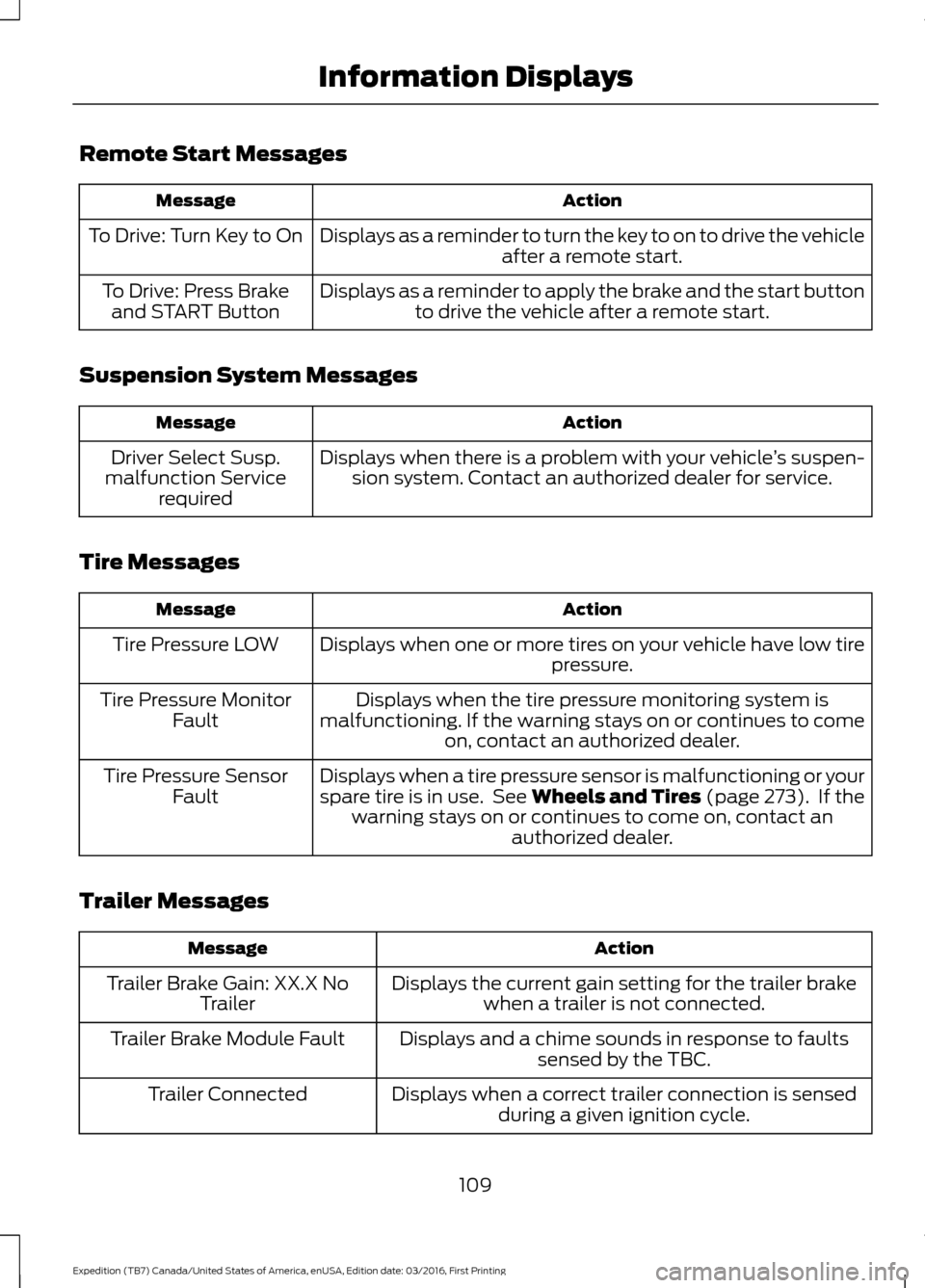
Remote Start Messages
Action
Message
Displays as a reminder to turn the key to on to drive the vehicle after a remote start.
To Drive: Turn Key to On
Displays as a reminder to apply the brake and the start buttonto drive the vehicle after a remote start.
To Drive: Press Brake
and START Button
Suspension System Messages Action
Message
Displays when there is a problem with your vehicle ’s suspen-
sion system. Contact an authorized dealer for service.
Driver Select Susp.
malfunction Service required
Tire Messages Action
Message
Displays when one or more tires on your vehicle have low tire pressure.
Tire Pressure LOW
Displays when the tire pressure monitoring system is
malfunctioning. If the warning stays on or continues to come on, contact an authorized dealer.
Tire Pressure Monitor
Fault
Displays when a tire pressure sensor is malfunctioning or your
spare tire is in use. See Wheels and Tires (page 273). If thewarning stays on or continues to come on, contact an authorized dealer.
Tire Pressure Sensor
Fault
Trailer Messages Action
Message
Displays the current gain setting for the trailer brakewhen a trailer is not connected.
Trailer Brake Gain: XX.X No
Trailer
Displays and a chime sounds in response to faultssensed by the TBC.
Trailer Brake Module Fault
Displays when a correct trailer connection is sensedduring a given ignition cycle.
Trailer Connected
109
Expedition (TB7) Canada/United States of America, enUSA, Edition date: 03/2016, First Printing Information Displays
Page 113 of 500
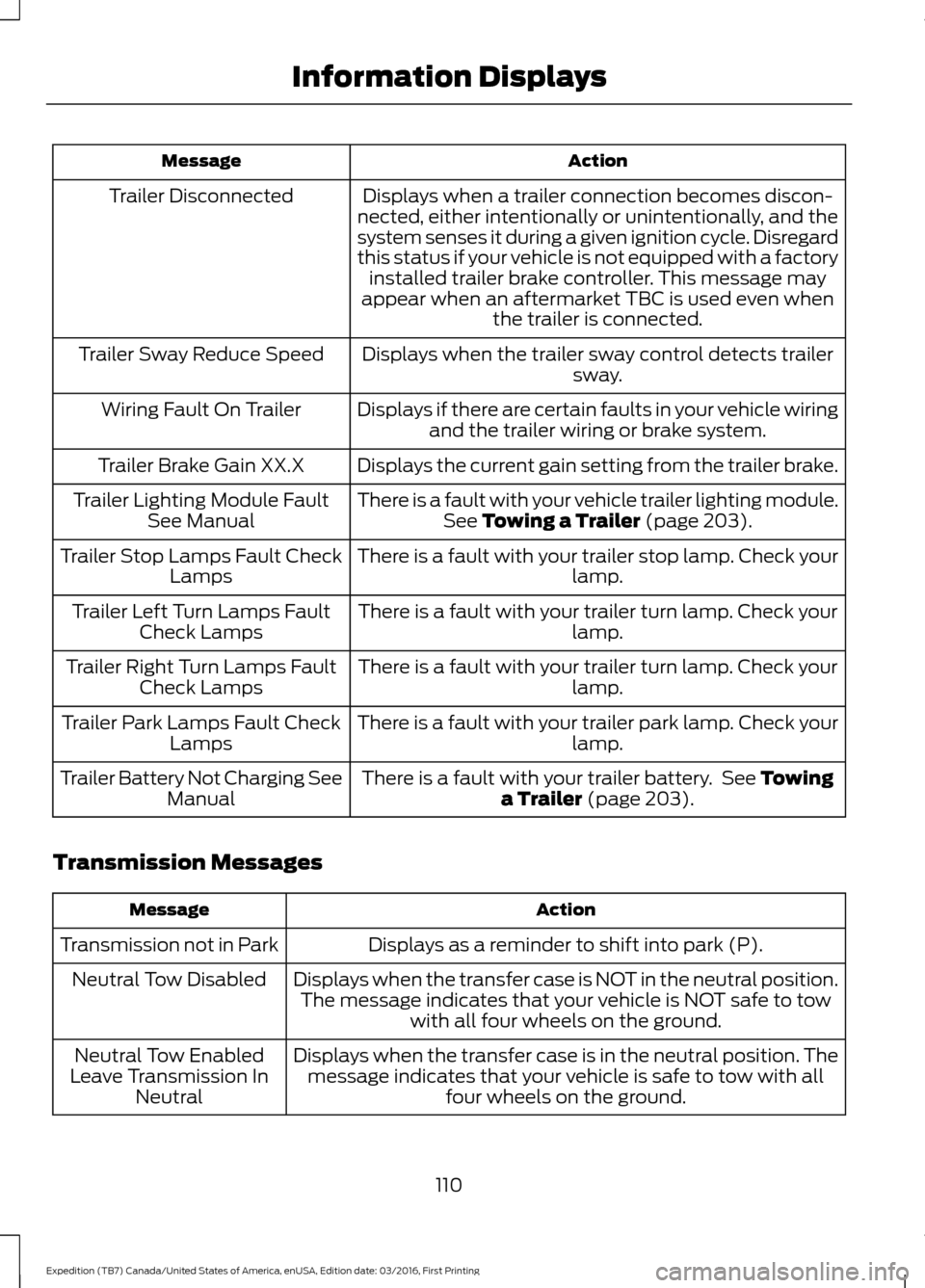
Action
Message
Displays when a trailer connection becomes discon-
nected, either intentionally or unintentionally, and the
system senses it during a given ignition cycle. Disregard
this status if your vehicle is not equipped with a factory installed trailer brake controller. This message may
appear when an aftermarket TBC is used even when the trailer is connected.
Trailer Disconnected
Displays when the trailer sway control detects trailersway.
Trailer Sway Reduce Speed
Displays if there are certain faults in your vehicle wiringand the trailer wiring or brake system.
Wiring Fault On Trailer
Displays the current gain setting from the trailer brake.
Trailer Brake Gain XX.X
There is a fault with your vehicle trailer lighting module.See Towing a Trailer (page 203).
Trailer Lighting Module Fault
See Manual
There is a fault with your trailer stop lamp. Check your lamp.
Trailer Stop Lamps Fault Check
Lamps
There is a fault with your trailer turn lamp. Check your lamp.
Trailer Left Turn Lamps Fault
Check Lamps
There is a fault with your trailer turn lamp. Check yourlamp.
Trailer Right Turn Lamps Fault
Check Lamps
There is a fault with your trailer park lamp. Check yourlamp.
Trailer Park Lamps Fault Check
Lamps
There is a fault with your trailer battery. See
Towing
a Trailer (page 203).
Trailer Battery Not Charging See
Manual
Transmission Messages Action
Message
Displays as a reminder to shift into park (P).
Transmission not in Park
Displays when the transfer case is NOT in the neutral position.The message indicates that your vehicle is NOT safe to tow with all four wheels on the ground.
Neutral Tow Disabled
Displays when the transfer case is in the neutral position. Themessage indicates that your vehicle is safe to tow with all four wheels on the ground.
Neutral Tow Enabled
Leave Transmission In Neutral
110
Expedition (TB7) Canada/United States of America, enUSA, Edition date: 03/2016, First Printing Information Displays
Page 114 of 500
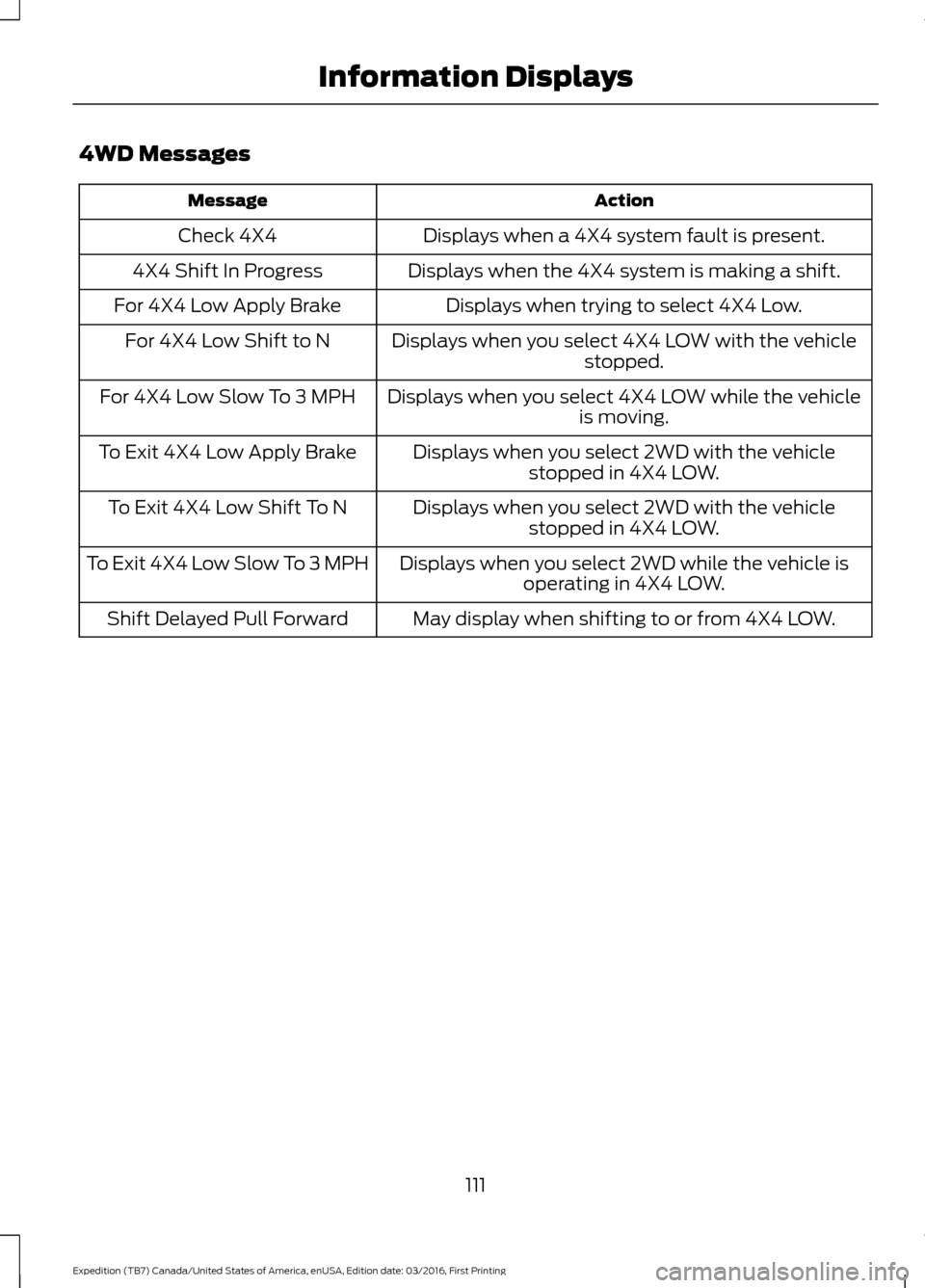
4WD Messages
Action
Message
Displays when a 4X4 system fault is present.
Check 4X4
Displays when the 4X4 system is making a shift.
4X4 Shift In Progress
Displays when trying to select 4X4 Low.
For 4X4 Low Apply Brake
Displays when you select 4X4 LOW with the vehiclestopped.
For 4X4 Low Shift to N
Displays when you select 4X4 LOW while the vehicleis moving.
For 4X4 Low Slow To 3 MPH
Displays when you select 2WD with the vehiclestopped in 4X4 LOW.
To Exit 4X4 Low Apply Brake
Displays when you select 2WD with the vehiclestopped in 4X4 LOW.
To Exit 4X4 Low Shift To N
Displays when you select 2WD while the vehicle isoperating in 4X4 LOW.
To Exit 4X4 Low Slow To 3 MPH
May display when shifting to or from 4X4 LOW.
Shift Delayed Pull Forward
111
Expedition (TB7) Canada/United States of America, enUSA, Edition date: 03/2016, First Printing Information Displays
Page 148 of 500
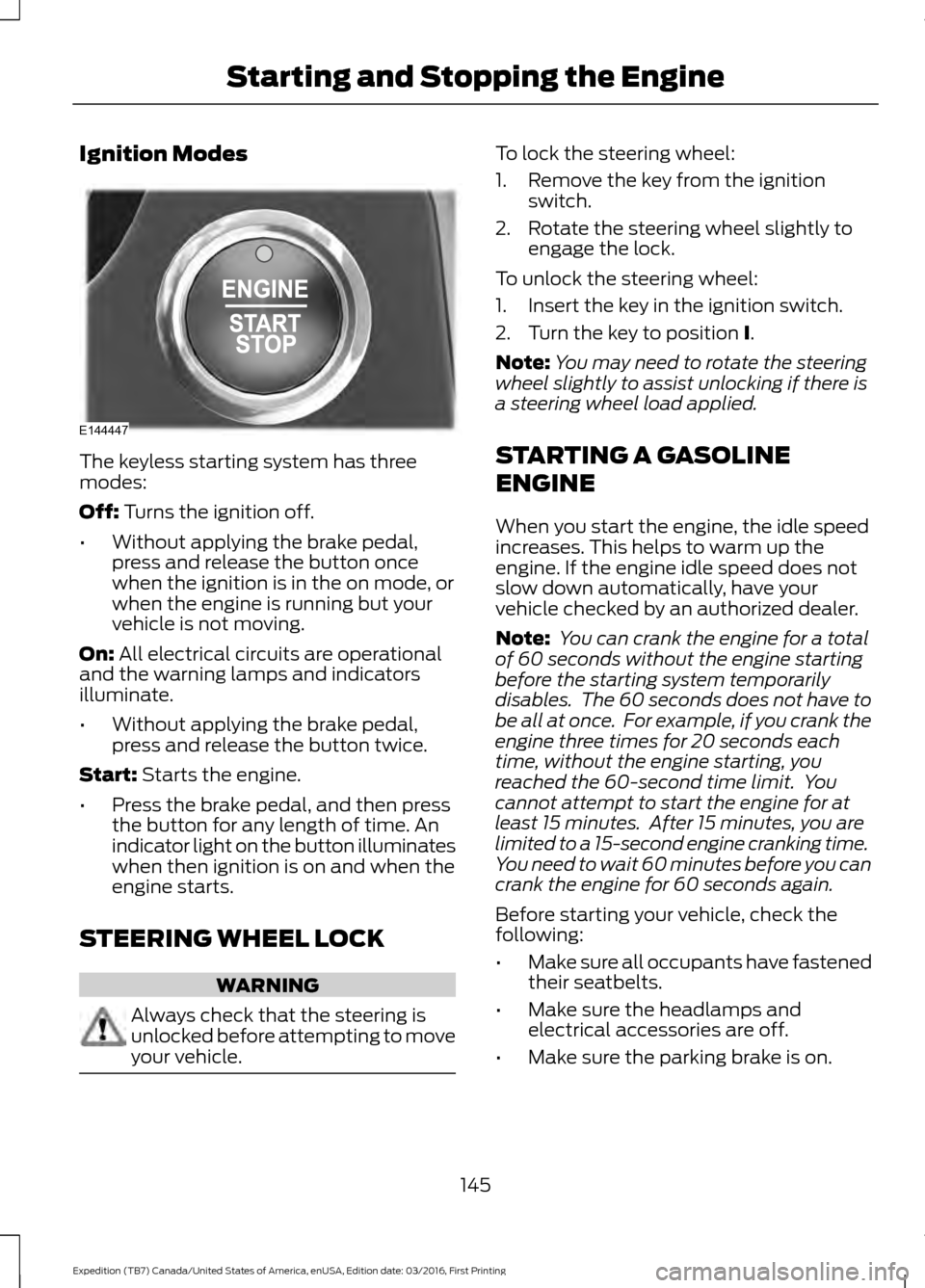
Ignition Modes
The keyless starting system has three
modes:
Off: Turns the ignition off.
• Without applying the brake pedal,
press and release the button once
when the ignition is in the on mode, or
when the engine is running but your
vehicle is not moving.
On:
All electrical circuits are operational
and the warning lamps and indicators
illuminate.
• Without applying the brake pedal,
press and release the button twice.
Start:
Starts the engine.
• Press the brake pedal, and then press
the button for any length of time. An
indicator light on the button illuminates
when then ignition is on and when the
engine starts.
STEERING WHEEL LOCK WARNING
Always check that the steering is
unlocked before attempting to move
your vehicle. To lock the steering wheel:
1. Remove the key from the ignition
switch.
2. Rotate the steering wheel slightly to engage the lock.
To unlock the steering wheel:
1. Insert the key in the ignition switch.
2. Turn the key to position
I.
Note: You may need to rotate the steering
wheel slightly to assist unlocking if there is
a steering wheel load applied.
STARTING A GASOLINE
ENGINE
When you start the engine, the idle speed
increases. This helps to warm up the
engine. If the engine idle speed does not
slow down automatically, have your
vehicle checked by an authorized dealer.
Note: You can crank the engine for a total
of 60 seconds without the engine starting
before the starting system temporarily
disables. The 60 seconds does not have to
be all at once. For example, if you crank the
engine three times for 20 seconds each
time, without the engine starting, you
reached the 60-second time limit. You
cannot attempt to start the engine for at
least 15 minutes. After 15 minutes, you are
limited to a 15-second engine cranking time.
You need to wait 60 minutes before you can
crank the engine for 60 seconds again.
Before starting your vehicle, check the
following:
• Make sure all occupants have fastened
their seatbelts.
• Make sure the headlamps and
electrical accessories are off.
• Make sure the parking brake is on.
145
Expedition (TB7) Canada/United States of America, enUSA, Edition date: 03/2016, First Printing Starting and Stopping the EngineE144447
Page 149 of 500
•
Make sure the transmission is in park
(P).
• Switch the ignition on. For vehicles with
a keyless ignition, see the following
instructions.
Vehicles with an Ignition Key
Note: Do not touch the accelerator pedal.
1. Fully press the brake pedal.
2. Turn the key to the start position to start the engine.
Note: The engine may continue cranking
for up to 15 seconds or until it starts.
Note: If you cannot start the engine on the
first try, wait for a short period and try again.
Vehicles with Keyless Start
Note: Do not touch the accelerator pedal.
Note: You must have your intelligent access
key in your vehicle in order to shift the
transmission out of park (P).
1. Fully press the brake pedal.
2. Press the push button ignition switch.
The system does not function if:
• The passive key frequencies are
jammed.
• The key battery has no charge.
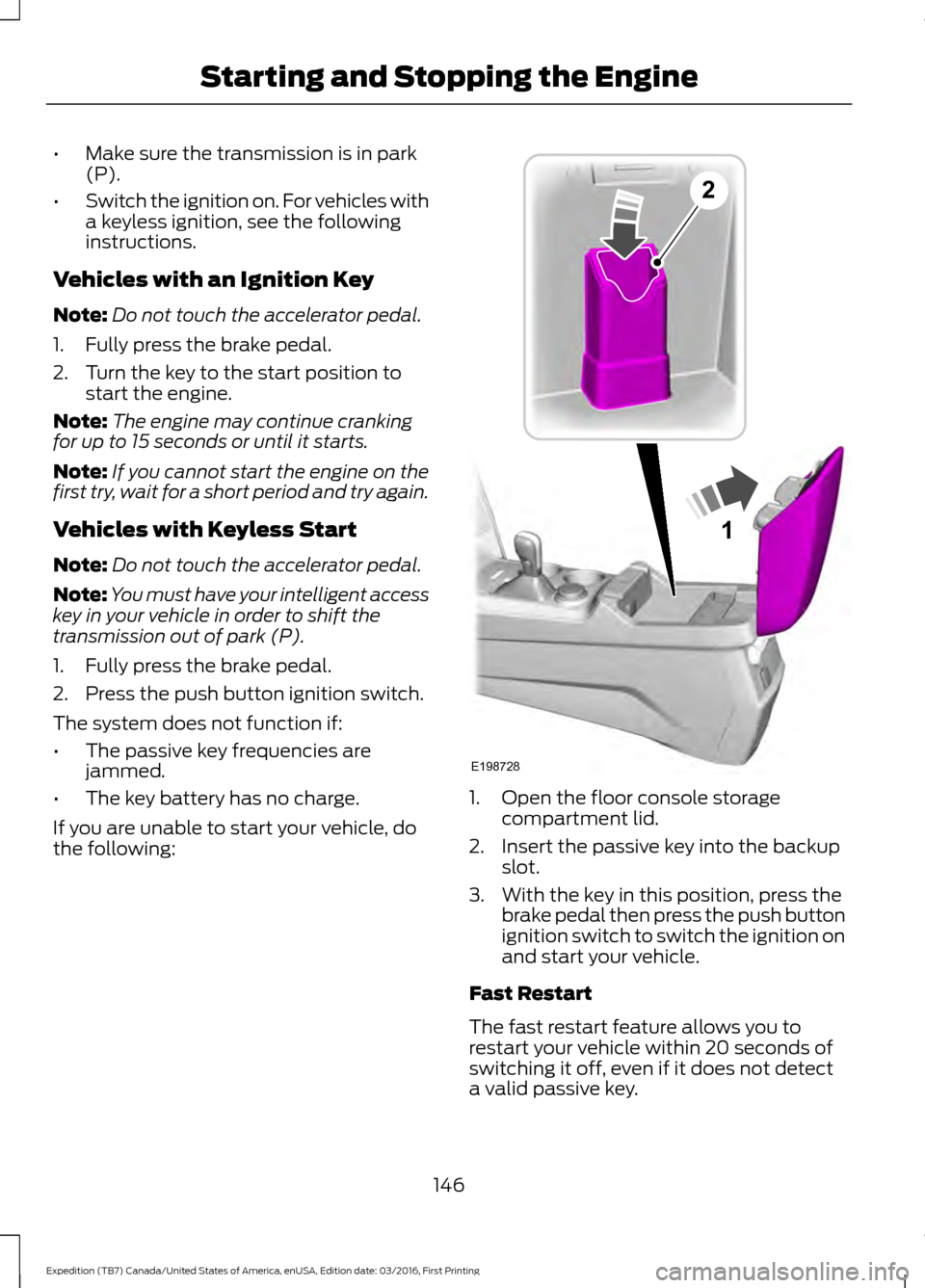
If you are unable to start your vehicle, do
the following: 1. Open the floor console storage
compartment lid.
2. Insert the passive key into the backup slot.
3. With the key in this position, press the brake pedal then press the push button
ignition switch to switch the ignition on
and start your vehicle.
Fast Restart
The fast restart feature allows you to
restart your vehicle within 20 seconds of
switching it off, even if it does not detect
a valid passive key.
146
Expedition (TB7) Canada/United States of America, enUSA, Edition date: 03/2016, First Printing Starting and Stopping the Engine1
E198728
2
Page 150 of 500
Within 20 seconds of switching the engine
off, press the brake pedal and press the
push button ignition switch. After 20
seconds, you can no longer start your
vehicle if it does not detect a valid passive
key.
Once your vehicle starts, it remains running
until you press the push button ignition
switch, even if your vehicle does not detect
a valid passive key. If you open and close
a door while your vehicle is running, the
system searches for a valid passive key.
You cannot start your vehicle if the system
does not detect a valid passive key within
20 seconds.
Failure to Start
If you cannot start the engine after three
attempts, wait 10 seconds and follow this
procedure:
1. Fully press the brake pedal.
2. Shift into park (P).
3. Fully press the accelerator pedal and
hold it there.
4. Start the engine.
Automatic Engine Shutdown
For vehicles with a keyless ignition, this
feature automatically shuts down the
engine if it has been idling for an extended
period. The ignition also turns off in order
to save battery power. Before your vehicle
shuts down, a message appears in the
information display showing a timer
counting down from 30 seconds. If you do
not intervene within 30 seconds, your
vehicle shuts down. Another message
appears in the information display to
inform you that your vehicle has shut down
to save fuel. Start your vehicle as you
normally do. Automatic Engine Shutdown Override
Note:
You cannot permanently switch off
the automatic shutdown feature. When you
switch it off temporarily, it turns on at the
next ignition cycle.
You can stop the shutdown, or reset the
timer, at any point before the 30-second
countdown has expired by doing any of the
following:
• You can reset the timer by interacting
with your vehicle, for example pressing
the brake or accelerator pedal.
• You can temporarily switch off the
shutdown feature any time the ignition
is on using the information display. See
Information Displays (page 91). The
feature only remains off for the current
ignition cycle.
• During the 30-second countdown, the
system prompts you to press OK or
RESET to temporarily switch the
feature off for the current ignition cycle
only.
Stopping the Engine When Your
Vehicle is Stationary
Vehicles with an Ignition Key
1. Shift into park (P).
2. Switch the ignition off.
3. Apply the parking brake.
Vehicles with Keyless Start
1. Shift into park (P).
2. Press the push button ignition switch.
3. Apply the parking brake.
Note: The ignition, all electrical circuits and
all warning lamps and indicators will be
turned off.
Note: If the engine is idling for 30 minutes,
the ignition and engine automatically shut
down.
147
Expedition (TB7) Canada/United States of America, enUSA, Edition date: 03/2016, First Printing Starting and Stopping the Engine
Page 151 of 500
Stopping the Engine When Your
Vehicle is Moving
WARNING
Switching off the engine when the
vehicle is still moving will result in a
loss of brake and steering assistance.
The steering will not lock, but higher effort
will be required. When the ignition is
switched off, some electrical circuits,
including air bags, warning lamps and
indicators may also be off. If the ignition
was turned off accidentally, you can shift
into neutral (N) and re-start the engine. Vehicles with an Ignition Key
1.
Shift into neutral and use the brakes to
bring your vehicle to a safe stop.
2. When your vehicle has stopped, shift into park (P) and switch the ignition
off.
3. Apply the parking brake.
Vehicles with Keyless Start
1. Shift into neutral and use the brakes to
bring your vehicle to a safe stop.
2. When your vehicle has stopped, shift into park (P).
3. Press and hold the push button ignition
switch, or press it three times within
two seconds.
4. Apply the parking brake.
Guarding Against Exhaust Fumes WARNING
Exhaust leaks may result in entry of
harmful and potentially lethal fumes
into the passenger compartment. If
you smell exhaust fumes inside your
vehicle, have your vehicle inspected
immediately. Do not drive if you smell
exhaust fumes. Important Ventilating Information
If you stop your vehicle and then leave the
engine idling for long periods, we
recommend that you do one of the
following:
•
Open the windows at least 1 in (3 cm).
• Set your climate control to outside air.
ENGINE BLOCK HEATER (If
Equipped) WARNINGS
Failure to follow engine block heater
instructions could result in property
damage or serious personal injury.
Do not use your heater with
ungrounded electrical systems or
two-pronged adapters. There is a risk
of electrical shock. Do not fully close the hood, or allow
it to drop under its own weight when
using the engine block heater. This
could damage the power cable and may
cause an electrical short resulting in fire,
injury and property damage. Note:
The heater is most effective when
outdoor temperatures are below 0°F
(-18°C).
The heater acts as a starting aid by
warming the engine coolant. This allows
the climate control system to respond
quickly. The equipment includes a heater
element (installed in the engine block) and
a wire harness. You can connect the
system to a grounded 120-volt AC
electrical source.
148
Expedition (TB7) Canada/United States of America, enUSA, Edition date: 03/2016, First Printing Starting and Stopping the Engine
Page 157 of 500
Note:
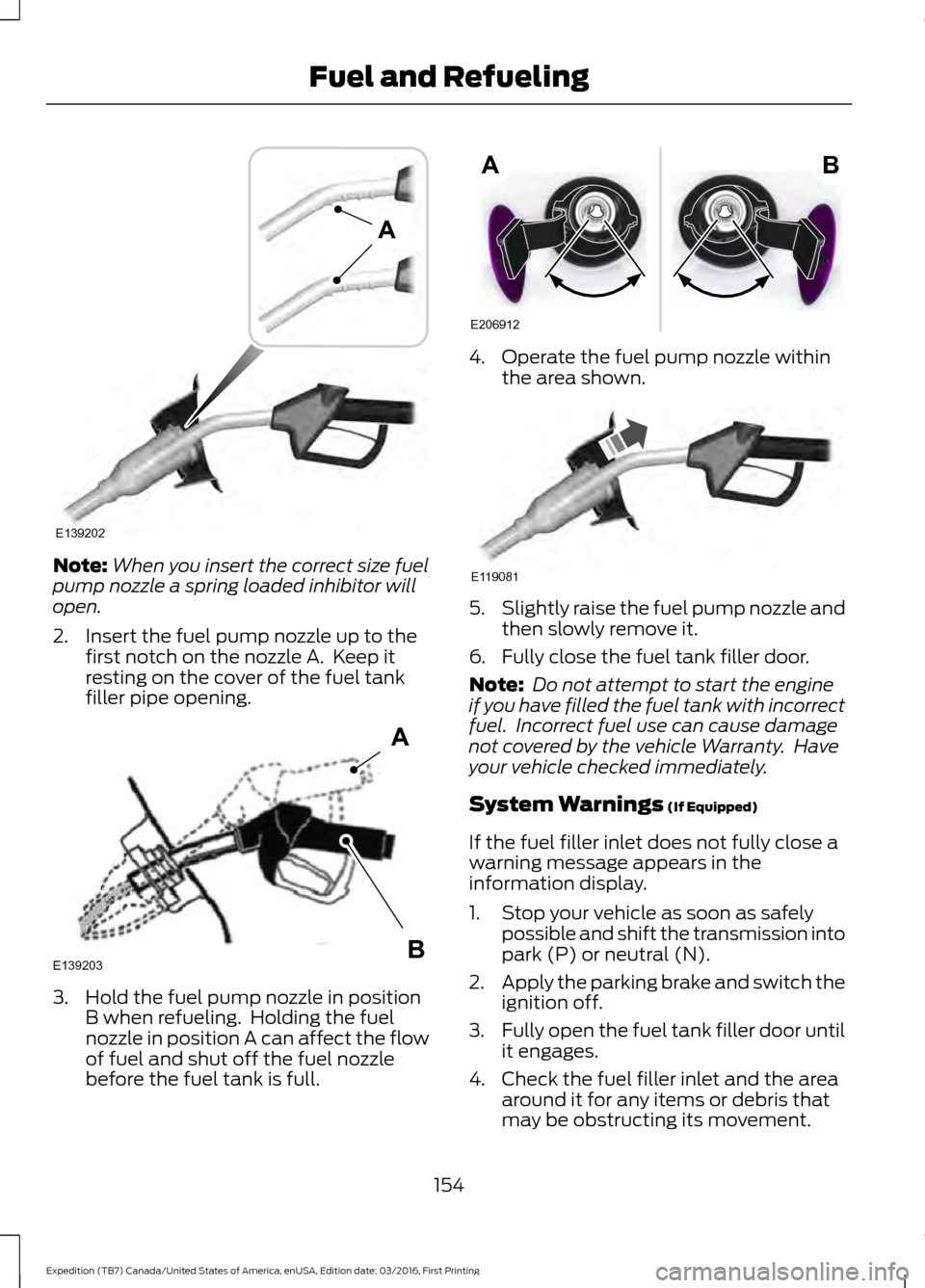
When you insert the correct size fuel
pump nozzle a spring loaded inhibitor will
open.
2. Insert the fuel pump nozzle up to the first notch on the nozzle A. Keep it
resting on the cover of the fuel tank
filler pipe opening. 3. Hold the fuel pump nozzle in position
B when refueling. Holding the fuel
nozzle in position A can affect the flow
of fuel and shut off the fuel nozzle
before the fuel tank is full. 4. Operate the fuel pump nozzle within
the area shown. 5.
Slightly raise the fuel pump nozzle and
then slowly remove it.
6. Fully close the fuel tank filler door.
Note: Do not attempt to start the engine
if you have filled the fuel tank with incorrect
fuel. Incorrect fuel use can cause damage
not covered by the vehicle Warranty. Have
your vehicle checked immediately.
System Warnings (If Equipped)
If the fuel filler inlet does not fully close a
warning message appears in the
information display.
1. Stop your vehicle as soon as safely possible and shift the transmission into
park (P) or neutral (N).
2. Apply the parking brake and switch the
ignition off.
3. Fully open the fuel tank filler door until
it engages.
4. Check the fuel filler inlet and the area around it for any items or debris that
may be obstructing its movement.
154
Expedition (TB7) Canada/United States of America, enUSA, Edition date: 03/2016, First Printing Fuel and RefuelingE139202
A E139203
A
B E206912
AB E119081
Page 162 of 500
AUTOMATIC TRANSMISSION
WARNINGS
Always set the parking brake fully
and make sure you shift the gearshift
lever to park (P). Switch the ignition
off and remove the key whenever you leave
your vehicle. Do not use the tow/haul feature
when driving in icy or slippery
conditions as the increased engine
braking can cause the rear wheels to slide
and your vehicle to swing around with the
possible loss of vehicle control. Understanding the Shift Positions
of your Automatic Transmission
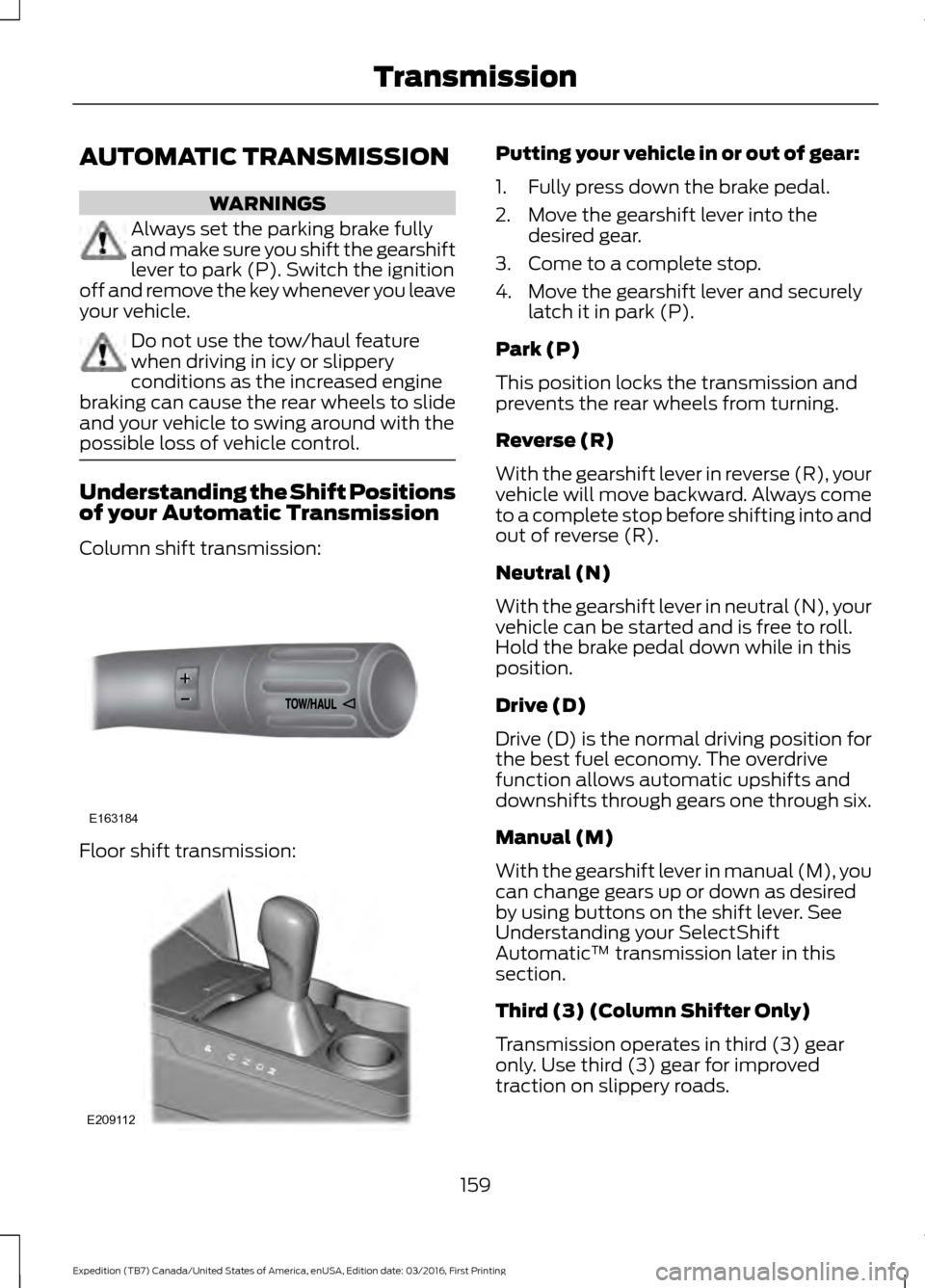
Column shift transmission:
Floor shift transmission: Putting your vehicle in or out of gear:
1. Fully press down the brake pedal.
2. Move the gearshift lever into the
desired gear.
3. Come to a complete stop.
4. Move the gearshift lever and securely latch it in park (P).
Park (P)
This position locks the transmission and
prevents the rear wheels from turning.
Reverse (R)
With the gearshift lever in reverse (R), your
vehicle will move backward. Always come
to a complete stop before shifting into and
out of reverse (R).
Neutral (N)
With the gearshift lever in neutral (N), your
vehicle can be started and is free to roll.
Hold the brake pedal down while in this
position.
Drive (D)
Drive (D) is the normal driving position for
the best fuel economy. The overdrive
function allows automatic upshifts and
downshifts through gears one through six.
Manual (M)
With the gearshift lever in manual (M), you
can change gears up or down as desired
by using buttons on the shift lever. See
Understanding your SelectShift
Automatic ™ transmission later in this
section.
Third (3) (Column Shifter Only)
Transmission operates in third (3) gear
only. Use third (3) gear for improved
traction on slippery roads.
159
Expedition (TB7) Canada/United States of America, enUSA, Edition date: 03/2016, First Printing TransmissionE163184 E209112
Page 163 of 500
Second (2)
Transmission operates in second (2) gear
only. Use second (2) gear to start-up on
slippery roads.
First (1)
•
Transmission operates in first (1) gear
only.
• Provides maximum engine braking.
• Allows upshifts by moving gearshift
lever.
• Will not downshift into first (1) gear at
high speeds; allows for first (1) gear
when vehicle reaches slower speeds.
Tow/Haul Mode WARNING
Do not use the tow/haul feature
when driving in icy or slippery
conditions as the increased engine
braking can cause the rear wheels to slide
and your vehicle to swing around with the
possible loss of vehicle control. To activate tow/haul, press the
button on the gearshift lever
once. The TOW HAUL indicator
light will illuminate in the instrument
cluster. The tow/haul feature:
•
Delays upshifts to reduce the frequency
of transmission shifting.
• Provides engine braking in all forward
gears, which will slow your vehicle and
assist you in controlling your vehicle
when descending a grade.
• Depending on driving conditions and
load conditions, may downshift the
transmission, slow your vehicle and
control your vehicle speed when
descending a hill, without pressing the
accelerator pedal. The amount of
downshift braking provided will vary
based upon the amount the brake
pedal is pressed.
The tow/haul feature improves
transmission operation when towing a
trailer or a heavy load. All transmission
gear ranges are available when using
tow/haul.
To deactivate the tow/haul feature and
return to normal driving mode, press the
button on the gearshift lever twice. The
TOW HAUL light will deactivate. Tow/haul
will also deactivate when you power down
your vehicle.
Forced Downshifts
• Allowed in drive (D) with the tow/haul
feature on or off.
• Press the accelerator to the floor.
• Allows transmission to select an
appropriate gear.
160
Expedition (TB7) Canada/United States of America, enUSA, Edition date: 03/2016, First Printing TransmissionE161509