ECO mode FORD EXPEDITION 2017 3.G Workshop Manual
[x] Cancel search | Manufacturer: FORD, Model Year: 2017, Model line: EXPEDITION, Model: FORD EXPEDITION 2017 3.GPages: 500, PDF Size: 4.83 MB
Page 397 of 500
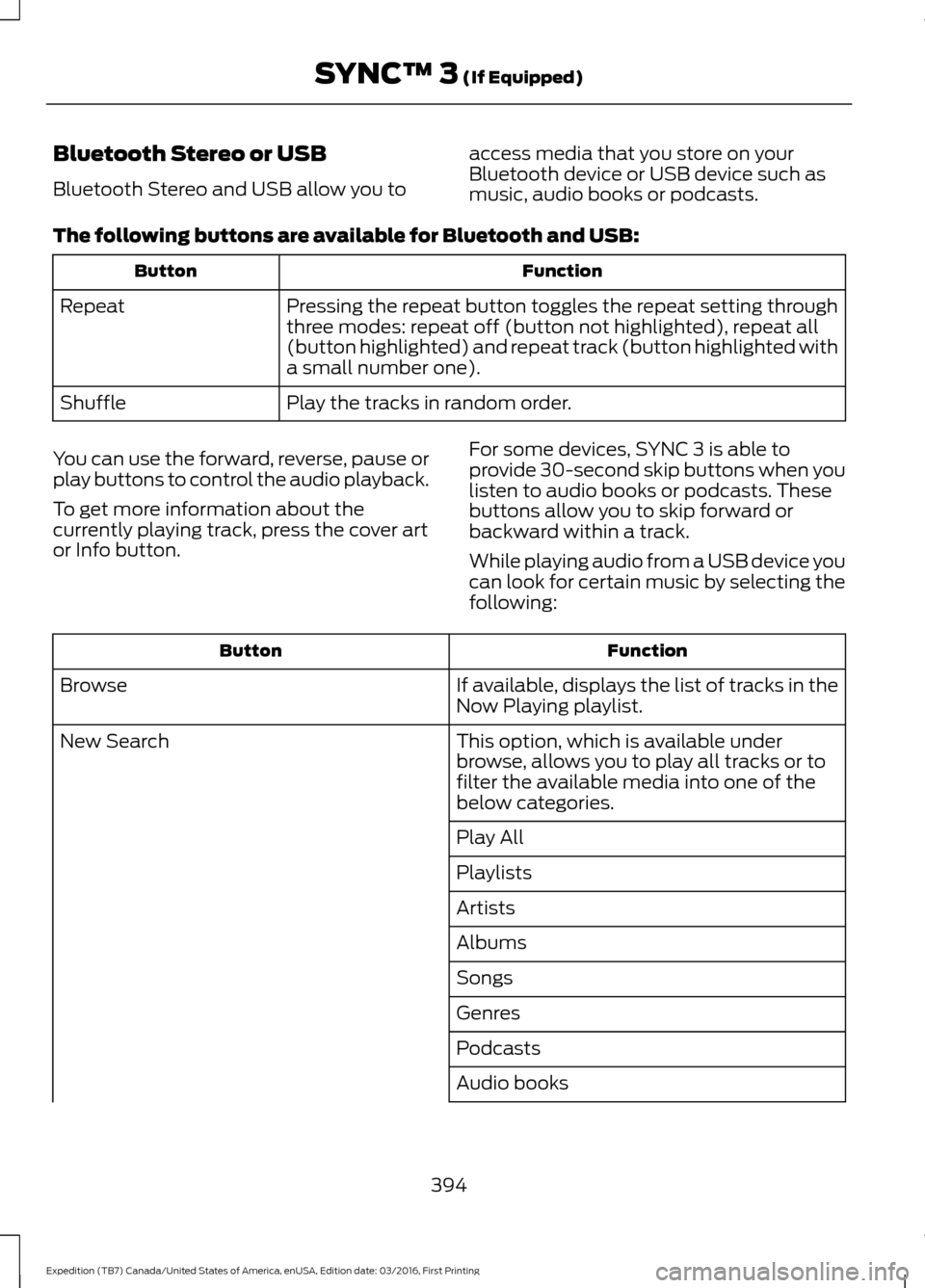
Bluetooth Stereo or USB
Bluetooth Stereo and USB allow you to
access media that you store on your
Bluetooth device or USB device such as
music, audio books or podcasts.
The following buttons are available for Bluetooth and USB: Function
Button
Pressing the repeat button toggles the repeat setting through
three modes: repeat off (button not highlighted), repeat all
(button highlighted) and repeat track (button highlighted with
a small number one).
Repeat
Play the tracks in random order.
Shuffle
You can use the forward, reverse, pause or
play buttons to control the audio playback.
To get more information about the
currently playing track, press the cover art
or Info button. For some devices, SYNC 3 is able to
provide 30-second skip buttons when you
listen to audio books or podcasts. These
buttons allow you to skip forward or
backward within a track.
While playing audio from a USB device you
can look for certain music by selecting the
following: Function
Button
If available, displays the list of tracks in the
Now Playing playlist.
Browse
This option, which is available under
browse, allows you to play all tracks or to
filter the available media into one of the
below categories.
New Search
Play All
Playlists
Artists
Albums
Songs
Genres
Podcasts
Audio books
394
Expedition (TB7) Canada/United States of America, enUSA, Edition date: 03/2016, First Printing SYNC™ 3 (If Equipped)
Page 402 of 500
PHONE
WARNING
Driving while distracted can result in
loss of vehicle control, crash and
injury. We strongly recommend that
you use extreme caution when using any
device that may take your focus off the
road. Your primary responsibility is the safe
operation of your vehicle. We recommend
against the use of any hand-held device
while driving and encourage the use of
voice-operated systems when possible.
Make sure you are aware of all applicable
local laws that may affect the use of
electronic devices while driving. Hands-free calling is one of the main
features of the system. Once you pair your
cell phone, you can access many options
using the touchscreen or voice commands.
While the system supports a variety of
features, many are dependent on your cell
phone
’s functionality.
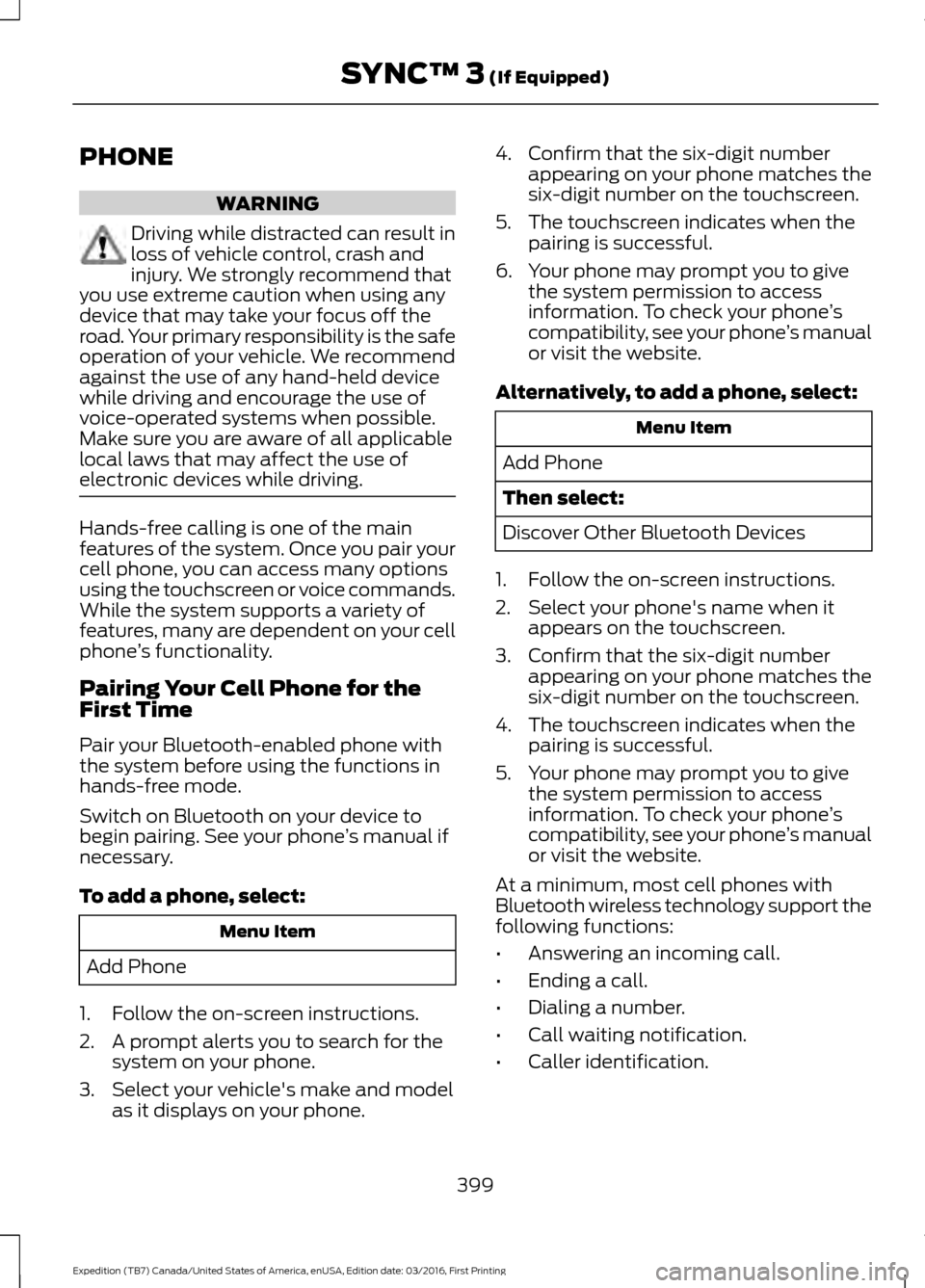
Pairing Your Cell Phone for the
First Time
Pair your Bluetooth-enabled phone with
the system before using the functions in
hands-free mode.
Switch on Bluetooth on your device to
begin pairing. See your phone ’s manual if
necessary.
To add a phone, select: Menu Item
Add Phone
1. Follow the on-screen instructions.
2. A prompt alerts you to search for the system on your phone.
3. Select your vehicle's make and model as it displays on your phone. 4. Confirm that the six-digit number
appearing on your phone matches the
six-digit number on the touchscreen.
5. The touchscreen indicates when the pairing is successful.
6. Your phone may prompt you to give the system permission to access
information. To check your phone ’s
compatibility, see your phone ’s manual
or visit the website.
Alternatively, to add a phone, select: Menu Item
Add Phone
Then select:
Discover Other Bluetooth Devices
1. Follow the on-screen instructions.
2. Select your phone's name when it appears on the touchscreen.
3. Confirm that the six-digit number appearing on your phone matches the
six-digit number on the touchscreen.
4. The touchscreen indicates when the pairing is successful.
5. Your phone may prompt you to give the system permission to access
information. To check your phone ’s
compatibility, see your phone ’s manual
or visit the website.
At a minimum, most cell phones with
Bluetooth wireless technology support the
following functions:
• Answering an incoming call.
• Ending a call.
• Dialing a number.
• Call waiting notification.
• Caller identification.
399
Expedition (TB7) Canada/United States of America, enUSA, Edition date: 03/2016, First Printing SYNC™ 3 (If Equipped)
Page 407 of 500
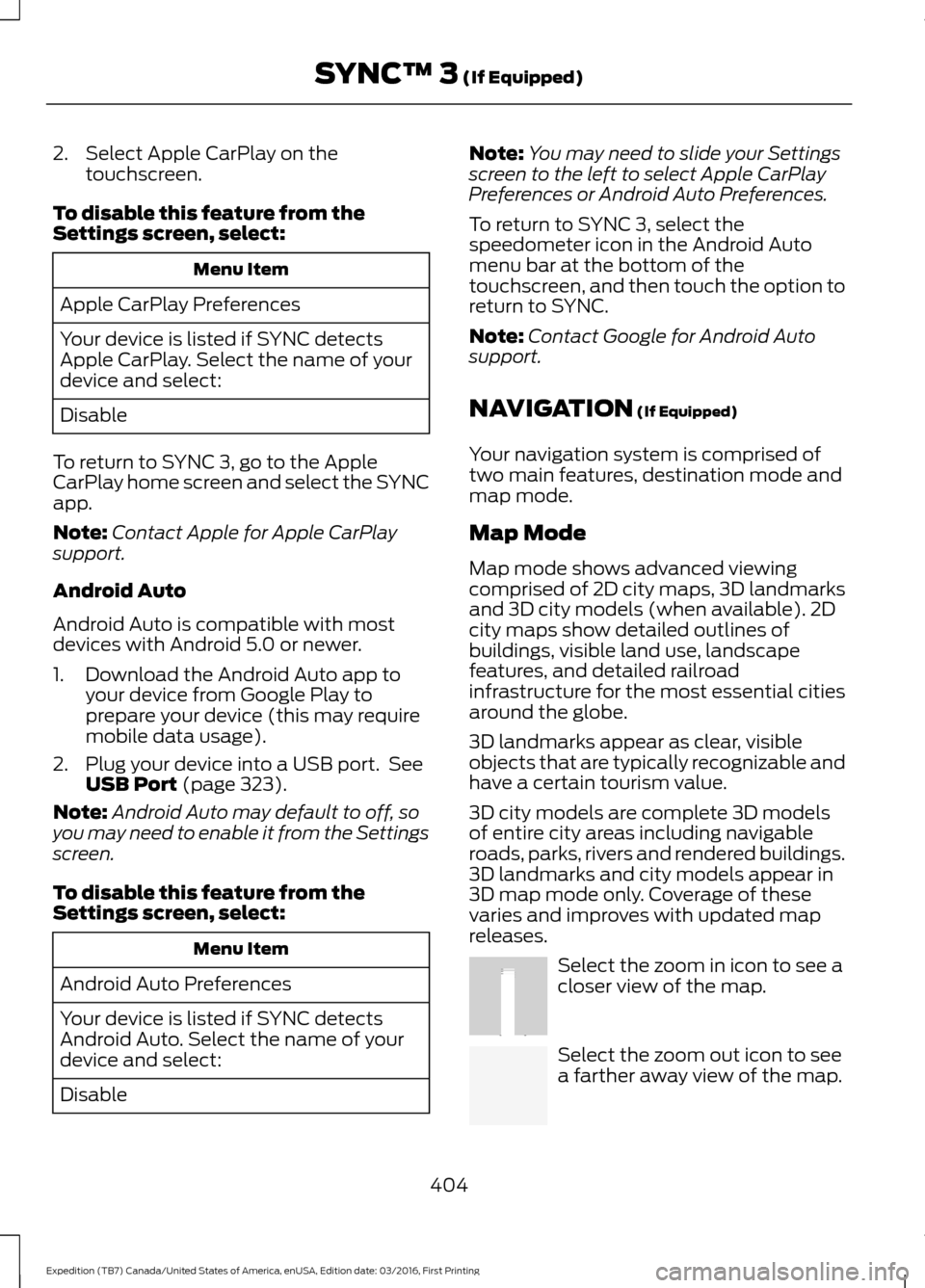
2. Select Apple CarPlay on the
touchscreen.
To disable this feature from the
Settings screen, select: Menu Item
Apple CarPlay Preferences
Your device is listed if SYNC detects
Apple CarPlay. Select the name of your
device and select:
Disable
To return to SYNC 3, go to the Apple
CarPlay home screen and select the SYNC
app.
Note: Contact Apple for Apple CarPlay
support.
Android Auto
Android Auto is compatible with most
devices with Android 5.0 or newer.
1. Download the Android Auto app to your device from Google Play to
prepare your device (this may require
mobile data usage).
2. Plug your device into a USB port. See USB Port (page 323).
Note: Android Auto may default to off, so
you may need to enable it from the Settings
screen.
To disable this feature from the
Settings screen, select: Menu Item
Android Auto Preferences
Your device is listed if SYNC detects
Android Auto. Select the name of your
device and select:
Disable Note:
You may need to slide your Settings
screen to the left to select
Apple CarPlay
Preferences or Android Auto Preferences.
To return to SYNC 3, select the
speedometer icon in the Android Auto
menu bar at the bottom of the
touchscreen, and then touch the option to
return to SYNC.
Note: Contact Google for Android Auto
support.
NAVIGATION
(If Equipped)
Your navigation system is comprised of
two main features, destination mode and
map mode.
Map Mode
Map mode shows advanced viewing
comprised of 2D city maps, 3D landmarks
and 3D city models (when available). 2D
city maps show detailed outlines of
buildings, visible land use, landscape
features, and detailed railroad
infrastructure for the most essential cities
around the globe.
3D landmarks appear as clear, visible
objects that are typically recognizable and
have a certain tourism value.
3D city models are complete 3D models
of entire city areas including navigable
roads, parks, rivers and rendered buildings.
3D landmarks and city models appear in
3D map mode only. Coverage of these
varies and improves with updated map
releases. Select the zoom in icon to see a
closer view of the map.
Select the zoom out icon to see
a farther away view of the map.
404
Expedition (TB7) Canada/United States of America, enUSA, Edition date: 03/2016, First Printing SYNC™ 3
(If Equipped)E207752 E207753
Page 411 of 500
Description
Menu Item
Along Route
Near Destination
In a City
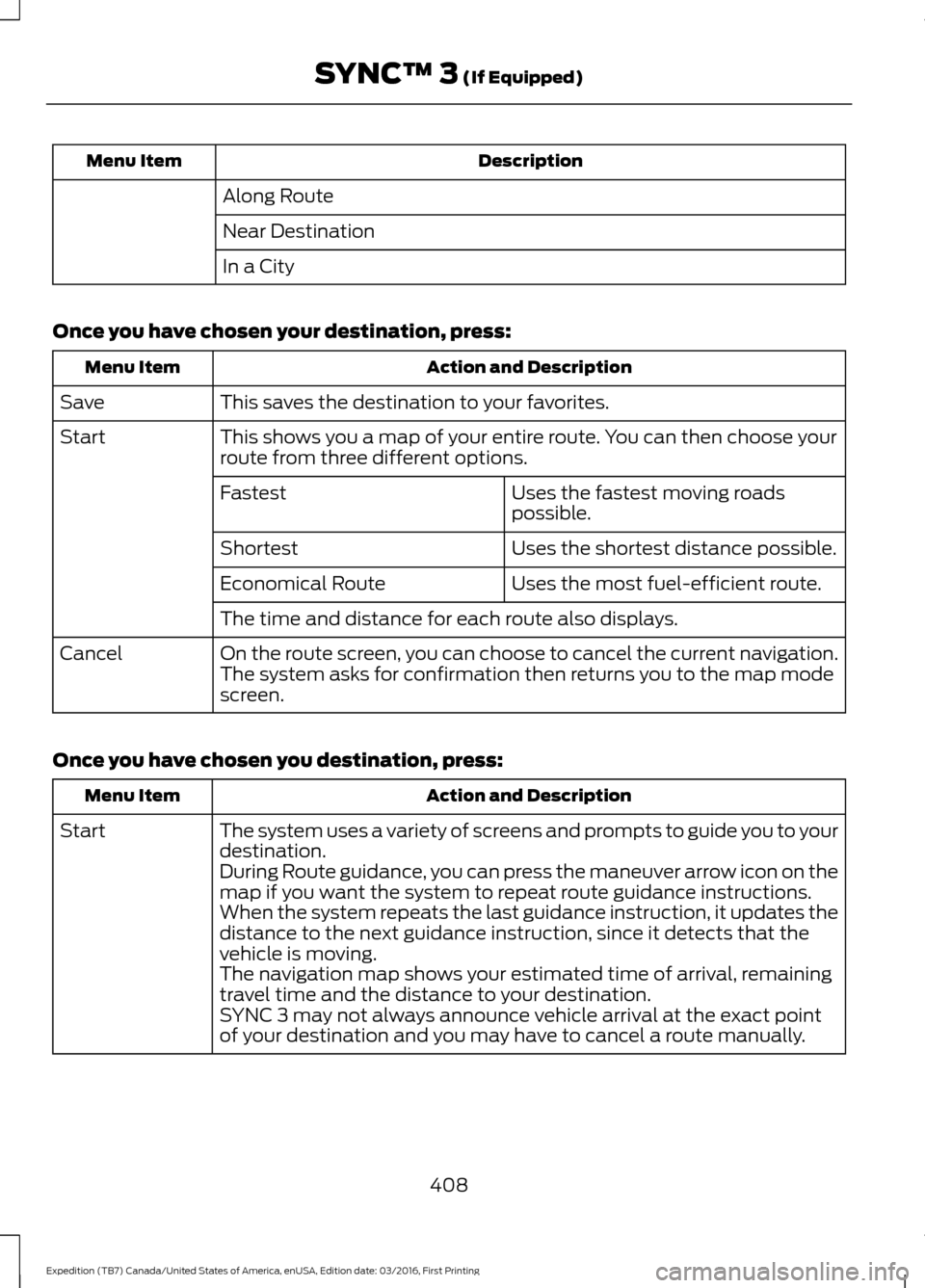
Once you have chosen your destination, press: Action and Description
Menu Item
This saves the destination to your favorites.
Save
This shows you a map of your entire route. You can then choose your
route from three different options.
Start
Uses the fastest moving roads
possible.
Fastest
Uses the shortest distance possible.
Shortest
Uses the most fuel-efficient route.
Economical Route
The time and distance for each route also displays.
On the route screen, you can choose to cancel the current navigation.
The system asks for confirmation then returns you to the map mode
screen.
Cancel
Once you have chosen you destination, press: Action and Description
Menu Item
The system uses a variety of screens and prompts to guide you to your
destination.
Start
During Route guidance, you can press the maneuver arrow icon on the
map if you want the system to repeat route guidance instructions.
When the system repeats the last guidance instruction, it updates the
distance to the next guidance instruction, since it detects that the
vehicle is moving.
The navigation map shows your estimated time of arrival, remaining
travel time and the distance to your destination.
SYNC 3 may not always announce vehicle arrival at the exact point
of your destination and you may have to cancel a route manually.
408
Expedition (TB7) Canada/United States of America, enUSA, Edition date: 03/2016, First Printing SYNC™ 3 (If Equipped)
Page 429 of 500
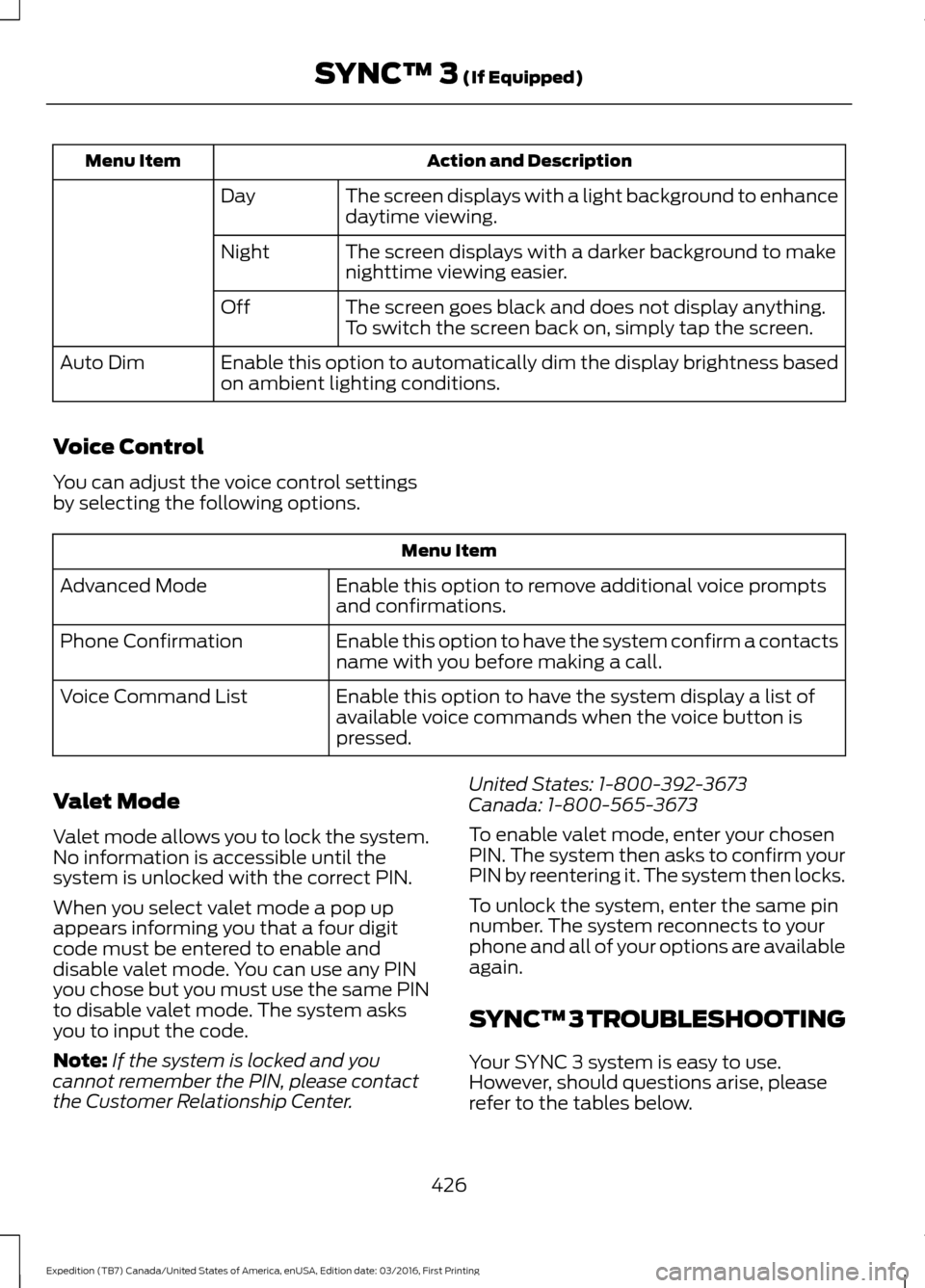
Action and Description
Menu Item
The screen displays with a light background to enhance
daytime viewing.
Day
The screen displays with a darker background to make
nighttime viewing easier.
Night
The screen goes black and does not display anything.
To switch the screen back on, simply tap the screen.
Off
Enable this option to automatically dim the display brightness based
on ambient lighting conditions.
Auto Dim
Voice Control
You can adjust the voice control settings
by selecting the following options. Menu Item
Enable this option to remove additional voice prompts
and confirmations.
Advanced Mode
Enable this option to have the system confirm a contacts
name with you before making a call.
Phone Confirmation
Enable this option to have the system display a list of
available voice commands when the voice button is
pressed.
Voice Command List
Valet Mode
Valet mode allows you to lock the system.
No information is accessible until the
system is unlocked with the correct PIN.
When you select valet mode a pop up
appears informing you that a four digit
code must be entered to enable and
disable valet mode. You can use any PIN
you chose but you must use the same PIN
to disable valet mode. The system asks
you to input the code.
Note: If the system is locked and you
cannot remember the PIN, please contact
the Customer Relationship Center. United States: 1-800-392-3673
Canada: 1-800-565-3673
To enable valet mode, enter your chosen
PIN. The system then asks to confirm your
PIN by reentering it. The system then locks.
To unlock the system, enter the same pin
number. The system reconnects to your
phone and all of your options are available
again.
SYNC™ 3 TROUBLESHOOTING
Your SYNC 3 system is easy to use.
However, should questions arise, please
refer to the tables below.
426
Expedition (TB7) Canada/United States of America, enUSA, Edition date: 03/2016, First Printing SYNC™ 3 (If Equipped)
Page 432 of 500
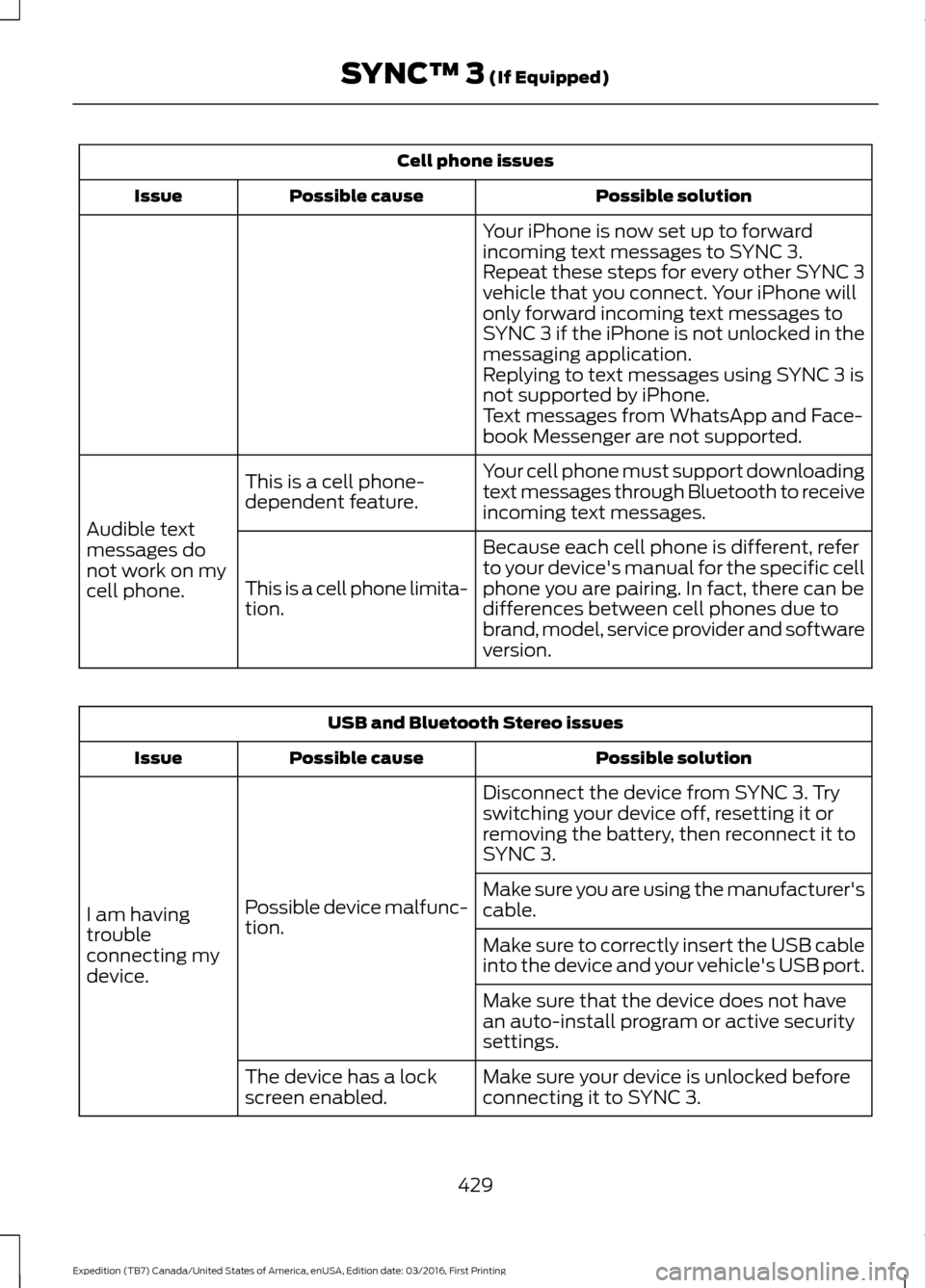
Cell phone issues
Possible solution
Possible cause
Issue
Your iPhone is now set up to forward
incoming text messages to SYNC 3.
Repeat these steps for every other SYNC 3
vehicle that you connect. Your iPhone will
only forward incoming text messages to
SYNC 3 if the iPhone is not unlocked in the
messaging application.
Replying to text messages using SYNC 3 is
not supported by iPhone.
Text messages from WhatsApp and Face-
book Messenger are not supported.
Your cell phone must support downloading
text messages through Bluetooth to receive
incoming text messages.
This is a cell phone-
dependent feature.
Audible text
messages do
not work on my
cell phone. Because each cell phone is different, refer
to your device's manual for the specific cell
phone you are pairing. In fact, there can be
differences between cell phones due to
brand, model, service provider and software
version.
This is a cell phone limita-
tion. USB and Bluetooth Stereo issues
Possible solution
Possible cause
Issue
Disconnect the device from SYNC 3. Try
switching your device off, resetting it or
removing the battery, then reconnect it to
SYNC 3.
Possible device malfunc-
tion.
I am having
trouble
connecting my
device. Make sure you are using the manufacturer's
cable.
Make sure to correctly insert the USB cable
into the device and your vehicle's USB port.
Make sure that the device does not have
an auto-install program or active security
settings.
Make sure your device is unlocked before
connecting it to SYNC 3.
The device has a lock
screen enabled.
429
Expedition (TB7) Canada/United States of America, enUSA, Edition date: 03/2016, First Printing SYNC™ 3 (If Equipped)
Page 450 of 500
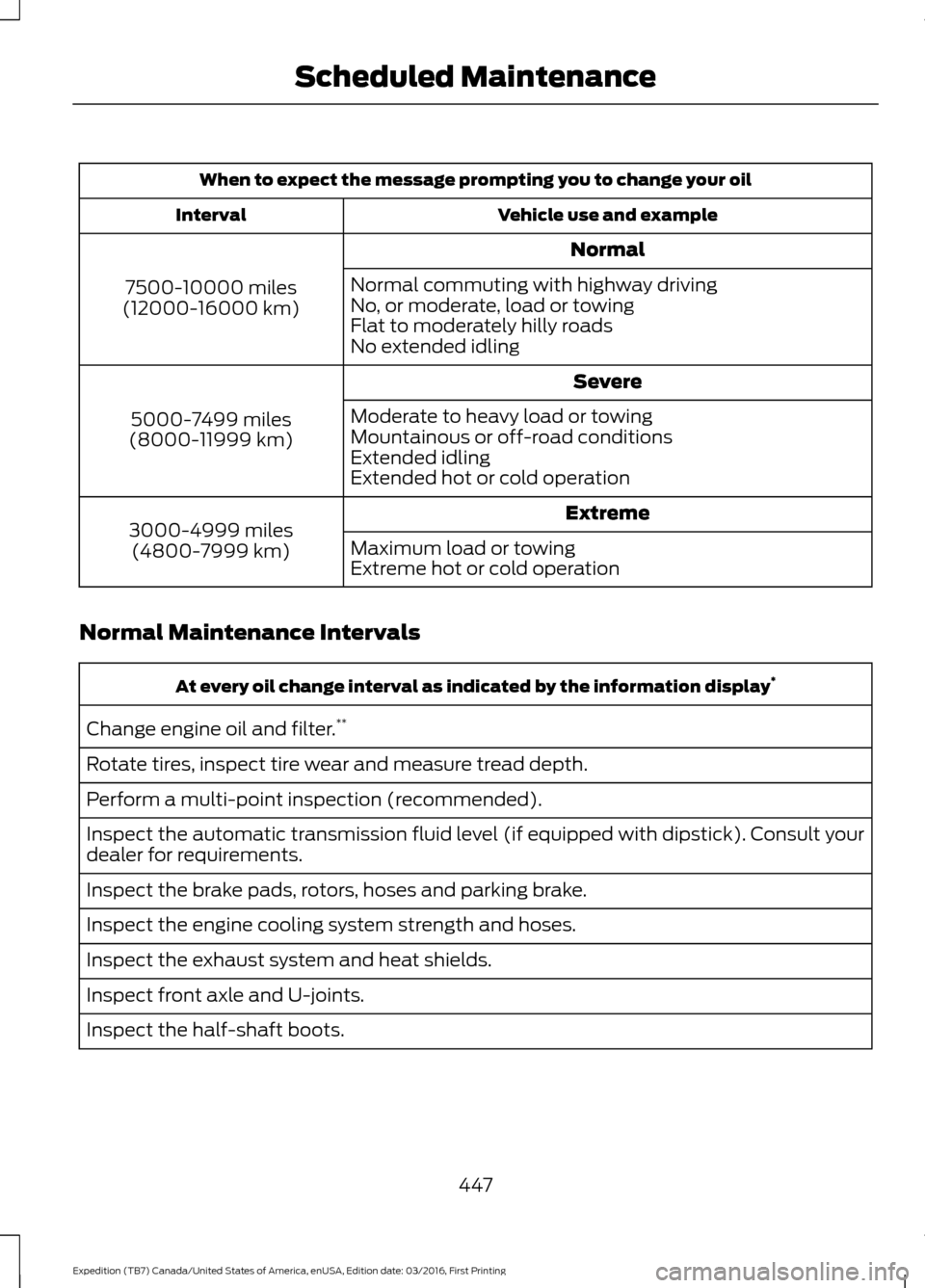
When to expect the message prompting you to change your oil
Vehicle use and example
Interval
Normal
7500-10000 miles
(12000-16000 km) Normal commuting with highway driving
No, or moderate, load or towing
Flat to moderately hilly roads
No extended idling
Severe
5000-7499 miles
(8000-11999 km) Moderate to heavy load or towing
Mountainous or off-road conditions
Extended idling
Extended hot or cold operation
Extreme
3000-4999 miles
(4800-7999 km) Maximum load or towing
Extreme hot or cold operation
Normal Maintenance Intervals At every oil change interval as indicated by the information display
*
Change engine oil and filter. **
Rotate tires, inspect tire wear and measure tread depth.
Perform a multi-point inspection (recommended).
Inspect the automatic transmission fluid level (if equipped with dipstick). Consult your
dealer for requirements.
Inspect the brake pads, rotors, hoses and parking brake.
Inspect the engine cooling system strength and hoses.
Inspect the exhaust system and heat shields.
Inspect front axle and U-joints.
Inspect the half-shaft boots.
447
Expedition (TB7) Canada/United States of America, enUSA, Edition date: 03/2016, First Printing Scheduled Maintenance
Page 493 of 500
F
Fastening the Seatbelts..............................30
Seatbelt Locking Modes..................................... 31
Using Seatbelts During Pregnancy...............30
Floor Mats........................................................219
Fog Lamps - Front See: Front Fog Lamps......................................... 76
Foot Pedals See: Adjusting the Pedals................................. 70
Ford Credit
..........................................................11
US Only...................................................................... 11
Ford Protect....................................................441 Ford Protect (CANADA ONLY)..................... 442
Ford Protect Extended Service Plans (U.S. Only)................................................................... 441
Four-Wheel Drive.........................................165
Front Fog Lamps............................................76
Front Parking Aid
..........................................183
Fuel and Refueling.......................................150
Fuel Consumption
........................................155
Calculating Fuel Economy.............................. 155
Filling the Fuel Tank........................................... 155
Fuel Filler Funnel Location.........................151
Fuel Filter
........................................................253
Fuel Quality......................................................151 Choosing the Right Fuel.................................... 151
Fuel Shutoff
...................................................222
Fuses.................................................................233
Fuse Specification Chart...........................233 Passenger Compartment Fuse Panel........237
Power Distribution Box.................................... 233
G
Garage Door Opener See: Universal Garage Door Opener...........136
Gauges...............................................................84 Type 1 and 2............................................................ 84
Type 3....................................................................... 86
General Information on Radio Frequencies...................................................42
Intelligent Access................................................. 42
General Maintenance Information.......443 Multi-Point Inspection..................................... 445
Owner Checks and Services......................... 444
Protecting Your Investment........................... 443
Why Maintain Your Vehicle?......................... 443Why Maintain Your Vehicle at Your
Dealership?..................................................... 443
Getting Assistance Outside the U.S. and Canada.........................................................229
Getting the Services You Need...............226 Away From Home.............................................. 226
H
Handbrake See: Parking Brake.............................................. 174
Hazard Warning Flashers..........................222
HDC See: Using Hill Descent Control.................... 180
Headlamp Adjusting See: Adjusting the Headlamps..................... 256
Headlamp Removal See: Removing a Headlamp.......................... 257
Head Restraints
..............................................121
Adjusting the Head Restraint......................... 122
Heated Seats
..................................................133
Front Seats............................................................ 133
Rear Seats............................................................. 133
Heated Steering Wheel...............................69
Heated Windows and Mirrors..................120 Heated Exterior Mirror....................................... 120
Heated Rear Window........................................ 120
Heating See: Climate Control........................................... 112
Hill Start Assist..............................................174 Switching the System On and Off................175
Using Hill Start Assist........................................ 175
Hints on Controlling the Interior Climate...........................................................116
Cooling the Interior Quickly............................. 118
General Hints........................................................ 116
Heating the Interior Quickly.............................. 117
Recommended Settings for Cooling............118
Recommended Settings for Heating............117
Side Window Defogging in Cold Weather.............................................................. 118
Hints on Driving With Anti-Lock Brakes
.............................................................173
Home Screen.................................................378
Hood Lock See: Opening and Closing the Hood..........243
490
Expedition (TB7) Canada/United States of America, enUSA, Edition date: 03/2016, First Printing Index
Page 494 of 500
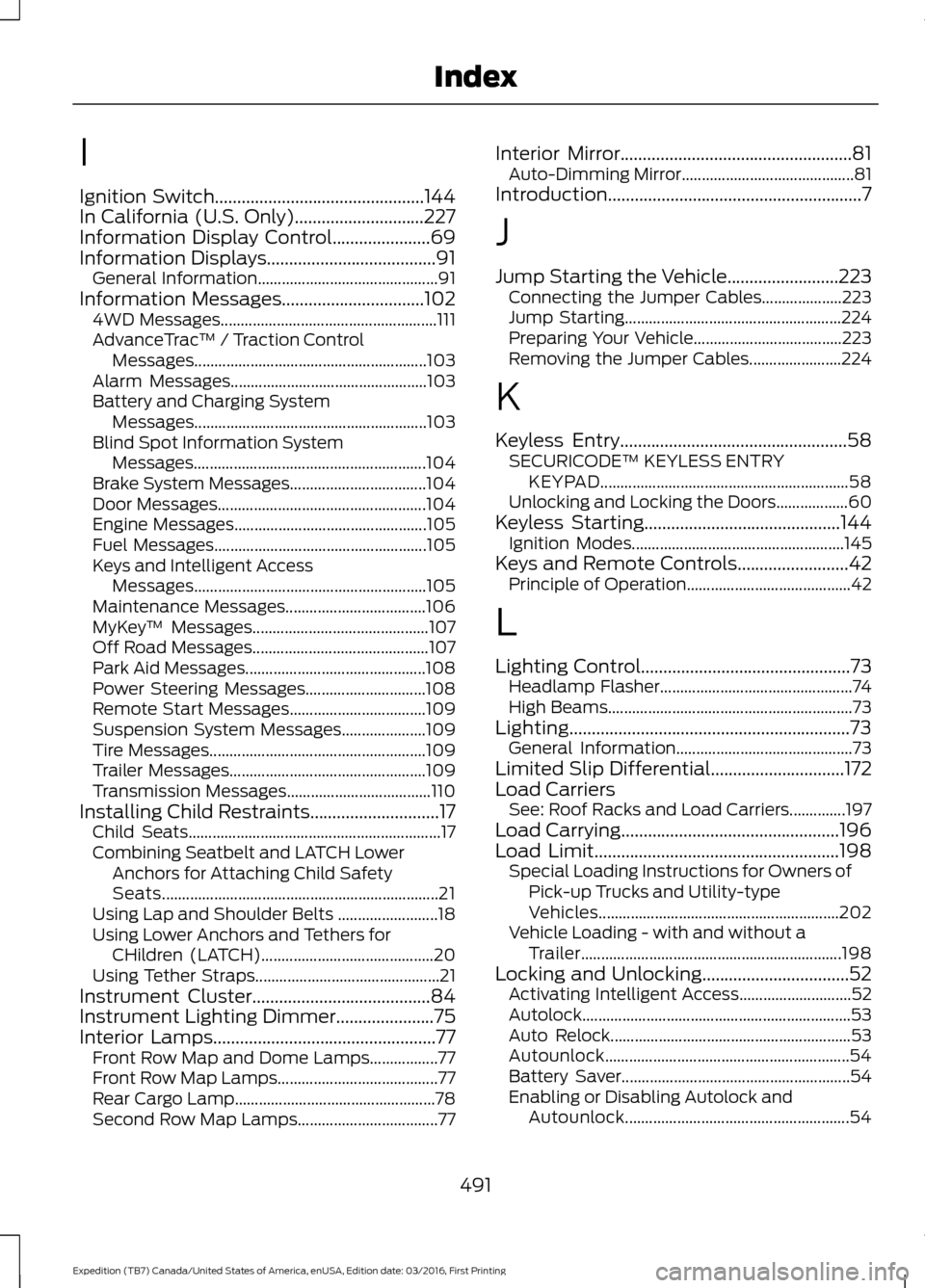
I
Ignition Switch...............................................144
In California (U.S. Only).............................227
Information Display Control......................69
Information Displays......................................91
General Information............................................. 91
Information Messages................................102 4WD Messages...................................................... 111
AdvanceTrac ™ / Traction Control
Messages.......................................................... 103
Alarm Messages................................................. 103
Battery and Charging System Messages.......................................................... 103
Blind Spot Information System Messages.......................................................... 104
Brake System Messages.................................. 104
Door Messages.................................................... 104
Engine Messages................................................ 105
Fuel Messages..................................................... 105
Keys and Intelligent Access Messages.......................................................... 105
Maintenance Messages................................... 106
MyKey ™ Messages............................................ 107
Off Road Messages............................................ 107
Park Aid Messages............................................. 108
Power Steering Messages.............................. 108
Remote Start Messages.................................. 109
Suspension System Messages..................... 109
Tire Messages...................................................... 109
Trailer Messages................................................. 109
Transmission Messages.................................... 110
Installing Child Restraints.............................17 Child Seats............................................................... 17
Combining Seatbelt and LATCH Lower Anchors for Attaching Child Safety
Seats..................................................................... 21
Using Lap and Shoulder Belts ......................... 18
Using Lower Anchors and Tethers for CHildren (LATCH)........................................... 20
Using Tether Straps.............................................. 21
Instrument Cluster
........................................84
Instrument Lighting Dimmer......................75
Interior Lamps..................................................77
Front Row Map and Dome Lamps.................77
Front Row Map Lamps........................................ 77
Rear Cargo Lamp.................................................. 78
Second Row Map Lamps................................... 77Interior Mirror....................................................81
Auto-Dimming Mirror........................................... 81
Introduction.........................................................7
J
Jump Starting the Vehicle.........................223 Connecting the Jumper Cables.................... 223
Jump Starting...................................................... 224
Preparing Your Vehicle..................................... 223
Removing the Jumper Cables....................... 224
K
Keyless Entry
...................................................58
SECURICODE™ KEYLESS ENTRY
KEYPAD.............................................................. 58
Unlocking and Locking the Doors.................. 60
Keyless Starting
............................................144
Ignition Modes..................................................... 145
Keys and Remote Controls
.........................42
Principle of Operation......................................... 42
L
Lighting Control
...............................................73
Headlamp Flasher................................................ 74
High Beams............................................................. 73
Lighting...............................................................73 General Information............................................ 73
Limited Slip Differential
..............................172
Load Carriers See: Roof Racks and Load Carriers..............197
Load Carrying
.................................................196
Load Limit.......................................................198
Special Loading Instructions for Owners of
Pick-up Trucks and Utility-type
Vehicles............................................................ 202
Vehicle Loading - with and without a Trailer................................................................. 198
Locking and Unlocking.................................52 Activating Intelligent Access............................ 52
Autolock................................................................... 53
Auto Relock............................................................ 53
Autounlock............................................................. 54
Battery Saver......................................................... 54
Enabling or Disabling Autolock and Autounlock........................................................ 54
491
Expedition (TB7) Canada/United States of America, enUSA, Edition date: 03/2016, First Printing Index
Page 496 of 500
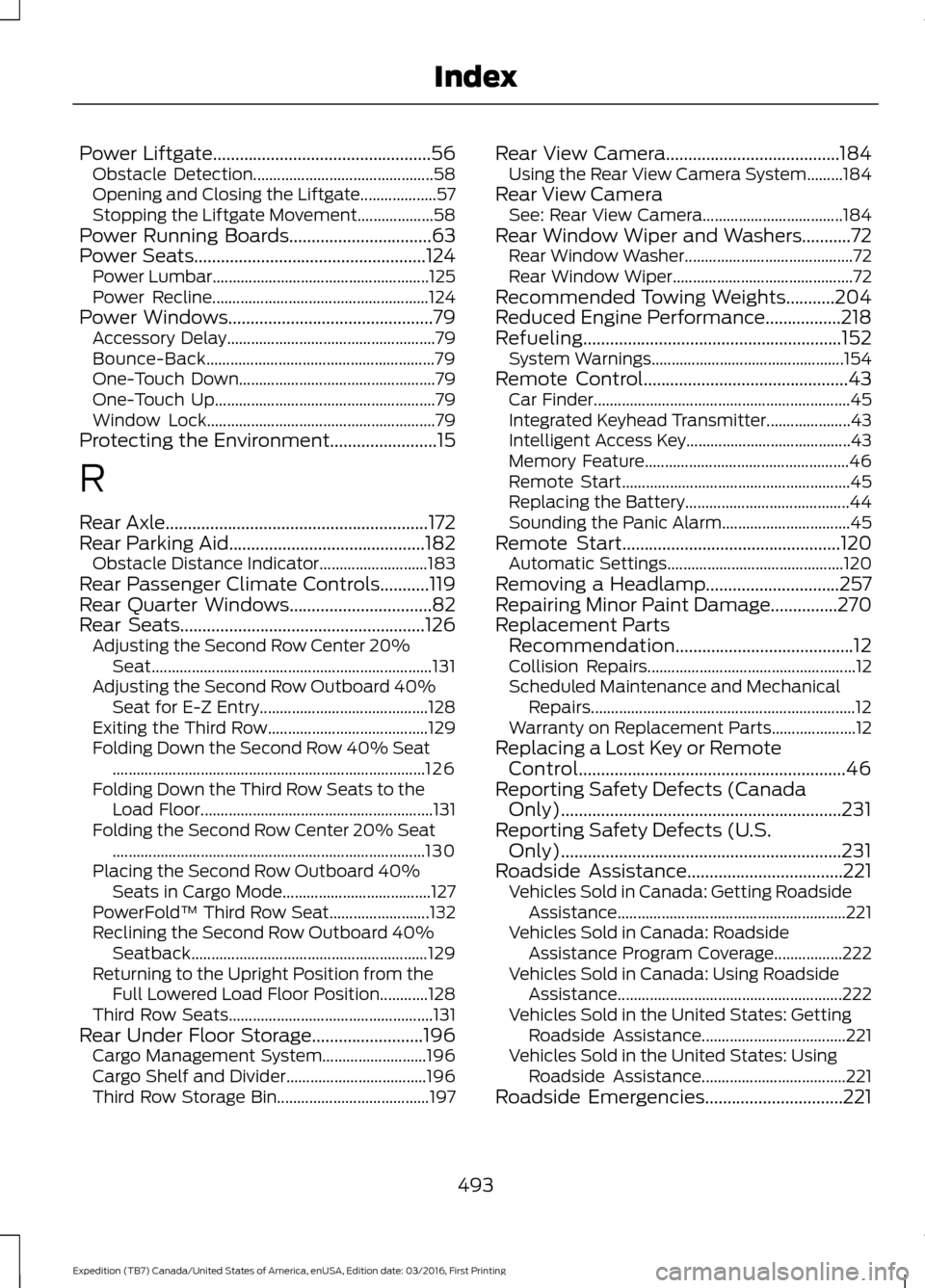
Power Liftgate.................................................56
Obstacle Detection............................................. 58
Opening and Closing the Liftgate................... 57
Stopping the Liftgate Movement................... 58
Power Running Boards
................................63
Power Seats....................................................124
Power Lumbar...................................................... 125
Power Recline...................................................... 124
Power Windows
..............................................79
Accessory Delay.................................................... 79
Bounce-Back......................................................... 79
One-Touch Down................................................. 79
One-Touch Up....................................................... 79
Window Lock......................................................... 79
Protecting the Environment........................15
R
Rear Axle
...........................................................172
Rear Parking Aid............................................182
Obstacle Distance Indicator........................... 183
Rear Passenger Climate Controls...........119
Rear Quarter Windows
................................82
Rear Seats.......................................................126
Adjusting the Second Row Center 20%
Seat...................................................................... 131
Adjusting the Second Row Outboard 40% Seat for E-Z Entry.......................................... 128
Exiting the Third Row........................................ 129
Folding Down the Second Row 40% Seat ........................................................................\
...... 126
Folding Down the Third Row Seats to the Load Floor.......................................................... 131
Folding the Second Row Center 20% Seat ........................................................................\
...... 130
Placing the Second Row Outboard 40% Seats in Cargo Mode..................................... 127
PowerFold™ Third Row Seat......................... 132
Reclining the Second Row Outboard 40% Seatback........................................................... 129
Returning to the Upright Position from the Full Lowered Load Floor Position............128
Third Row Seats................................................... 131
Rear Under Floor Storage.........................196 Cargo Management System.......................... 196
Cargo Shelf and Divider................................... 196
Third Row Storage Bin...................................... 197Rear View Camera.......................................184
Using the Rear View Camera System.........184
Rear View Camera See: Rear View Camera................................... 184
Rear Window Wiper and Washers...........72 Rear Window Washer.......................................... 72
Rear Window Wiper............................................. 72
Recommended Towing Weights...........204
Reduced Engine Performance.................218
Refueling..........................................................152 System Warnings................................................ 154
Remote Control..............................................43 Car Finder................................................................ 45
Integrated Keyhead Transmitter..................... 43
Intelligent Access Key......................................... 43
Memory Feature................................................... 46
Remote Start......................................................... 45
Replacing the Battery......................................... 44
Sounding the Panic Alarm................................ 45
Remote Start
.................................................120
Automatic Settings............................................ 120
Removing a Headlamp
..............................257
Repairing Minor Paint Damage...............270
Replacement Parts Recommendation........................................12
Collision Repairs.................................................... 12
Scheduled Maintenance and Mechanical Repairs.................................................................. 12
Warranty on Replacement Parts..................... 12
Replacing a Lost Key or Remote Control............................................................46
Reporting Safety Defects (Canada Only)...............................................................231
Reporting Safety Defects (U.S. Only)...............................................................231
Roadside Assistance
...................................221
Vehicles Sold in Canada: Getting Roadside
Assistance......................................................... 221
Vehicles Sold in Canada: Roadside Assistance Program Coverage.................222
Vehicles Sold in Canada: Using Roadside Assistance........................................................ 222
Vehicles Sold in the United States: Getting Roadside Assistance.................................... 221
Vehicles Sold in the United States: Using Roadside Assistance.................................... 221
Roadside Emergencies...............................221
493
Expedition (TB7) Canada/United States of America, enUSA, Edition date: 03/2016, First Printing Index