mirror controls FORD EXPEDITION 2018 Owners Manual
[x] Cancel search | Manufacturer: FORD, Model Year: 2018, Model line: EXPEDITION, Model: FORD EXPEDITION 2018Pages: 571, PDF Size: 25.8 MB
Page 5 of 571
Steering Wheel
Adjusting the Steering Wheel - Vehicles
With: Manual Adjustable Steering
Column .........................................................82
Adjusting the Steering Wheel - Vehicles With: Power Adjustable Steering
Column .........................................................
82
Audio Control ..................................................
83
Voice Control ..................................................
84
Cruise Control ................................................
84
Information Display Control ......................
85
Heated Steering Wheel ..............................
85
Pedals
Adjusting the Pedals ...................................
86
Wipers and Washers
Windshield Wipers ........................................
87
Autowipers .......................................................
87
Windshield Washers ....................................
88
Rear Window Wiper and Washers .........
88
Lighting
General Information ....................................
89
Lighting Control .............................................
89
Autolamps .......................................................
90
Instrument Lighting Dimmer ....................
90
Headlamp Exit Delay ....................................
91
Daytime Running Lamps .............................
91
Automatic High Beam Control ..................
91
Front Fog Lamps ...........................................
92
Direction Indicators ......................................
93
Interior Lamps ................................................
93
Ambient Lighting ..........................................
94
Windows and Mirrors
Power Windows ............................................
96
Global Opening and Closing .....................
97
Exterior Mirrors ...............................................
98
Interior Mirror ................................................
100Childminder Mirror
.......................................
101
Sun Visors .......................................................
101
Moonroof - Vehicles With: Vista Roof Opening Panel ...........................................
101
Liftgate Window ..........................................
102
Instrument Cluster
Gauges ............................................................
104
Warning Lamps and Indicators ..............
106
Audible Warnings and Indicators ...........
110
Information Displays
General Information .....................................
111
Information Messages ...............................
123
Climate Control
Manual Climate Control ............................
139
Automatic Climate Control .....................
140
Hints on Controlling the Interior Climate ........................................................................\
.
143
Rear Passenger Climate Controls .........
145
Heated Windows and Mirrors ..................
147
Cabin Air Filter ..............................................
148
Remote Start ................................................
148
Seats
Sitting in the Correct Position .................
149
Head Restraints ...........................................
149
Manual Seats ................................................
153
Power Seats ...................................................
153
Memory Function ........................................
156
Rear Seats .......................................................
157
Heated Seats .................................................
162
Climate Controlled Seats .........................
164
Universal Garage Door Opener
Universal Garage Door Opener ..............
166
2
Expedition (TB8) Canada/United States of America, enUSA, Edition date: 201708, Third-Printing- Table of Contents
Page 99 of 571
POWER WINDOWS
WARNING: Do not leave children
unattended in your vehicle and do not
let them play with the power windows.
Failure to follow this instruction could
result in personal injury. WARNING:
When closing the
power windows, verify they are free of
obstruction and make sure that children
and pets are not in the proximity of the
window openings. Note:
You may hear a pulsing noise when
just one of the windows is open. Lower the
opposite window slightly to reduce this
noise.
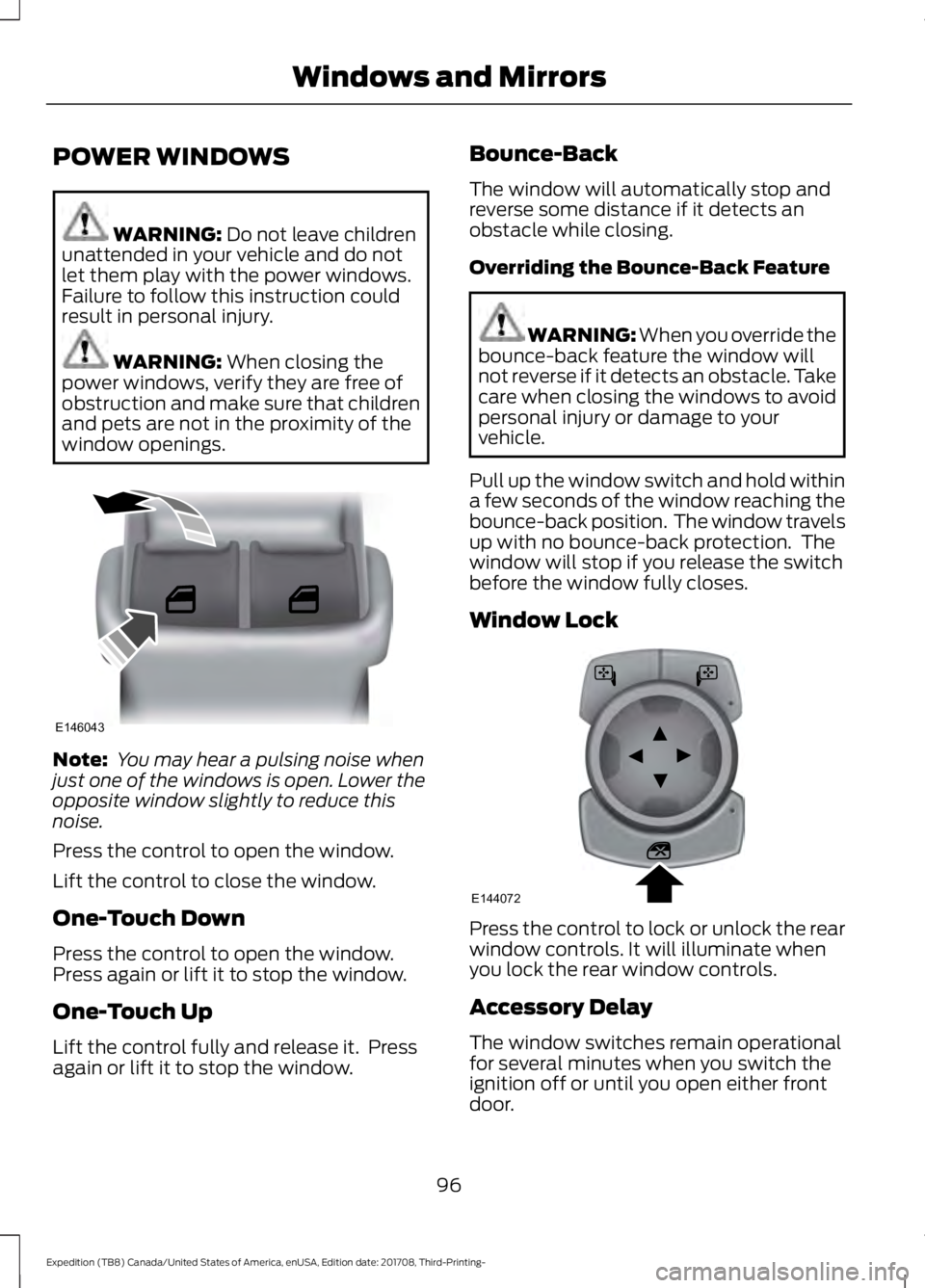
Press the control to open the window.
Lift the control to close the window.
One-Touch Down
Press the control to open the window.
Press again or lift it to stop the window.
One-Touch Up
Lift the control fully and release it. Press
again or lift it to stop the window. Bounce-Back
The window will automatically stop and
reverse some distance if it detects an
obstacle while closing.
Overriding the Bounce-Back Feature
WARNING: When you override the
bounce-back feature the window will
not reverse if it detects an obstacle. Take
care when closing the windows to avoid
personal injury or damage to your
vehicle.
Pull up the window switch and hold within
a few seconds of the window reaching the
bounce-back position. The window travels
up with no bounce-back protection. The
window will stop if you release the switch
before the window fully closes.
Window Lock Press the control to lock or unlock the rear
window controls. It will illuminate when
you lock the rear window controls.
Accessory Delay
The window switches remain operational
for several minutes when you switch the
ignition off or until you open either front
door.
96
Expedition (TB8) Canada/United States of America, enUSA, Edition date: 201708, Third-Printing- Windows and MirrorsE146043 E144072
Page 105 of 571
WARNING: When closing the
moonroof, you should verify that it is free
of obstructions and make sure that
children and pets are not in the proximity
of the roof opening.
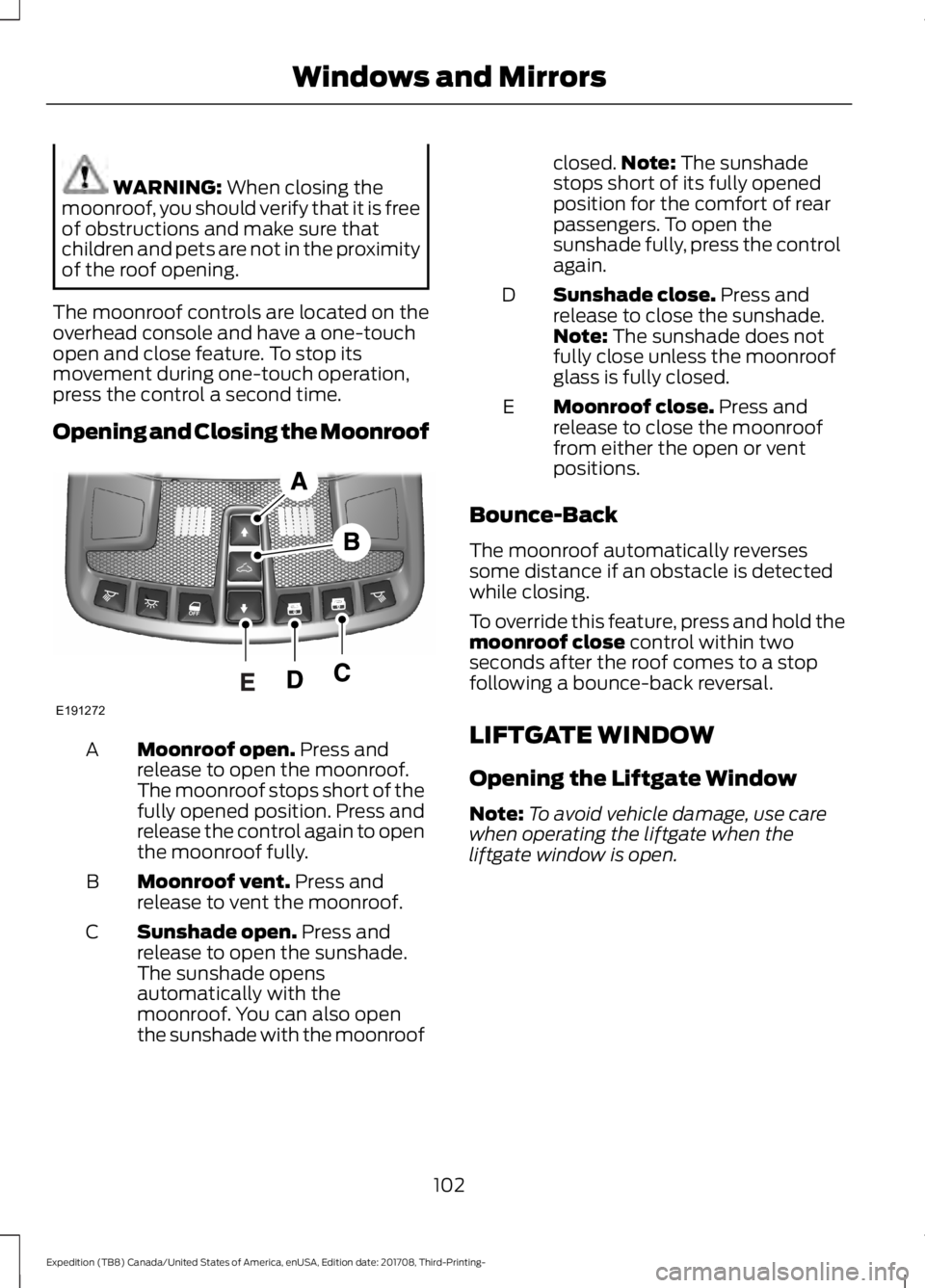
The moonroof controls are located on the
overhead console and have a one-touch
open and close feature. To stop its
movement during one-touch operation,
press the control a second time.
Opening and Closing the Moonroof Moonroof open.
Press and
release to open the moonroof.
The moonroof stops short of the
fully opened position. Press and
release the control again to open
the moonroof fully.
A
Moonroof vent.
Press and
release to vent the moonroof.
B
Sunshade open.
Press and
release to open the sunshade.
The sunshade opens
automatically with the
moonroof. You can also open
the sunshade with the moonroof
C closed.
Note:
The sunshade
stops short of its fully opened
position for the comfort of rear
passengers. To open the
sunshade fully, press the control
again.
Sunshade close.
Press and
release to close the sunshade.
Note:
The sunshade does not
fully close unless the moonroof
glass is fully closed.
D
Moonroof close.
Press and
release to close the moonroof
from either the open or vent
positions.
E
Bounce-Back
The moonroof automatically reverses
some distance if an obstacle is detected
while closing.
To override this feature, press and hold the
moonroof close
control within two
seconds after the roof comes to a stop
following a bounce-back reversal.
LIFTGATE WINDOW
Opening the Liftgate Window
Note: To avoid vehicle damage, use care
when operating the liftgate when the
liftgate window is open.
102
Expedition (TB8) Canada/United States of America, enUSA, Edition date: 201708, Third-Printing- Windows and MirrorsE191272
Page 125 of 571
Settings
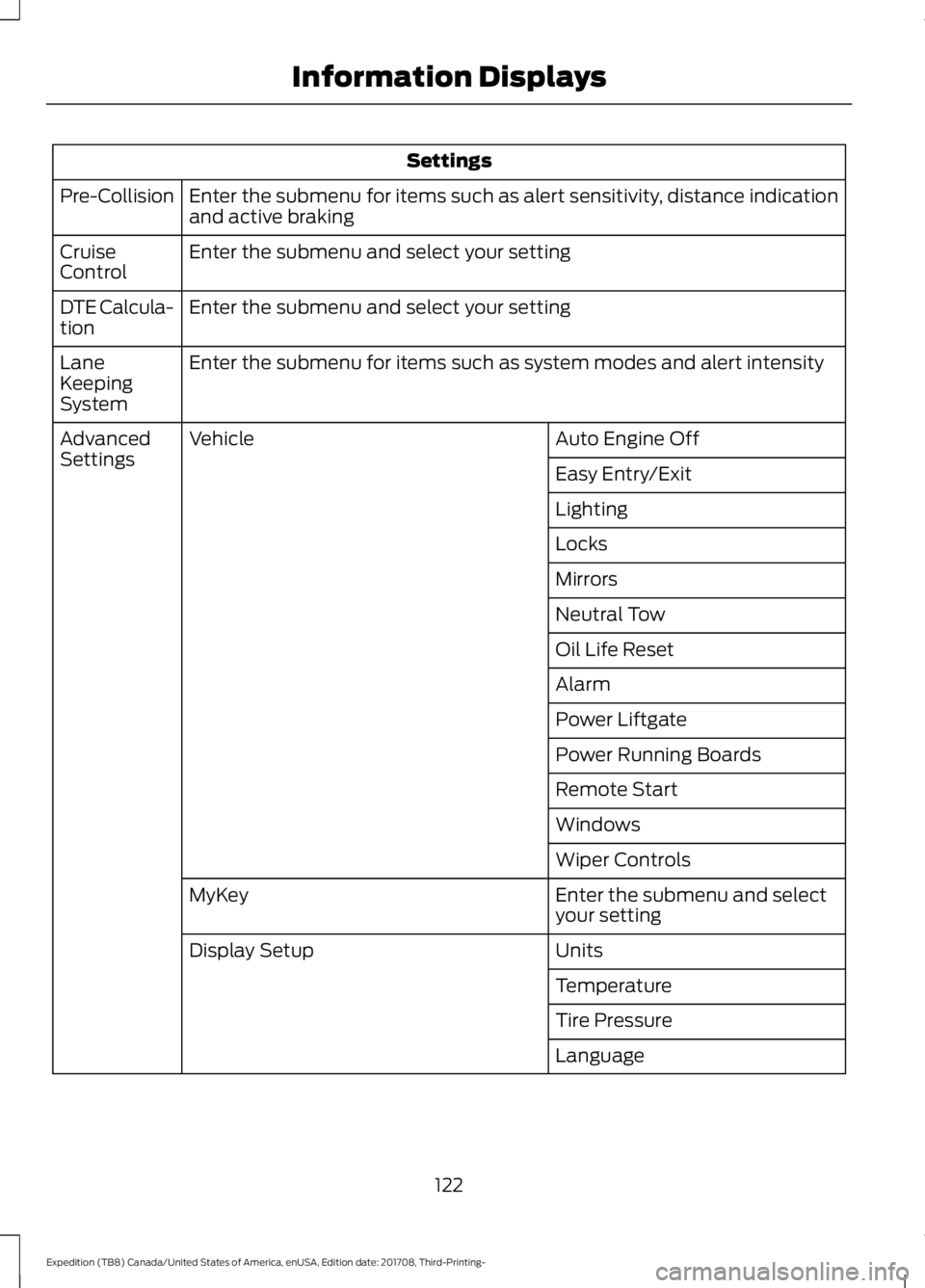
Enter the submenu for items such as alert sensitivity, distance indication
and active braking
Pre-Collision
Enter the submenu and select your setting
Cruise
Control
Enter the submenu and select your setting
DTE Calcula-
tion
Enter the submenu for items such as system modes and alert intensity
Lane
Keeping
System
Auto Engine Off
Vehicle
Advanced
Settings
Easy Entry/Exit
Lighting
Locks
Mirrors
Neutral Tow
Oil Life Reset
Alarm
Power Liftgate
Power Running Boards
Remote Start
Windows
Wiper Controls
Enter the submenu and select
your setting
MyKey
Units
Display Setup
Temperature
Tire Pressure
Language
122
Expedition (TB8) Canada/United States of America, enUSA, Edition date: 201708, Third-Printing- Information Displays
Page 143 of 571
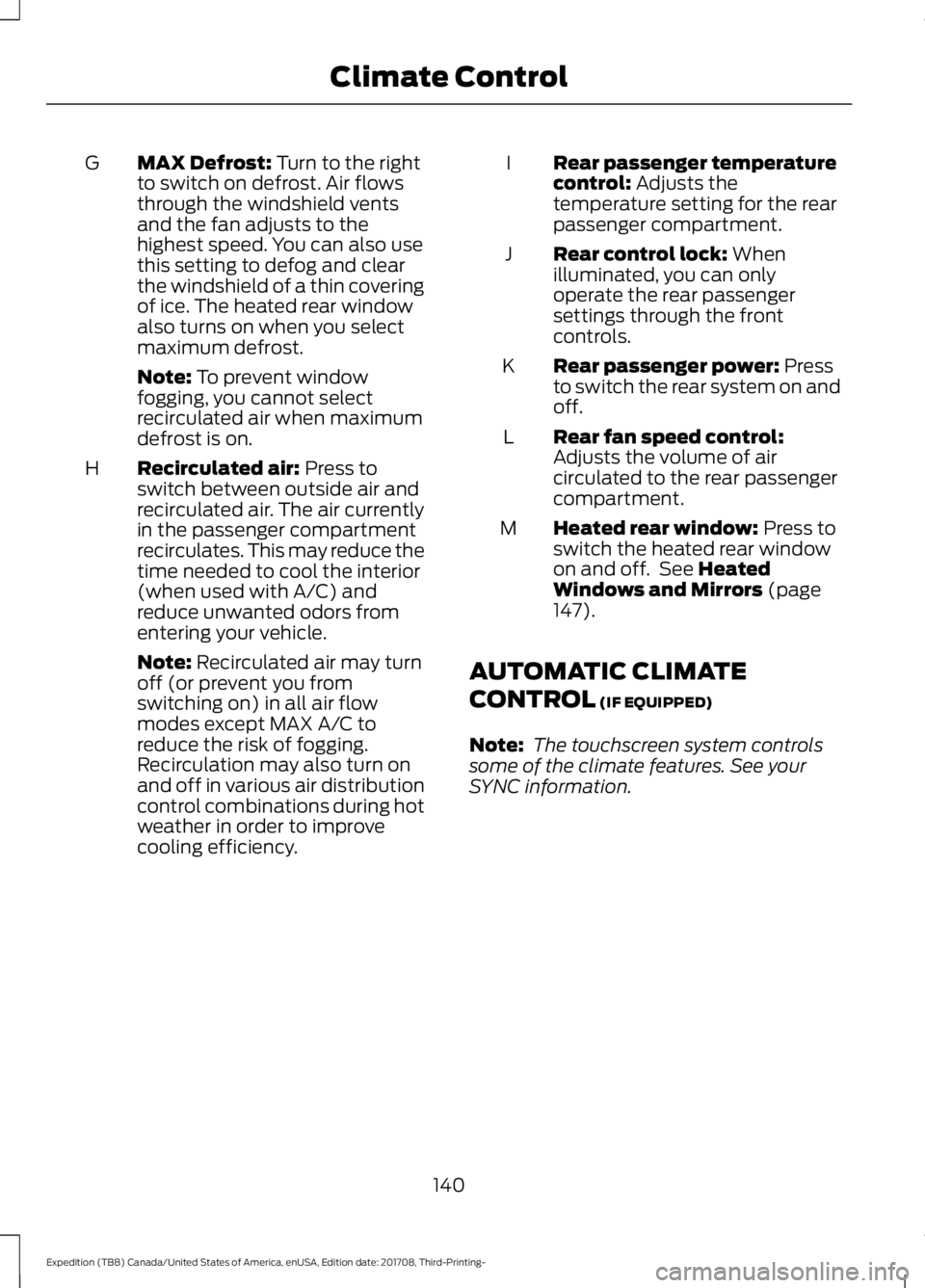
MAX Defrost: Turn to the right
to switch on defrost. Air flows
through the windshield vents
and the fan adjusts to the
highest speed. You can also use
this setting to defog and clear
the windshield of a thin covering
of ice. The heated rear window
also turns on when you select
maximum defrost.
G
Note:
To prevent window
fogging, you cannot select
recirculated air when maximum
defrost is on.
Recirculated air:
Press to
switch between outside air and
recirculated air. The air currently
in the passenger compartment
recirculates. This may reduce the
time needed to cool the interior
(when used with A/C) and
reduce unwanted odors from
entering your vehicle.
H
Note:
Recirculated air may turn
off (or prevent you from
switching on) in all air flow
modes except MAX A/C to
reduce the risk of fogging.
Recirculation may also turn on
and off in various air distribution
control combinations during hot
weather in order to improve
cooling efficiency. Rear passenger temperature
control:
Adjusts the
temperature setting for the rear
passenger compartment.
I
Rear control lock:
When
illuminated, you can only
operate the rear passenger
settings through the front
controls.
J
Rear passenger power:
Press
to switch the rear system on and
off.
K
Rear fan speed control:
Adjusts the volume of air
circulated to the rear passenger
compartment.
L
Heated rear window:
Press to
switch the heated rear window
on and off. See
Heated
Windows and Mirrors (page
147).
M
AUTOMATIC CLIMATE
CONTROL
(IF EQUIPPED)
Note: The touchscreen system controls
some of the climate features. See your
SYNC information.
140
Expedition (TB8) Canada/United States of America, enUSA, Edition date: 201708, Third-Printing- Climate Control
Page 144 of 571
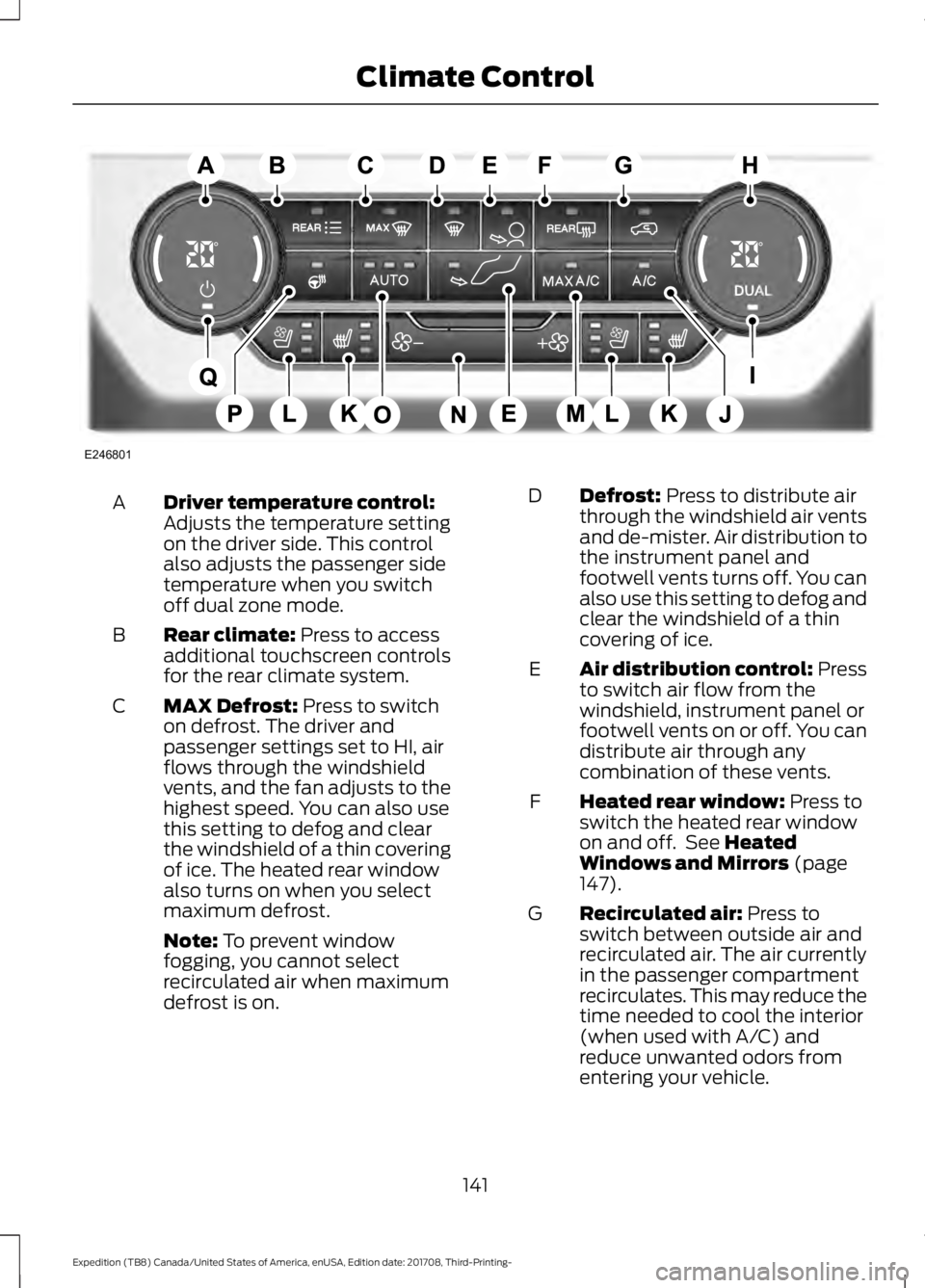
Driver temperature control:
Adjusts the temperature setting
on the driver side. This control
also adjusts the passenger side
temperature when you switch
off dual zone mode.
A
Rear climate: Press to access
additional touchscreen controls
for the rear climate system.
B
MAX Defrost:
Press to switch
on defrost. The driver and
passenger settings set to HI, air
flows through the windshield
vents, and the fan adjusts to the
highest speed. You can also use
this setting to defog and clear
the windshield of a thin covering
of ice. The heated rear window
also turns on when you select
maximum defrost.
C
Note:
To prevent window
fogging, you cannot select
recirculated air when maximum
defrost is on. Defrost:
Press to distribute air
through the windshield air vents
and de-mister. Air distribution to
the instrument panel and
footwell vents turns off. You can
also use this setting to defog and
clear the windshield of a thin
covering of ice.
D
Air distribution control: Press
to switch air flow from the
windshield, instrument panel or
footwell vents on or off. You can
distribute air through any
combination of these vents.
E
Heated rear window:
Press to
switch the heated rear window
on and off. See
Heated
Windows and Mirrors (page
147).
F
Recirculated air:
Press to
switch between outside air and
recirculated air. The air currently
in the passenger compartment
recirculates. This may reduce the
time needed to cool the interior
(when used with A/C) and
reduce unwanted odors from
entering your vehicle.
G
141
Expedition (TB8) Canada/United States of America, enUSA, Edition date: 201708, Third-Printing- Climate ControlE246801
Page 150 of 571
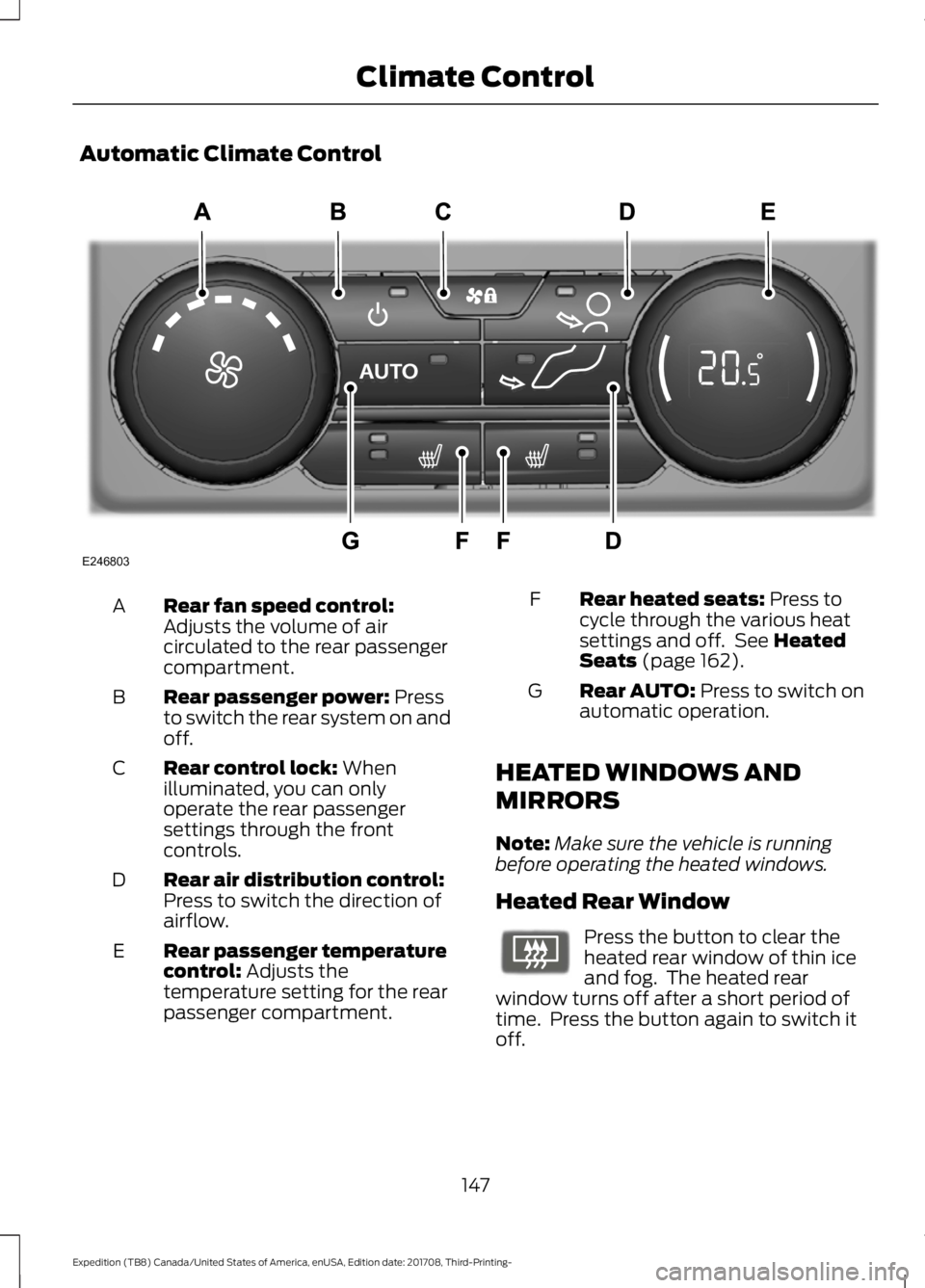
Automatic Climate Control
Rear fan speed control:
Adjusts the volume of air
circulated to the rear passenger
compartment.
A
Rear passenger power: Press
to switch the rear system on and
off.
B
Rear control lock:
When
illuminated, you can only
operate the rear passenger
settings through the front
controls.
C
Rear air distribution control:
Press to switch the direction of
airflow.
D
Rear passenger temperature
control:
Adjusts the
temperature setting for the rear
passenger compartment.
E Rear heated seats:
Press to
cycle through the various heat
settings and off. See
Heated
Seats (page 162).
F
Rear AUTO:
Press to switch on
automatic operation.
G
HEATED WINDOWS AND
MIRRORS
Note: Make sure the vehicle is running
before operating the heated windows.
Heated Rear Window Press the button to clear the
heated rear window of thin ice
and fog. The heated rear
window turns off after a short period of
time. Press the button again to switch it
off.
147
Expedition (TB8) Canada/United States of America, enUSA, Edition date: 201708, Third-Printing- Climate ControlE246803 E72507
Page 159 of 571
MEMORY FUNCTION (IF EQUIPPED)
WARNING:
Before activating the
memory seat, make sure that the area
immediately surrounding the seat is clear
of obstructions and that all occupants
are clear of moving parts. WARNING:
Do not use the
memory function when your vehicle is
moving.
This feature automatically recalls the
position of the following:
• Driver seat.
• Power mirrors.
• Optional power adjustable foot pedals.
• Optional power adjustable steering
column.
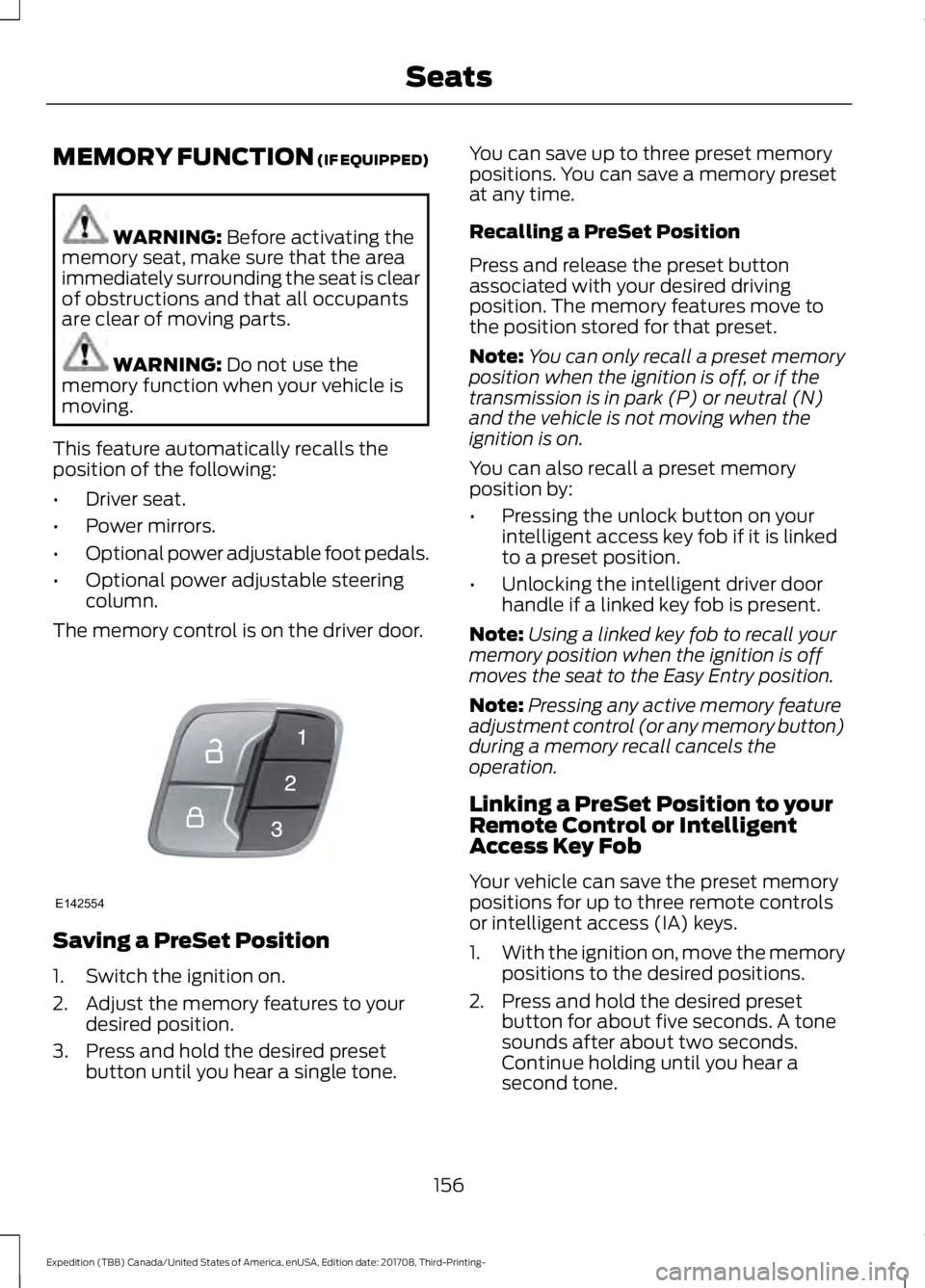
The memory control is on the driver door. Saving a PreSet Position
1. Switch the ignition on.
2. Adjust the memory features to your
desired position.
3. Press and hold the desired preset button until you hear a single tone. You can save up to three preset memory
positions. You can save a memory preset
at any time.
Recalling a PreSet Position
Press and release the preset button
associated with your desired driving
position. The memory features move to
the position stored for that preset.
Note:
You can only recall a preset memory
position when the ignition is off, or if the
transmission is in park (P) or neutral (N)
and the vehicle is not moving when the
ignition is on.
You can also recall a preset memory
position by:
• Pressing the unlock button on your
intelligent access key fob if it is linked
to a preset position.
• Unlocking the intelligent driver door
handle if a linked key fob is present.
Note: Using a linked key fob to recall your
memory position when the ignition is off
moves the seat to the Easy Entry position.
Note: Pressing any active memory feature
adjustment control (or any memory button)
during a memory recall cancels the
operation.
Linking a PreSet Position to your
Remote Control or Intelligent
Access Key Fob
Your vehicle can save the preset memory
positions for up to three remote controls
or intelligent access (IA) keys.
1. With the ignition on, move the memory
positions to the desired positions.
2. Press and hold the desired preset button for about five seconds. A tone
sounds after about two seconds.
Continue holding until you hear a
second tone.
156
Expedition (TB8) Canada/United States of America, enUSA, Edition date: 201708, Third-Printing- SeatsE142554
Page 451 of 571
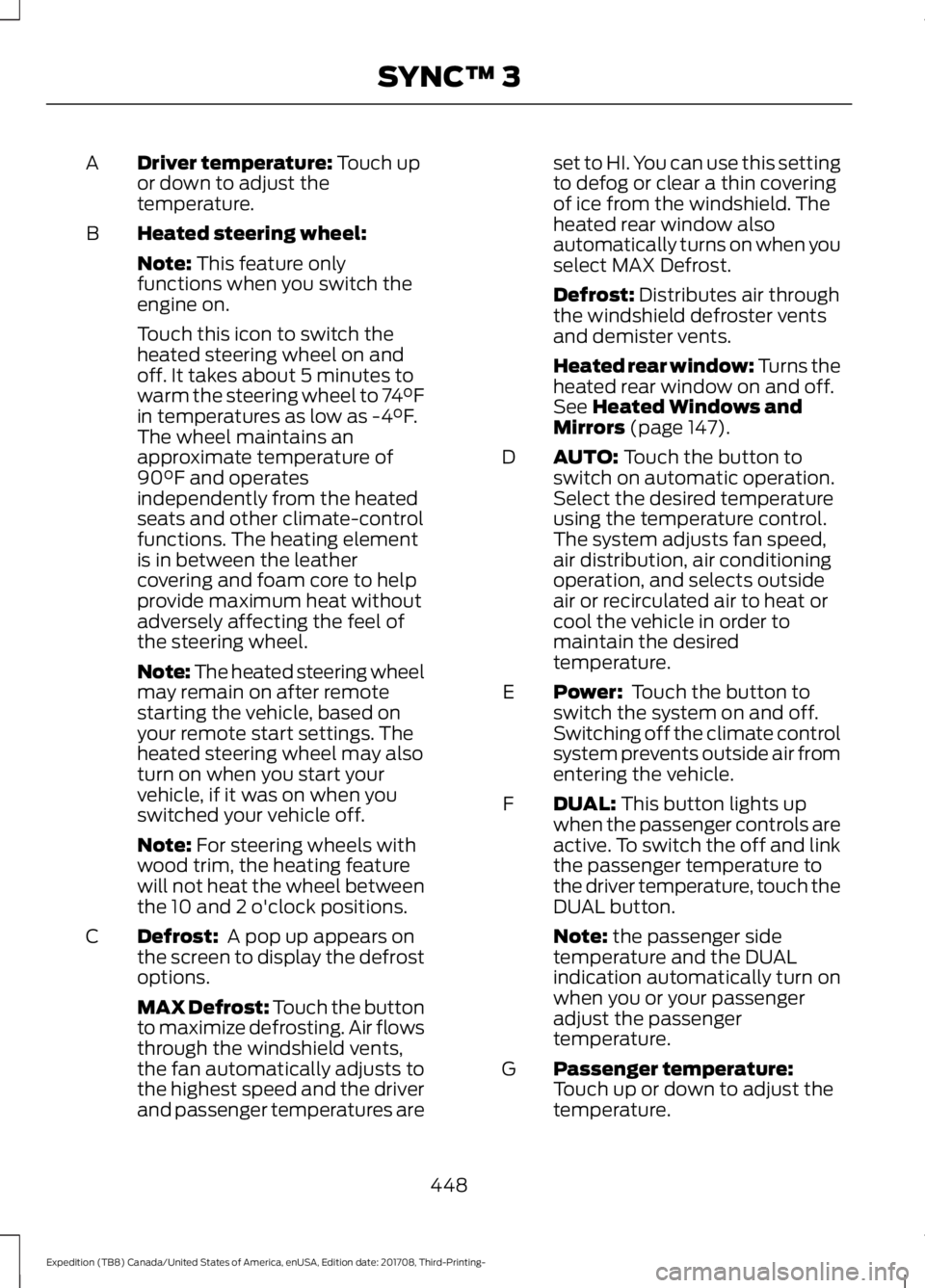
Driver temperature: Touch up
or down to adjust the
temperature.
A
Heated steering wheel:
B
Note:
This feature only
functions when you switch the
engine on.
Touch this icon to switch the
heated steering wheel on and
off. It takes about 5 minutes to
warm the steering wheel to 74°F
in temperatures as low as -4°F.
The wheel maintains an
approximate temperature of
90°F and operates
independently from the heated
seats and other climate-control
functions. The heating element
is in between the leather
covering and foam core to help
provide maximum heat without
adversely affecting the feel of
the steering wheel.
Note: The heated steering wheel
may remain on after remote
starting the vehicle, based on
your remote start settings. The
heated steering wheel may also
turn on when you start your
vehicle, if it was on when you
switched your vehicle off.
Note:
For steering wheels with
wood trim, the heating feature
will not heat the wheel between
the 10 and 2 o'clock positions.
Defrost:
A pop up appears on
the screen to display the defrost
options.
C
MAX Defrost: Touch the button
to maximize defrosting. Air flows
through the windshield vents,
the fan automatically adjusts to
the highest speed and the driver
and passenger temperatures are set to HI. You can use this setting
to defog or clear a thin covering
of ice from the windshield. The
heated rear window also
automatically turns on when you
select MAX Defrost.
Defrost:
Distributes air through
the windshield defroster vents
and demister vents.
Heated rear window: Turns the
heated rear window on and off.
See
Heated Windows and
Mirrors (page 147).
AUTO:
Touch the button to
switch on automatic operation.
Select the desired temperature
using the temperature control.
The system adjusts fan speed,
air distribution, air conditioning
operation, and selects outside
air or recirculated air to heat or
cool the vehicle in order to
maintain the desired
temperature.
D
Power:
Touch the button to
switch the system on and off.
Switching off the climate control
system prevents outside air from
entering the vehicle.
E
DUAL:
This button lights up
when the passenger controls are
active. To switch the off and link
the passenger temperature to
the driver temperature, touch the
DUAL button.
F
Note:
the passenger side
temperature and the DUAL
indication automatically turn on
when you or your passenger
adjust the passenger
temperature.
Passenger temperature:
Touch up or down to adjust the
temperature.
G
448
Expedition (TB8) Canada/United States of America, enUSA, Edition date: 201708, Third-Printing- SYNC™ 3
Page 565 of 571
Doors and Locks..................................................
127
Driver Alert............................................................. 127
Drivetrain................................................................ 127
Engine..................................................................... 128
Four-Wheel Drive................................................ 128
Fuel........................................................................\
.. 129
Keys and Intelligent Access............................ 130
Lane Keeping System......................................... 131
Maintenance.......................................................... 131
MyKey...................................................................... 132
Off Road................................................................. 132
Park Aid................................................................... 133
Park Brake............................................................. 134
Power Steering.................................................... 134
Pro Trailer Backup Assist™............................. 135
Remote Start........................................................ 136
Seats....................................................................... 136
Starting System ................................................. 136
Tire Pressure Monitoring System.................. 137
Trailer....................................................................... 137
Transmission........................................................ 138
Installing Child Restraints............................18
Child Seats............................................................... 18
Combining Seatbelt and LATCH Lower Anchors for Attaching Child Safety
Seats.................................................................... 25
Using Lap and Shoulder Belts.......................... 19
Using Lower Anchors and Tethers for CHildren (LATCH)........................................... 24
Using Tether Straps............................................. 25
Instrument Cluster.......................................104
Instrument Lighting Dimmer.....................90
Instrument Panel Overview
.........................15
Interior Lamps.................................................93
Battery Saver......................................................... 94
Front Interior Lamps........................................... 93
Rear Interior Lamps............................................. 94
Interior Mirror
.................................................100
Auto-Dimming Mirror....................................... 100
Introduction.........................................................7
J
Jump Starting the Vehicle........................302 Connecting the Jumper Cables.................... 302
Jump Starting..................................................... 303
Preparing Your Vehicle.................................... 302
Removing the Jumper Cables....................... 303K
Keyless Entry
...................................................68
Displaying the Factory-Set Code................... 70
Locking and Unlocking....................................... 70
SECURICODE™ KEYLESS ENTRY KEYPAD.............................................................. 68
Keyless Starting.............................................176 Ignition Modes...................................................... 176
Keys and Remote Controls.........................53
L
Lane Keeping System
................................246
Switching the System On and Off...............247
System Display................................................... 248
System Settings.................................................. 247
Troubleshooting................................................. 249
Liftgate................................................................72
Liftgate Window...........................................102 Opening the Liftgate Window....................... 102
Lighting Control
..............................................89
Flashing the Headlamp High Beam.............90
Headlamp High Beam....................................... 89
Lighting..............................................................89 General Information........................................... 89
Limited Slip Differential
.............................210
Locking Function................................................ 210
Spare Tire.............................................................. 210
Trailer Towing....................................................... 210
Load Carriers See: Roof Racks and Load Carriers.............267
Load Carrying................................................264
Load Limit
......................................................268
Special Loading Instructions for Owners of
Pick-up Trucks and Utility-type
Vehicles............................................................. 272
Vehicle Loading - with and without a Trailer................................................................ 268
Locking and Unlocking.................................65 Activating Intelligent Access........................... 66
Autolock................................................................... 67
Battery Saver......................................................... 68
Illuminated Entry.................................................. 68
Illuminated Exit..................................................... 68
Locking and Unlocking the Doors with the Key Blade............................................................ 67
Power Door Locks................................................ 65
562
Expedition (TB8) Canada/United States of America, enUSA, Edition date: 201708, Third-Printing- Index