oil temperature FORD EXPEDITION 2018 Owners Manual
[x] Cancel search | Manufacturer: FORD, Model Year: 2018, Model line: EXPEDITION, Model: FORD EXPEDITION 2018Pages: 571, PDF Size: 25.8 MB
Page 11 of 571
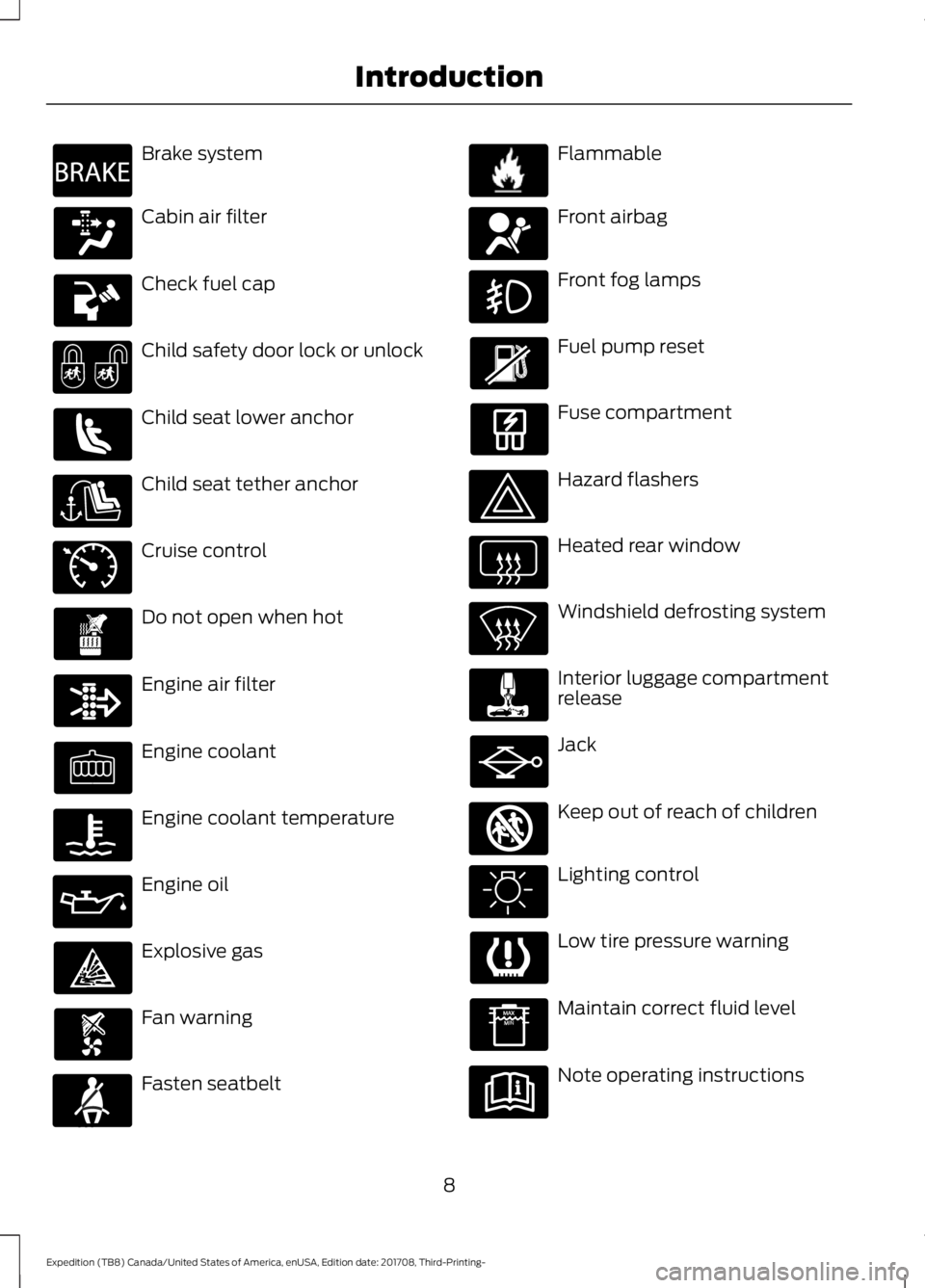
Brake system
Cabin air filter
Check fuel cap
Child safety door lock or unlock
Child seat lower anchor
Child seat tether anchor
Cruise control
Do not open when hot
Engine air filter
Engine coolant
Engine coolant temperature
Engine oil
Explosive gas
Fan warning
Fasten seatbelt Flammable
Front airbag
Front fog lamps
Fuel pump reset
Fuse compartment
Hazard flashers
Heated rear window
Windshield defrosting system
Interior luggage compartment
release
Jack
Keep out of reach of children
Lighting control
Low tire pressure warning
Maintain correct fluid level
Note operating instructions
8
Expedition (TB8) Canada/United States of America, enUSA, Edition date: 201708, Third-Printing- IntroductionE270480 E71340 E71880 E231160 E67017 E161353
Page 107 of 571
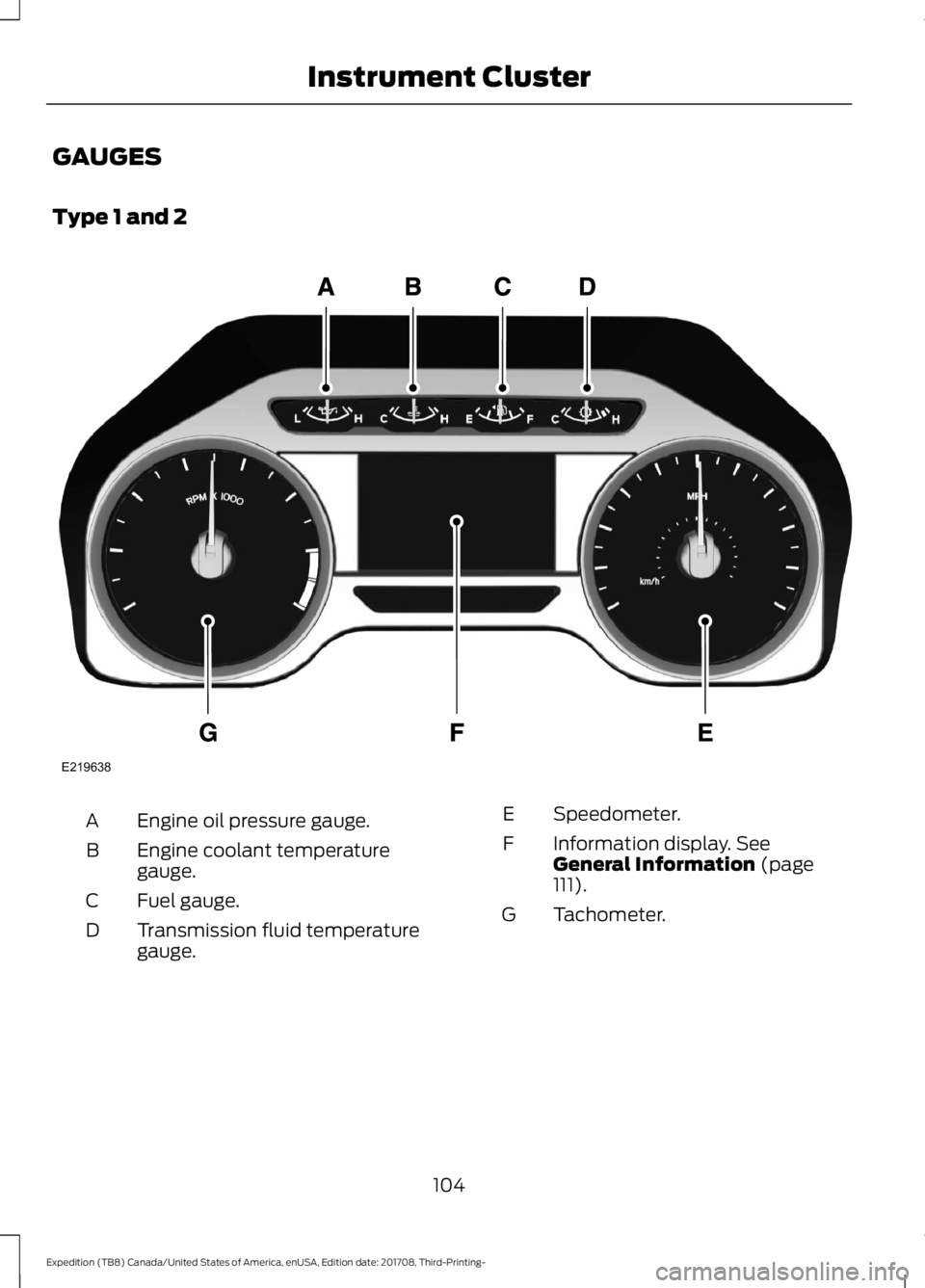
GAUGES
Type 1 and 2
Engine oil pressure gauge.
A
Engine coolant temperature
gauge.
B
Fuel gauge.
C
Transmission fluid temperature
gauge.
D Speedometer.
E
Information display. See
General Information (page
111).
F
Tachometer.
G
104
Expedition (TB8) Canada/United States of America, enUSA, Edition date: 201708, Third-Printing- Instrument ClusterE219638
Page 108 of 571
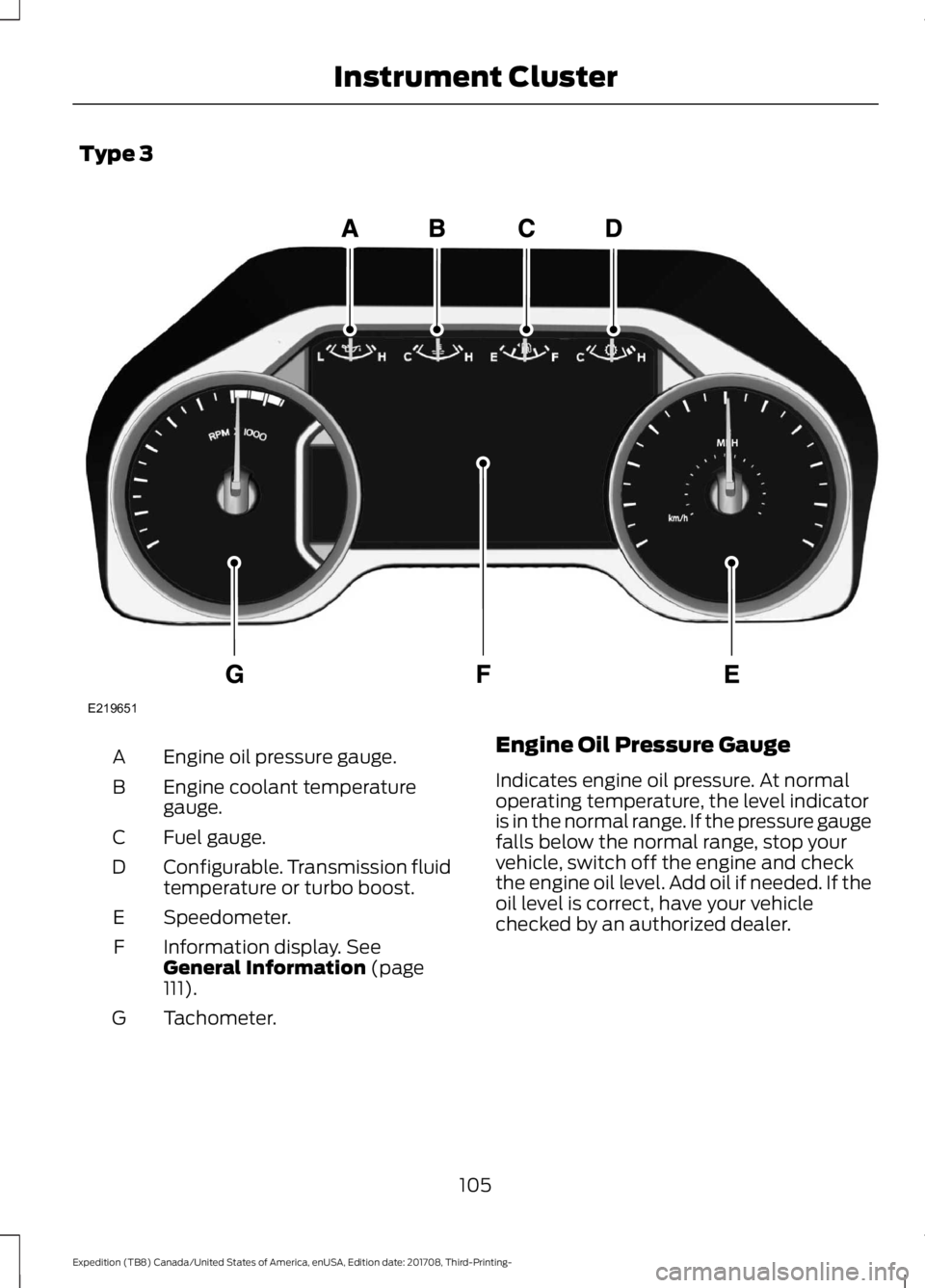
Type 3
Engine oil pressure gauge.
A
Engine coolant temperature
gauge.
B
Fuel gauge.
C
Configurable. Transmission fluid
temperature or turbo boost.
D
Speedometer.
E
Information display. See
General Information (page
111).
F
Tachometer.
G Engine Oil Pressure Gauge
Indicates engine oil pressure. At normal
operating temperature, the level indicator
is in the normal range. If the pressure gauge
falls below the normal range, stop your
vehicle, switch off the engine and check
the engine oil level. Add oil if needed. If the
oil level is correct, have your vehicle
checked by an authorized dealer.
105
Expedition (TB8) Canada/United States of America, enUSA, Edition date: 201708, Third-Printing- Instrument ClusterE219651
Page 112 of 571
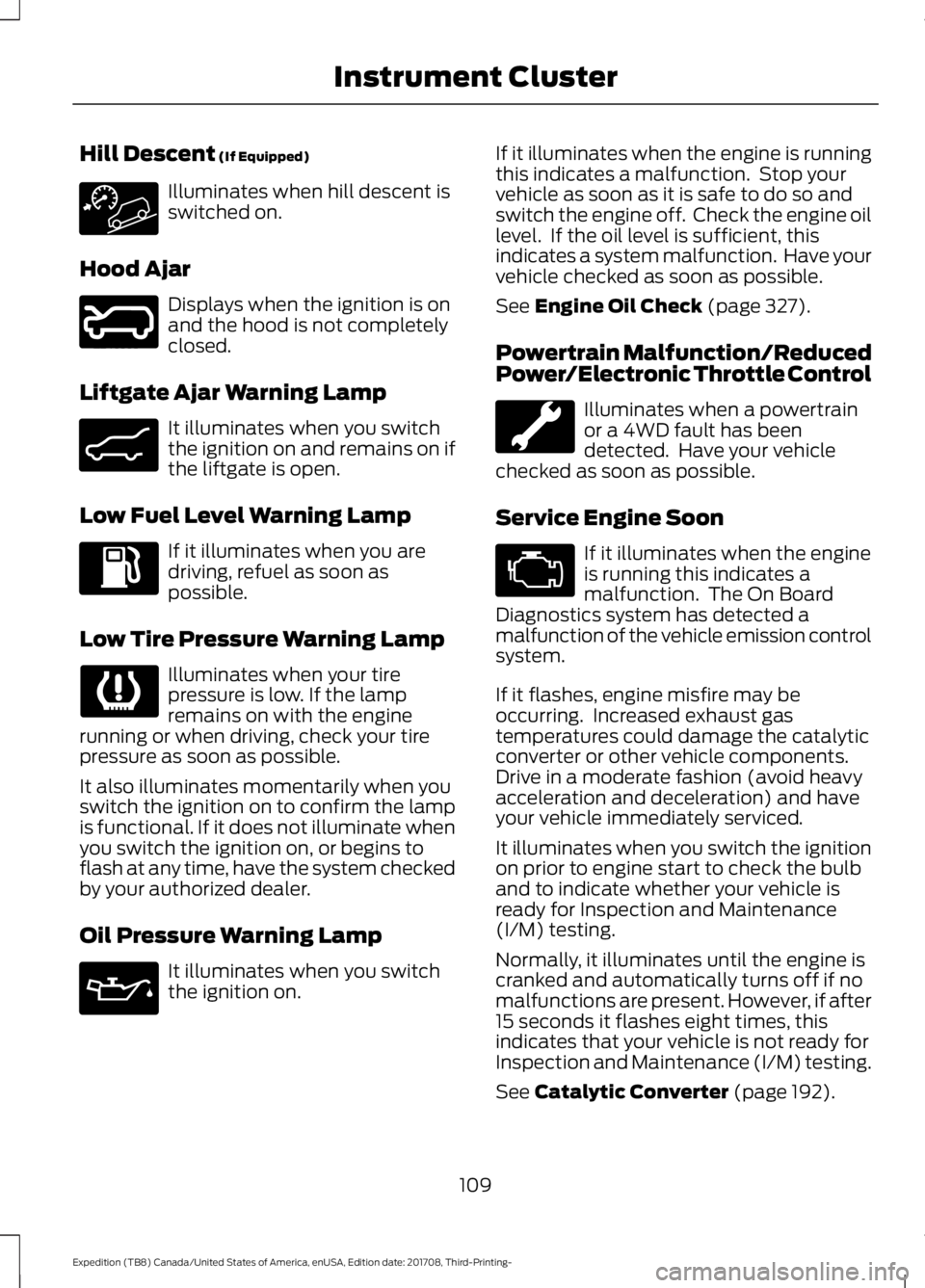
Hill Descent (If Equipped)
Illuminates when hill descent is
switched on.
Hood Ajar Displays when the ignition is on
and the hood is not completely
closed.
Liftgate Ajar Warning Lamp It illuminates when you switch
the ignition on and remains on if
the liftgate is open.
Low Fuel Level Warning Lamp If it illuminates when you are
driving, refuel as soon as
possible.
Low Tire Pressure Warning Lamp Illuminates when your tire
pressure is low. If the lamp
remains on with the engine
running or when driving, check your tire
pressure as soon as possible.
It also illuminates momentarily when you
switch the ignition on to confirm the lamp
is functional. If it does not illuminate when
you switch the ignition on, or begins to
flash at any time, have the system checked
by your authorized dealer.
Oil Pressure Warning Lamp It illuminates when you switch
the ignition on. If it illuminates when the engine is running
this indicates a malfunction. Stop your
vehicle as soon as it is safe to do so and
switch the engine off. Check the engine oil
level. If the oil level is sufficient, this
indicates a system malfunction. Have your
vehicle checked as soon as possible.
See
Engine Oil Check (page 327).
Powertrain Malfunction/Reduced
Power/Electronic Throttle Control Illuminates when a powertrain
or a 4WD fault has been
detected. Have your vehicle
checked as soon as possible.
Service Engine Soon If it illuminates when the engine
is running this indicates a
malfunction. The On Board
Diagnostics system has detected a
malfunction of the vehicle emission control
system.
If it flashes, engine misfire may be
occurring. Increased exhaust gas
temperatures could damage the catalytic
converter or other vehicle components.
Drive in a moderate fashion (avoid heavy
acceleration and deceleration) and have
your vehicle immediately serviced.
It illuminates when you switch the ignition
on prior to engine start to check the bulb
and to indicate whether your vehicle is
ready for Inspection and Maintenance
(I/M) testing.
Normally, it illuminates until the engine is
cranked and automatically turns off if no
malfunctions are present. However, if after
15 seconds it flashes eight times, this
indicates that your vehicle is not ready for
Inspection and Maintenance (I/M) testing.
See
Catalytic Converter (page 192).
109
Expedition (TB8) Canada/United States of America, enUSA, Edition date: 201708, Third-Printing- Instrument Cluster E246598 E162453
Page 118 of 571
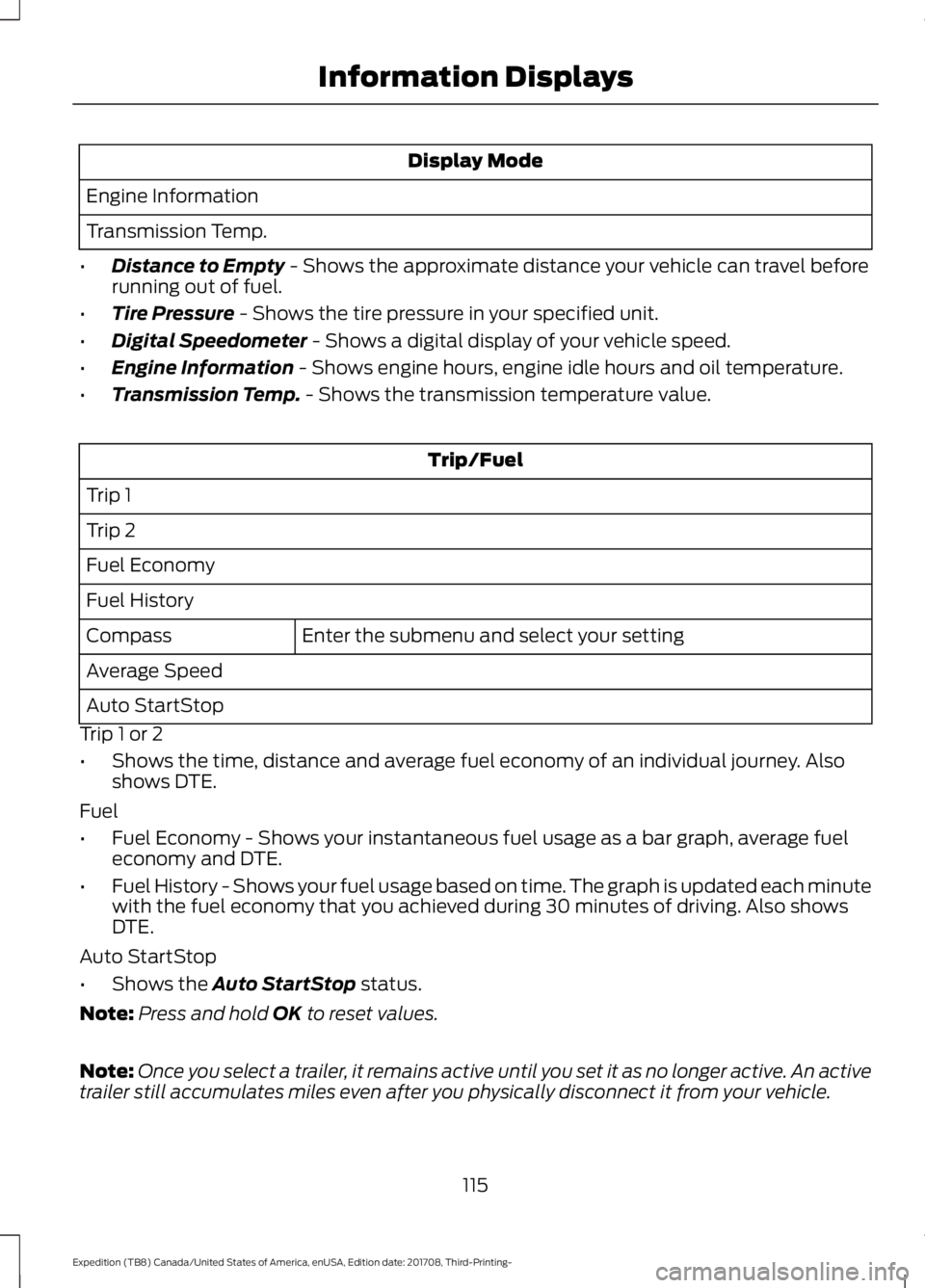
Display Mode
Engine Information
Transmission Temp.
• Distance to Empty - Shows the approximate distance your vehicle can travel before
running out of fuel.
• Tire Pressure
- Shows the tire pressure in your specified unit.
• Digital Speedometer
- Shows a digital display of your vehicle speed.
• Engine Information
- Shows engine hours, engine idle hours and oil temperature.
• Transmission Temp.
- Shows the transmission temperature value. Trip/Fuel
Trip 1
Trip 2
Fuel Economy
Fuel History Enter the submenu and select your setting
Compass
Average Speed
Auto StartStop
Trip 1 or 2
• Shows the time, distance and average fuel economy of an individual journey. Also
shows DTE.
Fuel
• Fuel Economy - Shows your instantaneous fuel usage as a bar graph, average fuel
economy and DTE.
• Fuel History - Shows your fuel usage based on time. The graph is updated each minute
with the fuel economy that you achieved during 30 minutes of driving. Also shows
DTE.
Auto StartStop
• Shows the
Auto StartStop status.
Note: Press and hold
OK to reset values.
Note: Once you select a trailer, it remains active until you set it as no longer active. An active
trailer still accumulates miles even after you physically disconnect it from your vehicle.
115
Expedition (TB8) Canada/United States of America, enUSA, Edition date: 201708, Third-Printing- Information Displays
Page 120 of 571
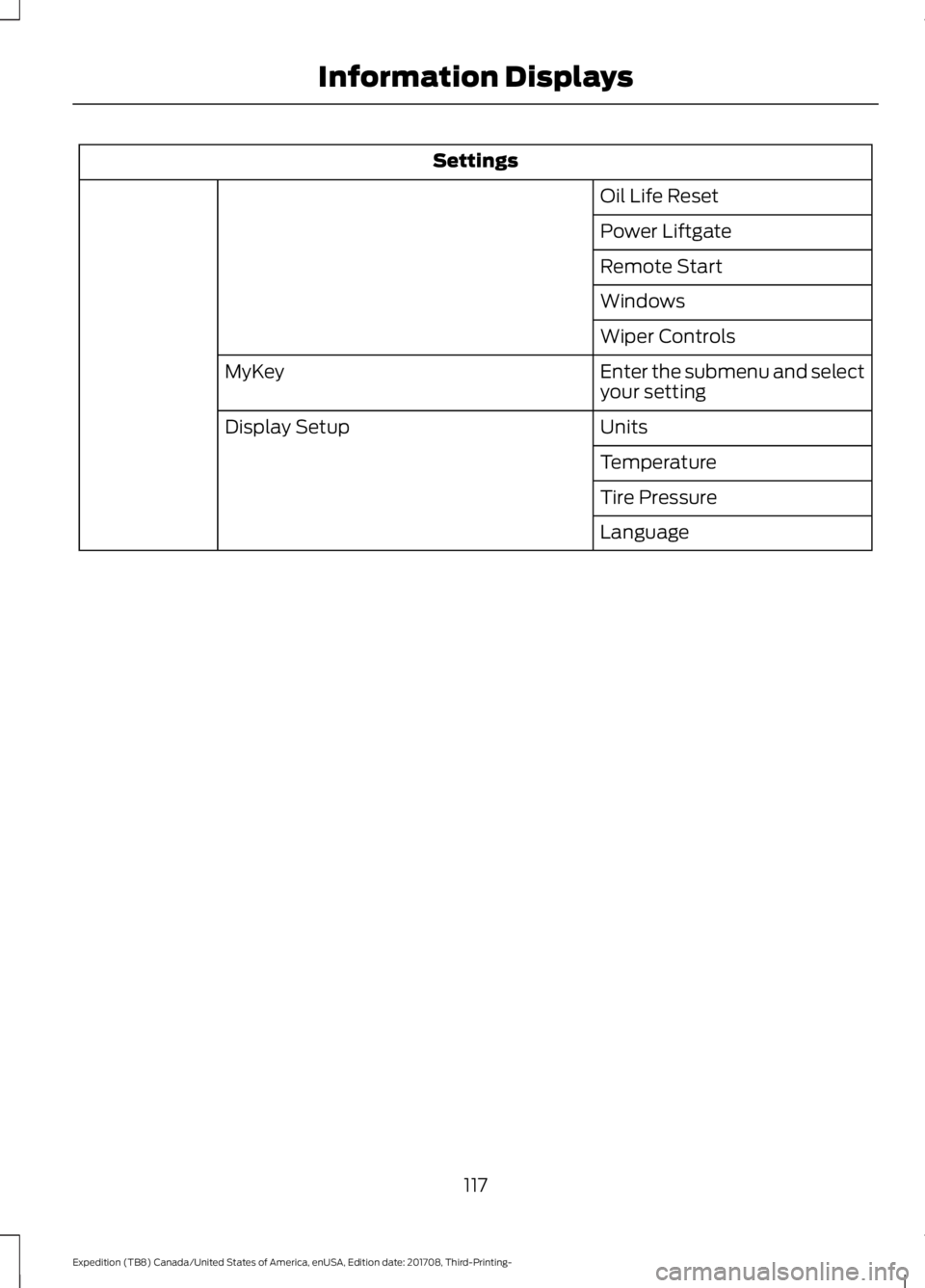
Settings
Oil Life Reset
Power Liftgate
Remote Start
Windows
Wiper Controls
Enter the submenu and select
your setting
MyKey
Units
Display Setup
Temperature
Tire Pressure
Language
117
Expedition (TB8) Canada/United States of America, enUSA, Edition date: 201708, Third-Printing- Information Displays
Page 123 of 571
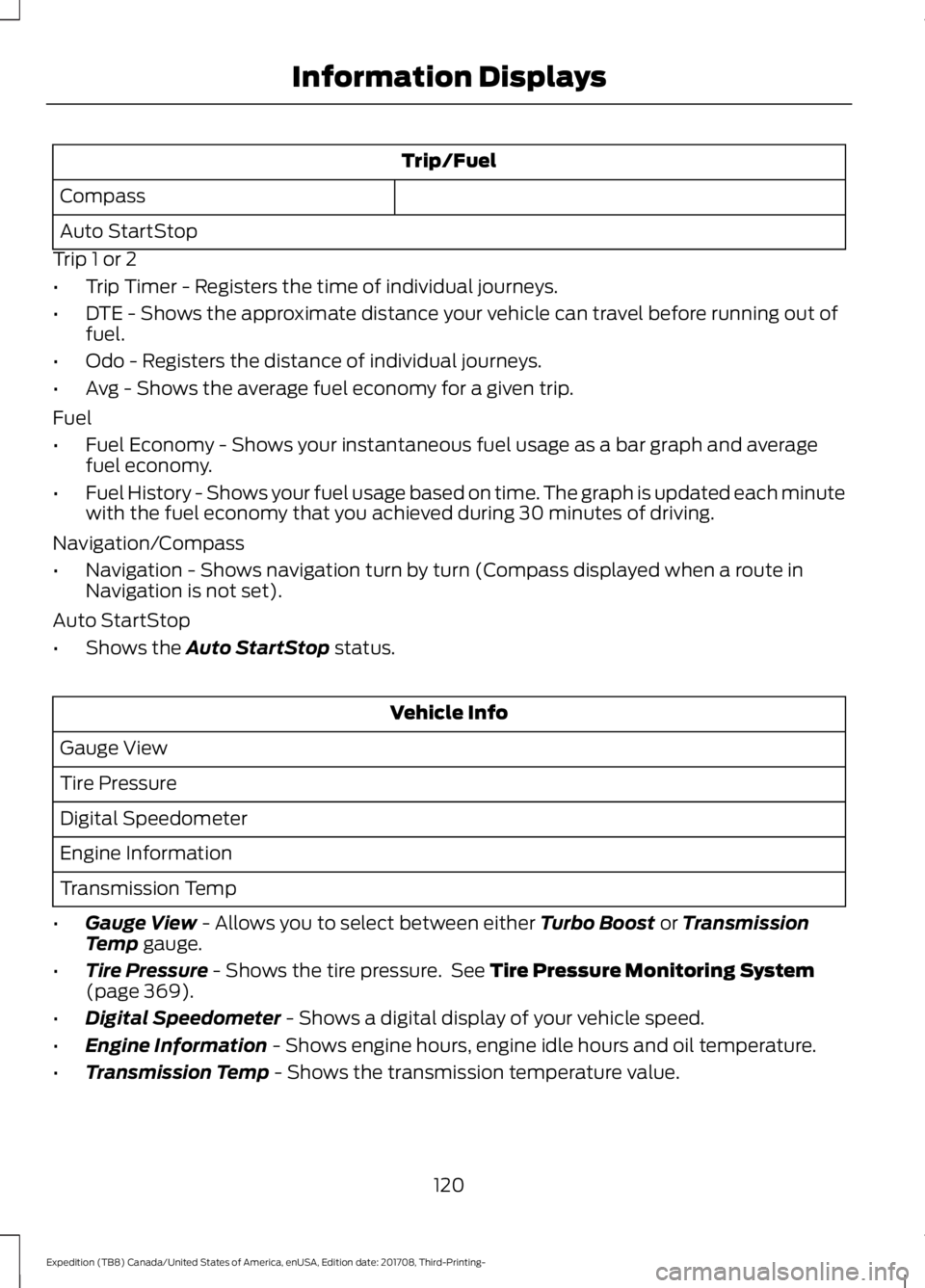
Trip/Fuel
Compass
Auto StartStop
Trip 1 or 2
• Trip Timer - Registers the time of individual journeys.
• DTE - Shows the approximate distance your vehicle can travel before running out of
fuel.
• Odo - Registers the distance of individual journeys.
• Avg - Shows the average fuel economy for a given trip.
Fuel
• Fuel Economy - Shows your instantaneous fuel usage as a bar graph and average
fuel economy.
• Fuel History - Shows your fuel usage based on time. The graph is updated each minute
with the fuel economy that you achieved during 30 minutes of driving.
Navigation/Compass
• Navigation - Shows navigation turn by turn (Compass displayed when a route in
Navigation is not set).
Auto StartStop
• Shows the Auto StartStop status. Vehicle Info
Gauge View
Tire Pressure
Digital Speedometer
Engine Information
Transmission Temp
• Gauge View
- Allows you to select between either Turbo Boost or Transmission
Temp gauge.
• Tire Pressure
- Shows the tire pressure. See Tire Pressure Monitoring System
(page 369).
• Digital Speedometer
- Shows a digital display of your vehicle speed.
• Engine Information
- Shows engine hours, engine idle hours and oil temperature.
• Transmission Temp
- Shows the transmission temperature value.
120
Expedition (TB8) Canada/United States of America, enUSA, Edition date: 201708, Third-Printing- Information Displays
Page 125 of 571
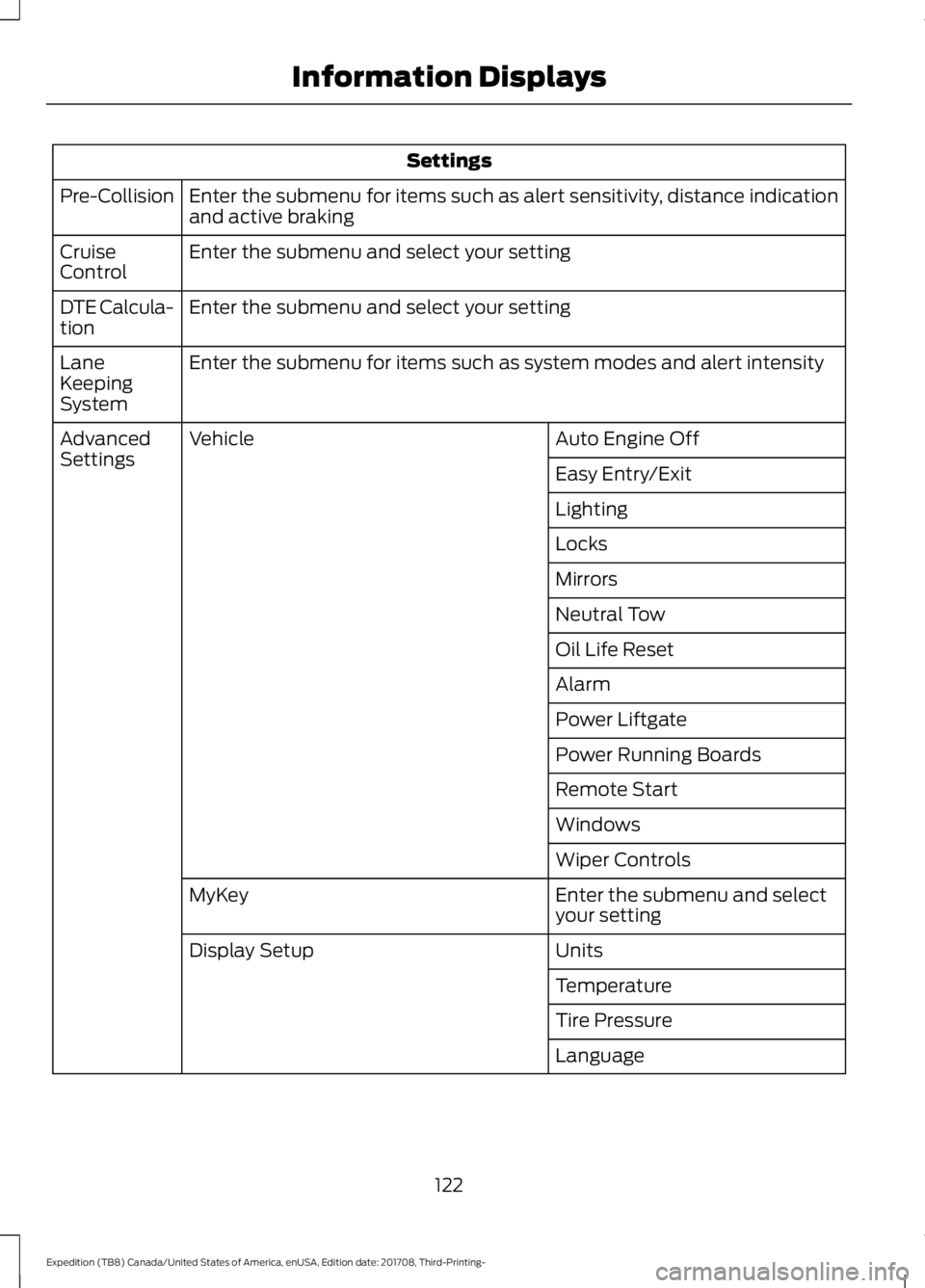
Settings
Enter the submenu for items such as alert sensitivity, distance indication
and active braking
Pre-Collision
Enter the submenu and select your setting
Cruise
Control
Enter the submenu and select your setting
DTE Calcula-
tion
Enter the submenu for items such as system modes and alert intensity
Lane
Keeping
System
Auto Engine Off
Vehicle
Advanced
Settings
Easy Entry/Exit
Lighting
Locks
Mirrors
Neutral Tow
Oil Life Reset
Alarm
Power Liftgate
Power Running Boards
Remote Start
Windows
Wiper Controls
Enter the submenu and select
your setting
MyKey
Units
Display Setup
Temperature
Tire Pressure
Language
122
Expedition (TB8) Canada/United States of America, enUSA, Edition date: 201708, Third-Printing- Information Displays
Page 195 of 571
•
Incorrect fuel for climatic conditions.
• Incorrect engine oil viscosity for
climactic conditions.
Note: Some vehicles have a lifetime fuel
filter that is integrated with the fuel tank.
Regular maintenance or replacement is not
needed.
Note: If these checks do not help you
correct the concern, have your vehicle
checked as soon as possible.
Noise Emissions Warranty,
Prohibited Tampering Acts and
Maintenance
On January 1, 1978, Federal regulation
became effective governing the noise
emission on trucks over 10,000 lb
(4,536 kg) Gross Vehicle Weight Rating
(GVWR). The preceding statements
concerning prohibited tampering acts and
maintenance, and the noise warranty
found in the Warranty Guide, are
applicable to complete chassis cabs over
10,000 lb (4,536 kg)
GVWR.
CATALYTIC CONVERTER WARNING:
Do not park, idle or
drive your vehicle on dry grass or other
dry ground cover. The emission system
heats up the engine compartment and
exhaust system, creating the risk of fire. WARNING:
The normal operating
temperature of the exhaust system is
very high. Never work around or attempt
to repair any part of the exhaust system
until it has cooled. Use special care when
working around the catalytic converter.
The catalytic converter heats up to a very
high temperature after only a short
period of engine operation and stays hot
after the engine is switched off. WARNING:
Exhaust leaks may
result in entry of harmful and potentially
lethal fumes into the passenger
compartment. If you smell exhaust
fumes inside your vehicle, have your
vehicle inspected immediately. Do not
drive if you smell exhaust fumes.
Your vehicle has various emission control
components and a catalytic converter that
enables it to comply with applicable
exhaust emission standards.
To make sure that the catalytic converter
and other emission control components
continue to work properly:
• Do not crank the engine for more than
10 seconds at a time.
• Do not run the engine with a spark plug
lead disconnected.
• Do not push-start or tow-start your
vehicle. Use booster cables. See Jump
Starting the Vehicle
(page 302).
• Use only the specified fuel listed.
• Do not switch the ignition off when your
vehicle is moving.
• Avoid running out of fuel.
• Have the items listed in scheduled
maintenance information performed
according to the specified schedule.
Note: Resulting component damage may
not be covered by the vehicle Warranty.
The scheduled maintenance items listed
in scheduled maintenance information are
essential to the life and performance of
your vehicle and to its emissions system.
If you use anything other than Ford,
Motorcraft or Ford-authorized parts for
maintenance replacements or for service
of components affecting emission control,
such non-Ford parts should be equivalent
to genuine Ford Motor Company parts in
performance and durability.
192
Expedition (TB8) Canada/United States of America, enUSA, Edition date: 201708, Third-Printing- Engine Emission Control
Page 300 of 571
BREAKING-IN
You need to break in new tires for
approximately 300 mi (480 km). During
this time, your vehicle may exhibit some
unusual driving characteristics.
Avoid driving too fast during the first
1,000 mi (1,600 km)
. Vary your speed
frequently and change up through the
gears early. Do not labor the engine.
Do not tow during the first
1,000 mi
(1,600 km).
REDUCED ENGINE
PERFORMANCE WARNING: If you continue to drive
your vehicle when the engine is
overheating, the engine could stop
without warning. Failure to follow this
instruction could result in the loss of
control of your vehicle.
If the engine coolant temperature gauge
needle moves to the upper limit position,
the engine is overheating. See
Gauges
(page 104).
You must only drive your vehicle for a short
distance if the engine overheats. The
distance you can travel depends on
ambient temperature, vehicle load and
terrain. The engine continues to operate
with limited power for a short period of
time.
If the engine temperature continues to rise,
the fuel supply to the engine reduces. The
air conditioning switches off and the engine
cooling fan operates continually.
1. Gradually reduce your speed and stop your vehicle as soon as it is safe to do
so. 2. Immediately switch the engine off to
prevent severe engine damage.
3. Wait for the engine to cool down.
4. Check the coolant level. See
Engine
Coolant Check (page 329).
5. Have your vehicle checked as soon as possible.
ECONOMICAL DRIVING
Fuel economy is affected by several things
such as how you drive, the conditions you
drive under and how you maintain your
vehicle.
There are some things to keep in mind that
may improve your fuel economy:
• Accelerate and slow down in a smooth,
moderate fashion.
• Drive at steady speeds.
• Anticipate stops; slowing down may
eliminate the need to stop.
• Combine errands and minimize
stop-and-go driving (When running
errands, go to the furthest destination
first and then work your way back
home).
• Close the windows for high-speed
driving.
• Drive at reasonable speeds.
• Keep the tires properly inflated and use
only the recommended size.
• Use the recommended engine oil.
• Perform all regularly scheduled
maintenance.
There are also some things you may want
to avoid doing because they reduce your
fuel economy:
• Avoid sudden or hard accelerations.
• Avoid revving the engine before turning
off the car.
• Avoid long idle periods.
297
Expedition (TB8) Canada/United States of America, enUSA, Edition date: 201708, Third-Printing- Driving Hints