steering wheel adjustment FORD EXPEDITION 2018 Owners Manual
[x] Cancel search | Manufacturer: FORD, Model Year: 2018, Model line: EXPEDITION, Model: FORD EXPEDITION 2018Pages: 571, PDF Size: 25.8 MB
Page 18 of 571
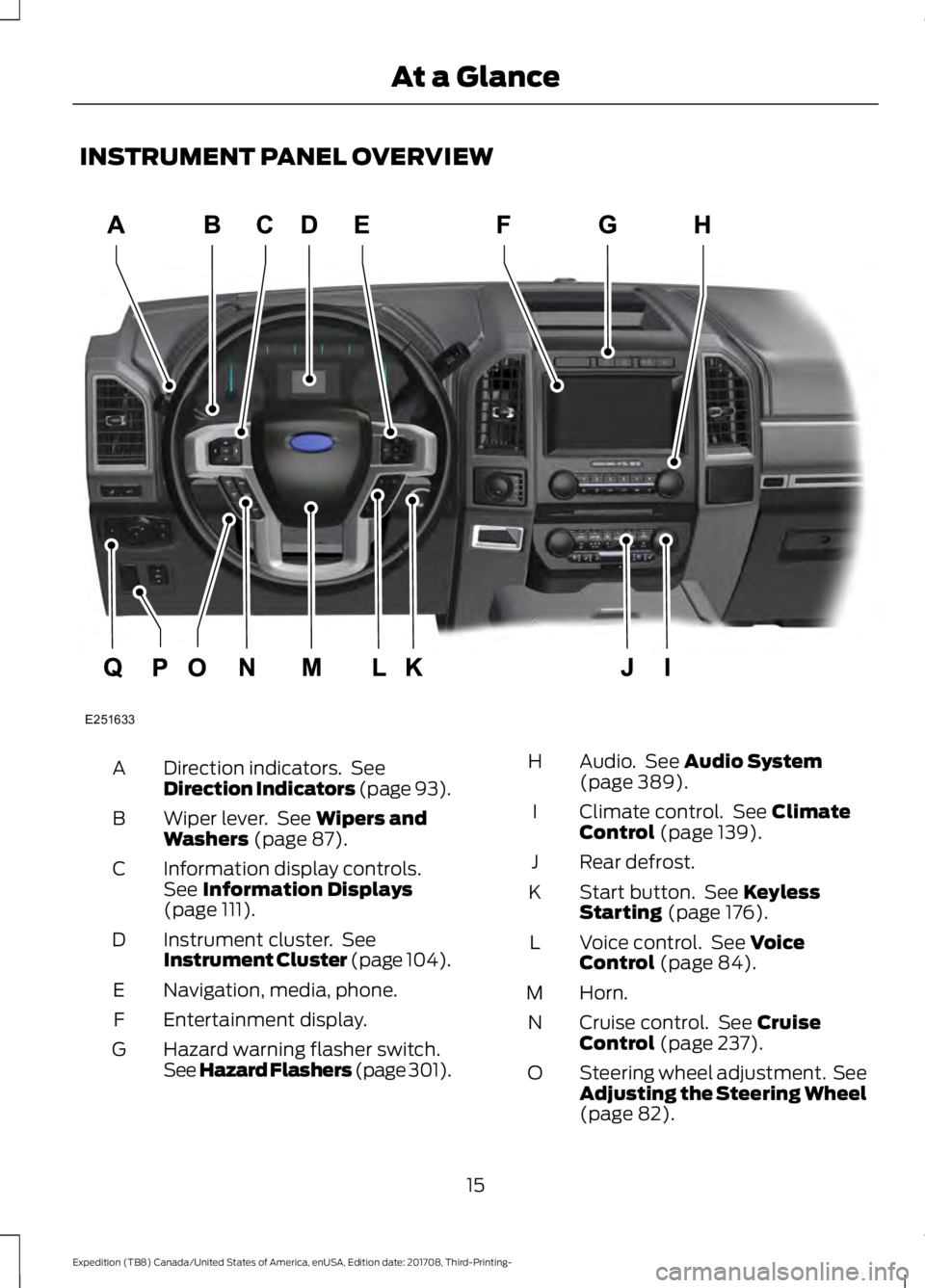
INSTRUMENT PANEL OVERVIEW
Direction indicators. See
Direction Indicators (page 93).
A
Wiper lever. See
Wipers and
Washers (page 87).
B
Information display controls.
See
Information Displays
(page 111).
C
Instrument cluster. See
Instrument Cluster (page 104).
D
Naviga
tion, media, phone.
E
Entertainment display.
F
Hazard warning flasher switch.
See Hazard Flashers (page 301).
G Audio. See
Audio System
(page 389).
H
Climate control. See
Climate
Control (page 139).
I
Rear defrost.
J
Start button. See
Keyless
Starting (page 176).
K
Voice control. See
Voice
Control (page 84).
L
Horn.
M
Cruise control. See
Cruise
Control (page 237).
N
Steering wheel adjustment. See
Adjusting the Steering Wheel
(page
82).
O
15
Expedition (TB8) Canada/United States of America, enUSA, Edition date: 201708, Third-Printing- At a GlanceE251633
Page 48 of 571
While the system is designed to help
reduce serious injuries, contact with a
deploying airbag may also cause abrasions
or swelling. Temporary hearing loss is also
a possibility as a result of the noise
associated with a deploying airbag.
Because airbags must inflate rapidly and
with considerable force, there is the risk of
death or serious injuries such as fractures,
facial and eye injuries or internal injuries,
particularly to occupants who are not
properly restrained or are otherwise out of
position at the time of airbag deployment.
Thus, it is extremely important that
occupants be properly restrained as far
away from the airbag module as possible
while maintaining vehicle control.
Routine maintenance of the airbags is not
required.
DRIVER AND PASSENGER
AIRBAGS
WARNING: Do not place your arms
on the airbag cover or through the
steering wheel. Failure to follow this
instruction could result in personal injury. WARNING: Keep the areas in front
of the airbags free from obstruction. Do
not affix anything to or over the airbag
covers. Objects could become projectiles
during airbag deployment or in a sudden
stop. Failure to follow this instruction
could result in personal injury or death. WARNING:
Airbags can kill or
injure a child in a child restraint. Never
place a rear-facing child restraint in front
of an active airbag. If you must use a
forward-facing child restraint in the front
seat, move the seat upon which the child
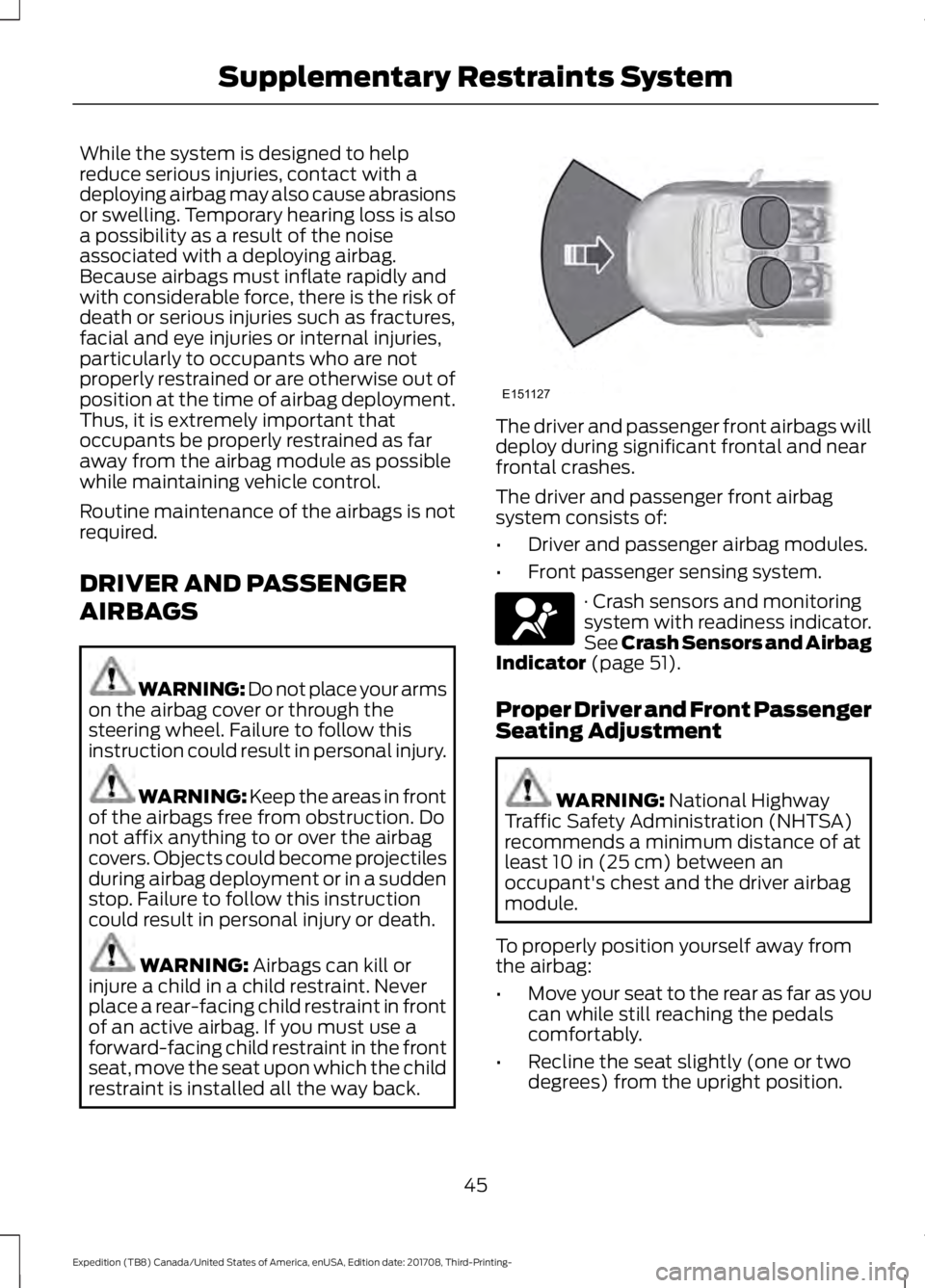
restraint is installed all the way back. The driver and passenger front airbags will
deploy during significant frontal and near
frontal crashes.
The driver and passenger front airbag
system consists of:
•
Driver and passenger airbag modules.
• Front passenger sensing system. · Crash sensors and monitoring
system with readiness indicator.
See Crash Sensors and Airbag
Indicator
(page 51).
Proper Driver and Front Passenger
Seating Adjustment WARNING:
National Highway
Traffic Safety Administration (NHTSA)
recommends a minimum distance of at
least
10 in (25 cm) between an
occupant's chest and the driver airbag
module.
To properly position yourself away from
the airbag:
• Move your seat to the rear as far as you
can while still reaching the pedals
comfortably.
• Recline the seat slightly (one or two
degrees) from the upright position.
45
Expedition (TB8) Canada/United States of America, enUSA, Edition date: 201708, Third-Printing- Supplementary Restraints SystemE151127 E67017
Page 86 of 571
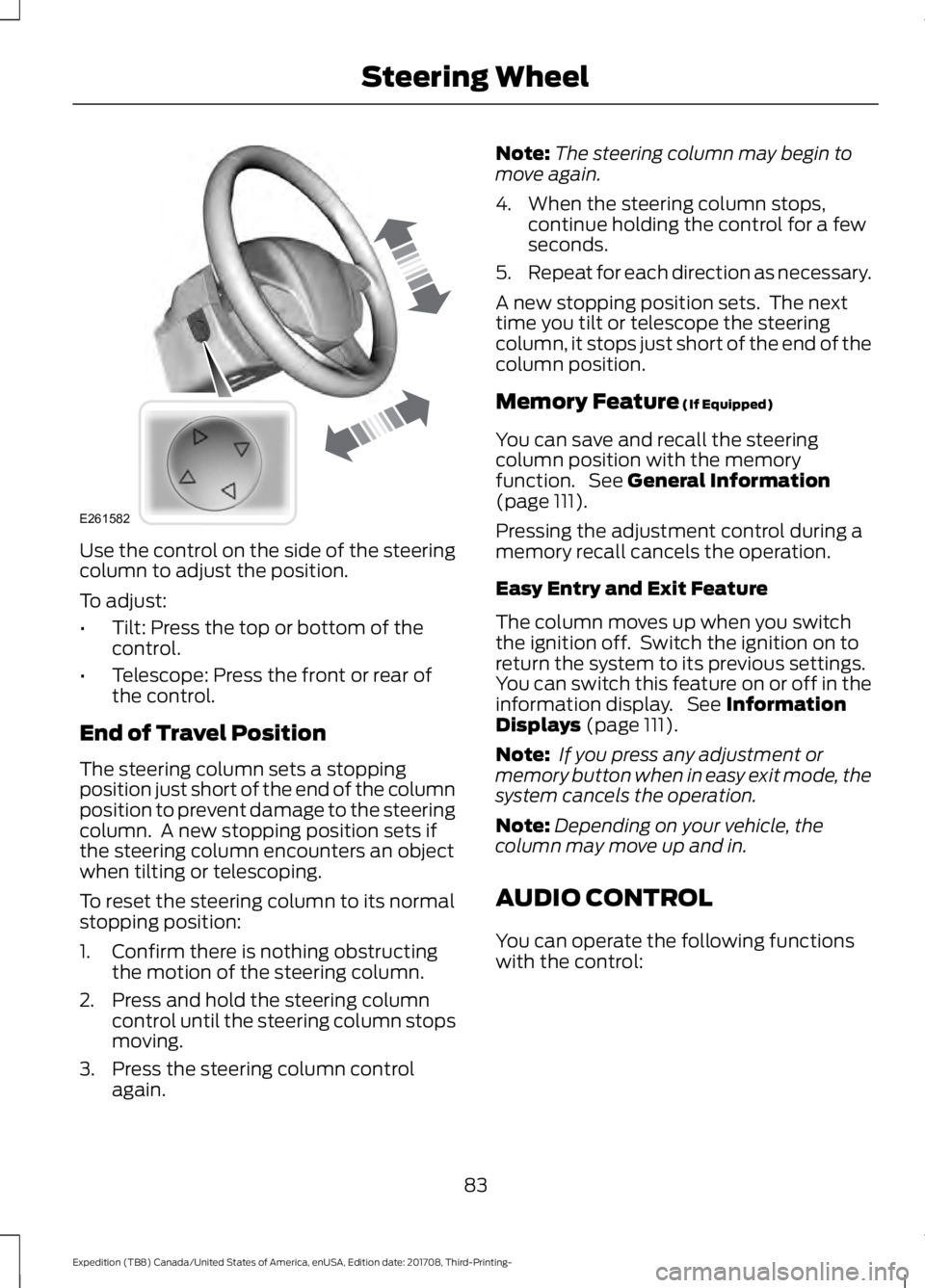
Use the control on the side of the steering
column to adjust the position.
To adjust:
•
Tilt: Press the top or bottom of the
control.
• Telescope: Press the front or rear of
the control.
End of Travel Position
The steering column sets a stopping
position just short of the end of the column
position to prevent damage to the steering
column. A new stopping position sets if
the steering column encounters an object
when tilting or telescoping.
To reset the steering column to its normal
stopping position:
1. Confirm there is nothing obstructing the motion of the steering column.
2. Press and hold the steering column control until the steering column stops
moving.
3. Press the steering column control again. Note:
The steering column may begin to
move again.
4. When the steering column stops, continue holding the control for a few
seconds.
5. Repeat for each direction as necessary.
A new stopping position sets. The next
time you tilt or telescope the steering
column, it stops just short of the end of the
column position.
Memory Feature (If Equipped)
You can save and recall the steering
column position with the memory
function. See
General Information
(page 111).
Pressing the adjustment control during a
memory recall cancels the operation.
Easy Entry and Exit Feature
The column moves up when you switch
the ignition off. Switch the ignition on to
return the system to its previous settings.
You can switch this feature on or off in the
information display. See
Information
Displays (page 111).
Note: If you press any adjustment or
memory button when in easy exit mode, the
system cancels the operation.
Note: Depending on your vehicle, the
column may move up and in.
AUDIO CONTROL
You can operate the following functions
with the control:
83
Expedition (TB8) Canada/United States of America, enUSA, Edition date: 201708, Third-Printing- Steering WheelE261582
Page 151 of 571
Note:
Do not use razor blades or other
sharp objects to clean or remove decals
from the inside of the heated rear window.
The vehicle warranty does not cover
damage caused to the heated rear window
grid lines.
Heated Exterior Mirrors (If Equipped)
When you switch the heated rear window
on, the heated exterior mirrors turn on.
Note: Do not remove ice from the mirrors
with a scraper or adjust the mirror glass
when it is frozen in place.
Note: Do not clean the mirror housing or
glass with harsh abrasives, fuel or other
petroleum-based cleaning products.
Windshield Wiper De-icer
(If Equipped)
The windshield wiper de-icer turns on in
low temperatures.
CABIN AIR FILTER
Your vehicle is equipped with a cabin air
filter, which gives you and your passengers
the following benefits:
• It improves your driving comfort by
reducing particle concentration.
• It improves the interior compartment
cleanliness.
• It protects the climate control
components from particle deposits.
You can locate the cabin air filter behind
the glove box.
Note: Make sure you have a cabin air filter
installed at all times. This prevents foreign
objects from entering the system. Running
the system without a filter in place could
result in degradation or damage to the
system.
Replace the filter at regular intervals. See
Scheduled Maintenance
(page 498). For additional cabin air filter information,
or to replace the filter, see an authorized
dealer.
REMOTE START
(IF EQUIPPED)
You can switch this feature on or off and
adjust the settings using the information
display.
The system adjusts the interior
temperature depending on your chosen
settings during remote start.
You cannot adjust the climate control
setting during remote start operation.
When you switch the ignition on, the
climate control system returns to the
previous settings. You can now make
adjustments.
You need to switch on certain
vehicle-dependent features, such as:
• Heated seats.
• Cooled seats.
• Heated steering wheel.
• Heated mirrors.
• Heated rear window.
Automatic Settings
In hot weather, the system sets to
72°F
(22°C). The cooled seats are set to high
(if available, and AUTO is on in the
information display).
In moderate weather, the system either
heats or cools (based on previous
settings). The rear defroster, heated
mirrors and heated or cooled seats do not
turn on.
In cold weather, the system sets to
72°F
(22°C). The heated seats are set to high
(if available, and AUTO is on in the
information display). The heated rear
window and heated mirrors turn on.
148
Expedition (TB8) Canada/United States of America, enUSA, Edition date: 201708, Third-Printing- Climate Control
Page 425 of 571
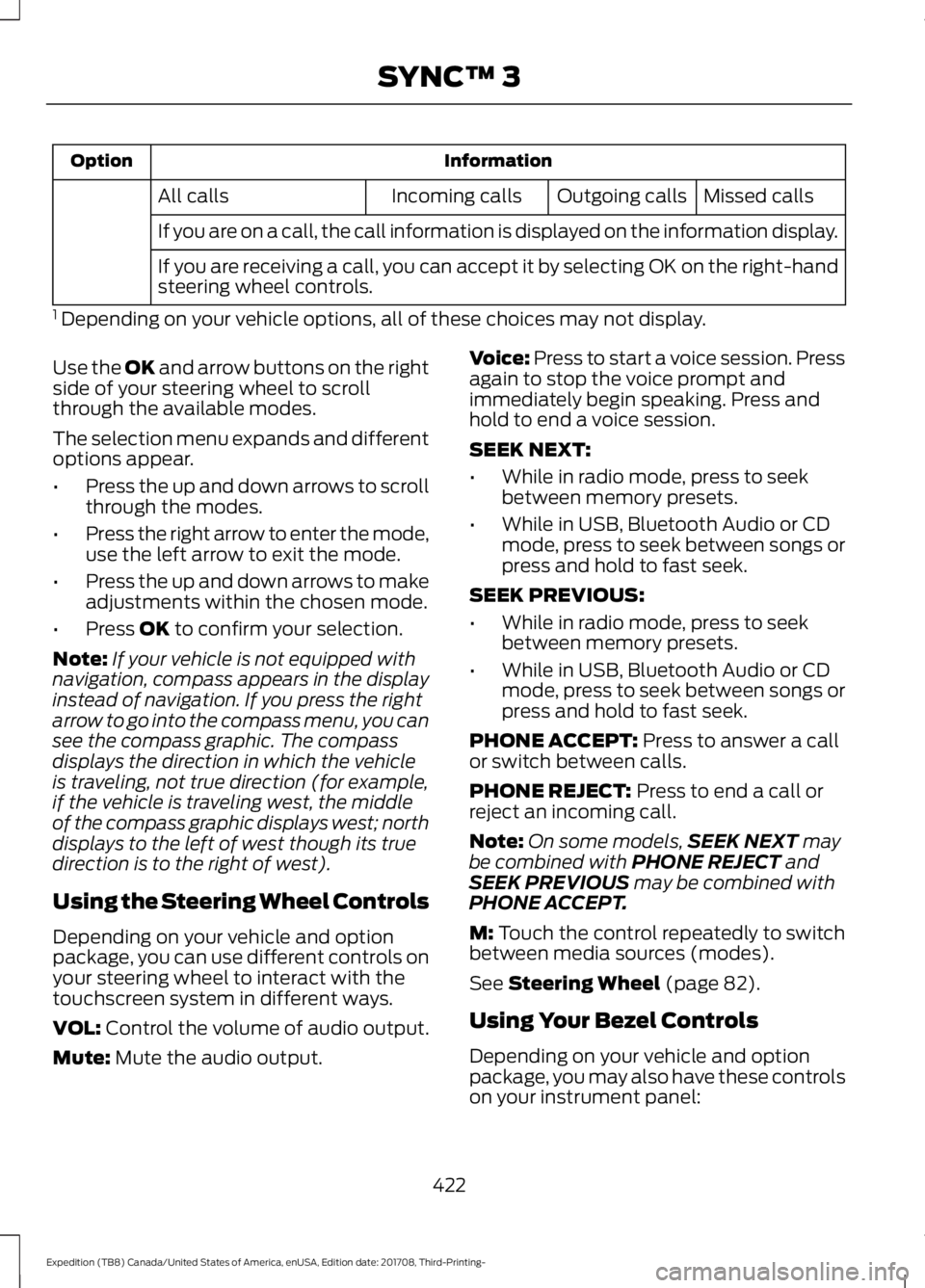
Information
Option
Missed calls
Outgoing calls
Incoming calls
All calls
If you are on a call, the call information is displayed on the information display.
If you are receiving a call, you can accept it by selecting OK on the right-hand
steering wheel controls.
1 Depending on your vehicle options, all of these choices may not display.
Use the OK and arrow buttons on the right
side of your steering wheel to scroll
through the available modes.
The selection menu expands and different
options appear.
• Press the up and down arrows to scroll
through the modes.
• Press the right arrow to enter the mode,
use the left arrow to exit the mode.
• Press the up and down arrows to make
adjustments within the chosen mode.
• Press
OK to confirm your selection.
Note: If your vehicle is not equipped with
navigation, compass appears in the display
instead of navigation. If you press the right
arrow to go into the compass menu, you can
see the compass graphic. The compass
displays the direction in which the vehicle
is traveling, not true direction (for example,
if the vehicle is traveling west, the middle
of the compass graphic displays west; north
displays to the left of west though its true
direction is to the right of west).
Using the Steering Wheel Controls
Depending on your vehicle and option
package, you can use different controls on
your steering wheel to interact with the
touchscreen system in different ways.
VOL:
Control the volume of audio output.
Mute:
Mute the audio output. Voice:
Press to start a voice session. Press
again to stop the voice prompt and
immediately begin speaking. Press and
hold to end a voice session.
SEEK NEXT:
• While in radio mode, press to seek
between memory presets.
• While in USB, Bluetooth Audio or CD
mode, press to seek between songs or
press and hold to fast seek.
SEEK PREVIOUS:
• While in radio mode, press to seek
between memory presets.
• While in USB, Bluetooth Audio or CD
mode, press to seek between songs or
press and hold to fast seek.
PHONE ACCEPT:
Press to answer a call
or switch between calls.
PHONE REJECT:
Press to end a call or
reject an incoming call.
Note: On some models, SEEK NEXT
may
be combined with PHONE REJECT and
SEEK PREVIOUS may be combined with
PHONE ACCEPT.
M:
Touch the control repeatedly to switch
between media sources (modes).
See
Steering Wheel (page 82).
Using Your Bezel Controls
Depending on your vehicle and option
package, you may also have these controls
on your instrument panel:
422
Expedition (TB8) Canada/United States of America, enUSA, Edition date: 201708, Third-Printing- SYNC™ 3
Page 560 of 571
3
360 Degree Camera...................................234
Advanced Camera Views................................ 235
Camera Views..................................................... 235
Front Camera...................................................... 235
Keep Out Zone.................................................... 235
Side Camera........................................................ 236
4
4WD See: Four-Wheel Drive..................................... 202
A
A/C See: Climate Control......................................... 139
About This Manual...........................................7
ABS See: Brakes............................................................. 211
ABS driving hints See: Hints on Driving With Anti-Lock
Brakes.................................................................. 211
Accessories....................................................494 Exterior Style....................................................... 494
Interior Style........................................................ 494
Lifestyle................................................................. 494
Peace of Mind..................................................... 494
Accessories See: Replacement Parts
Recommendation............................................ 12
ACC See: Using Adaptive Cruise Control............238
Active Park Assist........................................225 Using Active Park Assist.................................. 226
Adjusting the Headlamps
........................338
Horizontal Aim Adjustment........................... 339
Vertical Aim Adjustment................................ 338
Adjusting the Pedals
....................................86
Adjusting the Steering Wheel - Vehicles With: Manual Adjustable Steering
Column............................................................82
Adjusting the Steering Wheel - Vehicles With: Power Adjustable Steering
Column............................................................82
End of Travel Position......................................... 83
Memory Feature................................................... 83Airbag Disposal
...............................................52
Air Conditioning See: Climate Control......................................... 139
Air Filter See: Changing the Engine Air Filter.............343
Alarm See: Anti-Theft Alarm........................................ 79
Ambient Lighting
...........................................94
Adjusting the Brightness................................... 95
Changing the Color.............................................. 95
Switching Ambient Lighting Off..................... 95
Switching Ambient Lighting On..................... 95
Anti-Theft Alarm
............................................79
Arming the Alarm................................................. 79
Disarming the Alarm........................................... 79
Appendices.....................................................517
Apps.................................................................463 ........................................................................\
.......... 463
SiriusXM Traffic and Travel Link..................465
At a Glance........................................................15
Audible Warnings and Indicators............110 Direction Indicator Chime................................. 110
Headlamps On Warning Chime.....................110
Key in Ignition Warning Chime........................110
Parking Brake On Warning Chime.................110
Audio Control
...................................................83
Media........................................................................\
84
Seek, Next or Previous....................................... 84
Audio System
...............................................389
General Information......................................... 389
Audio Unit - Vehicles With: AM/FM/CD/ SYNC/Touchscreen Display.................392
Audio Unit - Vehicles With: AM/FM/CD/ SYNC.............................................................390
Autolamps........................................................90 Windshield Wiper Activated
Headlamps........................................................ 90
Automatic Climate Control......................140 Automatic Fan Settings................................... 142
Automatic High Beam Control...................91 Automatic High Beam Indicator.....................92
Switching the System On and Off.................92
Automatic Transmission
...........................195
Automatic Transmission Adaptive
Learning............................................................. 201
Brake-Shift Interlock........................................ 200
If Your Vehicle Gets Stuck In Mud or Snow.................................................................. 201
557
Expedition (TB8) Canada/United States of America, enUSA, Edition date: 201708, Third-Printing- Index