AUX FORD EXPEDITION 2019 Owners Manual
[x] Cancel search | Manufacturer: FORD, Model Year: 2019, Model line: EXPEDITION, Model: FORD EXPEDITION 2019Pages: 583, PDF Size: 6.71 MB
Page 6 of 583
Climate Controlled Seats
.........................167
Garage Door Opener
Universal Garage Door Opener ..............
170
Auxiliary Power Points
Auxiliary Power Points ...............................
174
Wireless Accessory Charging ..................
175
Storage Compartments
Center Console .............................................
178
Overhead Console .......................................
178
Starting and Stopping the Engine
General Information ...................................
179
Ignition Switch ..............................................
179
Keyless Starting ...........................................
180
Starting a Gasoline Engine ......................
180
Engine Block Heater ...................................
183
Unique Driving Characteristics
Auto-Start-Stop ..........................................
185
Fuel and Refueling
Safety Precautions .....................................
188
Fuel Quality ...................................................
188
Fuel Filler Funnel Location ......................
189
Running Out of Fuel ...................................
189
Refueling ..........................................................
191
Fuel Consumption .......................................
193
Engine Emission Control
Emission Law ................................................
195
Catalytic Converter .....................................
196
Transmission
Automatic Transmission ..........................
199Four-Wheel Drive
Using Four-Wheel Drive
..........................
206
Rear Axle
Limited Slip Differential ............................
214
Brakes
General Information ...................................
215
Hints on Driving With Anti-Lock Brakes ........................................................................\
.
215
Electric Parking Brake ................................
216
Hill Start Assist ..............................................
217
Traction Control
Principle of Operation ................................
219
Using Traction Control ...............................
219
Stability Control
Principle of Operation ...............................
220
Using Stability Control ...............................
221
Hill Descent Control
Principle of Operation ...............................
223
Using Hill Descent Control ......................
223
Parking Aids
Principle of Operation ...............................
225
Rear Parking Aid ..........................................
226
Front Parking Aid ........................................
226
Side Sensing System .................................
227
Active Park Assist .......................................
229
Rear View Camera ......................................
235
360 Degree Camera ..................................
238
Cruise Control
Principle of Operation ................................
241
Using Cruise Control ...................................
241
Using Adaptive Cruise Control ...............
242
3
Expedition (TB8) Canada/United States of America, enUSA, Edition date: 201808, Second-Printing Table of Contents
Page 177 of 583
12 Volt DC Power Point
WARNING: Do not plug optional
electrical accessories into the cigar
lighter socket. Incorrect use of the cigar
lighter can cause damage not covered
by the vehicle warranty, and can result
in fire or serious injury.
Note: When you switch the ignition on, you
can use the socket to power 12 volt
appliances with a maximum current rating
of 15 amps.
If the power supply does not work after you
switch the ignition off, switch the ignition
on.
Note: Do not hang any accessory from the
accessory plug.
Note: Do not use the power point over the
vehicle capacity of 12 volt DC 180 watts or
a fuse may blow.
Note: Always keep the power point caps
closed when not in use.
Do not insert objects other than an
accessory plug into the power point. This
damages the power point and may blow
the fuse.
Run the vehicle for full capacity use of the
power point.
To prevent the battery from running out of
charge:
• Do not use the power point longer than
necessary when the engine is not
running.
• Do not leave devices plugged in
overnight or when you park your vehicle
for extended periods. USB Port and Power Point
Locations
USB Ports and Power Points may be in the
following locations:
•
On the lower instrument panel.
• Inside the center console.
• On the front of the center console.
• On the rear of the center console.
• In the cargo area.
• On the passenger side floor panel.
• 3rd row on the quarter trim panels.
Note: Some of the USB ports may not have
data transfer capabilities.
110 Volt AC Power Point
(If Equipped) WARNING: Do not keep electrical
devices plugged in the power point
whenever the device is not in use. Do not
use any extension cord with the 110 volt
AC power point, since it will defeat the
safety protection design. Doing so may
cause the power point to overload due
to powering multiple devices that can
reach beyond the 150 watt load limit and
could result in fire or serious injury.
Note: The power point turns off when you
switch off the ignition, when the vehicle is
not in accessory mode or when the battery
voltage drops below 11 volts.
You can use the power point for electric
devices that require up to 150 watts. It is
on the rear of the center console.
174
Expedition (TB8) Canada/United States of America, enUSA, Edition date: 201808, Second-Printing Auxiliary Power Points
Page 178 of 583
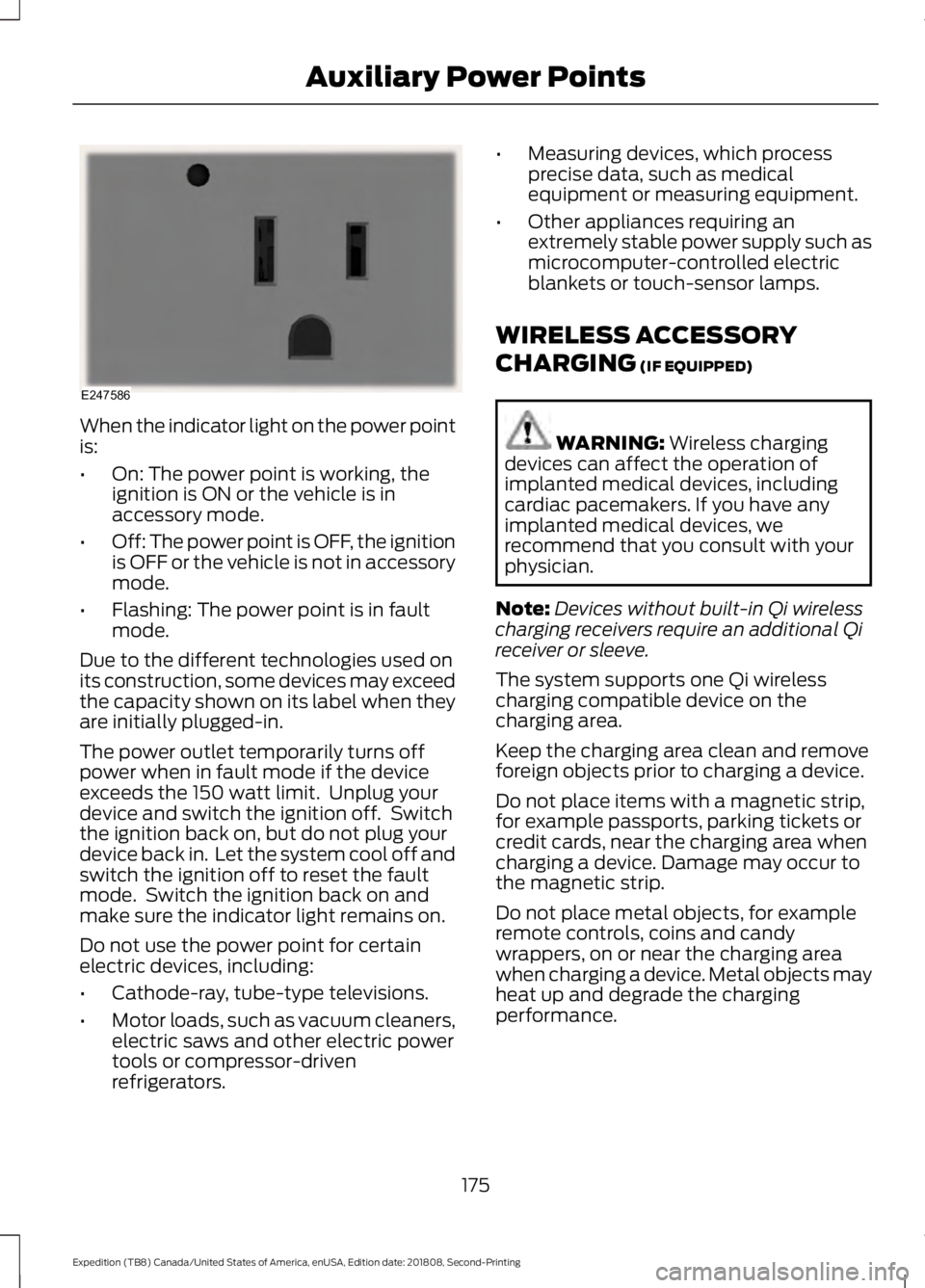
When the indicator light on the power point
is:
•
On: The power point is working, the
ignition is ON or the vehicle is in
accessory mode.
• Off: The power point is OFF, the ignition
is OFF or the vehicle is not in accessory
mode.
• Flashing: The power point is in fault
mode.
Due to the different technologies used on
its construction, some devices may exceed
the capacity shown on its label when they
are initially plugged-in.
The power outlet temporarily turns off
power when in fault mode if the device
exceeds the 150 watt limit. Unplug your
device and switch the ignition off. Switch
the ignition back on, but do not plug your
device back in. Let the system cool off and
switch the ignition off to reset the fault
mode. Switch the ignition back on and
make sure the indicator light remains on.
Do not use the power point for certain
electric devices, including:
• Cathode-ray, tube-type televisions.
• Motor loads, such as vacuum cleaners,
electric saws and other electric power
tools or compressor-driven
refrigerators. •
Measuring devices, which process
precise data, such as medical
equipment or measuring equipment.
• Other appliances requiring an
extremely stable power supply such as
microcomputer-controlled electric
blankets or touch-sensor lamps.
WIRELESS ACCESSORY
CHARGING (IF EQUIPPED) WARNING:
Wireless charging
devices can affect the operation of
implanted medical devices, including
cardiac pacemakers. If you have any
implanted medical devices, we
recommend that you consult with your
physician.
Note: Devices without built-in Qi wireless
charging receivers require an additional Qi
receiver or sleeve.
The system supports one Qi wireless
charging compatible device on the
charging area.
Keep the charging area clean and remove
foreign objects prior to charging a device.
Do not place items with a magnetic strip,
for example passports, parking tickets or
credit cards, near the charging area when
charging a device. Damage may occur to
the magnetic strip.
Do not place metal objects, for example
remote controls, coins and candy
wrappers, on or near the charging area
when charging a device. Metal objects may
heat up and degrade the charging
performance.
175
Expedition (TB8) Canada/United States of America, enUSA, Edition date: 201808, Second-Printing Auxiliary Power PointsE247586
Page 179 of 583
Note:
The rate of charge, or charging power,
is controlled by the device. During charging,
the device and the charger may heat up, this
is normal. If the battery gets hotter than
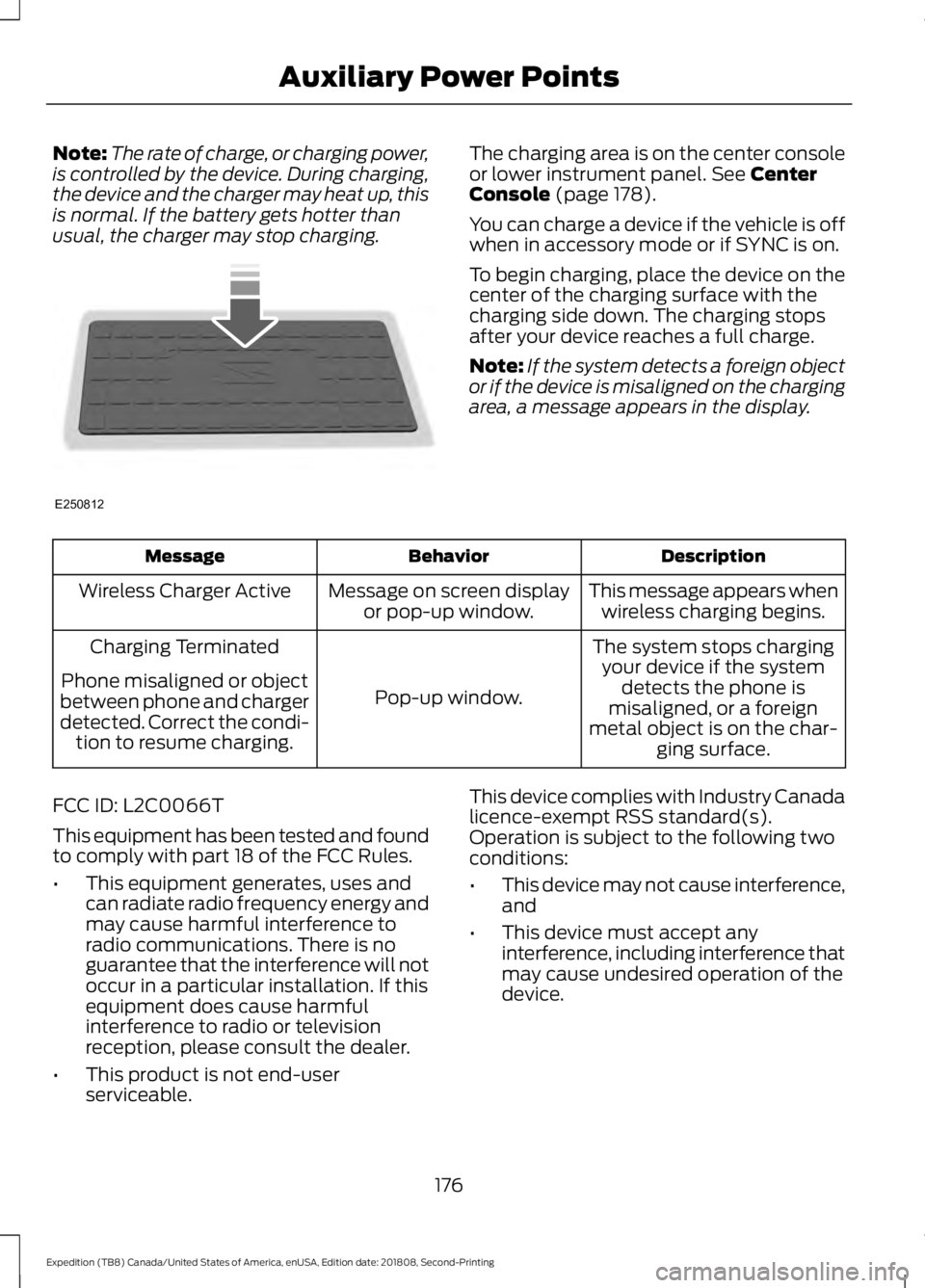
usual, the charger may stop charging. The charging area is on the center console
or lower instrument panel. See Center
Console (page 178).
You can charge a device if the vehicle is off
when in accessory mode or if SYNC is on.
To begin charging, place the device on the
center of the charging surface with the
charging side down. The charging stops
after your device reaches a full charge.
Note: If the system detects a foreign object
or if the device is misaligned on the charging
area, a message appears in the display. Description
Behavior
Message
This message appears whenwireless charging begins.
Message on screen display
or pop-up window.
Wireless Charger Active
The system stops chargingyour device if the system detects the phone is
misaligned, or a foreign
metal object is on the char- ging surface.
Pop-up window.
Charging Terminated
Phone misaligned or object
between phone and charger
detected. Correct the condi- tion to resume charging.
FCC ID: L2C0066T
This equipment has been tested and found
to comply with part 18 of the FCC Rules.
• This equipment generates, uses and
can radiate radio frequency energy and
may cause harmful interference to
radio communications. There is no
guarantee that the interference will not
occur in a particular installation. If this
equipment does cause harmful
interference to radio or television
reception, please consult the dealer.
• This product is not end-user
serviceable. This device complies with Industry Canada
licence-exempt RSS standard(s).
Operation is subject to the following two
conditions:
•
This device may not cause interference,
and
• This device must accept any
interference, including interference that
may cause undesired operation of the
device.
176
Expedition (TB8) Canada/United States of America, enUSA, Edition date: 201808, Second-Printing Auxiliary Power PointsE250812
Page 180 of 583
Note:
Changes or modifications not
expressively approved by the party
responsible for compliance could void the
user's authority to operate the equipment.
The term "IC" before the radio certification
number only signifies that Industry Canada
technical specifications were met.
177
Expedition (TB8) Canada/United States of America, enUSA, Edition date: 201808, Second-Printing Auxiliary Power Points
Page 181 of 583
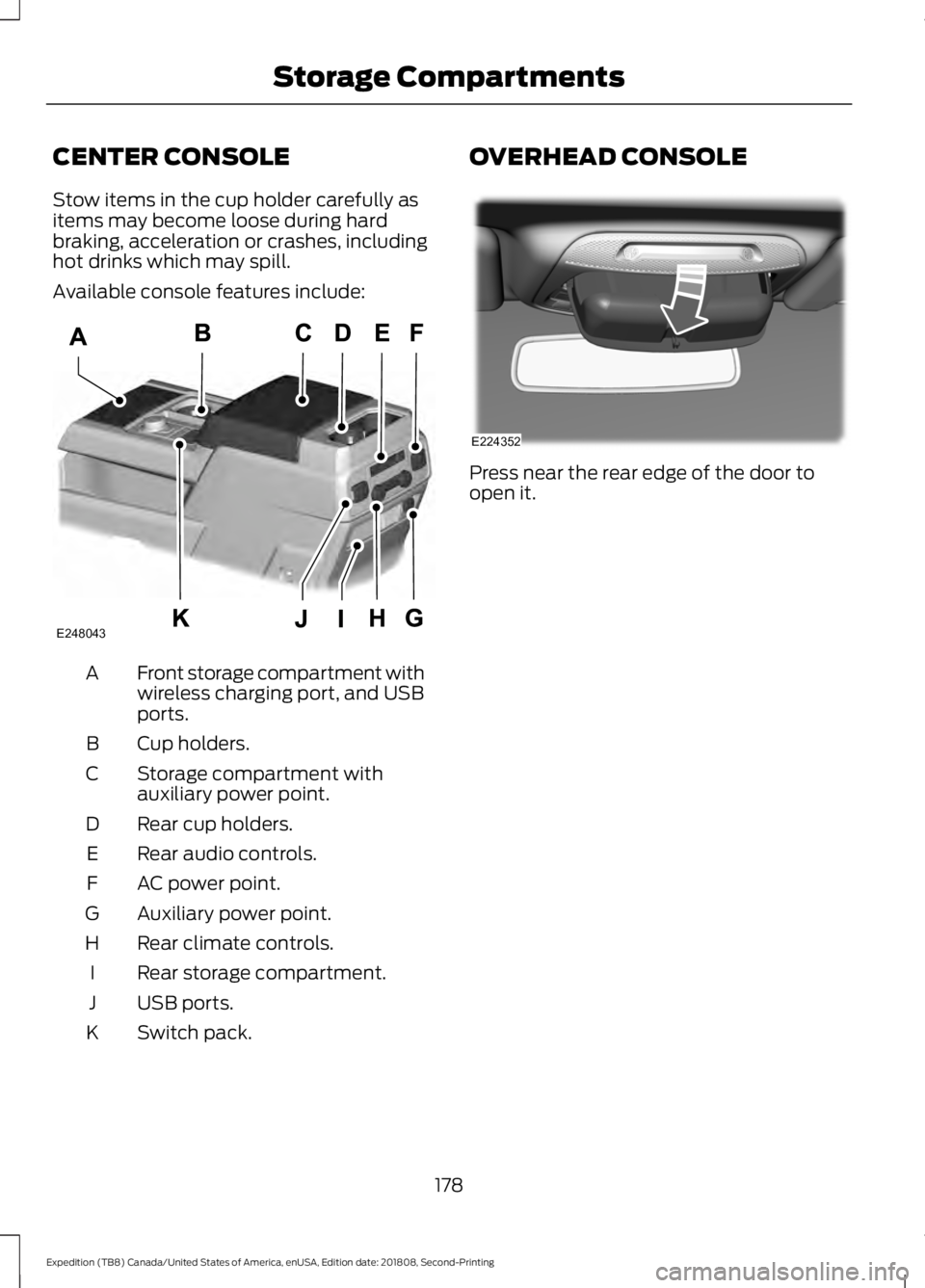
CENTER CONSOLE
Stow items in the cup holder carefully as
items may become loose during hard
braking, acceleration or crashes, including
hot drinks which may spill.
Available console features include:
Front storage compartment with
wireless charging port, and USB
ports.
A
Cup holders.
B
Storage compartment with
auxiliary power point.
C
Rear cup holders.
D
Rear audio controls.
E
AC power point.
F
Auxiliary power point.
G
Rear climate controls.
H
Rear storage compartment.
I
USB ports.
J
Switch pack.
K OVERHEAD CONSOLE
Press near the rear edge of the door to
open it.
178
Expedition (TB8) Canada/United States of America, enUSA, Edition date: 201808, Second-Printing Storage CompartmentsE248043 E224352
Page 327 of 583
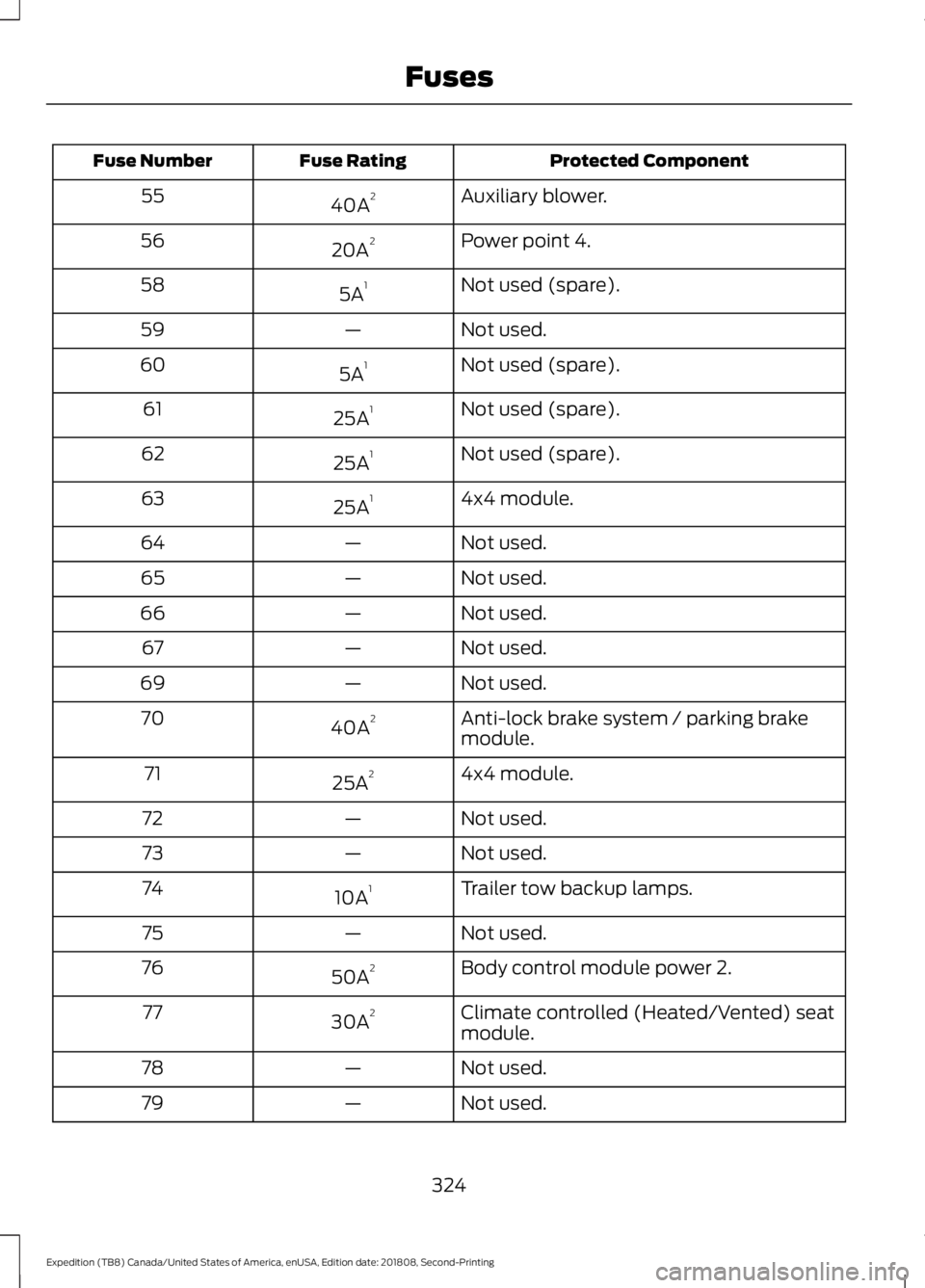
Protected Component
Fuse Rating
Fuse Number
Auxiliary blower.
40A 2
55
Power point 4.
20A 2
56
Not used (spare).
5A 1
58
Not used.
—
59
Not used (spare).
5A 1
60
Not used (spare).
25A 1
61
Not used (spare).
25A 1
62
4x4 module.
25A 1
63
Not used.
—
64
Not used.
—
65
Not used.
—
66
Not used.
—
67
Not used.
—
69
Anti-lock brake system / parking brake
module.
40A 2
70
4x4 module.
25A 2
71
Not used.
—
72
Not used.
—
73
Trailer tow backup lamps.
10A 1
74
Not used.
—
75
Body control module power 2.
50A 2
76
Climate controlled (Heated/Vented) seat
module.
30A 2
77
Not used.
—
78
Not used.
—
79
324
Expedition (TB8) Canada/United States of America, enUSA, Edition date: 201808, Second-Printing Fuses
Page 394 of 583
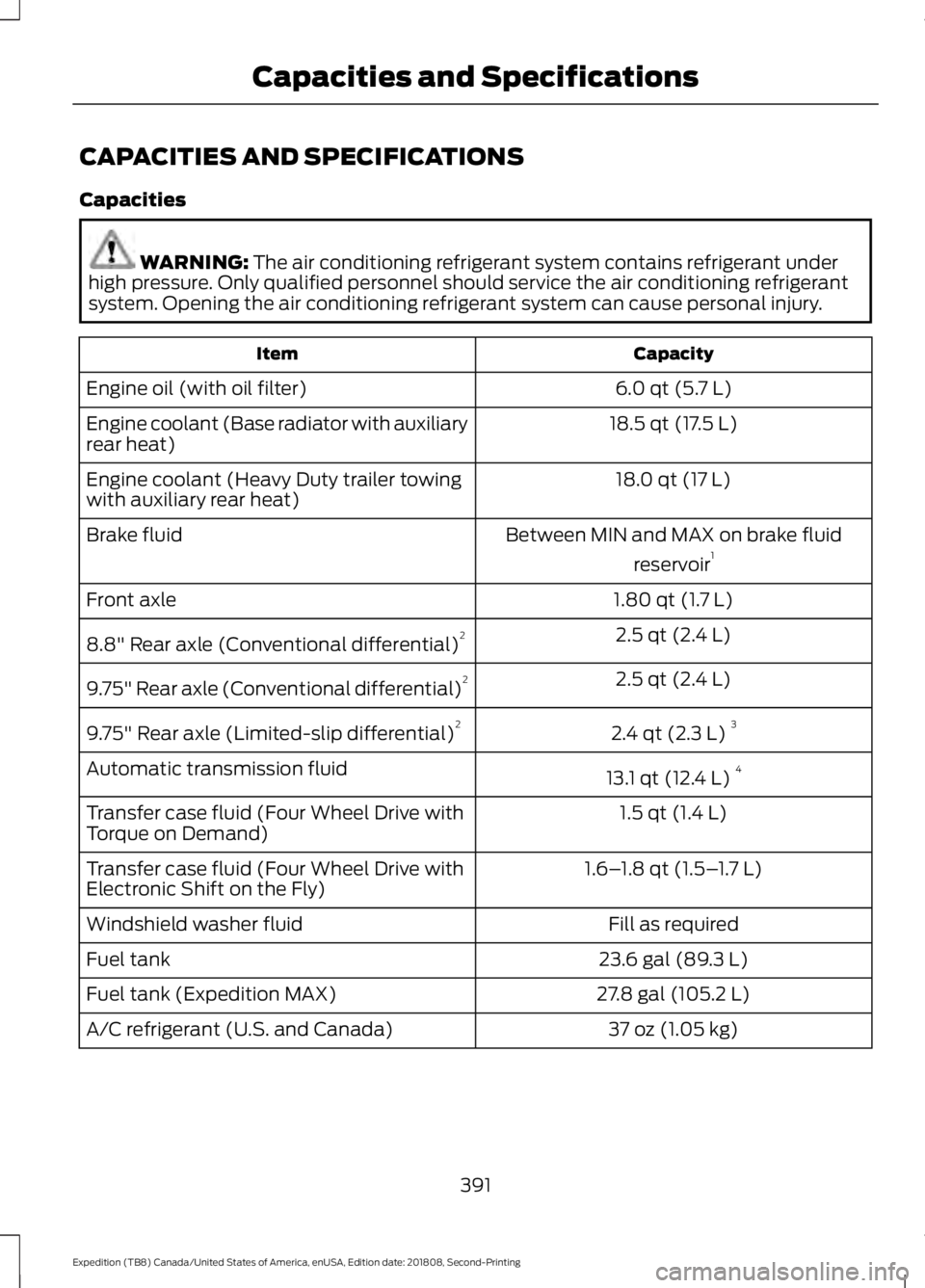
CAPACITIES AND SPECIFICATIONS
Capacities
WARNING: The air conditioning refrigerant system contains refrigerant under
high pressure. Only qualified personnel should service the air conditioning refrigerant
system. Opening the air conditioning refrigerant system can cause personal injury. Capacity
Item
6.0 qt (5.7 L)
Engine oil (with oil filter)
18.5 qt (17.5 L)
Engine coolant (Base radiator with auxiliary
rear heat)
18.0 qt (17 L)
Engine coolant (Heavy Duty trailer towing
with auxiliary rear heat)
Between MIN and MAX on brake fluidreservoir1
Brake fluid
1.80 qt (1.7 L)
Front axle
2.5 qt (2.4 L)
8.8" Rear axle (Conventional differential) 2
2.5 qt (2.4 L)
9.75" Rear axle (Conventional differential) 2
2.4 qt (2.3 L)3
9.75" Rear axle (Limited-slip differential) 2
13.1 qt (12.4 L)4
Automatic transmission fluid
1.5 qt (1.4 L)
Transfer case fluid (Four Wheel Drive with
Torque on Demand)
1.6–1.8 qt (1.5– 1.7 L)
Transfer case fluid (Four Wheel Drive with
Electronic Shift on the Fly)
Fill as required
Windshield washer fluid
23.6 gal (89.3 L)
Fuel tank
27.8 gal (105.2 L)
Fuel tank (Expedition MAX)
37 oz (1.05 kg)
A/C refrigerant (U.S. and Canada)
391
Expedition (TB8) Canada/United States of America, enUSA, Edition date: 201808, Second-Printing Capacities and Specifications
Page 420 of 583
•
To allow your vehicle to provide
location information, including: GPS
and speed.
• To allow the app to send push
notifications using the vehicle display
and voice capabilities while running in
a background state. Push notifications
may be particularly useful for news or
location based apps.
Note: You only need to grant permissions
the first time you use an app with SYNC.
Note: Ford is not responsible or liable for
any damages or loss of privacy relating to
usage of an app, or dissemination of any
vehicle data that you approve Ford to
provide to an app.
Enabling SYNC Mobile Apps
In order to enable mobile apps, SYNC
requires user consent to send and receive
app authorization information and updates
using the data plan associated with the
connected device.
Data is sent to Ford in the United States
through the connected device. The
information is encrypted and includes your
VIN, SYNC module number, anonymous
usage statistics and debugging
information. Updates may take place.
Note: You must enable mobile apps for
each connected device the first time you
select a mobile app using the system.
Note: Standard data rates apply. Ford is
not responsible for any additional charges
you may receive from your service provider,
when your vehicle sends or receives data
through the connected device. This includes
any additional charges incurred due to
driving in areas when roaming out of a home
network. USING SYNC™ WITH YOUR
MEDIA PLAYER
SYNC supports digital media sources
including: iPod, Bluetooth devices, and
most USB drives. SYNC also supports
audio formats, such as MP3, WMA, WAV
and ACC.
Media Sources
The AUX or MEDIA button allows you to
view and select available media sources.
Press the
AUX or MEDIA button to view
your sources. Use the directional arrows
and OK button to select your source. You
can also use the steering wheel audio
controls.
Audio Voice Commands Press the voice button. You can
do things like play a specific song
or album, skip to the next song,
or tune to a radio station. When prompted,
say a command. See the following table
for example commands. Not all
commands may be available on your
vehicle. Command
___ List of Commands Help
Pause Play
Next Track
Previous Track AM ___FM ___
CD Player
417
Expedition (TB8) Canada/United States of America, enUSA, Edition date: 201808, Second-Printing SYNC™E142599
Page 571 of 583
Accessing the Clock Settings.......................
400
Accessing the Media Source Menu............400
Accessing the Phone Features.................... 400
Accessing the Settings Menu....................... 400
Accessing the Sound Settings..................... 400
Adjusting the Volume...................................... 400
Changing Radio Stations............................... 400
Listening to the Radio...................................... 401
Playing or Pausing Media................................ 401
Switching Radio Text On and Off................401
Switching Repeat Mode On and Off...........401
Switching Shuffle Mode On and Off..........401
Switching the Audio Unit On and Off.........401
Switching the Display On and Off...............401
Using Seek, Fast Forward and Reverse.............................................................. 401
Using the Display Control............................... 401
Using the Number Block................................. 401
Autolamps........................................................95 Windshield Wiper Activated
Headlamps........................................................ 95
Automatic Climate Control......................144 Accessing Rear Climate Controls.................144
Directing Air to the Footwell Air
Vents.................................................................. 144
Directing Air to the Instrument Panel Air Vents.................................................................. 144
Setting the Blower Motor Speed.................. 144
Setting the Temperature................................. 144
Switching Auto Mode On and Off................144
Switching Defrost On and Off....................... 145
Switching Dual Zone Mode On and Off........................................................................\
145
Switching Maximum Air Conditioning On and Off............................................................... 145
Switching Maximum Defrost On and Off........................................................................\
145
Switching Recirculated Air On and Off....................................................................... 146
Switching the Air Conditioning On and Off........................................................................\
145
Switching the Climate Control On and Off........................................................................\
145
Switching the Heated Seats On and Off........................................................................\
145
Switching the Ventilated Seats On and Off....................................................................... 146Automatic High Beam Control.................96
Automatic High Beam Indicator..................... 97
Switching the System On and Off.................97
Automatic Transmission...........................199 Automatic Transmission Adaptive
Learning........................................................... 205
Brake-Shift Interlock........................................ 204
If Your Vehicle Gets Stuck In Mud or Snow................................................................. 205
SelectShift™ Automatic Transmission.................................................. 203
Understanding the Shift Positions of your Automatic Transmission............................ 199
Automatic Transmission Fluid Check............................................................339
Auto-Start-Stop...........................................185 Disabling Auto-Start-Stop............................. 186
Enabling Auto-Start-Stop.............................. 185
Autowipers........................................................92
Autowipers Settings............................................ 93
Auxiliary Power Points................................174 110 Volt AC Power Point.................................... 174
12 Volt DC Power Point...................................... 174
USB Port and Power Point Locations..........174
B
Battery See: Changing the 12V Battery...................... 341
Blind Spot Information System
.............254
........................................................................\
.......... 254
Blind Spot Information System with Trailer Tow..................................................................... 256
Switching the System On and Off..............258
System Errors...................................................... 258
Using the Blind Spot Information System.............................................................. 255
BLIS See: Blind Spot Information System..........254
Bonnet Lock See: Opening and Closing the Hood...........331
Booster Seats
...................................................31
Types of Booster Seats...................................... 32
Brake Fluid Check
.......................................340
Brakes................................................................215 General Information.......................................... 215
Breaking-In....................................................303
Bulb Specification Chart..........................396
568
Expedition (TB8) Canada/United States of America, enUSA, Edition date: 201808, Second-Printing Index