automatic FORD EXPEDITION 2020 Owner's Manual
[x] Cancel search | Manufacturer: FORD, Model Year: 2020, Model line: EXPEDITION, Model: FORD EXPEDITION 2020Pages: 542, PDF Size: 6.73 MB
Page 105 of 542
Opening the Windows
You can only open the windows for a short
time after you unlock your vehicle with the
remote control. After you unlock your
vehicle, press and hold the remote control
unlock button to open the windows.
Release the button once movement starts.
Press the lock or unlock button to stop
movement.
Closing the Windows
WARNING: When closing the
power windows, verify they are free of
obstruction and make sure that children
and pets are not in the proximity of the
window openings.
To close the windows, press and hold the
remote control lock button. Release the
button once movement starts. Press the
lock or unlock button to stop movement.
EXTERIOR MIRRORS
Power Exterior Mirrors WARNING:
Do not adjust the
mirrors when your vehicle is moving. This
could result in the loss of control of your
vehicle, serious personal injury or death.
Note: Do not use an ice scraper on the
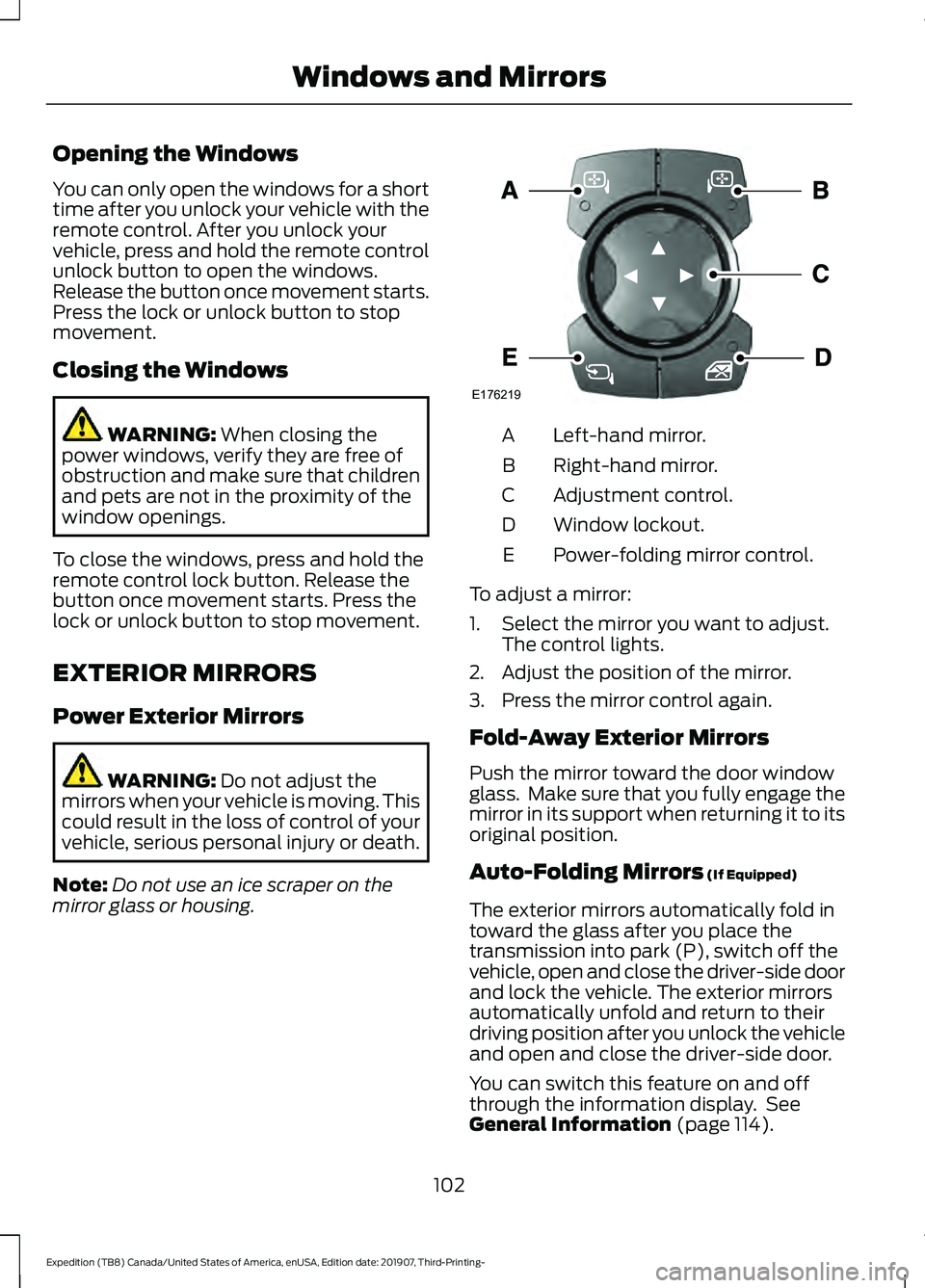
mirror glass or housing. Left-hand mirror.
A
Right-hand mirror.
B
Adjustment control.
C
Window lockout.
D
Power-folding mirror control.
E
To adjust a mirror:
1. Select the mirror you want to adjust. The control lights.
2. Adjust the position of the mirror.
3. Press the mirror control again.
Fold-Away Exterior Mirrors
Push the mirror toward the door window
glass. Make sure that you fully engage the
mirror in its support when returning it to its
original position.
Auto-Folding Mirrors
(If Equipped)
The exterior mirrors automatically fold in
toward the glass after you place the
transmission into park (P), switch off the
vehicle, open and close the driver-side door
and lock the vehicle. The exterior mirrors
automatically unfold and return to their
driving position after you unlock the vehicle
and open and close the driver-side door.
You can switch this feature on and off
through the information display. See
General Information
(page 114).
102
Expedition (TB8) Canada/United States of America, enUSA, Edition date: 201907, Third-Printing- Windows and MirrorsE176219
Page 106 of 542
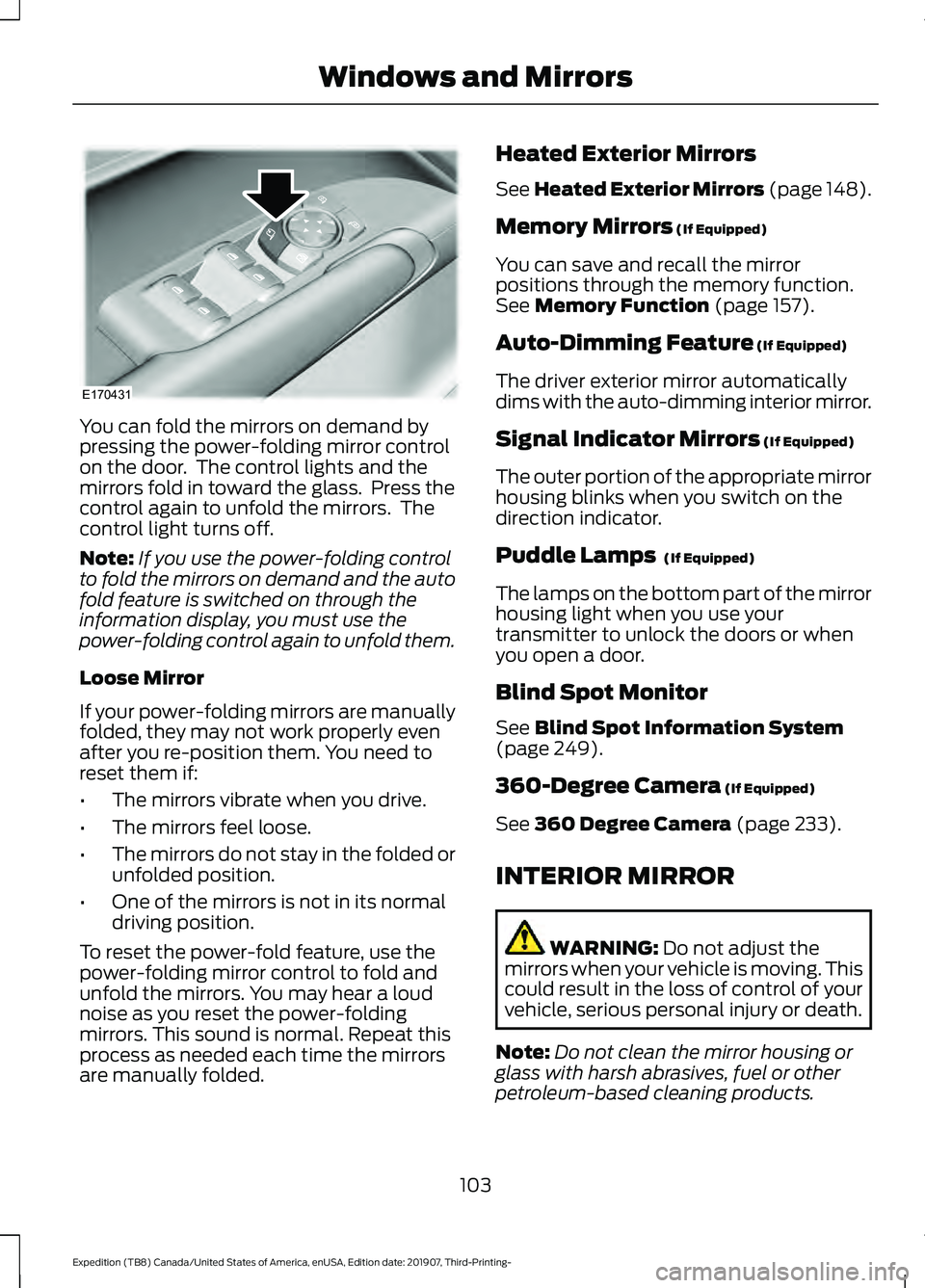
You can fold the mirrors on demand by
pressing the power-folding mirror control
on the door. The control lights and the
mirrors fold in toward the glass. Press the
control again to unfold the mirrors. The
control light turns off.
Note:
If you use the power-folding control
to fold the mirrors on demand and the auto
fold feature is switched on through the
information display, you must use the
power-folding control again to unfold them.
Loose Mirror
If your power-folding mirrors are manually
folded, they may not work properly even
after you re-position them. You need to
reset them if:
• The mirrors vibrate when you drive.
• The mirrors feel loose.
• The mirrors do not stay in the folded or
unfolded position.
• One of the mirrors is not in its normal
driving position.
To reset the power-fold feature, use the
power-folding mirror control to fold and
unfold the mirrors. You may hear a loud
noise as you reset the power-folding
mirrors. This sound is normal. Repeat this
process as needed each time the mirrors
are manually folded. Heated Exterior Mirrors
See Heated Exterior Mirrors (page 148).
Memory Mirrors
(If Equipped)
You can save and recall the mirror
positions through the memory function.
See
Memory Function (page 157).
Auto-Dimming Feature
(If Equipped)
The driver exterior mirror automatically
dims with the auto-dimming interior mirror.
Signal Indicator Mirrors
(If Equipped)
The outer portion of the appropriate mirror
housing blinks when you switch on the
direction indicator.
Puddle Lamps
(If Equipped)
The lamps on the bottom part of the mirror
housing light when you use your
transmitter to unlock the doors or when
you open a door.
Blind Spot Monitor
See
Blind Spot Information System
(page 249).
360-Degree Camera
(If Equipped)
See
360 Degree Camera (page 233).
INTERIOR MIRROR WARNING:
Do not adjust the
mirrors when your vehicle is moving. This
could result in the loss of control of your
vehicle, serious personal injury or death.
Note: Do not clean the mirror housing or
glass with harsh abrasives, fuel or other
petroleum-based cleaning products.
103
Expedition (TB8) Canada/United States of America, enUSA, Edition date: 201907, Third-Printing- Windows and MirrorsE170431
Page 107 of 542
You can adjust the interior mirror to your
preference. Some mirrors also have a
second pivot point. This lets you move the
mirror head up or down and from side to
side.
Manual Dimming Mirror
Pull the tab below the mirror toward you
to reduce the effect of bright light from
behind.
Automatic Dimming Mirror (If Equipped)
Note:
Do not block the sensors on the front
and back of the mirror. A rear center
passenger or raised rear center head
restraint may also block light from reaching
the sensor.
The mirror dims to reduce the effect of
bright light from behind. It returns to
normal when the bright light from behind
is no longer present or if you shift into
reverse (R).
CHILDMINDER MIRROR
On overhead consoles, the childminder
mirror allows the driver to view the rear
seating area. WARNING: Do not use the
childminder mirror to view rearward
traffic, do not allow rear passengers to
distract you from the driving task, and
make sure the rear view mirror has a
clear view of rearward traffic. Failure to
do so could increase the risk of a crash
from an unseen vehicle, which may result
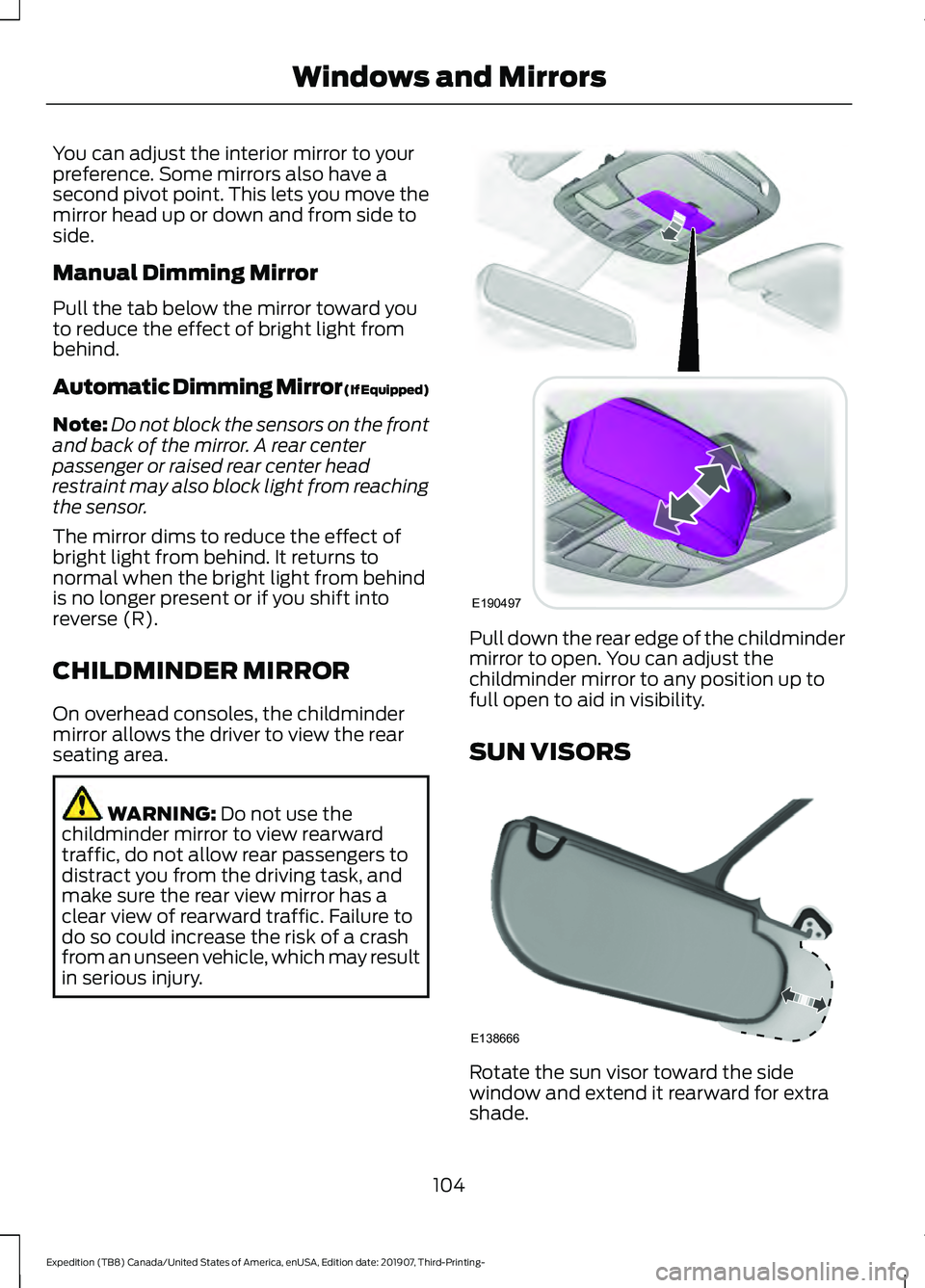
in serious injury. Pull down the rear edge of the childminder
mirror to open. You can adjust the
childminder mirror to any position up to
full open to aid in visibility.
SUN VISORS
Rotate the sun visor toward the side
window and extend it rearward for extra
shade.
104
Expedition (TB8) Canada/United States of America, enUSA, Edition date: 201907, Third-Printing- Windows and MirrorsE190497 E138666
Page 108 of 542
Illuminated Vanity Mirror
Lift the cover to switch the lamp on.
MOONROOF (IF EQUIPPED)
WARNING:
Do not let children play
with the moonroof or leave them
unattended in the vehicle. They may
seriously hurt themselves. WARNING:
When closing the
moonroof, you should verify that it is free
of obstructions and make sure that
children and pets are not in the proximity
of the roof opening.
The moonroof controls are located on the
overhead console and have a one-touch
open and close feature. To stop its
movement during one-touch operation,
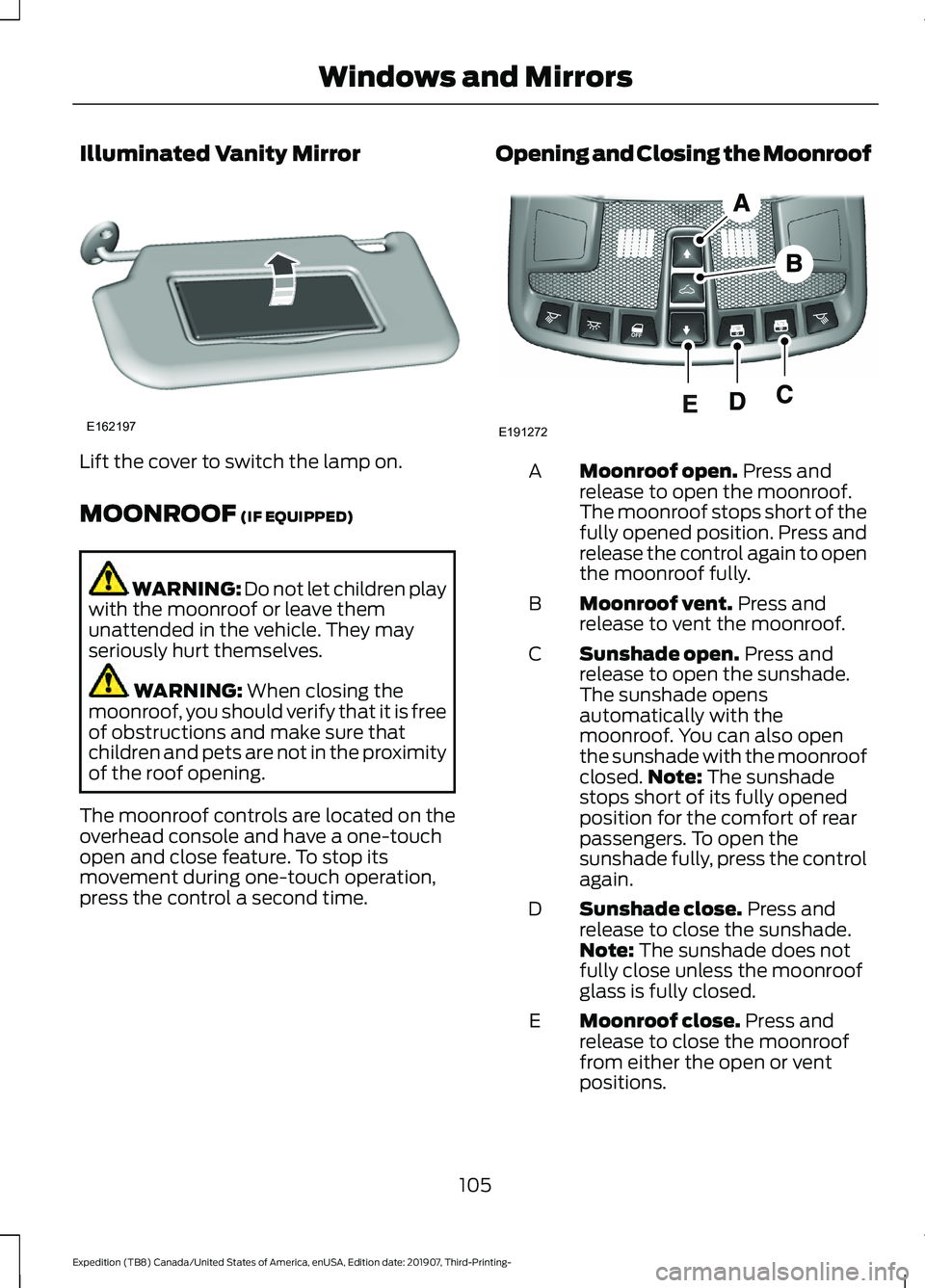
press the control a second time. Opening and Closing the Moonroof Moonroof open.
Press and
release to open the moonroof.
The moonroof stops short of the
fully opened position. Press and
release the control again to open
the moonroof fully.
A
Moonroof vent.
Press and
release to vent the moonroof.
B
Sunshade open.
Press and
release to open the sunshade.
The sunshade opens
automatically with the
moonroof. You can also open
the sunshade with the moonroof
C
closed. Note:
The sunshade
stops short of its fully opened
position for the comfort of rear
passengers. To open the
sunshade fully, press the control
again.
Sunshade close.
Press and
release to close the sunshade.
Note:
The sunshade does not
fully close unless the moonroof
glass is fully closed.
D
Moonroof close.
Press and
release to close the moonroof
from either the open or vent
positions.
E
105
Expedition (TB8) Canada/United States of America, enUSA, Edition date: 201907, Third-Printing- Windows and MirrorsE162197 E191272
Page 109 of 542
Bounce-Back
The moonroof automatically reverses
some distance if an obstacle is detected
while closing.
To override this feature, press and hold the
moonroof close control within two
seconds after the roof comes to a stop
following a bounce-back reversal.
LIFTGATE WINDOW
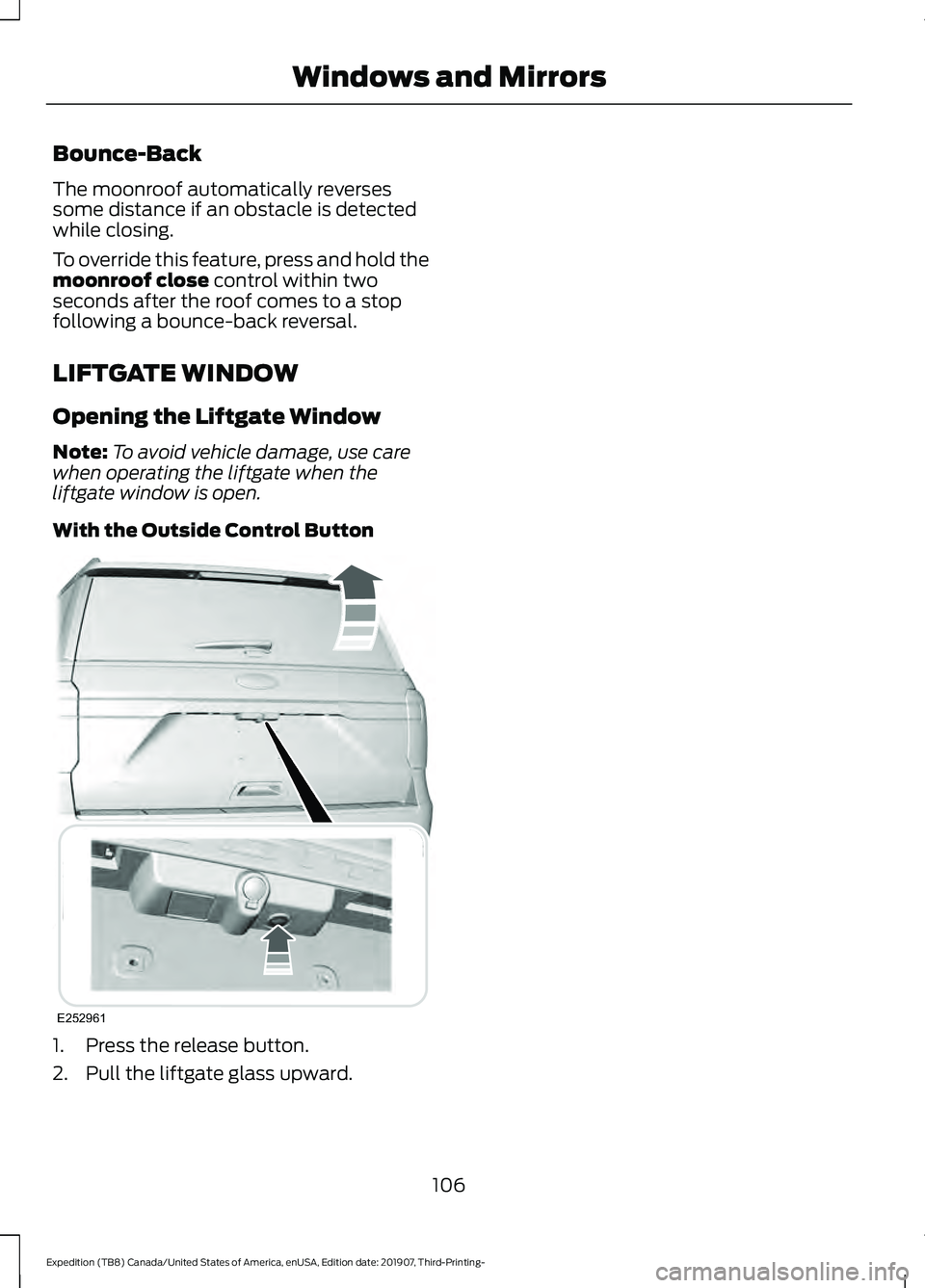
Opening the Liftgate Window
Note: To avoid vehicle damage, use care
when operating the liftgate when the
liftgate window is open.
With the Outside Control Button 1. Press the release button.
2. Pull the liftgate glass upward.
106
Expedition (TB8) Canada/United States of America, enUSA, Edition date: 201907, Third-Printing- Windows and MirrorsE252961
Page 113 of 542
Turbo Boost Gauge
Indicates the amount of manifold air
pressure in the engine.
WARNING LAMPS AND
INDICATORS
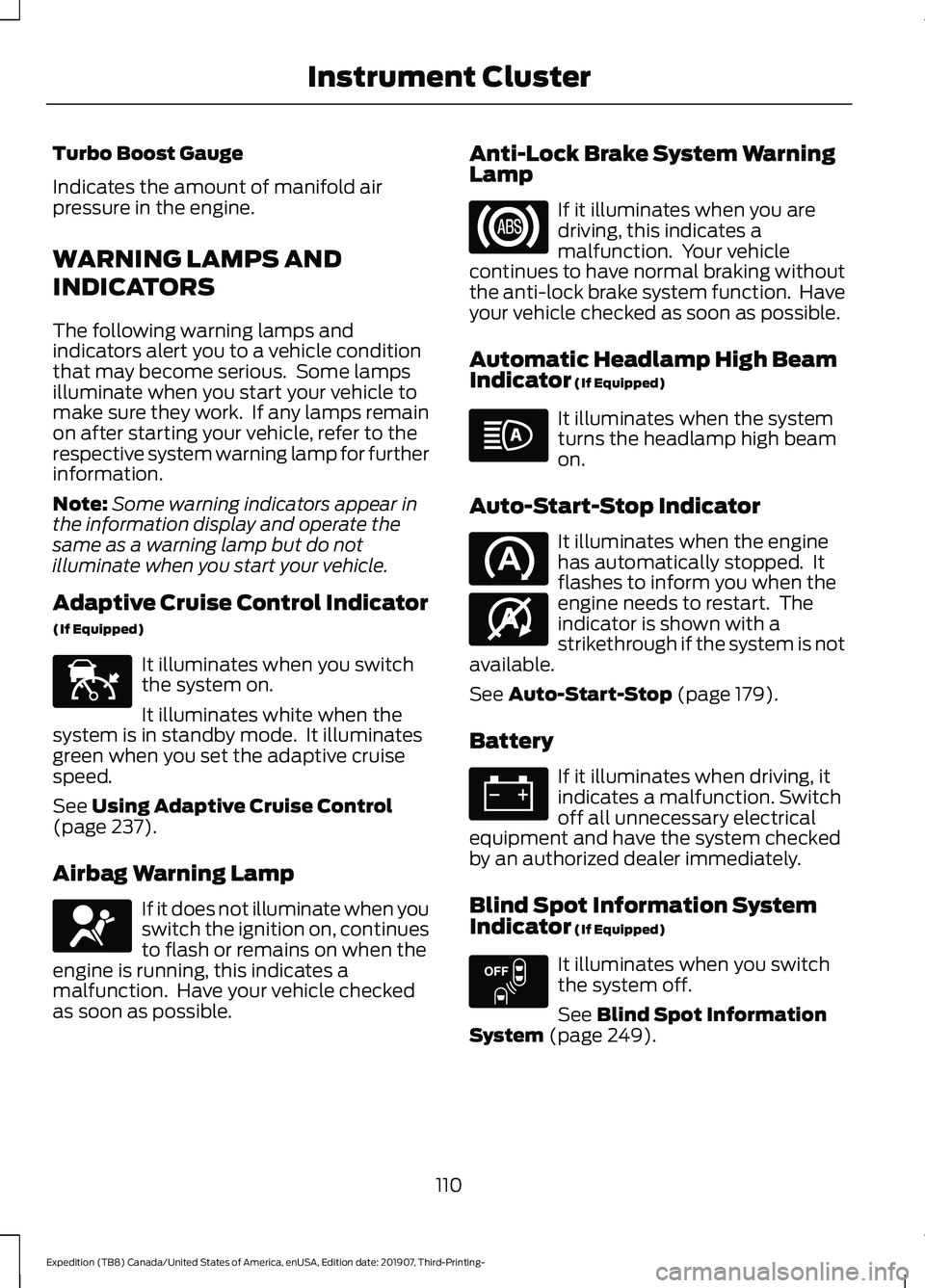
The following warning lamps and
indicators alert you to a vehicle condition
that may become serious. Some lamps
illuminate when you start your vehicle to
make sure they work. If any lamps remain
on after starting your vehicle, refer to the
respective system warning lamp for further
information.
Note:
Some warning indicators appear in
the information display and operate the
same as a warning lamp but do not
illuminate when you start your vehicle.
Adaptive Cruise Control Indicator
(If Equipped) It illuminates when you switch
the system on.
It illuminates white when the
system is in standby mode. It illuminates
green when you set the adaptive cruise
speed.
See Using Adaptive Cruise Control
(page 237).
Airbag Warning Lamp If it does not illuminate when you
switch the ignition on, continues
to flash or remains on when the
engine is running, this indicates a
malfunction. Have your vehicle checked
as soon as possible. Anti-Lock Brake System Warning
Lamp If it illuminates when you are
driving, this indicates a
malfunction. Your vehicle
continues to have normal braking without
the anti-lock brake system function. Have
your vehicle checked as soon as possible.
Automatic Headlamp High Beam
Indicator
(If Equipped) It illuminates when the system
turns the headlamp high beam
on.
Auto-Start-Stop Indicator It illuminates when the engine
has automatically stopped. It
flashes to inform you when the
engine needs to restart. The
indicator is shown with a
strikethrough if the system is not
available.
See
Auto-Start-Stop (page 179).
Battery If it illuminates when driving, it
indicates a malfunction. Switch
off all unnecessary electrical
equipment and have the system checked
by an authorized dealer immediately.
Blind Spot Information System
Indicator
(If Equipped) It illuminates when you switch
the system off.
See
Blind Spot Information
System (page 249).
110
Expedition (TB8) Canada/United States of America, enUSA, Edition date: 201907, Third-Printing- Instrument ClusterE144524 E67017 E146361 E151262
Page 114 of 542
Brake System Warning Lamp
WARNING: Driving your vehicle
with the warning lamp on is dangerous.
A significant decrease in braking
performance may occur. It may take you
longer to stop your vehicle. Have your
vehicle checked as soon as possible.
Driving extended distances with the
parking brake engaged can cause brake
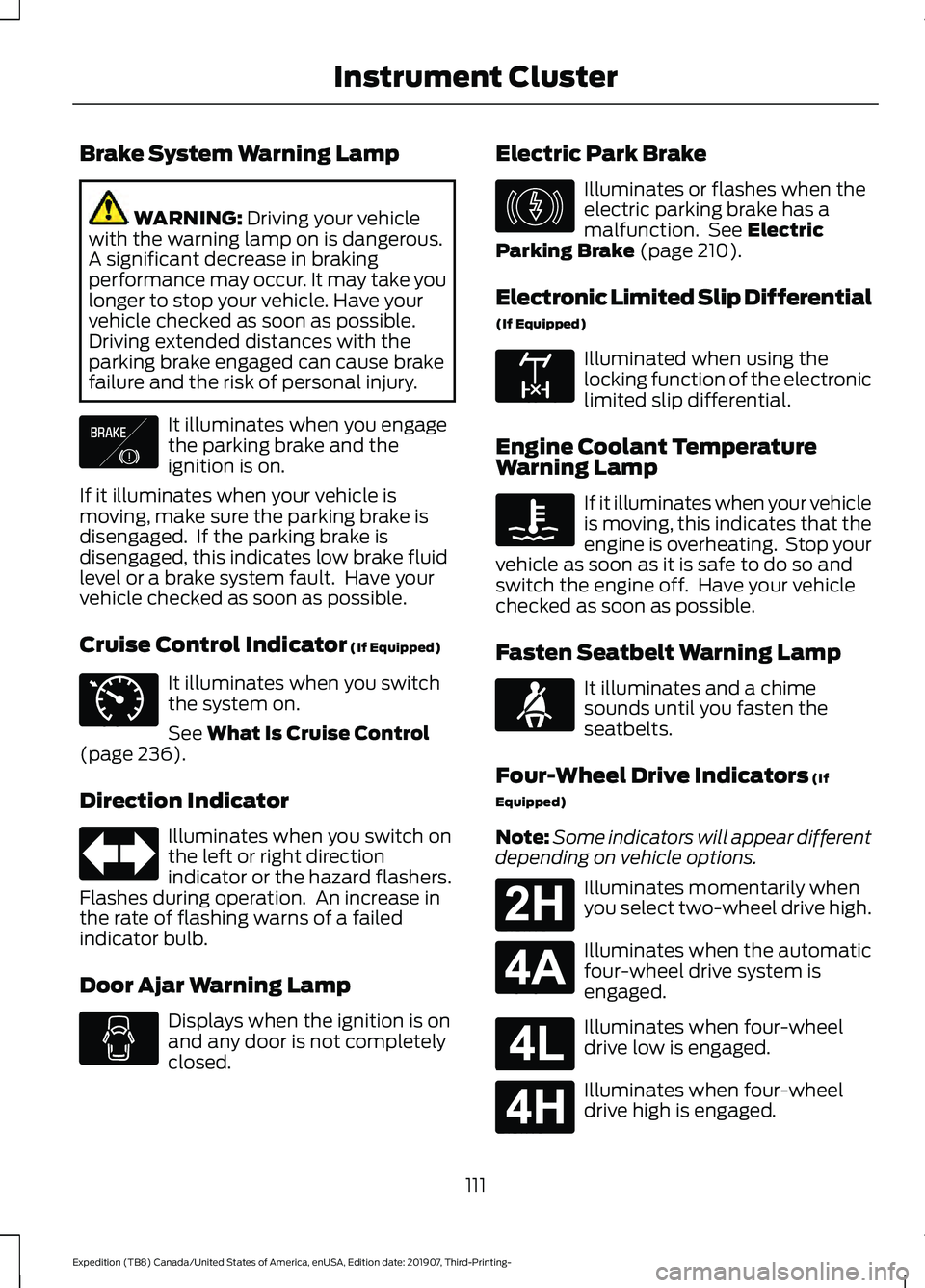
failure and the risk of personal injury. It illuminates when you engage
the parking brake and the
ignition is on.
If it illuminates when your vehicle is
moving, make sure the parking brake is
disengaged. If the parking brake is
disengaged, this indicates low brake fluid
level or a brake system fault. Have your
vehicle checked as soon as possible.
Cruise Control Indicator
(If Equipped) It illuminates when you switch
the system on.
See
What Is Cruise Control
(page 236).
Direction Indicator Illuminates when you switch on
the left or right direction
indicator or the hazard flashers.
Flashes during operation. An increase in
the rate of flashing warns of a failed
indicator bulb.
Door Ajar Warning Lamp Displays when the ignition is on
and any door is not completely
closed. Electric Park Brake Illuminates or flashes when the
electric parking brake has a
malfunction. See
Electric
Parking Brake (page 210).
Electronic Limited Slip Differential
(If Equipped) Illuminated when using the
locking function of the electronic
limited slip differential.
Engine Coolant Temperature
Warning Lamp If it illuminates when your vehicle
is moving, this indicates that the
engine is overheating. Stop your
vehicle as soon as it is safe to do so and
switch the engine off. Have your vehicle
checked as soon as possible.
Fasten Seatbelt Warning Lamp It illuminates and a chime
sounds until you fasten the
seatbelts.
Four-Wheel Drive Indicators
(If
Equipped)
Note: Some indicators will appear different
depending on vehicle options. Illuminates momentarily when
you select two-wheel drive high.
Illuminates when the automatic
four-wheel drive system is
engaged.
Illuminates when four-wheel
drive low is engaged.
Illuminates when four-wheel
drive high is engaged.
111
Expedition (TB8) Canada/United States of America, enUSA, Edition date: 201907, Third-Printing- Instrument ClusterE138644 E71340 E146190 E163170 E71880 E181778 E181781 E181780 E181779
Page 116 of 542
Normally, it illuminates until the engine is
cranked and automatically turns off if no
malfunctions are present. However, if after
15 seconds it flashes eight times, this
indicates that your vehicle is not ready for
Inspection and Maintenance (I/M) testing.
See Catalytic Converter (page 190).
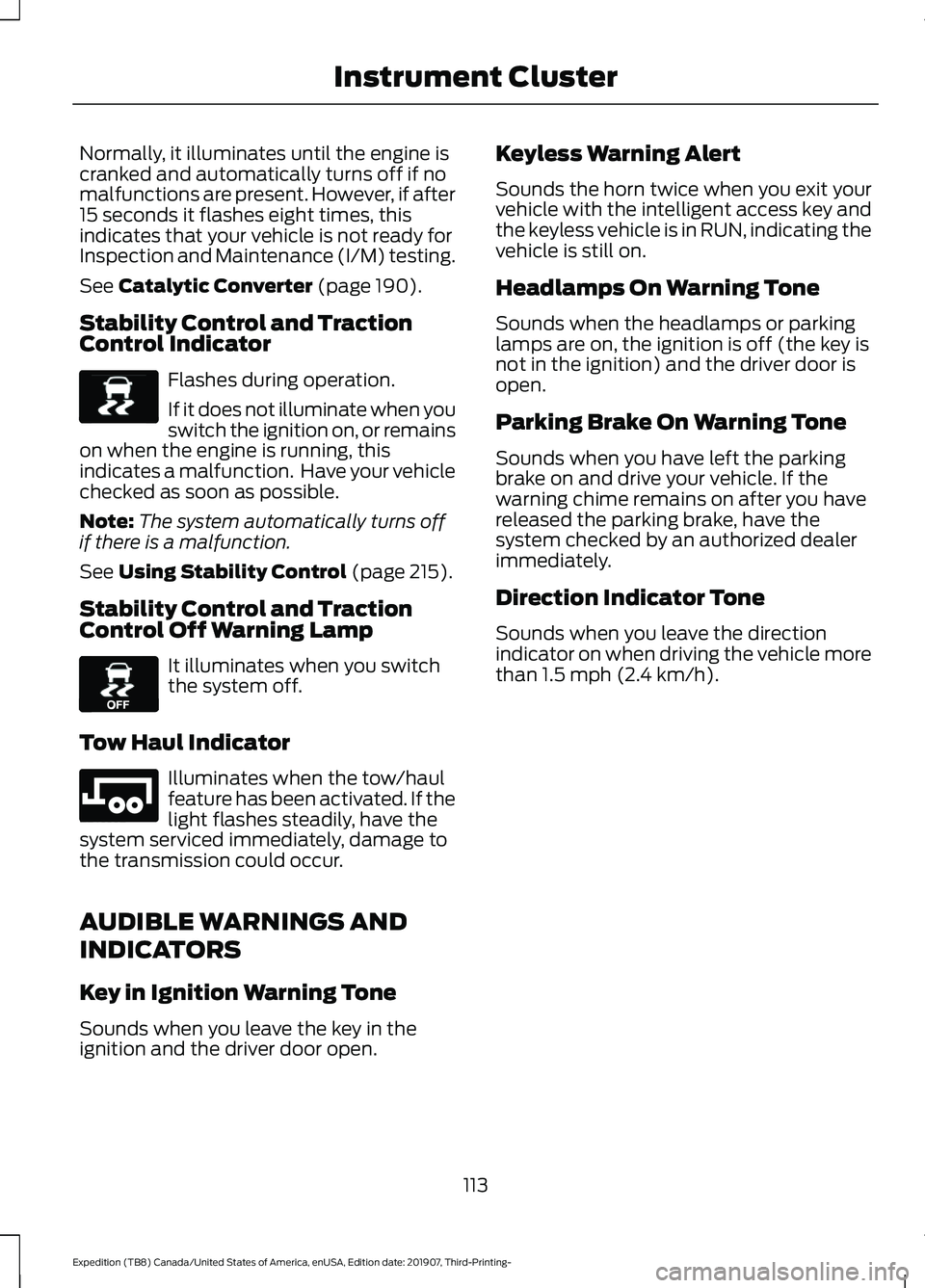
Stability Control and Traction
Control Indicator Flashes during operation.
If it does not illuminate when you
switch the ignition on, or remains
on when the engine is running, this
indicates a malfunction. Have your vehicle
checked as soon as possible.
Note: The system automatically turns off
if there is a malfunction.
See
Using Stability Control (page 215).
Stability Control and Traction
Control Off Warning Lamp It illuminates when you switch
the system off.
Tow Haul Indicator Illuminates when the tow/haul
feature has been activated. If the
light flashes steadily, have the
system serviced immediately, damage to
the transmission could occur.
AUDIBLE WARNINGS AND
INDICATORS
Key in Ignition Warning Tone
Sounds when you leave the key in the
ignition and the driver door open. Keyless Warning Alert
Sounds the horn twice when you exit your
vehicle with the intelligent access key and
the keyless vehicle is in RUN, indicating the
vehicle is still on.
Headlamps On Warning Tone
Sounds when the headlamps or parking
lamps are on, the ignition is off (the key is
not in the ignition) and the driver door is
open.
Parking Brake On Warning Tone
Sounds when you have left the parking
brake on and drive your vehicle. If the
warning chime remains on after you have
released the parking brake, have the
system checked by an authorized dealer
immediately.
Direction Indicator Tone
Sounds when you leave the direction
indicator on when driving the vehicle more
than
1.5 mph (2.4 km/h).
113
Expedition (TB8) Canada/United States of America, enUSA, Edition date: 201907, Third-Printing- Instrument ClusterE138639 E130458 E246592
Page 126 of 542
Settings
Remote Start
Windows
Wiper Controls
Enter the submenu and select
your setting
MyKey
Units
Display Setup
Temperature
Tire Pressure
Language
INFORMATION MESSAGES
Note: Depending on your vehicle options
and instrument cluster type, not all of the
messages will display or be available. The
information display may abbreviate or
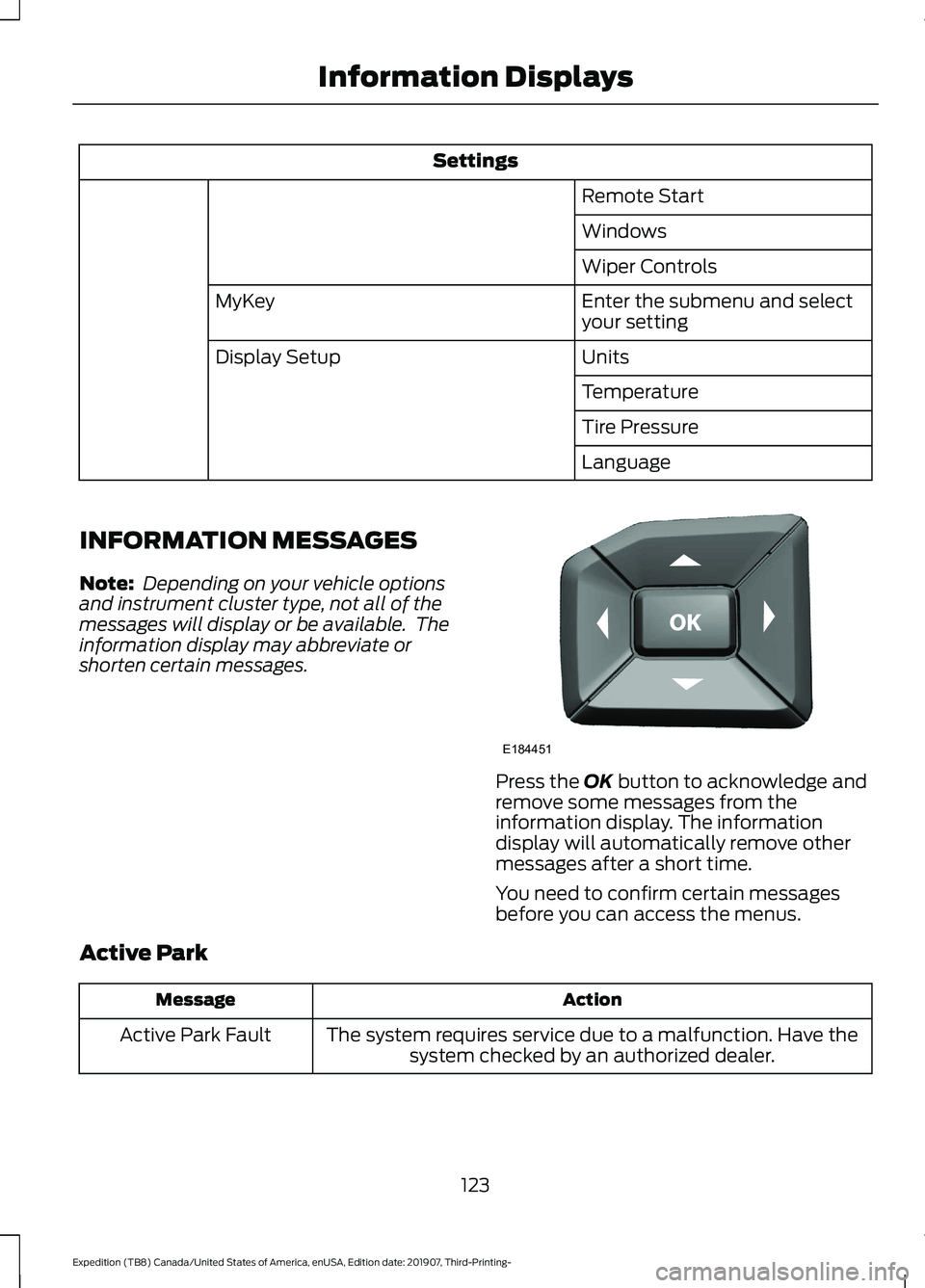
shorten certain messages. Press the OK button to acknowledge and
remove some messages from the
information display. The information
display will automatically remove other
messages after a short time.
You need to confirm certain messages
before you can access the menus.
Active Park Action
Message
The system requires service due to a malfunction. Have thesystem checked by an authorized dealer.
Active Park Fault
123
Expedition (TB8) Canada/United States of America, enUSA, Edition date: 201907, Third-Printing- Information DisplaysE184451
Page 127 of 542
Adaptive Cruise Control
Action
Message
A radar malfunction is preventing the adaptive cruise controlfrom engaging. See Using Adaptive Cruise Control (page
237).
Adaptive Cruise
Malfunction
A condition exists such that the adaptive cruise cannot func-tion properly. See
Using Adaptive Cruise Control (page
237).
Adaptive Cruise Not
Available
You have a blocked sensor due to bad weather, ice, mud or
water in front of the radar sensor. You can typically clean the
sensor to resolve. See Using Adaptive Cruise Control
(page
237).
Adaptive Cruise Not
Available Sensor
Blocked See Manual
The system has disabled the automatic braking.
Normal Cruise Active
Adaptive Braking Off
A radar malfunction is preventing the adaptive cruise controlfrom engaging.
Front Sensor Not Aligned
The adaptive cruise has reinstated controls to the driver.
Adaptive Cruise - Driver
Resume Control
Your vehicle speed is too slow to activate the adaptive cruise.
Adaptive Cruise Speed
Too Low to Activate
The adaptive cruise is automatically adjusting the gap
distance and you need to shift the transmission into a lower gear.
Adaptive Cruise Shift
Down
AdvanceTrac and Traction Control Action
Message
The system detects a condition that requires service. Contactan authorized dealer as soon as possible.
Service AdvanceTrac
The status of the AdvanceTrac system after you switched it off.
AdvanceTrac Off
The status of the AdvanceTrac system after you switched it on.
AdvanceTrac On
124
Expedition (TB8) Canada/United States of America, enUSA, Edition date: 201907, Third-Printing- Information Displays