reset FORD EXPEDITION 2020 Workshop Manual
[x] Cancel search | Manufacturer: FORD, Model Year: 2020, Model line: EXPEDITION, Model: FORD EXPEDITION 2020Pages: 542, PDF Size: 6.73 MB
Page 479 of 542
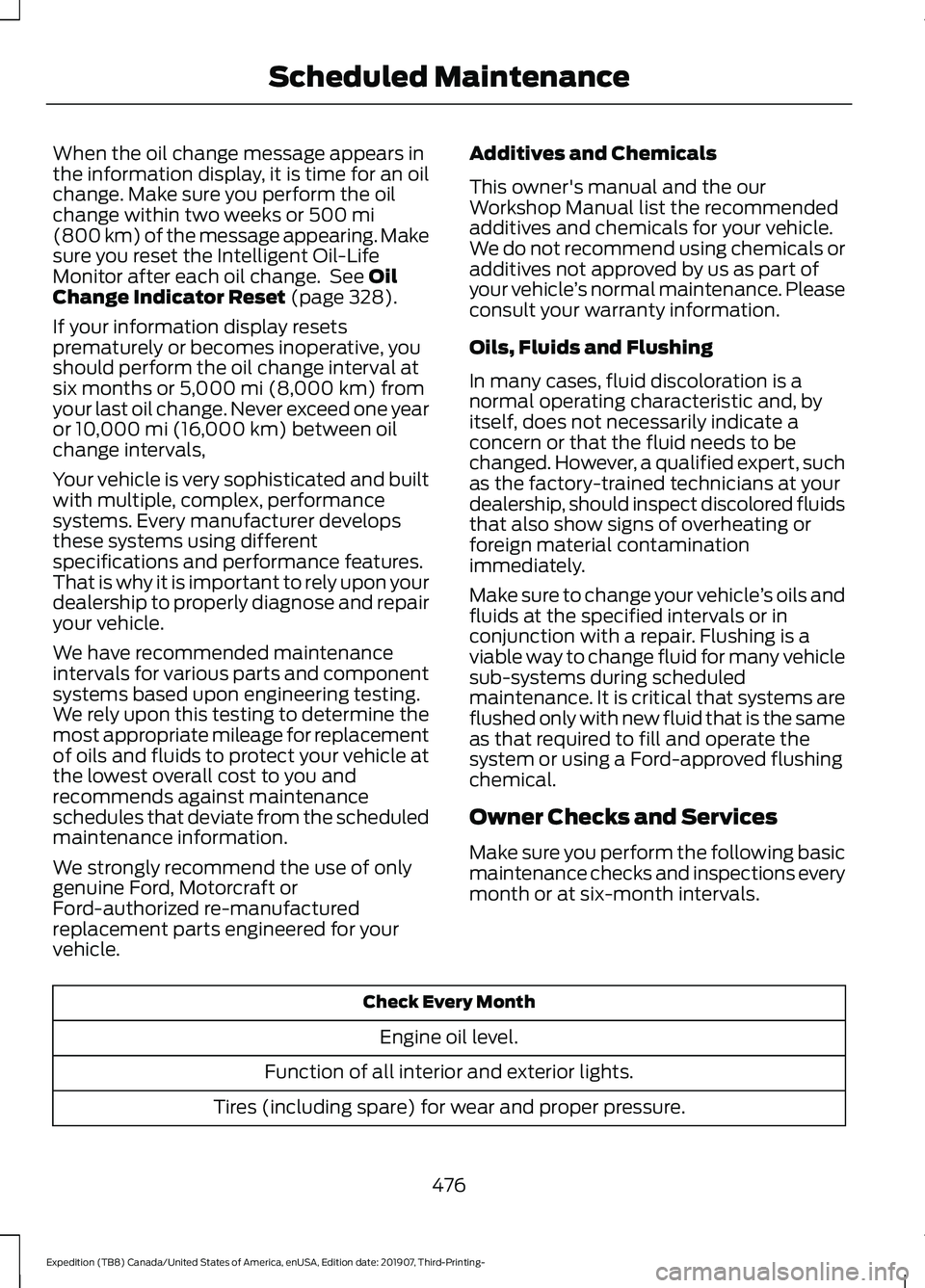
When the oil change message appears in
the information display, it is time for an oil
change. Make sure you perform the oil
change within two weeks or 500 mi
(800 km) of the message appearing. Make
sure you reset the Intelligent Oil-Life
Monitor after each oil change. See
Oil
Change Indicator Reset (page 328).
If your information display resets
prematurely or becomes inoperative, you
should perform the oil change interval at
six months or
5,000 mi (8,000 km) from
your last oil change. Never exceed one year
or
10,000 mi (16,000 km) between oil
change intervals,
Your vehicle is very sophisticated and built
with multiple, complex, performance
systems. Every manufacturer develops
these systems using different
specifications and performance features.
That is why it is important to rely upon your
dealership to properly diagnose and repair
your vehicle.
We have recommended maintenance
intervals for various parts and component
systems based upon engineering testing.
We rely upon this testing to determine the
most appropriate mileage for replacement
of oils and fluids to protect your vehicle at
the lowest overall cost to you and
recommends against maintenance
schedules that deviate from the scheduled
maintenance information.
We strongly recommend the use of only
genuine Ford, Motorcraft or
Ford-authorized re-manufactured
replacement parts engineered for your
vehicle. Additives and Chemicals
This owner's manual and the our
Workshop Manual list the recommended
additives and chemicals for your vehicle.
We do not recommend using chemicals or
additives not approved by us as part of
your vehicle
’s normal maintenance. Please
consult your warranty information.
Oils, Fluids and Flushing
In many cases, fluid discoloration is a
normal operating characteristic and, by
itself, does not necessarily indicate a
concern or that the fluid needs to be
changed. However, a qualified expert, such
as the factory-trained technicians at your
dealership, should inspect discolored fluids
that also show signs of overheating or
foreign material contamination
immediately.
Make sure to change your vehicle ’s oils and
fluids at the specified intervals or in
conjunction with a repair. Flushing is a
viable way to change fluid for many vehicle
sub-systems during scheduled
maintenance. It is critical that systems are
flushed only with new fluid that is the same
as that required to fill and operate the
system or using a Ford-approved flushing
chemical.
Owner Checks and Services
Make sure you perform the following basic
maintenance checks and inspections every
month or at six-month intervals. Check Every Month
Engine oil level.
Function of all interior and exterior lights.
Tires (including spare) for wear and proper pressure.
476
Expedition (TB8) Canada/United States of America, enUSA, Edition date: 201907, Third-Printing- Scheduled Maintenance
Page 483 of 542
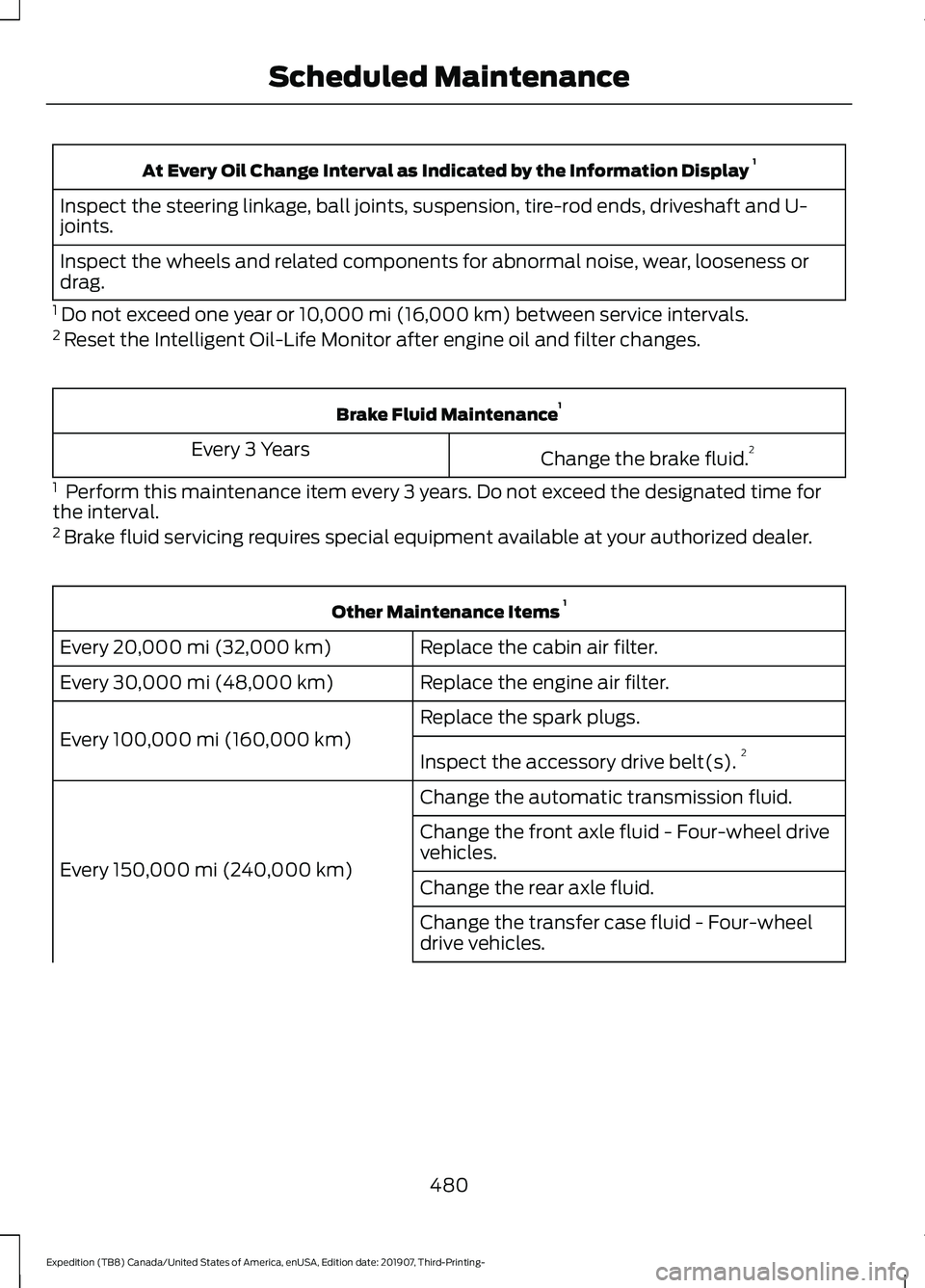
At Every Oil Change Interval as Indicated by the Information Display
1
Inspect the steering linkage, ball joints, suspension, tire-rod ends, driveshaft and U-
joints.
Inspect the wheels and related components for abnormal noise, wear, looseness or
drag.
1 Do not exceed one year or 10,000 mi (16,000 km) between service intervals.
2 Reset the Intelligent Oil-Life Monitor after engine oil and filter changes. Brake Fluid Maintenance
1
Change the brake fluid. 2
Every 3 Years
1 Perform this maintenance item every 3 years. Do not exceed the designated time for
the interval.
2 Brake fluid servicing requires special equipment available at your authorized dealer. Other Maintenance Items
1
Replace the cabin air filter.
Every 20,000 mi (32,000 km)
Replace the engine air filter.
Every
30,000 mi (48,000 km)
Replace the spark plugs.
Every
100,000 mi (160,000 km) Inspect the accessory drive belt(s). 2
Change the automatic transmission fluid.
Every
150,000 mi (240,000 km) Change the front axle fluid - Four-wheel drive
vehicles.
Change the rear axle fluid.
Change the transfer case fluid - Four-wheel
drive vehicles.
480
Expedition (TB8) Canada/United States of America, enUSA, Edition date: 201907, Third-Printing- Scheduled Maintenance
Page 484 of 542
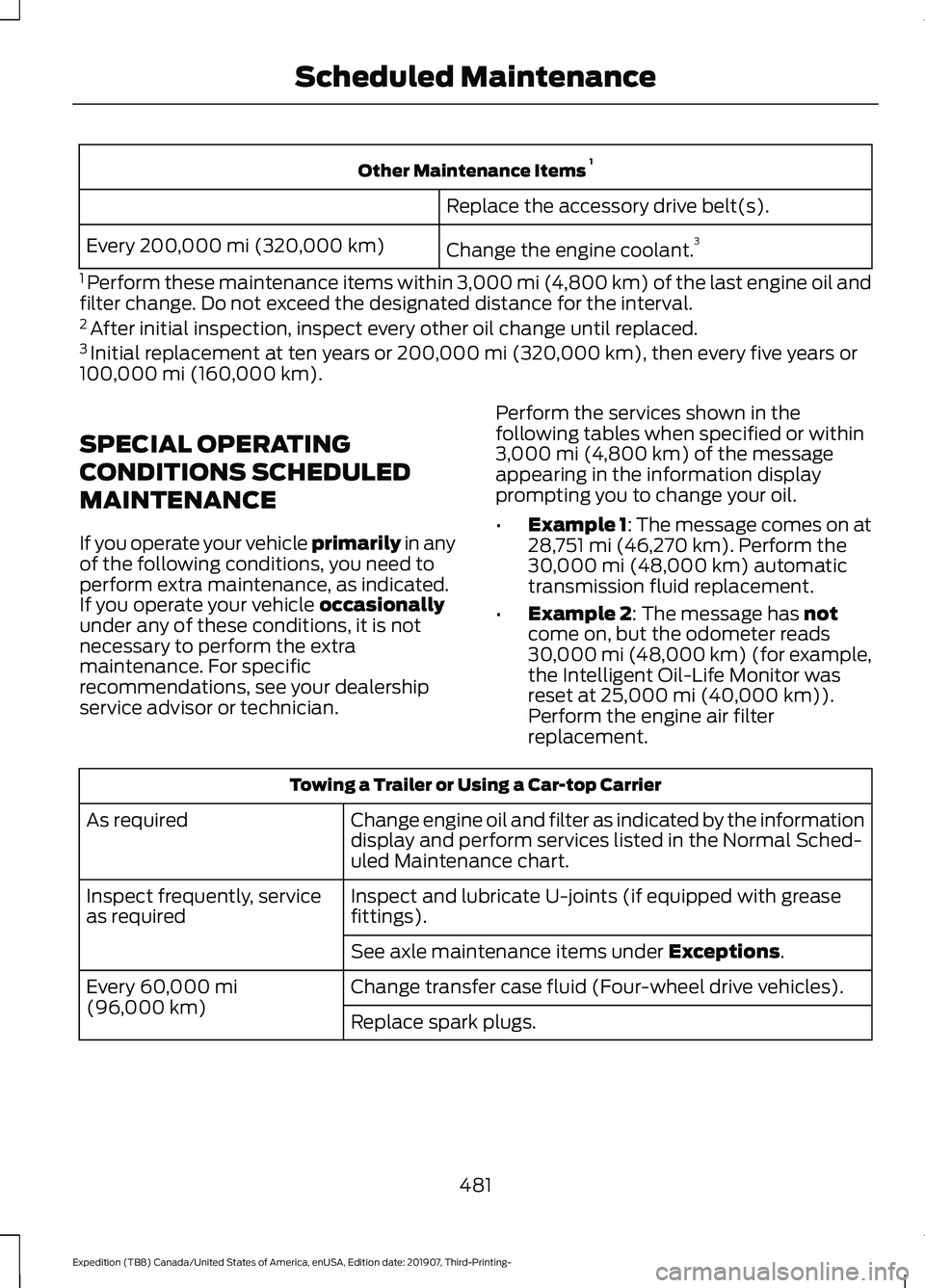
Other Maintenance Items
1
Replace the accessory drive belt(s).
Change the engine coolant. 3
Every 200,000 mi (320,000 km)
1 Perform these maintenance items within 3,000 mi (4,800 km) of the last engine oil and
filter change. Do not exceed the designated distance for the interval.
2 After initial inspection, inspect every other oil change until replaced.
3 Initial replacement at ten years or 200,000 mi (320,000 km), then every five years or
100,000 mi (160,000 km).
SPECIAL OPERATING
CONDITIONS SCHEDULED
MAINTENANCE
If you operate your vehicle primarily
in any
of the following conditions, you need to
perform extra maintenance, as indicated.
If you operate your vehicle
occasionally
under any of these conditions, it is not
necessary to perform the extra
maintenance. For specific
recommendations, see your dealership
service advisor or technician. Perform the services shown in the
following tables when specified or within
3,000 mi (4,800 km)
of the message
appearing in the information display
prompting you to change your oil.
• Example 1: The message comes on at
28,751 mi (46,270 km)
. Perform the
30,000 mi (48,000 km) automatic
transmission fluid replacement.
• Example 2
: The message has not
come on, but the odometer reads
30,000 mi (48,000 km) (for example,
the Intelligent Oil-Life Monitor was
reset at
25,000 mi (40,000 km)).
Perform the engine air filter
replacement. Towing a Trailer or Using a Car-top Carrier
Change engine oil and filter as indicated by the information
display and perform services listed in the Normal Sched-
uled Maintenance chart.
As required
Inspect and lubricate U-joints (if equipped with grease
fittings).
Inspect frequently, service
as required
See axle maintenance items under
Exceptions.
Change transfer case fluid (Four-wheel drive vehicles).
Every
60,000 mi
(96,000 km) Replace spark plugs.
481
Expedition (TB8) Canada/United States of America, enUSA, Edition date: 201907, Third-Printing- Scheduled Maintenance
Page 485 of 542
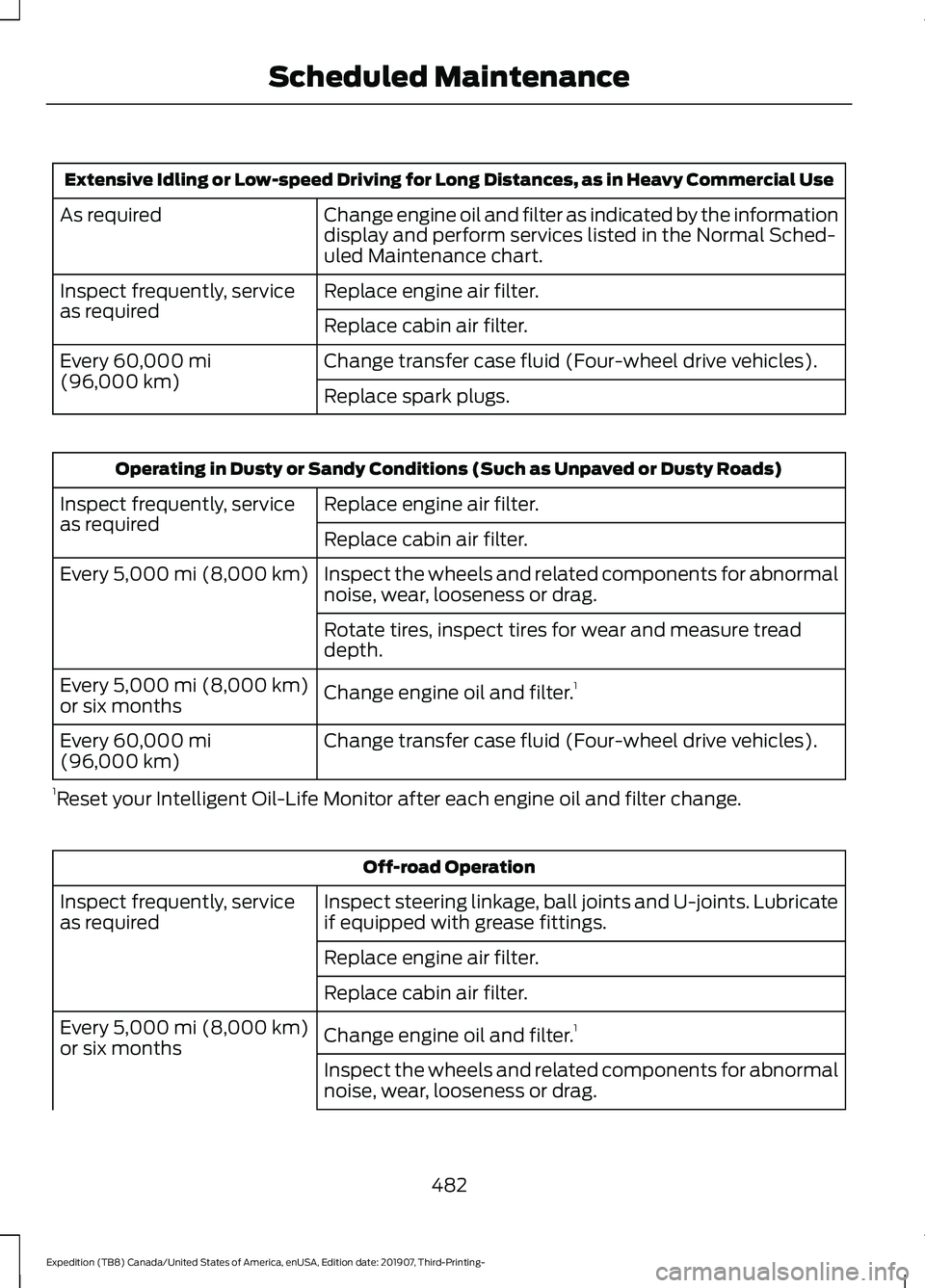
Extensive Idling or Low-speed Driving for Long Distances, as in Heavy Commercial Use
Change engine oil and filter as indicated by the information
display and perform services listed in the Normal Sched-
uled Maintenance chart.
As required
Replace engine air filter.
Inspect frequently, service
as required
Replace cabin air filter.
Change transfer case fluid (Four-wheel drive vehicles).
Every 60,000 mi
(96,000 km) Replace spark plugs.Operating in Dusty or Sandy Conditions (Such as Unpaved or Dusty Roads)
Replace engine air filter.
Inspect frequently, service
as required
Replace cabin air filter.
Inspect the wheels and related components for abnormal
noise, wear, looseness or drag.
Every
5,000 mi (8,000 km)
Rotate tires, inspect tires for wear and measure tread
depth.
Change engine oil and filter. 1
Every
5,000 mi (8,000 km)
or six months
Change transfer case fluid (Four-wheel drive vehicles).
Every
60,000 mi
(96,000 km)
1 Reset your Intelligent Oil-Life Monitor after each engine oil and filter change. Off-road Operation
Inspect steering linkage, ball joints and U-joints. Lubricate
if equipped with grease fittings.
Inspect frequently, service
as required
Replace engine air filter.
Replace cabin air filter.
Change engine oil and filter.1
Every
5,000 mi (8,000 km)
or six months
Inspect the wheels and related components for abnormal
noise, wear, looseness or drag.
482
Expedition (TB8) Canada/United States of America, enUSA, Edition date: 201907, Third-Printing- Scheduled Maintenance
Page 486 of 542
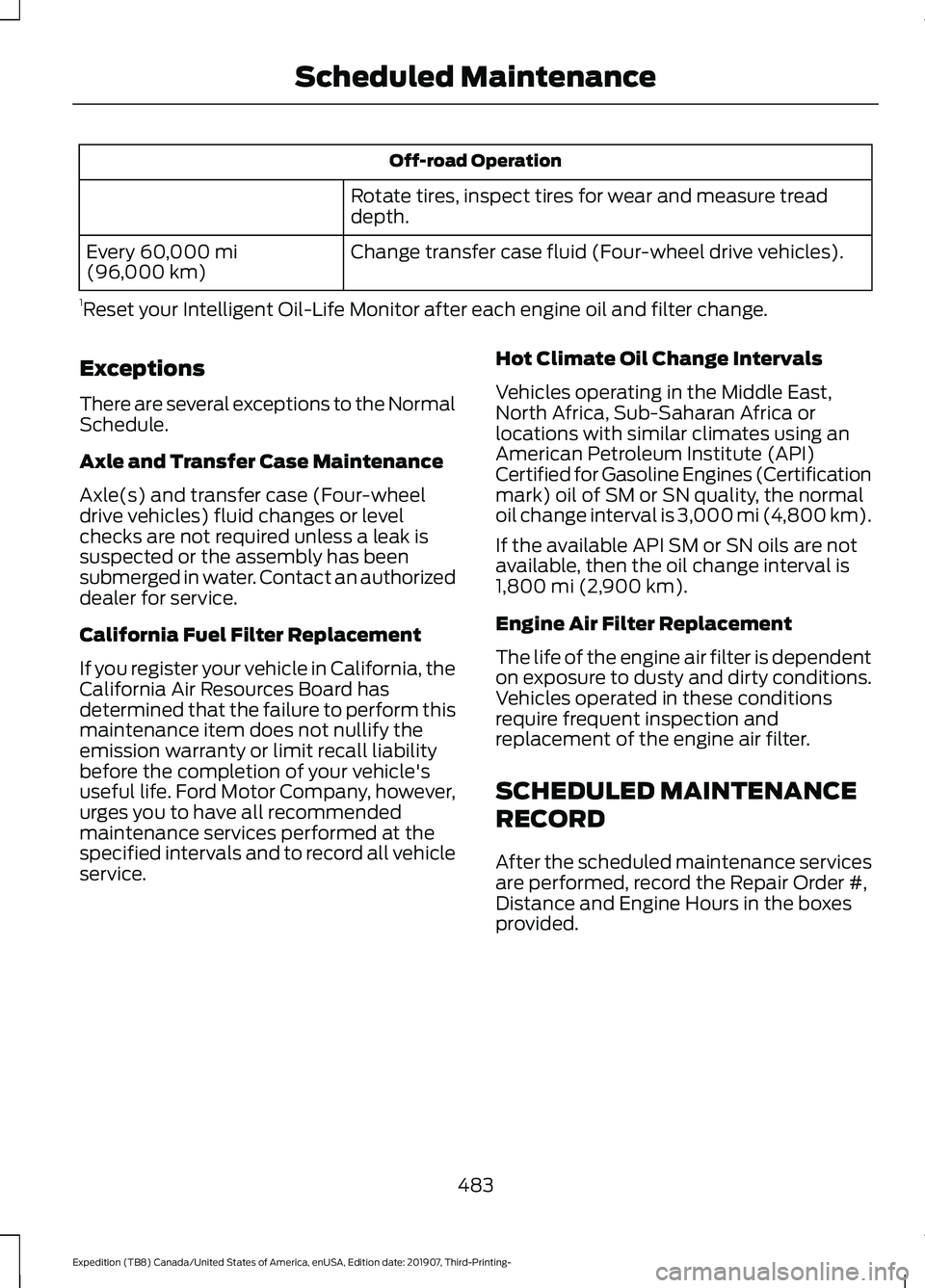
Off-road Operation
Rotate tires, inspect tires for wear and measure tread
depth.
Change transfer case fluid (Four-wheel drive vehicles).
Every 60,000 mi
(96,000 km)
1 Reset your Intelligent Oil-Life Monitor after each engine oil and filter change.
Exceptions
There are several exceptions to the Normal
Schedule.
Axle and Transfer Case Maintenance
Axle(s) and transfer case (Four-wheel
drive vehicles) fluid changes or level
checks are not required unless a leak is
suspected or the assembly has been
submerged in water. Contact an authorized
dealer for service.
California Fuel Filter Replacement
If you register your vehicle in California, the
California Air Resources Board has
determined that the failure to perform this
maintenance item does not nullify the
emission warranty or limit recall liability
before the completion of your vehicle's
useful life. Ford Motor Company, however,
urges you to have all recommended
maintenance services performed at the
specified intervals and to record all vehicle
service. Hot Climate Oil Change Intervals
Vehicles operating in the Middle East,
North Africa, Sub-Saharan Africa or
locations with similar climates using an
American Petroleum Institute (API)
Certified for Gasoline Engines (Certification
mark) oil of SM or SN quality, the normal
oil change interval is 3,000 mi (4,800 km).
If the available API SM or SN oils are not
available, then the oil change interval is
1,800 mi (2,900 km)
.
Engine Air Filter Replacement
The life of the engine air filter is dependent
on exposure to dusty and dirty conditions.
Vehicles operated in these conditions
require frequent inspection and
replacement of the engine air filter.
SCHEDULED MAINTENANCE
RECORD
After the scheduled maintenance services
are performed, record the Repair Order #,
Distance and Engine Hours in the boxes
provided.
483
Expedition (TB8) Canada/United States of America, enUSA, Edition date: 201907, Third-Printing- Scheduled Maintenance
Page 528 of 542
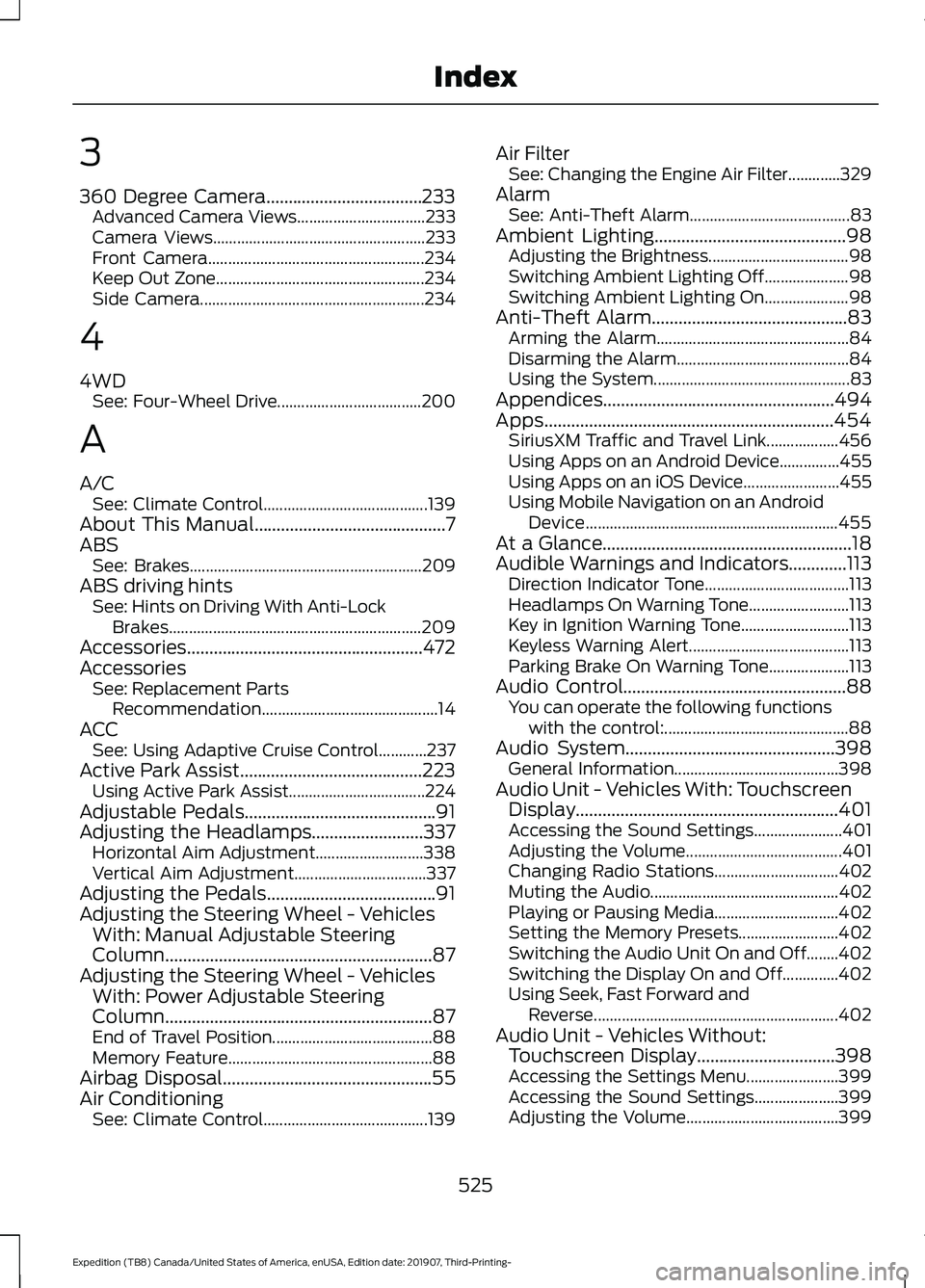
3
360 Degree Camera...................................233
Advanced Camera Views................................ 233
Camera Views..................................................... 233
Front Camera...................................................... 234
Keep Out Zone.................................................... 234
Side Camera........................................................ 234
4
4WD See: Four-Wheel Drive.................................... 200
A
A/C See: Climate Control......................................... 139
About This Manual...........................................7
ABS See: Brakes.......................................................... 209
ABS driving hints See: Hints on Driving With Anti-Lock
Brakes............................................................... 209
Accessories.....................................................472
Accessories See: Replacement Parts
Recommendation............................................ 14
ACC See: Using Adaptive Cruise Control............237
Active Park Assist.........................................223 Using Active Park Assist.................................. 224
Adjustable Pedals...........................................91
Adjusting the Headlamps.........................337 Horizontal Aim Adjustment........................... 338
Vertical Aim Adjustment................................. 337
Adjusting the Pedals......................................91
Adjusting the Steering Wheel - Vehicles With: Manual Adjustable Steering
Column............................................................87
Adjusting the Steering Wheel - Vehicles With: Power Adjustable Steering
Column............................................................87
End of Travel Position........................................ 88
Memory Feature................................................... 88
Airbag Disposal...............................................55
Air Conditioning See: Climate Control......................................... 139Air Filter
See: Changing the Engine Air Filter.............329
Alarm See: Anti-Theft Alarm........................................ 83
Ambient Lighting
...........................................98
Adjusting the Brightness................................... 98
Switching Ambient Lighting Off..................... 98
Switching Ambient Lighting On..................... 98
Anti-Theft Alarm............................................83 Arming the Alarm................................................ 84
Disarming the Alarm........................................... 84
Using the System................................................. 83
Appendices....................................................494
Apps.................................................................454 SiriusXM Traffic and Travel Link.................. 456
Using Apps on an Android Device...............455
Using Apps on an iOS Device........................ 455
Using Mobile Navigation on an Android Device............................................................... 455
At a Glance........................................................18
Audible Warnings and Indicators.............113 Direction Indicator Tone.................................... 113
Headlamps On Warning Tone......................... 113
Key in Ignition Warning Tone........................... 113
Keyless Warning Alert........................................ 113
Parking Brake On Warning Tone.................... 113
Audio Control
..................................................88
You can operate the following functions
with the control:.............................................. 88
Audio System
...............................................398
General Information......................................... 398
Audio Unit - Vehicles With: Touchscreen Display...........................................................401
Accessing the Sound Settings...................... 401
Adjusting the Volume....................................... 401
Changing Radio Stations............................... 402
Muting the Audio............................................... 402
Playing or Pausing Media............................... 402
Setting the Memory Presets......................... 402
Switching the Audio Unit On and Off........402
Switching the Display On and Off..............402
Using Seek, Fast Forward and Reverse............................................................. 402
Audio Unit - Vehicles Without: Touchscreen Display
...............................398
Accessing the Settings Menu....................... 399
Accessing the Sound Settings..................... 399
Adjusting the Volume...................................... 399
525
Expedition (TB8) Canada/United States of America, enUSA, Edition date: 201907, Third-Printing- Index
Page 529 of 542
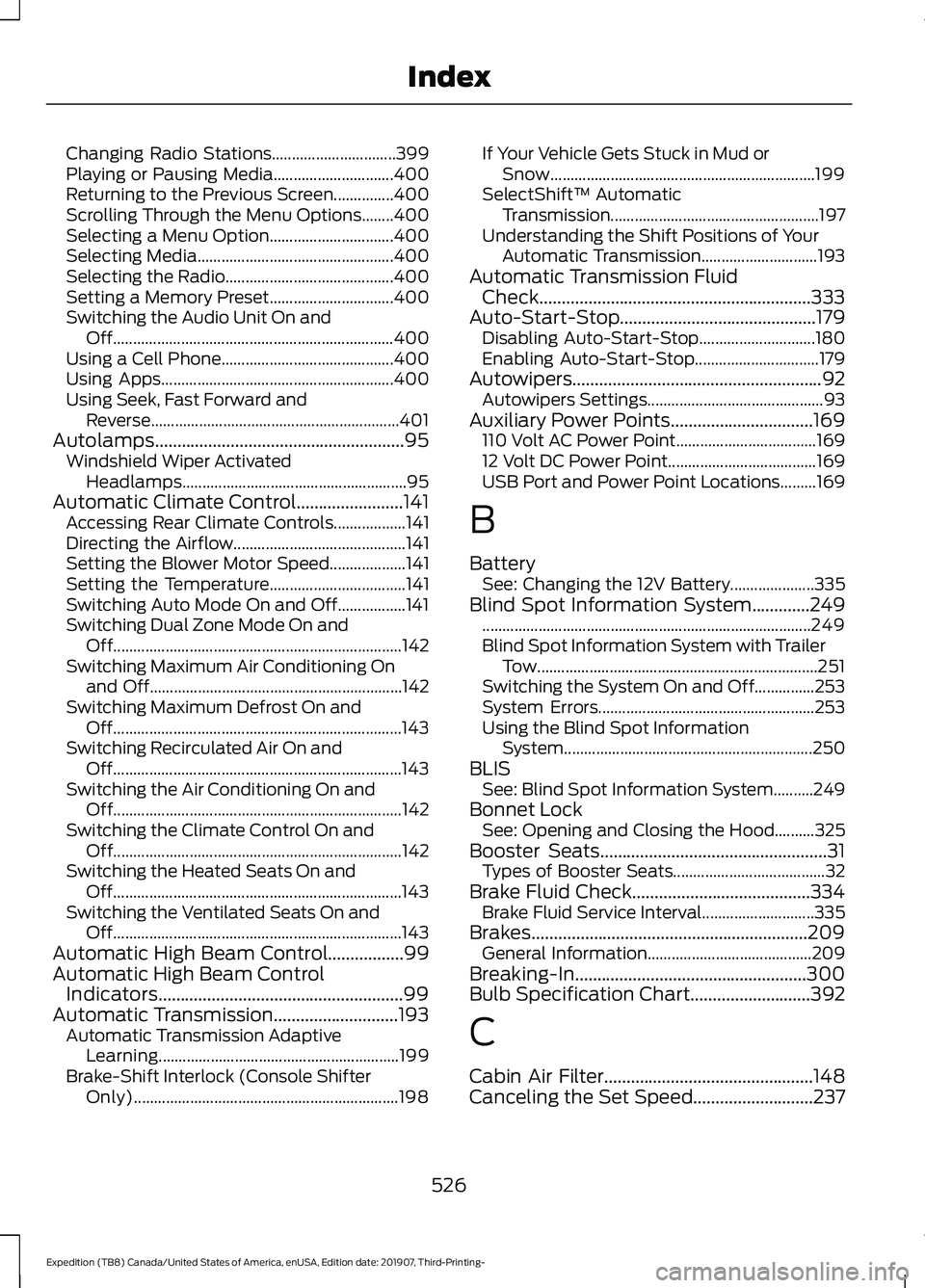
Changing Radio Stations...............................
399
Playing or Pausing Media.............................. 400
Returning to the Previous Screen...............400
Scrolling Through the Menu Options........400
Selecting a Menu Option............................... 400
Selecting Media................................................. 400
Selecting the Radio.......................................... 400
Setting a Memory Preset............................... 400
Switching the Audio Unit On and Off...................................................................... 400
Using a Cell Phone........................................... 400
Using Apps.......................................................... 400
Using Seek, Fast Forward and Reverse.............................................................. 401
Autolamps........................................................95 Windshield Wiper Activated
Headlamps........................................................ 95
Automatic Climate Control........................141 Accessing Rear Climate Controls.................. 141
Directing the Airflow........................................... 141
Setting the Blower Motor Speed................... 141
Setting the Temperature.................................. 141
Switching Auto Mode On and Off.................141
Switching Dual Zone Mode On and Off........................................................................\
142
Switching Maximum Air Conditioning On and Off............................................................... 142
Switching Maximum Defrost On and Off........................................................................\
143
Switching Recirculated Air On and Off........................................................................\
143
Switching the Air Conditioning On and Off........................................................................\
142
Switching the Climate Control On and Off........................................................................\
142
Switching the Heated Seats On and Off........................................................................\
143
Switching the Ventilated Seats On and Off........................................................................\
143
Automatic High Beam Control.................99
Automatic High Beam Control Indicators.......................................................99
Automatic Transmission............................193
Automatic Transmission Adaptive
Learning............................................................ 199
Brake-Shift Interlock (Console Shifter Only).................................................................. 198If Your Vehicle Gets Stuck in Mud or
Snow.................................................................. 199
SelectShift™ Automatic Transmission.................................................... 197
Understanding the Shift Positions of Your Automatic Transmission............................. 193
Automatic Transmission Fluid Check.............................................................333
Auto-Start-Stop............................................179 Disabling Auto-Start-Stop............................. 180
Enabling Auto-Start-Stop............................... 179
Autowipers
........................................................92
Autowipers Settings............................................ 93
Auxiliary Power Points
................................169
110 Volt AC Power Point................................... 169
12 Volt DC Power Point..................................... 169
USB Port and Power Point Locations.........169
B
Battery See: Changing the 12V Battery..................... 335
Blind Spot Information System.............249 ........................................................................\
.......... 249
Blind Spot Information System with Trailer Tow...................................................................... 251
Switching the System On and Off...............253
System Errors...................................................... 253
Using the Blind Spot Information System.............................................................. 250
BLIS See: Blind Spot Information System..........249
Bonnet Lock See: Opening and Closing the Hood..........325
Booster Seats
...................................................31
Types of Booster Seats...................................... 32
Brake Fluid Check........................................334 Brake Fluid Service Interval............................ 335
Brakes..............................................................209 General Information......................................... 209
Breaking-In
....................................................300
Bulb Specification Chart...........................392
C
Cabin Air Filter...............................................148
Canceling the Set Speed
...........................237
526
Expedition (TB8) Canada/United States of America, enUSA, Edition date: 201907, Third-Printing- Index
Page 536 of 542
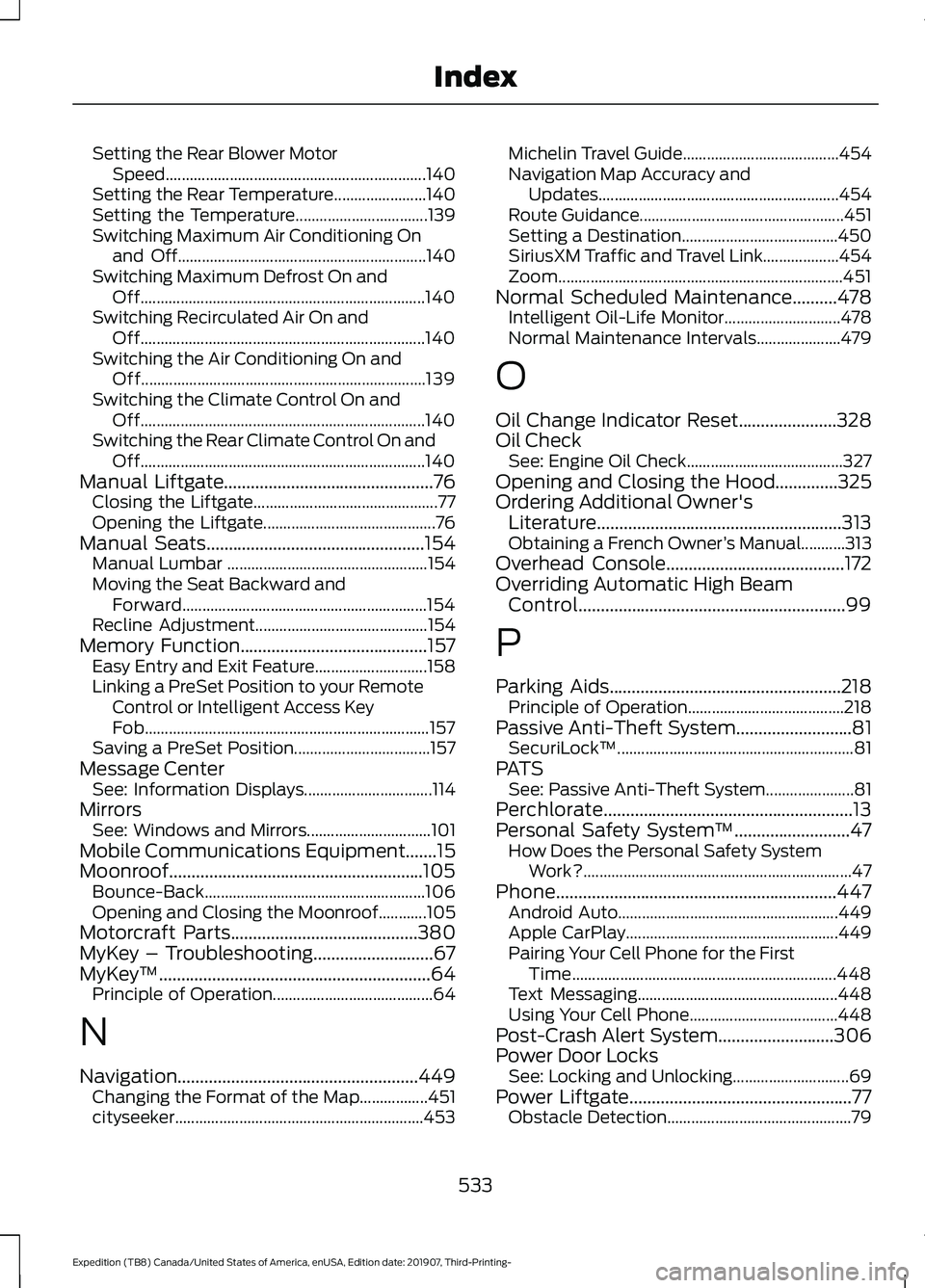
Setting the Rear Blower Motor
Speed................................................................. 140
Setting the Rear Temperature....................... 140
Setting the Temperature................................. 139
Switching Maximum Air Conditioning On and Off.............................................................. 140
Switching Maximum Defrost On and Off....................................................................... 140
Switching Recirculated Air On and Off....................................................................... 140
Switching the Air Conditioning On and Off....................................................................... 139
Switching the Climate Control On and Off....................................................................... 140
Switching the Rear Climate Control On and Off....................................................................... 140
Manual Liftgate...............................................76 Closing the Liftgate.............................................. 77
Opening the Liftgate........................................... 76
Manual Seats.................................................154
Manual Lumbar .................................................. 154
Moving the Seat Backward and Forward............................................................. 154
Recline Adjustment........................................... 154
Memory Function..........................................157 Easy Entry and Exit Feature............................ 158
Linking a PreSet Position to your Remote Control or Intelligent Access Key
Fob....................................................................... 157
Saving a PreSet Position.................................. 157
Message Center See: Information Displays................................ 114
Mirrors See: Windows and Mirrors............................... 101
Mobile Communications Equipment.......15
Moonroof.........................................................105 Bounce-Back....................................................... 106
Opening and Closing the Moonroof............105
Motorcraft Parts
..........................................380
MyKey – Troubleshooting...........................67
MyKey ™.............................................................64
Principle of Operation........................................ 64
N
Navigation......................................................449 Changing the Format of the Map.................451
cityseeker.............................................................. 453Michelin Travel Guide.......................................
454
Navigation Map Accuracy and Updates............................................................ 454
Route Guidance................................................... 451
Setting a Destination....................................... 450
SiriusXM Traffic and Travel Link................... 454
Zoom....................................................................... 451
Normal Scheduled Maintenance
..........478
Intelligent Oil-Life Monitor............................. 478
Normal Maintenance Intervals..................... 479
O
Oil Change Indicator Reset......................328
Oil Check See: Engine Oil Check....................................... 327
Opening and Closing the Hood..............325
Ordering Additional Owner's Literature.......................................................313
Obtaining a French Owner ’s Manual...........313
Overhead Console
........................................172
Overriding Automatic High Beam Control............................................................99
P
Parking Aids
....................................................218
Principle of Operation....................................... 218
Passive Anti-Theft System
..........................81
SecuriLock ™........................................................... 81
PATS See: Passive Anti-Theft System...................... 81
Perchlorate........................................................13
Personal Safety System ™
..........................47
How Does the Personal Safety System
Work?................................................................... 47
Phone...............................................................447 Android Auto....................................................... 449
Apple CarPlay..................................................... 449
Pairing Your Cell Phone for the First Time.................................................................. 448
Text Messaging.................................................. 448
Using Your Cell Phone..................................... 448
Post-Crash Alert System..........................306
Power Door Locks See: Locking and Unlocking............................. 69
Power Liftgate
..................................................77
Obstacle Detection.............................................. 79
533
Expedition (TB8) Canada/United States of America, enUSA, Edition date: 201907, Third-Printing- Index
Page 539 of 542
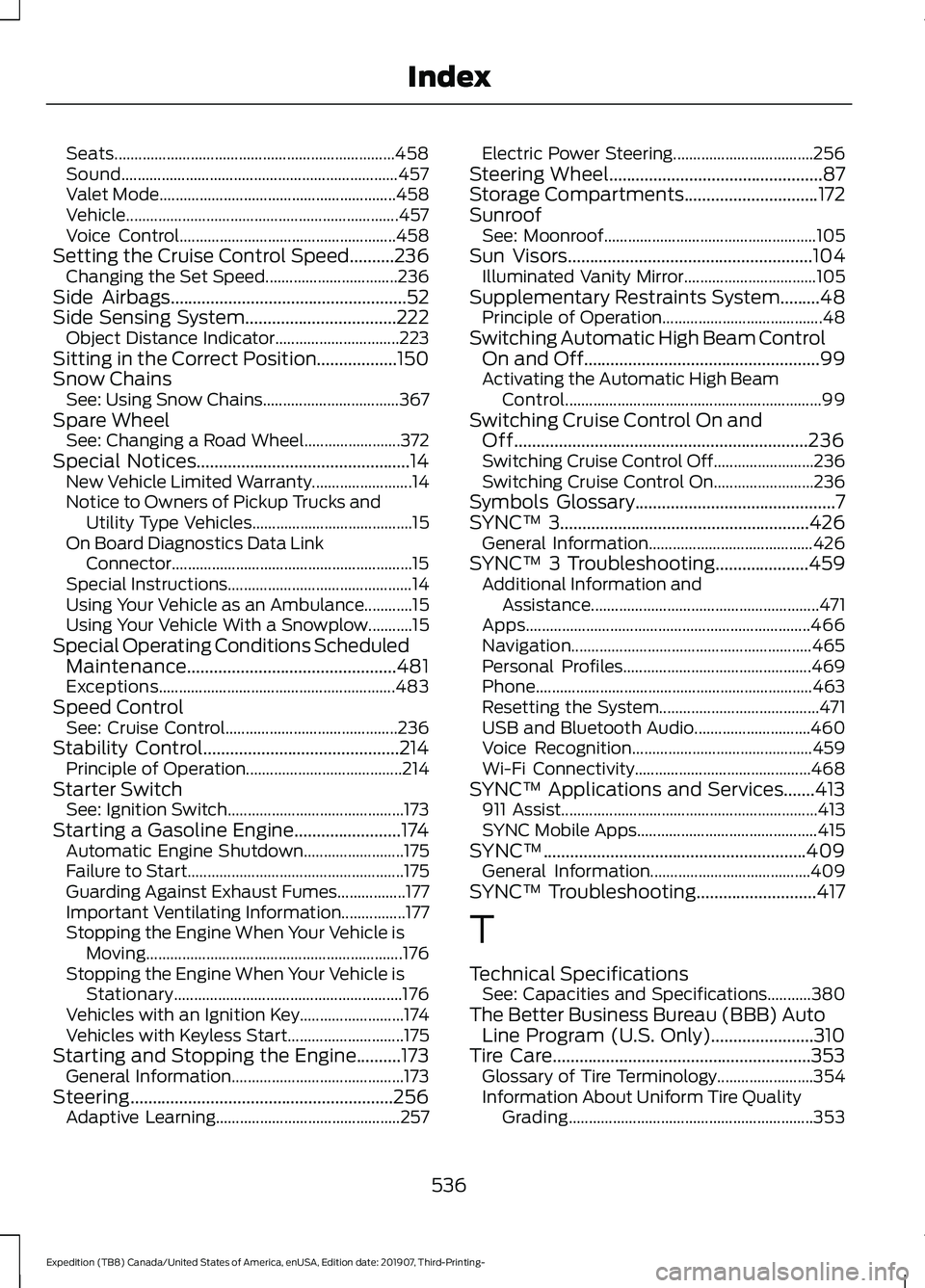
Seats......................................................................
458
Sound..................................................................... 457
Valet Mode........................................................... 458
Vehicle.................................................................... 457
Voice Control...................................................... 458
Setting the Cruise Control Speed..........236 Changing the Set Speed................................. 236
Side Airbags.....................................................52
Side Sensing System..................................222
Object Distance Indicator............................... 223
Sitting in the Correct Position
..................150
Snow Chains See: Using Snow Chains.................................. 367
Spare Wheel See: Changing a Road Wheel........................ 372
Special Notices
................................................14
New Vehicle Limited Warranty......................... 14
Notice to Owners of Pickup Trucks and Utility Type Vehicles........................................ 15
On Board Diagnostics Data Link Connector............................................................ 15
Special Instructions.............................................. 14
Using Your Vehicle as an Ambulance............15
Using Your Vehicle With a Snowplow...........15
Special Operating Conditions Scheduled Maintenance...............................................481
Exceptions........................................................... 483
Speed Control See: Cruise Control........................................... 236
Stability Control............................................214 Principle of Operation....................................... 214
Starter Switch See: Ignition Switch............................................ 173
Starting a Gasoline Engine........................174 Automatic Engine Shutdown......................... 175
Failure to Start...................................................... 175
Guarding Against Exhaust Fumes.................177
Important Ventilating Information................177
Stopping the Engine When Your Vehicle is Moving................................................................ 176
Stopping the Engine When Your Vehicle is Stationary......................................................... 176
Vehicles with an Ignition Key.......................... 174
Vehicles with Keyless Start............................. 175
Starting and Stopping the Engine
..........173
General Information........................................... 173
Steering...........................................................256 Adaptive Learning.............................................. 257Electric Power Steering...................................
256
Steering Wheel................................................87
Storage Compartments
..............................172
Sunroof See: Moonroof..................................................... 105
Sun Visors
.......................................................104
Illuminated Vanity Mirror................................. 105
Supplementary Restraints System.........48 Principle of Operation........................................ 48
Switching Automatic High Beam Control On and Off.....................................................99
Activating the Automatic High Beam Control................................................................ 99
Switching Cruise Control On and Off..................................................................236
Switching Cruise Control Off......................... 236
Switching Cruise Control On......................... 236
Symbols Glossary
.............................................7
SYNC™ 3........................................................426
General Information......................................... 426
SYNC™ 3 Troubleshooting.....................459 Additional Information and
Assistance......................................................... 471
Apps....................................................................... 466
Navigation............................................................ 465
Personal Profiles............................................... 469
Phone..................................................................... 463
Resetting the System........................................ 471
USB and Bluetooth Audio............................. 460
Voice Recognition............................................. 459
Wi-Fi Connectivity............................................ 468
SYNC™ Applications and Services
.......413
911 Assist................................................................ 413
SYNC Mobile Apps............................................. 415
SYNC™...........................................................409 General Information........................................ 409
SYNC™ Troubleshooting
...........................417
T
Technical Specifications See: Capacities and Specifications...........380
The Better Business Bureau (BBB) Auto Line Program (U.S. Only).......................310
Tire Care
..........................................................353
Glossary of Tire Terminology........................ 354
Information About Uniform Tire Quality Grading............................................................. 353
536
Expedition (TB8) Canada/United States of America, enUSA, Edition date: 201907, Third-Printing- Index