display FORD EXPEDITION 2021 Owners Manual
[x] Cancel search | Manufacturer: FORD, Model Year: 2021, Model line: EXPEDITION, Model: FORD EXPEDITION 2021Pages: 574, PDF Size: 8.33 MB
Page 487 of 574
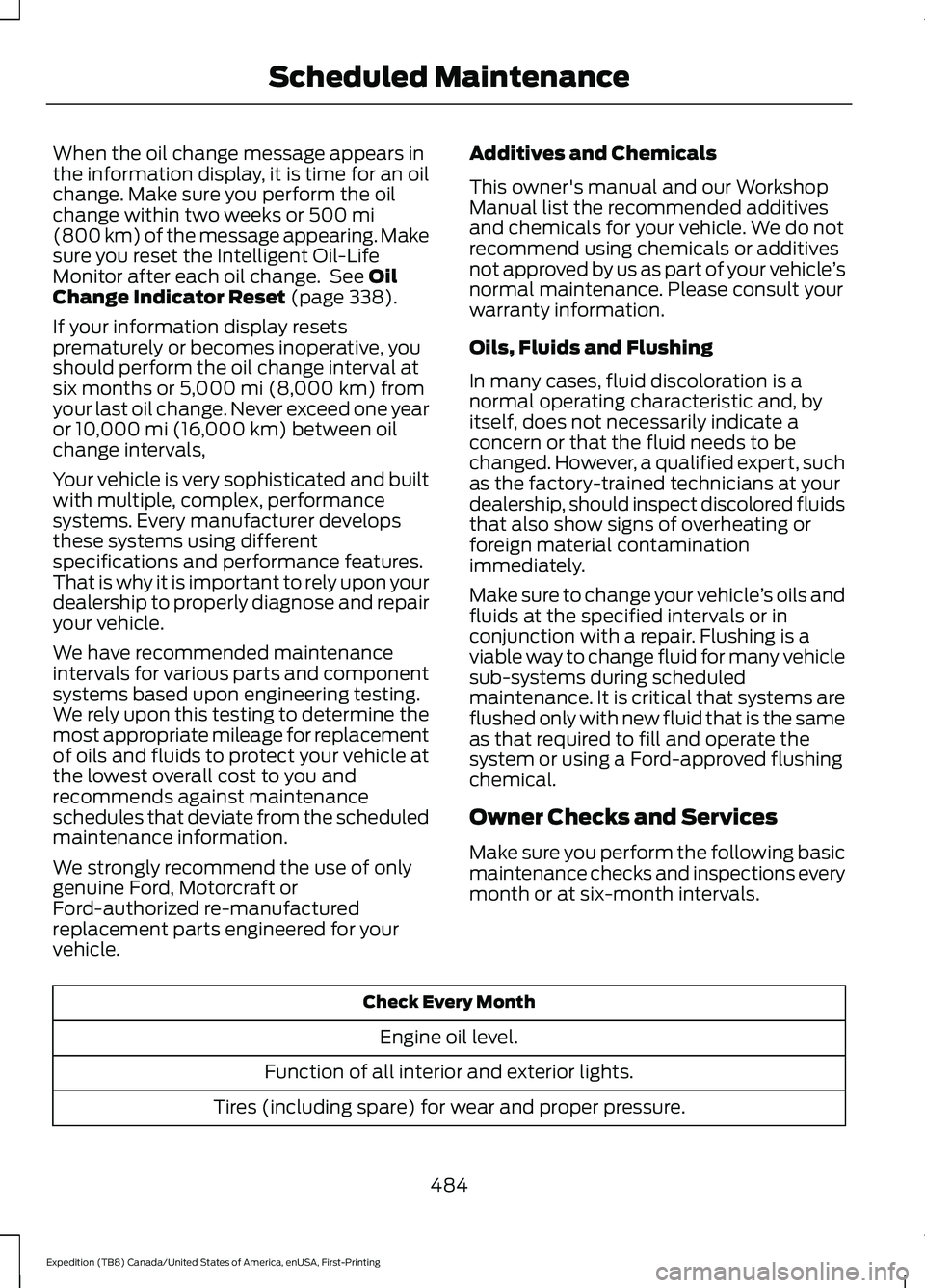
When the oil change message appears in
the information display, it is time for an oil
change. Make sure you perform the oil
change within two weeks or 500 mi
(800 km) of the message appearing. Make
sure you reset the Intelligent Oil-Life
Monitor after each oil change. See
Oil
Change Indicator Reset (page 338).
If your information display resets
prematurely or becomes inoperative, you
should perform the oil change interval at
six months or
5,000 mi (8,000 km) from
your last oil change. Never exceed one year
or
10,000 mi (16,000 km) between oil
change intervals,
Your vehicle is very sophisticated and built
with multiple, complex, performance
systems. Every manufacturer develops
these systems using different
specifications and performance features.
That is why it is important to rely upon your
dealership to properly diagnose and repair
your vehicle.
We have recommended maintenance
intervals for various parts and component
systems based upon engineering testing.
We rely upon this testing to determine the
most appropriate mileage for replacement
of oils and fluids to protect your vehicle at
the lowest overall cost to you and
recommends against maintenance
schedules that deviate from the scheduled
maintenance information.
We strongly recommend the use of only
genuine Ford, Motorcraft or
Ford-authorized re-manufactured
replacement parts engineered for your
vehicle. Additives and Chemicals
This owner's manual and our Workshop
Manual list the recommended additives
and chemicals for your vehicle. We do not
recommend using chemicals or additives
not approved by us as part of your vehicle
’s
normal maintenance. Please consult your
warranty information.
Oils, Fluids and Flushing
In many cases, fluid discoloration is a
normal operating characteristic and, by
itself, does not necessarily indicate a
concern or that the fluid needs to be
changed. However, a qualified expert, such
as the factory-trained technicians at your
dealership, should inspect discolored fluids
that also show signs of overheating or
foreign material contamination
immediately.
Make sure to change your vehicle ’s oils and
fluids at the specified intervals or in
conjunction with a repair. Flushing is a
viable way to change fluid for many vehicle
sub-systems during scheduled
maintenance. It is critical that systems are
flushed only with new fluid that is the same
as that required to fill and operate the
system or using a Ford-approved flushing
chemical.
Owner Checks and Services
Make sure you perform the following basic
maintenance checks and inspections every
month or at six-month intervals. Check Every Month
Engine oil level.
Function of all interior and exterior lights.
Tires (including spare) for wear and proper pressure.
484
Expedition (TB8) Canada/United States of America, enUSA, First-Printing Scheduled Maintenance
Page 488 of 574

Check Every Month
Windshield washer fluid level.
Fuel and water separator. Drain if necessary (or if indicated by the information display). Holes and slots in the tail pipe to make sure they are functional and clear of debris. Check Every Six Months
Battery connections. Clean if necessary.
Body and door drain holes for obstructions. Clean if necessary. Cooling system fluid level and coolant strength.
Door weatherstrips for wear. Lubricate if necessary.
Hinges, latches and outside locks for proper operation. Lubricate if necessary. Parking brake for proper operation.
Seatbelts and seat latches for wear and function.
Safety warning lamps (brake, ABS, airbag and seatbelt) for operation.
Washer spray and wiper operation. Clean or replace blades as necessary.
Multi-Point Inspection
In order to keep your vehicle running right,
it is important to have the systems on your
vehicle checked regularly. This can help
identify potential issues and prevent major
problems. We recommend having the
following multi-point inspection performed
at every scheduled maintenance interval
to help make sure your vehicle keeps
running great. Multi-Point Inspection
Hazard warning system operation
Accessory drive belt(s)
Horn operation
Battery performance
Radiator, cooler, heater and air conditioninghoses
Engine air filter
485
Expedition (TB8) Canada/United States of America, enUSA, First-Printing Scheduled Maintenance
Page 489 of 574
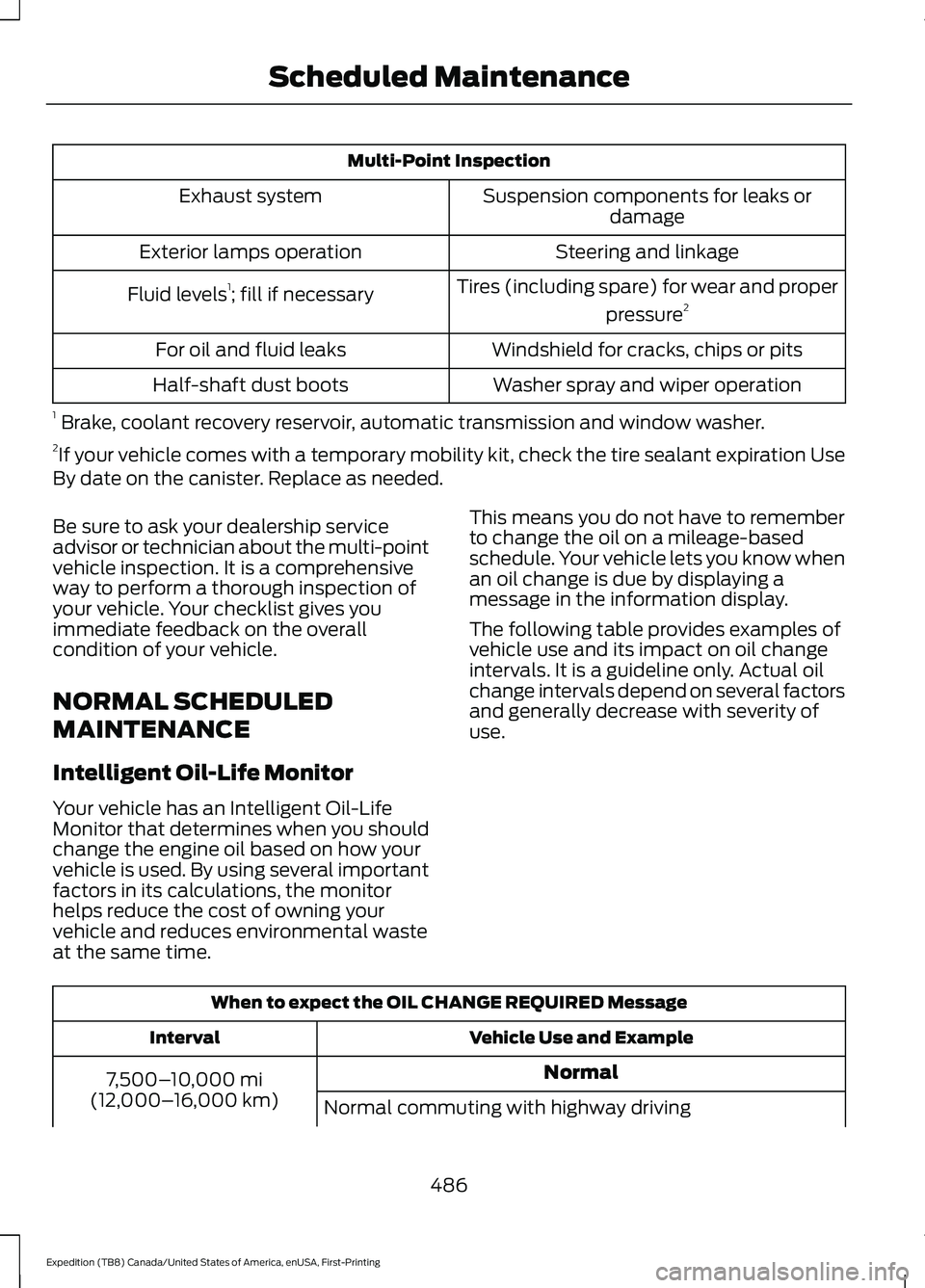
Multi-Point Inspection
Suspension components for leaks ordamage
Exhaust system
Steering and linkage
Exterior lamps operation
Tires (including spare) for wear and properpressure2
Fluid levels 1
; fill if necessary
Windshield for cracks, chips or pits
For oil and fluid leaks
Washer spray and wiper operation
Half-shaft dust boots
1 Brake, coolant recovery reservoir, automatic transmission and window washer.
2 If your vehicle comes with a temporary mobility kit, check the tire sealant expiration Use
By date on the canister. Replace as needed.
Be sure to ask your dealership service
advisor or technician about the multi-point
vehicle inspection. It is a comprehensive
way to perform a thorough inspection of
your vehicle. Your checklist gives you
immediate feedback on the overall
condition of your vehicle.
NORMAL SCHEDULED
MAINTENANCE
Intelligent Oil-Life Monitor
Your vehicle has an Intelligent Oil-Life
Monitor that determines when you should
change the engine oil based on how your
vehicle is used. By using several important
factors in its calculations, the monitor
helps reduce the cost of owning your
vehicle and reduces environmental waste
at the same time. This means you do not have to remember
to change the oil on a mileage-based
schedule. Your vehicle lets you know when
an oil change is due by displaying a
message in the information display.
The following table provides examples of
vehicle use and its impact on oil change
intervals. It is a guideline only. Actual oil
change intervals depend on several factors
and generally decrease with severity of
use.
When to expect the OIL CHANGE REQUIRED Message
Vehicle Use and Example
Interval
Normal
7,500– 10,000 mi
(12,000– 16,000 km)
Normal commuting with highway driving
486
Expedition (TB8) Canada/United States of America, enUSA, First-Printing Scheduled Maintenance
Page 490 of 574
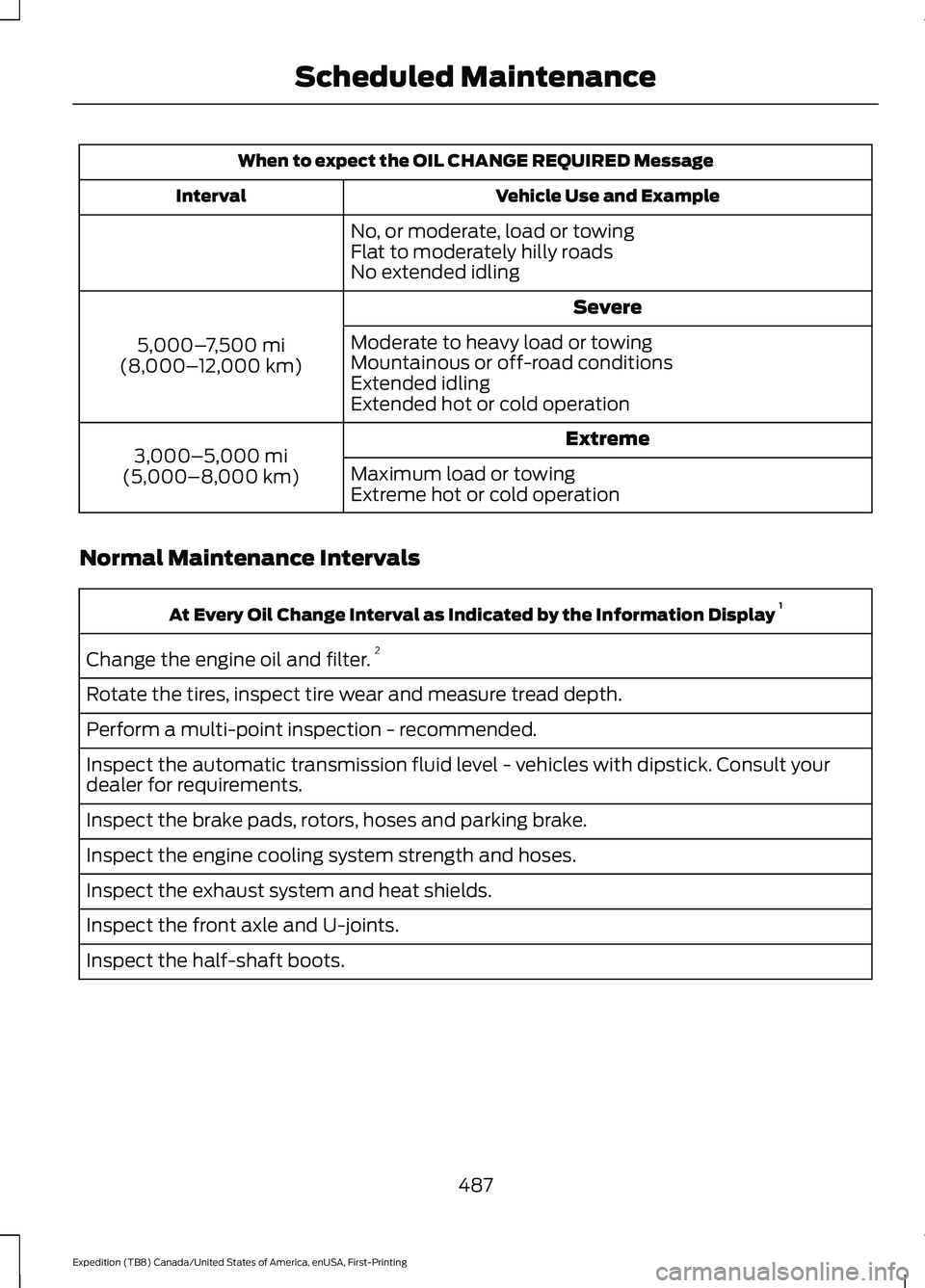
When to expect the OIL CHANGE REQUIRED Message
Vehicle Use and Example
Interval
No, or moderate, load or towing
Flat to moderately hilly roads
No extended idling Severe
5,000– 7,500 mi
(8,000– 12,000 km) Moderate to heavy load or towing
Mountainous or off-road conditions
Extended idling
Extended hot or cold operation
Extreme
3,000–5,000 mi
(5,000–8,000 km) Maximum load or towing
Extreme hot or cold operation
Normal Maintenance Intervals At Every Oil Change Interval as Indicated by the Information Display
1
Change the engine oil and filter. 2
Rotate the tires, inspect tire wear and measure tread depth.
Perform a multi-point inspection - recommended.
Inspect the automatic transmission fluid level - vehicles with dipstick. Consult your
dealer for requirements.
Inspect the brake pads, rotors, hoses and parking brake.
Inspect the engine cooling system strength and hoses.
Inspect the exhaust system and heat shields.
Inspect the front axle and U-joints.
Inspect the half-shaft boots.
487
Expedition (TB8) Canada/United States of America, enUSA, First-Printing Scheduled Maintenance
Page 491 of 574
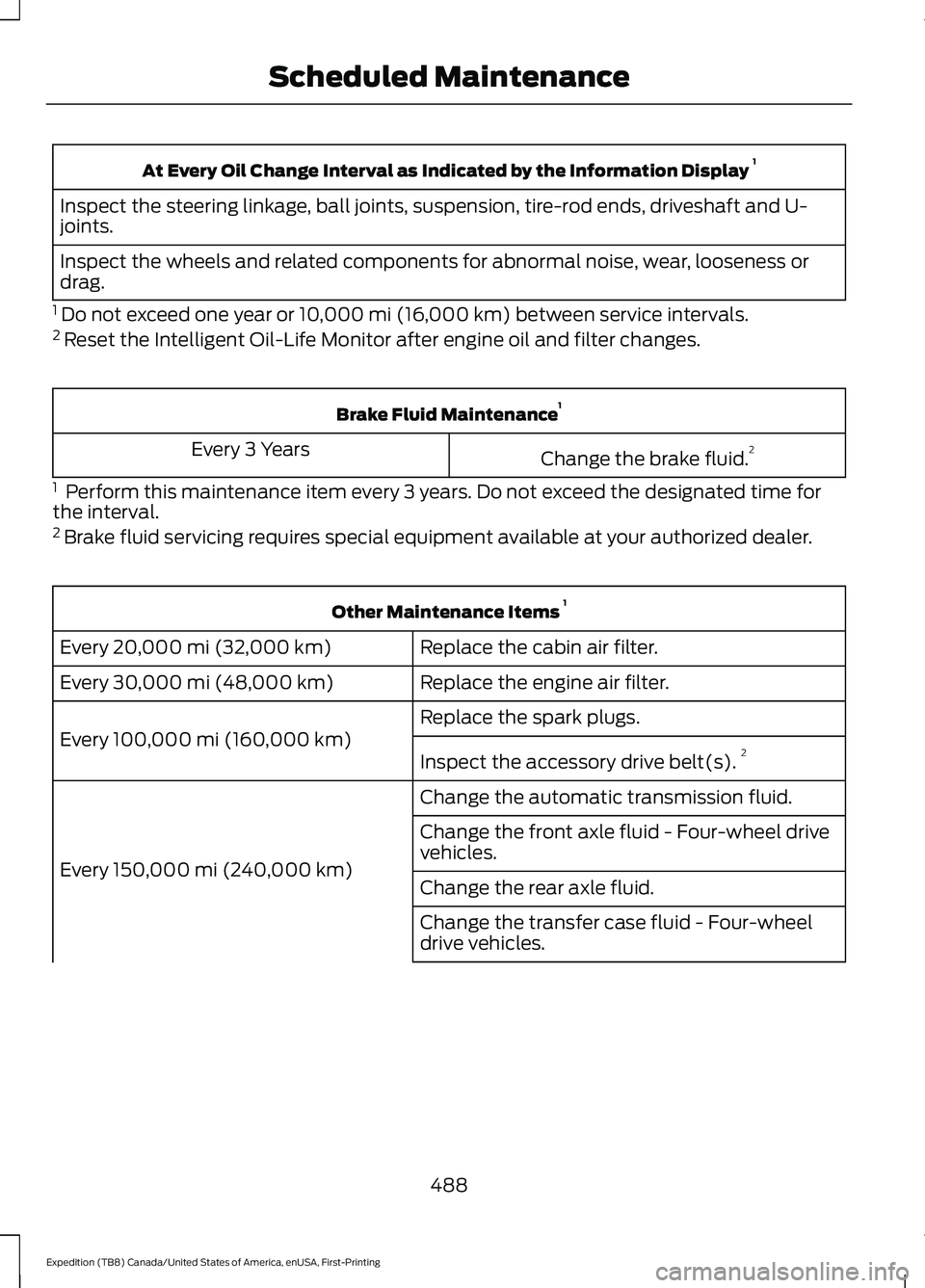
At Every Oil Change Interval as Indicated by the Information Display
1
Inspect the steering linkage, ball joints, suspension, tire-rod ends, driveshaft and U-
joints.
Inspect the wheels and related components for abnormal noise, wear, looseness or
drag.
1 Do not exceed one year or 10,000 mi (16,000 km) between service intervals.
2 Reset the Intelligent Oil-Life Monitor after engine oil and filter changes. Brake Fluid Maintenance
1
Change the brake fluid. 2
Every 3 Years
1 Perform this maintenance item every 3 years. Do not exceed the designated time for
the interval.
2 Brake fluid servicing requires special equipment available at your authorized dealer. Other Maintenance Items
1
Replace the cabin air filter.
Every 20,000 mi (32,000 km)
Replace the engine air filter.
Every
30,000 mi (48,000 km)
Replace the spark plugs.
Every
100,000 mi (160,000 km) Inspect the accessory drive belt(s). 2
Change the automatic transmission fluid.
Every
150,000 mi (240,000 km) Change the front axle fluid - Four-wheel drive
vehicles.
Change the rear axle fluid.
Change the transfer case fluid - Four-wheel
drive vehicles.
488
Expedition (TB8) Canada/United States of America, enUSA, First-Printing Scheduled Maintenance
Page 492 of 574
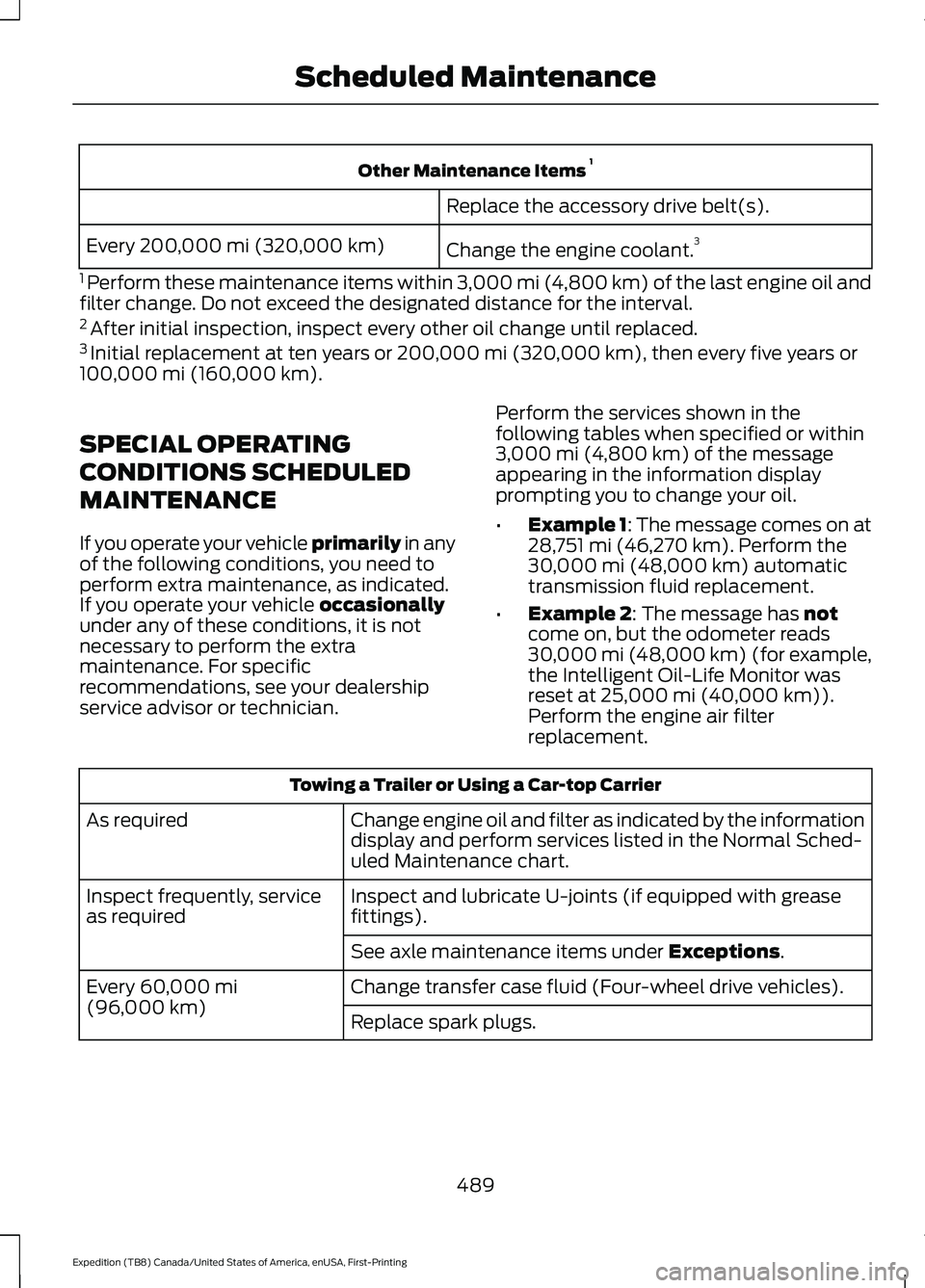
Other Maintenance Items
1
Replace the accessory drive belt(s).
Change the engine coolant. 3
Every 200,000 mi (320,000 km)
1 Perform these maintenance items within 3,000 mi (4,800 km) of the last engine oil and
filter change. Do not exceed the designated distance for the interval.
2 After initial inspection, inspect every other oil change until replaced.
3 Initial replacement at ten years or 200,000 mi (320,000 km), then every five years or
100,000 mi (160,000 km).
SPECIAL OPERATING
CONDITIONS SCHEDULED
MAINTENANCE
If you operate your vehicle primarily
in any
of the following conditions, you need to
perform extra maintenance, as indicated.
If you operate your vehicle
occasionally
under any of these conditions, it is not
necessary to perform the extra
maintenance. For specific
recommendations, see your dealership
service advisor or technician. Perform the services shown in the
following tables when specified or within
3,000 mi (4,800 km)
of the message
appearing in the information display
prompting you to change your oil.
• Example 1: The message comes on at
28,751 mi (46,270 km)
. Perform the
30,000 mi (48,000 km) automatic
transmission fluid replacement.
• Example 2
: The message has not
come on, but the odometer reads
30,000 mi (48,000 km) (for example,
the Intelligent Oil-Life Monitor was
reset at
25,000 mi (40,000 km)).
Perform the engine air filter
replacement. Towing a Trailer or Using a Car-top Carrier
Change engine oil and filter as indicated by the information
display and perform services listed in the Normal Sched-
uled Maintenance chart.
As required
Inspect and lubricate U-joints (if equipped with grease
fittings).
Inspect frequently, service
as required
See axle maintenance items under
Exceptions.
Change transfer case fluid (Four-wheel drive vehicles).
Every
60,000 mi
(96,000 km) Replace spark plugs.
489
Expedition (TB8) Canada/United States of America, enUSA, First-Printing Scheduled Maintenance
Page 493 of 574
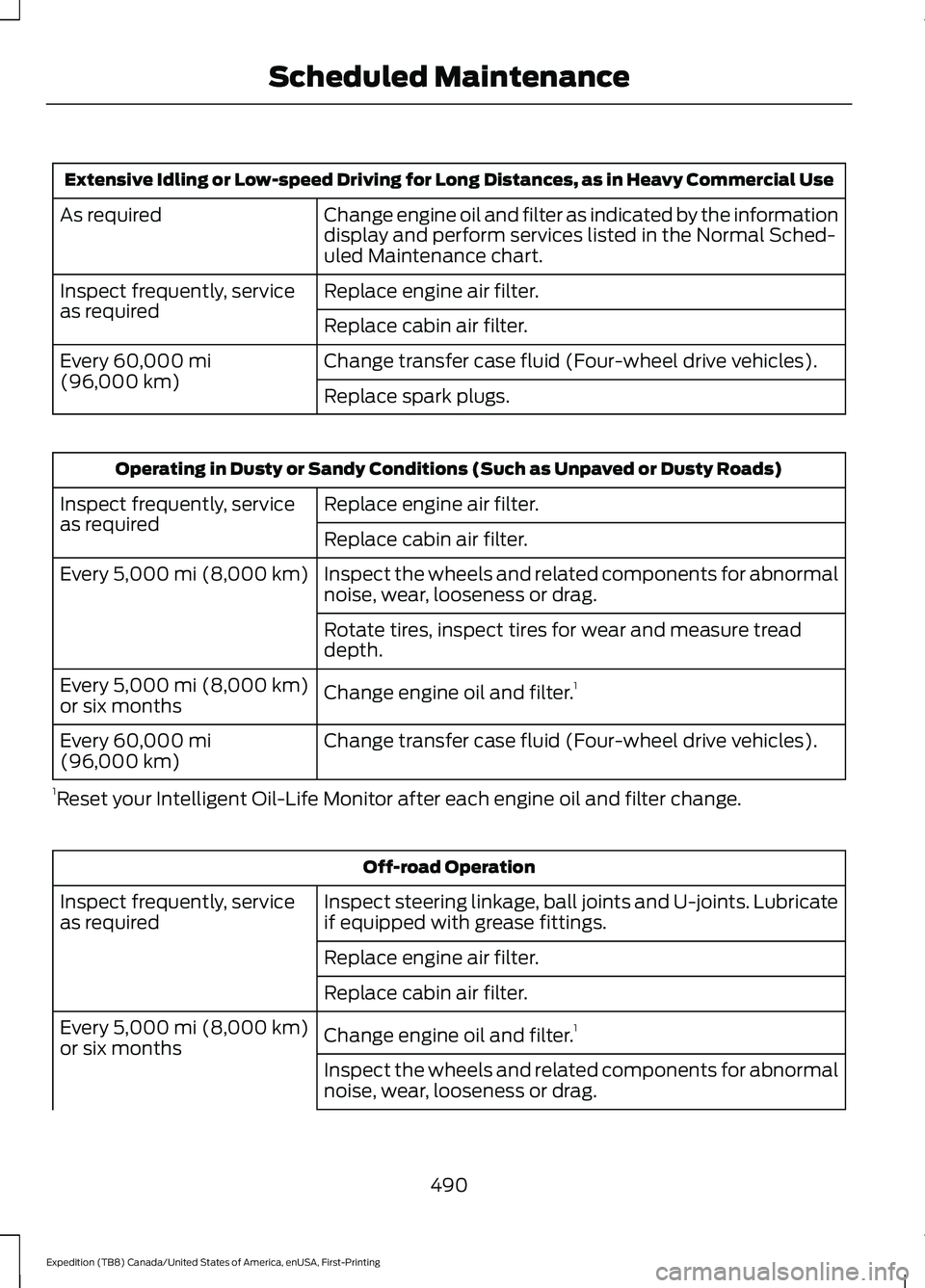
Extensive Idling or Low-speed Driving for Long Distances, as in Heavy Commercial Use
Change engine oil and filter as indicated by the information
display and perform services listed in the Normal Sched-
uled Maintenance chart.
As required
Replace engine air filter.
Inspect frequently, service
as required
Replace cabin air filter.
Change transfer case fluid (Four-wheel drive vehicles).
Every 60,000 mi
(96,000 km) Replace spark plugs.Operating in Dusty or Sandy Conditions (Such as Unpaved or Dusty Roads)
Replace engine air filter.
Inspect frequently, service
as required
Replace cabin air filter.
Inspect the wheels and related components for abnormal
noise, wear, looseness or drag.
Every
5,000 mi (8,000 km)
Rotate tires, inspect tires for wear and measure tread
depth.
Change engine oil and filter. 1
Every
5,000 mi (8,000 km)
or six months
Change transfer case fluid (Four-wheel drive vehicles).
Every
60,000 mi
(96,000 km)
1 Reset your Intelligent Oil-Life Monitor after each engine oil and filter change. Off-road Operation
Inspect steering linkage, ball joints and U-joints. Lubricate
if equipped with grease fittings.
Inspect frequently, service
as required
Replace engine air filter.
Replace cabin air filter.
Change engine oil and filter.1
Every
5,000 mi (8,000 km)
or six months
Inspect the wheels and related components for abnormal
noise, wear, looseness or drag.
490
Expedition (TB8) Canada/United States of America, enUSA, First-Printing Scheduled Maintenance
Page 551 of 574
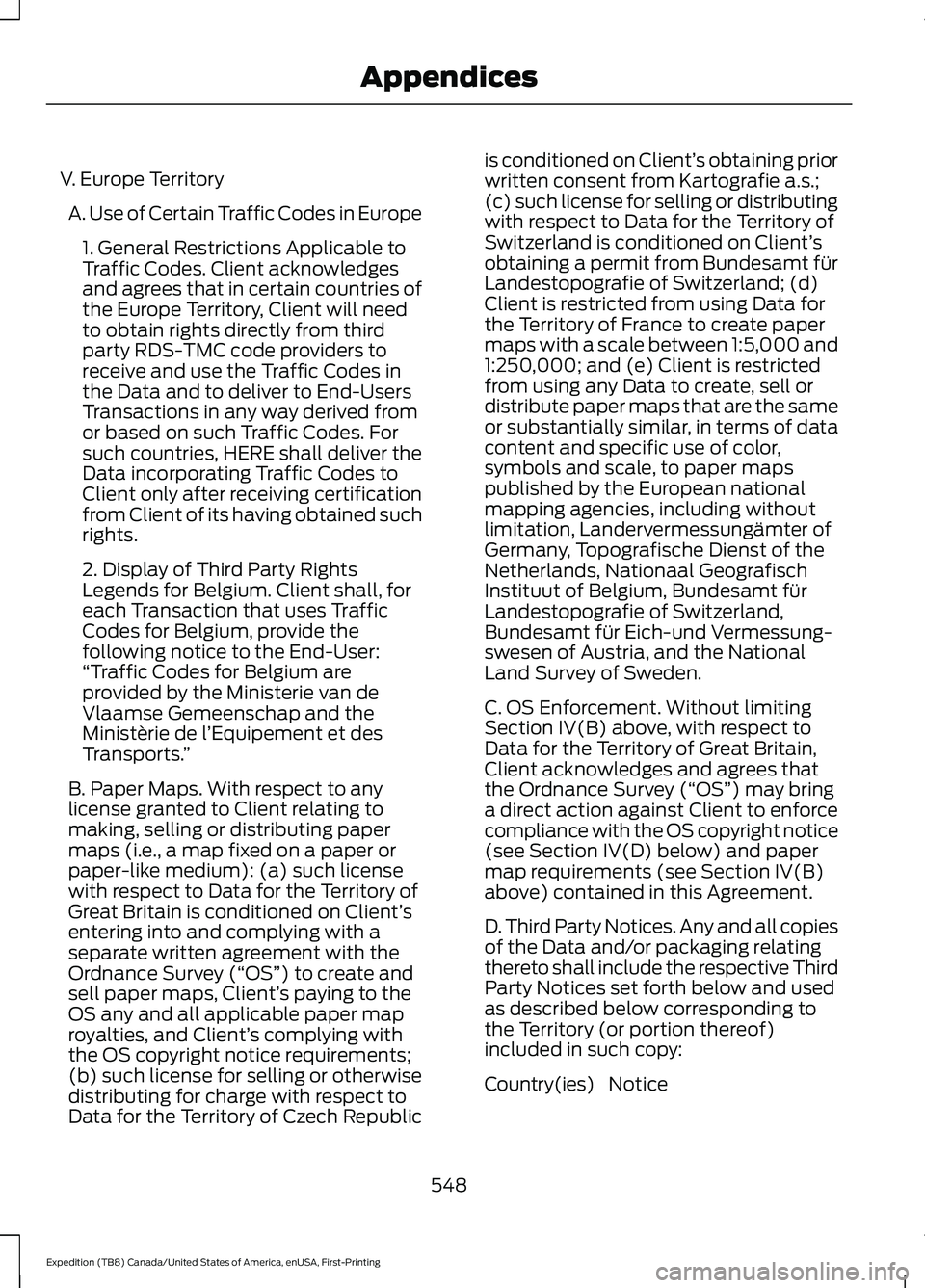
V. Europe Territory
A. Use of Certain Traffic Codes in Europe 1. General Restrictions Applicable to
Traffic Codes. Client acknowledges
and agrees that in certain countries of
the Europe Territory, Client will need
to obtain rights directly from third
party RDS-TMC code providers to
receive and use the Traffic Codes in
the Data and to deliver to End-Users
Transactions in any way derived from
or based on such Traffic Codes. For
such countries, HERE shall deliver the
Data incorporating Traffic Codes to
Client only after receiving certification
from Client of its having obtained such
rights.
2. Display of Third Party Rights
Legends for Belgium. Client shall, for
each Transaction that uses Traffic
Codes for Belgium, provide the
following notice to the End-User:
“Traffic Codes for Belgium are
provided by the Ministerie van de
Vlaamse Gemeenschap and the
Ministèrie de l ’Equipement et des
Transports. ”
B. Paper Maps. With respect to any
license granted to Client relating to
making, selling or distributing paper
maps (i.e., a map fixed on a paper or
paper-like medium): (a) such license
with respect to Data for the Territory of
Great Britain is conditioned on Client’ s
entering into and complying with a
separate written agreement with the
Ordnance Survey (“OS ”) to create and
sell paper maps, Client’ s paying to the
OS any and all applicable paper map
royalties, and Client’ s complying with
the OS copyright notice requirements;
(b) such license for selling or otherwise
distributing for charge with respect to
Data for the Territory of Czech Republic is conditioned on Client’
s obtaining prior
written consent from Kartografie a.s.;
(c) such license for selling or distributing
with respect to Data for the Territory of
Switzerland is conditioned on Client’ s
obtaining a permit from Bundesamt für
Landestopografie of Switzerland; (d)
Client is restricted from using Data for
the Territory of France to create paper
maps with a scale between 1:5,000 and
1:250,000; and (e) Client is restricted
from using any Data to create, sell or
distribute paper maps that are the same
or substantially similar, in terms of data
content and specific use of color,
symbols and scale, to paper maps
published by the European national
mapping agencies, including without
limitation, Landervermessungämter of
Germany, Topografische Dienst of the
Netherlands, Nationaal Geografisch
Instituut of Belgium, Bundesamt für
Landestopografie of Switzerland,
Bundesamt für Eich-und Vermessung-
swesen of Austria, and the National
Land Survey of Sweden.
C. OS Enforcement. Without limiting
Section IV(B) above, with respect to
Data for the Territory of Great Britain,
Client acknowledges and agrees that
the Ordnance Survey (“OS ”) may bring
a direct action against Client to enforce
compliance with the OS copyright notice
(see Section IV(D) below) and paper
map requirements (see Section IV(B)
above) contained in this Agreement.
D. Third Party Notices. Any and all copies
of the Data and/or packaging relating
thereto shall include the respective Third
Party Notices set forth below and used
as described below corresponding to
the Territory (or portion thereof)
included in such copy:
Notice
Country(ies)
548
Expedition (TB8) Canada/United States of America, enUSA, First-Printing Appendices
Page 560 of 574
3
360 Degree Camera...................................243
Advanced Camera Views................................ 243
Camera Views..................................................... 243
Front Camera...................................................... 244
Keep Out Zone.................................................... 244
Side Camera........................................................ 244
4
4WD See: Four-Wheel Drive...................................... 210
9
911 Assist...........................................................58
A
A/C See: Climate Control......................................... 146
About This Manual...........................................9
ABS See: Brakes............................................................ 219
ABS driving hints See: Hints on Driving With Anti-Lock
Brakes................................................................. 219
Accessories...................................................480
Accessories See: Replacement Parts
Recommendation............................................ 16
ACC See: Using Adaptive Cruise Control............247
Active Park Assist........................................233
Using Active Park Assist.................................. 234
Adjustable Pedals
..........................................95
Adjusting the Headlamps.........................347
Horizontal Aim Adjustment........................... 348
Vertical Aim Adjustment................................. 347
Adjusting the Pedals.....................................95
Adjusting the Steering Wheel - Vehicles With: Manual Adjustable Steering
Column.............................................................91
Adjusting the Steering Wheel - Vehicles With: Power Adjustable Steering
Column.............................................................91
End of Travel Position......................................... 92Memory Feature...................................................
92
Airbag Disposal...............................................57
Air Conditioning See: Climate Control......................................... 146
Air Filter See: Changing the Engine Air Filter.............339
Alarm See: Anti-Theft Alarm........................................ 87
Ambient Lighting..........................................102 Adjusting the Brightness................................. 102
Switching Ambient Lighting Off................... 102
Switching Ambient Lighting On.................... 102
Anti-Theft Alarm............................................87 Arming the Alarm................................................ 88
Disarming the Alarm........................................... 88
Using the System................................................. 87
Appendices....................................................528
Apps.................................................................462 SiriusXM Traffic and Travel Link.................. 464
Using Apps on an Android Device...............463
Using Apps on an iOS Device....................... 463
Using Mobile Navigation on an Android Device............................................................... 463
At a Glance.......................................................20
Audible Warnings and Indicators
............118
Direction Indicator Tone.................................... 118
Headlamps On Warning Tone........................ 118
Key in Ignition Warning Tone........................... 118
Keyless Warning Alert........................................ 118
Parking Brake On Warning Tone.................... 118
Audio Control
...................................................92
You can operate the following functions
with the control:............................................... 92
Audio System
...............................................408
General Information........................................ 408
Audio Unit - Vehicles With: Touchscreen Display............................................................411
Accessing the Sound Settings........................ 411
Adjusting the Volume......................................... 411
Changing Radio Stations................................. 412
Muting the Audio................................................ 412
Playing or Pausing Media................................. 412
Setting the Memory Presets........................... 412
Switching the Audio Unit On and Off.........412
Switching the Display On and Off................412
Using Seek, Fast Forward and Reverse.............................................................. 412
557
Expedition (TB8) Canada/United States of America, enUSA, First-Printing Index
Page 561 of 574
Audio Unit - Vehicles Without:
Touchscreen Display..............................408
Accessing the Settings Menu....................... 409
Accessing the Sound Settings..................... 409
Adjusting the Volume...................................... 409
Changing Radio Stations............................... 409
Playing or Pausing Media................................ 410
Returning to the Previous Screen................410
Scrolling Through the Menu Options.........410
Selecting a Menu Option................................. 410
Selecting Media.................................................. 410
Selecting the Radio........................................... 410
Setting a Memory Preset.................................410
Switching the Audio Unit On and Off.........410
Using a Cell Phone.............................................410
Using Apps............................................................ 410
Using Seek, Fast Forward and Reverse............................................................... 411
Autolamps........................................................99 Windshield Wiper Activated
Headlamps........................................................ 99
Automatic Climate Control......................148 Accessing Rear Climate Controls.................148
Directing the Airflow.......................................... 148
Setting the Blower Motor Speed.................. 148
Setting the Temperature................................. 148
Switching Auto Mode On and Off................148
Switching Dual Zone Mode On and Off....................................................................... 149
Switching Maximum Air Conditioning On and Off.............................................................. 149
Switching Maximum Defrost On and Off....................................................................... 150
Switching Recirculated Air On and Off....................................................................... 150
Switching the Air Conditioning On and Off....................................................................... 149
Switching the Climate Control On and Off....................................................................... 149
Switching the Heated Seats On and Off....................................................................... 150
Switching the Ventilated Seats On and Off....................................................................... 150
Automatic High Beam Control................103
Automatic High Beam Control Indicators......................................................103 Automatic Transmission
..........................203
Automatic Transmission Adaptive
Learning........................................................... 209
Brake-Shift Interlock (Console Shifter Only)................................................................. 208
If Your Vehicle Gets Stuck in Mud or Snow................................................................. 209
SelectShift™ Automatic Transmission.................................................. 207
Understanding the Shift Positions of Your Automatic Transmission............................ 203
Automatic Transmission Fluid Check
............................................................343
Auto-Start-Stop...........................................189 Disabling Auto-Start-Stop............................. 190
Enabling Auto-Start-Stop.............................. 189
Autowipers.......................................................96 Autowipers Settings............................................ 97
B
Battery See: Changing the 12V Battery..................... 345
Blind Spot Information System.............259 ........................................................................\
.......... 259
Blind Spot Information System with Trailer Tow...................................................................... 261
Switching the System On and Off..............263
System Errors...................................................... 263
Using the Blind Spot Information System............................................................. 260
BLIS See: Blind Spot Information System..........259
Body Styling Kits.........................................360
Bonnet Lock See: Opening and Closing the Hood..........335
Booster Seats..................................................33 Types of Booster Seats...................................... 34
Brake Fluid Check........................................344 Brake Fluid Service Interval........................... 345
Brakes...............................................................219 General Information.......................................... 219
Breaking-In.....................................................310
Bulb Specification Chart...........................401
C
Canceling the Set Speed
...........................247
558
Expedition (TB8) Canada/United States of America, enUSA, First-Printing Index