keyless FORD EXPEDITION 2021 User Guide
[x] Cancel search | Manufacturer: FORD, Model Year: 2021, Model line: EXPEDITION, Model: FORD EXPEDITION 2021Pages: 574, PDF Size: 8.33 MB
Page 172 of 574
Folds the right-hand third-row
seat.
C
Folds the left-hand second-row
seat.
D
Folds the second-row bench
center seat or both second-row
captain chair seats.
E
Folds the right-hand second-row
seat.
F
To return the second-row seat backrest to
the original position, rotate the seat
backrest up until it latches in the upright
position. The seat backrest clicks when it
is locked into position.
To return the third-row seat backrest to
the original position, press the
corresponding control again.
Note: If the third row seat does not
completely fold or unfold, press and hold
the seat button until the seat folds and
unfolds twice.
If the power rear seat is disabled after 10
minutes, you can enable the seat by:
• Opening any door.
• Pressing the unlock button on the key
fob.
• Pressing any keyless entry keypad
button.
• Switching the ignition on.
Folding Down the Rear Seats to the
Load Floor WARNING: To prevent possible
damage to the seat or seatbelts, make
sure that the seatbelts are not fastened
before folding the seatback. WARNING:
Do not place cargo or
any objects behind the seatback before
returning it to the original position. The third-row seats have obstacle
detection that prevents the seats from
folding or returning if they are obstructed.
Reclining the Third Row Power Seats
WARNING:
Do not recline a rear
seat on which a child restraint is
installed. Failure to follow this instruction
could reduce the effectiveness of the
child restraint.
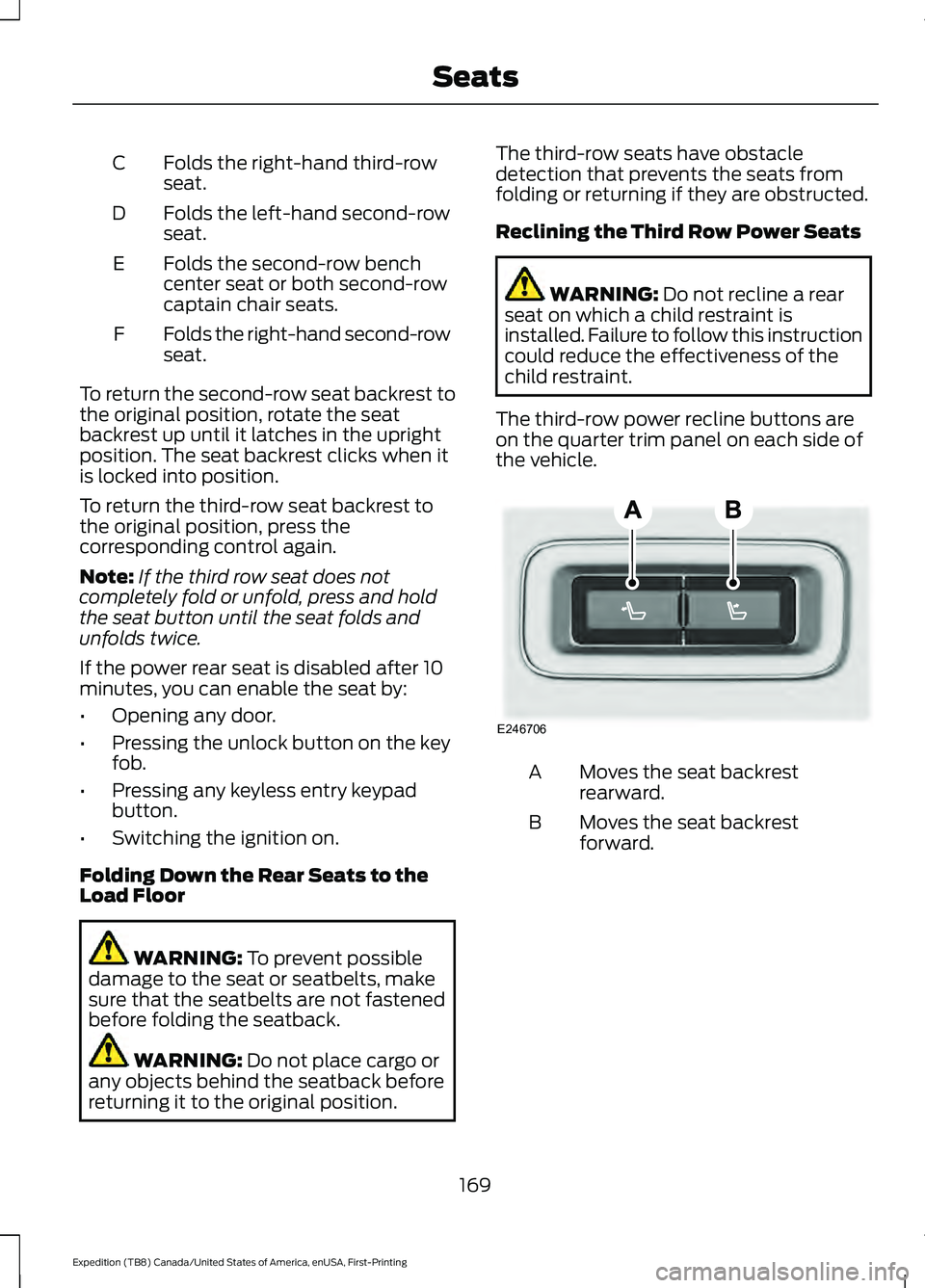
The third-row power recline buttons are
on the quarter trim panel on each side of
the vehicle. Moves the seat backrest
rearward.
A
Moves the seat backrest
forward.
B
169
Expedition (TB8) Canada/United States of America, enUSA, First-Printing SeatsE246706
Page 186 of 574
GENERAL INFORMATION
WARNING: Extended idling at high
engine speeds can produce very high
temperatures in the engine and exhaust
system, creating the risk of fire or other
damage. WARNING:
Do not park, idle or
drive your vehicle on dry grass or other
dry ground cover. The emission system
heats up the engine compartment and
exhaust system, creating the risk of fire. WARNING: Do not start the engine
in a closed garage or in other enclosed
areas. Exhaust fumes can be toxic.
Always open the garage door before you
start the engine. WARNING:
Exhaust leaks may
result in entry of harmful and potentially
lethal fumes into the passenger
compartment. If you smell exhaust
fumes inside your vehicle, have your
vehicle inspected immediately. Do not
drive if you smell exhaust fumes.
If you disconnect the battery, your vehicle
may exhibit some unusual driving
characteristics for approximately
5 mi
(8 km) after you reconnect it. This is
because the engine management system
must realign itself with the engine. You
can disregard any unusual driving
characteristics during this period.
The powertrain control system meets all
Canadian interference-causing equipment
standard requirements regulating the
impulse electrical field or radio noise.
When you start the engine, avoid pressing
the accelerator pedal before and during
operation. Only use the accelerator pedal
when you have difficulty starting the
engine. IGNITION SWITCH
(IF EQUIPPED)
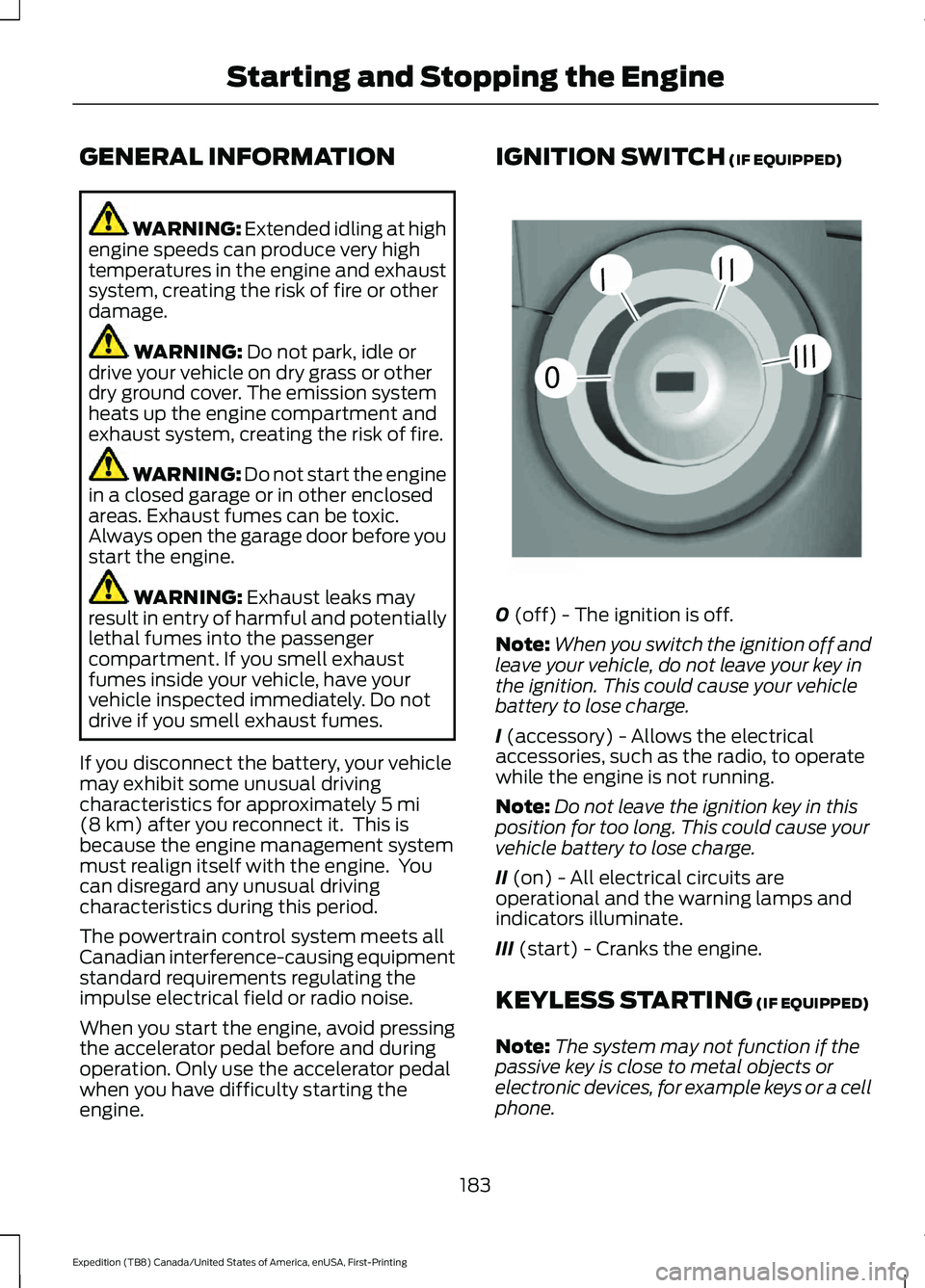
0
(off) - The ignition is off.
Note: When you switch the ignition off and
leave your vehicle, do not leave your key in
the ignition. This could cause your vehicle
battery to lose charge.
I
(accessory) - Allows the electrical
accessories, such as the radio, to operate
while the engine is not running.
Note: Do not leave the ignition key in this
position for too long. This could cause your
vehicle battery to lose charge.
II
(on) - All electrical circuits are
operational and the warning lamps and
indicators illuminate.
III
(start) - Cranks the engine.
KEYLESS STARTING
(IF EQUIPPED)
Note: The system may not function if the
passive key is close to metal objects or
electronic devices, for example keys or a cell
phone.
183
Expedition (TB8) Canada/United States of America, enUSA, First-Printing Starting and Stopping the Engine0
///
///E252522
Page 187 of 574
Note:
A valid passive key must be located
inside your vehicle to switch the ignition on
and start your vehicle.
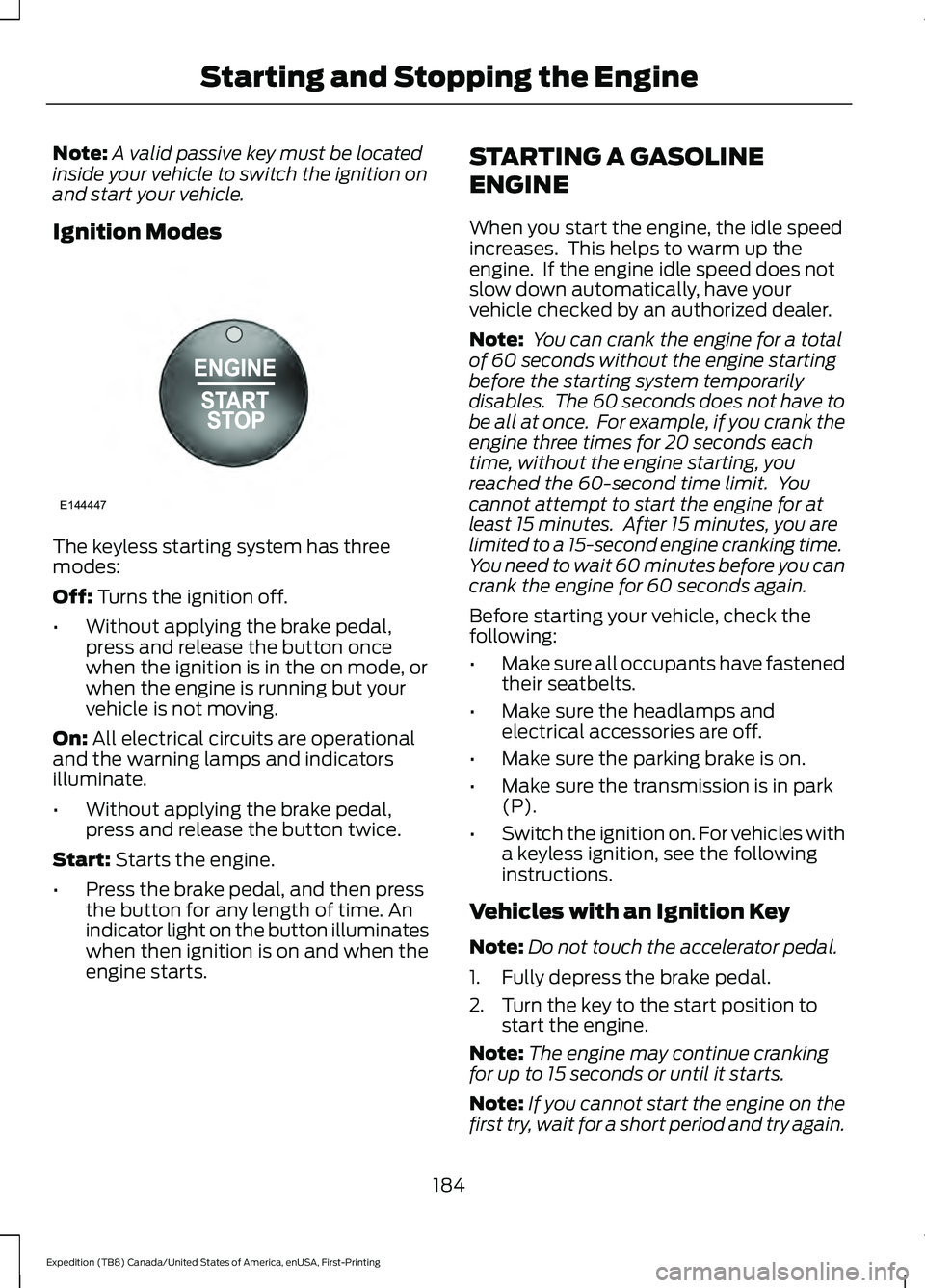
Ignition Modes The keyless starting system has three
modes:
Off: Turns the ignition off.
• Without applying the brake pedal,
press and release the button once
when the ignition is in the on mode, or
when the engine is running but your
vehicle is not moving.
On:
All electrical circuits are operational
and the warning lamps and indicators
illuminate.
• Without applying the brake pedal,
press and release the button twice.
Start:
Starts the engine.
• Press the brake pedal, and then press
the button for any length of time. An
indicator light on the button illuminates
when then ignition is on and when the
engine starts. STARTING A GASOLINE
ENGINE
When you start the engine, the idle speed
increases. This helps to warm up the
engine. If the engine idle speed does not
slow down automatically, have your
vehicle checked by an authorized dealer.
Note:
You can crank the engine for a total
of 60 seconds without the engine starting
before the starting system temporarily
disables. The 60 seconds does not have to
be all at once. For example, if you crank the
engine three times for 20 seconds each
time, without the engine starting, you
reached the 60-second time limit. You
cannot attempt to start the engine for at
least 15 minutes. After 15 minutes, you are
limited to a 15-second engine cranking time.
You need to wait 60 minutes before you can
crank the engine for 60 seconds again.
Before starting your vehicle, check the
following:
• Make sure all occupants have fastened
their seatbelts.
• Make sure the headlamps and
electrical accessories are off.
• Make sure the parking brake is on.
• Make sure the transmission is in park
(P).
• Switch the ignition on. For vehicles with
a keyless ignition, see the following
instructions.
Vehicles with an Ignition Key
Note: Do not touch the accelerator pedal.
1. Fully depress the brake pedal.
2. Turn the key to the start position to start the engine.
Note: The engine may continue cranking
for up to 15 seconds or until it starts.
Note: If you cannot start the engine on the
first try, wait for a short period and try again.
184
Expedition (TB8) Canada/United States of America, enUSA, First-Printing Starting and Stopping the EngineE144447
Page 188 of 574
Vehicles with Keyless Start
Note:
Do not touch the accelerator pedal.
Note: You must have your intelligent access
key in your vehicle in order to shift the
transmission out of park (P).
1. Fully depress the brake pedal.
2. Press the push button ignition switch.
The system does not function if:
• The passive key frequencies are
jammed.
• The key battery has no charge.
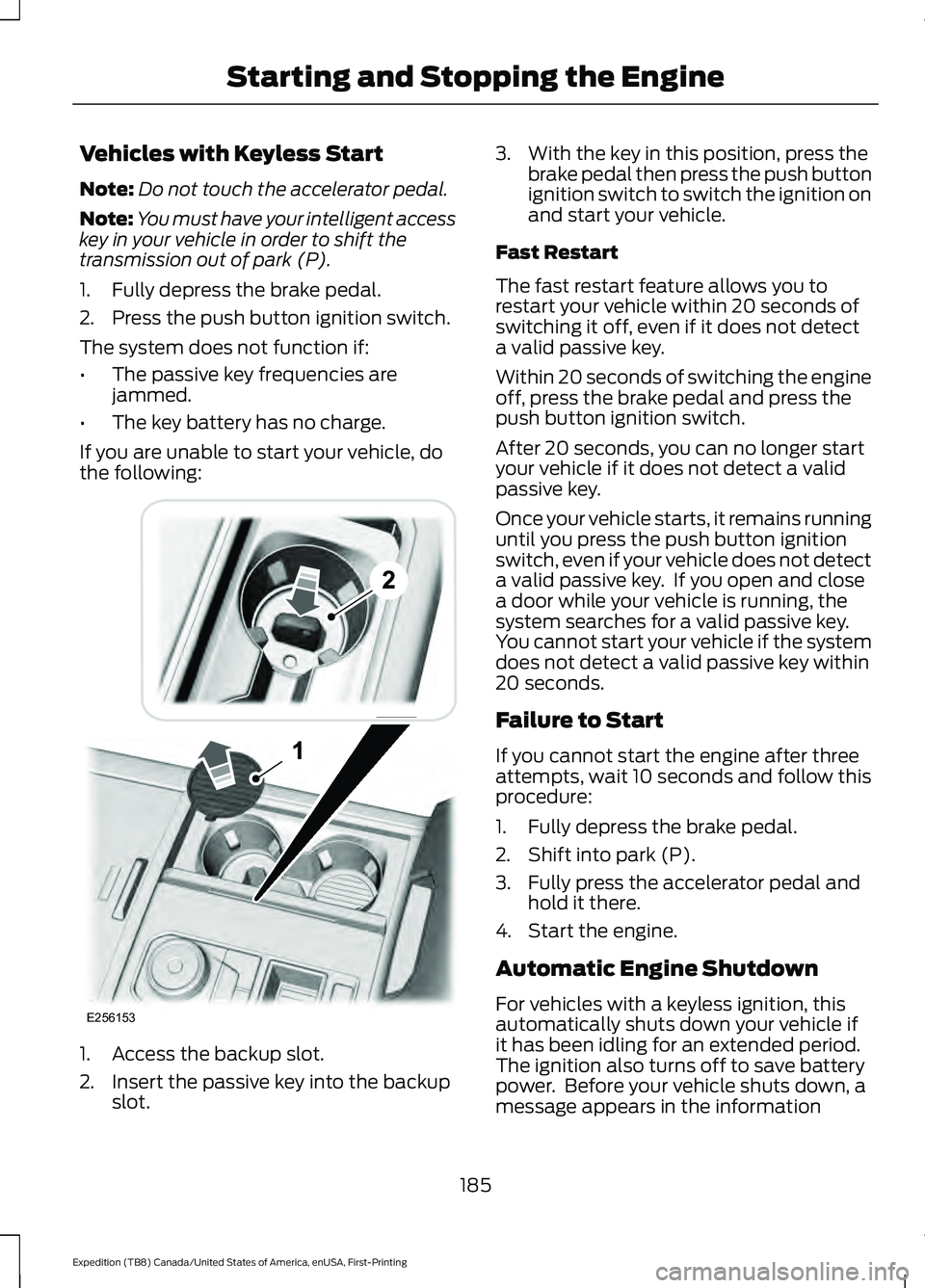
If you are unable to start your vehicle, do
the following: 1. Access the backup slot.
2. Insert the passive key into the backup
slot. 3. With the key in this position, press the
brake pedal then press the push button
ignition switch to switch the ignition on
and start your vehicle.
Fast Restart
The fast restart feature allows you to
restart your vehicle within 20 seconds of
switching it off, even if it does not detect
a valid passive key.
Within 20 seconds of switching the engine
off, press the brake pedal and press the
push button ignition switch.
After 20 seconds, you can no longer start
your vehicle if it does not detect a valid
passive key.
Once your vehicle starts, it remains running
until you press the push button ignition
switch, even if your vehicle does not detect
a valid passive key. If you open and close
a door while your vehicle is running, the
system searches for a valid passive key.
You cannot start your vehicle if the system
does not detect a valid passive key within
20 seconds.
Failure to Start
If you cannot start the engine after three
attempts, wait 10 seconds and follow this
procedure:
1. Fully depress the brake pedal.
2. Shift into park (P).
3. Fully press the accelerator pedal and hold it there.
4. Start the engine.
Automatic Engine Shutdown
For vehicles with a keyless ignition, this
automatically shuts down your vehicle if
it has been idling for an extended period.
The ignition also turns off to save battery
power. Before your vehicle shuts down, a
message appears in the information
185
Expedition (TB8) Canada/United States of America, enUSA, First-Printing Starting and Stopping the EngineE256153
Page 189 of 574
display showing a timer counting down. If
you do not intervene within 30 seconds,
your vehicle shuts down. Another message
appears in the information display to
inform you that your vehicle has shut down
to save fuel. Start your vehicle as normal.
Automatic Engine Shutdown Override
Note:
You cannot permanently switch off
the automatic shutdown feature. When you
switch it off temporarily, it turns on at the
next ignition cycle.
You can stop the shutdown, or reset the
timer, at any point before the 30-second
countdown has expired by doing any of the
following:
• You can reset the timer by interacting
with your vehicle, for example pressing
the brake or accelerator pedal.
• You can temporarily switch off the
shutdown feature any time the ignition
is on using the information display. See
Information Displays (page 119). The
feature only remains off for the current
ignition cycle.
• During the 30-second countdown, the
system prompts you to press OK or
RESET to temporarily switch the
feature off for the current ignition cycle
only.
Stopping the Engine When Your
Vehicle is Stationary
Vehicles with an Ignition Key
1. Shift into park (P).
2. Switch the ignition off.
3. Apply the parking brake.
Vehicles with Keyless Start
1. Shift into park (P).
2. Press the push button ignition switch.
3. Apply the parking brake. Note:
The ignition, all electrical circuits and
all warning lamps and indicators will be
turned off.
Note: If the engine is idling for 30 minutes,
the ignition and engine automatically shuts
down.
Stopping the Engine When Your
Vehicle is Moving WARNING: Switching off the
engine when your vehicle is still moving
results in a significant decrease in
braking assistance. Higher effort is
required to apply the brakes and to stop
your vehicle. A significant decrease in
steering assistance could also occur. The
steering does not lock, but higher effort
could be required to steer your vehicle.
When you switch the ignition off, some
electrical circuits, for example airbags,
also turn off. If you unintentionally switch
the ignition off, shift into neutral (N) and
restart the engine.
Vehicles with an Ignition Key
1. Shift into neutral and use the brakes to
bring your vehicle to a safe stop.
2. When your vehicle has stopped, shift into park (P) and switch the ignition
off.
3. Apply the parking brake.
Vehicles with Keyless Start
1. Shift into neutral and use the brakes to
bring your vehicle to a safe stop.
2. When your vehicle has stopped, shift into park (P).
3. Press and hold the push button ignition
switch, or press it three times within
two seconds.
4. Apply the parking brake.
186
Expedition (TB8) Canada/United States of America, enUSA, First-Printing Starting and Stopping the Engine
Page 310 of 574
Note:
If your vehicle has intelligent access,
you can keep your vehicle on while switching
the engine off by pressing the
START/STOP button two times slowly
without pressing the brake pedal.
5. Press and hold the brake pedal.
6. Enable neutral tow through the information display by selecting
Settings
from the menu. See General
Information (page 119).
7. Then select
Advanced Settings.
8. Then select
Vehicle.
9. Then select
Neutral Tow.
10. Press and hold the
OK button until
the information display confirms
neutral tow is enabled.
Note: If completed successfully, the
information display shows
Neutral Tow
Enabled Leave Transmission in Neutral.
This indicates that your vehicle is safe to
tow with all wheels on the ground.
Note: If you do not see the message in the
display, you must perform the procedure
again from the beginning.
Note: You may hear an audible noise as the
transfer case shifts into its neutral position.
This is normal.
11. Leave the transmission in neutral (N).
If your vehicle has intelligent access,
press the engine
START/STOP
button once without pressing the
brake pedal to switch the ignition off.
You do not need to leave your keys in
the vehicle. You can lock and unlock
your vehicle as you normally do. If
your vehicle has a physical ignition
key, turn the ignition as far as it can
go toward the off position. It does not
turn to the off position when the
transmission is in neutral (N). You
must leave the key in the ignition
when towing. To lock and unlock your
vehicle, use the keyless entry keypad
or an extra set of keys. 12. Release the brake pedal. WARNING:
Do not disconnect the
battery during recreational towing. It
prevents the transfer case from shifting
properly and may cause the vehicle to
roll, even if the transmission is in park
(P). WARNING:
Shifting the transfer
case to its neutral position for
recreational towing may cause the
vehicle to roll, even if the transmission is
in park (P). It may injure the driver and
others. Make sure you press the foot
brake and the vehicle is in a secure, safe
position when you shift to neutral (N).
Note: Failing to put the transfer case in its
neutral position may damage vehicle
components.
Note: You can check four-wheel-down
towing status at any time by opening the
driver door or turning the ignition to the
accessory or on position and verifying the
message displays in the cluster.
Exiting Four-wheel-down Towing
To exit four-wheel-down towing and return
the transfer case to its
2H position:
1. With your vehicle still properly secured
to the tow vehicle, start the engine.
2. After starting your vehicle, switch the engine off but leave the key in the on
position.
Note: If your vehicle has intelligent access,
you can keep the vehicle on when switching
the engine off by pressing the
START/STOP
button two times slowly
without pressing the brake pedal.
3. Press and hold the brake pedal.
4. Shift the transmission out of neutral (N) and into park (P).
5. Release the brake pedal.
307
Expedition (TB8) Canada/United States of America, enUSA, First-Printing Towing
Page 560 of 574
3
360 Degree Camera...................................243
Advanced Camera Views................................ 243
Camera Views..................................................... 243
Front Camera...................................................... 244
Keep Out Zone.................................................... 244
Side Camera........................................................ 244
4
4WD See: Four-Wheel Drive...................................... 210
9
911 Assist...........................................................58
A
A/C See: Climate Control......................................... 146
About This Manual...........................................9
ABS See: Brakes............................................................ 219
ABS driving hints See: Hints on Driving With Anti-Lock
Brakes................................................................. 219
Accessories...................................................480
Accessories See: Replacement Parts
Recommendation............................................ 16
ACC See: Using Adaptive Cruise Control............247
Active Park Assist........................................233
Using Active Park Assist.................................. 234
Adjustable Pedals
..........................................95
Adjusting the Headlamps.........................347
Horizontal Aim Adjustment........................... 348
Vertical Aim Adjustment................................. 347
Adjusting the Pedals.....................................95
Adjusting the Steering Wheel - Vehicles With: Manual Adjustable Steering
Column.............................................................91
Adjusting the Steering Wheel - Vehicles With: Power Adjustable Steering
Column.............................................................91
End of Travel Position......................................... 92Memory Feature...................................................
92
Airbag Disposal...............................................57
Air Conditioning See: Climate Control......................................... 146
Air Filter See: Changing the Engine Air Filter.............339
Alarm See: Anti-Theft Alarm........................................ 87
Ambient Lighting..........................................102 Adjusting the Brightness................................. 102
Switching Ambient Lighting Off................... 102
Switching Ambient Lighting On.................... 102
Anti-Theft Alarm............................................87 Arming the Alarm................................................ 88
Disarming the Alarm........................................... 88
Using the System................................................. 87
Appendices....................................................528
Apps.................................................................462 SiriusXM Traffic and Travel Link.................. 464
Using Apps on an Android Device...............463
Using Apps on an iOS Device....................... 463
Using Mobile Navigation on an Android Device............................................................... 463
At a Glance.......................................................20
Audible Warnings and Indicators
............118
Direction Indicator Tone.................................... 118
Headlamps On Warning Tone........................ 118
Key in Ignition Warning Tone........................... 118
Keyless Warning Alert........................................ 118
Parking Brake On Warning Tone.................... 118
Audio Control
...................................................92
You can operate the following functions
with the control:............................................... 92
Audio System
...............................................408
General Information........................................ 408
Audio Unit - Vehicles With: Touchscreen Display............................................................411
Accessing the Sound Settings........................ 411
Adjusting the Volume......................................... 411
Changing Radio Stations................................. 412
Muting the Audio................................................ 412
Playing or Pausing Media................................. 412
Setting the Memory Presets........................... 412
Switching the Audio Unit On and Off.........412
Switching the Display On and Off................412
Using Seek, Fast Forward and Reverse.............................................................. 412
557
Expedition (TB8) Canada/United States of America, enUSA, First-Printing Index
Page 567 of 574
Doors and Locks..................................................
133
Driver Alert............................................................. 133
Drivetrain................................................................ 134
Engine..................................................................... 135
Four-Wheel Drive................................................ 135
Fuel........................................................................\
.. 136
Keys and Intelligent Access............................ 136
Lane Keeping System........................................ 137
Maintenance........................................................ 138
MyKey...................................................................... 138
Off Road................................................................. 139
Park Aid.................................................................. 140
Park Brake............................................................. 140
Power Steering..................................................... 141
Pre-Collision Assist............................................. 141
Pro Trailer Backup Assist™............................. 142
Remote Start........................................................ 143
Seats........................................................................\
143
Starting System .................................................. 143
Tire Pressure Monitoring System.................144
Trailer...................................................................... 144
Transmission........................................................ 145
Installing Child Restraints...........................24
Child Seats.............................................................. 24
Combining Seatbelt and LATCH Lower Anchors for Attaching Child Safety
Seats.................................................................... 30
Using Lap and Shoulder Belts......................... 24
Using Lower Anchors and Tethers for CHildren (LATCH)........................................... 29
Using Tether Straps............................................ 30
Instrument Cluster
.........................................111
Instrument Lighting Dimmer.....................99
Instrument Panel...........................................20
Interior Air Quality........................................156
Interior Lamps................................................101
Front Interior Lamp............................................. 101
Interior Lamp Function..................................... 102
Rear Interior Lamps........................................... 102
Switching All of the Interior Lamps Off........................................................................\
101
Switching All of the Interior Lamps On........................................................................\
. 101
Switching the Individual Map Lamps On and Off............................................................... 101
Interior Mirror
..................................................107
Automatic Dimming Mirror............................. 107
Manual Dimming Mirror.................................... 107Introduction........................................................9
J
Jump Starting the Vehicle
.........................314
Connecting the Jumper Cables..................... 314
Jump Starting....................................................... 315
Preparing Your Vehicle...................................... 314
Removing the Jumper Cables........................ 315
K
Keyless Entry
....................................................76
Displaying the Factory-Set Code................... 78
Locking and Unlocking....................................... 78
SECURICODE™ KEYLESS ENTRY KEYPAD............................................................... 76
Keyless Starting
............................................183
Ignition Modes..................................................... 184
Keys and Remote Controls........................60
L
Lane Keeping System................................255 Switching the System On and Off..............256
System Display.................................................... 257
System Settings................................................. 256
Troubleshooting................................................. 258
Liftgate..............................................................80
Liftgate Window...........................................109 Opening the Liftgate Window....................... 109
Lighting Control..............................................98 Flashing the Headlamp High Beam..............99
Headlamp High Beam....................................... 98
Lighting..............................................................98 General Information........................................... 98
Limited Slip Differential
.............................218
Locking Function................................................. 218
Spare Tire.............................................................. 218
Trailer Towing....................................................... 218
Load Carriers See: Roof Racks and Load Carriers.............278
Load Carrying
.................................................275
Load Limit.......................................................279 Special Loading Instructions for Owners of
Pick-up Trucks and Utility-type
Vehicles............................................................ 283
564
Expedition (TB8) Canada/United States of America, enUSA, First-Printing Index
Page 572 of 574
Starter Switch
See: Ignition Switch........................................... 183
Starting a Gasoline Engine.......................184 Automatic Engine Shutdown........................ 185
Failure to Start..................................................... 185
Guarding Against Exhaust Fumes................187
Important Ventilating Information...............187
Stopping the Engine When Your Vehicle is Moving............................................................... 186
Stopping the Engine When Your Vehicle is Stationary......................................................... 186
Vehicles with an Ignition Key......................... 184
Vehicles with Keyless Start............................. 185
Starting and Stopping the Engine..........183 General Information.......................................... 183
Steering...........................................................266 Adaptive Learning.............................................. 267
Electric Power Steering................................... 266
Steering Wheel................................................91
Storage Compartments.............................182
Sunroof See: Moonroof..................................................... 109
Sun Visors
.......................................................108
Illuminated Vanity Mirror................................. 108
Supplementary Restraints System.........50 Principle of Operation........................................ 50
Switching Automatic High Beam Control On and Off
...................................................103
Activating the Automatic High Beam
Control............................................................... 103
Switching Cruise Control On and Off..................................................................246
Switching Cruise Control Off........................ 246
Switching Cruise Control On......................... 246
Switching Rear Occupant Alert System On and Off - Vehicles With: SYNC
3
........................................................................\
173
Semiannual Reminder...................................... 173
Switching Rear Occupant Alert System On and Off - Vehicles With:
SYNC...............................................................172
Semiannual Reminder...................................... 172
Symbols Glossary
.............................................9
SYNC™ 3........................................................434
General Information......................................... 434
SYNC™ 3 Troubleshooting......................467 Additional Information and
Assistance....................................................... 479Apps........................................................................\
474
Navigation............................................................. 473
Personal Profiles................................................. 477
Phone
...................................................................... 471
Resetting the System....................................... 479
USB and Bluetooth Audio............................. 468
Voice Recognition.............................................. 467
Wi-Fi Connectivity............................................. 476
SYNC™ Applications and Services........................................................423
SYNC Mobile Apps............................................ 423
SYNC™............................................................419 General Information.......................................... 419
SYNC™ Troubleshooting
.........................425
T
Technical Specifications See: Capacities and Specifications...........390
The Better Business Bureau (BBB) Auto Line Program (U.S. Only).......................320
Tire Care
..........................................................363
Glossary of Tire Terminology........................ 364
Information About Uniform Tire Quality Grading............................................................. 363
Information Contained on the Tire Sidewall........................................................... 365
Temperature A B C............................................ 364
Traction AA A B C.............................................. 363
Treadwear............................................................ 363
Tire Pressure Monitoring System...........378 Changing Tires With a Tire Pressure
Monitoring System...................................... 380
Understanding Your Tire Pressure Monitoring System ..................................... 380
Tires See: Wheels and Tires...................................... 361
Towing a Trailer............................................285 Load Placement................................................. 285
Towing Points.................................................317
Towing the Vehicle on Four Wheels.........................................................306
Four-wheel-down Towing............................. 306
Recreational Towing........................................ 306
Towing.............................................................285
Traction Control
............................................223
Principle of Operation...................................... 223
569
Expedition (TB8) Canada/United States of America, enUSA, First-Printing Index