roof FORD EXPEDITION 2021 User Guide
[x] Cancel search | Manufacturer: FORD, Model Year: 2021, Model line: EXPEDITION, Model: FORD EXPEDITION 2021Pages: 574, PDF Size: 8.33 MB
Page 286 of 574
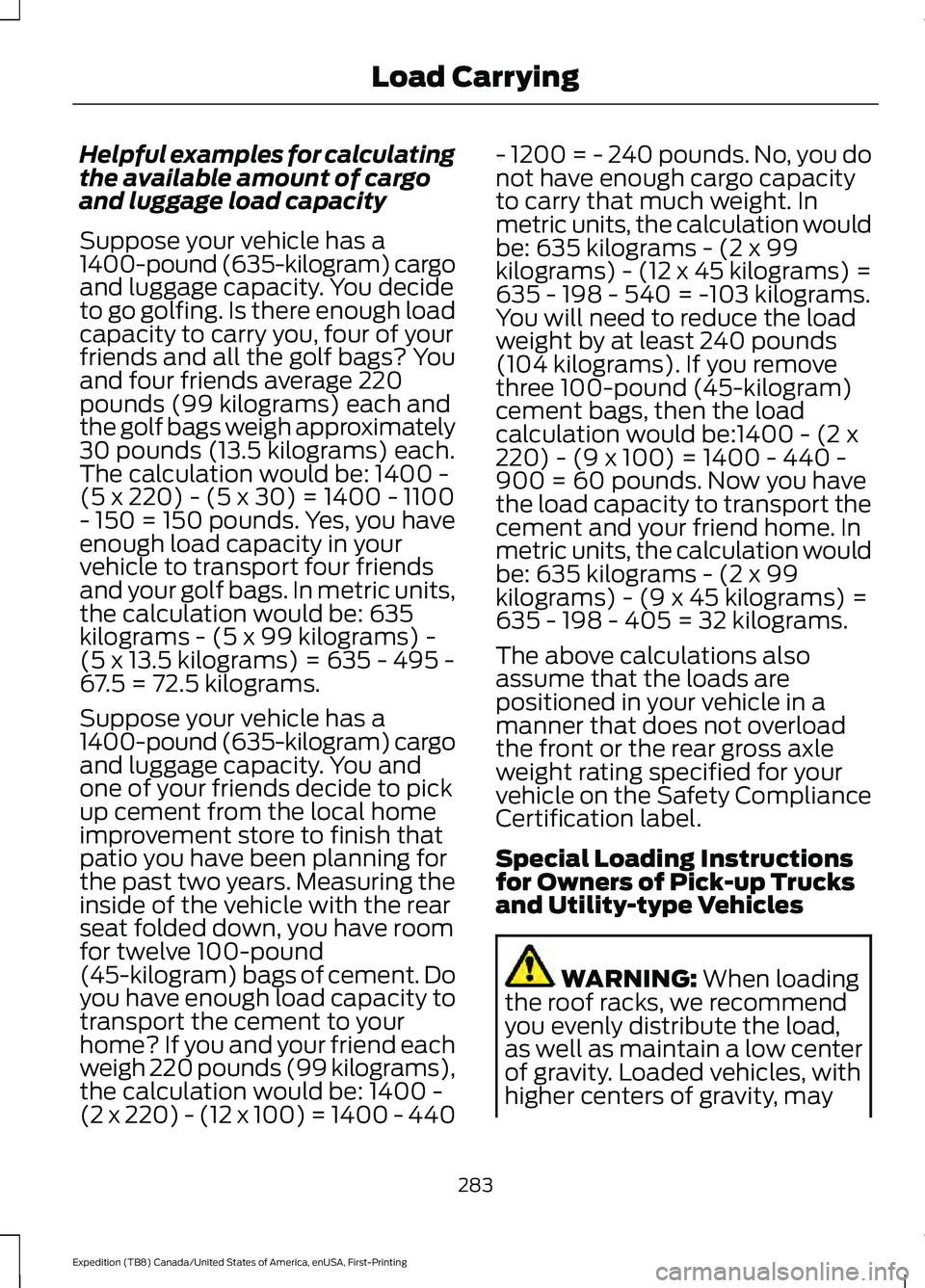
Helpful examples for calculating
the available amount of cargo
and luggage load capacity
Suppose your vehicle has a
1400-pound (635-kilogram) cargo
and luggage capacity. You decide
to go golfing. Is there enough load
capacity to carry you, four of your
friends and all the golf bags? You
and four friends average 220
pounds (99 kilograms) each and
the golf bags weigh approximately
30 pounds (13.5 kilograms) each.
The calculation would be: 1400 -
(5 x 220) - (5 x 30) = 1400 - 1100
- 150 = 150 pounds. Yes, you have
enough load capacity in your
vehicle to transport four friends
and your golf bags. In metric units,
the calculation would be: 635
kilograms - (5 x 99 kilograms) -
(5 x 13.5 kilograms) = 635 - 495 -
67.5 = 72.5 kilograms.
Suppose your vehicle has a
1400-pound (635-kilogram) cargo
and luggage capacity. You and
one of your friends decide to pick
up cement from the local home
improvement store to finish that
patio you have been planning for
the past two years. Measuring the
inside of the vehicle with the rear
seat folded down, you have room
for twelve 100-pound
(45-kilogram) bags of cement. Do
you have enough load capacity to
transport the cement to your
home? If you and your friend each
weigh 220 pounds (99 kilograms),
the calculation would be: 1400 -
(2 x 220) - (12 x 100) = 1400 - 440
- 1200 = - 240 pounds. No, you do
not have enough cargo capacity
to carry that much weight. In
metric units, the calculation would
be: 635 kilograms - (2 x 99
kilograms) - (12 x 45 kilograms) =
635 - 198 - 540 = -103 kilograms.
You will need to reduce the load
weight by at least 240 pounds
(104 kilograms). If you remove
three 100-pound (45-kilogram)
cement bags, then the load
calculation would be:1400 - (2 x
220) - (9 x 100) = 1400 - 440 -
900 = 60 pounds. Now you have
the load capacity to transport the
cement and your friend home. In
metric units, the calculation would
be: 635 kilograms - (2 x 99
kilograms) - (9 x 45 kilograms) =
635 - 198 - 405 = 32 kilograms.
The above calculations also
assume that the loads are
positioned in your vehicle in a
manner that does not overload
the front or the rear gross axle
weight rating specified for your
vehicle on the Safety Compliance
Certification label.
Special Loading Instructions
for Owners of Pick-up Trucks
and Utility-type Vehicles
WARNING: When loading
the roof racks, we recommend
you evenly distribute the load,
as well as maintain a low center
of gravity. Loaded vehicles, with
higher centers of gravity, may
283
Expedition (TB8) Canada/United States of America, enUSA, First-Printing Load Carrying
Page 323 of 574
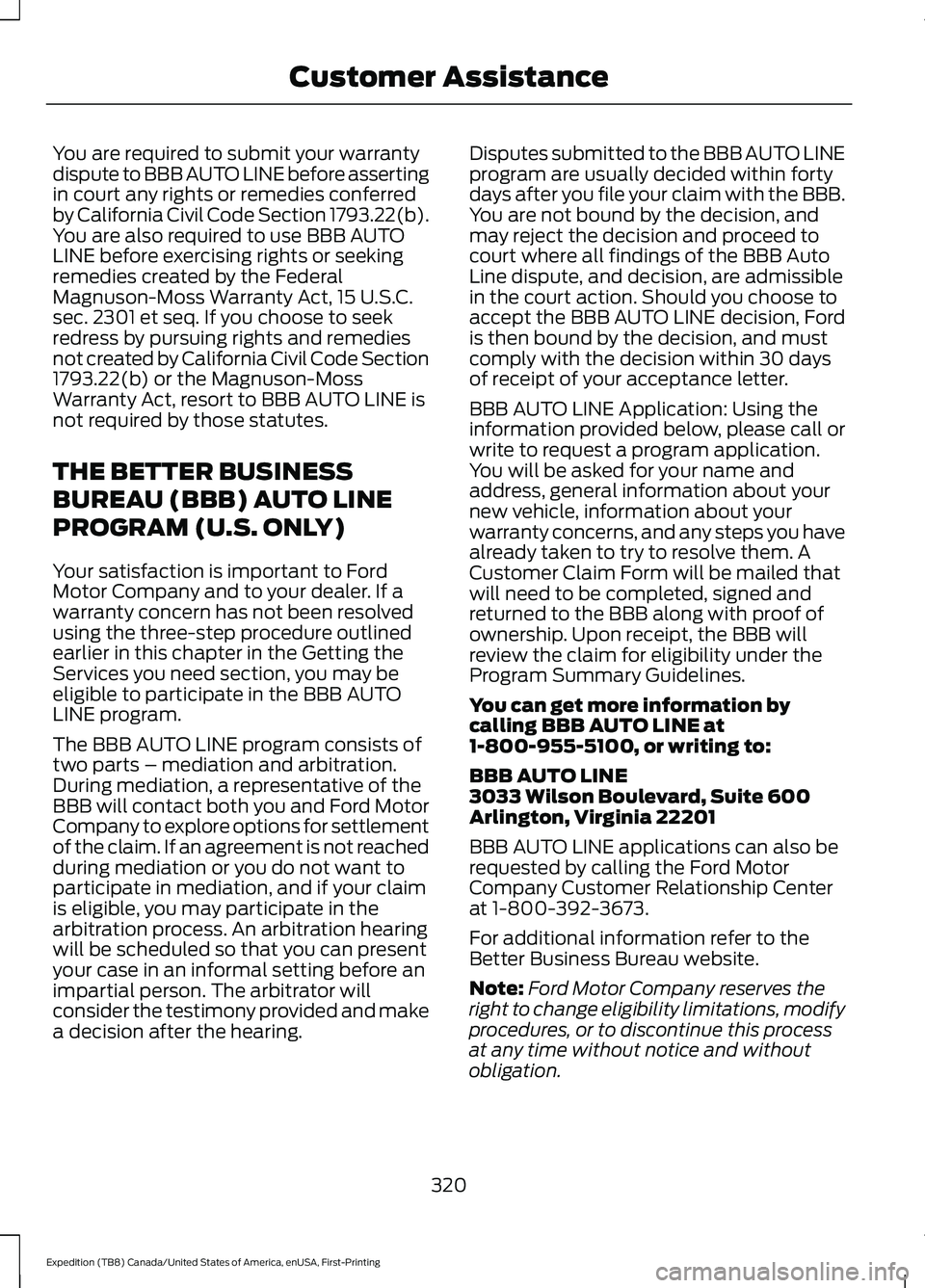
You are required to submit your warranty
dispute to BBB AUTO LINE before asserting
in court any rights or remedies conferred
by California Civil Code Section 1793.22(b).
You are also required to use BBB AUTO
LINE before exercising rights or seeking
remedies created by the Federal
Magnuson-Moss Warranty Act, 15 U.S.C.
sec. 2301 et seq. If you choose to seek
redress by pursuing rights and remedies
not created by California Civil Code Section
1793.22(b) or the Magnuson-Moss
Warranty Act, resort to BBB AUTO LINE is
not required by those statutes.
THE BETTER BUSINESS
BUREAU (BBB) AUTO LINE
PROGRAM (U.S. ONLY)
Your satisfaction is important to Ford
Motor Company and to your dealer. If a
warranty concern has not been resolved
using the three-step procedure outlined
earlier in this chapter in the Getting the
Services you need section, you may be
eligible to participate in the BBB AUTO
LINE program.
The BBB AUTO LINE program consists of
two parts – mediation and arbitration.
During mediation, a representative of the
BBB will contact both you and Ford Motor
Company to explore options for settlement
of the claim. If an agreement is not reached
during mediation or you do not want to
participate in mediation, and if your claim
is eligible, you may participate in the
arbitration process. An arbitration hearing
will be scheduled so that you can present
your case in an informal setting before an
impartial person. The arbitrator will
consider the testimony provided and make
a decision after the hearing.
Disputes submitted to the BBB AUTO LINE
program are usually decided within forty
days after you file your claim with the BBB.
You are not bound by the decision, and
may reject the decision and proceed to
court where all findings of the BBB Auto
Line dispute, and decision, are admissible
in the court action. Should you choose to
accept the BBB AUTO LINE decision, Ford
is then bound by the decision, and must
comply with the decision within 30 days
of receipt of your acceptance letter.
BBB AUTO LINE Application: Using the
information provided below, please call or
write to request a program application.
You will be asked for your name and
address, general information about your
new vehicle, information about your
warranty concerns, and any steps you have
already taken to try to resolve them. A
Customer Claim Form will be mailed that
will need to be completed, signed and
returned to the BBB along with proof of
ownership. Upon receipt, the BBB will
review the claim for eligibility under the
Program Summary Guidelines.
You can get more information by
calling BBB AUTO LINE at
1-800-955-5100, or writing to:
BBB AUTO LINE
3033 Wilson Boulevard, Suite 600
Arlington, Virginia 22201
BBB AUTO LINE applications can also be
requested by calling the Ford Motor
Company Customer Relationship Center
at 1-800-392-3673.
For additional information refer to the
Better Business Bureau website.
Note:
Ford Motor Company reserves the
right to change eligibility limitations, modify
procedures, or to discontinue this process
at any time without notice and without
obligation.
320
Expedition (TB8) Canada/United States of America, enUSA, First-Printing Customer Assistance
Page 335 of 574
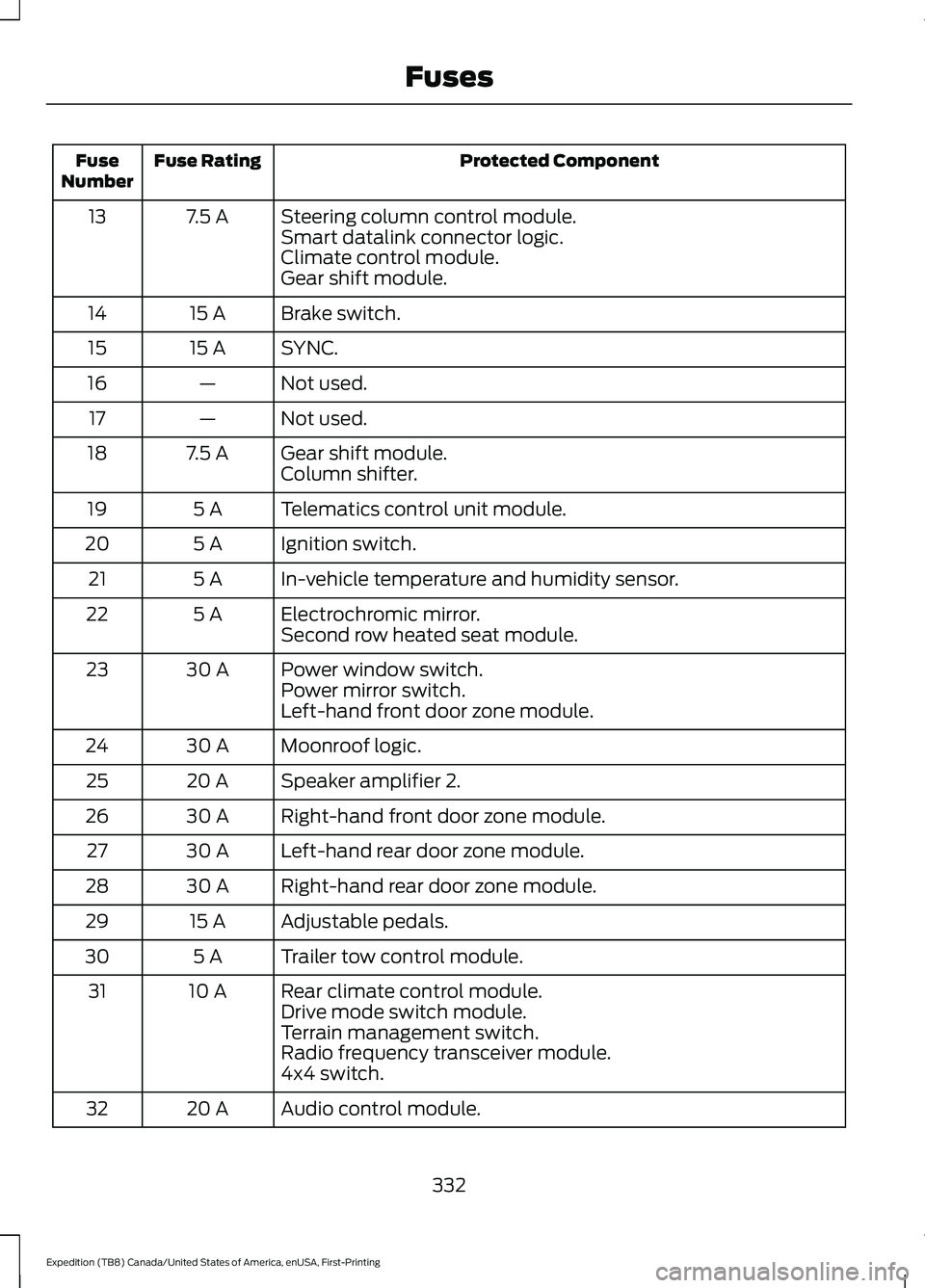
Protected Component
Fuse Rating
Fuse
Number
Steering column control module.
7.5 A
13
Smart datalink connector logic.
Climate control module.
Gear shift module.
Brake switch.
15 A
14
SYNC.
15 A
15
Not used.
—
16
Not used.
—
17
Gear shift module.
7.5 A
18
Column shifter.
Telematics control unit module.
5 A
19
Ignition switch.
5 A
20
In-vehicle temperature and humidity sensor.
5 A
21
Electrochromic mirror.
5 A
22
Second row heated seat module.
Power window switch.
30 A
23
Power mirror switch.
Left-hand front door zone module.
Moonroof logic.
30 A
24
Speaker amplifier 2.
20 A
25
Right-hand front door zone module.
30 A
26
Left-hand rear door zone module.
30 A
27
Right-hand rear door zone module.
30 A
28
Adjustable pedals.
15 A
29
Trailer tow control module.
5 A
30
Rear climate control module.
10 A
31
Drive mode switch module.
Terrain management switch.
Radio frequency transceiver module.
4x4 switch.
Audio control module.
20 A
32
332
Expedition (TB8) Canada/United States of America, enUSA, First-Printing Fuses
Page 358 of 574
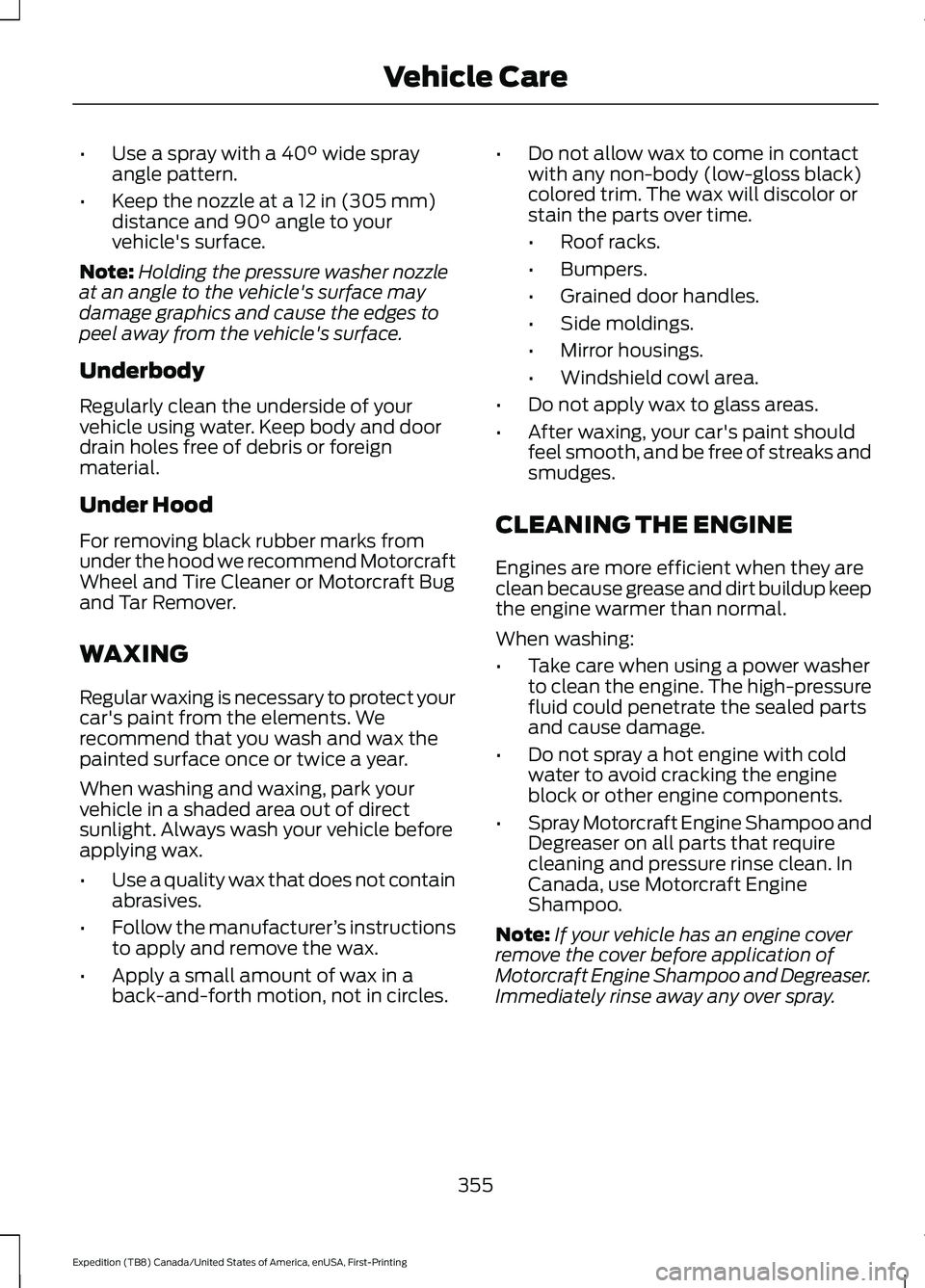
•
Use a spray with a 40° wide spray
angle pattern.
• Keep the nozzle at a
12 in (305 mm)
distance and 90° angle to your
vehicle's surface.
Note: Holding the pressure washer nozzle
at an angle to the vehicle's surface may
damage graphics and cause the edges to
peel away from the vehicle's surface.
Underbody
Regularly clean the underside of your
vehicle using water. Keep body and door
drain holes free of debris or foreign
material.
Under Hood
For removing black rubber marks from
under the hood we recommend Motorcraft
Wheel and Tire Cleaner or Motorcraft Bug
and Tar Remover.
WAXING
Regular waxing is necessary to protect your
car's paint from the elements. We
recommend that you wash and wax the
painted surface once or twice a year.
When washing and waxing, park your
vehicle in a shaded area out of direct
sunlight. Always wash your vehicle before
applying wax.
• Use a quality wax that does not contain
abrasives.
• Follow the manufacturer ’s instructions
to apply and remove the wax.
• Apply a small amount of wax in a
back-and-forth motion, not in circles. •
Do not allow wax to come in contact
with any non-body (low-gloss black)
colored trim. The wax will discolor or
stain the parts over time.
•Roof racks.
• Bumpers.
• Grained door handles.
• Side moldings.
• Mirror housings.
• Windshield cowl area.
• Do not apply wax to glass areas.
• After waxing, your car's paint should
feel smooth, and be free of streaks and
smudges.
CLEANING THE ENGINE
Engines are more efficient when they are
clean because grease and dirt buildup keep
the engine warmer than normal.
When washing:
• Take care when using a power washer
to clean the engine. The high-pressure
fluid could penetrate the sealed parts
and cause damage.
• Do not spray a hot engine with cold
water to avoid cracking the engine
block or other engine components.
• Spray Motorcraft Engine Shampoo and
Degreaser on all parts that require
cleaning and pressure rinse clean. In
Canada, use Motorcraft Engine
Shampoo.
Note: If your vehicle has an engine cover
remove the cover before application of
Motorcraft Engine Shampoo and Degreaser.
Immediately rinse away any over spray.
355
Expedition (TB8) Canada/United States of America, enUSA, First-Printing Vehicle Care
Page 555 of 574
Customer Remedies
NAV2 and its suppliers’
entire liability and
your exclusive remedy shall be, at NAV2’ s
sole discretion, either (a) return of the price
paid, if any, or (b) repair or replacement of
the Data that do not meet NAV2’ s Limited
Warranty and that are returned to NAV2
with a copy of your receipt. This Limited
Warranty is void if failure of the Data has
resulted from accident, abuse, or
misapplication. Any replacement Data will
be warranted for the remainder of the
original warranty period or thirty (30) days,
whichever is longer. Neither these remedies
nor any product support services offered
by NAV2 are available without proof of
purchase from an authorized international
source.
No Other Warranty:
EXCEPT FOR THE LMITED WARRANTY
SET FORTH ABOVE AND TO THE EXTENT
PERMITTED BY APPLICABLE LAW, NAV2
AND ITS LICENSORS (INCLUDING THEIR
LICENSORS AND SUPPLIERS) DISCLAIM
ANY WARRANTIES, EXPRESS OR IMPLIED,
OF QUALITY, PERFORMANCE,
MERCHANTABILITY, FITNESS FOR A
PARTICULAR PURPOSE, OWNERSHIP OR
NON-INFRINGEMENT. Certain warranty
exclusions may not be permitted under
applicable law, so to that extent the above
exclusion may not apply to you.
Limited Liability:
TO THE EXTENT PERMITTED BY
APPLICABLE LAW, NAV2 AND ITS
LICENSORS (INCLUDING THEIR
LICENSORS AND SUPPLIERS) SHALL NOT
BE LIABLE TO YOU: IN RESPECT OF ANY
CLAIM, DEMAND OR ACTION,
IRRESPECTIVE OF THE NATURE OF THE
CAUSE OF THE CLAIM, DEMAND OR
ACTION ALLEGING ANY LOSS, INJURY OR
DAMAGES, DIRECT OR INDIRECT, WHICH
MAY RESULT FROM THE USE OR
POSSESSION OF THE INFORMATION; OR FOR ANY LOSS OF PROFIT, REVENUE,
CONTRACTS OR SAVINGS, OR ANY
OTHER DIRECT, INDIRECT, INCIDENTAL,
SPECIAL OR CONSEQUENTIAL DAMAGES
ARISING OUT OF YOUR USE OF OR
INABILITY TO USE THIS INFORMATION,
ANY DEFECT IN THE INFROMATION, OR
THE BREACH OF THESE TERMS OR
CONDITIONS, WHETHER IN AN ACTION
IN CONTRACT OR TORT OR BASED ON A
WARRANTY, EVEN IF NAV2 OR ITS
LICENSORS HAVE BEEN ADVISED OF THE
POSSIBILITY OF SUCH DAMAGES. UNDER
NO CIRCUMSTANCES SHALL NAV2’
s OR
ITS SUPPLIERS ’ LIABILITY HEREUNDER
EXCEED THE PRICE PAID. Certain liability
exclusions may not be permitted under
applicable law, so to that extent the above
exclusion may not apply to you.
Export Control
You agree not to export to anywhere any
part of the Data provided to you or any
direct product thereof except in
compliance with, and with all licenses and
approvals required under, applicable
export laws, rules and regulations.
IP Protection
The Data are owned by NAV2 or its
suppliers and are protected by applicable
copyright and other intellectual property
law and treaties. The Data are provided
solely on the basis of a license to use, not
sale.
Entire Agreement
These terms and conditions constitute the
entire agreement between NAV2(and its
licensors, including their licensors and
suppliers) and you pertaining to the subject
matter hereof, and supersedes in their
entirety any and all written or oral
agreements previously existing between
us with respect to such subject matter.
552
Expedition (TB8) Canada/United States of America, enUSA, First-Printing Appendices
Page 567 of 574
Doors and Locks..................................................
133
Driver Alert............................................................. 133
Drivetrain................................................................ 134
Engine..................................................................... 135
Four-Wheel Drive................................................ 135
Fuel........................................................................\
.. 136
Keys and Intelligent Access............................ 136
Lane Keeping System........................................ 137
Maintenance........................................................ 138
MyKey...................................................................... 138
Off Road................................................................. 139
Park Aid.................................................................. 140
Park Brake............................................................. 140
Power Steering..................................................... 141
Pre-Collision Assist............................................. 141
Pro Trailer Backup Assist™............................. 142
Remote Start........................................................ 143
Seats........................................................................\
143
Starting System .................................................. 143
Tire Pressure Monitoring System.................144
Trailer...................................................................... 144
Transmission........................................................ 145
Installing Child Restraints...........................24
Child Seats.............................................................. 24
Combining Seatbelt and LATCH Lower Anchors for Attaching Child Safety
Seats.................................................................... 30
Using Lap and Shoulder Belts......................... 24
Using Lower Anchors and Tethers for CHildren (LATCH)........................................... 29
Using Tether Straps............................................ 30
Instrument Cluster
.........................................111
Instrument Lighting Dimmer.....................99
Instrument Panel...........................................20
Interior Air Quality........................................156
Interior Lamps................................................101
Front Interior Lamp............................................. 101
Interior Lamp Function..................................... 102
Rear Interior Lamps........................................... 102
Switching All of the Interior Lamps Off........................................................................\
101
Switching All of the Interior Lamps On........................................................................\
. 101
Switching the Individual Map Lamps On and Off............................................................... 101
Interior Mirror
..................................................107
Automatic Dimming Mirror............................. 107
Manual Dimming Mirror.................................... 107Introduction........................................................9
J
Jump Starting the Vehicle
.........................314
Connecting the Jumper Cables..................... 314
Jump Starting....................................................... 315
Preparing Your Vehicle...................................... 314
Removing the Jumper Cables........................ 315
K
Keyless Entry
....................................................76
Displaying the Factory-Set Code................... 78
Locking and Unlocking....................................... 78
SECURICODE™ KEYLESS ENTRY KEYPAD............................................................... 76
Keyless Starting
............................................183
Ignition Modes..................................................... 184
Keys and Remote Controls........................60
L
Lane Keeping System................................255 Switching the System On and Off..............256
System Display.................................................... 257
System Settings................................................. 256
Troubleshooting................................................. 258
Liftgate..............................................................80
Liftgate Window...........................................109 Opening the Liftgate Window....................... 109
Lighting Control..............................................98 Flashing the Headlamp High Beam..............99
Headlamp High Beam....................................... 98
Lighting..............................................................98 General Information........................................... 98
Limited Slip Differential
.............................218
Locking Function................................................. 218
Spare Tire.............................................................. 218
Trailer Towing....................................................... 218
Load Carriers See: Roof Racks and Load Carriers.............278
Load Carrying
.................................................275
Load Limit.......................................................279 Special Loading Instructions for Owners of
Pick-up Trucks and Utility-type
Vehicles............................................................ 283
564
Expedition (TB8) Canada/United States of America, enUSA, First-Printing Index
Page 568 of 574
Vehicle Loading - with and without a
Trailer................................................................. 279
Locating the Cabin Air Filter.....................156
Locating the Power Outlet........................178
Locating the Wireless Accessory Charger
..........................................................180
Locking and Unlocking.................................73 Activating Intelligent Access............................ 74
Autolock................................................................... 75
Battery Saver.......................................................... 76
Illuminated Entry.................................................. 76
Illuminated Exit..................................................... 76
Locking and Unlocking the Doors with the Key Blade............................................................ 75
Power Door Locks................................................. 73
Remote Control..................................................... 73
Smart Unlocks for Integrated Keyhead Transmitter......................................................... 75
Smart Unlocks for Intelligent Access Keys....................................................................... 75
Lug Nuts See: Changing a Road Wheel....................... 382
M
Maintenance..................................................335 General Information......................................... 335
Manual Climate Control............................146 Directing the Airflow.......................................... 146
Locking the Rear Climate Control.................147
Setting the Blower Motor Speed.................. 146
Setting the Rear Blower Motor Speed........147
Setting the Rear Temperature........................ 147
Setting the Temperature................................. 146
Switching Maximum Air Conditioning On and Off............................................................... 147
Switching Maximum Defrost On and Off........................................................................\
147
Switching Recirculated Air On and Off........................................................................\
147
Switching the Air Conditioning On and Off....................................................................... 146
Switching the Climate Control On and Off........................................................................\
147
Switching the Rear Climate Control On and Off........................................................................\
147
Manual Liftgate
..............................................80
Closing the Liftgate.............................................. 81Opening the Liftgate..........................................
80
Manual Seats..................................................161 Manual Lumbar ................................................... 161
Moving the Seat Backward and Forward.............................................................. 161
Recline Adjustment............................................ 161
Memory Function
.........................................164
Easy Entry and Exit Feature............................ 165
Linking a PreSet Position to your Remote Control or Intelligent Access Key
Fob...................................................................... 164
Saving a PreSet Position................................. 164
Message Center See: Information Displays................................ 119
Mirrors See: Windows and Mirrors.............................. 105
Mobile Communications Equipment.......17
Moonroof.........................................................109 Bounce-Back....................................................... 109
Opening and Closing the Moonroof............109
Motorcraft Parts..........................................390
MyKey – Troubleshooting.............................71
MyKey ™
............................................................68
Principle of Operation........................................ 68
N
Navigation.......................................................457 Changing the Format of the Map................459
cityseeker.............................................................. 461
Michelin Travel Guide....................................... 462
Navigation Map Accuracy and Updates............................................................ 462
Route Guidance................................................. 459
Setting a Destination....................................... 458
SiriusXM Traffic and Travel Link................... 462
Zoom
...................................................................... 459
Normal Scheduled Maintenance..........486 Intelligent Oil-Life Monitor............................ 486
Normal Maintenance Intervals..................... 487
O
Oil Change Indicator Reset
......................338
Oil Check See: Engine Oil Check....................................... 337
Opening and Closing the Hood..............335
565
Expedition (TB8) Canada/United States of America, enUSA, First-Printing Index
Page 571 of 574
Reporting Safety Defects (U.S.
Only)..............................................................323
Resuming the Set Speed..........................247
Roadside Assistance...................................312
Vehicles Sold in Canada: Getting Roadside
Assistance........................................................ 313
Vehicles Sold in the United States: Getting Roadside Assistance.................................... 312
Vehicles Sold in the United States: Using Roadside Assistance.................................... 312
Roadside Emergencies
...............................312
Roof Racks and Load Carriers.................278
Adjusting the Crossbar.................................... 279
Maximum Recommended Load Amounts........................................................... 278
Running-In See: Breaking-In.................................................. 310
Running Out of Fuel....................................193 Adding Fuel From a Portable Fuel
Container.......................................................... 194
Filling a Portable Fuel Container.................. 193
S
Safety Canopy ™
............................................55
Safety Precautions.......................................192
Satellite Radio...............................................415 Satellite Radio Electronic Serial Number
(ESN)................................................................. 416
Satellite Radio Reception Factors...............415
SiriusXM Satellite Radio Service.................. 415
Troubleshooting.................................................. 416
Scheduled Maintenance..........................483
Seatbelt Extensions
.......................................47
Seatbelt Height Adjustment.....................44
Seatbelt Reminder........................................45 Front Seats............................................................. 45
Seatbelt Monitor.................................................. 46
Seatbelt Status..................................................... 46
Seatbelts...........................................................39 Principle of Operation........................................ 39
Seatbelt Warning Lamp and Indicator Chime..............................................................45
Conditions of operation..................................... 45
Seats..................................................................157
Security..............................................................85
Settings...........................................................465 911 Assist............................................................... 465Ambient Lighting...............................................
466
Audio...................................................................... 465
Automatic Updates.......................................... 465
Bluetooth.............................................................. 465
Charge Settings................................................. 466
Clock...................................................................... 465
Display................................................................... 466
Driver Assist......................................................... 465
FordPass............................................................... 465
General.................................................................. 465
Message Center................................................. 466
Mobile Apps........................................................ 465
Multi Contour Seats......................................... 466
Navigation............................................................ 466
Personal Profiles............................................... 466
Phone..................................................................... 465
Seats...................................................................... 466
Sound.................................................................... 465
Valet Mode.......................................................... 466
Vehicle................................................................... 465
Voice Control...................................................... 466
Setting the Cruise Control Speed.........246 Changing the Set Speed................................. 246
Side Airbags
.....................................................54
Side Sensing System..................................232
Object Distance Indicator............................... 233
Sitting in the Correct Position..................157
Snow Chains See: Using Snow Chains.................................. 377
Spare Wheel See: Changing a Road Wheel....................... 382
Special Notices
................................................16
New Vehicle Limited Warranty........................ 16
Notice to Owners of Pickup Trucks and Utility Type Vehicles......................................... 17
On Board Diagnostics Data Link Connector............................................................ 17
Special Instructions............................................. 16
Using Your Vehicle as an Ambulance.............17
Using Your Vehicle With a Snowplow............17
Special Operating Conditions Scheduled Maintenance..............................................489
Exceptions............................................................. 491
Speed Control See: Cruise Control........................................... 246
Stability Control
...........................................224
Principle of Operation...................................... 224
568
Expedition (TB8) Canada/United States of America, enUSA, First-Printing Index
Page 572 of 574
Starter Switch
See: Ignition Switch........................................... 183
Starting a Gasoline Engine.......................184 Automatic Engine Shutdown........................ 185
Failure to Start..................................................... 185
Guarding Against Exhaust Fumes................187
Important Ventilating Information...............187
Stopping the Engine When Your Vehicle is Moving............................................................... 186
Stopping the Engine When Your Vehicle is Stationary......................................................... 186
Vehicles with an Ignition Key......................... 184
Vehicles with Keyless Start............................. 185
Starting and Stopping the Engine..........183 General Information.......................................... 183
Steering...........................................................266 Adaptive Learning.............................................. 267
Electric Power Steering................................... 266
Steering Wheel................................................91
Storage Compartments.............................182
Sunroof See: Moonroof..................................................... 109
Sun Visors
.......................................................108
Illuminated Vanity Mirror................................. 108
Supplementary Restraints System.........50 Principle of Operation........................................ 50
Switching Automatic High Beam Control On and Off
...................................................103
Activating the Automatic High Beam
Control............................................................... 103
Switching Cruise Control On and Off..................................................................246
Switching Cruise Control Off........................ 246
Switching Cruise Control On......................... 246
Switching Rear Occupant Alert System On and Off - Vehicles With: SYNC
3
........................................................................\
173
Semiannual Reminder...................................... 173
Switching Rear Occupant Alert System On and Off - Vehicles With:
SYNC...............................................................172
Semiannual Reminder...................................... 172
Symbols Glossary
.............................................9
SYNC™ 3........................................................434
General Information......................................... 434
SYNC™ 3 Troubleshooting......................467 Additional Information and
Assistance....................................................... 479Apps........................................................................\
474
Navigation............................................................. 473
Personal Profiles................................................. 477
Phone
...................................................................... 471
Resetting the System....................................... 479
USB and Bluetooth Audio............................. 468
Voice Recognition.............................................. 467
Wi-Fi Connectivity............................................. 476
SYNC™ Applications and Services........................................................423
SYNC Mobile Apps............................................ 423
SYNC™............................................................419 General Information.......................................... 419
SYNC™ Troubleshooting
.........................425
T
Technical Specifications See: Capacities and Specifications...........390
The Better Business Bureau (BBB) Auto Line Program (U.S. Only).......................320
Tire Care
..........................................................363
Glossary of Tire Terminology........................ 364
Information About Uniform Tire Quality Grading............................................................. 363
Information Contained on the Tire Sidewall........................................................... 365
Temperature A B C............................................ 364
Traction AA A B C.............................................. 363
Treadwear............................................................ 363
Tire Pressure Monitoring System...........378 Changing Tires With a Tire Pressure
Monitoring System...................................... 380
Understanding Your Tire Pressure Monitoring System ..................................... 380
Tires See: Wheels and Tires...................................... 361
Towing a Trailer............................................285 Load Placement................................................. 285
Towing Points.................................................317
Towing the Vehicle on Four Wheels.........................................................306
Four-wheel-down Towing............................. 306
Recreational Towing........................................ 306
Towing.............................................................285
Traction Control
............................................223
Principle of Operation...................................... 223
569
Expedition (TB8) Canada/United States of America, enUSA, First-Printing Index