transmission service FORD EXPEDITION 2021 User Guide
[x] Cancel search | Manufacturer: FORD, Model Year: 2021, Model line: EXPEDITION, Model: FORD EXPEDITION 2021Pages: 574, PDF Size: 8.33 MB
Page 311 of 574
Note:
If completed successfully, the
instrument cluster displays 4X2, and
Neutral Tow Disabled.
Note: If the indicator light and message do
not display, you must perform the procedure
again from the beginning.
Note: You may hear an audible noise as the
transfer case shifts out of its neutral
position. This is normal.
Note: If
Shift Delayed Pull Forward
appears in the instrument cluster, transfer
case gear tooth blockage is present. See the
instructions after this section.
6. Apply the parking brake, then disconnect your vehicle from the tow
vehicle.
7. Release the parking brake, start the engine and shift the transmission to
drive (D) to make sure the transfer
case is out neutral (N).
8. If the transfer case does not successfully shift out of neutral (N),
set the parking brake until you can have
your vehicle serviced.
Resolving the
Shift Delayed Pull
Forward Message
If the instrument cluster displays
Shift
Delayed Pull Forward, perform the
following:
1. Press and hold the brake pedal.
2. Put the transmission into neutral (N), then start the engine.
3. With the engine running, shift the transmission to drive (D) and let the
vehicle roll forward up to
3 ft (1 m). You
may hear an audible noise as the
transfer case shifts out of its neutral
position. This is normal.
4. Make sure the instrument cluster displays
Neutral Tow Disabled.
308
Expedition (TB8) Canada/United States of America, enUSA, First-Printing Towing
Page 338 of 574
GENERAL INFORMATION
Have your vehicle serviced regularly to help
maintain its roadworthiness and resale
value. There is a large network of
authorized dealers that are there to help
you with their professional servicing
expertise. We believe that their specially
trained technicians are best qualified to
service your vehicle properly and expertly.
They are supported by a wide range of
highly specialized tools developed
specifically for servicing your vehicle.
If your vehicle requires professional service,
an authorized dealer can provide the
necessary parts and service. Check your
warranty information to find out which
parts and services are covered.
Use only recommended fuels, lubricants,
fluids and service parts conforming to
specifications. Motorcraft® parts are
designed and built to provide the best
performance in your vehicle.
Precautions
•
Do not work on a hot engine.
• Make sure that nothing gets caught in
moving parts.
• Do not work on a vehicle with the
engine running in an enclosed space,
unless you are sure you have enough
ventilation.
• Keep all open flames and other burning
material (such as cigarettes) away
from the battery and all fuel related
parts.
Working with the Engine Off
1. Set the parking brake and shift the transmission to park (P).
2. Switch off the engine.
3. Block the wheels. Working with the Engine On WARNING: To reduce the risk of
vehicle damage and personal burn
injuries, do not start your engine with the
air cleaner removed and do not remove
it while the engine is running.
1. Set the parking brake and shift the transmission to park (P).
2. Block the wheels.
OPENING AND CLOSING THE
HOOD
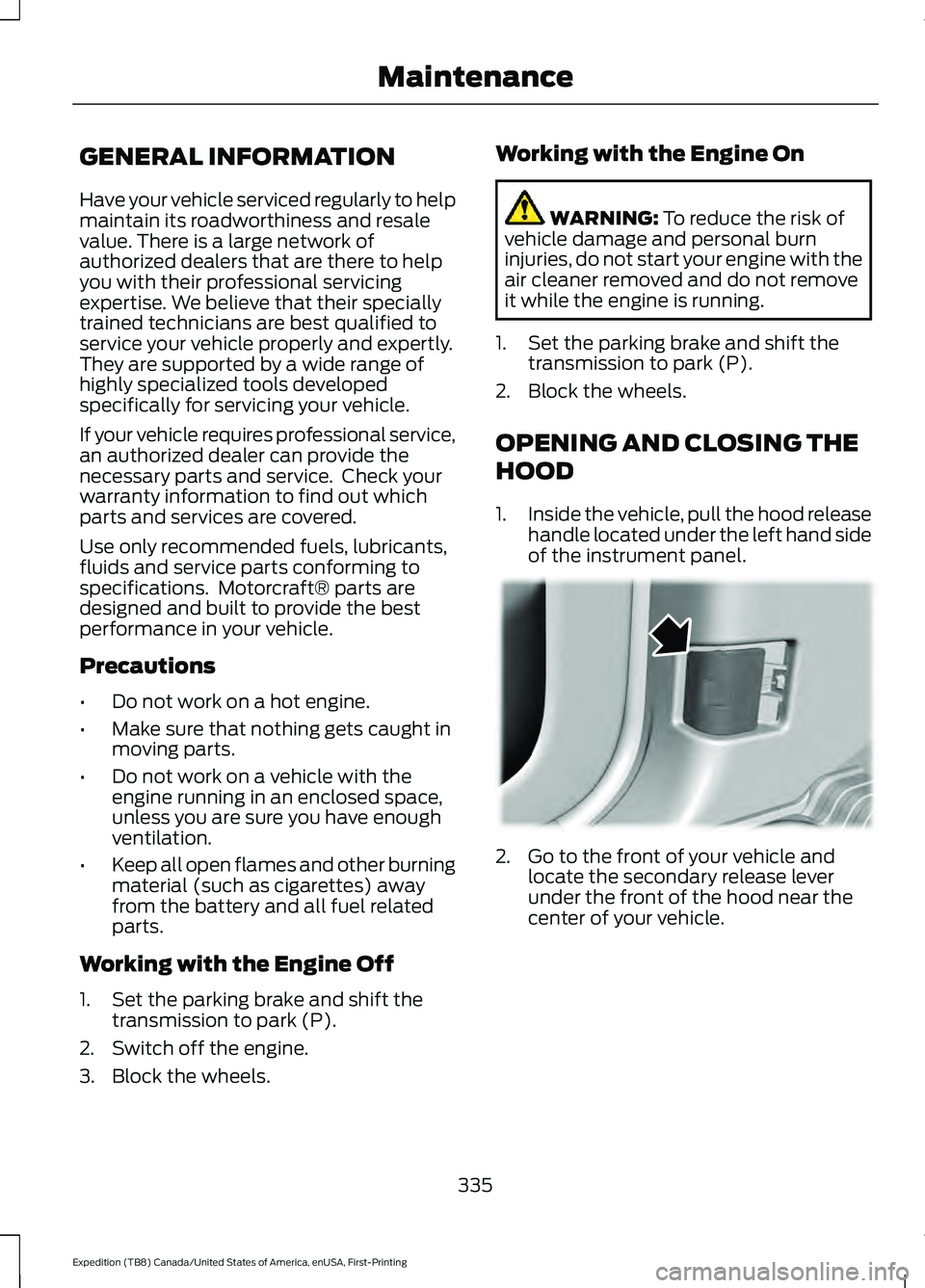
1. Inside the vehicle, pull the hood release
handle located under the left hand side
of the instrument panel. 2. Go to the front of your vehicle and
locate the secondary release lever
under the front of the hood near the
center of your vehicle.
335
Expedition (TB8) Canada/United States of America, enUSA, First-Printing Maintenance E166491
Page 346 of 574
4. Check the coolant level. If the coolant
level is at or below the minimum mark,
add prediluted coolant immediately.
5. When the engine temperature cools, you can re-start the engine. Have your
vehicle checked as soon as possible to
minimize engine damage.
Note: Driving your vehicle without repair
increases the chance of engine damage.
Engine Coolant Temperature
Management (If Equipped) WARNING:
To reduce the risk of
crash and injury, be prepared that the
vehicle speed may reduce and the
vehicle may not be able to accelerate
with full power until the coolant
temperature reduces.
If you tow a trailer with your vehicle, the
engine may temporarily reach a higher
temperature during severe operating
conditions, for example ascending a long
or steep grade in high ambient
temperatures.
At this time, you may notice the coolant
temperature gauge moves toward the red
zone and a message may appear in the
information display.
You may notice a reduction in vehicle
speed caused by reduced engine power in
order to manage the engine coolant
temperature. Your vehicle may enter this
mode if certain high-temperature and
high-load conditions take place. The
amount of speed reduction depends on
vehicle loading, grade and ambient
temperature. If this occurs, there is no
need to stop your vehicle. You can
continue to drive. The air conditioning may automatically
turn on and off during severe operating
conditions to protect the engine from
overheating. When the coolant
temperature decreases to the normal
operating temperature, the air conditioning
turns on.
If the coolant temperature gauge moves
fully into the red zone, or if the coolant
temperature warning or service engine
soon messages appear in your information
display, do the following:
1. Stop your vehicle as soon as it is safe
to do so. Fully apply the parking brake,
shift into park (P) or neutral (N).
2. Leave the engine running until the coolant temperature gauge needle
returns to the normal position. If the
temperature does not drop after
several minutes, follow the remaining
steps.
3. Switch the engine off and wait for it to
cool. Check the coolant level.
4. If the coolant level is at or below the minimum mark, add prediluted coolant
immediately.
5. If the coolant level is normal, restart the engine and continue.
AUTOMATIC TRANSMISSION
FLUID CHECK
If required, have an authorized dealer check
and change the transmission fluid at the
correct service interval. See
Scheduled
Maintenance (page 483).
The automatic transmission does not have
a transmission fluid dipstick.
343
Expedition (TB8) Canada/United States of America, enUSA, First-Printing Maintenance
Page 396 of 574
Air Conditioning System
WARNING: The air conditioning
refrigerant system contains refrigerant under high pressure. Only qualified
personnel should service the air
conditioning refrigerant system. Opening
the air conditioning refrigerant system
can cause personal injury.
Capacities Refrigerant Oil
Refrigerant
Variant
6.1 fl oz (180 ml)
37 oz (1.05 kg)
All.
Materials Specification
Name
WSS-M17B21-A
R-1234yf Refrigerant(U.S.)
R-1234yf Refrigerant / Frigorigène R-1234yf(Canada)
YN-33-A(U.S.)
HS7Z-19B519-BA(Canada)
WSS-M2C300-A2
Motorcraft® R-1234yf Refrigerant PAG Oil(U.S.)
Motorcraft® R-1234yf Refrigerant PAG Oil / Huile
PAG pour frigorigène R-1234yf Motorcraft®(Canada)
YN-35(U.S. & Canada)
Automatic Transmission
Note: Only use MERCON® ULV
transmission fluid for automatic
transmissions that require MERCON® ULV
transmission fluid. The use of any other fluid
could cause transmission damage.
Capacities Quantity
Variant
13.1 qt (12.4 L)1
All.
1 Approximate dry fill capacity. Actual amount could vary during fluid changes.
393
Expedition (TB8) Canada/United States of America, enUSA, First-Printing Capacities and Specifications
Page 489 of 574
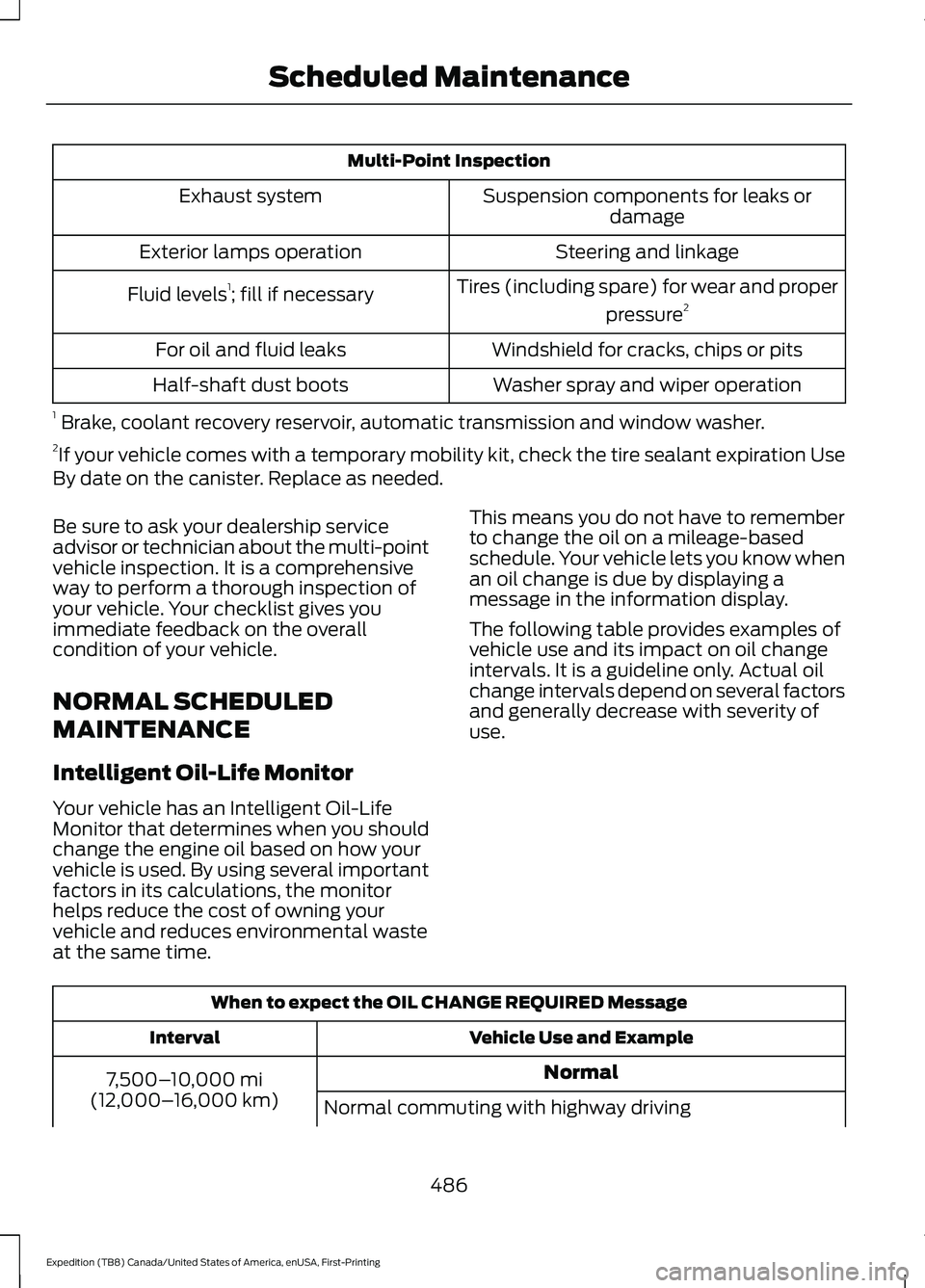
Multi-Point Inspection
Suspension components for leaks ordamage
Exhaust system
Steering and linkage
Exterior lamps operation
Tires (including spare) for wear and properpressure2
Fluid levels 1
; fill if necessary
Windshield for cracks, chips or pits
For oil and fluid leaks
Washer spray and wiper operation
Half-shaft dust boots
1 Brake, coolant recovery reservoir, automatic transmission and window washer.
2 If your vehicle comes with a temporary mobility kit, check the tire sealant expiration Use
By date on the canister. Replace as needed.
Be sure to ask your dealership service
advisor or technician about the multi-point
vehicle inspection. It is a comprehensive
way to perform a thorough inspection of
your vehicle. Your checklist gives you
immediate feedback on the overall
condition of your vehicle.
NORMAL SCHEDULED
MAINTENANCE
Intelligent Oil-Life Monitor
Your vehicle has an Intelligent Oil-Life
Monitor that determines when you should
change the engine oil based on how your
vehicle is used. By using several important
factors in its calculations, the monitor
helps reduce the cost of owning your
vehicle and reduces environmental waste
at the same time. This means you do not have to remember
to change the oil on a mileage-based
schedule. Your vehicle lets you know when
an oil change is due by displaying a
message in the information display.
The following table provides examples of
vehicle use and its impact on oil change
intervals. It is a guideline only. Actual oil
change intervals depend on several factors
and generally decrease with severity of
use.
When to expect the OIL CHANGE REQUIRED Message
Vehicle Use and Example
Interval
Normal
7,500– 10,000 mi
(12,000– 16,000 km)
Normal commuting with highway driving
486
Expedition (TB8) Canada/United States of America, enUSA, First-Printing Scheduled Maintenance
Page 491 of 574
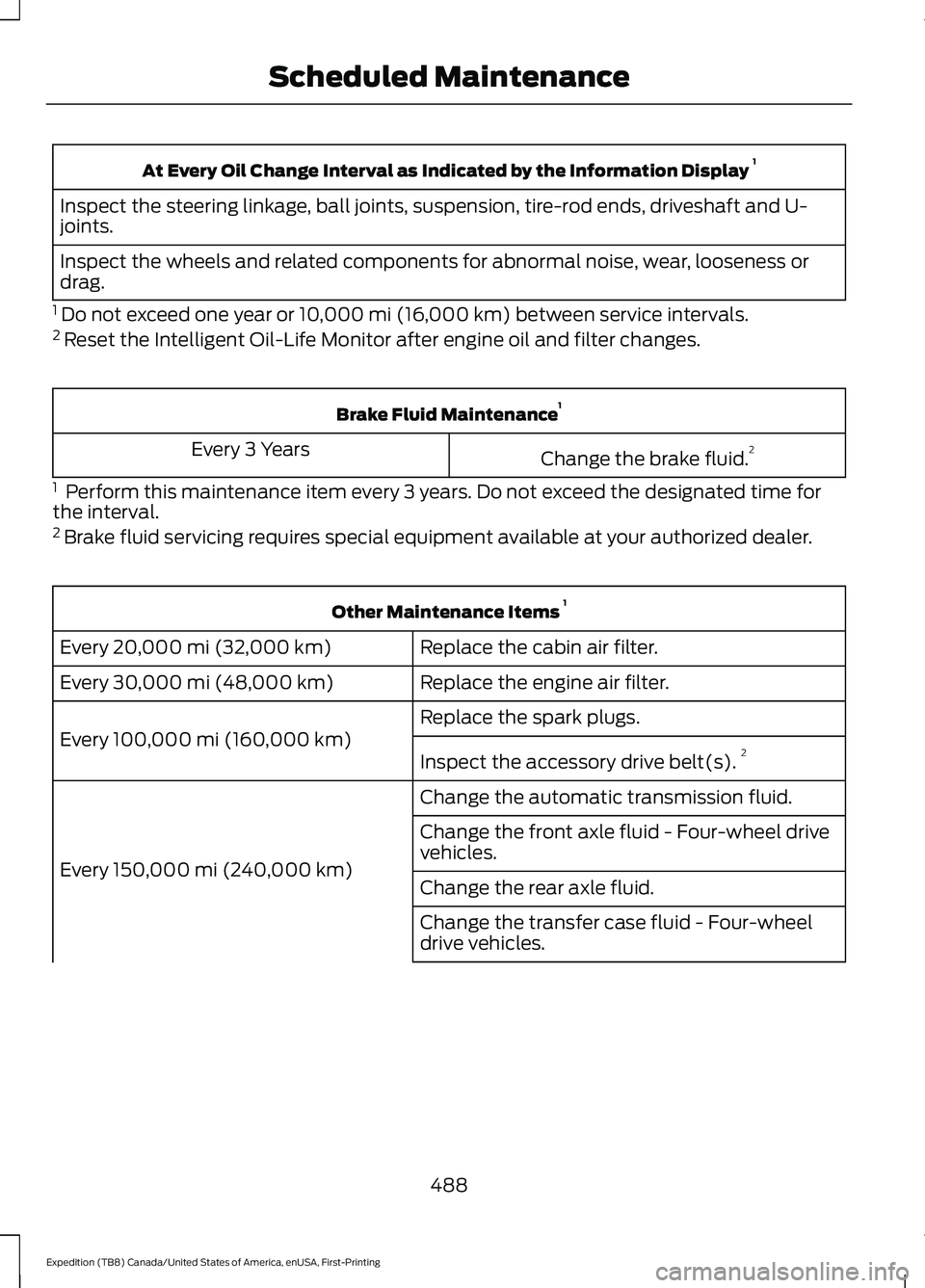
At Every Oil Change Interval as Indicated by the Information Display
1
Inspect the steering linkage, ball joints, suspension, tire-rod ends, driveshaft and U-
joints.
Inspect the wheels and related components for abnormal noise, wear, looseness or
drag.
1 Do not exceed one year or 10,000 mi (16,000 km) between service intervals.
2 Reset the Intelligent Oil-Life Monitor after engine oil and filter changes. Brake Fluid Maintenance
1
Change the brake fluid. 2
Every 3 Years
1 Perform this maintenance item every 3 years. Do not exceed the designated time for
the interval.
2 Brake fluid servicing requires special equipment available at your authorized dealer. Other Maintenance Items
1
Replace the cabin air filter.
Every 20,000 mi (32,000 km)
Replace the engine air filter.
Every
30,000 mi (48,000 km)
Replace the spark plugs.
Every
100,000 mi (160,000 km) Inspect the accessory drive belt(s). 2
Change the automatic transmission fluid.
Every
150,000 mi (240,000 km) Change the front axle fluid - Four-wheel drive
vehicles.
Change the rear axle fluid.
Change the transfer case fluid - Four-wheel
drive vehicles.
488
Expedition (TB8) Canada/United States of America, enUSA, First-Printing Scheduled Maintenance
Page 492 of 574
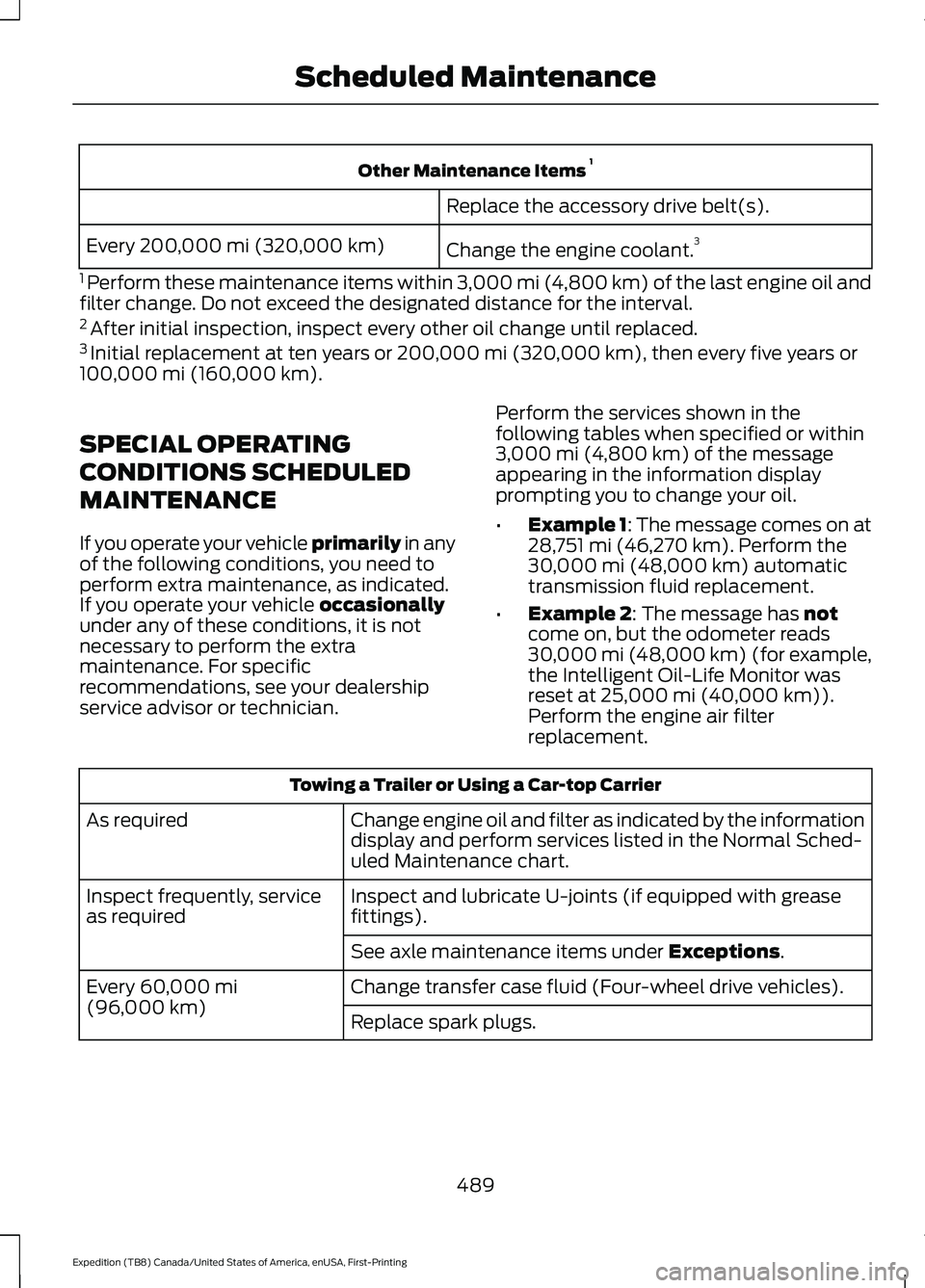
Other Maintenance Items
1
Replace the accessory drive belt(s).
Change the engine coolant. 3
Every 200,000 mi (320,000 km)
1 Perform these maintenance items within 3,000 mi (4,800 km) of the last engine oil and
filter change. Do not exceed the designated distance for the interval.
2 After initial inspection, inspect every other oil change until replaced.
3 Initial replacement at ten years or 200,000 mi (320,000 km), then every five years or
100,000 mi (160,000 km).
SPECIAL OPERATING
CONDITIONS SCHEDULED
MAINTENANCE
If you operate your vehicle primarily
in any
of the following conditions, you need to
perform extra maintenance, as indicated.
If you operate your vehicle
occasionally
under any of these conditions, it is not
necessary to perform the extra
maintenance. For specific
recommendations, see your dealership
service advisor or technician. Perform the services shown in the
following tables when specified or within
3,000 mi (4,800 km)
of the message
appearing in the information display
prompting you to change your oil.
• Example 1: The message comes on at
28,751 mi (46,270 km)
. Perform the
30,000 mi (48,000 km) automatic
transmission fluid replacement.
• Example 2
: The message has not
come on, but the odometer reads
30,000 mi (48,000 km) (for example,
the Intelligent Oil-Life Monitor was
reset at
25,000 mi (40,000 km)).
Perform the engine air filter
replacement. Towing a Trailer or Using a Car-top Carrier
Change engine oil and filter as indicated by the information
display and perform services listed in the Normal Sched-
uled Maintenance chart.
As required
Inspect and lubricate U-joints (if equipped with grease
fittings).
Inspect frequently, service
as required
See axle maintenance items under
Exceptions.
Change transfer case fluid (Four-wheel drive vehicles).
Every
60,000 mi
(96,000 km) Replace spark plugs.
489
Expedition (TB8) Canada/United States of America, enUSA, First-Printing Scheduled Maintenance
Page 536 of 574
•
Links to Third Party Sites: The
SOFTWARE may provide you with the
ability to link to third party sites. The
third party sites are not under the
control of FORD MOTOR COMPANY,
its affiliates and/or its designated
agent. Neither FORD MOTOR
COMPANY nor its affiliates nor its
designated agent are responsible for
(I) the contents of any third party sites,
any links contained in third party sites,
or any changes or updates to third
party sites, or (ii) webcasting or any
other form of transmission received
from any third party sites. If the
SOFTWARE provides links to third
party sites, those links are provided to
you only as a convenience, and the
inclusion of any link does not imply an
endorsement of the third party site by
FORD MOTOR COMPANY, its affiliates
and/or its designated agent.
• Obligation to Drive Responsibly:
You recognize your obligation to drive
responsibly and keep attention on the
road. You will read and abide with the
DEVICES operating instructions
particularly as they pertain to safety
and you agree to assume any risk
associated with the use of the
DEVICES.
UPGRADES AND RECOVERY MEDIA:
If the SOFTWARE is provided by FORD
MOTOR COMPANY separate from the
DEVICES on media such as a ROM chip,
CD ROM disk(s) or via web download or
other means, and is labeled "For Upgrade
Purposes Only" or "For Recovery Purposes
Only" you may install one (1) copy of such
SOFTWARE onto the DEVICES as a
replacement copy for the existing
SOFTWARE, and use it in accordance with
this EULA, including any additional EULA
terms accompanying the upgrade
SOFTWARE. INTELLECTUAL PROPERTY RIGHTS:
All title and intellectual property rights in
and to the SOFTWARE (including but not
limited to any images, photographs,
animations, video, audio, music, text and
"applets" incorporated into the
SOFTWARE), the accompanying printed
materials, and any copies of the
SOFTWARE, are owned by FORD MOTOR
COMPANY, or its affiliates or suppliers. The
SOFTWARE is licensed, not sold. You may
not copy the printed materials
accompanying the SOFTWARE. All title
and intellectual property rights in and to
the content which may be accessed
through use of the SOFTWARE is the
property of the respective content owner
and may be protected by applicable
copyright or other intellectual property
laws and treaties. This EULA grants you no
rights to use such content outside its
intended use. All rights not specifically
granted under this EULA are reserved by
FORD MOTOR COMPANY, its affiliates,
and third party software and service
providers and suppliers. Use of any on-line
services which may be accessed through
the SOFTWARE may be governed by the
respective terms of use relating to such
services. If this SOFTWARE contains
documentation that is provided only in
electronic form, you may print one copy of
such electronic documentation.
EXPORT RESTRICTIONS:
You
acknowledge that the SOFTWARE is
subject to U.S. and European Union export
jurisdiction. You agree to comply with all
applicable international and national laws
that apply to the SOFTWARE, including
the U.S. Export Administration Regulations,
as well as end-user, end-use and
destination restrictions issued by U.S. and
other governments.
533
Expedition (TB8) Canada/United States of America, enUSA, First-Printing Appendices
Page 553 of 574
Product incorporates data which is ©
20XX Telstra Corporation Limited, GM
Holden Limited, Intelematics Australia
Pty Ltd and Continental Pty Ltd.
B. Third Party Notices for Australia. In
addition to the foregoing, the End-User
Terms for any Application containing
RDS-TMC Traffic Codes for Australia
shall contain the following notice:
“Product incorporates traffic location
codes which is © 20XX Telstra Corpora-
tion Limited and its licensors. ”
AT&T Vehicle Network Carrier
Telematics Disclosure
END USER FOR PURPOSES OF THIS
SECTION MEANS YOU AND YOUR HEIRS,
EXECUTORS, LEGAL PERSONAL
REPRESENTATITVES AND PERMITED
ASSIGNS. FOR PURPOSES OF THIS
SECTION “UNDERLYING WIRELESS
SERVICE CARRIER” INCLUDES ITS
AFFILIATES AND CONTRACTORS AND
THEIR RESPECTIVE OFFICERS,
DIRECTORS, EMPLOYEES, SUCCESSORS
AND ASSIGNS. END USER HAS NO
CONTRACTUAL RELATIONSHIP WITH
THE UNDERLYING WIRELESS SERVICE
CARRIER AND END USER IS NOT A THIRD
PARTY BENEFICIARY OF ANY
AGREEMENT BETWEEN FORD AND
UNDERLYING CARRIER. END USER
UNDERSTANDS AND AGREES THAT THE
UNDERLYING CARRIER HAS NO LEGAL,
EQUITABLE, OR OTHER LIABILITY OF ANY
KIND TO END USER. IN ANY EVENT,
REGARDLESS OF THE FORM OF THE
ACTION, WHETHER FOR BREACH OF
CONTRACT, WARRANTY, NEGLIGENCE,
STRICT LIABILITY IN TORT OR
OTHERWISE, END USER'S EXCLUSIVE
REMEDY FOR CLAIMS ARISING IN ANY
WAY IN CONNECTION WITH THIS
AGREEMENT, FOR ANY CAUSE
WHATSOEVER, INCLUDING BUT NOT
LIMITED TO ANY FAILURE OR DISRUPTION OF SERVICE PROVIDED
HEREUNDER, IS LIMITED TO PAYMENT
OF DAMAGES IN AN AMOUNT NOT TO
EXCEED THE AMOUNT PAID BY END USER
FOR THE SERVICES DURING THE
TWO-MONTH PERIOD PRECEDING THE
DATE THE CLAIM AROSE.
(ii) END USER AGREES TO INDEMNIFY
AND HOLD HARMLESS THE UNDERLYING
WIRELESS SERVICE CARRIER AND ITS
OFFICERS, EMPLOYEES, AND AGENTS
AGAINST ANY AND ALL CLAIMS,
INCLUDING WITHOUT LIMITATION
CLAIMS FOR LIBEL, SLANDER, OR ANY
PROPERTY DAMAGE, PERSONAL INJURY
OR DEATH, ARISING IN ANY WAY,
DIRECTLY OR INDIRECTLY, IN
CONNECTION WITH THIS AGREEMENT
OR THE USE, FAILURE TO USE, OR
INABILITY TO USE THE DEVICE EXCEPT
WHERE THE CLAIMS RESULT FROM THE
UNDERLYING CARRIER’
S GROSS
NEGLIGENCE OR WILLFUL MISCONDUCT.
THIS INDEMNITY WILL SURVIVE THE
TERMINATION OF THE AGREEMENT.
(iii) END USER HAS NO PROPERTY RIGHT
IN ANY NUMBER ASSIGNED TO THE
DEVICE.
(iv) END USER UNDERSTANDS THAT
FORD AND THE UNDERLYING CARRIER
CANNOT GUARANTY THE SECURITY OF
WIRELESS TRANSMISSIONS, AND WILL
NOT BE LIABLE FOR ANY LACK OF
SECURITY RELATING TO THE USE OF THE
SERVICES
THE SERVICE IS FOR [END USER’ S] USE
ONLY AND END USER MAY NOT RESELL
THE SERVICE TO ANY OTHER PARTY END
USER UNDERSTANDS THAT THE
UNDERLYING CARRIER DOES NOT
GUARANTEE ANY END USER
UNINTERRUPTED SERVICE OR
COVERAGE. THE UNDERLYING CARRIER
DOES NOT WARRANT THAT END USERS
CAN OR WILL BE LOCATED USING THE
SERVICE. THE UNDERLYING CARRIER
550
Expedition (TB8) Canada/United States of America, enUSA, First-Printing Appendices
Page 561 of 574
Audio Unit - Vehicles Without:
Touchscreen Display..............................408
Accessing the Settings Menu....................... 409
Accessing the Sound Settings..................... 409
Adjusting the Volume...................................... 409
Changing Radio Stations............................... 409
Playing or Pausing Media................................ 410
Returning to the Previous Screen................410
Scrolling Through the Menu Options.........410
Selecting a Menu Option................................. 410
Selecting Media.................................................. 410
Selecting the Radio........................................... 410
Setting a Memory Preset.................................410
Switching the Audio Unit On and Off.........410
Using a Cell Phone.............................................410
Using Apps............................................................ 410
Using Seek, Fast Forward and Reverse............................................................... 411
Autolamps........................................................99 Windshield Wiper Activated
Headlamps........................................................ 99
Automatic Climate Control......................148 Accessing Rear Climate Controls.................148
Directing the Airflow.......................................... 148
Setting the Blower Motor Speed.................. 148
Setting the Temperature................................. 148
Switching Auto Mode On and Off................148
Switching Dual Zone Mode On and Off....................................................................... 149
Switching Maximum Air Conditioning On and Off.............................................................. 149
Switching Maximum Defrost On and Off....................................................................... 150
Switching Recirculated Air On and Off....................................................................... 150
Switching the Air Conditioning On and Off....................................................................... 149
Switching the Climate Control On and Off....................................................................... 149
Switching the Heated Seats On and Off....................................................................... 150
Switching the Ventilated Seats On and Off....................................................................... 150
Automatic High Beam Control................103
Automatic High Beam Control Indicators......................................................103 Automatic Transmission
..........................203
Automatic Transmission Adaptive
Learning........................................................... 209
Brake-Shift Interlock (Console Shifter Only)................................................................. 208
If Your Vehicle Gets Stuck in Mud or Snow................................................................. 209
SelectShift™ Automatic Transmission.................................................. 207
Understanding the Shift Positions of Your Automatic Transmission............................ 203
Automatic Transmission Fluid Check
............................................................343
Auto-Start-Stop...........................................189 Disabling Auto-Start-Stop............................. 190
Enabling Auto-Start-Stop.............................. 189
Autowipers.......................................................96 Autowipers Settings............................................ 97
B
Battery See: Changing the 12V Battery..................... 345
Blind Spot Information System.............259 ........................................................................\
.......... 259
Blind Spot Information System with Trailer Tow...................................................................... 261
Switching the System On and Off..............263
System Errors...................................................... 263
Using the Blind Spot Information System............................................................. 260
BLIS See: Blind Spot Information System..........259
Body Styling Kits.........................................360
Bonnet Lock See: Opening and Closing the Hood..........335
Booster Seats..................................................33 Types of Booster Seats...................................... 34
Brake Fluid Check........................................344 Brake Fluid Service Interval........................... 345
Brakes...............................................................219 General Information.......................................... 219
Breaking-In.....................................................310
Bulb Specification Chart...........................401
C
Canceling the Set Speed
...........................247
558
Expedition (TB8) Canada/United States of America, enUSA, First-Printing Index