transmission service FORD EXPEDITION 2021 Owners Manual
[x] Cancel search | Manufacturer: FORD, Model Year: 2021, Model line: EXPEDITION, Model: FORD EXPEDITION 2021Pages: 574, PDF Size: 8.33 MB
Page 8 of 574
Driving Aids
Driver Alert
.....................................................254
Lane Keeping System ...............................
255
Blind Spot Information System ............
259
Cross Traffic Alert .......................................
263
Steering ..........................................................
266
Pre-Collision Assist ....................................
267
Drive Control ..................................................
271
Load Carrying
Rear Under Floor Storage ........................
275
Cargo Nets ......................................................
277
Roof Racks and Load Carriers ................
278
Load Limit ......................................................
279
Towing
Towing a Trailer ...........................................
285
Trailer Reversing Aids ................................
286
Trailer Sway Control ..................................
295
Recommended Towing Weights ..........
296
Essential Towing Checks .........................
299
Towing the Vehicle on Four Wheels .....
306
Driving Hints
Reduced Engine Performance ..............
309
Economical Driving ...................................
309
Breaking-In .....................................................
310
Driving Through Water ..............................
310
Floor Mats ......................................................
310
Roadside Emergencies
Roadside Assistance ..................................
312
Hazard Flashers ............................................
313
Fuel Shutoff ...................................................
313
Jump Starting the Vehicle ........................
314
Post-Crash Alert System ..........................
316
Transporting the Vehicle ...........................
316
Towing Points ................................................
317Customer Assistance
Getting the Services You Need
...............
318
In California (U.S. Only) ............................
319
The Better Business Bureau (BBB) Auto Line Program (U.S. Only) ....................
320
Utilizing the Mediation/Arbitration Program (Canada Only) .......................
321
Getting Assistance Outside the U.S. and Canada ........................................................
321
Ordering Additional Owner's Literature ........................................................................\
323
Reporting Safety Defects (U.S. Only) ........................................................................\
323
Reporting Safety Defects (Canada Only) ........................................................................\
323
Fuses
Fuse Box Locations ....................................
325
Fuse Specification Chart ..........................
325
Changing a Fuse ..........................................
333
Maintenance
General Information ..................................
335
Opening and Closing the Hood .............
335
Under Hood Overview ..............................
336
Engine Oil Dipstick ......................................
337
Engine Oil Check .........................................
337
Oil Change Indicator Reset .....................
338
Changing the Engine Air Filter ...............
339
Engine Coolant Check ..............................
339
Automatic Transmission Fluid Check ........................................................................\
343
Transfer Case Fluid Check ......................
344
Brake Fluid Check .......................................
344
Power Steering Fluid Check ....................
345
Changing the 12V Battery ........................
345
Adjusting the Headlamps ........................
347
Washer Fluid Check ...................................
348
Fuel Filter .......................................................
349
Checking the Wiper Blades ....................
349
Changing the Wiper Blades ....................
349
5
Expedition (TB8) Canada/United States of America, enUSA, First-Printing Table of Contents
Page 20 of 574
On Board Diagnostics Data Link
Connector
WARNING: Do not connect
wireless plug-in devices to the data link
connector. Unauthorized third parties
could gain access to vehicle data and
impair the performance of safety related
systems. Only allow repair facilities that
follow our service and repair instructions
to connect their equipment to the data
link connector.
Your vehicle has an OBD Data Link
Connector (DLC) that is used in
conjunction with a diagnostic scan tool for
vehicle diagnostics, repairs and
reprogramming services. Installing an
aftermarket device that uses the DLC
during normal driving for purposes such as
remote insurance company monitoring,
transmission of vehicle data to other
devices or entities, or altering the
performance of the vehicle, may cause
interference with or even damage to
vehicle systems. We do not recommend
or endorse the use of unapproved
aftermarket plug-in devices. The vehicle
Warranty will not cover damage caused
by an aftermarket plug-in device.
Notice to Owners of Pickup Trucks
and Utility Type Vehicles WARNING:
Utility vehicles have a
significantly higher rollover rate than
other types of vehicles.
Before you drive your vehicle, please read
this Owner ’s Guide carefully. Your vehicle
is not a passenger car. As with other
vehicles of this type, failure to operate this
vehicle correctly may result in loss of
vehicle control, vehicle rollover, personal
injury or death. Using Your Vehicle With a
Snowplow
Do not use this vehicle for
snowplowing.
Your vehicle does not have a snowplowing
package.
Using Your Vehicle as an
Ambulance
Do not use this vehicle as an
ambulance.
Your vehicle does not have the Ambulance
Preparation Package.
MOBILE COMMUNICATIONS
EQUIPMENT
WARNING:
Driving while
distracted can result in loss of vehicle
control, crash and injury. We strongly
recommend that you use extreme
caution when using any device that may
take your focus off the road. Your
primary responsibility is the safe
operation of your vehicle. We
recommend against the use of any
hand-held device while driving and
encourage the use of voice-operated
systems when possible. Make sure you
are aware of all applicable local laws
that may affect the use of electronic
devices while driving.
Using mobile communications equipment
is becoming increasingly important in the
conduct of business and personal affairs.
However, you must not compromise your
own or others’ safety when using such
equipment. Mobile communications can
enhance personal safety and security when
appropriately used, particularly in
emergency situations. Safety must be
paramount when using mobile
17
Expedition (TB8) Canada/United States of America, enUSA, First-Printing Introduction
Page 121 of 574
Normally, it illuminates until the engine is
cranked and automatically turns off if no
concerns are present. However, if after 15
seconds it flashes eight times, this
indicates that your vehicle is not ready for
Inspection and Maintenance (I/M) testing.
See Catalytic Converter (page 200).
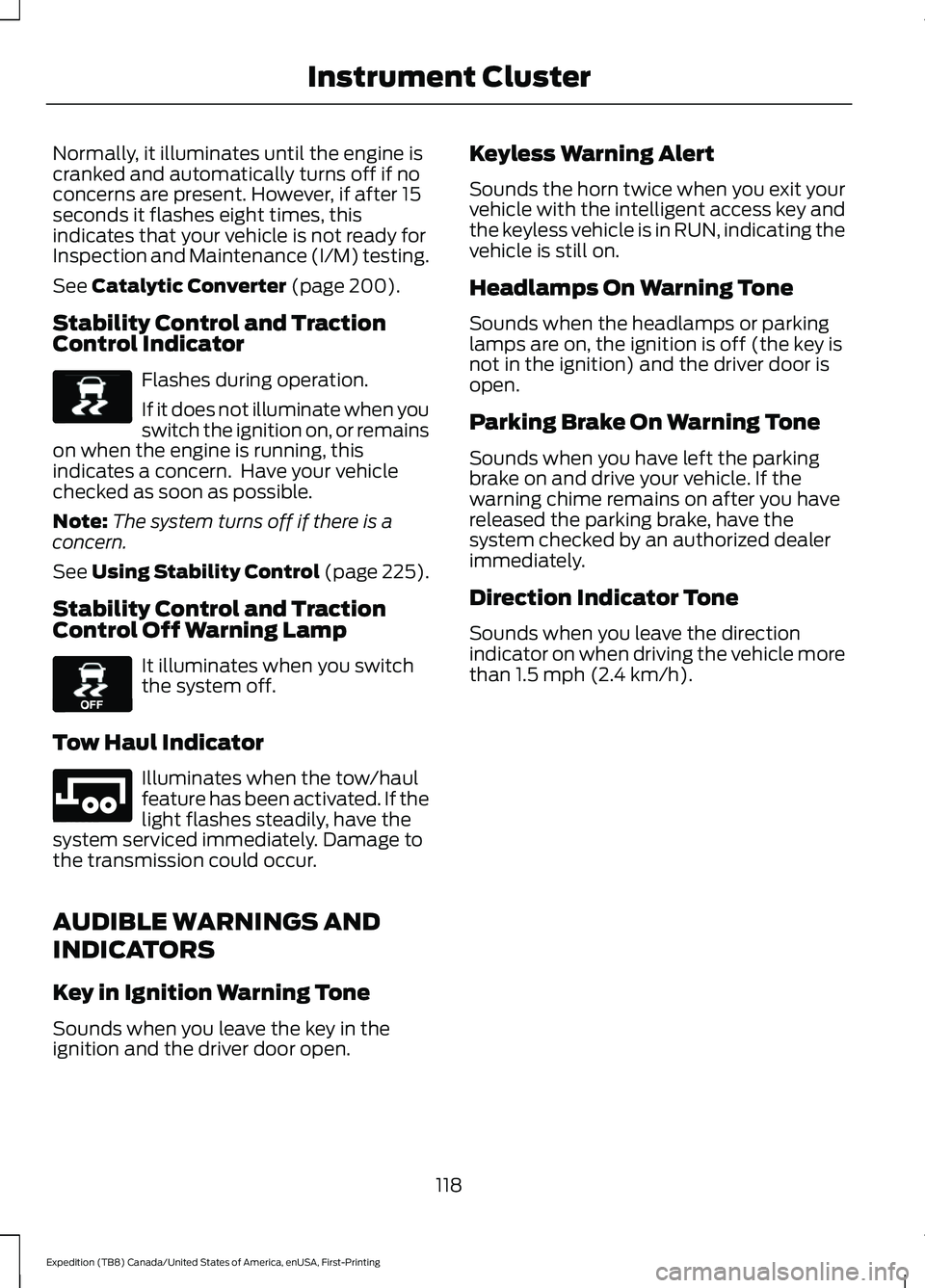
Stability Control and Traction
Control Indicator Flashes during operation.
If it does not illuminate when you
switch the ignition on, or remains
on when the engine is running, this
indicates a concern. Have your vehicle
checked as soon as possible.
Note: The system turns off if there is a
concern.
See
Using Stability Control (page 225).
Stability Control and Traction
Control Off Warning Lamp It illuminates when you switch
the system off.
Tow Haul Indicator Illuminates when the tow/haul
feature has been activated. If the
light flashes steadily, have the
system serviced immediately. Damage to
the transmission could occur.
AUDIBLE WARNINGS AND
INDICATORS
Key in Ignition Warning Tone
Sounds when you leave the key in the
ignition and the driver door open. Keyless Warning Alert
Sounds the horn twice when you exit your
vehicle with the intelligent access key and
the keyless vehicle is in RUN, indicating the
vehicle is still on.
Headlamps On Warning Tone
Sounds when the headlamps or parking
lamps are on, the ignition is off (the key is
not in the ignition) and the driver door is
open.
Parking Brake On Warning Tone
Sounds when you have left the parking
brake on and drive your vehicle. If the
warning chime remains on after you have
released the parking brake, have the
system checked by an authorized dealer
immediately.
Direction Indicator Tone
Sounds when you leave the direction
indicator on when driving the vehicle more
than
1.5 mph (2.4 km/h).
118
Expedition (TB8) Canada/United States of America, enUSA, First-Printing Instrument ClusterE138639 E130458 E246592
Page 133 of 574
Adaptive Cruise Control
Action
Message
A condition exists that is preventing the adaptive cruise control fromengaging. See What Is Cruise Control (page 246).
Adaptive Cruise
Malfunction
A condition exists such that the adaptive cruise cannot functionproperly. See
What Is Cruise Control (page 246).
Adaptive Cruise
Not Available
You have a blocked sensor due to inclement weather, ice, mud or
water in front of the radar sensor. You can typically clean the sensor to resolve. See
What Is Cruise Control (page 246).
Adaptive Cruise
Not Available
Sensor Blocked See Manual
The system has disabled the automatic braking.
Normal Cruise
Active Adaptive Braking Off
A condition exists that is preventing the adaptive cruise control from engaging.
Front Sensor Not
Aligned
The adaptive cruise has reinstated controls to you.
Adaptive Cruise -
Driver Resume Control
Your vehicle speed is too slow to activate the adaptive cruise.
Adaptive Cruise
Speed Too Low to Activate
The adaptive cruise is automatically adjusting the gap distance andyou need to shift the transmission into a lower gear.
Adaptive Cruise
Shift Down
AdvanceTrac and Traction Control Action
Message
The system detects a condition that requires service. Contact anauthorized dealer as soon as possible.
Service Advan-
ceTrac
The status of the AdvanceTrac system after you switched it off.
AdvanceTrac Off
The status of the AdvanceTrac system after you switched it on.
AdvanceTrac On
130
Expedition (TB8) Canada/United States of America, enUSA, First-Printing Information Displays
Page 137 of 574
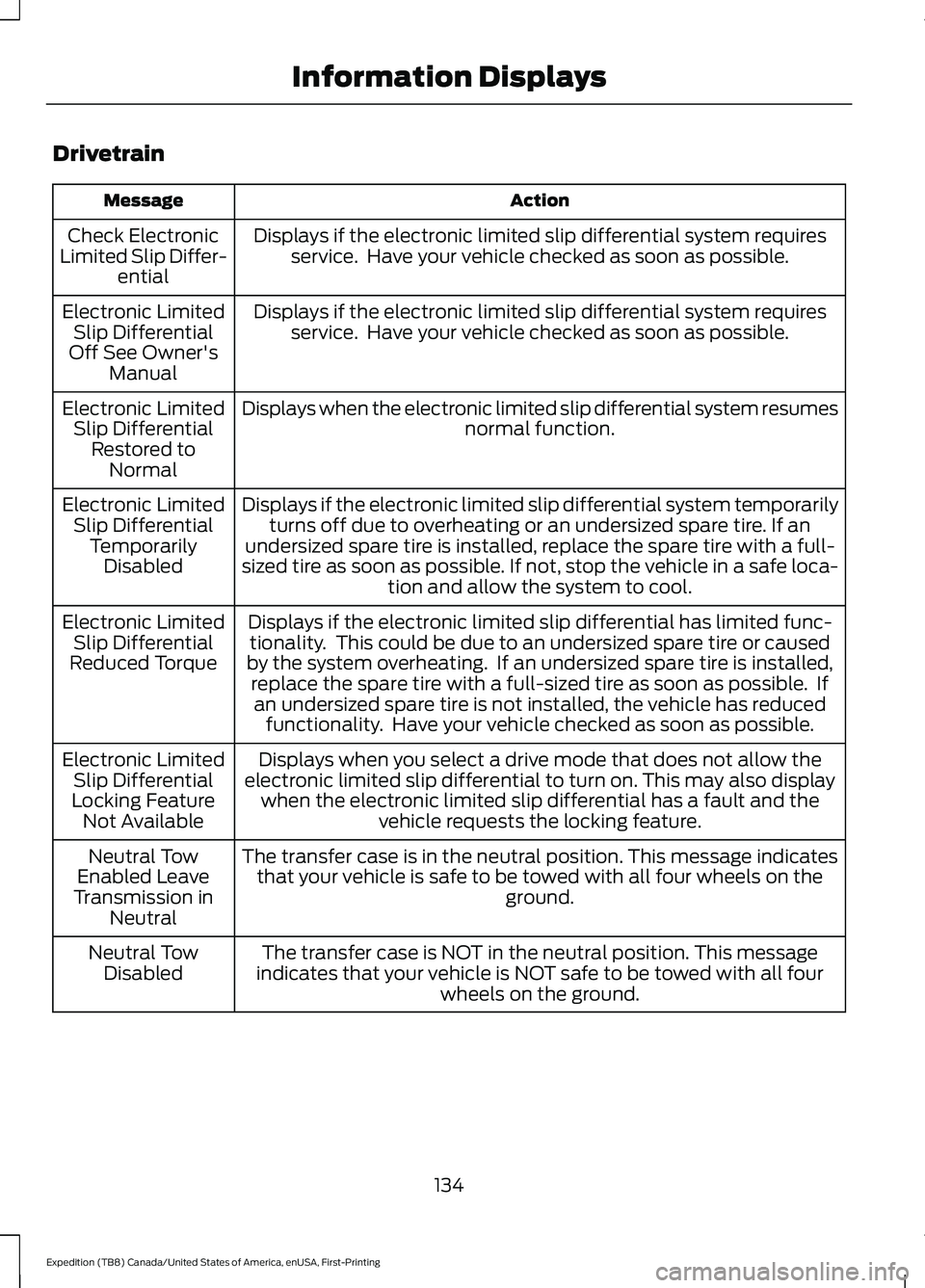
Drivetrain
Action
Message
Displays if the electronic limited slip differential system requiresservice. Have your vehicle checked as soon as possible.
Check Electronic
Limited Slip Differ- ential
Displays if the electronic limited slip differential system requiresservice. Have your vehicle checked as soon as possible.
Electronic Limited
Slip Differential
Off See Owner's Manual
Displays when the electronic limited slip differential system resumes normal function.
Electronic Limited
Slip Differential Restored to Normal
Displays if the electronic limited slip differential system temporarilyturns off due to overheating or an undersized spare tire. If an
undersized spare tire is installed, replace the spare tire with a full-
sized tire as soon as possible. If not, stop the vehicle in a safe loca- tion and allow the system to cool.
Electronic Limited
Slip Differential TemporarilyDisabled
Displays if the electronic limited slip differential has limited func-tionality. This could be due to an undersized spare tire or caused
by the system overheating. If an undersized spare tire is installed, replace the spare tire with a full-sized tire as soon as possible. Ifan undersized spare tire is not installed, the vehicle has reduced functionality. Have your vehicle checked as soon as possible.
Electronic Limited
Slip Differential
Reduced Torque
Displays when you select a drive mode that does not allow the
electronic limited slip differential to turn on. This may also display when the electronic limited slip differential has a fault and the vehicle requests the locking feature.
Electronic Limited
Slip Differential
Locking Feature Not Available
The transfer case is in the neutral position. This message indicatesthat your vehicle is safe to be towed with all four wheels on the ground.
Neutral Tow
Enabled Leave
Transmission in Neutral
The transfer case is NOT in the neutral position. This message
indicates that your vehicle is NOT safe to be towed with all four wheels on the ground.
Neutral Tow
Disabled
134
Expedition (TB8) Canada/United States of America, enUSA, First-Printing Information Displays
Page 142 of 574
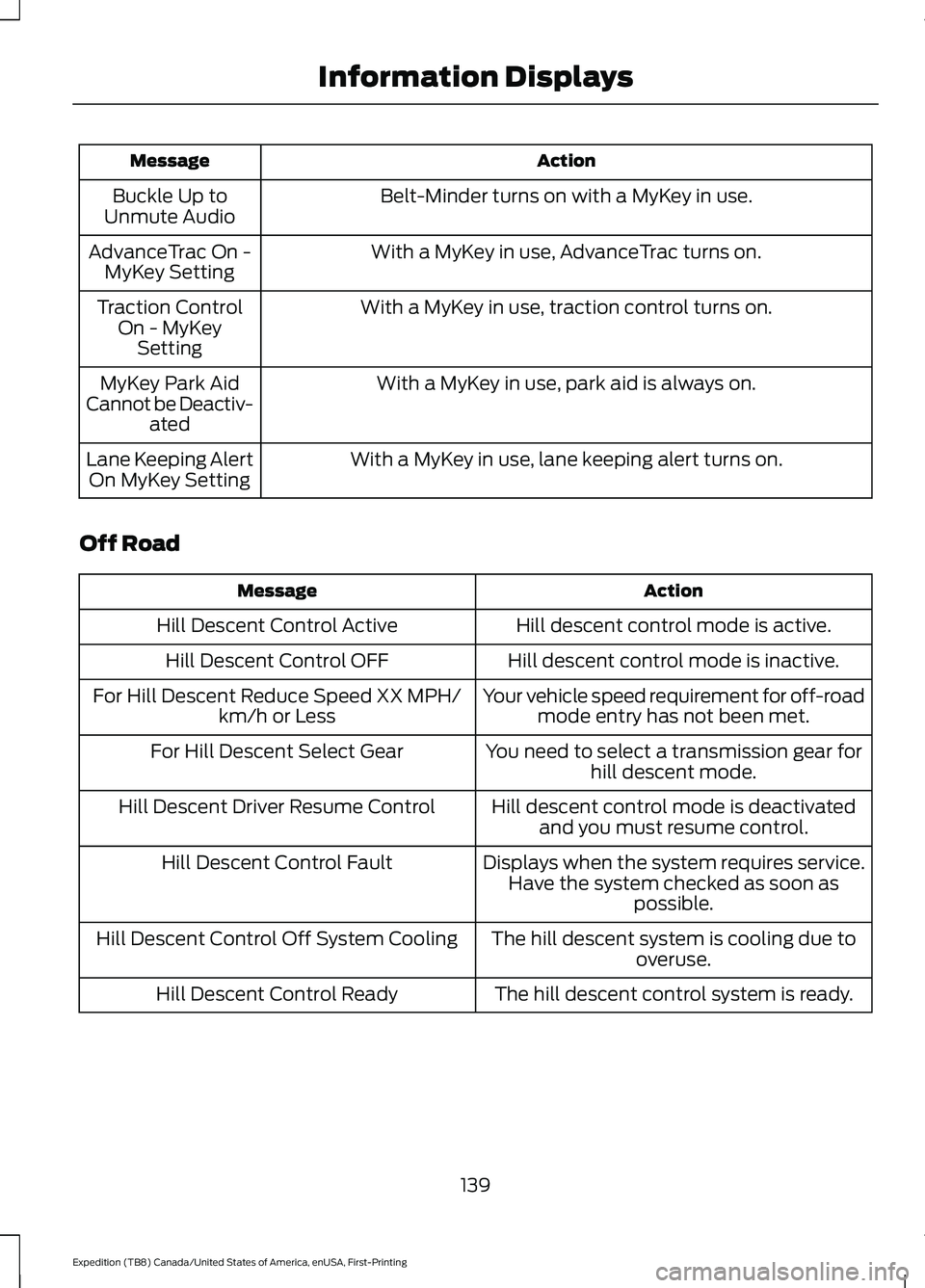
Action
Message
Belt-Minder turns on with a MyKey in use.
Buckle Up to
Unmute Audio
With a MyKey in use, AdvanceTrac turns on.
AdvanceTrac On -
MyKey Setting
With a MyKey in use, traction control turns on.
Traction Control
On - MyKeySetting
With a MyKey in use, park aid is always on.
MyKey Park Aid
Cannot be Deactiv- ated
With a MyKey in use, lane keeping alert turns on.
Lane Keeping Alert
On MyKey Setting
Off Road Action
Message
Hill descent control mode is active.
Hill Descent Control Active
Hill descent control mode is inactive.
Hill Descent Control OFF
Your vehicle speed requirement for off-roadmode entry has not been met.
For Hill Descent Reduce Speed XX MPH/
km/h or Less
You need to select a transmission gear forhill descent mode.
For Hill Descent Select Gear
Hill descent control mode is deactivatedand you must resume control.
Hill Descent Driver Resume Control
Displays when the system requires service.Have the system checked as soon as possible.
Hill Descent Control Fault
The hill descent system is cooling due tooveruse.
Hill Descent Control Off System Cooling
The hill descent control system is ready.
Hill Descent Control Ready
139
Expedition (TB8) Canada/United States of America, enUSA, First-Printing Information Displays
Page 148 of 574
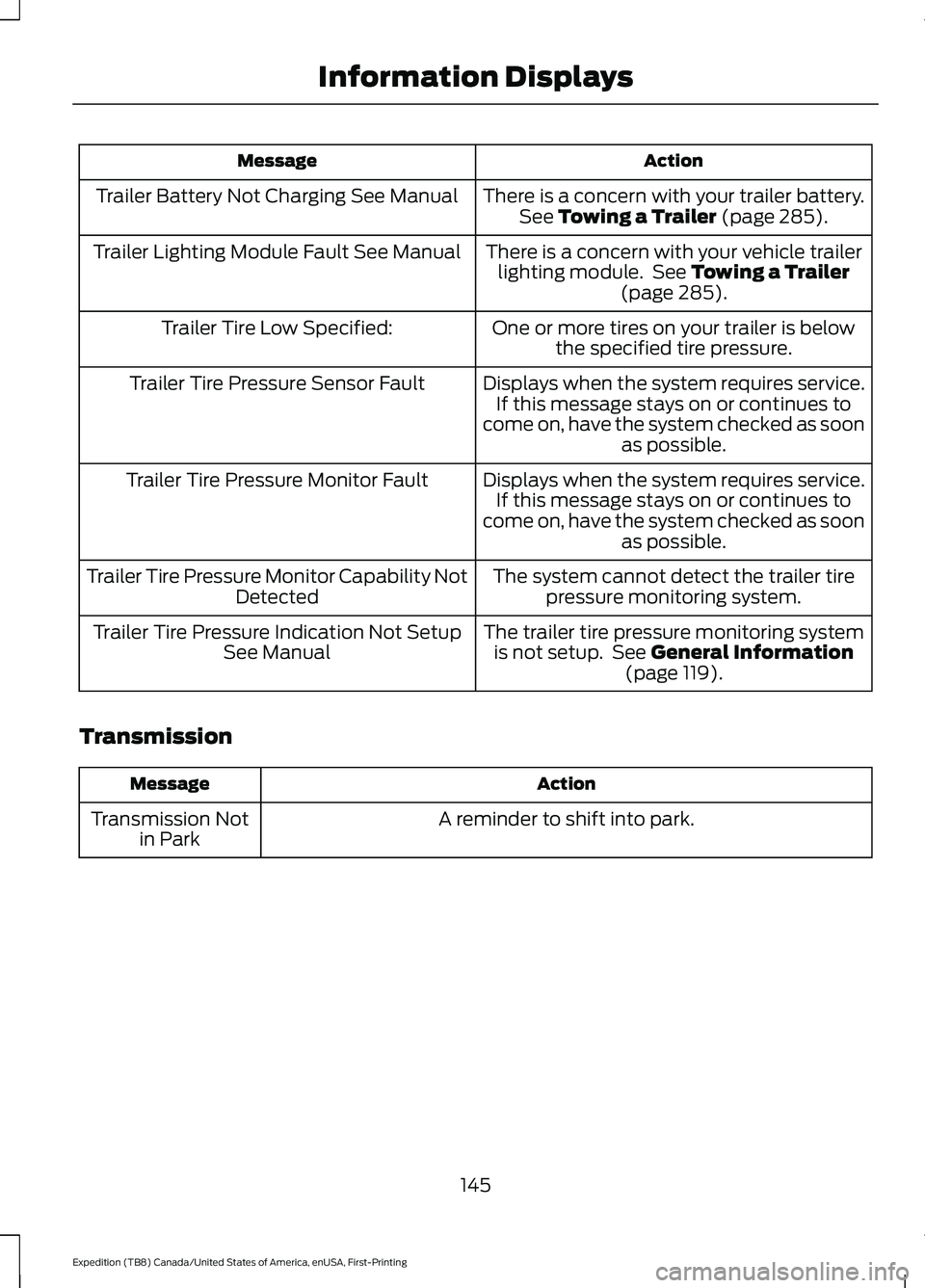
Action
Message
There is a concern with your trailer battery.See Towing a Trailer (page 285).
Trailer Battery Not Charging See Manual
There is a concern with your vehicle trailerlighting module. See
Towing a Trailer
(page 285).
Trailer Lighting Module Fault See Manual
One or more tires on your trailer is belowthe specified tire pressure.
Trailer Tire Low Specified:
Displays when the system requires service.If this message stays on or continues to
come on, have the system checked as soon as possible.
Trailer Tire Pressure Sensor Fault
Displays when the system requires service.If this message stays on or continues to
come on, have the system checked as soon as possible.
Trailer Tire Pressure Monitor Fault
The system cannot detect the trailer tirepressure monitoring system.
Trailer Tire Pressure Monitor Capability Not
Detected
The trailer tire pressure monitoring systemis not setup. See
General Information
(page 119).
Trailer Tire Pressure Indication Not Setup
See Manual
Transmission Action
Message
A reminder to shift into park.
Transmission Not
in Park
145
Expedition (TB8) Canada/United States of America, enUSA, First-Printing Information Displays
Page 204 of 574
Illumination of the service engine soon
indicator, charging system warning light or
the temperature warning light, fluid leaks,
strange odors, smoke or loss of engine
power could indicate that the emission
control system is not working properly.
An improperly operating or damaged
exhaust system may allow exhaust to
enter the vehicle. Have a damaged or
improperly operating exhaust system
inspected and repaired immediately.
Do not make any unauthorized changes to
your vehicle or engine. By law, vehicle
owners and anyone who manufactures,
repairs, services, sells, leases, trades
vehicles, or supervises a fleet of vehicles
are not permitted to intentionally remove
an emission control device or prevent it
from working. Information about your
vehicle
’s emission system is on the Vehicle
Emission Control Information Decal
located on or near the engine. This decal
also lists engine displacement.
Please consult your warranty information
for complete details.
On-Board Diagnostics (OBD-II)
Your vehicle has a computer known as the
on-board diagnostics system (OBD-II) that
monitors the engine ’s emission control
system. The system protects the
environment by making sure that your
vehicle continues to meet government
emission standards. The OBD-II system
also assists a service technician in properly
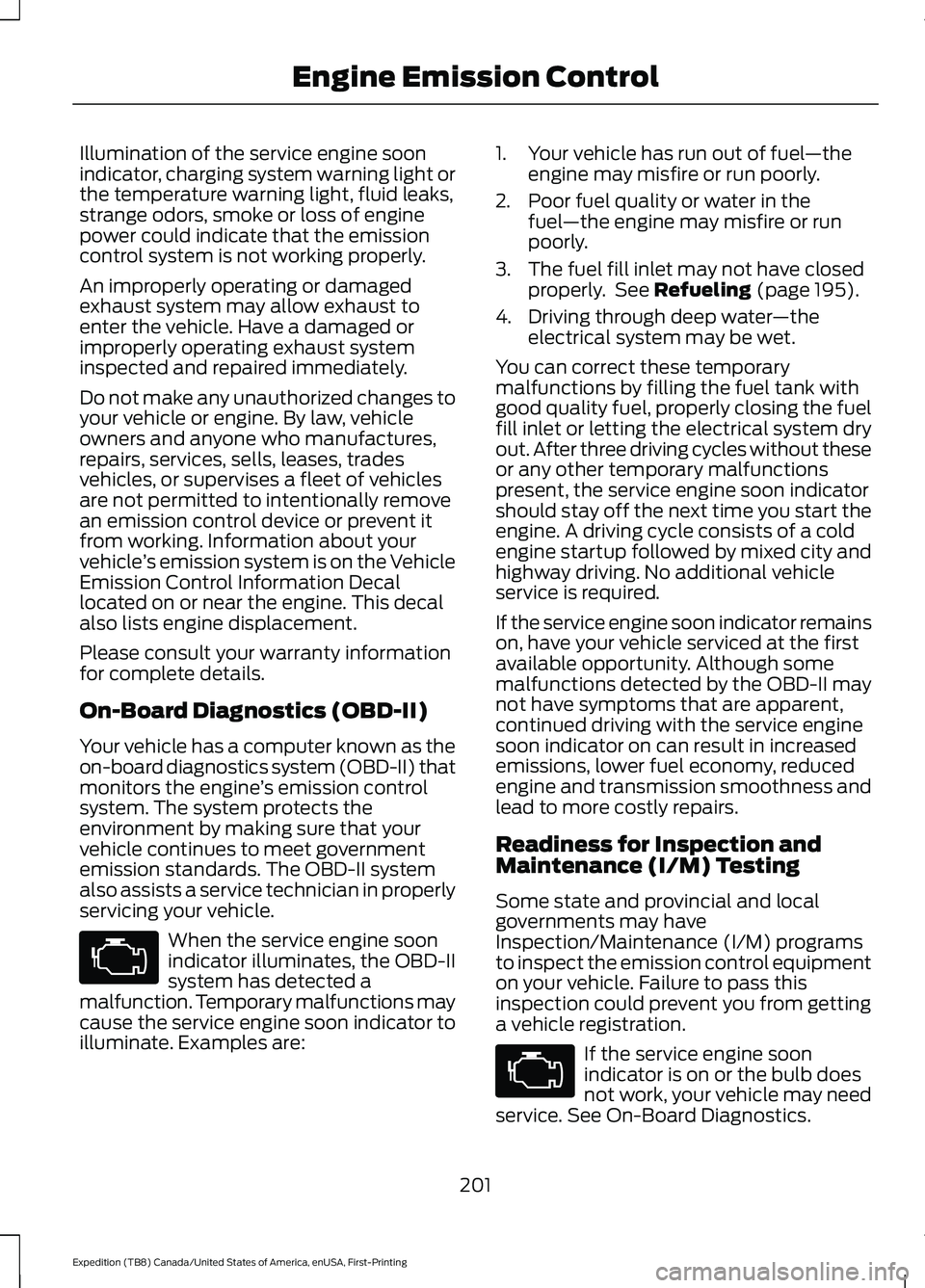
servicing your vehicle. When the service engine soon
indicator illuminates, the OBD-II
system has detected a
malfunction. Temporary malfunctions may
cause the service engine soon indicator to
illuminate. Examples are: 1. Your vehicle has run out of fuel
—the
engine may misfire or run poorly.
2. Poor fuel quality or water in the fuel —the engine may misfire or run
poorly.
3. The fuel fill inlet may not have closed properly. See Refueling (page 195).
4. Driving through deep water —the
electrical system may be wet.
You can correct these temporary
malfunctions by filling the fuel tank with
good quality fuel, properly closing the fuel
fill inlet or letting the electrical system dry
out. After three driving cycles without these
or any other temporary malfunctions
present, the service engine soon indicator
should stay off the next time you start the
engine. A driving cycle consists of a cold
engine startup followed by mixed city and
highway driving. No additional vehicle
service is required.
If the service engine soon indicator remains
on, have your vehicle serviced at the first
available opportunity. Although some
malfunctions detected by the OBD-II may
not have symptoms that are apparent,
continued driving with the service engine
soon indicator on can result in increased
emissions, lower fuel economy, reduced
engine and transmission smoothness and
lead to more costly repairs.
Readiness for Inspection and
Maintenance (I/M) Testing
Some state and provincial and local
governments may have
Inspection/Maintenance (I/M) programs
to inspect the emission control equipment
on your vehicle. Failure to pass this
inspection could prevent you from getting
a vehicle registration. If the service engine soon
indicator is on or the bulb does
not work, your vehicle may need
service. See On-Board Diagnostics.
201
Expedition (TB8) Canada/United States of America, enUSA, First-Printing Engine Emission Control
Page 205 of 574
Your vehicle may not pass the I/M test if
the service engine soon indicator is on or
not working properly (bulb is burned out),
or if the OBD-II system has determined
that some of the emission control systems
have not been properly checked. In this
case, the vehicle is not ready for I/M
testing.
If the vehicle
’s engine or transmission has
just been serviced, or the battery has
recently run down or been replaced, the
OBD-II system may indicate that the
vehicle is not ready for I/M testing. To
determine if the vehicle is ready for I/M
testing, turn the ignition key to the on
position for 15 seconds without cranking
the engine. If the service engine soon
indicator blinks eight times, it means that
the vehicle is not ready for I/M testing; if
the service engine soon indicator stays on
solid, it means that your vehicle is ready
for I/M testing.
The OBD-II system checks the emission
control system during normal driving. A
complete check may take several days.
If the vehicle is not ready for I/M testing,
you can perform the following driving cycle
consisting of mixed city and highway
driving:
1. 15 minutes of steady driving on an expressway or highway followed by 20
minutes of stop-and-go driving with at
least four 30-second idle periods.
2. Allow your vehicle to sit for at least eight hours with the ignition off. Then,
start the vehicle and complete the
above driving cycle. The vehicle must
warm up to its normal operating
temperature. Once started, do not turn
off the vehicle until the above driving
cycle is complete.
If the vehicle is still not ready for I/M
testing, you need to repeat the above
driving cycle.
202
Expedition (TB8) Canada/United States of America, enUSA, First-Printing Engine Emission Control
Page 222 of 574
GENERAL INFORMATION
Note:
Occasional brake noise is normal. If
a metal-to-metal, continuous grinding or
continuous squeal sound is present, the
brake linings could be worn-out, you should
have them checked. If the vehicle has
continuous vibration or shudder in the
steering wheel while braking, you should
have the system checked.
Note: Brake dust may accumulate on the
wheels, even under normal driving
conditions. Some dust is inevitable as the
brakes wear and does not contribute to
brake noise. See Cleaning the Wheels
(page 358). See
Warning Lamps and
Indicators (page 115).
Wet brakes result in reduced braking
efficiency. Gently press the brake pedal a
few times when driving from a car wash or
standing water to dry the brakes.
Brake Over Accelerator
In the event the accelerator pedal
becomes stuck or entrapped, apply steady
and firm pressure to the brake pedal to
slow the vehicle and reduce engine power.
If you experience this condition, apply the
brakes and bring your vehicle to a safe
stop. Switch the engine off, move the
transmission to park (P) and apply the
parking brake. Inspect the accelerator
pedal and the area around it for any items
or debris that may be obstructing its
movement. If none are found and the
condition persists, do not drive your vehicle.
Have your vehicle towed to the location
you are having it checked. Emergency Brake Assist
Emergency brake assist detects when you
brake heavily by measuring the rate at
which you press the brake pedal. It
provides maximum braking efficiency as
long as you press the pedal. Emergency
brake assist can reduce stopping distances
in critical situations.
Anti-lock Brake System
This system helps you maintain steering
control during emergency stops by keeping
the brakes from locking.
This lamp momentarily
illuminates when you switch the
ignition on. If the light does not
illuminate during start up, remains on or
flashes, the anti-lock braking system may
be disabled. Have the system checked. If
the anti-lock brake system is disabled,
normal braking is still effective. If the brake warning lamp
illuminates with the parking
brake released, have your brake
system serviced immediately.
It also illuminates momentarily when you
switch the ignition on to confirm the lamp
is functional. If it does not illuminate when
you switch the ignition on, or begins to
flash at any time, have the system
checked.
HINTS ON DRIVING WITH
ANTI-LOCK BRAKES
The anti-lock braking system does not
eliminate the risks when:
• You drive too closely to the vehicle in
front of you.
• Your vehicle is hydroplaning.
• You take corners too fast.
• The road surface is poor.
219
Expedition (TB8) Canada/United States of America, enUSA, First-Printing BrakesE138644 E138644