tow FORD EXPEDITION 2021 Owner's Guide
[x] Cancel search | Manufacturer: FORD, Model Year: 2021, Model line: EXPEDITION, Model: FORD EXPEDITION 2021Pages: 574, PDF Size: 8.33 MB
Page 127 of 574
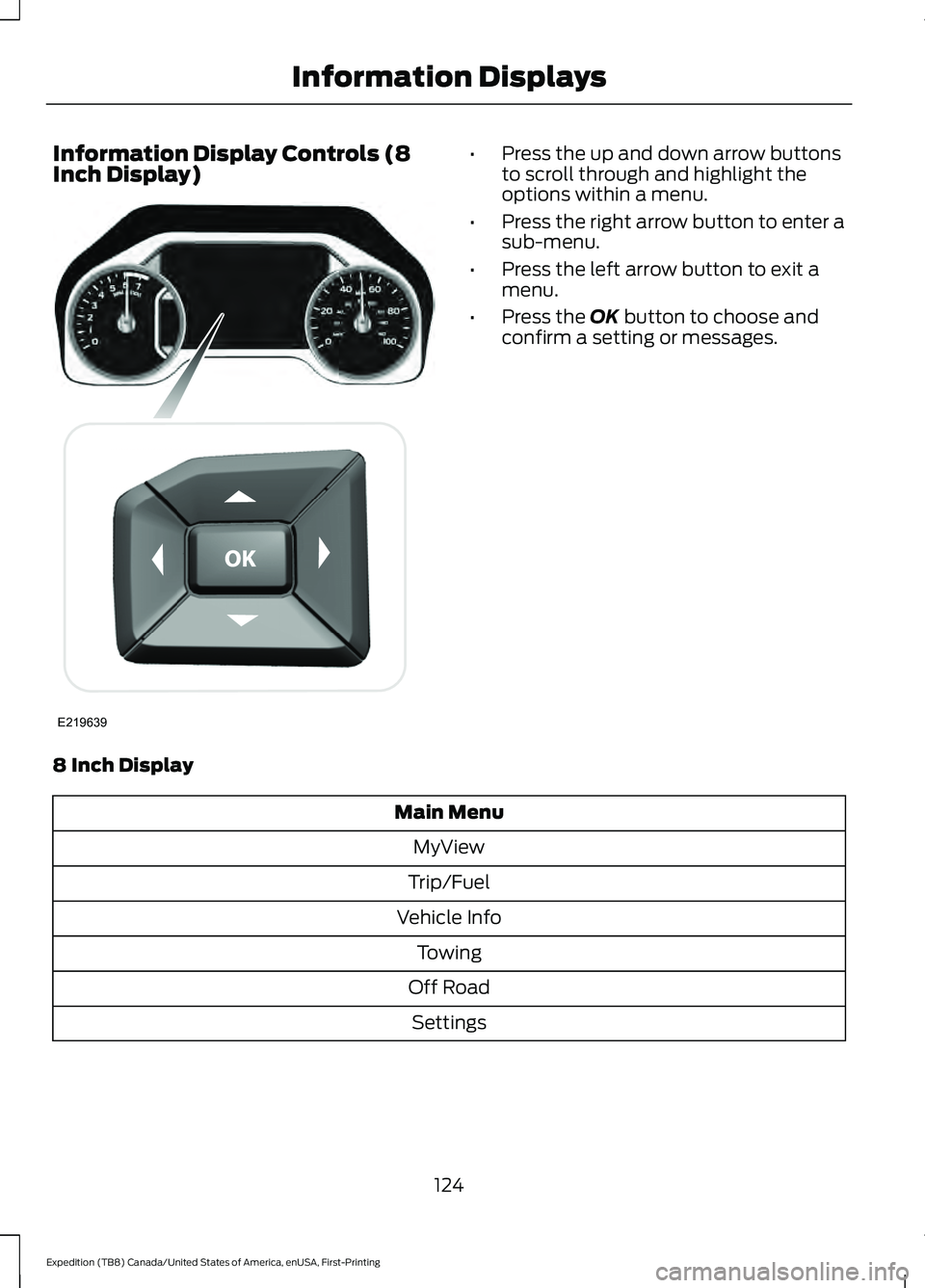
Information Display Controls (8
Inch Display) •
Press the up and down arrow buttons
to scroll through and highlight the
options within a menu.
• Press the right arrow button to enter a
sub-menu.
• Press the left arrow button to exit a
menu.
• Press the OK button to choose and
confirm a setting or messages.
8 Inch Display Main Menu
MyView
Trip/Fuel
Vehicle Info Towing
Off Road Settings
124
Expedition (TB8) Canada/United States of America, enUSA, First-Printing Information DisplaysE219639
Page 130 of 574
Vehicle Info
Transmission Temp
Seatbelts
• Gauge View - Allows you to select between either Turbo Boost or Transmission
Temp gauge.
• Tire Pressure
- Shows the tire pressure. See Tire Pressure Monitoring System
(page 378).
• Digital Speedometer
- Shows a digital display of your vehicle speed.
• Engine Information
- Shows engine hours, engine idle hours and oil temperature.
• Transmission Temp
- Shows the transmission temperature value.
• Seatbelts
- Shows the seatbelt buckle status.
Note: Once you select a trailer, it remains active until you set it as no longer active. An active
trailer still accumulates miles even after you physically disconnect it from your vehicle. Towing
% Grade, steering angle, gain and output display.
Towing
Status
Trailer Name, Accumulated Distance, Pro Trailer Backup Assist™ Status,
Trailer BLIS Status and Trailer Blind Spot.
Trailer
Informa-
tion
Provides status of the brake, park and direction indicator light for the active
trailer.
Trailer
Light
Check
Trailer Sway Control
Trailer
Setup
Enter the submenu and select your
setting.
Select trailer
Change Trailer Settings
Add Trailer
Connection Checklist
127
Expedition (TB8) Canada/United States of America, enUSA, First-Printing Information Displays
Page 131 of 574
Off Road
Off Road Status
Power Distribution
Off Road Status - Displays pitch, steering angle and roll.
Power Distribution
- Displays a graphic of the power distribution between the front and
rear wheels. Settings
Blind Spot
Cross Traffic Alert
Gauge Selection
Driver Alert
Rear Park Aid
Trailer Blind Spot Enter the submenu for items such as alert sensitivity, distance indication
and active braking.
Pre-Collision
Enter the submenu and select your setting.
Cruise
Control
Enter the submenu for items such as system modes and alert intensity.
Lane
Keeping
System
Auto Engine Off
Vehicle
Advanced
Settings
Easy Entry/Exit
Lighting
Locks
Mirrors
Neutral Tow
Alarm
Power Liftgate
Power Running Boards
128
Expedition (TB8) Canada/United States of America, enUSA, First-Printing Information Displays
Page 137 of 574
Drivetrain
Action
Message
Displays if the electronic limited slip differential system requiresservice. Have your vehicle checked as soon as possible.
Check Electronic
Limited Slip Differ- ential
Displays if the electronic limited slip differential system requiresservice. Have your vehicle checked as soon as possible.
Electronic Limited
Slip Differential
Off See Owner's Manual
Displays when the electronic limited slip differential system resumes normal function.
Electronic Limited
Slip Differential Restored to Normal
Displays if the electronic limited slip differential system temporarilyturns off due to overheating or an undersized spare tire. If an
undersized spare tire is installed, replace the spare tire with a full-
sized tire as soon as possible. If not, stop the vehicle in a safe loca- tion and allow the system to cool.
Electronic Limited
Slip Differential TemporarilyDisabled
Displays if the electronic limited slip differential has limited func-tionality. This could be due to an undersized spare tire or caused
by the system overheating. If an undersized spare tire is installed, replace the spare tire with a full-sized tire as soon as possible. Ifan undersized spare tire is not installed, the vehicle has reduced functionality. Have your vehicle checked as soon as possible.
Electronic Limited
Slip Differential
Reduced Torque
Displays when you select a drive mode that does not allow the
electronic limited slip differential to turn on. This may also display when the electronic limited slip differential has a fault and the vehicle requests the locking feature.
Electronic Limited
Slip Differential
Locking Feature Not Available
The transfer case is in the neutral position. This message indicatesthat your vehicle is safe to be towed with all four wheels on the ground.
Neutral Tow
Enabled Leave
Transmission in Neutral
The transfer case is NOT in the neutral position. This message
indicates that your vehicle is NOT safe to be towed with all four wheels on the ground.
Neutral Tow
Disabled
134
Expedition (TB8) Canada/United States of America, enUSA, First-Printing Information Displays
Page 147 of 574
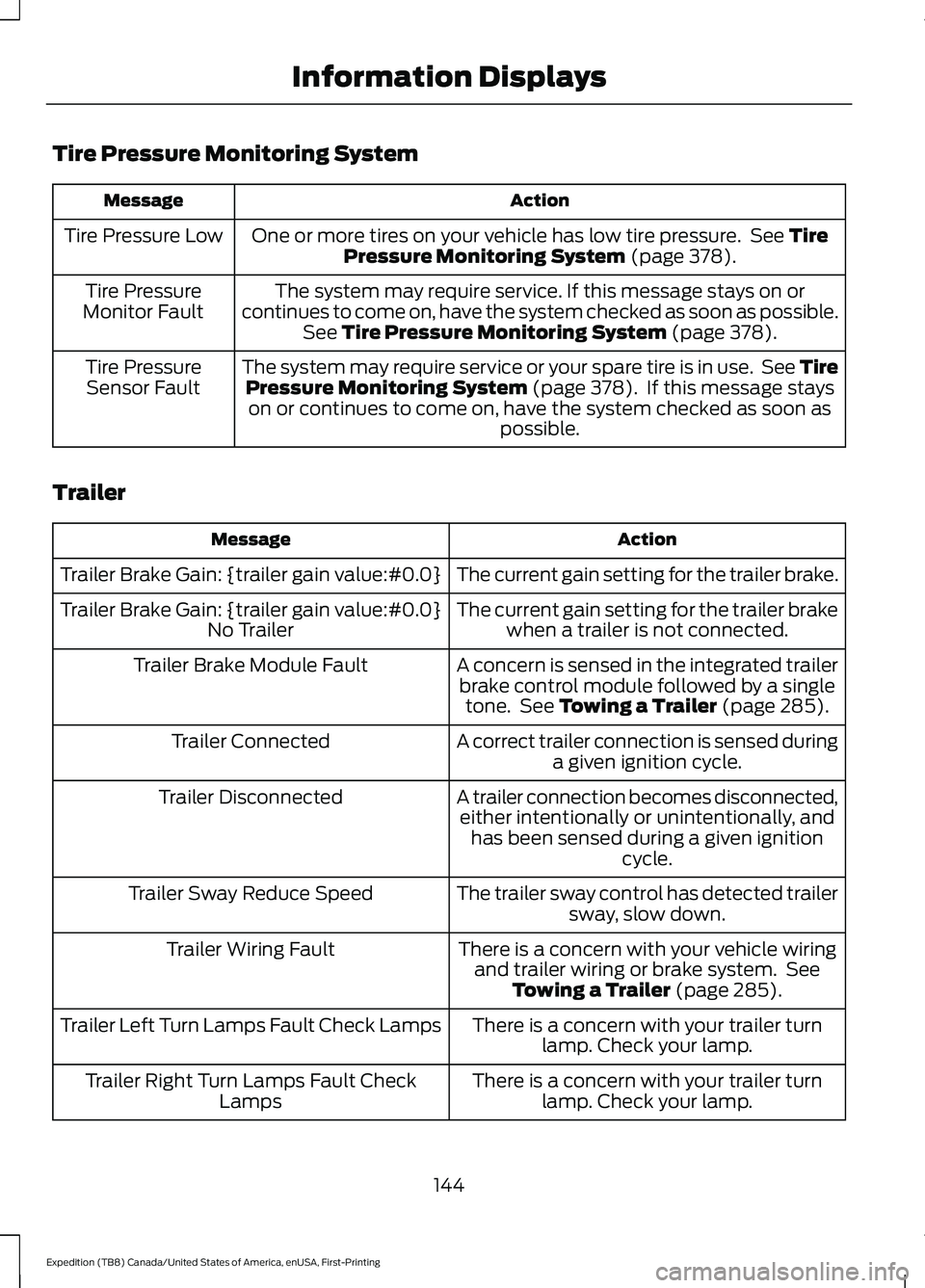
Tire Pressure Monitoring System
Action
Message
One or more tires on your vehicle has low tire pressure. See Tire
Pressure Monitoring System (page 378).
Tire Pressure Low
The system may require service. If this message stays on or
continues to come on, have the system checked as soon as possible. See
Tire Pressure Monitoring System (page 378).
Tire Pressure
Monitor Fault
The system may require service or your spare tire is in use. See TirePressure Monitoring System
(page 378). If this message stays
on or continues to come on, have the system checked as soon as possible.
Tire Pressure
Sensor Fault
Trailer Action
Message
The current gain setting for the trailer brake.
Trailer Brake Gain: {trailer gain value:#0.0}
The current gain setting for the trailer brakewhen a trailer is not connected.
Trailer Brake Gain: {trailer gain value:#0.0}
No Trailer
A concern is sensed in the integrated trailerbrake control module followed by a single tone. See
Towing a Trailer (page 285).
Trailer Brake Module Fault
A correct trailer connection is sensed duringa given ignition cycle.
Trailer Connected
A trailer connection becomes disconnected,either intentionally or unintentionally, and has been sensed during a given ignition cycle.
Trailer Disconnected
The trailer sway control has detected trailersway, slow down.
Trailer Sway Reduce Speed
There is a concern with your vehicle wiringand trailer wiring or brake system. See Towing a Trailer
(page 285).
Trailer Wiring Fault
There is a concern with your trailer turnlamp. Check your lamp.
Trailer Left Turn Lamps Fault Check Lamps
There is a concern with your trailer turnlamp. Check your lamp.
Trailer Right Turn Lamps Fault Check
Lamps
144
Expedition (TB8) Canada/United States of America, enUSA, First-Printing Information Displays
Page 148 of 574
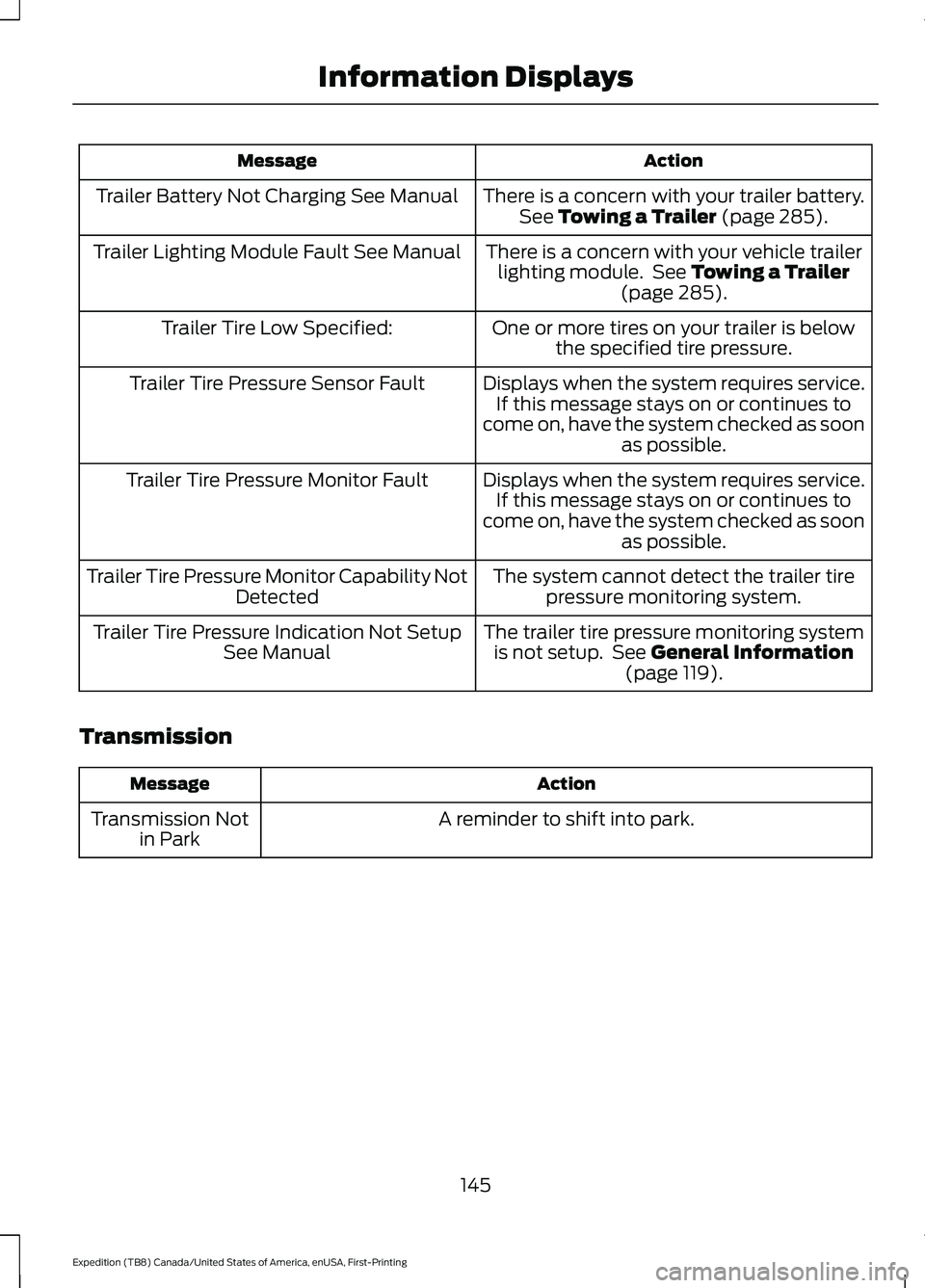
Action
Message
There is a concern with your trailer battery.See Towing a Trailer (page 285).
Trailer Battery Not Charging See Manual
There is a concern with your vehicle trailerlighting module. See
Towing a Trailer
(page 285).
Trailer Lighting Module Fault See Manual
One or more tires on your trailer is belowthe specified tire pressure.
Trailer Tire Low Specified:
Displays when the system requires service.If this message stays on or continues to
come on, have the system checked as soon as possible.
Trailer Tire Pressure Sensor Fault
Displays when the system requires service.If this message stays on or continues to
come on, have the system checked as soon as possible.
Trailer Tire Pressure Monitor Fault
The system cannot detect the trailer tirepressure monitoring system.
Trailer Tire Pressure Monitor Capability Not
Detected
The trailer tire pressure monitoring systemis not setup. See
General Information
(page 119).
Trailer Tire Pressure Indication Not Setup
See Manual
Transmission Action
Message
A reminder to shift into park.
Transmission Not
in Park
145
Expedition (TB8) Canada/United States of America, enUSA, First-Printing Information Displays
Page 155 of 574
Recommended Settings for
Heating
1. Adjust the blower motor speed to the
center setting.
2. Adjust the temperature control to the midway point of the hot settings.
3. Direct air to the footwell air vents.
Quickly Cooling the Interior
1. Select MAX A/C.
2. Drive with the windows open for a short
period of time.
Recommended Settings for
Cooling
1. Adjust the blower motor speed to the center setting.
2. Adjust the temperature control to the midway point of the cold settings.
3. Direct air to the instrument panel air vents.
Vehicle Stationary for Extended
Periods During Extreme High
Ambient Temperatures
1. Apply the parking brake.
2. Place your vehicle in park (P) or neutral.
3. Select
MAX A/C.
4. Adjust the blower motor speed to the lowest speed setting.
Defogging the Side Windows in
Cold Weather
1. Direct air to the instrument panel and windshield air vents.
2. Press and release
A/C.
3. Adjust the temperature control to the setting you prefer.
4. Adjust the blower motor speed to the highest setting. 5. Direct air toward the side windows.
6. Close the instrument panel air vents.
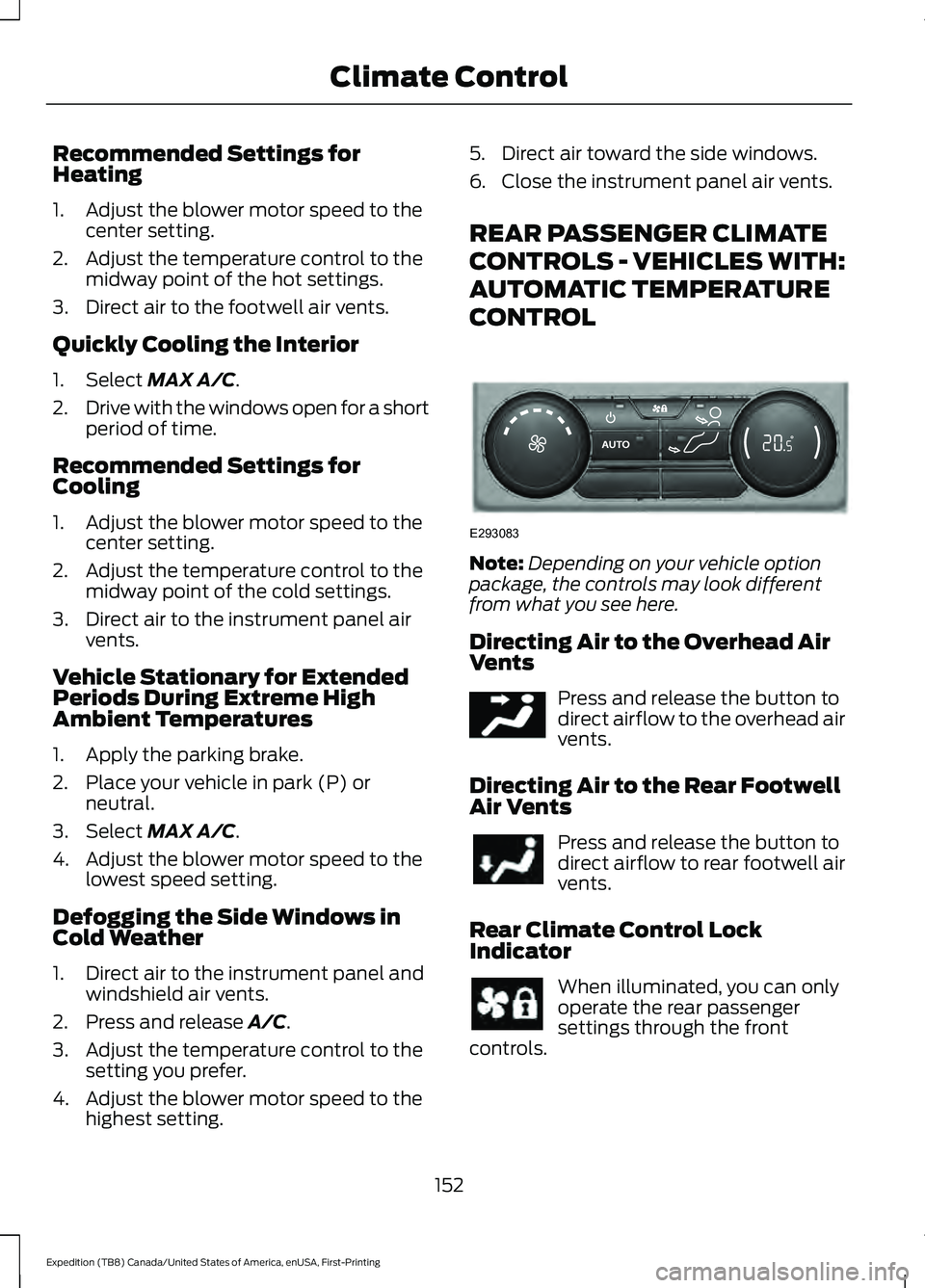
REAR PASSENGER CLIMATE
CONTROLS - VEHICLES WITH:
AUTOMATIC TEMPERATURE
CONTROL
Note:
Depending on your vehicle option
package, the controls may look different
from what you see here.
Directing Air to the Overhead Air
Vents Press and release the button to
direct airflow to the overhead air
vents.
Directing Air to the Rear Footwell
Air Vents Press and release the button to
direct airflow to rear footwell air
vents.
Rear Climate Control Lock
Indicator When illuminated, you can only
operate the rear passenger
settings through the front
controls.
152
Expedition (TB8) Canada/United States of America, enUSA, First-Printing Climate ControlE293083 E244097
Page 162 of 574
1. Adjust the seat backrest to an upright
driving or riding position.
2. Pivot the head restraint forward toward
your head to the desired position.
After the head restraint reaches the
forward-most tilt position, pivot it forward
again to release it to the rearward, un-tilted
position.
Second Row Outermost Head
Restraints
The outermost head restraints are
non-adjustable, but you may be able to
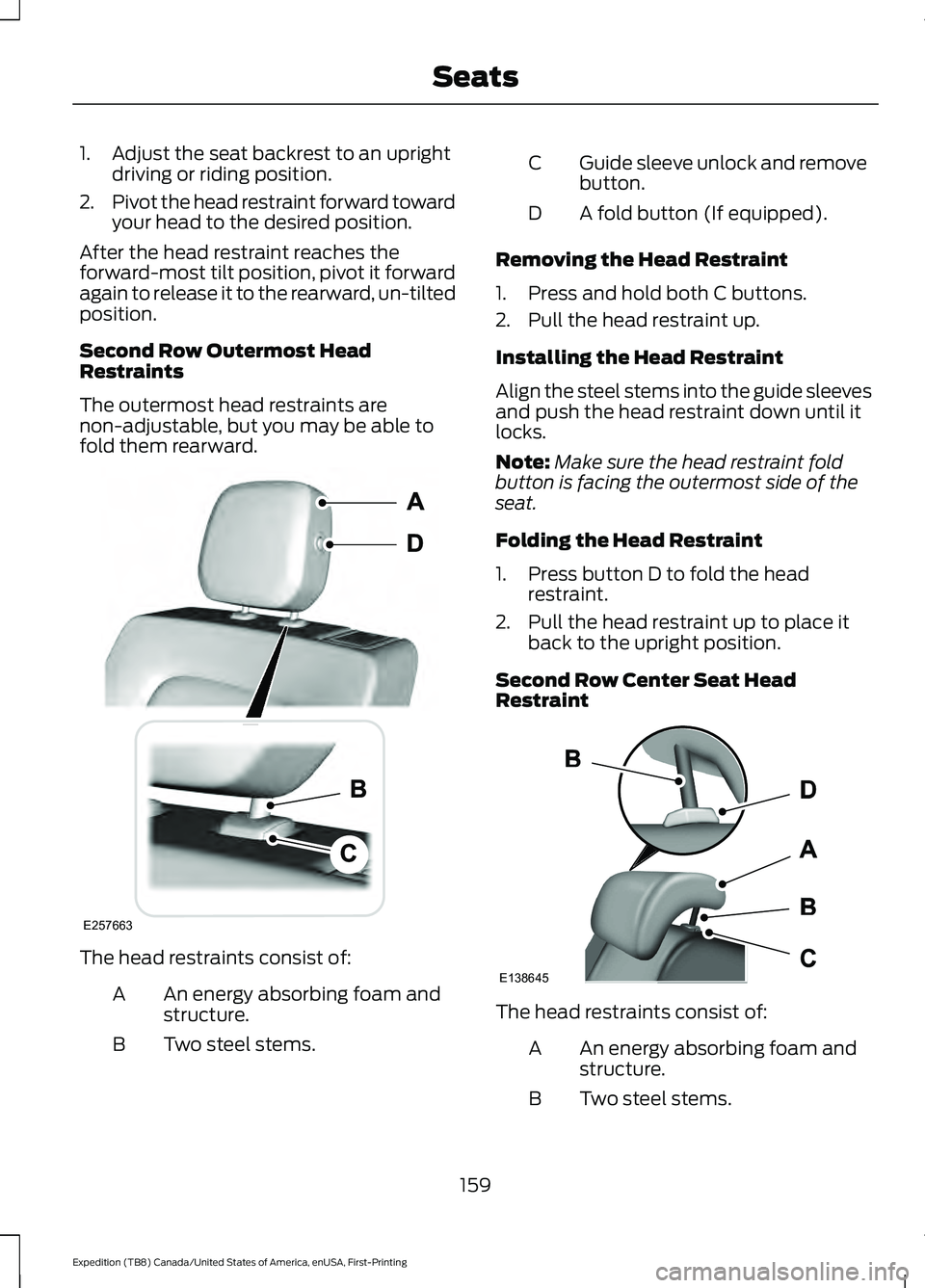
fold them rearward. The head restraints consist of:
An energy absorbing foam and
structure.
A
Two steel stems.
B Guide sleeve unlock and remove
button.
C
A fold button (If equipped).
D
Removing the Head Restraint
1. Press and hold both C buttons.
2. Pull the head restraint up.
Installing the Head Restraint
Align the steel stems into the guide sleeves
and push the head restraint down until it
locks.
Note: Make sure the head restraint fold
button is facing the outermost side of the
seat.
Folding the Head Restraint
1. Press button D to fold the head restraint.
2. Pull the head restraint up to place it back to the upright position.
Second Row Center Seat Head
Restraint The head restraints consist of:
An energy absorbing foam and
structure.
A
Two steel stems.
B
159
Expedition (TB8) Canada/United States of America, enUSA, First-Printing SeatsE257663 E138645
Page 168 of 574
To unlink a remote control, follow the
same procedure – except in step 3, press
the unlock button on the remote control.
Note:
If more than one linked remote
control or intelligent access key is in range,
the memory function moves to the settings
of the first key to recall a memory position.
Easy Entry and Exit Feature
If you enable the easy entry and exit
feature, it automatically moves the driver
seat position rearward up to 2 in (5 cm)
when you switch the ignition off.
The driver seat returns to the previous
position when you switch the ignition on.
You can enable or disable this feature
through the information display. See
General Information
(page 119).
REAR SEATS
Folding the Second Row
Outermost Seats WARNING:
Do not place cargo or
any objects behind the seat backrest
before returning it to the original position.
Pull on the seat backrest to make sure
that it has fully latched after returning
the seat backrest to its original position.
An unlatched seat may become
dangerous if you stop suddenly or have
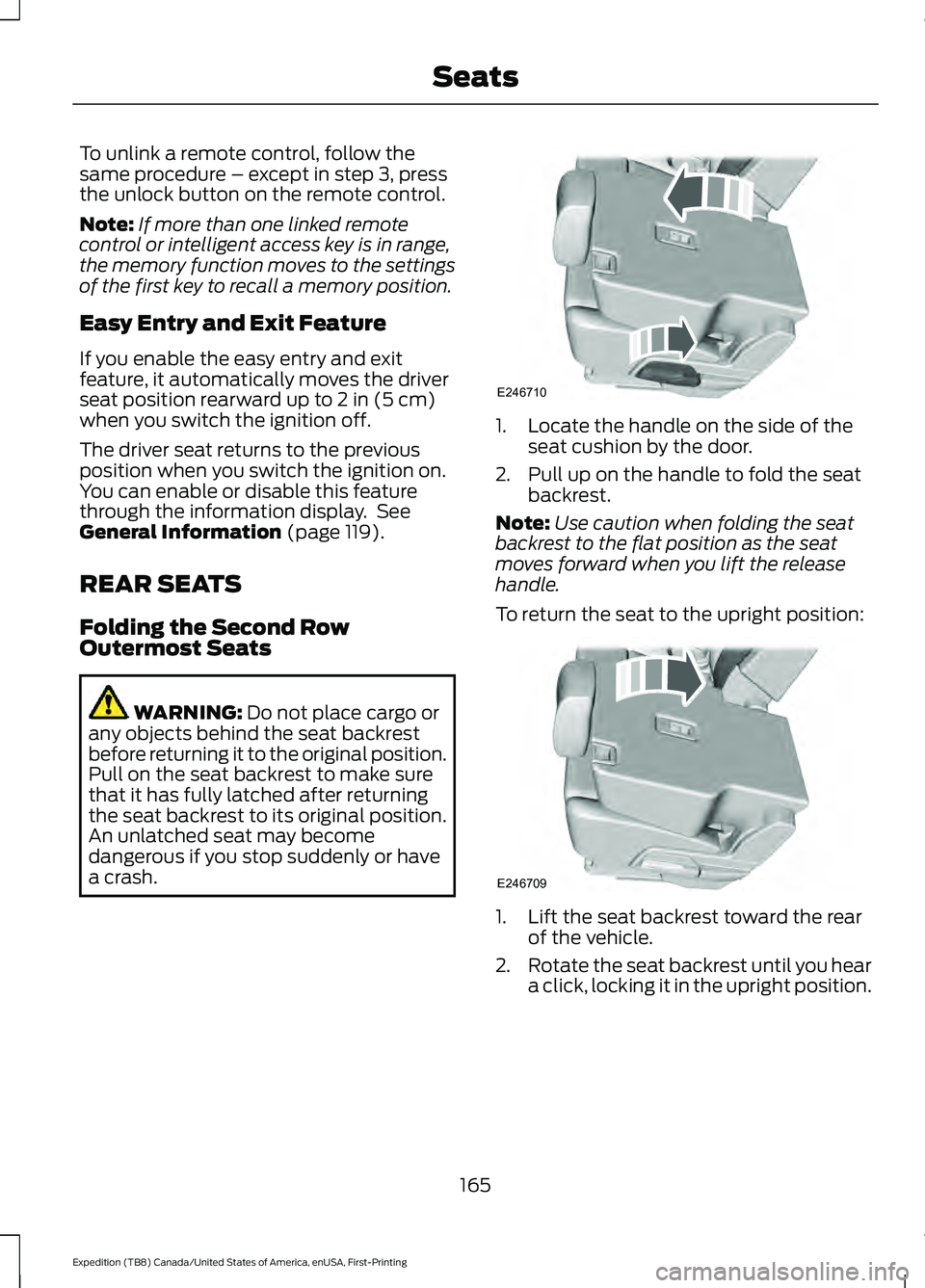
a crash. 1. Locate the handle on the side of the
seat cushion by the door.
2. Pull up on the handle to fold the seat backrest.
Note: Use caution when folding the seat
backrest to the flat position as the seat
moves forward when you lift the release
handle.
To return the seat to the upright position: 1. Lift the seat backrest toward the rear
of the vehicle.
2. Rotate the seat backrest until you hear
a click, locking it in the upright position.
165
Expedition (TB8) Canada/United States of America, enUSA, First-Printing SeatsE246710 E246709
Page 185 of 574
CENTER CONSOLE
Stow items in the cup holder carefully as
items may become loose during hard
braking, acceleration or crashes, including
hot drinks which may spill.
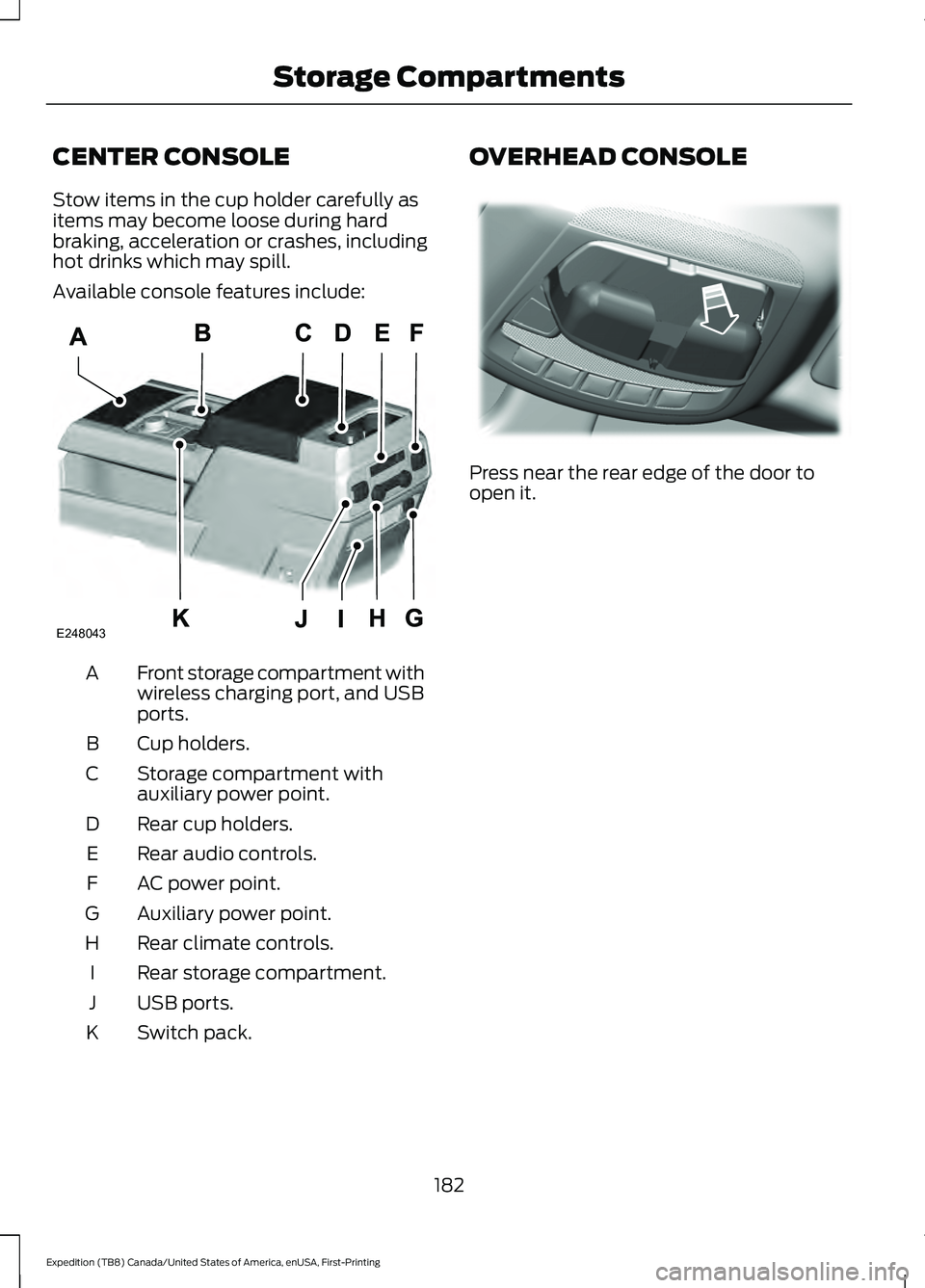
Available console features include:
Front storage compartment with
wireless charging port, and USB
ports.
A
Cup holders.
B
Storage compartment with
auxiliary power point.
C
Rear cup holders.
D
Rear audio controls.
E
AC power point.
F
Auxiliary power point.
G
Rear climate controls.
H
Rear storage compartment.
I
USB ports.
J
Switch pack.
K OVERHEAD CONSOLE
Press near the rear edge of the door to
open it.
182
Expedition (TB8) Canada/United States of America, enUSA, First-Printing Storage CompartmentsE248043 E332434