tow FORD EXPEDITION 2021 Workshop Manual
[x] Cancel search | Manufacturer: FORD, Model Year: 2021, Model line: EXPEDITION, Model: FORD EXPEDITION 2021Pages: 574, PDF Size: 8.33 MB
Page 222 of 574
GENERAL INFORMATION
Note:
Occasional brake noise is normal. If
a metal-to-metal, continuous grinding or
continuous squeal sound is present, the
brake linings could be worn-out, you should
have them checked. If the vehicle has
continuous vibration or shudder in the
steering wheel while braking, you should
have the system checked.
Note: Brake dust may accumulate on the
wheels, even under normal driving
conditions. Some dust is inevitable as the
brakes wear and does not contribute to
brake noise. See Cleaning the Wheels
(page 358). See
Warning Lamps and
Indicators (page 115).
Wet brakes result in reduced braking
efficiency. Gently press the brake pedal a
few times when driving from a car wash or
standing water to dry the brakes.
Brake Over Accelerator
In the event the accelerator pedal
becomes stuck or entrapped, apply steady
and firm pressure to the brake pedal to
slow the vehicle and reduce engine power.
If you experience this condition, apply the
brakes and bring your vehicle to a safe
stop. Switch the engine off, move the
transmission to park (P) and apply the
parking brake. Inspect the accelerator
pedal and the area around it for any items
or debris that may be obstructing its
movement. If none are found and the
condition persists, do not drive your vehicle.
Have your vehicle towed to the location
you are having it checked. Emergency Brake Assist
Emergency brake assist detects when you
brake heavily by measuring the rate at
which you press the brake pedal. It
provides maximum braking efficiency as
long as you press the pedal. Emergency
brake assist can reduce stopping distances
in critical situations.
Anti-lock Brake System
This system helps you maintain steering
control during emergency stops by keeping
the brakes from locking.
This lamp momentarily
illuminates when you switch the
ignition on. If the light does not
illuminate during start up, remains on or
flashes, the anti-lock braking system may
be disabled. Have the system checked. If
the anti-lock brake system is disabled,
normal braking is still effective. If the brake warning lamp
illuminates with the parking
brake released, have your brake
system serviced immediately.
It also illuminates momentarily when you
switch the ignition on to confirm the lamp
is functional. If it does not illuminate when
you switch the ignition on, or begins to
flash at any time, have the system
checked.
HINTS ON DRIVING WITH
ANTI-LOCK BRAKES
The anti-lock braking system does not
eliminate the risks when:
• You drive too closely to the vehicle in
front of you.
• Your vehicle is hydroplaning.
• You take corners too fast.
• The road surface is poor.
219
Expedition (TB8) Canada/United States of America, enUSA, First-Printing BrakesE138644 E138644
Page 224 of 574
Push the switch downward.
The red warning lamp turns off.
If it remains illuminated or flashes, the
system has malfunctioned. Have your
vehicle checked as soon as possible.
Pulling Away on a Hill When Towing a
Trailer
Press and hold the brake pedal.
Pull the switch upward and hold
it.
Shift into gear.
Press the accelerator pedal until engine
has developed sufficient torque to prevent
your vehicle from rolling down the hill. Release the switch and pull
away in a normal manner.
Automatically Releasing the
Electric Parking Brake
Close the driver door.
Shift into gear.
Press the accelerator pedal and pull away
in a normal manner. The red warning lamp turns off.
If it remains illuminated or flashes, the
electric parking brake has not released.
Manually release the parking brake. Releasing the Electric Parking
Brake if the Vehicle Battery is
Running Out of Charge
Connect a booster battery to the vehicle
battery to release the electric parking brake
if the vehicle battery is running out of
charge. See Jump Starting the Vehicle
(page 314).
HILL START ASSIST WARNING:
The system does not
replace the parking brake. When you
leave your vehicle, always apply the
parking brake. WARNING:
You must remain in
your vehicle when the system turns on.
At all times, you are responsible for
controlling your vehicle, supervising the
system and intervening, if required.
Failure to take care may result in the loss
of control of your vehicle, serious
personal injury or death. WARNING:
The system will turn
off if a malfunction is apparent or if you
rev the engine excessively. Failure to take
care may result in the loss of control of
your vehicle, serious personal injury or
death.
The system makes it easier to pull away
when your vehicle is on a slope without the
need to use the parking brake.
When the system is active, your vehicle
remains stationary on the slope for two to
three seconds after you release the brake
pedal. This allows time to move your foot
from the brake to the accelerator pedal.
The system releases the brakes
automatically once the engine has
221
Expedition (TB8) Canada/United States of America, enUSA, First-Printing BrakesE267156 E270480 E267156 E267156 E270480
Page 232 of 574
REAR PARKING AID (IF EQUIPPED)
WARNING:
The system may not
detect objects with surfaces that absorb
reflection. Always drive with due care
and attention. Failure to take care may
result in a crash. WARNING:
The system may not
detect small or moving objects,
particularly those close to the ground. WARNING:
To help avoid personal
injury, always use caution when in
reverse (R) and when using the sensing
system. WARNING:
The parking aid system
can only assist you to detect objects
when your vehicle is moving at parking
speeds. To help avoid personal injury you
must take care when using the parking
aid system.
Note: Keep the sensors free from snow, ice
and large accumulations of dirt.
Note: Do not cover up the sensors.
Note: Do not clean the sensors with sharp
objects.
Note: If your vehicle sustains damage
leaving the sensors misaligned, this may
cause inaccurate measurements or false
alerts.
Note: Some accessories, for example large
trailer hitches or bike or surfboard racks can
cause reduced performance or false alerts.
The sensors are on the rear bumper.
The sensors are active when the
transmission is in reverse (R) and the
vehicle speed is less than 3 mph (5 km/h).
When the parking aid system sounds a
tone, the audio system may reduce the set
volume. A warning tone sounds when your vehicle
approaches an object. As your vehicle
moves closer to an object, the rate of the
tone increases. The warning tone
continuously sounds when an object is 12 in
(30 cm)
or less from the center of the rear
bumper.
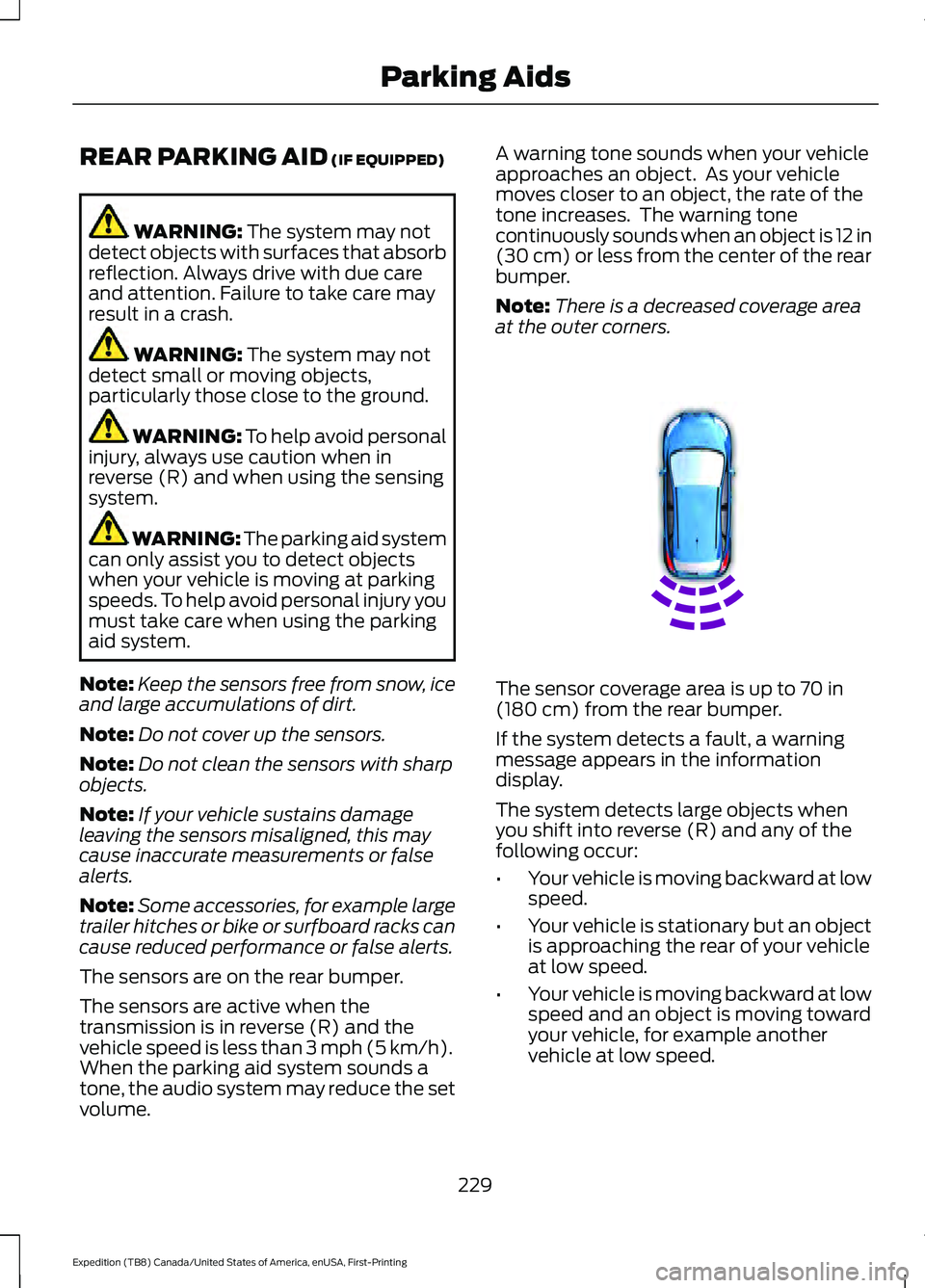
Note: There is a decreased coverage area
at the outer corners. The sensor coverage area is up to
70 in
(180 cm) from the rear bumper.
If the system detects a fault, a warning
message appears in the information
display.
The system detects large objects when
you shift into reverse (R) and any of the
following occur:
• Your vehicle is moving backward at low
speed.
• Your vehicle is stationary but an object
is approaching the rear of your vehicle
at low speed.
• Your vehicle is moving backward at low
speed and an object is moving toward
your vehicle, for example another
vehicle at low speed.
229
Expedition (TB8) Canada/United States of America, enUSA, First-Printing Parking AidsE130178
Page 233 of 574
If your vehicle remains stationary for two
seconds the audible warning turns off. If
your vehicle moves backward the tone
sounds again.
Note:
If the detected object is 12 in (30 cm)
or less from the rear bumper, the audible
warning does not turn off.
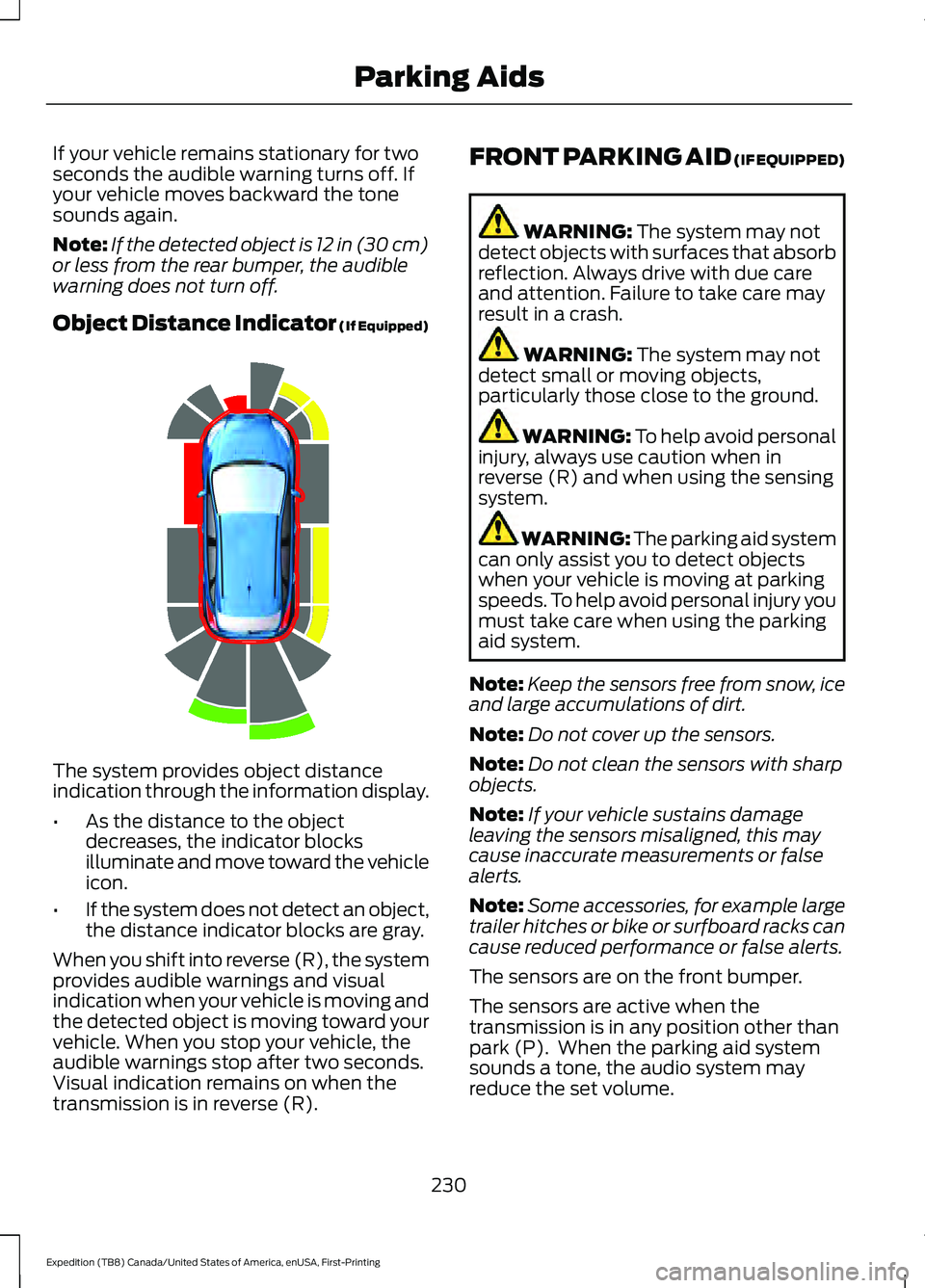
Object Distance Indicator (If Equipped) The system provides object distance
indication through the information display.
•
As the distance to the object
decreases, the indicator blocks
illuminate and move toward the vehicle
icon.
• If the system does not detect an object,
the distance indicator blocks are gray.
When you shift into reverse (R), the system
provides audible warnings and visual
indication when your vehicle is moving and
the detected object is moving toward your
vehicle. When you stop your vehicle, the
audible warnings stop after two seconds.
Visual indication remains on when the
transmission is in reverse (R). FRONT PARKING AID (IF EQUIPPED) WARNING: The system may not
detect objects with surfaces that absorb
reflection. Always drive with due care
and attention. Failure to take care may
result in a crash. WARNING:
The system may not
detect small or moving objects,
particularly those close to the ground. WARNING:
To help avoid personal
injury, always use caution when in
reverse (R) and when using the sensing
system. WARNING:
The parking aid system
can only assist you to detect objects
when your vehicle is moving at parking
speeds. To help avoid personal injury you
must take care when using the parking
aid system.
Note: Keep the sensors free from snow, ice
and large accumulations of dirt.
Note: Do not cover up the sensors.
Note: Do not clean the sensors with sharp
objects.
Note: If your vehicle sustains damage
leaving the sensors misaligned, this may
cause inaccurate measurements or false
alerts.
Note: Some accessories, for example large
trailer hitches or bike or surfboard racks can
cause reduced performance or false alerts.
The sensors are on the front bumper.
The sensors are active when the
transmission is in any position other than
park (P). When the parking aid system
sounds a tone, the audio system may
reduce the set volume.
230
Expedition (TB8) Canada/United States of America, enUSA, First-Printing Parking AidsE190459
Page 234 of 574
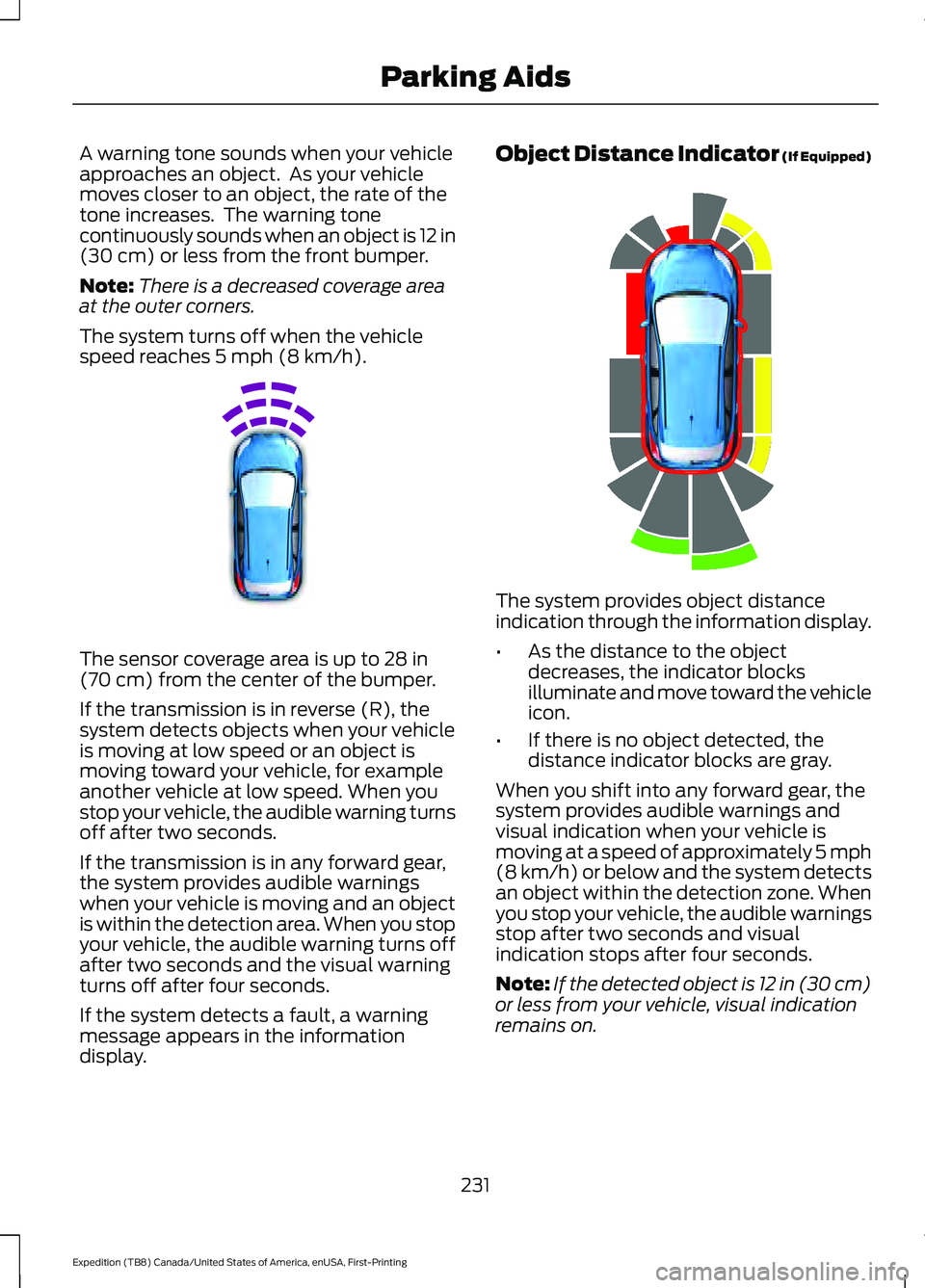
A warning tone sounds when your vehicle
approaches an object. As your vehicle
moves closer to an object, the rate of the
tone increases. The warning tone
continuously sounds when an object is 12 in
(30 cm) or less from the front bumper.
Note: There is a decreased coverage area
at the outer corners.
The system turns off when the vehicle
speed reaches
5 mph (8 km/h). The sensor coverage area is up to
28 in
(70 cm) from the center of the bumper.
If the transmission is in reverse (R), the
system detects objects when your vehicle
is moving at low speed or an object is
moving toward your vehicle, for example
another vehicle at low speed. When you
stop your vehicle, the audible warning turns
off after two seconds.
If the transmission is in any forward gear,
the system provides audible warnings
when your vehicle is moving and an object
is within the detection area. When you stop
your vehicle, the audible warning turns off
after two seconds and the visual warning
turns off after four seconds.
If the system detects a fault, a warning
message appears in the information
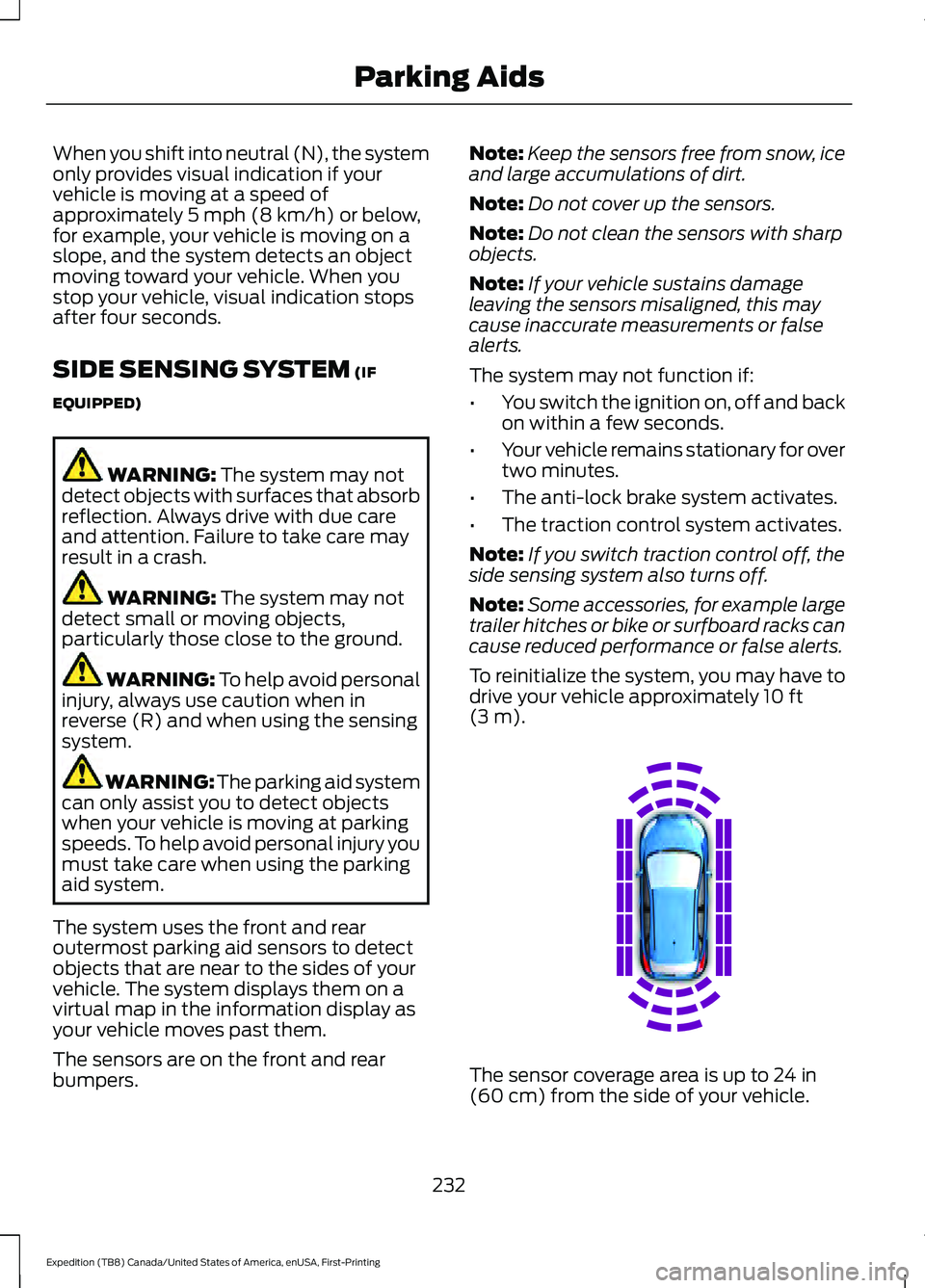
display. Object Distance Indicator (If Equipped)
The system provides object distance
indication through the information display.
•
As the distance to the object
decreases, the indicator blocks
illuminate and move toward the vehicle
icon.
• If there is no object detected, the
distance indicator blocks are gray.
When you shift into any forward gear, the
system provides audible warnings and
visual indication when your vehicle is
moving at a speed of approximately 5 mph
(8 km/h)
or below and the system detects
an object within the detection zone. When
you stop your vehicle, the audible warnings
stop after two seconds and visual
indication stops after four seconds.
Note: If the detected object is 12 in (30 cm)
or less from your vehicle, visual indication
remains on.
231
Expedition (TB8) Canada/United States of America, enUSA, First-Printing Parking AidsE187330 E190459
Page 235 of 574
When you shift into neutral (N), the system
only provides visual indication if your
vehicle is moving at a speed of
approximately 5 mph (8 km/h) or below,
for example, your vehicle is moving on a
slope, and the system detects an object
moving toward your vehicle. When you
stop your vehicle, visual indication stops
after four seconds.
SIDE SENSING SYSTEM
(IF
EQUIPPED) WARNING:
The system may not
detect objects with surfaces that absorb
reflection. Always drive with due care
and attention. Failure to take care may
result in a crash. WARNING:
The system may not
detect small or moving objects,
particularly those close to the ground. WARNING:
To help avoid personal
injury, always use caution when in
reverse (R) and when using the sensing
system. WARNING:
The parking aid system
can only assist you to detect objects
when your vehicle is moving at parking
speeds. To help avoid personal injury you
must take care when using the parking
aid system.
The system uses the front and rear
outermost parking aid sensors to detect
objects that are near to the sides of your
vehicle. The system displays them on a
virtual map in the information display as
your vehicle moves past them.
The sensors are on the front and rear
bumpers. Note:
Keep the sensors free from snow, ice
and large accumulations of dirt.
Note: Do not cover up the sensors.
Note: Do not clean the sensors with sharp
objects.
Note: If your vehicle sustains damage
leaving the sensors misaligned, this may
cause inaccurate measurements or false
alerts.
The system may not function if:
• You switch the ignition on, off and back
on within a few seconds.
• Your vehicle remains stationary for over
two minutes.
• The anti-lock brake system activates.
• The traction control system activates.
Note: If you switch traction control off, the
side sensing system also turns off.
Note: Some accessories, for example large
trailer hitches or bike or surfboard racks can
cause reduced performance or false alerts.
To reinitialize the system, you may have to
drive your vehicle approximately
10 ft
(3 m). The sensor coverage area is up to
24 in
(60 cm) from the side of your vehicle.
232
Expedition (TB8) Canada/United States of America, enUSA, First-Printing Parking AidsE190458
Page 236 of 574
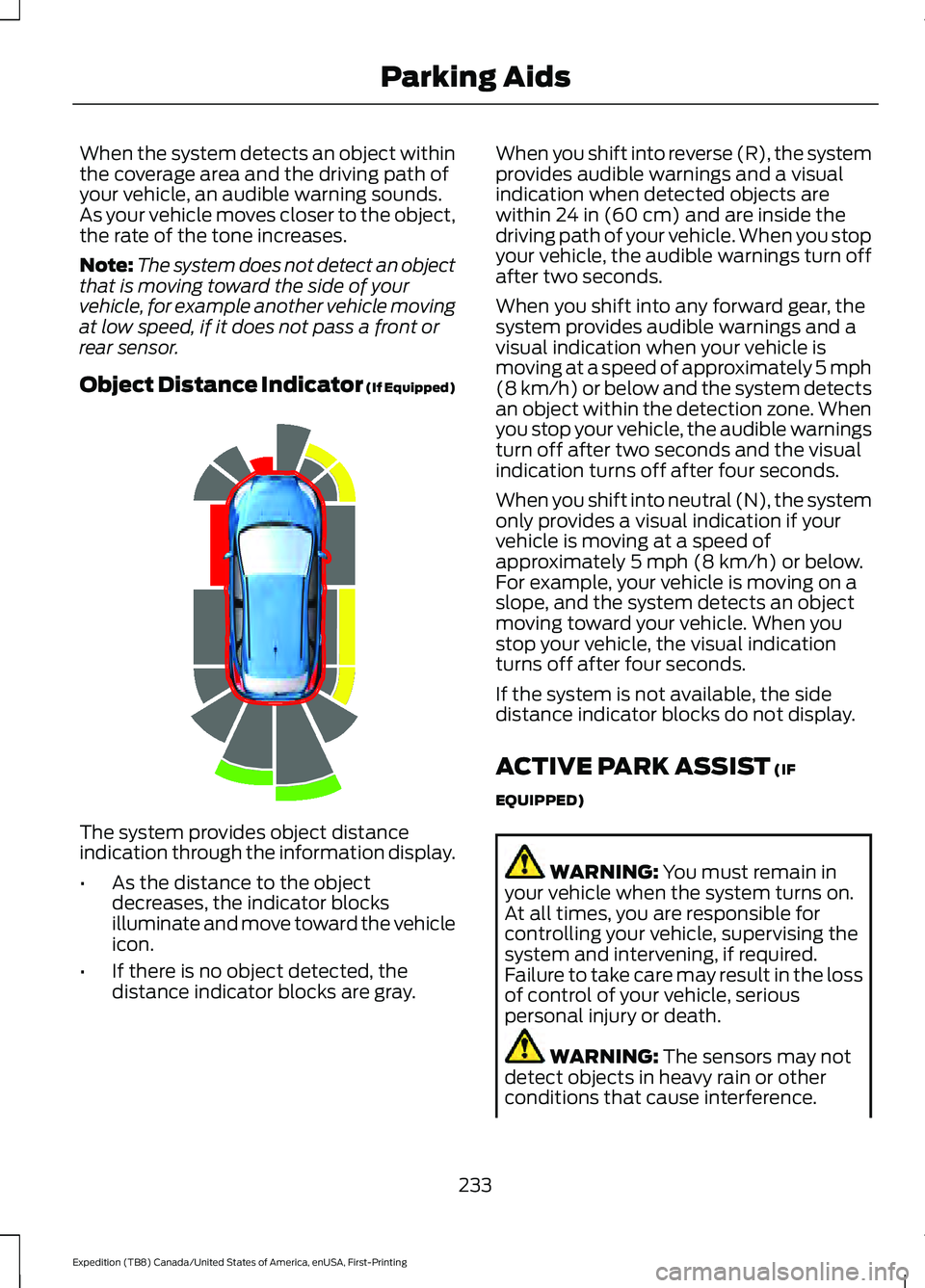
When the system detects an object within
the coverage area and the driving path of
your vehicle, an audible warning sounds.
As your vehicle moves closer to the object,
the rate of the tone increases.
Note:
The system does not detect an object
that is moving toward the side of your
vehicle, for example another vehicle moving
at low speed, if it does not pass a front or
rear sensor.
Object Distance Indicator (If Equipped) The system provides object distance
indication through the information display.
•
As the distance to the object
decreases, the indicator blocks
illuminate and move toward the vehicle
icon.
• If there is no object detected, the
distance indicator blocks are gray. When you shift into reverse (R), the system
provides audible warnings and a visual
indication when detected objects are
within 24 in (60 cm) and are inside the
driving path of your vehicle. When you stop
your vehicle, the audible warnings turn off
after two seconds.
When you shift into any forward gear, the
system provides audible warnings and a
visual indication when your vehicle is
moving at a speed of approximately 5 mph
(8 km/h)
or below and the system detects
an object within the detection zone. When
you stop your vehicle, the audible warnings
turn off after two seconds and the visual
indication turns off after four seconds.
When you shift into neutral (N), the system
only provides a visual indication if your
vehicle is moving at a speed of
approximately
5 mph (8 km/h) or below.
For example, your vehicle is moving on a
slope, and the system detects an object
moving toward your vehicle. When you
stop your vehicle, the visual indication
turns off after four seconds.
If the system is not available, the side
distance indicator blocks do not display.
ACTIVE PARK ASSIST
(IF
EQUIPPED) WARNING:
You must remain in
your vehicle when the system turns on.
At all times, you are responsible for
controlling your vehicle, supervising the
system and intervening, if required.
Failure to take care may result in the loss
of control of your vehicle, serious
personal injury or death. WARNING:
The sensors may not
detect objects in heavy rain or other
conditions that cause interference.
233
Expedition (TB8) Canada/United States of America, enUSA, First-Printing Parking AidsE190459
Page 237 of 574
WARNING: Active park assist does
not apply the brakes under any
circumstances. WARNING: You are responsible for
controlling your vehicle at all times. The
system is designed to be an aid and does
not relieve you of your responsibility to
drive with due care and attention. Failure
to follow this instruction could result in
the loss of control of your vehicle,
personal injury or death.
Active park assist is a multi-step process
and may require you to shift the
transmission multiple times. Follow the
onscreen instructions until the parking
maneuver is complete.
If you are uncomfortable with the proximity
to any vehicle or object, you may choose
to override the system by grabbing the
steering wheel, or by taking full control of
your vehicle after pressing the active park
assist button.
Keep your hands, hair, clothing and any
loose items clear of the steering wheel
when using active park assist.
The sensors are on the front and rear
bumpers.
Note: Keep the sensors free from snow, ice
and large accumulations of dirt.
Note: Do not cover up the sensors.
Note: Do not clean the sensors with sharp
objects.
Note: The sensors may not detect objects
with surfaces that absorb ultrasonic waves.
The sensors may falsely detect objects due
to ultrasonic interference caused by
motorcycle exhausts, truck air brakes or
horns, for example.
Note: If you change any tires, the system
must recalibrate and may not correctly
operate for a short time. The system may not correctly operate in
any of the following conditions:
•
You use a spare tire or a tire that is
significantly worn more than the other
tires.
• One or more tires are incorrectly
inflated.
• You try to park on a tight curve.
• Something passes between the front
bumper and the parking space. For
example, a pedestrian or cyclist.
• The edge of the neighboring parked
vehicle is high off the ground. For
example, a bus, tow truck or flatbed
truck.
• The weather conditions are poor. For
example, during heavy rain, snow, fog,
high humidity and high temperatures.
Do not use the system if:
• You have attached an add-on
accessory close to the sensors on the
front or rear of your vehicle. For
example, a bike rack or trailer.
• You have attached an overhanging
object to the roof. For example, a
surfboard.
• The front bumper, rear bumper or the
side sensors are damaged.
• The correct tire size is not in use on your
vehicle. For example, a mini-spare tire.
Using Active Park Assist
Selecting an Active Park Assist Mode Press the button once to
activate parallel parking. Press
the button a second time to
activate perpendicular parking. If you press
the button again the system switches off.
234
Expedition (TB8) Canada/United States of America, enUSA, First-Printing Parking AidsE146186
Page 244 of 574
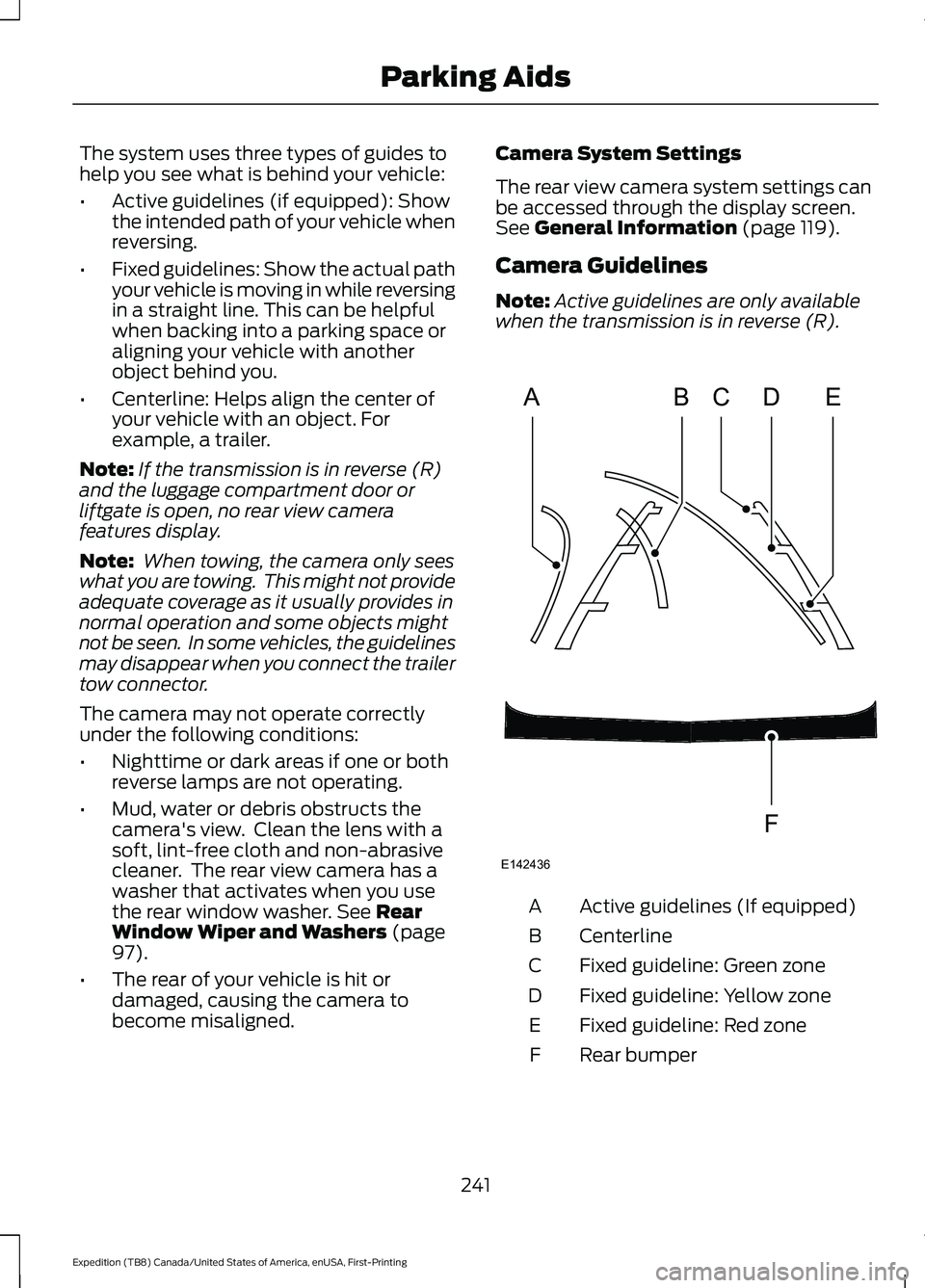
The system uses three types of guides to
help you see what is behind your vehicle:
•
Active guidelines (if equipped): Show
the intended path of your vehicle when
reversing.
• Fixed guidelines: Show the actual path
your vehicle is moving in while reversing
in a straight line. This can be helpful
when backing into a parking space or
aligning your vehicle with another
object behind you.
• Centerline: Helps align the center of
your vehicle with an object. For
example, a trailer.
Note: If the transmission is in reverse (R)
and the luggage compartment door or
liftgate is open, no rear view camera
features display.
Note: When towing, the camera only sees
what you are towing. This might not provide
adequate coverage as it usually provides in
normal operation and some objects might
not be seen. In some vehicles, the guidelines
may disappear when you connect the trailer
tow connector.
The camera may not operate correctly
under the following conditions:
• Nighttime or dark areas if one or both
reverse lamps are not operating.
• Mud, water or debris obstructs the
camera's view. Clean the lens with a
soft, lint-free cloth and non-abrasive
cleaner. The rear view camera has a
washer that activates when you use
the rear window washer. See Rear
Window Wiper and Washers (page
97).
• The rear of your vehicle is hit or
damaged, causing the camera to
become misaligned. Camera System Settings
The rear view camera system settings can
be accessed through the display screen.
See
General Information (page 119).
Camera Guidelines
Note: Active guidelines are only available
when the transmission is in reverse (R). Active guidelines (If equipped)
A
Centerline
B
Fixed guideline: Green zone
C
Fixed guideline: Yellow zone
D
Fixed guideline: Red zone
E
Rear bumper
F
241
Expedition (TB8) Canada/United States of America, enUSA, First-Printing Parking AidsABCD
F
E
E142436
Page 245 of 574
Active guidelines are only shown with fixed
guidelines. To use active guidelines, turn
the steering wheel to point the guidelines
toward an intended path. If you change
the steering wheel position while reversing,
your vehicle might deviate from the original
intended path.
The fixed and active guidelines fade in and
out depending on the steering wheel
position. The active guidelines do not
display when the steering wheel position
is straight.
Always use caution while reversing.
Objects in the red zone are closest to your
vehicle and objects in the green zone are
farther away. Objects are getting closer to
your vehicle as they move from the green
zone to the yellow or red zones. Use the
side view mirrors and rear view mirror to
get better coverage on both sides and rear
of the vehicle.
Obstacle Distance Indicator (If
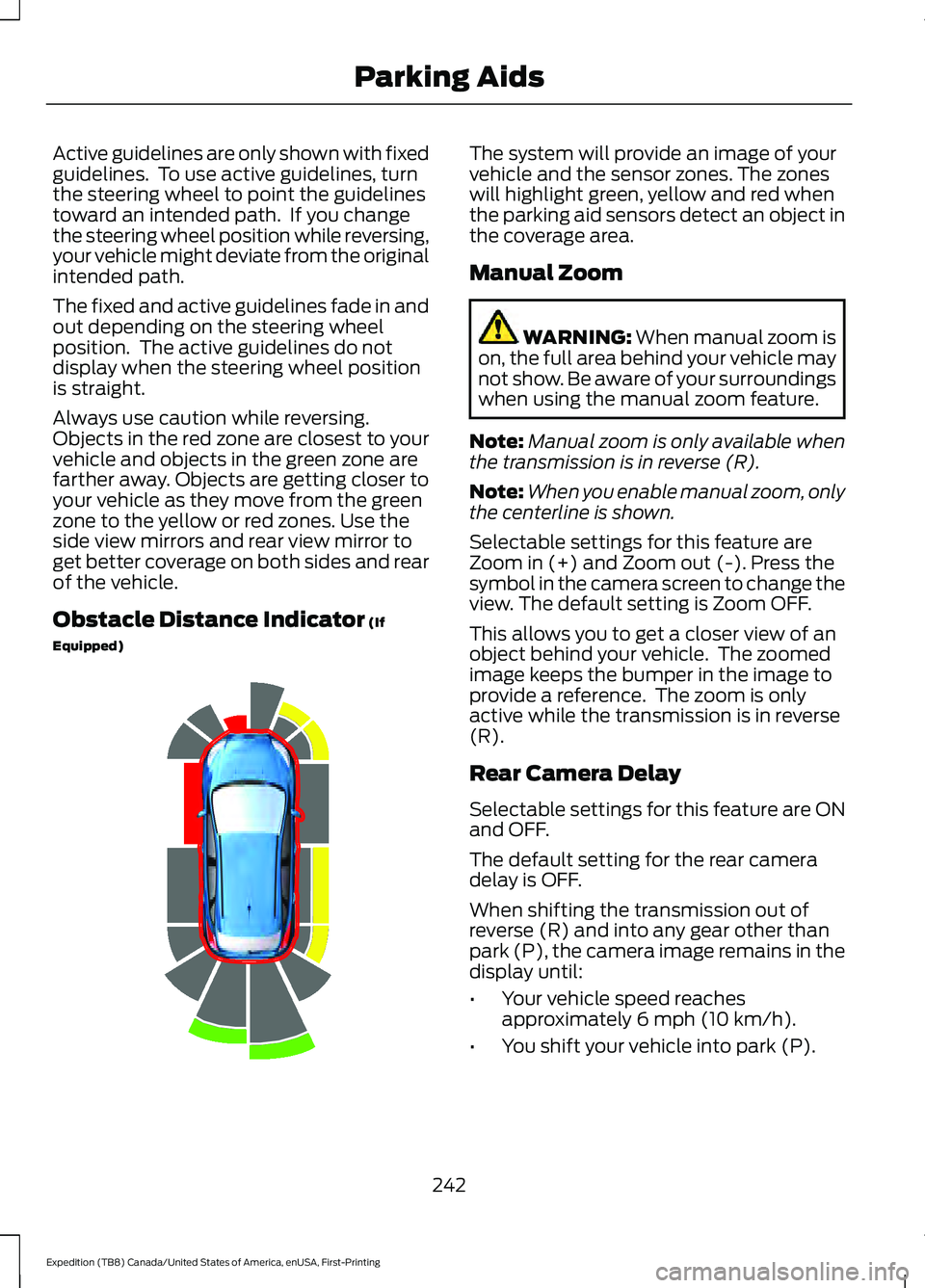
Equipped) The system will provide an image of your
vehicle and the sensor zones. The zones
will highlight green, yellow and red when
the parking aid sensors detect an object in
the coverage area.
Manual Zoom
WARNING:
When manual zoom is
on, the full area behind your vehicle may
not show. Be aware of your surroundings
when using the manual zoom feature.
Note: Manual zoom is only available when
the transmission is in reverse (R).
Note: When you enable manual zoom, only
the centerline is shown.
Selectable settings for this feature are
Zoom in (+) and Zoom out (-). Press the
symbol in the camera screen to change the
view. The default setting is Zoom OFF.
This allows you to get a closer view of an
object behind your vehicle. The zoomed
image keeps the bumper in the image to
provide a reference. The zoom is only
active while the transmission is in reverse
(R).
Rear Camera Delay
Selectable settings for this feature are ON
and OFF.
The default setting for the rear camera
delay is OFF.
When shifting the transmission out of
reverse (R) and into any gear other than
park (P), the camera image remains in the
display until:
• Your vehicle speed reaches
approximately
6 mph (10 km/h).
• You shift your vehicle into park (P).
242
Expedition (TB8) Canada/United States of America, enUSA, First-Printing Parking AidsE190459