ECO mode FORD EXPEDITION 2021 Workshop Manual
[x] Cancel search | Manufacturer: FORD, Model Year: 2021, Model line: EXPEDITION, Model: FORD EXPEDITION 2021Pages: 574, PDF Size: 8.33 MB
Page 454 of 574
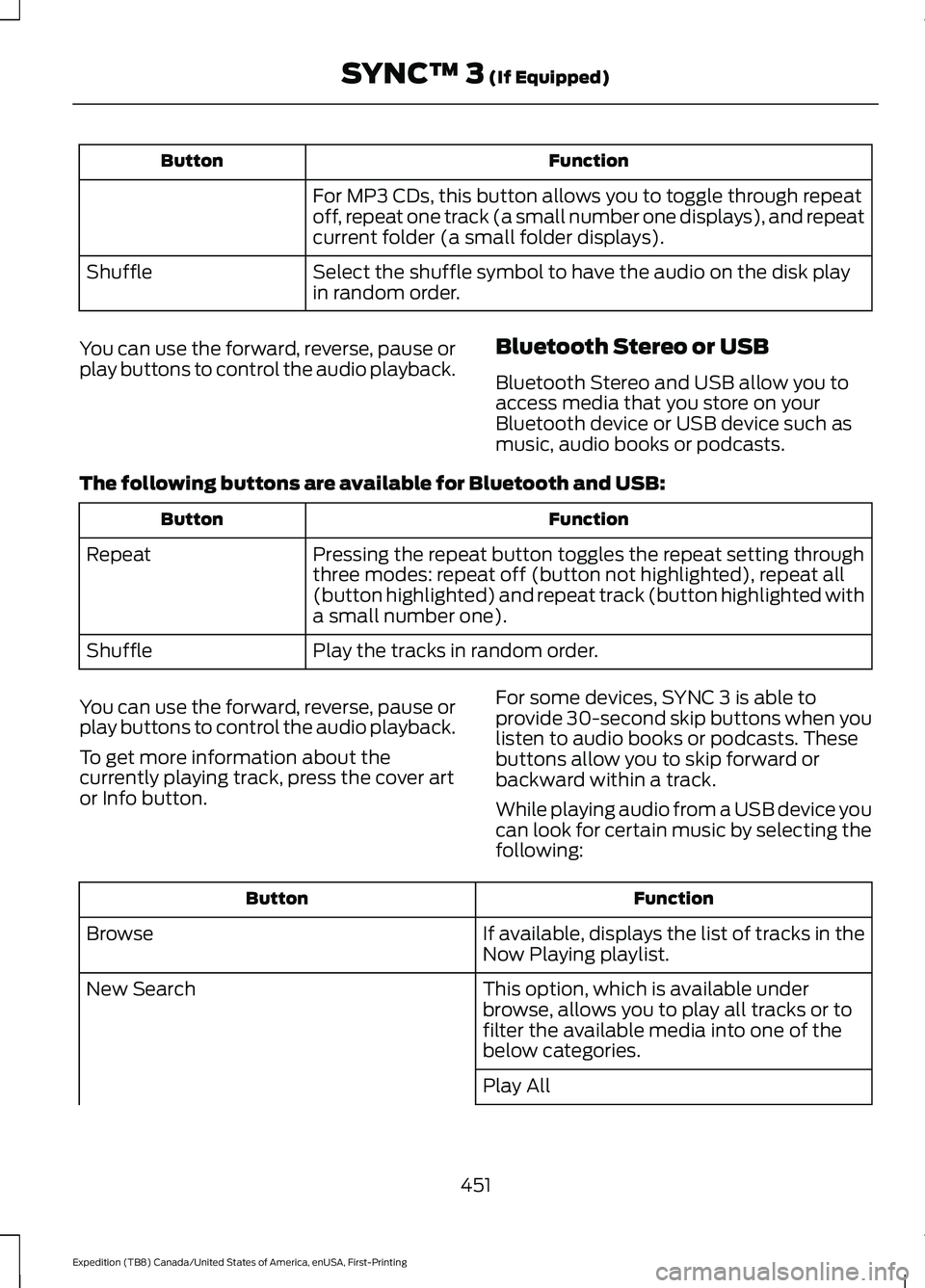
Function
Button
For MP3 CDs, this button allows you to toggle through repeat
off, repeat one track (a small number one displays), and repeat
current folder (a small folder displays).
Select the shuffle symbol to have the audio on the disk play
in random order.
Shuffle
You can use the forward, reverse, pause or
play buttons to control the audio playback. Bluetooth Stereo or USB
Bluetooth Stereo and USB allow you to
access media that you store on your
Bluetooth device or USB device such as
music, audio books or podcasts.
The following buttons are available for Bluetooth and USB: Function
Button
Pressing the repeat button toggles the repeat setting through
three modes: repeat off (button not highlighted), repeat all
(button highlighted) and repeat track (button highlighted with
a small number one).
Repeat
Play the tracks in random order.
Shuffle
You can use the forward, reverse, pause or
play buttons to control the audio playback.
To get more information about the
currently playing track, press the cover art
or Info button. For some devices, SYNC 3 is able to
provide 30-second skip buttons when you
listen to audio books or podcasts. These
buttons allow you to skip forward or
backward within a track.
While playing audio from a USB device you
can look for certain music by selecting the
following: Function
Button
If available, displays the list of tracks in the
Now Playing playlist.
Browse
This option, which is available under
browse, allows you to play all tracks or to
filter the available media into one of the
below categories.
New Search
Play All
451
Expedition (TB8) Canada/United States of America, enUSA, First-Printing SYNC™ 3 (If Equipped)
Page 458 of 574

Note:
The heated rear window also turns
on when you select maximum defrost.
Switching Recirculated Air On and
Off Touch the button to switch
between outside air and
recirculated air.
The air currently in the passenger
compartment recirculates. This may
reduce the time needed to cool the interior,
when used with A/C, and reduce unwanted
odors from entering your vehicle.
Note: Recirculated air may turn off, or
prevent you from switching on, in all air flow
modes except MAX A/C to reduce the risk
of fogging. Recirculation may also turn on
and off in various air distribution control
combinations during hot weather to improve
cooling efficiency.
Switching the Ventilated Seats On
and Off Touch the button to cycle
through the various ventilated
seat settings.
Accessing Rear Climate Controls Touch the button to access
additional controls for the rear
climate system.
Rear Climate Control Lock
Indicator Touch the button.
When on, you can only operate
the rear passenger settings
through the front controls. Switching Rear Auto Mode On and
Off Touch the button to switch on
rear automatic operation, then
set the temperature.
Switching the Rear Climate
Controlled Seats On and Off Touch the button to cycle
through the various climate
controlled seat settings.
Switching the Rear Heated Seats
On and Off Touch the button to cycle
through the various heat
settings.
Switching the Rear Ventilated
Seats On and Off Touch the button to cycle
through the various ventilated
seat settings.
PHONE WARNING: Driving while distracted
can result in loss of vehicle control, crash
and injury. We strongly recommend that
you use extreme caution when using any
device that may take your focus off the
road. Your primary responsibility is the
safe operation of your vehicle. We
recommend against the use of any
hand-held device while driving and
encourage the use of voice-operated
systems when possible. Make sure you
are aware of all applicable local laws
that may affect the use of electronic
devices while driving.
455
Expedition (TB8) Canada/United States of America, enUSA, First-Printing SYNC™ 3
(If Equipped) E268558 E270447 E265289 E265282 E268558
Page 490 of 574
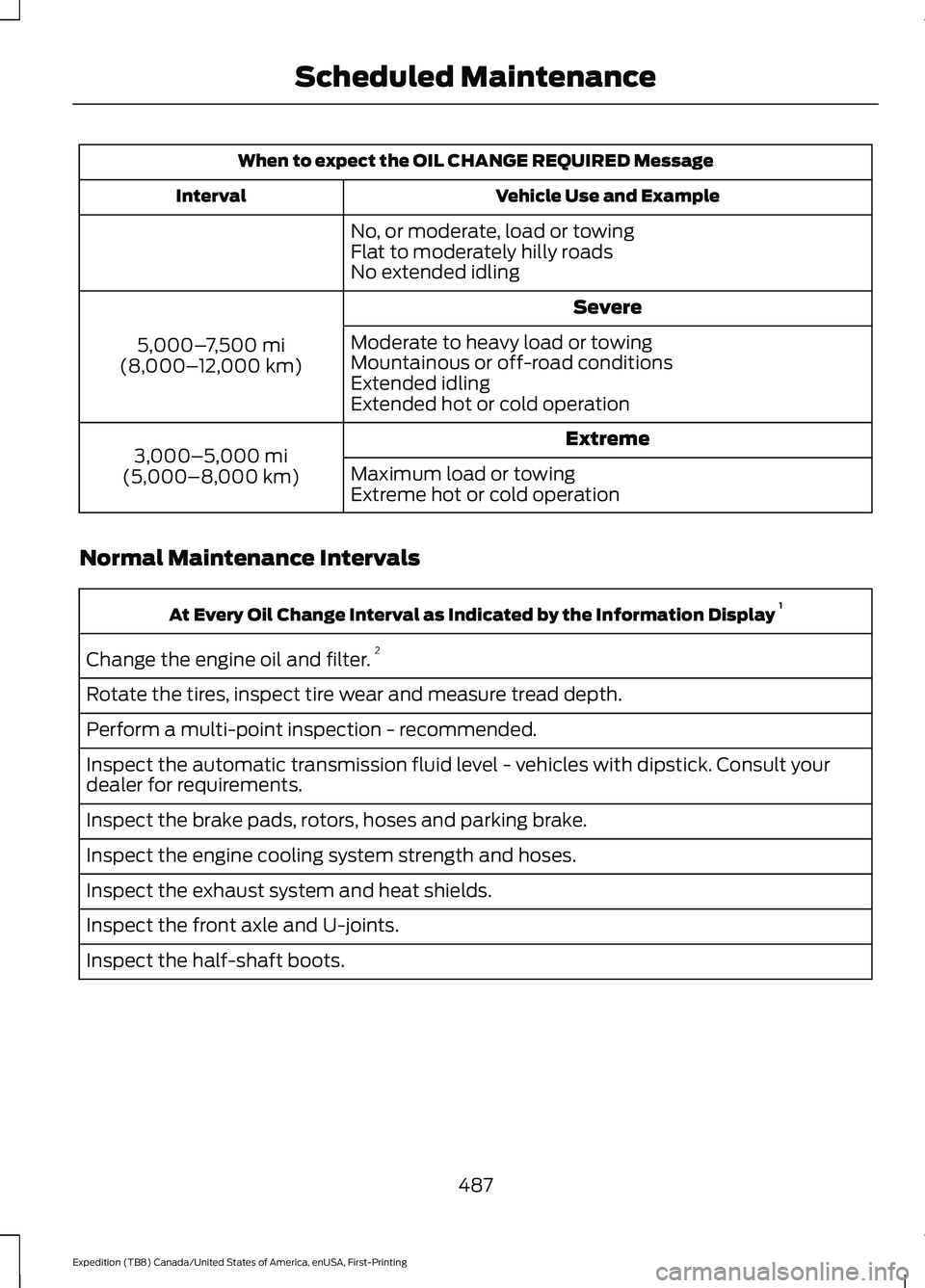
When to expect the OIL CHANGE REQUIRED Message
Vehicle Use and Example
Interval
No, or moderate, load or towing
Flat to moderately hilly roads
No extended idling Severe
5,000– 7,500 mi
(8,000– 12,000 km) Moderate to heavy load or towing
Mountainous or off-road conditions
Extended idling
Extended hot or cold operation
Extreme
3,000–5,000 mi
(5,000–8,000 km) Maximum load or towing
Extreme hot or cold operation
Normal Maintenance Intervals At Every Oil Change Interval as Indicated by the Information Display
1
Change the engine oil and filter. 2
Rotate the tires, inspect tire wear and measure tread depth.
Perform a multi-point inspection - recommended.
Inspect the automatic transmission fluid level - vehicles with dipstick. Consult your
dealer for requirements.
Inspect the brake pads, rotors, hoses and parking brake.
Inspect the engine cooling system strength and hoses.
Inspect the exhaust system and heat shields.
Inspect the front axle and U-joints.
Inspect the half-shaft boots.
487
Expedition (TB8) Canada/United States of America, enUSA, First-Printing Scheduled Maintenance
Page 558 of 574
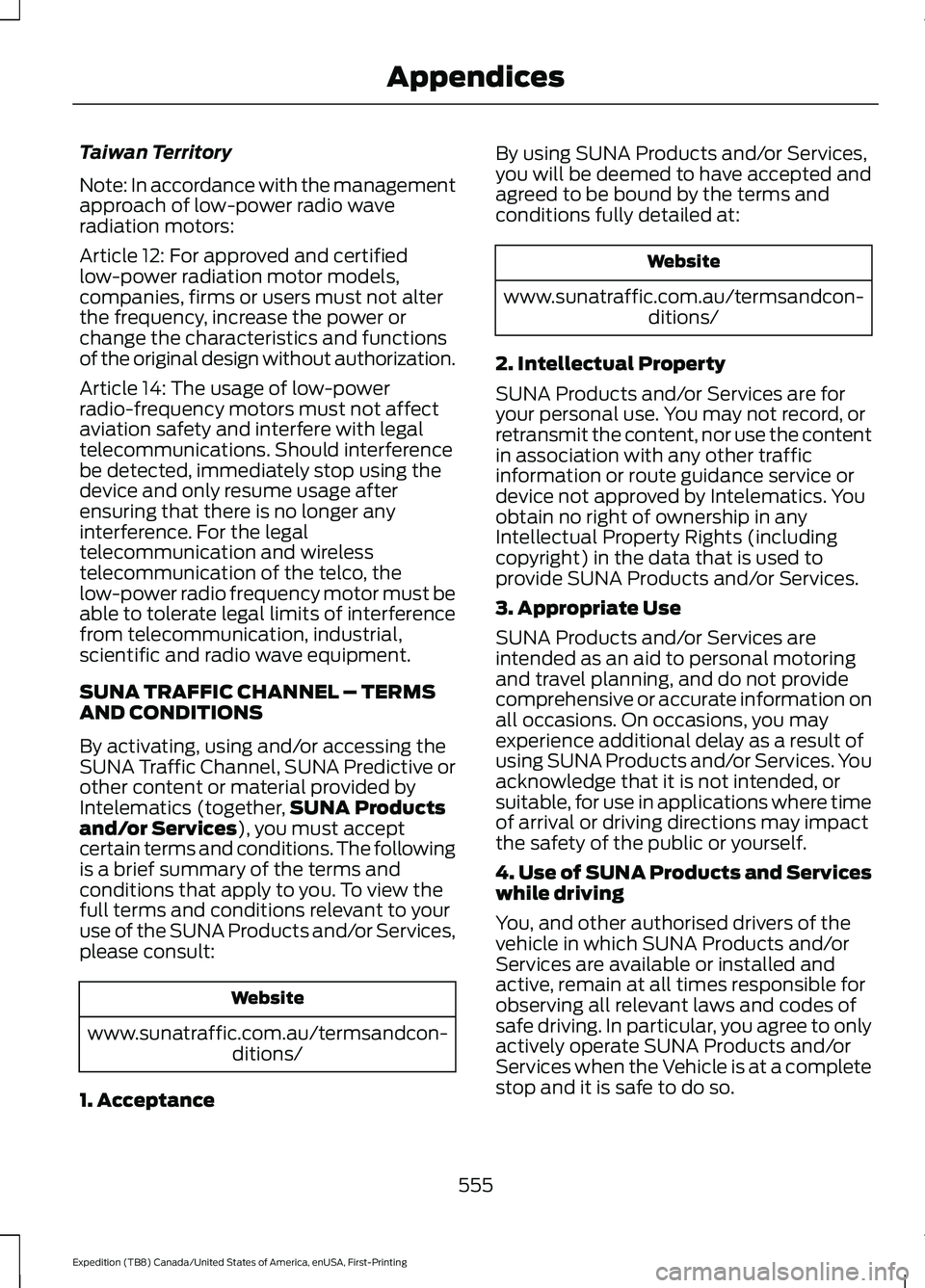
Taiwan Territory
Note: In accordance with the management
approach of low-power radio wave
radiation motors:
Article 12: For approved and certified
low-power radiation motor models,
companies, firms or users must not alter
the frequency, increase the power or
change the characteristics and functions
of the original design without authorization.
Article 14: The usage of low-power
radio-frequency motors must not affect
aviation safety and interfere with legal
telecommunications. Should interference
be detected, immediately stop using the
device and only resume usage after
ensuring that there is no longer any
interference. For the legal
telecommunication and wireless
telecommunication of the telco, the
low-power radio frequency motor must be
able to tolerate legal limits of interference
from telecommunication, industrial,
scientific and radio wave equipment.
SUNA TRAFFIC CHANNEL – TERMS
AND CONDITIONS
By activating, using and/or accessing the
SUNA Traffic Channel, SUNA Predictive or
other content or material provided by
Intelematics (together,
SUNA Products
and/or Services), you must accept
certain terms and conditions. The following
is a brief summary of the terms and
conditions that apply to you. To view the
full terms and conditions relevant to your
use of the SUNA Products and/or Services,
please consult: Website
www.sunatraffic.com.au/termsandcon- ditions/
1. Acceptance By using SUNA Products and/or Services,
you will be deemed to have accepted and
agreed to be bound by the terms and
conditions fully detailed at: Website
www.sunatraffic.com.au/termsandcon- ditions/
2. Intellectual Property
SUNA Products and/or Services are for
your personal use. You may not record, or
retransmit the content, nor use the content
in association with any other traffic
information or route guidance service or
device not approved by Intelematics. You
obtain no right of ownership in any
Intellectual Property Rights (including
copyright) in the data that is used to
provide SUNA Products and/or Services.
3. Appropriate Use
SUNA Products and/or Services are
intended as an aid to personal motoring
and travel planning, and do not provide
comprehensive or accurate information on
all occasions. On occasions, you may
experience additional delay as a result of
using SUNA Products and/or Services. You
acknowledge that it is not intended, or
suitable, for use in applications where time
of arrival or driving directions may impact
the safety of the public or yourself.
4. Use of SUNA Products and Services
while driving
You, and other authorised drivers of the
vehicle in which SUNA Products and/or
Services are available or installed and
active, remain at all times responsible for
observing all relevant laws and codes of
safe driving. In particular, you agree to only
actively operate SUNA Products and/or
Services when the Vehicle is at a complete
stop and it is safe to do so.
555
Expedition (TB8) Canada/United States of America, enUSA, First-Printing Appendices
Page 563 of 574
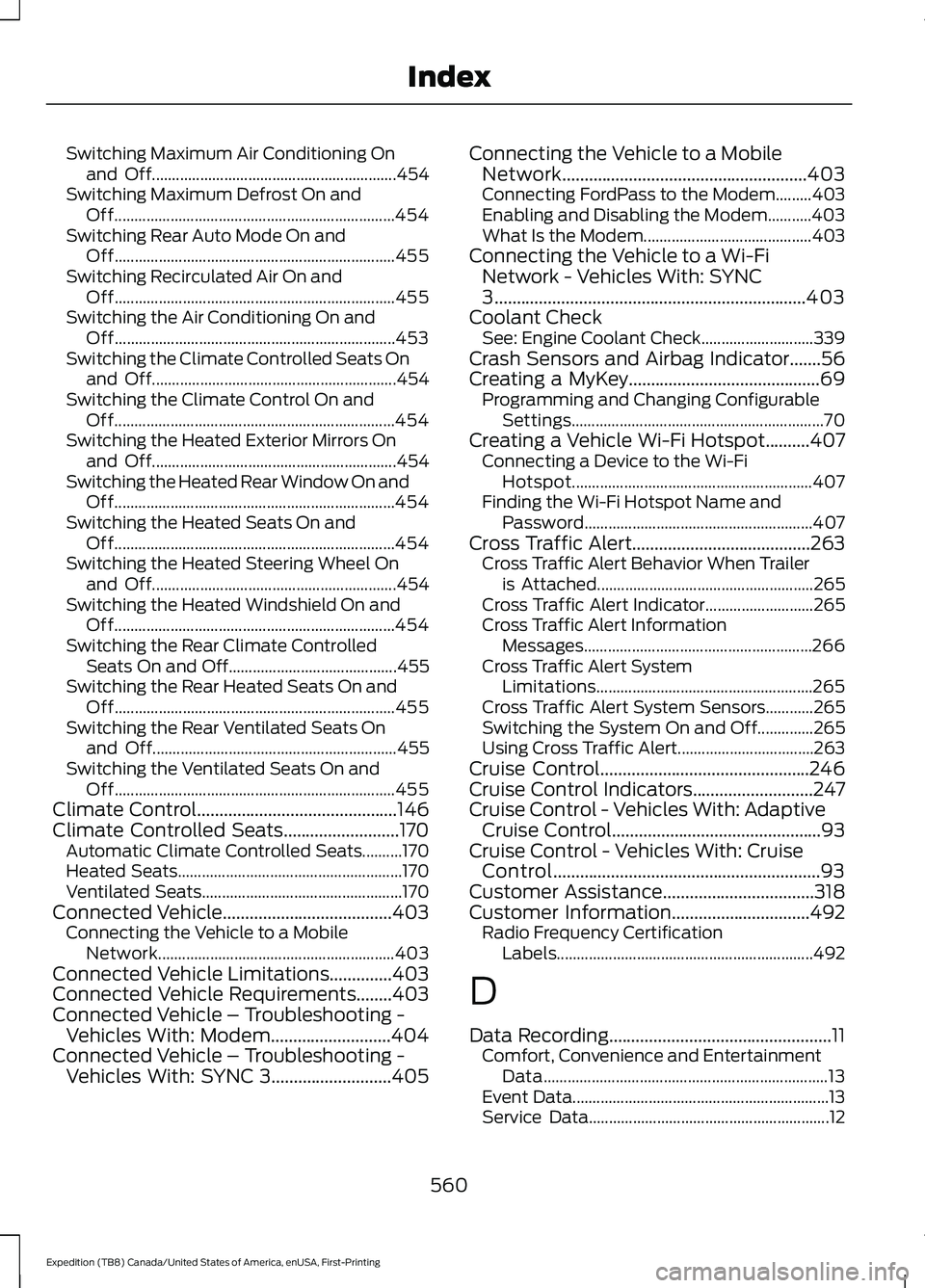
Switching Maximum Air Conditioning On
and Off............................................................. 454
Switching Maximum Defrost On and Off...................................................................... 454
Switching Rear Auto Mode On and Off...................................................................... 455
Switching Recirculated Air On and Off...................................................................... 455
Switching the Air Conditioning On and Off...................................................................... 453
Switching the Climate Controlled Seats On and Off............................................................. 454
Switching the Climate Control On and Off...................................................................... 454
Switching the Heated Exterior Mirrors On and Off............................................................. 454
Switching the Heated Rear Window On and Off...................................................................... 454
Switching the Heated Seats On and Off...................................................................... 454
Switching the Heated Steering Wheel On and Off............................................................. 454
Switching the Heated Windshield On and Off...................................................................... 454
Switching the Rear Climate Controlled Seats On and Off.......................................... 455
Switching the Rear Heated Seats On and Off...................................................................... 455
Switching the Rear Ventilated Seats On and Off............................................................. 455
Switching the Ventilated Seats On and Off...................................................................... 455
Climate Control.............................................146
Climate Controlled Seats..........................170 Automatic Climate Controlled Seats..........170
Heated Seats........................................................ 170
Ventilated Seats.................................................. 170
Connected Vehicle
......................................403
Connecting the Vehicle to a Mobile
Network........................................................... 403
Connected Vehicle Limitations..............403
Connected Vehicle Requirements
........403
Connected Vehicle – Troubleshooting - Vehicles With: Modem...........................404
Connected Vehicle – Troubleshooting - Vehicles With: SYNC 3...........................405 Connecting the Vehicle to a Mobile
Network.......................................................403
Connecting FordPass to the Modem.........403
Enabling and Disabling the Modem...........403
What Is the Modem.......................................... 403
Connecting the Vehicle to a Wi-Fi Network - Vehicles With: SYNC
3
......................................................................403
Coolant Check See: Engine Coolant Check............................ 339
Crash Sensors and Airbag Indicator
.......56
Creating a MyKey...........................................69
Programming and Changing Configurable
Settings............................................................... 70
Creating a Vehicle Wi-Fi Hotspot..........407 Connecting a Device to the Wi-Fi
Hotspot............................................................ 407
Finding the Wi-Fi Hotspot Name and Password......................................................... 407
Cross Traffic Alert........................................263 Cross Traffic Alert Behavior When Trailer
is Attached...................................................... 265
Cross Traffic Alert Indicator........................... 265
Cross Traffic Alert Information Messages......................................................... 266
Cross Traffic Alert System Limitations...................................................... 265
Cross Traffic Alert System Sensors............265
Switching the System On and Off..............265
Using Cross Traffic Alert.................................. 263
Cruise Control...............................................246
Cruise Control Indicators...........................247
Cruise Control - Vehicles With: Adaptive Cruise Control
...............................................93
Cruise Control - Vehicles With: Cruise Control............................................................93
Customer Assistance..................................318
Customer Information
...............................492
Radio Frequency Certification
Labels................................................................ 492
D
Data Recording
..................................................11
Comfort, Convenience and Entertainment
Data....................................................................... 13
Event Data................................................................ 13
Service Data............................................................ 12
560
Expedition (TB8) Canada/United States of America, enUSA, First-Printing Index
Page 564 of 574
Services That Third Parties Provide...............14
Services That We Provide..................................
14
Vehicles With a Modem...................................... 14
Vehicles With an Emergency Call System.................................................................. 15
Vehicles With SYNC............................................. 14
Daytime Running Lamps - Vehicles With: Configurable Daytime Running
Lamps...........................................................100
Daytime Running Lamps - Vehicles With: Daytime Running Lamps (DRL)..........100
Declaration of Conformity - Vehicles With: SYNC 3..............................................556
Radio Frequency Statement......................... 556
Digital Radio...................................................412
HD Radio Reception and Station
Troubleshooting............................................. 413
Direction Indicators
.......................................101
Doors and Locks..............................................73
Drive Control...................................................271 Selectable Drive Modes.................................... 271
Driver Alert
.....................................................254
Using Driver Alert............................................... 254
Driver and Passenger Airbags.....................51 Children and Airbags........................................... 52
Proper Driver and Front Passenger Seating Adjustment......................................................... 51
Driving Aids....................................................254
Driving Hints
..................................................309
Driving Through Water...............................310
DRL See: Daytime Running Lamps - Vehicles With:
Configurable Daytime Running
Lamps............................................................... 100
See: Daytime Running Lamps - Vehicles With: Daytime Running Lamps (DRL)..............100
E
Economical Driving....................................309
Electric Parking Brake................................220 Applying the Electric Parking Brake............220
Automatically Releasing the Electric
Parking Brake................................................... 221
Manually Releasing the Electric Parking Brake.................................................................. 220Releasing the Electric Parking Brake if the
Vehicle Battery is Running Out of
Charge................................................................ 221
Electromagnetic Compatibility
..............528
Emergency Call Limitations.......................59
Emergency Call Requirements.................58
Emission Law
.................................................199
Noise Emissions Warranty, Prohibited
Tampering Acts and
Maintenance.................................................. 200
Tampering With a Noise Control System.............................................................. 199
End User License Agreement...................531 VEHICLE SOFTWARE END USER LICENSE
AGREEMENT (EULA) .................................. 531
Engine Block Heater
....................................187
Using the Engine Block Heater...................... 188
Engine Coolant Check...............................339 Adding Coolant.................................................. 340
Coolant Change................................................. 342
Engine Coolant Temperature Management.................................................. 343
Fail-Safe Cooling............................................... 342
Recycled Coolant................................................ 341
Severe Climates.................................................. 341
Engine Emission Control...........................199
Engine Immobilizer See: Passive Anti-Theft System..................... 85
Engine Oil Check..........................................337 Adding Engine Oil............................................... 337
Engine Oil Dipstick.......................................337
Engine Specifications................................390 Drivebelt Routing.............................................. 390
Entertainment..............................................443 AM/FM Radio...................................................... 444
Apps........................................................................\
452
Bluetooth Stereo or USB................................. 451
CD........................................................................\
... 450
HD Radio ™ Information (If
Available)......................................................... 447
SiriusXM® Satellite Radio (If Activated)........................................................ 445
Sources.................................................................. 443
Supported Media Players, Formats and Metadata Information................................ 452
USB Ports............................................................. 452
Environment.....................................................19
561
Expedition (TB8) Canada/United States of America, enUSA, First-Printing Index
Page 565 of 574
EPB
See: Electric Parking Brake............................ 220
Essential Towing Checks..........................299 Before Towing a Trailer................................... 304
Hitches.................................................................. 300
Launching or Retrieving a Boat or Personal Watercraft (PWC)........................................ 305
Safety Chains....................................................... 301
Trailer Brakes........................................................ 301
Trailer Hitch Cover............................................. 299
Trailer Lamps...................................................... 304
Trailer Towing Connector (Vehicles with a Trailer Towing Package and 7 –Pin
Connector)...................................................... 299
When Towing a Trailer..................................... 305
Event Data Recording See: Data Recording.............................................. 11
Export Unique Options.................................18
Exterior Mirrors..............................................106
360-Degree Camera......................................... 107
Auto-Dimming Feature..................................... 107
Auto-Folding Mirrors......................................... 106
Blind Spot Monitor............................................. 107
Fold-Away Exterior Mirrors............................. 106
Heated Exterior Mirrors..................................... 107
Memory Mirrors.................................................... 107
Power Exterior Mirrors...................................... 106
Puddle Lamps ..................................................... 107
Signal Indicator Mirrors..................................... 107
F
Fastening the Seatbelts..............................40 Rear Inflatable Seatbelt..................................... 43
Seatbelt Locking Modes.................................... 42
Using Seatbelts During Pregnancy.................41
Flat Tire See: Changing a Road Wheel....................... 382
Floor Mats.......................................................310
Fog Lamps - Front See: Front Fog Lamps...................................... 100
Foot Pedals See: Adjusting the Pedals................................. 95
Ford Credit
.........................................................15
US Only..................................................................... 15
Ford Protect
...................................................481
Ford Protect Extended Service Plan
(CANADA ONLY).......................................... 482Ford Protect Extended Service Plans (U.S.
Only)................................................................... 481
Four-Wheel Drive
.........................................210
Front Fog Lamps..........................................100
Front Fog Lamp Indicator................................. 101
Switching the Front Fog Lamps On or Off....................................................................... 100
Front Parking Aid.........................................230 Object Distance Indicator................................ 231
Front Passenger Sensing System............52
Fuel and Refueling.......................................192
Fuel Consumption
........................................197
Advertised Capacity........................................... 197
Calculating Fuel Economy.............................. 198
Filling the Fuel Tank.......................................... 198
Fuel Filler Funnel Location
........................193
Fuel Filter........................................................349
Fuel Quality.....................................................192 Choosing the Right Fuel................................... 192
Fuel Shutoff....................................................313
Fuse Box Locations.....................................325 Engine Compartment Fuse Box................... 325
Passenger Compartment Fuse Box............325
Fuses................................................................325
Fuse Specification Chart...........................325 Engine Compartment Fuse Box................... 325
Passenger Compartment Fuse Box.............331
G
Garage Door Opener....................................174
Garage Door Opener See: Universal Garage Door Opener............174
Gauges - Vehicles With: 4 Inch Information and Entertainment Display
Screen..............................................................111
4 Inch Display......................................................... 111
Configurable Gauge............................................ 112
Engine Coolant Temperature Gauge............112
Engine Oil Pressure Gauge............................... 112
Fuel Gauge.............................................................. 112
Gauges - Vehicles With: 8 Inch Information and Entertainment Display
Screen.............................................................113
8 Inch Display........................................................ 113
Configurable Gauge............................................ 114
Engine Coolant Temperature Gauge............114
Engine Oil Pressure Gauge............................... 114
562
Expedition (TB8) Canada/United States of America, enUSA, First-Printing Index
Page 570 of 574
Rear Passenger Climate Controls -
Vehicles With: Automatic Temperature
Control...........................................................152
Directing Air to the Overhead Air Vents................................................................... 152
Directing Air to the Rear Footwell Air Vents................................................................... 152
Rear Climate Control Lock Indicator...........152
Setting the Rear Blower Motor Speed................................................................. 153
Setting the Rear Temperature....................... 153
Switching Rear Auto Mode On and Off........................................................................\
153
Switching the Rear Climate Control On and Off........................................................................\
153
Switching the Rear Heated Seats On and Off........................................................................\
153
Rear Passenger Climate Controls - Vehicles With: Manual Temperature
Control...........................................................153
Directing Air to the Overhead Air Vents................................................................... 153
Directing Air to the Rear Footwell Air Vents.................................................................. 154
Rear Climate Control Lock Indicator...........154
Setting the Rear Blower Motor Speed................................................................. 154
Setting the Rear Temperature....................... 154
Switching the Rear Climate Control On and Off....................................................................... 154
Switching the Rear Heated Seats On and Off....................................................................... 154
Rear Seats.......................................................165
Adjusting the Manual Second Row
Outermost Seats for Easy Entry..............166
Adjusting the Second Row Center Seat.................................................................... 168
Adjusting the Second Row Outermost Seats for Easy Exit......................................... 167
Folding the Power Rear Seats....................... 168
Folding the Second Row Center Seat ........................................................................\
....... 167
Folding the Second Row Outermost Seats ........................................................................\
...... 165
Reclining the Second Row Outermost Seat Backrest............................................................. 167Rear Under Floor Storage.........................275
Advanced System: Forward Divider, Cargo
Shelf and Rear Barrier (Bulkhead
Position)........................................................... 276
Cargo Management System.......................... 275
Rear View Camera......................................240 Camera Guidelines............................................. 241
Manual Zoom...................................................... 242
Obstacle Distance Indicator.......................... 242
Rear Camera Delay........................................... 242
Using the Rear View Camera System.............................................................. 240
Rear View Camera See: Rear View Camera.................................. 240
Rear Window Wiper and Washers...........97 Rear Window Washer......................................... 97
Rear Window Wiper Blade................................ 97
Recommended Towing Weights...........296
Reduced Engine Performance...............309
Refueling..........................................................195 Refueling System Overview........................... 195
Refueling System Warning.............................. 197
Refueling Your Vehicle...................................... 195
Remote Control
..............................................60
Car Finder................................................................ 65
Integrated Keyhead Transmitter.................... 60
Intelligent Access Key.......................................... 61
Remote Start......................................................... 65
Replacing the Battery......................................... 62
Sounding the Panic Alarm................................ 65
Using the Key Blade............................................ 62
Remote Start
..................................................155
Automatic Settings............................................ 155
Heated and Cooled Features......................... 155
Last Settings......................................................... 155
Removing a Headlamp.............................350
Repairing Minor Paint Damage..............358
Replacement Parts Recommendation........................................16
Collision Repairs.................................................... 16
Scheduled Maintenance and Mechanical Repairs................................................................. 16
Warranty on Replacement Parts.................... 16
Replacing a Lost Key or Remote Control.............................................................67
Replacing the Cabin Air Filter..................156
Reporting Safety Defects (Canada Only)..............................................................323
567
Expedition (TB8) Canada/United States of America, enUSA, First-Printing Index
Page 571 of 574
Reporting Safety Defects (U.S.
Only)..............................................................323
Resuming the Set Speed..........................247
Roadside Assistance...................................312
Vehicles Sold in Canada: Getting Roadside
Assistance........................................................ 313
Vehicles Sold in the United States: Getting Roadside Assistance.................................... 312
Vehicles Sold in the United States: Using Roadside Assistance.................................... 312
Roadside Emergencies
...............................312
Roof Racks and Load Carriers.................278
Adjusting the Crossbar.................................... 279
Maximum Recommended Load Amounts........................................................... 278
Running-In See: Breaking-In.................................................. 310
Running Out of Fuel....................................193 Adding Fuel From a Portable Fuel
Container.......................................................... 194
Filling a Portable Fuel Container.................. 193
S
Safety Canopy ™
............................................55
Safety Precautions.......................................192
Satellite Radio...............................................415 Satellite Radio Electronic Serial Number
(ESN)................................................................. 416
Satellite Radio Reception Factors...............415
SiriusXM Satellite Radio Service.................. 415
Troubleshooting.................................................. 416
Scheduled Maintenance..........................483
Seatbelt Extensions
.......................................47
Seatbelt Height Adjustment.....................44
Seatbelt Reminder........................................45 Front Seats............................................................. 45
Seatbelt Monitor.................................................. 46
Seatbelt Status..................................................... 46
Seatbelts...........................................................39 Principle of Operation........................................ 39
Seatbelt Warning Lamp and Indicator Chime..............................................................45
Conditions of operation..................................... 45
Seats..................................................................157
Security..............................................................85
Settings...........................................................465 911 Assist............................................................... 465Ambient Lighting...............................................
466
Audio...................................................................... 465
Automatic Updates.......................................... 465
Bluetooth.............................................................. 465
Charge Settings................................................. 466
Clock...................................................................... 465
Display................................................................... 466
Driver Assist......................................................... 465
FordPass............................................................... 465
General.................................................................. 465
Message Center................................................. 466
Mobile Apps........................................................ 465
Multi Contour Seats......................................... 466
Navigation............................................................ 466
Personal Profiles............................................... 466
Phone..................................................................... 465
Seats...................................................................... 466
Sound.................................................................... 465
Valet Mode.......................................................... 466
Vehicle................................................................... 465
Voice Control...................................................... 466
Setting the Cruise Control Speed.........246 Changing the Set Speed................................. 246
Side Airbags
.....................................................54
Side Sensing System..................................232
Object Distance Indicator............................... 233
Sitting in the Correct Position..................157
Snow Chains See: Using Snow Chains.................................. 377
Spare Wheel See: Changing a Road Wheel....................... 382
Special Notices
................................................16
New Vehicle Limited Warranty........................ 16
Notice to Owners of Pickup Trucks and Utility Type Vehicles......................................... 17
On Board Diagnostics Data Link Connector............................................................ 17
Special Instructions............................................. 16
Using Your Vehicle as an Ambulance.............17
Using Your Vehicle With a Snowplow............17
Special Operating Conditions Scheduled Maintenance..............................................489
Exceptions............................................................. 491
Speed Control See: Cruise Control........................................... 246
Stability Control
...........................................224
Principle of Operation...................................... 224
568
Expedition (TB8) Canada/United States of America, enUSA, First-Printing Index
Page 573 of 574
Trailer Reversing Aids.................................286
Principle of Operation...................................... 286
Pro Trailer Backup Assist™........................... 286
Setting Up Pro Trailer Backup Assist.........286
Troubleshooting.................................................. 291
Using Pro Trailer Backup Assist................... 290
Trailer Sway Control...................................295
Transfer Case Fluid Check.......................344
Transmission.................................................203
Transporting the Vehicle............................316
U
Under Hood Overview
...............................336
Unique Driving Characteristics................189
Universal Garage Door Opener................174 HomeLink Wireless Control System............174
USB Port
...........................................................417
Locating the USB Ports.................................... 418
Using Adaptive Cruise Control................247 Automatic Cancellation.................................. 250
Blocked Sensor................................................... 252
Canceling the Set Speed................................ 250
Changing the Set Speed................................. 250
Detection Issues.................................................. 251
Following a Vehicle........................................... 248
Following a Vehicle to a Complete Stop................................................................... 249
Hilly Condition Usage........................................ 251
Overriding the Set Speed............................... 250
Park Brake Application..................................... 251
Resuming the Set Speed................................ 250
Setting the Adaptive Cruise Speed............248
Setting the Adaptive Cruise Speed When Your Vehicle is Stationary.......................... 248
Setting the Gap Distance............................... 249
Switching Adaptive Cruise Control Off........................................................................\
251
Switching Adaptive Cruise Control On....................................................................... 248
Switching to Normal Cruise Control...........253
System Not Available....................................... 252
Using Four-Wheel Drive.............................210 4WD Switch Selections................................... 210
4X4 Indicator Lights.......................................... 210
Driving Off-Road With Truck and Utility Vehicles.............................................................. 213How Your Vehicle Differs From Other
Vehicles.............................................................. 212
Operating Four-Wheel Drive Vehicles With Spare or Mismatched Tires........................ 212
Using Hill Descent Control........................227 Hill Descent Modes............................................ 227
Using MyKey With Remote Start Systems............................................................71
Using Power Running Boards....................89 Automatic Power Deploy.................................. 89
Automatic Power Stow..................................... 89
Bounce-back......................................................... 90
Enabling and Disabling...................................... 89
Manual Power Deploy........................................ 89
Using Snow Chains
......................................377
Using Stability Control...............................225
Stability Control and Traction Control with
Roll Stability Control ™ (RSC™).............225
Using SYNC™ With Your Media Player............................................................425
Audio Voice Commands................................. 425
Media Sources.................................................... 425
Using SYNC™ With Your Phone............422 Accessing Features through the Phone
Menu.................................................................. 423
Pairing a Phone................................................... 422
Phone Controls................................................... 423
Phone Voice Commands................................ 422
Using Traction Control...............................223 Switching the System Off .............................. 223
System Indicator Lights and Messages......................................................... 223
Using Voice Recognition
...........................420
Audio Voice Commands.................................. 437
Climate Voice Commands............................. 438
Initiating a Voice Session................................ 420
Mobile App Voice Commands....................... 441
Navigation Voice Commands....................... 440
Phone Voice Commands................................ 438
SiriusXM Traffic and Travel Link Voice Commands..................................................... 442
System Interaction and Feedback...............421
Voice Settings Commands............................ 442
Utilizing the Mediation/Arbitration Program (Canada Only)..........................321
570
Expedition (TB8) Canada/United States of America, enUSA, First-Printing Index