fuel type FORD EXPEDITION 2021 Owners Manual
[x] Cancel search | Manufacturer: FORD, Model Year: 2021, Model line: EXPEDITION, Model: FORD EXPEDITION 2021Pages: 574, PDF Size: 8.33 MB
Page 15 of 574
Your vehicle has electronic control units
that have data recording functionality and
the ability to permanently or temporarily
store data. This data could include
information on the condition and status of
your vehicle, vehicle maintenance
requirements, events and malfunctions.
The types of data that can be recorded are
described in this section. Some of the data
recorded is stored in event logs or error
logs.
Note:
Error logs are reset following a service
or repair.
Note: We may provide information in
response to requests from law enforcement,
other government authorities and third
parties acting with lawful authority or
through a legal process. Such information
could be used by them in legal proceedings.
Data recorded includes, for example:
• Operating states of system
components, for example, fuel level,
tire pressure and battery charge level.
• Vehicle and component status, for
example, wheel speed, deceleration,
lateral acceleration and seatbelt
status.
• Events or errors in essential systems,
for example, headlamps and brakes.
• System responses to driving situations,
for example, airbag deployment and
stability control.
• Environmental conditions, for example,
temperature.
Some of this data, when used in
combination with other information, for
example, an accident report, damage to a
vehicle or eyewitness statements, could
be associated with a specific person. Service Data
Service data recorders in your vehicle are
capable of collecting and storing
diagnostic information about your vehicle.
This potentially includes information about
the performance or status of various
systems and modules in the vehicle, such
as engine, throttle, steering or brake
systems. In order to properly diagnose and
service your vehicle, Ford Motor Company
(Ford of Canada in Canada), and service
and repair facilities may access or share
among them vehicle diagnostic
information received through a direct
connection to your vehicle when
diagnosing or servicing your vehicle.
Additionally, Ford Motor Company (Ford
of Canada, in Canada) may, where
permitted by law, use vehicle diagnostic
information for vehicle improvement or
with other information we may have about
you, for example, your contact information,
to offer you products or services that may
interest you. Data may be provided to our
service providers such as part suppliers
that may help diagnose malfunctions, and
who are similarly obligated to protect data.
We retain this data only as long as
necessary to perform these functions or to
comply with law. We may provide
information where required in response to
official requests to law enforcement or
other government authorities or third
parties acting with lawful authority or court
order, and such information may be used
in legal proceedings. For U.S. only (if
equipped), if you choose to use connected
apps and services, you consent that certain
diagnostic information may also be
accessed electronically by Ford Motor
Company and Ford authorized service
facilities, and that the diagnostic
information may be used to provide
services to you, personalizing your
experience, troubleshoot, and to improve
products and services and offer you
products and services that may interest
12
Expedition (TB8) Canada/United States of America, enUSA, First-Printing Introduction
Page 192 of 574
AUTO-START-STOP
The system helps reduce fuel consumption
by automatically stopping and restarting
the engine when your vehicle has stopped.
The engine restarts automatically when
you release the brake pedal.
In some situations, your vehicle may restart
automatically, for example:
•
To maintain interior comfort.
• To recharge the battery.
Note: Power assist steering turns off when
the engine is off.
Note: If your vehicle is flex fuel capable,
Auto-Start-Stop will be inhibited for a short
time after a refuel event while the system
is verifying the fuel type being used. WARNING: Always fully apply the
parking brake. Make sure you shift into
park (P) for vehicles with an automatic
transmission. Switch the ignition off and
remove the key whenever you leave your
vehicle. WARNING:
Before opening the
hood or performing any maintenance,
fully apply the parking brake, shift into
park (P) or neutral (N) and switch the
ignition off. WARNING:
Always switch the
ignition off before leaving the vehicle. If
the ignition is switched on an automatic
restart may occur at any time. WARNING:
The system may
require the engine to automatically
restart when the auto-start-stop
indicator illuminates green or flashes
amber. Failure to follow this instruction
could result in personal injury. The Auto-Start-Stop system status is
available at a glance within the information
display. See Information Displays (page
119
).
Enabling Auto-Start-Stop
The system automatically enables every
time you start your vehicle if:
• You do not press the Auto-Start-Stop
button (not illuminated).
• Your vehicle exceeds an initial speed
of
3 mph (5 km/h) after you have
initially started your vehicle.
• You have stopped your vehicle.
• Your foot is on the brake pedal.
• The driver door is closed.
• There is adequate brake vacuum.
• The interior compartment has cooled
or warmed to an acceptable level.
• The front windshield defroster is off.
• You have not turned the steering wheel
rapidly or you do not have it at a sharp
angle.
• The vehicle is not on a steep road
grade.
• The battery is within optimal operating
conditions (battery state of charge and
temperature in range).
• The engine coolant is at operating
temperature.
• Elevation is below about
11,000 ft
(3,350 m).
• Ambient temperature is moderate.
• The trailer is not connected.
• If you select Normal, Eco, Snow/Wet
or Grass/Gravel/Snow modes.
• You are not in 4H or 4L.
• You have not selected Manual shift
mode.
189
Expedition (TB8) Canada/United States of America, enUSA, First-Printing Unique Driving Characteristics
Page 201 of 574
Filling the Fuel Tank
For consistent results when refueling:
•
Turn the ignition off before fueling; an
inaccurate reading results if the engine
is left running.
• Use the same fill rate
(low-medium-high) each time the tank
is filled.
• Allow no more than one automatic
shut-off when refueling.
Results are most accurate when the filling
method is consistent.
Calculating Fuel Economy
Your vehicle calculates fuel economy
figures through the trip computer average
fuel function. See Information Displays
(page 119).
The first
1,000 mi (1,500 km) of driving is
the break-in period of the engine. A more
accurate measurement is obtained after
2,000 mi (3,000 km)
.
1. Completely fill the fuel tank and record
the initial odometer reading.
2. Each time you fill the fuel tank, record the amount of fuel added.
3. After at least three fill ups, fill the fuel tank and record the current odometer
reading.
4. Subtract your initial odometer reading from the current odometer reading.
To calculate L/100 km (liters per 100
kilometers) fuel consumption, multiply the
liters used by 100, then divide by kilometers
traveled. To calculate MPG (miles per
gallon) fuel consumption, divide miles
traveled by gallons used. Keep a record for at least one month and
record the type of driving, for example city
or highway. This provides an accurate
estimate of your vehicle
’s fuel economy
under current driving conditions. Keeping
records during summer and winter shows
how temperature impacts fuel economy.
Conditions
• Heavily loading your vehicle reduces
fuel economy.
• Carrying unnecessary weight in your
vehicle may reduce fuel economy.
• Avoid adding accessories that increase
aerodynamic drag to your vehicle such
as bug deflectors, car top carriers and
ski or bike racks.
• Using fuel blended with alcohol may
lower fuel economy.
• Fuel economy may decrease with lower
temperatures.
• Fuel economy may decrease when
driving short distances.
• You will get better fuel economy when
driving on flat terrain than when driving
on hilly terrain.
198
Expedition (TB8) Canada/United States of America, enUSA, First-Printing Fuel and Refueling
Page 308 of 574
When Towing a Trailer
•
Do not tow during the first 1,000 mi
(1,600 km).
• Do not make full-throttle starts.
• Check your hitch, electrical connections
and trailer wheel lug nuts thoroughly
after you have traveled 50 mi (80 km).
• When stopped in congested or heavy
traffic during hot weather, place the
transmission in park (P) to aid engine
and transmission cooling and to help
A/C performance.
• Turn off the speed control with heavy
loads or in hilly terrain. The speed
control may turn off automatically
when you are towing on long, steep
slopes.
• Shift to a lower gear when driving down
a long or steep hill. Do not apply the
brakes continuously, as they may
overheat and become less effective.
• If your transmission is equipped with a
Grade Assist or Tow/Haul feature, use
this feature when towing. This provides
engine braking and helps eliminate
excessive transmission shifting for
optimum fuel economy and
transmission cooling.
• If your vehicle is equipped with
AdvanceTrac with RSC, this system
may turn on during typical cornering
maneuvers with a heavily loaded trailer.
This is normal. Turning the corner at a
slower speed when towing may reduce
this tendency.
• If you are towing a trailer frequently in
hot weather, hilly conditions, at the
gross combined weight rating (or any
combination of these factors), consider
refilling your rear axle with synthetic
gear lubricant if the axle is not already
filled with it. See
Capacities and
Specifications (page 392). •
Allow more distance for stopping with
a trailer attached. Anticipate stops and
brake gradually.
• Avoid parking on a slope. However, if
you must park on a slope:
1. Turn the steering wheel to point your vehicle tires away from traffic flow.
2. Set your vehicle parking brake.
3. Place the transmission in park (P).
4. Place wheel chocks in front and back of the trailer wheels. Chocks are not
included with your vehicle.
Your vehicle may be equipped with a
temporary or conventional spare tire. A
temporary spare tire is different in size,
tread-type, or is from a different
manufacturer than the road tires on your
vehicle. Consult information on the tire
label or Safety Compliance label for
limitations when using these tires.
Launching or Retrieving a Boat or
Personal Watercraft (PWC)
Note: Disconnect the wiring to the trailer
before backing the trailer into the water.
Note: Reconnect the wiring to the trailer
after removing the trailer from the water.
When backing down a ramp during boat
launching or retrieval:
• Do not allow the static water level to
rise above the bottom edge of the rear
bumper.
• Do not allow waves to break higher
than
6 in (15 cm) above the bottom
edge of the rear bumper.
Exceeding these limits may allow water to
enter vehicle components:
• Causing internal damage to the
components.
• Affecting driveability, emissions and
reliability.
305
Expedition (TB8) Canada/United States of America, enUSA, First-Printing Towing
Page 364 of 574
GENERAL INFORMATION
Use only approved wheel and tire sizes,
using other sizes could damage your
vehicle. If you change the diameter of the
tires from that fitted at the factory, the
speedometer may not display the correct
speed. If you intend to change the size of
the wheels from that fitted by the
manufacturer, you can check the suitability
with an authorized dealer.
Additional information related to the
functionality and maintenance of your tires
can be found later in this chapter. See Tire
Care (page 363).
You can find the recommended tire
inflation pressures can on the Tire Label,
which is on the B-pillar or the edge of the
driver door. You can also find this
information on the Safety Compliance
Certification Label, affixed to either the
door hinge pillar, door-latch post, or the
door edge that meets the door latch post;
next to the driver seating position.
We strongly recommend maintaining these
tire pressures at all times. Failure to follow
the tire pressure recommendations can
cause uneven treadwear patterns, reduced
fuel economy, and adversely affect the
way your vehicle handles.
Note: Check and set the tire pressure at the
ambient temperature in which you are
intending to drive your vehicle and when the
tires are cold.
Note: Check your tire pressures at least
once per month.
If your vehicle has a spare tire, set the
pressure to the highest value given for your
vehicle and tire size combination. Notice to utility vehicle and truck
owners WARNING:
Utility vehicles have a
significantly higher rollover rate than
other types of vehicles. WARNING:
Vehicles with a higher
center of gravity (utility and four-wheel
drive vehicles) handle differently than
vehicles with a lower center of gravity
(passenger cars). Avoid sharp turns,
excessive speed and abrupt steering in
these vehicles. Failure to drive cautiously
increases the risk of losing control of your
vehicle, vehicle rollover, personal injury
and death. WARNING:
In a rollover crash, an
unbelted person is significantly more
likely to die than a person wearing a
seatbelt. WARNING:
Do not become
overconfident in the ability of four-wheel
drive vehicles. Although a four-wheel
drive vehicle may accelerate better than
a two-wheel drive vehicle in low traction
situations, it won't stop any faster than
two-wheel drive vehicles. Always drive
at a safe speed.
Utility vehicles and trucks handle
differently than passenger cars in the
various driving conditions that are
encountered on streets, highways and
off-road. Utility vehicles and trucks are not
designed for cornering at speeds as high
as passenger cars any more than low-slung
sports cars are designed to perform
satisfactorily under off-road conditions.
361
Expedition (TB8) Canada/United States of America, enUSA, First-Printing Wheels and Tires
Page 381 of 574
Compliance Certification Label (on the
door hinge pillar, door latch post or the
door edge that meets the door latch
post, next to the driver seat), or Tire
Label on the B-Pillar or the edge of the
driver door. Failure to follow the tire
pressure recommendations can cause
uneven treadwear patterns and
adversely affect the way your vehicle
handles.
Note: The suspension insulation and
bumpers will help prevent vehicle damage.
Do not remove these components from your
vehicle when using snow tires and chains.
The tires on your vehicle have all-weather
treads to provide traction in rain and snow.
However, in some climates, you may need
to use snow tires and cables. If you need
to use cables, it is recommended that steel
wheels (of the same size and
specifications) be used, as cables may chip
aluminum wheels.
Follow these guidelines when using snow
tires and chains:
• If possible, avoid fully loading your
vehicle.
• Use only cable type chains or chains
offered by Ford/Lincoln as an
accessory or equivalent. Other
conventional link type chains may
contact and cause damage to the
vehicle's wheel house and/or body.
• Do not install chains on the front tires
as this may interfere with suspension
components.
• Only certain snow cables or chains
have been approved by Ford/Lincoln
as safe for use on your vehicle with the
following tires: 265/70R17 and
275/65R18.
• You should install snow cables or
chains that have been rated as SAE
Class S. •
Install chains securely, verifying that
the chains do not touch any wiring,
brake lines, or fuel lines.
• Do not exceed 31 mph (50 km/h) or
less if recommended by the chain
manufacturer while using snow chains.
• Drive cautiously. If you hear the chains
rub or bang against your vehicle, stop
and retighten the chains. If this does
not work, remove the chains to prevent
damage to your vehicle.
• Remove the tire chains when they are
no longer needed. Do not use tire
chains on dry roads.
• Purchase chains or cables from a
manufacturer that clearly labels body
to tire dimension restrictions. The snow
chains or cables must be mounted in
pairs on the rear tires only.
If you have any questions regarding snow
chains or cables, please contact your
authorized dealer.
TIRE PRESSURE MONITORING
SYSTEM WARNING:
The tire pressure
monitoring system is not a substitute for
manually checking tire pressures. You
should periodically check tire pressures
using a pressure gauge. Failure to
correctly maintain tire pressures could
increase the risk of tire failure, loss of
control, vehicle rollover and personal
injury.
Note: You should only use tire sealants in
roadside emergencies as they could cause
damage to the tire pressure monitoring
system sensor.
Note: If the tire pressure monitoring system
sensor becomes damaged, it will not
function.
378
Expedition (TB8) Canada/United States of America, enUSA, First-Printing Wheels and Tires
Page 395 of 574
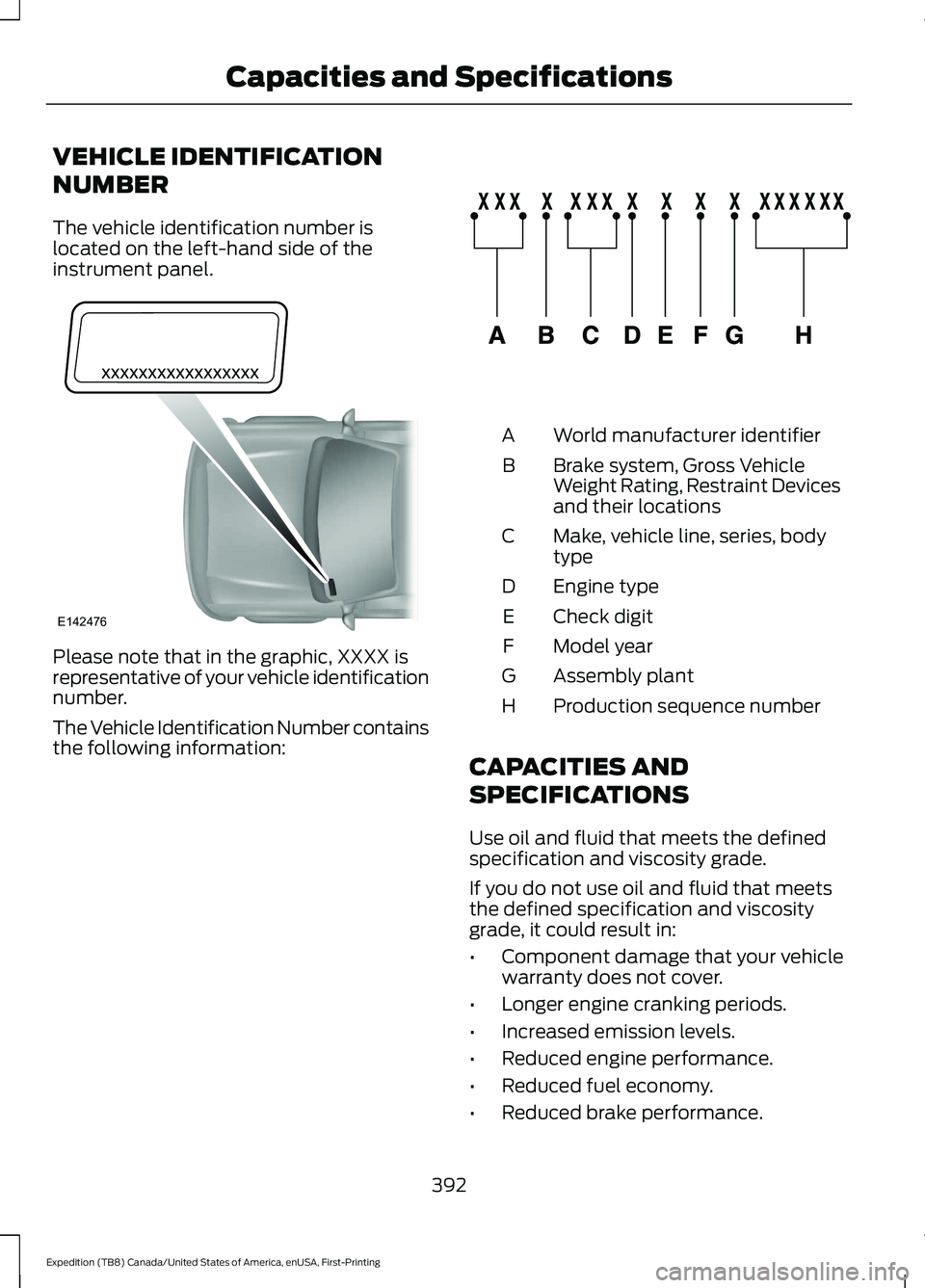
VEHICLE IDENTIFICATION
NUMBER
The vehicle identification number is
located on the left-hand side of the
instrument panel.
Please note that in the graphic, XXXX is
representative of your vehicle identification
number.
The Vehicle Identification Number contains
the following information: World manufacturer identifier
A
Brake system, Gross Vehicle
Weight Rating, Restraint Devices
and their locations
B
Make, vehicle line, series, body
type
C
Engine type
D
Check digit
E
Model year
F
Assembly plant
G
Production sequence number
H
CAPACITIES AND
SPECIFICATIONS
Use oil and fluid that meets the defined
specification and viscosity grade.
If you do not use oil and fluid that meets
the defined specification and viscosity
grade, it could result in:
• Component damage that your vehicle
warranty does not cover.
• Longer engine cranking periods.
• Increased emission levels.
• Reduced engine performance.
• Reduced fuel economy.
• Reduced brake performance.
392
Expedition (TB8) Canada/United States of America, enUSA, First-Printing Capacities and SpecificationsE142476 E142477
Page 567 of 574
Doors and Locks..................................................
133
Driver Alert............................................................. 133
Drivetrain................................................................ 134
Engine..................................................................... 135
Four-Wheel Drive................................................ 135
Fuel........................................................................\
.. 136
Keys and Intelligent Access............................ 136
Lane Keeping System........................................ 137
Maintenance........................................................ 138
MyKey...................................................................... 138
Off Road................................................................. 139
Park Aid.................................................................. 140
Park Brake............................................................. 140
Power Steering..................................................... 141
Pre-Collision Assist............................................. 141
Pro Trailer Backup Assist™............................. 142
Remote Start........................................................ 143
Seats........................................................................\
143
Starting System .................................................. 143
Tire Pressure Monitoring System.................144
Trailer...................................................................... 144
Transmission........................................................ 145
Installing Child Restraints...........................24
Child Seats.............................................................. 24
Combining Seatbelt and LATCH Lower Anchors for Attaching Child Safety
Seats.................................................................... 30
Using Lap and Shoulder Belts......................... 24
Using Lower Anchors and Tethers for CHildren (LATCH)........................................... 29
Using Tether Straps............................................ 30
Instrument Cluster
.........................................111
Instrument Lighting Dimmer.....................99
Instrument Panel...........................................20
Interior Air Quality........................................156
Interior Lamps................................................101
Front Interior Lamp............................................. 101
Interior Lamp Function..................................... 102
Rear Interior Lamps........................................... 102
Switching All of the Interior Lamps Off........................................................................\
101
Switching All of the Interior Lamps On........................................................................\
. 101
Switching the Individual Map Lamps On and Off............................................................... 101
Interior Mirror
..................................................107
Automatic Dimming Mirror............................. 107
Manual Dimming Mirror.................................... 107Introduction........................................................9
J
Jump Starting the Vehicle
.........................314
Connecting the Jumper Cables..................... 314
Jump Starting....................................................... 315
Preparing Your Vehicle...................................... 314
Removing the Jumper Cables........................ 315
K
Keyless Entry
....................................................76
Displaying the Factory-Set Code................... 78
Locking and Unlocking....................................... 78
SECURICODE™ KEYLESS ENTRY KEYPAD............................................................... 76
Keyless Starting
............................................183
Ignition Modes..................................................... 184
Keys and Remote Controls........................60
L
Lane Keeping System................................255 Switching the System On and Off..............256
System Display.................................................... 257
System Settings................................................. 256
Troubleshooting................................................. 258
Liftgate..............................................................80
Liftgate Window...........................................109 Opening the Liftgate Window....................... 109
Lighting Control..............................................98 Flashing the Headlamp High Beam..............99
Headlamp High Beam....................................... 98
Lighting..............................................................98 General Information........................................... 98
Limited Slip Differential
.............................218
Locking Function................................................. 218
Spare Tire.............................................................. 218
Trailer Towing....................................................... 218
Load Carriers See: Roof Racks and Load Carriers.............278
Load Carrying
.................................................275
Load Limit.......................................................279 Special Loading Instructions for Owners of
Pick-up Trucks and Utility-type
Vehicles............................................................ 283
564
Expedition (TB8) Canada/United States of America, enUSA, First-Printing Index
Page 571 of 574
Reporting Safety Defects (U.S.
Only)..............................................................323
Resuming the Set Speed..........................247
Roadside Assistance...................................312
Vehicles Sold in Canada: Getting Roadside
Assistance........................................................ 313
Vehicles Sold in the United States: Getting Roadside Assistance.................................... 312
Vehicles Sold in the United States: Using Roadside Assistance.................................... 312
Roadside Emergencies
...............................312
Roof Racks and Load Carriers.................278
Adjusting the Crossbar.................................... 279
Maximum Recommended Load Amounts........................................................... 278
Running-In See: Breaking-In.................................................. 310
Running Out of Fuel....................................193 Adding Fuel From a Portable Fuel
Container.......................................................... 194
Filling a Portable Fuel Container.................. 193
S
Safety Canopy ™
............................................55
Safety Precautions.......................................192
Satellite Radio...............................................415 Satellite Radio Electronic Serial Number
(ESN)................................................................. 416
Satellite Radio Reception Factors...............415
SiriusXM Satellite Radio Service.................. 415
Troubleshooting.................................................. 416
Scheduled Maintenance..........................483
Seatbelt Extensions
.......................................47
Seatbelt Height Adjustment.....................44
Seatbelt Reminder........................................45 Front Seats............................................................. 45
Seatbelt Monitor.................................................. 46
Seatbelt Status..................................................... 46
Seatbelts...........................................................39 Principle of Operation........................................ 39
Seatbelt Warning Lamp and Indicator Chime..............................................................45
Conditions of operation..................................... 45
Seats..................................................................157
Security..............................................................85
Settings...........................................................465 911 Assist............................................................... 465Ambient Lighting...............................................
466
Audio...................................................................... 465
Automatic Updates.......................................... 465
Bluetooth.............................................................. 465
Charge Settings................................................. 466
Clock...................................................................... 465
Display................................................................... 466
Driver Assist......................................................... 465
FordPass............................................................... 465
General.................................................................. 465
Message Center................................................. 466
Mobile Apps........................................................ 465
Multi Contour Seats......................................... 466
Navigation............................................................ 466
Personal Profiles............................................... 466
Phone..................................................................... 465
Seats...................................................................... 466
Sound.................................................................... 465
Valet Mode.......................................................... 466
Vehicle................................................................... 465
Voice Control...................................................... 466
Setting the Cruise Control Speed.........246 Changing the Set Speed................................. 246
Side Airbags
.....................................................54
Side Sensing System..................................232
Object Distance Indicator............................... 233
Sitting in the Correct Position..................157
Snow Chains See: Using Snow Chains.................................. 377
Spare Wheel See: Changing a Road Wheel....................... 382
Special Notices
................................................16
New Vehicle Limited Warranty........................ 16
Notice to Owners of Pickup Trucks and Utility Type Vehicles......................................... 17
On Board Diagnostics Data Link Connector............................................................ 17
Special Instructions............................................. 16
Using Your Vehicle as an Ambulance.............17
Using Your Vehicle With a Snowplow............17
Special Operating Conditions Scheduled Maintenance..............................................489
Exceptions............................................................. 491
Speed Control See: Cruise Control........................................... 246
Stability Control
...........................................224
Principle of Operation...................................... 224
568
Expedition (TB8) Canada/United States of America, enUSA, First-Printing Index