mirror controls FORD EXPEDITION 2021 Owners Manual
[x] Cancel search | Manufacturer: FORD, Model Year: 2021, Model line: EXPEDITION, Model: FORD EXPEDITION 2021Pages: 574, PDF Size: 8.33 MB
Page 6 of 574
Information Displays
General Information - Vehicles With: 4
Inch Information and Entertainment
Display Screen ...........................................119
General Information - Vehicles With: 8 Inch Information and Entertainment
Display Screen ..........................................
123
Information Messages ...............................
129
Climate Control
Manual Climate Control ...........................
146
Automatic Climate Control .....................
148
Hints on Controlling the Interior Climate - Vehicles With: Automatic
Temperature Control .............................
150
Hints on Controlling the Interior Climate - Vehicles With: Manual Temperature
Control ..........................................................
151
Rear Passenger Climate Controls - Vehicles With: Automatic
Temperature Control ..............................
152
Rear Passenger Climate Controls - Vehicles With: Manual Temperature
Control .........................................................
153
Heated Rear Window .................................
154
Heated Exterior Mirrors ..............................
155
Remote Start .................................................
155
Interior Air Quality
What Is the Cabin Air Filter ......................
156
Locating the Cabin Air Filter ....................
156
Replacing the Cabin Air Filter .................
156
Seats
Sitting in the Correct Position .................
157
Head Restraints ............................................
157
Manual Seats .................................................
161
Power Seats ...................................................
161
Memory Function ........................................
164
Rear Seats ......................................................
165
Climate Controlled Seats .........................
170Rear Occupant Alert System
What is the Rear Occupant Alert System
........................................................................\
..
172
How Does the Rear Occupant Alert System Work ..............................................
172
Rear Occupant Alert System Precautions ........................................................................\
..
172
Rear Occupant Alert System Limitations ........................................................................\
..
172
Switching Rear Occupant Alert System On and Off - Vehicles With: SYNC
........................................................................\
..
172
Switching Rear Occupant Alert System On and Off - Vehicles With: SYNC 3
........................................................................\
.
173
Rear Occupant Alert System Indicators - Vehicles With: SYNC ............................
173
Rear Occupant Alert System Indicators - Vehicles With: SYNC 3 ........................
173
Rear Occupant Alert System Audible Warnings .....................................................
173
Garage Door Opener
Universal Garage Door Opener ...............
174
Power Outlet - Vehicles With: 12V Power Outlet
What Is the Power Outlet .........................
178
Power Outlet Precautions ........................
178
Locating the Power Outlet .......................
178
Power Outlet - Vehicles With: 110V Power Outlet
What Is the Power Outlet .........................
179
Power Outlet Precautions ........................
179
Locating the Power Outlet .......................
179
Power Outlet Indicators ............................
179
Wireless Accessory Charger
What Is the Wireless Accessory Charger ........................................................................\
180
3
Expedition (TB8) Canada/United States of America, enUSA, First-Printing Table of Contents
Page 108 of 574
POWER WINDOWS
WARNING: Do not leave children
unattended in your vehicle and do not
let them play with the power windows.
Failure to follow this instruction could
result in personal injury. WARNING:
When closing the
power windows, verify they are free of
obstruction and make sure that children
and pets are not in the proximity of the
window openings. Note:
You may hear a pulsing noise when
just one of the windows is open. Lower the
opposite window slightly to reduce this
noise.
Press the control to open the window.
Lift the control to close the window.
One-Touch Down
Press the control to open the window.
Press again or lift it to stop the window.
One-Touch Up
Lift the control fully and release it. Press
again or lift it to stop the window.
Bounce-Back
The window stops and reverses some
distance if it detects an obstacle when
closing. Overriding the Bounce-Back Feature WARNING:
If you override
bounce-back, the window does not
reverse if it detects an obstacle. Take
care when closing the windows to avoid
personal injury or damage to your
vehicle.
Pull up the window switch and hold within
a few seconds of the window reaching the
bounce-back position. The window travels
up with no bounce-back protection. The
window stops if you release the switch
before the window fully closes.
Window Lock Press the control to lock or
unlock the rear window controls.
It illuminates when you lock the
rear window controls.
Accessory
The window switches remain operational
for several minutes when you switch the
ignition off or until you open either front
door.
GLOBAL OPENING
(IF EQUIPPED)
You can use the remote control to open
the windows with the ignition off.
Note: You can enable or disable this feature
in the information display, or see an
authorized dealer. See
General
Information (page 119).
Note: To operate this feature, accessory
delay must not be active.
105
Expedition (TB8) Canada/United States of America, enUSA, First-Printing Windows and Mirrors
Page 112 of 574
MOONROOF (IF EQUIPPED)
WARNING:
Do not let children play
with the moonroof or leave them
unattended in the vehicle. They may
seriously hurt themselves. WARNING:
When closing the
moonroof, you should verify that it is free
of obstructions and make sure that
children and pets are not in the proximity
of the roof opening.
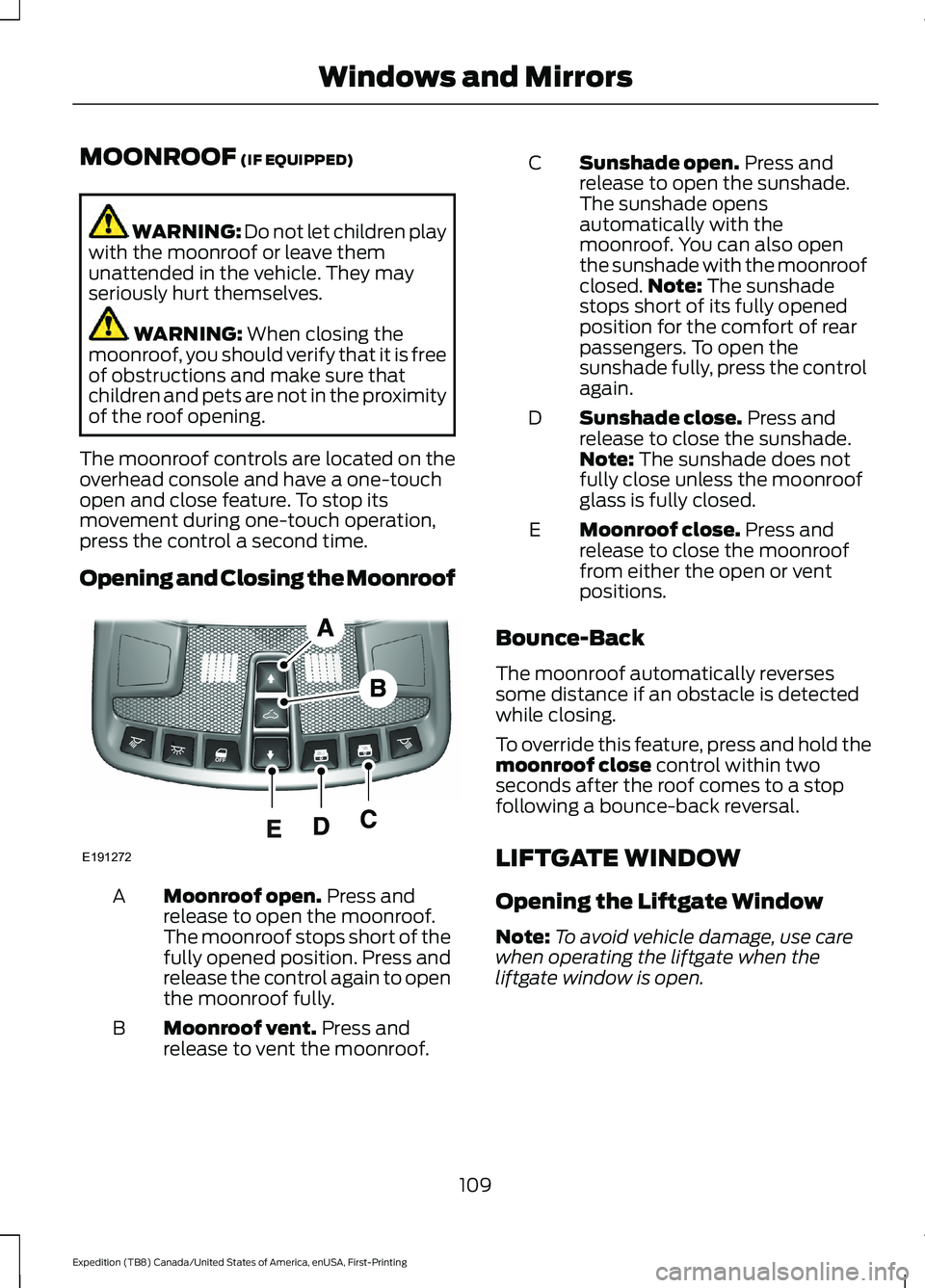
The moonroof controls are located on the
overhead console and have a one-touch
open and close feature. To stop its
movement during one-touch operation,
press the control a second time.
Opening and Closing the Moonroof Moonroof open.
Press and
release to open the moonroof.
The moonroof stops short of the
fully opened position. Press and
release the control again to open
the moonroof fully.
A
Moonroof vent.
Press and
release to vent the moonroof.
B Sunshade open.
Press and
release to open the sunshade.
The sunshade opens
automatically with the
moonroof. You can also open
the sunshade with the moonroof
C
closed. Note:
The sunshade
stops short of its fully opened
position for the comfort of rear
passengers. To open the
sunshade fully, press the control
again.
Sunshade close.
Press and
release to close the sunshade.
Note:
The sunshade does not
fully close unless the moonroof
glass is fully closed.
D
Moonroof close.
Press and
release to close the moonroof
from either the open or vent
positions.
E
Bounce-Back
The moonroof automatically reverses
some distance if an obstacle is detected
while closing.
To override this feature, press and hold the
moonroof close
control within two
seconds after the roof comes to a stop
following a bounce-back reversal.
LIFTGATE WINDOW
Opening the Liftgate Window
Note: To avoid vehicle damage, use care
when operating the liftgate when the
liftgate window is open.
109
Expedition (TB8) Canada/United States of America, enUSA, First-Printing Windows and MirrorsE191272
Page 125 of 574
Off Road
Off Road Status
Power Distribution
Off Road Status - Displays pitch, steering angle and roll.
Power Distribution
- Displays a graphic of the power distribution between the front and
rear wheels. Settings
Blind Spot
Cross Traffic Alert
Driver Alert
Rear Park Aid
Trailer Blind Spot Enter the submenu for items such as alert sensitivity, distance indication
and active braking.
Pre-Collision
Enter the submenu and select your setting.
Cruise
Control
Auto Engine Off
Vehicle
Advanced
Settings
Easy Entry/Exit
Lighting
Locks
Mirrors
Neutral Tow
Alarm
Power Liftgate
Power Running Boards
Remote Start
Windows
Wiper Controls
122
Expedition (TB8) Canada/United States of America, enUSA, First-Printing Information Displays
Page 158 of 574
Note:
Do not use harsh chemicals, razor
blades or other sharp objects to clean or
remove decals from the inside of the heated
rear window. The vehicle warranty may not
cover damage to the heated rear window
grid lines.
HEATED EXTERIOR MIRRORS
When you switch the heated rear window
on, the heated exterior mirrors turn on.
Note: Do not remove ice from the mirrors
with a scraper or adjust the mirror glass
when it is frozen in place.
Note: Do not clean the mirror housing or
glass with harsh abrasives, fuel or other
petroleum-based cleaning products. The
vehicle warranty may not cover damage
caused to the mirror housing or glass.
REMOTE START (IF EQUIPPED)
You can switch this feature on or off and
adjust the settings using the information
display controls. See
Information
Displays (page 119).
The climate control system adjusts the
interior temperature during remote start.
You cannot adjust the climate control
setting during remote start operation.
Switch the ignition on to make
adjustments.
Based on your remote start settings, the
following vehicle-dependent features may
or may not remain on after remote starting
your vehicle:
• Climate controlled seats.
• Heated steering wheel.
• Heated mirrors.
• Heated rear window.
• Windshield wiper de-icer. Note:
For dual zone climate controlled
seats, the passenger seat setting defaults
to match the driver seat during remote start.
Automatic Settings
If
Auto is on, the system sets the interior
temperature to 72°F (22°C) and heats or
cools the vehicle interior as required to
achieve comfort.
Note: In cold weather, the heated rear
window and heated mirrors turn on.
Last Settings
If
Last Settings is on, the system uses the
settings last selected before you turned
off the vehicle.
Heated and Cooled Features
In Auto mode, certain heated features may
switch on during cold weather, and cooled
features during hot weather.
155
Expedition (TB8) Canada/United States of America, enUSA, First-Printing Climate Control
Page 167 of 574
MEMORY FUNCTION (IF EQUIPPED)
WARNING:
Before activating the
memory seat, make sure that the area
immediately surrounding the seat is clear
of obstructions and that all occupants
are clear of moving parts. WARNING:
Do not use the memory
function when your vehicle is moving.
This feature automatically recalls the
position of the following:
• Driver seat.
• Power mirrors.
• Optional power adjustable foot pedals.
• Optional power adjustable steering
column.
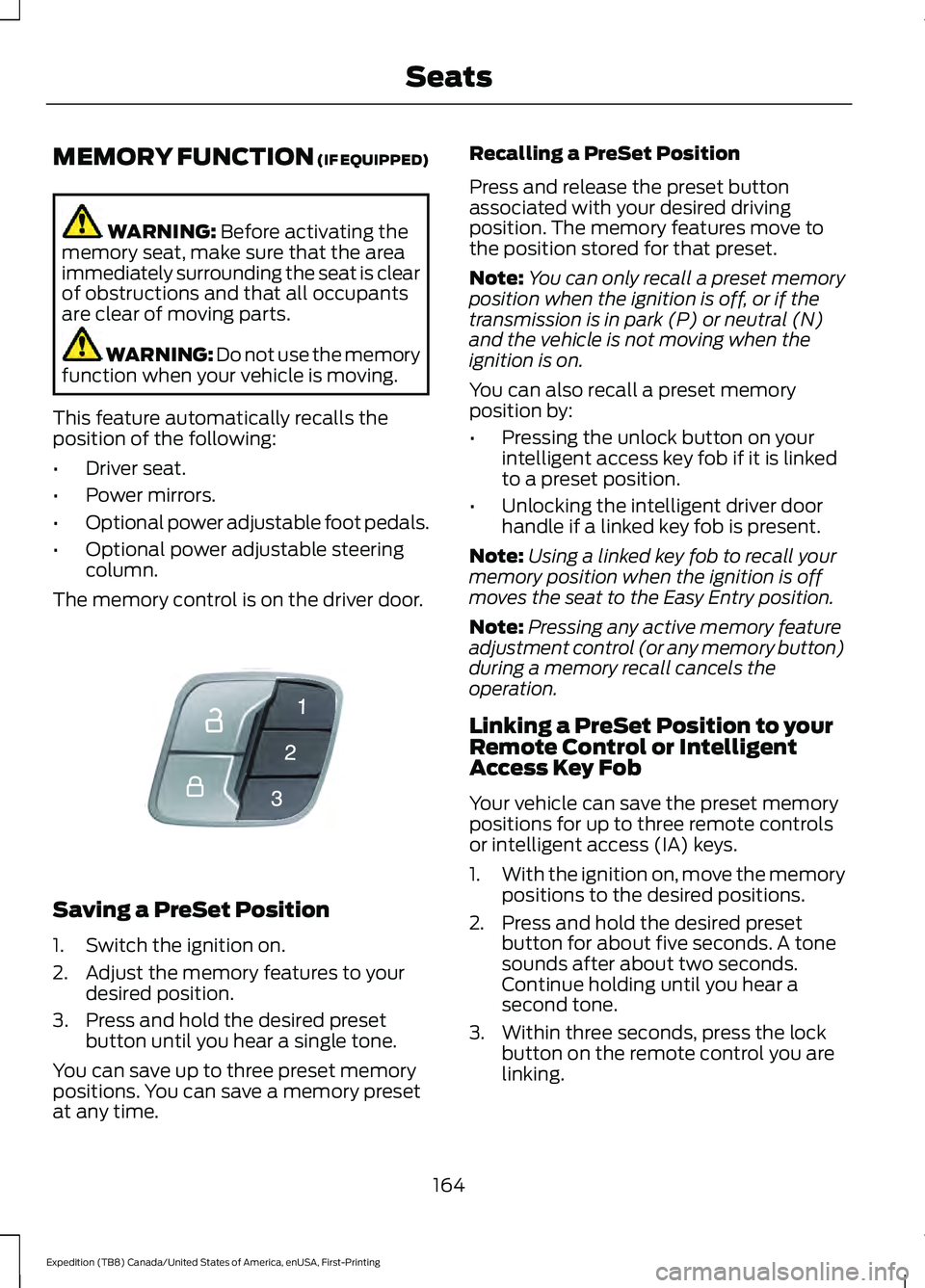
The memory control is on the driver door. Saving a PreSet Position
1. Switch the ignition on.
2. Adjust the memory features to your
desired position.
3. Press and hold the desired preset button until you hear a single tone.
You can save up to three preset memory
positions. You can save a memory preset
at any time. Recalling a PreSet Position
Press and release the preset button
associated with your desired driving
position. The memory features move to
the position stored for that preset.
Note:
You can only recall a preset memory
position when the ignition is off, or if the
transmission is in park (P) or neutral (N)
and the vehicle is not moving when the
ignition is on.
You can also recall a preset memory
position by:
• Pressing the unlock button on your
intelligent access key fob if it is linked
to a preset position.
• Unlocking the intelligent driver door
handle if a linked key fob is present.
Note: Using a linked key fob to recall your
memory position when the ignition is off
moves the seat to the Easy Entry position.
Note: Pressing any active memory feature
adjustment control (or any memory button)
during a memory recall cancels the
operation.
Linking a PreSet Position to your
Remote Control or Intelligent
Access Key Fob
Your vehicle can save the preset memory
positions for up to three remote controls
or intelligent access (IA) keys.
1. With the ignition on, move the memory
positions to the desired positions.
2. Press and hold the desired preset button for about five seconds. A tone
sounds after about two seconds.
Continue holding until you hear a
second tone.
3. Within three seconds, press the lock button on the remote control you are
linking.
164
Expedition (TB8) Canada/United States of America, enUSA, First-Printing SeatsE142554
Page 562 of 574
Capacities and Specifications................392
8.8 Inch Rear Axle............................................. 398
9.75 Inch Rear Axle with Limited-Slip................................................... 400
9.75 Inch Rear Axle Without Limited-Slip.................................................... 399
Air Conditioning System................................. 393
Alternative Engine Oil for Extremely Cold Climates........................................................... 395
Automatic Transmission................................. 393
Engine Coolant................................................... 394
Engine Oil............................................................. 395
Front Axle............................................................. 398
Fuel Tank.............................................................. 396
Grease.................................................................... 396
Hydraulic Brake System.................................. 397
Locks....................................................................... 397
Transfer Case....................................................... 397
Washer Reservoir.............................................. 400
Cargo Nets.......................................................277
Car Wash See: Cleaning the Exterior.............................. 354
Catalytic Converter....................................200 On-Board Diagnostics (OBD-II)................... 201
Readiness for Inspection and Maintenance (I/M) Testing................................................... 201
Center Console
..............................................182
Changing a Bulb..........................................350
Fog Lamp Bulb.................................................... 351
Front Direction Indicator Bulb...................... 350
Headlamp Bulb.................................................. 350
LED Bulbs.............................................................. 352
LED Direction Indicator and Side Marker Bulbs................................................................... 351
LED Foglamp...................................................... 350
LED Headlamp................................................... 350
Rear Lamp, Brake Lamp, Rear Direction Indicator and Reverse Lamp Bulbs.........351
Changing a Fuse
...........................................333
Fuses....................................................................... 333
Changing a Road Wheel
...........................382
Dissimilar Spare Wheel and Tire Assembly
Information..................................................... 382
Location of the Spare Tire and Tools.........383
Tire Change Procedure.................................... 383
Changing the 12V Battery
.........................345
Battery Management System....................... 347
Changing the Engine Air Filter................339 Changing the Vehicle Wi-Fi Hotspot
Name or Password
...................................407
Changing the Wiper Blades.....................349
Charging a Wireless Device......................180
Checking MyKey System Status...............70 MyKey Distance..................................................... 70
Number of Admin Keys........................................ 71
Number of MyKeys................................................ 71
Checking the Wiper Blades.....................349
Childminder Mirror.......................................108
Child Restraint and Seatbelt Maintenance..................................................47
Child Restraint Positioning.........................35
Child Safety
......................................................22
General Information............................................ 22
Child Safety Locks..........................................37 Left-Hand Side..................................................... 38
Right-Hand Side................................................... 38
Cleaning Leather Seats..............................357
Cleaning Products
.......................................353
Materials............................................................... 353
Cleaning the Engine....................................355
Cleaning the Exterior
..................................354
Cleaning the Exterior Lamps......................... 354
Cleaning the Exterior Precautions...............354
Exterior Chrome Parts..................................... 354
Exterior Plastic Parts........................................ 354
Stripes or Graphics............................................ 354
Underbody........................................................... 355
Under Hood......................................................... 355
Cleaning the Instrument Panel and Instrument Cluster Lens.........................357
Cleaning the Interior...................................356 Mirrors.................................................................... 356
Cleaning the Wheels..................................358
Cleaning the Windows and Wiper Blades...........................................................356
Clearing All MyKeys.......................................70
Climate............................................................453 Accessing Rear Climate Controls................455
Accessing the Climate Control Menu........453
Directing the Airflow......................................... 453
Rear Climate Control Lock Indicator..........455
Setting the Blower Motor Speed.................453
Setting the Temperature................................ 453
Switching Auto Mode On and Off...............453
Switching Dual Zone Mode On and Off...................................................................... 454
559
Expedition (TB8) Canada/United States of America, enUSA, First-Printing Index
Page 567 of 574
Doors and Locks..................................................
133
Driver Alert............................................................. 133
Drivetrain................................................................ 134
Engine..................................................................... 135
Four-Wheel Drive................................................ 135
Fuel........................................................................\
.. 136
Keys and Intelligent Access............................ 136
Lane Keeping System........................................ 137
Maintenance........................................................ 138
MyKey...................................................................... 138
Off Road................................................................. 139
Park Aid.................................................................. 140
Park Brake............................................................. 140
Power Steering..................................................... 141
Pre-Collision Assist............................................. 141
Pro Trailer Backup Assist™............................. 142
Remote Start........................................................ 143
Seats........................................................................\
143
Starting System .................................................. 143
Tire Pressure Monitoring System.................144
Trailer...................................................................... 144
Transmission........................................................ 145
Installing Child Restraints...........................24
Child Seats.............................................................. 24
Combining Seatbelt and LATCH Lower Anchors for Attaching Child Safety
Seats.................................................................... 30
Using Lap and Shoulder Belts......................... 24
Using Lower Anchors and Tethers for CHildren (LATCH)........................................... 29
Using Tether Straps............................................ 30
Instrument Cluster
.........................................111
Instrument Lighting Dimmer.....................99
Instrument Panel...........................................20
Interior Air Quality........................................156
Interior Lamps................................................101
Front Interior Lamp............................................. 101
Interior Lamp Function..................................... 102
Rear Interior Lamps........................................... 102
Switching All of the Interior Lamps Off........................................................................\
101
Switching All of the Interior Lamps On........................................................................\
. 101
Switching the Individual Map Lamps On and Off............................................................... 101
Interior Mirror
..................................................107
Automatic Dimming Mirror............................. 107
Manual Dimming Mirror.................................... 107Introduction........................................................9
J
Jump Starting the Vehicle
.........................314
Connecting the Jumper Cables..................... 314
Jump Starting....................................................... 315
Preparing Your Vehicle...................................... 314
Removing the Jumper Cables........................ 315
K
Keyless Entry
....................................................76
Displaying the Factory-Set Code................... 78
Locking and Unlocking....................................... 78
SECURICODE™ KEYLESS ENTRY KEYPAD............................................................... 76
Keyless Starting
............................................183
Ignition Modes..................................................... 184
Keys and Remote Controls........................60
L
Lane Keeping System................................255 Switching the System On and Off..............256
System Display.................................................... 257
System Settings................................................. 256
Troubleshooting................................................. 258
Liftgate..............................................................80
Liftgate Window...........................................109 Opening the Liftgate Window....................... 109
Lighting Control..............................................98 Flashing the Headlamp High Beam..............99
Headlamp High Beam....................................... 98
Lighting..............................................................98 General Information........................................... 98
Limited Slip Differential
.............................218
Locking Function................................................. 218
Spare Tire.............................................................. 218
Trailer Towing....................................................... 218
Load Carriers See: Roof Racks and Load Carriers.............278
Load Carrying
.................................................275
Load Limit.......................................................279 Special Loading Instructions for Owners of
Pick-up Trucks and Utility-type
Vehicles............................................................ 283
564
Expedition (TB8) Canada/United States of America, enUSA, First-Printing Index