change time FORD EXPEDITION 2023 User Guide
[x] Cancel search | Manufacturer: FORD, Model Year: 2023, Model line: EXPEDITION, Model: FORD EXPEDITION 2023Pages: 658, PDF Size: 16.16 MB
Page 243 of 658
WHAT IS CROSS TRAFFIC
BRAKING
The system is designed to reduce impactdamage or assist in avoiding a collision byusing the sensors on the rear of yourvehicle to detect a possible collision andapplying the brakes.
HOW DOES CROSS TRAFFIC
BRAKING WORK
The system only reacts for vehiclesapproaching from the sides when you shiftinto reverse (R).
If the system detects a vehicle approachingyour vehicle, it provides a warning throughthe cross traffic alert system. See What IsCross Traffic Alert (page 325).
The system only applies the brakes for ashort period of time when an event occurs.Take action as soon as you notice thesystem applying the brakes in order toremain in control of your vehicle, thesystem does not do this for you.
Note:You need to enable cross traffic alertfor the system to function.
CROSS TRAFFIC BRAKING
PRECAUTIONS
WARNING: You are responsible forcontrolling your vehicle at all times. Thesystem is designed to be an aid and doesnot relieve you of your responsibility todrive with due care and attention. Failureto follow this instruction could result inthe loss of control of your vehicle,personal injury or death.
WARNING: To help avoid personalinjury, always use caution when inreverse (R) and when using the sensingsystem.
WARNING: The system may notoperate properly during severe weatherconditions, for example snow, ice, heavyrain and spray. Always drive with duecare and attention. Failure to take caremay result in a crash.
WARNING: Do not use the systemwith accessories that extend beyond thefront or rear of your vehicle, for examplea trailer hitch or bike rack. The system isnot able to make corrections for theadditional length of the accessories.
WARNING: Some situations andobjects prevent hazard detection, forexample, inclement weather,unconventional vehicle types andpedestrians. Apply the brakes whennecessary. Failure to follow thisinstruction could result in the loss ofcontrol of your vehicle, personal injury ordeath.
Note:If your vehicle sustains damage tothe bumper or fascia leaving it misalignedor bent, it could alter the sensing zonecausing inaccurate measurement ofobstacles or false alerts.
Note:Vehicle loading and suspensionchanges can impact the angle of the sensorsand may change the normal detection zoneof the system resulting in inaccuratemeasurement of obstacles or false alerts.
Note:When you connect a trailer, thesystem may detect the trailer and providean alert, or the system turns off. If thesystem does not turn off, switch the systemoff manually after you connect the trailer.
239
2023 Expedition (TB8) Canada/United States of America, enUSA, Edition date: 202207, DOMCross Traffic Braking
Page 251 of 658
HOW DOES STABILITY
CONTROL WORK
WARNING: Vehicle modificationsinvolving braking system, aftermarketroof racks, suspension, steering system,tire construction and wheel and tire sizemay change the handling characteristicsof your vehicle and may adversely affectthe performance of the electronicstability control system. In addition,installing any stereo speakers mayinterfere with and adversely affect theelectronic stability control system.Reducing the effectiveness of theelectronic stability control system couldlead to an increased risk of loss of vehiclecontrol, vehicle rollover, personal injuryand death.
WARNING: Remember that evenadvanced technology cannot defy thelaws of physics. It's always possible tolose control of a vehicle due toinappropriate driver input for theconditions. Aggressive driving on anyroad condition can cause you to losecontrol of your vehicle increasing the riskof personal injury or property damage.Activation of the electronic stabilitycontrol system is an indication that atleast some of the tires have exceededtheir ability to grip the road; this couldreduce the operator's ability to controlthe vehicle potentially resulting in a lossof vehicle control, vehicle rollover,personal injury and death.
WARNING: You are responsible forcontrolling your vehicle at all times. Thesystem is designed to be an aid and doesnot relieve you of your responsibility todrive with due care and attention. Failureto follow this instruction could result inthe loss of control of your vehicle,personal injury or death.
If a driving condition activates either thestability control or traction control you mayexperience the following conditions:
•The stability and traction control lightflashes.
•Your vehicle slows down.
•Reduced engine power.
The stability control system has severalfeatures built into it to help you maintaincontrol of your vehicle:
Electronic Stability Control
Electronic stability control enhances yourvehicle’s ability to prevent skids or lateralslides by applying brakes to one or moreof the wheels individually and, if necessary,reducing engine power.
Roll Stability Control
Roll stability control enhances yourvehicle’s ability to prevent rollovers bydetecting your vehicle’s roll motion andthe rate at which it changes by applyingthe brakes to one or more wheelsindividually.
Curve Control
Curve control enhances your vehicle’sability to follow the road when corneringseverely or avoiding objects in the roadway.Curve control operates by reducing enginepower and, if necessary, applying brakesto one or more of the wheels individually.
247
2023 Expedition (TB8) Canada/United States of America, enUSA, Edition date: 202207, DOMStability Control
Page 280 of 658
Why does active park assist not offera parking space?
You recently disconnected or replacedthe battery. After you reconnect thebattery you must drive your vehicle ona straight road for a short period oftime.
Why does active park assist notcorrectly position the vehicle into aparking space?
An irregular curb along the parkingspace prevents the system fromcorrectly aligning your vehicle.
Why does active park assist notcorrectly position the vehicle into aparking space?
Vehicles or objects bordering thespace could not be correctly parked.
Why does active park assist notcorrectly position the vehicle into aparking space?
Your vehicle stopped too far past theparking space.
Why does active park assist notcorrectly position the vehicle into aparking space?
The tires are not correctly installed ormaintained. For example, using a sparetire, not inflated correctly, impropersize, or of different sizes.
Why does active park assist notcorrectly position the vehicle into aparking space?
A repair or alteration changed thedetection capabilities.
Why does active park assist notcorrectly position the vehicle into aparking space?
A parked vehicle has a highattachment. For example, a saltsprayer, snowplow or moving truckbed.
Why does active park assist notcorrectly position the vehicle into aparking space?
The parking space length, or positionof parked objects, changes after yourvehicle passes the space.
Why does active park assist notcorrectly position the vehicle into aparking space?
The temperature around your vehiclequickly changes. For example, drivingfrom a heated garage into a coldoutside temperature, or after leavinga car wash.
276
2023 Expedition (TB8) Canada/United States of America, enUSA, Edition date: 202207, DOMActive Park Assist (If Equipped)
Page 294 of 658
WARNING: Do not use the systemif any changes or modifications to thesteering wheel have been made. Anychanges or modifications to the steeringwheel could affect the functionality orperformance of the system. Failure tofollow this instruction could result in theloss of control of your vehicle, personalinjury or death.
Adaptive cruise control precautions applyto lane centering unless stated otherwiseor contradicted by a lane centeringprecaution. See Adaptive Cruise ControlPrecautions (page 279).
LANE CENTERINGREQUIREMENTS
You must keep your hands on the steeringwheel at all times.
Lane centering only activates when all ofthe following occur:
•Adaptive cruise control with lanecentering is enabled in your informationand entertainment screen. SeeSwitching the Lane Keeping SystemOn and Off (page 310).
•You have adaptive cruise control withstop and go enabled and set.
•The steering sensor detects your handson the steering wheel.
•The system detects both lane markingswhen driving on a straight road.
•Your vehicle is initially centered in thelane between two visible line markings.
Note:If the system does not detect validlane line markings, the system will remainin standby until valid line markings areavailable.
LANE CENTERING LIMITATIONS
Adaptive cruise control limitations applyto lane centering unless stated otherwiseor contradicted by a lane centeringlimitation. See Adaptive Cruise ControlLimitations (page 280).
Lane centering may not correctly operatein any of the following conditions:
•The lane width is too narrow or wide.
•The curve in the road is too small.
•The system does not detect theminimum required lane markings orwhen lanes merge or split.
•When the required steering effort tomaintain lane center exceeds the lanecentering system limit.
•When driving in areas that are underconstruction or when road work is inprogress.
•If the front windshield camera and/orthe front radar are blocked.
•When using a spare tire.
•Inclement weather conditionsincluding, but not limited to, high wind,heavy rain, and fog.
•Driving into direct sunlight.
•When modification to the steeringsystem has been made, includingalterations to the steering wheel.
•When towing a trailer.
See Lane Keeping System Precautions(page 309).
Note:The system steering assistance islimited and may not have sufficient effortfor all driving situations and/or conditions,such as driving through tight curves ordriving through curves at high speeds.
Note:In exceptional conditions, the systemmay deviate from the lane center.
290
2023 Expedition (TB8) Canada/United States of America, enUSA, Edition date: 202207, DOMAdaptive Cruise Control (If Equipped)
Page 295 of 658
SWITCHING LANE CENTERING ONAND OFF - VEHICLES WITH: 12INCH SCREEN
Keep your hands on the steering wheel atall times.
The controls are on the steering wheel.
Press the button.
The indicator appears in the instrumentcluster display. When the system is on, thecolor of the indicator changes to indicatethe system status.
You can override the system at any timeby steering your vehicle.
Note:The correct requirements must bemet before you can switch the system on.See Lane Centering Requirements (page290).
Enabling and Disabling LaneCentering
1.Press Features on the touchscreen.
2.Press Driver Assistance.
3.Press Cruise Control.
4.Press Lane Centering Assist.
SWITCHING LANE CENTERING ONAND OFF - VEHICLES WITH: 15INCH SCREEN
You must keep your hands on the steeringwheel at all times.
The controls are on the steering wheel.
Press the button.
The indicator appears in the instrumentcluster display. When the system is on, thecolor of the indicator changes to indicatethe system status.
You can override the system at any timeby steering your vehicle.
Note:The correct requirements must bemet before you can switch the system on.See Lane Centering Requirements (page290).
Enabling and Disabling LaneCentering
1.Access the vehicle drawer on thetouchscreen.
2.Press SETTINGS.
3.Press Driver Assistance.
4.Press Cruise Control.
5.Press Adaptive Cruise Control.
6.Press Lane Centering Assist.
LANE CENTERING ALERTS
You must keep your hands on the steeringwheel at all times.
When the system is active and detects nosteering activity for a period of time, thesystem alerts you to put your hands on thesteering wheel. If you do not reactappropriately to the warnings the adaptivecruise control with lane centering systemcancels and slows your vehicle down toidle speeds while maintaining steeringcontrol. See Lane Centering AutomaticCancellation (page 292).
The system also alerts you if your vehiclecrosses lane line markings withoutdetected steering activity.
Note:The system could detect a light gripor light touch on the steering wheel ashands-off driving.
291
2023 Expedition (TB8) Canada/United States of America, enUSA, Edition date: 202207, DOMAdaptive Cruise Control (If Equipped)E308131 E308131
Page 304 of 658
BLUECRUISE ALERTS
When BlueCruise is providing hands-ondriving or transitioning to hands-on drivingfrom hands-free driving and detects nosteering activity for a certain period of time,the system alerts you with a message inthe instrument cluster to put your handson the steering wheel. After the first alert,the system alerts you with a message inthe instrument cluster and an audiblewarning.
When BlueCruise is providing hands-on orhands-free driving and detects you are notlooking at the road for a certain period oftime, the system alerts you to return youreyes to the road. Depending on where youare looking, the alert can be a message inthe instrument cluster and an audiblewarning.
If you do not react to the warnings,BlueCruise cancels, quickly activates andreleases the brakes, and slows your vehicledown to low speeds while maintainingsteering control.
If your vehicle slows down and you resumecontrol, a message appears to prompt youto press the accelerator pedal to allow thesystem to resume.
Note:If the system detects repeatedinactivity, it disables until the next key cycle.
BLUECRUISE AUTOMATIC
CANCELLATION
When an external condition cancelsBlueCruise, for example, no lane markingsavailable, a tone sounds and a messageappears in the instrument cluster.
If your vehicle starts to slowdown, you must take control ofsteering and press and releasethe button to reactivate BlueCruise.
System cancellation can also occur if:
•The lane becomes too narrow.
•The system cannot detect valid lanemarkings.
•Lane markings cross.
•Your eyes are not on the road or yourhands are not on the steering wheel.
If you have your hands on the steeringwheel and your eyes are on the road whenthe feature is active and a cancellationoccurs, the system sounds a tone anddisplays a cancelled graphic in theinstrument cluster.
If you are not paying attention to the roador your hands are not on the steering wheeland a cancellation occurs, the systemdisplays a message and a tone sounds untilyou resume control. If you do not resumecontrol in time, BlueCruise quickly activatesand releases the brakes, and slows yourvehicle to low speeds while maintainingsteering control. If your vehicle slows downand you resume control, a messageappears to prompt you to press theaccelerator pedal to allow the system toresume.
Note:The system disables until the vehicleis turned off and back on if it detectsrepeated inactivity.
BLUECRUISE INDICATORS
When on, the color of theindicator changes to indicate thestatus.
Gray indicates BlueCruise is on but inactive.
Green indicates BlueCruise is active andapplying continuous steering support.
Blue indicates BlueCruise is active andhands-free driving mode is available.
300
2023 Expedition (TB8) Canada/United States of America, enUSA, Edition date: 202207, DOMBlueCruise (If Equipped)E308130 E297977
Page 307 of 658
WHAT IS DRIVE MODE
CONTROL
Your vehicle has various drive modes thatyou can select for different drivingconditions. Depending on the drive modethat you select, the system adjusts variousvehicle settings.
HOW DOES DRIVE MODE
CONTROL WORK
Drive mode control adjusts your vehicleconfiguration for each mode you select.
Changing the drive mode adjusts thesteering effort and feel of the steeringsystem.
The stability and traction control assistyour vehicle control in adverse conditionsor high-performance driving.
Throttle control enhances the powertrainresponse, transmission controls becomeoptimized with shift schedules, andfour-wheel drive settings are optimizedand tuned to each mode.
Changing the drive mode can engage ordisengage the electronic lockingdifferentials.
Changing the drive mode changes thefour-wheel drive mode to the defaultsetting for the selected drive mode.
Note:The system has diagnostic checksthat continuously monitor the system forproper operation. If a mode is unavailabledue to a system fault, the drive modesystem defaults to normal. When thesystem defaults to normal, the drivelinesettings remain the same as prior to thesystem fault.
Note:The system reverts to the normalmode each time you start your vehicle. Atstartup the system also displays a prompton the instrument cluster display that givesyou the option to return to the previouslyselected drive mode during the last ignitioncycle. If you select yes, the system returnsto the last selected drive mode and thedefault driveline settings associated withthat mode. If you select no, the systemremains in normal mode and the drivelinesettings remain the same as selected in theprior ignition cycle. If you do not select yesor no, the system stays in normal mode andthe driveline settings remain the same asselected in the prior ignition cycle.
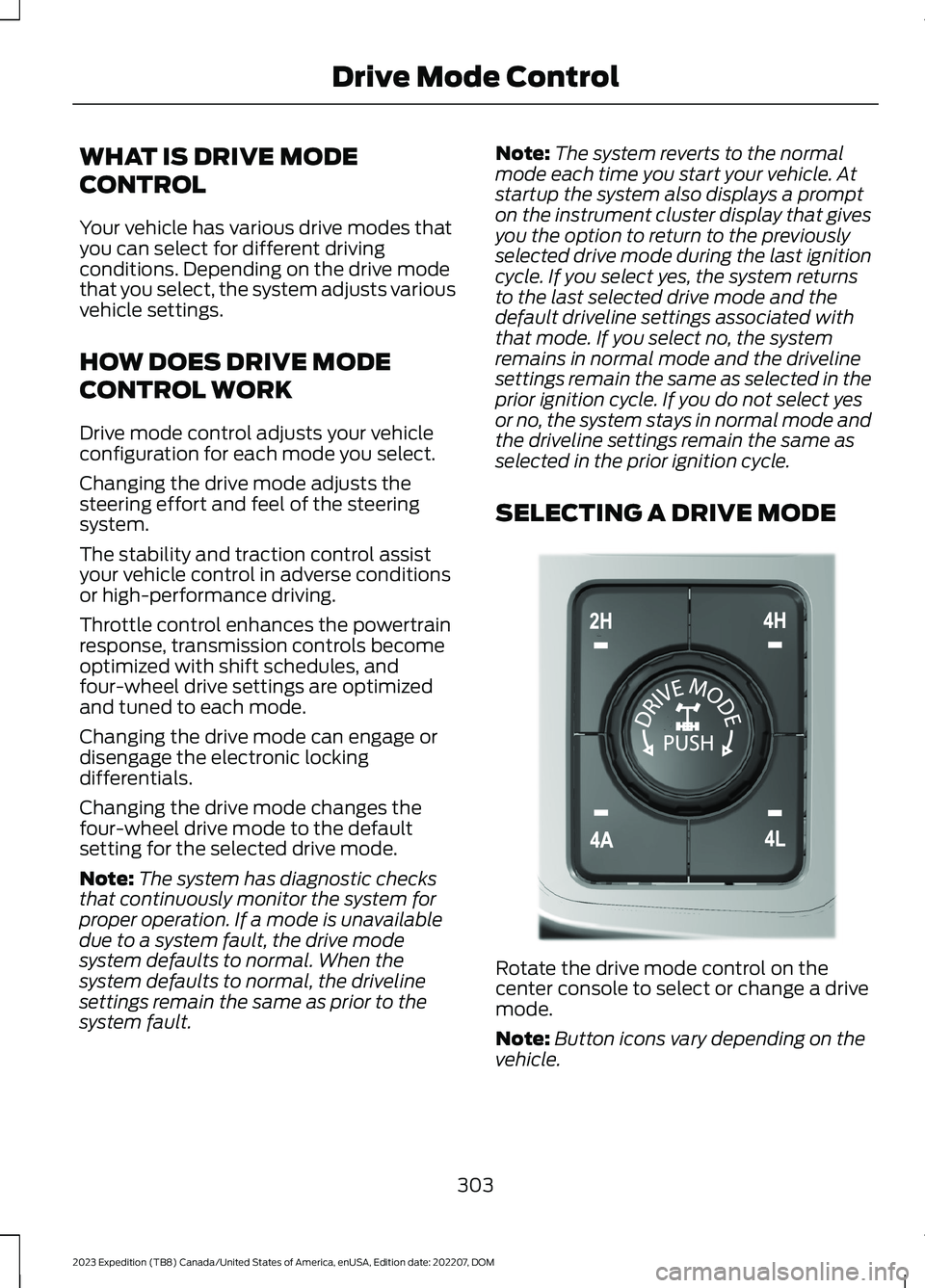
SELECTING A DRIVE MODE
Rotate the drive mode control on thecenter console to select or change a drivemode.
Note:Button icons vary depending on thevehicle.
303
2023 Expedition (TB8) Canada/United States of America, enUSA, Edition date: 202207, DOMDrive Mode ControlE308146
Page 314 of 658
The lane keeping system may not correctlyoperate in any of the following conditions:
•The lane keeping system does notdetect at least one lane marking.
•You switch the turn signal on.
•You apply direct steering, acceleratefast or brake hard.
•The vehicle speed is less than 40 mph(64 km/h).
•The anti-lock brake, stability control ortraction control system activates.
•The lane is too narrow.
•Something is obscuring the camera orit is unable to detect the lane markingsdue to environment, traffic or vehicleconditions.
•Entering or exiting a tight curve whendriving at high speeds.
The lane keeping system may not correctlane positioning in any of the followingconditions:
•High winds.
•Uneven road surfaces.
•Heavy or uneven loads.
•Incorrect tire pressure.
SWITCHING THE LANE
KEEPING SYSTEM ON AND
OFF
To activate the lane keepingsystem, press the button on thesteering wheel.
To deactivate the lane keeping system,press the button again.
Note:When switching the system on or offa message appears in the information andentertainment display to show the status.
Note:The system stores the on or offsetting until manually changed, unless itdetects a MyKey™. If the system detects aMyKey™, it defaults to the last setting forthat MyKey™.
Note: If the system detects a MyKey™,pressing the button does not affect the onor off status of the system. You can onlychange the mode and intensity settings.
SWITCHING THE LANE
KEEPING SYSTEM MODE -
VEHICLES WITH: 12 INCH
SCREEN
The lane keeping system has differentsettings that you can view or adjust usingthe information display.
The system stores the last known selectionfor each of these settings. You do not needto readjust your settings each time youswitch on the system.
To change the lane keeping system mode,use the touchscreen:
1.Press Features on the touchscreen.
2.Press Driver Assistance.
3.Press Lane-Keeping System.
4.Press Lane-Keeping Mode.
5.Select a mode.
Note:The system remembers the lastsetting when you start your vehicle. If thesystem detects a MyKey™, it defaults to thelast setting for that MyKey™.
310
2023 Expedition (TB8) Canada/United States of America, enUSA, Edition date: 202207, DOMLane Keeping SystemE334922
Page 319 of 658
When active, this system functions with orwithout the use of direction indicators andhazard flashers.
You must keep your hands on the steeringwheel at all times.
BLIND SPOT ASSIST LIMITATIONS
All system limitations present in the basiclane keeping system also apply to blindspot assist.
Blind spot assist does not function underthe following conditions:
•No lane markings are detected.
•One or both rear radar sensors becomeblocked or faulty.
•Attaching bike or cargo racks couldcause false alerts due to obstructionof the sensor.
Blind spot assist may have difficultydetecting hazards under the followingconditions:
•If a vehicle is approaching in anadjacent lane at a speed higher thanyour vehicle.
•Bad weather obstructing the sensors.
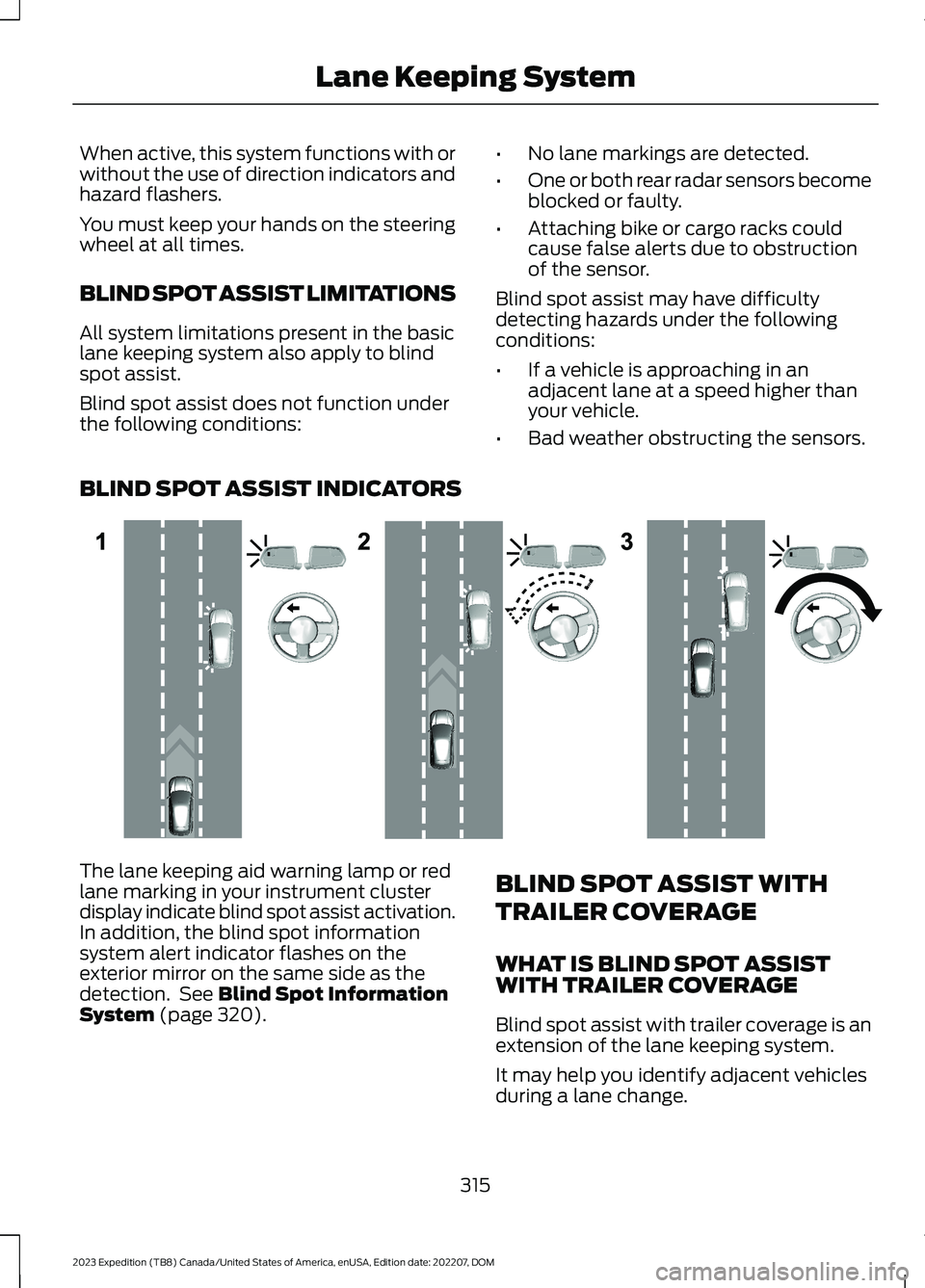
BLIND SPOT ASSIST INDICATORS
The lane keeping aid warning lamp or redlane marking in your instrument clusterdisplay indicate blind spot assist activation.In addition, the blind spot informationsystem alert indicator flashes on theexterior mirror on the same side as thedetection. See Blind Spot InformationSystem (page 320).
BLIND SPOT ASSIST WITH
TRAILER COVERAGE
WHAT IS BLIND SPOT ASSISTWITH TRAILER COVERAGE
Blind spot assist with trailer coverage is anextension of the lane keeping system.
It may help you identify adjacent vehiclesduring a lane change.
315
2023 Expedition (TB8) Canada/United States of America, enUSA, Edition date: 202207, DOMLane Keeping SystemE310089
Page 320 of 658
Blind spot assist provides a blind spotwarning and steering assistance to helpduring lane changes.
When attaching a trailer, ensure you haveproperly set up the trailer coveragesettings. See Blind Spot InformationSystem With Trailer Coverage (page322).
HOW DOES BLIND SPOT ASSISTWITH TRAILER COVERAGE WORK
Activate and deactivate thesystem using the lane keepingsystem button on the steeringwheel.
During lane changes, the design of theblind spot assist feature detects vehiclesin, or approaching, your blind spot andprovides a warning, plus steeringassistance to direct your vehicle back intoyour lane.
If a supported trailer is connected, thefunction is reduced to only detectingvehicles on both sides of your vehicle andtrailer, extending rearward from theexterior mirrors to the end of your trailer.See Blind Spot Information SystemWith Trailer Coverage (page 322).
When active, this system functions with orwithout the use of direction indicators andhazard flashers.
You must keep your hands on the steeringwheel at all times.
BLIND SPOT ASSIST WITHTRAILER COVERAGELIMITATIONS
All system limitations present in the basiclane keeping system also apply to blindspot assist.
Blind spot assist does not function underthe following conditions:
•The system does not detect lanemarkings.
•One or both rear radar sensors becomeblocked or faulty.
•You have not configured the attachedtrailer correctly in the trailer tow menusor you attached an unsupported trailer.The system only supports certain trailershapes and dimensions.
Note:Blind spot assist with trailer coveragecould have reduced performance if any ofthe above limitations are present.
Blind spot assist may have difficultydetecting hazards under the followingconditions:
•If a vehicle is approaching in anadjacent lane at a relative speed muchhigher than your vehicle.
•Bad weather conditions are presentthat obstruct the sensors.
•Attaching bike or cargo racks couldcause false alerts due to obstructionof the sensor.
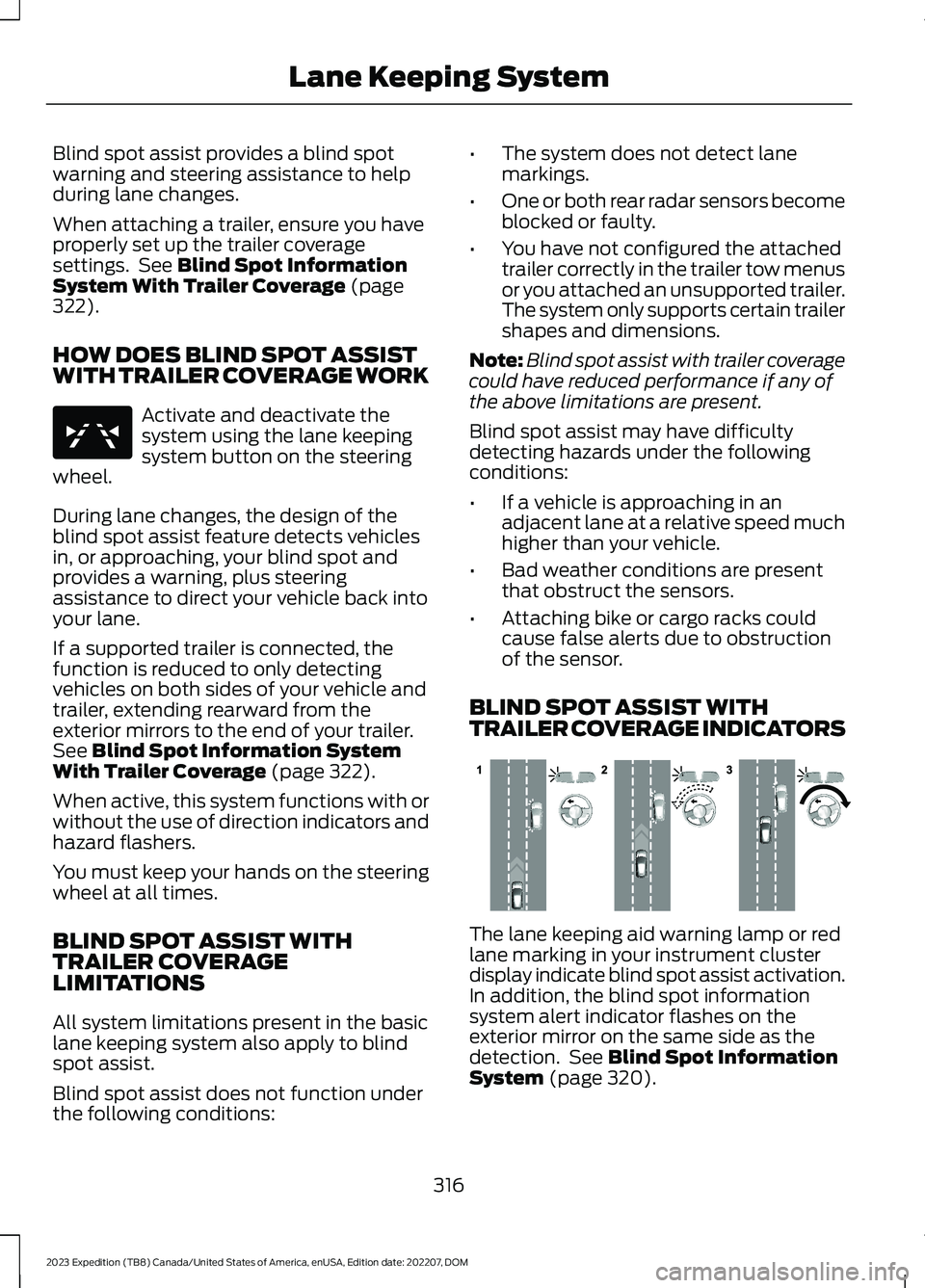
BLIND SPOT ASSIST WITHTRAILER COVERAGE INDICATORS
The lane keeping aid warning lamp or redlane marking in your instrument clusterdisplay indicate blind spot assist activation.In addition, the blind spot informationsystem alert indicator flashes on theexterior mirror on the same side as thedetection. See Blind Spot InformationSystem (page 320).
316
2023 Expedition (TB8) Canada/United States of America, enUSA, Edition date: 202207, DOMLane Keeping SystemE334922 E310089