trailer FORD EXPEDITION 2023 User Guide
[x] Cancel search | Manufacturer: FORD, Model Year: 2023, Model line: EXPEDITION, Model: FORD EXPEDITION 2023Pages: 658, PDF Size: 16.16 MB
Page 219 of 658
MANUALLY SHIFTING GEARS
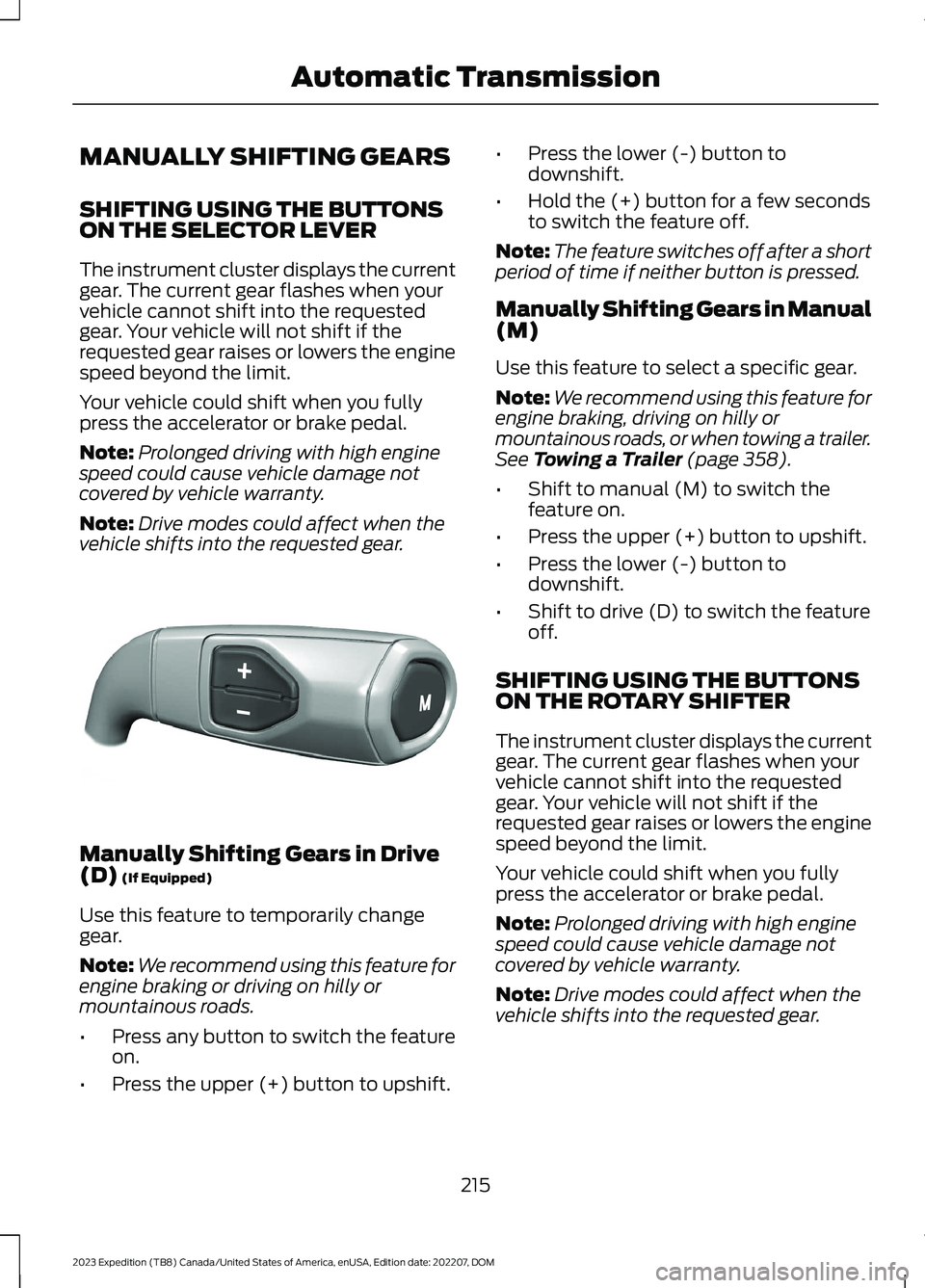
SHIFTING USING THE BUTTONSON THE SELECTOR LEVER
The instrument cluster displays the currentgear. The current gear flashes when yourvehicle cannot shift into the requestedgear. Your vehicle will not shift if therequested gear raises or lowers the enginespeed beyond the limit.
Your vehicle could shift when you fullypress the accelerator or brake pedal.
Note:Prolonged driving with high enginespeed could cause vehicle damage notcovered by vehicle warranty.
Note:Drive modes could affect when thevehicle shifts into the requested gear.
Manually Shifting Gears in Drive(D) (If Equipped)
Use this feature to temporarily changegear.
Note:We recommend using this feature forengine braking or driving on hilly ormountainous roads.
•Press any button to switch the featureon.
•Press the upper (+) button to upshift.
•Press the lower (-) button todownshift.
•Hold the (+) button for a few secondsto switch the feature off.
Note:The feature switches off after a shortperiod of time if neither button is pressed.
Manually Shifting Gears in Manual(M)
Use this feature to select a specific gear.
Note:We recommend using this feature forengine braking, driving on hilly ormountainous roads, or when towing a trailer.See Towing a Trailer (page 358).
•Shift to manual (M) to switch thefeature on.
•Press the upper (+) button to upshift.
•Press the lower (-) button todownshift.
•Shift to drive (D) to switch the featureoff.
SHIFTING USING THE BUTTONSON THE ROTARY SHIFTER
The instrument cluster displays the currentgear. The current gear flashes when yourvehicle cannot shift into the requestedgear. Your vehicle will not shift if therequested gear raises or lowers the enginespeed beyond the limit.
Your vehicle could shift when you fullypress the accelerator or brake pedal.
Note:Prolonged driving with high enginespeed could cause vehicle damage notcovered by vehicle warranty.
Note:Drive modes could affect when thevehicle shifts into the requested gear.
215
2023 Expedition (TB8) Canada/United States of America, enUSA, Edition date: 202207, DOMAutomatic TransmissionE327267
Page 220 of 658
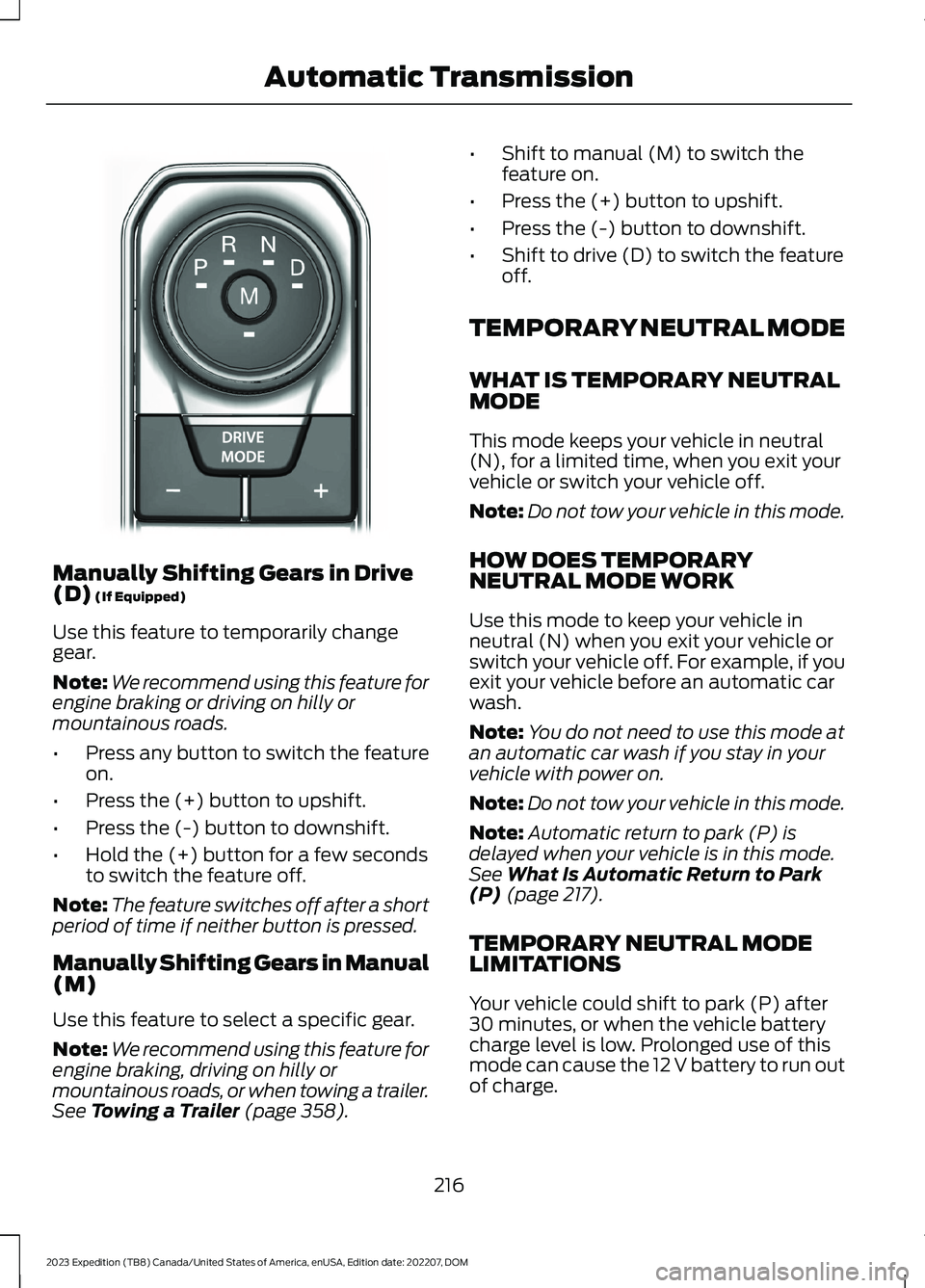
Manually Shifting Gears in Drive(D) (If Equipped)
Use this feature to temporarily changegear.
Note:We recommend using this feature forengine braking or driving on hilly ormountainous roads.
•Press any button to switch the featureon.
•Press the (+) button to upshift.
•Press the (-) button to downshift.
•Hold the (+) button for a few secondsto switch the feature off.
Note:The feature switches off after a shortperiod of time if neither button is pressed.
Manually Shifting Gears in Manual(M)
Use this feature to select a specific gear.
Note:We recommend using this feature forengine braking, driving on hilly ormountainous roads, or when towing a trailer.See Towing a Trailer (page 358).
•Shift to manual (M) to switch thefeature on.
•Press the (+) button to upshift.
•Press the (-) button to downshift.
•Shift to drive (D) to switch the featureoff.
TEMPORARY NEUTRAL MODE
WHAT IS TEMPORARY NEUTRALMODE
This mode keeps your vehicle in neutral(N), for a limited time, when you exit yourvehicle or switch your vehicle off.
Note:Do not tow your vehicle in this mode.
HOW DOES TEMPORARYNEUTRAL MODE WORK
Use this mode to keep your vehicle inneutral (N) when you exit your vehicle orswitch your vehicle off. For example, if youexit your vehicle before an automatic carwash.
Note:You do not need to use this mode atan automatic car wash if you stay in yourvehicle with power on.
Note:Do not tow your vehicle in this mode.
Note:Automatic return to park (P) isdelayed when your vehicle is in this mode.See What Is Automatic Return to Park(P) (page 217).
TEMPORARY NEUTRAL MODELIMITATIONS
Your vehicle could shift to park (P) after30 minutes, or when the vehicle batterycharge level is low. Prolonged use of thismode can cause the 12 V battery to run outof charge.
216
2023 Expedition (TB8) Canada/United States of America, enUSA, Edition date: 202207, DOMAutomatic TransmissionE252861
Page 230 of 658
WHAT IS THE ELECTRONIC
LIMITED-SLIP DIFFERENTIAL
The electronic limited-slip differentialsystem directs torque across the axle,enabling the vehicle to drive over terrainand road conditions that a conventionalaxle cannot. The system is active at alltimes and requires no input from the driver.
Note:If your vehicle is not at optimaloperating conditions or a system fault ispresent, a warning may display in theinstrument cluster. Depending on thewarning, you may need to service yourvehicle.
Operating the Electronic Limited-SlipDifferential with a Spare orMismatched Tires
If your vehicle has an electronic limited-slipdifferential, do not use a spare tire of adifferent size than the tire provided. If youhave a spare tire installed, a message mayappear indicating the system has disabledautomatically or reduced function toprevent system overheat and damage. Werecommend you reinstall the repaired orreplaced spare tire as soon as possible.When you replace the spare tire, thesystem resumes normal operation on thenext key cycle.
Trailer Towing
The electronic limited-slip differentialenhances vehicle stability during trailer towoperation. During high demand traileringevents, such as steep slopes, high speedsor with a spare tire, the system may providea warning in the instrument cluster andreduce function or enter a temporarilydisabled state. To resume normal function,stop the vehicle in a safe location andallow the unit to adequately cool. Oncethe system reaches normal operatingtemperatures, system function restoresand the electronic limited-slip differentialrestored message displays.
ELECTRONIC LIMITED-SLIP
DIFFERENTIAL INDICATORS
The locker mode mayautomatically disengage basedon certain conditions such asvehicle speed. When engaged, a telltale inthe instrument cluster illuminates amber.When you exceed the speed the telltaleturns gray, the locker disengages and staysin standby mode until you meet the speedconditions. If the system faults and thelocker cannot engage, a warning messagedisplays in the instrument cluster.
Automatic Re-engagementSpeedMaximum EngagementSpeedDrive Mode
35 mph (57 km/h)40 mph (65 km/h)Normal
20 mph (32 km/h)25 mph (40 km/h)Slippery
35 mph (57 km/h)40 mph (65 km/h)Eco
57 mph (92 km/h)62 mph (100 km/h)Mud/Ruts
57 mph (92 km/h)62 mph (100 km/h)Sand
35 mph (57 km/h)40 mph (65 km/h)Sport
35 mph (57 km/h)40 mph (65 km/h)Tow/Haul
226
2023 Expedition (TB8) Canada/United States of America, enUSA, Edition date: 202207, DOMElectronic Limited-Slip Differential (If Equipped)E163170
Page 236 of 658
WHAT IS THE ELECTRIC
PARKING BRAKE
The electric parking brake is used to holdyour vehicle on slopes and flat roads.
APPLYING THE ELECTRIC
PARKING BRAKE
WARNING: Apply the parkingbrake, shift into park (P), switch theignition off and remove the key beforeyou leave your vehicle. Failure to followthis instruction could result in personalinjury or death.
WARNING: If you drive extendeddistances with the parking brake applied,you could cause damage to the brakesystem.
WARNING: The electric parkingbrake does not operate if the vehiclebattery has run out of charge.
The switch is on the lower partof the instrument panel.
Pull the switch up to apply the electricparking brake. The red warning lampflashes, then steadily illuminates when theparking brake is applied.
Note:You can apply the electric parkingbrake when the ignition is off.
Note:The electric parking brake couldautomatically apply when park (P) isselected. See Park (P) (page 213).
APPLYING THE ELECTRIC
PARKING BRAKE IN AN
EMERGENCY
You can use the electric parking brake toslow or stop your vehicle in an emergency.
Pull the switch up and hold it.
The red warning lamp illuminates, a tonesounds and the stoplamps turn on whenyou use the electric parking brake in anemergency.
The electric parking brake continues toslow your vehicle down unless you releasethe switch.
Note:Do not apply the electric parkingbrake when your vehicle is moving, exceptin an emergency. If you repeatedly use theelectric parking brake to slow or stop yourvehicle, you could cause damage to thebrake system.
MANUALLY RELEASING THE
ELECTRIC PARKING BRAKE
1.Switch the ignition on.
2.Press and hold the brake pedal.
3.Push the switch down.
The red warning lamp turns off.
Pulling Away on a Hill When Towing aTrailer
1.Press and hold the brake pedal.
2.Pull the switch upward and hold it.
3.Shift into gear.
4.Press the accelerator pedal until enginehas developed sufficient torque toprevent your vehicle from rolling downthe hill.
5.Release the switch and pull away in anormal manner.
232
2023 Expedition (TB8) Canada/United States of America, enUSA, Edition date: 202207, DOMElectric Parking BrakeE267156
Page 239 of 658
WHAT IS REVERSE BRAKING
ASSIST
Reverse braking assist is designed toreduce impact damage or assist in avoidinga collision while in reverse (R). Usingsensors on the rear of the vehicle, it candetect a possible collision and apply thebrakes. If full braking occurs, the systemattempts to stop the vehicle a safedistance from the obstacle.
HOW DOES REVERSE
BRAKING ASSIST WORK
Reverse braking assist functions when inreverse (R) and traveling at a speed of1–7 mph (2–12 km/h).
If the system detects an obstacle behindyour vehicle, it provides a warning throughthe rear parking aid or cross traffic alertsystem.
REVERSE BRAKING ASSIST
PRECAUTIONS
WARNING: You are responsible forcontrolling your vehicle at all times. Thesystem is designed to be an aid and doesnot relieve you of your responsibility todrive with due care and attention. Failureto follow this instruction could result inthe loss of control of your vehicle,personal injury or death.
WARNING: To help avoid personalinjury, always use caution when inreverse (R) and when using the sensingsystem.
WARNING: The system may notoperate properly during severe weatherconditions, for example snow, ice, heavyrain and spray. Always drive with duecare and attention. Failure to take caremay result in a crash.
WARNING: Traffic control systems,fluorescent lamps, inclement weather,air brakes, external motors and fans mayaffect the correct operation of thesensing system. This may cause reducedperformance or false alerts.
WARNING: Some situations andobjects prevent hazard detection. Forexample low or direct sunlight, inclementweather, unconventional vehicle types,and pedestrians. Apply the brakes whennecessary. Failure to follow thisinstruction could result in the loss ofcontrol of your vehicle, personal injury ordeath.
WARNING: Do not use the systemwith accessories that extend beyond thefront or rear of your vehicle, for examplea trailer hitch or bike rack. The system isnot able to make corrections for theadditional length of the accessories.
The system only applies the brakes for ashort period of time when an event occurs.Act as soon as you notice the brakes applyto remain in control of the vehicle. If youdo not intervene the vehicle may start tomove again.
Note:Certain add-on devices around thebumper or fascia may create false alerts.For example, large trailer hitches, bicycle orsurfboard racks, license plate brackets,bumper covers or any other device that mayblock the normal detection zone of thesystem. Remove the add-on device toprevent false alerts.
235
2023 Expedition (TB8) Canada/United States of America, enUSA, Edition date: 202207, DOMReverse Braking Assist (If Equipped)
Page 240 of 658
Note:The system does not react to smallor moving objects, particularly those closeto the ground.
Note:The system does not operate duringhard acceleration or steering.
Note:If your vehicle sustains damage tothe bumper or fascia leaving it misalignedor bent, it could alter the sensing zonecausing inaccurate measurement ofobstacles or false alerts.
Note:Vehicle loading and suspensionchanges can impact the angle of the sensorsand may change the normal detection zoneof the system resulting in inaccuratemeasurement of obstacles or false alerts.
Note:When you connect a trailer, thesystem may detect the trailer and providean alert, or the system turns off. If thesystem does not turn off, manually switchthe system off after you connect the trailer.
Note:You may experience reduced systemperformance on road surfaces that limitdeceleration. For example, roads with ice,loose gravel, mud or sand.
SWITCHING REVERSE
BRAKING ASSIST ON AND OFF
- VEHICLES WITH: 12 INCH
SCREEN
1.Press Features on the touchscreen.
2.Press Driver Assistance.
3.Switch Reverse Brake Assist on or off.
Note:The system is unavailable when therear parking aid, cross traffic alert or tractioncontrol is off.
Note:If your vehicle is not equipped withcross traffic alert the reverse braking assistrelies on input from the rear parking aid andrear camera sensors.
Note:The default setting is on in someregions.
SWITCHING REVERSE
BRAKING ASSIST ON AND OFF
- VEHICLES WITH: 15 INCH
SCREEN
1.Access the vehicle drawer on thetouchscreen.
2.Press SETTINGS.
3.Press Driver Assistance.
4.Switch Reverse Brake Assist on or off.
Note:The system is unavailable when therear parking aid, cross traffic alert or tractioncontrol is off.
Note:If your vehicle is not equipped withcross traffic alert the reverse braking assistrelies on input from the rear parking aid andrear camera sensors.
Note:The default setting is on in someregions.
OVERRIDING REVERSE
BRAKING ASSIST
There could be instances whenunexpected or unwanted braking occurs.Firmly pressing the accelerator pedal orswitching the feature off overrides thesystem.
REVERSE BRAKING ASSIST
INDICATORS
If the system determines that a collisionwith an obstacle may occur, full brakingmay apply.
A message and warningindicator appear when thesystem applies the brakes.
236
2023 Expedition (TB8) Canada/United States of America, enUSA, Edition date: 202207, DOMReverse Braking Assist (If Equipped)E293490
Page 242 of 658
REVERSE BRAKING ASSIST –FREQUENTLY ASKED QUESTIONS
Why is reverse braking assist unavailable?
•Make sure the reverse braking assist ison. See Switching Reverse BrakingAssist On and Off (page 236).
•Make sure that all doors, liftgate ortailgate and hood are closed. Drive thevehicle on a straight road for a shortperiod. If the message remains, havethe system checked.
•If your vehicle has the cross traffic alertsystem, make sure it is on. SeeSwitching Cross Traffic Alert Onand Off (page 326).
•Make sure the rear parking aid systemis on. See Parking Aids (page 261).
•Make sure the traction control is on.See Switching Traction Control Onand Off (page 245).
Note:The traction control automaticallyturns off if four-wheel drive low and certaindrive modes such as mud/ruts andsnow/sand is activated.
•Your vehicle may have sustained a rearend impact. Have the sensors checkedfor proper coverage and operation.
•An anti-lock brake, traction control orstability control event may haveoccurred. Reverse braking assistresumes operation when the event iscomplete.
•Make sure the rear view camera and360 degree camera are not dirty orobstructed. If dirty, clean the camera.If the message still appears aftercleaning the camera, wait a short timefor the message to clear. If themessage does not clear, have thesystem checked.
•Make sure the cross traffic alert, rearparking aid and side parking aid sensorsare not blocked or faulty. See Locatingthe Cross Traffic Alert Sensors(page 326). See Locating the RearParking Aid Sensors (page 262). SeeLocating the Side Parking AidSensors (page 264).
•You recently had your vehicle serviced,or the battery disconnected. Drive yourvehicle a short distance to resumesystem operation.
•Reverse braking assist does notfunction when you connect a trailer.Operation resumes when youdisconnect the trailer.
Note:If the answers to why the system isunavailable do not assist in returning reversebraking assist to available, have the systemchecked as soon as possible.
238
2023 Expedition (TB8) Canada/United States of America, enUSA, Edition date: 202207, DOMReverse Braking Assist (If Equipped)
Page 243 of 658
WHAT IS CROSS TRAFFIC
BRAKING
The system is designed to reduce impactdamage or assist in avoiding a collision byusing the sensors on the rear of yourvehicle to detect a possible collision andapplying the brakes.
HOW DOES CROSS TRAFFIC
BRAKING WORK
The system only reacts for vehiclesapproaching from the sides when you shiftinto reverse (R).
If the system detects a vehicle approachingyour vehicle, it provides a warning throughthe cross traffic alert system. See What IsCross Traffic Alert (page 325).
The system only applies the brakes for ashort period of time when an event occurs.Take action as soon as you notice thesystem applying the brakes in order toremain in control of your vehicle, thesystem does not do this for you.
Note:You need to enable cross traffic alertfor the system to function.
CROSS TRAFFIC BRAKING
PRECAUTIONS
WARNING: You are responsible forcontrolling your vehicle at all times. Thesystem is designed to be an aid and doesnot relieve you of your responsibility todrive with due care and attention. Failureto follow this instruction could result inthe loss of control of your vehicle,personal injury or death.
WARNING: To help avoid personalinjury, always use caution when inreverse (R) and when using the sensingsystem.
WARNING: The system may notoperate properly during severe weatherconditions, for example snow, ice, heavyrain and spray. Always drive with duecare and attention. Failure to take caremay result in a crash.
WARNING: Do not use the systemwith accessories that extend beyond thefront or rear of your vehicle, for examplea trailer hitch or bike rack. The system isnot able to make corrections for theadditional length of the accessories.
WARNING: Some situations andobjects prevent hazard detection, forexample, inclement weather,unconventional vehicle types andpedestrians. Apply the brakes whennecessary. Failure to follow thisinstruction could result in the loss ofcontrol of your vehicle, personal injury ordeath.
Note:If your vehicle sustains damage tothe bumper or fascia leaving it misalignedor bent, it could alter the sensing zonecausing inaccurate measurement ofobstacles or false alerts.
Note:Vehicle loading and suspensionchanges can impact the angle of the sensorsand may change the normal detection zoneof the system resulting in inaccuratemeasurement of obstacles or false alerts.
Note:When you connect a trailer, thesystem may detect the trailer and providean alert, or the system turns off. If thesystem does not turn off, switch the systemoff manually after you connect the trailer.
239
2023 Expedition (TB8) Canada/United States of America, enUSA, Edition date: 202207, DOMCross Traffic Braking
Page 257 of 658
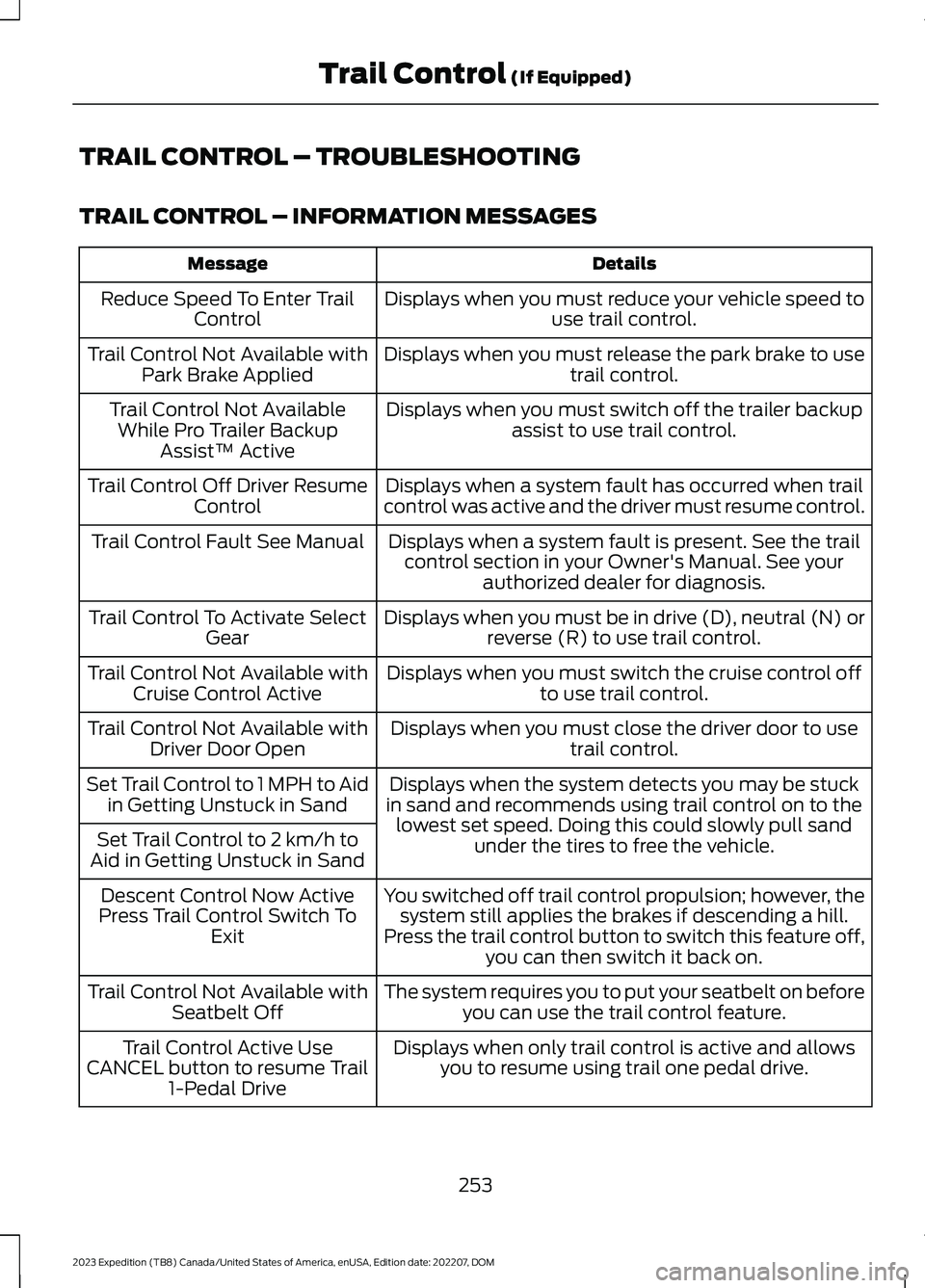
TRAIL CONTROL – TROUBLESHOOTING
TRAIL CONTROL – INFORMATION MESSAGES
DetailsMessage
Displays when you must reduce your vehicle speed touse trail control.Reduce Speed To Enter TrailControl
Displays when you must release the park brake to usetrail control.Trail Control Not Available withPark Brake Applied
Displays when you must switch off the trailer backupassist to use trail control.Trail Control Not AvailableWhile Pro Trailer BackupAssist™ Active
Displays when a system fault has occurred when trailcontrol was active and the driver must resume control.Trail Control Off Driver ResumeControl
Displays when a system fault is present. See the trailcontrol section in your Owner's Manual. See yourauthorized dealer for diagnosis.
Trail Control Fault See Manual
Displays when you must be in drive (D), neutral (N) orreverse (R) to use trail control.Trail Control To Activate SelectGear
Displays when you must switch the cruise control offto use trail control.Trail Control Not Available withCruise Control Active
Displays when you must close the driver door to usetrail control.Trail Control Not Available withDriver Door Open
Displays when the system detects you may be stuckin sand and recommends using trail control on to thelowest set speed. Doing this could slowly pull sandunder the tires to free the vehicle.
Set Trail Control to 1 MPH to Aidin Getting Unstuck in Sand
Set Trail Control to 2 km/h toAid in Getting Unstuck in Sand
You switched off trail control propulsion; however, thesystem still applies the brakes if descending a hill.Press the trail control button to switch this feature off,you can then switch it back on.
Descent Control Now ActivePress Trail Control Switch ToExit
The system requires you to put your seatbelt on beforeyou can use the trail control feature.Trail Control Not Available withSeatbelt Off
Displays when only trail control is active and allowsyou to resume using trail one pedal drive.Trail Control Active UseCANCEL button to resume Trail1-Pedal Drive
253
2023 Expedition (TB8) Canada/United States of America, enUSA, Edition date: 202207, DOMTrail Control (If Equipped)
Page 265 of 658
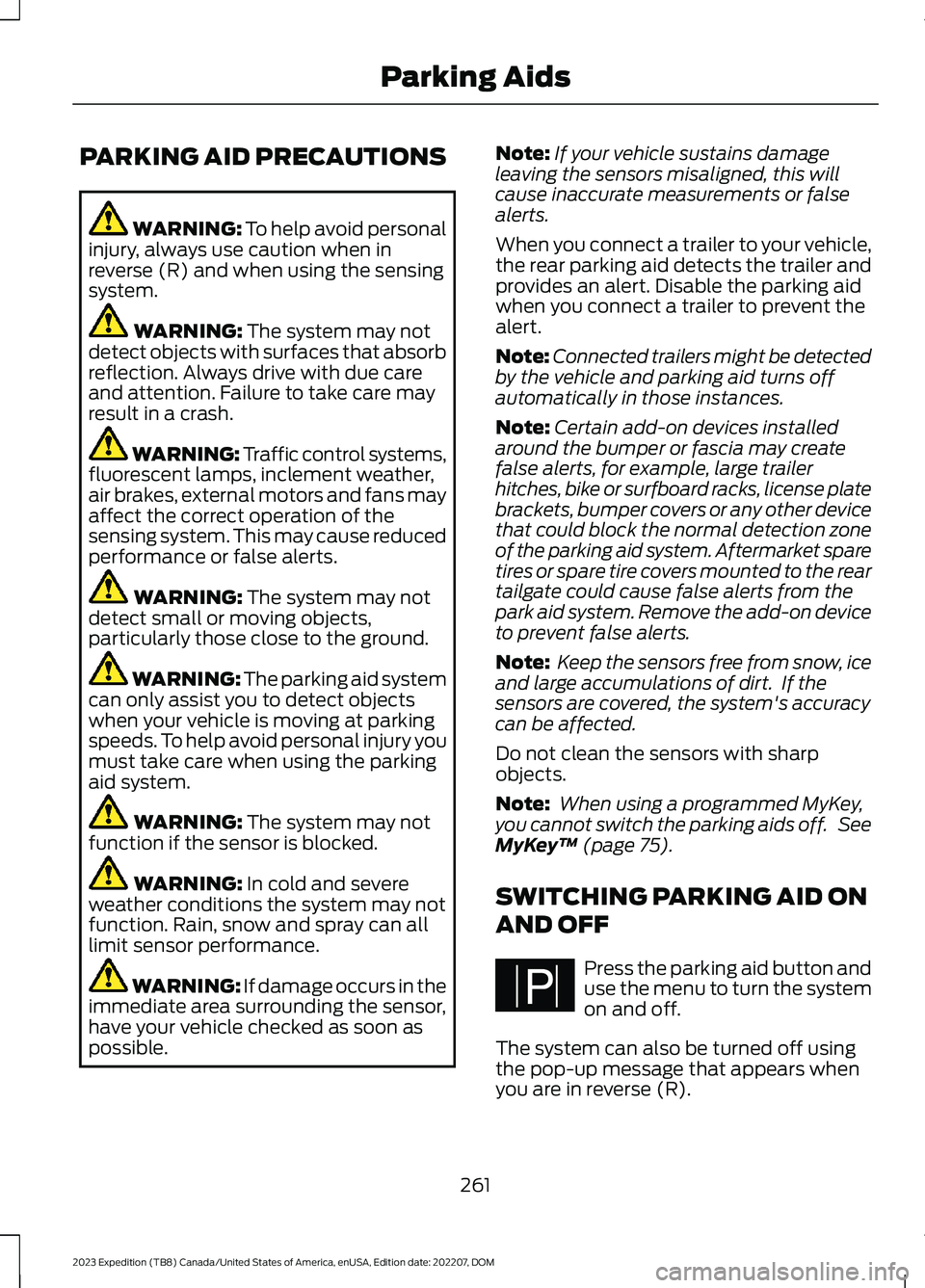
PARKING AID PRECAUTIONS
WARNING: To help avoid personalinjury, always use caution when inreverse (R) and when using the sensingsystem.
WARNING: The system may notdetect objects with surfaces that absorbreflection. Always drive with due careand attention. Failure to take care mayresult in a crash.
WARNING: Traffic control systems,fluorescent lamps, inclement weather,air brakes, external motors and fans mayaffect the correct operation of thesensing system. This may cause reducedperformance or false alerts.
WARNING: The system may notdetect small or moving objects,particularly those close to the ground.
WARNING: The parking aid systemcan only assist you to detect objectswhen your vehicle is moving at parkingspeeds. To help avoid personal injury youmust take care when using the parkingaid system.
WARNING: The system may notfunction if the sensor is blocked.
WARNING: In cold and severeweather conditions the system may notfunction. Rain, snow and spray can alllimit sensor performance.
WARNING: If damage occurs in theimmediate area surrounding the sensor,have your vehicle checked as soon aspossible.
Note:If your vehicle sustains damageleaving the sensors misaligned, this willcause inaccurate measurements or falsealerts.
When you connect a trailer to your vehicle,the rear parking aid detects the trailer andprovides an alert. Disable the parking aidwhen you connect a trailer to prevent thealert.
Note:Connected trailers might be detectedby the vehicle and parking aid turns offautomatically in those instances.
Note:Certain add-on devices installedaround the bumper or fascia may createfalse alerts, for example, large trailerhitches, bike or surfboard racks, license platebrackets, bumper covers or any other devicethat could block the normal detection zoneof the parking aid system. Aftermarket sparetires or spare tire covers mounted to the reartailgate could cause false alerts from thepark aid system. Remove the add-on deviceto prevent false alerts.
Note: Keep the sensors free from snow, iceand large accumulations of dirt. If thesensors are covered, the system's accuracycan be affected.
Do not clean the sensors with sharpobjects.
Note: When using a programmed MyKey,you cannot switch the parking aids off. SeeMyKey™ (page 75).
SWITCHING PARKING AID ON
AND OFF
Press the parking aid button anduse the menu to turn the systemon and off.
The system can also be turned off usingthe pop-up message that appears whenyou are in reverse (R).
261
2023 Expedition (TB8) Canada/United States of America, enUSA, Edition date: 202207, DOMParking AidsPE326188