door lock FORD EXPEDITION 2023 Owner's Manual
[x] Cancel search | Manufacturer: FORD, Model Year: 2023, Model line: EXPEDITION, Model: FORD EXPEDITION 2023Pages: 658, PDF Size: 16.16 MB
Page 108 of 658
POWER RUNNING BOARD
PRECAUTIONS
WARNING: In extreme climates,excessive ice buildup may occur, causingthe running boards not to deploy. Makesure that the running boards havedeployed, and have finished movingbefore attempting to step on them. Therunning boards will resume normalfunction once the blockage is cleared.
WARNING: Switch off the runningboards before jacking or placing anyobject under your vehicle. Never placeyour hand between the extended runningboard and your vehicle. A moving runningboard may cause injury.
Do not use the running boards, front andrear hinge assemblies, running boardmotors, or the running board underbodymounts to lift your vehicle when jacking.Use proper jacking points.
The running boards could move slower incold temperatures.
POWER RUNNING BOARD
SETTINGS - VEHICLES WITH:
12 INCH SCREEN
1.Press Features on the touchscreen.
2.Press Running Boards.
3.Press a setting.
Running Boards (Modes)
Off
The power running boards remain stowed,regardless of door position.
Auto
The power running boards deploy whenyou open the door and stow when youclose the door.
Out
The power running boards remaindeployed, regardless of door position.
POWER RUNNING BOARD
SETTINGS - VEHICLES WITH:
15 INCH SCREEN
1.Access the vehicle drawer on thetouchscreen.
2.Press SETTINGS.
3.Press Easy Entry/Exit.
4.Press Power Running Board.
5.Press a setting.
Running Board Modes
Off
The power running boards remain stowed,regardless of door position.
Auto
The power running boards deploy whenyou open the door and stow when youclose the door.
Out
The power running boards remaindeployed, regardless of door position.
104
2023 Expedition (TB8) Canada/United States of America, enUSA, Edition date: 202207, DOMPower Running Boards (If Equipped)
Page 131 of 658
OPENING AND CLOSING THE
WINDOWS
WARNING: Do not leave childrenunattended in your vehicle and do notlet them play with the power windows.Failure to follow this instruction couldresult in personal injury.
WARNING: When closing thepower windows, verify they are free ofobstruction and make sure that childrenand pets are not in the proximity of thewindow openings.
Press the window control switchto open the window. Lift thewindow control switch to closethe window.
Note:The power windows operate with theignition on, and for several minutes after youswitch the ignition off or until you open afront door.
To reduce wind noise or pulsing noise whenone window is open, slightly open theopposite window.
One-Touch Open
Fully press the window control switch andrelease it. Press again or lift it to stop thewindow.
One-Touch Close
Fully lift the window control switch andrelease it. Press again or lift it to stop thewindow.
Resetting One-Touch Close
Carry out all steps within 30 seconds ofstarting the sequence.
1.Close the window.
2.Press and hold the window controlswitch until the window is fully open.Keep the window control switchpressed for a few seconds.
3.Lift and hold the window control switchuntil the window is fully closed. Keepthe window control switch held for afew seconds.
4.Press and hold the window controlswitch until the window is fully open.Keep the window control switchpressed for a few seconds.
5.Lift and hold the window control switchuntil the window is fully closed. Keepthe window control switch held for afew seconds.
Note:Repeat the procedure if the windowdoes not close when you use one-touch.
GLOBAL OPENING
WHAT IS GLOBAL OPENING
You can use the remote control to openthe windows with the ignition off.
USING GLOBAL OPENING
1.Press and release the unlock button onthe remote control.
2.Press and hold the unlock button onthe remote control.
3.Release the button when the windowsstart to open.
Press the lock or the unlock button on theremote control to stop global opening.
Note:You can use global opening for ashort period of time when you unlock yourvehicle using the remote control.
127
2023 Expedition (TB8) Canada/United States of America, enUSA, Edition date: 202207, DOMWindows
Page 134 of 658
ADJUSTING THE EXTERIOR
MIRRORS
WARNING: Do not adjust themirrors when your vehicle is moving. Thiscould result in the loss of control of yourvehicle, serious personal injury or death.
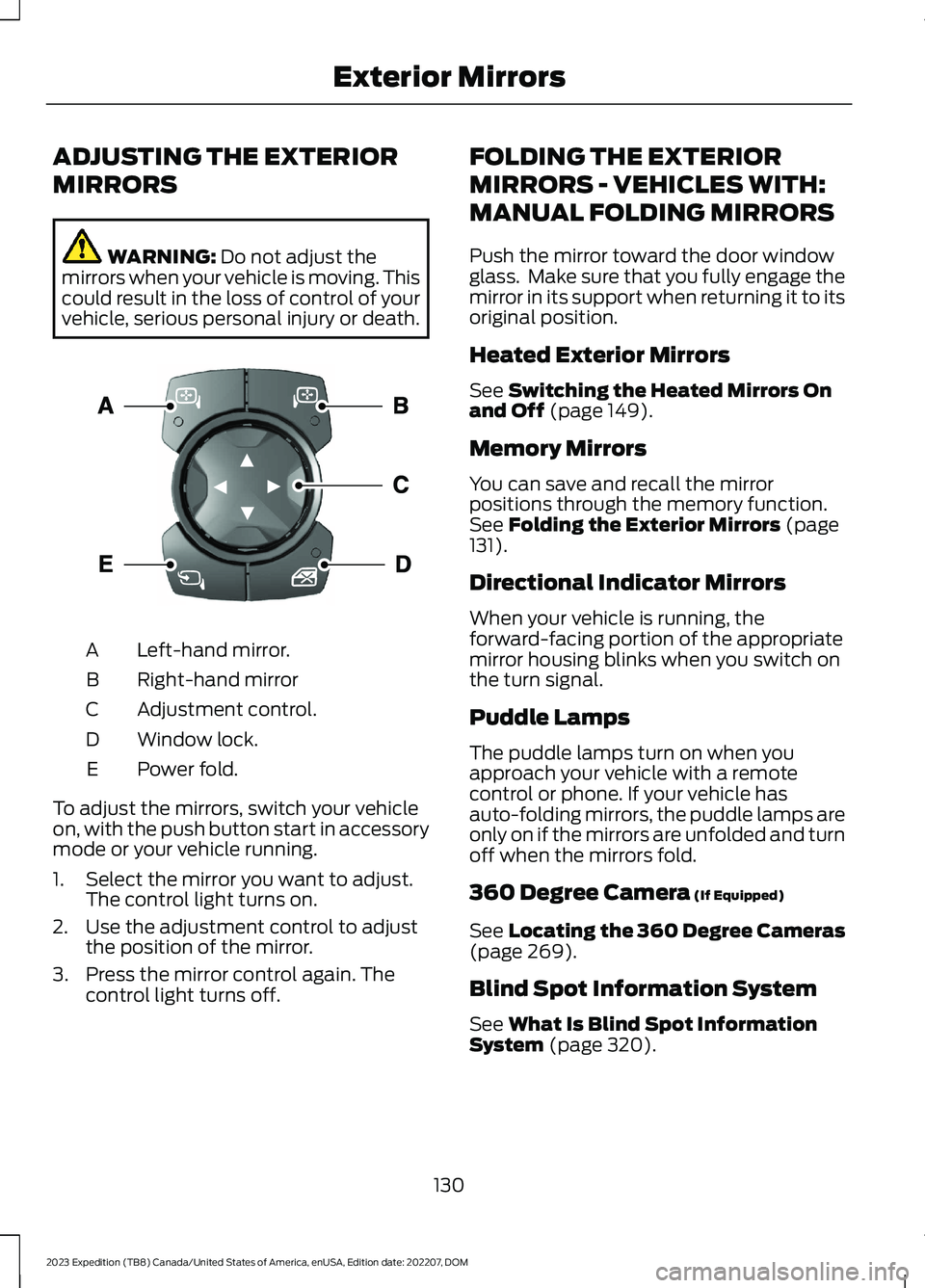
Left-hand mirror.A
Right-hand mirrorB
Adjustment control.C
Window lock.D
Power fold.E
To adjust the mirrors, switch your vehicleon, with the push button start in accessorymode or your vehicle running.
1.Select the mirror you want to adjust.The control light turns on.
2.Use the adjustment control to adjustthe position of the mirror.
3.Press the mirror control again. Thecontrol light turns off.
FOLDING THE EXTERIOR
MIRRORS - VEHICLES WITH:
MANUAL FOLDING MIRRORS
Push the mirror toward the door windowglass. Make sure that you fully engage themirror in its support when returning it to itsoriginal position.
Heated Exterior Mirrors
See Switching the Heated Mirrors Onand Off (page 149).
Memory Mirrors
You can save and recall the mirrorpositions through the memory function.See Folding the Exterior Mirrors (page131).
Directional Indicator Mirrors
When your vehicle is running, theforward-facing portion of the appropriatemirror housing blinks when you switch onthe turn signal.
Puddle Lamps
The puddle lamps turn on when youapproach your vehicle with a remotecontrol or phone. If your vehicle hasauto-folding mirrors, the puddle lamps areonly on if the mirrors are unfolded and turnoff when the mirrors fold.
360 Degree Camera (If Equipped)
See Locating the 360 Degree Cameras(page 269).
Blind Spot Information System
See What Is Blind Spot InformationSystem (page 320).
130
2023 Expedition (TB8) Canada/United States of America, enUSA, Edition date: 202207, DOMExterior MirrorsE369398
Page 140 of 658
FUEL GAUGE LIMITATIONS
The fuel gauge may not provide anaccurate reading when your vehicle is onan incline.
LOCATING THE FUEL FILLERDOOR
The arrow adjacent to the fuel pumpsymbol indicates on which side of yourvehicle the fuel filler door is located.
WHAT IS THE LOW FUELREMINDER
A low fuel level reminder displays andsounds when the distance to emptyreaches 75 mi (120 km) to empty forMyKey, and at 50 mi (80 km),25 mi(40 km),12 mi (20 km) and 0 mi (0 km)for all vehicle keys.
Note:The low fuel reminder can appear atdifferent fuel gauge positions depending onfuel economy conditions. This variation isnormal.
WHAT IS DISTANCE TO EMPTY
Indicates the approximate distance yourvehicle can travel on the fuel remaining inthe tank. Changes in driving pattern cancause the value to not only decrease butalso increase or stay constant for periodsof time.
ENGINE COOLANT
TEMPERATURE GAUGE
Indicates the engine coolant temperature.
ENGINE OIL PRESSURE GAUGE
Indicates the engine oil pressure.
Note:This is a configurable gauge.
TRANSMISSION FLUID
TEMPERATURE GAUGE
Indicates the transmission fluidtemperature.
Special operating conditions can causehigher than normal operatingtemperatures. See Special OperatingConditions Scheduled Maintenance(page 545).
Note:This is a configurable gauge.
TURBO BOOST GAUGE -
VEHICLES WITH: 12 INCH
SCREEN
Indicates the amount of manifold airpressure in the engine.
Note:This is a configurable gauge.
WHAT ARE THE INSTRUMENT
CLUSTER WARNING LAMPS
Warning lamps alert you to a vehiclecondition that could become serious.Some lamps illuminate when you startyour vehicle to make sure they work. If anylamps remain on after starting your vehicle,refer to the respective system warninglamp for further information.
INSTRUMENT CLUSTER
WARNING LAMPS
Anti-Lock Brake System
If it illuminates when you aredriving, this indicates amalfunction. Your vehiclecontinues to have normal braking withoutthe anti-lock brake system function. Haveyour vehicle checked as soon as possible.
136
2023 Expedition (TB8) Canada/United States of America, enUSA, Edition date: 202207, DOMInstrument ClusterE67020
Page 149 of 658
Within three seconds, press thebutton on the remote control.
Within three seconds, press thebutton again.
Note:You can also use FordPass to startthe vehicle.
Note:The vehicle doors lock when yousuccessfully remote start your vehicle.
Note:The turn signal lamps flash twice.
Note:The parking lamps turn on when thevehicle is running.
Note:The horn sounds if the system failsto start.
Note:All other vehicle systems remain offwhen you have remotely started the vehicle.
Note:The vehicle remains secured whenyou have remotely started the vehicle. Avalid key must be inside your vehicle toswitch the ignition on and drive your vehicle.
Remotely Stopping the Vehicle
Within three seconds, press thebutton on the remote control.
Within three seconds, press thebutton again.
EXTENDING THE REMOTE
START DURATION
To extend the remote start duration duringremote start, do the following:
Press the button on the remotecontrol.
Within three seconds, press thebutton on the remote control.
Within three seconds, press thebutton again.
If the duration is set to 15 minutes, theduration extends by another 15 minutes.This provides a total of 30 minutes.
Note:Remote start can only be extendedonce.
Note:A maximum of two remote starts, orone remote start with an extension, areallowed. To reset the restart procedureswitch the vehicle to on, then to off.
REMOTE START REMOTE
CONTROL INDICATORS
Remote Control Feedback
An LED on the remote control providesstatus feedback of remote start or stopcommands.
StatusLED
Remote startsuccessful.Solid green.
Remote stopsuccessful.Solid red.
Request failed orstatus not received.Blinking red.
Status incomplete.Blinking green.
REMOTE START SETTINGS -
VEHICLES WITH: 12 INCH
SCREEN
Climate Control Settings
1.Press Settings on the touchscreen.
2.Press Vehicle Settings.
3.Press Remote Start Setup.
4.Press Climate Control.
5.Press Auto or Last settings.
145
2023 Expedition (TB8) Canada/United States of America, enUSA, Edition date: 202207, DOMRemote Start (If Equipped)E138625 E138625 E138623 E138625
Page 179 of 658
Note:Be sure the third-row center headrestraint is in the lowered position beforeyou power the rear seats down. Thethird-row outermost head restraints foldautomatically when you press the foldbutton.
UNFOLDING THE SEAT BACKREST
To return the second-row seat backrest tothe original position, rotate the seatbackrest up until it latches in the uprightposition. The seat backrest clicks when itis locked into position.
To return the third-row seat backrest tothe original position, press thecorresponding control again.
Note:If the third row seat does notcompletely fold or unfold, press and holdthe seat button until the seat folds andunfolds twice.
If the power rear seat is disabled after 10minutes, you can enable the seat by:
•Opening any door.
•Pressing the unlock button on the keyfob.
•Pressing any keyless entry keypadbutton.
•Switching the ignition on.
Folding Down the Rear Seats to theLoad Floor
WARNING: To prevent possibledamage to the seat or seatbelts, makesure that the seatbelts are not fastenedbefore folding the seatback.
WARNING: Do not place cargo orany objects behind the seatback beforereturning it to the original position.
The third-row seats have obstacledetection that prevents the seats fromfolding or returning if they are obstructed.
HEATED SEATS (IF EQUIPPED)
HEATED SEAT PRECAUTIONS
WARNING: Use caution when usingthe heated seat if you are unable to feelpain to your skin because of advancedage, chronic illness, diabetes, spinal cordinjury, medication, alcohol use,exhaustion or other physical conditions.The heated seat could cause burns evenat low temperatures, especially if usedfor long periods of time. Failure to followthis instruction could result in personalinjury.
WARNING: Do not poke sharpobjects into the seat cushion or seatbackrest. This could damage the heatedseat element and cause it to overheat.Failure to follow this instruction couldresult in personal injury.
WARNING: Do not place anythingon the seat that blocks the heat, forexample a seat cover or a cushion. Thiscould cause the seat to overheat. Failureto follow this instruction could result inpersonal injury.
Do not:
•Place heavy objects on the seat.
•Operate the heated seat if water or anyother liquid spills on the seat. Allow theseat to dry.
175
2023 Expedition (TB8) Canada/United States of America, enUSA, Edition date: 202207, DOMRear Seats
Page 183 of 658
WHAT IS THE MEMORY
FUNCTION
The memory function recalls the positionof these features:
•Driver seat.
•Power mirrors.
•Optional power steering column.
•Optional power adjustable pedals.
MEMORY FUNCTION
PRECAUTIONS
WARNING: Before activating thememory seat, make sure that the areaimmediately surrounding the seat is clearof obstructions and that all occupantsare clear of moving parts.
WARNING: Do not use the memoryfunction when your vehicle is moving.
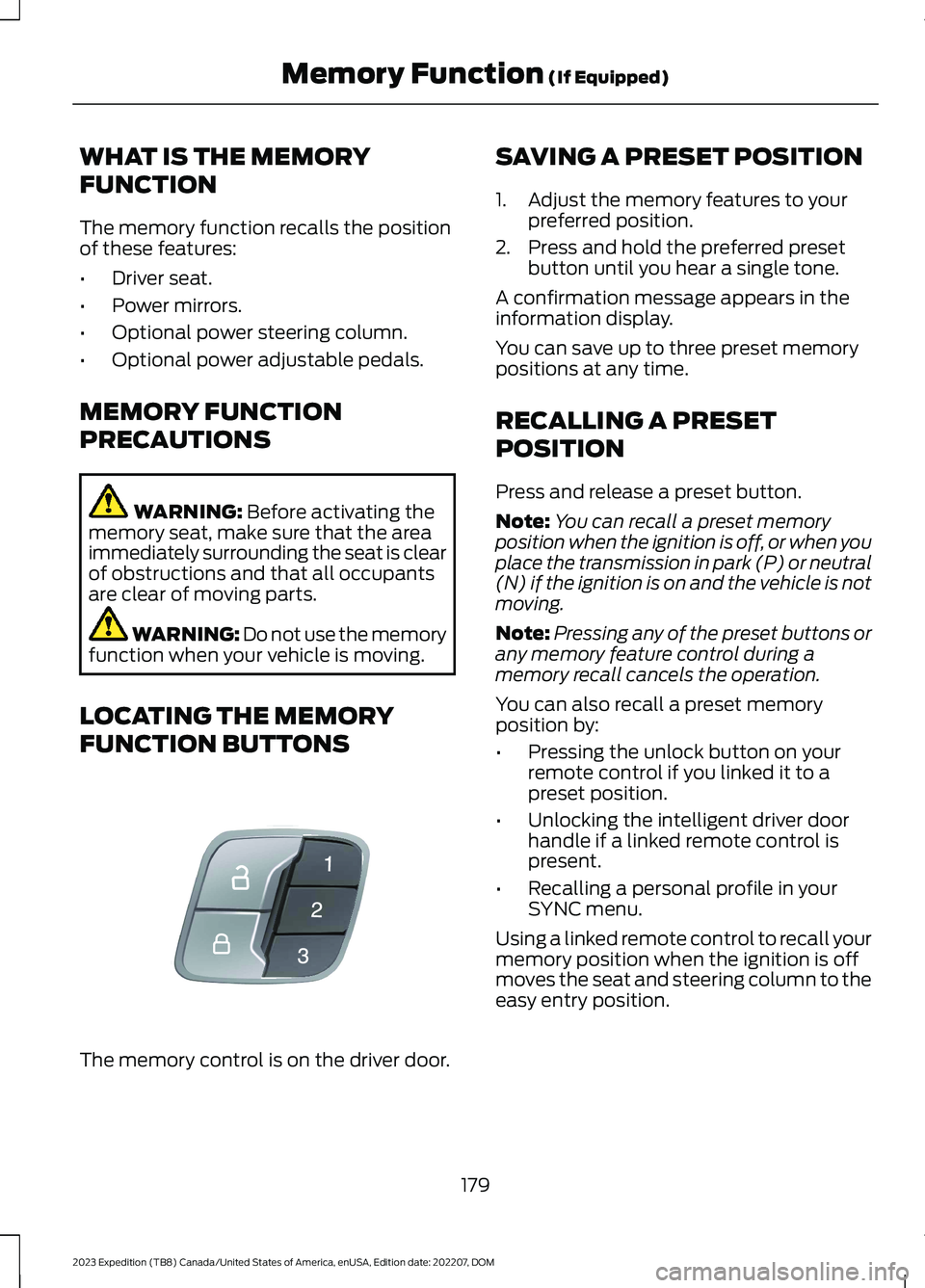
LOCATING THE MEMORY
FUNCTION BUTTONS
The memory control is on the driver door.
SAVING A PRESET POSITION
1.Adjust the memory features to yourpreferred position.
2.Press and hold the preferred presetbutton until you hear a single tone.
A confirmation message appears in theinformation display.
You can save up to three preset memorypositions at any time.
RECALLING A PRESET
POSITION
Press and release a preset button.
Note:You can recall a preset memoryposition when the ignition is off, or when youplace the transmission in park (P) or neutral(N) if the ignition is on and the vehicle is notmoving.
Note:Pressing any of the preset buttons orany memory feature control during amemory recall cancels the operation.
You can also recall a preset memoryposition by:
•Pressing the unlock button on yourremote control if you linked it to apreset position.
•Unlocking the intelligent driver doorhandle if a linked remote control ispresent.
•Recalling a personal profile in yourSYNC menu.
Using a linked remote control to recall yourmemory position when the ignition is offmoves the seat and steering column to theeasy entry position.
179
2023 Expedition (TB8) Canada/United States of America, enUSA, Edition date: 202207, DOMMemory Function (If Equipped)E142554
Page 185 of 658
GARAGE DOOR OPENER
INTRODUCTION
HomeLink Wireless ControlSystem
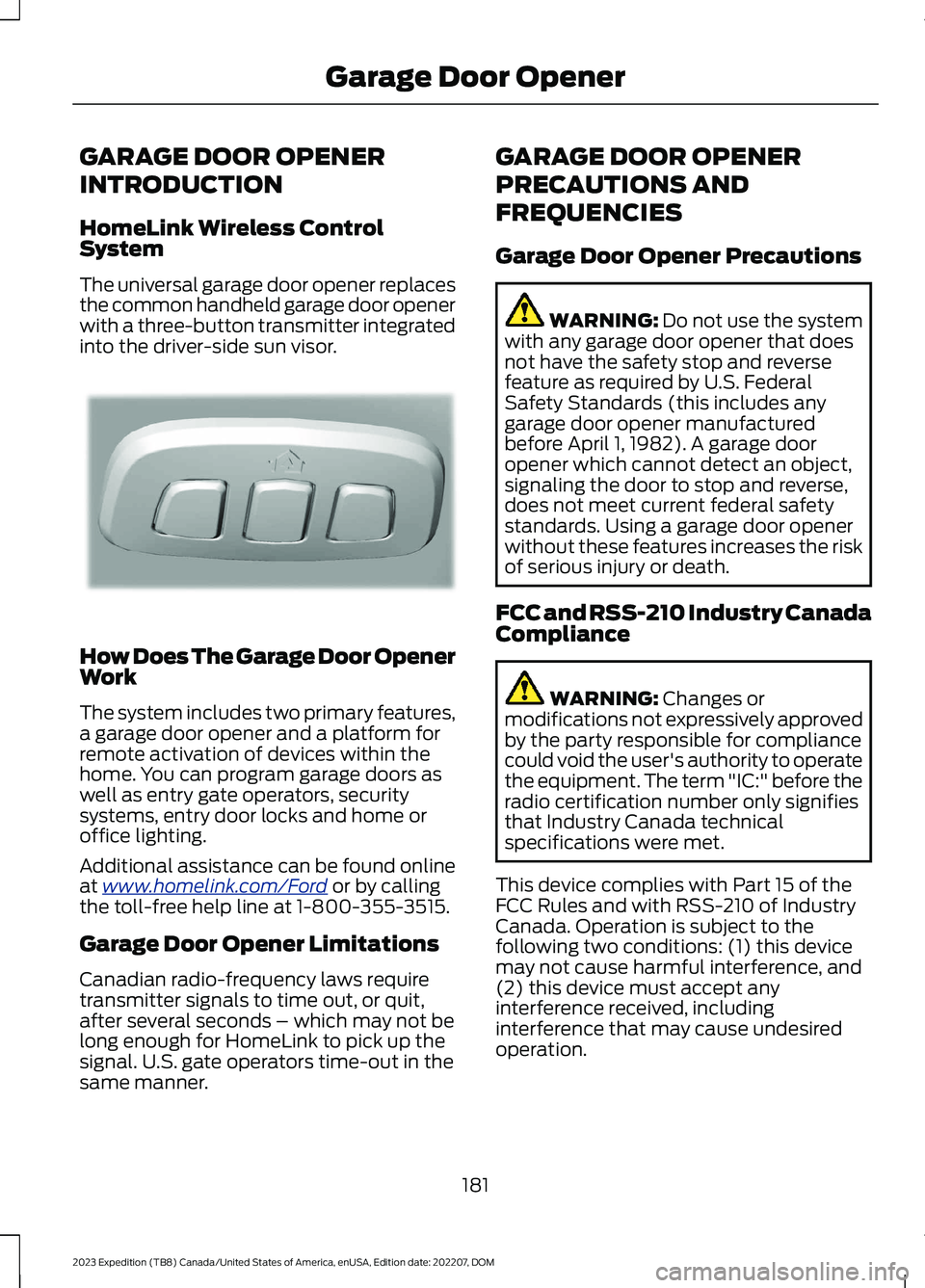
The universal garage door opener replacesthe common handheld garage door openerwith a three-button transmitter integratedinto the driver-side sun visor.
How Does The Garage Door OpenerWork
The system includes two primary features,a garage door opener and a platform forremote activation of devices within thehome. You can program garage doors aswell as entry gate operators, securitysystems, entry door locks and home oroffice lighting.
Additional assistance can be found onlineat www.homelink.com/Ford or by callingthe toll-free help line at 1-800-355-3515.
Garage Door Opener Limitations
Canadian radio-frequency laws requiretransmitter signals to time out, or quit,after several seconds – which may not belong enough for HomeLink to pick up thesignal. U.S. gate operators time-out in thesame manner.
GARAGE DOOR OPENER
PRECAUTIONS AND
FREQUENCIES
Garage Door Opener Precautions
WARNING: Do not use the systemwith any garage door opener that doesnot have the safety stop and reversefeature as required by U.S. FederalSafety Standards (this includes anygarage door opener manufacturedbefore April 1, 1982). A garage dooropener which cannot detect an object,signaling the door to stop and reverse,does not meet current federal safetystandards. Using a garage door openerwithout these features increases the riskof serious injury or death.
FCC and RSS-210 Industry CanadaCompliance
WARNING: Changes ormodifications not expressively approvedby the party responsible for compliancecould void the user's authority to operatethe equipment. The term "IC:" before theradio certification number only signifiesthat Industry Canada technicalspecifications were met.
This device complies with Part 15 of theFCC Rules and with RSS-210 of IndustryCanada. Operation is subject to thefollowing two conditions: (1) this devicemay not cause harmful interference, and(2) this device must accept anyinterference received, includinginterference that may cause undesiredoperation.
181
2023 Expedition (TB8) Canada/United States of America, enUSA, Edition date: 202207, DOMGarage Door OpenerE188211
Page 195 of 658
OVERHEAD STORAGE
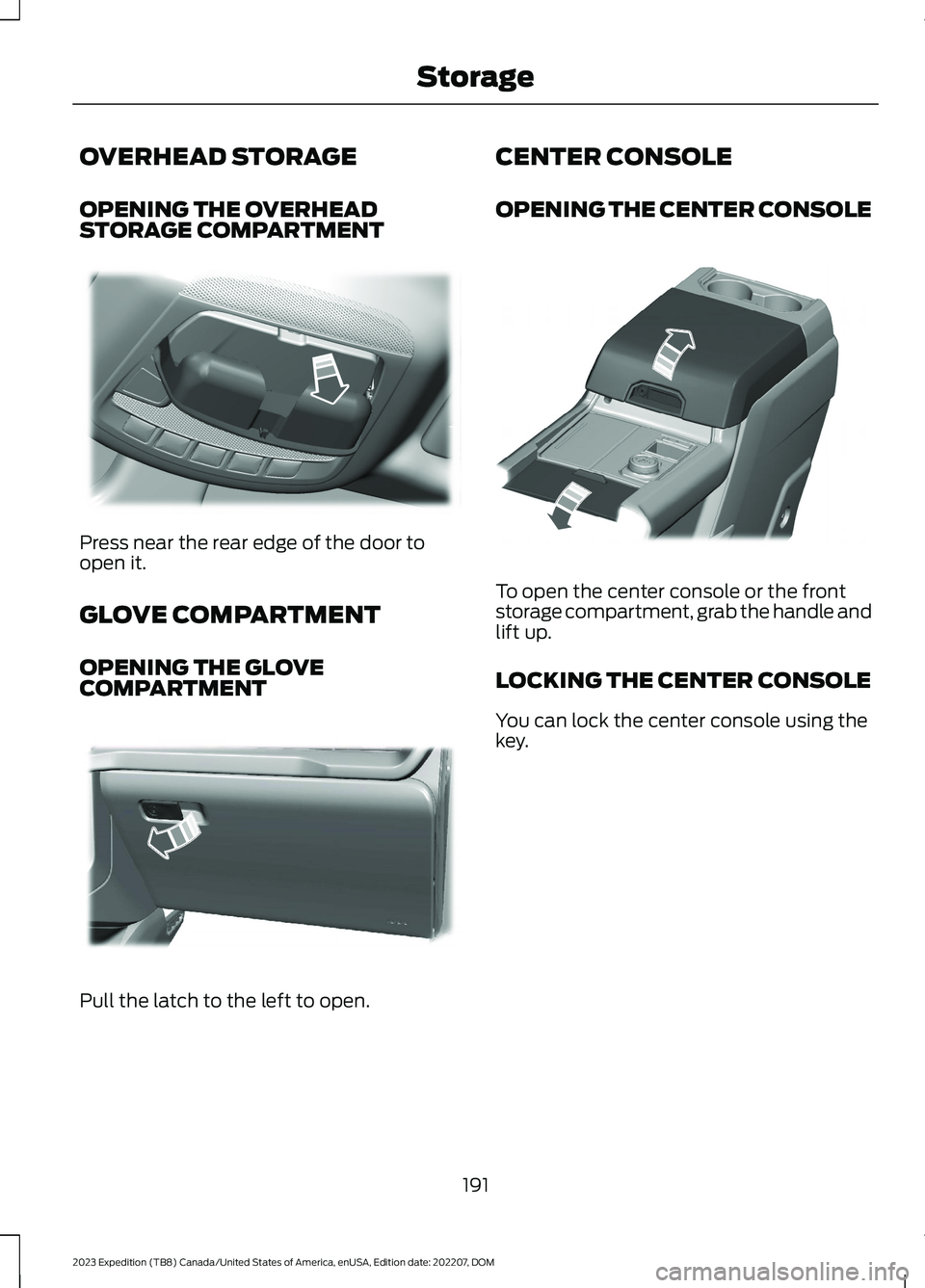
OPENING THE OVERHEADSTORAGE COMPARTMENT
Press near the rear edge of the door toopen it.
GLOVE COMPARTMENT
OPENING THE GLOVECOMPARTMENT
Pull the latch to the left to open.
CENTER CONSOLE
OPENING THE CENTER CONSOLE
To open the center console or the frontstorage compartment, grab the handle andlift up.
LOCKING THE CENTER CONSOLE
You can lock the center console using thekey.
191
2023 Expedition (TB8) Canada/United States of America, enUSA, Edition date: 202207, DOMStorageE332434 E310218 E351263
Page 199 of 658
2.Press the push button ignition switch.
Note:The engine may continue crankingfor up to 15 seconds or until it starts.
Note:The engine takes longer to start atlower temperatures. It may crank for severalseconds when very cold.
RESTARTING THE ENGINE AFTERSTOPPING IT - VEHICLES WITH:PUSH BUTTON START
The system allows you to start the enginewithin 10 seconds of switching it off, evenif it does not detect a valid passive key.
Within 10 seconds of switching the engineoff, fully press the brake pedal and pressthe push button ignition switch. After 10seconds, you can no longer start the engineif the system does not detect a validpassive key.
When you start the engine, it remainsrunning until you press the push buttonignition switch, even if your vehicle doesnot detect a valid passive key. If you openand close a door when the engine isrunning, the system searches for a validpassive key.
ENGINE BLOCK HEATER (IF
EQUIPPED)
ENGINE BLOCK HEATERPRECAUTIONS
WARNING: Failure to follow engineblock heater instructions could result inproperty damage or serious personalinjury.
WARNING: Do not use your heaterwith ungrounded electrical systems ortwo-pronged adapters. There is a risk ofelectrical shock.
WARNING: Do not fully close thehood, or allow it to drop under its ownweight when using the engine blockheater. This could damage the powercable and may cause an electrical shortresulting in fire, injury and propertydamage.
We recommend that you do the followingfor a safe and correct operation:
•Use a 16-gauge outdoor extension cordthat is product certified byUnderwriter’s Laboratory (UL) orCanadian Standards Association(CSA). This extension cord must besuitable for use outdoors, in coldtemperatures, and be clearly markedSuitable for Use with OutdoorAppliances. Do not use an indoorextension cord outdoors. This couldresult in an electric shock or become afire hazard.
•Use as short an extension cord aspossible.
•Do not use multiple extension cords.
195
2023 Expedition (TB8) Canada/United States of America, enUSA, Edition date: 202207, DOMStarting and Stopping the EngineE357998