warning light FORD EXPEDITION 2023 Service Manual
[x] Cancel search | Manufacturer: FORD, Model Year: 2023, Model line: EXPEDITION, Model: FORD EXPEDITION 2023Pages: 658, PDF Size: 16.16 MB
Page 398 of 658
Vehicles Sold in Canada: GettingRoadside Assistance
To fully assist you should you have avehicle concern, Ford Motor Company ofCanada, Limited offers a complimentaryroadside assistance program. Thisprogram is eligible within Canada or thecontinental United States.
The service is available 24 hours a day,seven days a week.
This program is separate from the NewVehicle Limited Warranty, but the coverageis concurrent with the powertrain coverageperiod of your vehicle. Canadian roadsidecoverage and benefits may differ from theU.S. coverage.
If you require more information, please callus in Canada at 1-800-665-2006, or visitour website at www.ford.ca.
SWITCHING THE HAZARD
FLASHERS ON AND OFF
The hazard flasher button is onthe instrument panel. Press thebutton to switch the hazardflashers on if your vehicle is creating asafety hazard for other road users.
When you switch the hazard flashers on,all front and rear direction indicators flash.
Note:The hazard flashers operate whenthe ignition is in any position, or if the key isnot in the ignition. The battery loses chargeand could have insufficient power to restartyour vehicle.
Press the button again to switch them off.
JUMP STARTING THE VEHICLE
JUMP STARTING PRECAUTIONS
WARNING: Batteries normallyproduce explosive gases which cancause personal injury. Therefore, do notallow flames, sparks or lightedsubstances to come near the battery.When working near the battery, alwaysshield your face and protect your eyes.Always provide correct ventilation.
WARNING: Keep batteries out ofreach of children. Batteries containsulfuric acid. Avoid contact with skin,eyes or clothing. Shield your eyes whenworking near the battery to protectagainst possible splashing of acidsolution. In case of acid contact with skinor eyes, flush immediately with water fora minimum of 15 minutes and get promptmedical attention. If acid is swallowed,call a physician immediately.
WARNING: Use only adequatelysized cables with insulated clamps.
WARNING: Make sure that thecables are clear of any moving parts andfuel delivery system parts.
WARNING: Connect batteries withonly the same nominal voltage.
WARNING: If the engine is runningwhile the hood is open, stay clear ofmoving engine components. Failure tofollow this warning could result in seriouspersonal injury or death.
Do not attempt to push-start an automatictransmission vehicle. This could causetransmission damage.
394
2023 Expedition (TB8) Canada/United States of America, enUSA, Edition date: 202207, DOMCrash and Breakdown InformationE75790
Page 423 of 658
1.Stop your vehicle as soon as it is safeto do so. Fully apply the parking brake,shift into park (P) or neutral (N).
2.Leave the engine running until thecoolant temperature gauge needlereturns to the normal position. If thetemperature does not drop afterseveral minutes, follow the remainingsteps.
3.Switch the engine off and wait for it tocool. Check the coolant level.
4.If the coolant level is at or below theminimum mark, add prediluted coolantimmediately.
5.If the coolant level is normal, restartthe engine and continue.
ENGINE AIR FILTER
CHANGING THE ENGINE AIRFILTER
WARNING: To reduce the risk ofvehicle damage and personal burninjuries, do not start your engine with theair cleaner removed and do not removeit while the engine is running.
Change the engine air filter element at theproper intervals. See Normal ScheduledMaintenance (page 542).
When changing the engine air filter, useonly the air filter element listed. SeeMotorcraft Parts (page 464).
Note: Failure to use the correct air filterelement may result in severe enginedamage. Resulting component damagemay not be covered by the vehicle Warranty.
Note: When servicing the air cleaner, donot allow foreign material to enter the airinduction system.
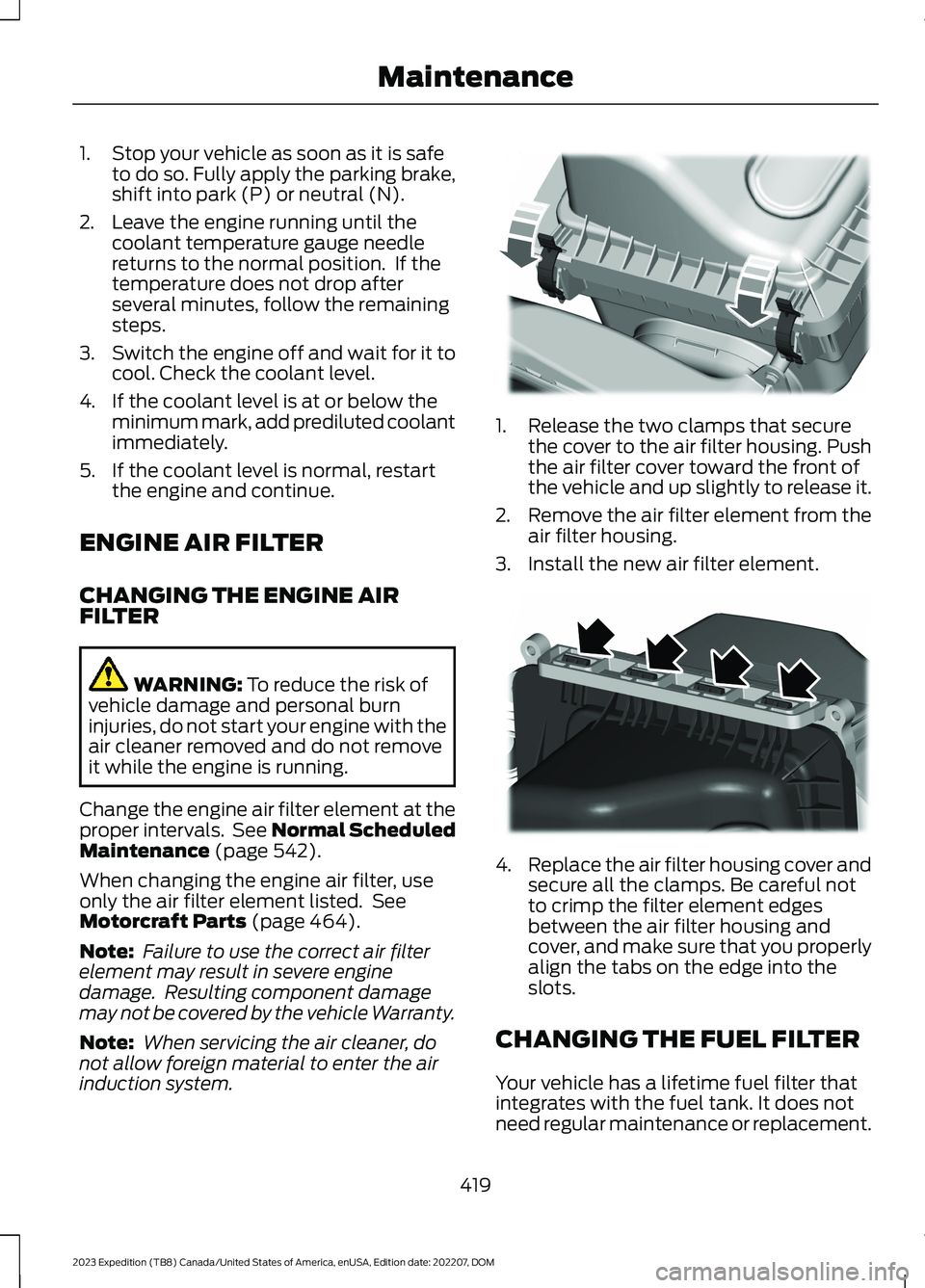
1.Release the two clamps that securethe cover to the air filter housing. Pushthe air filter cover toward the front ofthe vehicle and up slightly to release it.
2.Remove the air filter element from theair filter housing.
3.Install the new air filter element.
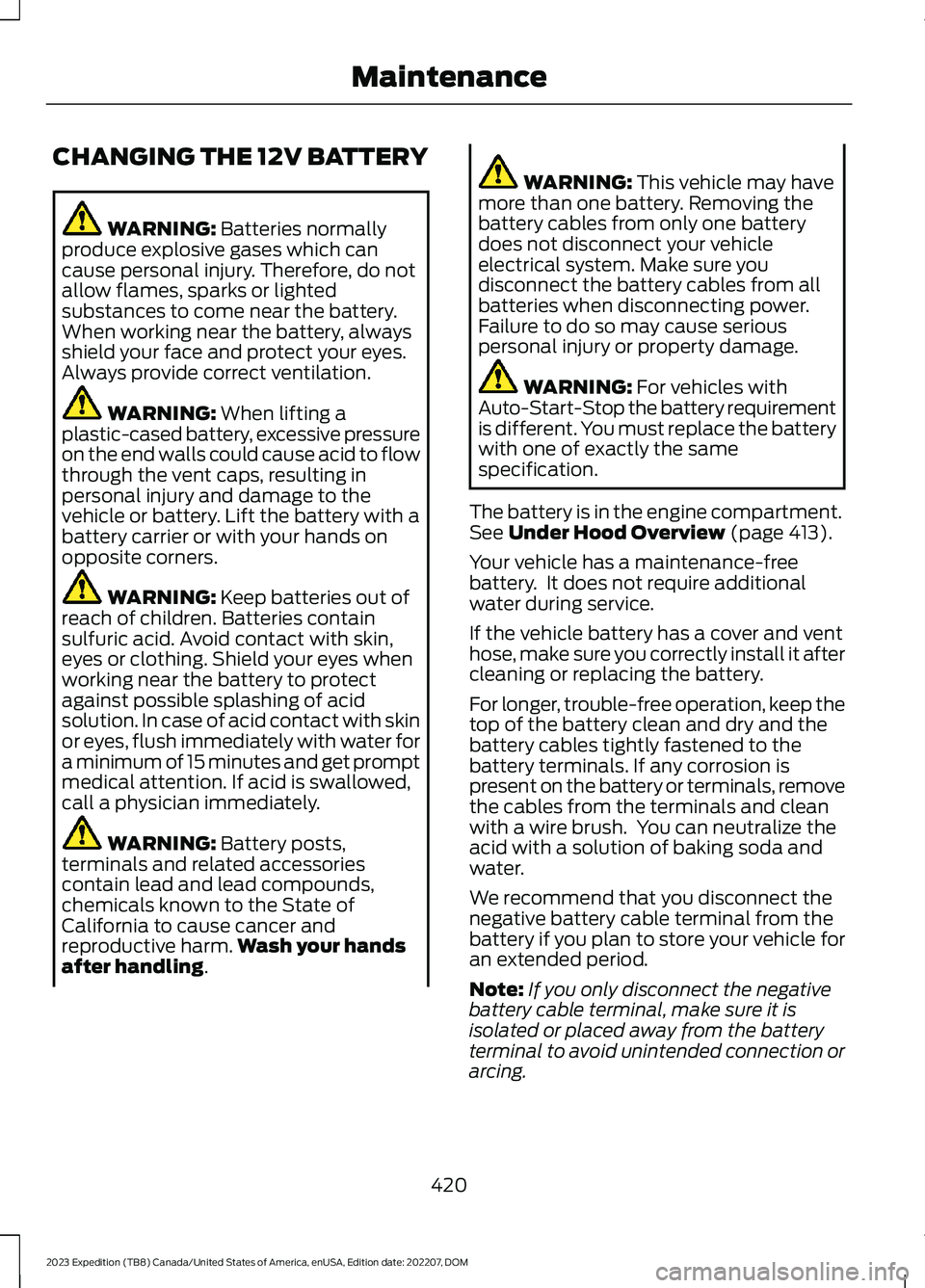
4.Replace the air filter housing cover andsecure all the clamps. Be careful notto crimp the filter element edgesbetween the air filter housing andcover, and make sure that you properlyalign the tabs on the edge into theslots.
CHANGING THE FUEL FILTER
Your vehicle has a lifetime fuel filter thatintegrates with the fuel tank. It does notneed regular maintenance or replacement.
419
2023 Expedition (TB8) Canada/United States of America, enUSA, Edition date: 202207, DOMMaintenanceE248801 E248800
Page 424 of 658
CHANGING THE 12V BATTERY
WARNING: Batteries normallyproduce explosive gases which cancause personal injury. Therefore, do notallow flames, sparks or lightedsubstances to come near the battery.When working near the battery, alwaysshield your face and protect your eyes.Always provide correct ventilation.
WARNING: When lifting aplastic-cased battery, excessive pressureon the end walls could cause acid to flowthrough the vent caps, resulting inpersonal injury and damage to thevehicle or battery. Lift the battery with abattery carrier or with your hands onopposite corners.
WARNING: Keep batteries out ofreach of children. Batteries containsulfuric acid. Avoid contact with skin,eyes or clothing. Shield your eyes whenworking near the battery to protectagainst possible splashing of acidsolution. In case of acid contact with skinor eyes, flush immediately with water fora minimum of 15 minutes and get promptmedical attention. If acid is swallowed,call a physician immediately.
WARNING: Battery posts,terminals and related accessoriescontain lead and lead compounds,chemicals known to the State ofCalifornia to cause cancer andreproductive harm.Wash your handsafter handling.
WARNING: This vehicle may havemore than one battery. Removing thebattery cables from only one batterydoes not disconnect your vehicleelectrical system. Make sure youdisconnect the battery cables from allbatteries when disconnecting power.Failure to do so may cause seriouspersonal injury or property damage.
WARNING: For vehicles withAuto-Start-Stop the battery requirementis different. You must replace the batterywith one of exactly the samespecification.
The battery is in the engine compartment.See Under Hood Overview (page 413).
Your vehicle has a maintenance-freebattery. It does not require additionalwater during service.
If the vehicle battery has a cover and venthose, make sure you correctly install it aftercleaning or replacing the battery.
For longer, trouble-free operation, keep thetop of the battery clean and dry and thebattery cables tightly fastened to thebattery terminals. If any corrosion ispresent on the battery or terminals, removethe cables from the terminals and cleanwith a wire brush. You can neutralize theacid with a solution of baking soda andwater.
We recommend that you disconnect thenegative battery cable terminal from thebattery if you plan to store your vehicle foran extended period.
Note:If you only disconnect the negativebattery cable terminal, make sure it isisolated or placed away from the batteryterminal to avoid unintended connection orarcing.
420
2023 Expedition (TB8) Canada/United States of America, enUSA, Edition date: 202207, DOMMaintenance
Page 425 of 658
If you replace the battery make sure itmatches the electrical requirements ofyour vehicle.
If you disconnect or replace the batteryand your vehicle has an automatictransmission, it must relearn its adaptivestrategy. Because of this, the transmissionmay shift firmly when first driven. This isnormal operation while the transmissionfully updates its operation to optimumshift feel.
Battery Sensor Reset
When you install a new battery, reset thebattery sensor by doing the following:
1.Switch the ignition on, and leave theengine off.
Note:Complete Steps 2 and 3 within 10seconds.
2.Flash the high beam headlamps fivetimes, ending with the high beams off.
3.Press and release the brake pedal threetimes.
The battery warning lamp flashes threetimes to confirm that the reset issuccessful.
Battery Management System (If
Equipped)
The system monitors battery conditionsand takes actions to extend battery life. Ifexcessive battery drain is detected, thesystem temporarily disables someelectrical systems to protect the battery.
Systems included are:
•Heated rear window.
•Heated seats.
•Climate control.
•Heated steering wheel.
•Audio unit.
•Navigation system.
A message may appear in the informationdisplay to alert you that battery protectionactions are active. This message is only fornotification that an action is taking place,and not intended to indicate an electricalproblem or that the battery requiresreplacement.
After battery replacement, or in somecases after charging the battery with anexternal charger, the battery managementsystem requires eight hours of vehicle sleeptime to relearn the battery state of charge.During this time, your vehicle must remainfully locked with the ignition switched off.
Note:Prior to relearning the battery stateof charge, the battery management systemmay temporarily disable some electricalsystems.
Electrical Accessory Installation
To make sure the battery managementsystem works correctly, do not connect anelectrical device ground connectiondirectly to the battery negative post. Thiscan cause inaccurate measurements ofthe battery condition and potentialincorrect system operation.
Note:If you add electrical accessories orcomponents to the vehicle, it may adverselyaffect battery performance and durability.This may also affect the performance ofother electrical systems in the vehicle.
Remove and Reinstall the Battery
Install a battery approved for use by ourspecifications. See Capacities andSpecifications (page 463).
To disconnect or remove the battery, dothe following:
1.Apply the parking brake and switch theignition off.
2.Switch all electrical equipment off, forexample lights and radio.
421
2023 Expedition (TB8) Canada/United States of America, enUSA, Edition date: 202207, DOMMaintenance
Page 458 of 658
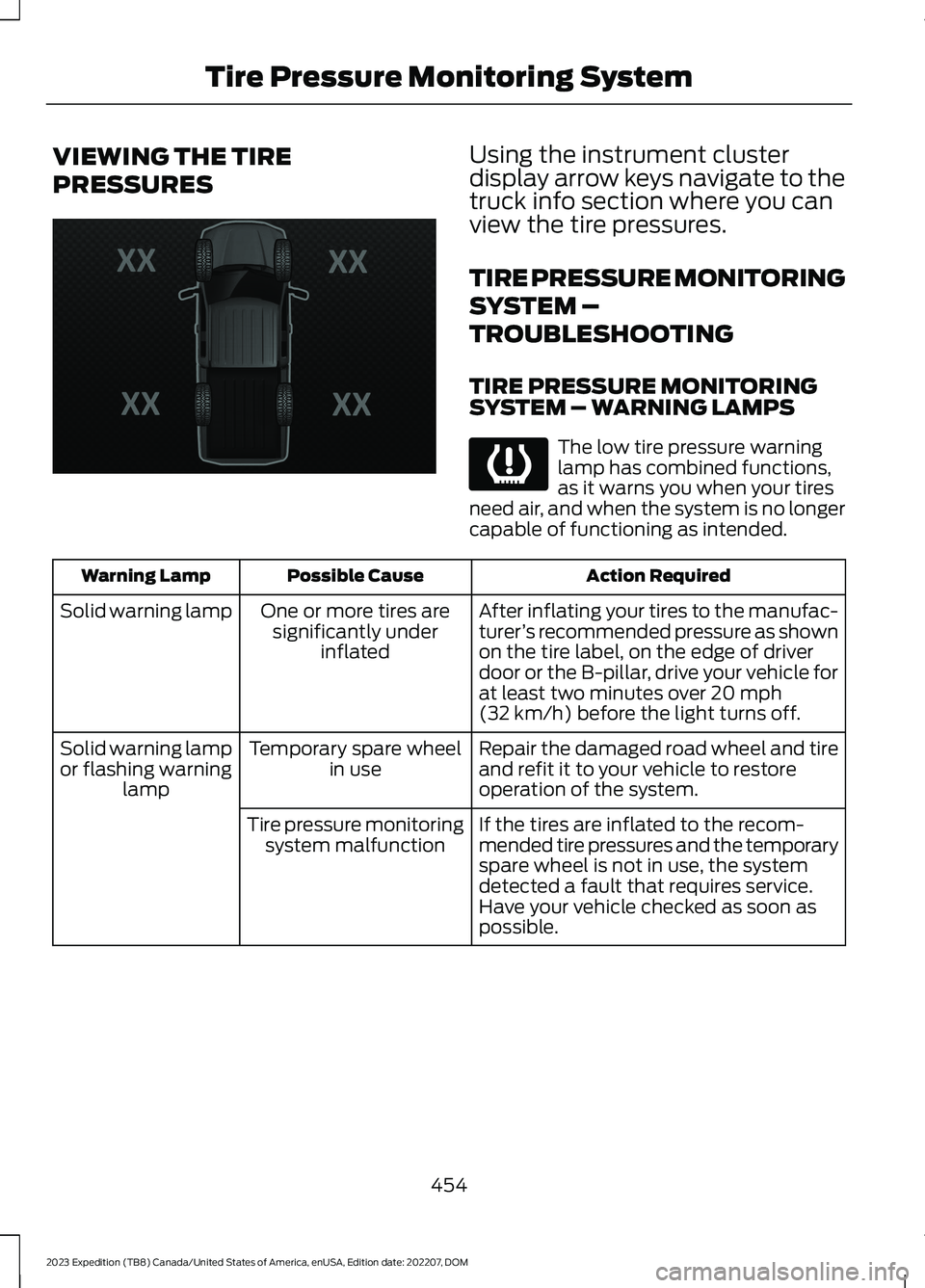
VIEWING THE TIRE
PRESSURES
Using the instrument clusterdisplay arrow keys navigate to thetruck info section where you canview the tire pressures.
TIRE PRESSURE MONITORING
SYSTEM –
TROUBLESHOOTING
TIRE PRESSURE MONITORINGSYSTEM – WARNING LAMPS
The low tire pressure warninglamp has combined functions,as it warns you when your tiresneed air, and when the system is no longercapable of functioning as intended.
Action RequiredPossible CauseWarning Lamp
After inflating your tires to the manufac-turer’s recommended pressure as shownon the tire label, on the edge of driverdoor or the B-pillar, drive your vehicle forat least two minutes over 20 mph(32 km/h) before the light turns off.
One or more tires aresignificantly underinflated
Solid warning lamp
Repair the damaged road wheel and tireand refit it to your vehicle to restoreoperation of the system.
Temporary spare wheelin useSolid warning lampor flashing warninglamp
If the tires are inflated to the recom-mended tire pressures and the temporaryspare wheel is not in use, the systemdetected a fault that requires service.Have your vehicle checked as soon aspossible.
Tire pressure monitoringsystem malfunction
454
2023 Expedition (TB8) Canada/United States of America, enUSA, Edition date: 202207, DOMTire Pressure Monitoring SystemE224333 E139232
Page 460 of 658
CHANGING A FLAT TIRE
If you get a flat tire when driving, do notapply the brake heavily. Instead, graduallydecrease your speed, hold the steeringwheel firmly and slowly move to a safeplace on the side of the road.
Have the flat serviced by an authorizeddealer to prevent damage to the systemsensors. See Tire Pressure MonitoringSystem (page 452). Replace the spare tirewith a road tire as soon as possible. Duringrepairing or replacing of the flat tire, havethe authorized dealer inspect the systemsensor for damage.
Note:Only use tire sealants in roadsideemergencies as they may cause damage tothe tire pressure monitoring system sensor.
Note:The tire pressure monitoring systemindicator light illuminates when the sparetire is in use. To restore the full function ofthe monitoring system, all road wheels withtire pressure monitoring sensors must bemounted on this vehicle.
Dissimilar Spare Wheel and TireAssembly Information
WARNING: Failure to follow theseguidelines could result in an increasedrisk of loss of vehicle control, injury ordeath.
If you have a dissimilar spare wheel andtire, then it is intended for temporary useonly. This means that if you need to use it,you should replace it as soon as possiblewith a road wheel and tire assembly thatis the same size and type as the road tiresand wheels that were originally provided.If the dissimilar spare tire or wheel isdamaged, it should be replaced rather thanrepaired.
A dissimilar spare wheel and tire assemblyis defined as a spare wheel and tireassembly that is different in brand, size orappearance from the other road tires andwheels on your vehicle.
Full-size dissimilar spare
When driving with the full-size dissimilarspare wheel and tire assembly, do not:
•Exceed 70 mph (113 km/h).
•Use more than one dissimilar sparewheel and tire assembly at a time.
•Use snow chains on the end of thevehicle with the dissimilar spare wheeland tire assembly.
When driving with the full-size dissimilarspare wheel and tire assembly, it isrecommended that you do not:
•Exceed 50 mph (80 km/h) infour-wheel drive.
•Engage four-wheel drive unless thevehicle is stationary.
•Use four-wheel drive on dry pavement.
Using a dissimilar spare wheel and tireassembly can compromise theeffectiveness of the following:
•Handling, stability and brakingperformance.
•Comfort and noise.
•Ground clearance and parking at curbs.
•Winter weather driving capability.
•Wet weather driving capability.
•Four-wheel driving capability.
When driving with the full-size dissimilarspare wheel and tire assembly additionalcaution should be given to:
•Towing a trailer.
•Driving vehicles equipped with acamper body.
•Driving vehicles with a load on thecargo rack.
456
2023 Expedition (TB8) Canada/United States of America, enUSA, Edition date: 202207, DOMChanging a Road Wheel
Page 462 of 658
WARNING: Do not attempt tochange a tire on the side of the vehicleclose to moving traffic. Pull far enoughoff the road to not obstruct the flow oftraffic and avoid the danger of being hitwhen operating the jack or changing thewheel.
1.Park the vehicle on firm, level groundand activate the hazard flashers.
2.Apply the parking brake, place thetransmission in park (P) and switch theignition off.
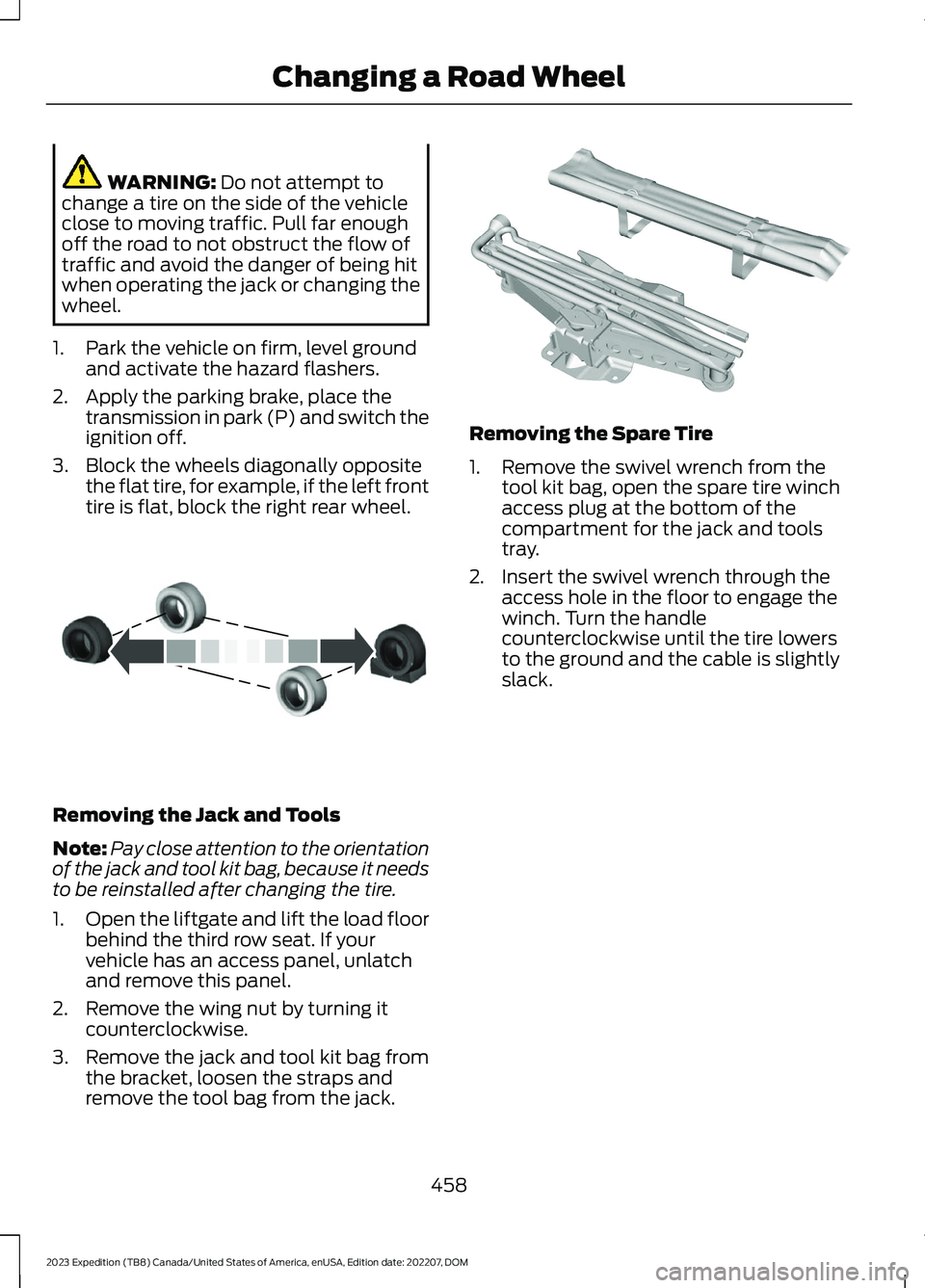
3.Block the wheels diagonally oppositethe flat tire, for example, if the left fronttire is flat, block the right rear wheel.
Removing the Jack and Tools
Note:Pay close attention to the orientationof the jack and tool kit bag, because it needsto be reinstalled after changing the tire.
1.Open the liftgate and lift the load floorbehind the third row seat. If yourvehicle has an access panel, unlatchand remove this panel.
2.Remove the wing nut by turning itcounterclockwise.
3.Remove the jack and tool kit bag fromthe bracket, loosen the straps andremove the tool bag from the jack.
Removing the Spare Tire
1.Remove the swivel wrench from thetool kit bag, open the spare tire winchaccess plug at the bottom of thecompartment for the jack and toolstray.
2.Insert the swivel wrench through theaccess hole in the floor to engage thewinch. Turn the handlecounterclockwise until the tire lowersto the ground and the cable is slightlyslack.
458
2023 Expedition (TB8) Canada/United States of America, enUSA, Edition date: 202207, DOMChanging a Road WheelE175447 E252435
Page 625 of 658
SUNA Products and/or Services areintended as an aid to personal motoringand travel planning, and do not providecomprehensive or accurate information onall occasions. On occasions, you mayexperience additional delay as a result ofusing SUNA Products and/or Services. Youacknowledge that it is not intended, orsuitable, for use in applications where timeof arrival or driving directions may impactthe safety of the public or yourself.
4. Use of SUNA Products and Serviceswhile driving
You, and other authorized drivers of thevehicle in which SUNA Products and/orServices are available or installed andactive, remain at all times responsible forobserving all relevant laws and codes ofsafe driving. In particular, you agree to onlyactively operate SUNA Products and/orServices when the Vehicle is at a completestop and it is safe to do so.
5. Service Continuity and Reception ofthe SUNA Traffic Channel
We will use reasonable endeavors toprovide the SUNA Traffic Channel 24 hoursa day, 365 days a year. The SUNA TrafficChannel may occasionally be unavailablefor technical reasons or for plannedmaintenance. We will try to performmaintenance at times when congestion islight. We reserve the right to withdrawSUNA Products and/or Services at anytime.
Also, we cannot assure the uninterruptedreception of the SUNA Traffic ChannelRDS-TMC signal at any particular location.
6. Limitation of Liability
Neither Intelematics (nor its suppliers orthe manufacturer of your device (the“Suppliers”)) shall be liable to you or toany third party for any damages eitherdirect, indirect, incidental, consequentialor otherwise arising out of the use of orinability to use SUNA Products and/or
Services even if Intelematics or a Supplierhas been advised of the possibility of suchdamages. You also acknowledge thatneither Intelematics nor any Supplierguarantees nor make any warranties thatrelate to the availability, accuracy orcompleteness of SUNA Products and/orServices, and to the extent which it islawful to do so, both Intelematics and eachSupplier excludes any warranties whichmight otherwise be implied by any Stateor Federal legislation in relation to SUNAProducts and/or Services.
7. Please Note
Great care has been taken in preparing thismanual. Constant product developmentmay mean that some information is notentirely up-to-date. The information in thisdocument is subject to change withoutnotice.
EMISSION LAW - UNITED
STATES OF AMERICA
WARNING: Do not remove or alterthe original equipment floor covering orinsulation between it and the metal floorof the vehicle. The floor covering andinsulation protect occupants of thevehicle from the engine and exhaustsystem heat and noise. On vehicles withno original equipment floor coveringinsulation, do not carry passengers in amanner that permits prolonged skincontact with the metal floor. Failure tofollow these instructions may result infire or personal injury.
U.S. federal laws and certain state lawsprohibit removing or rendering inoperativeemission control system components.Similar federal or provincial laws mayapply in Canada. We do not approve of anyvehicle modification without firstdetermining applicable laws.
621
2023 Expedition (TB8) Canada/United States of America, enUSA, Edition date: 202207, DOMCustomer Information
Page 627 of 658
Manual is written primarily for the U.S. andCanadian markets. Features or equipmentlisted as standard may be different on unitsbuilt for export.Refer to this Owner’sManual for all other requiredinformation and warnings.
WARRANTY INFORMATION
The following warranties may apply to yourvehicle:
•New vehicle limited warranties.
•Emissions warranties, if applicable.(Note: Fully-electric vehicles are noteligible for emissions warranties.)
•Other warranties, if applicable.
Detailed warranty information specific toyour vehicle can be found in the WarrantyGuide at www.owner.ford.com.
The following California WarrantyStatement, required by Californiaregulations, applies to vehicles certified toCalifornia emissions standards andregistered in a state that requires Californiaemissions warranty. If applicable,additional California Emissions Warrantiescan be found in the Warranty Guide atwww.owner.ford.com.
CALIFORNIA EMISSION CONTROLWARRANTY STATEMENT
YOUR WARRANTY RIGHTS ANDOBLIGATIONS
The California Air Resources Board andFord Motor Company are pleased toexplain the emission control systemwarranty on your (year) vehicle. InCalifornia, new motor vehicles must bedesignated, built and equipped to meet
the State's stringent anti-smog standards.Ford Motor Company must warrant theemission control system on your vehiclefor the periods of time listed belowprovided there has been no abuse, neglector improper maintenance of your vehicle.
Your emission control system may includeparts such as the carburetor orfuel-injection system, the ignition system,catalytic converter and engine computer.Also included may be hoses, belts,connectors and other emission-relatedassemblies. Where a warrantable conditionexists, Ford Motor Company will repair yourvehicle at no cost to you includingdiagnosis, parts and labor.
MANUFACTURER'S WARRANTYCOVERAGE:
(For 1990 and subsequent modelpassenger cars, light-duty trucks, andmedium-duty vehicles.)
- For 3 years or 50,000 miles (whicheveroccurs first);
1) If your vehicle fails a Smog Checkinspection, all necessary repairs andadjustments will be made by Ford MotorCompany to ensure that your emissioncontrol system PERFORMANCEWARRANTY.
2) If any emission-related part on yourvehicle is defective, the part will berepaired or replaced by Ford MotorCompany. This is your short-term emissioncontrol system DEFECTS WARRANTY.
- For 7 years or 70,000 miles (whicheveroccurs first);
1) If an emission-related part listed in thiswarranty booklet specially noted withcoverage for 7 years or 70,000 miles isdefective, the part will be repaired orreplaced by Ford Motor Company. This isyour long-term emission control systemDEFECTS WARRANTY.
623
2023 Expedition (TB8) Canada/United States of America, enUSA, Edition date: 202207, DOMCustomer Information
Page 640 of 658
Checking the Engine Oil Level.......................414Engine Oil Capacity andSpecification...................................................415Engine Oil Dipstick Overview.........................414Resetting the Intelligent Oil LifeMonitor..............................................................415Engine Oil Pressure Gauge........................136Engine Specifications................................463Entering a Parallel Parking Space..........273Entering a Perpendicular ParkingSpace.............................................................274Evasive Steering Assist..............................336Evasive Steering Assist Limitations............336Switching Evasive Steering Assist On andOff......................................................................336What Is Evasive Steering Assist...................336Event Data.........................................................27Exiting a Parking Space.............................274Export Unique Options..............................622Extending the Remote StartDuration.........................................................145Exterior Bulbs................................................423Changing a License Plate Lamp Bulb........427Changing a Rear Lamp Bulb..........................425Changing a Rear Turn Signal LampBulb....................................................................426Changing a Reversing Lamp Bulb................427Changing a Stoplamp Bulb...........................426Exterior Bulb Specification Chart................423Removing a Rear Lamp Assembly..............425Exterior Lamps................................................117Exterior Lamp Indicators...................................119Exterior Lamps On Audible Warning............119Switching the Daytime Running Lamps Onand Off................................................................117Switching the Spot Lamps On andOff........................................................................119Using the Front Fog Lamps.............................118Using the Turn Signal Lamps...........................117Exterior Lighting Control.............................115Exterior Lighting.............................................115Autolamps..............................................................116Automatic High Beam Control.......................121Automatic High Beam Control –Troubleshooting.............................................124Exterior Lamps......................................................117Exterior Zone Lighting........................................119Headlamps.............................................................115
Headlamps – Troubleshooting......................115Exterior Mirrors..............................................130Auto-Dimming Exterior Mirror.........................131Exterior Zone Lighting..................................119Exterior Zone Lighting Settings......................121Using the Exterior Zone Lighting....................119What Is Exterior Zone Lighting.......................119
F
Fastening and Unfastening theSeatbelts........................................................49Feature Bar....................................................500Flat TireSee: Changing a Flat Tire...............................456Floor Mats.......................................................392Folding the Exterior Mirrors - VehiclesWith: Manual Folding Mirrors................130Folding the Exterior Mirrors - VehiclesWith: Power Folding Mirrors....................131Foot PedalsSee: Adjusting the Pedals...............................108Ford Assistant..............................................504Ford Assistant – Frequently AskedQuestions........................................................505Ford Assistant Settings..................................504Using Ford Assistant........................................504Ford Power-UpSee: Software Update Settings - VehiclesWith: 12 Inch Screen.....................................532See: Software Update Settings - VehiclesWith: 15 Inch Screen.....................................533See: Vehicle Software Updates....................532Ford Protect...................................................537Four-Wheel Drive Driving Hints..............222Driving In Sand....................................................222Driving on Hilly or Sloping Terrain................223Driving on Snow and Ice..................................224Driving Through Mud and Water..................223Four-Wheel Drive.........................................219Four-Wheel Drive Driving Hints....................222Four-Wheel Drive Modes.................................221Four-Wheel Drive – Troubleshooting.........224Four-Wheel Drive Indicators....................222Four-Wheel Drive Limitations.................220Four-Wheel Drive Modes...........................221Four-Wheel Drive Auto....................................222Four-Wheel Drive High.....................................222
636
2023 Expedition (TB8) Canada/United States of America, enUSA, Edition date: 202207, DOMIndex