cruise control FORD EXPEDITION 2023 Owners Manual
[x] Cancel search | Manufacturer: FORD, Model Year: 2023, Model line: EXPEDITION, Model: FORD EXPEDITION 2023Pages: 658, PDF Size: 16.16 MB
Page 5 of 658
Contacting Us
Contacting Us..................................................19
Introduction
About This Publication.................................21
Using This Publication.................................22
Symbols Glossary
Symbols Used on Your Vehicle................23
Data Privacy
Data Privacy....................................................26
Service Data.....................................................27
Event Data........................................................27
Settings Data..................................................28
Connected Vehicle Data.............................28
Mobile Device Data.......................................29
Emergency Call System Data...................29
Visual Search
Steering Wheel - Vehicles With: AdaptiveCruise Control............................................30
Steering Wheel - Vehicles With: CruiseControl............................................................31
Instrument Panel - Vehicles With: 12 InchScreen............................................................32
Instrument Panel - Vehicles With: 15 InchScreen............................................................33
Vehicle Interior...............................................34
Front Exterior..................................................35
Rear Exterior....................................................36
Child Safety
Child Safety Precautions............................37
Child Restraint Anchor Points..................38
Child Restraints..............................................39
Installing Child Restraints...........................41
Booster Seats.................................................45
Child Safety Locks.........................................47
Seatbelts
Seatbelt Precautions...................................48
Fastening and Unfastening the Seatbelts..........................................................................49
Sensitive Locking Mode..............................50
Automatic Locking Mode...........................50
Adjusting the Seatbelts DuringPregnancy.....................................................51
Adjusting the Seatbelt Height...................51
Seatbelt Reminder........................................52
Checking the Seatbelts..............................54
Seatbelt Extensions.....................................54
Personal Safety System™
What Is the Personal Safety System..........................................................................55
How Does the Personal Safety SystemWork...............................................................55
Personal Safety System Components..........................................................................55
Airbags
How Do the Front Airbags Work..............56
How Do the Side Airbags Work...............56
How Do the Knee Airbags Work...............57
How Does the Safety Canopy™ Work...........................................................................57
Airbag Precautions.......................................58
Properly Adjusting the Driver and FrontPassenger Seats........................................59
Children and Airbags...................................60
Front Passenger Sensing System...........60
Crash Sensors and Airbag Indicator.......63
Disposing of Airbags....................................64
911 Assist
What Is 911 Assist..........................................65
How Does 911 Assist Work.........................65
Emergency Call Requirements................65
Emergency Call Limitations......................66
1
2023 Expedition (TB8) Canada/United States of America, enUSA, Edition date: 202207, DOMTable of Contents
Page 13 of 658
Trail Turn Assist
What Is Trail Turn Assist...........................254
Trail Turn Assist Precautions..................254
Trail Turn Assist Limitations...................254
Switching Trail Turn Assist On and Off........................................................................254
Trail Turn Assist Indicators......................254
Trail Turn Assist – Troubleshooting......255
Hill Descent Control
What Is Hill Descent Control..................256
How Does Hill Descent Control Work........................................................................256
Hill Descent Control Precautions.........256
Switching Hill Descent Control On andOff................................................................256
Setting the Hill Descent Speed.............256
Hill Descent Control Indicator...............256
Hill Descent Control – Troubleshooting........................................................................257
Steering
Electric Power Steering............................258
Steering – Troubleshooting....................258
Parking Aids
Parking Aid Precautions............................261
Switching Parking Aid On and Off........261
Rear Parking Aid..........................................262
Front Parking Aid........................................263
Side Parking Aid..........................................263
Parking Aid Indicators...............................265
Parking Aids – Troubleshooting............265
Rear View Camera
What Is the Rear View Camera.............266
What Is the Rear View Camera.............266
Rear View Camera Precautions............266
Locating the Rear View Camera...........266
Rear View Camera Guide Lines.............267
Rear View Camera Settings....................267
360 Degree Camera
What Is the 360 Degree Camera.........269
How Does the 360 Degree Camera Work........................................................................269
360 Degree Camera Precautions........269
360 Degree Camera Limitations..........269
Locating the 360 Degree Cameras......269
360 Degree Camera Guide Lines..........270
360 Degree Camera Settings..................271
Active Park Assist
What Is Active Park Assist.......................273
How Does Active Park Assist Work......273
Active Park Assist Precautions...............273
Switching Active Park Assist On and Off.........................................................................273
Entering a Parallel Parking Space.........273
Entering a Perpendicular Parking Space........................................................................274
Exiting a Parking Space............................274
Active Park Assist – Troubleshooting........................................................................275
Cruise Control
What Is Cruise Control...............................277
Switching Cruise Control On and Off.........................................................................277
Setting the Cruise Control Speed..........277
Canceling the Set Speed.........................278
Resuming the Set Speed.........................278
Cruise Control Indicators..........................278
Adaptive Cruise Control
How Does Adaptive Cruise Control WithStop and Go Work..................................279
Adaptive Cruise Control Precautions........................................................................279
Adaptive Cruise Control Limitations.......................................................................280
9
2023 Expedition (TB8) Canada/United States of America, enUSA, Edition date: 202207, DOMTable of Contents
Page 14 of 658

Switching Adaptive Cruise Control Onand Off........................................................281
Adaptive Cruise Control AutomaticCancellation.............................................282
Setting the Adaptive Cruise ControlSpeed - Vehicles With: 8 Inch Screen........................................................................282
Setting the Adaptive Cruise ControlSpeed - Vehicles With: 12 Inch Screen........................................................................283
Setting the Adaptive Cruise Control Gap- Vehicles With: 8 Inch Screen..........284
Setting the Adaptive Cruise Control Gap- Vehicles With: 12 Inch Screen.........285
Canceling the Set Speed.........................286
Resuming the Set Speed - Vehicles With:8 Inch Screen...........................................286
Resuming the Set Speed - Vehicles With:12 Inch Screen..........................................287
Overriding the Set Speed........................288
Adaptive Cruise Control Indicators......288
Switching From Adaptive Cruise Controlto Cruise Control - Vehicles With: 12Inch Screen...............................................289
Switching From Adaptive Cruise Controlto Cruise Control - Vehicles With: 15Inch Screen...............................................289
Lane Centering............................................289
Intelligent Adaptive Cruise Control......292
Adaptive Cruise Control –Troubleshooting......................................295
BlueCruise
What Is BlueCruise.....................................297
How Does BlueCruise Work....................297
BlueCruise Precautions............................297
BlueCruise Requirements.......................298
BlueCruise Limitations.............................298
BlueCruise Settings...................................299
Switching BlueCruise On and Off........299
BlueCruise Alerts........................................300
BlueCruise Automatic Cancellation....300
BlueCruise Indicators...............................300
BlueCruise – Troubleshooting................301
Drive Mode Control
What Is Drive Mode Control...................303
How Does Drive Mode Control Work........................................................................303
Selecting a Drive Mode............................303
Drive Modes..................................................304
Drive Mode Control – Troubleshooting........................................................................307
Lane Keeping System
What Is the Lane Keeping System......309
How Does the Lane Keeping SystemWork............................................................309
Lane Keeping System Precautions......309
Lane Keeping System Limitations.......309
Switching the Lane Keeping System Onand Off........................................................310
Switching the Lane Keeping SystemMode - Vehicles With: 12 Inch Screen.........................................................................310
Switching the Lane Keeping SystemMode - Vehicles With: 15 Inch Screen..........................................................................311
Alert Mode.......................................................311
Aid Mode.........................................................312
Alert and Aid Mode.....................................312
Lane Keeping System Indicators -Vehicles With: 8 Inch Screen...............312
Lane Keeping System Indicators -Vehicles With: 12 Inch Screen.............314
Blind Spot Assist..........................................314
Blind Spot Assist with Trailer Coverage.........................................................................315
Lane Keeping System – Troubleshooting.........................................................................317
Blind Spot InformationSystem
What Is Blind Spot Information System........................................................................320
10
2023 Expedition (TB8) Canada/United States of America, enUSA, Edition date: 202207, DOMTable of Contents
Page 27 of 658
SYMBOLS USED ON YOUR
VEHICLE
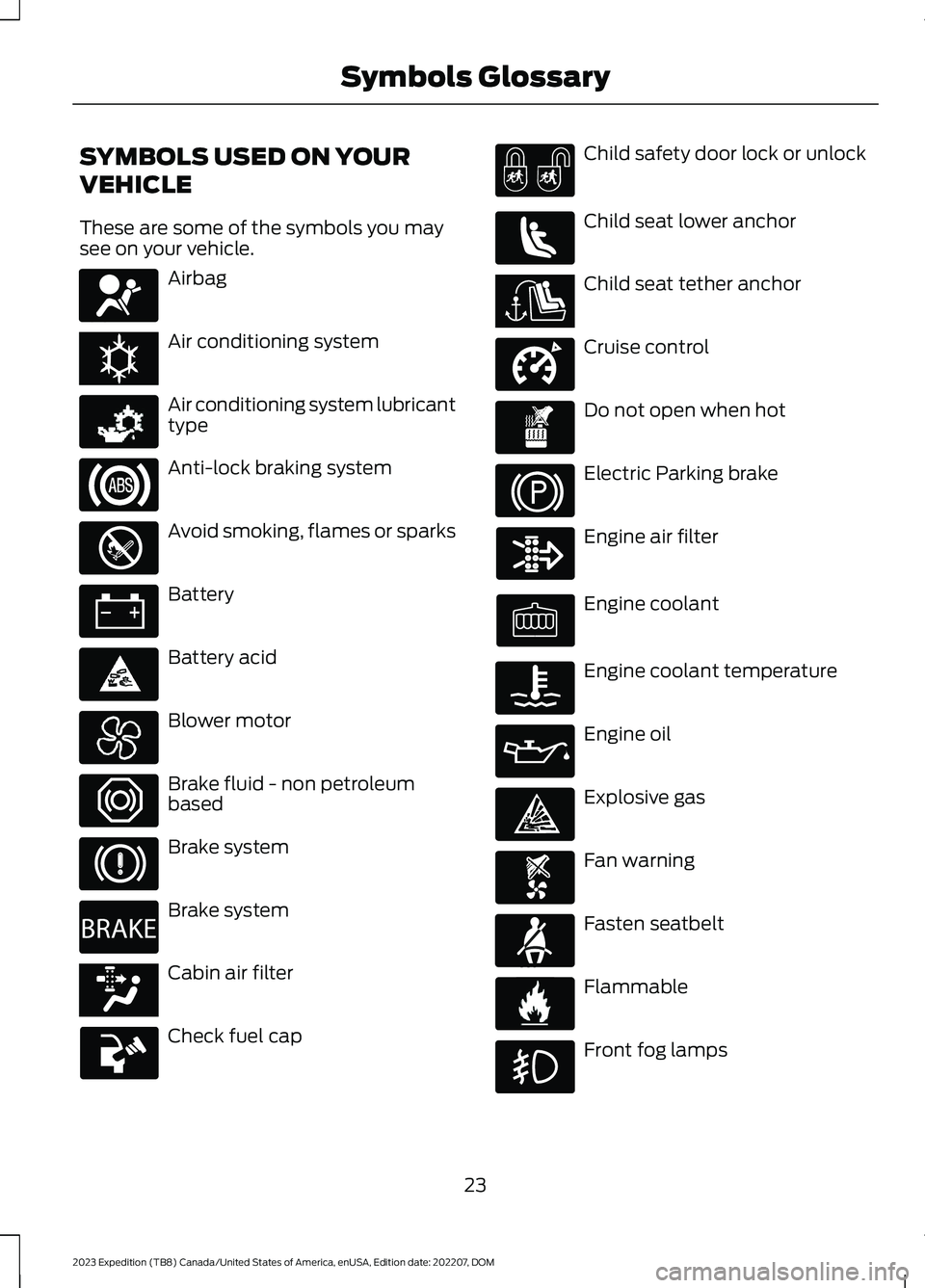
These are some of the symbols you maysee on your vehicle.
Airbag
Air conditioning system
Air conditioning system lubricanttype
Anti-lock braking system
Avoid smoking, flames or sparks
Battery
Battery acid
Blower motor
Brake fluid - non petroleumbased
Brake system
Brake system
Cabin air filter
Check fuel cap
Child safety door lock or unlock
Child seat lower anchor
Child seat tether anchor
Cruise control
Do not open when hot
Electric Parking brake
Engine air filter
Engine coolant
Engine coolant temperature
Engine oil
Explosive gas
Fan warning
Fasten seatbelt
Flammable
Front fog lamps
23
2023 Expedition (TB8) Canada/United States of America, enUSA, Edition date: 202207, DOMSymbols GlossaryE67017 E162384 E231157 E67020 E139220 E67021 E139227 E139209 E67024 E270480 E139223 E139211 E141128 E332905 E139219 E139212 E103308 E67022 E139221 E139228 E71880 E231160
Page 32 of 658
Note:Event data recorder data is recordedby your vehicle only if a non-trivial crashsituation occurs; no data is recorded by theevent data recorder under normal drivingconditions and no personal data orinformation (for example name, gender,age, and crash location) is recorded.However, parties, such as law enforcement,could combine the event data recorder datawith the type of personally identifying dataroutinely acquired during a crashinvestigation.
To read data recorded by an event datarecorder, special equipment is required,and access to the vehicle or the event datarecorder is needed. In addition to thevehicle manufacturer, other parties, suchas law enforcement, that have such specialequipment, can read the information if theyhave access to the vehicle or the eventdata recorder.
BlueCruise Data (If Equipped)
If BlueCruise is active in certain crash ornear crash-like situations, such as anairbag deployment or hitting a roadobstacle, the system may record driverattentiveness, based on the direction ofeyes and duration, and photographs of thedriver seat area.
Note:No data is recorded under normaldriving conditions.
SETTINGS DATA
Your vehicle has electronic control unitsthat have the ability to store data basedon your personalized settings. The data isstored locally in the vehicle or on devicesthat you connect to it, for example, a USBdrive or digital music player. You can deletesome of this data and also choose whetherto share it through the services to whichyou subscribe.
Comfort and Convenience Data
Data recorded includes, for example:
•Seat and steering wheel position.
•Climate control settings.
•Radio presets.
Entertainment Data
Data recorded includes, for example:
•Music, videos or album art.
•Contacts and corresponding addressbook entries.
•Navigation destinations.
CONNECTED VEHICLE DATA
The modem has a SIM. Themodem was enabled when yourvehicle was built and periodicallysends messages to stay connected to thecell phone network, receive automaticsoftware updates and send vehicle-relatedinformation to us, for example diagnosticinformation. These messages couldinclude information that identifies yourvehicle, the SIM and the electronic serialnumber of the modem. Cell phone networkservice providers could have access toadditional information, for example cellphone network tower identification. Foradditional information about our privacypolicy, visit www.FordConnected.com orrefer to your local Ford website.
Note:The modem continues to send thisinformation unless you disable the modemor stop the modem from sharing vehicledata by changing the modem settings. SeeConnected Vehicle (page 475).
Note:The service can be unavailable orinterrupted for a number of reasons, forexample environmental or topographicalconditions and data plan coverage.
Note:To find out if your vehicle has amodem, visit www.FordConnected.com.
28
2023 Expedition (TB8) Canada/United States of America, enUSA, Edition date: 202207, DOMData Privacy
Page 34 of 658
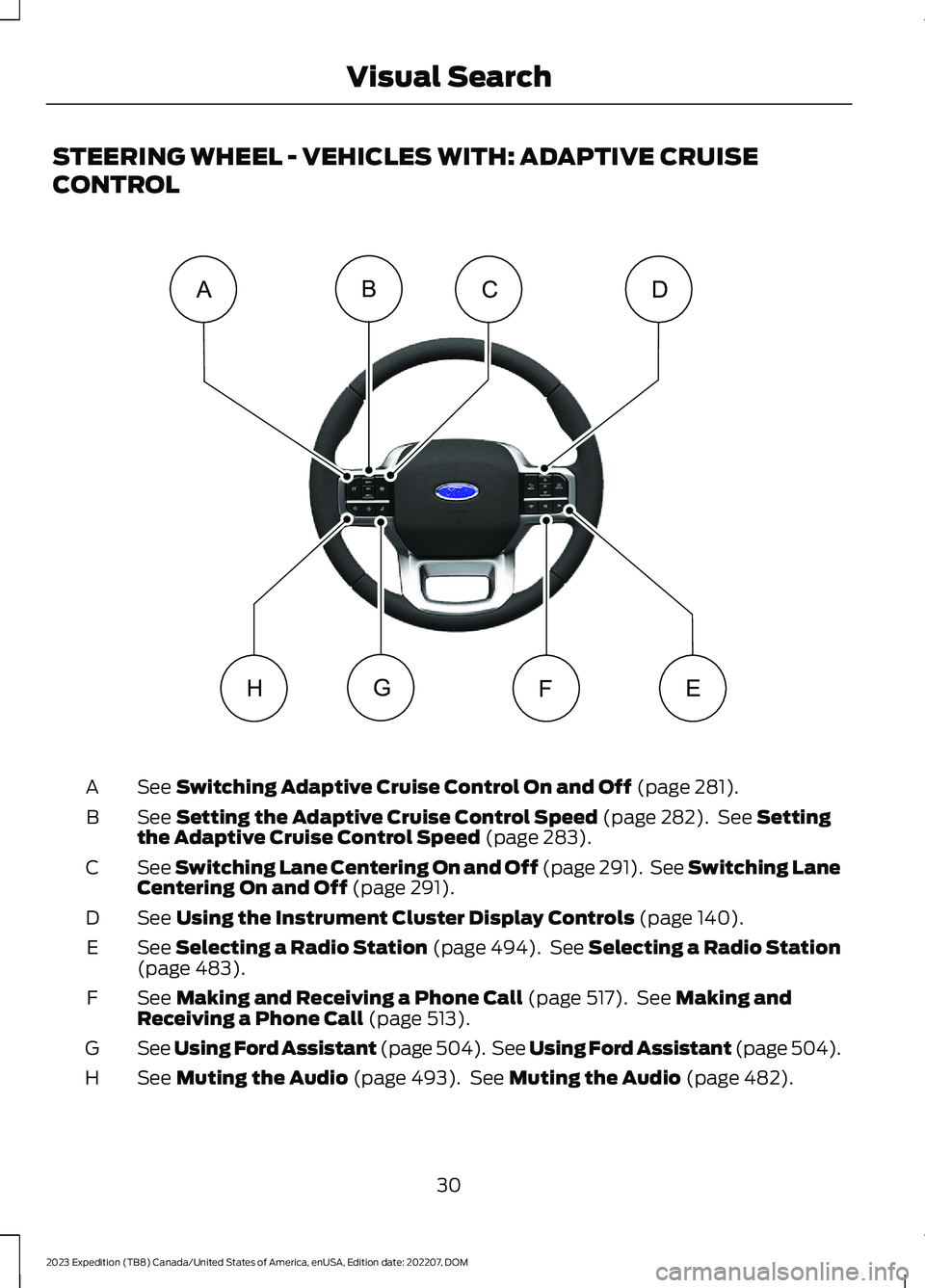
STEERING WHEEL - VEHICLES WITH: ADAPTIVE CRUISE
CONTROL
See Switching Adaptive Cruise Control On and Off (page 281).A
See Setting the Adaptive Cruise Control Speed (page 282). See Settingthe Adaptive Cruise Control Speed (page 283).B
See Switching Lane Centering On and Off (page 291). See Switching LaneCentering On and Off (page 291).C
See Using the Instrument Cluster Display Controls (page 140).D
See Selecting a Radio Station (page 494). See Selecting a Radio Station(page 483).E
See Making and Receiving a Phone Call (page 517). See Making andReceiving a Phone Call (page 513).F
See Using Ford Assistant (page 504). See Using Ford Assistant (page 504).G
See Muting the Audio (page 493). See Muting the Audio (page 482).H
30
2023 Expedition (TB8) Canada/United States of America, enUSA, Edition date: 202207, DOMVisual SearchEFGCABDH E358099
Page 35 of 658
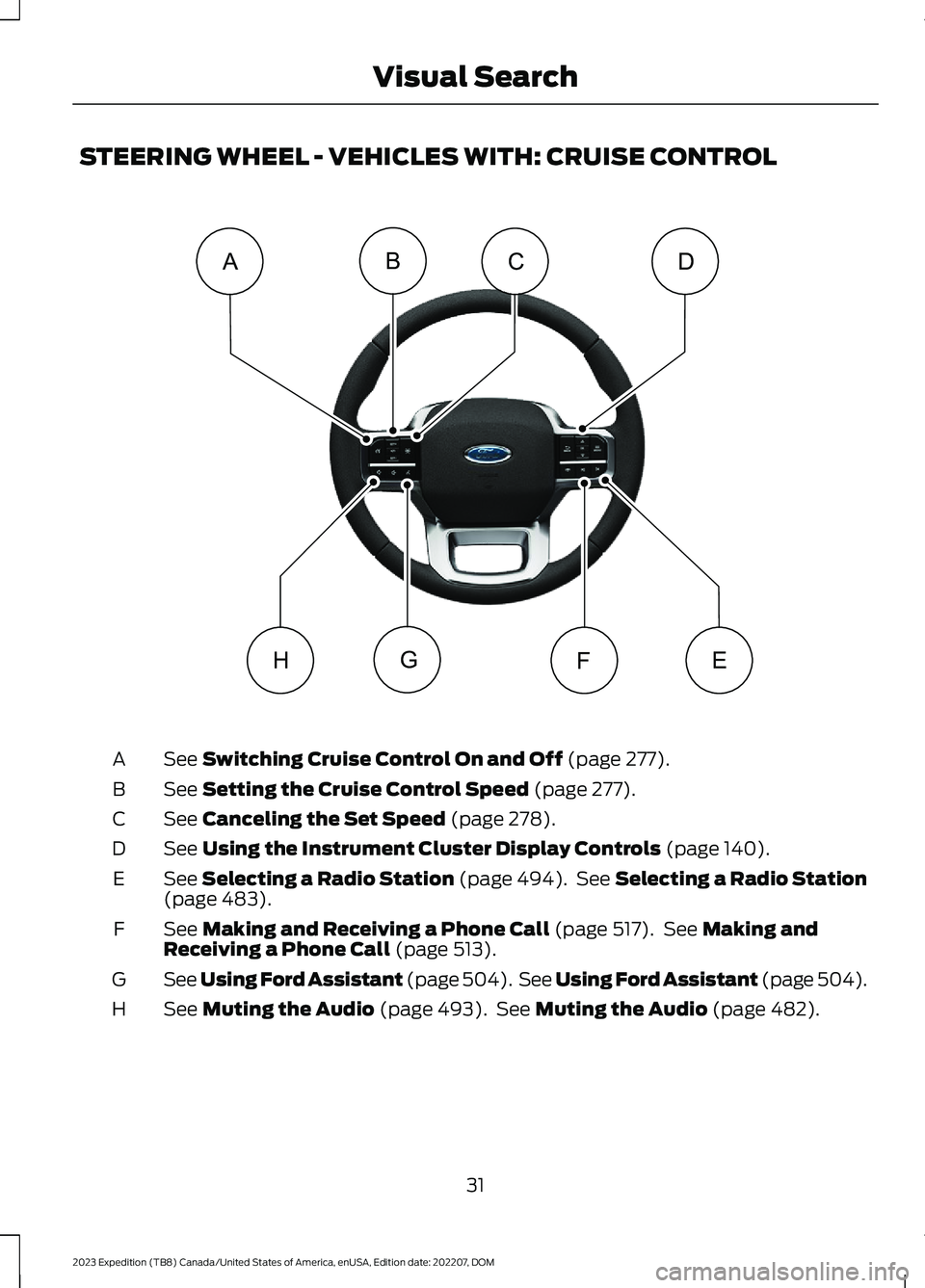
STEERING WHEEL - VEHICLES WITH: CRUISE CONTROL
See Switching Cruise Control On and Off (page 277).A
See Setting the Cruise Control Speed (page 277).B
See Canceling the Set Speed (page 278).C
See Using the Instrument Cluster Display Controls (page 140).D
See Selecting a Radio Station (page 494). See Selecting a Radio Station(page 483).E
See Making and Receiving a Phone Call (page 517). See Making andReceiving a Phone Call (page 513).F
See Using Ford Assistant (page 504). See Using Ford Assistant (page 504).G
See Muting the Audio (page 493). See Muting the Audio (page 482).H
31
2023 Expedition (TB8) Canada/United States of America, enUSA, Edition date: 202207, DOMVisual SearchEFGCABDHE362274
Page 142 of 658
Malfunction Indicator Lamp
Illuminates when the ignition ison and the engine is off, this isnormal. If it illuminates when theengine is on this indicates the emissioncontrol system requires service. If it flashes,have your vehicle checked immediately.See Emission Law (page 621). SeeStarting and Stopping the Engine –Warning Lamps (page 199).
WHAT ARE THE INSTRUMENT
CLUSTER INDICATORS
Indicators notify you of various featuresthat are active on your vehicle.
INSTRUMENT CLUSTER
INDICATORS
Adaptive Cruise Control
See Adaptive Cruise Control(page 279).
Automatic High Beam
See Automatic High BeamControl (page 121).
Auto Hold Active
See Auto Hold (page 243).
Auto Hold Unavailable
See Auto Hold (page 243).
Auto-Start-Stop
See Auto-Start-Stop (page202).
Blind Spot Monitor
See Blind Spot InformationSystem (page 320).
BlueCruise
See BlueCruise (page 297).
Cruise Control
See Cruise Control (page 277).
Electronic Limited Slip Differential
See Electronic Limited-SlipDifferential (page 226).
Four-Wheel Drive
See Four-Wheel Drive (page219).
Note:Some indicators appear differentdepending on vehicle options.
Front Airbag
See Airbags (page 56).
138
2023 Expedition (TB8) Canada/United States of America, enUSA, Edition date: 202207, DOMInstrument ClusterE67028 E144524 E146105 E323448 E323449 E121377 E151262 E297977 E332905 E325779 E181778 E181781 E181780 E181779 E67017
Page 255 of 658
TRAIL ONE PEDAL DRIVEPRECAUTIONS
WARNING: This system is an extradriving aid. It does not replace yourattention and judgment, or the need toapply the brakes. This system does NOTautomatically brake your vehicle. If youfail to press the brake pedal whennecessary, you may collide with anothervehicle.
Shifting into drive (D) or reverse (R) doesnot cause the vehicle to move.
You can press the brake pedal to increasebraking. This does not turn the system off.
Trail one pedal drive could apply theparking brake when your vehicle is notmoving and not in park (P).
Note:Always check the transmissionselection before accelerating.
Note:Only use trail one pedal drive onslippery or loose surfaces. Using trail onepedal drive on dry, hard surfaces couldproduce some vibration, driveline bind upand potential excessive tire and vehiclewear.
TRAIL ONE PEDAL DRIVELIMITATIONS
Trail one pedal drive is unavailable whenany of the following occur:
•Your vehicle is not in four-wheel drivehigh (4H) or four-wheel drive low (4L)modes.
•Using cruise control.
•Using trail control.
•You exceed 30 mph (48 km/h).
Releasing the accelerator pedal may allowyour vehicle to come to a complete stop,some situations may require you to pressthe brake pedal to come to a completestop.
SWITCHING TRAIL ONE PEDALDRIVE ON AND OFF
Switching Trail One Pedal Drive On
Press the trail features buttonwhen in four-wheel drive high orfour-wheel drive low to activatetrail one pedal drive.
Switching Trail One Pedal DriveOff
Press the trail features button again toswitch trail one pedal drive off.
Selecting a driveline mode other thanfour-wheel drive high or four-wheel drivelow switches trail one pedal drive off.
If you exceed 40 mph (65 km/h) trail onepedal drive switches off.
Pressing either button when trailone pedal drive is active turnstrail control on and places trailone pedal drive into standbymode.
Switching from Trail Control toTrail One Pedal Drive
When using trail control infour-wheel drive high orfour-wheel drive low modes, youcan switch to trail one pedal drive bypressing the button on the steering wheel.
251
2023 Expedition (TB8) Canada/United States of America, enUSA, Edition date: 202207, DOMTrail Control (If Equipped)E371768 E246884 E246885 E308130
Page 257 of 658
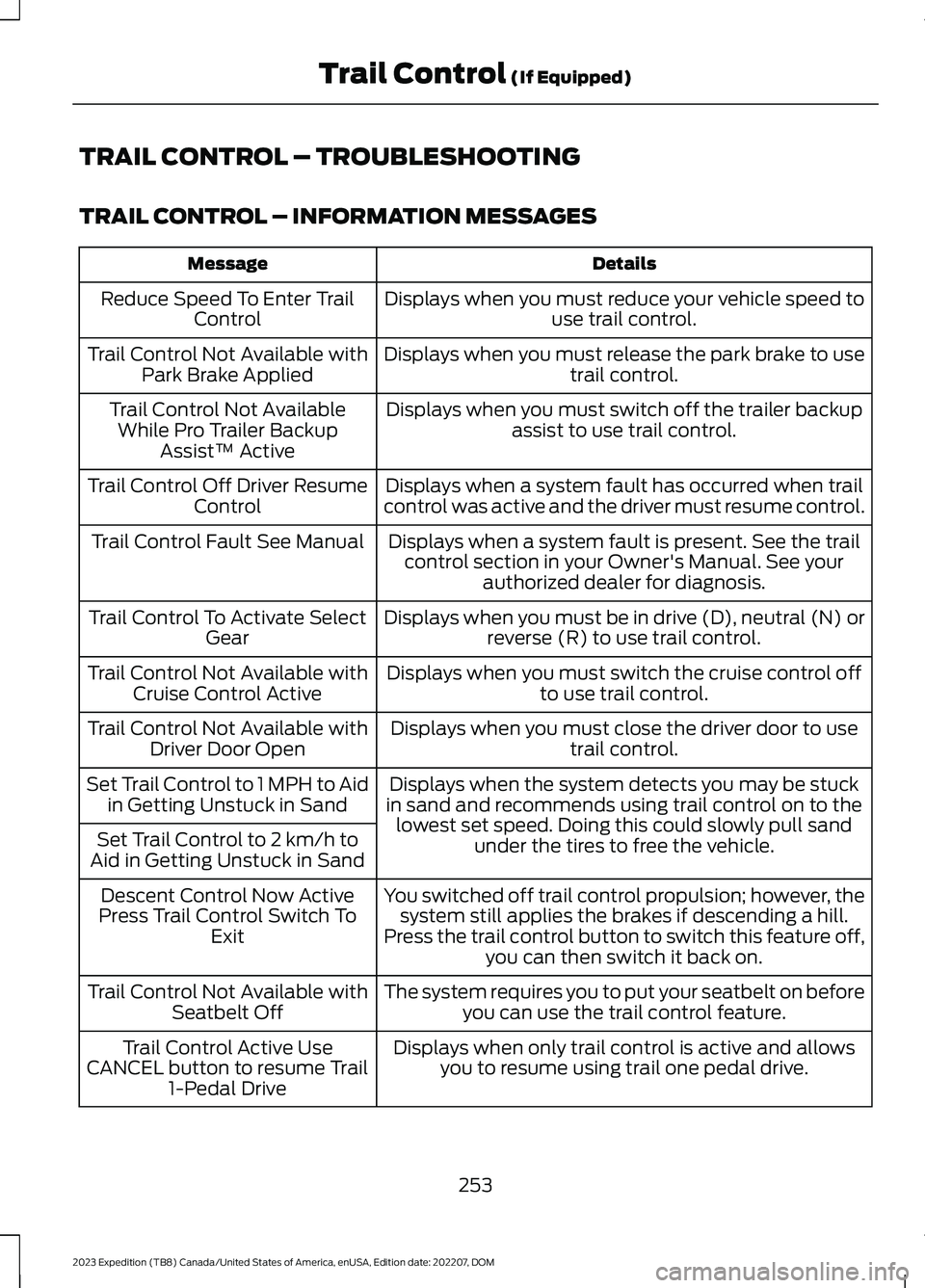
TRAIL CONTROL – TROUBLESHOOTING
TRAIL CONTROL – INFORMATION MESSAGES
DetailsMessage
Displays when you must reduce your vehicle speed touse trail control.Reduce Speed To Enter TrailControl
Displays when you must release the park brake to usetrail control.Trail Control Not Available withPark Brake Applied
Displays when you must switch off the trailer backupassist to use trail control.Trail Control Not AvailableWhile Pro Trailer BackupAssist™ Active
Displays when a system fault has occurred when trailcontrol was active and the driver must resume control.Trail Control Off Driver ResumeControl
Displays when a system fault is present. See the trailcontrol section in your Owner's Manual. See yourauthorized dealer for diagnosis.
Trail Control Fault See Manual
Displays when you must be in drive (D), neutral (N) orreverse (R) to use trail control.Trail Control To Activate SelectGear
Displays when you must switch the cruise control offto use trail control.Trail Control Not Available withCruise Control Active
Displays when you must close the driver door to usetrail control.Trail Control Not Available withDriver Door Open
Displays when the system detects you may be stuckin sand and recommends using trail control on to thelowest set speed. Doing this could slowly pull sandunder the tires to free the vehicle.
Set Trail Control to 1 MPH to Aidin Getting Unstuck in Sand
Set Trail Control to 2 km/h toAid in Getting Unstuck in Sand
You switched off trail control propulsion; however, thesystem still applies the brakes if descending a hill.Press the trail control button to switch this feature off,you can then switch it back on.
Descent Control Now ActivePress Trail Control Switch ToExit
The system requires you to put your seatbelt on beforeyou can use the trail control feature.Trail Control Not Available withSeatbelt Off
Displays when only trail control is active and allowsyou to resume using trail one pedal drive.Trail Control Active UseCANCEL button to resume Trail1-Pedal Drive
253
2023 Expedition (TB8) Canada/United States of America, enUSA, Edition date: 202207, DOMTrail Control (If Equipped)