display FORD EXPEDITION EL 2016 Owners Manual
[x] Cancel search | Manufacturer: FORD, Model Year: 2016, Model line: EXPEDITION EL, Model: FORD EXPEDITION EL 2016Pages: 421, PDF Size: 7.39 MB
Page 349 of 421
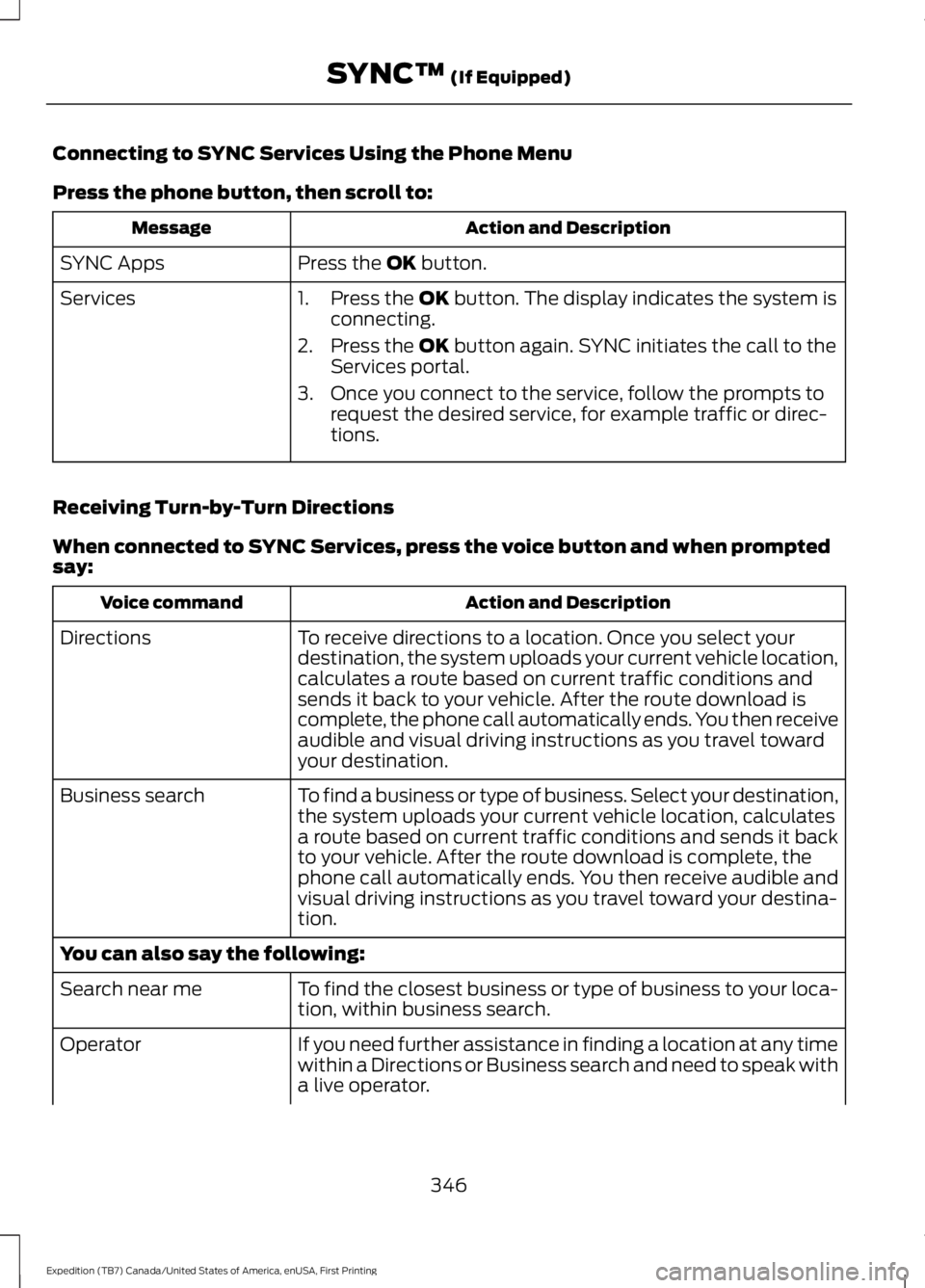
Connecting to SYNC Services Using the Phone Menu
Press the phone button, then scroll to:
Action and DescriptionMessage
Press the OK button.SYNC Apps
Services1. Press the OK button. The display indicates the system isconnecting.
2. Press the OK button again. SYNC initiates the call to theServices portal.
3. Once you connect to the service, follow the prompts torequest the desired service, for example traffic or direc-tions.
Receiving Turn-by-Turn Directions
When connected to SYNC Services, press the voice button and when promptedsay:
Action and DescriptionVoice command
To receive directions to a location. Once you select yourdestination, the system uploads your current vehicle location,calculates a route based on current traffic conditions andsends it back to your vehicle. After the route download iscomplete, the phone call automatically ends. You then receiveaudible and visual driving instructions as you travel towardyour destination.
Directions
To find a business or type of business. Select your destination,the system uploads your current vehicle location, calculatesa route based on current traffic conditions and sends it backto your vehicle. After the route download is complete, thephone call automatically ends. You then receive audible andvisual driving instructions as you travel toward your destina-tion.
Business search
You can also say the following:
To find the closest business or type of business to your loca-tion, within business search.Search near me
If you need further assistance in finding a location at any timewithin a Directions or Business search and need to speak witha live operator.
Operator
346
Expedition (TB7) Canada/United States of America, enUSA, First Printing
SYNC™ (If Equipped)
Page 351 of 421
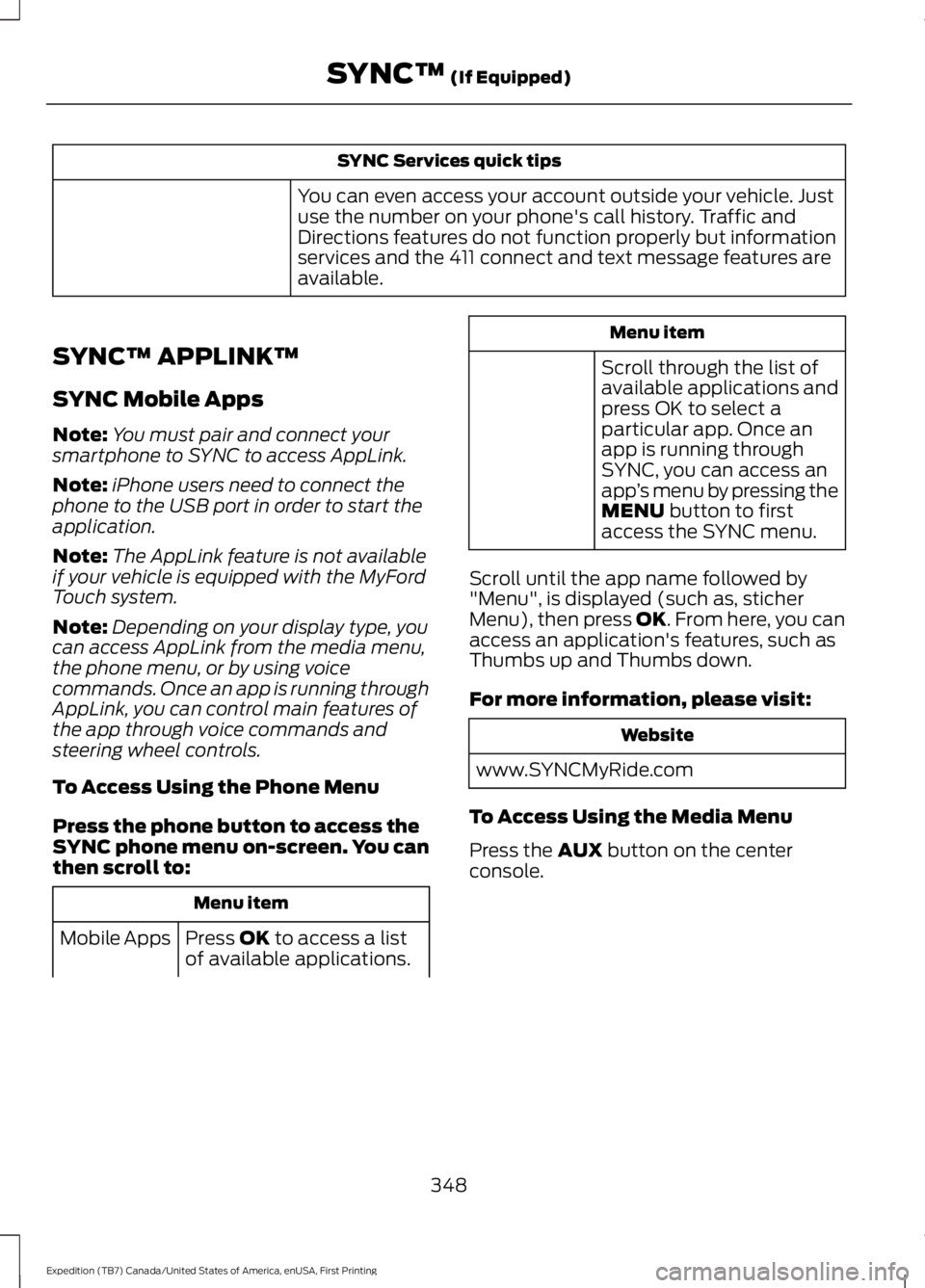
SYNC Services quick tips
You can even access your account outside your vehicle. Justuse the number on your phone's call history. Traffic andDirections features do not function properly but informationservices and the 411 connect and text message features areavailable.
SYNC™ APPLINK™
SYNC Mobile Apps
Note:You must pair and connect yoursmartphone to SYNC to access AppLink.
Note:iPhone users need to connect thephone to the USB port in order to start theapplication.
Note:The AppLink feature is not availableif your vehicle is equipped with the MyFordTouch system.
Note:Depending on your display type, youcan access AppLink from the media menu,the phone menu, or by using voicecommands. Once an app is running throughAppLink, you can control main features ofthe app through voice commands andsteering wheel controls.
To Access Using the Phone Menu
Press the phone button to access theSYNC phone menu on-screen. You canthen scroll to:
Menu item
Press OK to access a listof available applications.Mobile Apps
Menu item
Scroll through the list ofavailable applications andpress OK to select aparticular app. Once anapp is running throughSYNC, you can access anapp’s menu by pressing theMENU button to firstaccess the SYNC menu.
Scroll until the app name followed by"Menu", is displayed (such as, sticherMenu), then press OK. From here, you canaccess an application's features, such asThumbs up and Thumbs down.
For more information, please visit:
Website
www.SYNCMyRide.com
To Access Using the Media Menu
Press the AUX button on the centerconsole.
348
Expedition (TB7) Canada/United States of America, enUSA, First Printing
SYNC™ (If Equipped)
Page 352 of 421
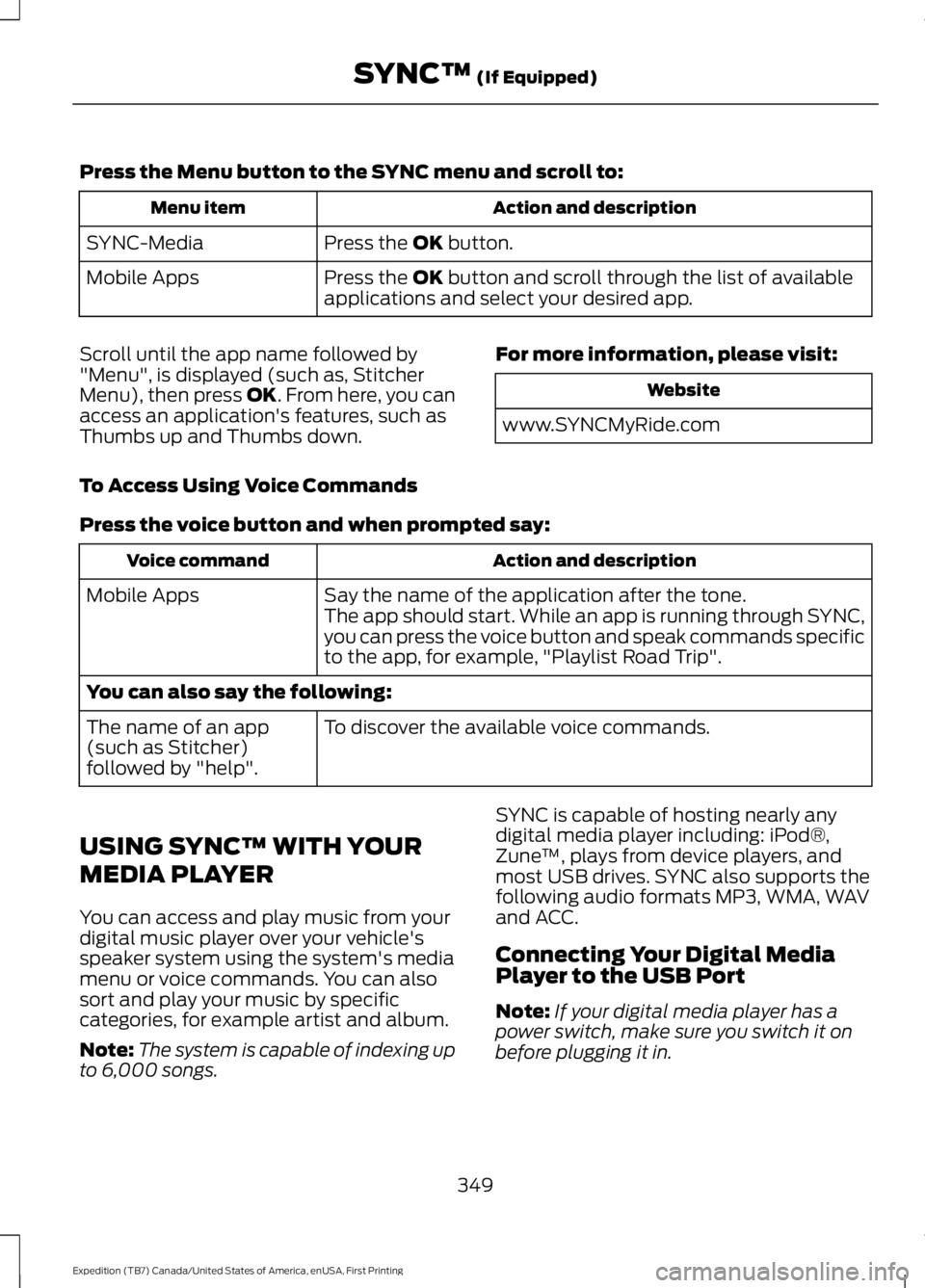
Press the Menu button to the SYNC menu and scroll to:
Action and descriptionMenu item
Press the OK button.SYNC-Media
Press the OK button and scroll through the list of availableapplications and select your desired app.Mobile Apps
Scroll until the app name followed by"Menu", is displayed (such as, StitcherMenu), then press OK. From here, you canaccess an application's features, such asThumbs up and Thumbs down.
For more information, please visit:
Website
www.SYNCMyRide.com
To Access Using Voice Commands
Press the voice button and when prompted say:
Action and descriptionVoice command
Say the name of the application after the tone.The app should start. While an app is running through SYNC,you can press the voice button and speak commands specificto the app, for example, "Playlist Road Trip".
Mobile Apps
You can also say the following:
To discover the available voice commands.The name of an app(such as Stitcher)followed by "help".
USING SYNC™ WITH YOUR
MEDIA PLAYER
You can access and play music from yourdigital music player over your vehicle'sspeaker system using the system's mediamenu or voice commands. You can alsosort and play your music by specificcategories, for example artist and album.
Note:The system is capable of indexing upto 6,000 songs.
SYNC is capable of hosting nearly anydigital media player including: iPod®,Zune™, plays from device players, andmost USB drives. SYNC also supports thefollowing audio formats MP3, WMA, WAVand ACC.
Connecting Your Digital MediaPlayer to the USB Port
Note:If your digital media player has apower switch, make sure you switch it onbefore plugging it in.
349
Expedition (TB7) Canada/United States of America, enUSA, First Printing
SYNC™ (If Equipped)
Page 353 of 421
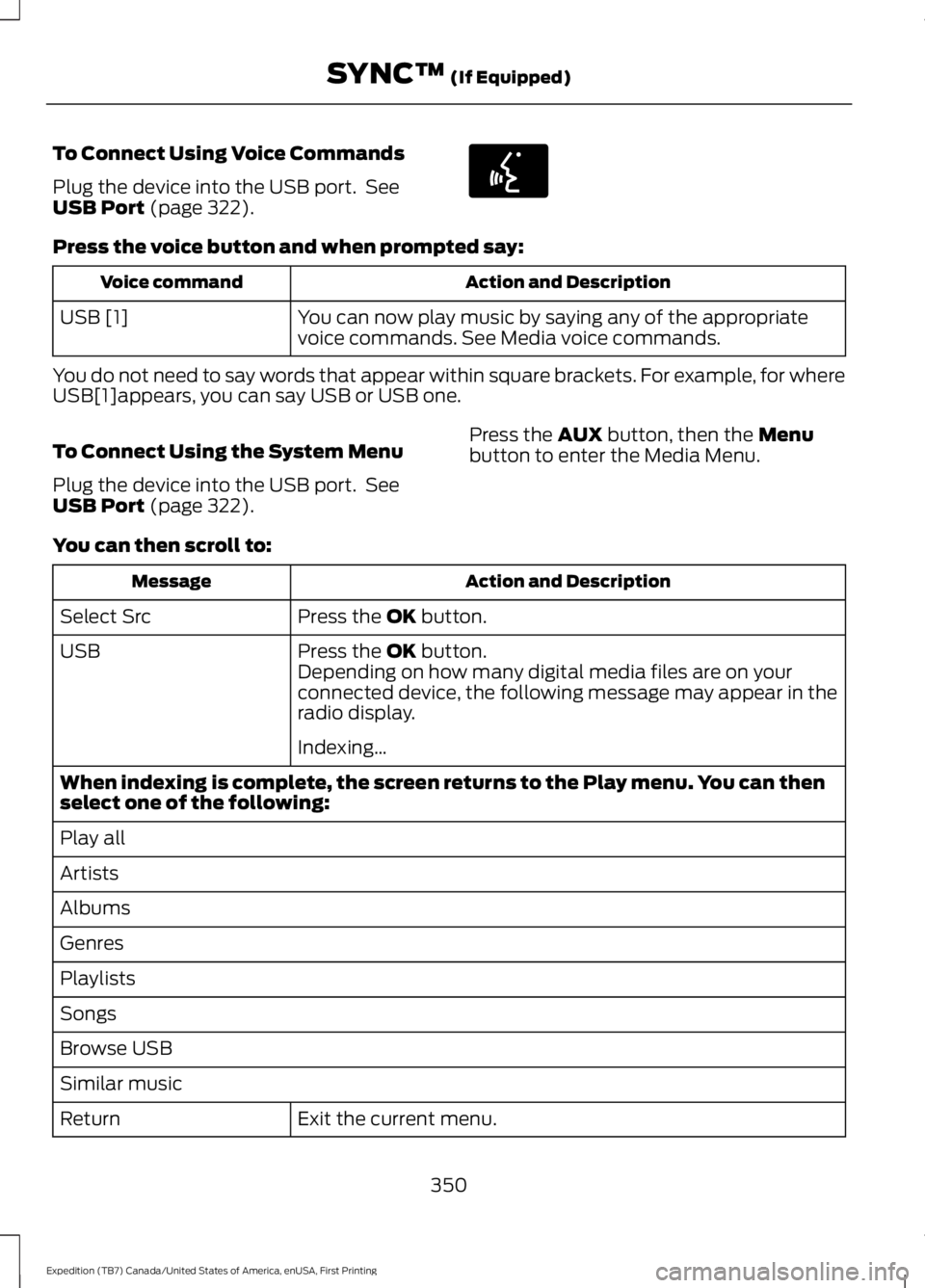
To Connect Using Voice Commands
Plug the device into the USB port. SeeUSB Port (page 322).
Press the voice button and when prompted say:
Action and DescriptionVoice command
You can now play music by saying any of the appropriatevoice commands. See Media voice commands.USB [1]
You do not need to say words that appear within square brackets. For example, for whereUSB[1]appears, you can say USB or USB one.
To Connect Using the System Menu
Plug the device into the USB port. SeeUSB Port (page 322).
Press the AUX button, then the Menubutton to enter the Media Menu.
You can then scroll to:
Action and DescriptionMessage
Press the OK button.Select Src
Press the OK button.USBDepending on how many digital media files are on yourconnected device, the following message may appear in theradio display.
Indexing…
When indexing is complete, the screen returns to the Play menu. You can thenselect one of the following:
Play all
Artists
Albums
Genres
Playlists
Songs
Browse USB
Similar music
Exit the current menu.Return
350
Expedition (TB7) Canada/United States of America, enUSA, First Printing
SYNC™ (If Equipped)E142599
Page 357 of 421
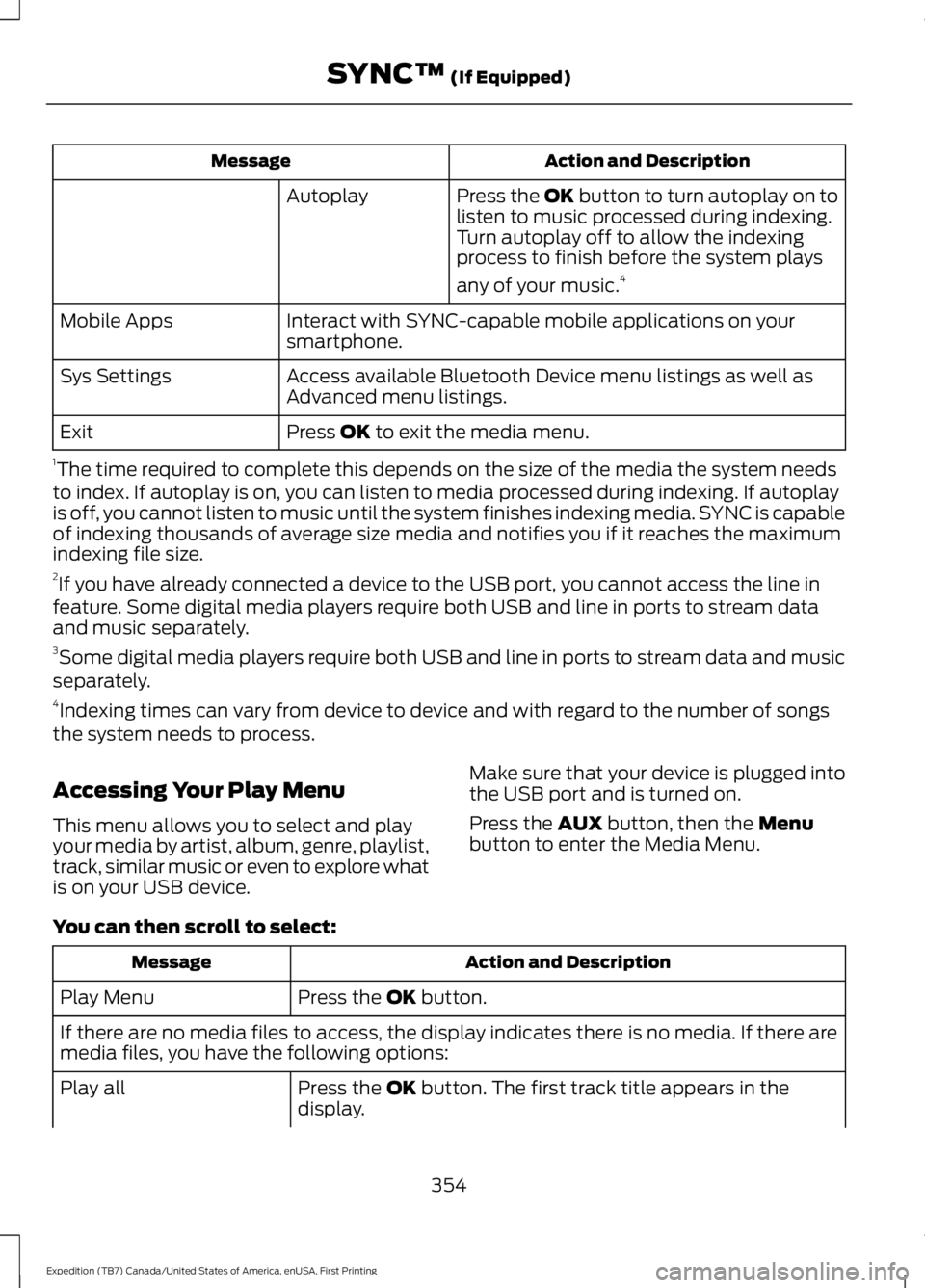
Action and DescriptionMessage
Press the OK button to turn autoplay on tolisten to music processed during indexing.Turn autoplay off to allow the indexingprocess to finish before the system plays
any of your music.4
Autoplay
Interact with SYNC-capable mobile applications on yoursmartphone.Mobile Apps
Access available Bluetooth Device menu listings as well asAdvanced menu listings.Sys Settings
Press OK to exit the media menu.Exit
1The time required to complete this depends on the size of the media the system needsto index. If autoplay is on, you can listen to media processed during indexing. If autoplayis off, you cannot listen to music until the system finishes indexing media. SYNC is capableof indexing thousands of average size media and notifies you if it reaches the maximumindexing file size.2If you have already connected a device to the USB port, you cannot access the line infeature. Some digital media players require both USB and line in ports to stream dataand music separately.3Some digital media players require both USB and line in ports to stream data and musicseparately.4Indexing times can vary from device to device and with regard to the number of songsthe system needs to process.
Accessing Your Play Menu
This menu allows you to select and playyour media by artist, album, genre, playlist,track, similar music or even to explore whatis on your USB device.
Make sure that your device is plugged intothe USB port and is turned on.
Press the AUX button, then the Menubutton to enter the Media Menu.
You can then scroll to select:
Action and DescriptionMessage
Press the OK button.Play Menu
If there are no media files to access, the display indicates there is no media. If there aremedia files, you have the following options:
Press the OK button. The first track title appears in thedisplay.Play all
354
Expedition (TB7) Canada/United States of America, enUSA, First Printing
SYNC™ (If Equipped)
Page 360 of 421
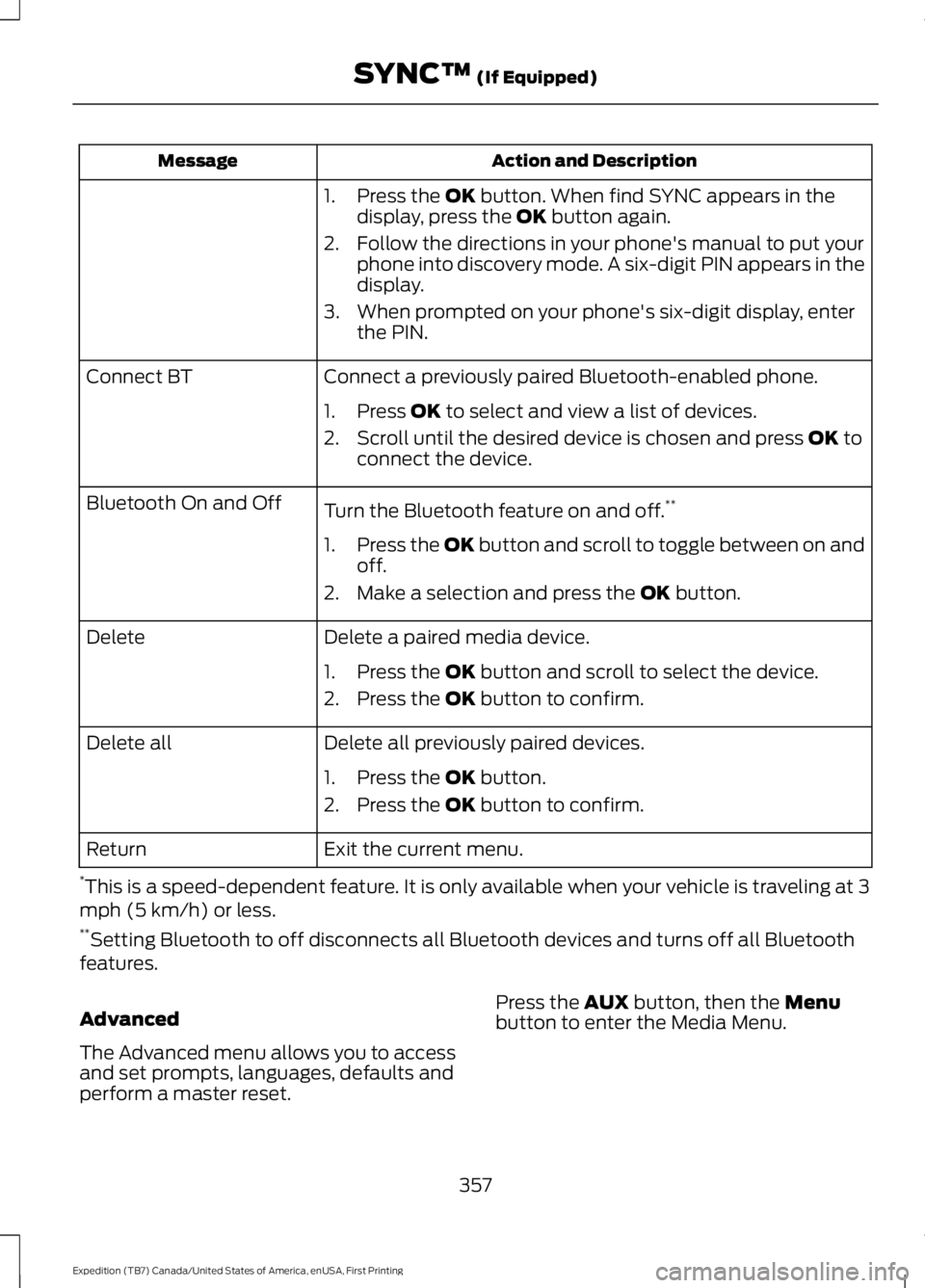
Action and DescriptionMessage
1. Press the OK button. When find SYNC appears in thedisplay, press the OK button again.
2. Follow the directions in your phone's manual to put yourphone into discovery mode. A six-digit PIN appears in thedisplay.
3. When prompted on your phone's six-digit display, enterthe PIN.
Connect a previously paired Bluetooth-enabled phone.Connect BT
1. Press OK to select and view a list of devices.
2. Scroll until the desired device is chosen and press OK toconnect the device.
Turn the Bluetooth feature on and off.**Bluetooth On and Off
1.Press the OK button and scroll to toggle between on andoff.
2. Make a selection and press the OK button.
Delete a paired media device.Delete
1. Press the OK button and scroll to select the device.
2. Press the OK button to confirm.
Delete all previously paired devices.Delete all
1. Press the OK button.
2. Press the OK button to confirm.
Exit the current menu.Return
*This is a speed-dependent feature. It is only available when your vehicle is traveling at 3mph (5 km/h) or less.**Setting Bluetooth to off disconnects all Bluetooth devices and turns off all Bluetoothfeatures.
Advanced
The Advanced menu allows you to accessand set prompts, languages, defaults andperform a master reset.
Press the AUX button, then the Menubutton to enter the Media Menu.
357
Expedition (TB7) Canada/United States of America, enUSA, First Printing
SYNC™ (If Equipped)
Page 361 of 421
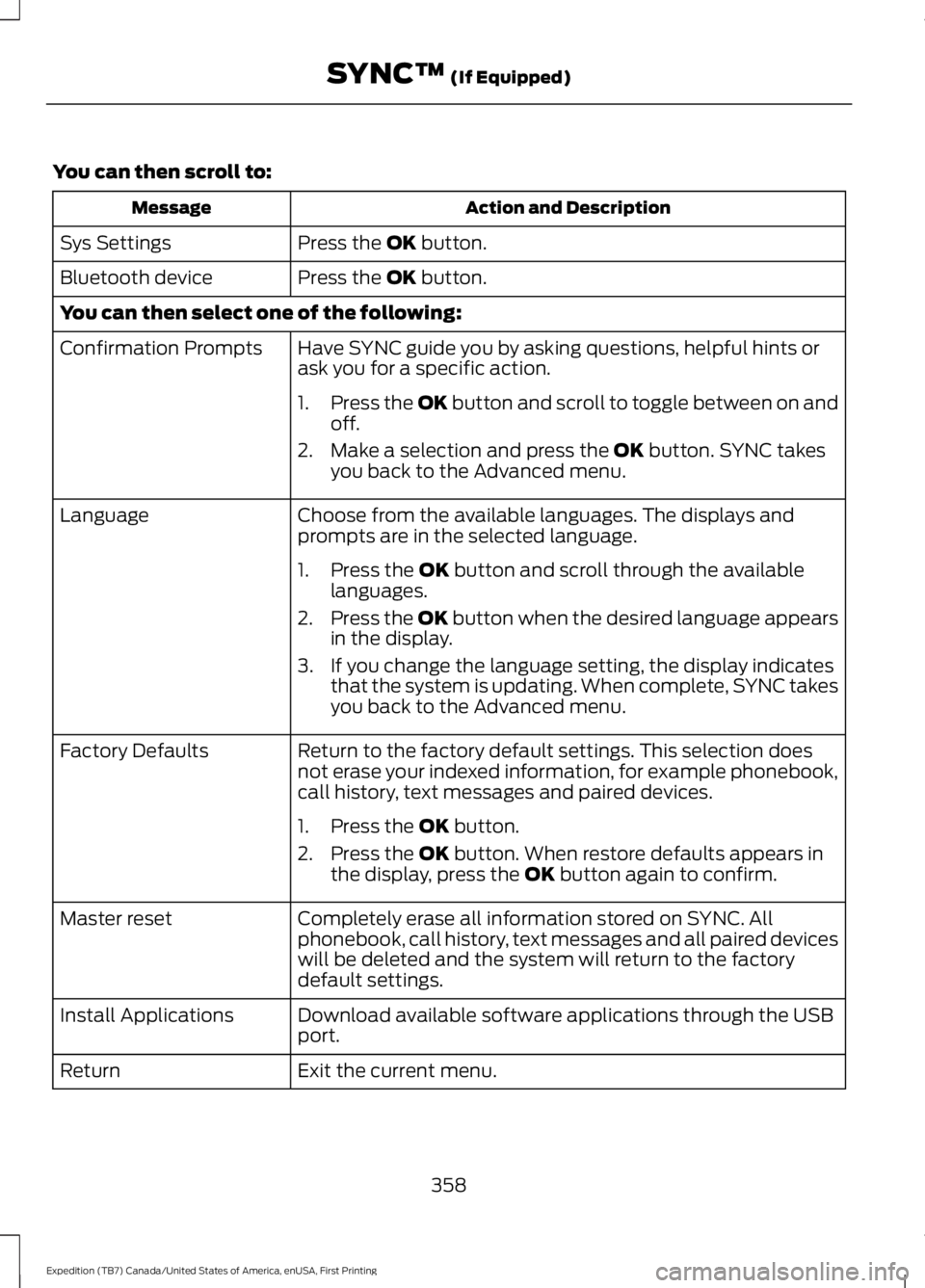
You can then scroll to:
Action and DescriptionMessage
Press the OK button.Sys Settings
Press the OK button.Bluetooth device
You can then select one of the following:
Have SYNC guide you by asking questions, helpful hints orask you for a specific action.Confirmation Prompts
1.Press the OK button and scroll to toggle between on andoff.
2. Make a selection and press the OK button. SYNC takesyou back to the Advanced menu.
Choose from the available languages. The displays andprompts are in the selected language.Language
1. Press the OK button and scroll through the availablelanguages.
2.Press the OK button when the desired language appearsin the display.
3. If you change the language setting, the display indicatesthat the system is updating. When complete, SYNC takesyou back to the Advanced menu.
Return to the factory default settings. This selection doesnot erase your indexed information, for example phonebook,call history, text messages and paired devices.
Factory Defaults
1. Press the OK button.
2. Press the OK button. When restore defaults appears inthe display, press the OK button again to confirm.
Completely erase all information stored on SYNC. Allphonebook, call history, text messages and all paired deviceswill be deleted and the system will return to the factorydefault settings.
Master reset
Download available software applications through the USBport.Install Applications
Exit the current menu.Return
358
Expedition (TB7) Canada/United States of America, enUSA, First Printing
SYNC™ (If Equipped)
Page 375 of 421
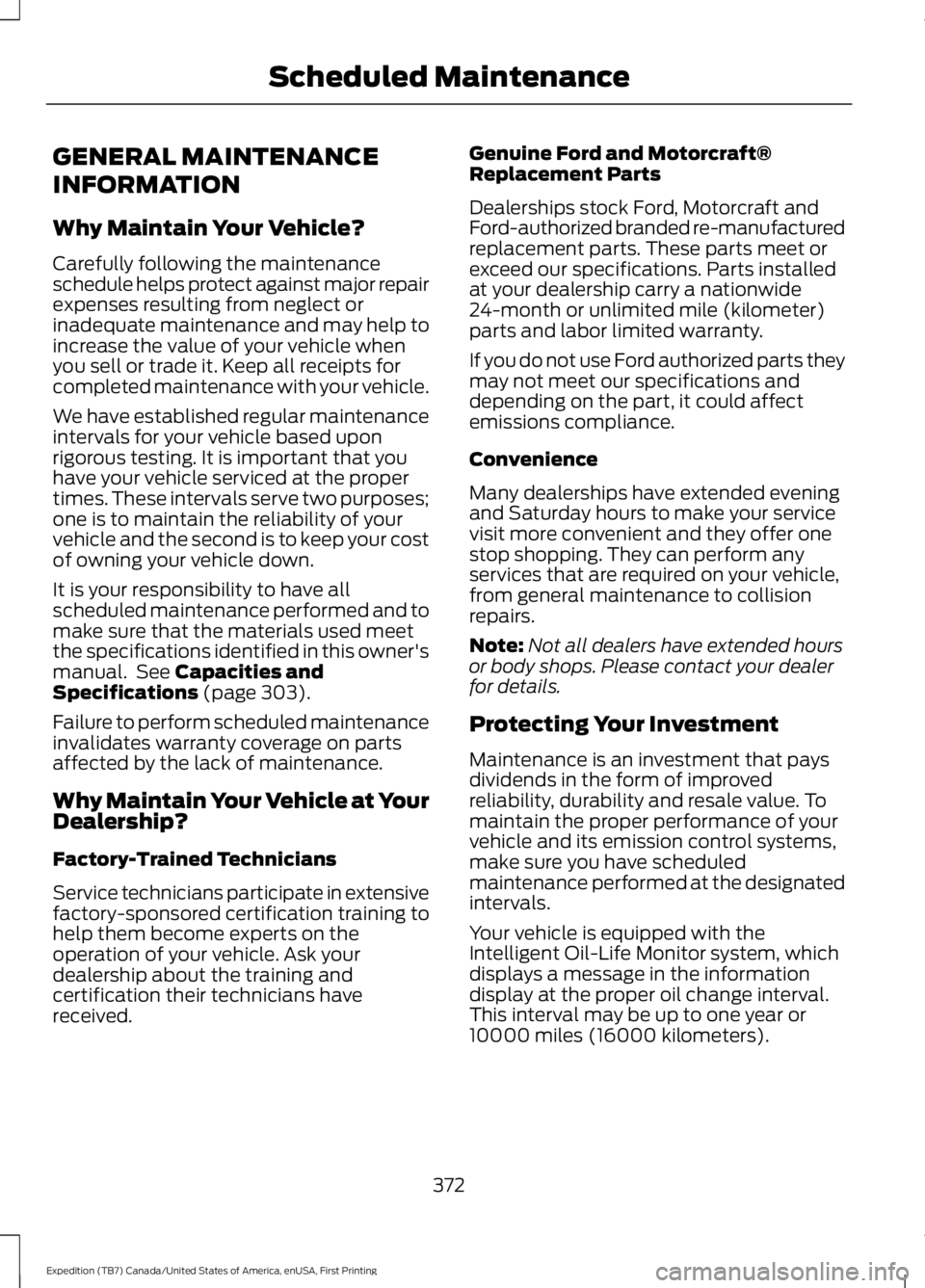
GENERAL MAINTENANCE
INFORMATION
Why Maintain Your Vehicle?
Carefully following the maintenanceschedule helps protect against major repairexpenses resulting from neglect orinadequate maintenance and may help toincrease the value of your vehicle whenyou sell or trade it. Keep all receipts forcompleted maintenance with your vehicle.
We have established regular maintenanceintervals for your vehicle based uponrigorous testing. It is important that youhave your vehicle serviced at the propertimes. These intervals serve two purposes;one is to maintain the reliability of yourvehicle and the second is to keep your costof owning your vehicle down.
It is your responsibility to have allscheduled maintenance performed and tomake sure that the materials used meetthe specifications identified in this owner'smanual. See Capacities andSpecifications (page 303).
Failure to perform scheduled maintenanceinvalidates warranty coverage on partsaffected by the lack of maintenance.
Why Maintain Your Vehicle at YourDealership?
Factory-Trained Technicians
Service technicians participate in extensivefactory-sponsored certification training tohelp them become experts on theoperation of your vehicle. Ask yourdealership about the training andcertification their technicians havereceived.
Genuine Ford and Motorcraft®Replacement Parts
Dealerships stock Ford, Motorcraft andFord-authorized branded re-manufacturedreplacement parts. These parts meet orexceed our specifications. Parts installedat your dealership carry a nationwide24-month or unlimited mile (kilometer)parts and labor limited warranty.
If you do not use Ford authorized parts theymay not meet our specifications anddepending on the part, it could affectemissions compliance.
Convenience
Many dealerships have extended eveningand Saturday hours to make your servicevisit more convenient and they offer onestop shopping. They can perform anyservices that are required on your vehicle,from general maintenance to collisionrepairs.
Note:Not all dealers have extended hoursor body shops. Please contact your dealerfor details.
Protecting Your Investment
Maintenance is an investment that paysdividends in the form of improvedreliability, durability and resale value. Tomaintain the proper performance of yourvehicle and its emission control systems,make sure you have scheduledmaintenance performed at the designatedintervals.
Your vehicle is equipped with theIntelligent Oil-Life Monitor system, whichdisplays a message in the informationdisplay at the proper oil change interval.This interval may be up to one year or10000 miles (16000 kilometers).
372
Expedition (TB7) Canada/United States of America, enUSA, First Printing
Scheduled Maintenance
Page 376 of 421
When the oil change message appears inthe information display, it is time for an oilchange. Make sure you perform the oilchange within two weeks or 500 miles(800 kilometers) of the messageappearing. Make sure you reset theIntelligent Oil-Life Monitor after each oilchange. See Oil Change Indicator Reset(page 246).
If your information display resetsprematurely or becomes inoperative, youshould perform the oil change interval atsix months or 5000 miles (8000kilometers) from your last oil change.Never exceed one year or 10000 miles(16000 kilometers) between oil changeintervals.
Your vehicle is very sophisticated and builtwith multiple, complex, performancesystems. Every manufacturer developsthese systems using differentspecifications and performance features.That is why it is important to rely upon yourdealership to properly diagnose and repairyour vehicle.
Ford Motor Company has recommendedmaintenance intervals for various partsand component systems based uponengineering testing. Ford Motor Companyrelies upon this testing to determine themost appropriate mileage for replacementof oils and fluids to protect your vehicle atthe lowest overall cost to you andrecommends against maintenanceschedules that deviate from the scheduledmaintenance information.
We strongly recommend the use of onlygenuine Ford, Motorcraft orFord-authorized re-manufacturedreplacement parts engineered for yourvehicle.
Additives and Chemicals
This owner's manual and the FordWorkshop Manual list the recommendedadditives and chemicals for your vehicle.We do not recommend using chemicals oradditives not approved by us as part ofyour vehicle’s normal maintenance. Pleaseconsult your warranty information.
Oils, Fluids and Flushing
In many cases, fluid discoloration is anormal operating characteristic and, byitself, does not necessarily indicate aconcern or that the fluid needs to bechanged. However, a qualified expert, suchas the factory-trained technicians at yourdealership, should inspect discolored fluidsthat also show signs of overheating orforeign material contaminationimmediately.
Make sure to change your vehicle’s oils andfluids at the specified intervals or inconjunction with a repair. Flushing is aviable way to change fluid for many vehiclesub-systems during scheduledmaintenance. It is critical that systems areflushed only with new fluid that is the sameas that required to fill and operate thesystem or using a Ford-approved flushingchemical.
Owner Checks and Services
Make sure you perform the following basicmaintenance checks and inspections everymonth or at six-month intervals.
373
Expedition (TB7) Canada/United States of America, enUSA, First Printing
Scheduled Maintenance
Page 378 of 421
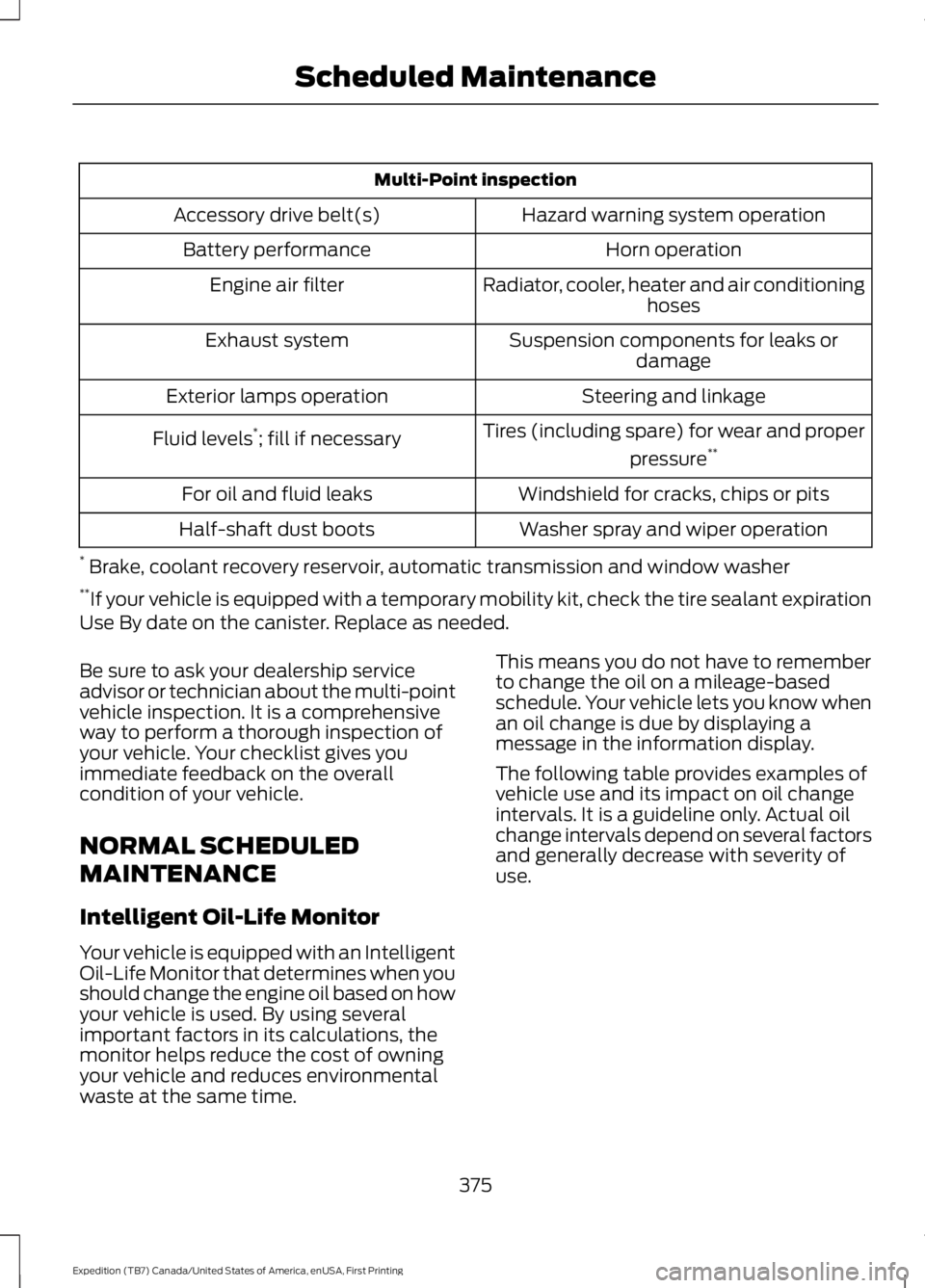
Multi-Point inspection
Hazard warning system operationAccessory drive belt(s)
Horn operationBattery performance
Radiator, cooler, heater and air conditioninghosesEngine air filter
Suspension components for leaks ordamageExhaust system
Steering and linkageExterior lamps operation
Tires (including spare) for wear and proper
pressure**Fluid levels*; fill if necessary
Windshield for cracks, chips or pitsFor oil and fluid leaks
Washer spray and wiper operationHalf-shaft dust boots
* Brake, coolant recovery reservoir, automatic transmission and window washer**If your vehicle is equipped with a temporary mobility kit, check the tire sealant expirationUse By date on the canister. Replace as needed.
Be sure to ask your dealership serviceadvisor or technician about the multi-pointvehicle inspection. It is a comprehensiveway to perform a thorough inspection ofyour vehicle. Your checklist gives youimmediate feedback on the overallcondition of your vehicle.
NORMAL SCHEDULED
MAINTENANCE
Intelligent Oil-Life Monitor
Your vehicle is equipped with an IntelligentOil-Life Monitor that determines when youshould change the engine oil based on howyour vehicle is used. By using severalimportant factors in its calculations, themonitor helps reduce the cost of owningyour vehicle and reduces environmentalwaste at the same time.
This means you do not have to rememberto change the oil on a mileage-basedschedule. Your vehicle lets you know whenan oil change is due by displaying amessage in the information display.
The following table provides examples ofvehicle use and its impact on oil changeintervals. It is a guideline only. Actual oilchange intervals depend on several factorsand generally decrease with severity ofuse.
375
Expedition (TB7) Canada/United States of America, enUSA, First Printing
Scheduled Maintenance