door lock FORD EXPEDITION EL 2016 Owner's Manual
[x] Cancel search | Manufacturer: FORD, Model Year: 2016, Model line: EXPEDITION EL, Model: FORD EXPEDITION EL 2016Pages: 421, PDF Size: 7.39 MB
Page 97 of 421
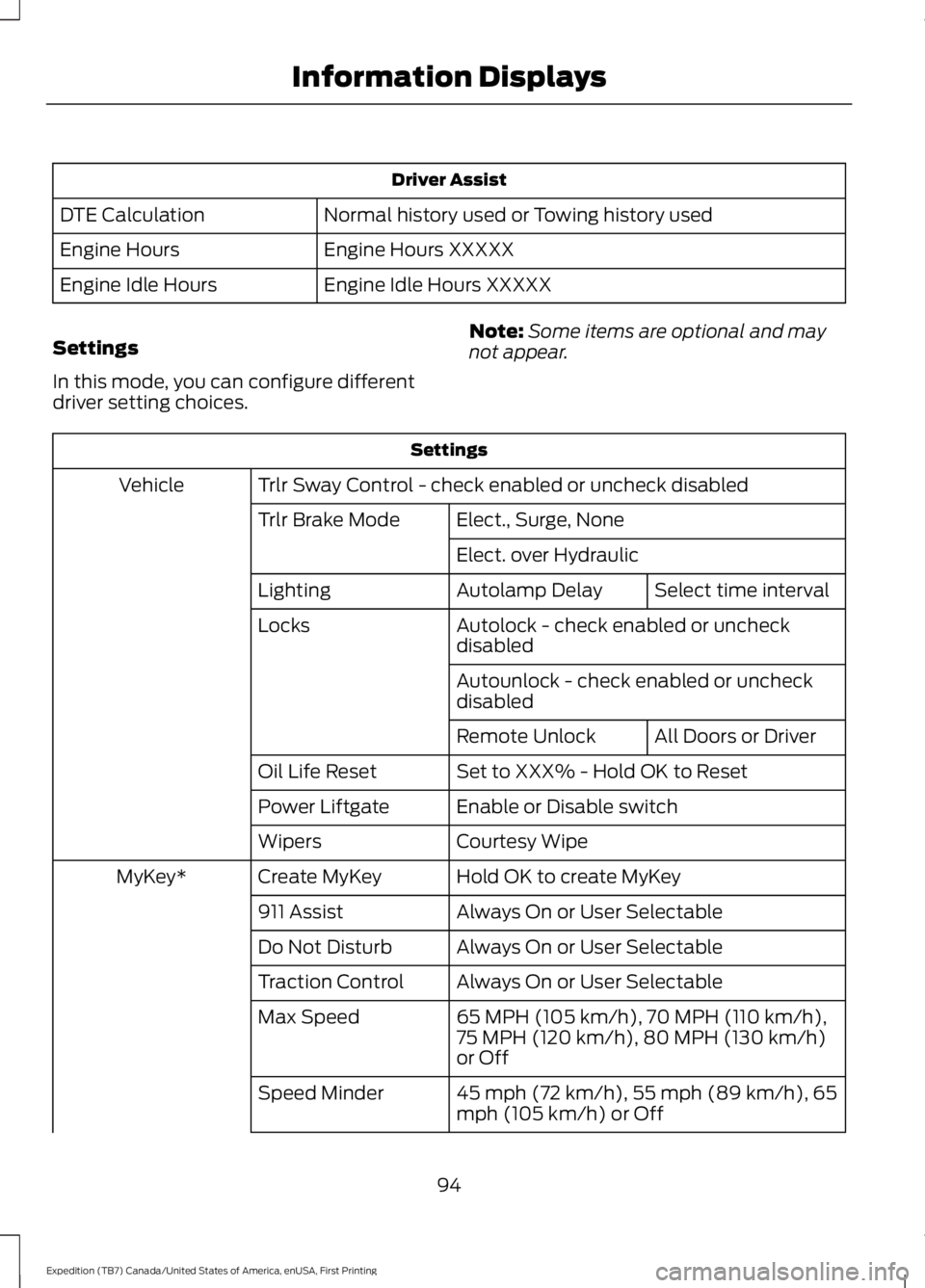
Driver Assist
Normal history used or Towing history usedDTE Calculation
Engine Hours XXXXXEngine Hours
Engine Idle Hours XXXXXEngine Idle Hours
Settings
In this mode, you can configure differentdriver setting choices.
Note:Some items are optional and maynot appear.
Settings
Trlr Sway Control - check enabled or uncheck disabledVehicle
Elect., Surge, NoneTrlr Brake Mode
Elect. over Hydraulic
Select time intervalAutolamp DelayLighting
Autolock - check enabled or uncheckdisabledLocks
Autounlock - check enabled or uncheckdisabled
All Doors or DriverRemote Unlock
Set to XXX% - Hold OK to ResetOil Life Reset
Enable or Disable switchPower Liftgate
Courtesy WipeWipers
Hold OK to create MyKeyCreate MyKeyMyKey*
Always On or User Selectable911 Assist
Always On or User SelectableDo Not Disturb
Always On or User SelectableTraction Control
65 MPH (105 km/h), 70 MPH (110 km/h),75 MPH (120 km/h), 80 MPH (130 km/h)or Off
Max Speed
45 mph (72 km/h), 55 mph (89 km/h), 65mph (105 km/h) or OffSpeed Minder
94
Expedition (TB7) Canada/United States of America, enUSA, First Printing
Information Displays
Page 101 of 421
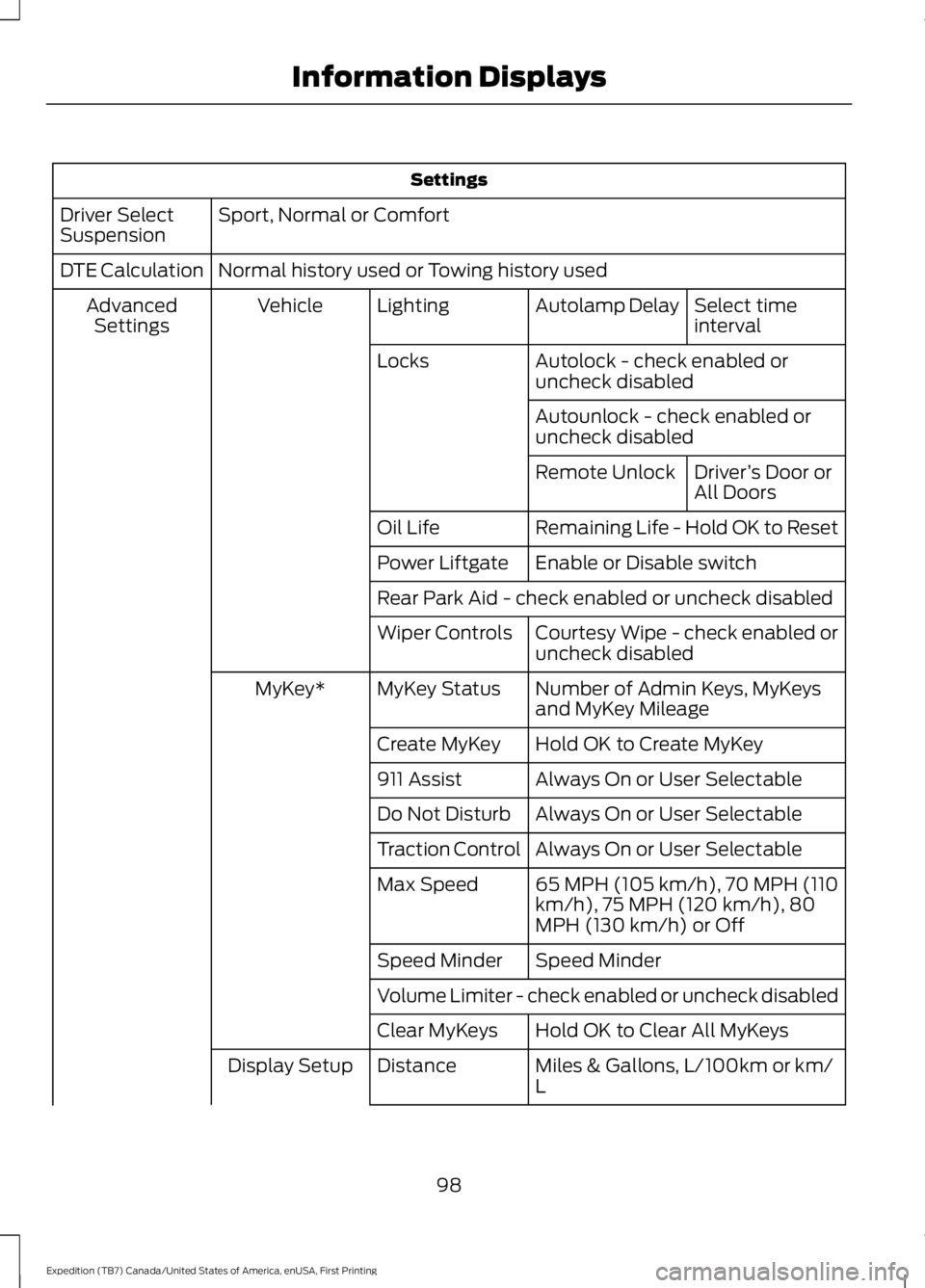
Settings
Sport, Normal or ComfortDriver SelectSuspension
Normal history used or Towing history usedDTE Calculation
Select timeintervalAutolamp DelayLightingVehicleAdvancedSettings
Autolock - check enabled oruncheck disabledLocks
Autounlock - check enabled oruncheck disabled
Driver’s Door orAll DoorsRemote Unlock
Remaining Life - Hold OK to ResetOil Life
Enable or Disable switchPower Liftgate
Rear Park Aid - check enabled or uncheck disabled
Courtesy Wipe - check enabled oruncheck disabledWiper Controls
Number of Admin Keys, MyKeysand MyKey MileageMyKey StatusMyKey*
Hold OK to Create MyKeyCreate MyKey
Always On or User Selectable911 Assist
Always On or User SelectableDo Not Disturb
Always On or User SelectableTraction Control
65 MPH (105 km/h), 70 MPH (110km/h), 75 MPH (120 km/h), 80MPH (130 km/h) or Off
Max Speed
Speed MinderSpeed Minder
Volume Limiter - check enabled or uncheck disabled
Hold OK to Clear All MyKeysClear MyKeys
Miles & Gallons, L/100km or km/LDistanceDisplay Setup
98
Expedition (TB7) Canada/United States of America, enUSA, First Printing
Information Displays
Page 105 of 421
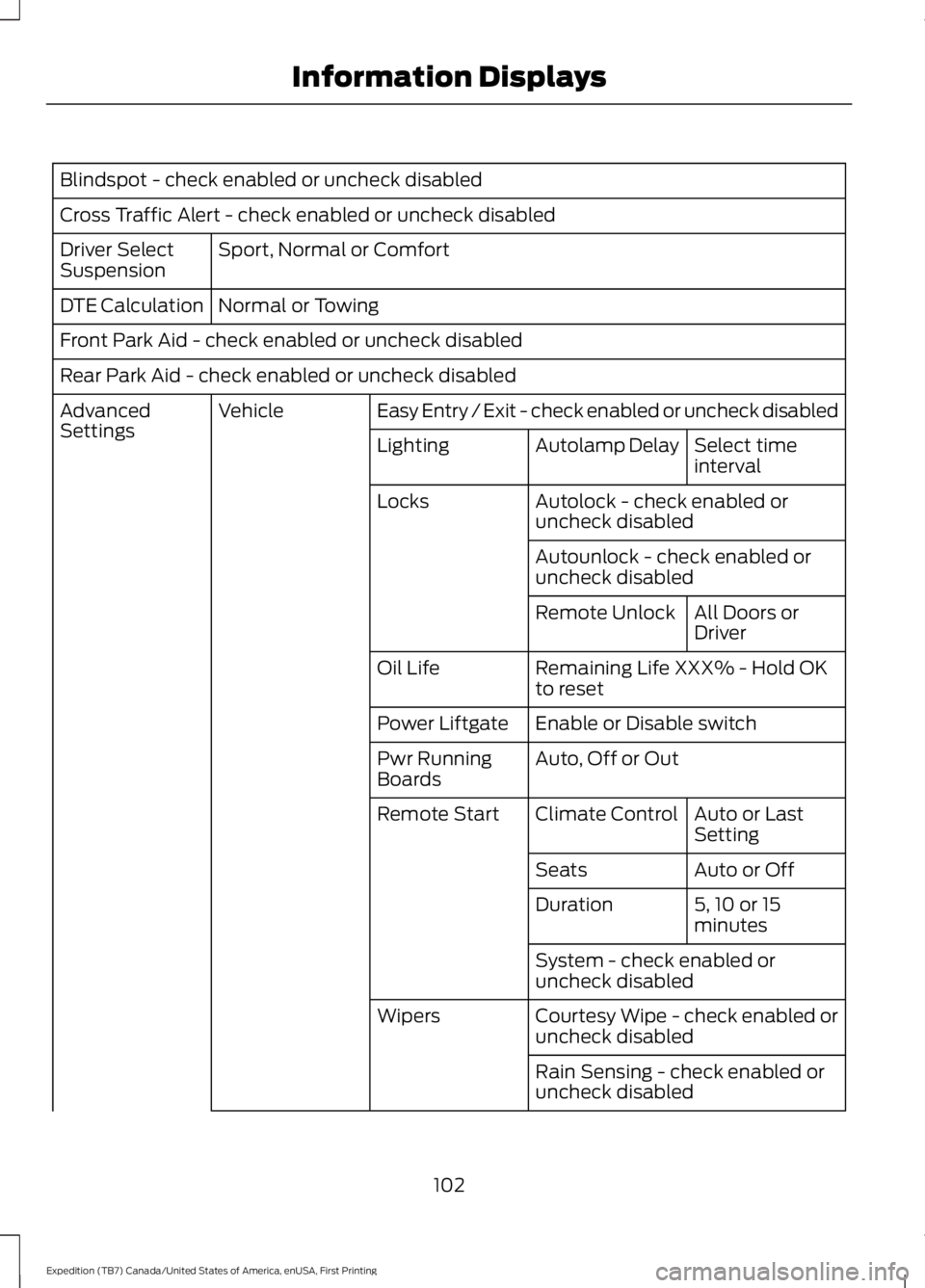
Blindspot - check enabled or uncheck disabled
Cross Traffic Alert - check enabled or uncheck disabled
Sport, Normal or ComfortDriver SelectSuspension
Normal or TowingDTE Calculation
Front Park Aid - check enabled or uncheck disabled
Rear Park Aid - check enabled or uncheck disabled
Easy Entry / Exit - check enabled or uncheck disabledVehicleAdvancedSettingsSelect timeintervalAutolamp DelayLighting
Autolock - check enabled oruncheck disabledLocks
Autounlock - check enabled oruncheck disabled
All Doors orDriverRemote Unlock
Remaining Life XXX% - Hold OKto resetOil Life
Enable or Disable switchPower Liftgate
Auto, Off or OutPwr RunningBoards
Auto or LastSettingClimate ControlRemote Start
Auto or OffSeats
5, 10 or 15minutesDuration
System - check enabled oruncheck disabled
Courtesy Wipe - check enabled oruncheck disabledWipers
Rain Sensing - check enabled oruncheck disabled
102
Expedition (TB7) Canada/United States of America, enUSA, First Printing
Information Displays
Page 108 of 421
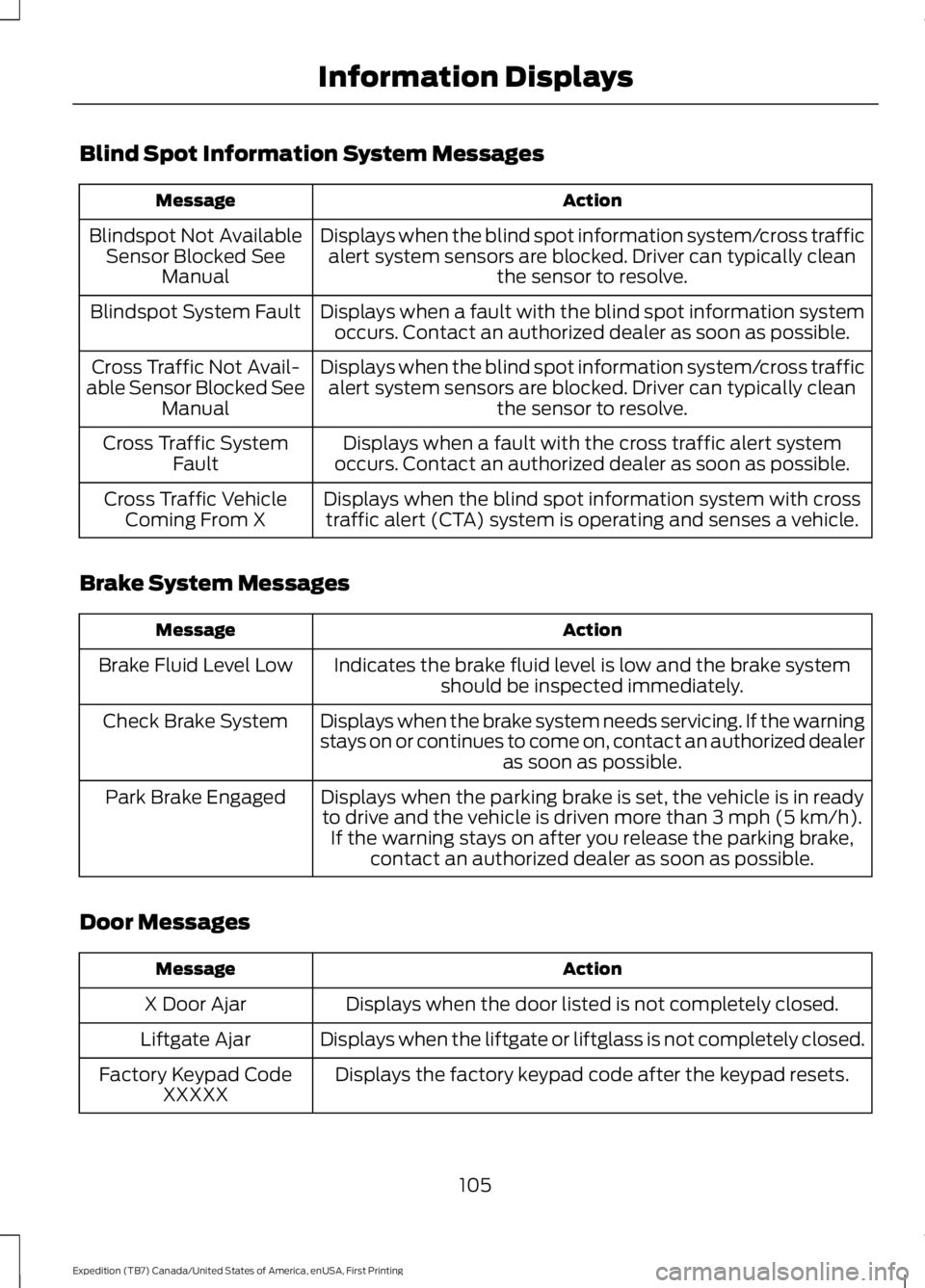
Blind Spot Information System Messages
ActionMessage
Displays when the blind spot information system/cross trafficalert system sensors are blocked. Driver can typically cleanthe sensor to resolve.
Blindspot Not AvailableSensor Blocked SeeManual
Displays when a fault with the blind spot information systemoccurs. Contact an authorized dealer as soon as possible.Blindspot System Fault
Displays when the blind spot information system/cross trafficalert system sensors are blocked. Driver can typically cleanthe sensor to resolve.
Cross Traffic Not Avail-able Sensor Blocked SeeManual
Displays when a fault with the cross traffic alert systemoccurs. Contact an authorized dealer as soon as possible.Cross Traffic SystemFault
Displays when the blind spot information system with crosstraffic alert (CTA) system is operating and senses a vehicle.Cross Traffic VehicleComing From X
Brake System Messages
ActionMessage
Indicates the brake fluid level is low and the brake systemshould be inspected immediately.Brake Fluid Level Low
Displays when the brake system needs servicing. If the warningstays on or continues to come on, contact an authorized dealeras soon as possible.
Check Brake System
Displays when the parking brake is set, the vehicle is in readyto drive and the vehicle is driven more than 3 mph (5 km/h).If the warning stays on after you release the parking brake,contact an authorized dealer as soon as possible.
Park Brake Engaged
Door Messages
ActionMessage
Displays when the door listed is not completely closed.X Door Ajar
Displays when the liftgate or liftglass is not completely closed.Liftgate Ajar
Displays the factory keypad code after the keypad resets.Factory Keypad CodeXXXXX
105
Expedition (TB7) Canada/United States of America, enUSA, First Printing
Information Displays
Page 130 of 421
You can also recall a preset memoryposition by:
•Pressing the unlock button on yourremote control if it is linked to a presetposition.
•Unlocking the intelligent driver doorhandle if a linked key fob is present.
•Entering a personal entry code on theSecuricode keypad. See Locks (page53).
Note:Using a linked key fob to recall yourmemory position when the ignition is offmoves the seat and steering column to theEasy Entry position.
Note:Pressing any active memory featurecontrol - power seat, mirror (or steeringcolumn switch) (or any memory button)during a memory recall cancels theoperation.
Linking a PreSet Position to yourRemote Control or Intelligent AccessKey Fob
Your vehicle can save the preset memorypositions for up to two remote controls.
1.With the ignition on, move the memorypositions to the desired positions.
2. Press and hold the desired presetbutton for about five seconds. A tonewill sound after about two seconds.Continue holding until a second toneis heard.
3. Within three seconds, press the lockbutton on the remote control you arelinking.
To unlink a remote control, follow thesame procedure – except in step 3, pressthe unlock button on the remote control.
Note:If more than one linked remotecontrol or intelligent access key is in range,the memory function moves to the settingsof the first key to initiate a memory recall.
Easy Entry and Exit Feature (If
Equipped)
This feature adjusts the position of the seatand steering column to allow easier exitand entry to the vehicle.
The driver seat automatically moves 2inches (5 centimeters) rearward when thetransmission is in park (P) and you removethe key from the ignition or you switch theignition off.
The driver seat returns to the previousposition when you put the key in theignition or switch the ignition on.
You can enable or disable this feature inthe information display. See InformationDisplays (page 92).
REAR SEATS
Folding Down the Second Row40% Seat
WARNINGS
Use caution when folding theseatback to the flat back position asthe system will move forward whenyou lift the release handle.
Before returning the seatback to itsoriginal position, make sure thatcargo or any objects are not trappedbehind the seatback. After returning theseatback to its original position, pull on theseatback to make sure that it has fullylatched. An unlatched seat may becomedangerous in the event of a sudden stopor crash.
Make sure that the head restraint is in thedown position and no objects such asbooks, purses or briefcases are on the floorin front of the second row seats beforefolding them down.
127
Expedition (TB7) Canada/United States of America, enUSA, First Printing
Seats
Page 131 of 421
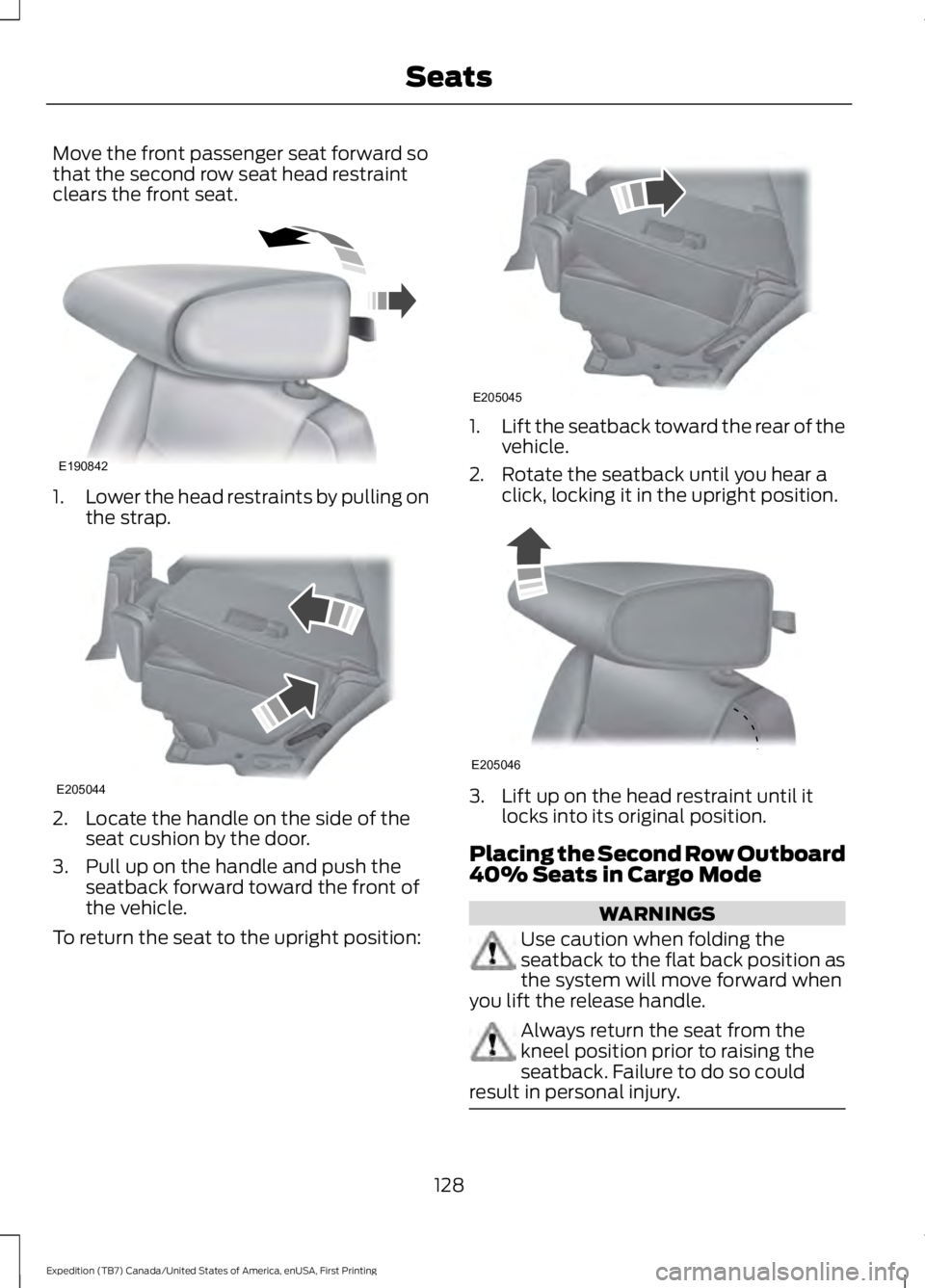
Move the front passenger seat forward sothat the second row seat head restraintclears the front seat.
1.Lower the head restraints by pulling onthe strap.
2. Locate the handle on the side of theseat cushion by the door.
3. Pull up on the handle and push theseatback forward toward the front ofthe vehicle.
To return the seat to the upright position:
1.Lift the seatback toward the rear of thevehicle.
2. Rotate the seatback until you hear aclick, locking it in the upright position.
3. Lift up on the head restraint until itlocks into its original position.
Placing the Second Row Outboard40% Seats in Cargo Mode
WARNINGS
Use caution when folding theseatback to the flat back position asthe system will move forward whenyou lift the release handle.
Always return the seat from thekneel position prior to raising theseatback. Failure to do so couldresult in personal injury.
128
Expedition (TB7) Canada/United States of America, enUSA, First Printing
SeatsE190842 E205044 E205045 E205046
Page 136 of 421
To return the seatback to its originalposition, lift the seatback until it latchesinto place.
PowerFold™ Third Row Seat (If
Equipped)
Note:The power fold down seats operatefor 10 minutes after you switch the ignitionoff. The transmission must be in park (P)and the liftgate, or liftgate glass must beopen. Similar to the battery saver feature,the power third row seat disables 10 minutesafter you switch the ignition off.
Note:Be sure that the head restraints arefolded down before powering the third rowseat down.
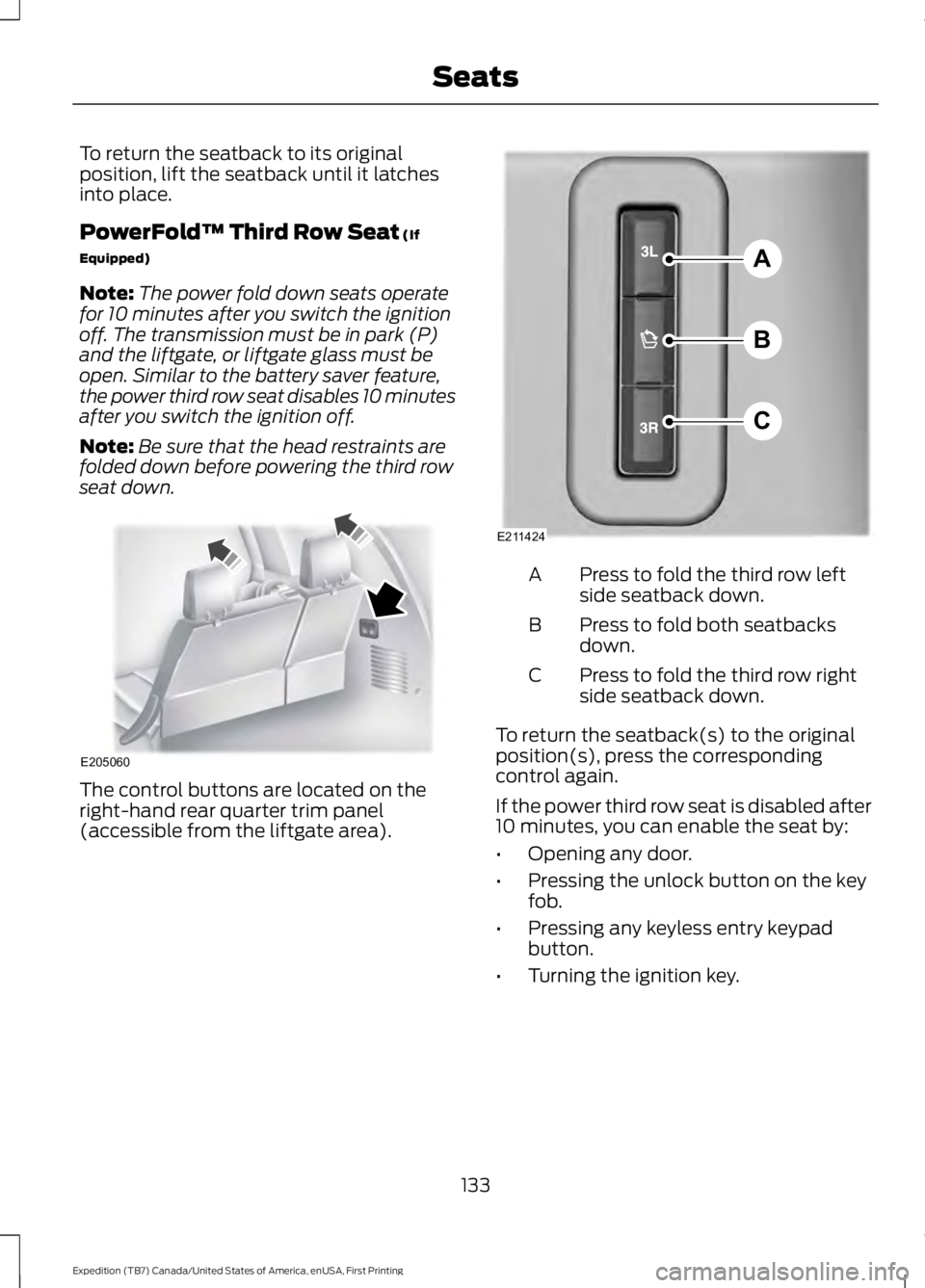
The control buttons are located on theright-hand rear quarter trim panel(accessible from the liftgate area).
Press to fold the third row leftside seatback down.A
Press to fold both seatbacksdown.B
Press to fold the third row rightside seatback down.C
To return the seatback(s) to the originalposition(s), press the correspondingcontrol again.
If the power third row seat is disabled after10 minutes, you can enable the seat by:
•Opening any door.
•Pressing the unlock button on the keyfob.
•Pressing any keyless entry keypadbutton.
•Turning the ignition key.
133
Expedition (TB7) Canada/United States of America, enUSA, First Printing
SeatsE205060 A
B
C
E211424
Page 140 of 421
HomeLink Wireless ControlSystem
WARNINGS
Make sure that the garage door andsecurity device are free fromobstruction when you areprogramming. Do not program the systemwith the vehicle in the garage.
Do not use the system with anygarage door opener that does nothave the safety stop and reversefeature as required by U.S. Federal SafetyStandards (this includes any garage dooropener manufactured before April 1, 1982).A garage door opener which cannot detectan object, signaling the door to stop andreverse, does not meet current federalsafety standards. Using a garage dooropener without these features increasesthe risk of serious injury or death.
Note:Make sure you keep the originalremote control transmitter for use in othervehicles as well as for future systemprogramming.
Note:We recommend that upon the saleor lease termination of your vehicle, youerase the programmed function buttons forsecurity reasons. See Erasing the FunctionButton Codes.
Note:You can program a maximum ofthree devices. To change or replace any ofthe three devices after it has been initiallyprogrammed, you must first erase thecurrent settings. See Erasing the FunctionButton Codes.
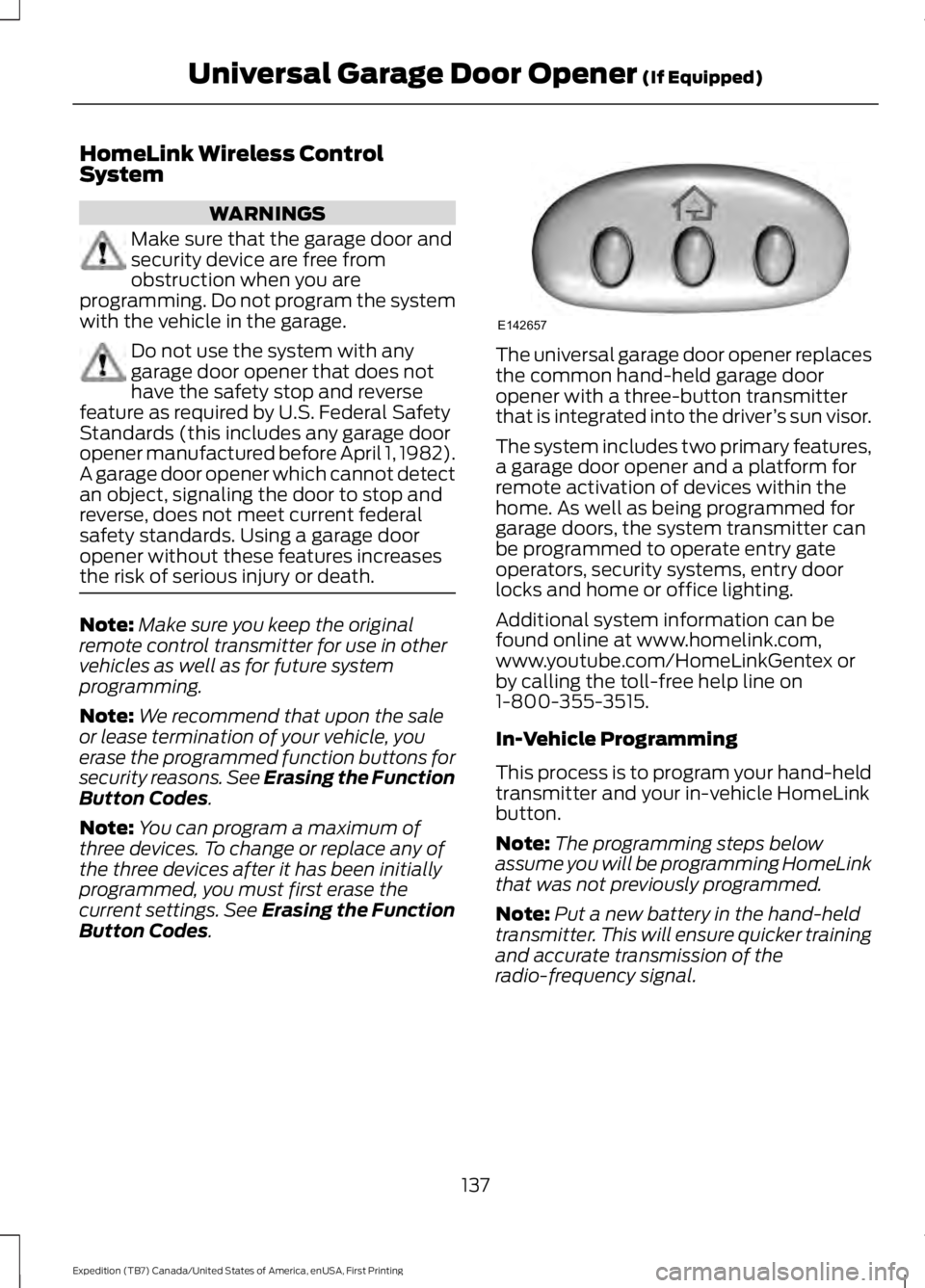
The universal garage door opener replacesthe common hand-held garage dooropener with a three-button transmitterthat is integrated into the driver’s sun visor.
The system includes two primary features,a garage door opener and a platform forremote activation of devices within thehome. As well as being programmed forgarage doors, the system transmitter canbe programmed to operate entry gateoperators, security systems, entry doorlocks and home or office lighting.
Additional system information can befound online at www.homelink.com,www.youtube.com/HomeLinkGentex orby calling the toll-free help line on1-800-355-3515.
In-Vehicle Programming
This process is to program your hand-heldtransmitter and your in-vehicle HomeLinkbutton.
Note:The programming steps belowassume you will be programming HomeLinkthat was not previously programmed.
Note:Put a new battery in the hand-heldtransmitter. This will ensure quicker trainingand accurate transmission of theradio-frequency signal.
137
Expedition (TB7) Canada/United States of America, enUSA, First Printing
Universal Garage Door Opener (If Equipped)E142657
Page 152 of 421
3.Press and hold the push button ignitionswitch, or press it three times withintwo seconds.
4. Apply the parking brake.
Guarding Against Exhaust Fumes
WARNING
If you smell exhaust fumes insideyour vehicle, have your vehiclechecked by your authorized dealerimmediately. Do not drive your vehicle ifyou smell exhaust fumes. Carbonmonoxide is present in exhaust fumes.Take precautions to avoid its dangerouseffects.
Important Ventilating Information
If you stop your vehicle and then leave theengine idling for long periods, werecommend that you do one of thefollowing:
•Open the windows at least 1 in (3 cm).
•Set your climate control to outside air.
ENGINE BLOCK HEATER (If
Equipped)
WARNINGS
Failure to follow engine block heaterinstructions could result in propertydamage or serious personal injury.
Do not use your heater withungrounded electrical systems ortwo-pronged adapters. There is a riskof electrical shock.
Do not fully close the hood, or allowit to drop under its own weight whenusing the engine block heater. Thiscould damage the power cable and maycause an electrical short resulting in fire,injury and property damage.
Note:The heater is most effective whenoutdoor temperatures are below 0°F(-18°C).
The heater acts as a starting aid bywarming the engine coolant. This allowsthe climate control system to respondquickly. The equipment includes a heaterelement (installed in the engine block) anda wire harness. You can connect thesystem to a grounded 120-volt ACelectrical source.
We recommend that you do the followingfor a safe and correct operation:
•Use a 16-gauge outdoor extension cordthat is product certified byUnderwriter’s Laboratory (UL) orCanadian Standards Association(CSA). This extension cord must besuitable for use outdoors, in coldtemperatures, and be clearly markedSuitable for Use with OutdoorAppliances. Do not use an indoorextension cord outdoors. This couldresult in an electric shock or become afire hazard.
•Use as short an extension cord aspossible.
•Do not use multiple extension cords.
•Make sure that when in operation, theextension cord plug and heater cordplug connections are free and clear ofwater. This could cause an electricshock or fire.
•Make sure your vehicle is parked in aclean area, clear of combustibles.
•Make sure the heater, heater cord andextension cord are firmly connected.
•Check for heat anywhere in theelectrical hookup once the system hasbeen operating for approximately 30minutes.
149
Expedition (TB7) Canada/United States of America, enUSA, First Printing
Starting and Stopping the Engine
Page 221 of 421
Note:If completed successfully, theinformation display shows NEUTRAL TOWLEAVE IN N or NEUTRAL TOW ENABLEDLEAVE TRANSMISSION IN NEUTRAL.This indicates that your vehicle is safe totow with all wheels on the ground.
Note:If you do not see the message in thedisplay, you must perform the procedureagain from the beginning.
Note:You may hear an audible noise as thetransfer case shifts into its neutral position.This is normal.
6. Leave the transmission in position Nand turn the ignition as far as it will gotoward the off position (it will not turnfully off when the transmission is inposition N). If your vehicle has anignition key, you must leave the key inthe ignition while towing. To lock andunlock your vehicle, use the keylessentry keypad or extra set of keys. If yourvehicle has intelligent access, press theengine START/STOP button oncewithout pressing the brake pedal. Youdo not need to leave your keys in thevehicle. You can lock and unlock yourvehicle as you normally do.
7. Release the brake pedal.
WARNINGS
Do not disconnect the battery duringrecreational towing. Doing so willprevent the transfer case fromshifting properly and may cause the vehicleto roll even if the transmission is in P(Park).
Shifting the transfer case to itsneutral position for recreationaltowing may cause the vehicle to beable to roll even if the transmission is in P(Park). The driver or others could beinjured. Make sure the foot brake isdepressed and the vehicle is in a secureand safe position while the transfer caseis being shifted to its neutral position.
WARNINGS
Failing to put the transfer case in itsneutral position will damage vehiclecomponents.
Note:You can check four-wheel-downtowing status at any time by opening thedriver's door or turning the ignition to theaccessory or on position and verifying theNEUTRAL TOW ENABLED messagedisplays in the cluster.
Exiting Four-wheel-down Towing
To exit four-wheel-down towing and returnthe transfer case to its 2H position:
1.With your vehicle still properly securedto the tow vehicle, put the ignition inthe on position, but do not start theengine. If your vehicle has an ignitionkey, turn the key to on. If your vehiclehas intelligent access, press the engineSTART/STOP button twice withoutpressing the brake pedal.
2. Press and hold the brake pedal.
3.Shift the transmission out of N and intoany gear.
4. Release the brake pedal.
Note:If completed successfully, theinstrument cluster displays 4X2, andNEUTRAL TOW DISABLED.
Note:If the indicator light and message donot display, you must perform the procedureagain from the beginning.
Note:You may hear an audible noise as thetransfer case shifts out of its neutralposition. This is normal.
Note:If SHIFT DELAY PULL FORWARDdisplays in the instrument cluster, transfercase gear tooth blockage is present. See theinstructions after this section.
5. Apply the parking brake, and thendisconnect the vehicle from the towvehicle.
218
Expedition (TB7) Canada/United States of America, enUSA, First Printing
Towing