remote control FORD EXPEDITION EL 2017 User Guide
[x] Cancel search | Manufacturer: FORD, Model Year: 2017, Model line: EXPEDITION EL, Model: FORD EXPEDITION EL 2017Pages: 500, PDF Size: 6.13 MB
Page 55 of 500
LOCKING AND UNLOCKING
You can use the power door lock controlor the remote control to lock and unlockyour vehicle.
Power Door Locks
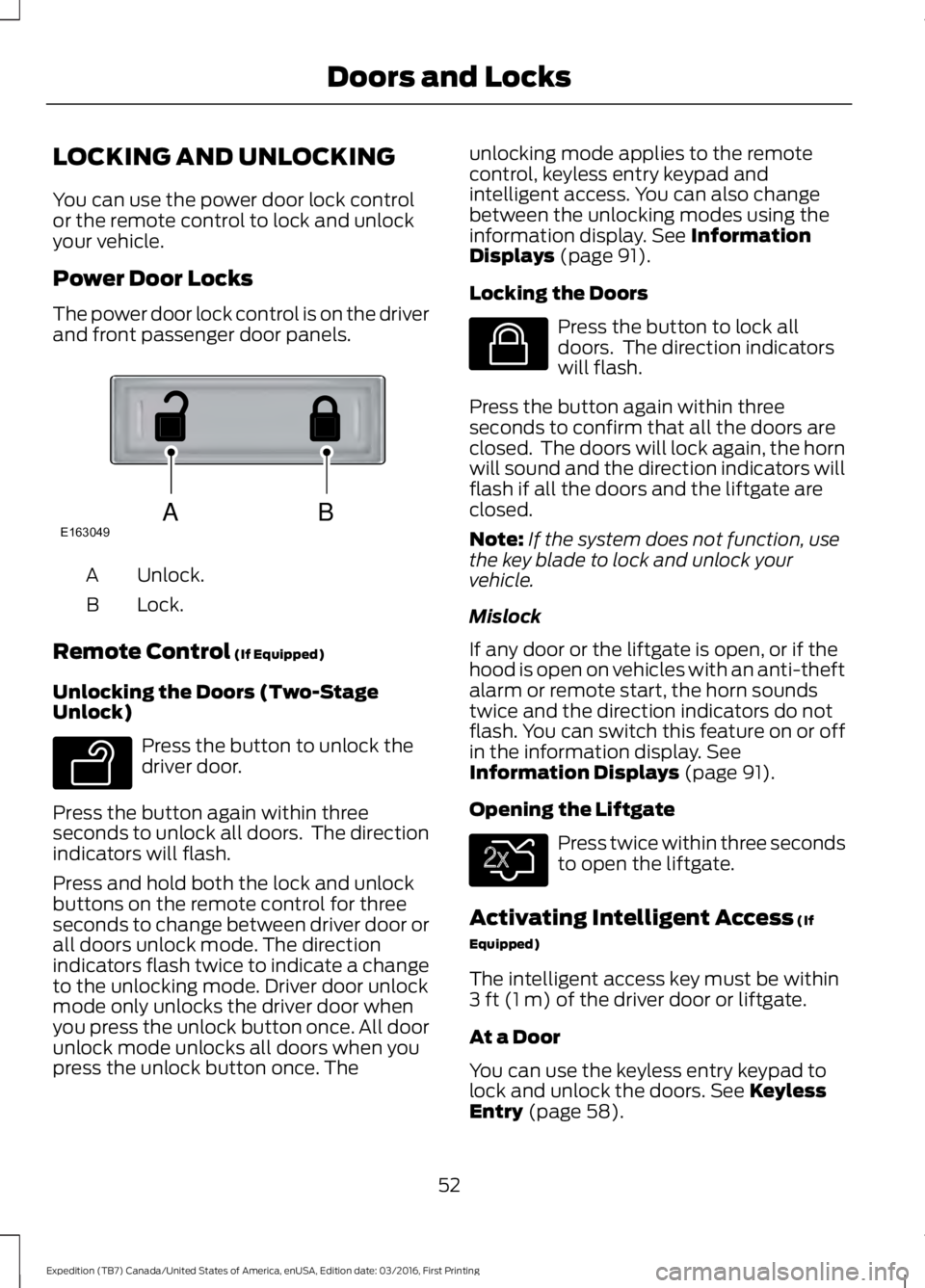
The power door lock control is on the driverand front passenger door panels.
Unlock.A
Lock.B
Remote Control (If Equipped)
Unlocking the Doors (Two-StageUnlock)
Press the button to unlock thedriver door.
Press the button again within threeseconds to unlock all doors. The directionindicators will flash.
Press and hold both the lock and unlockbuttons on the remote control for threeseconds to change between driver door orall doors unlock mode. The directionindicators flash twice to indicate a changeto the unlocking mode. Driver door unlockmode only unlocks the driver door whenyou press the unlock button once. All doorunlock mode unlocks all doors when youpress the unlock button once. The
unlocking mode applies to the remotecontrol, keyless entry keypad andintelligent access. You can also changebetween the unlocking modes using theinformation display. See InformationDisplays (page 91).
Locking the Doors
Press the button to lock alldoors. The direction indicatorswill flash.
Press the button again within threeseconds to confirm that all the doors areclosed. The doors will lock again, the hornwill sound and the direction indicators willflash if all the doors and the liftgate areclosed.
Note:If the system does not function, usethe key blade to lock and unlock yourvehicle.
Mislock
If any door or the liftgate is open, or if thehood is open on vehicles with an anti-theftalarm or remote start, the horn soundstwice and the direction indicators do notflash. You can switch this feature on or offin the information display. SeeInformation Displays (page 91).
Opening the Liftgate
Press twice within three secondsto open the liftgate.
Activating Intelligent Access (If
Equipped)
The intelligent access key must be within3 ft (1 m) of the driver door or liftgate.
At a Door
You can use the keyless entry keypad tolock and unlock the doors. See KeylessEntry (page 58).
52
Expedition (TB7) Canada/United States of America, enUSA, Edition date: 03/2016, First Printing
Doors and LocksABE163049 E138629 E138623 E138630
Page 56 of 500
At the Liftgate
The liftgate unlocks and opensautomatically when you press the liftgaterelease button.
Smart Unlocks for IntegratedKeyhead Transmitter (If Equipped)
This helps to prevent you from lockingyourself out of your vehicle if the key is stillin the ignition.
When you open one of the front doors andlock your vehicle with the power door lockcontrol, all the doors will lock then unlockand the horn will sound twice if the key isstill in the ignition.
Your can still lock your vehicle with the keyin the ignition by:
•Using the manual lock on the door.
•Locking the driver door with a key.
•Using the keyless entry keypad.
•Pressing the lock button on anotherremote control.
Smart Unlocks for IntelligentAccess Keys (If Equipped)
This helps to prevent you from locking yourkey inside the passenger compartment orrear cargo area.
When you electronically lock your vehiclewith any door open, the transmission is inpark (P) and the ignition is off, the systemsearches for an intelligent access keyinside your vehicle after you close the lastdoor. If the system finds a key, all of thedoors will immediately unlock and the hornwill sound twice, indicating that a key isinside.
You can override the smart unlock featureand intentionally lock the intelligent accesskey inside your vehicle.
To do this, lock your vehicle after you haveclosed all the doors by:
•Using the keyless entry keypad.
•Pressing the lock button on anotherintelligent access key.
When you open one of the front doors andlock your vehicle using the power door lockcontrol, all doors will lock then unlock if:
•The ignition is on.
•The ignition is off and the transmissionis not in park (P).
Auto Relock
If you press the unlock button on theremote control and do not open a doorwithin 45 seconds, your vehicle will lockand the alarm will arm. You can switch thisfeature on or off in the information display.See Information Displays (page 91).
Autolock
Autolock locks all the doors when all of thefollowing occur:
•All doors are closed.
•The ignition is on.
•You shift into any gear putting yourvehicle in motion.
•Your vehicle's speed is greater than12 mph (20 km/h).
Autolock repeats when:
•You open then close any door while theignition is on and your vehicle's speedis less than 9 mph (15 km/h).
•Your vehicle's speed is greater than12 mph (20 km/h).
53
Expedition (TB7) Canada/United States of America, enUSA, Edition date: 03/2016, First Printing
Doors and Locks
Page 57 of 500
Autounlock
Autounlock unlocks all the doors when allof the following occur:
•The ignition is on, all the doors areclosed, and your vehicle has beenmoving at a speed greater than 12 mph(20 km/h).
•You stop your vehicle and switch theignition off or to accessory.
•You open the driver door within 10minutes of switching the ignition off orto accessory.
Note:The doors do not autounlock if youelectronically lock your vehicle after youswitch the ignition off and before you openthe driver door.
Enabling or Disabling Autolock andAutounlock
You can enable or disable autolock andautounlock in the information display oran authorized dealer can do it for you. SeeGeneral Information (page 91).
Illuminated Entry
The interior lamps and some exteriorlamps illuminate when you unlock thedoors with the remote control.
The lamps turn off if:
•The ignition is on.
•You press the remote control lockbutton.
•25 seconds have elapsed.
The lamps do not turn off if:
•You turn them on with the lampcontrol.
•Any door is open.
Illuminated Exit
The interior lamps and some exteriorlamps illuminate when all doors are closedand you switch the ignition off.
The lamps will turn off if all the doorsremain closed and:
•25 seconds have elapsed.
•You press the push button ignitionswitch.
Battery Saver
If you leave the courtesy lamps, interiorlamps or headlamps on, the battery savershuts them off 10 minutes after you switchthe ignition off.
Battery Saver for Intelligent AccessKeys (If Equipped)
If you leave the ignition switched on, itshuts off when it detects a certain amountof battery drain, or after 45 minutes.
MANUAL LIFTGATE (If Equipped)
WARNINGS
It is extremely dangerous to ride in acargo area, inside or outside of yourvehicle. In a crash, people riding inthese areas are more likely to be seriouslyinjured or killed. Do not allow people to ridein any area of your vehicle that is notequipped with seats and safety belts. Makesure everyone in your vehicle is in a seatand properly using a safety belt. Failure tofollow this warning could result in seriouspersonal injury or death.
Make sure to close and latch theliftgate to prevent drawing exhaustfumes into your vehicle. This will alsoprevent passengers and cargo from fallingout. If you must drive with the liftgate open,keep the vents or windows open so outsideair comes into your vehicle. Failure tofollow this warning could result in seriouspersonal injury.
54
Expedition (TB7) Canada/United States of America, enUSA, Edition date: 03/2016, First Printing
Doors and Locks
Page 58 of 500
Note:Be careful when opening or closingthe liftgate in a garage or other enclosedarea to avoid damaging the liftgate.
Note: Do not hang anything, for examplea bike rack, from the glass or liftgate. Thiscould damage the liftgate and itscomponents.
Note: Do not leave the liftgate open whiledriving. This could damage the liftgate andits components.
Opening the Liftgate
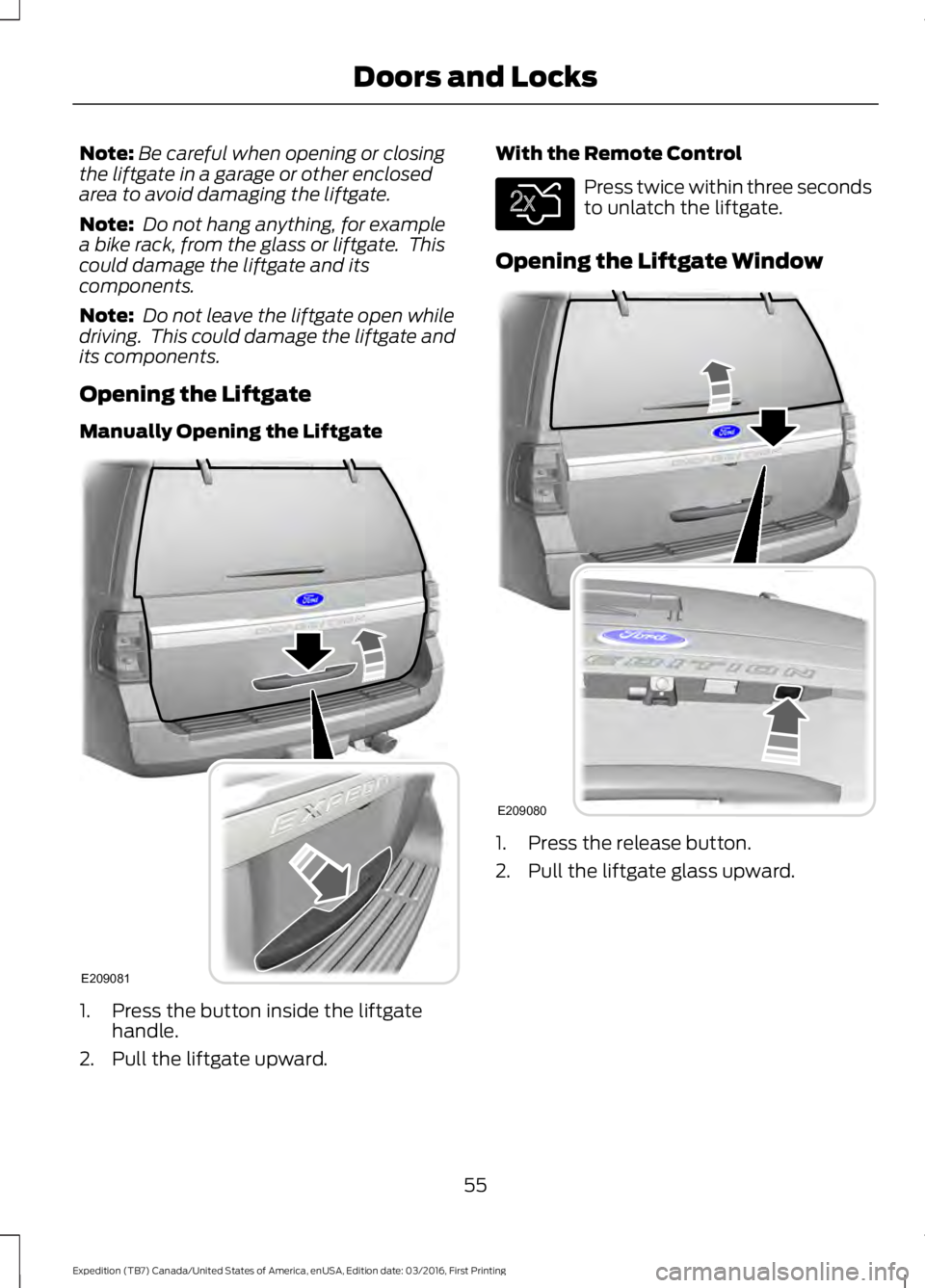
Manually Opening the Liftgate
1. Press the button inside the liftgatehandle.
2. Pull the liftgate upward.
With the Remote Control
Press twice within three secondsto unlatch the liftgate.
Opening the Liftgate Window
1. Press the release button.
2. Pull the liftgate glass upward.
55
Expedition (TB7) Canada/United States of America, enUSA, Edition date: 03/2016, First Printing
Doors and LocksE209081 E138630 E209080
Page 60 of 500
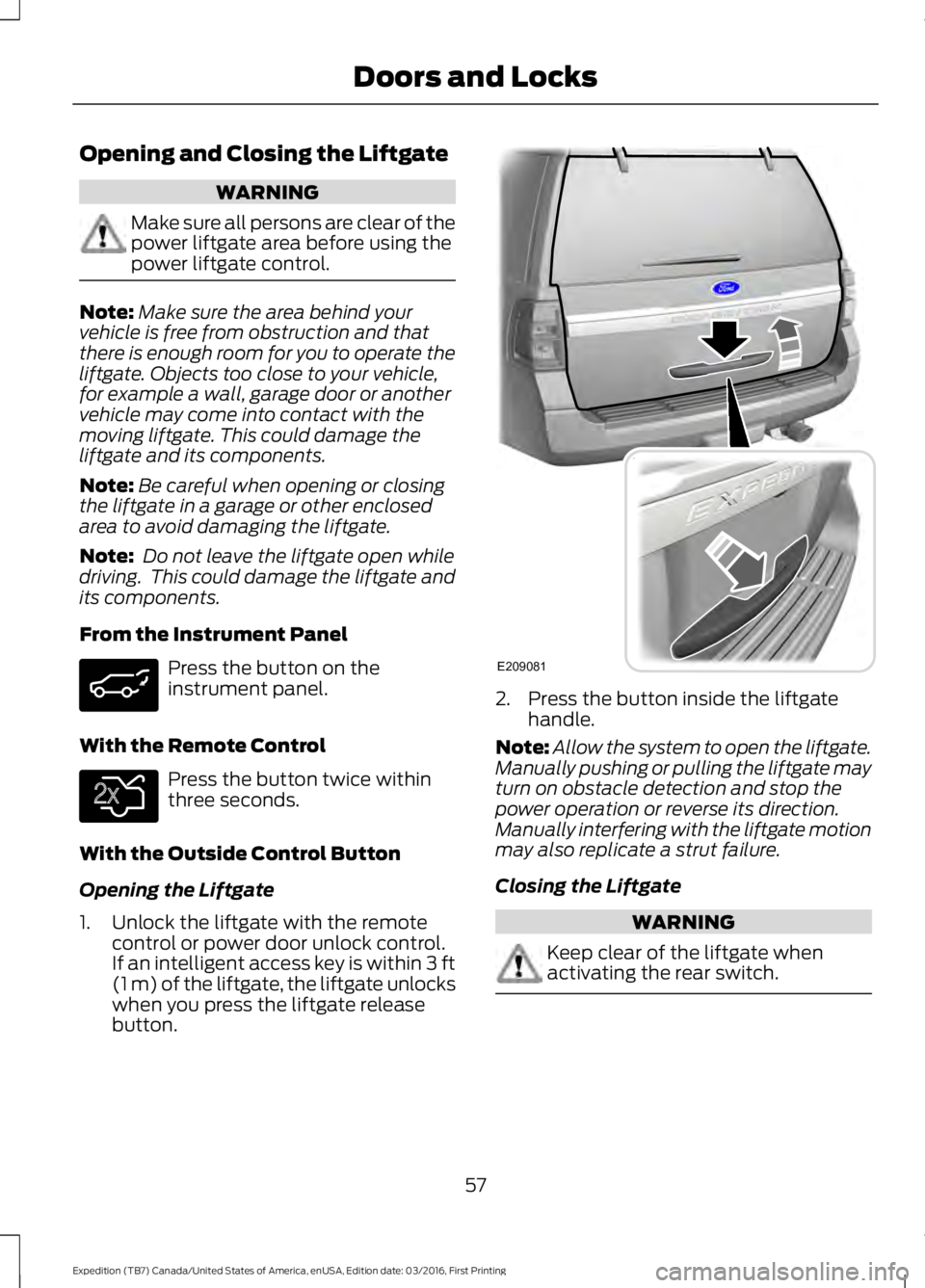
Opening and Closing the Liftgate
WARNING
Make sure all persons are clear of thepower liftgate area before using thepower liftgate control.
Note:Make sure the area behind yourvehicle is free from obstruction and thatthere is enough room for you to operate theliftgate. Objects too close to your vehicle,for example a wall, garage door or anothervehicle may come into contact with themoving liftgate. This could damage theliftgate and its components.
Note:Be careful when opening or closingthe liftgate in a garage or other enclosedarea to avoid damaging the liftgate.
Note: Do not leave the liftgate open whiledriving. This could damage the liftgate andits components.
From the Instrument Panel
Press the button on theinstrument panel.
With the Remote Control
Press the button twice withinthree seconds.
With the Outside Control Button
Opening the Liftgate
1. Unlock the liftgate with the remotecontrol or power door unlock control.If an intelligent access key is within 3 ft(1 m) of the liftgate, the liftgate unlockswhen you press the liftgate releasebutton.
2. Press the button inside the liftgatehandle.
Note:Allow the system to open the liftgate.Manually pushing or pulling the liftgate mayturn on obstacle detection and stop thepower operation or reverse its direction.Manually interfering with the liftgate motionmay also replicate a strut failure.
Closing the Liftgate
WARNING
Keep clear of the liftgate whenactivating the rear switch.
57
Expedition (TB7) Canada/United States of America, enUSA, Edition date: 03/2016, First Printing
Doors and Locks E138630 E209081
Page 61 of 500
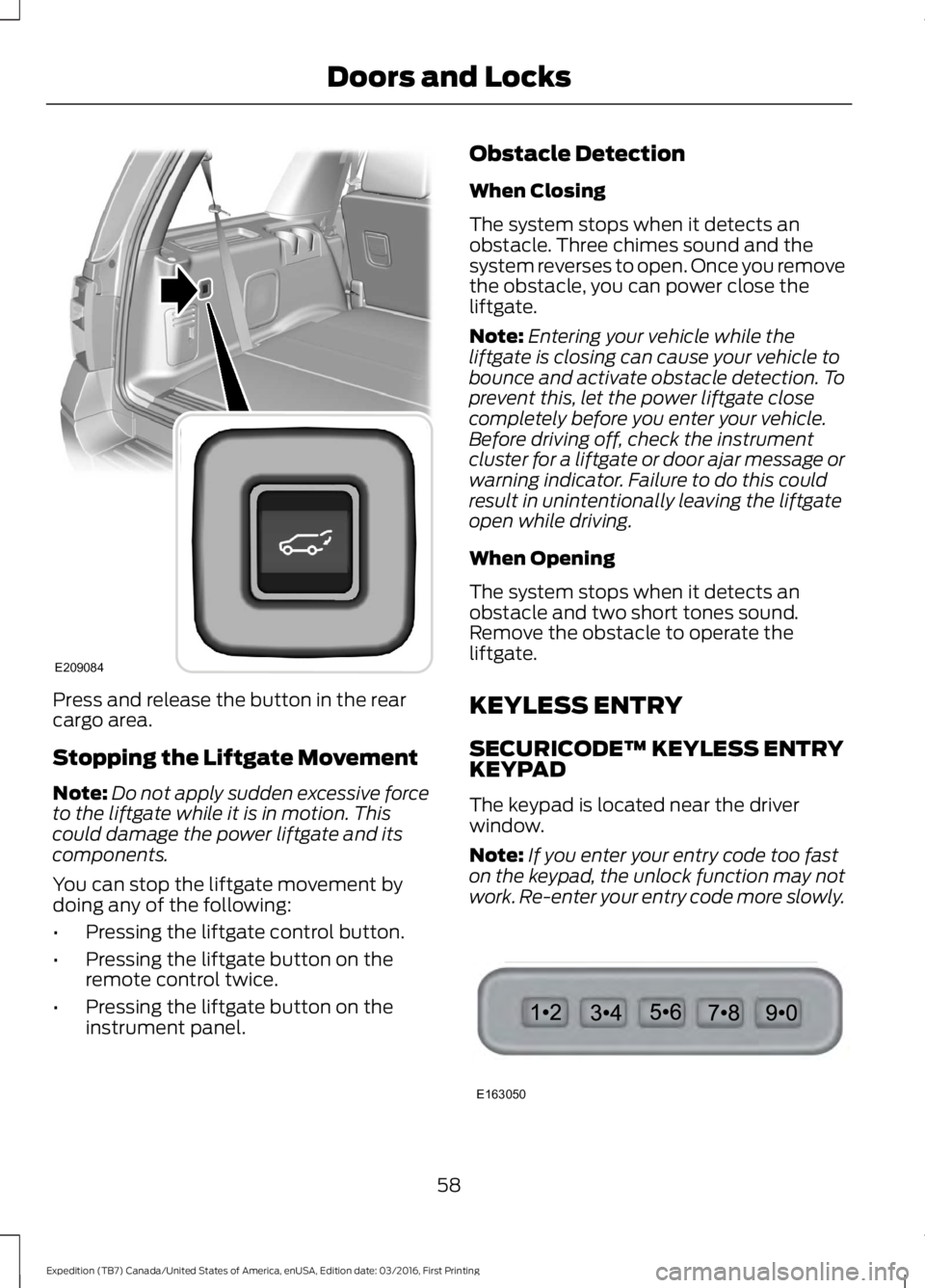
Press and release the button in the rearcargo area.
Stopping the Liftgate Movement
Note:Do not apply sudden excessive forceto the liftgate while it is in motion. Thiscould damage the power liftgate and itscomponents.
You can stop the liftgate movement bydoing any of the following:
•Pressing the liftgate control button.
•Pressing the liftgate button on theremote control twice.
•Pressing the liftgate button on theinstrument panel.
Obstacle Detection
When Closing
The system stops when it detects anobstacle. Three chimes sound and thesystem reverses to open. Once you removethe obstacle, you can power close theliftgate.
Note:Entering your vehicle while theliftgate is closing can cause your vehicle tobounce and activate obstacle detection. Toprevent this, let the power liftgate closecompletely before you enter your vehicle.Before driving off, check the instrumentcluster for a liftgate or door ajar message orwarning indicator. Failure to do this couldresult in unintentionally leaving the liftgateopen while driving.
When Opening
The system stops when it detects anobstacle and two short tones sound.Remove the obstacle to operate theliftgate.
KEYLESS ENTRY
SECURICODE™ KEYLESS ENTRYKEYPAD
The keypad is located near the driverwindow.
Note:If you enter your entry code too faston the keypad, the unlock function may notwork. Re-enter your entry code more slowly.
58
Expedition (TB7) Canada/United States of America, enUSA, Edition date: 03/2016, First Printing
Doors and LocksE209084 E163050
Page 62 of 500
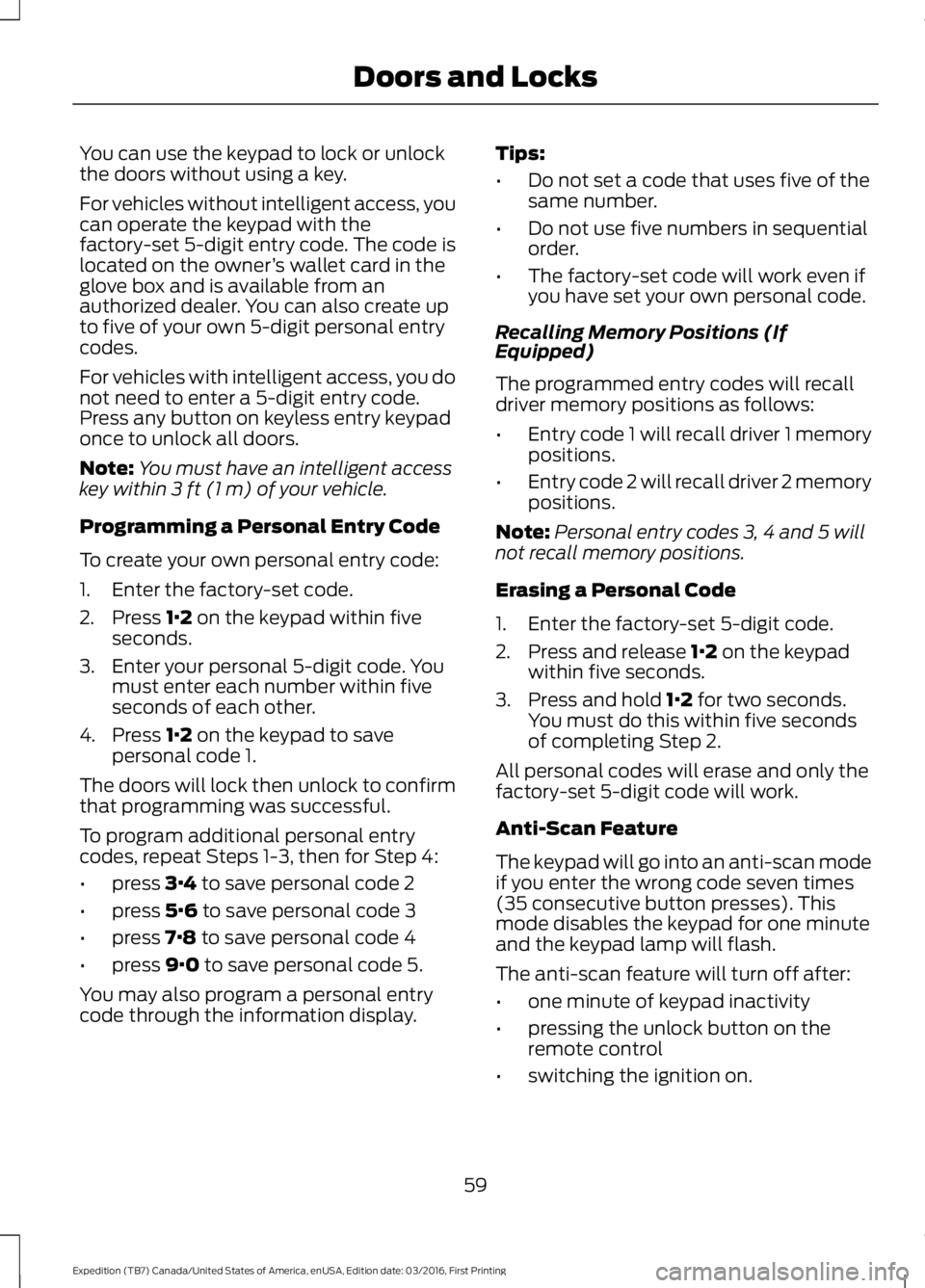
You can use the keypad to lock or unlockthe doors without using a key.
For vehicles without intelligent access, youcan operate the keypad with thefactory-set 5-digit entry code. The code islocated on the owner’s wallet card in theglove box and is available from anauthorized dealer. You can also create upto five of your own 5-digit personal entrycodes.
For vehicles with intelligent access, you donot need to enter a 5-digit entry code.Press any button on keyless entry keypadonce to unlock all doors.
Note:You must have an intelligent accesskey within 3 ft (1 m) of your vehicle.
Programming a Personal Entry Code
To create your own personal entry code:
1. Enter the factory-set code.
2. Press 1·2 on the keypad within fiveseconds.
3. Enter your personal 5-digit code. Youmust enter each number within fiveseconds of each other.
4. Press 1·2 on the keypad to savepersonal code 1.
The doors will lock then unlock to confirmthat programming was successful.
To program additional personal entrycodes, repeat Steps 1-3, then for Step 4:
•press 3·4 to save personal code 2
•press 5·6 to save personal code 3
•press 7·8 to save personal code 4
•press 9·0 to save personal code 5.
You may also program a personal entrycode through the information display.
Tips:
•Do not set a code that uses five of thesame number.
•Do not use five numbers in sequentialorder.
•The factory-set code will work even ifyou have set your own personal code.
Recalling Memory Positions (IfEquipped)
The programmed entry codes will recalldriver memory positions as follows:
•Entry code 1 will recall driver 1 memorypositions.
•Entry code 2 will recall driver 2 memorypositions.
Note:Personal entry codes 3, 4 and 5 willnot recall memory positions.
Erasing a Personal Code
1. Enter the factory-set 5-digit code.
2. Press and release 1·2 on the keypadwithin five seconds.
3. Press and hold 1·2 for two seconds.You must do this within five secondsof completing Step 2.
All personal codes will erase and only thefactory-set 5-digit code will work.
Anti-Scan Feature
The keypad will go into an anti-scan modeif you enter the wrong code seven times(35 consecutive button presses). Thismode disables the keypad for one minuteand the keypad lamp will flash.
The anti-scan feature will turn off after:
•one minute of keypad inactivity
•pressing the unlock button on theremote control
•switching the ignition on.
59
Expedition (TB7) Canada/United States of America, enUSA, Edition date: 03/2016, First Printing
Doors and Locks
Page 64 of 500
PASSIVE ANTI-THEFT
SYSTEM
Note:The system is not compatible withnon-Ford aftermarket remote start systems.Use of these systems may result in vehiclestarting problems and a loss of securityprotection.
Note:Metallic objects, electronic devicesor a second coded key on the same keychain may cause vehicle starting problemsif they are too close to the key when startingthe engine. Prevent these objects fromtouching the coded key while starting theengine. Switch the ignition off, move allobjects on the key chain away from thecoded key and restart the engine if aproblem occurs.
Note:Do not leave a duplicate coded keyin the vehicle. Always take your keys andlock all doors when leaving the vehicle.
SecuriLock®
The system is an engine immobilizationsystem. It is designed to help prevent theengine from being started unless a codedkey programmed to your vehicle is used.Using the wrong key may prevent theengine from starting. A message mayappear in the information display.
If you are unable to start the engine with acorrectly coded key, a malfunction hashappened and a message may appear inthe information display.
Automatic Arming
The vehicle arms immediately after youswitch the ignition off.
Automatic Disarming
Switching the ignition on with a coded keydisarms the vehicle.
Replacement Keys
Note:Your vehicle comes equipped withtwo integrated keyhead transmitters or twointelligent access keys.
The integrated keyhead transmitterfunctions as a programmed ignition keythat operates all the locks and starts thevehicle, as well as a remote control.
The intelligent access key functions as aprogrammed key that operates the driverdoor lock and activates the intelligentaccess with push button start system, aswell as a remote control.
If your programmed transmitters orstandard SecuriLock coded keys(integrated keyhead transmitters only) arelost or stolen and you do not have an extracoded key, you will need to have yourvehicle towed to an authorized dealer. Youneed to erase the key codes from yourvehicle and program new coded keys.
Store an extra programmed key away fromthe vehicle in a safe place to help preventany inconveniences. See your authorizeddealer to purchase additional spare orreplacement keys.
Programming a Spare IntegratedKeyhead Transmitter
Note:You can program a maximum of eightcoded keys to your vehicle. All eight can beintegrated keyhead transmitters.
You can program your own integratedkeyhead transmitter or standardSecuriLock coded keys to your vehicle. Thisprocedure will program both the engineimmobilizer keycode and the remote entryportion of the remote control to yourvehicle
Only use integrated keyhead transmittersor standard SecuriLock keys.
61
Expedition (TB7) Canada/United States of America, enUSA, Edition date: 03/2016, First Printing
Security
Page 65 of 500
You must have two previouslyprogrammed coded keys and the newunprogrammed key readily accessible. Seeyour authorized dealer to have the sparekey programmed if two previouslyprogrammed coded keys are not available.
Read and understand the entire procedurebefore you begin.
1.Insert the first previously programmedcoded key into the ignition.
2.Switch the ignition from off to on. Keepthe ignition on for at least threeseconds, but no more than 10 seconds.
3.Switch the ignition off and remove thefirst coded key from the ignition.
4. After three seconds but within 10seconds of switching the ignition off,insert the second previously coded keyinto the ignition.
5.Switch the ignition from off to on. Keepthe ignition on for at least threeseconds, but no more than 10 seconds.
6.Switch the ignition off and remove thesecond previously programmed codedkey from the ignition.
7. After three seconds but within 10seconds of switching the ignition offand removing the previouslyprogrammed coded key, insert the newunprogrammed key into the ignition.
8.Switch the ignition from off to on. Keepthe ignition on for at least six seconds.
9.Remove the newly programmed codedkey from the ignition.
If the key has been successfullyprogrammed it will start the engine andoperate the remote entry system (if thenew key is an integrated keyheadtransmitter).
If programming was not successful, wait10 seconds and repeat Steps 1 through 8.If you are still unsuccessful, take yourvehicle to your authorized dealer.
Programming a Spare IntelligentAccess Key
See your authorized dealer to haveadditional keys programmed to yourvehicle.
ANTI-THEFT ALARM
The system will warn you of anunauthorized entry to your vehicle. It willbe triggered if any door, the luggagecompartment or the hood is openedwithout using the key, remote control orkeyless entry keypad.
The direction indicators will flash and thehorn will sound if unauthorized entry isattempted while the alarm is armed.
Take all remote controls to an authorizeddealer if there is any potential alarmproblem with your vehicle.
Arming the Alarm
The alarm is ready to arm when there isnot a key in your vehicle. Electronically lockyour vehicle to arm the alarm.
Disarming the Alarm
Disarm the alarm by any of the followingactions:
•Unlock the doors or luggagecompartment with the remote controlor keyless entry keypad.
•Switch your vehicle on or start yourvehicle.
•Use a key in the driver door to unlockyour vehicle, then switch your vehicleon within 12 seconds.
Note:Pressing the panic button on theremote control will stop the horn and signalindicators, but will not disarm the system.
62
Expedition (TB7) Canada/United States of America, enUSA, Edition date: 03/2016, First Printing
Security
Page 80 of 500
INTERIOR LAMPS
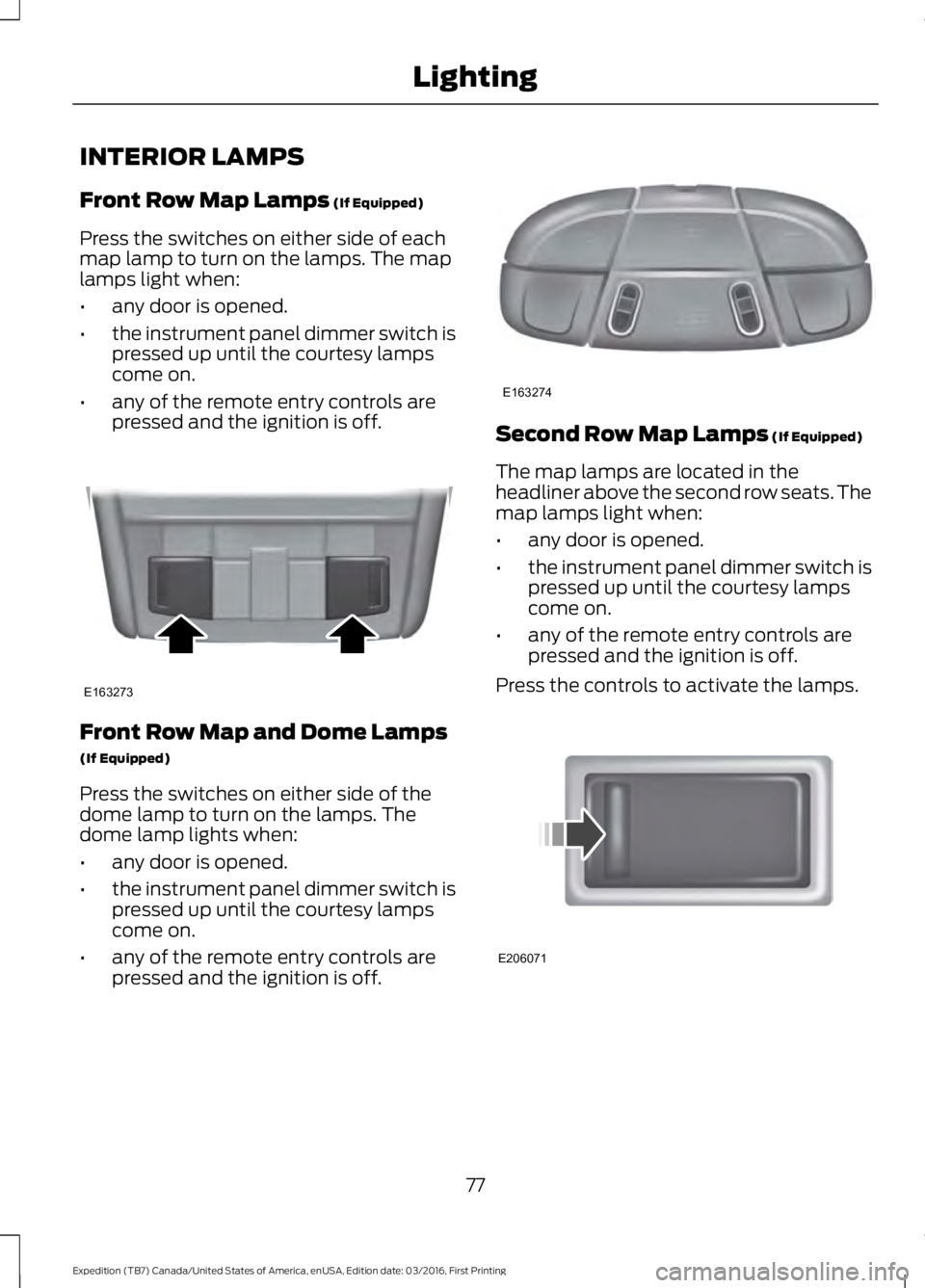
Front Row Map Lamps (If Equipped)
Press the switches on either side of eachmap lamp to turn on the lamps. The maplamps light when:
•any door is opened.
•the instrument panel dimmer switch ispressed up until the courtesy lampscome on.
•any of the remote entry controls arepressed and the ignition is off.
Front Row Map and Dome Lamps
(If Equipped)
Press the switches on either side of thedome lamp to turn on the lamps. Thedome lamp lights when:
•any door is opened.
•the instrument panel dimmer switch ispressed up until the courtesy lampscome on.
•any of the remote entry controls arepressed and the ignition is off.
Second Row Map Lamps (If Equipped)
The map lamps are located in theheadliner above the second row seats. Themap lamps light when:
•any door is opened.
•the instrument panel dimmer switch ispressed up until the courtesy lampscome on.
•any of the remote entry controls arepressed and the ignition is off.
Press the controls to activate the lamps.
77
Expedition (TB7) Canada/United States of America, enUSA, Edition date: 03/2016, First Printing
LightingE163273 E163274 E206071