roof FORD EXPEDITION EL 2017 User Guide
[x] Cancel search | Manufacturer: FORD, Model Year: 2017, Model line: EXPEDITION EL, Model: FORD EXPEDITION EL 2017Pages: 500, PDF Size: 6.13 MB
Page 243 of 500
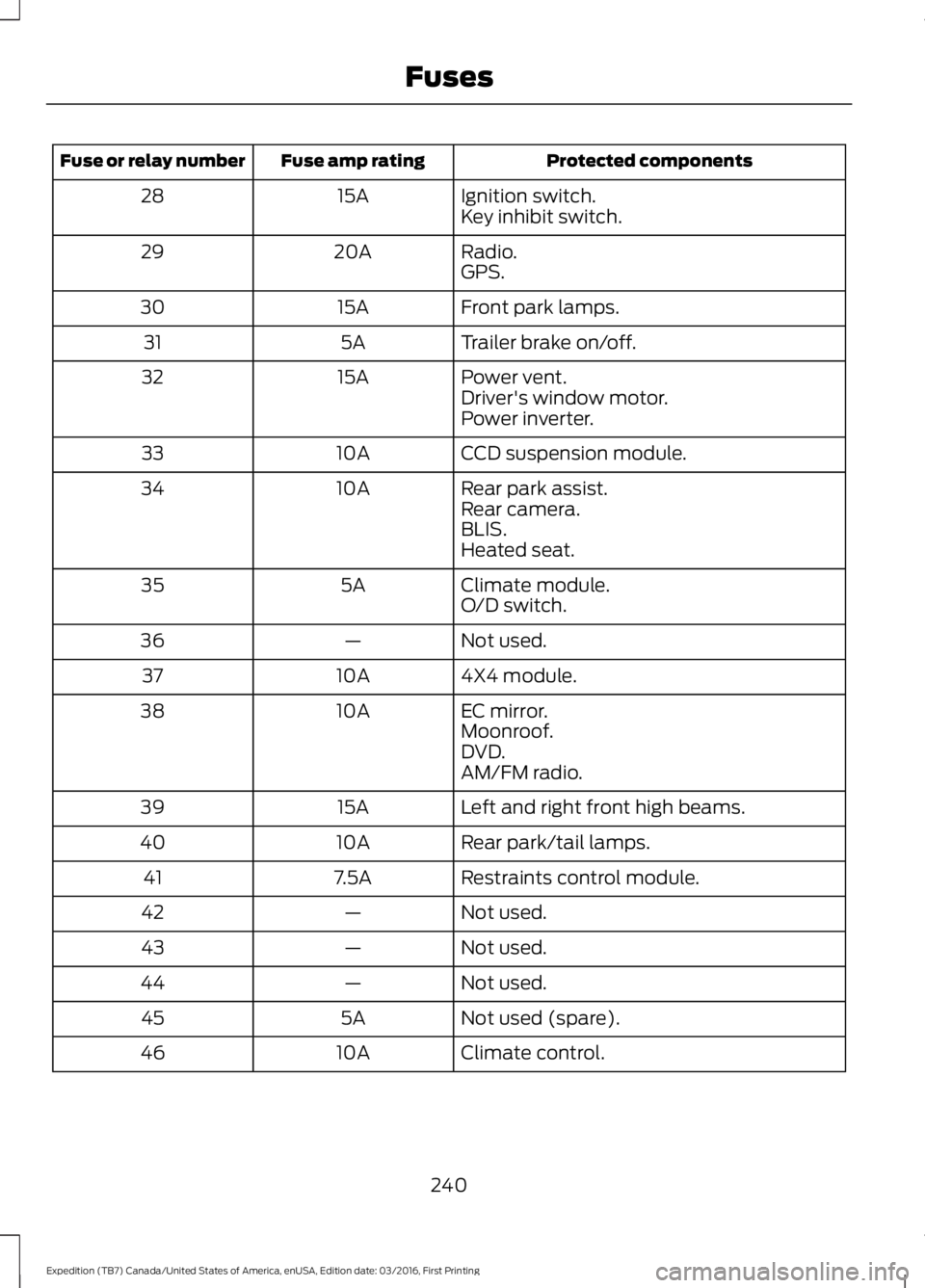
Protected componentsFuse amp ratingFuse or relay number
Ignition switch.15A28Key inhibit switch.
Radio.20A29GPS.
Front park lamps.15A30
Trailer brake on/off.5A31
Power vent.15A32Driver's window motor.Power inverter.
CCD suspension module.10A33
Rear park assist.10A34Rear camera.BLIS.Heated seat.
Climate module.5A35O/D switch.
Not used.—36
4X4 module.10A37
EC mirror.10A38Moonroof.DVD.AM/FM radio.
Left and right front high beams.15A39
Rear park/tail lamps.10A40
Restraints control module.7.5A41
Not used.—42
Not used.—43
Not used.—44
Not used (spare).5A45
Climate control.10A46
240
Expedition (TB7) Canada/United States of America, enUSA, Edition date: 03/2016, First Printing
Fuses
Page 269 of 500
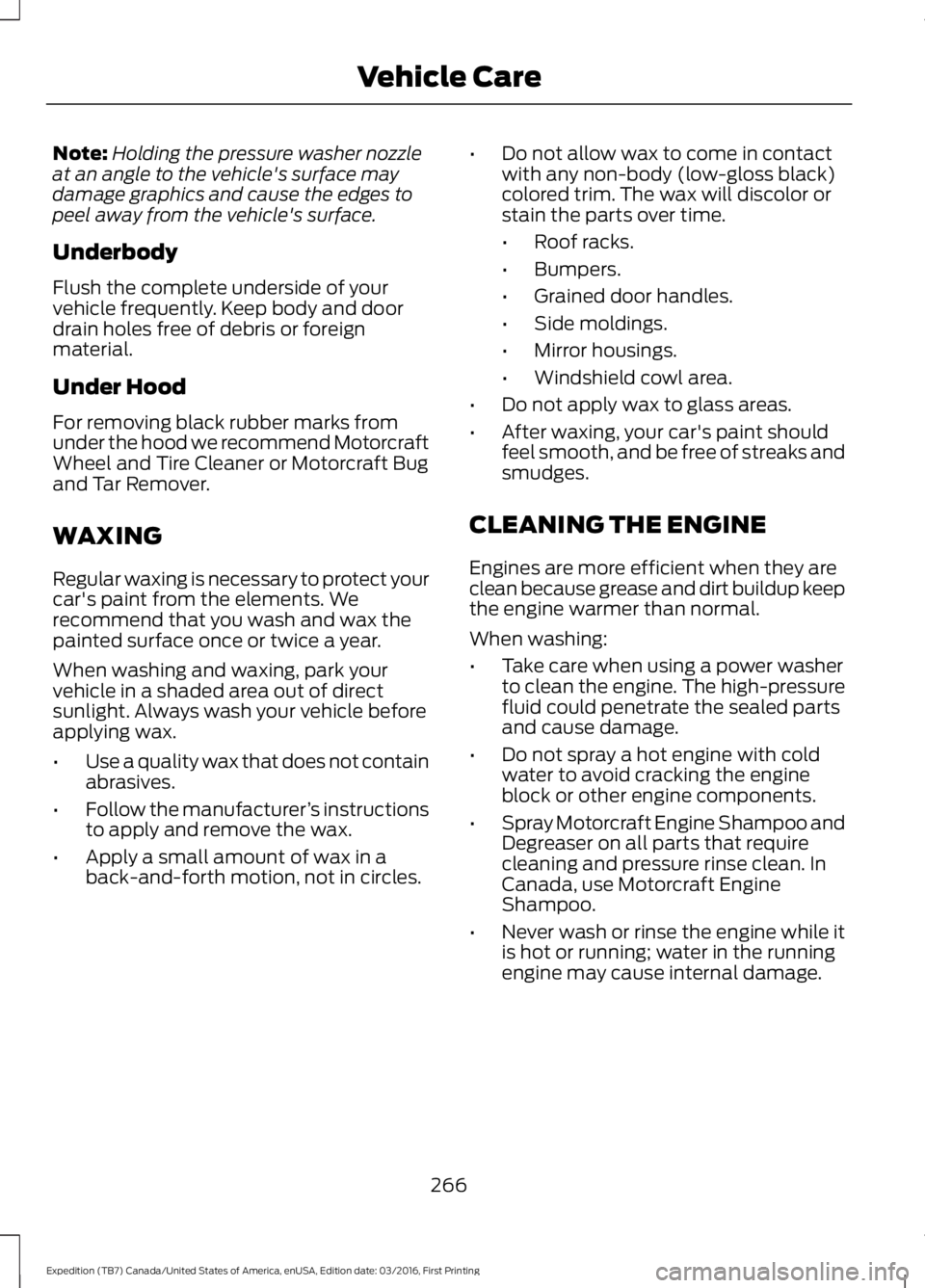
Note:Holding the pressure washer nozzleat an angle to the vehicle's surface maydamage graphics and cause the edges topeel away from the vehicle's surface.
Underbody
Flush the complete underside of yourvehicle frequently. Keep body and doordrain holes free of debris or foreignmaterial.
Under Hood
For removing black rubber marks fromunder the hood we recommend MotorcraftWheel and Tire Cleaner or Motorcraft Bugand Tar Remover.
WAXING
Regular waxing is necessary to protect yourcar's paint from the elements. Werecommend that you wash and wax thepainted surface once or twice a year.
When washing and waxing, park yourvehicle in a shaded area out of directsunlight. Always wash your vehicle beforeapplying wax.
•Use a quality wax that does not containabrasives.
•Follow the manufacturer’s instructionsto apply and remove the wax.
•Apply a small amount of wax in aback-and-forth motion, not in circles.
•Do not allow wax to come in contactwith any non-body (low-gloss black)colored trim. The wax will discolor orstain the parts over time.
•Roof racks.
•Bumpers.
•Grained door handles.
•Side moldings.
•Mirror housings.
•Windshield cowl area.
•Do not apply wax to glass areas.
•After waxing, your car's paint shouldfeel smooth, and be free of streaks andsmudges.
CLEANING THE ENGINE
Engines are more efficient when they areclean because grease and dirt buildup keepthe engine warmer than normal.
When washing:
•Take care when using a power washerto clean the engine. The high-pressurefluid could penetrate the sealed partsand cause damage.
•Do not spray a hot engine with coldwater to avoid cracking the engineblock or other engine components.
•Spray Motorcraft Engine Shampoo andDegreaser on all parts that requirecleaning and pressure rinse clean. InCanada, use Motorcraft EngineShampoo.
•Never wash or rinse the engine while itis hot or running; water in the runningengine may cause internal damage.
266
Expedition (TB7) Canada/United States of America, enUSA, Edition date: 03/2016, First Printing
Vehicle Care
Page 272 of 500
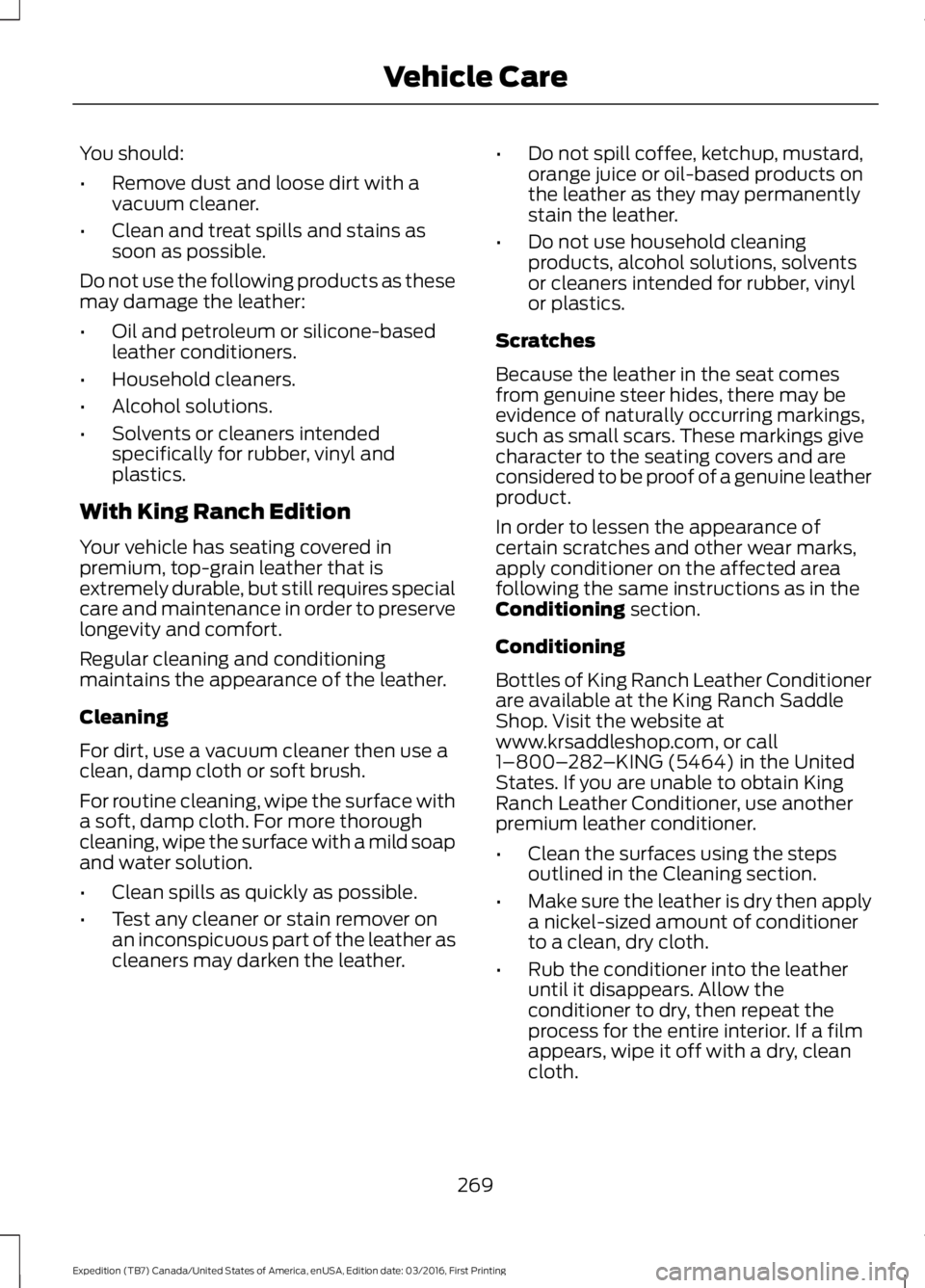
You should:
•Remove dust and loose dirt with avacuum cleaner.
•Clean and treat spills and stains assoon as possible.
Do not use the following products as thesemay damage the leather:
•Oil and petroleum or silicone-basedleather conditioners.
•Household cleaners.
•Alcohol solutions.
•Solvents or cleaners intendedspecifically for rubber, vinyl andplastics.
With King Ranch Edition
Your vehicle has seating covered inpremium, top-grain leather that isextremely durable, but still requires specialcare and maintenance in order to preservelongevity and comfort.
Regular cleaning and conditioningmaintains the appearance of the leather.
Cleaning
For dirt, use a vacuum cleaner then use aclean, damp cloth or soft brush.
For routine cleaning, wipe the surface witha soft, damp cloth. For more thoroughcleaning, wipe the surface with a mild soapand water solution.
•Clean spills as quickly as possible.
•Test any cleaner or stain remover onan inconspicuous part of the leather ascleaners may darken the leather.
•Do not spill coffee, ketchup, mustard,orange juice or oil-based products onthe leather as they may permanentlystain the leather.
•Do not use household cleaningproducts, alcohol solutions, solventsor cleaners intended for rubber, vinylor plastics.
Scratches
Because the leather in the seat comesfrom genuine steer hides, there may beevidence of naturally occurring markings,such as small scars. These markings givecharacter to the seating covers and areconsidered to be proof of a genuine leatherproduct.
In order to lessen the appearance ofcertain scratches and other wear marks,apply conditioner on the affected areafollowing the same instructions as in theConditioning section.
Conditioning
Bottles of King Ranch Leather Conditionerare available at the King Ranch SaddleShop. Visit the website atwww.krsaddleshop.com, or call1–800–282–KING (5464) in the UnitedStates. If you are unable to obtain KingRanch Leather Conditioner, use anotherpremium leather conditioner.
•Clean the surfaces using the stepsoutlined in the Cleaning section.
•Make sure the leather is dry then applya nickel-sized amount of conditionerto a clean, dry cloth.
•Rub the conditioner into the leatheruntil it disappears. Allow theconditioner to dry, then repeat theprocess for the entire interior. If a filmappears, wipe it off with a dry, cleancloth.
269
Expedition (TB7) Canada/United States of America, enUSA, Edition date: 03/2016, First Printing
Vehicle Care
Page 442 of 500
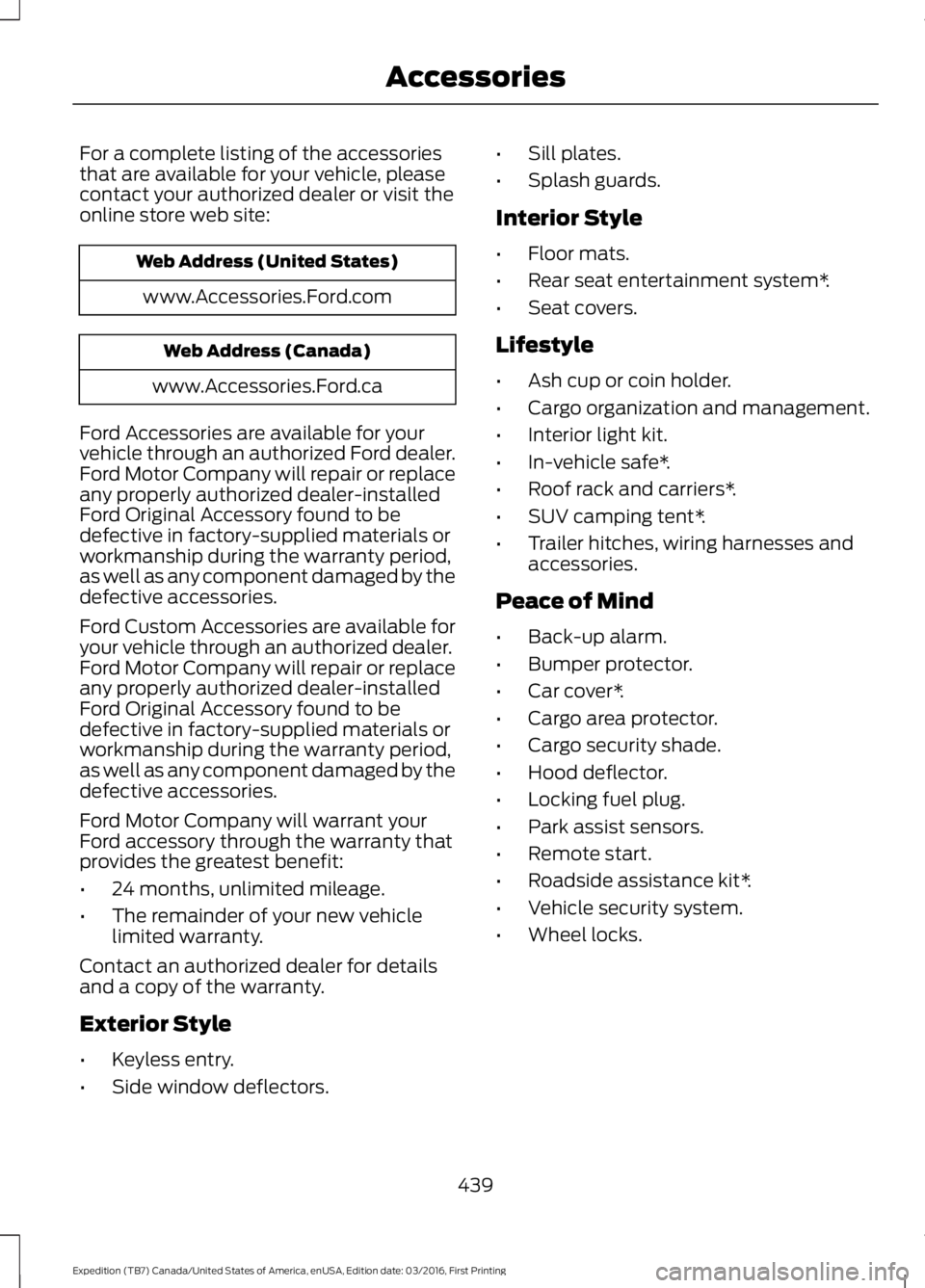
For a complete listing of the accessoriesthat are available for your vehicle, pleasecontact your authorized dealer or visit theonline store web site:
Web Address (United States)
www.Accessories.Ford.com
Web Address (Canada)
www.Accessories.Ford.ca
Ford Accessories are available for yourvehicle through an authorized Ford dealer.Ford Motor Company will repair or replaceany properly authorized dealer-installedFord Original Accessory found to bedefective in factory-supplied materials orworkmanship during the warranty period,as well as any component damaged by thedefective accessories.
Ford Custom Accessories are available foryour vehicle through an authorized dealer.Ford Motor Company will repair or replaceany properly authorized dealer-installedFord Original Accessory found to bedefective in factory-supplied materials orworkmanship during the warranty period,as well as any component damaged by thedefective accessories.
Ford Motor Company will warrant yourFord accessory through the warranty thatprovides the greatest benefit:
•24 months, unlimited mileage.
•The remainder of your new vehiclelimited warranty.
Contact an authorized dealer for detailsand a copy of the warranty.
Exterior Style
•Keyless entry.
•Side window deflectors.
•Sill plates.
•Splash guards.
Interior Style
•Floor mats.
•Rear seat entertainment system*.
•Seat covers.
Lifestyle
•Ash cup or coin holder.
•Cargo organization and management.
•Interior light kit.
•In-vehicle safe*.
•Roof rack and carriers*.
•SUV camping tent*.
•Trailer hitches, wiring harnesses andaccessories.
Peace of Mind
•Back-up alarm.
•Bumper protector.
•Car cover*.
•Cargo area protector.
•Cargo security shade.
•Hood deflector.
•Locking fuel plug.
•Park assist sensors.
•Remote start.
•Roadside assistance kit*.
•Vehicle security system.
•Wheel locks.
439
Expedition (TB7) Canada/United States of America, enUSA, Edition date: 03/2016, First Printing
Accessories
Page 484 of 500
Product incorporates data which is ©20XX Telstra Corporation Limited, GMHolden Limited, Intelematics AustraliaPty Ltd and Continental Pty Ltd.
B. Third Party Notices for Australia. Inaddition to the foregoing, the End-UserTerms for any Application containingRDS-TMC Traffic Codes for Australiashall contain the following notice:“Product incorporates traffic locationcodes which is © 20XX Telstra Corpora-tion Limited and its licensors.”
VII. China Territory
Personal Use Only
You agree to use this Data together with[insert name of Client Application] for thesolely personal, non-commercial purposesfor which you were licensed, and not forservice bureau, time-sharing or othersimilar purposes. Accordingly, but subjectto the restrictions set forth in the followingparagraphs, you may copy this Data onlyas necessary for your personal use to (i)view it, and (ii) save it, provided that youdo not remove any copyright notices thatappear and do not modify the Data in anyway. You agree not to otherwise reproduce,copy, modify, decompile, disassemble orreverse engineer any portion of this Data,and may not transfer or distribute it in anyform, for any purpose, except to the extentpermitted by mandatory laws.
Restrictions
Except where you have been specificallylicensed to do so by NAV2 , and withoutlimiting the preceding paragraph, you maynot (a) use this Data with any products,systems, or applications installed orotherwise connected to or incommunication with vehicles, capable ofvehicle navigation, positioning, dispatch,real time route guidance, fleetmanagement or similar applications; or (b)
with or in communication with anypositioning devices or any mobile orwireless-connected electronic or computerdevices, including without limitationcellular phones, palmtop and handheldcomputers, pagers, and personal digitalassistants or PDAs. You agree to ceaseusing this Data if you fail to comply withthese terms and conditions.
Limited Warranty
NAV2 warrants that (a) the Data willperform substantially in accordance withthe accompanying written materials for aperiod of ninety (90) days from the dateof receipt, and (b) any support servicesprovided by NAV2 shall be substantially asdescribed in applicable written materialsprovided to you by NAV2, and NAV2’ssupport engineers will make commerciallyreasonable efforts to solve any problemissues.
rigCustomer Remedies
NAV2 and its suppliers’ entire liability andyour exclusive remedy shall be, at NAV2’ssole discretion, either (a) return of the pricepaid, if any, or (b) repair or replacement ofthe Data that do not meet NAV2’s LimitedWarranty and that are returned to NAV2with a copy of your receipt. This LimitedWarranty is void if failure of the Data hasresulted from accident, abuse, ormisapplication. Any replacement Data willbe warranted for the remainder of theoriginal warranty period or thirty (30) days,whichever is longer. Neither these remediesnor any product support services offeredby NAV2 are available without proof ofpurchase from an authorized internationalsource.
481
Expedition (TB7) Canada/United States of America, enUSA, Edition date: 03/2016, First Printing
Appendices
Page 494 of 500
I
Ignition Switch...............................................144In California (U.S. Only).............................227Information Display Control......................69Information Displays......................................91General Information.............................................91Information Messages................................1024WD Messages......................................................111AdvanceTrac™ / Traction ControlMessages..........................................................103Alarm Messages.................................................103Battery and Charging SystemMessages..........................................................103Blind Spot Information SystemMessages..........................................................104Brake System Messages..................................104Door Messages....................................................104Engine Messages................................................105Fuel Messages.....................................................105Keys and Intelligent AccessMessages..........................................................105Maintenance Messages...................................106MyKey™ Messages............................................107Off Road Messages............................................107Park Aid Messages.............................................108Power Steering Messages..............................108Remote Start Messages..................................109Suspension System Messages.....................109Tire Messages......................................................109Trailer Messages.................................................109Transmission Messages....................................110Installing Child Restraints.............................17Child Seats...............................................................17Combining Seatbelt and LATCH LowerAnchors for Attaching Child SafetySeats.....................................................................21Using Lap and Shoulder Belts .........................18Using Lower Anchors and Tethers forCHildren (LATCH)...........................................20Using Tether Straps..............................................21Instrument Cluster........................................84Instrument Lighting Dimmer......................75Interior Lamps..................................................77Front Row Map and Dome Lamps.................77Front Row Map Lamps........................................77Rear Cargo Lamp..................................................78Second Row Map Lamps...................................77
Interior Mirror....................................................81Auto-Dimming Mirror...........................................81Introduction.........................................................7
J
Jump Starting the Vehicle.........................223Connecting the Jumper Cables....................223Jump Starting......................................................224Preparing Your Vehicle.....................................223Removing the Jumper Cables.......................224
K
Keyless Entry...................................................58SECURICODE™ KEYLESS ENTRYKEYPAD..............................................................58Unlocking and Locking the Doors..................60Keyless Starting............................................144Ignition Modes.....................................................145Keys and Remote Controls.........................42Principle of Operation.........................................42
L
Lighting Control...............................................73Headlamp Flasher................................................74High Beams.............................................................73Lighting...............................................................73General Information............................................73Limited Slip Differential..............................172Load CarriersSee: Roof Racks and Load Carriers..............197Load Carrying.................................................196Load Limit.......................................................198Special Loading Instructions for Owners ofPick-up Trucks and Utility-typeVehicles............................................................202Vehicle Loading - with and without aTrailer.................................................................198Locking and Unlocking.................................52Activating Intelligent Access............................52Autolock...................................................................53Auto Relock............................................................53Autounlock.............................................................54Battery Saver.........................................................54Enabling or Disabling Autolock andAutounlock........................................................54
491
Expedition (TB7) Canada/United States of America, enUSA, Edition date: 03/2016, First Printing
Index
Page 495 of 500
Illuminated Entry..................................................54Illuminated Exit.....................................................54Power Door Locks................................................52Remote Control.....................................................52Smart Unlocks for Integrated KeyheadTransmitter........................................................53Smart Unlocks for Intelligent AccessKeys......................................................................53Lug NutsSee: Changing a Road Wheel........................297
M
Maintenance..................................................243General Information.........................................243Manual Climate Control..............................112Manual Climate Control - Vehicles With:Electronic Manual TemperatureControl (EMTC)...........................................113Manual Liftgate...............................................54Closing the Liftgate.............................................56Opening the Liftgate...........................................55Opening the Liftgate Window.........................55Manual Seats.................................................123Manual Lumbar ..................................................124Moving the Seat Backward andForward..............................................................123Recline Adjustment............................................123Media Hub......................................................323Memory Function..........................................125Easy Entry and Exit Feature............................126Saving a PreSet Position..................................125Message CenterSee: Information Displays..................................91MirrorsSee: Heated Windows and Mirrors..............120See: Windows and Mirrors................................79Mobile Communications Equipment.......13Moonroof...........................................................82Bounce-Back.........................................................83Opening and Closing the Moonroof..............83Venting the Moonroof........................................83Motorcraft Parts..........................................304MyKey Troubleshooting................................51MyKey™.............................................................47Principle of Operation.........................................47
N
Navigation.....................................................404cityseeker................................................................411Destination Mode.............................................405Map Mode............................................................404Navigation Map Updates..................................411Navigation Menu...............................................409SiriusXM Traffic and Travel Link.....................411Waypoints.............................................................410Normal Scheduled Maintenance..........446Intelligent Oil-Life Monitor............................446Normal Maintenance Intervals.....................447
O
Oil Change Indicator Reset......................246Oil CheckSee: Engine Oil Check......................................245Opening and Closing the Hood..............243Ordering Additional Owner'sLiterature.....................................................230Obtaining a French Owner’s Manual...........231Overhead Console........................................143
P
Parking Aids....................................................182Principle of Operation.......................................182Parking Brake..................................................174Passive Anti-Theft System..........................61SecuriLock®............................................................61PATSSee: Passive Anti-Theft System......................61Pedals.................................................................70Perchlorate.........................................................11Phone..............................................................399During a Phone Call..........................................402Making Calls.........................................................401Pairing Your Cell Phone for the FirstTime..................................................................399Phone Menu.......................................................400Receiving Calls...................................................402Smartphone Connectivity.............................403Text Messaging..................................................403Power Door LocksSee: Locking and Unlocking.............................52
492
Expedition (TB7) Canada/United States of America, enUSA, Edition date: 03/2016, First Printing
Index
Page 497 of 500
Roof Racks and Load Carriers..................197Adjusting the Crossbar.....................................197Running-InSee: Breaking-In..................................................218Running Out of Fuel......................................151Adding Fuel From a Portable FuelContainer..........................................................152Filling a Portable Fuel Container...................152
S
Safety Canopy™............................................39Safety Precautions......................................150Satellite Radio..............................................320Satellite Radio Electronic Serial Number(ESN)..................................................................321Satellite Radio Reception Factors................321SIRIUS® Satellite Radio Service...................321Troubleshooting.................................................322Scheduled Maintenance Record...........452Scheduled Maintenance..........................443Seatbelt Extension........................................35Seatbelt Height Adjustment......................32Second Row Comfort Guide............................32Seatbelt Reminder.........................................33Belt-Minder™........................................................33Seatbelts...........................................................29Principle of Operation........................................29Seatbelt Warning Lamp and IndicatorChime...............................................................33Conditions of operation.....................................33Seats...................................................................121Security...............................................................61Self-Leveling Suspension.........................194Settings............................................................414911 Assist................................................................419Ambient Lighting...............................................425Bluetooth...............................................................416Clock.......................................................................416Display...................................................................425General..................................................................423Media Player.........................................................415Mobile Apps.........................................................422Navigation............................................................420Phone......................................................................417Radio......................................................................420Sound......................................................................414Valet Mode...........................................................426
Vehicle...................................................................425Voice Control.......................................................426Wi-Fi.......................................................................424Side Airbags.....................................................38Sitting in the Correct Position...................121Snow ChainsSee: Using Snow Chains..................................291Special Notices................................................12New Vehicle Limited Warranty.........................12On Board Diagnostics Data LinkConnector............................................................13Special Instructions..............................................12Special Operating Conditions ScheduledMaintenance..............................................449Exceptions...........................................................450Speed ControlSee: Cruise Control.............................................187Stability Control.............................................177Principle of Operation........................................177Starter SwitchSee: Ignition Switch...........................................144Starting a Gasoline Engine.......................145Automatic Engine Shutdown.........................147Failure to Start......................................................147Guarding Against Exhaust Fumes...............148Important Ventilating Information..............148Stopping the Engine When Your Vehicle isMoving...............................................................148Stopping the Engine When Your Vehicle isStationary.........................................................147Vehicles with an Ignition Key.........................146Vehicles with Keyless Start............................146Starting and Stopping the Engine.........144General Information..........................................144Steering............................................................193Electric Power Steering....................................193Steering Wheel Lock...................................145Steering Wheel...............................................65Storage Compartments.............................143SunroofSee: Moonroof.......................................................82Sun Visors.........................................................82Illuminated Vanity Mirror...................................82Supplementary Restraints System.........36Principle of Operation........................................36Symbols Glossary.............................................7SYNC™ 3........................................................365General Information.........................................365
494
Expedition (TB7) Canada/United States of America, enUSA, Edition date: 03/2016, First Printing
Index