traction control FORD EXPEDITION EL 2017 Owner's Manual
[x] Cancel search | Manufacturer: FORD, Model Year: 2017, Model line: EXPEDITION EL, Model: FORD EXPEDITION EL 2017Pages: 500, PDF Size: 6.13 MB
Page 280 of 500
The traction grades, from highestto lowest are AA, A, B, and C. Thegrades represent the tire’s abilityto stop on wet pavement asmeasured under controlledconditions on specifiedgovernment test surfaces ofasphalt and concrete. A tiremarked C may have poor tractionperformance.
Temperature A B C
WARNING
The temperature grade forthis tire is established for atire that is properly inflated andnot overloaded. Excessive speed,underinflation, or excessiveloading, either separately or incombination, can cause heat
buildup and possible tire failure.
The temperature grades are A(the highest), B and C,representing the tire’s resistanceto the generation of heat and itsability to dissipate heat whentested under controlled conditionson a specified indoor laboratorytest wheel. Sustained hightemperature can cause thematerial of the tire to degenerateand reduce tire life, and excessivetemperature can lead to suddentire failure. The grade Ccorresponds to a level ofperformance which all passengercar tires must meet under the
Federal Motor Vehicle SafetyStandard No. 139. Grades B and Arepresent higher levels ofperformance on the laboratorytest wheel than the minimumrequired by law.
Glossary of Tire Terminology
*Tire label: A label showing theoriginal equipment tire sizes,recommended inflation pressureand the maximum weight thevehicle can carry.
*Tire Identification Number(TIN): A number on the sidewallof each tire providing informationabout the tire brand andmanufacturing plant, tire size anddate of manufacture. Also referredto as DOT code.
*Inflation pressure: A measureof the amount of air in a tire.
*Standard load: A class ofP-metric or Metric tires designedto carry a maximum load at setpressure. For example: ForP-Metric tires 35 psi (2.4 bar) andfor Metric 36 psi (2.5 bar).Increasing the inflation pressurebeyond this pressure will notincrease the tire’s load carryingcapability.
*Extra load: A class of P-metricor Metric tires designed to carry aheavier maximum load at 42 psi(2.9 bar). Increasing the inflationpressure beyond this pressure willnot increase the tire’s loadcarrying capability.
277
Expedition (TB7) Canada/United States of America, enUSA, Edition date: 03/2016, First Printing
Wheels and Tires
Page 283 of 500
mph ( km/h)Letterrating
168 (270)W
186 (299)Y
Note:For tires with a maximum
speed capability over 149 mph
(240 km/h), tire manufacturers
sometimes use the letters ZR. For
those with a maximum speed
capability over 186 mph
(299 km/h), tire manufacturers
always use the letters ZR.
H.U.S. DOT Tire IdentificationNumber: This begins with theletters DOT and indicates that thetire meets all federal standards.The next two numbers or lettersare the plant code designatingwhere it was manufactured, thenext two are the tire size code andthe last four numbers representthe week and year the tire wasbuilt. For example, the numbers317 mean the 31st week of 1997.After 2000 the numbers go to fourdigits. For example, 2501 meansthe 25th week of 2001. Thenumbers in between areidentification codes used fortraceability. This information isused to contact customers if a tiredefect requires a recall.
I.M+S or M/S: Mud and Snow, or
AT: All Terrain, or
AS: All Season.
J.Tire Ply Composition andMaterial Used: Indicates thenumber of plies or the number oflayers of rubber-coated fabric inthe tire tread and sidewall. Tiremanufacturers also must indicatethe ply materials in the tire and thesidewall, which include steel,nylon, polyester, and others.
K.Maximum Load: Indicates themaximum load in kilograms andpounds that can be carried by thetire (affixed to either the doorhinge pillar, door-latch post, or thedoor edge that meets thedoor-latch post, next to thedriver's seating position), or TireLabel located on the B-pillar orthe edge of the driver's door.
L.Treadwear, Traction andTemperature Grades:
*Treadwear: The treadweargrade is a comparative ratingbased on the wear rate of the tirewhen tested under controlledconditions on a specifiedgovernment test course. Forexample, a tire graded 150 wouldwear 1½ times as well on thegovernment course as a tiregraded 100.
280
Expedition (TB7) Canada/United States of America, enUSA, Edition date: 03/2016, First Printing
Wheels and Tires
Page 284 of 500
*Traction: The traction grades,from highest to lowest are AA, A,B, and C. The grades represent thetire's ability to stop on wetpavement as measured undercontrolled conditions on specifiedgovernment test surfaces ofasphalt and concrete. A tiremarked C may have poor tractionperformance.
*Temperature: The temperaturegrades are A (the highest), B andC, representing the tire'sresistance to the generation ofheat and its ability to dissipateheat when tested under controlledconditions on a specified indoorlaboratory test wheel.
M.Maximum InflationPressure: Indicates the tiremanufacturers' maximumpermissible pressure or thepressure at which the maximumload can be carried by the tire. Thispressure is normally higher thanthe vehicle manufacturer'srecommended cold inflationpressure which can be found onthe Safety ComplianceCertification Label (affixed toeither the door hinge pillar,door-latch post, or the door edgethat meets the door-latch post,next to the driver's seatingposition), or Tire Label located onthe B-pillar or the edge of thedriver's door. The cold inflationpressure should never be set lowerthan the recommended pressure
on the vehicle label.
The tire suppliers may haveadditional markings, notes orwarnings such as standard loador radial tubeless.
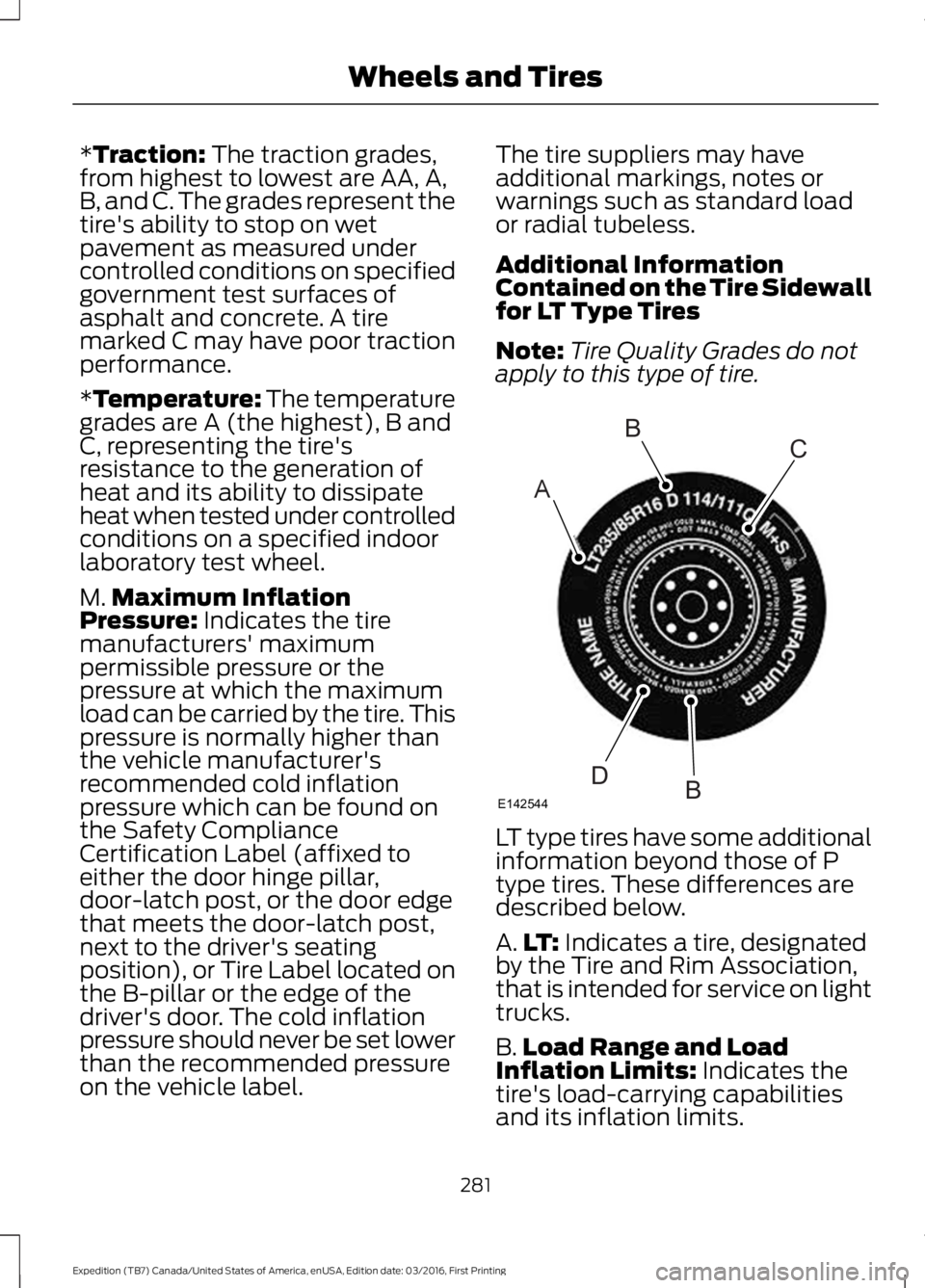
Additional InformationContained on the Tire Sidewallfor LT Type Tires
Note:Tire Quality Grades do notapply to this type of tire.
LT type tires have some additionalinformation beyond those of Ptype tires. These differences aredescribed below.
A.LT: Indicates a tire, designatedby the Tire and Rim Association,that is intended for service on lighttrucks.
B.Load Range and LoadInflation Limits: Indicates thetire's load-carrying capabilitiesand its inflation limits.
281
Expedition (TB7) Canada/United States of America, enUSA, Edition date: 03/2016, First Printing
Wheels and TiresA
BC
BDE142544
Page 294 of 500
USING SNOW CHAINS
WARNING
Snow tires must be the same size,load index and speed rating as thoseoriginally provided by Ford. Use ofany tire or wheel not recommended byFord can affect the safety andperformance of your vehicle, which couldresult in an increased risk of loss of control,vehicle rollover, personal injury and death.Additionally, the use of non-recommendedtires and wheels can cause steering,suspension, axle, transfer case or powertransfer unit failure. Follow the Fordrecommended tire inflation pressure foundon the Safety Compliance CertificationLabel (on the door hinge pillar, door latchpost or the door edge that meets the doorlatch post, next to the driver seat), or TireLabel on the B-Pillar or the edge of thedriver door. Failure to follow the tirepressure recommendations can causeuneven treadwear patterns and adverselyaffect the way your vehicle handles.
Note:The suspension insulation andbumpers will help prevent vehicle damage.Do not remove these components from yourvehicle when using snow tires and chains.
The tires on your vehicle have all-weathertreads to provide traction in rain and snow.However, in some climates, you may needto use snow tires and cables. If you needto use cables, it is recommended that steelwheels (of the same size andspecifications) be used, as cables may chipaluminum wheels.
Follow these guidelines when using snowtires and chains:
•If possible, avoid fully loading yourvehicle.
•Use only cable type chains or chainsoffered by Ford/Lincoln as anaccessory or equivalent. Otherconventional link type chains maycontact and cause damage to thevehicle's wheel house and/or body.
•Do not install chains on the front tiresas this may interfere with suspensioncomponents.
•Only certain snow cables or chainshave been approved by Ford/Lincolnas safe for use on your vehicle with thefollowing tires: 265/70R17 and275/65R18.
•You should install snow cables orchains that have been rated as SAEClass S.
•Install chains securely, verifying thatthe chains do not touch any wiring,brake lines, or fuel lines.
•Do not exceed 31 mph (50 km/h) orless if recommended by the chainmanufacturer while using snow chains.
•Drive cautiously. If you hear the chainsrub or bang against your vehicle, stopand retighten the chains. If this doesnot work, remove the chains to preventdamage to your vehicle.
•Remove the tire chains when they areno longer needed. Do not use tirechains on dry roads.
•Purchase chains or cables from amanufacturer that clearly labels bodyto tire dimension restrictions. The snowchains or cables must be mounted inpairs on the rear tires only.
If you have any questions regarding snowchains or cables, please contact yourauthorized dealer.
291
Expedition (TB7) Canada/United States of America, enUSA, Edition date: 03/2016, First Printing
Wheels and Tires
Page 468 of 500
TRADEMARKS: This EULA does not grantyou any rights in connection with anytrademarks or service marks of FORDMOTOR COMPANY, its affiliates, and thirdparty software and service providers.
PRODUCT SUPPORT: Please refer toFORD MOTOR COMPANY instructionsprovided in the documentation for theDEVICES product support, such as thevehicle owner guide.
Should you have any questions concerningthis EULA, or if you desire to contact FORDMOTOR COMPANY for any other reason,please refer to the address provided in thedocumentation for the DEVICES.
No Liability for Certain Damages:EXCEPT AS PROHIBITED BY LAW, FORDMOTOR COMPANY, ANY THIRD PARTYSOFTWARE OR SERVICES SUPPLIERS,AND THEIR AFFILIATES SHALL HAVE NOLIABILITY FOR ANY INDIRECT, SPECIAL,CONSEQUENTIAL OR INCIDENTALDAMAGES ARISING FROM OR INCONNECTION WITH THE USE ORPERFORMANCE OF THE SOFTWARE. THISLIMITATION SHALL APPLY EVEN IF ANYREMEDY FAILS OF ITS ESSENTIALPURPOSE. THERE ARE NO WARRANTIESOTHER THAN THOSE THAT MAY BEEXPRESSLY PROVIDED FOR YOUR NEWVEHICLE.
SYNC® Automotive Important SafetyInformation Read and followinstructions:
•Before using your SYNC® system, readand follow all instructions and safetyinformation provided in this end usermanual ("Owner Guide".) Notfollowing precautions found in theOwner Guide can lead to an accidentor other serious injuries.
General Operation
•Voice Command Control: Certainfunctions within the SYNC® systemmay be accomplished using voicecommands. Using voice commandswhile driving helps you to operate thesystem without removing your handsfrom the wheel or eyes from the road.
•Prolonged Views of Screen: Do notaccess any function requiring aprolonged view of the screen while youare driving. Pull over in a safe and legalmanner before attempting to access afunction of the system requiringprolonged attention.
•Volume Setting: Do not raise thevolume excessively. Keep the volumeat a level where you can still hearoutside traffic and emergency signalswhile driving. Driving while unable tohear these sounds could cause anaccident.
•Navigation Features: Any navigationfeatures included in the system areintended to provide turn by turninstructions to get you to a desireddestination. Please make certain allpersons using this system carefullyread and follow instructions and safetyinformation fully.
•Distraction Hazard: Any navigationfeatures may require manual(non-verbal) setup. Attempting toperform such set-up or insert datawhile driving can distract your attentionand could cause an accident or otherserious injury. Stop the vehicle in a safeand legal manner before attemptingthese operations.
•Let Your Judgment Prevail: Anynavigation features are provided onlyas an aid. Make your driving decisionsbased on your observations of localconditions and existing trafficregulations. Any such feature is not a
465
Expedition (TB7) Canada/United States of America, enUSA, Edition date: 03/2016, First Printing
Appendices
Page 494 of 500
I
Ignition Switch...............................................144In California (U.S. Only).............................227Information Display Control......................69Information Displays......................................91General Information.............................................91Information Messages................................1024WD Messages......................................................111AdvanceTrac™ / Traction ControlMessages..........................................................103Alarm Messages.................................................103Battery and Charging SystemMessages..........................................................103Blind Spot Information SystemMessages..........................................................104Brake System Messages..................................104Door Messages....................................................104Engine Messages................................................105Fuel Messages.....................................................105Keys and Intelligent AccessMessages..........................................................105Maintenance Messages...................................106MyKey™ Messages............................................107Off Road Messages............................................107Park Aid Messages.............................................108Power Steering Messages..............................108Remote Start Messages..................................109Suspension System Messages.....................109Tire Messages......................................................109Trailer Messages.................................................109Transmission Messages....................................110Installing Child Restraints.............................17Child Seats...............................................................17Combining Seatbelt and LATCH LowerAnchors for Attaching Child SafetySeats.....................................................................21Using Lap and Shoulder Belts .........................18Using Lower Anchors and Tethers forCHildren (LATCH)...........................................20Using Tether Straps..............................................21Instrument Cluster........................................84Instrument Lighting Dimmer......................75Interior Lamps..................................................77Front Row Map and Dome Lamps.................77Front Row Map Lamps........................................77Rear Cargo Lamp..................................................78Second Row Map Lamps...................................77
Interior Mirror....................................................81Auto-Dimming Mirror...........................................81Introduction.........................................................7
J
Jump Starting the Vehicle.........................223Connecting the Jumper Cables....................223Jump Starting......................................................224Preparing Your Vehicle.....................................223Removing the Jumper Cables.......................224
K
Keyless Entry...................................................58SECURICODE™ KEYLESS ENTRYKEYPAD..............................................................58Unlocking and Locking the Doors..................60Keyless Starting............................................144Ignition Modes.....................................................145Keys and Remote Controls.........................42Principle of Operation.........................................42
L
Lighting Control...............................................73Headlamp Flasher................................................74High Beams.............................................................73Lighting...............................................................73General Information............................................73Limited Slip Differential..............................172Load CarriersSee: Roof Racks and Load Carriers..............197Load Carrying.................................................196Load Limit.......................................................198Special Loading Instructions for Owners ofPick-up Trucks and Utility-typeVehicles............................................................202Vehicle Loading - with and without aTrailer.................................................................198Locking and Unlocking.................................52Activating Intelligent Access............................52Autolock...................................................................53Auto Relock............................................................53Autounlock.............................................................54Battery Saver.........................................................54Enabling or Disabling Autolock andAutounlock........................................................54
491
Expedition (TB7) Canada/United States of America, enUSA, Edition date: 03/2016, First Printing
Index
Page 498 of 500
SYNC™ 3 Troubleshooting......................426SYNC™ Applications andServices........................................................340911 Assist..............................................................340SYNC Services: Traffic, Directions &Information (TDI) (If Equipped, UnitedStates Only)...................................................344Vehicle Health Report (If Equipped, UnitedStates Only)....................................................342SYNC™............................................................324General Information.........................................324SYNC™ Troubleshooting.........................356
T
TailgateSee: Manual Liftgate...........................................54See: Power Liftgate.............................................56Technical SpecificationsSee: Capacities and Specifications............304Terrain Response.........................................180The Better Business Bureau (BBB) AutoLine Program (U.S. Only).......................228Tire Care..........................................................276Glossary of Tire Terminology..........................277Information About Uniform Tire QualityGrading..............................................................276Information Contained on the TireSidewall............................................................278Temperature A B C.............................................277Traction AA A B C...............................................276Treadwear.............................................................276Tire Pressure Monitoring System...........292Changing Tires With a Tire PressureMonitoring System.......................................293Understanding Your Tire PressureMonitoring System ......................................293TiresSee: Wheels and Tires......................................273Towing a Trailer............................................203Load Placement................................................203Towing Points.................................................214Towing the Vehicle on FourWheels...........................................................215Emergency Towing.............................................215Four-wheel-down Towing...............................216Recreational Towing..........................................215Towing.............................................................203
Traction Control.............................................176Principle of Operation.......................................176Trailer Sway Control...................................204Transfer Case Fluid Check.........................251Transmission Code Designation............307Transmission..................................................159TransmissionSee: Transmission..............................................159
U
Under Hood Overview...............................244Universal Garage Door Opener...............136HomeLink Wireless Control System............136USB Port..........................................................323Using Cruise Control....................................187Switching Cruise Control Off.........................188Switching Cruise Control On and Off..........187Using Four-Wheel Drive.............................1654WD Indicator Lights........................................1654WD Switch Positions......................................165Driving Off-Road With Truck and UtilityVehicles..............................................................167How Your Vehicle Differs From OtherVehicles..............................................................167Using Hill Descent Control.......................180Principle of Operation......................................180Using Hill Descent Control.............................180Using MyKey With Remote StartSystems...........................................................51Using Power Running Boards....................63Automatic Power Deploy..................................63Automatic Power Stow......................................63Bounce-back.........................................................64Enabling and Disabling......................................63Manual Power Deploy........................................63Using Snow Chains......................................291Using Stability Control................................178Stability Control and Traction Control withRoll Stability Control™ (RSC™)..............178Using SYNC™ With Your MediaPlayer............................................................348Accessing Your USB Song Library...............352Bluetooth Devices and SystemSettings............................................................354Connecting Your Digital Media Player to theUSB Port..........................................................348Media Menu Features........................................351
495
Expedition (TB7) Canada/United States of America, enUSA, Edition date: 03/2016, First Printing
Index
Page 499 of 500
Media Voice Commands................................349USB 2......................................................................354Voice Commands for Audio Sources.........354Using SYNC™ With Your Phone............328Accessing Features through the PhoneMenu..................................................................333Accessing Your Phone Settings...................336Bluetooth Devices..............................................337Making Calls.........................................................332Pairing a Phone for the First Time...............329Pairing Subsequent Phones..........................330Phone Options during an Active Call.........332Phone Voice Commands................................330Receiving Calls....................................................332System Settings.................................................338Text Messaging...................................................334Using Traction Control................................176Switching the System Off ...............................176System Indicator Lights andMessages..........................................................176Using Voice Recognition...........................326Audio Voice Commands.................................380Climate Voice Commands..............................381Initiating a Voice Session................................326Mobile App Voice Commands......................383Navigation Voice Commands.......................382Phone Voice Commands.................................381SiriusXM Traffic and Travel Link VoiceCommands.....................................................384System Interaction and Feedback...............327Voice Settings Commands............................384Utilizing the Mediation/ArbitrationProgram (Canada Only)........................229
V
Vehicle Care...................................................264General Information.........................................264Vehicle Certification Label.......................307Vehicle Identification Number...............306Vehicle Storage.............................................270Battery.....................................................................271Body........................................................................270Brakes......................................................................271Cooling system.....................................................271Engine......................................................................271Fuel system...........................................................271General..................................................................270
Miscellaneous.......................................................271Removing Vehicle From Storage...................271Tires..........................................................................271VentilationSee: Climate Control...........................................112VINSee: Vehicle Identification Number...........306Voice Control...................................................68Type One.................................................................68Type Two.................................................................69
W
Warning Lamps and Indicators.................874X2............................................................................894X4 Auto.................................................................894X4 HIGH................................................................904X4 LOW................................................................90Anti-Lock Braking System.................................87Battery......................................................................87Brake System.........................................................87Cruise Control........................................................87Direction Indicator................................................87Door Ajar..................................................................87Engine Coolant Temperature...........................87Engine Oil................................................................88Fasten Safety Belt...............................................88Front Airbag...........................................................88Front Fog Lamps..................................................88High Beam..............................................................88Hill Descent............................................................88Liftgate Ajar............................................................88Low Fuel Level......................................................88Low Tire Pressure Warning..............................88Low Washer Fluid................................................88Parking Lamps......................................................88Powertrain Fault...................................................88Service Engine Soon...........................................89Stability Control System...................................89Stability Control System Off...........................89Transmission Tow/Haul....................................89Washer Fluid Check....................................252WashersSee: Cleaning the Exterior..............................265See: Wipers and Washers...................................71Waxing.............................................................266Wheel NutsSee: Changing a Road Wheel........................297
496
Expedition (TB7) Canada/United States of America, enUSA, Edition date: 03/2016, First Printing
Index