bluetooth FORD EXPEDITION EL 2017 Service Manual
[x] Cancel search | Manufacturer: FORD, Model Year: 2017, Model line: EXPEDITION EL, Model: FORD EXPEDITION EL 2017Pages: 500, PDF Size: 6.13 MB
Page 431 of 500
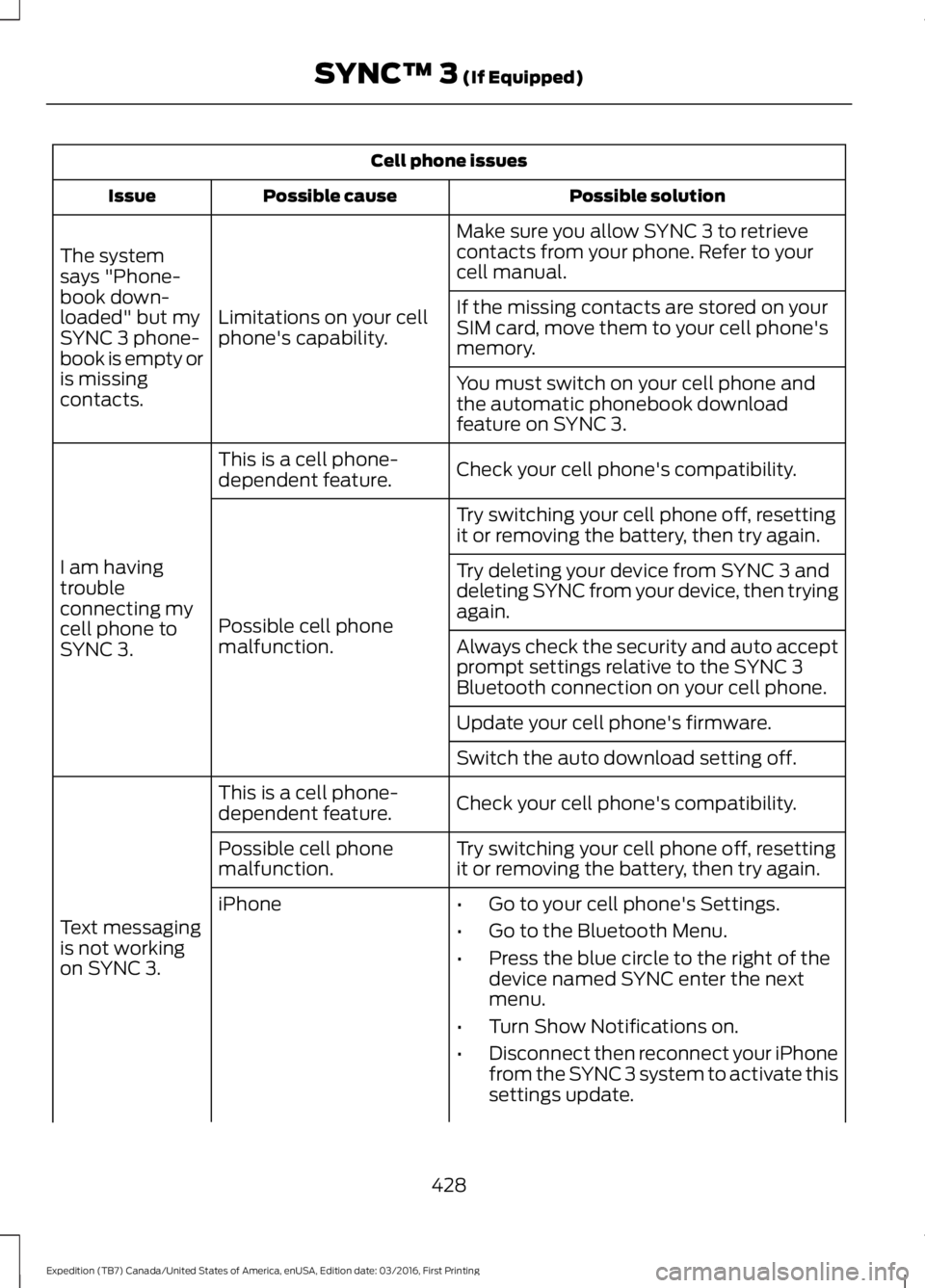
Cell phone issues
Possible solutionPossible causeIssue
Make sure you allow SYNC 3 to retrievecontacts from your phone. Refer to yourcell manual.
Limitations on your cellphone's capability.
The systemsays "Phone-book down-loaded" but mySYNC 3 phone-book is empty oris missingcontacts.
If the missing contacts are stored on yourSIM card, move them to your cell phone'smemory.
You must switch on your cell phone andthe automatic phonebook downloadfeature on SYNC 3.
Check your cell phone's compatibility.This is a cell phone-dependent feature.
I am havingtroubleconnecting mycell phone toSYNC 3.
Try switching your cell phone off, resettingit or removing the battery, then try again.
Possible cell phonemalfunction.
Try deleting your device from SYNC 3 anddeleting SYNC from your device, then tryingagain.
Always check the security and auto acceptprompt settings relative to the SYNC 3Bluetooth connection on your cell phone.
Update your cell phone's firmware.
Switch the auto download setting off.
Check your cell phone's compatibility.This is a cell phone-dependent feature.
Text messagingis not workingon SYNC 3.
Try switching your cell phone off, resettingit or removing the battery, then try again.Possible cell phonemalfunction.
iPhone•Go to your cell phone's Settings.
•Go to the Bluetooth Menu.
•Press the blue circle to the right of thedevice named SYNC enter the nextmenu.
•Turn Show Notifications on.
•Disconnect then reconnect your iPhonefrom the SYNC 3 system to activate thissettings update.
428
Expedition (TB7) Canada/United States of America, enUSA, Edition date: 03/2016, First Printing
SYNC™ 3 (If Equipped)
Page 432 of 500
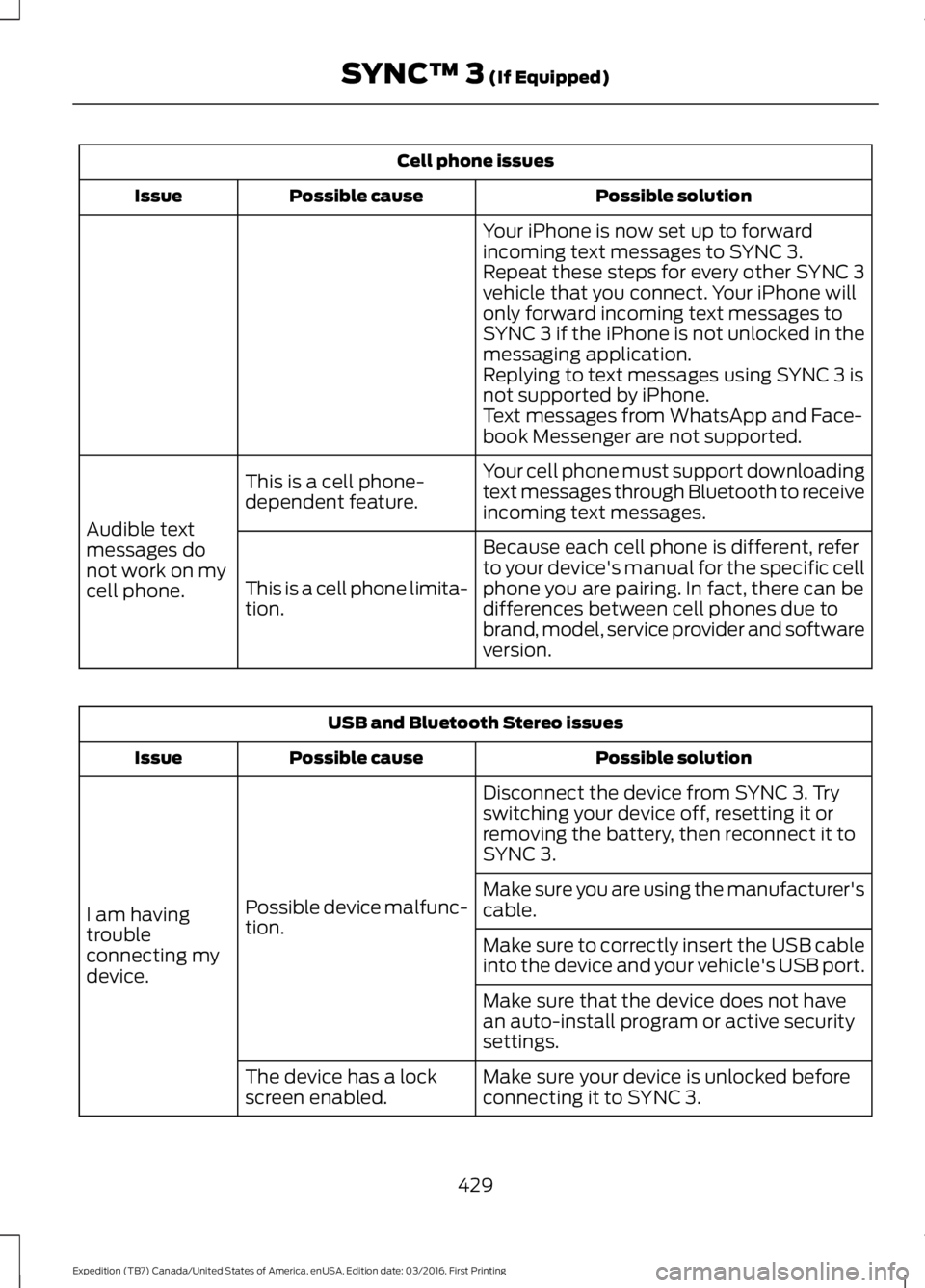
Cell phone issues
Possible solutionPossible causeIssue
Your iPhone is now set up to forwardincoming text messages to SYNC 3.Repeat these steps for every other SYNC 3vehicle that you connect. Your iPhone willonly forward incoming text messages toSYNC 3 if the iPhone is not unlocked in themessaging application.Replying to text messages using SYNC 3 isnot supported by iPhone.Text messages from WhatsApp and Face-book Messenger are not supported.
Your cell phone must support downloadingtext messages through Bluetooth to receiveincoming text messages.
This is a cell phone-dependent feature.
Audible textmessages donot work on mycell phone.
Because each cell phone is different, referto your device's manual for the specific cellphone you are pairing. In fact, there can bedifferences between cell phones due tobrand, model, service provider and softwareversion.
This is a cell phone limita-tion.
USB and Bluetooth Stereo issues
Possible solutionPossible causeIssue
Disconnect the device from SYNC 3. Tryswitching your device off, resetting it orremoving the battery, then reconnect it toSYNC 3.
Possible device malfunc-tion.I am havingtroubleconnecting mydevice.
Make sure you are using the manufacturer'scable.
Make sure to correctly insert the USB cableinto the device and your vehicle's USB port.
Make sure that the device does not havean auto-install program or active securitysettings.
Make sure your device is unlocked beforeconnecting it to SYNC 3.The device has a lockscreen enabled.
429
Expedition (TB7) Canada/United States of America, enUSA, Edition date: 03/2016, First Printing
SYNC™ 3 (If Equipped)
Page 433 of 500
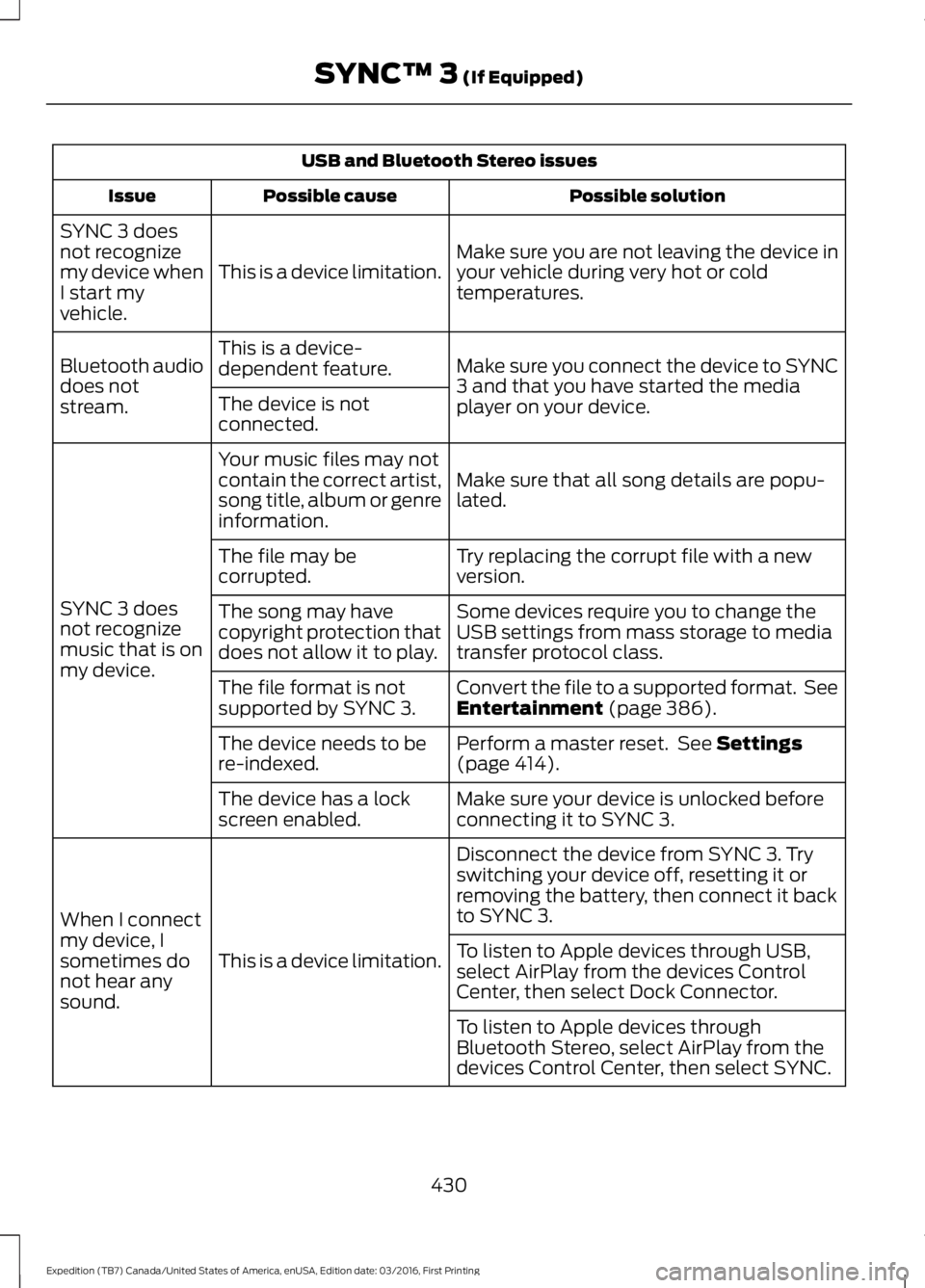
USB and Bluetooth Stereo issues
Possible solutionPossible causeIssue
Make sure you are not leaving the device inyour vehicle during very hot or coldtemperatures.This is a device limitation.
SYNC 3 doesnot recognizemy device whenI start myvehicle.
Make sure you connect the device to SYNC3 and that you have started the mediaplayer on your device.
This is a device-dependent feature.Bluetooth audiodoes notstream.The device is notconnected.
Make sure that all song details are popu-lated.
Your music files may notcontain the correct artist,song title, album or genreinformation.
SYNC 3 doesnot recognizemusic that is onmy device.
Try replacing the corrupt file with a newversion.The file may becorrupted.
Some devices require you to change theUSB settings from mass storage to mediatransfer protocol class.
The song may havecopyright protection thatdoes not allow it to play.
Convert the file to a supported format. SeeEntertainment (page 386).The file format is notsupported by SYNC 3.
Perform a master reset. See Settings(page 414).The device needs to bere-indexed.
Make sure your device is unlocked beforeconnecting it to SYNC 3.The device has a lockscreen enabled.
Disconnect the device from SYNC 3. Tryswitching your device off, resetting it orremoving the battery, then connect it backto SYNC 3.
This is a device limitation.
When I connectmy device, Isometimes donot hear anysound.
To listen to Apple devices through USB,select AirPlay from the devices ControlCenter, then select Dock Connector.
To listen to Apple devices throughBluetooth Stereo, select AirPlay from thedevices Control Center, then select SYNC.
430
Expedition (TB7) Canada/United States of America, enUSA, Edition date: 03/2016, First Printing
SYNC™ 3 (If Equipped)
Page 434 of 500
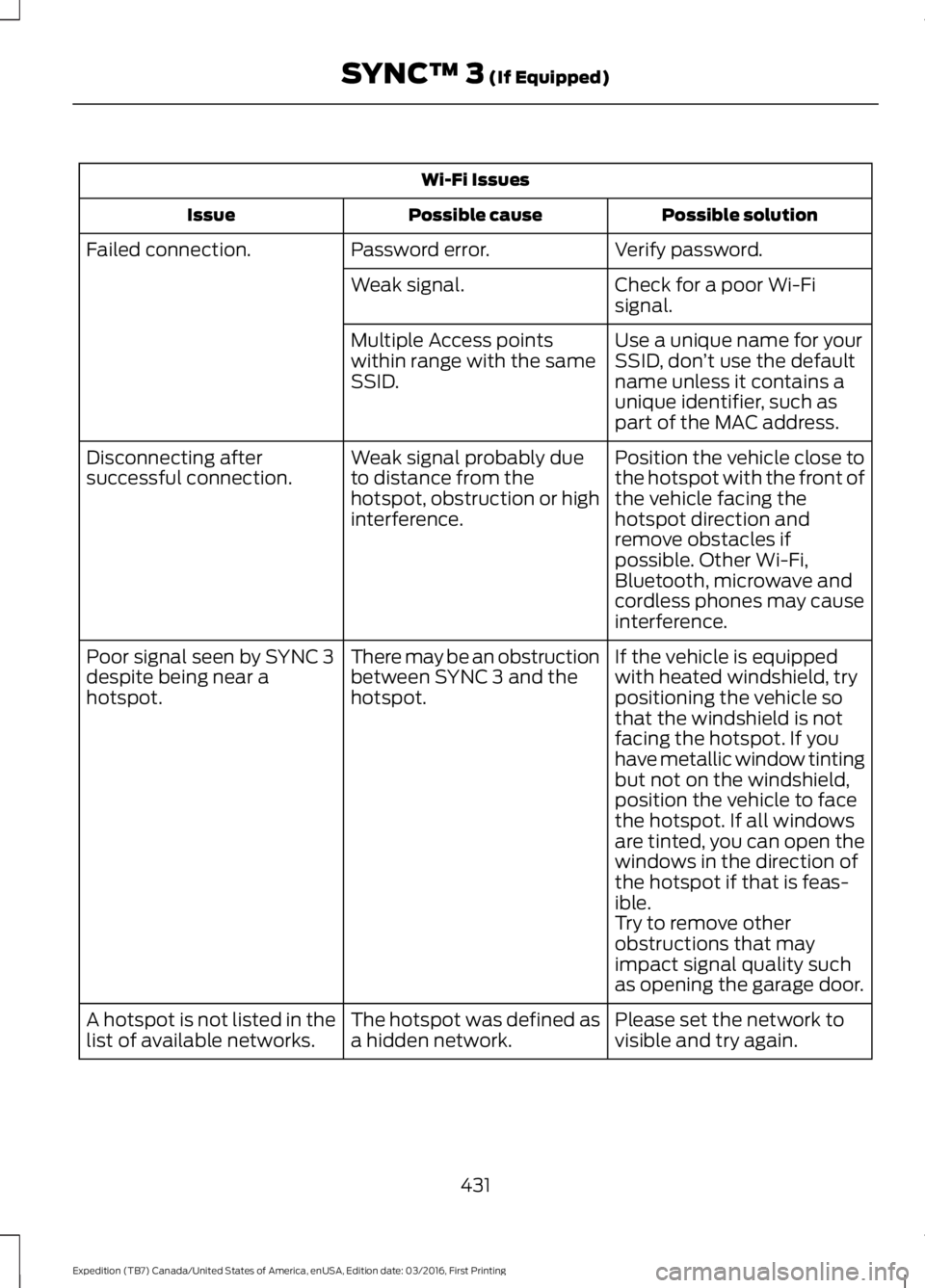
Wi-Fi Issues
Possible solutionPossible causeIssue
Verify password.Password error.Failed connection.
Check for a poor Wi-Fisignal.Weak signal.
Use a unique name for yourSSID, don’t use the defaultname unless it contains aunique identifier, such aspart of the MAC address.
Multiple Access pointswithin range with the sameSSID.
Position the vehicle close tothe hotspot with the front ofthe vehicle facing thehotspot direction andremove obstacles ifpossible. Other Wi-Fi,Bluetooth, microwave andcordless phones may causeinterference.
Weak signal probably dueto distance from thehotspot, obstruction or highinterference.
Disconnecting aftersuccessful connection.
If the vehicle is equippedwith heated windshield, trypositioning the vehicle sothat the windshield is notfacing the hotspot. If youhave metallic window tinting
There may be an obstructionbetween SYNC 3 and thehotspot.
Poor signal seen by SYNC 3despite being near ahotspot.
but not on the windshield,position the vehicle to facethe hotspot. If all windowsare tinted, you can open thewindows in the direction ofthe hotspot if that is feas-ible.Try to remove otherobstructions that mayimpact signal quality suchas opening the garage door.
Please set the network tovisible and try again.The hotspot was defined asa hidden network.A hotspot is not listed in thelist of available networks.
431
Expedition (TB7) Canada/United States of America, enUSA, Edition date: 03/2016, First Printing
SYNC™ 3 (If Equipped)
Page 437 of 500
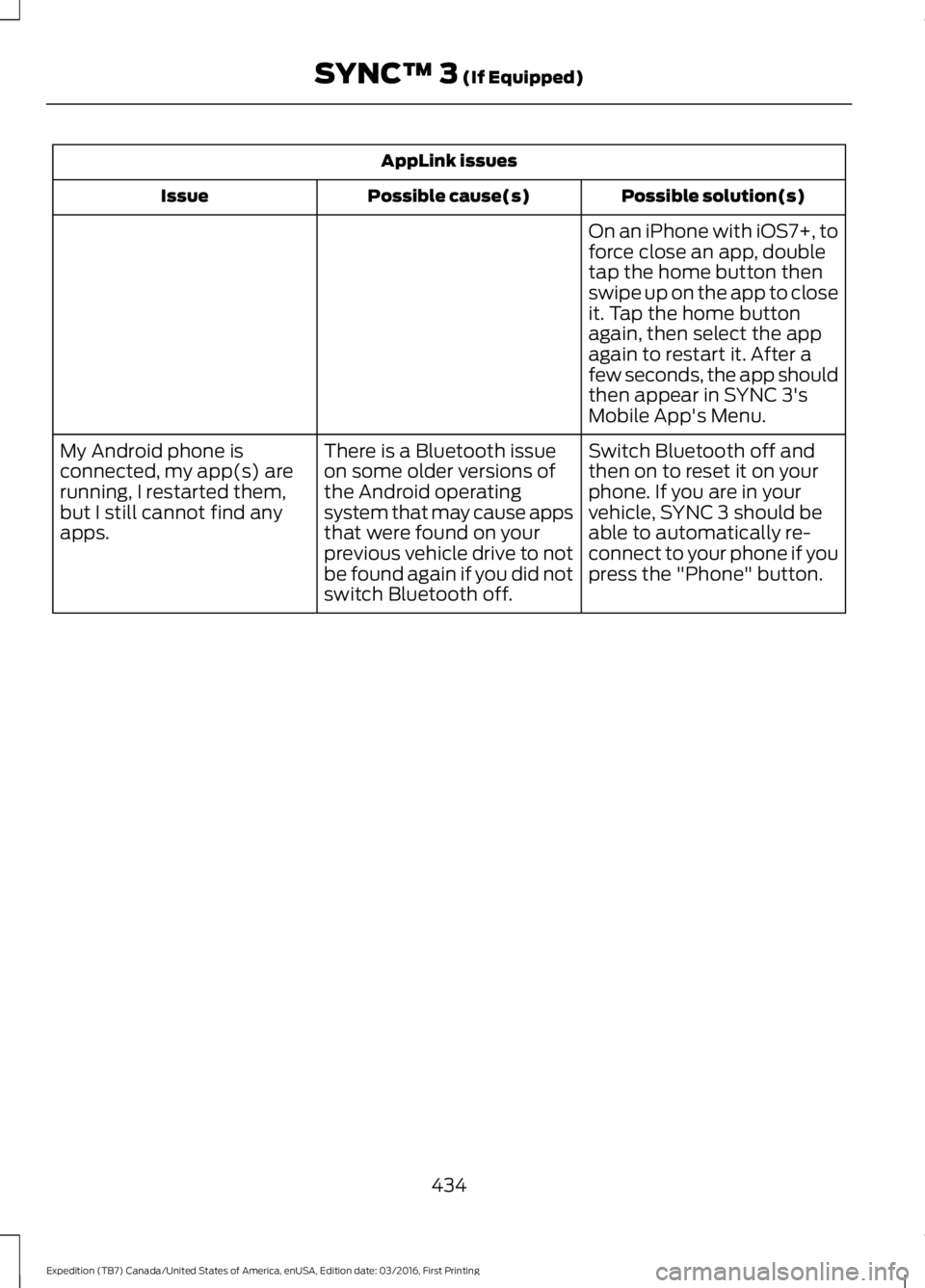
AppLink issues
Possible solution(s)Possible cause(s)Issue
On an iPhone with iOS7+, toforce close an app, doubletap the home button thenswipe up on the app to closeit. Tap the home buttonagain, then select the appagain to restart it. After afew seconds, the app shouldthen appear in SYNC 3'sMobile App's Menu.
Switch Bluetooth off andthen on to reset it on yourphone. If you are in yourvehicle, SYNC 3 should beable to automatically re-connect to your phone if youpress the "Phone" button.
There is a Bluetooth issueon some older versions ofthe Android operatingsystem that may cause appsthat were found on yourprevious vehicle drive to notbe found again if you did notswitch Bluetooth off.
My Android phone isconnected, my app(s) arerunning, I restarted them,but I still cannot find anyapps.
434
Expedition (TB7) Canada/United States of America, enUSA, Edition date: 03/2016, First Printing
SYNC™ 3 (If Equipped)
Page 438 of 500
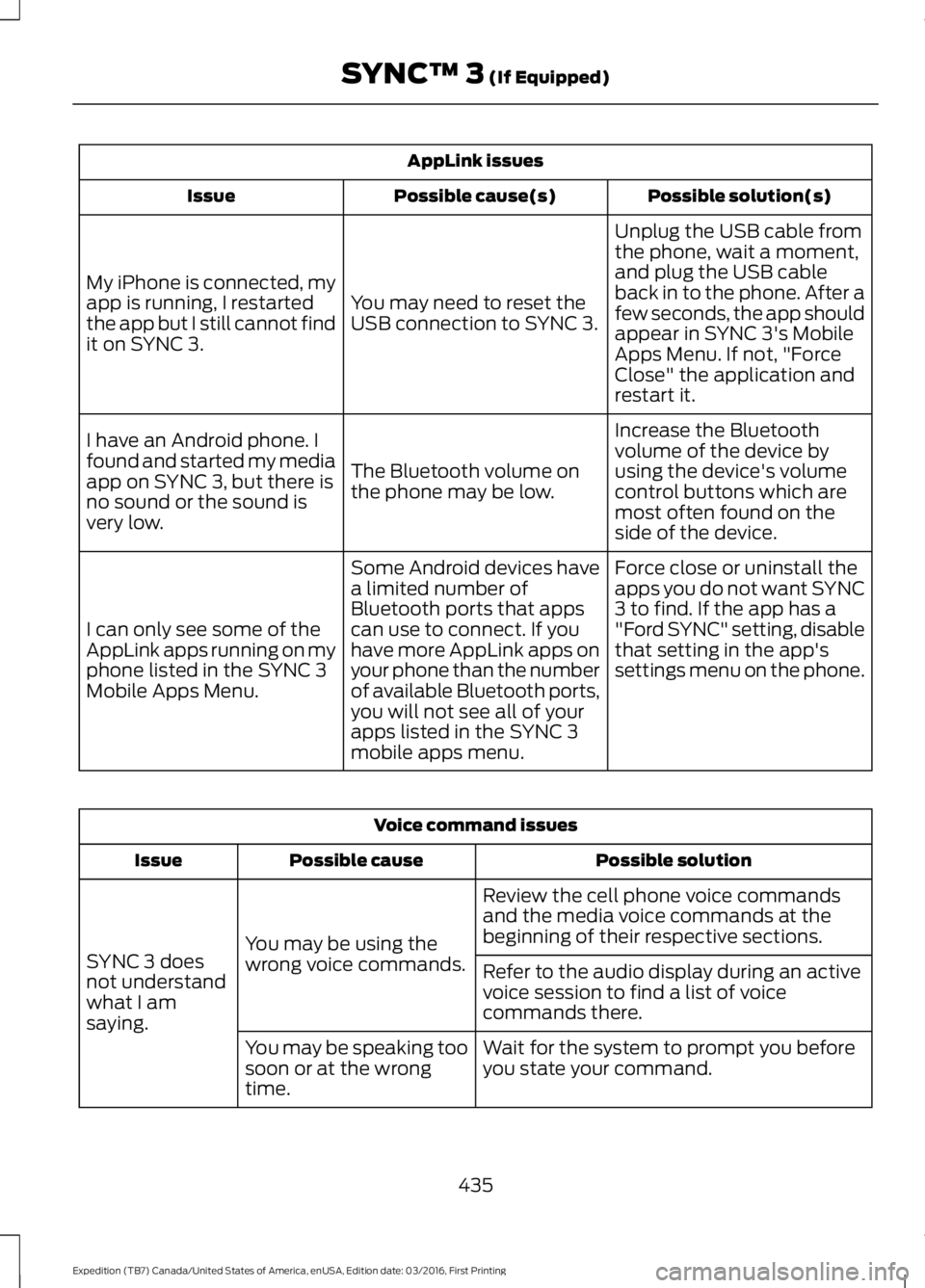
AppLink issues
Possible solution(s)Possible cause(s)Issue
Unplug the USB cable fromthe phone, wait a moment,and plug the USB cableback in to the phone. After afew seconds, the app shouldappear in SYNC 3's MobileApps Menu. If not, "ForceClose" the application andrestart it.
You may need to reset theUSB connection to SYNC 3.
My iPhone is connected, myapp is running, I restartedthe app but I still cannot findit on SYNC 3.
Increase the Bluetoothvolume of the device byusing the device's volumecontrol buttons which aremost often found on theside of the device.
The Bluetooth volume onthe phone may be low.
I have an Android phone. Ifound and started my mediaapp on SYNC 3, but there isno sound or the sound isvery low.
Force close or uninstall theapps you do not want SYNC3 to find. If the app has a"Ford SYNC" setting, disablethat setting in the app'ssettings menu on the phone.
Some Android devices havea limited number ofBluetooth ports that appscan use to connect. If youhave more AppLink apps onyour phone than the numberof available Bluetooth ports,you will not see all of yourapps listed in the SYNC 3mobile apps menu.
I can only see some of theAppLink apps running on myphone listed in the SYNC 3Mobile Apps Menu.
Voice command issues
Possible solutionPossible causeIssue
Review the cell phone voice commandsand the media voice commands at thebeginning of their respective sections.You may be using thewrong voice commands.SYNC 3 doesnot understandwhat I amsaying.
Refer to the audio display during an activevoice session to find a list of voicecommands there.
Wait for the system to prompt you beforeyou state your command.You may be speaking toosoon or at the wrongtime.
435
Expedition (TB7) Canada/United States of America, enUSA, Edition date: 03/2016, First Printing
SYNC™ 3 (If Equipped)
Page 441 of 500
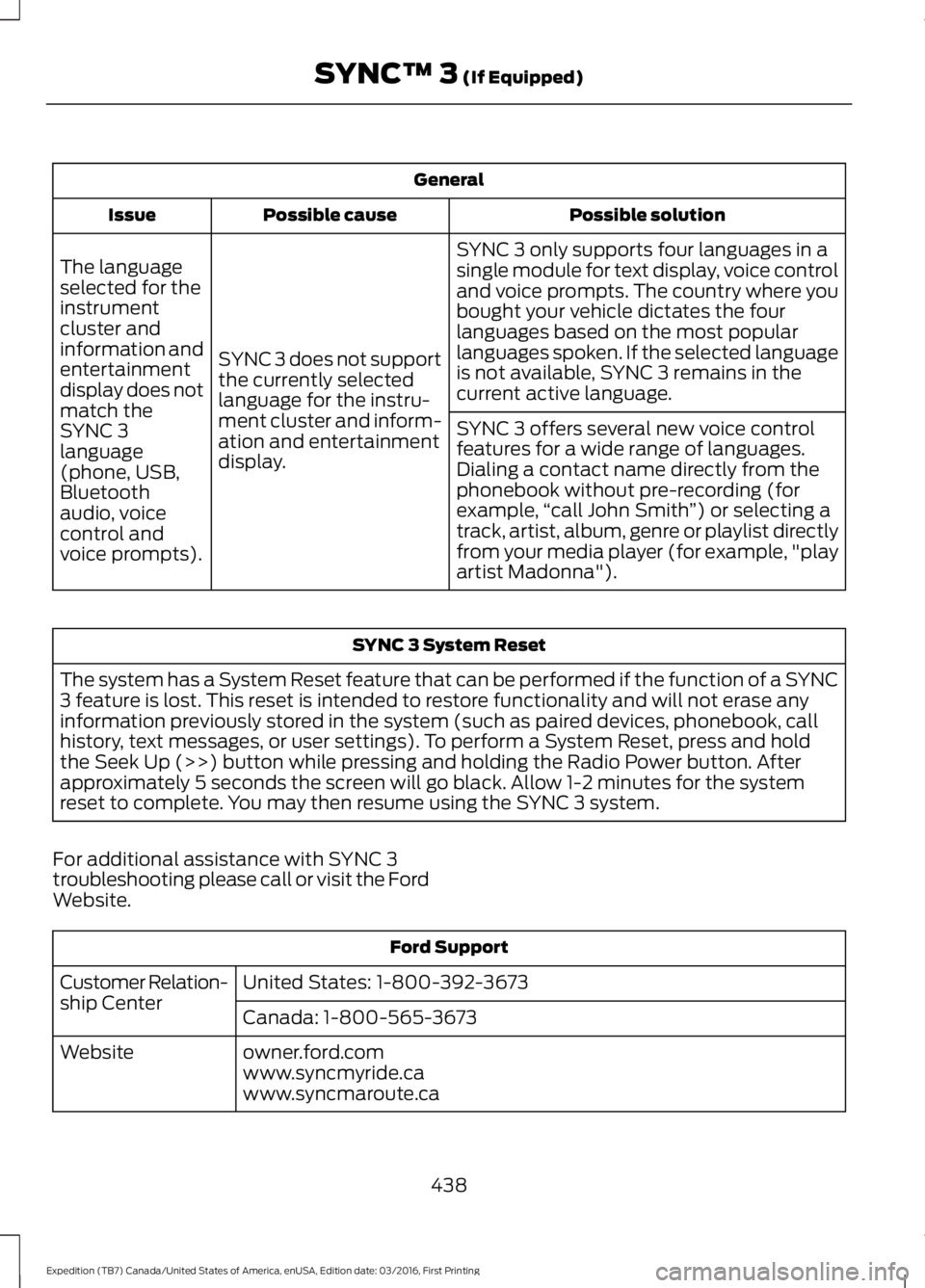
General
Possible solutionPossible causeIssue
SYNC 3 only supports four languages in asingle module for text display, voice controland voice prompts. The country where youbought your vehicle dictates the fourlanguages based on the most popularlanguages spoken. If the selected languageis not available, SYNC 3 remains in thecurrent active language.
SYNC 3 does not supportthe currently selectedlanguage for the instru-ment cluster and inform-ation and entertainmentdisplay.
The languageselected for theinstrumentcluster andinformation andentertainmentdisplay does notmatch theSYNC 3SYNC 3 offers several new voice controlfeatures for a wide range of languages.Dialing a contact name directly from thephonebook without pre-recording (forexample,“call John Smith”) or selecting atrack, artist, album, genre or playlist directlyfrom your media player (for example, "playartist Madonna").
language(phone, USB,Bluetoothaudio, voicecontrol andvoice prompts).
SYNC 3 System Reset
The system has a System Reset feature that can be performed if the function of a SYNC3 feature is lost. This reset is intended to restore functionality and will not erase anyinformation previously stored in the system (such as paired devices, phonebook, callhistory, text messages, or user settings). To perform a System Reset, press and holdthe Seek Up (>>) button while pressing and holding the Radio Power button. Afterapproximately 5 seconds the screen will go black. Allow 1-2 minutes for the systemreset to complete. You may then resume using the SYNC 3 system.
For additional assistance with SYNC 3troubleshooting please call or visit the FordWebsite.
Ford Support
United States: 1-800-392-3673Customer Relation-ship CenterCanada: 1-800-565-3673
owner.ford.comWebsitewww.syncmyride.cawww.syncmaroute.ca
438
Expedition (TB7) Canada/United States of America, enUSA, Edition date: 03/2016, First Printing
SYNC™ 3 (If Equipped)
Page 492 of 500
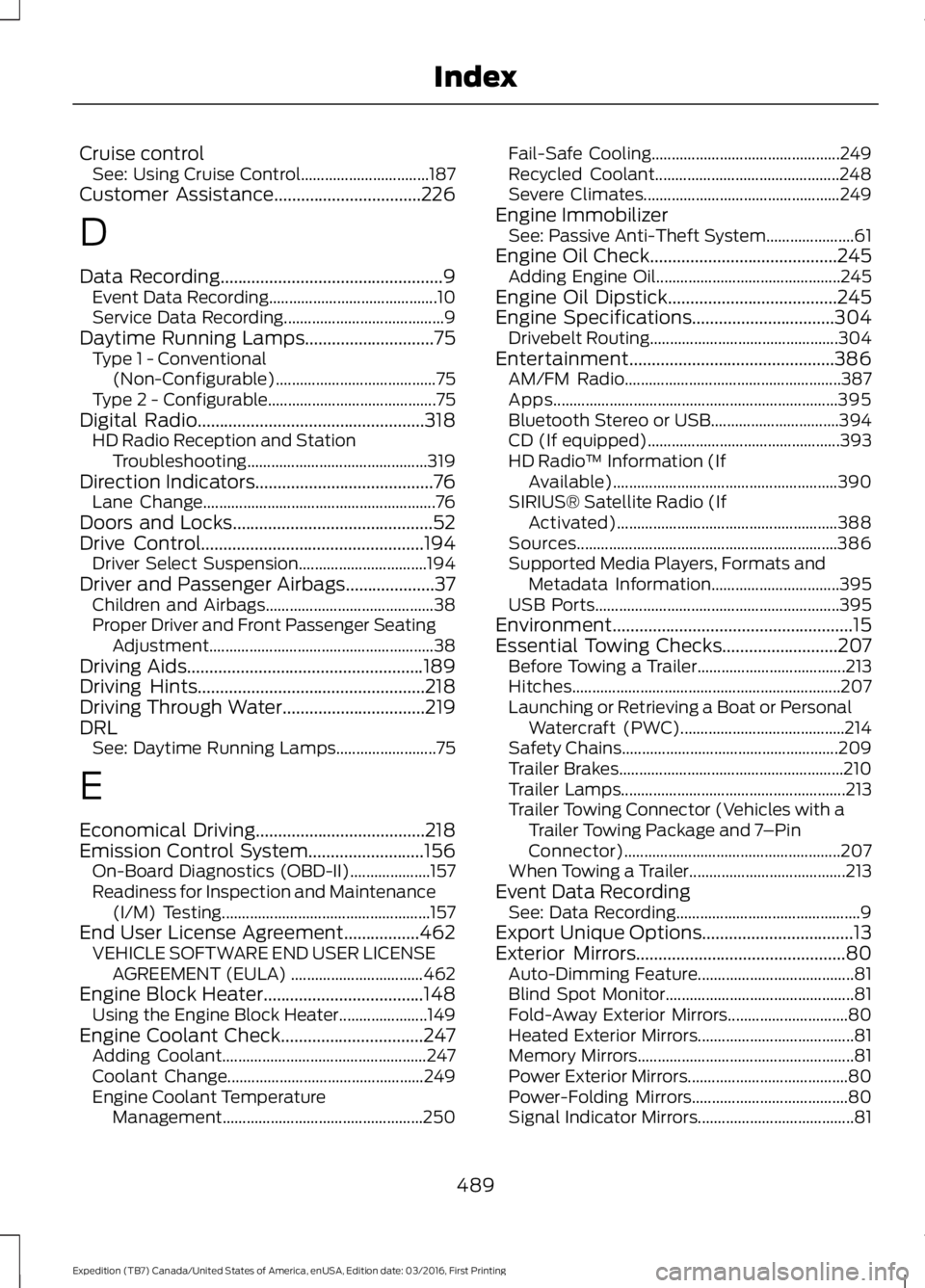
Cruise controlSee: Using Cruise Control................................187Customer Assistance.................................226
D
Data Recording..................................................9Event Data Recording..........................................10Service Data Recording........................................9Daytime Running Lamps.............................75Type 1 - Conventional(Non-Configurable)........................................75Type 2 - Configurable..........................................75Digital Radio...................................................318HD Radio Reception and StationTroubleshooting.............................................319Direction Indicators........................................76Lane Change..........................................................76Doors and Locks.............................................52Drive Control..................................................194Driver Select Suspension................................194Driver and Passenger Airbags....................37Children and Airbags..........................................38Proper Driver and Front Passenger SeatingAdjustment........................................................38Driving Aids.....................................................189Driving Hints...................................................218Driving Through Water................................219DRLSee: Daytime Running Lamps.........................75
E
Economical Driving......................................218Emission Control System..........................156On-Board Diagnostics (OBD-II)....................157Readiness for Inspection and Maintenance(I/M) Testing....................................................157End User License Agreement.................462VEHICLE SOFTWARE END USER LICENSEAGREEMENT (EULA) .................................462Engine Block Heater....................................148Using the Engine Block Heater......................149Engine Coolant Check................................247Adding Coolant...................................................247Coolant Change.................................................249Engine Coolant TemperatureManagement..................................................250
Fail-Safe Cooling...............................................249Recycled Coolant..............................................248Severe Climates.................................................249Engine ImmobilizerSee: Passive Anti-Theft System......................61Engine Oil Check..........................................245Adding Engine Oil..............................................245Engine Oil Dipstick......................................245Engine Specifications................................304Drivebelt Routing...............................................304Entertainment..............................................386AM/FM Radio......................................................387Apps.......................................................................395Bluetooth Stereo or USB................................394CD (If equipped)................................................393HD Radio™ Information (IfAvailable)........................................................390SIRIUS® Satellite Radio (IfActivated).......................................................388Sources.................................................................386Supported Media Players, Formats andMetadata Information................................395USB Ports.............................................................395Environment......................................................15Essential Towing Checks..........................207Before Towing a Trailer.....................................213Hitches...................................................................207Launching or Retrieving a Boat or PersonalWatercraft (PWC).........................................214Safety Chains......................................................209Trailer Brakes........................................................210Trailer Lamps........................................................213Trailer Towing Connector (Vehicles with aTrailer Towing Package and 7–PinConnector)......................................................207When Towing a Trailer.......................................213Event Data RecordingSee: Data Recording..............................................9Export Unique Options..................................13Exterior Mirrors...............................................80Auto-Dimming Feature.......................................81Blind Spot Monitor...............................................81Fold-Away Exterior Mirrors..............................80Heated Exterior Mirrors.......................................81Memory Mirrors......................................................81Power Exterior Mirrors........................................80Power-Folding Mirrors.......................................80Signal Indicator Mirrors.......................................81
489
Expedition (TB7) Canada/United States of America, enUSA, Edition date: 03/2016, First Printing
Index
Page 497 of 500
Roof Racks and Load Carriers..................197Adjusting the Crossbar.....................................197Running-InSee: Breaking-In..................................................218Running Out of Fuel......................................151Adding Fuel From a Portable FuelContainer..........................................................152Filling a Portable Fuel Container...................152
S
Safety Canopy™............................................39Safety Precautions......................................150Satellite Radio..............................................320Satellite Radio Electronic Serial Number(ESN)..................................................................321Satellite Radio Reception Factors................321SIRIUS® Satellite Radio Service...................321Troubleshooting.................................................322Scheduled Maintenance Record...........452Scheduled Maintenance..........................443Seatbelt Extension........................................35Seatbelt Height Adjustment......................32Second Row Comfort Guide............................32Seatbelt Reminder.........................................33Belt-Minder™........................................................33Seatbelts...........................................................29Principle of Operation........................................29Seatbelt Warning Lamp and IndicatorChime...............................................................33Conditions of operation.....................................33Seats...................................................................121Security...............................................................61Self-Leveling Suspension.........................194Settings............................................................414911 Assist................................................................419Ambient Lighting...............................................425Bluetooth...............................................................416Clock.......................................................................416Display...................................................................425General..................................................................423Media Player.........................................................415Mobile Apps.........................................................422Navigation............................................................420Phone......................................................................417Radio......................................................................420Sound......................................................................414Valet Mode...........................................................426
Vehicle...................................................................425Voice Control.......................................................426Wi-Fi.......................................................................424Side Airbags.....................................................38Sitting in the Correct Position...................121Snow ChainsSee: Using Snow Chains..................................291Special Notices................................................12New Vehicle Limited Warranty.........................12On Board Diagnostics Data LinkConnector............................................................13Special Instructions..............................................12Special Operating Conditions ScheduledMaintenance..............................................449Exceptions...........................................................450Speed ControlSee: Cruise Control.............................................187Stability Control.............................................177Principle of Operation........................................177Starter SwitchSee: Ignition Switch...........................................144Starting a Gasoline Engine.......................145Automatic Engine Shutdown.........................147Failure to Start......................................................147Guarding Against Exhaust Fumes...............148Important Ventilating Information..............148Stopping the Engine When Your Vehicle isMoving...............................................................148Stopping the Engine When Your Vehicle isStationary.........................................................147Vehicles with an Ignition Key.........................146Vehicles with Keyless Start............................146Starting and Stopping the Engine.........144General Information..........................................144Steering............................................................193Electric Power Steering....................................193Steering Wheel Lock...................................145Steering Wheel...............................................65Storage Compartments.............................143SunroofSee: Moonroof.......................................................82Sun Visors.........................................................82Illuminated Vanity Mirror...................................82Supplementary Restraints System.........36Principle of Operation........................................36Symbols Glossary.............................................7SYNC™ 3........................................................365General Information.........................................365
494
Expedition (TB7) Canada/United States of America, enUSA, Edition date: 03/2016, First Printing
Index
Page 498 of 500
SYNC™ 3 Troubleshooting......................426SYNC™ Applications andServices........................................................340911 Assist..............................................................340SYNC Services: Traffic, Directions &Information (TDI) (If Equipped, UnitedStates Only)...................................................344Vehicle Health Report (If Equipped, UnitedStates Only)....................................................342SYNC™............................................................324General Information.........................................324SYNC™ Troubleshooting.........................356
T
TailgateSee: Manual Liftgate...........................................54See: Power Liftgate.............................................56Technical SpecificationsSee: Capacities and Specifications............304Terrain Response.........................................180The Better Business Bureau (BBB) AutoLine Program (U.S. Only).......................228Tire Care..........................................................276Glossary of Tire Terminology..........................277Information About Uniform Tire QualityGrading..............................................................276Information Contained on the TireSidewall............................................................278Temperature A B C.............................................277Traction AA A B C...............................................276Treadwear.............................................................276Tire Pressure Monitoring System...........292Changing Tires With a Tire PressureMonitoring System.......................................293Understanding Your Tire PressureMonitoring System ......................................293TiresSee: Wheels and Tires......................................273Towing a Trailer............................................203Load Placement................................................203Towing Points.................................................214Towing the Vehicle on FourWheels...........................................................215Emergency Towing.............................................215Four-wheel-down Towing...............................216Recreational Towing..........................................215Towing.............................................................203
Traction Control.............................................176Principle of Operation.......................................176Trailer Sway Control...................................204Transfer Case Fluid Check.........................251Transmission Code Designation............307Transmission..................................................159TransmissionSee: Transmission..............................................159
U
Under Hood Overview...............................244Universal Garage Door Opener...............136HomeLink Wireless Control System............136USB Port..........................................................323Using Cruise Control....................................187Switching Cruise Control Off.........................188Switching Cruise Control On and Off..........187Using Four-Wheel Drive.............................1654WD Indicator Lights........................................1654WD Switch Positions......................................165Driving Off-Road With Truck and UtilityVehicles..............................................................167How Your Vehicle Differs From OtherVehicles..............................................................167Using Hill Descent Control.......................180Principle of Operation......................................180Using Hill Descent Control.............................180Using MyKey With Remote StartSystems...........................................................51Using Power Running Boards....................63Automatic Power Deploy..................................63Automatic Power Stow......................................63Bounce-back.........................................................64Enabling and Disabling......................................63Manual Power Deploy........................................63Using Snow Chains......................................291Using Stability Control................................178Stability Control and Traction Control withRoll Stability Control™ (RSC™)..............178Using SYNC™ With Your MediaPlayer............................................................348Accessing Your USB Song Library...............352Bluetooth Devices and SystemSettings............................................................354Connecting Your Digital Media Player to theUSB Port..........................................................348Media Menu Features........................................351
495
Expedition (TB7) Canada/United States of America, enUSA, Edition date: 03/2016, First Printing
Index