clock FORD EXPLORER 2012 5.G Owners Manual
[x] Cancel search | Manufacturer: FORD, Model Year: 2012, Model line: EXPLORER, Model: FORD EXPLORER 2012 5.GPages: 439, PDF Size: 3.63 MB
Page 49 of 439
2. You can press some of the hard buttons to access their respective
menus.
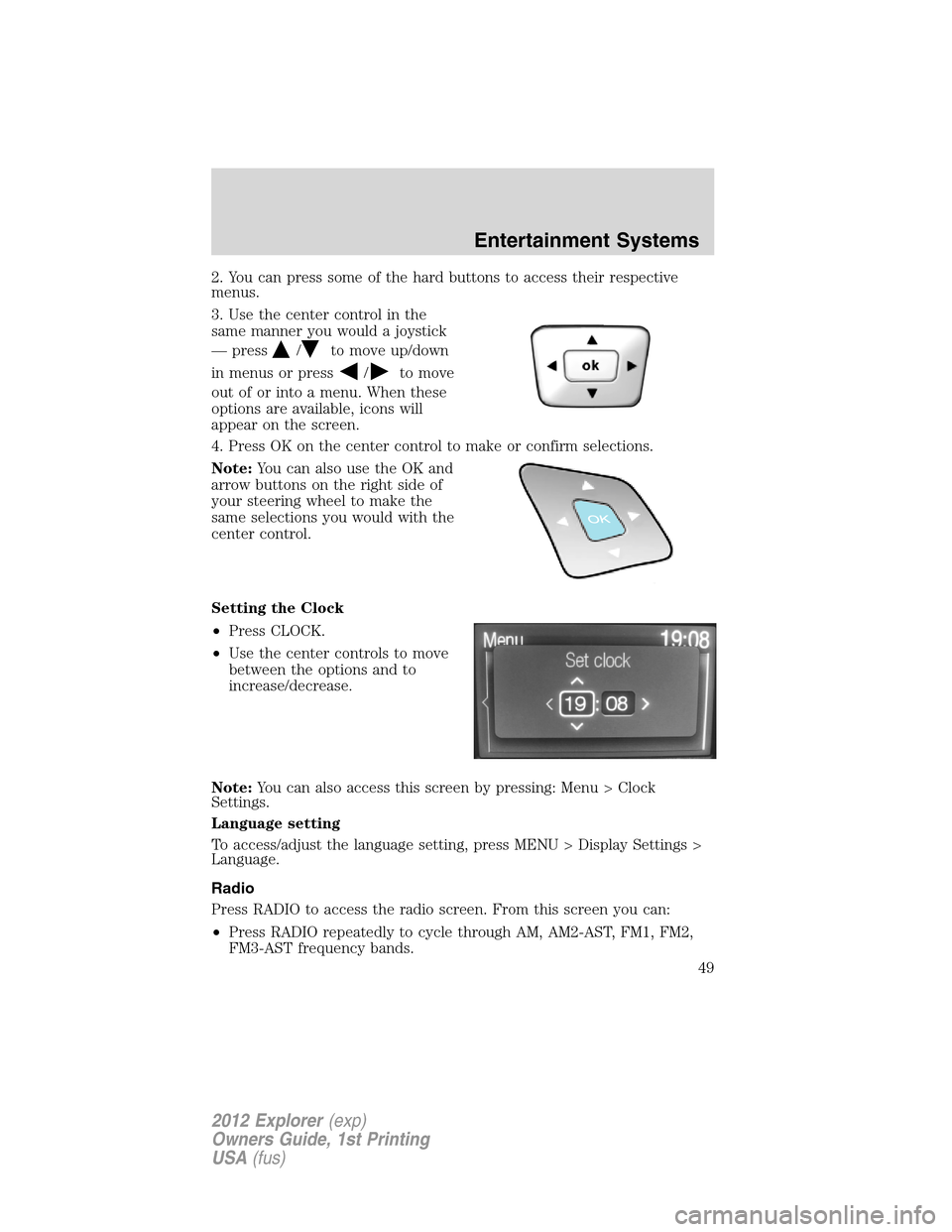
3. Use the center control in the
same manner you would a joystick
— press
/to move up/down
in menus or press
/to move
out of or into a menu. When these
options are available, icons will
appear on the screen.
4. Press OK on the center control to make or confirm selections.
Note:You can also use the OK and
arrow buttons on the right side of
your steering wheel to make the
same selections you would with the
center control.
Setting the Clock
•Press CLOCK.
•Use the center controls to move
between the options and to
increase/decrease.
Note:You can also access this screen by pressing: Menu > Clock
Settings.
Language setting
To access/adjust the language setting, press MENU > Display Settings >
Language.
Radio
Press RADIO to access the radio screen. From this screen you can:
•Press RADIO repeatedly to cycle through AM, AM2-AST, FM1, FM2,
FM3-AST frequency bands.
Entertainment Systems
49
2012 Explorer(exp)
Owners Guide, 1st Printing
USA(fus)
Page 76 of 439
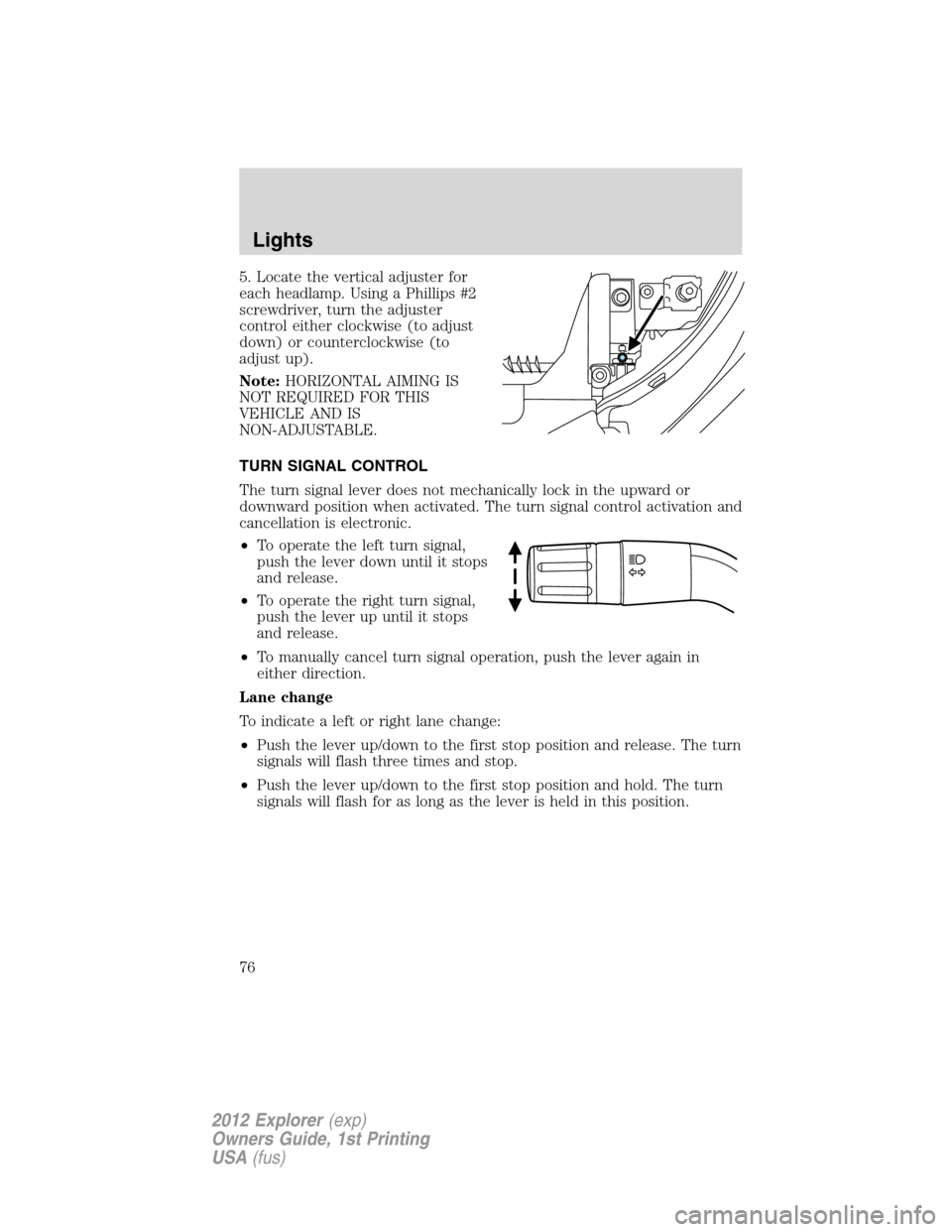
5. Locate the vertical adjuster for
each headlamp. Using a Phillips #2
screwdriver, turn the adjuster
control either clockwise (to adjust
down) or counterclockwise (to
adjust up).
Note:HORIZONTAL AIMING IS
NOT REQUIRED FOR THIS
VEHICLE AND IS
NON-ADJUSTABLE.
TURN SIGNAL CONTROL
The turn signal lever does not mechanically lock in the upward or
downward position when activated. The turn signal control activation and
cancellation is electronic.
•To operate the left turn signal,
push the lever down until it stops
and release.
•To operate the right turn signal,
push the lever up until it stops
and release.
•To manually cancel turn signal operation, push the lever again in
either direction.
Lane change
To indicate a left or right lane change:
•Push the lever up/down to the first stop position and release. The turn
signals will flash three times and stop.
•Push the lever up/down to the first stop position and hold. The turn
signals will flash for as long as the lever is held in this position.
Lights
76
2012 Explorer(exp)
Owners Guide, 1st Printing
USA(fus)
Page 80 of 439
Replacing interior bulbs
Check the operation of the bulbs frequently. To replace any of the
interior bulbs, see a dealer or qualified technician.
Replacing exterior bulbs
Check the operation of all the bulbs frequently.
Replacing headlamp bulbs
1. Make sure that the headlamp control is in the off position.
2. Open the hood.
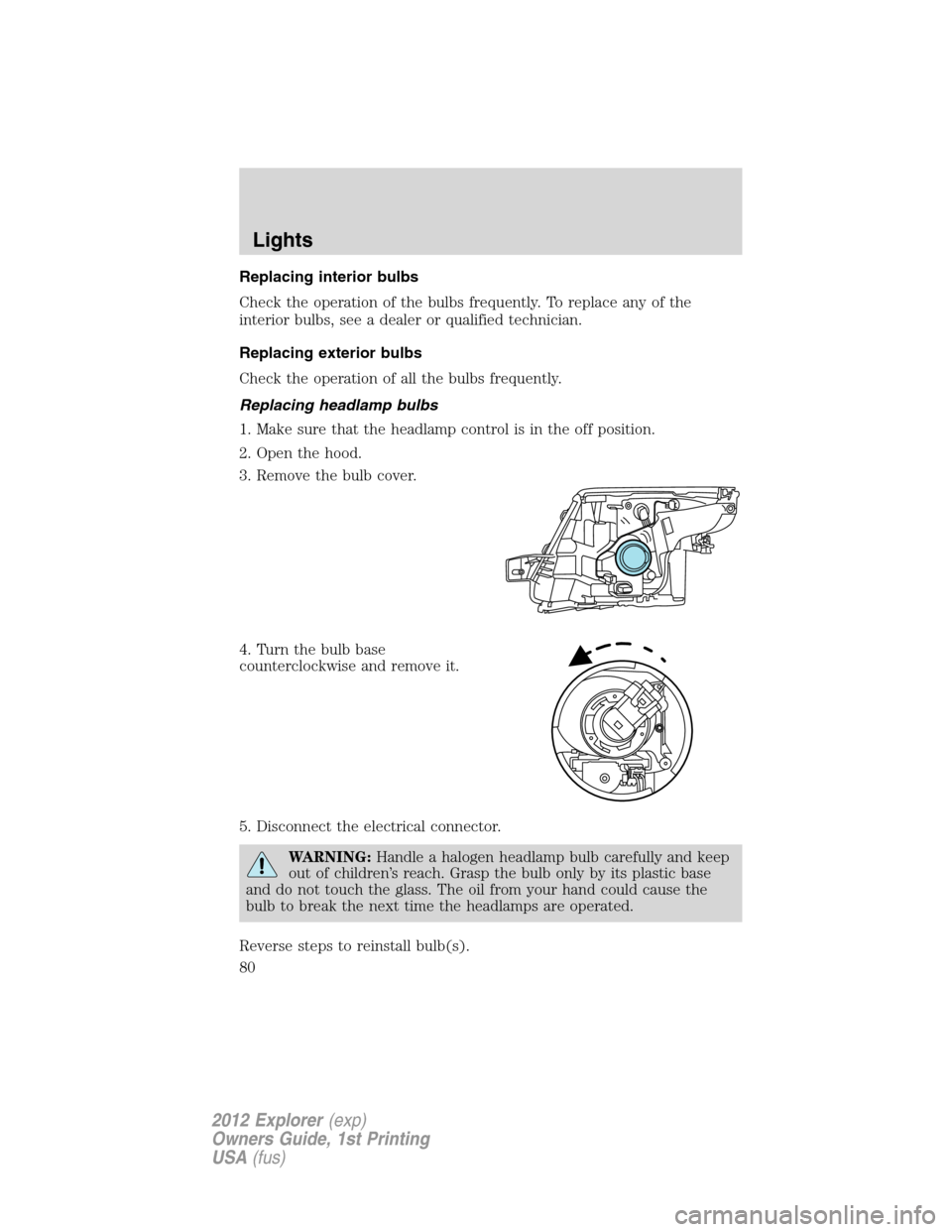
3. Remove the bulb cover.
4. Turn the bulb base
counterclockwise and remove it.
5. Disconnect the electrical connector.
WARNING:Handle a halogen headlamp bulb carefully and keep
out of children’s reach. Grasp the bulb only by its plastic base
and do not touch the glass. The oil from your hand could cause the
bulb to break the next time the headlamps are operated.
Reverse steps to reinstall bulb(s).
Lights
80
2012 Explorer(exp)
Owners Guide, 1st Printing
USA(fus)
Page 81 of 439
Replacing HID headlamp bulbs (if equipped)
The headlamps on your vehicle use a “high intensity discharge” source.
These lamps operate at a high voltage. When the bulb is burned out, the
bulb and starter capsule assembly must be replaced by your authorized
dealer.
Replacing front parking lamp/turn signal bulbs
1. Make sure that the headlamp
control is in the off position.
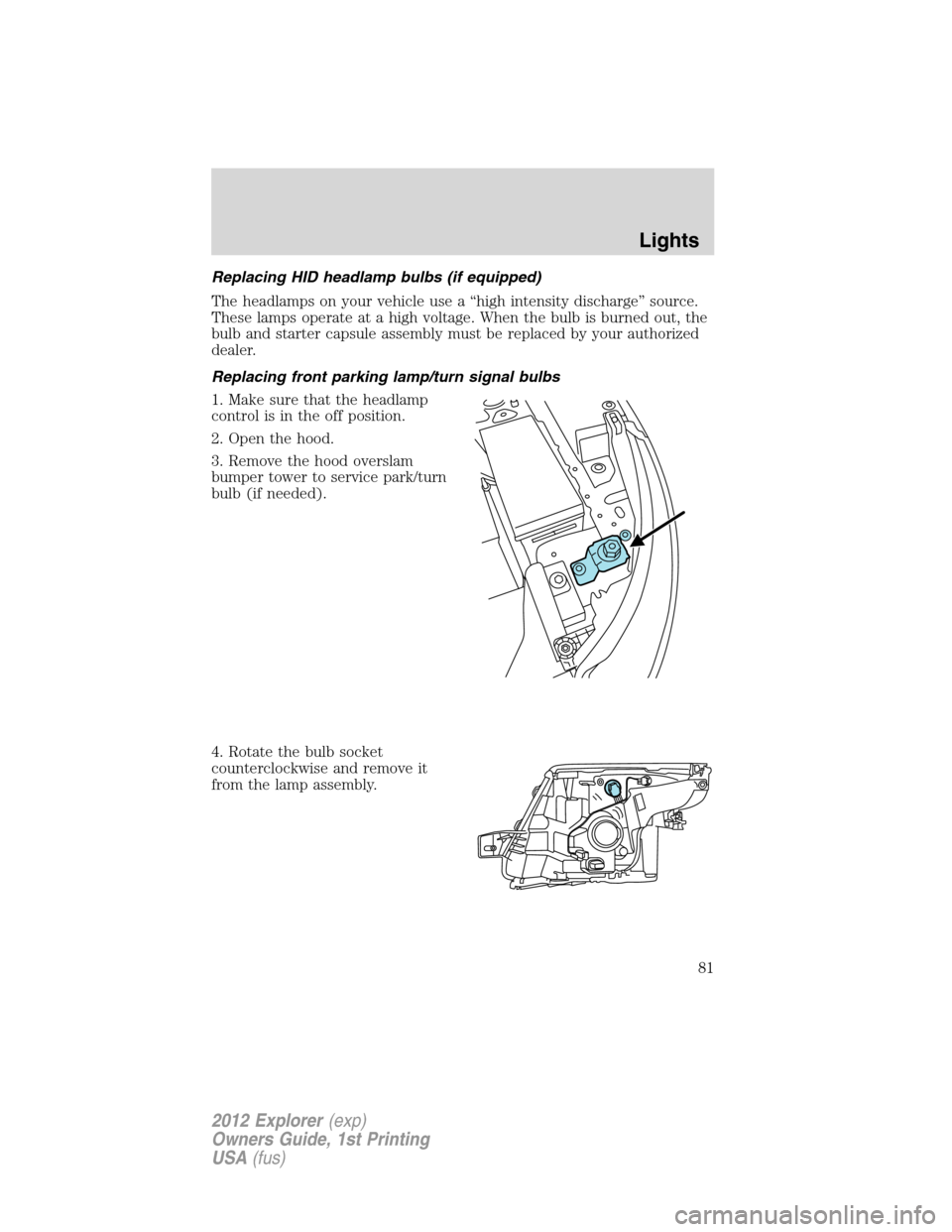
2. Open the hood.
3. Remove the hood overslam
bumper tower to service park/turn
bulb (if needed).
4. Rotate the bulb socket
counterclockwise and remove it
from the lamp assembly.
Lights
81
2012 Explorer(exp)
Owners Guide, 1st Printing
USA(fus)
Page 83 of 439

4. Rotate the bulb socket
counterclockwise and remove it
from the lamp assembly.
5. Pull the bulb straight out of the
socket.
Reverse steps to reinstall bulb(s).
Replacing turn/backup lamp bulbs
The turn/backup lamp bulbs are located in the same area of the tail lamp
assembly, one below the other. Follow the same steps to replace these
bulbs:
1. Make sure the headlamp switch is
in the off position, then open the
liftgate to expose the lamp assembly
bolts.
2. Remove the two bolts covers
using a standard flat tip screwdriver.
3. Remove the two bolts from the
lamp assembly.
4. Carefully remove the lamp
assembly away from the vehicle by
pulling the assembly straight out to expose the bulb socket.
Lights
83
2012 Explorer(exp)
Owners Guide, 1st Printing
USA(fus)
Page 85 of 439

Replacing fog lamp bulbs
1. Make sure the headlamp switch is
off.
2. Remove the bulb socket from the
fog lamp by turning it
counterclockwise.
3. Disconnect the electrical
connector.
Reverse steps to reinstall bulb(s).
Replacing license plate lamp bulb
1. Carefully release the spring clip
(1).
2. Remove the lamp (2).
3. Remove the bulb (3).
Reverse steps to reinstall bulb.
Replacing high-mount brake lamp bulb
Your vehicle is equipped with an LED center high-mount stop lamp
located in the spoiler. It is designed to last the life of the vehicle. If
replacement is required, see your authorized dealer.
3
2
1
Lights
85
2012 Explorer(exp)
Owners Guide, 1st Printing
USA(fus)
Page 124 of 439
Note:If the power liftgate system is turned off in the message center,
the system cannot be activated with the outside release handle or
control button on the liftgate. The system will need to be turned on to
resume operation with the outside release handle or control button on
the liftgate. The power liftgate is still operational through the use of the
transmitter and instrument panel button when the power liftgate is
turned off in the message center.
ROOF RACK SYSTEM (IF EQUIPPED)
Loads should never be placed directly on the roof panel. For proper
function of the roof rack system, loads must be placed directly on
crossbars affixed to the roof rack side rails. Your vehicle may be
equipped with factory-installed crossbars. Ford Genuine Accessory
crossbars, designed specifically for your vehicle, are also recommended
for use with your roof rack system.
The vehicle’s roof panel isNOTdesigned to directly carry a load.The
maximum recommended load is 100 lb (45 kg), evenly distributed
on the crossbars.Ensure that the load is securely fastened. When the
rail system is loaded, check the tightness of the load before driving and
at each fuel stop.
WARNING:When loading the roof rail crossbars, it is
recommended to evenly distribute the load, as well as maintain a
low center of gravity. Loaded vehicles, with higher centers of gravity,
may handle differently than unloaded vehicles. Extra precautions, such
as slower speeds and increased stopping distance, should be taken
when driving a heavily loaded vehicle.
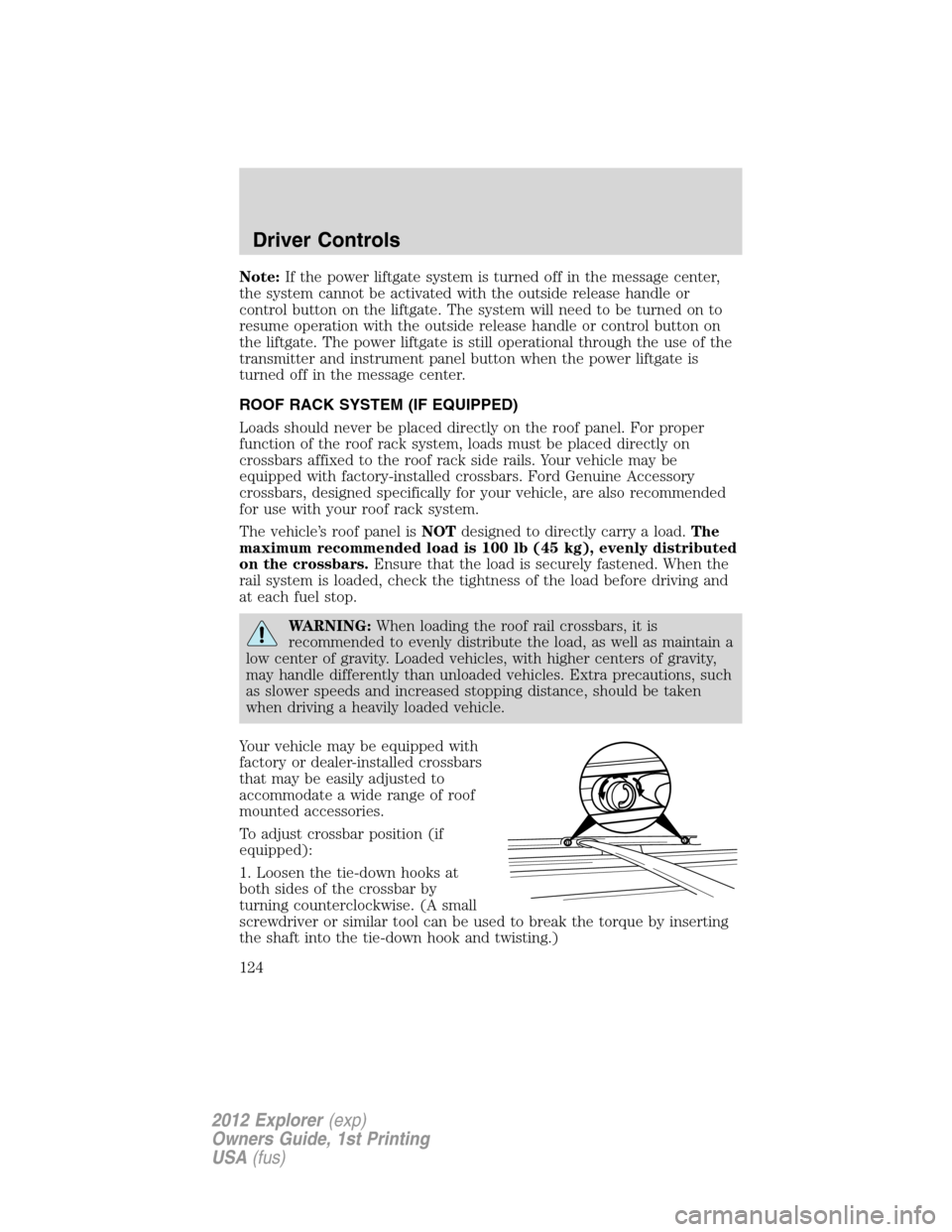
Your vehicle may be equipped with
factory or dealer-installed crossbars
that may be easily adjusted to
accommodate a wide range of roof
mounted accessories.
To adjust crossbar position (if
equipped):
1. Loosen the tie-down hooks at
both sides of the crossbar by
turning counterclockwise. (A small
screwdriver or similar tool can be used to break the torque by inserting
the shaft into the tie-down hook and twisting.)
Driver Controls
124
2012 Explorer(exp)
Owners Guide, 1st Printing
USA(fus)
Page 125 of 439
2. Slide the crossbar to the desired position. This may require someone
on each side of the crossbar.
3. Tighten the tie-down hooks at both sides of the crossbar by turning
clockwise until tight. (A small screwdriver or similar tool can be used to
tighten the hook an additional half turn.)
Be sure to check that the tie-down hooks are tight each time load is
added or removed from the roof rack, and periodically while traveling.
Always ensure that the load is secure before traveling.
Note:Wind noise can be minimized by either removing or repositioning
the crossbars when they are not is use. Position the rear crossbar fully
rearward and the front crossbar 10 inches (25 cm) from the front
end-cap.
Driver Controls
125
2012 Explorer(exp)
Owners Guide, 1st Printing
USA(fus)
Page 259 of 439
Engine/Passengers/Trailer Class Maximum
GCWR - lb
(kg)Maximum
Trailer Weight
- lb (kg)
FWD vehicles
2.0L/6–passenger/Class I 6810 (3089) 2000 (907)
2.0L/7–passenger/Class I 6820 (3094) 2000 (907)
3.5L/6–passenger/Class I 6870 (3116) 2000 (907)
3.5L/7–passenger/Class I 6880 (3121) 2000 (907)
3.5L/6–passenger/Class III 9910 (4495) 5000 (2268)*
3.5L/7–passenger/Class III 9920 (4500) 5000 (2268)*
4WD vehicles
3.5L/6–passenger/Class I 7050 (3199) 2000 (907)
3.5L/7–passenger/Class I 7060 (3202) 2000 (907)
3.5L/6–passenger/Class III 10125 (4594) 5000 (2268)
3.5L/7–passenger/Class III 10125 (4594) 5000 (2268)
*For towing trailers up to 3500 lb (1588 kg), use a weight-carrying
hitch and ball which uniformly spreads the trailer tongue loads through
the vehicle’s underbody structure. For towing trailers over 3500 lb
(1588 kg), up to 5000 lb (2268 kg), it is recommended to use a
weight-distributing hitch to increase front axle load while towing.
Trailer hitch cover
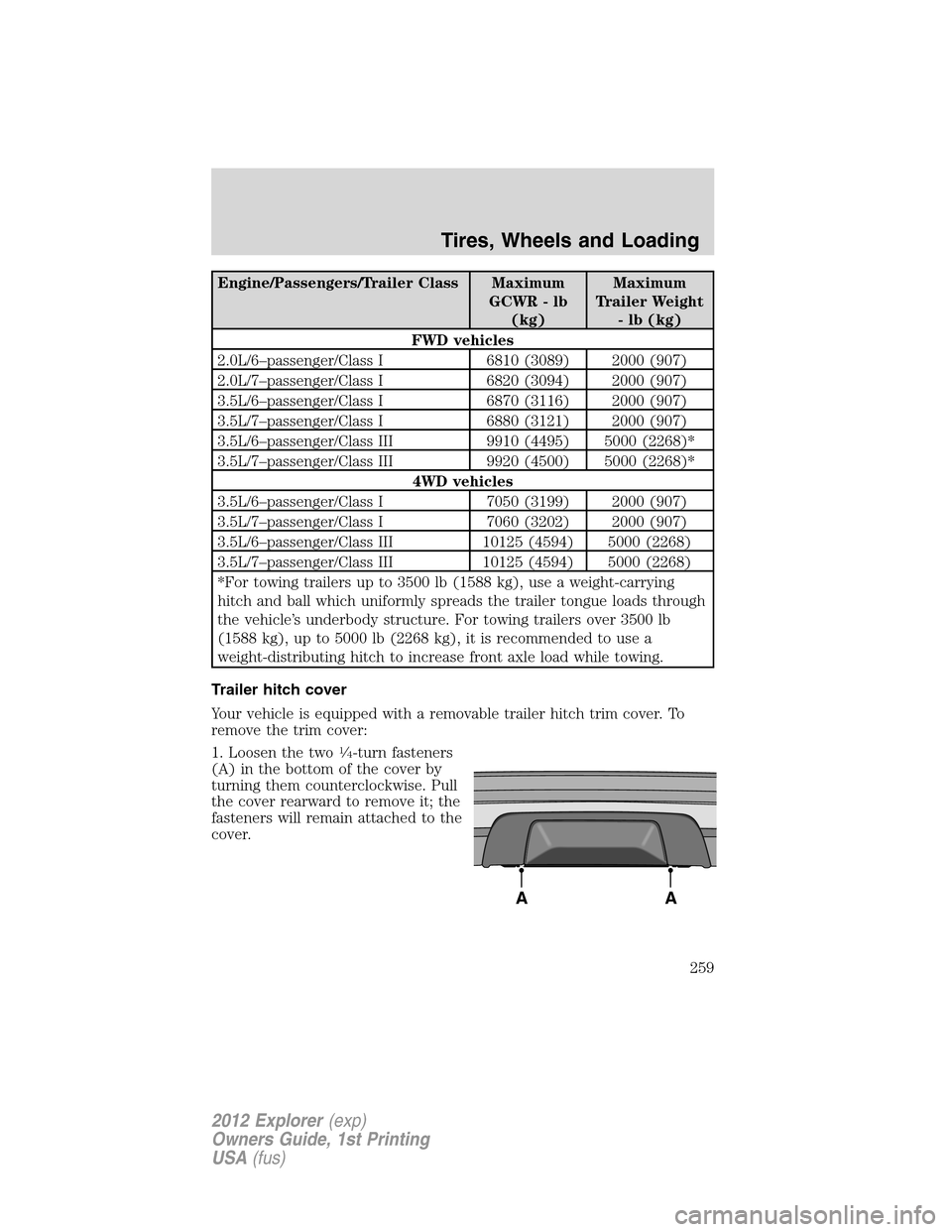
Your vehicle is equipped with a removable trailer hitch trim cover. To
remove the trim cover:
1. Loosen the two
14-turn fasteners
(A) in the bottom of the cover by
turning them counterclockwise. Pull
the cover rearward to remove it; the
fasteners will remain attached to the
cover.
AA
Tires, Wheels and Loading
259
2012 Explorer(exp)
Owners Guide, 1st Printing
USA(fus)
Page 260 of 439
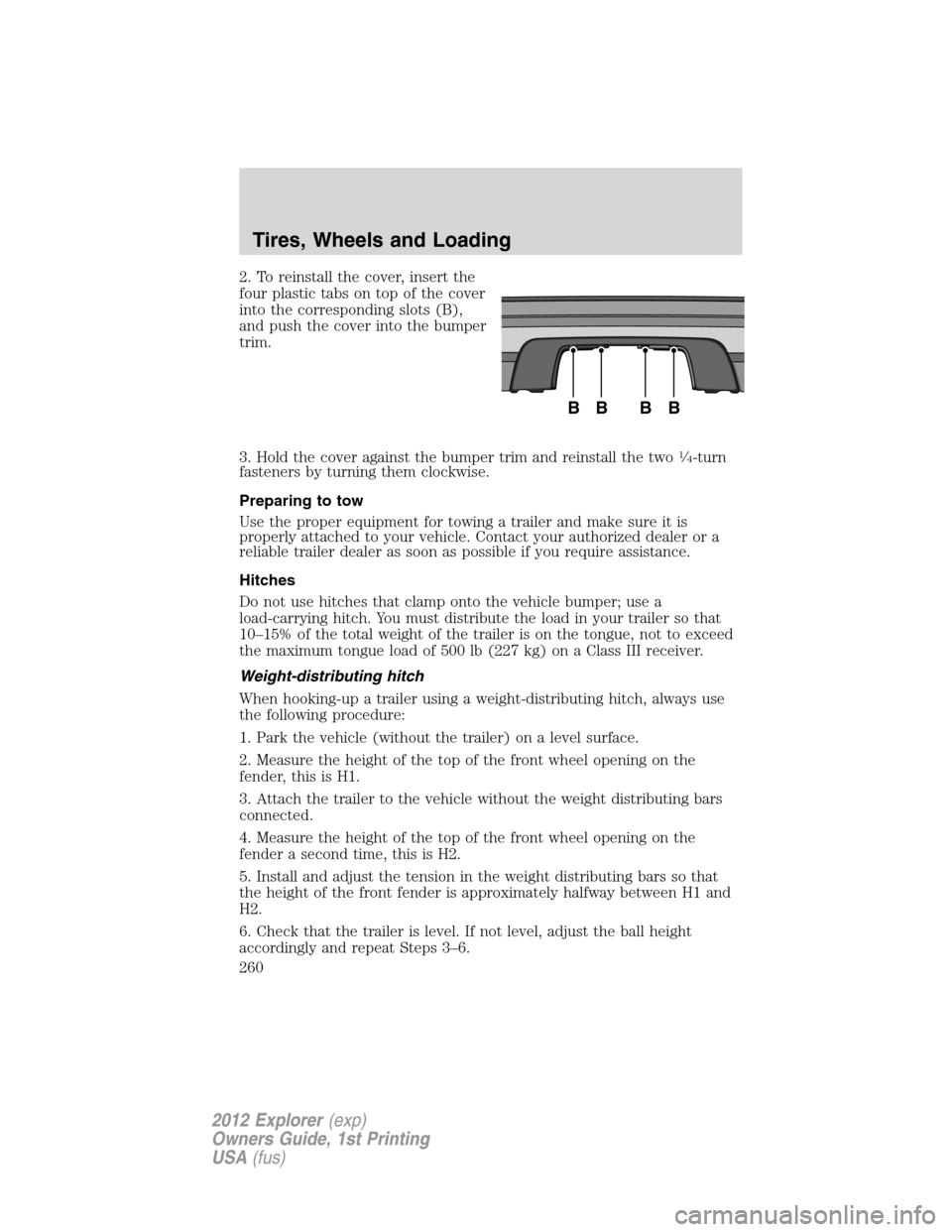
2. To reinstall the cover, insert the
four plastic tabs on top of the cover
into the corresponding slots (B),
and push the cover into the bumper
trim.
3. Hold the cover against the bumper trim and reinstall the two
14-turn
fasteners by turning them clockwise.
Preparing to tow
Use the proper equipment for towing a trailer and make sure it is
properly attached to your vehicle. Contact your authorized dealer or a
reliable trailer dealer as soon as possible if you require assistance.
Hitches
Do not use hitches that clamp onto the vehicle bumper; use a
load-carrying hitch. You must distribute the load in your trailer so that
10–15% of the total weight of the trailer is on the tongue, not to exceed
the maximum tongue load of 500 lb (227 kg) on a Class III receiver.
Weight-distributing hitch
When hooking-up a trailer using a weight-distributing hitch, always use
the following procedure:
1. Park the vehicle (without the trailer) on a level surface.
2. Measure the height of the top of the front wheel opening on the
fender, this is H1.
3. Attach the trailer to the vehicle without the weight distributing bars
connected.
4. Measure the height of the top of the front wheel opening on the
fender a second time, this is H2.
5. Install and adjust the tension in the weight distributing bars so that
the height of the front fender is approximately halfway between H1 and
H2.
6. Check that the trailer is level. If not level, adjust the ball height
accordingly and repeat Steps 3–6.
BBBB
Tires, Wheels and Loading
260
2012 Explorer(exp)
Owners Guide, 1st Printing
USA(fus)