SOUND button FORD EXPLORER 2014 5.G User Guide
[x] Cancel search | Manufacturer: FORD, Model Year: 2014, Model line: EXPLORER, Model: FORD EXPLORER 2014 5.GPages: 586, PDF Size: 9.07 MB
Page 162 of 586
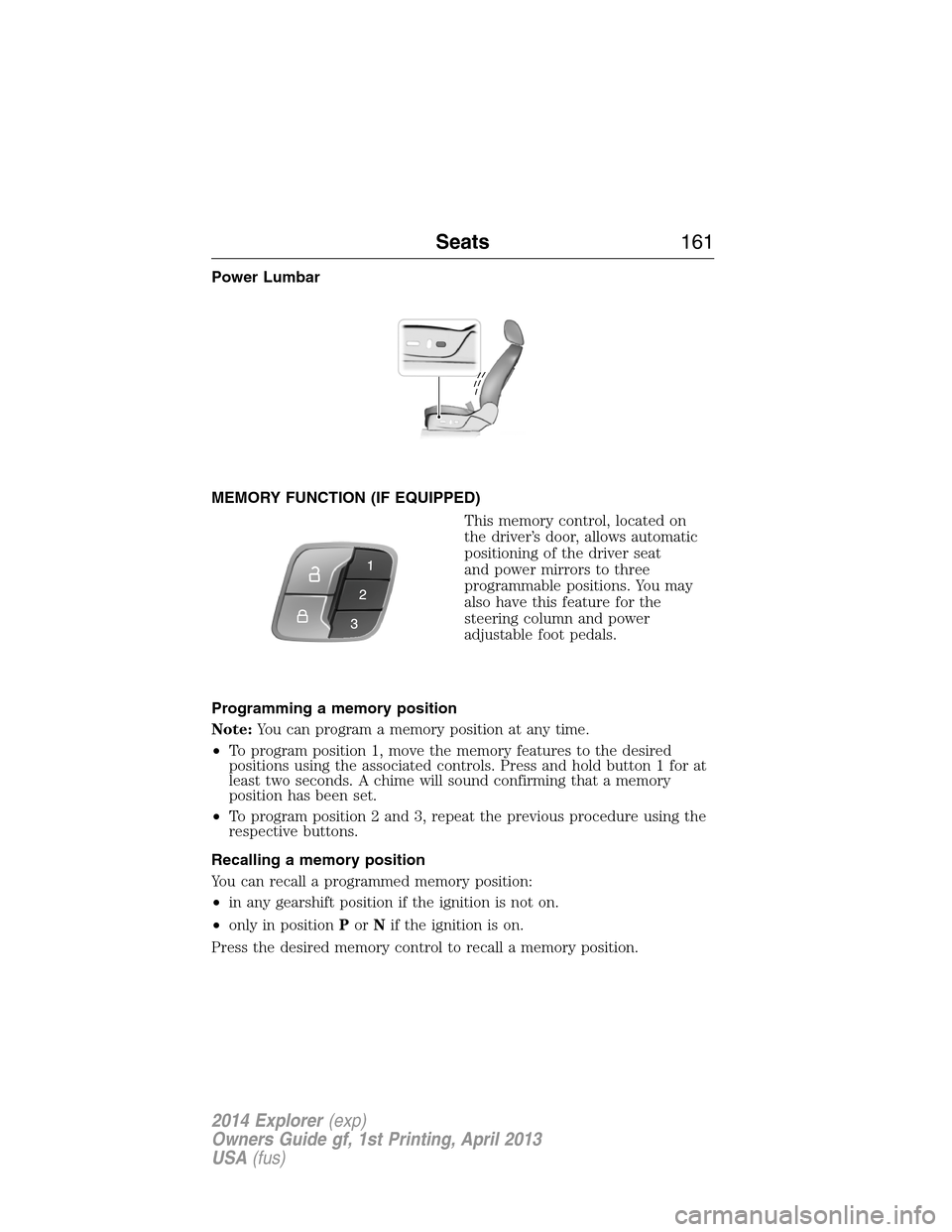
Power Lumbar
MEMORY FUNCTION (IF EQUIPPED)
This memory control, located on
the driver’s door, allows automatic
positioning of the driver seat
and power mirrors to three
programmable positions. You may
also have this feature for the
steering column and power
adjustable foot pedals.
Programming a memory position
Note:You can program a memory position at any time.
•To program position 1, move the memory features to the desired
positions using the associated controls. Press and hold button 1 for at
least two seconds. A chime will sound confirming that a memory
position has been set.
•To program position 2 and 3, repeat the previous procedure using the
respective buttons.
Recalling a memory position
You can recall a programmed memory position:
•in any gearshift position if the ignition is not on.
•only in positionPorNif the ignition is on.
Press the desired memory control to recall a memory position.
Seats161
2014 Explorer(exp)
Owners Guide gf, 1st Printing, April 2013
USA(fus)
Page 229 of 586
To enable hill descent control and set the descent speed, do the
following:
1. Press and release the hill descent button located in the
center of the terrain management control. A light in the
control will illuminate and chime will sound when this feature
is activated.
2. To increase descent speed, press the accelerator pedal until the
desired speed is reached. To decrease descent speed, press the brake
pedal until the desired speed is reached.
Whether accelerating or decelerating, once the desired descent speed is
reached, remove your feet from the pedals and the chosen vehicle speed
will be maintained.
Note:Noise from the ABS pump motor may be observed during hill
descent control operation. This is a normal characteristic of the ABS and
should be no reason for concern.
Hill descent modes
•At speeds below 20 mph (32 km/h): When the HDC button is pressed
and HDC is active, HILL DESCENT CONTROL ACTIVE will appear in
the message center for several seconds.
•At speeds below 20 mph (32 km/h): When the HDC button is pressed
and conditions are not correct for hill descent activation, the HDC
system will be enabled, the light on the button will be on solid and
HILL DESCENT CONTROL READY will be displayed in the message
center for several seconds.
•At speeds above 20 mph (32 km/h): When the HDC button is pressed,
the HDC system will be enabled, the light on the button will be
illuminated, and FOR HILL CNTRL, 20 MPH OR LESS will be
displayed in the message center for several seconds.
•For HDC to enable, the vehicle must be in a drive gear or (R)
Reverse. If the vehicle is in P (Park) or N (Neutral) and the HDC
button is pressed, FOR HILL CNTRL, SELECT GEAR will be displayed
in the message center for several seconds.
Refer toWarning lamps and indicatorsin theInstrument Cluster
chapter for hill descent control messages.
228Terrain Response
2014 Explorer(exp)
Owners Guide gf, 1st Printing, April 2013
USA(fus)
Page 404 of 586
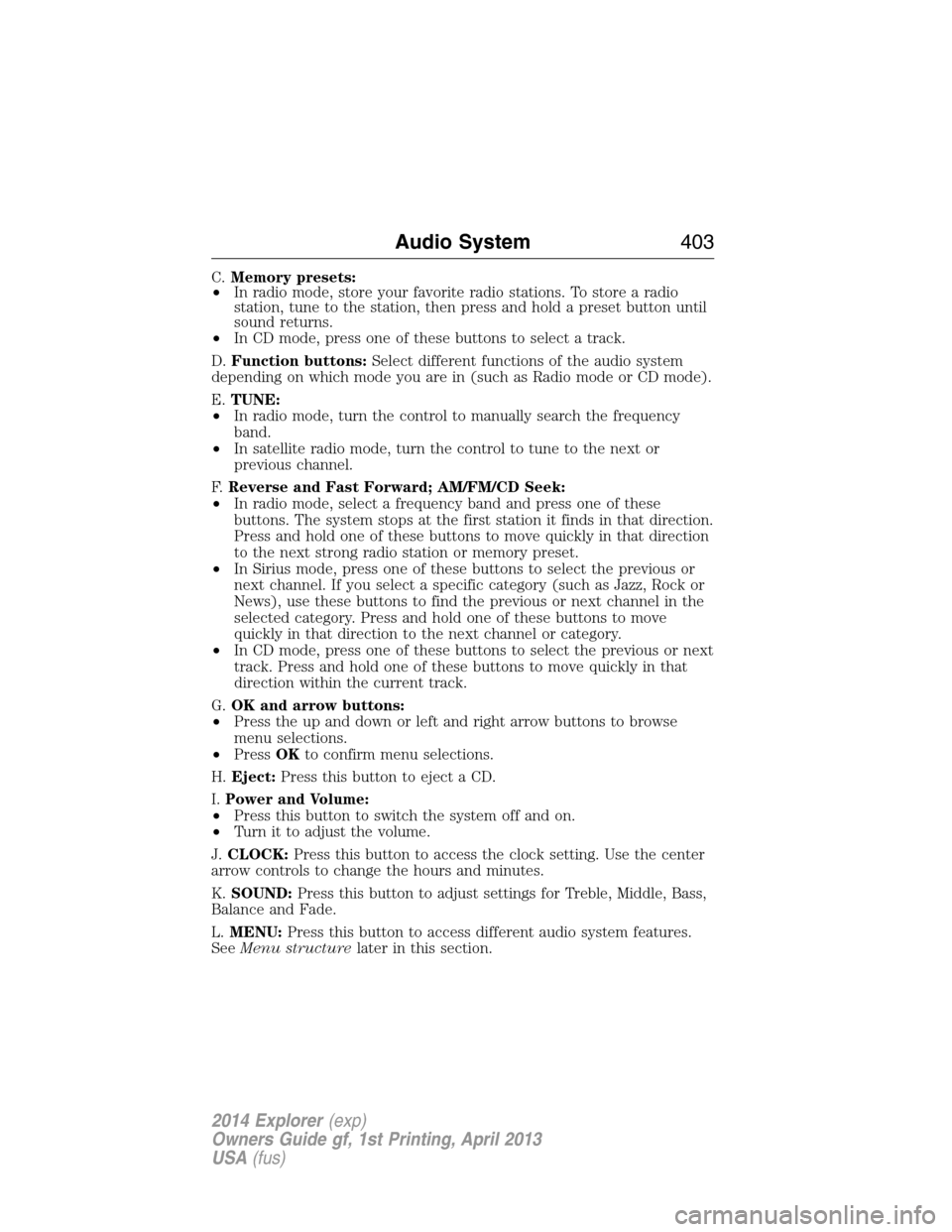
C.Memory presets:
•In radio mode, store your favorite radio stations. To store a radio
station, tune to the station, then press and hold a preset button until
sound returns.
•In CD mode, press one of these buttons to select a track.
D.Function buttons:Select different functions of the audio system
depending on which mode you are in (such as Radio mode or CD mode).
E.TUNE:
•In radio mode, turn the control to manually search the frequency
band.
•In satellite radio mode, turn the control to tune to the next or
previous channel.
F.Reverse and Fast Forward; AM/FM/CD Seek:
•In radio mode, select a frequency band and press one of these
buttons. The system stops at the first station it finds in that direction.
Press and hold one of these buttons to move quickly in that direction
to the next strong radio station or memory preset.
•In Sirius mode, press one of these buttons to select the previous or
next channel. If you select a specific category (such as Jazz, Rock or
News), use these buttons to find the previous or next channel in the
selected category. Press and hold one of these buttons to move
quickly in that direction to the next channel or category.
•In CD mode, press one of these buttons to select the previous or next
track. Press and hold one of these buttons to move quickly in that
direction within the current track.
G.OK and arrow buttons:
•Press the up and down or left and right arrow buttons to browse
menu selections.
•PressOKto confirm menu selections.
H.Eject:Press this button to eject a CD.
I.Power and Volume:
•Press this button to switch the system off and on.
•Turn it to adjust the volume.
J.CLOCK:Press this button to access the clock setting. Use the center
arrow controls to change the hours and minutes.
K.SOUND:Press this button to adjust settings for Treble, Middle, Bass,
Balance and Fade.
L.MENU:Press this button to access different audio system features.
SeeMenu structurelater in this section.
Audio System403
2014 Explorer(exp)
Owners Guide gf, 1st Printing, April 2013
USA(fus)
Page 410 of 586
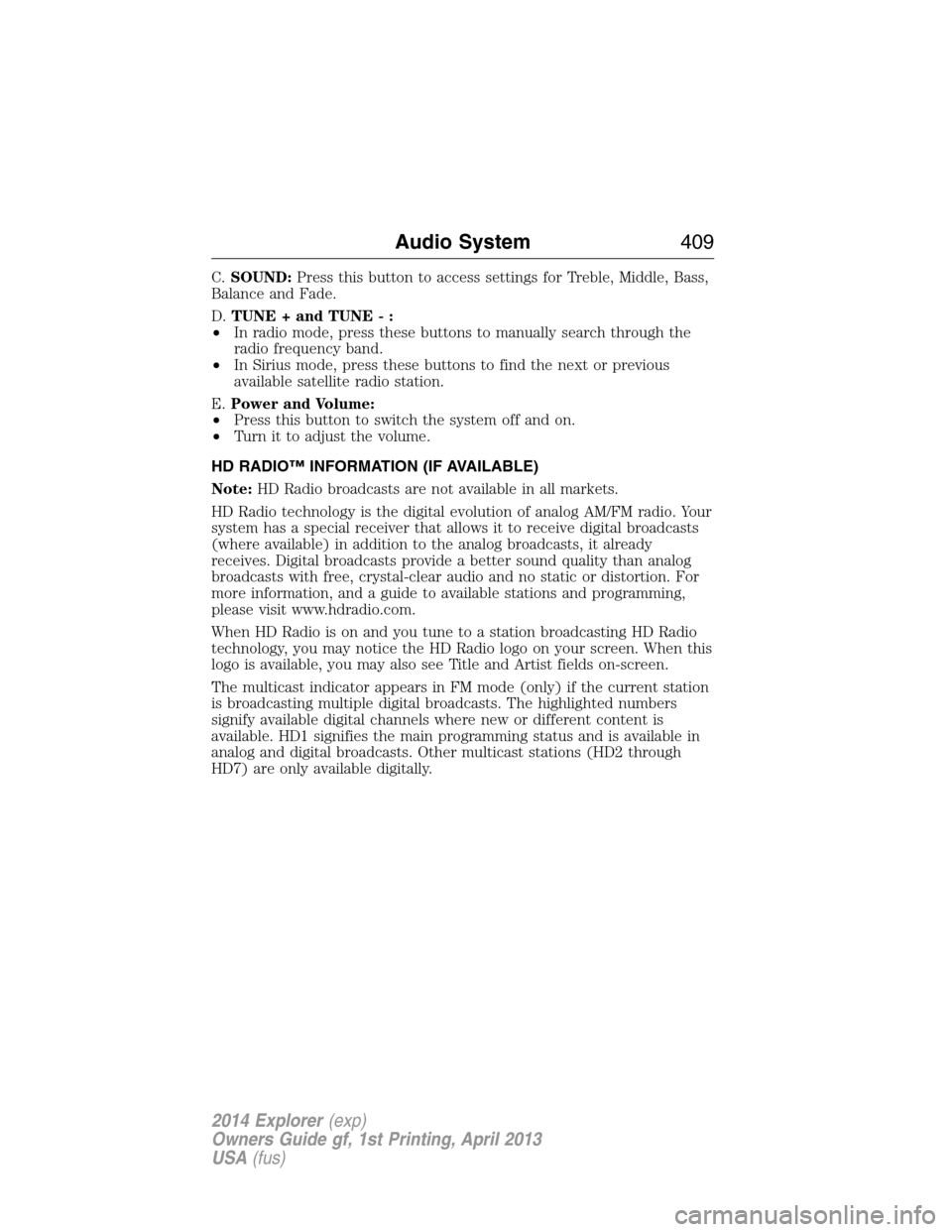
C.SOUND:Press this button to access settings for Treble, Middle, Bass,
Balance and Fade.
D.TUNE + and TUNE - :
•In radio mode, press these buttons to manually search through the
radio frequency band.
•In Sirius mode, press these buttons to find the next or previous
available satellite radio station.
E.Power and Volume:
•Press this button to switch the system off and on.
•Turn it to adjust the volume.
HD RADIO™ INFORMATION (IF AVAILABLE)
Note:HD Radio broadcasts are not available in all markets.
HD Radio technology is the digital evolution of analog AM/FM radio. Your
system has a special receiver that allows it to receive digital broadcasts
(where available) in addition to the analog broadcasts, it already
receives. Digital broadcasts provide a better sound quality than analog
broadcasts with free, crystal-clear audio and no static or distortion. For
more information, and a guide to available stations and programming,
please visit www.hdradio.com.
When HD Radio is on and you tune to a station broadcasting HD Radio
technology, you may notice the HD Radio logo on your screen. When this
logo is available, you may also see Title and Artist fields on-screen.
The multicast indicator appears in FM mode (only) if the current station
is broadcasting multiple digital broadcasts. The highlighted numbers
signify available digital channels where new or different content is
available. HD1 signifies the main programming status and is available in
analog and digital broadcasts. Other multicast stations (HD2 through
HD7) are only available digitally.
Audio System409
2014 Explorer(exp)
Owners Guide gf, 1st Printing, April 2013
USA(fus)
Page 429 of 586
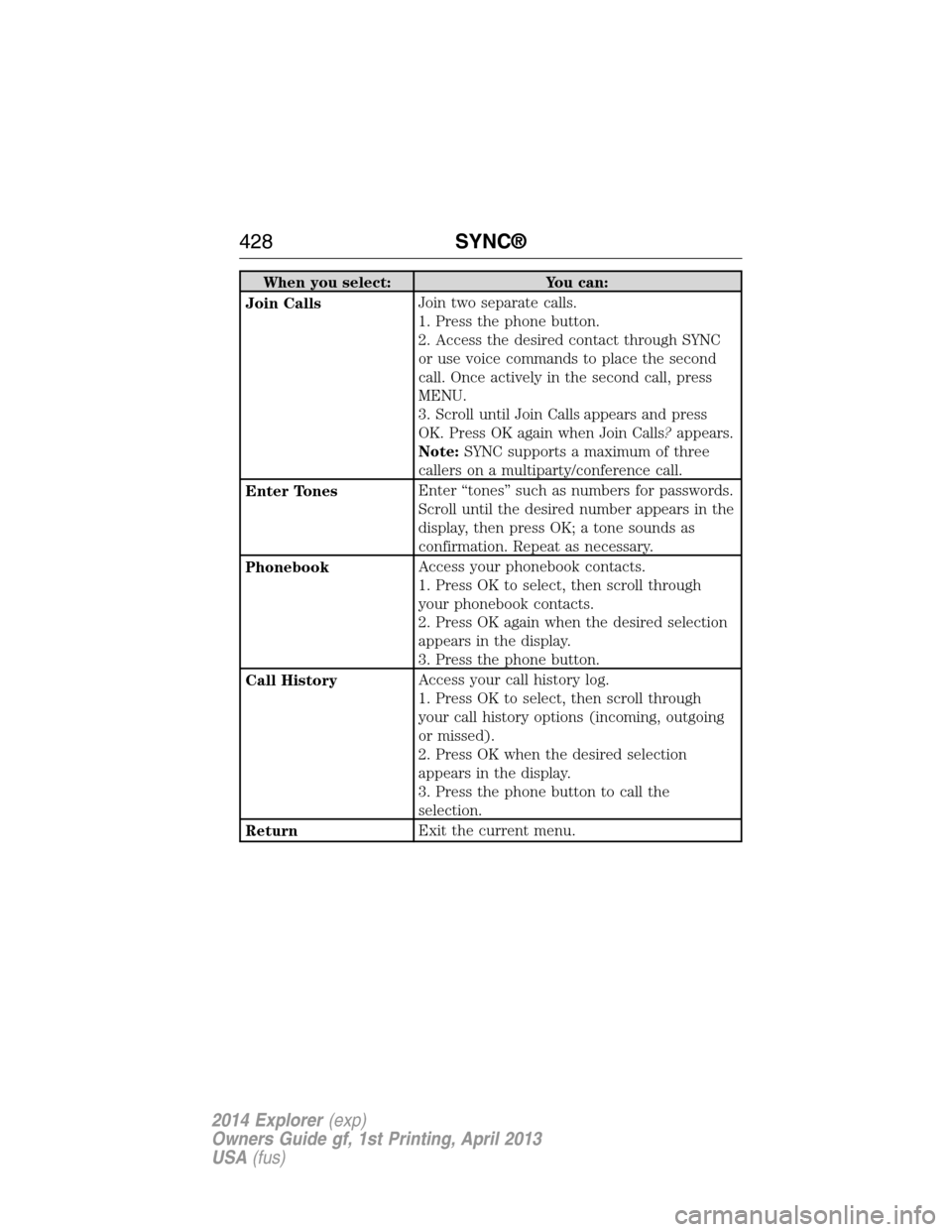
When you select: You can:
Join CallsJoin two separate calls.
1. Press the phone button.
2. Access the desired contact through SYNC
or use voice commands to place the second
call. Once actively in the second call, press
MENU.
3. Scroll until Join Calls appears and press
OK. Press OK again when Join Calls?appears.
Note:SYNC supports a maximum of three
callers on a multiparty/conference call.
Enter TonesEnter “tones” such as numbers for passwords.
Scroll until the desired number appears in the
display, then press OK; a tone sounds as
confirmation. Repeat as necessary.
PhonebookAccess your phonebook contacts.
1. Press OK to select, then scroll through
your phonebook contacts.
2. Press OK again when the desired selection
appears in the display.
3. Press the phone button.
Call HistoryAccess your call history log.
1. Press OK to select, then scroll through
your call history options (incoming, outgoing
or missed).
2. Press OK when the desired selection
appears in the display.
3. Press the phone button to call the
selection.
ReturnExit the current menu.
428SYNC®
2014 Explorer(exp)
Owners Guide gf, 1st Printing, April 2013
USA(fus)
Page 432 of 586
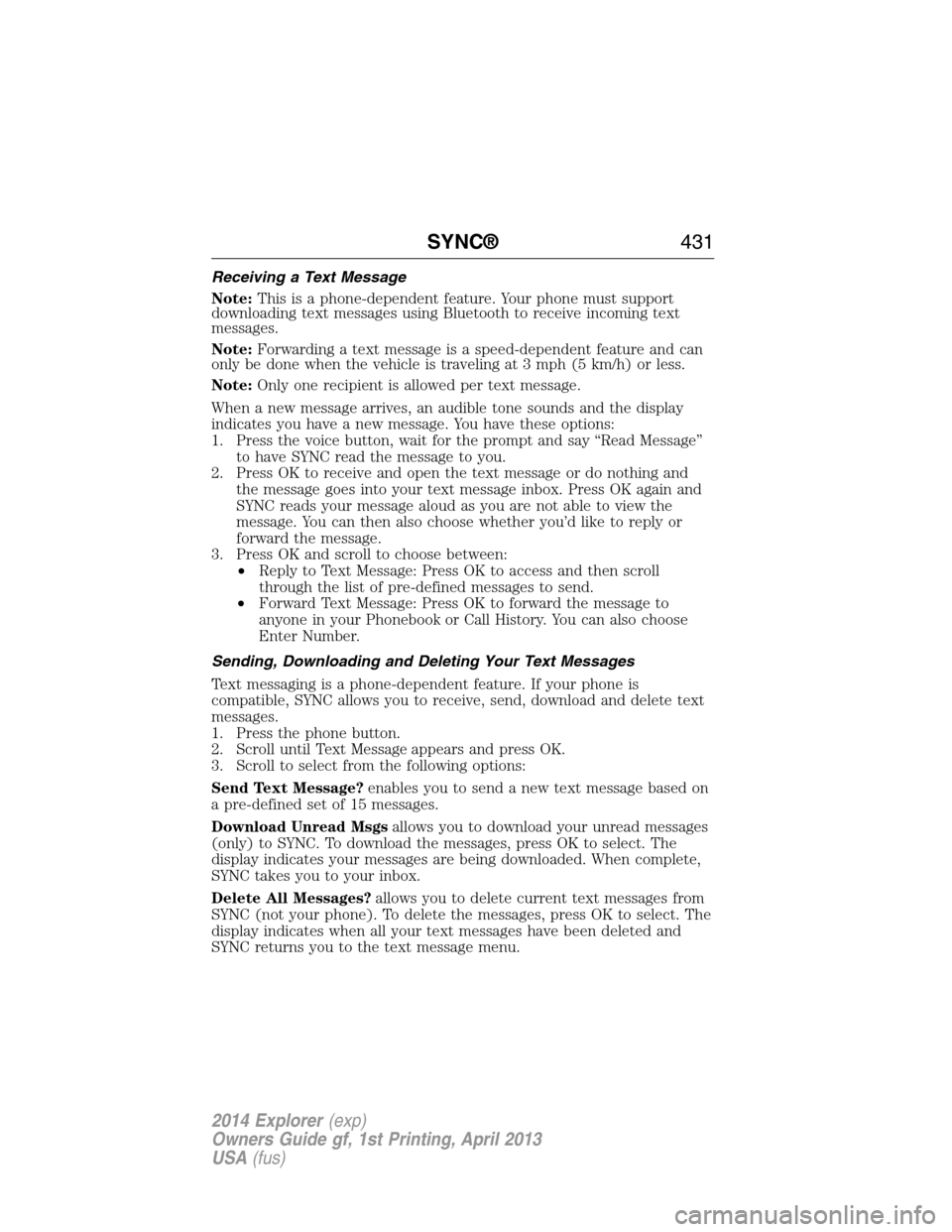
Receiving a Text Message
Note:This is a phone-dependent feature. Your phone must support
downloading text messages using Bluetooth to receive incoming text
messages.
Note:Forwarding a text message is a speed-dependent feature and can
only be done when the vehicle is traveling at 3 mph (5 km/h) or less.
Note:Only one recipient is allowed per text message.
When a new message arrives, an audible tone sounds and the display
indicates you have a new message. You have these options:
1. Press the voice button, wait for the prompt and say “Read Message”
to have SYNC read the message to you.
2. Press OK to receive and open the text message or do nothing and
the message goes into your text message inbox. Press OK again and
SYNC reads your message aloud as you are not able to view the
message. You can then also choose whether you’d like to reply or
forward the message.
3. Press OK and scroll to choose between:
•Reply to Text Message: Press OK to access and then scroll
through the list of pre-defined messages to send.
•Forward Text Message: Press OK to forward the message to
anyone in your Phonebook or Call History. You can also choose
Enter Number.
Sending, Downloading and Deleting Your Text Messages
Text messaging is a phone-dependent feature. If your phone is
compatible, SYNC allows you to receive, send, download and delete text
messages.
1. Press the phone button.
2. Scroll until Text Message appears and press OK.
3. Scroll to select from the following options:
Send Text Message?enables you to send a new text message based on
a pre-defined set of 15 messages.
Download Unread Msgsallows you to download your unread messages
(only) to SYNC. To download the messages, press OK to select. The
display indicates your messages are being downloaded. When complete,
SYNC takes you to your inbox.
Delete All Messages?allows you to delete current text messages from
SYNC (not your phone). To delete the messages, press OK to select. The
display indicates when all your text messages have been deleted and
SYNC returns you to the text message menu.
SYNC®431
2014 Explorer(exp)
Owners Guide gf, 1st Printing, April 2013
USA(fus)
Page 434 of 586
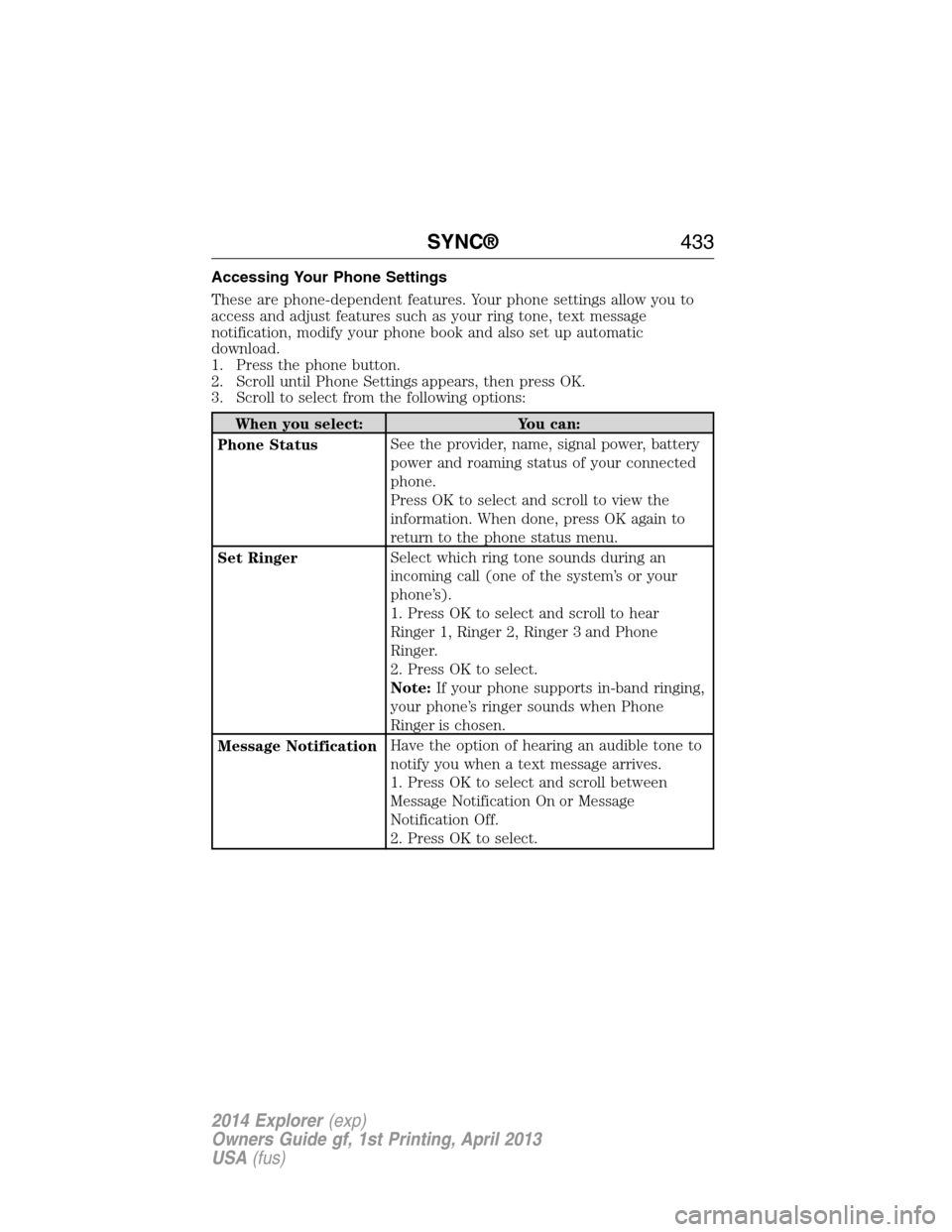
Accessing Your Phone Settings
These are phone-dependent features. Your phone settings allow you to
access and adjust features such as your ring tone, text message
notification, modify your phone book and also set up automatic
download.
1. Press the phone button.
2. Scroll until Phone Settings appears, then press OK.
3. Scroll to select from the following options:
When you select: You can:
Phone StatusSee the provider, name, signal power, battery
power and roaming status of your connected
phone.
Press OK to select and scroll to view the
information. When done, press OK again to
return to the phone status menu.
Set RingerSelect which ring tone sounds during an
incoming call (one of the system’s or your
phone’s).
1. Press OK to select and scroll to hear
Ringer 1, Ringer 2, Ringer 3 and Phone
Ringer.
2. Press OK to select.
Note:If your phone supports in-band ringing,
your phone’s ringer sounds when Phone
Ringer is chosen.
Message NotificationHave the option of hearing an audible tone to
notify you when a text message arrives.
1. Press OK to select and scroll between
Message Notification On or Message
Notification Off.
2. Press OK to select.
SYNC®433
2014 Explorer(exp)
Owners Guide gf, 1st Printing, April 2013
USA(fus)
Page 469 of 586
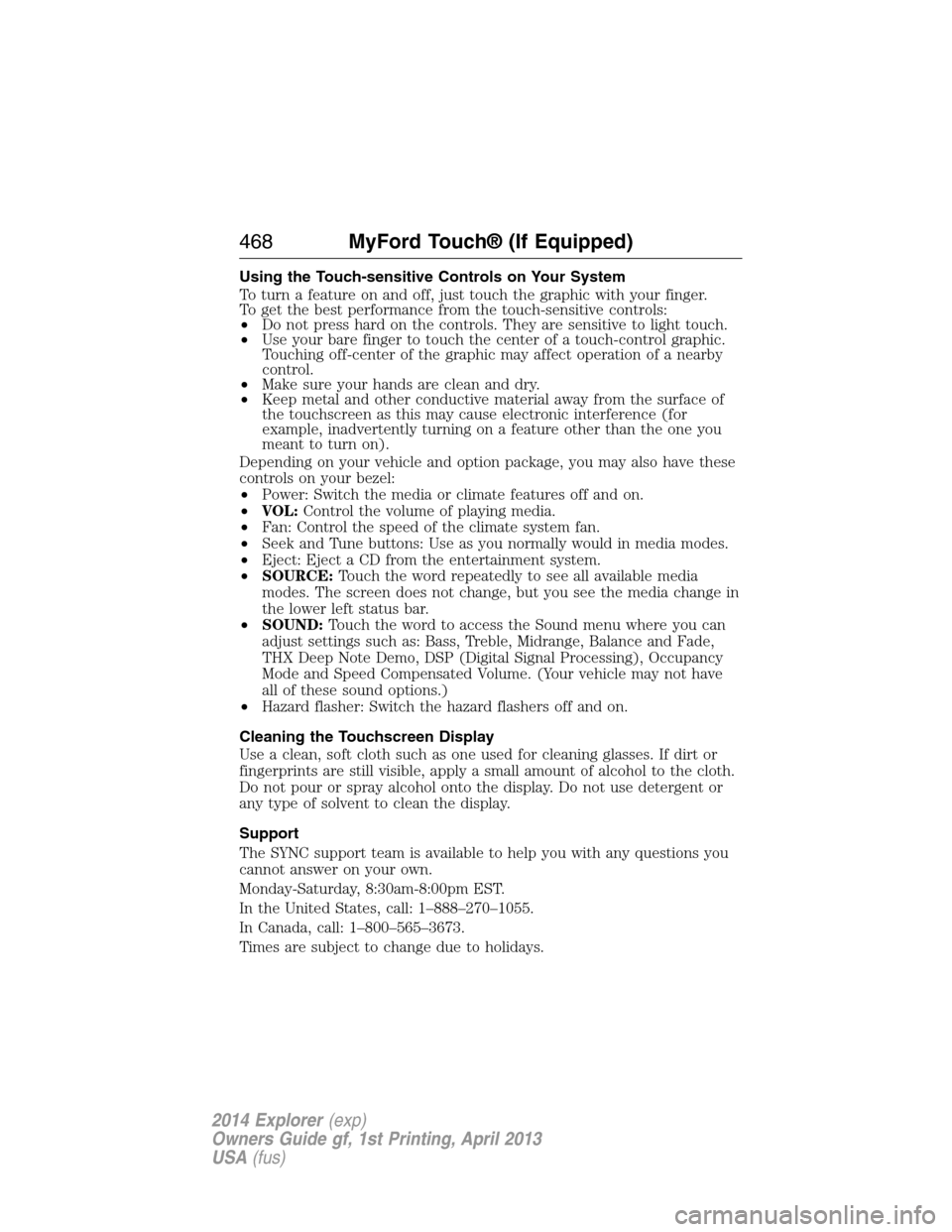
Using the Touch-sensitive Controls on Your System
To turn a feature on and off, just touch the graphic with your finger.
To get the best performance from the touch-sensitive controls:
•Do not press hard on the controls. They are sensitive to light touch.
•Use your bare finger to touch the center of a touch-control graphic.
Touching off-center of the graphic may affect operation of a nearby
control.
•Make sure your hands are clean and dry.
•Keep metal and other conductive material away from the surface of
the touchscreen as this may cause electronic interference (for
example, inadvertently turning on a feature other than the one you
meant to turn on).
Depending on your vehicle and option package, you may also have these
controls on your bezel:
•Power: Switch the media or climate features off and on.
•VOL:Control the volume of playing media.
•Fan: Control the speed of the climate system fan.
•Seek and Tune buttons: Use as you normally would in media modes.
•Eject: Eject a CD from the entertainment system.
•SOURCE:Touch the word repeatedly to see all available media
modes. The screen does not change, but you see the media change in
the lower left status bar.
•SOUND:Touch the word to access the Sound menu where you can
adjust settings such as: Bass, Treble, Midrange, Balance and Fade,
THX Deep Note Demo, DSP (Digital Signal Processing), Occupancy
Mode and Speed Compensated Volume. (Your vehicle may not have
all of these sound options.)
•Hazard flasher: Switch the hazard flashers off and on.
Cleaning the Touchscreen Display
Use a clean, soft cloth such as one used for cleaning glasses. If dirt or
fingerprints are still visible, apply a small amount of alcohol to the cloth.
Do not pour or spray alcohol onto the display. Do not use detergent or
any type of solvent to clean the display.
Support
The SYNC support team is available to help you with any questions you
cannot answer on your own.
Monday-Saturday, 8:30am-8:00pm EST.
In the United States, call: 1–888–270–1055.
In Canada, call: 1–800–565–3673.
Times are subject to change due to holidays.
468MyFord Touch® (If Equipped)
2014 Explorer(exp)
Owners Guide gf, 1st Printing, April 2013
USA(fus)
Page 479 of 586
![FORD EXPLORER 2014 5.G User Guide “AM <530 - 1710>” “FM <87.7 – 107.9>”
“<530 - 1710>” “<87.7 – 107.9>”
“Sirius <0-223>”
*“<Channel name>”*
“Play [genre] <name>”**“Play [playlist] <name>”**
“Play](/img/11/4945/w960_4945-478.png "FORD EXPLORER 2014 5.G User Guide “AM <530 - 1710>” “FM <87.7 – 107.9>”
“<530 - 1710>” “<87.7 – 107.9>”
“Sirius <0-223>”
*“<Channel name>”*
“Play [genre] <name>”**“Play [playlist] <name>”**
“Play")
“AM <530 - 1710>” “FM <87.7 – 107.9>”
“<530 - 1710>” “<87.7 – 107.9>”
“Sirius <0-223>”
*“
“Play [genre]
“Play [artist]
“Play [album]
“Play
*
*
This command is only usable if you have an active subscription to Sirius
satellite radio.
**The commands that have [ ] around the word means that the word is
optional. For example, if you say, “Play Metallica”, this is the same as the
voice command, “Play [artist]
AM and FM
Touch theAMorFMtab to listen to the radio.
To change between AM and FM presets, just touch theAMor
FMtab.
Memory Presets
Save a station by pressing and holding one of the memory preset areas.
There is a brief mute while the radio saves the station. Sound returns
when finished.
HD Radio
Touch this button to turn HD Radio on. The light on the button
illuminates when the feature is on. HD Radio allows you to receive radio
broadcasts digitally, where available, providing free, crystal-clear sound.
SeeHD Radio informationlater in this chapter.
Scan
Touch this button to go to the next strong AM or FM radio station.
The light on the button illuminates when the feature is on.
478MyFord Touch® (If Equipped)
2014 Explorer(exp)
Owners Guide gf, 1st Printing, April 2013
USA(fus)
Page 480 of 586
Options
Sound Settingsallows you to adjust settings for:
•Bass
•Midrange
•Treble
•Balance and Fade
•DSP (Digital Signal Processing)
•Occupancy Mode
•Speed Compensated Volume.
Note:Your vehicle may not have all these sound settings.
Set PTY for Seek/Scanallows you to select a category of music you
would like to search for. You can then choose to either seek or scan for
the stations playing that category.
RDS Text Displayallows you to view the information broadcast by FM
stations.
ASTallows you to have the system automatically store the six strongest
stations in your current location.
TAG Buttonis available when HD Radio is on, and allows you to tag a
song to download later. When you selectOn,TAG appears on-screen
when HD Radio is active. You can touchTA Gto save the information of
the song that is playing. When you plug in your portable music player,
the information transfers, if supported by your device. When you are
connected to iTunes, the tags appear to remind you of the songs you
would like to download. SeeHD Radio informationlater in this chapter.
Direct Tune
Touch this button to manually enter the desired station number. Touch
Enterwhen you are done.
HD Radio™ Information (If Available)
Note:HD Radio broadcasts are not available in all markets.
HD Radio technology is the digital evolution of analog AM/FM radio. Your
system has a special receiver that allows it to receive digital broadcasts
(where available) in addition to the analog broadcasts, it already
receives. Digital broadcasts provide a better sound quality than analog
broadcasts with free, crystal-clear audio and no static or distortion. For
more information, and a guide to available stations and programming,
please visit www.hdradio.com.
MyFord Touch® (If Equipped)479
2014 Explorer(exp)
Owners Guide gf, 1st Printing, April 2013
USA(fus)