ECO mode FORD EXPLORER 2014 5.G Owner's Manual
[x] Cancel search | Manufacturer: FORD, Model Year: 2014, Model line: EXPLORER, Model: FORD EXPLORER 2014 5.GPages: 586, PDF Size: 9.07 MB
Page 131 of 586
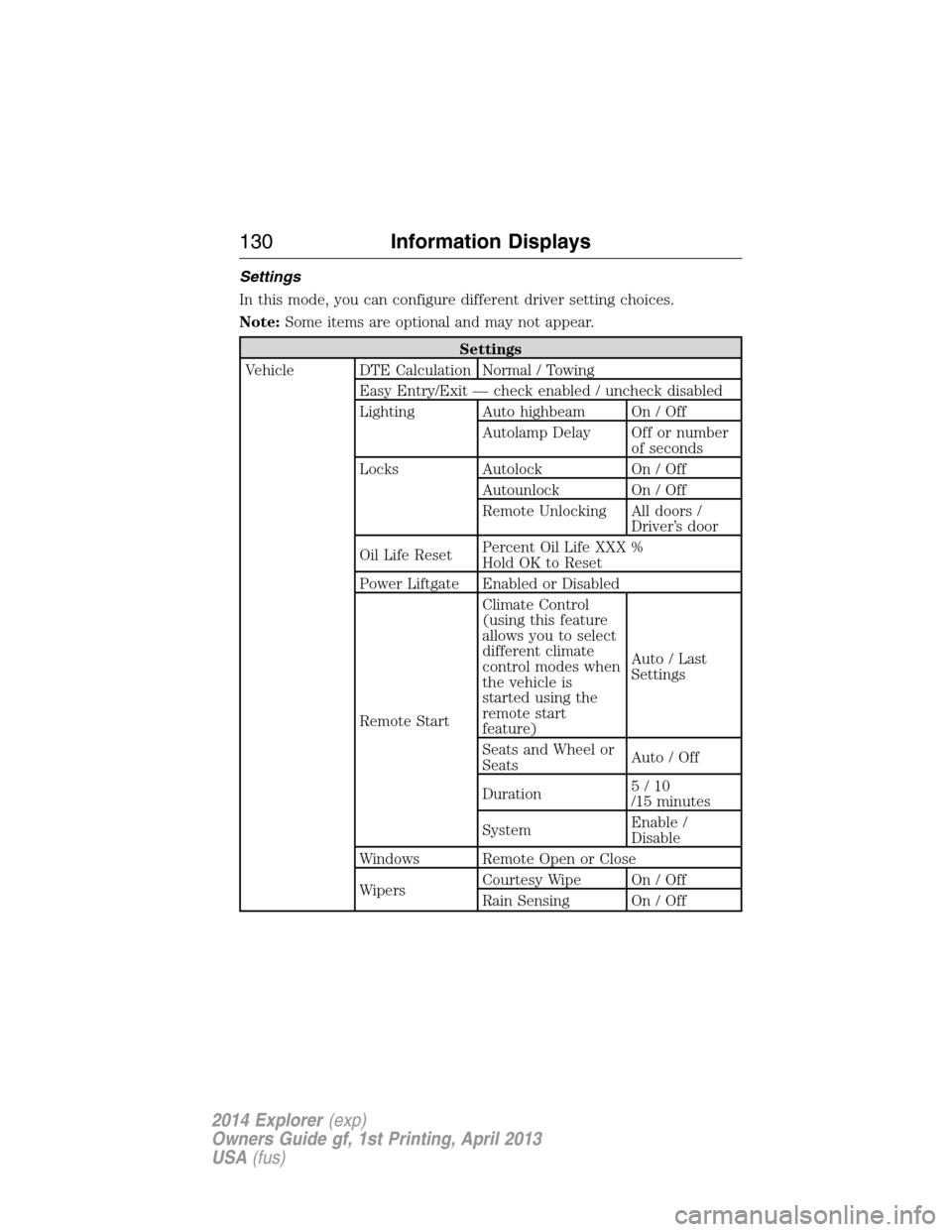
Settings
In this mode, you can configure different driver setting choices.
Note:Some items are optional and may not appear.
Settings
Vehicle DTE Calculation Normal / Towing
Easy Entry/Exit — check enabled / uncheck disabled
Lighting Auto highbeam On / Off
Autolamp Delay Off or number
of seconds
Locks Autolock On / Off
Autounlock On / Off
Remote Unlocking All doors /
Driver’s door
Oil Life ResetPercent Oil Life XXX %
Hold OK to Reset
Power Liftgate Enabled or Disabled
Remote StartClimate Control
(using this feature
allows you to select
different climate
control modes when
the vehicle is
started using the
remote start
feature)Auto / Last
Settings
Seats and Wheel or
SeatsAuto / Off
Duration5/10
/15 minutes
SystemEnable /
Disable
Windows Remote Open or Close
WipersCourtesy Wipe On / Off
Rain Sensing On / Off
130Information Displays
2014 Explorer(exp)
Owners Guide gf, 1st Printing, April 2013
USA(fus)
Page 135 of 586
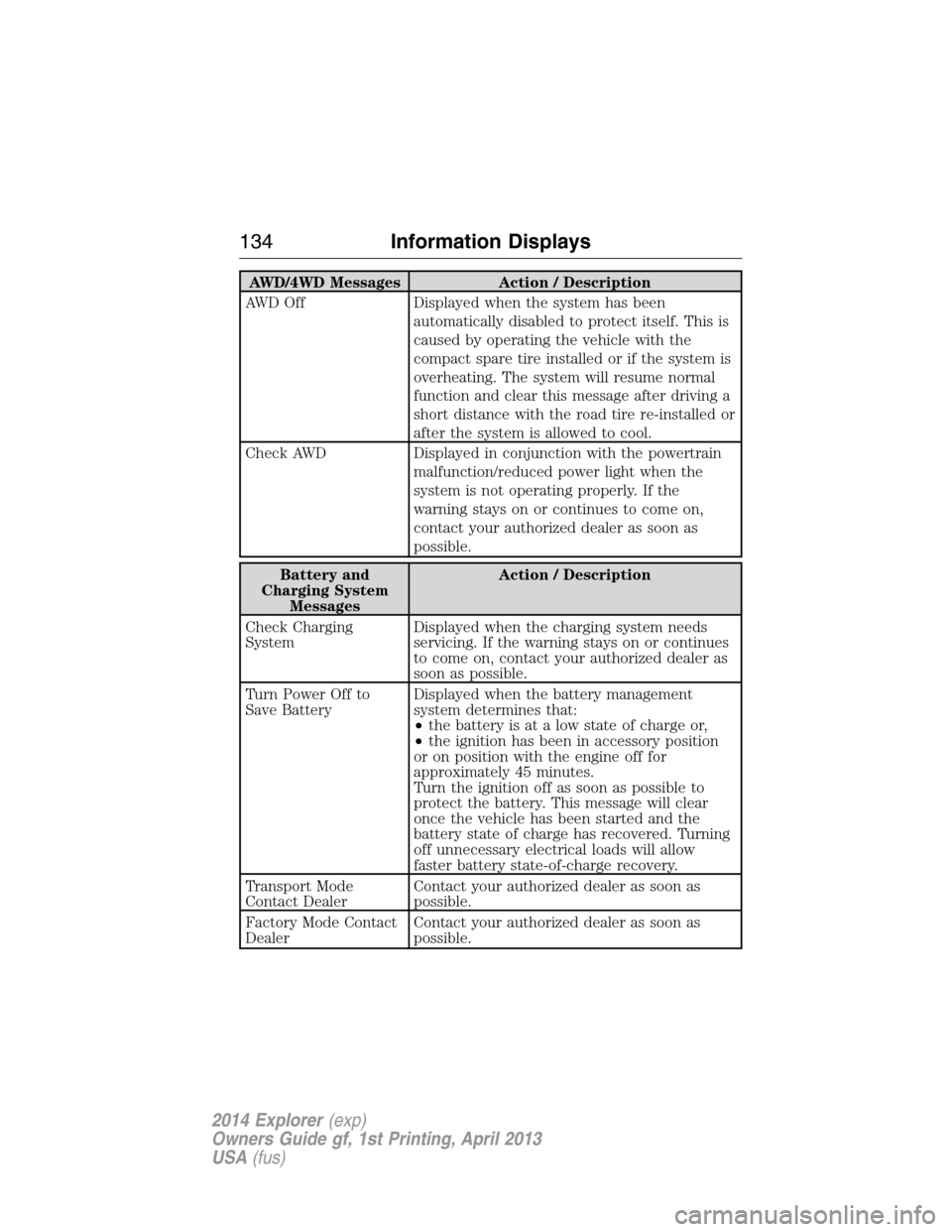
AWD/4WD Messages Action / Description
AWD Off Displayed when the system has been
automatically disabled to protect itself. This is
caused by operating the vehicle with the
compact spare tire installed or if the system is
overheating. The system will resume normal
function and clear this message after driving a
short distance with the road tire re-installed or
after the system is allowed to cool.
Check AWD Displayed in conjunction with the powertrain
malfunction/reduced power light when the
system is not operating properly. If the
warning stays on or continues to come on,
contact your authorized dealer as soon as
possible.
Battery and
Charging System
MessagesAction / Description
Check Charging
SystemDisplayed when the charging system needs
servicing. If the warning stays on or continues
to come on, contact your authorized dealer as
soon as possible.
Turn Power Off to
Save BatteryDisplayed when the battery management
system determines that:
•the battery is at a low state of charge or,
•the ignition has been in accessory position
or on position with the engine off for
approximately 45 minutes.
Turn the ignition off as soon as possible to
protect the battery. This message will clear
once the vehicle has been started and the
battery state of charge has recovered. Turning
off unnecessary electrical loads will allow
faster battery state-of-charge recovery.
Transport Mode
Contact DealerContact your authorized dealer as soon as
possible.
Factory Mode Contact
DealerContact your authorized dealer as soon as
possible.
134Information Displays
2014 Explorer(exp)
Owners Guide gf, 1st Printing, April 2013
USA(fus)
Page 148 of 586
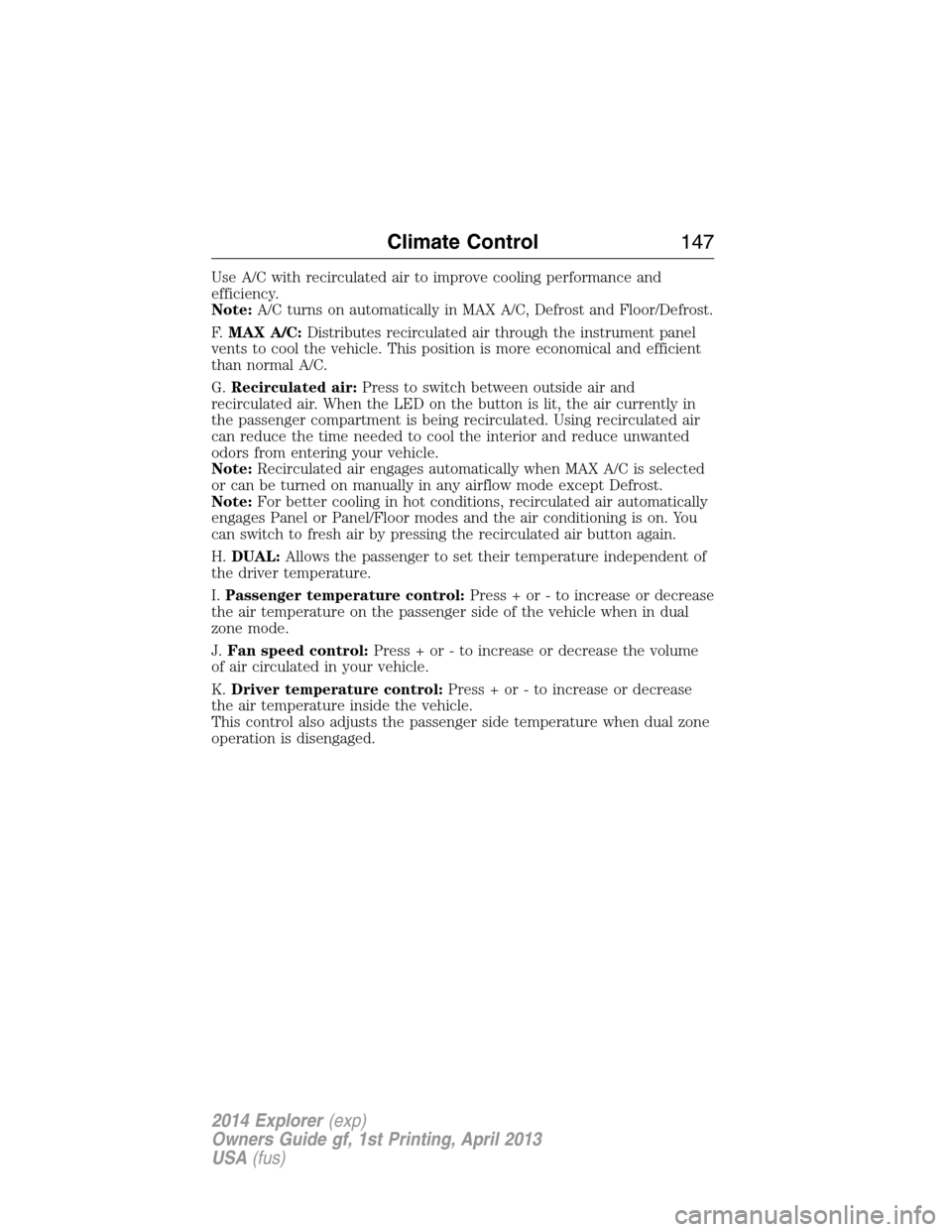
Use A/C with recirculated air to improve cooling performance and
efficiency.
Note:A/C turns on automatically in MAX A/C, Defrost and Floor/Defrost.
F.MAX A/C:Distributes recirculated air through the instrument panel
vents to cool the vehicle. This position is more economical and efficient
than normal A/C.
G.Recirculated air:Press to switch between outside air and
recirculated air. When the LED on the button is lit, the air currently in
the passenger compartment is being recirculated. Using recirculated air
can reduce the time needed to cool the interior and reduce unwanted
odors from entering your vehicle.
Note:Recirculated air engages automatically when MAX A/C is selected
or can be turned on manually in any airflow mode except Defrost.
Note:For better cooling in hot conditions, recirculated air automatically
engages Panel or Panel/Floor modes and the air conditioning is on. You
can switch to fresh air by pressing the recirculated air button again.
H.DUAL:Allows the passenger to set their temperature independent of
the driver temperature.
I.Passenger temperature control:Press + or - to increase or decrease
the air temperature on the passenger side of the vehicle when in dual
zone mode.
J.Fan speed control:Press + or - to increase or decrease the volume
of air circulated in your vehicle.
K.Driver temperature control:Press + or - to increase or decrease
the air temperature inside the vehicle.
This control also adjusts the passenger side temperature when dual zone
operation is disengaged.
Climate Control147
2014 Explorer(exp)
Owners Guide gf, 1st Printing, April 2013
USA(fus)
Page 149 of 586
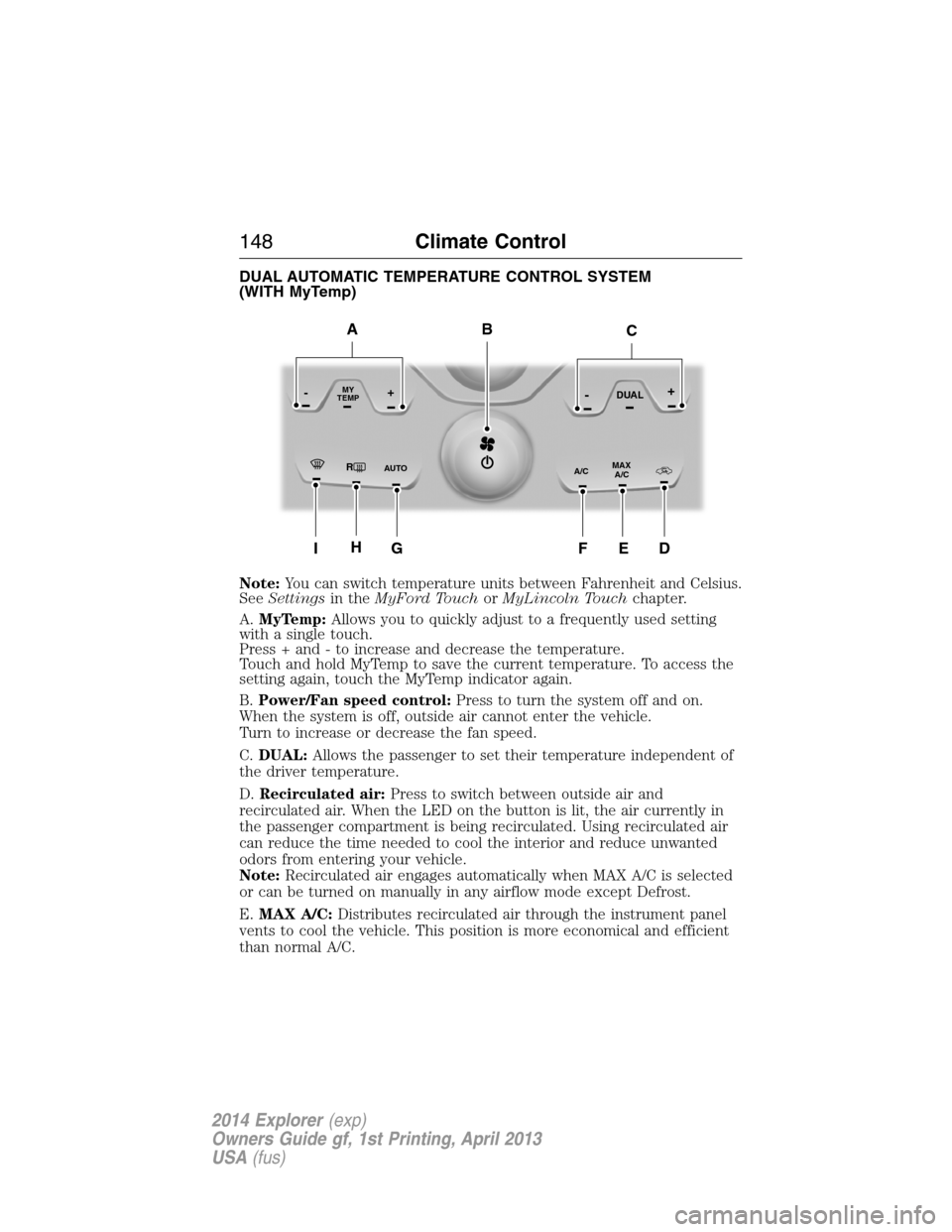
DUAL AUTOMATIC TEMPERATURE CONTROL SYSTEM
(WITH MyTemp)
Note:You can switch temperature units between Fahrenheit and Celsius.
SeeSettingsin theMyFord TouchorMyLincoln Touchchapter.
A.MyTemp:Allows you to quickly adjust to a frequently used setting
with a single touch.
Press + and - to increase and decrease the temperature.
Touch and hold MyTemp to save the current temperature. To access the
setting again, touch the MyTemp indicator again.
B.Power/Fan speed control:Press to turn the system off and on.
When the system is off, outside air cannot enter the vehicle.
Turn to increase or decrease the fan speed.
C.DUAL:Allows the passenger to set their temperature independent of
the driver temperature.
D.Recirculated air:Press to switch between outside air and
recirculated air. When the LED on the button is lit, the air currently in
the passenger compartment is being recirculated. Using recirculated air
can reduce the time needed to cool the interior and reduce unwanted
odors from entering your vehicle.
Note:Recirculated air engages automatically when MAX A/C is selected
or can be turned on manually in any airflow mode except Defrost.
E.MAX A/C:Distributes recirculated air through the instrument panel
vents to cool the vehicle. This position is more economical and efficient
than normal A/C.
RMAX
A/C A/C
TEMP
AU TO
MY-+DUAL-+
IG
B
HEDF
AC
148Climate Control
2014 Explorer(exp)
Owners Guide gf, 1st Printing, April 2013
USA(fus)
Page 151 of 586
GENERAL OPERATING TIPS
Manual Heating and Air Conditioning System
•To reduce fog build-up on the windshield during humid weather, select
Defrost. Temperature and fan speed can also be increased to improve
clearing.
•To reduce humidity build-up inside the vehicle, do not drive with the
system off or with recirculated air engaged.
•Do not put objects under the front seats that will interfere with the
airflow to the back seats.
•Remove any snow, ice or leaves from the air intake area at the base of
the windshield.
•To improve the A/C cool down, drive with the windows slightly open
for 2-3 minutes after start-up or until the vehicle has been aired out.
•A small amount of air may be felt from the floor vent regardless of the
air distribution setting that is selected.
During extreme high ambient temperatures when idling stationary for
extended periods of time in gear, it is recommended to run the A/C in
the MAX A/C mode, adjust the blower fan speed to the lowest setting
and put the vehicle’s transmission into positionP(vehicles equipped
with an automatic transmission) to continue to receive cool air from your
A/C system.
For maximum cooling performance in A/C mode, pressMAX A/C.
For maximum cooling performance in panel or panel/floor modes:
1. Move temperature control to the coolest setting.
2. Select A/C and recirculated air to provide colder airflow.
3. Set the fan to the highest speed initially, then adjust to maintain
comfort.
To aid in side window defogging and demisting in cold or humid weather:
1. Select Floor/Panel.
2. Select A/C.
3. Adjust the temperature control to maintain comfort.
4. Set the fan speed to the highest setting.
5. Direct the outer instrument panel vents toward the side windows.
6. To increase airflow to the outer instrument panel vents, close the
vents located in the middle of the instrument panel.
150Climate Control
2014 Explorer(exp)
Owners Guide gf, 1st Printing, April 2013
USA(fus)
Page 152 of 586
Dual Zone Automatic Temperature Control
•To reduce fog build-up on the windshield during humid weather, select
Defrost. Temperature and fan speed can also be increased to improve
clearing.
•To reduce humidity build-up inside the vehicle, do not drive with the
system off or with recirculated air engaged.
•Do not put objects under the front seats that will interfere with the
airflow to the back seats.
•Remove any snow, ice or leaves from the air intake area at the base of
the windshield.
•To improve the A/C cool down, drive with the windows slightly open
for 2-3 minutes after start-up or until the vehicle has been aired out.
•A small amount of air may be felt from the floor vent regardless of the
air distribution setting that is selected.
During extreme high ambient temperatures when idling stationary for
extended periods of time in gear, it is recommended to run the A/C in
the MAX A/C mode, adjust the blower fan speed to the lowest setting
and put the vehicle’s transmission into positionP(vehicles equipped
with an automatic transmission) to continue to receive cool air from your
A/C system.
For maximum cooling performance in AUTO mode, pressMAX A/C.
For maximum cooling performance in manual override control:
1. Choose Panel, A/C, and recirc controls.
2. Set the temperature to LO.
3. Set the fan to the highest blower setting.
To aid in side window defogging and demisting in cold or humid weather:
1. Select Floor/Panel.
2. Select A/C.
3. Adjust the temperature control to maintain comfort.
4. Set the fan speed to the highest setting.
5. Direct the outer instrument panel vents toward the side windows.
6. To increase airflow to the outer instrument panel vents, close the
vents located in the middle of the instrument panel.
Climate Control151
2014 Explorer(exp)
Owners Guide gf, 1st Printing, April 2013
USA(fus)
Page 182 of 586
Programing the transmitters
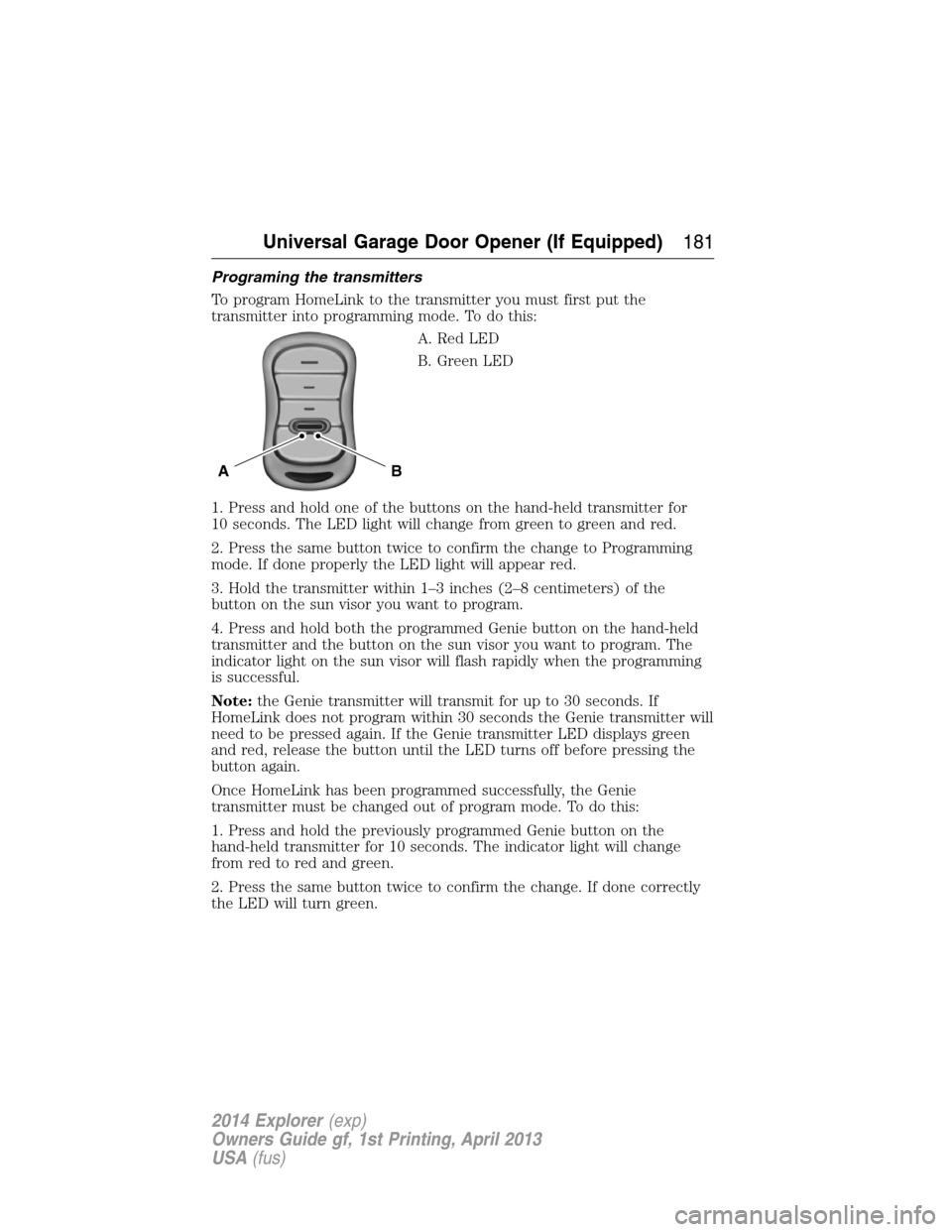
To program HomeLink to the transmitter you must first put the
transmitter into programming mode. To do this:
A. Red LED
B. Green LED
1. Press and hold one of the buttons on the hand-held transmitter for
10 seconds. The LED light will change from green to green and red.
2. Press the same button twice to confirm the change to Programming
mode. If done properly the LED light will appear red.
3. Hold the transmitter within 1–3 inches (2–8 centimeters) of the
button on the sun visor you want to program.
4. Press and hold both the programmed Genie button on the hand-held
transmitter and the button on the sun visor you want to program. The
indicator light on the sun visor will flash rapidly when the programming
is successful.
Note:the Genie transmitter will transmit for up to 30 seconds. If
HomeLink does not program within 30 seconds the Genie transmitter will
need to be pressed again. If the Genie transmitter LED displays green
and red, release the button until the LED turns off before pressing the
button again.
Once HomeLink has been programmed successfully, the Genie
transmitter must be changed out of program mode. To do this:
1. Press and hold the previously programmed Genie button on the
hand-held transmitter for 10 seconds. The indicator light will change
from red to red and green.
2. Press the same button twice to confirm the change. If done correctly
the LED will turn green.
BA
Universal Garage Door Opener (If Equipped)181
2014 Explorer(exp)
Owners Guide gf, 1st Printing, April 2013
USA(fus)
Page 183 of 586
Programming HomeLink to the Genie Intellicode garage door
opener motor
Note:You may need a ladder to access the garage door opener motor.
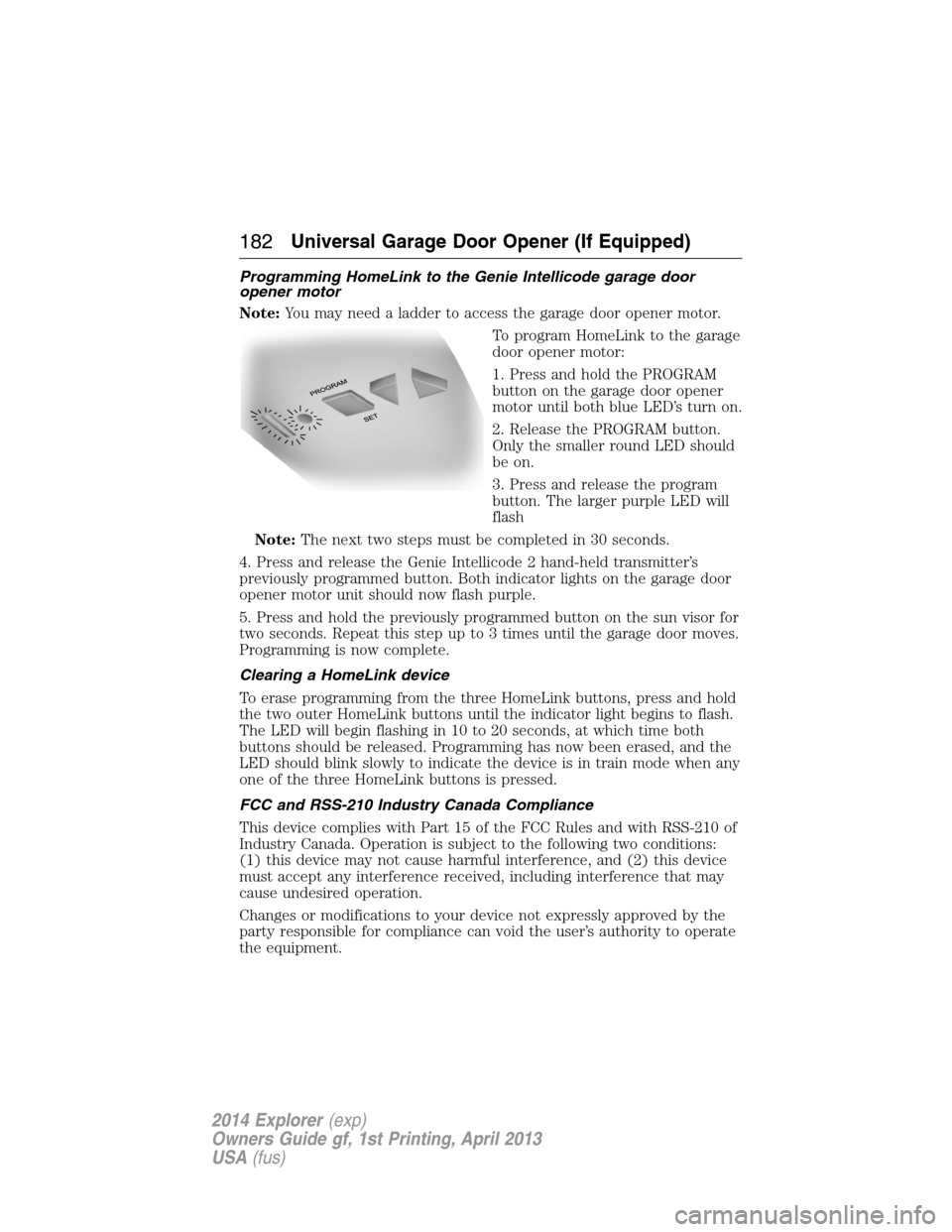
To program HomeLink to the garage
door opener motor:
1. Press and hold the PROGRAM
button on the garage door opener
motor until both blue LED’s turn on.
2. Release the PROGRAM button.
Only the smaller round LED should
be on.
3. Press and release the program
button. The larger purple LED will
flash
Note:The next two steps must be completed in 30 seconds.
4. Press and release the Genie Intellicode 2 hand-held transmitter’s
previously programmed button. Both indicator lights on the garage door
opener motor unit should now flash purple.
5. Press and hold the previously programmed button on the sun visor for
two seconds. Repeat this step up to 3 times until the garage door moves.
Programming is now complete.
Clearing a HomeLink device
To erase programming from the three HomeLink buttons, press and hold
the two outer HomeLink buttons until the indicator light begins to flash.
The LED will begin flashing in 10 to 20 seconds, at which time both
buttons should be released. Programming has now been erased, and the
LED should blink slowly to indicate the device is in train mode when any
one of the three HomeLink buttons is pressed.
FCC and RSS-210 Industry Canada Compliance
This device complies with Part 15 of the FCC Rules and with RSS-210 of
Industry Canada. Operation is subject to the following two conditions:
(1) this device may not cause harmful interference, and (2) this device
must accept any interference received, including interference that may
cause undesired operation.
Changes or modifications to your device not expressly approved by the
party responsible for compliance can void the user’s authority to operate
the equipment.
182Universal Garage Door Opener (If Equipped)
2014 Explorer(exp)
Owners Guide gf, 1st Printing, April 2013
USA(fus)
Page 208 of 586
D (Drive) with Overdrive
The normal driving position for the best fuel economy. Transmission
operates in gears one through six.
The automatic transmission shift strategy has the ability to detect hilly
terrain or mountainous areas and will provide a limited amount of grade
assist features automatically. Refer toD(Drive) with Grade assist or
SelectShift for more information.
D (Drive) with Tow on
Press theTOWswitch located on the instrument panel by the headlamp
control to activate tow. TheTOW/HAULmessage will illuminate in the
instrument cluster.
The tow feature improves transmission operation when towing a trailer
or a heavy load. All transmission gear ranges are available when using
tow.
The tow feature delays upshifts to reduce frequency of transmission
shifting. Tow also provides engine braking in all forward gears when the
transmission is in theD(Overdrive) position. This engine braking will
slow the vehicle and assist the driver in controlling the vehicle when
descending a grade. Depending on driving conditions and load
conditions, the transmission may downshift, slow the vehicle and control
the vehicle speed when descending a hill, without the accelerator pedal
being pressed. The amount of downshift braking provided will vary based
upon the amount the brake pedal is depressed.
Press theTOWbutton to deactivate the tow feature and return to
normal driving mode. The tow light will no longer be illuminated.
When you shut-off and restart the engine, the transmission will
automatically return to normalD(Overdrive) mode (tow off).
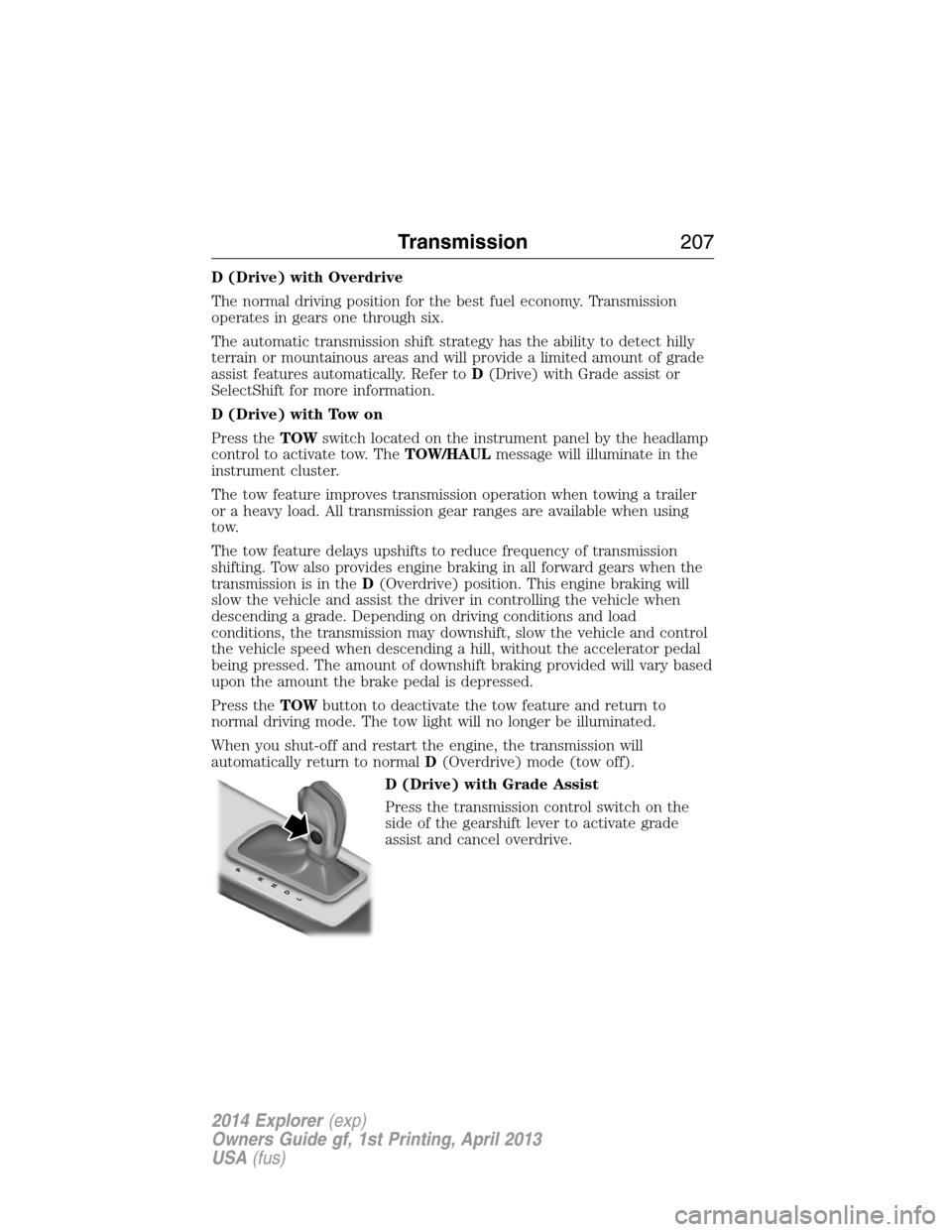
D (Drive) with Grade Assist
Press the transmission control switch on the
side of the gearshift lever to activate grade
assist and cancel overdrive.
PRNDL
Transmission207
2014 Explorer(exp)
Owners Guide gf, 1st Printing, April 2013
USA(fus)
Page 209 of 586
Grade assist:
•Provides additional grade (engine) braking and extends
lower gear operation on uphill climbs for hilly terrain or
mountainous areas.
•Provides additional engine braking through the automatic transmission
shift strategy which reacts to vehicle inputs (vehicle acceleration,
accelerator pedal, brake pedal and vehicle speed).
•Allows the transmission to select gears that will provide the desired
engine braking based on the vehicle inputs mentioned above. This will
increase engine RPM during engine braking.
•The grade assist lamp in the instrument cluster is illuminated.
Grade assist is designed to aid the driver with optimal gear selection in
hilly terrain or mountainous areas but is not intended for normal operation.
It is recommended that you return to O/D (overdrive mode) on flat terrain
to provide the best fuel economy and transmission function.
Press the transmission control switch again to return to normal D
(Drive) position (with O/D).
•The grade assist lamp in the instrument cluster will not be illuminated.
•The transmission will operate in gears one through six.
L (Low)
•Provides maximum engine braking.
•Will downshift to the lowest available gear for the current vehicle
speed; allows for first gear when vehicle reaches slower speeds.
•Is not intended for use under extended or normal driving co nditions
and results in lower fuel economy.
M (Manual) (if equipped)
Moving the gearshift lever to M (Manual):
•Provides additional grade (engine) braking and extends lower gear
operation to enhance performance for uphill climbs, hilly terrain or
mountainous areas. This will increase engine RPM during engine
braking.
•Provides additional lower gear operation through the automatic
transmission shift strategy which reacts to vehicle inputs (vehicle
acceleration, accelerator pedal, brake pedal and vehicle speed).
•Gears are selected more quickly and at higher engine speeds.
Note:The system will stay in M (Manual) until the gear shift lever is
moved into another gear for example P (park) or D (Drive).
208Transmission
2014 Explorer(exp)
Owners Guide gf, 1st Printing, April 2013
USA(fus)