lock FORD EXPLORER 2014 5.G Workshop Manual
[x] Cancel search | Manufacturer: FORD, Model Year: 2014, Model line: EXPLORER, Model: FORD EXPLORER 2014 5.GPages: 586, PDF Size: 9.07 MB
Page 142 of 586
Passenger Sensing
System MessagesAction / Description
Remove Objects Near
Passenger SeatDisplayed when objects are by the passenger
seat. After the objects are moved away from
the seat, if the warning stays on or continues
to come on contact your authorized dealer as
soon as possible.
Reminder Messages Action / Description
Steering Lock Turn
Wheel to UnlockDisplays when you need to turn the steering
wheel in order to disengage the steering lock.
Shift to Park Displays as a reminder to shift into park if
gear shift lever is not in park and a door is
opened.
Engine On Displays when the driver’s door is opened, the
vehicle is on park and the engine is on.
Remote Start Action / Description
To Drive: Turn Key to
OnDisplays as a reminder to turn the key on to
drive the vehicle after a remote start.
To Drive: Press Brake
and START ButtonDisplays as a reminder to apply the brake and
the start button to drive the vehicle after a
remote start.
Terrain Management
/OffRoad/Hill
Descent MessagesAction / Description
For Hill Descent
Reduce Speed
XX MPH/km/h or LessDisplayed when hill descent speed exceeds
20 MPH (32 KM/H).
For Hill Descent Shift
into GearDisplayed when hill descent control mode
requires driver shift transmission into gear.
Driver Resume Control Displayed when the hill control mode requires
the driver to resume control.
Hill Descent Control
ActiveDisplayed when hill descent control mode is
activated.
Information Displays141
2014 Explorer(exp)
Owners Guide gf, 1st Printing, April 2013
USA(fus)
Page 150 of 586
F.A/C:Press to turn air conditioning off and on. Air conditioning cools the
vehicle using outside air. To improve air conditioning when starting your
vehicle, drive with the windows slightly open for two to three minutes.
Use A/C with recirculated air to improve cooling performance and
efficiency.
Note:A/C turns on automatically in MAX A/C, Defrost and Floor/Defrost.
G.AUTO:Press to turn on fully automatic operation. Select the desired
temperature using the temperature control. The system automatically
determines fan speed, air distribution, A/C operation, and outside or
recirculated air, to heat or cool the vehicle to maintain the selected
temperature.
H.Rear defrost:Turns the heated windows and mirrors off and on.
SeeHeated windows and mirrorslater in this chapter for more
information. If your vehicle is equipped with heated mirrors, this button
turns them on also.
I.Defrost:Distributes air through the windshield defroster vents and
demister vents. This setting can also be used to defog and clear the
windshield of a thin covering of ice.
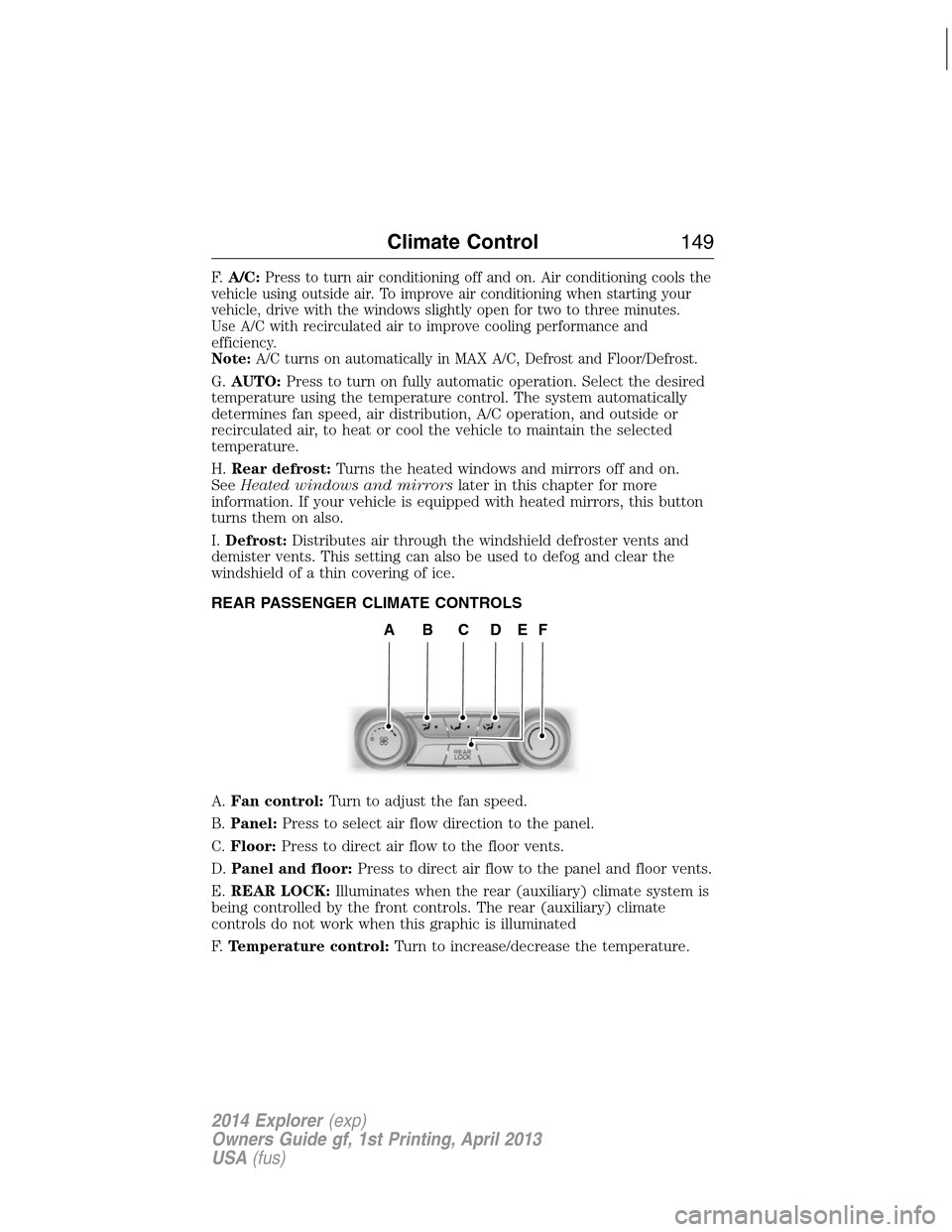
REAR PASSENGER CLIMATE CONTROLS
A.Fan control:Turn to adjust the fan speed.
B.Panel:Press to select air flow direction to the panel.
C.Floor:Press to direct air flow to the floor vents.
D.Panel and floor:Press to direct air flow to the panel and floor vents.
E.REAR LOCK:Illuminates when the rear (auxiliary) climate system is
being controlled by the front controls. The rear (auxiliary) climate
controls do not work when this graphic is illuminated
F.Temperature control:Turn to increase/decrease the temperature.
ABCDEF
Climate Control149
2014 Explorer(exp)
Owners Guide gf, 1st Printing, April 2013
USA(fus)
Page 158 of 586
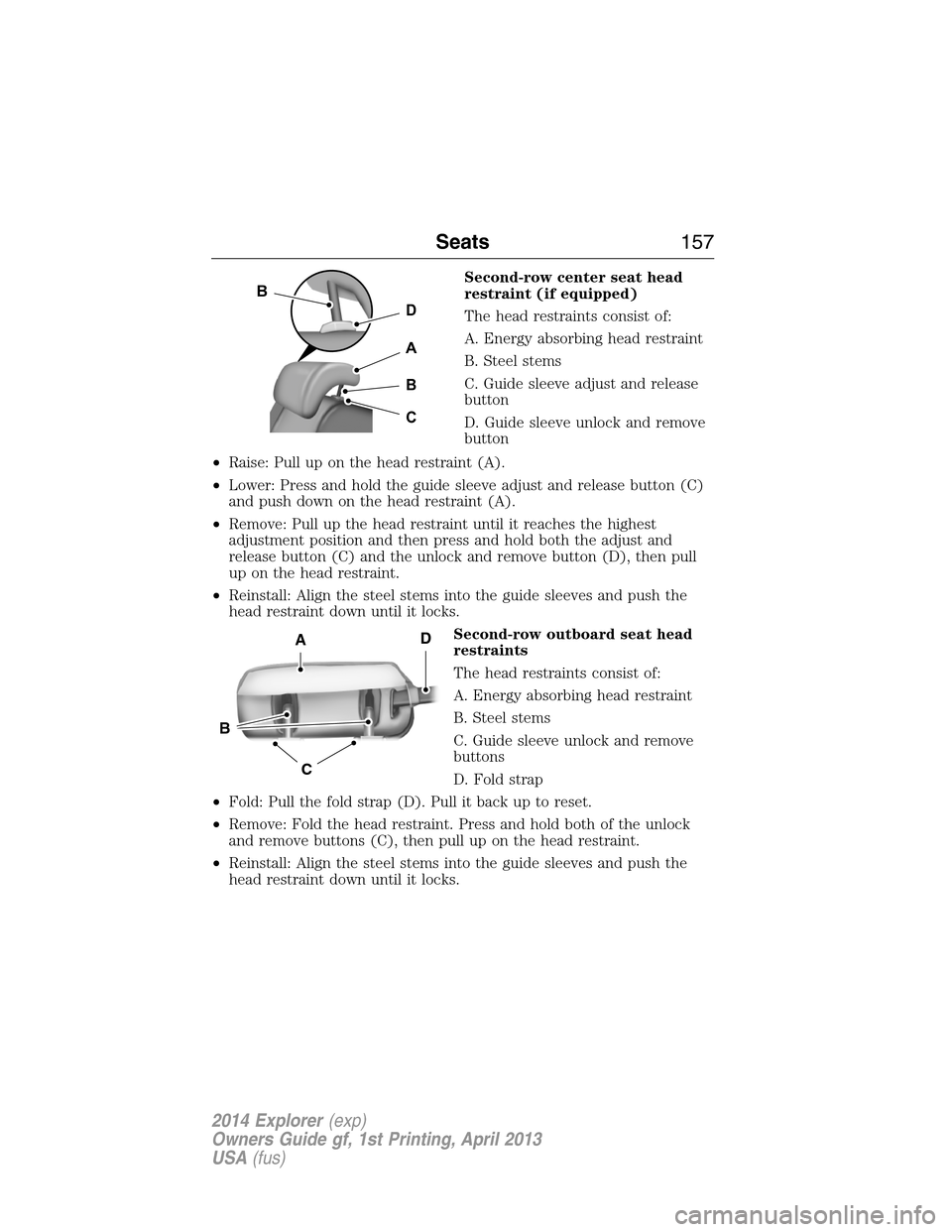
Second-row center seat head
restraint (if equipped)
The head restraints consist of:
A. Energy absorbing head restraint
B. Steel stems
C. Guide sleeve adjust and release
button
D. Guide sleeve unlock and remove
button
•Raise: Pull up on the head restraint (A).
•Lower: Press and hold the guide sleeve adjust and release button (C)
and push down on the head restraint (A).
•Remove: Pull up the head restraint until it reaches the highest
adjustment position and then press and hold both the adjust and
release button (C) and the unlock and remove button (D), then pull
up on the head restraint.
•Reinstall: Align the steel stems into the guide sleeves and push the
head restraint down until it locks.
Second-row outboard seat head
restraints
The head restraints consist of:
A. Energy absorbing head restraint
B. Steel stems
C. Guide sleeve unlock and remove
buttons
D. Fold strap
•Fold: Pull the fold strap (D). Pull it back up to reset.
•Remove: Fold the head restraint. Press and hold both of the unlock
and remove buttons (C), then pull up on the head restraint.
•Reinstall: Align the steel stems into the guide sleeves and push the
head restraint down until it locks.
D
B
A
B
C
C
B
AD
Seats157
2014 Explorer(exp)
Owners Guide gf, 1st Printing, April 2013
USA(fus)
Page 163 of 586
Recalling memory positions with the remote control
You can recall memory positions when you press unlock on your remote
control (if the transmitter is programmed to a memory position) or,
when you enter a valid personal entry code that is programmed to a
memory position. If the easy entry feature is enabled, the seat will first
move to the easy entry position. The seat will move to the final position
when the key is in the ignition or when the push button start system
(if equipped) is put in accessory mode or started.
To program the memory feature to a remote control, see theKeys and
Remote Controlchapter.
Easy Entry and Exit Feature (If Equipped)
This feature can move the seat rearward and the steering column up and
forward to allow extra room to exit the vehicle.
This occurs when:
•the transmission selector lever is in positionNorP
•the key is removed from the ignition or the push button start system
is switched off.
The seat and steering wheel will move to their original positions when:
•the transmission selector lever is in positionNorP
•the key is placed in the ignition or when the push button start system
is put in accessory mode or started.
Turn the easy entry feature off or on through the information display.
See theInformation Displayschapter.
162Seats
2014 Explorer(exp)
Owners Guide gf, 1st Printing, April 2013
USA(fus)
Page 166 of 586
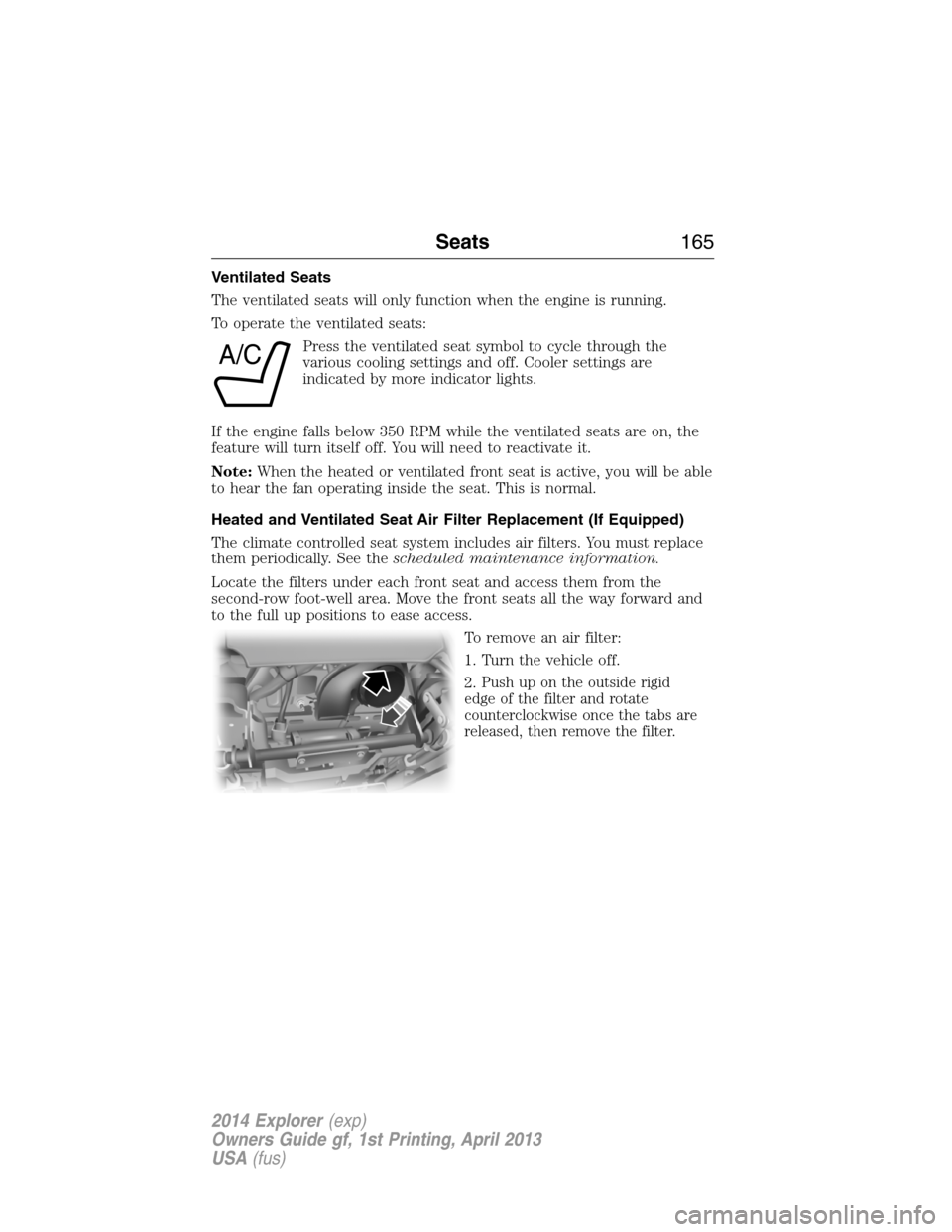
Ventilated Seats
The ventilated seats will only function when the engine is running.
To operate the ventilated seats:
Press the ventilated seat symbol to cycle through the
various cooling settings and off. Cooler settings are
indicated by more indicator lights.
If the engine falls below 350 RPM while the ventilated seats are on, the
feature will turn itself off. You will need to reactivate it.
Note:When the heated or ventilated front seat is active, you will be able
to hear the fan operating inside the seat. This is normal.
Heated and Ventilated Seat Air Filter Replacement (If Equipped)
The climate controlled seat system includes air filters. You must replace
them periodically. See thescheduled maintenance information.
Locate the filters under each front seat and access them from the
second-row foot-well area. Move the front seats all the way forward and
to the full up positions to ease access.
To remove an air filter:
1. Turn the vehicle off.
2.
Push up on the outside rigid
edge of the filter and rotate
counterclockwise once the tabs are
released, then remove the filter.
A/C
Seats165
2014 Explorer(exp)
Owners Guide gf, 1st Printing, April 2013
USA(fus)
Page 171 of 586
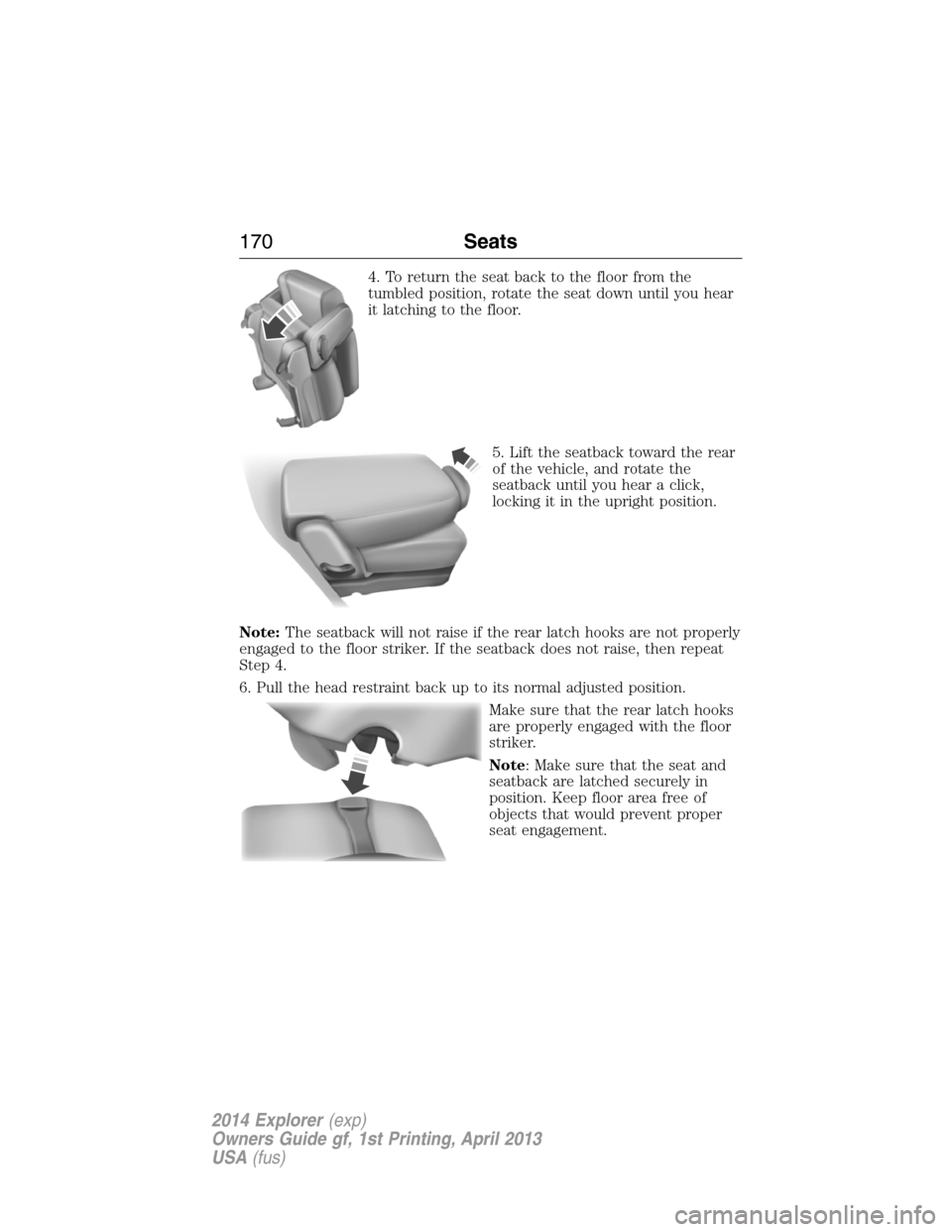
4. To return the seat back to the floor from the
tumbled position, rotate the seat down until you hear
it latching to the floor.
5. Lift the seatback toward the rear
of the vehicle, and rotate the
seatback until you hear a click,
locking it in the upright position.
Note:The seatback will not raise if the rear latch hooks are not properly
engaged to the floor striker. If the seatback does not raise, then repeat
Step 4.
6. Pull the head restraint back up to its normal adjusted position.
Make sure that the rear latch hooks
are properly engaged with the floor
striker.
Note: Make sure that the seat and
seatback are latched securely in
position. Keep floor area free of
objects that would prevent proper
seat engagement.
170Seats
2014 Explorer(exp)
Owners Guide gf, 1st Printing, April 2013
USA(fus)
Page 174 of 586
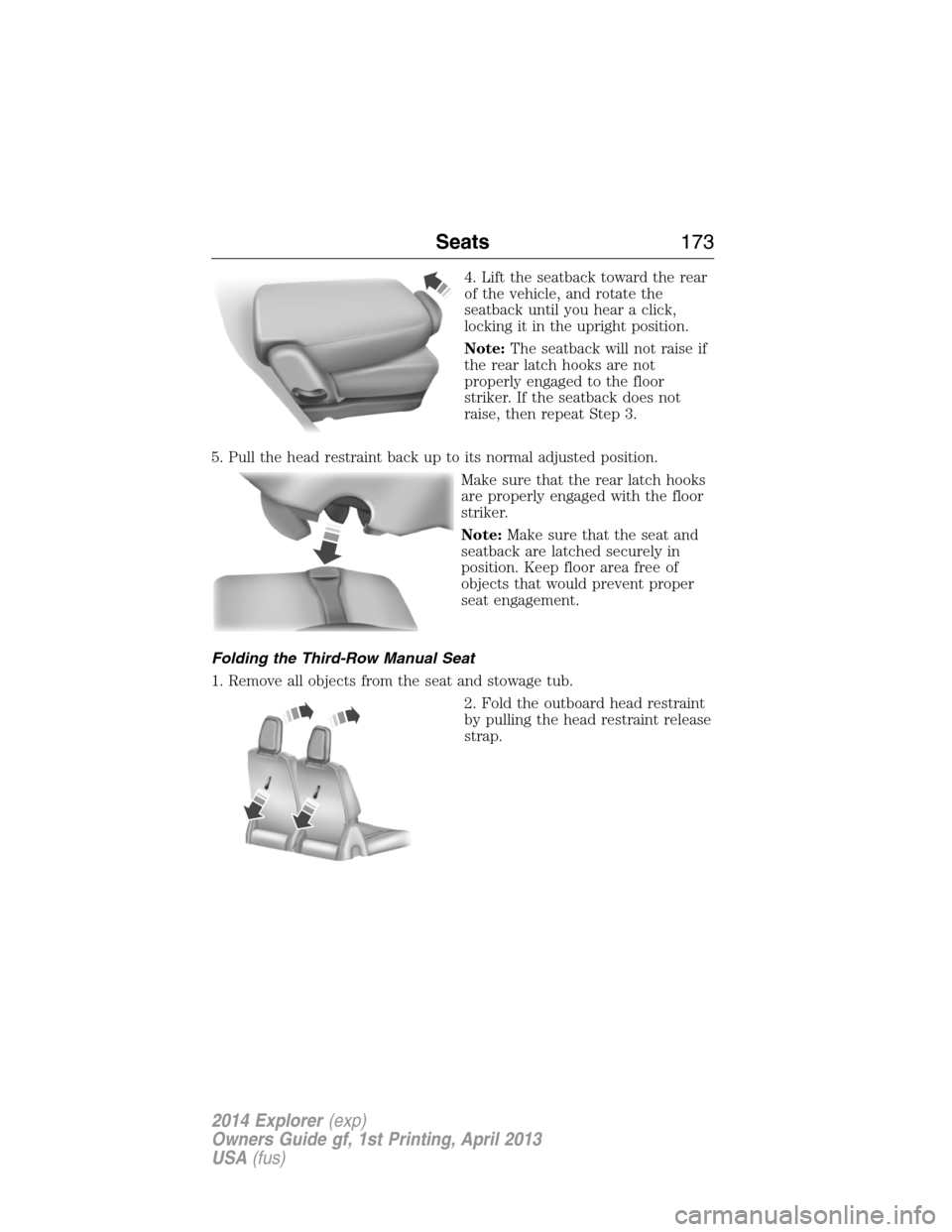
4. Lift the seatback toward the rear
of the vehicle, and rotate the
seatback until you hear a click,
locking it in the upright position.
Note:The seatback will not raise if
the rear latch hooks are not
properly engaged to the floor
striker. If the seatback does not
raise, then repeat Step 3.
5. Pull the head restraint back up to its normal adjusted position.
Make sure that the rear latch hooks
are properly engaged with the floor
striker.
Note:Make sure that the seat and
seatback are latched securely in
position. Keep floor area free of
objects that would prevent proper
seat engagement.
Folding the Third-Row Manual Seat
1. Remove all objects from the seat and stowage tub.
2. Fold the outboard head restraint
by pulling the head restraint release
strap.
Seats173
2014 Explorer(exp)
Owners Guide gf, 1st Printing, April 2013
USA(fus)
Page 178 of 586
These seats feature a power one-touch operation that allows you fold
and stow the seats.
•The power fold seats work only when the transmission selector lever
is in positionPand the liftgate is open.
•If the ignition is off and the feature is still running, the battery saver
will turn it off after 10 minutes. Press unlock on the remote entry key
transmitter to reactivate the power seats or unlock it with the keyless
entry keypad. See theKeys and Remote Controlchapter.
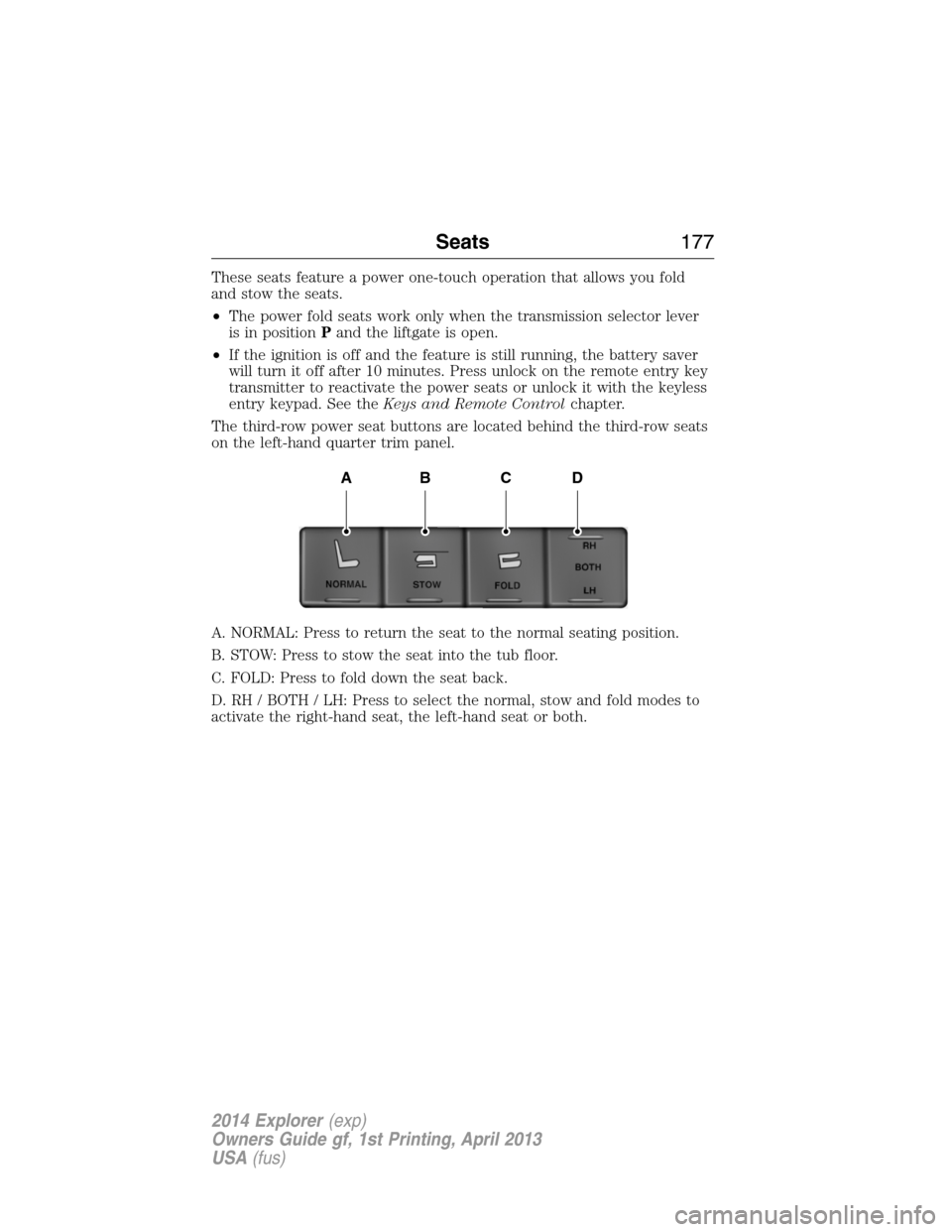
The third-row power seat buttons are located behind the third-row seats
on the left-hand quarter trim panel.
A. NORMAL: Press to return the seat to the normal seating position.
B. STOW: Press to stow the seat into the tub floor.
C. FOLD: Press to fold down the seat back.
D. RH / BOTH / LH: Press to select the normal, stow and fold modes to
activate the right-hand seat, the left-hand seat or both.
ABCD
Seats177
2014 Explorer(exp)
Owners Guide gf, 1st Printing, April 2013
USA(fus)
Page 179 of 586
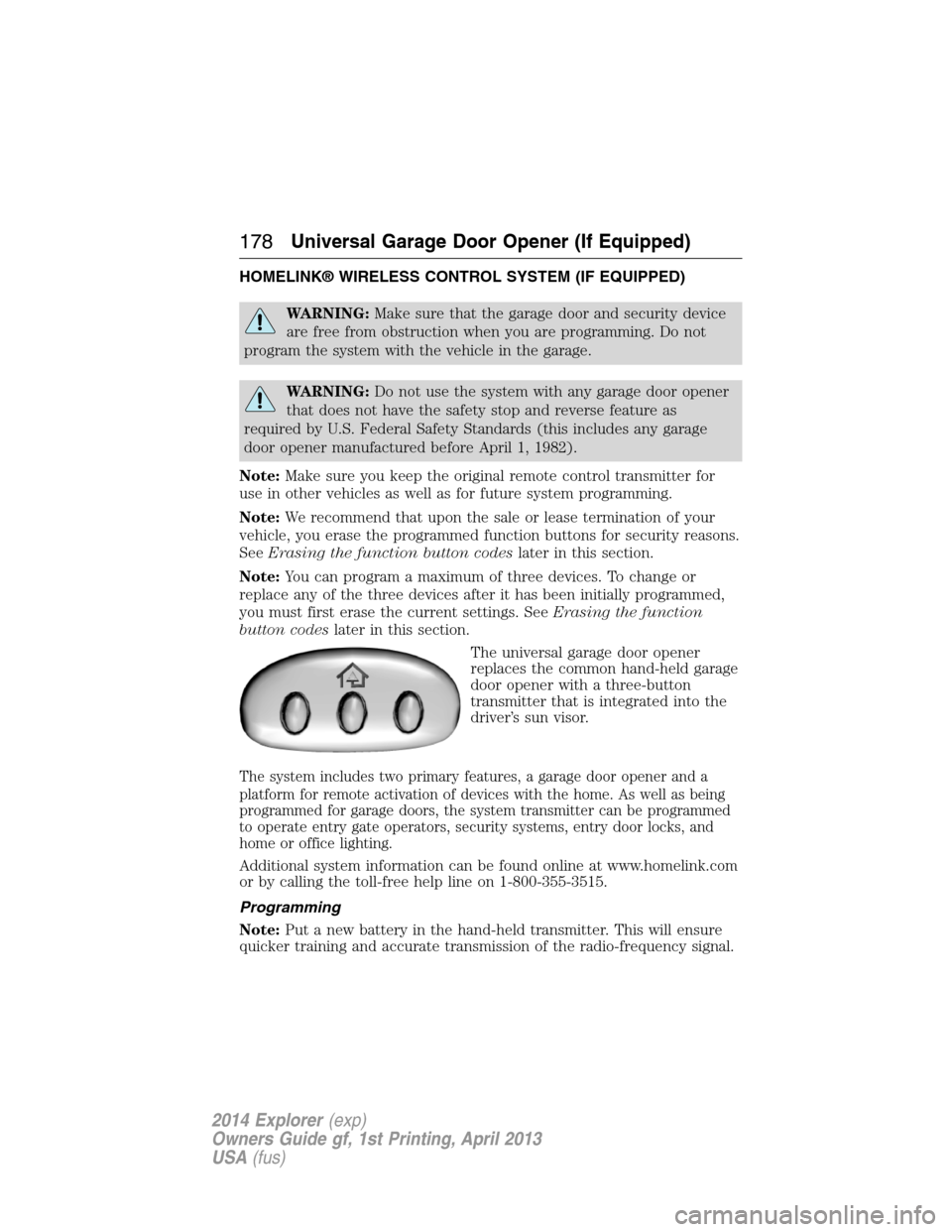
HOMELINK® WIRELESS CONTROL SYSTEM (IF EQUIPPED)
WARNING:Make sure that the garage door and security device
are free from obstruction when you are programming. Do not
program the system with the vehicle in the garage.
WARNING:Do not use the system with any garage door opener
that does not have the safety stop and reverse feature as
required by U.S. Federal Safety Standards (this includes any garage
door opener manufactured before April 1, 1982).
Note:Make sure you keep the original remote control transmitter for
use in other vehicles as well as for future system programming.
Note:We recommend that upon the sale or lease termination of your
vehicle, you erase the programmed function buttons for security reasons.
SeeErasing the function button codeslater in this section.
Note:You can program a maximum of three devices. To change or
replace any of the three devices after it has been initially programmed,
you must first erase the current settings. SeeErasing the function
button codeslater in this section.
The universal garage door opener
replaces the common hand-held garage
door opener with a three-button
transmitter that is integrated into the
driver’s sun visor.
The system includes two primary features, a garage door opener and a
platform for remote activation of devices with the home. As well as being
programmed for garage doors, the system transmitter can be programmed
to operate entry gate operators, security systems, entry door locks, and
home or office lighting.
Additional system information can be found online at www.homelink.com
or by calling the toll-free help line on 1-800-355-3515.
Programming
Note:Put a new battery in the hand-held transmitter. This will ensure
quicker training and accurate transmission of the radio-frequency signal.
178Universal Garage Door Opener (If Equipped)
2014 Explorer(exp)
Owners Guide gf, 1st Printing, April 2013
USA(fus)
Page 190 of 586
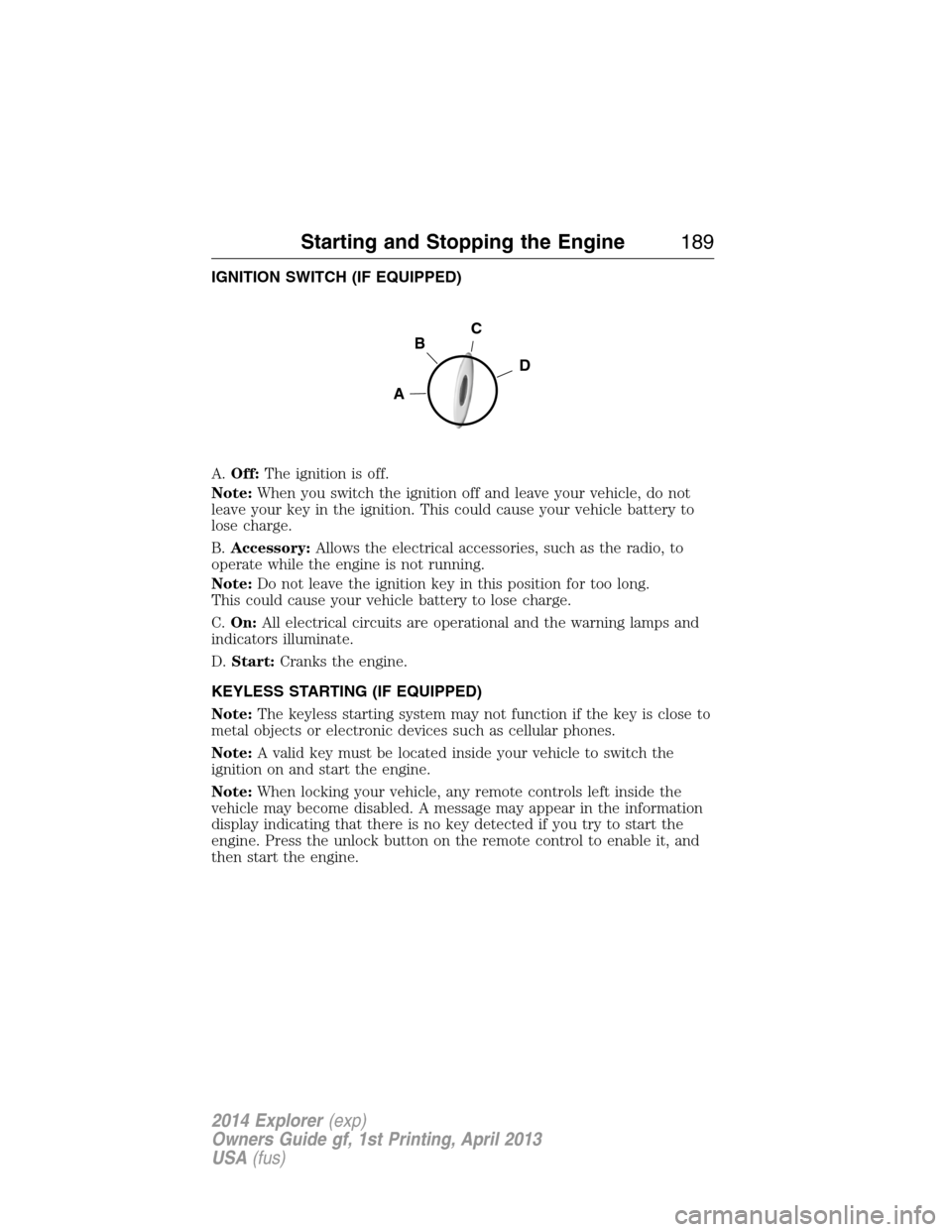
IGNITION SWITCH (IF EQUIPPED)
A.Off:The ignition is off.
Note:When you switch the ignition off and leave your vehicle, do not
leave your key in the ignition. This could cause your vehicle battery to
lose charge.
B.Accessory:Allows the electrical accessories, such as the radio, to
operate while the engine is not running.
Note:Do not leave the ignition key in this position for too long.
This could cause your vehicle battery to lose charge.
C.On:All electrical circuits are operational and the warning lamps and
indicators illuminate.
D.Start:Cranks the engine.
KEYLESS STARTING (IF EQUIPPED)
Note:The keyless starting system may not function if the key is close to
metal objects or electronic devices such as cellular phones.
Note:A valid key must be located inside your vehicle to switch the
ignition on and start the engine.
Note:When locking your vehicle, any remote controls left inside the
vehicle may become disabled. A message may appear in the information
display indicating that there is no key detected if you try to start the
engine. Press the unlock button on the remote control to enable it, and
then start the engine.
C
D
B
A
Starting and Stopping the Engine189
2014 Explorer(exp)
Owners Guide gf, 1st Printing, April 2013
USA(fus)