lock FORD EXPLORER 2014 5.G Manual Online
[x] Cancel search | Manufacturer: FORD, Model Year: 2014, Model line: EXPLORER, Model: FORD EXPLORER 2014 5.GPages: 586, PDF Size: 9.07 MB
Page 261 of 586
Reasons for messages being displayed
The radar surface is
dirty or obstructedClean the fascia area in front of the radar or
remove the obstruction.
The radar surface is
not dirty or obstructedDrive normally in traffic for a few minutes to
allow the radar to detect passing vehicles so it
can clear the blocked state.
Heavy rainfall/snowfall
interferes with the
radar signalsNo action required. The system automatically
resets to an unblocked state once the
rainfall/snowfall rate decreases or stops. Do
not use BLIS® and/or CTA in these conditions.
System Limitations
The BLIS® and CTA systems do have their limitations; situations such as
severe weather conditions or debris build-up on the sensor area may
limit vehicle detection.
The following are other situations that may limit the BLIS®:
•Certain maneuvering of vehicles entering and exiting the blind zone.
•Vehicles passing through the blind zone at very fast rates.
•When several vehicles forming a convoy pass through the blind zone.
The following are other situations that may limit the CTA system:
•Adjacently parked vehicles or objects obstructing the sensors.
•Approaching vehicles passing at speeds greater than 15 mph
(24 km/h).
•Driving in reverse faster than 3 mph (5 km/h).
•Backing out of an angled parking spot.
False Alerts
Note:If you connected a trailer to your vehicle the BLIS® system may
detect the trailer causing a false alert. To avoid false alerts you may want
to turn the BLIS off manually.
There may be certain instances when either the BLIS® or CTA systems
illuminate the alert indicator with no vehicle in the coverage zone; this is
known as a false alert. Some amount of false alerts are normal; they are
temporary and self-correct.
260Driving Aids
2014 Explorer(exp)
Owners Guide gf, 1st Printing, April 2013
USA(fus)
Page 264 of 586
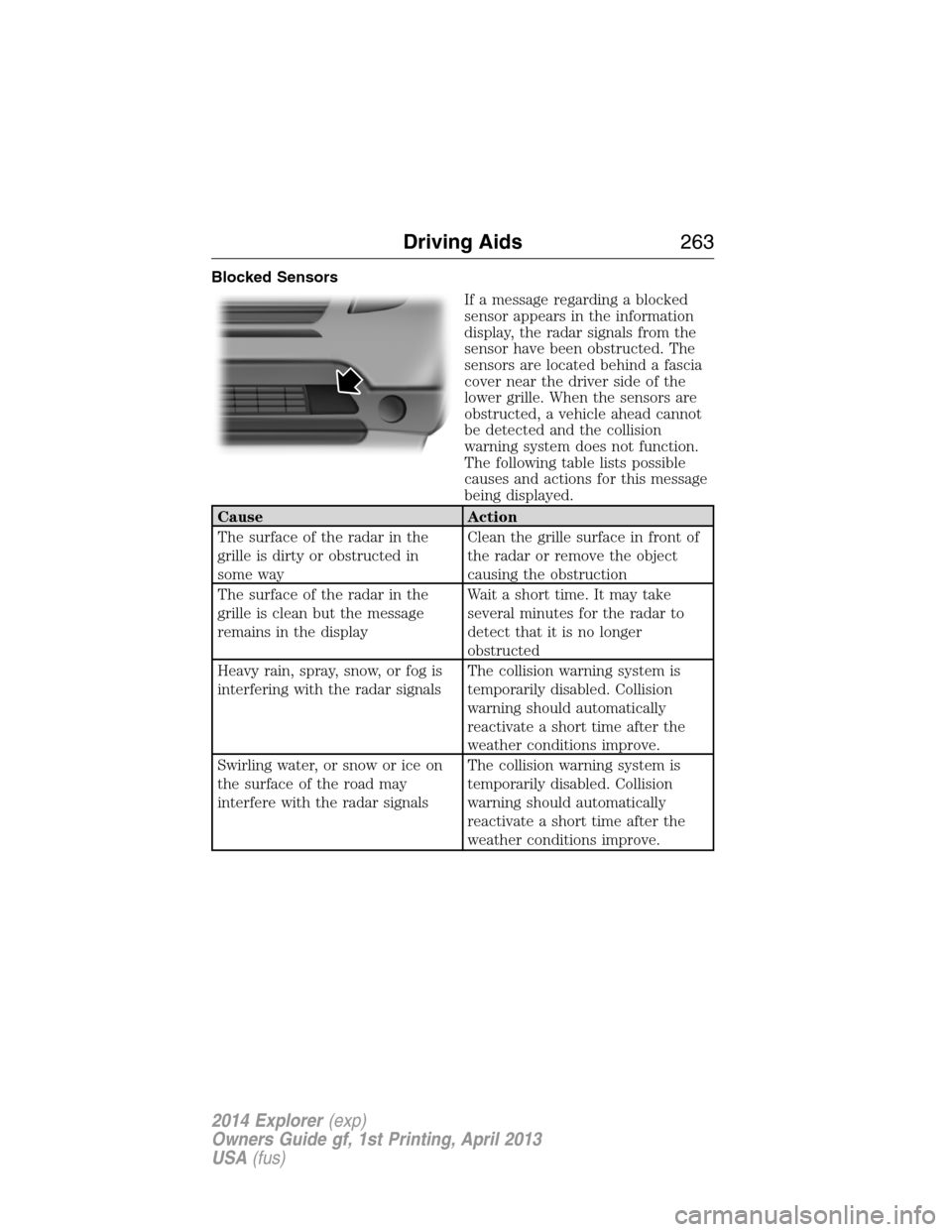
Blocked Sensors
If a message regarding a blocked
sensor appears in the information
display, the radar signals from the
sensor have been obstructed. The
sensors are located behind a fascia
cover near the driver side of the
lower grille. When the sensors are
obstructed, a vehicle ahead cannot
be detected and the collision
warning system does not function.
The following table lists possible
causes and actions for this message
being displayed.
Cause Action
The surface of the radar in the
grille is dirty or obstructed in
some wayClean the grille surface in front of
the radar or remove the object
causing the obstruction
The surface of the radar in the
grille is clean but the message
remains in the displayWait a short time. It may take
several minutes for the radar to
detect that it is no longer
obstructed
Heavy rain, spray, snow, or fog is
interfering with the radar signalsThe collision warning system is
temporarily disabled. Collision
warning should automatically
reactivate a short time after the
weather conditions improve.
Swirling water, or snow or ice on
the surface of the road may
interfere with the radar signalsThe collision warning system is
temporarily disabled. Collision
warning should automatically
reactivate a short time after the
weather conditions improve.
Driving Aids263
2014 Explorer(exp)
Owners Guide gf, 1st Printing, April 2013
USA(fus)
Page 265 of 586
System Limitations
WARNING:The collision warning system’s brake support can
only help reduce the speed at which a collision occurs if the
driver applies the vehicle’s brakes. The brake pedal must be pressed
just like any typical braking situation.
Due to the nature of radar technology, there may be certain instances
where vehicles do not provide a collision warning. These include:
•Stationary vehicles or vehicles moving below 6 mph (10 km/h).
•Pedestrians or objects in the roadway.
•Oncoming vehicles in the same lane.
•Severe weather conditions (see blocked sensor section).
•Debris build-up on the grille near the headlamps (see blocked sensor
section).
•Small distance to vehicle ahead.
•Steering wheel and pedal movements are large (very active driving
style).
•High interior temperatures, which may deactivate the illumination or
the warning lamps until the interior temperature reduces (audible
warning still sounds).
Certain conditions may reduce the visibility of the warning lamp;
therefore, it is recommended to keep the audible warning on.
If the front end of the vehicle is hit or damaged, the radar sensing zone
may be altered causing missed or false collision warnings. See your
authorized dealer to have your collision warning radar checked for
proper coverage and operation.
STEERING
Electric Power Steering
WARNING:The electric power steering system has diagnostic
checks that continuously monitor the system to ensure proper
operation. When a system error is detected a steering message will
appear in the information display.
264Driving Aids
2014 Explorer(exp)
Owners Guide gf, 1st Printing, April 2013
USA(fus)
Page 268 of 586
For correct roof rack system function, you must place loads directly on
crossbars affixed to the roof rack side rails. We recommend you use Ford
Genuine Accessory crossbars designed specifically for your vehicle.
Make sure that you securely fasten the load. Check the tightness of the
load before driving and at each fuel stop.
Adjusting the Crossbars (If Equipped)
Note:Wind noise can be minimized by either removing or repositioning
the crossbars when they are not is use. Position the rear crossbar fully
rearward and the front crossbar 10 inches (25 centimeters) from the
front end-cap.
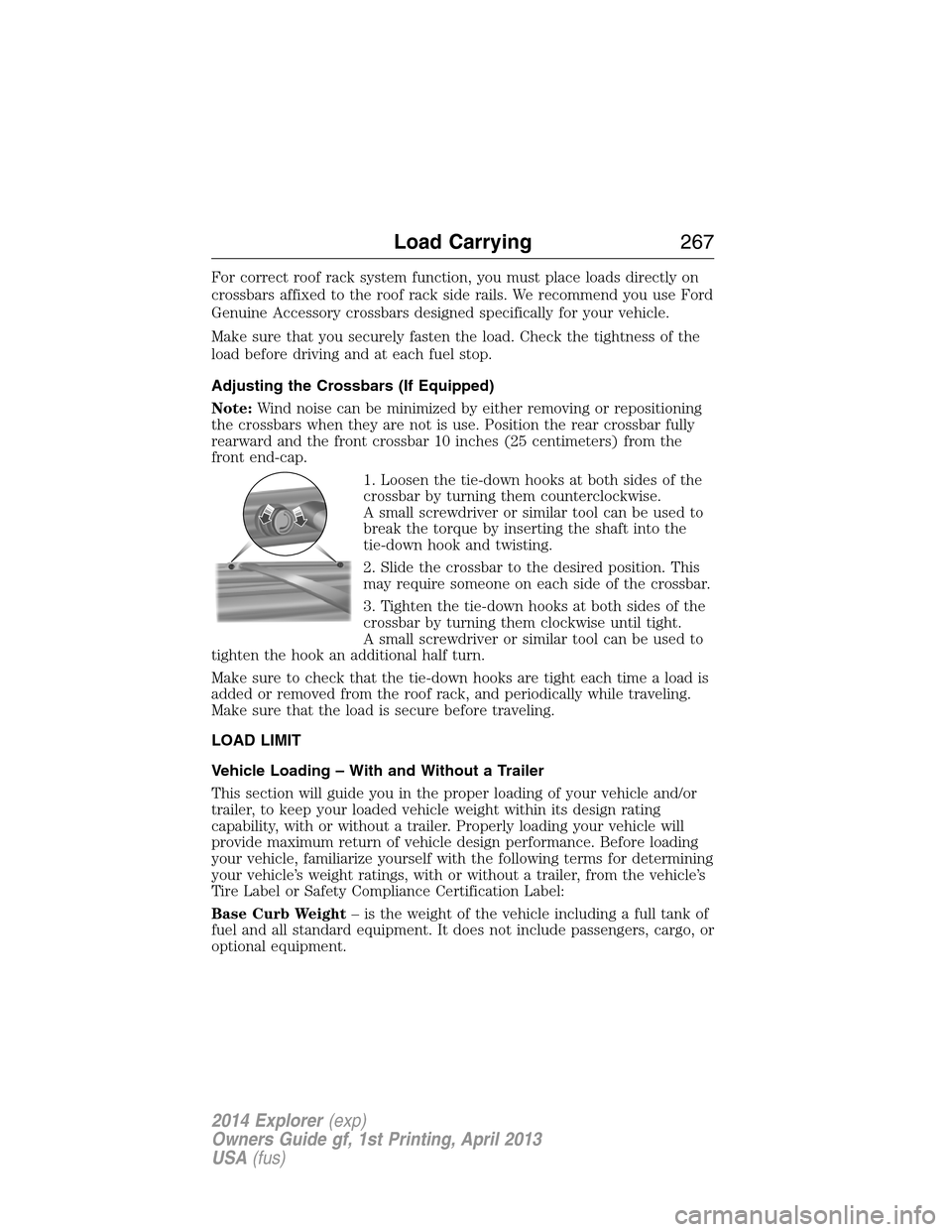
1. Loosen the tie-down hooks at both sides of the
crossbar by turning them counterclockwise.
A small screwdriver or similar tool can be used to
break the torque by inserting the shaft into the
tie-down hook and twisting.
2. Slide the crossbar to the desired position. This
may require someone on each side of the crossbar.
3. Tighten the tie-down hooks at both sides of the
crossbar by turning them clockwise until tight.
A small screwdriver or similar tool can be used to
tighten the hook an additional half turn.
Make sure to check that the tie-down hooks are tight each time a load is
added or removed from the roof rack, and periodically while traveling.
Make sure that the load is secure before traveling.
LOAD LIMIT
Vehicle Loading – With and Without a Trailer
This section will guide you in the proper loading of your vehicle and/or
trailer, to keep your loaded vehicle weight within its design rating
capability, with or without a trailer. Properly loading your vehicle will
provide maximum return of vehicle design performance. Before loading
your vehicle, familiarize yourself with the following terms for determining
your vehicle’s weight ratings, with or without a trailer, from the vehicle’s
Tire Label or Safety Compliance Certification Label:
Base Curb Weight– is the weight of the vehicle including a full tank of
fuel and all standard equipment. It does not include passengers, cargo, or
optional equipment.
Load Carrying267
2014 Explorer(exp)
Owners Guide gf, 1st Printing, April 2013
USA(fus)
Page 279 of 586
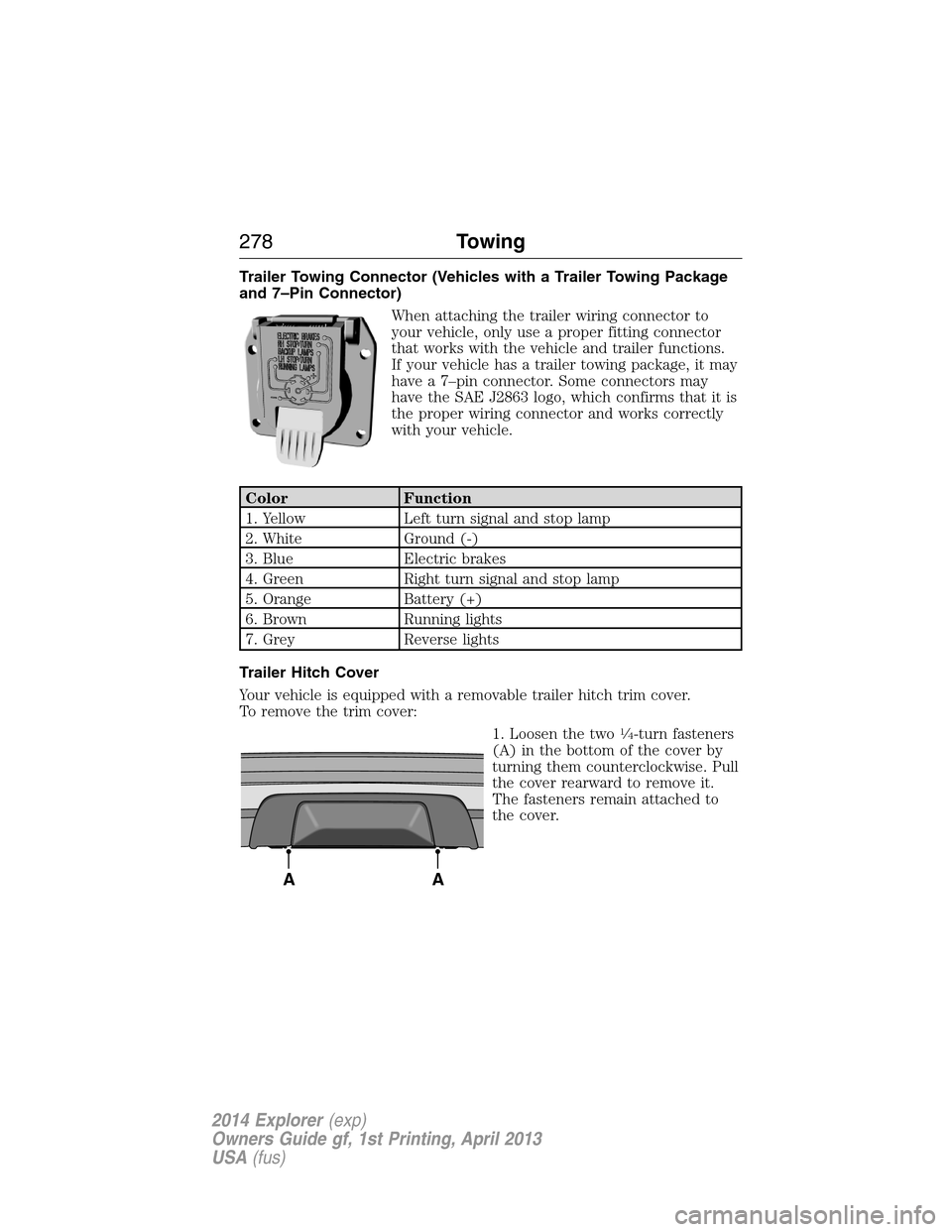
Trailer Towing Connector (Vehicles with a Trailer Towing Package
and 7–Pin Connector)
When attaching the trailer wiring connector to
your vehicle, only use a proper fitting connector
that works with the vehicle and trailer functions.
If your vehicle has a trailer towing package, it may
have a 7–pin connector. Some connectors may
have the SAE J2863 logo, which confirms that it is
the proper wiring connector and works correctly
with your vehicle.
Color Function
1. Yellow Left turn signal and stop lamp
2. White Ground (-)
3. Blue Electric brakes
4. Green Right turn signal and stop lamp
5. Orange Battery (+)
6. Brown Running lights
7. Grey Reverse lights
Trailer Hitch Cover
Your vehicle is equipped with a removable trailer hitch trim cover.
To remove the trim cover:
1. Loosen the two
14-turn fasteners
(A) in the bottom of the cover by
turning them counterclockwise. Pull
the cover rearward to remove it.
The fasteners remain attached to
the cover.
AA
278Towing
2014 Explorer(exp)
Owners Guide gf, 1st Printing, April 2013
USA(fus)
Page 280 of 586
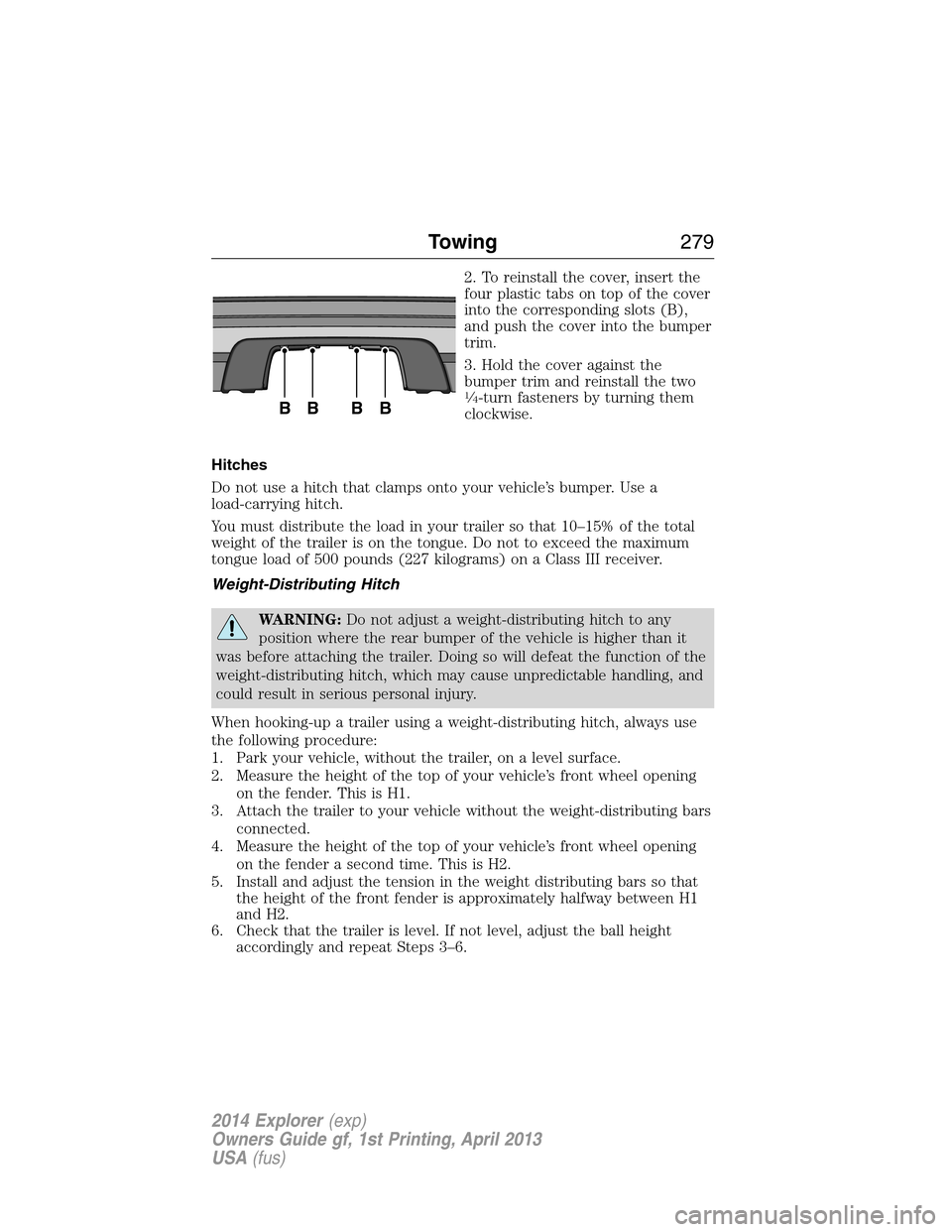
2. To reinstall the cover, insert the
four plastic tabs on top of the cover
into the corresponding slots (B),
and push the cover into the bumper
trim.
3. Hold the cover against the
bumper trim and reinstall the two
14-turn fasteners by turning them
clockwise.
Hitches
Do not use a hitch that clamps onto your vehicle’s bumper. Use a
load-carrying hitch.
You must distribute the load in your trailer so that 10–15% of the total
weight of the trailer is on the tongue. Do not to exceed the maximum
tongue load of 500 pounds (227 kilograms) on a Class III receiver.
Weight-Distributing Hitch
WARNING:Do not adjust a weight-distributing hitch to any
position where the rear bumper of the vehicle is higher than it
was before attaching the trailer. Doing so will defeat the function of the
weight-distributing hitch, which may cause unpredictable handling, and
could result in serious personal injury.
When hooking-up a trailer using a weight-distributing hitch, always use
the following procedure:
1. Park your vehicle, without the trailer, on a level surface.
2. Measure the height of the top of your vehicle’s front wheel opening
on the fender. This is H1.
3. Attach the trailer to your vehicle without the weight-distributing bars
connected.
4. Measure the height of the top of your vehicle’s front wheel opening
on the fender a second time. This is H2.
5. Install and adjust the tension in the weight distributing bars so that
the height of the front fender is approximately halfway between H1
and H2.
6. Check that the trailer is level. If not level, adjust the ball height
accordingly and repeat Steps 3–6.
BBBB
Towing279
2014 Explorer(exp)
Owners Guide gf, 1st Printing, April 2013
USA(fus)
Page 289 of 586
WARNING(Continued)
•Failure to properly follow floor mat installation or attachment
instructions can potentially cause interference with pedal operation
causing loss of control of vehicle.
•To install floor mats, position the floor mat so that the eyelet is over
the retention post and press down to lock in.
•To remove the floor mat, reverse the installation procedure.
288Driving Hints
2014 Explorer(exp)
Owners Guide gf, 1st Printing, April 2013
USA(fus)
Page 290 of 586
ROADSIDE ASSISTANCE
Vehicles Sold in the U.S.: Getting Roadside Assistance
To fully assist you should you have a vehicle concern, Ford Motor
Company offers a complimentary roadside assistance program. This
program is separate from the New Vehicle Limited Warranty. The service
is available:
•24 hours a day, seven days a week
•for the coverage period listed on the Roadside Assistance Card
included in your owner’s manual portfolio.
Roadside assistance will cover:
•a flat tire change with a good spare (except vehicles that have been
supplied with a tire inflation kit).
•battery jump start.
•lock-out assistance (key replacement cost is the customer’s
responsibility).
•fuel delivery – Independent Service Contractors, if not prohibited by
state, local or municipal law, shall deliver up to 2.0 gallons (7.5 liters)
of gasoline or 5.0 gallons (18.9 liters) of diesel fuel to a disabled
vehicle. Fuel delivery service is limited to two no-charge occurrences
within a 12-month period.
•winch out – available within 100 feet (30.5 meters) of a paved or
county maintained road, no recoveries.
•towing – Ford and Lincoln eligible vehicles towed to an authorized
dealer within 35 miles (56 kilometers) of the disablement location or
to the nearest authorized dealer. If a member requests to be towed to
an authorized dealer more than 35 miles (56 kilometers) from the
disablement location, the member shall be responsible for any mileage
costs in excess of 35 miles (56 kilometers).
Trailers shall be covered up to $200 if the disabled eligible vehicle
requires service at the nearest authorized dealer. If the trailer is disabled,
but the towing vehicle is operational, the trailer does not qualify for any
roadside services.
Vehicles Sold in the U.S.: Using Roadside Assistance
Complete the roadside assistance identification card and place it in your
wallet for quick reference. This card is found in the owner’s manual
portfolio in the glove compartment.
Roadside Emergencies289
2014 Explorer(exp)
Owners Guide gf, 1st Printing, April 2013
USA(fus)
Page 305 of 586
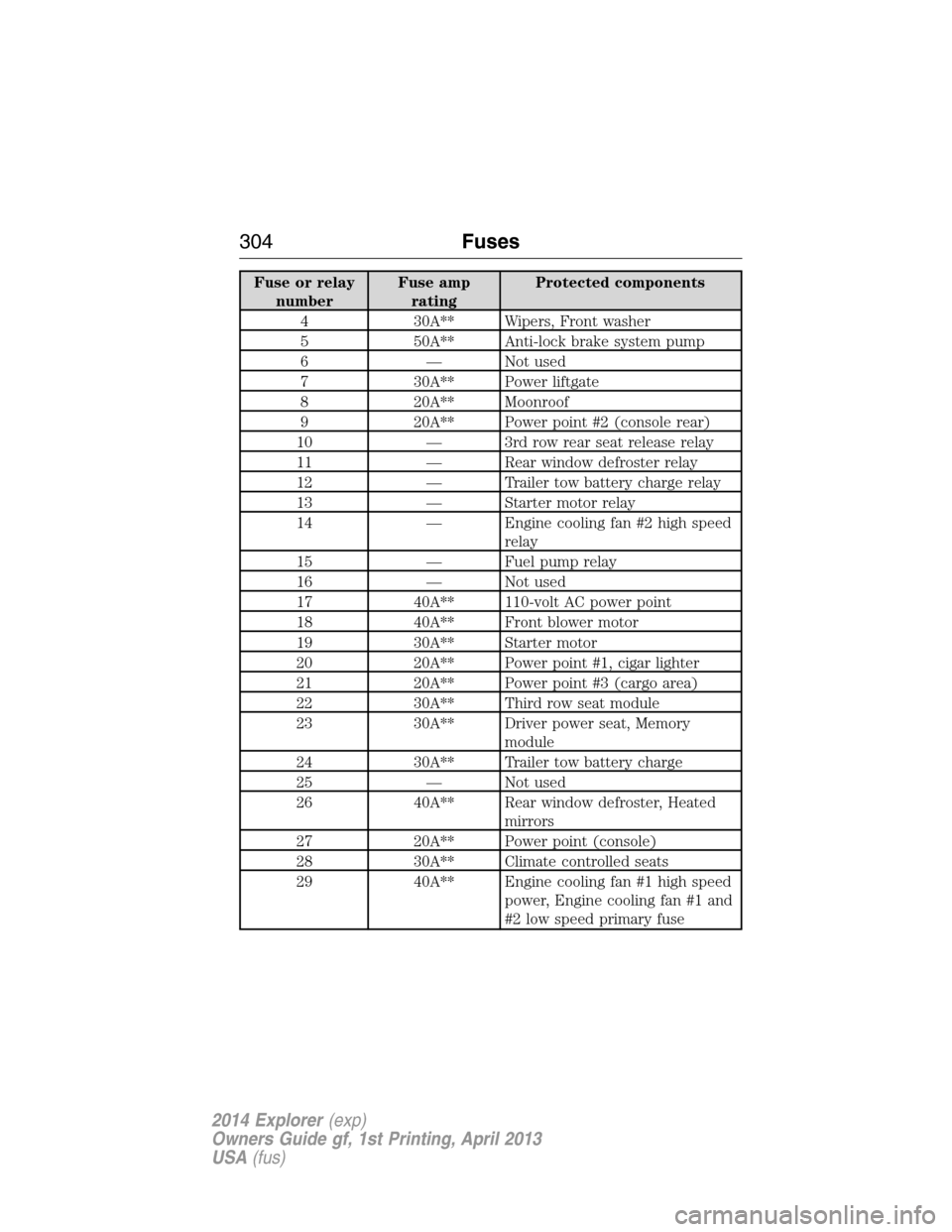
Fuse or relay
numberFuse amp
ratingProtected components
4 30A** Wipers, Front washer
5 50A** Anti-lock brake system pump
6 — Not used
7 30A** Power liftgate
8 20A** Moonroof
9 20A** Power point #2 (console rear)
10 — 3rd row rear seat release relay
11 — Rear window defroster relay
12 — Trailer tow battery charge relay
13 — Starter motor relay
14 — Engine cooling fan #2 high speed
relay
15 — Fuel pump relay
16 — Not used
17 40A** 110-volt AC power point
18 40A** Front blower motor
19 30A** Starter motor
20 20A** Power point #1, cigar lighter
21 20A** Power point #3 (cargo area)
22 30A** Third row seat module
23 30A** Driver power seat, Memory
module
24 30A** Trailer tow battery charge
25 — Not used
26 40A** Rear window defroster, Heated
mirrors
27 20A** Power point (console)
28 30A** Climate controlled seats
29 40A** Engine cooling fan #1 high speed
power, Engine cooling fan #1 and
#2 low speed primary fuse
304Fuses
2014 Explorer(exp)
Owners Guide gf, 1st Printing, April 2013
USA(fus)
Page 306 of 586
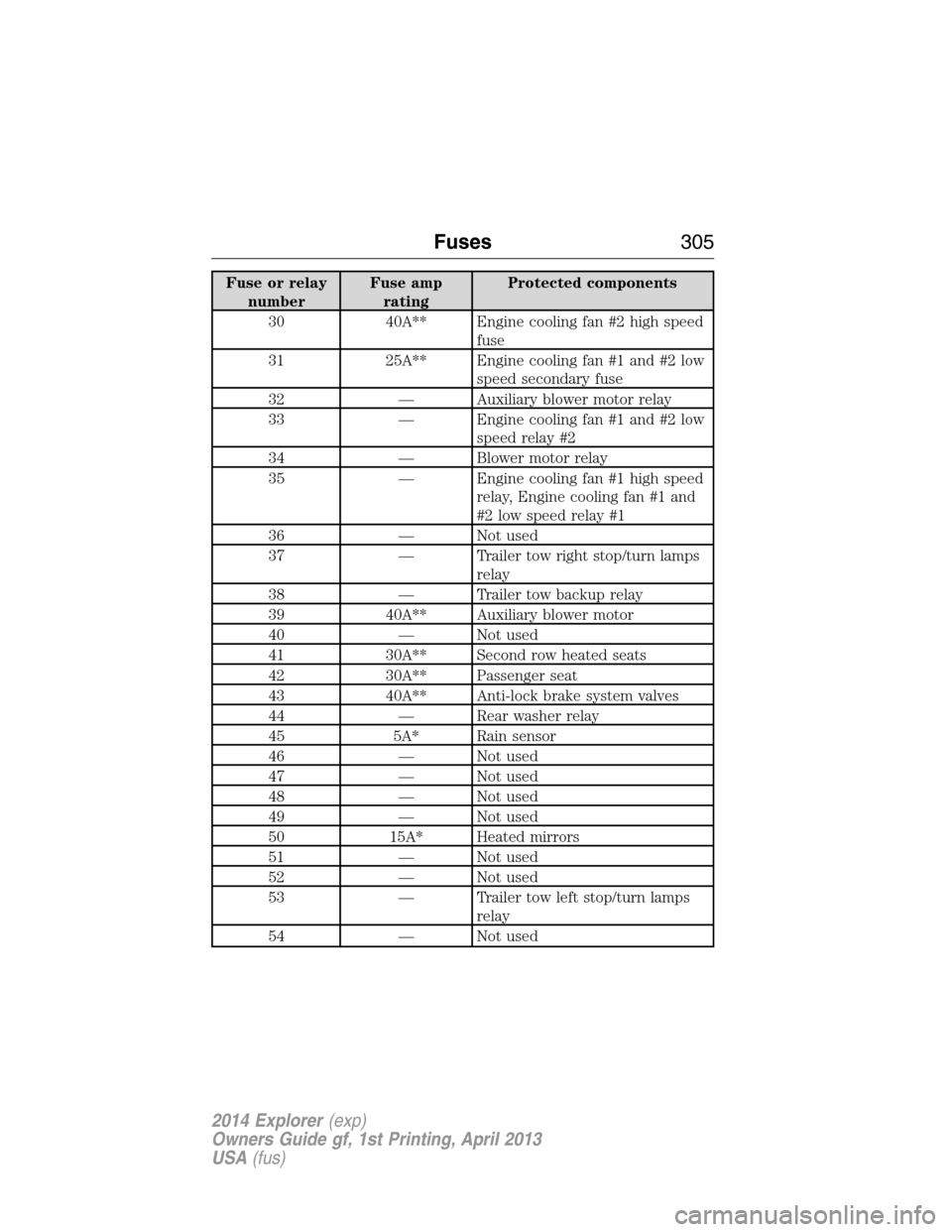
Fuse or relay
numberFuse amp
ratingProtected components
30 40A** Engine cooling fan #2 high speed
fuse
31 25A** Engine cooling fan #1 and #2 low
speed secondary fuse
32 — Auxiliary blower motor relay
33 — Engine cooling fan #1 and #2 low
speed relay #2
34 — Blower motor relay
35 — Engine cooling fan #1 high speed
relay, Engine cooling fan #1 and
#2 low speed relay #1
36 — Not used
37 — Trailer tow right stop/turn lamps
relay
38 — Trailer tow backup relay
39 40A** Auxiliary blower motor
40 — Not used
41 30A** Second row heated seats
42 30A** Passenger seat
43 40A** Anti-lock brake system valves
44 — Rear washer relay
45 5A* Rain sensor
46 — Not used
47 — Not used
48 — Not used
49 — Not used
50 15A* Heated mirrors
51 — Not used
52 — Not used
53 — Trailer tow left stop/turn lamps
relay
54 — Not used
Fuses305
2014 Explorer(exp)
Owners Guide gf, 1st Printing, April 2013
USA(fus)