instrument panel FORD EXPLORER 2015 5.G Owner's Manual
[x] Cancel search | Manufacturer: FORD, Model Year: 2015, Model line: EXPLORER, Model: FORD EXPLORER 2015 5.GPages: 596, PDF Size: 6.32 MB
Page 308 of 596
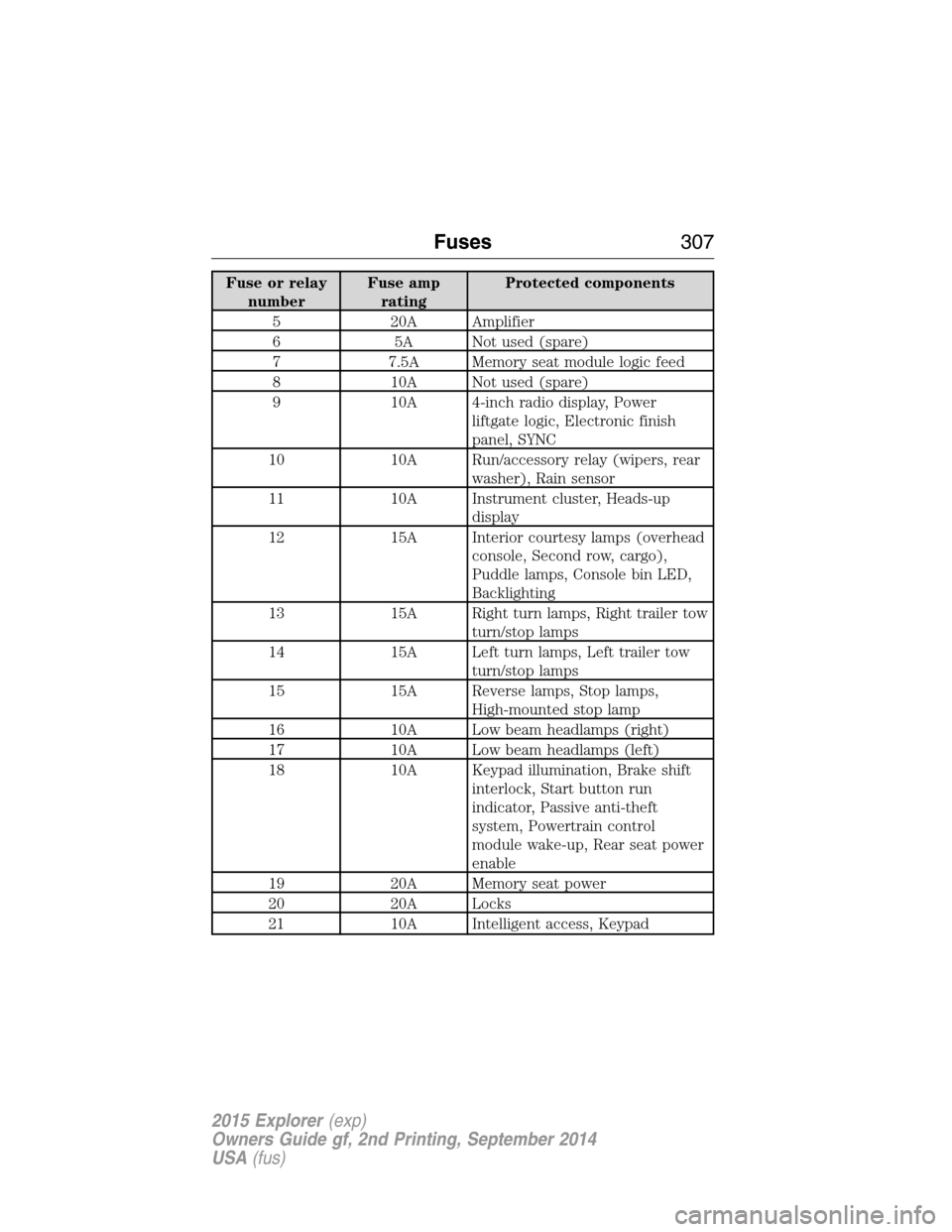
Fuse or relay
numberFuse amp
ratingProtected components
5 20A Amplifier
6 5A Not used (spare)
7 7.5A Memory seat module logic feed
8 10A Not used (spare)
9 10A 4-inch radio display, Power
liftgate logic, Electronic finish
panel, SYNC
10 10A Run/accessory relay (wipers, rear
washer), Rain sensor
11 10A Instrument cluster, Heads-up
display
12 15A Interior courtesy lamps (overhead
console, Second row, cargo),
Puddle lamps, Console bin LED,
Backlighting
13 15A Right turn lamps, Right trailer tow
turn/stop lamps
14 15A Left turn lamps, Left trailer tow
turn/stop lamps
15 15A Reverse lamps, Stop lamps,
High-mounted stop lamp
16 10A Low beam headlamps (right)
17 10A Low beam headlamps (left)
18 10A Keypad illumination, Brake shift
interlock, Start button run
indicator, Passive anti-theft
system, Powertrain control
module wake-up, Rear seat power
enable
19 20A Memory seat power
20 20A Locks
21 10A Intelligent access, Keypad
Fuses307
2015 Explorer(exp)
Owners Guide gf, 2nd Printing, September 2014
USA(fus)
Page 312 of 596

OPENING AND CLOSING THE HOOD
1. Inside the vehicle, pull the hood
release handle located under the
bottom left corner of the instrument
panel.
2. Go to the front of the vehicle and
release the auxiliary latch that is
located under the front center of
the hood.
3. Lift the hood.
Note:Make sure the hood is
properly closed.
Maintenance311
2015 Explorer(exp)
Owners Guide gf, 2nd Printing, September 2014
USA(fus)
Page 341 of 596
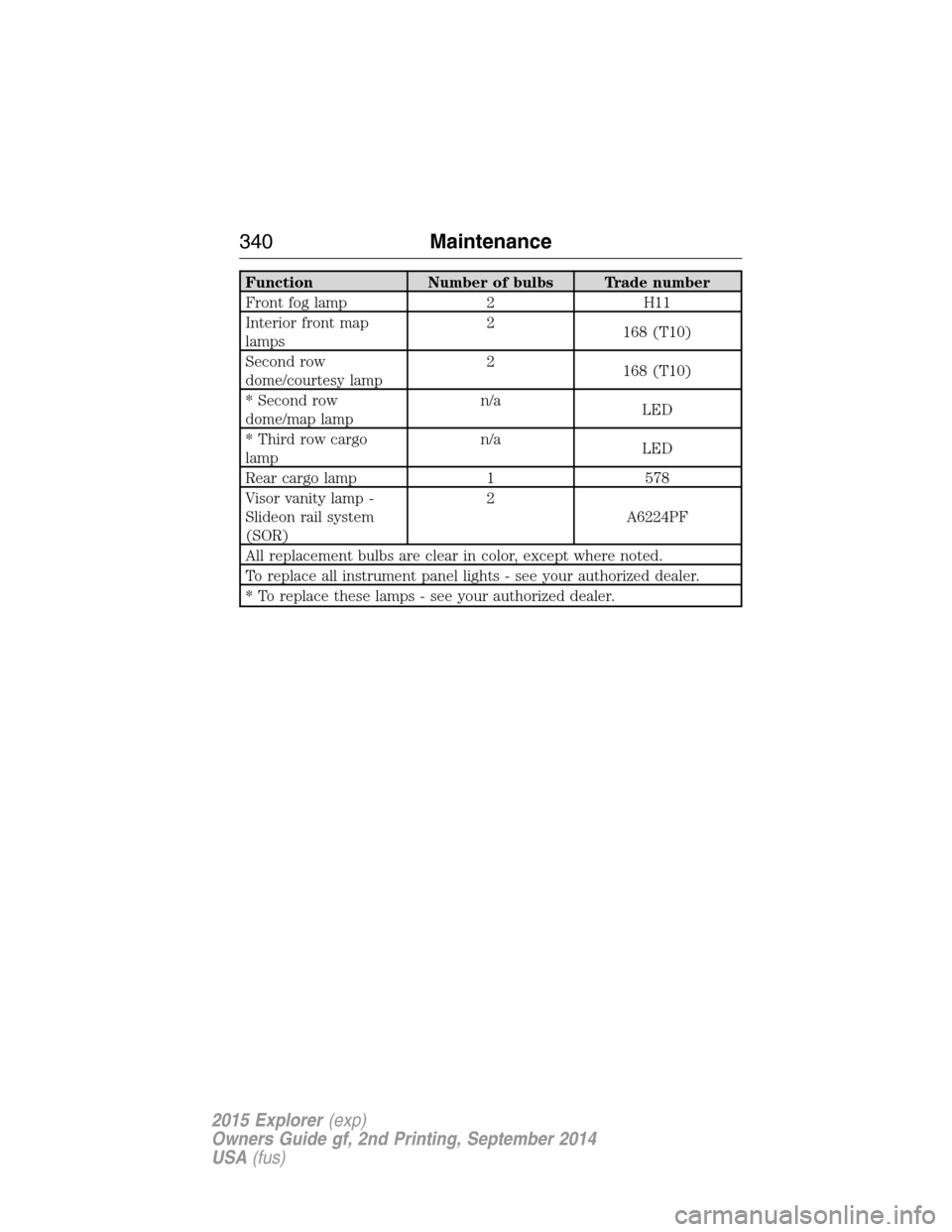
Function Number of bulbs Trade number
Front fog lamp 2 H11
Interior front map
lamps2
168 (T10)
Second row
dome/courtesy lamp2
168 (T10)
* Second row
dome/map lampn/a
LED
* Third row cargo
lampn/a
LED
Rear cargo lamp 1 578
Visor vanity lamp -
Slideon rail system
(SOR)2
A6224PF
All replacement bulbs are clear in color, except where noted.
To replace all instrument panel lights - see your authorized dealer.
* To replace these lamps - see your authorized dealer.
340Maintenance
2015 Explorer(exp)
Owners Guide gf, 2nd Printing, September 2014
USA(fus)
Page 346 of 596
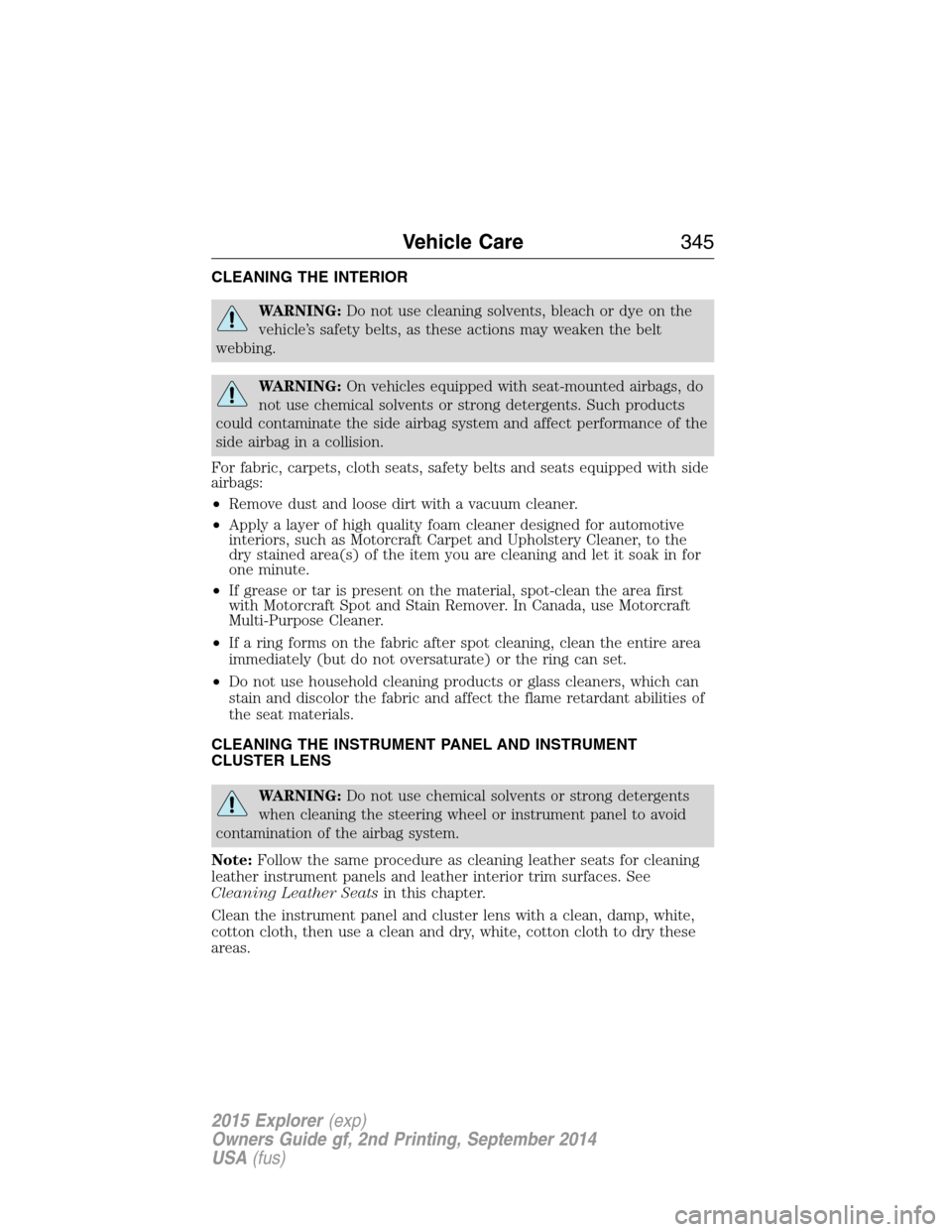
CLEANING THE INTERIOR
WARNING:Do not use cleaning solvents, bleach or dye on the
vehicle’s safety belts, as these actions may weaken the belt
webbing.
WARNING:On vehicles equipped with seat-mounted airbags, do
not use chemical solvents or strong detergents. Such products
could contaminate the side airbag system and affect performance of the
side airbag in a collision.
For fabric, carpets, cloth seats, safety belts and seats equipped with side
airbags:
•Remove dust and loose dirt with a vacuum cleaner.
•Apply a layer of high quality foam cleaner designed for automotive
interiors, such as Motorcraft Carpet and Upholstery Cleaner, to the
dry stained area(s) of the item you are cleaning and let it soak in for
one minute.
•If grease or tar is present on the material, spot-clean the area first
with Motorcraft Spot and Stain Remover. In Canada, use Motorcraft
Multi-Purpose Cleaner.
•If a ring forms on the fabric after spot cleaning, clean the entire area
immediately (but do not oversaturate) or the ring can set.
•Do not use household cleaning products or glass cleaners, which can
stain and discolor the fabric and affect the flame retardant abilities of
the seat materials.
CLEANING THE INSTRUMENT PANEL AND INSTRUMENT
CLUSTER LENS
WARNING:Do not use chemical solvents or strong detergents
when cleaning the steering wheel or instrument panel to avoid
contamination of the airbag system.
Note:Follow the same procedure as cleaning leather seats for cleaning
leather instrument panels and leather interior trim surfaces. See
Cleaning Leather Seatsin this chapter.
Clean the instrument panel and cluster lens with a clean, damp, white,
cotton cloth, then use a clean and dry, white, cotton cloth to dry these
areas.
Vehicle Care345
2015 Explorer(exp)
Owners Guide gf, 2nd Printing, September 2014
USA(fus)
Page 347 of 596
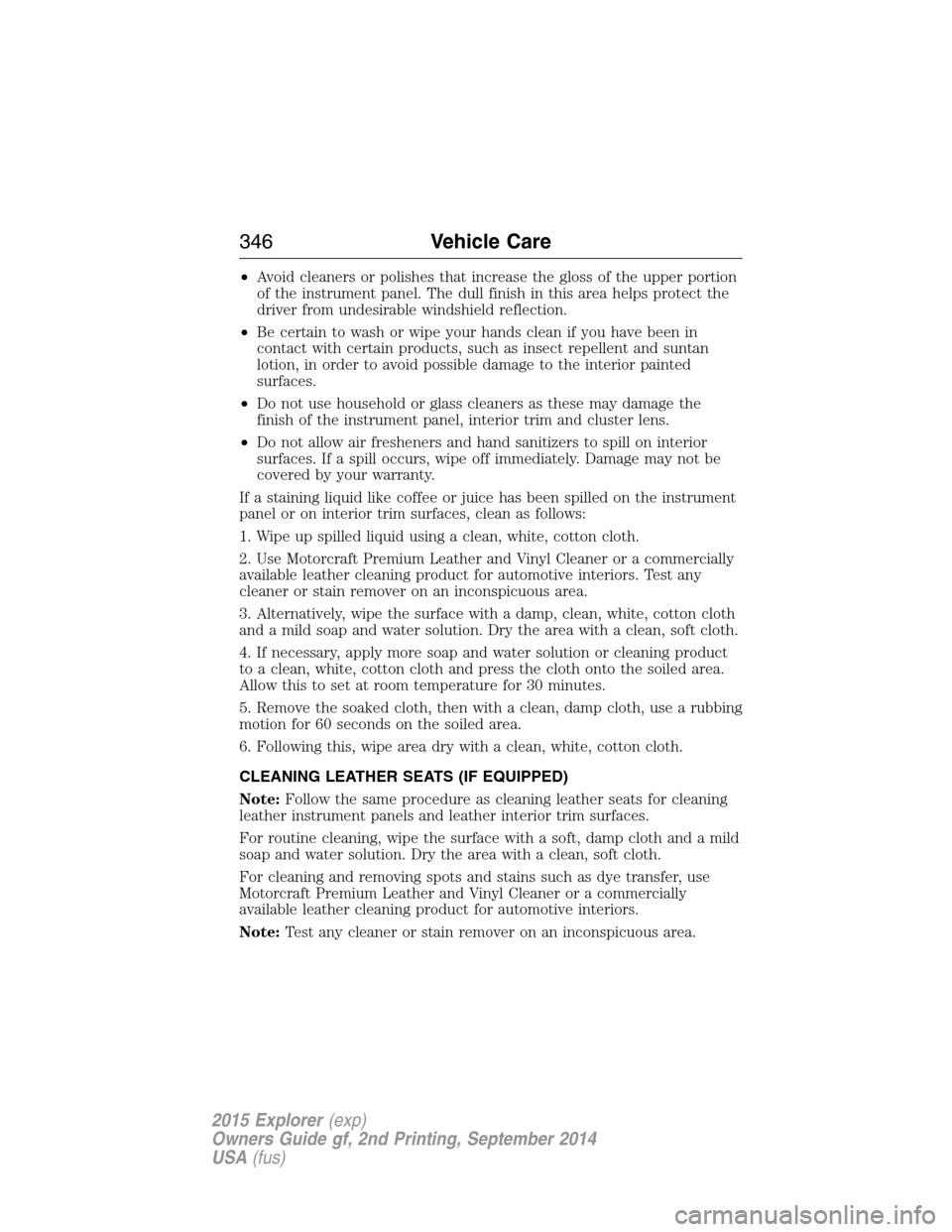
•Avoid cleaners or polishes that increase the gloss of the upper portion
of the instrument panel. The dull finish in this area helps protect the
driver from undesirable windshield reflection.
•Be certain to wash or wipe your hands clean if you have been in
contact with certain products, such as insect repellent and suntan
lotion, in order to avoid possible damage to the interior painted
surfaces.
•Do not use household or glass cleaners as these may damage the
finish of the instrument panel, interior trim and cluster lens.
•Do not allow air fresheners and hand sanitizers to spill on interior
surfaces. If a spill occurs, wipe off immediately. Damage may not be
covered by your warranty.
If a staining liquid like coffee or juice has been spilled on the instrument
panel or on interior trim surfaces, clean as follows:
1. Wipe up spilled liquid using a clean, white, cotton cloth.
2. Use Motorcraft Premium Leather and Vinyl Cleaner or a commercially
available leather cleaning product for automotive interiors. Test any
cleaner or stain remover on an inconspicuous area.
3. Alternatively, wipe the surface with a damp, clean, white, cotton cloth
and a mild soap and water solution. Dry the area with a clean, soft cloth.
4. If necessary, apply more soap and water solution or cleaning product
to a clean, white, cotton cloth and press the cloth onto the soiled area.
Allow this to set at room temperature for 30 minutes.
5. Remove the soaked cloth, then with a clean, damp cloth, use a rubbing
motion for 60 seconds on the soiled area.
6. Following this, wipe area dry with a clean, white, cotton cloth.
CLEANING LEATHER SEATS (IF EQUIPPED)
Note:Follow the same procedure as cleaning leather seats for cleaning
leather instrument panels and leather interior trim surfaces.
For routine cleaning, wipe the surface with a soft, damp cloth and a mild
soap and water solution. Dry the area with a clean, soft cloth.
For cleaning and removing spots and stains such as dye transfer, use
Motorcraft Premium Leather and Vinyl Cleaner or a commercially
available leather cleaning product for automotive interiors.
Note:Test any cleaner or stain remover on an inconspicuous area.
346Vehicle Care
2015 Explorer(exp)
Owners Guide gf, 2nd Printing, September 2014
USA(fus)
Page 393 of 596
VEHICLE IDENTIFICATION NUMBER
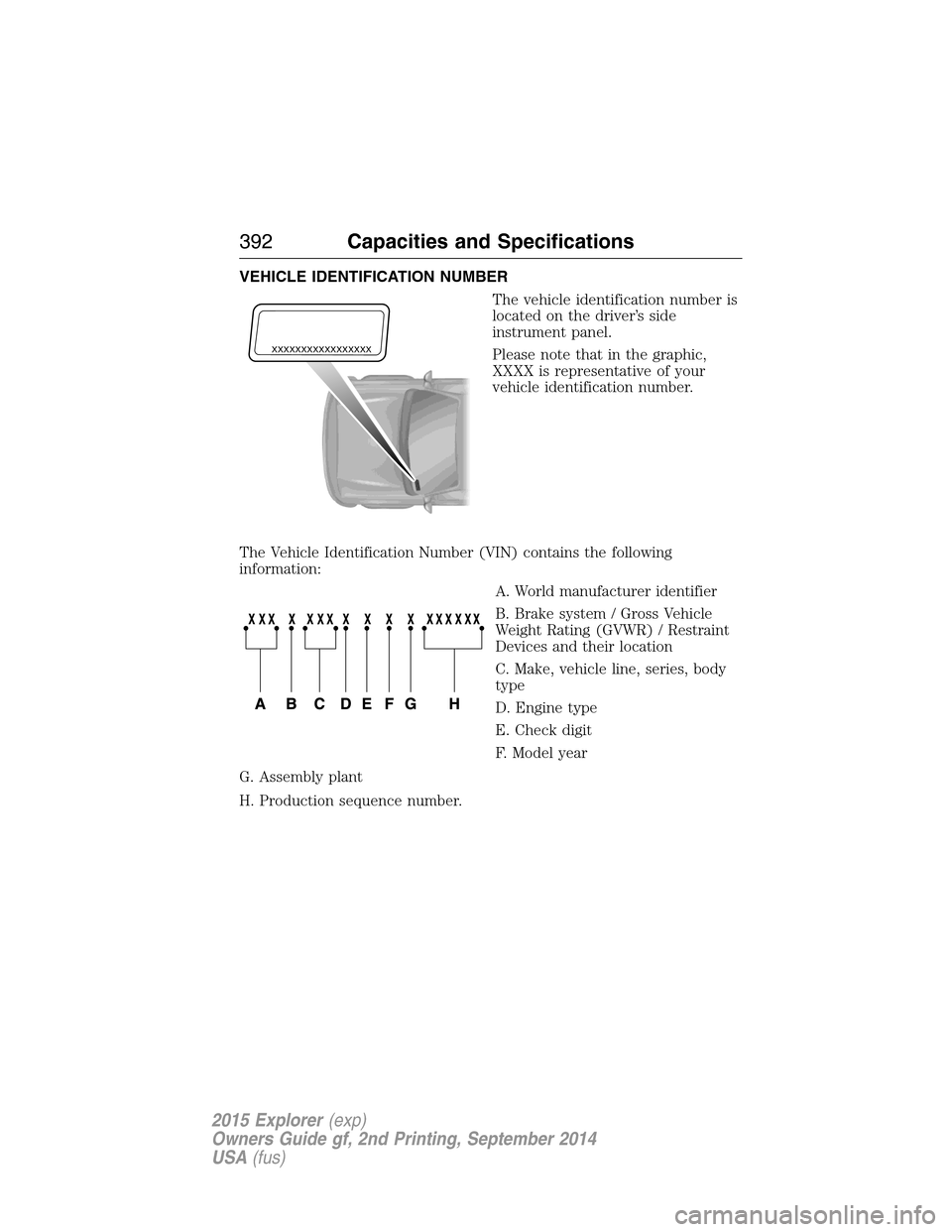
The vehicle identification number is
located on the driver’s side
instrument panel.
Please note that in the graphic,
XXXX is representative of your
vehicle identification number.
The Vehicle Identification Number (VIN) contains the following
information:
A. World manufacturer identifier
B. Brake system / Gross Vehicle
Weight Rating (GVWR) / Restraint
Devices and their location
C. Make, vehicle line, series, body
type
D. Engine type
E. Check digit
F. Model year
G. Assembly plant
H. Production sequence number.
XXXXXXXXXXXXXXXXX
392Capacities and Specifications
2015 Explorer(exp)
Owners Guide gf, 2nd Printing, September 2014
USA(fus)
Page 494 of 596
SD Card Slot and USB Port
SD Card Slot
Note:Your SD card slot is spring-loaded. To remove the SD card, press
the card in and the system ejects it. Do not attempt to pull the card to
remove it as this could cause damage.
Note:The navigation system also uses this card slot. SeeNavigation
systemlater in this chapter for more information.
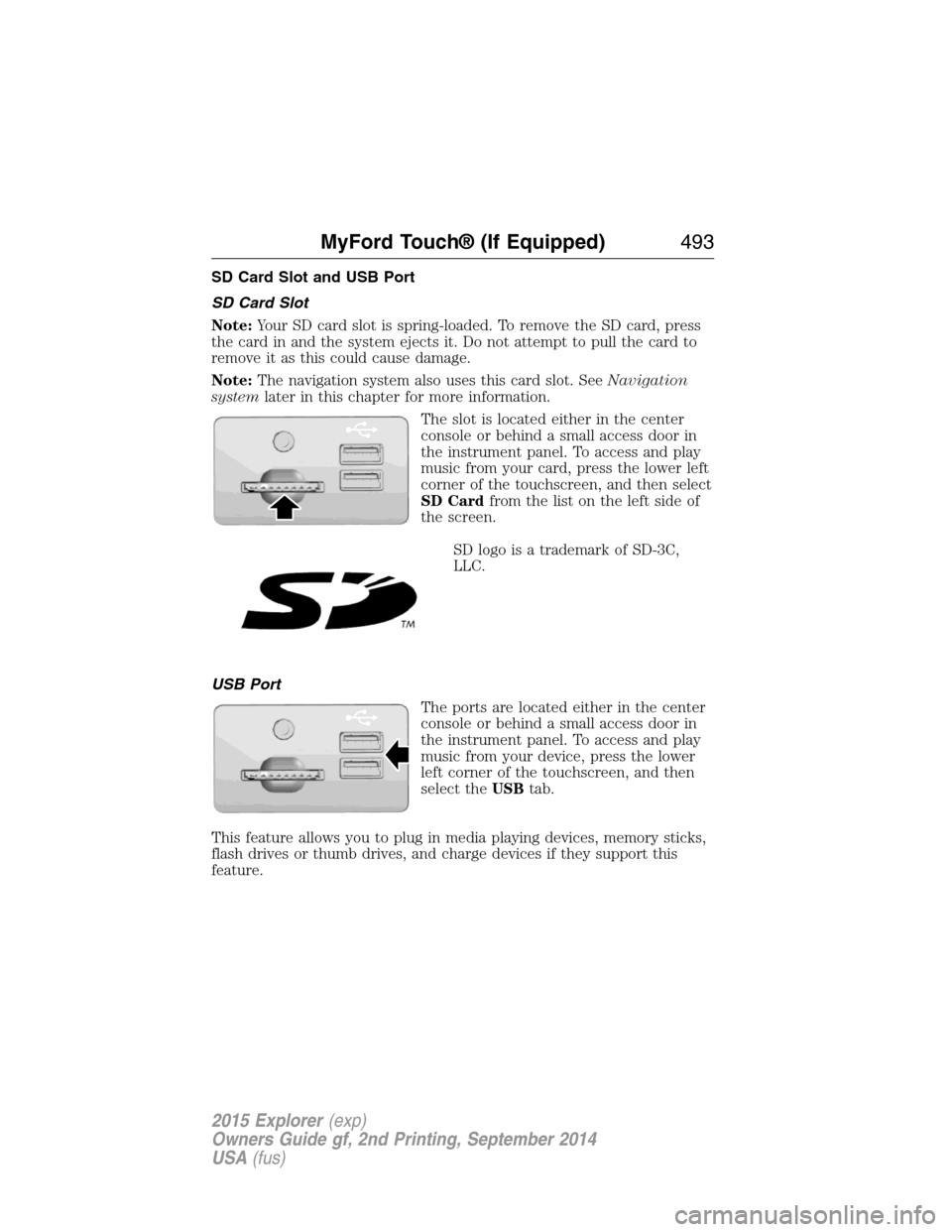
The slot is located either in the center
console or behind a small access door in
the instrument panel. To access and play
music from your card, press the lower left
corner of the touchscreen, and then select
SD Cardfrom the list on the left side of
the screen.
SD logo is a trademark of SD-3C,
LLC.
USB Port
The ports are located either in the center
console or behind a small access door in
the instrument panel. To access and play
music from your device, press the lower
left corner of the touchscreen, and then
select theUSBtab.
This feature allows you to plug in media playing devices, memory sticks,
flash drives or thumb drives, and charge devices if they support this
feature.
MyFord Touch® (If Equipped)493
2015 Explorer(exp)
Owners Guide gf, 2nd Printing, September 2014
USA(fus)
Page 520 of 596
You can also turn the outside air temperature display on and off. It
appears at the top center of the touchscreen, next to the time and date.
The system automatically saves any updates you make to the settings.
Display
You can adjust the touchscreen display through the touchscreen or by
pressing the voice button on your steering wheel controls and when
prompted, say, “Display settings”.
Press the Settings icon >Display,to access and make
adjustments using the touchscreen.
•Brightnessallows you to make the screen display brighter or
dimmer.
•Auto DIM, when set toOn,lets you use the Auto Dim Manual Offset
feature. When set toOff,screen brightness does not change.
•Modeallows you to set the screen to a certain brightness or have the
system automatically change based on the outside light level, or turn
the display off.
•If you selectAUTOorNIGHT,you have the options of turning
the display’s Auto Dim feature on or off and changing the Auto
Dim Manual Offset feature.
•Auto Dim Manual Offsetallows you to adjust screen dimming as
the outside lighting conditions change from day to night. This feature
also allows you to adjust screen brightness using the instrument panel
dimming control.
Edit Wallpaper
•You can have your touchscreen display the default photo or upload
your own.
Uploading Photos for Your Home Screen Wallpaper
Note:You cannot load photos directly from your camera. You must
access the photos either from your USB mass storage device or from an
SD card.
Note:Photographs with extremely large dimensions (such as 2048 x
1536) may not be compatible and appear as a blank (black) image on the
display.
Your system allows you to upload and view up to 32 photos.
To access, press the Settings icon >Display>Edit Wallpaper,and
then follow the system prompts to upload your photographs.
Only the photograph(s), which meets the following conditions, display:
•Compatible file formats are as follows: .jpg, .gif, .png, .bmp.
MyFord Touch® (If Equipped)519
2015 Explorer(exp)
Owners Guide gf, 2nd Printing, September 2014
USA(fus)
Page 532 of 596
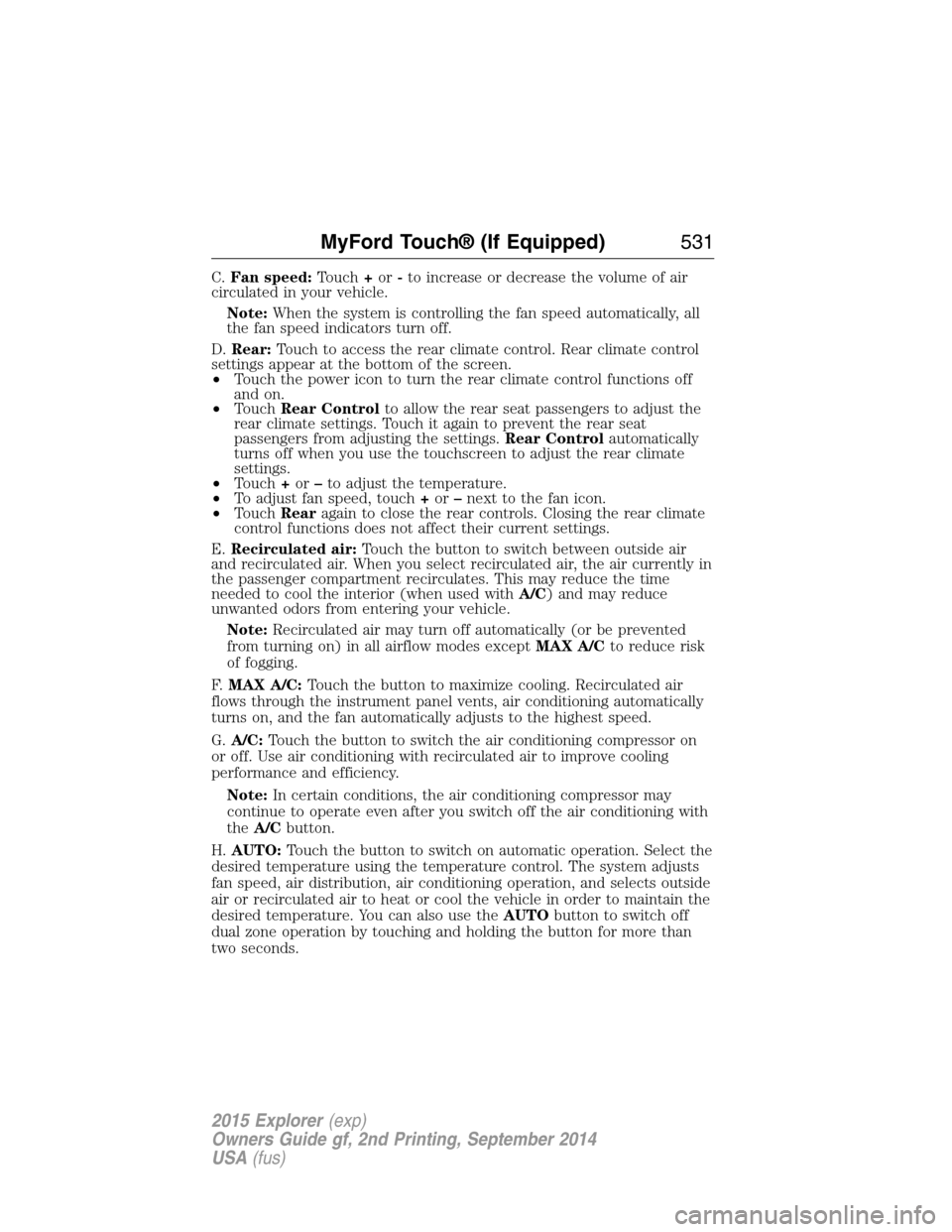
C.Fan speed:Touch+or-to increase or decrease the volume of air
circulated in your vehicle.
Note:When the system is controlling the fan speed automatically, all
the fan speed indicators turn off.
D.Rear:Touch to access the rear climate control. Rear climate control
settings appear at the bottom of the screen.
•Touch the power icon to turn the rear climate control functions off
and on.
•TouchRear Controlto allow the rear seat passengers to adjust the
rear climate settings. Touch it again to prevent the rear seat
passengers from adjusting the settings.Rear Controlautomatically
turns off when you use the touchscreen to adjust the rear climate
settings.
•Touch+or–to adjust the temperature.
•To adjust fan speed, touch+or–next to the fan icon.
•TouchRearagain to close the rear controls. Closing the rear climate
control functions does not affect their current settings.
E.Recirculated air:Touch the button to switch between outside air
and recirculated air. When you select recirculated air, the air currently in
the passenger compartment recirculates. This may reduce the time
needed to cool the interior (when used withA/C) and may reduce
unwanted odors from entering your vehicle.
Note:Recirculated air may turn off automatically (or be prevented
from turning on) in all airflow modes exceptMAX A/Cto reduce risk
of fogging.
F.MAX A/C:Touch the button to maximize cooling. Recirculated air
flows through the instrument panel vents, air conditioning automatically
turns on, and the fan automatically adjusts to the highest speed.
G.A/C:Touch the button to switch the air conditioning compressor on
or off. Use air conditioning with recirculated air to improve cooling
performance and efficiency.
Note:In certain conditions, the air conditioning compressor may
continue to operate even after you switch off the air conditioning with
theA/Cbutton.
H.AUTO:Touch the button to switch on automatic operation. Select the
desired temperature using the temperature control. The system adjusts
fan speed, air distribution, air conditioning operation, and selects outside
air or recirculated air to heat or cool the vehicle in order to maintain the
desired temperature. You can also use theAUTObutton to switch off
dual zone operation by touching and holding the button for more than
two seconds.
MyFord Touch® (If Equipped)531
2015 Explorer(exp)
Owners Guide gf, 2nd Printing, September 2014
USA(fus)
Page 533 of 596
I.Heated rear window:Turns the heated rear window on and off. See
Heated windows and mirrorsin theClimate Controlchapter.
J.Defrost:Touch the button to distribute air to the windshield vents
and de-mister. Air distribution to instrument panel and footwell vents
turn off. You can use this setting to defog and clear the windshield of a
thin covering of ice.
K.Manual controls:Touch these buttons to switch airflow from the
windshield, instrument panel, or footwell vents on or off. The system can
distribute air through any combination of these vents.
L.Driver settings:Depending on your vehicle and option package, you
may have the following features:
•Touch the+or–to increase or decrease the air temperature on the
passenger side of the vehicle.
•Touch the heated seat icon to switch the heated seat off and on (if
equipped).
•Touch the climate-controlled seat icon to switch the
climate-controlled seat off and on (if equipped).
•TouchMyTempto select your preset temperature setpoint. Touch
and holdMyTempto save a new preset temperature setpoint.
•If your vehicle is equipped with a heated steering wheel, touch the
heated steering wheel icon to warm the steering wheel.
Note:If your vehicle is equipped with a wood-trimmed steering wheel, it
does not heat between the 10 o’clock and 2 o’clock positions.
Climate Control Voice Commands
The following voice commands are available at the main menu
level of a voice session. For example, press the voice button
and after the prompt, “Say a command”; say any of the
following commands:
Climate control voice commands
“Climate automatic”
“Climate my temperature”
“Climate off”
“Climate on”
“Climate temperature <15.5–29.5> degrees”
“Climate temperature <60–85> degrees”
“Help”
532MyFord Touch® (If Equipped)
2015 Explorer(exp)
Owners Guide gf, 2nd Printing, September 2014
USA(fus)