buttons FORD EXPLORER 2015 5.G Owner's Guide
[x] Cancel search | Manufacturer: FORD, Model Year: 2015, Model line: EXPLORER, Model: FORD EXPLORER 2015 5.GPages: 596, PDF Size: 6.32 MB
Page 487 of 596
Sirius Satellite Radio (If Activated)
Press the lower left corner of the touchscreen, then select the
SIRIUStab.
Presets
Save a channel by pressing and holding one of the memory preset areas.
There is a brief mute while the radio saves the channel. Sound returns
when finished.
ALERT
Save the current song, artist, or team as a favorite. The system alerts
you when it plays again on any channel.
Replay
Replay audio on the current channel. You can replay approximately
45 minutes of audio as long as you have remained tuned to the current
station. Changing stations erases the previous audio.
While in replay mode:
•Press and release the seek buttons to hear the previous or next song.
•Press and hold the seek buttons to reverse or fast forward in the
current track.
•Press play or pause to play or pause the audio.
•PressReplayto return to live audio if you have been using the
feature to replay audio.
Scan
Touch this button to hear a brief sampling of channels.
Options
Sound Settingsallows you to adjust settings for:
•Bass
•Midrange
•Treble
•Balance and Fade
•DSP (Digital Signal Processing)
•Occupancy Mode
•Speed Compensated Volume.
Note:Your vehicle may not have all these sound settings.
486MyFord Touch® (If Equipped)
2015 Explorer(exp)
Owners Guide gf, 2nd Printing, September 2014
USA(fus)
Page 512 of 596
Traffic On Route and Traffic Nearby
Touch these buttons to identify traffic incidents on your route, nearby
your vehicle’s current location or near any of your favorite places, if
programmed.
Fuel Prices
Touch this button to view fuel prices at stations close to your vehicle’s
location or on an active navigation route.
Movie Listings
Touch this button to view nearby movie theaters and their show times, if
available.
Weather
Touch this button to view the nearby weather, current weather, or the
five day forecast for the chosen area. SelectMapto see the weather
map, which can show storms, radar information, charts and winds. Select
Areato select from a listing of weather locations.
Sports Info
Touch this button to view scores and schedules from a variety of sports.
You can also save up to 10 favorite teams for easier access. The score
automatically refreshes when a game is in progress.
Ski Conditions
Touch this button to view ski conditions for a specific area.
Sirius Travel Link Voice Commands
Note:In order to use Sirius Travel Link, your vehicle must be equipped
with navigation and your navigation SD card must be in the SD card slot.
Press the voice button on the steering wheel controls and, when
prompted, say any of the following:
Travel Link voice commands
“5–day weather forecast” “Sports scores”*
“Fuel prices” “Traffic”
“Movie listings” “Travel Link”**
MyFord Touch® (If Equipped)511
2015 Explorer(exp)
Owners Guide gf, 2nd Printing, September 2014
USA(fus)
Page 530 of 596
Help
Press the Settings icon >Help,then select from the following:
Help
Where Am I?View your vehicle’s current location, if your vehicle
is equipped with navigation. If your vehicle is not
equipped with navigation, nothing displays.
System
InformationTouchscreen system serial number.
Your vehicle identification number (VIN).
Touchscreen system software version.
Navigation system version.
Map database version.
Sirius satellite radio electronic serial number (ESN).
Gracenote Database Information and Library version.
Software LicensesView the licenses for any software and applications
installed on your system.
Driving
RestrictionsCertain features are not accessible when your
vehicle is moving.
911 AssistTurn on and turn off the 911 Assist feature. See911
Assistin theSYNC applications and services
section.
In Case of Emergency (ICE) Speed Dialallows
you to save up to two numbers as ICE contacts for
quick access if there is an emergency. SelectEditto
access your phonebook and then select the desired
contacts. The numbers then appear as options on
this screen for the ICE 1 and ICE 2 buttons. The
ICE contacts you select appear at the end of the 911
Assist call process.
Voice Command
ListView categorized lists of voice commands.
To access Help using the voice commands, press the voice button, then,
after the tone, say “Help”. The system provides allowable voice
commands for the current mode.
MyFord Touch® (If Equipped)529
2015 Explorer(exp)
Owners Guide gf, 2nd Printing, September 2014
USA(fus)
Page 533 of 596
I.Heated rear window:Turns the heated rear window on and off. See
Heated windows and mirrorsin theClimate Controlchapter.
J.Defrost:Touch the button to distribute air to the windshield vents
and de-mister. Air distribution to instrument panel and footwell vents
turn off. You can use this setting to defog and clear the windshield of a
thin covering of ice.
K.Manual controls:Touch these buttons to switch airflow from the
windshield, instrument panel, or footwell vents on or off. The system can
distribute air through any combination of these vents.
L.Driver settings:Depending on your vehicle and option package, you
may have the following features:
•Touch the+or–to increase or decrease the air temperature on the
passenger side of the vehicle.
•Touch the heated seat icon to switch the heated seat off and on (if
equipped).
•Touch the climate-controlled seat icon to switch the
climate-controlled seat off and on (if equipped).
•TouchMyTempto select your preset temperature setpoint. Touch
and holdMyTempto save a new preset temperature setpoint.
•If your vehicle is equipped with a heated steering wheel, touch the
heated steering wheel icon to warm the steering wheel.
Note:If your vehicle is equipped with a wood-trimmed steering wheel, it
does not heat between the 10 o’clock and 2 o’clock positions.
Climate Control Voice Commands
The following voice commands are available at the main menu
level of a voice session. For example, press the voice button
and after the prompt, “Say a command”; say any of the
following commands:
Climate control voice commands
“Climate automatic”
“Climate my temperature”
“Climate off”
“Climate on”
“Climate temperature <15.5–29.5> degrees”
“Climate temperature <60–85> degrees”
“Help”
532MyFord Touch® (If Equipped)
2015 Explorer(exp)
Owners Guide gf, 2nd Printing, September 2014
USA(fus)
Page 541 of 596
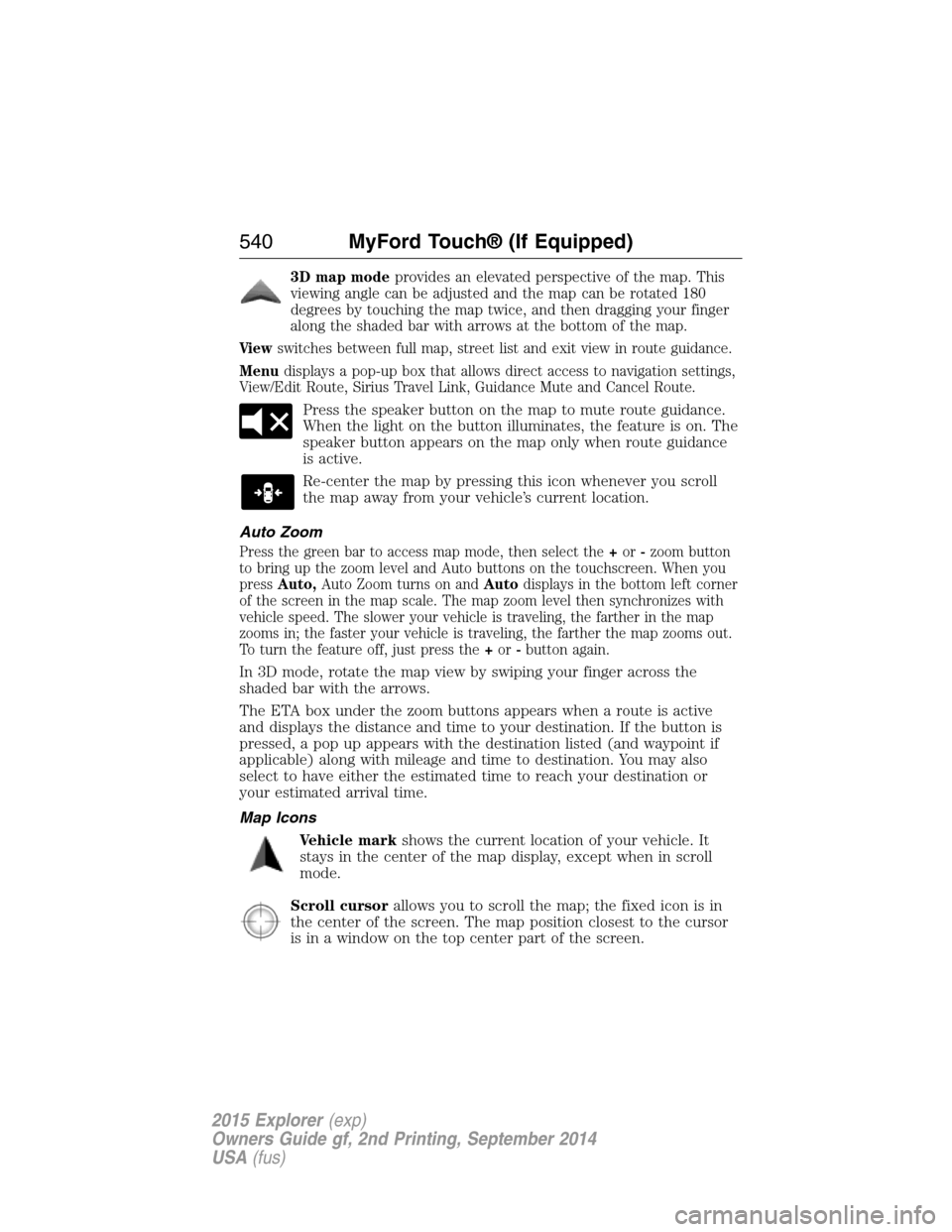
3D map modeprovides an elevated perspective of the map. This
viewing angle can be adjusted and the map can be rotated 180
degrees by touching the map twice, and then dragging your finger
along the shaded bar with arrows at the bottom of the map.
Viewswitches between full map, street list and exit view in route guidance.
Menudisplays a pop-up box that allows direct access to navigation settings,
View/Edit Route, Sirius Travel Link, Guidance Mute and Cancel Route.
Press the speaker button on the map to mute route guidance.
When the light on the button illuminates, the feature is on. The
speaker button appears on the map only when route guidance
is active.
Re-center the map by pressing this icon whenever you scroll
the map away from your vehicle’s current location.
Auto Zoom
Press the green bar to access map mode, then select the+or-zoom button
to bring up the zoom level and Auto buttons on the touchscreen. When you
pressAuto,Auto Zoom turns on andAutodisplays in the bottom left corner
of the screen in the map scale. The map zoom level then synchronizes with
vehicle speed. The slower your vehicle is traveling, the farther in the map
zooms in; the faster your vehicle is traveling, the farther the map zooms out.
To turn the feature off, just press the+or-button again.
In 3D mode, rotate the map view by swiping your finger across the
shaded bar with the arrows.
The ETA box under the zoom buttons appears when a route is active
and displays the distance and time to your destination. If the button is
pressed, a pop up appears with the destination listed (and waypoint if
applicable) along with mileage and time to destination. You may also
select to have either the estimated time to reach your destination or
your estimated arrival time.
Map Icons
Vehicle markshows the current location of your vehicle. It
stays in the center of the map display, except when in scroll
mode.
Scroll cursorallows you to scroll the map; the fixed icon is in
the center of the screen. The map position closest to the cursor
is in a window on the top center part of the screen.
540MyFord Touch® (If Equipped)
2015 Explorer(exp)
Owners Guide gf, 2nd Printing, September 2014
USA(fus)
Page 542 of 596
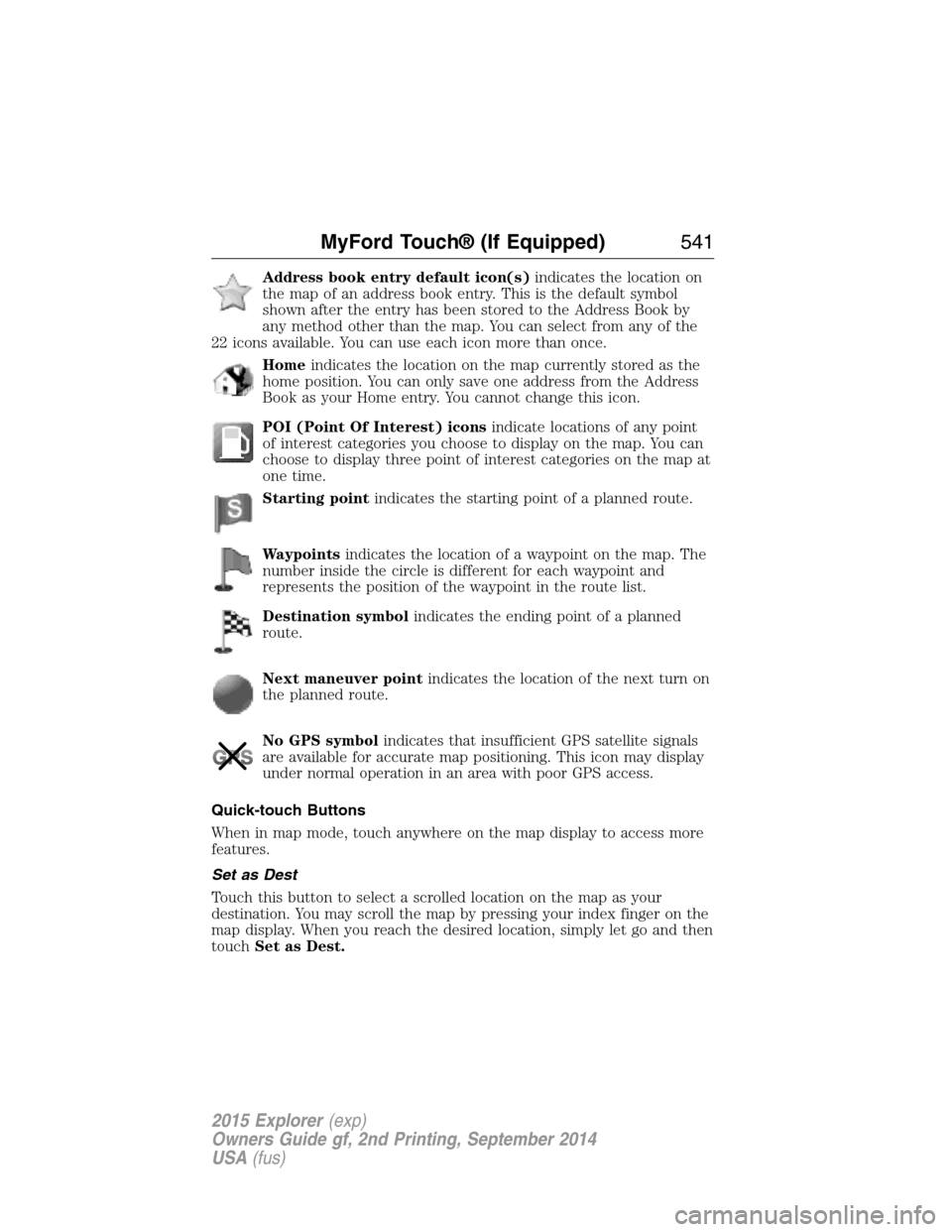
Address book entry default icon(s)indicates the location on
the map of an address book entry. This is the default symbol
shown after the entry has been stored to the Address Book by
any method other than the map. You can select from any of the
22 icons available. You can use each icon more than once.
Homeindicates the location on the map currently stored as the
home position. You can only save one address from the Address
Book as your Home entry. You cannot change this icon.
POI (Point Of Interest) iconsindicate locations of any point
of interest categories you choose to display on the map. You can
choose to display three point of interest categories on the map at
one time.
Starting pointindicates the starting point of a planned route.
Waypointsindicates the location of a waypoint on the map. The
number inside the circle is different for each waypoint and
represents the position of the waypoint in the route list.
Destination symbolindicates the ending point of a planned
route.
Next maneuver pointindicates the location of the next turn on
the planned route.
No GPS symbolindicates that insufficient GPS satellite signals
are available for accurate map positioning. This icon may display
under normal operation in an area with poor GPS access.
Quick-touch Buttons
When in map mode, touch anywhere on the map display to access more
features.
Set as Dest
Touch this button to select a scrolled location on the map as your
destination. You may scroll the map by pressing your index finger on the
map display. When you reach the desired location, simply let go and then
touchSet as Dest.
MyFord Touch® (If Equipped)541
2015 Explorer(exp)
Owners Guide gf, 2nd Printing, September 2014
USA(fus)
Page 593 of 596
Lug nuts ....................................382
M
Making and receiving calls .......501
MAP DVD - Loading and
Unloading ..................................501
Map icons ..................................540
Map mode ..................................539
Map preferences .......................537
Map updates ..............................542
Media Bluetooth menu options
(adding, connecting, deleting,
turning on/off) ..........................453
Message center .........................123
warning messages ...........127, 133
Mirrors ...............................109, 112
fold away .................................109
programmable memory ............65
side view mirrors (power) .....109
Moon roof ..................................113
Motorcraft® parts .............341, 391
MyFord Touch™ system ..........466
MyKey ..........................................69
N
Navigation features ...................533
Navigation voice commands ....543
Notifications ..............................513
P
Pairing other phones ........423, 500
Pairing your phone ...................500
Pairing your phone for
the first time .....................422, 500Parental MyKey programming ...69
Park Assist ................................230
Parking brake ............................220
Parts
(see Motorcraft® parts) ..........391
Passenger Occupant
Classification Sensor ...................54
Phone Bluetooth menu options
(adding, connecting, deleting,
turning on/off) ..........................433
Phone redial ..............................427
Phone settings ..................504, 526
Phone voice commands ............505
Playing music (by artist,
album, genre, playlist,
tracks, similar) ..........................451
POI categories ...........................535
Point of Interest (POI) .............535
Power distribution box
(see Fuses) ...............................300
Power door locks ........................73
Power liftgate ..............................79
Power mirrors ...........................109
Powerpoint ................................182
Power steering ..........................262
fluid, checking and adding ....326
Power Windows .........................107
Privacy information ..........419, 472
Push button start system .........188
Putting a call on/off hold .........425
Q
Quick touch buttons .................541
592Index
2015 Explorer(exp)
Owners Guide gf, 2nd Printing, September 2014
USA(fus)