parking brake FORD EXPLORER 2015 5.G Owner's Guide
[x] Cancel search | Manufacturer: FORD, Model Year: 2015, Model line: EXPLORER, Model: FORD EXPLORER 2015 5.GPages: 596, PDF Size: 6.32 MB
Page 378 of 596
•Ground clearance and parking at curbs
•Winter weather driving capability
•Wet weather driving capability
•All-wheel driving capability (if applicable)
•Load leveling adjustment (if applicable)
When driving with the full-size dissimilar spare tire and wheel assembly,
additional caution should be given to:
•towing a trailer.
•driving vehicles equipped with a camper body.
•driving vehicles with a load on the cargo rack.
Drive cautiously when using a full-size dissimilar spare tire and wheel,
and seek service as soon as possible.
Tire Change Procedure
WARNING:When one of the front wheels is off the ground, the
transmission alone will not prevent the vehicle from moving or
slipping off the jack, even if the transmission is in park (P).
WARNING:To help prevent the vehicle from moving when you
change a tire, be sure to place the transmission in park (P), set
the parking brake and block (in both directions) the wheel that is
diagonally opposite (other side and end of the vehicle) to the tire being
changed.
WARNING:Never get underneath a vehicle that is supported
only by a jack. If the vehicle slips off the jack, you or someone
else could be seriously injured.
WARNING:Do not attempt to change a tire on the side of the
vehicle close to moving traffic. Pull far enough off the road to
avoid the danger of being hit when operating the jack or changing the
wheel.
Wheels and Tires377
2015 Explorer(exp)
Owners Guide gf, 2nd Printing, September 2014
USA(fus)
Page 379 of 596
WARNING:Always use the jack provided as original equipment
with your vehicle. If using a jack other than the one provided as
original equipment with your vehicle, make sure the jack capacity is
adequate for the vehicle weight, including any vehicle cargo or
modifications.
Note:Passengers should not remain in the vehicle when the vehicle is
being jacked.
Note:If the third-row seat is stowed in the floor, you will need to
unstow it (raised position) to access the spare tire and jack. SeeRear
Seatsin theSeatschapter for this procedure.
1. Park on a level surface, set the parking brake and activate the hazard
flashers.
2. Put the transmission in park (P) and turn the engine off.
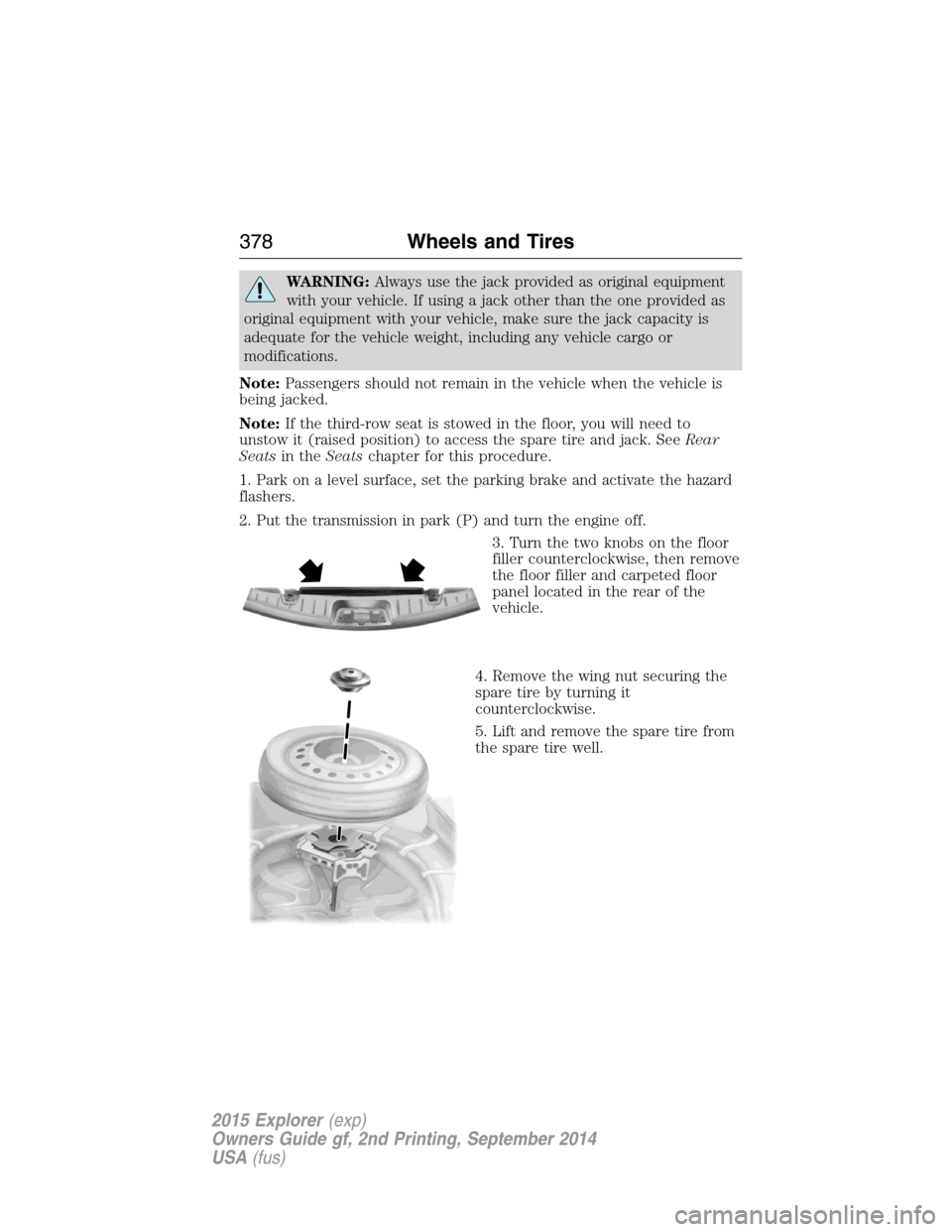
3. Turn the two knobs on the floor
filler counterclockwise, then remove
the floor filler and carpeted floor
panel located in the rear of the
vehicle.
4. Remove the wing nut securing the
spare tire by turning it
counterclockwise.
5. Lift and remove the spare tire from
the spare tire well.
378Wheels and Tires
2015 Explorer(exp)
Owners Guide gf, 2nd Printing, September 2014
USA(fus)
Page 416 of 596
WARNING:For safety reasons, do not connect or adjust the
settings on your portable music player while your vehicle is
moving.
WARNING:Store the portable music player in a secure location,
such as the center console or the glove box, when your vehicle is
moving. Hard objects may become projectiles in a crash or sudden stop,
which may increase the risk of serious injury. The audio extension cable
must be long enough to allow the portable music player to be safely
stored while your vehicle is moving.
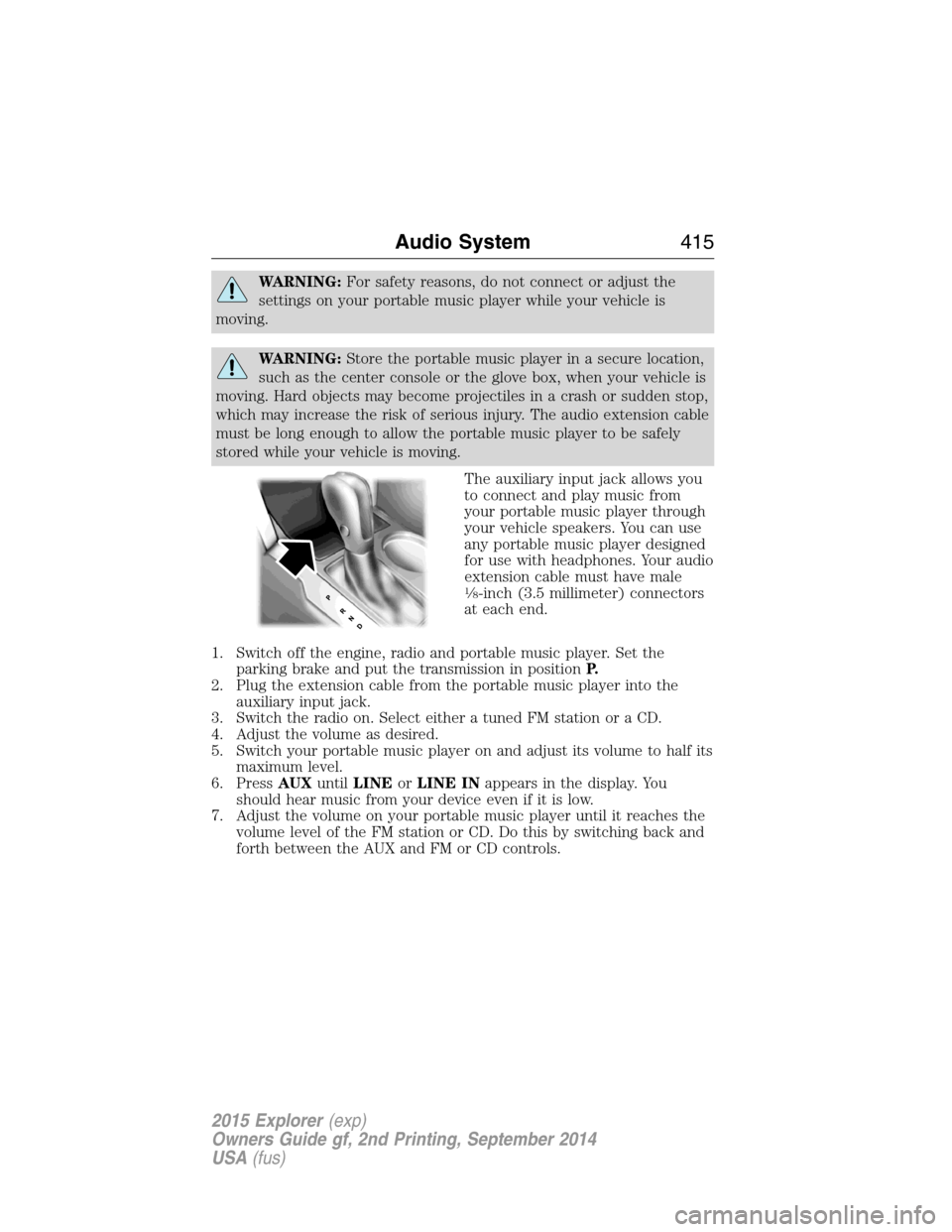
The auxiliary input jack allows you
to connect and play music from
your portable music player through
your vehicle speakers. You can use
any portable music player designed
for use with headphones. Your audio
extension cable must have male
18-inch (3.5 millimeter) connectors
at each end.
1. Switch off the engine, radio and portable music player. Set the
parking brake and put the transmission in positionP.
2. Plug the extension cable from the portable music player into the
auxiliary input jack.
3. Switch the radio on. Select either a tuned FM station or a CD.
4. Adjust the volume as desired.
5. Switch your portable music player on and adjust its volume to half its
maximum level.
6. PressAUXuntilLINEorLINE INappears in the display. You
should hear music from your device even if it is low.
7. Adjust the volume on your portable music player until it reaches the
volume level of the FM station or CD. Do this by switching back and
forth between the AUX and FM or CD controls.
Audio System415
2015 Explorer(exp)
Owners Guide gf, 2nd Printing, September 2014
USA(fus)
Page 499 of 596
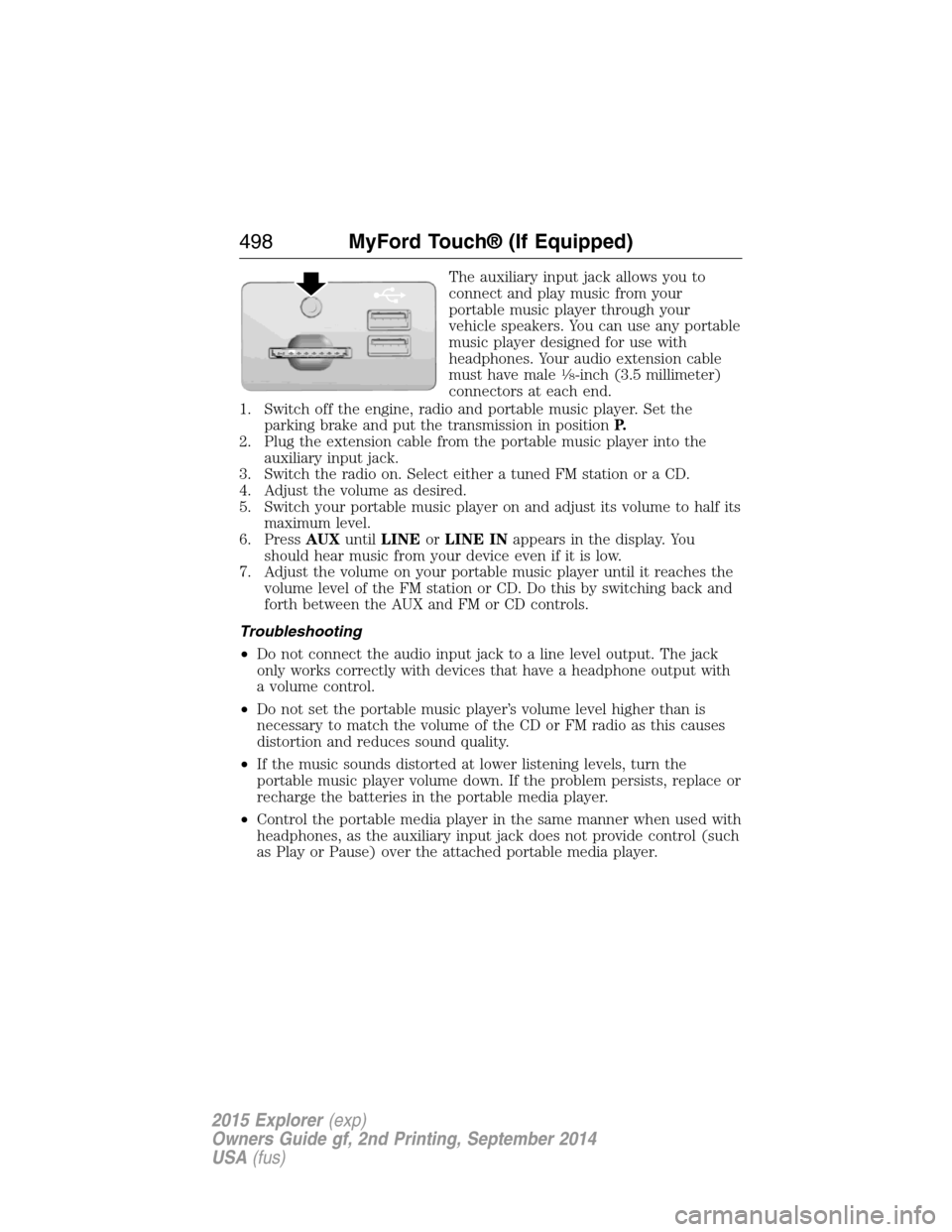
The auxiliary input jack allows you to
connect and play music from your
portable music player through your
vehicle speakers. You can use any portable
music player designed for use with
headphones. Your audio extension cable
must have male
18-inch (3.5 millimeter)
connectors at each end.
1. Switch off the engine, radio and portable music player. Set the
parking brake and put the transmission in positionP.
2. Plug the extension cable from the portable music player into the
auxiliary input jack.
3. Switch the radio on. Select either a tuned FM station or a CD.
4. Adjust the volume as desired.
5. Switch your portable music player on and adjust its volume to half its
maximum level.
6. PressAUXuntilLINEorLINE INappears in the display. You
should hear music from your device even if it is low.
7. Adjust the volume on your portable music player until it reaches the
volume level of the FM station or CD. Do this by switching back and
forth between the AUX and FM or CD controls.
Troubleshooting
•Do not connect the audio input jack to a line level output. The jack
only works correctly with devices that have a headphone output with
a volume control.
•Do not set the portable music player’s volume level higher than is
necessary to match the volume of the CD or FM radio as this causes
distortion and reduces sound quality.
•If the music sounds distorted at lower listening levels, turn the
portable music player volume down. If the problem persists, replace or
recharge the batteries in the portable media player.
•Control the portable media player in the same manner when used with
headphones, as the auxiliary input jack does not provide control (such
as Play or Pause) over the attached portable media player.
498MyFord Touch® (If Equipped)
2015 Explorer(exp)
Owners Guide gf, 2nd Printing, September 2014
USA(fus)
Page 574 of 596
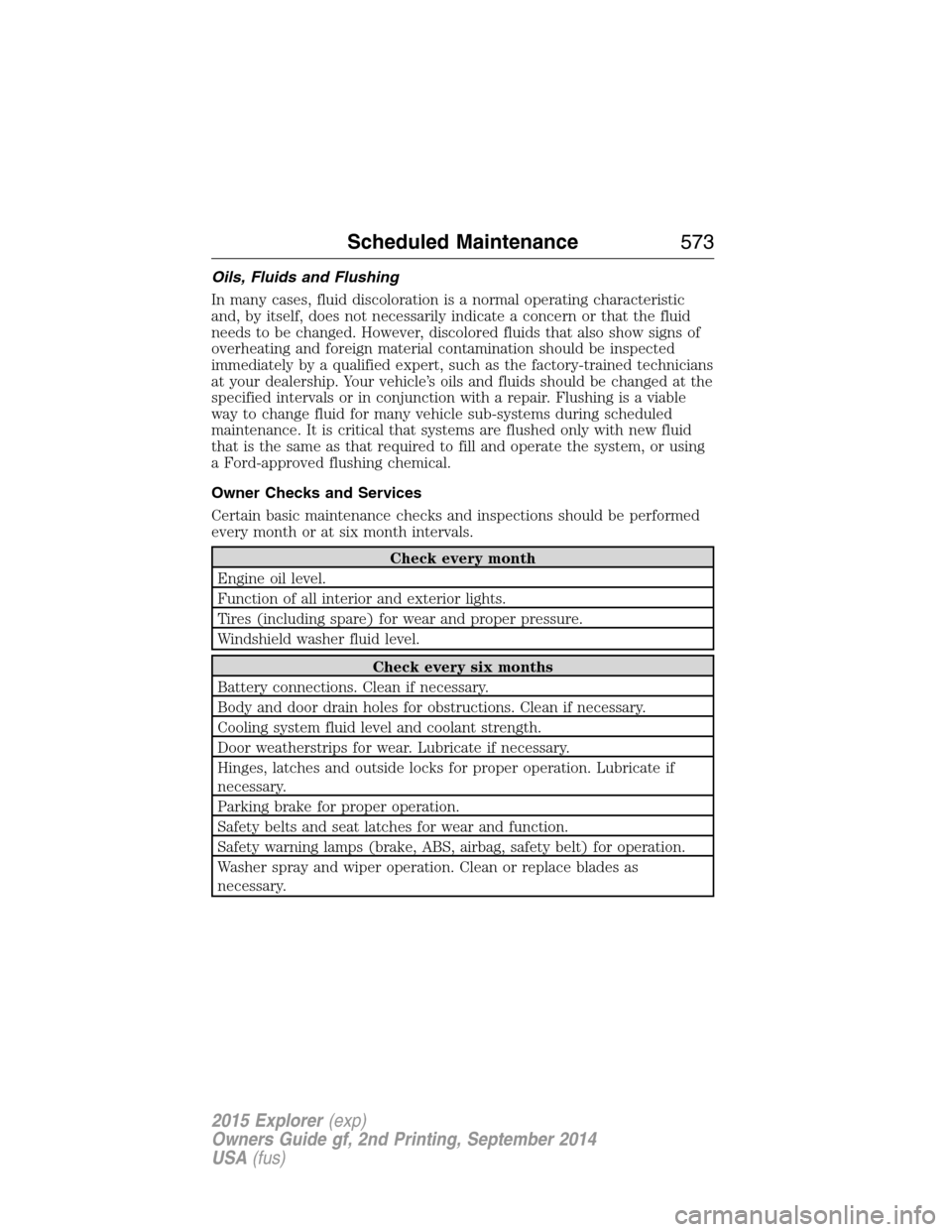
Oils, Fluids and Flushing
In many cases, fluid discoloration is a normal operating characteristic
and, by itself, does not necessarily indicate a concern or that the fluid
needs to be changed. However, discolored fluids that also show signs of
overheating and foreign material contamination should be inspected
immediately by a qualified expert, such as the factory-trained technicians
at your dealership. Your vehicle’s oils and fluids should be changed at the
specified intervals or in conjunction with a repair. Flushing is a viable
way to change fluid for many vehicle sub-systems during scheduled
maintenance. It is critical that systems are flushed only with new fluid
that is the same as that required to fill and operate the system, or using
a Ford-approved flushing chemical.
Owner Checks and Services
Certain basic maintenance checks and inspections should be performed
every month or at six month intervals.
Check every month
Engine oil level.
Function of all interior and exterior lights.
Tires (including spare) for wear and proper pressure.
Windshield washer fluid level.
Check every six months
Battery connections. Clean if necessary.
Body and door drain holes for obstructions. Clean if necessary.
Cooling system fluid level and coolant strength.
Door weatherstrips for wear. Lubricate if necessary.
Hinges, latches and outside locks for proper operation. Lubricate if
necessary.
Parking brake for proper operation.
Safety belts and seat latches for wear and function.
Safety warning lamps (brake, ABS, airbag, safety belt) for operation.
Washer spray and wiper operation. Clean or replace blades as
necessary.
Scheduled Maintenance573
2015 Explorer(exp)
Owners Guide gf, 2nd Printing, September 2014
USA(fus)
Page 578 of 596
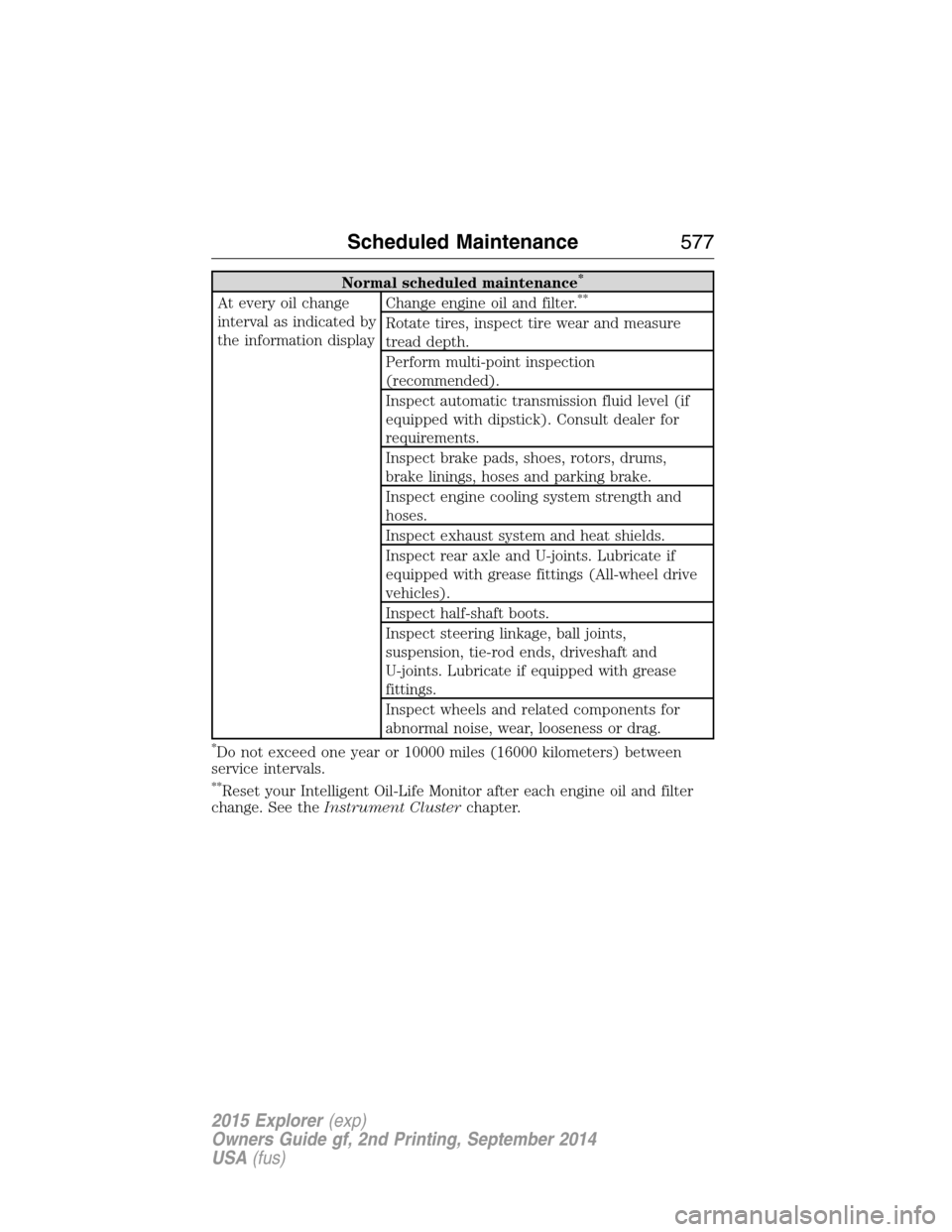
Normal scheduled maintenance*
At every oil change
interval as indicated by
the information displayChange engine oil and filter.**
Rotate tires, inspect tire wear and measure
tread depth.
Perform multi-point inspection
(recommended).
Inspect automatic transmission fluid level (if
equipped with dipstick). Consult dealer for
requirements.
Inspect brake pads, shoes, rotors, drums,
brake linings, hoses and parking brake.
Inspect engine cooling system strength and
hoses.
Inspect exhaust system and heat shields.
Inspect rear axle and U-joints. Lubricate if
equipped with grease fittings (All-wheel drive
vehicles).
Inspect half-shaft boots.
Inspect steering linkage, ball joints,
suspension, tie-rod ends, driveshaft and
U-joints. Lubricate if equipped with grease
fittings.
Inspect wheels and related components for
abnormal noise, wear, looseness or drag.
*Do not exceed one year or 10000 miles (16000 kilometers) between
service intervals.
**Reset your Intelligent Oil-Life Monitor after each engine oil and filter
change. See theInstrument Clusterchapter.
Scheduled Maintenance577
2015 Explorer(exp)
Owners Guide gf, 2nd Printing, September 2014
USA(fus)
Page 590 of 596
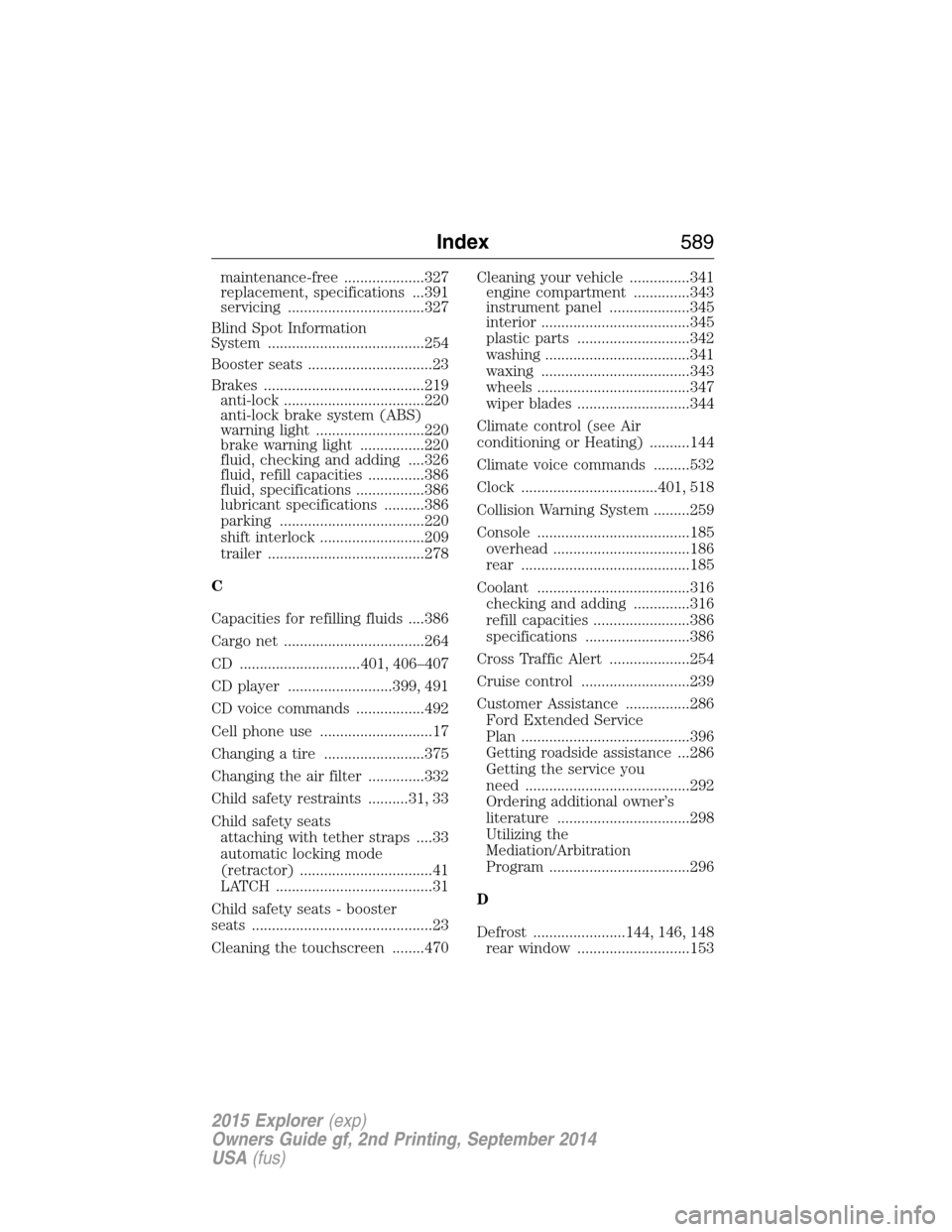
maintenance-free ....................327
replacement, specifications ...391
servicing ..................................327
Blind Spot Information
System .......................................254
Booster seats ...............................23
Brakes ........................................219
anti-lock ...................................220
anti-lock brake system (ABS)
warning light ...........................220
brake warning light ................220
fluid, checking and adding ....326
fluid, refill capacities ..............386
fluid, specifications .................386
lubricant specifications ..........386
parking ....................................220
shift interlock ..........................209
trailer .......................................278
C
Capacities for refilling fluids ....386
Cargo net ...................................264
CD ..............................401, 406–407
CD player ..........................399, 491
CD voice commands .................492
Cell phone use ............................17
Changing a tire .........................375
Changing the air filter ..............332
Child safety restraints ..........31, 33
Child safety seats
attaching with tether straps ....33
automatic locking mode
(retractor) .................................41
LATCH .......................................31
Child safety seats - booster
seats .............................................23
Cleaning the touchscreen ........470Cleaning your vehicle ...............341
engine compartment ..............343
instrument panel ....................345
interior .....................................345
plastic parts ............................342
washing ....................................341
waxing .....................................343
wheels ......................................347
wiper blades ............................344
Climate control (see Air
conditioning or Heating) ..........144
Climate voice commands .........532
Clock ..................................401, 518
Collision Warning System .........259
Console ......................................185
overhead ..................................186
rear ..........................................185
Coolant ......................................316
checking and adding ..............316
refill capacities ........................386
specifications ..........................386
Cross Traffic Alert ....................254
Cruise control ...........................239
Customer Assistance ................286
Ford Extended Service
Plan ..........................................396
Getting roadside assistance ...286
Getting the service you
need .........................................292
Ordering additional owner’s
literature .................................298
Utilizing the
Mediation/Arbitration
Program ...................................296
D
Defrost .......................144, 146, 148
rear window ............................153
Index589
2015 Explorer(exp)
Owners Guide gf, 2nd Printing, September 2014
USA(fus)
Page 591 of 596
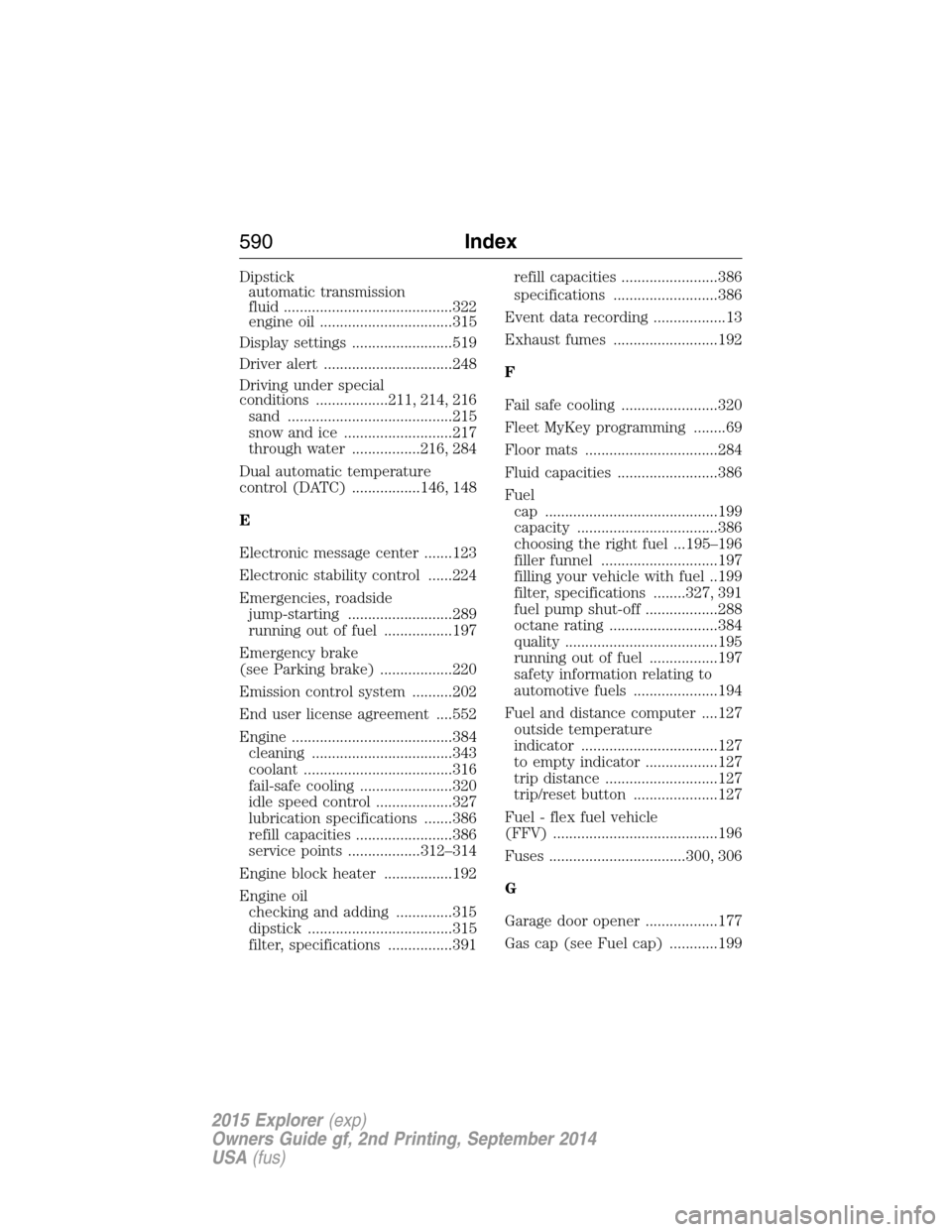
Dipstick
automatic transmission
fluid ..........................................322
engine oil .................................315
Display settings .........................519
Driver alert ................................248
Driving under special
conditions ..................211, 214, 216
sand .........................................215
snow and ice ...........................217
through water .................216, 284
Dual automatic temperature
control (DATC) .................146, 148
E
Electronic message center .......123
Electronic stability control ......224
Emergencies, roadside
jump-starting ..........................289
running out of fuel .................197
Emergency brake
(see Parking brake) ..................220
Emission control system ..........202
End user license agreement ....552
Engine ........................................384
cleaning ...................................343
coolant .....................................316
fail-safe cooling .......................320
idle speed control ...................327
lubrication specifications .......386
refill capacities ........................386
service points ..................312–314
Engine block heater .................192
Engine oil
checking and adding ..............315
dipstick ....................................315
filter, specifications ................391refill capacities ........................386
specifications ..........................386
Event data recording ..................13
Exhaust fumes ..........................192
F
Fail safe cooling ........................320
Fleet MyKey programming ........69
Floor mats .................................284
Fluid capacities .........................386
Fuel
cap ...........................................199
capacity ...................................386
choosing the right fuel ...195–196
filler funnel .............................197
filling your vehicle with fuel ..199
filter, specifications ........327, 391
fuel pump shut-off ..................288
octane rating ...........................384
quality ......................................195
running out of fuel .................197
safety information relating to
automotive fuels .....................194
Fuel and distance computer ....127
outside temperature
indicator ..................................127
to empty indicator ..................127
trip distance ............................127
trip/reset button .....................127
Fuel - flex fuel vehicle
(FFV) .........................................196
Fuses ..................................300, 306
G
Garage door opener ..................177
Gas cap (see Fuel cap) ............199
590Index
2015 Explorer(exp)
Owners Guide gf, 2nd Printing, September 2014
USA(fus)
Page 593 of 596
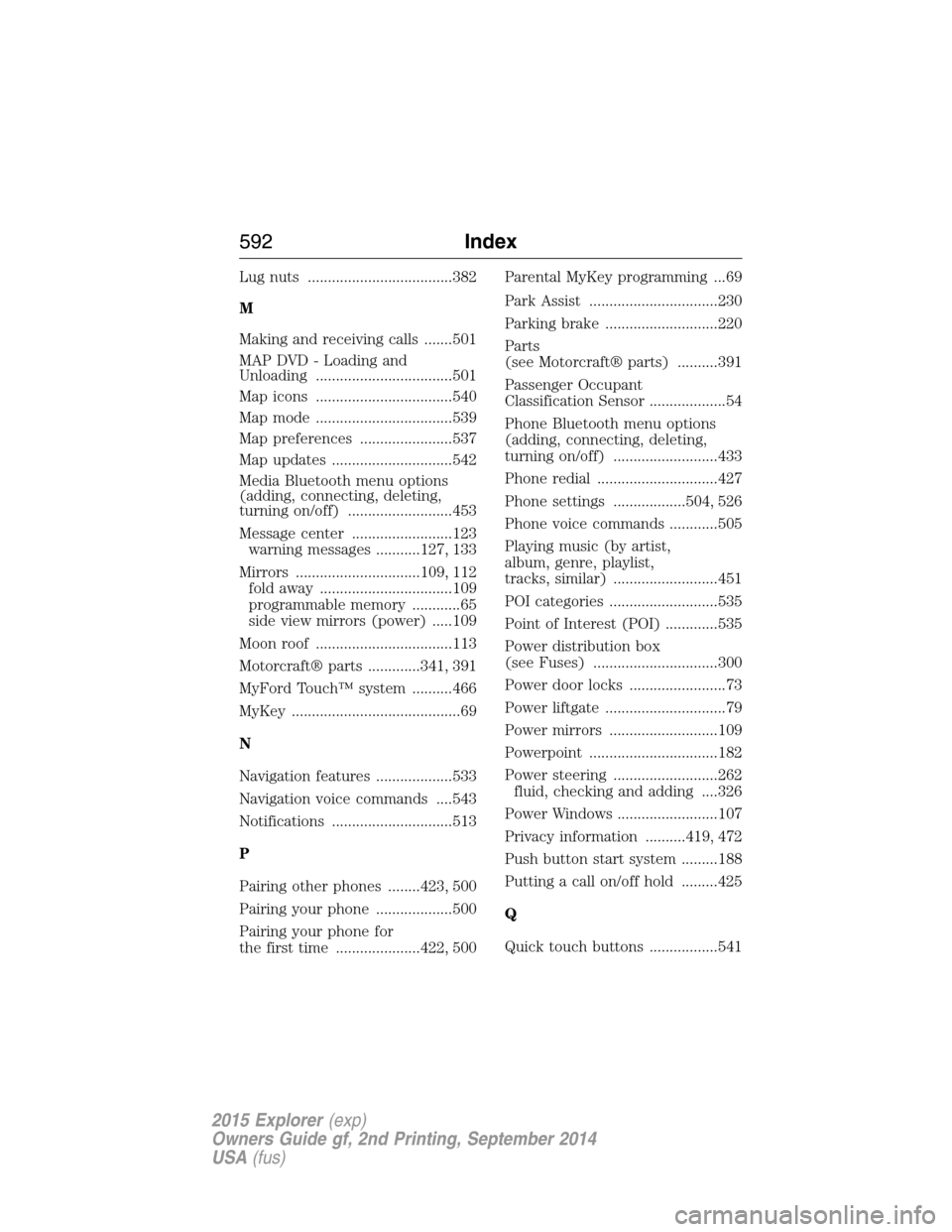
Lug nuts ....................................382
M
Making and receiving calls .......501
MAP DVD - Loading and
Unloading ..................................501
Map icons ..................................540
Map mode ..................................539
Map preferences .......................537
Map updates ..............................542
Media Bluetooth menu options
(adding, connecting, deleting,
turning on/off) ..........................453
Message center .........................123
warning messages ...........127, 133
Mirrors ...............................109, 112
fold away .................................109
programmable memory ............65
side view mirrors (power) .....109
Moon roof ..................................113
Motorcraft® parts .............341, 391
MyFord Touch™ system ..........466
MyKey ..........................................69
N
Navigation features ...................533
Navigation voice commands ....543
Notifications ..............................513
P
Pairing other phones ........423, 500
Pairing your phone ...................500
Pairing your phone for
the first time .....................422, 500Parental MyKey programming ...69
Park Assist ................................230
Parking brake ............................220
Parts
(see Motorcraft® parts) ..........391
Passenger Occupant
Classification Sensor ...................54
Phone Bluetooth menu options
(adding, connecting, deleting,
turning on/off) ..........................433
Phone redial ..............................427
Phone settings ..................504, 526
Phone voice commands ............505
Playing music (by artist,
album, genre, playlist,
tracks, similar) ..........................451
POI categories ...........................535
Point of Interest (POI) .............535
Power distribution box
(see Fuses) ...............................300
Power door locks ........................73
Power liftgate ..............................79
Power mirrors ...........................109
Powerpoint ................................182
Power steering ..........................262
fluid, checking and adding ....326
Power Windows .........................107
Privacy information ..........419, 472
Push button start system .........188
Putting a call on/off hold .........425
Q
Quick touch buttons .................541
592Index
2015 Explorer(exp)
Owners Guide gf, 2nd Printing, September 2014
USA(fus)