lock FORD EXPLORER 2015 5.G Workshop Manual
[x] Cancel search | Manufacturer: FORD, Model Year: 2015, Model line: EXPLORER, Model: FORD EXPLORER 2015 5.GPages: 596, PDF Size: 6.32 MB
Page 137 of 596
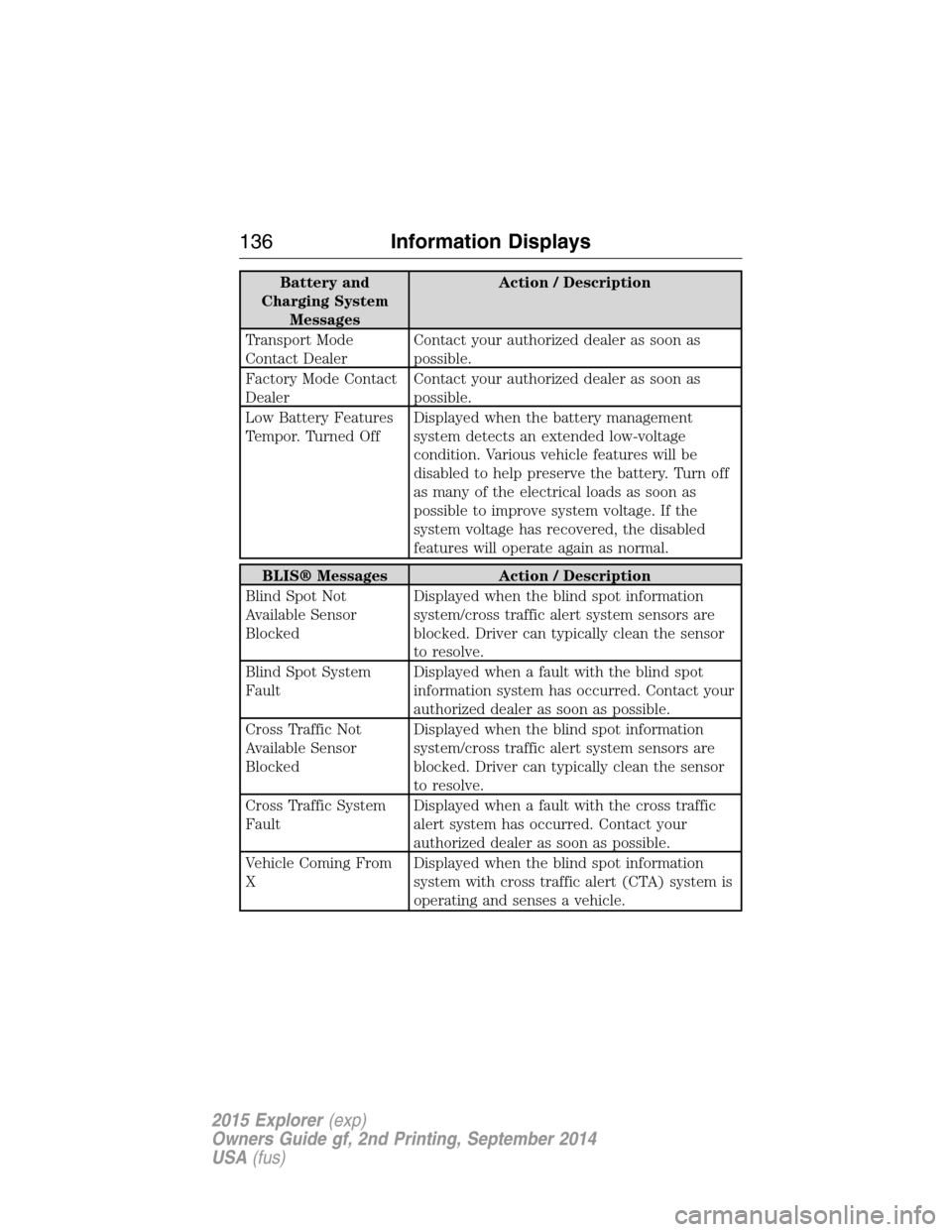
Battery and
Charging System
MessagesAction / Description
Transport Mode
Contact DealerContact your authorized dealer as soon as
possible.
Factory Mode Contact
DealerContact your authorized dealer as soon as
possible.
Low Battery Features
Tempor. Turned OffDisplayed when the battery management
system detects an extended low-voltage
condition. Various vehicle features will be
disabled to help preserve the battery. Turn off
as many of the electrical loads as soon as
possible to improve system voltage. If the
system voltage has recovered, the disabled
features will operate again as normal.
BLIS® Messages Action / Description
Blind Spot Not
Available Sensor
BlockedDisplayed when the blind spot information
system/cross traffic alert system sensors are
blocked. Driver can typically clean the sensor
to resolve.
Blind Spot System
FaultDisplayed when a fault with the blind spot
information system has occurred. Contact your
authorized dealer as soon as possible.
Cross Traffic Not
Available Sensor
BlockedDisplayed when the blind spot information
system/cross traffic alert system sensors are
blocked. Driver can typically clean the sensor
to resolve.
Cross Traffic System
FaultDisplayed when a fault with the cross traffic
alert system has occurred. Contact your
authorized dealer as soon as possible.
Vehicle Coming From
XDisplayed when the blind spot information
system with cross traffic alert (CTA) system is
operating and senses a vehicle.
136Information Displays
2015 Explorer(exp)
Owners Guide gf, 2nd Printing, September 2014
USA(fus)
Page 138 of 596
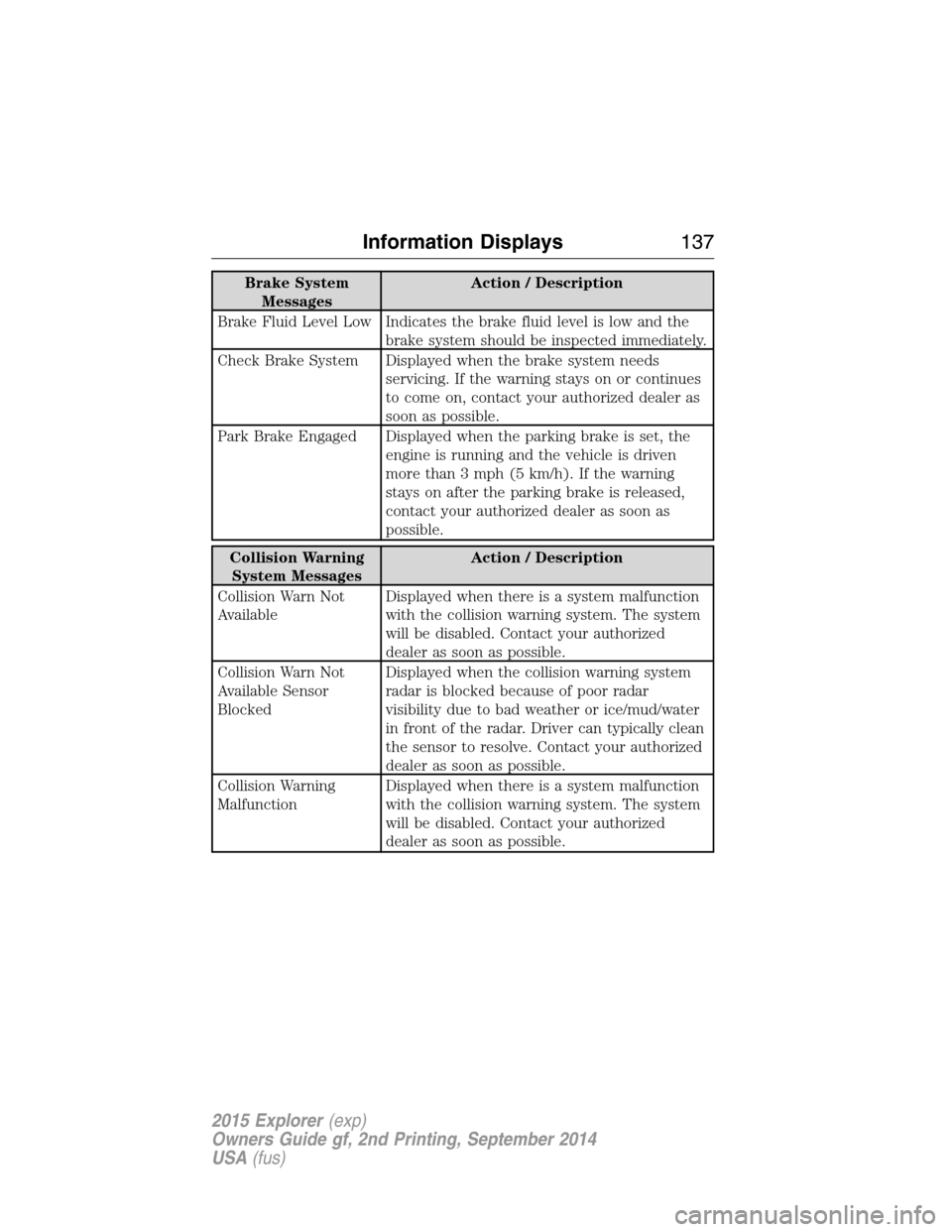
Brake System
MessagesAction / Description
Brake Fluid Level Low Indicates the brake fluid level is low and the
brake system should be inspected immediately.
Check Brake System Displayed when the brake system needs
servicing. If the warning stays on or continues
to come on, contact your authorized dealer as
soon as possible.
Park Brake Engaged Displayed when the parking brake is set, the
engine is running and the vehicle is driven
more than 3 mph (5 km/h). If the warning
stays on after the parking brake is released,
contact your authorized dealer as soon as
possible.
Collision Warning
System MessagesAction / Description
Collision Warn Not
AvailableDisplayed when there is a system malfunction
with the collision warning system. The system
will be disabled. Contact your authorized
dealer as soon as possible.
Collision Warn Not
Available Sensor
BlockedDisplayed when the collision warning system
radar is blocked because of poor radar
visibility due to bad weather or ice/mud/water
in front of the radar. Driver can typically clean
the sensor to resolve. Contact your authorized
dealer as soon as possible.
Collision Warning
MalfunctionDisplayed when there is a system malfunction
with the collision warning system. The system
will be disabled. Contact your authorized
dealer as soon as possible.
Information Displays137
2015 Explorer(exp)
Owners Guide gf, 2nd Printing, September 2014
USA(fus)
Page 143 of 596
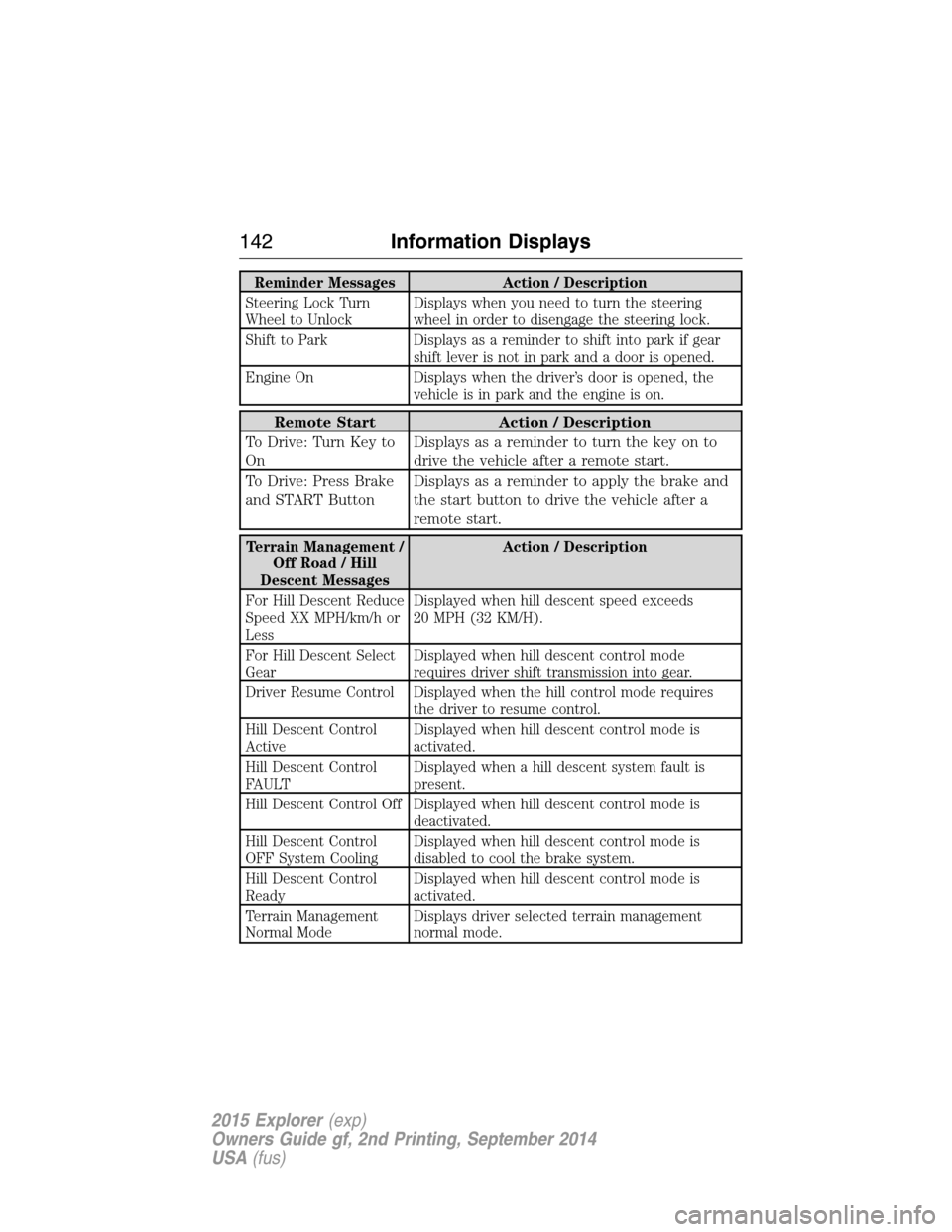
Reminder Messages Action / Description
Steering Lock Turn
Wheel to UnlockDisplays when you need to turn the steering
wheel in order to disengage the steering lock.
Shift to Park Displays as a reminder to shift into park if gear
shift lever is not in park and a door is opened.
Engine On Displays when the driver’s door is opened, the
vehicle is in park and the engine is on.
Remote Start Action / Description
To Drive: Turn Key to
OnDisplays as a reminder to turn the key on to
drive the vehicle after a remote start.
To Drive: Press Brake
and START ButtonDisplays as a reminder to apply the brake and
the start button to drive the vehicle after a
remote start.
Terrain Management /
Off Road / Hill
Descent MessagesAction / Description
For Hill Descent Reduce
Speed XX MPH/km/h or
LessDisplayed when hill descent speed exceeds
20 MPH (32 KM/H).
For Hill Descent Select
GearDisplayed when hill descent control mode
requires driver shift transmission into gear.
Driver Resume Control Displayed when the hill control mode requires
the driver to resume control.
Hill Descent Control
ActiveDisplayed when hill descent control mode is
activated.
Hill Descent Control
FAULTDisplayed when a hill descent system fault is
present.
Hill Descent Control Off Displayed when hill descent control mode is
deactivated.
Hill Descent Control
OFF System CoolingDisplayed when hill descent control mode is
disabled to cool the brake system.
Hill Descent Control
ReadyDisplayed when hill descent control mode is
activated.
Terrain Management
Normal ModeDisplays driver selected terrain management
normal mode.
142Information Displays
2015 Explorer(exp)
Owners Guide gf, 2nd Printing, September 2014
USA(fus)
Page 150 of 596
F.A/C:Press the button to turn air conditioning compressor on or off.
Use air conditioning with recirculated air to improve cooling performance
and efficiency.
G.
AUTO:Press the button to turn on automatic operation. Select the
desired temperature using the temperature control. The system adjusts fan
speed, air distribution, air conditioning operation, and selects outside air or
recirculated air to heat or cool the vehicle in order to maintain the desired
temperature. You can also use theAUTObutton to turn off dual zone
operation by pressing and holding the button for more than two seconds.
H.Heated rear window:Turns the heated rear window on and off. See
Heated windows and mirrorslater in this chapter for more
information. If your vehicle is equipped with heated mirrors, this button
turns them on also.
I.Defrost:Press the button to distribute air to the windshield vents and
de-mister. Air distribution to instrument panel and footwell vents turn
off. You can use this setting to defog and clear the windshield of a thin
covering of ice.
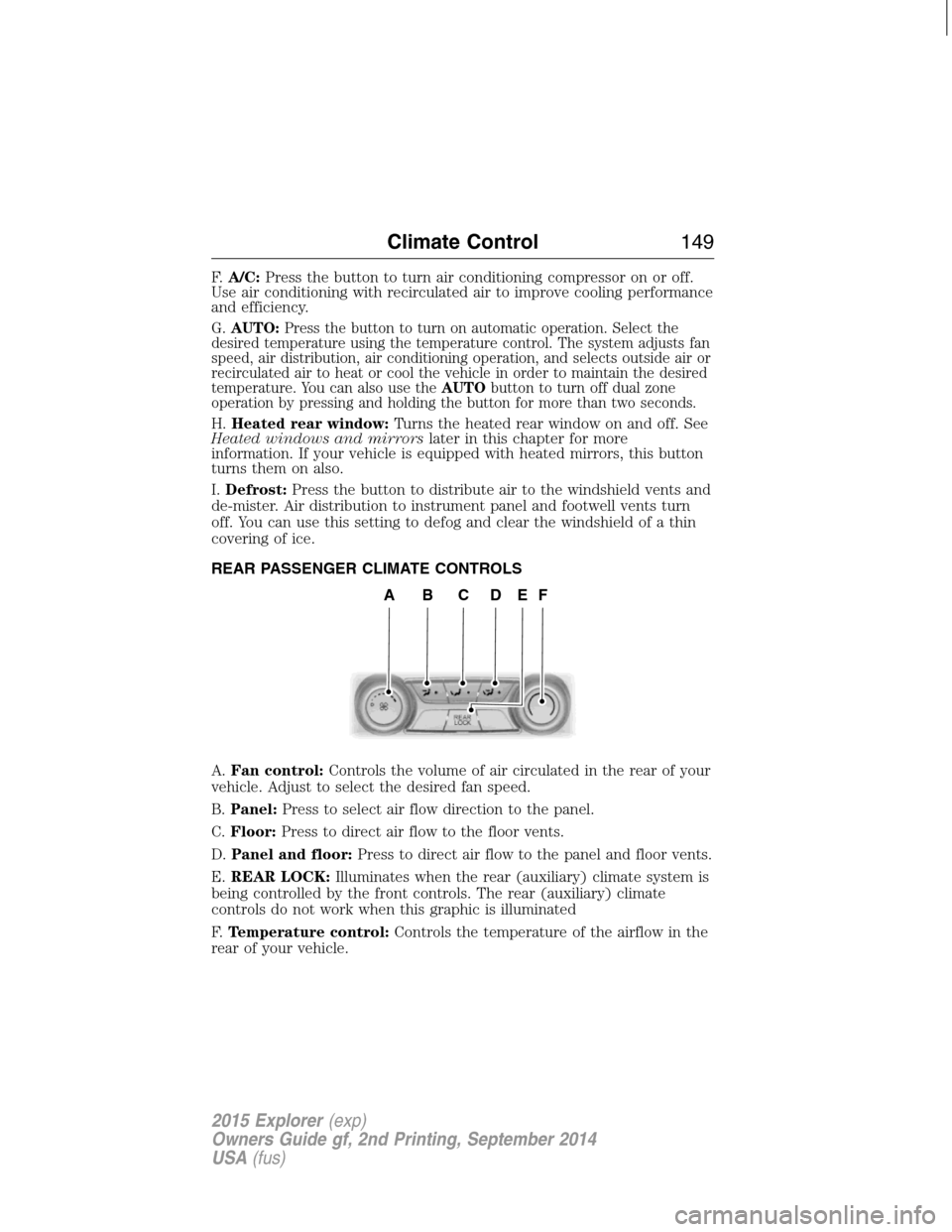
REAR PASSENGER CLIMATE CONTROLS
A.Fan control:Controls the volume of air circulated in the rear of your
vehicle. Adjust to select the desired fan speed.
B.Panel:Press to select air flow direction to the panel.
C.Floor:Press to direct air flow to the floor vents.
D.Panel and floor:Press to direct air flow to the panel and floor vents.
E.REAR LOCK:Illuminates when the rear (auxiliary) climate system is
being controlled by the front controls. The rear (auxiliary) climate
controls do not work when this graphic is illuminated
F.Temperature control:Controls the temperature of the airflow in the
rear of your vehicle.
ABCDEF
Climate Control149
2015 Explorer(exp)
Owners Guide gf, 2nd Printing, September 2014
USA(fus)
Page 158 of 596
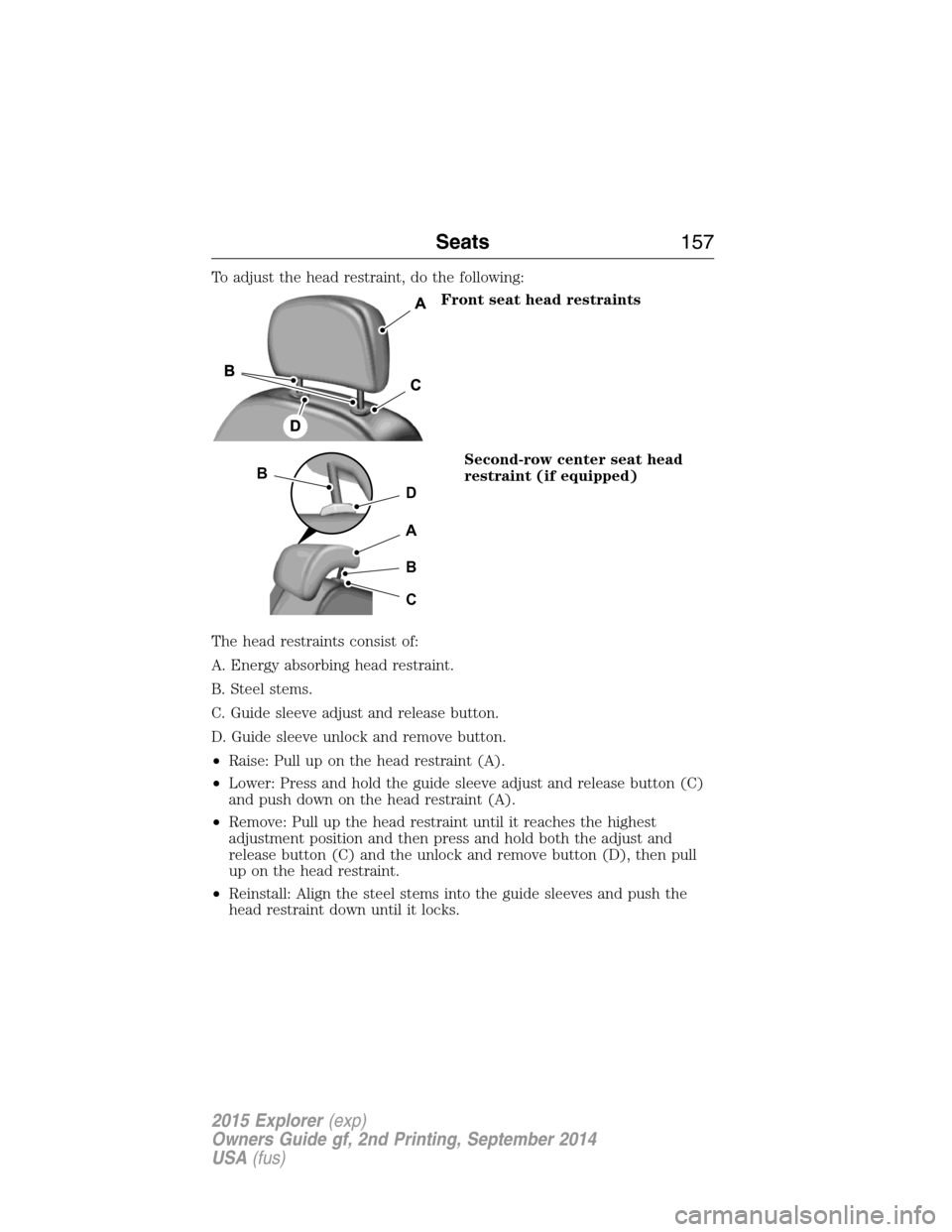
To adjust the head restraint, do the following:
Front seat head restraints
Second-row center seat head
restraint (if equipped)
The head restraints consist of:
A. Energy absorbing head restraint.
B. Steel stems.
C. Guide sleeve adjust and release button.
D. Guide sleeve unlock and remove button.
•Raise: Pull up on the head restraint (A).
•Lower: Press and hold the guide sleeve adjust and release button (C)
and push down on the head restraint (A).
•Remove: Pull up the head restraint until it reaches the highest
adjustment position and then press and hold both the adjust and
release button (C) and the unlock and remove button (D), then pull
up on the head restraint.
•Reinstall: Align the steel stems into the guide sleeves and push the
head restraint down until it locks.
D
B
A
B
C
Seats157
2015 Explorer(exp)
Owners Guide gf, 2nd Printing, September 2014
USA(fus)
Page 159 of 596
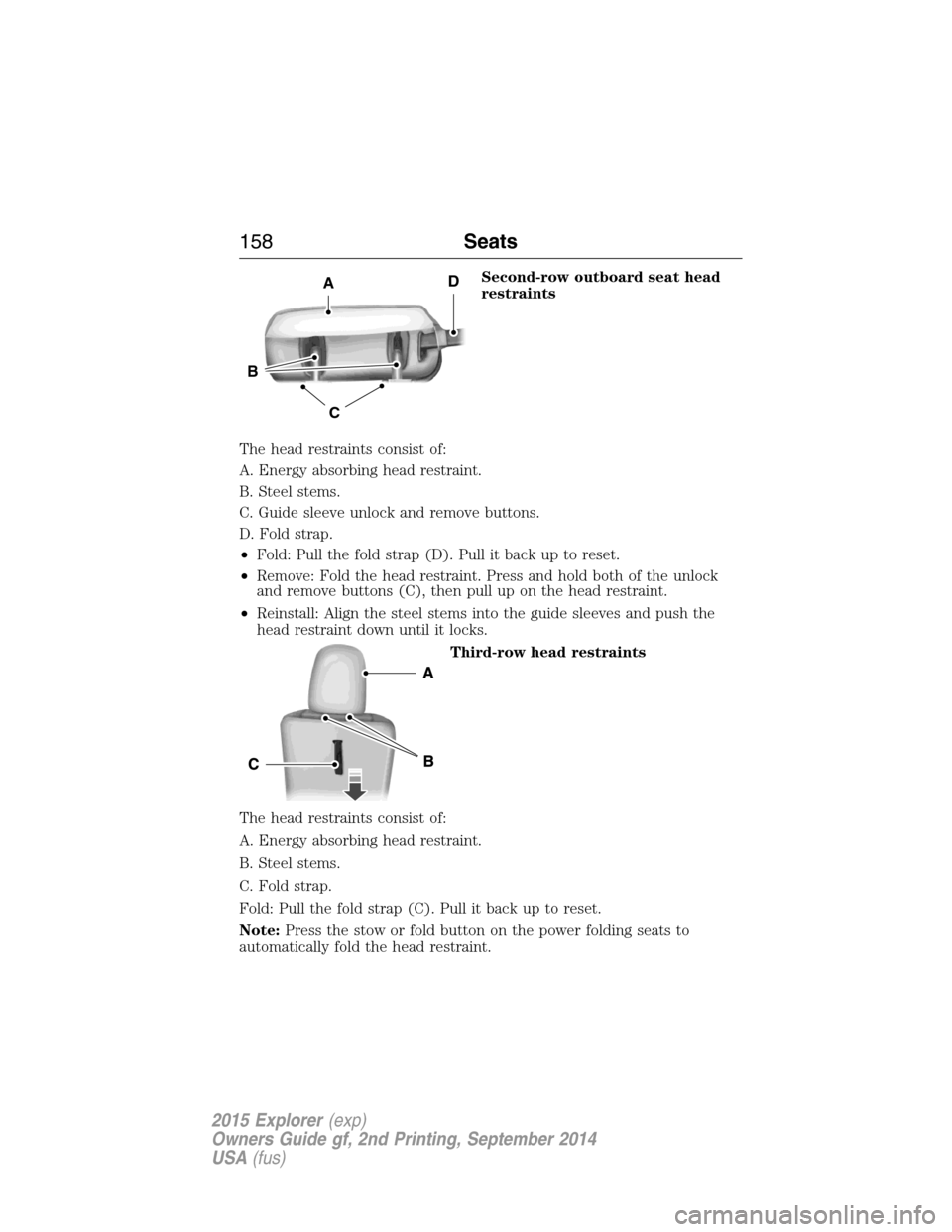
Second-row outboard seat head
restraints
The head restraints consist of:
A. Energy absorbing head restraint.
B. Steel stems.
C. Guide sleeve unlock and remove buttons.
D. Fold strap.
•Fold: Pull the fold strap (D). Pull it back up to reset.
•Remove: Fold the head restraint. Press and hold both of the unlock
and remove buttons (C), then pull up on the head restraint.
•Reinstall: Align the steel stems into the guide sleeves and push the
head restraint down until it locks.
Third-row head restraints
The head restraints consist of:
A. Energy absorbing head restraint.
B. Steel stems.
C. Fold strap.
Fold: Pull the fold strap (C). Pull it back up to reset.
Note:Press the stow or fold button on the power folding seats to
automatically fold the head restraint.
C
B
AD
158Seats
2015 Explorer(exp)
Owners Guide gf, 2nd Printing, September 2014
USA(fus)
Page 163 of 596
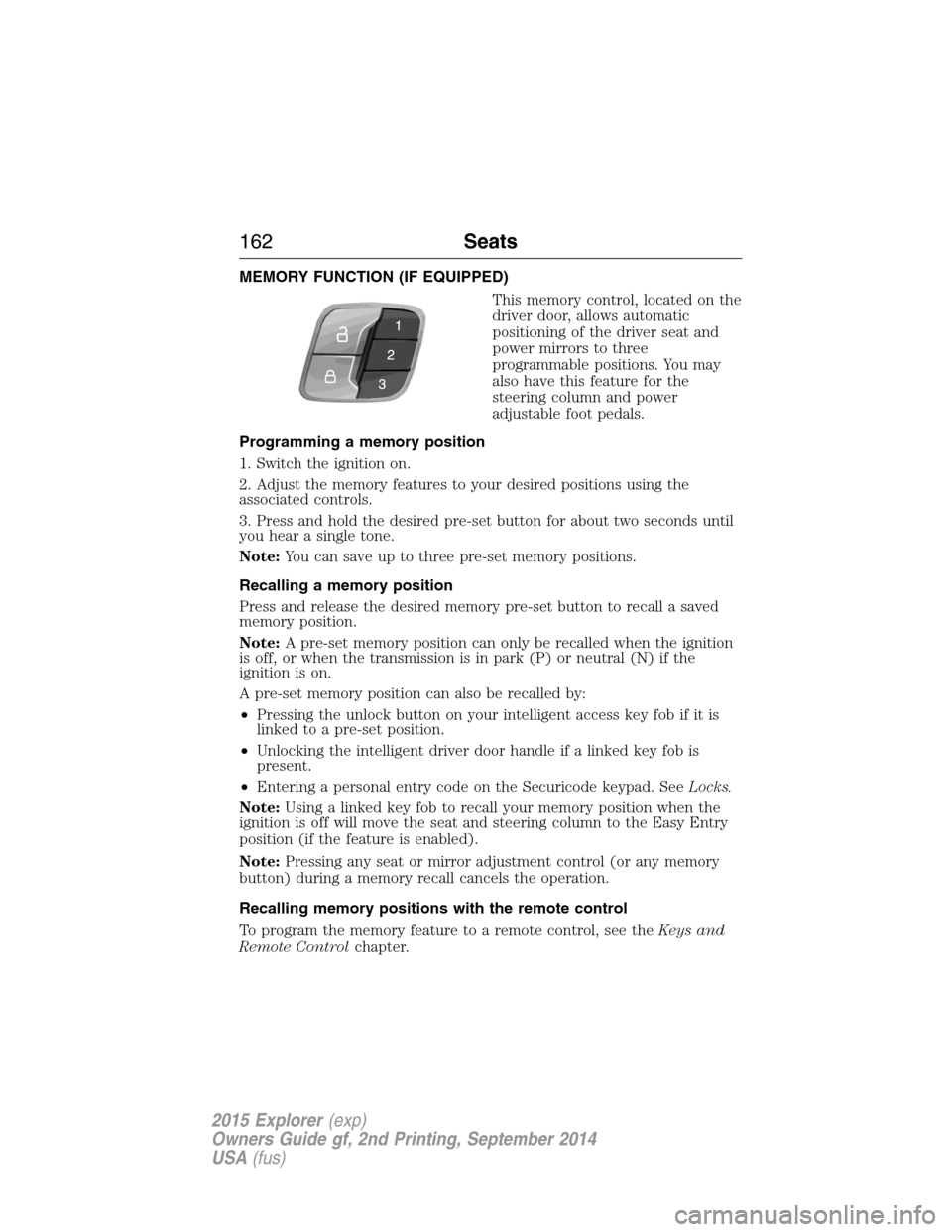
MEMORY FUNCTION (IF EQUIPPED)
This memory control, located on the
driver door, allows automatic
positioning of the driver seat and
power mirrors to three
programmable positions. You may
also have this feature for the
steering column and power
adjustable foot pedals.
Programming a memory position
1. Switch the ignition on.
2. Adjust the memory features to your desired positions using the
associated controls.
3. Press and hold the desired pre-set button for about two seconds until
you hear a single tone.
Note:You can save up to three pre-set memory positions.
Recalling a memory position
Press and release the desired memory pre-set button to recall a saved
memory position.
Note:A pre-set memory position can only be recalled when the ignition
is off, or when the transmission is in park (P) or neutral (N) if the
ignition is on.
A pre-set memory position can also be recalled by:
•Pressing the unlock button on your intelligent access key fob if it is
linked to a pre-set position.
•Unlocking the intelligent driver door handle if a linked key fob is
present.
•Entering a personal entry code on the Securicode keypad. SeeLocks.
Note:Using a linked key fob to recall your memory position when the
ignition is off will move the seat and steering column to the Easy Entry
position (if the feature is enabled).
Note:Pressing any seat or mirror adjustment control (or any memory
button) during a memory recall cancels the operation.
Recalling memory positions with the remote control
To program the memory feature to a remote control, see theKeys and
Remote Controlchapter.
162Seats
2015 Explorer(exp)
Owners Guide gf, 2nd Printing, September 2014
USA(fus)
Page 166 of 596
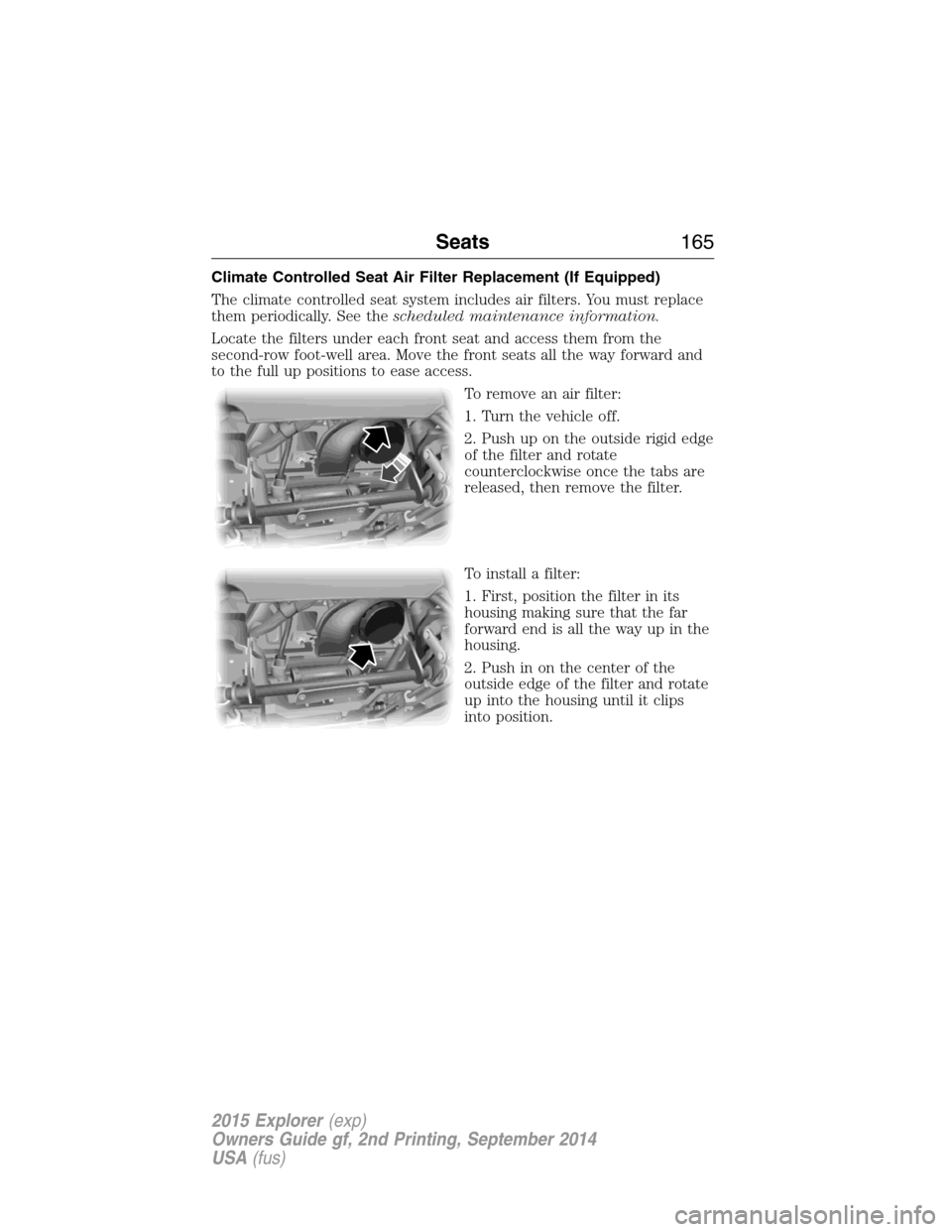
Climate Controlled Seat Air Filter Replacement (If Equipped)
The climate controlled seat system includes air filters. You must replace
them periodically. See thescheduled maintenance information.
Locate the filters under each front seat and access them from the
second-row foot-well area. Move the front seats all the way forward and
to the full up positions to ease access.
To remove an air filter:
1. Turn the vehicle off.
2. Push up on the outside rigid edge
of the filter and rotate
counterclockwise once the tabs are
released, then remove the filter.
To install a filter:
1. First, position the filter in its
housing making sure that the far
forward end is all the way up in the
housing.
2. Push in on the center of the
outside edge of the filter and rotate
up into the housing until it clips
into position.
Seats165
2015 Explorer(exp)
Owners Guide gf, 2nd Printing, September 2014
USA(fus)
Page 171 of 596
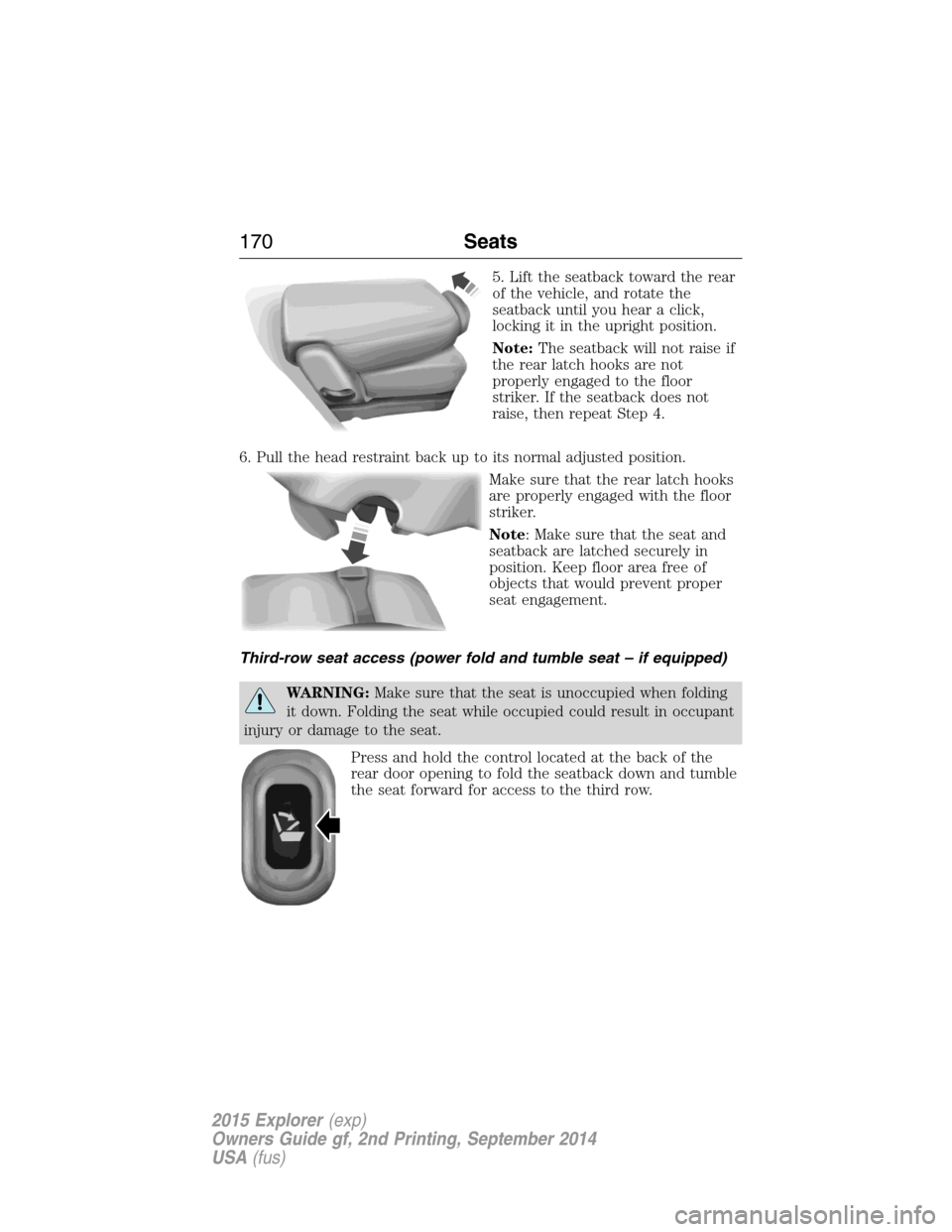
5. Lift the seatback toward the rear
of the vehicle, and rotate the
seatback until you hear a click,
locking it in the upright position.
Note:The seatback will not raise if
the rear latch hooks are not
properly engaged to the floor
striker. If the seatback does not
raise, then repeat Step 4.
6. Pull the head restraint back up to its normal adjusted position.
Make sure that the rear latch hooks
are properly engaged with the floor
striker.
Note: Make sure that the seat and
seatback are latched securely in
position. Keep floor area free of
objects that would prevent proper
seat engagement.
Third-row seat access (power fold and tumble seat – if equipped)
WARNING:Make sure that the seat is unoccupied when folding
it down. Folding the seat while occupied could result in occupant
injury or damage to the seat.
Press and hold the control located at the back of the
rear door opening to fold the seatback down and tumble
the seat forward for access to the third row.
170Seats
2015 Explorer(exp)
Owners Guide gf, 2nd Printing, September 2014
USA(fus)
Page 173 of 596
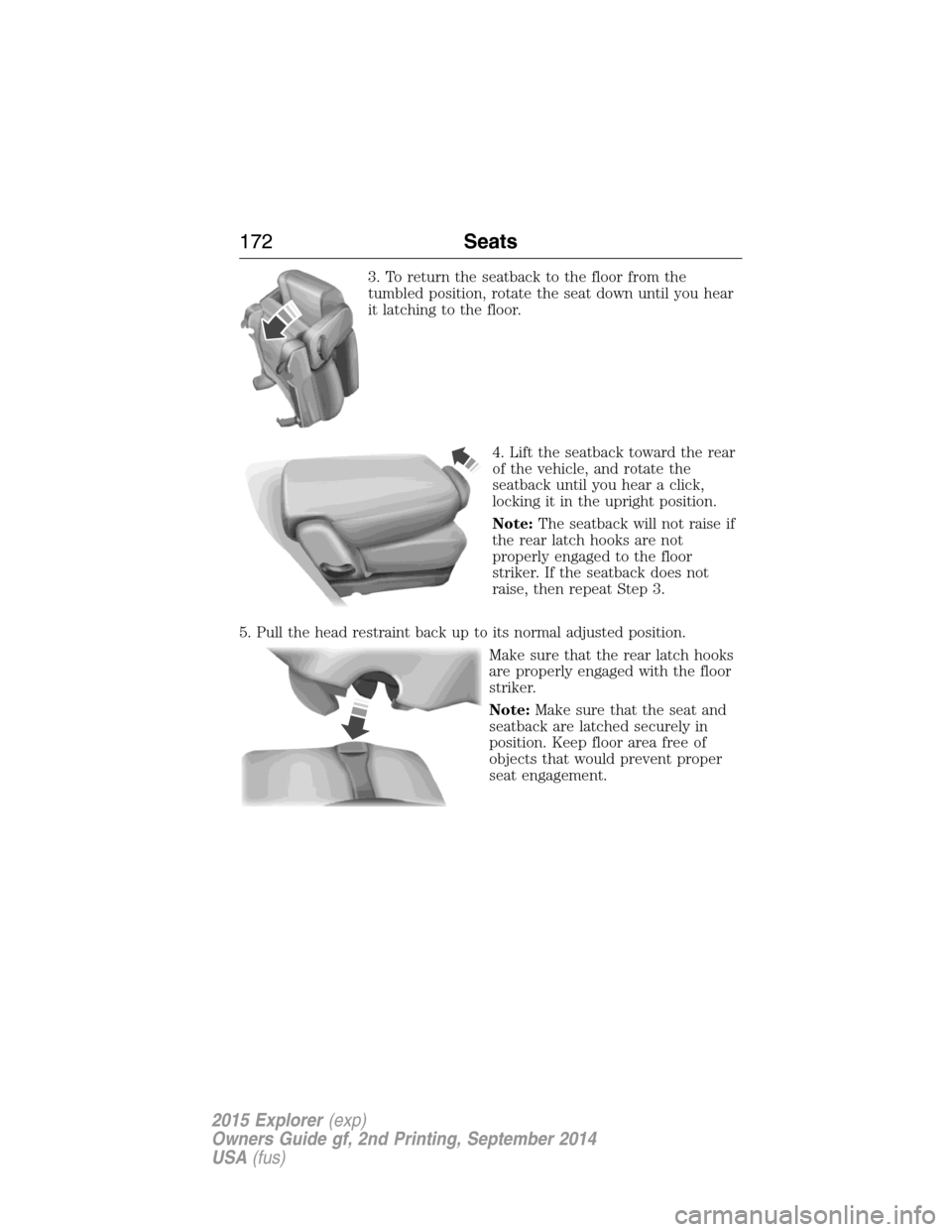
3. To return the seatback to the floor from the
tumbled position, rotate the seat down until you hear
it latching to the floor.
4. Lift the seatback toward the rear
of the vehicle, and rotate the
seatback until you hear a click,
locking it in the upright position.
Note:The seatback will not raise if
the rear latch hooks are not
properly engaged to the floor
striker. If the seatback does not
raise, then repeat Step 3.
5. Pull the head restraint back up to its normal adjusted position.
Make sure that the rear latch hooks
are properly engaged with the floor
striker.
Note:Make sure that the seat and
seatback are latched securely in
position. Keep floor area free of
objects that would prevent proper
seat engagement.
172Seats
2015 Explorer(exp)
Owners Guide gf, 2nd Printing, September 2014
USA(fus)