light FORD EXPLORER 2016 5.G Owners Manual
[x] Cancel search | Manufacturer: FORD, Model Year: 2016, Model line: EXPLORER, Model: FORD EXPLORER 2016 5.GPages: 541, PDF Size: 6.51 MB
Page 436 of 541
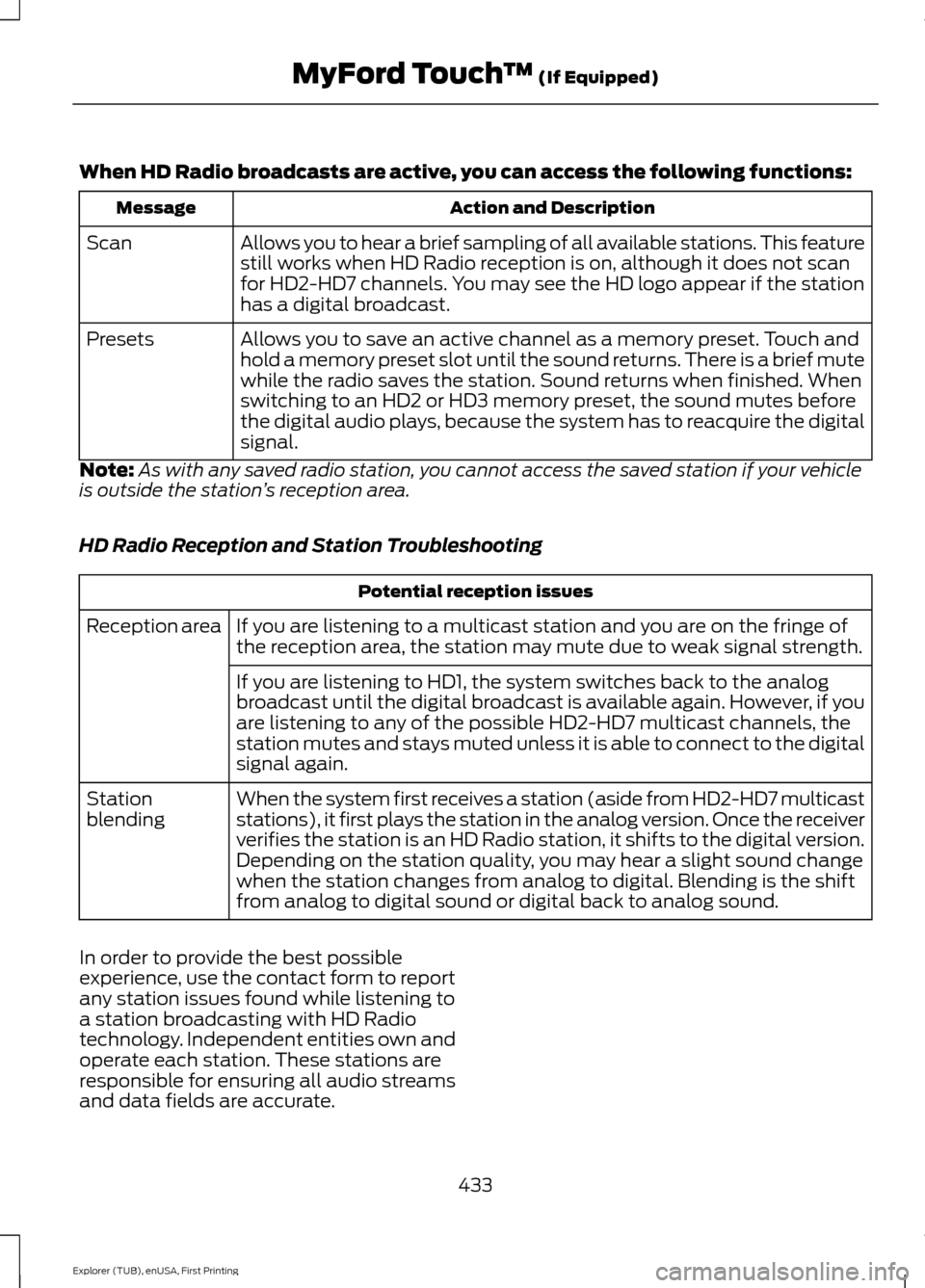
When HD Radio broadcasts are active, you can access the following functions:
Action and Description
Message
Allows you to hear a brief sampling of all available stations. This feature
still works when HD Radio reception is on, although it does not scan
for HD2-HD7 channels. You may see the HD logo appear if the station
has a digital broadcast.
Scan
Allows you to save an active channel as a memory preset. Touch and
hold a memory preset slot until the sound returns. There is a brief mute
while the radio saves the station. Sound returns when finished. When
switching to an HD2 or HD3 memory preset, the sound mutes before
the digital audio plays, because the system has to reacquire the digital
signal.
Presets
Note: As with any saved radio station, you cannot access the saved station if your vehicle
is outside the station ’s reception area.
HD Radio Reception and Station Troubleshooting Potential reception issues
If you are listening to a multicast station and you are on the fringe of
the reception area, the station may mute due to weak signal strength.
Reception area
If you are listening to HD1, the system switches back to the analog
broadcast until the digital broadcast is available again. However, if you
are listening to any of the possible HD2-HD7 multicast channels, the
station mutes and stays muted unless it is able to connect to the digital
signal again.
When the system first receives a station (aside from HD2-HD7 multicast
stations), it first plays the station in the analog version. Once the receiver
verifies the station is an HD Radio station, it shifts to the digital version.
Depending on the station quality, you may hear a slight sound change
when the station changes from analog to digital. Blending is the shift
from analog to digital sound or digital back to analog sound.
Station
blending
In order to provide the best possible
experience, use the contact form to report
any station issues found while listening to
a station broadcasting with HD Radio
technology. Independent entities own and
operate each station. These stations are
responsible for ensuring all audio streams
and data fields are accurate. 433
Explorer (TUB), enUSA, First Printing MyFord Touch
™ (If Equipped)
Page 469 of 541
NAVIGATION
Note:
The navigation SD card must be in
the SD card slot to operate the navigation
system. If you need a replacement SD card,
see an authorized dealer.
Note: The SD card slot is spring-loaded. To
remove the SD card, just push the card in
and release it. Do not attempt to pull the
card out to remove it; this could cause
damage.
Your navigation system is comprised of
two main features, destination mode and
map mode.
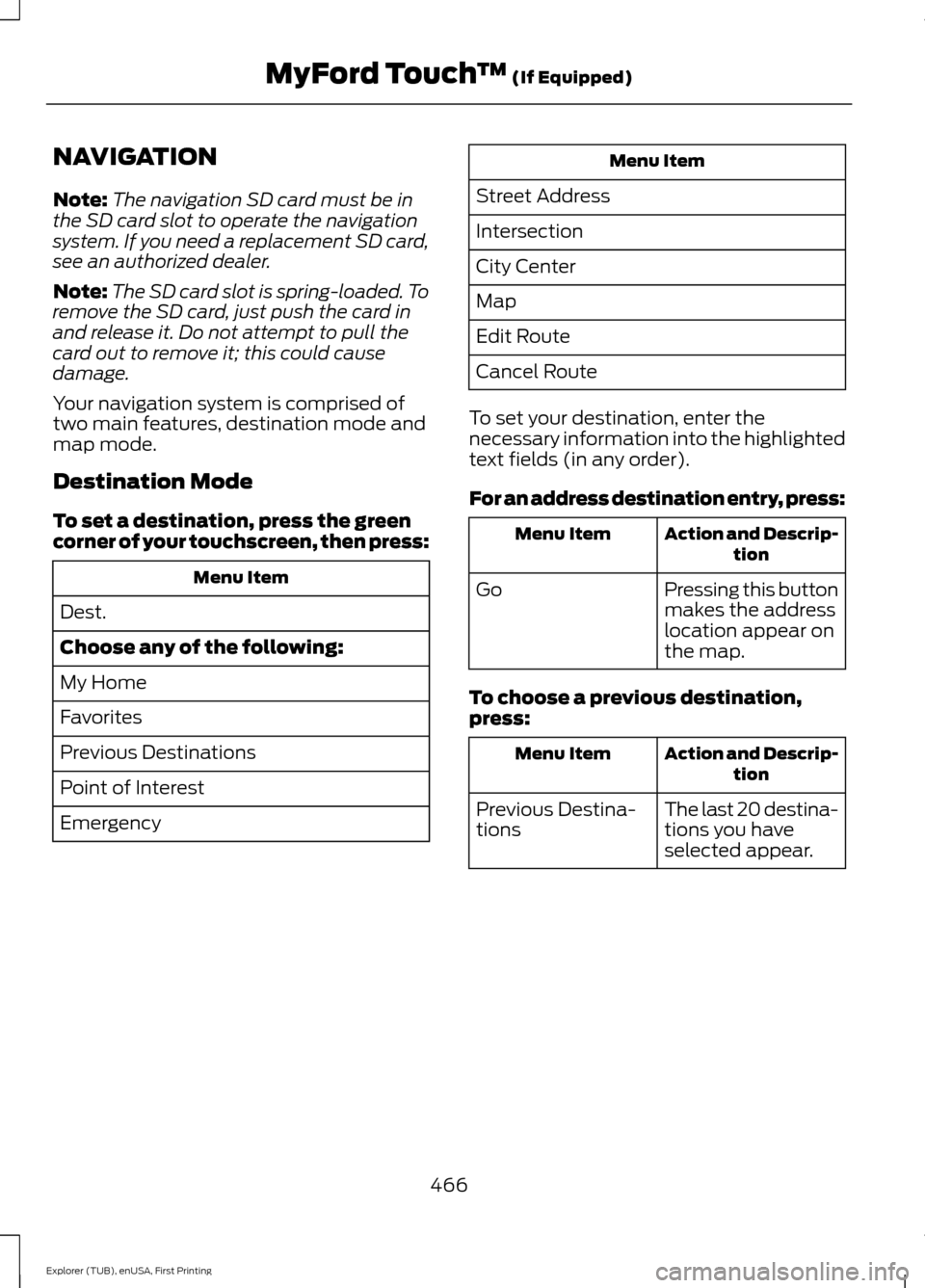
Destination Mode
To set a destination, press the green
corner of your touchscreen, then press: Menu Item
Dest.
Choose any of the following:
My Home
Favorites
Previous Destinations
Point of Interest
Emergency Menu Item
Street Address
Intersection
City Center
Map
Edit Route
Cancel Route
To set your destination, enter the
necessary information into the highlighted
text fields (in any order).
For an address destination entry, press: Action and Descrip-
tion
Menu Item
Pressing this button
makes the address
location appear on
the map.
Go
To choose a previous destination,
press: Action and Descrip-
tion
Menu Item
The last 20 destina-
tions you have
selected appear.
Previous Destina-
tions
466
Explorer (TUB), enUSA, First Printing MyFord Touch
™ (If Equipped)
Page 475 of 541
3D landmarks appear as clear, visible
objects that are typically recognizable and
have a certain tourist value. The 3D
landmarks appear in 3D map mode only.
Coverage varies and improves with
updated map releases.
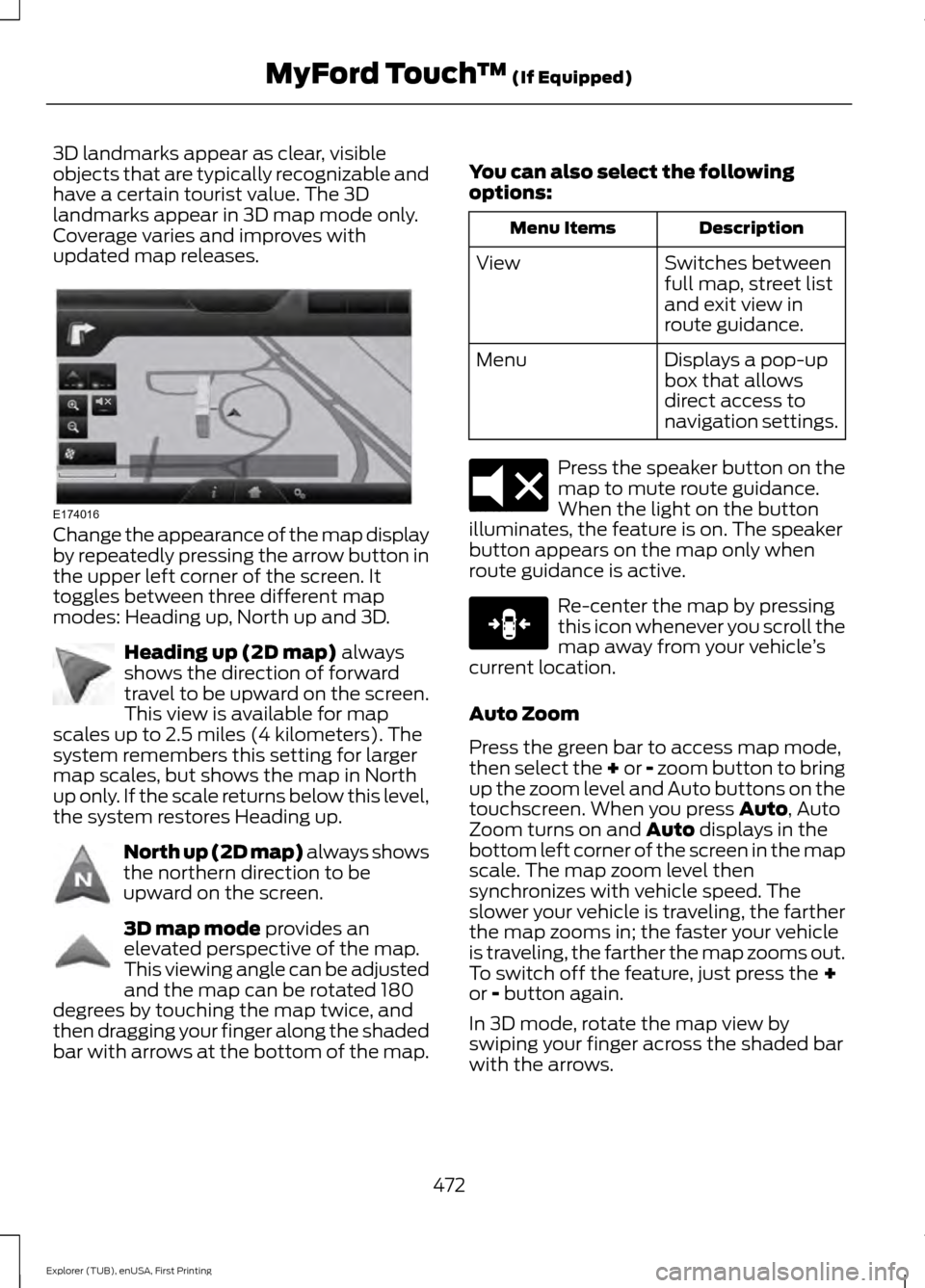
Change the appearance of the map display
by repeatedly pressing the arrow button in
the upper left corner of the screen. It
toggles between three different map
modes: Heading up, North up and 3D.
Heading up (2D map) always
shows the direction of forward
travel to be upward on the screen.
This view is available for map
scales up to 2.5 miles (4 kilometers). The
system remembers this setting for larger
map scales, but shows the map in North
up only. If the scale returns below this level,
the system restores Heading up. North up (2D map) always shows
the northern direction to be
upward on the screen.
3D map mode
provides an
elevated perspective of the map.
This viewing angle can be adjusted
and the map can be rotated 180
degrees by touching the map twice, and
then dragging your finger along the shaded
bar with arrows at the bottom of the map. You can also select the following
options: Description
Menu Items
Switches between
full map, street list
and exit view in
route guidance.
View
Displays a pop-up
box that allows
direct access to
navigation settings.
Menu Press the speaker button on the
map to mute route guidance.
When the light on the button
illuminates, the feature is on. The speaker
button appears on the map only when
route guidance is active. Re-center the map by pressing
this icon whenever you scroll the
map away from your vehicle
’s
current location.
Auto Zoom
Press the green bar to access map mode,
then select the + or - zoom button to bring
up the zoom level and Auto buttons on the
touchscreen. When you press
Auto, Auto
Zoom turns on and Auto displays in the
bottom left corner of the screen in the map
scale. The map zoom level then
synchronizes with vehicle speed. The
slower your vehicle is traveling, the farther
the map zooms in; the faster your vehicle
is traveling, the farther the map zooms out.
To switch off the feature, just press the
+
or - button again.
In 3D mode, rotate the map view by
swiping your finger across the shaded bar
with the arrows.
472
Explorer (TUB), enUSA, First Printing MyFord Touch
™
(If Equipped)E174016 E142642 E142643 E142644 E174017 E146188
Page 485 of 541
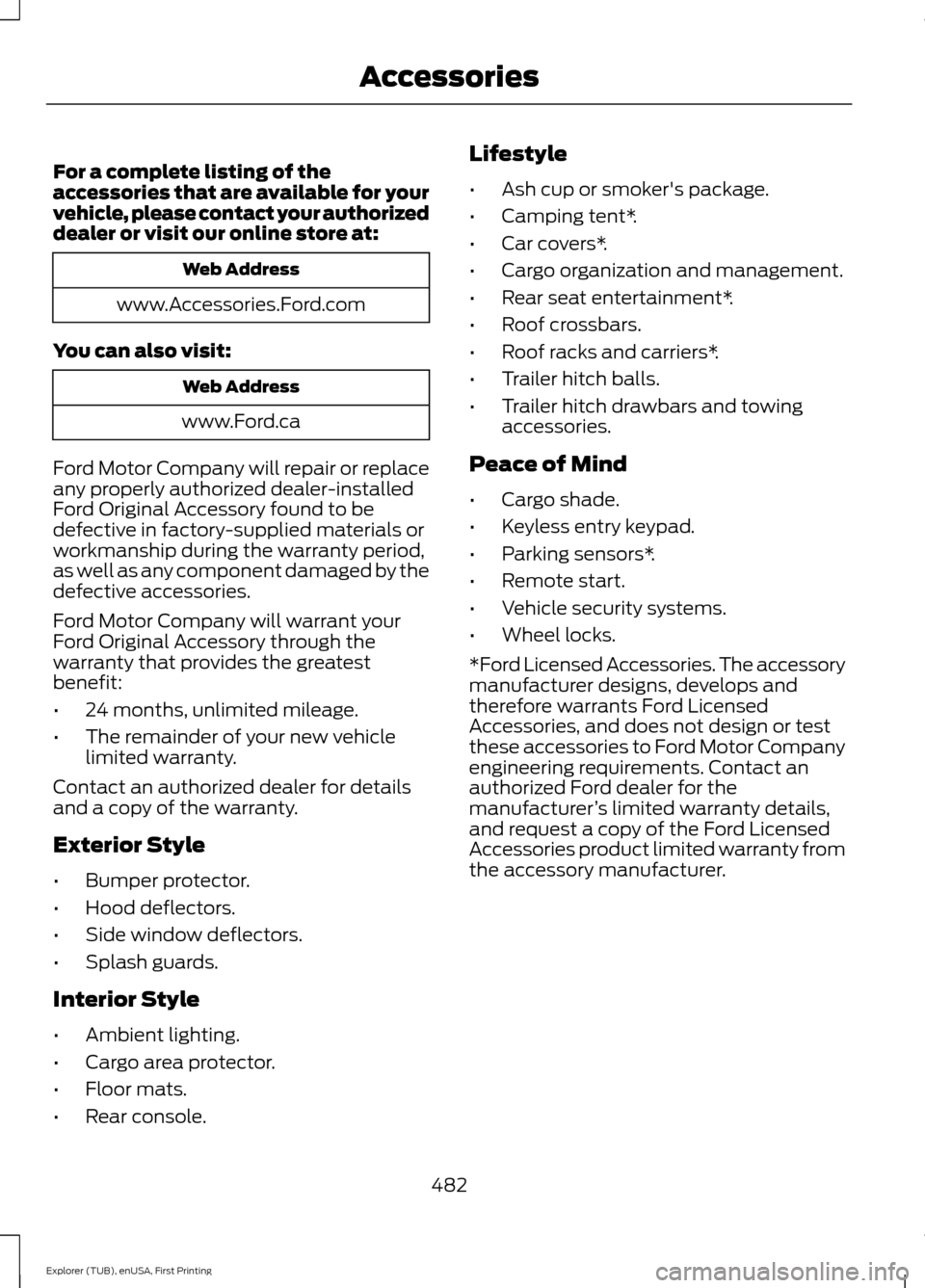
For a complete listing of the
accessories that are available for your
vehicle, please contact your authorized
dealer or visit our online store at:
Web Address
www.Accessories.Ford.com
You can also visit: Web Address
www.Ford.ca
Ford Motor Company will repair or replace
any properly authorized dealer-installed
Ford Original Accessory found to be
defective in factory-supplied materials or
workmanship during the warranty period,
as well as any component damaged by the
defective accessories.
Ford Motor Company will warrant your
Ford Original Accessory through the
warranty that provides the greatest
benefit:
• 24 months, unlimited mileage.
• The remainder of your new vehicle
limited warranty.
Contact an authorized dealer for details
and a copy of the warranty.
Exterior Style
• Bumper protector.
• Hood deflectors.
• Side window deflectors.
• Splash guards.
Interior Style
• Ambient lighting.
• Cargo area protector.
• Floor mats.
• Rear console. Lifestyle
•
Ash cup or smoker's package.
• Camping tent*.
• Car covers*.
• Cargo organization and management.
• Rear seat entertainment*.
• Roof crossbars.
• Roof racks and carriers*.
• Trailer hitch balls.
• Trailer hitch drawbars and towing
accessories.
Peace of Mind
• Cargo shade.
• Keyless entry keypad.
• Parking sensors*.
• Remote start.
• Vehicle security systems.
• Wheel locks.
*Ford Licensed Accessories. The accessory
manufacturer designs, develops and
therefore warrants Ford Licensed
Accessories, and does not design or test
these accessories to Ford Motor Company
engineering requirements. Contact an
authorized Ford dealer for the
manufacturer ’s limited warranty details,
and request a copy of the Ford Licensed
Accessories product limited warranty from
the accessory manufacturer.
482
Explorer (TUB), enUSA, First Printing Accessories
Page 491 of 541
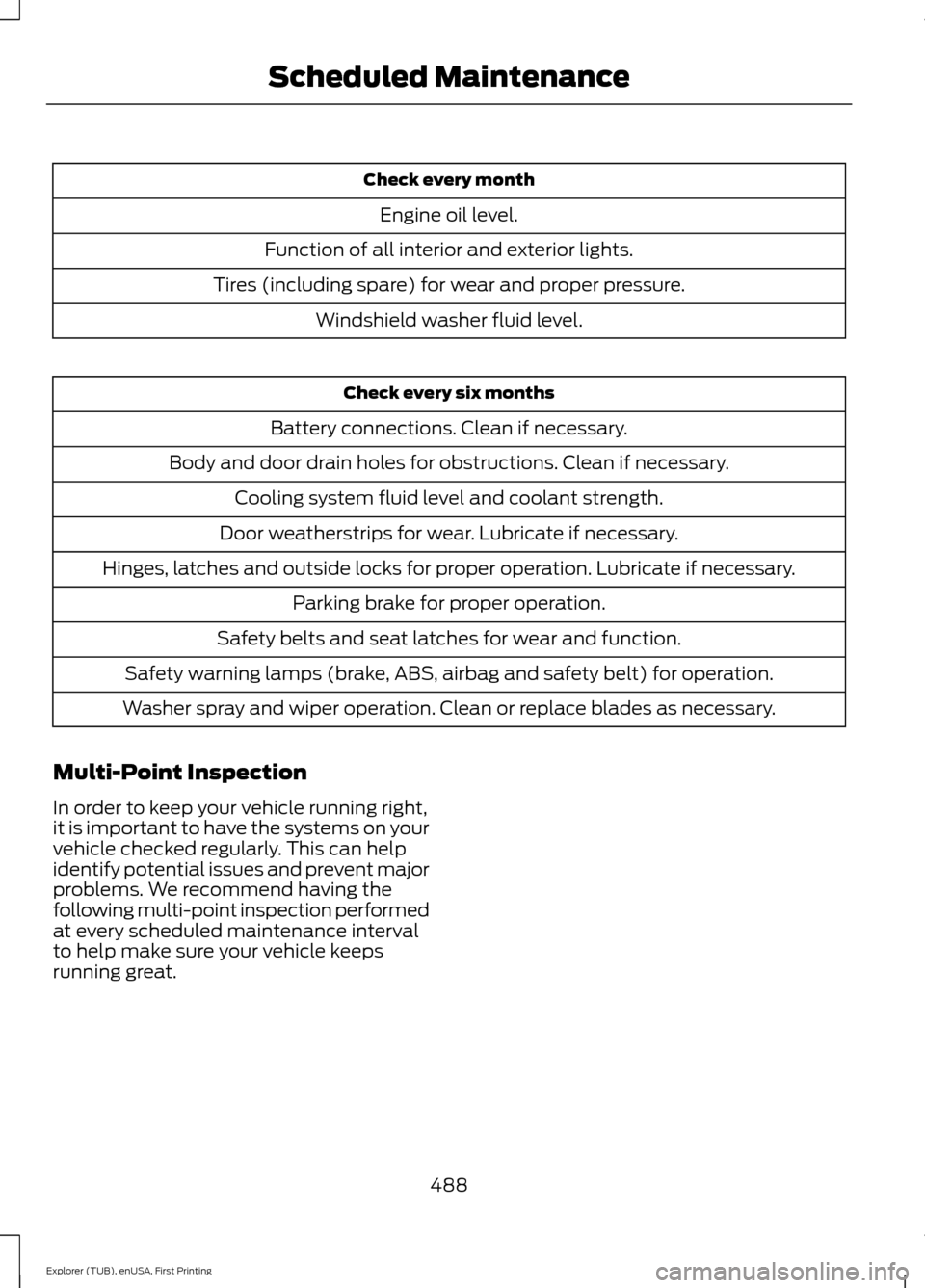
Check every month
Engine oil level.
Function of all interior and exterior lights.
Tires (including spare) for wear and proper pressure. Windshield washer fluid level. Check every six months
Battery connections. Clean if necessary.
Body and door drain holes for obstructions. Clean if necessary. Cooling system fluid level and coolant strength.
Door weatherstrips for wear. Lubricate if necessary.
Hinges, latches and outside locks for proper operation. Lubricate if necessary. Parking brake for proper operation.
Safety belts and seat latches for wear and function.
Safety warning lamps (brake, ABS, airbag and safety belt) for operation.
Washer spray and wiper operation. Clean or replace blades as necessary.
Multi-Point Inspection
In order to keep your vehicle running right,
it is important to have the systems on your
vehicle checked regularly. This can help
identify potential issues and prevent major
problems. We recommend having the
following multi-point inspection performed
at every scheduled maintenance interval
to help make sure your vehicle keeps
running great.
488
Explorer (TUB), enUSA, First Printing Scheduled Maintenance
Page 532 of 541
Cleaning the Interior...................................302
Cleaning the Windows and Wiper
Blades...........................................................302
Clearing All MyKeys.......................................56
Climate............................................................462 Climate Control Voice Commands.............465
Climate Control.............................................129
Climate Controlled Seats..........................155 Cooled Seats........................................................ 156
Coolant Check See: Engine Coolant Check............................ 282
Crash Sensors and Airbag Indicator.......46
Creating a MyKey
............................................55
Programming/Changing Configurable
Settings............................................................... 55
Cross Traffic Alert.........................................227 False Alerts........................................................... 229
Switching the System Off and On..............229
System Errors...................................................... 229
System Lights, Messages and Audible Alerts................................................................. 228
System Limitations........................................... 228
System Sensors.................................................. 228
Using the System............................................... 227
Cruise Control
..................................................74
Principle of Operation....................................... 213
Type 1........................................................................\
. 74
Type 2........................................................................\
74
Cruise control See: Using Cruise Control................................ 213
Customer Assistance................................260
D
Data Recording
..................................................9
Event Data Recording........................................... 9
Service Data Recording........................................ 9
Daytime Running Lamps
.............................82
Type 1 - Conventional
(Non-Configurable)....................................... 83
Type 2 - Configurable......................................... 83
Digital Radio
..................................................362
HD Radio Reception and Station
Troubleshooting............................................ 363
Direction Indicators
.......................................85
Driver Alert.....................................................220
PRINCIPLE OF OPERATION.......................... 220
USING DRIVER ALERT.................................... 220Driver and Passenger Airbags....................41
Children and Airbags............................................ 41
Proper Driver and Front Passenger Seating Adjustment......................................................... 41
Driving Aids
....................................................220
Driving Hints...................................................252
Driving Through Water...............................253
DRL See: Daytime Running Lamps......................... 82
E
Economical Driving
.....................................252
Emission Control System...........................177 On-Board Diagnostics (OBD-II).................... 178
Readiness for Inspection/Maintenance (I/M) Testing.................................................... 178
End User License Agreement
.................505
SYNC End User License Agreement
(EULA)............................................................. 505
Engine Block Heater....................................169 Using the Engine Block Heater...................... 170
Engine Coolant Check...............................282 Adding Engine Coolant.................................... 283
Checking the Engine Coolant........................ 282
Recycled Engine Coolant................................ 284
Severe Climates................................................. 284
What You Should Know About Fail-Safe Cooling............................................................. 284
Engine Immobilizer See: Passive Anti-Theft System..................... 70
Engine Oil Check...........................................281 Adding Engine Oil............................................... 281
Engine Oil Dipstick - 2.3L EcoBoost™..................................................281
Engine Oil Dipstick - 3.5L Duratec/3.5L Ecoboost™..................................................281
Engine Specifications - 2.3L EcoBoost™.................................................334
Drivebelt Routing............................................... 334
Engine Specifications - 3.5L Duratec.........................................................335
Drivebelt Routing............................................... 335
Engine Specifications - 3.5L Ecoboost™.................................................335
Drivebelt Routing............................................... 336
529
Explorer (TUB), enUSA, First Printing Index
Page 535 of 541
Installing Child Seats......................................17
Using Lap and Shoulder Belts.......................... 17
Using Lower Anchors and Tethers for CHildren (LATCH)............................................ 22
Using Tether Straps............................................. 24
Instrument Cluster
.........................................93
Instrument Lighting Dimmer.....................82
Interior Lamps
.................................................85
Battery Saver......................................................... 86
Dome Lamp........................................................... 85
Front Row Map Lamps...................................... 85
Second Row Dome and Courtesy Lamps................................................................. 86
Second Row Dome and Map Lamps...........86
Third Row Cargo Lamp...................................... 86
Interior Mirror...................................................90 Auto-Dimming Mirror......................................... 90
Introduction.........................................................7
J
Jump Starting the Vehicle.........................257 Connecting the Jumper Cables..................... 257
Jump Starting...................................................... 258
Preparing Your Vehicle..................................... 257
Removing the Jumper Cables....................... 258
K
Keyless Entry
....................................................67
SECURICODE™ Keyless Entry
Keypad................................................................. 67
Keyless Starting............................................165 Ignition Modes..................................................... 166
Keys and Remote Controls
........................48
Principle of Operation........................................ 48
L
Lane Keeping System
................................220
Switching the System On and Off................221
Lighting Control
..............................................80
Headlamp Flasher................................................ 81
High Beams............................................................ 80
Lighting
..............................................................80
General Information........................................... 80
Load Carriers See: Roof Racks and Load Carriers.............234 Load Carrying
................................................233
Load Limit.......................................................235 Special Loading Instructions for Owners of
Pick-up Trucks and Utility-type
Vehicles............................................................. 242
Vehicle Loading - with and without a Trailer................................................................. 235
Locking and Unlocking................................60 Activating Intelligent Access............................. 61
Autolock................................................................... 62
Autounlock ............................................................ 62
Battery Saver......................................................... 63
Enabling or Disabling Autolock and Autounlock........................................................ 62
Illuminated Entry.................................................. 63
Illuminated Exit..................................................... 63
Locking and Unlocking the Doors with the Key Blade........................................................... 60
Opening a Rear Door from Inside.................. 60
Power Door Locks................................................ 60
Remote Control.................................................... 60
Smart Unlocks for Integrated Keyhead Transmitter......................................................... 61
Smart Unlocks for Intelligent Access Keys....................................................................... 61
Locks..................................................................60
Luggage Covers
............................................234
Lug Nuts See: Changing a Road Wheel....................... 328
M
Maintenance..................................................275 General Information.......................................... 275
Manual Climate Control
.............................129
Manual Liftgate...............................................63 Closing the Liftgate............................................. 64
Opening the Liftgate........................................... 64
Manual Seats
.................................................143
Lumbar Adjustment.......................................... 144
Moving the Seat Backward and Forward............................................................. 143
Recline Adjustment........................................... 143
Media Hub
......................................................367
532
Explorer (TUB), enUSA, First Printing Index
Page 540 of 541
Using SYNC™ With Your Phone.............372
Accessing Features through the Phone
Menu................................................................... 377
Accessing Your Phone Settings................... 380
Bluetooth Devices.............................................. 381
Making Calls......................................................... 375
Pairing a Phone for the First Time...............372
Pairing Subsequent Phones........................... 373
Phone Options during an Active Call.........376
Phone Voice Commands................................ 374
Receiving Calls.................................................... 375
System Settings................................................. 382
Text Messaging................................................... 378
Using Terrain Response.............................195
Using Traction Control................................192
Switching the System Off............................... 192
System Indicator Lights and Messages.......................................................... 192
Using a Switch..................................................... 192
Using the Information Display Controls............................................................. 192
Using Voice Recognition...........................370 Initiating a Voice Session................................ 370
System Interaction and Feedback................371
Utilizing the Mediation/Arbitration Program (Canada Only)........................262
V
Vehicle Care
..................................................300
General Information........................................ 300
Vehicle Certification Label.......................340
Vehicle Identification Number
................339
Vehicle Storage............................................304
Battery................................................................... 305
Body....................................................................... 305
Brakes.................................................................... 305
Cooling system................................................... 305
Engine.................................................................... 305
Fuel system......................................................... 305
General.................................................................. 305
Miscellaneous.................................................... 306
Removing Vehicle From Storage.................306
Tires........................................................................\
305
Ventilation See: Climate Control......................................... 129
VIN See: Vehicle Identification Number............339 Voice Control
....................................................74
W
Warning Lamps and Indicators................96 Adaptive Cruise Control.................................... 96
Anti-Lock Braking System................................. 97
Automatic High Beam Control........................ 97
Battery...................................................................... 97
Blind Spot Monitor............................................... 97
Brake System......................................................... 97
Cruise Control........................................................ 97
Direction Indicator................................................ 97
Door Ajar.................................................................. 97
Engine Coolant Temperature........................... 97
Engine Oil................................................................ 98
Fasten Safety Belt............................................... 98
Front Airbag........................................................... 98
Front Fog Lamps.................................................. 98
Heads Up Display................................................ 98
High Beam.............................................................. 98
Hood Ajar................................................................ 98
Lane Keeping Aid................................................. 98
Liftgate Ajar............................................................ 98
Low Fuel Level...................................................... 98
Low Tire Pressure Warning.............................. 98
Low Washer Fluid................................................ 99
Parking Lamps...................................................... 99
Powertrain Fault................................................... 99
Service Engine Soon........................................... 99
Stability Control................................................... 99
Stability Control Off............................................ 99
Transmission Tow/Haul.................................... 99
Washer Fluid Check
....................................288
Washers See: Cleaning the Exterior............................. 300
See: Wipers and Washers.................................. 77
Waxing
..............................................................301
Wheel Nuts See: Changing a Road Wheel....................... 328
Wheels and Tires.........................................307 General Information......................................... 307
Technical Specifications................................. 332
Windows and Mirrors
....................................87
Windshield Washers.....................................78
Front Camera Washer........................................ 78
Windshield Wipers
.........................................77
Speed Dependent Wipers................................. 77
537
Explorer (TUB), enUSA, First Printing Index