Wheels FORD EXPLORER 2016 5.G Workshop Manual
[x] Cancel search | Manufacturer: FORD, Model Year: 2016, Model line: EXPLORER, Model: FORD EXPLORER 2016 5.GPages: 541, PDF Size: 6.51 MB
Page 334 of 541
7.
Remove the wing nut bolt that secures
the jack kit by turning it
counterclockwise.
8. Remove the jack kit, which includes the
jack, lug wrench, L-shaped bolt and
tow recovery hook.
9. Turn the lead screw (where the lug wrench attaches) of the jack by hand
to release the lug wrench from the jack.
Press the button on the wrench to
extend the handle. Fold down the
wrench socket.
10. Loosen each wheel lug nut one-half turn counterclockwise, but do not
remove them until the wheel is raised
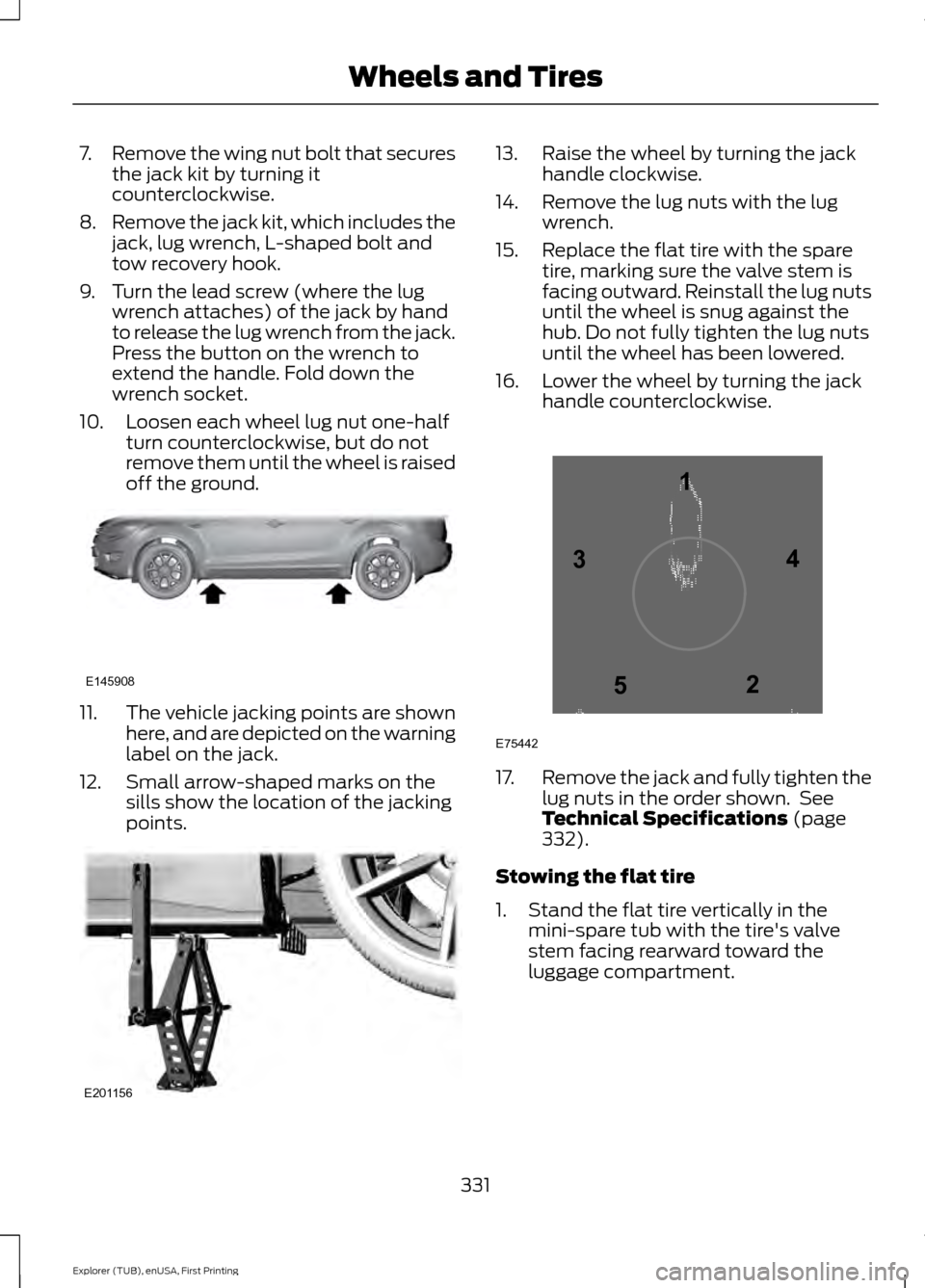
off the ground. 11.
The vehicle jacking points are shown
here, and are depicted on the warning
label on the jack.
12. Small arrow-shaped marks on the sills show the location of the jacking
points. 13. Raise the wheel by turning the jack
handle clockwise.
14. Remove the lug nuts with the lug wrench.
15. Replace the flat tire with the spare tire, marking sure the valve stem is
facing outward. Reinstall the lug nuts
until the wheel is snug against the
hub. Do not fully tighten the lug nuts
until the wheel has been lowered.
16. Lower the wheel by turning the jack handle counterclockwise. 17.
Remove the jack and fully tighten the
lug nuts in the order shown. See
Technical Specifications (page
332).
Stowing the flat tire
1. Stand the flat tire vertically in the mini-spare tub with the tire's valve
stem facing rearward toward the
luggage compartment.
331
Explorer (TUB), enUSA, First Printing Wheels and TiresE145908 E201156 12
3
4
5
E75442
Page 335 of 541
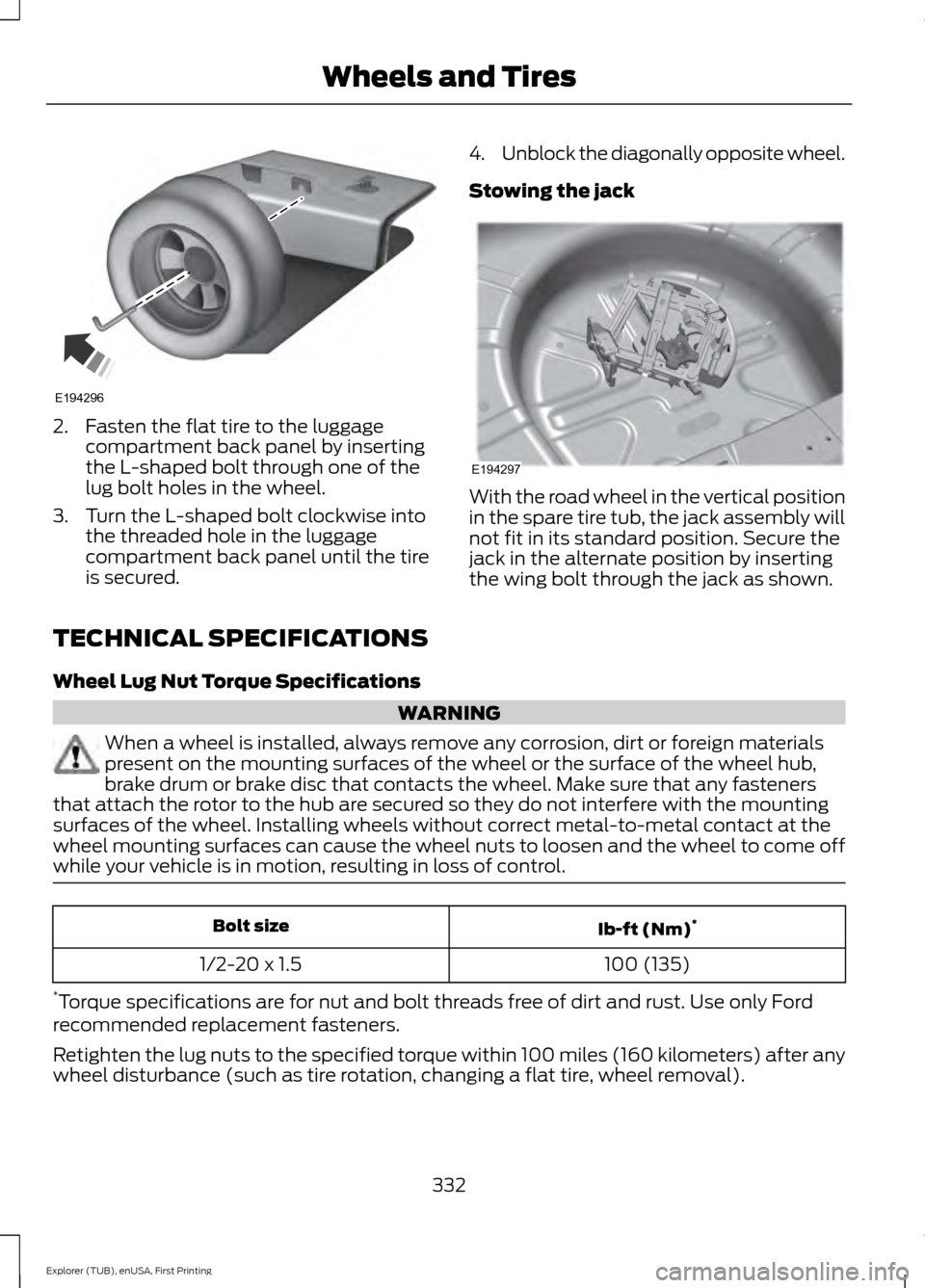
2. Fasten the flat tire to the luggage
compartment back panel by inserting
the L-shaped bolt through one of the
lug bolt holes in the wheel.
3. Turn the L-shaped bolt clockwise into the threaded hole in the luggage
compartment back panel until the tire
is secured. 4.
Unblock the diagonally opposite wheel.
Stowing the jack With the road wheel in the vertical position
in the spare tire tub, the jack assembly will
not fit in its standard position. Secure the
jack in the alternate position by inserting
the wing bolt through the jack as shown.
TECHNICAL SPECIFICATIONS
Wheel Lug Nut Torque Specifications WARNING
When a wheel is installed, always remove any corrosion, dirt or foreign materials
present on the mounting surfaces of the wheel or the surface of the wheel hub,
brake drum or brake disc that contacts the wheel. Make sure that any fasteners
that attach the rotor to the hub are secured so they do not interfere with the mounting
surfaces of the wheel. Installing wheels without correct metal-to-metal contact at the
wheel mounting surfaces can cause the wheel nuts to loosen and the wheel to come off
while your vehicle is in motion, resulting in loss of control. Ib-ft (Nm)
*
Bolt size
100 (135)
1/2-20 x 1.5
* Torque specifications are for nut and bolt threads free of dirt and rust. Use only Ford
recommended replacement fasteners.
Retighten the lug nuts to the specified torque within 100 miles (160 kilometers) after any
wheel disturbance (such as tire rotation, changing a flat tire, wheel removal).
332
Explorer (TUB), enUSA, First Printing Wheels and TiresE194296 E194297
Page 336 of 541
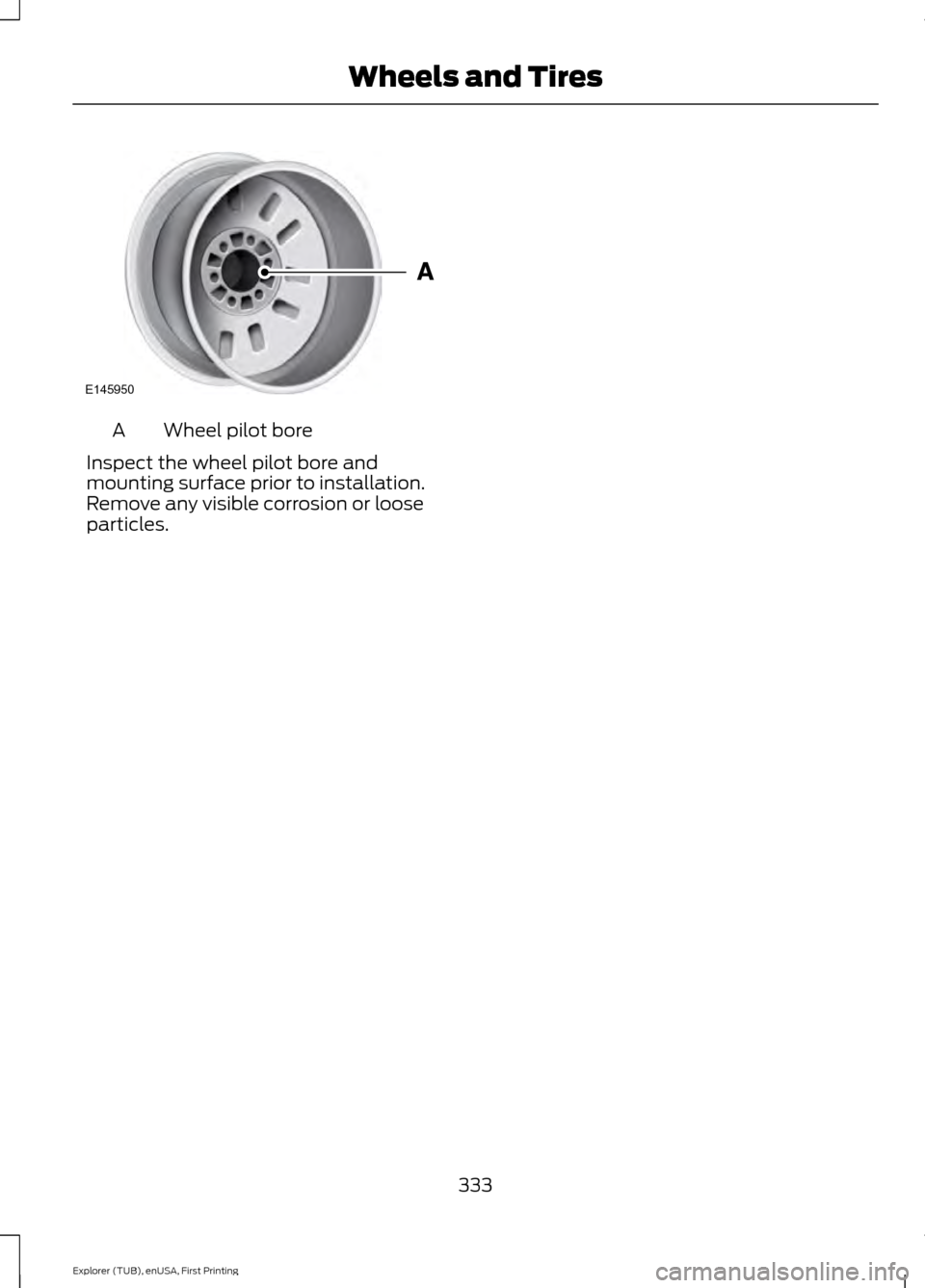
Wheel pilot bore
A
Inspect the wheel pilot bore and
mounting surface prior to installation.
Remove any visible corrosion or loose
particles.
333
Explorer (TUB), enUSA, First Printing Wheels and TiresE145950
Page 494 of 541
At every oil change interval as indicated by the information display
*
Inspect the tires, tire wear and measure the tread depth.
Inspect the wheels and related components for abnormal noise, wear, looseness or
drag.
* Do not exceed one year or 10000 miles (16000 kilometers) between service intervals.
** Reset the Intelligent Oil-Life Monitor after engine oil and filter changes. See Engine
Oil Check (page 281). Other maintenance items
1
Replace cabin air filter.
Every 20000 miles (32000
km)
Replace engine air filter.
Every 30000 miles (48000
km)
Change engine coolant.2
At 100000 miles (160000
km)
Replace spark plugs.
Every 100000 miles
(160000 km) Inspect accessory drive belt(s). 3
Change automatic transmission fluid.
Every 150000 miles
(240000 km)
Replace accessory drive belt(s). 4
1 Perform these maintenance items within 3000 miles (4800 kilometers) of the last
engine oil and filter change. Do not exceed the designated distance for the interval.
2 Initial replacement at six years or 100000 miles (160000 kilometers), then every three
years or 50000 miles (80000 kilometers).
3 After initial inspection, inspect every other oil change until replaced.
4 If not replaced within the last 100000 miles (160000 kilometers).
491
Explorer (TUB), enUSA, First Printing Scheduled Maintenance
Page 496 of 541
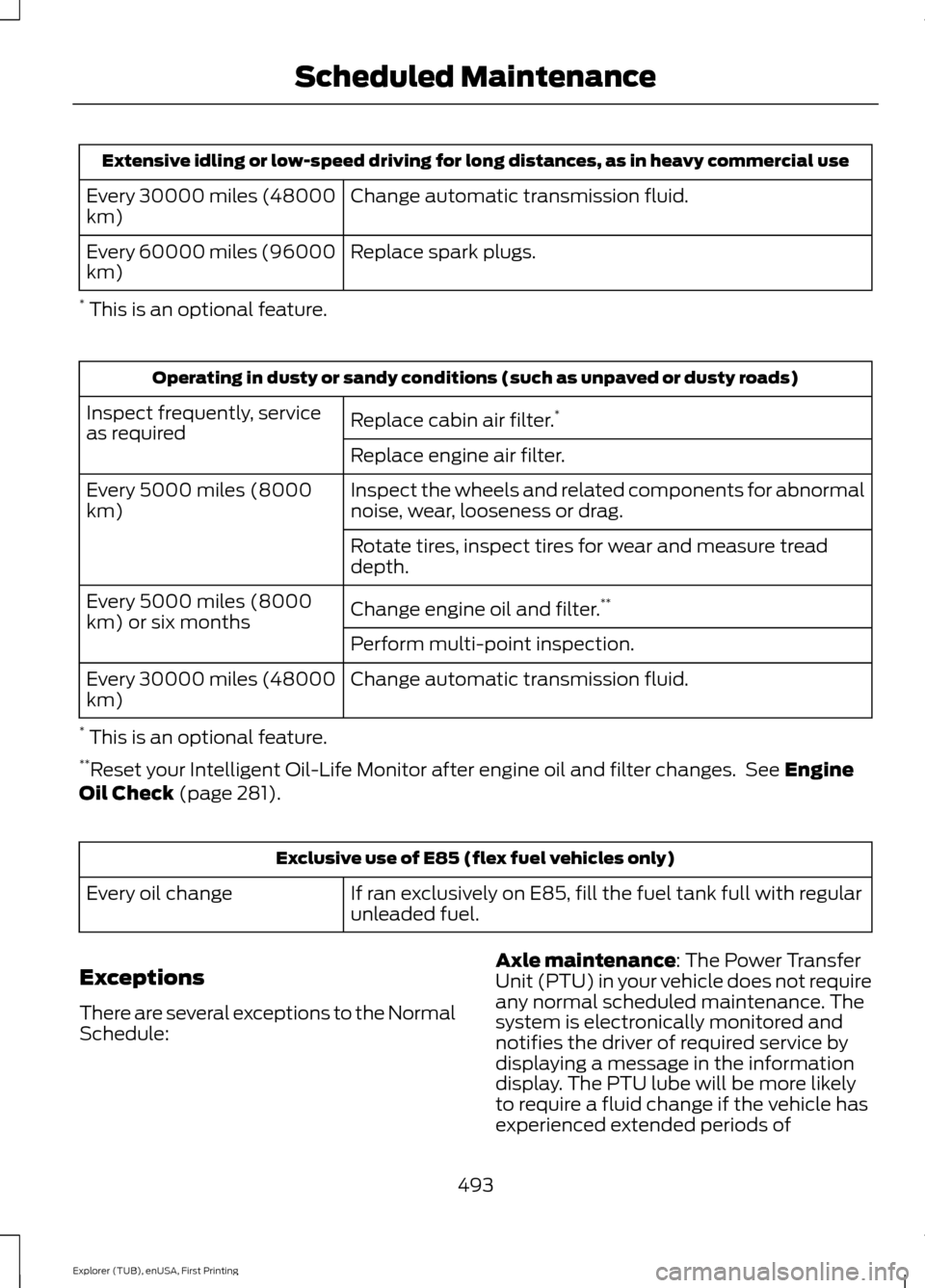
Extensive idling or low-speed driving for long distances, as in heavy commercial use
Change automatic transmission fluid.
Every 30000 miles (48000
km)
Replace spark plugs.
Every 60000 miles (96000
km)
* This is an optional feature. Operating in dusty or sandy conditions (such as unpaved or dusty roads)
Replace cabin air filter. *
Inspect frequently, service
as required
Replace engine air filter.
Inspect the wheels and related components for abnormal
noise, wear, looseness or drag.
Every 5000 miles (8000
km)
Rotate tires, inspect tires for wear and measure tread
depth.
Change engine oil and filter.**
Every 5000 miles (8000
km) or six months
Perform multi-point inspection.
Change automatic transmission fluid.
Every 30000 miles (48000
km)
* This is an optional feature.
** Reset your Intelligent Oil-Life Monitor after engine oil and filter changes. See Engine
Oil Check (page 281). Exclusive use of E85 (flex fuel vehicles only)
If ran exclusively on E85, fill the fuel tank full with regular
unleaded fuel.
Every oil change
Exceptions
There are several exceptions to the Normal
Schedule: Axle maintenance
: The Power Transfer
Unit (PTU) in your vehicle does not require
any normal scheduled maintenance. The
system is electronically monitored and
notifies the driver of required service by
displaying a message in the information
display. The PTU lube will be more likely
to require a fluid change if the vehicle has
experienced extended periods of
493
Explorer (TUB), enUSA, First Printing Scheduled Maintenance
Page 531 of 541
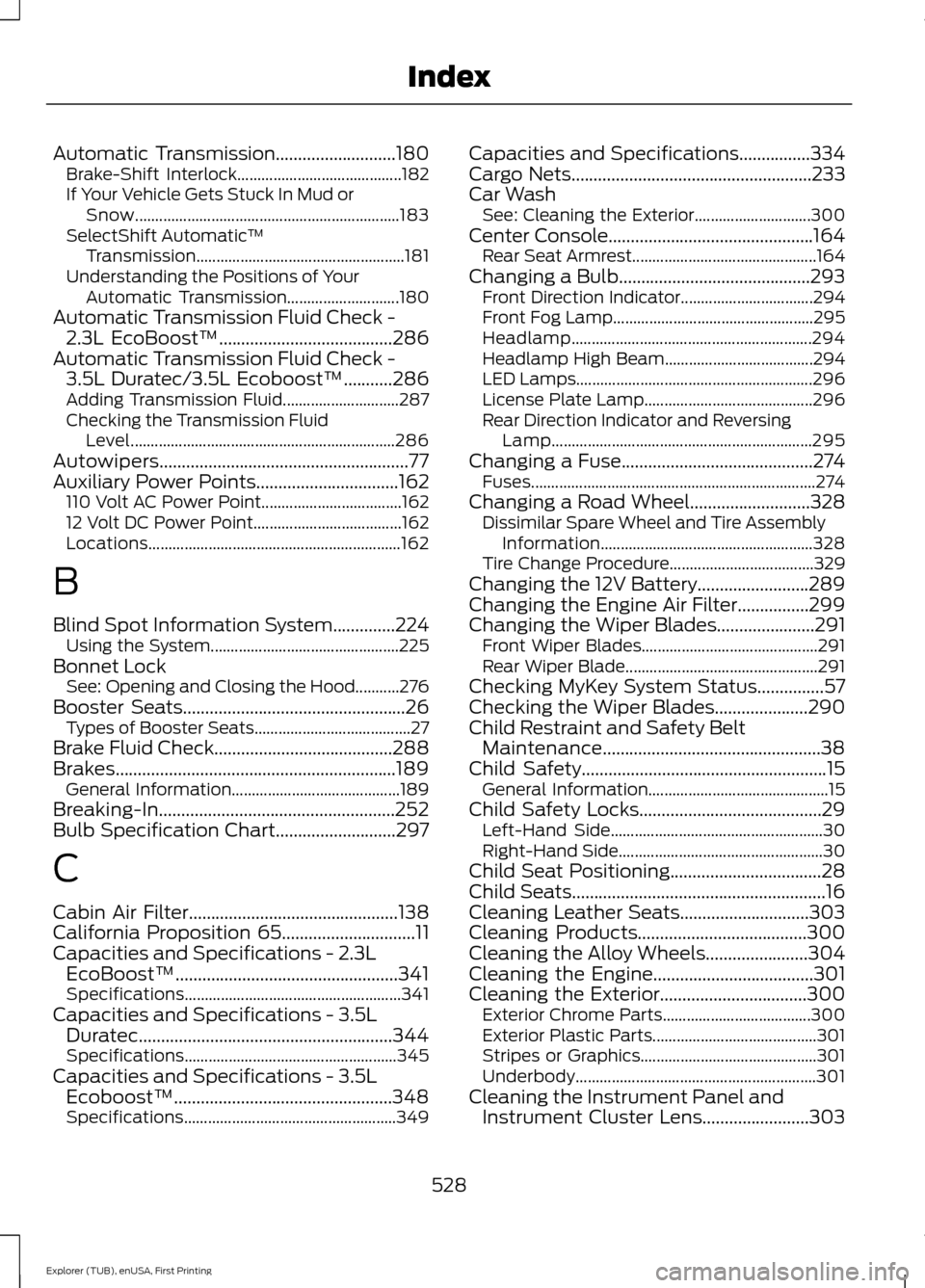
Automatic Transmission...........................180
Brake-Shift Interlock......................................... 182
If Your Vehicle Gets Stuck In Mud or Snow.................................................................. 183
SelectShift Automatic ™
Transmission.................................................... 181
Understanding the Positions of Your Automatic Transmission............................ 180
Automatic Transmission Fluid Check - 2.3L EcoBoost™.......................................286
Automatic Transmission Fluid Check - 3.5L Duratec/3.5L Ecoboost™...........286
Adding Transmission Fluid............................. 287
Checking the Transmission Fluid Level.................................................................. 286
Autowipers........................................................77
Auxiliary Power Points................................162 110 Volt AC Power Point................................... 162
12 Volt DC Power Point..................................... 162
Locations............................................................... 162
B
Blind Spot Information System..............224 Using the System............................................... 225
Bonnet Lock See: Opening and Closing the Hood...........276
Booster Seats..................................................26 Types of Booster Seats....................................... 27
Brake Fluid Check........................................288
Brakes...............................................................189 General Information.......................................... 189
Breaking-In.....................................................252
Bulb Specification Chart...........................297
C
Cabin Air Filter
...............................................138
California Proposition 65..............................11
Capacities and Specifications - 2.3L EcoBoost™..................................................341
Specifications...................................................... 341
Capacities and Specifications - 3.5L Duratec.........................................................344
Specifications..................................................... 345
Capacities and Specifications - 3.5L Ecoboost™.................................................348
Specifications..................................................... 349Capacities and Specifications
................334
Cargo Nets......................................................233
Car Wash See: Cleaning the Exterior............................. 300
Center Console..............................................164 Rear Seat Armrest.............................................. 164
Changing a Bulb...........................................293 Front Direction Indicator................................. 294
Front Fog Lamp.................................................. 295
Headlamp............................................................ 294
Headlamp High Beam..................................... 294
LED Lamps........................................................... 296
License Plate Lamp.......................................... 296
Rear Direction Indicator and Reversing Lamp
................................................................. 295
Changing a Fuse...........................................274
Fuses....................................................................... 274
Changing a Road Wheel
...........................328
Dissimilar Spare Wheel and Tire Assembly
Information..................................................... 328
Tire Change Procedure.................................... 329
Changing the 12V Battery.........................289
Changing the Engine Air Filter................299
Changing the Wiper Blades
......................291
Front Wiper Blades............................................ 291
Rear Wiper Blade................................................ 291
Checking MyKey System Status
...............57
Checking the Wiper Blades.....................290
Child Restraint and Safety Belt Maintenance.................................................38
Child Safety
.......................................................15
General Information............................................. 15
Child Safety Locks
.........................................29
Left-Hand Side..................................................... 30
Right-Hand Side................................................... 30
Child Seat Positioning
..................................28
Child Seats.........................................................16
Cleaning Leather Seats.............................303
Cleaning Products
......................................300
Cleaning the Alloy Wheels.......................304
Cleaning the Engine
....................................301
Cleaning the Exterior.................................300
Exterior Chrome Parts..................................... 300
Exterior Plastic Parts......................................... 301
Stripes or Graphics............................................ 301
Underbody............................................................ 301
Cleaning the Instrument Panel and Instrument Cluster Lens........................303
528
Explorer (TUB), enUSA, First Printing Index
Page 539 of 541
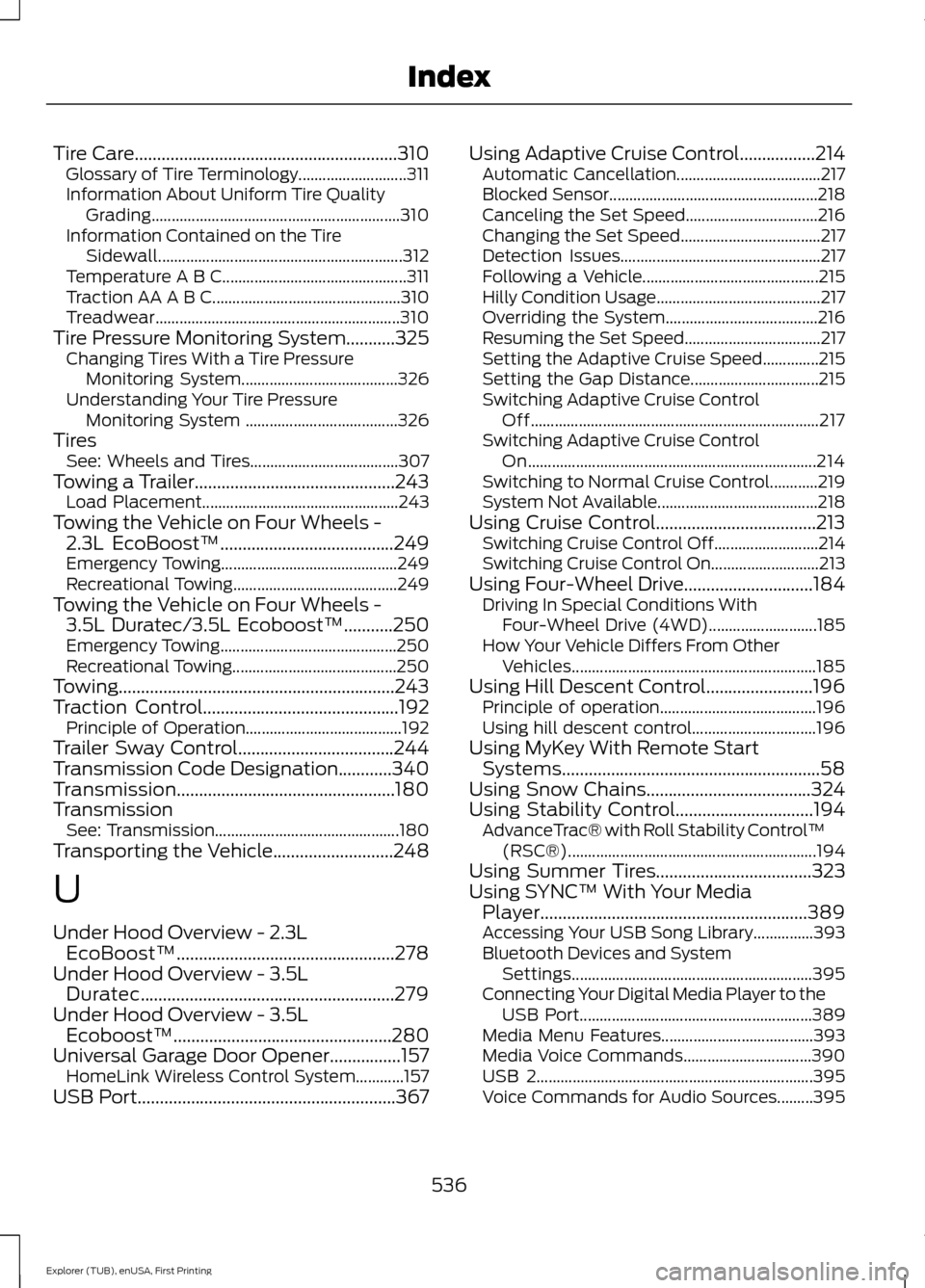
Tire Care...........................................................310
Glossary of Tire Terminology........................... 311
Information About Uniform Tire Quality Grading.............................................................. 310
Information Contained on the Tire Sidewall............................................................. 312
Temperature A B C.............................................. 311
Traction AA A B C............................................... 310
Treadwear............................................................. 310
Tire Pressure Monitoring System...........325 Changing Tires With a Tire Pressure
Monitoring System....................................... 326
Understanding Your Tire Pressure Monitoring System ...................................... 326
Tires See: Wheels and Tires..................................... 307
Towing a Trailer.............................................243 Load Placement................................................. 243
Towing the Vehicle on Four Wheels - 2.3L EcoBoost™
.......................................249
Emergency Towing............................................ 249
Recreational Towing......................................... 249
Towing the Vehicle on Four Wheels - 3.5L Duratec/3.5L Ecoboost™
...........250
Emergency Towing............................................ 250
Recreational Towing......................................... 250
Towing..............................................................243
Traction Control............................................192 Principle of Operation....................................... 192
Trailer Sway Control...................................244
Transmission Code Designation............340
Transmission.................................................180
Transmission See: Transmission.............................................. 180
Transporting the Vehicle
...........................248
U
Under Hood Overview - 2.3L EcoBoost™.................................................278
Under Hood Overview - 3.5L Duratec.........................................................279
Under Hood Overview - 3.5L Ecoboost™.................................................280
Universal Garage Door Opener................157 HomeLink Wireless Control System............157
USB Port..........................................................367 Using Adaptive Cruise Control.................214
Automatic Cancellation.................................... 217
Blocked Sensor.................................................... 218
Canceling the Set Speed................................. 216
Changing the Set Speed................................... 217
Detection Issues.................................................. 217
Following a Vehicle............................................ 215
Hilly Condition Usage......................................... 217
Overriding the System...................................... 216
Resuming the Set Speed.................................. 217
Setting the Adaptive Cruise Speed..............215
Setting the Gap Distance................................ 215
Switching Adaptive Cruise Control Off........................................................................\
217
Switching Adaptive Cruise Control On........................................................................\
214
Switching to Normal Cruise Control............219
System Not Available........................................ 218
Using Cruise Control....................................213 Switching Cruise Control Off.......................... 214
Switching Cruise Control On........................... 213
Using Four-Wheel Drive.............................184 Driving In Special Conditions With
Four-Wheel Drive (4WD)........................... 185
How Your Vehicle Differs From Other Vehicles............................................................. 185
Using Hill Descent Control........................196 Principle of operation....................................... 196
Using hill descent control............................... 196
Using MyKey With Remote Start Systems..........................................................58
Using Snow Chains.....................................324
Using Stability Control...............................194 AdvanceTrac® with Roll Stability Control ™
(RSC®).............................................................. 194
Using Summer Tires...................................323
Using SYNC™ With Your Media Player............................................................389
Accessing Your USB Song Library...............393
Bluetooth Devices and System Settings............................................................ 395
Connecting Your Digital Media Player to the USB Port.......................................................... 389
Media Menu Features...................................... 393
Media Voice Commands................................ 390
USB 2..................................................................... 395
Voice Commands for Audio Sources.........395
536
Explorer (TUB), enUSA, First Printing Index
Page 540 of 541
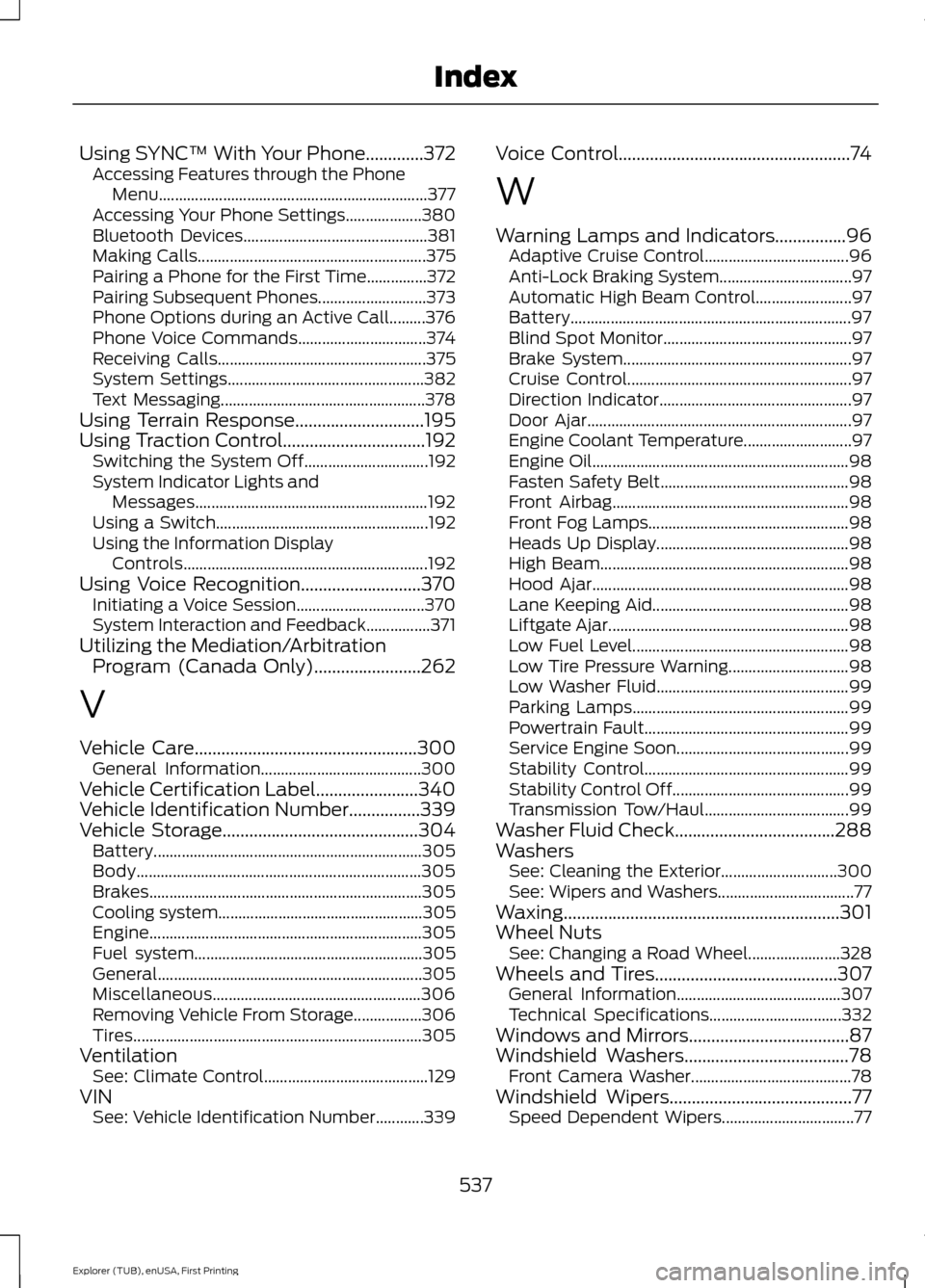
Using SYNC™ With Your Phone.............372
Accessing Features through the Phone
Menu................................................................... 377
Accessing Your Phone Settings................... 380
Bluetooth Devices.............................................. 381
Making Calls......................................................... 375
Pairing a Phone for the First Time...............372
Pairing Subsequent Phones........................... 373
Phone Options during an Active Call.........376
Phone Voice Commands................................ 374
Receiving Calls.................................................... 375
System Settings................................................. 382
Text Messaging................................................... 378
Using Terrain Response.............................195
Using Traction Control................................192
Switching the System Off............................... 192
System Indicator Lights and Messages.......................................................... 192
Using a Switch..................................................... 192
Using the Information Display Controls............................................................. 192
Using Voice Recognition...........................370 Initiating a Voice Session................................ 370
System Interaction and Feedback................371
Utilizing the Mediation/Arbitration Program (Canada Only)........................262
V
Vehicle Care
..................................................300
General Information........................................ 300
Vehicle Certification Label.......................340
Vehicle Identification Number
................339
Vehicle Storage............................................304
Battery................................................................... 305
Body....................................................................... 305
Brakes.................................................................... 305
Cooling system................................................... 305
Engine.................................................................... 305
Fuel system......................................................... 305
General.................................................................. 305
Miscellaneous.................................................... 306
Removing Vehicle From Storage.................306
Tires........................................................................\
305
Ventilation See: Climate Control......................................... 129
VIN See: Vehicle Identification Number............339 Voice Control
....................................................74
W
Warning Lamps and Indicators................96 Adaptive Cruise Control.................................... 96
Anti-Lock Braking System................................. 97
Automatic High Beam Control........................ 97
Battery...................................................................... 97
Blind Spot Monitor............................................... 97
Brake System......................................................... 97
Cruise Control........................................................ 97
Direction Indicator................................................ 97
Door Ajar.................................................................. 97
Engine Coolant Temperature........................... 97
Engine Oil................................................................ 98
Fasten Safety Belt............................................... 98
Front Airbag........................................................... 98
Front Fog Lamps.................................................. 98
Heads Up Display................................................ 98
High Beam.............................................................. 98
Hood Ajar................................................................ 98
Lane Keeping Aid................................................. 98
Liftgate Ajar............................................................ 98
Low Fuel Level...................................................... 98
Low Tire Pressure Warning.............................. 98
Low Washer Fluid................................................ 99
Parking Lamps...................................................... 99
Powertrain Fault................................................... 99
Service Engine Soon........................................... 99
Stability Control................................................... 99
Stability Control Off............................................ 99
Transmission Tow/Haul.................................... 99
Washer Fluid Check
....................................288
Washers See: Cleaning the Exterior............................. 300
See: Wipers and Washers.................................. 77
Waxing
..............................................................301
Wheel Nuts See: Changing a Road Wheel....................... 328
Wheels and Tires.........................................307 General Information......................................... 307
Technical Specifications................................. 332
Windows and Mirrors
....................................87
Windshield Washers.....................................78
Front Camera Washer........................................ 78
Windshield Wipers
.........................................77
Speed Dependent Wipers................................. 77
537
Explorer (TUB), enUSA, First Printing Index