tow FORD EXPLORER 2017 5.G Owner's Manual
[x] Cancel search | Manufacturer: FORD, Model Year: 2017, Model line: EXPLORER, Model: FORD EXPLORER 2017 5.GPages: 541, PDF Size: 6.81 MB
Page 97 of 541
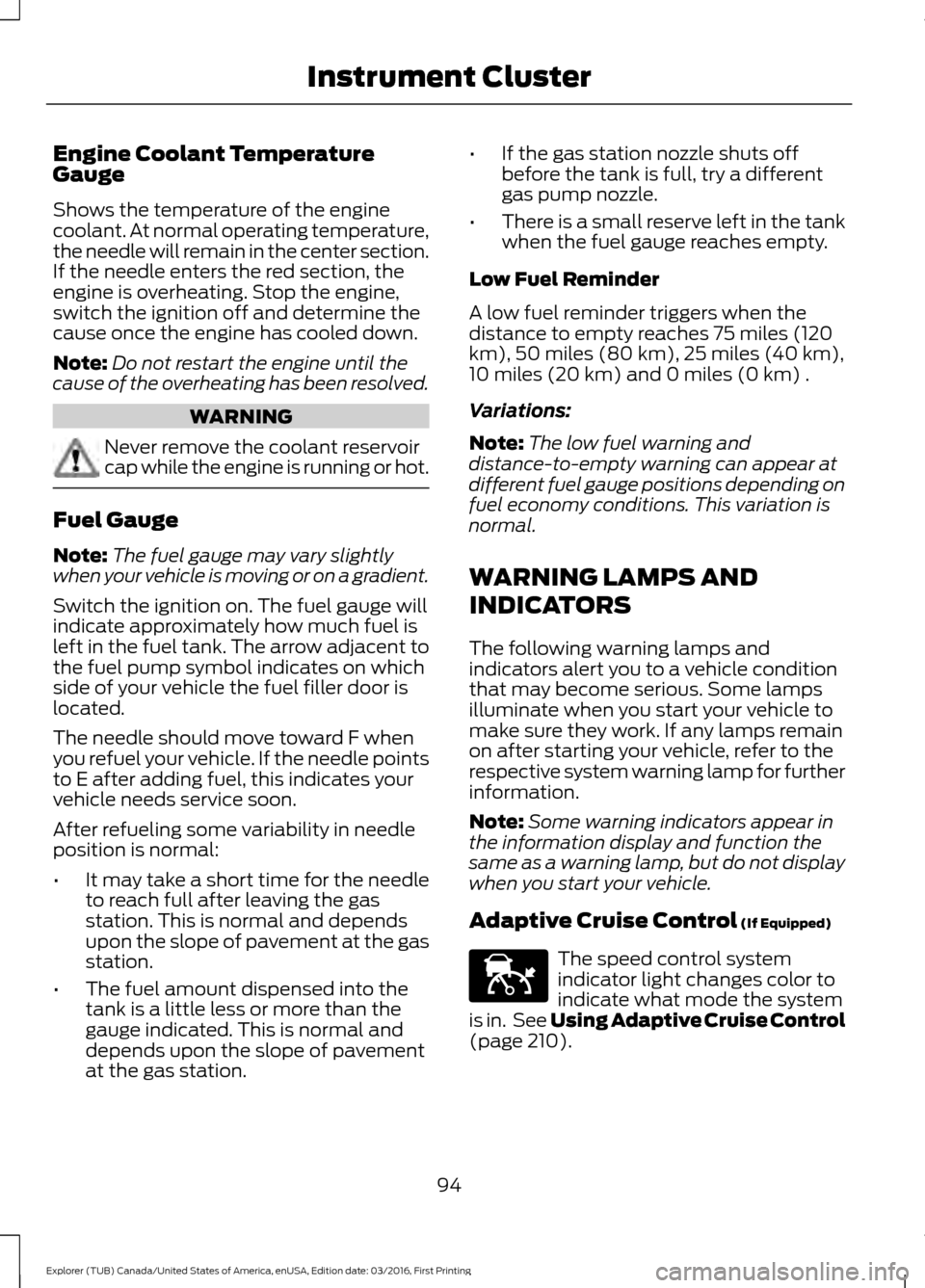
Engine Coolant Temperature
Gauge
Shows the temperature of the engine
coolant. At normal operating temperature,
the needle will remain in the center section.
If the needle enters the red section, the
engine is overheating. Stop the engine,
switch the ignition off and determine the
cause once the engine has cooled down.
Note:
Do not restart the engine until the
cause of the overheating has been resolved. WARNING
Never remove the coolant reservoir
cap while the engine is running or hot.
Fuel Gauge
Note:
The fuel gauge may vary slightly
when your vehicle is moving or on a gradient.
Switch the ignition on. The fuel gauge will
indicate approximately how much fuel is
left in the fuel tank. The arrow adjacent to
the fuel pump symbol indicates on which
side of your vehicle the fuel filler door is
located.
The needle should move toward F when
you refuel your vehicle. If the needle points
to E after adding fuel, this indicates your
vehicle needs service soon.
After refueling some variability in needle
position is normal:
• It may take a short time for the needle
to reach full after leaving the gas
station. This is normal and depends
upon the slope of pavement at the gas
station.
• The fuel amount dispensed into the
tank is a little less or more than the
gauge indicated. This is normal and
depends upon the slope of pavement
at the gas station. •
If the gas station nozzle shuts off
before the tank is full, try a different
gas pump nozzle.
• There is a small reserve left in the tank
when the fuel gauge reaches empty.
Low Fuel Reminder
A low fuel reminder triggers when the
distance to empty reaches 75 miles (120
km), 50 miles (80 km), 25 miles (40 km),
10 miles (20 km) and 0 miles (0 km) .
Variations:
Note: The low fuel warning and
distance-to-empty warning can appear at
different fuel gauge positions depending on
fuel economy conditions. This variation is
normal.
WARNING LAMPS AND
INDICATORS
The following warning lamps and
indicators alert you to a vehicle condition
that may become serious. Some lamps
illuminate when you start your vehicle to
make sure they work. If any lamps remain
on after starting your vehicle, refer to the
respective system warning lamp for further
information.
Note: Some warning indicators appear in
the information display and function the
same as a warning lamp, but do not display
when you start your vehicle.
Adaptive Cruise Control (If Equipped) The speed control system
indicator light changes color to
indicate what mode the system
is in. See Using Adaptive Cruise Control
(page
210).
94
Explorer (TUB) Canada/United States of America, enUSA, Edition date: 03/2016, First Printing Instrument ClusterE144524
Page 100 of 541
Low Washer Fluid
It illuminates when the
windshield washer fluid is low.
Parking Lamps It illuminates when you switch
the parking lamps on.
Powertrain Fault Illuminates when the system
detects a powertrain or an 4WD
fault. Contact an authorized
dealer as soon as possible.
Service Engine Soon If the service engine soon
indicator light stays illuminated
after you start the engine, it
indicates that the On Board Diagnostics
system (OBD) has detected a malfunction
of the vehicle emissions control system.
Refer to On board diagnostics (OBD) in
the Fuel and Refueling chapter for more
information about having your vehicle
serviced. See Emission Control System
(page 175).
If the light is blinking, engine misfire is
occurring which could damage your
catalytic converter. Drive in a moderate
fashion (avoid heavy acceleration and
deceleration) and have your vehicle
serviced immediately. WARNING
Under engine misfire conditions,
excessive exhaust temperatures
could damage the catalytic
converter, the fuel system, interior floor
coverings or other vehicle components,
possibly causing a fire. Have an authorized
dealer service your vehicle immediately. The service engine soon indicator light
illuminates when you first switch on the
ignition before engine start to check the
bulb and to indicate whether the vehicle
is ready for Inspection/Maintenance (I/M)
testing.
Normally, the service engine soon light
stays on until you crank the engine, then
turns itself off if no malfunctions are
present. However, if after 15 seconds the
service engine soon light blinks eight times,
it means that the vehicle is not ready for
I/M testing. See
Emission Control
System (page 175).
Stability Control It flashes when the system is
active. If it remains illuminated
or does not illuminate when you
switch the ignition on, this indicates a
malfunction. During a malfunction the
system switches off. Have the system
checked by an authorized dealer
immediately. See
Using Stability
Control (page 191).
Stability Control Off It illuminates when you switch
the system off. It goes out when
you switch the system back on
or when you switch the ignition off. See
Using Stability Control
(page 191).
Transmission Tow/Haul
(If Equipped) Illuminates when you activate
the tow/haul feature. If the light
flashes steadily, have the system
serviced immediately. Damage to the
transmission could occur. See
Automatic
Transmission (page 178).
97
Explorer (TUB) Canada/United States of America, enUSA, Edition date: 03/2016, First Printing Instrument ClusterE132353 E138639 E130458 E161509
Page 105 of 541
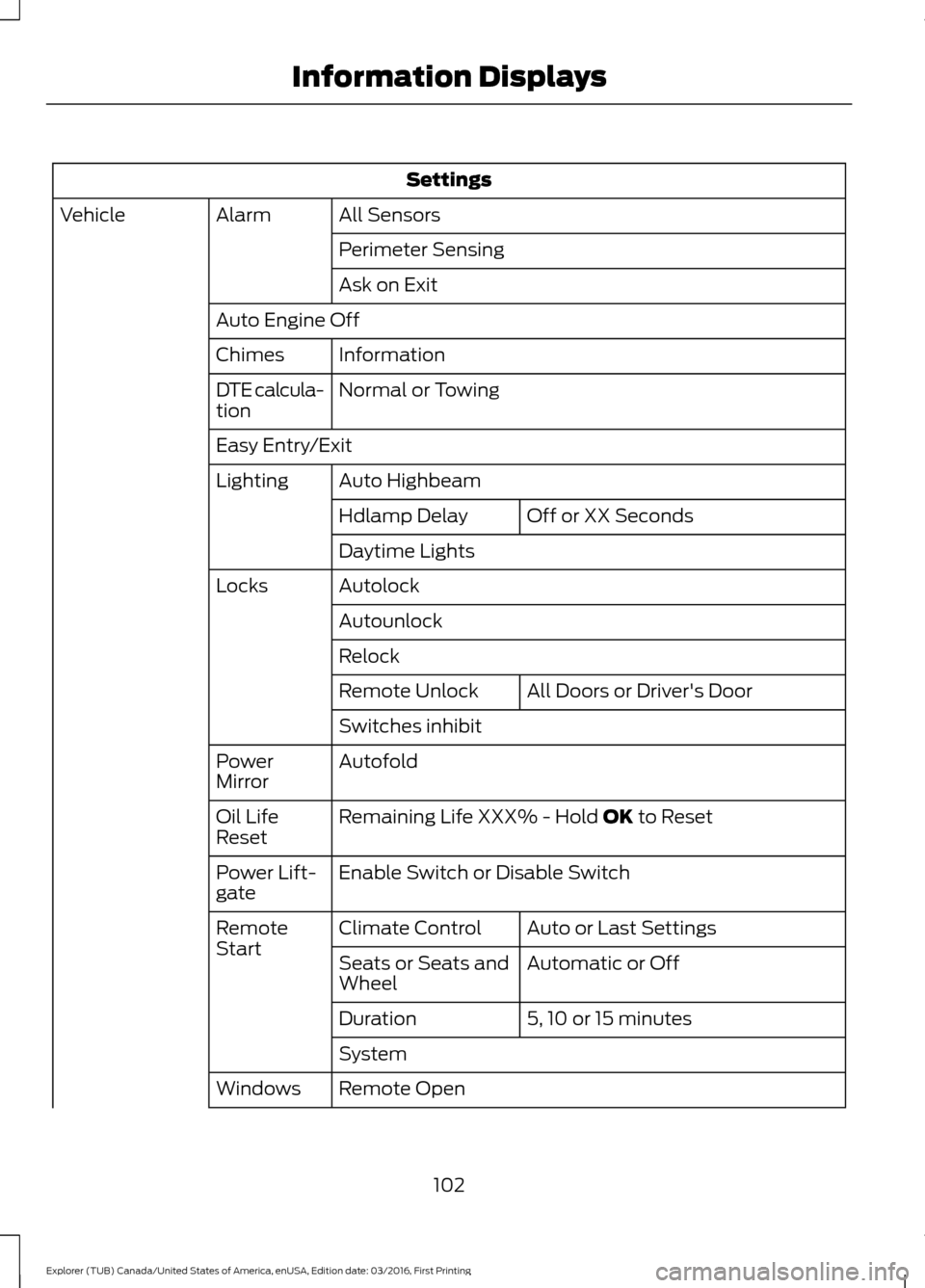
Settings
All Sensors
Alarm
Vehicle
Perimeter Sensing
Ask on Exit
Auto Engine Off Information
Chimes
Normal or Towing
DTE calcula-
tion
Easy Entry/Exit
Auto Highbeam
Lighting
Off or XX Seconds
Hdlamp Delay
Daytime Lights
Autolock
Locks
Autounlock
Relock All Doors
or Driver's Door
Remote Unlock
Switches inhibit
Autofold
Power
Mirror
Remaining Life XXX% - Hold
OK to Reset
Oil Life
Reset
Enable Switch
or Disable Switch
Power Lift-
gate
Auto or Last Settings
Climate Control
Remote
Start
Automatic or Off
Seats or Seats and
Wheel
5, 10 or 15 minutes
Duration
System
Remote Open
Windows
102
Explorer (TUB) Canada/United States of America, enUSA, Edition date: 03/2016, First Printing Information Displays
Page 110 of 541
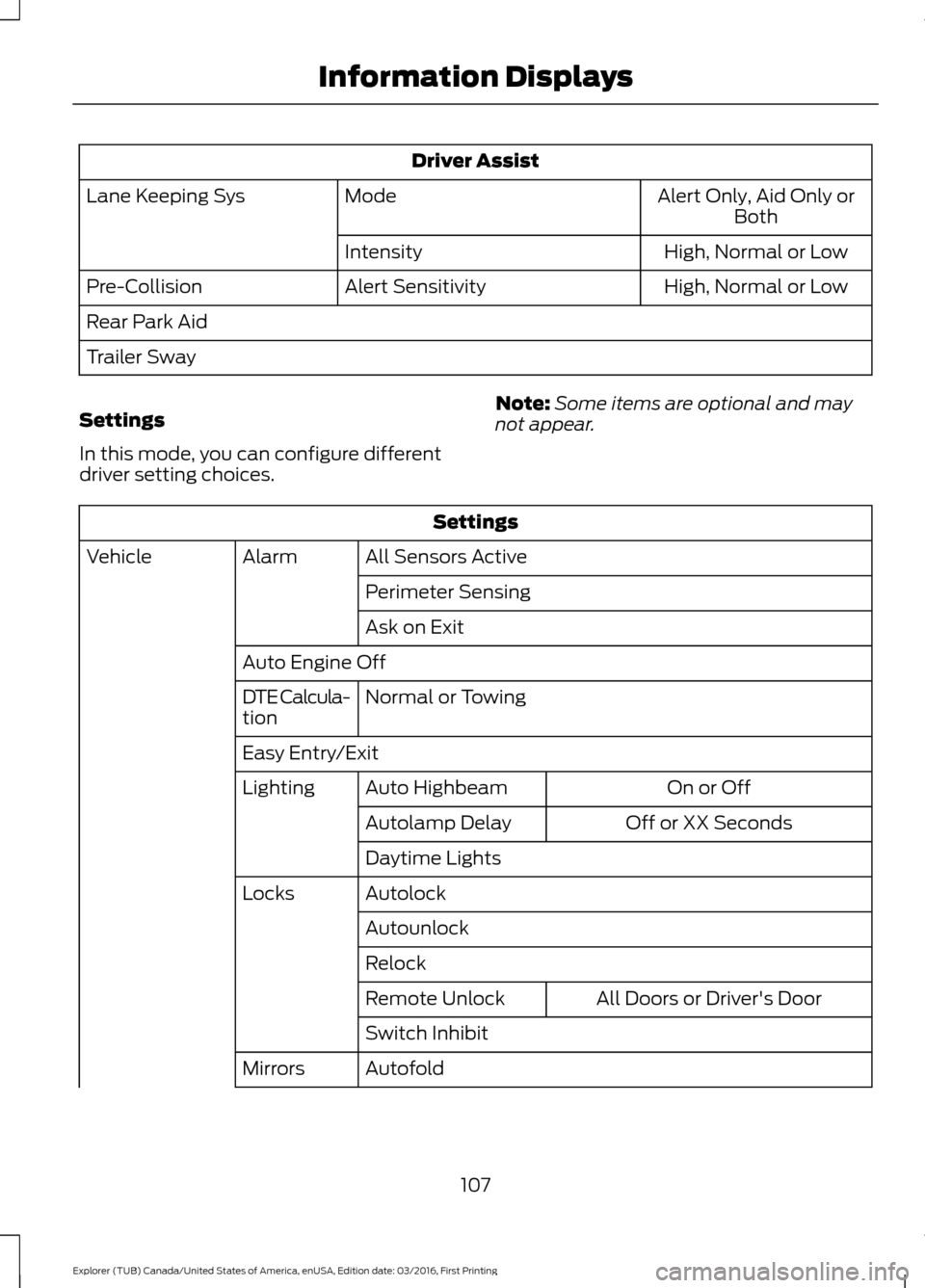
Driver Assist
Alert Only, Aid Only or
Both
Mode
Lane Keeping Sys
High
, Normal or Low
Intensity
High, Normal or Low
Alert Sensitivity
Pre-Collision
Rear Park Aid
Trailer Sway
Settings
In this mode, you can configure different
driver setting choices. Note:
Some items are optional and may
not appear. Settings
All Sensors Active
Alarm
Vehicle
Perimeter Sensing
Ask on Exit
Auto Engine Off Normal
or Towing
DTE Calcula-
tion
Easy Entry/Exit
On or Off
Auto Highbeam
Lighting
Off or XX Seconds
Autolamp Delay
Daytime Lights
Autolock
Locks
Autounlock
Relock All Doors
or Driver's Door
Remote Unlock
Switch Inhibit
Autofold
Mirrors
107
Explorer (TUB) Canada/United States of America, enUSA, Edition date: 03/2016, First Printing Information Displays
Page 114 of 541
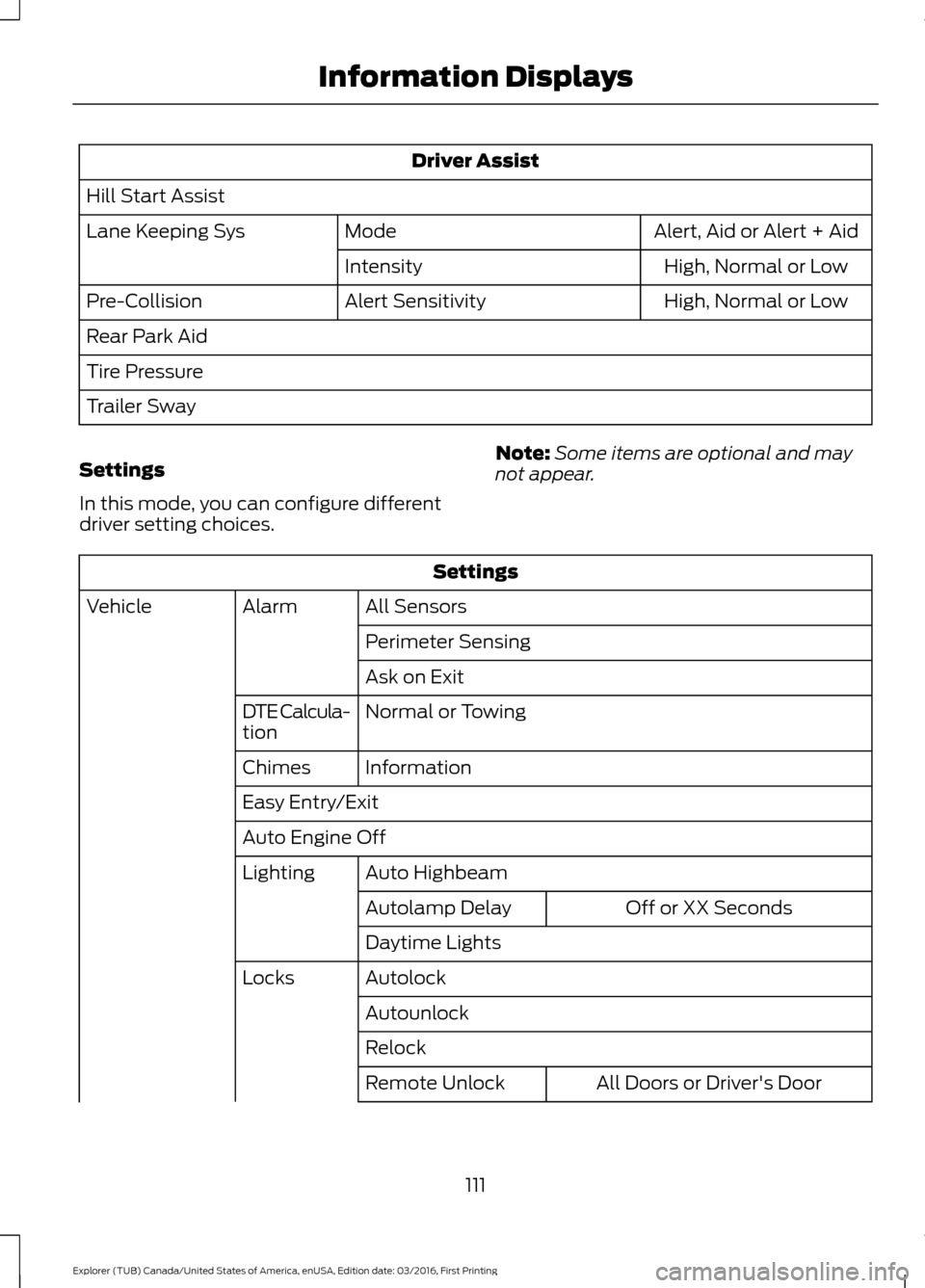
Driver Assist
Hill Start Assist Alert, Aid or Alert + Aid
Mode
Lane Keeping Sys
High
, Normal or Low
Intensity
High
, Normal or Low
Alert Sensitivity
Pre-Collision
Rear Park Aid
Tire Pressure
Trailer Sway
Settings
In this mode, you can configure different
driver setting choices. Note:
Some items are optional and may
not appear. Settings
All Sensors
Alarm
Vehicle
Perimeter Sensing
Ask on Exit
Normal
or Towing
DTE Calcula-
tion
Information
Chimes
Easy Entry/Exit
Auto Engine Off
Auto Highbeam
Lighting
Off or XX Seconds
Autolamp Delay
Daytime Lights
Autolock
Locks
Autounlock
Relock All Doors
or Driver's Door
Remote Unlock
111
Explorer (TUB) Canada/United States of America, enUSA, Edition date: 03/2016, First Printing Information Displays
Page 142 of 541
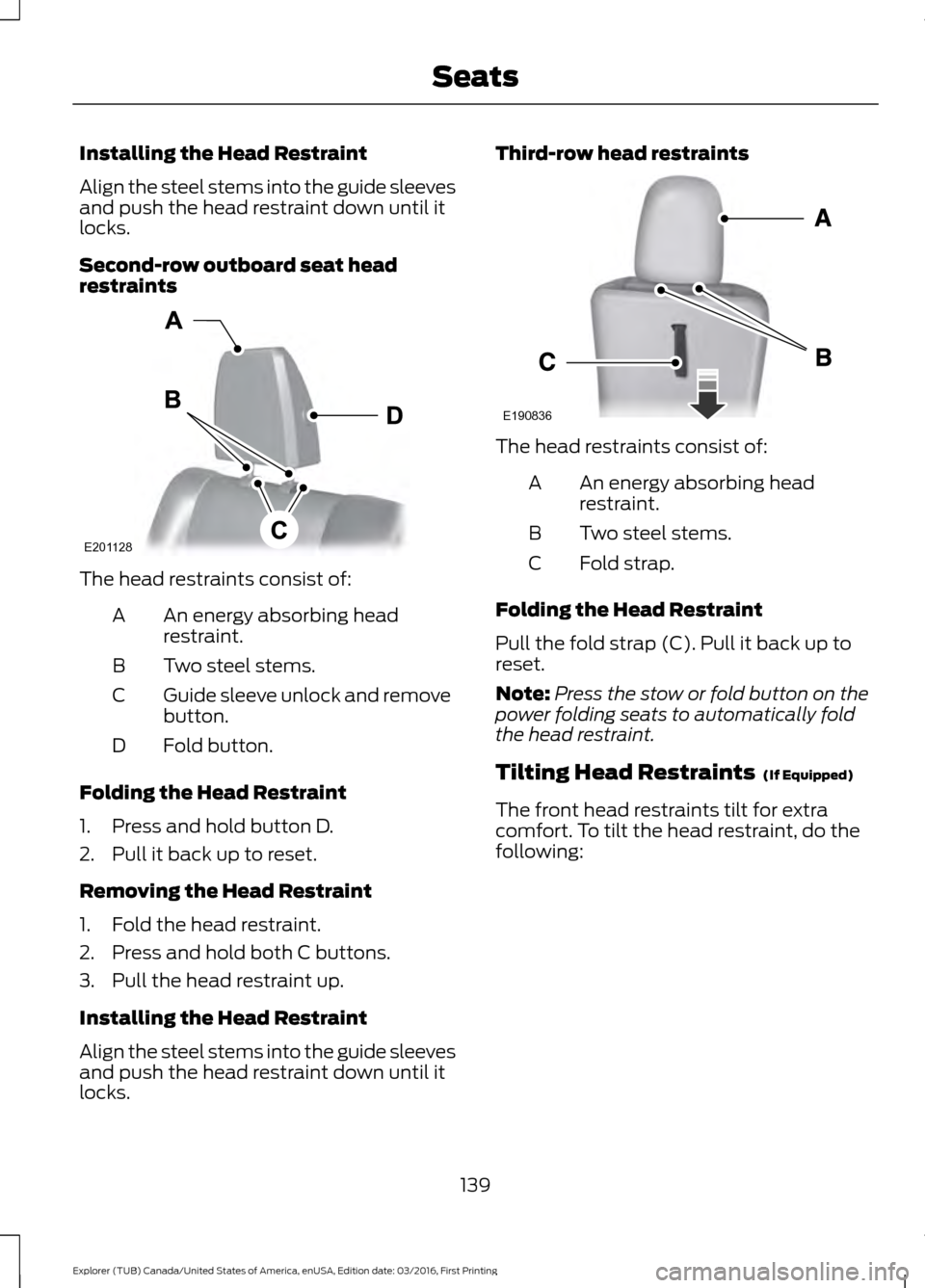
Installing the Head Restraint
Align the steel stems into the guide sleeves
and push the head restraint down until it
locks.
Second-row outboard seat head
restraints
The head restraints consist of:
An energy absorbing head
restraint.
A
Two steel stems.
B
Guide sleeve unlock and remove
button.
C
Fold button.
D
Folding the Head Restraint
1. Press and hold button D.
2. Pull it back up to reset.
Removing the Head Restraint
1. Fold the head restraint.
2. Press and hold both C buttons.
3. Pull the head restraint up.
Installing the Head Restraint
Align the steel stems into the guide sleeves
and push the head restraint down until it
locks. Third-row head restraints
The head restraints consist of:
An energy absorbing head
restraint.
A
Two steel stems.
B
Fold strap.
C
Folding the Head Restraint
Pull the fold strap (C). Pull it back up to
reset.
Note: Press the stow or fold button on the
power folding seats to automatically fold
the head restraint.
Tilting Head Restraints (If Equipped)
The front head restraints tilt for extra
comfort. To tilt the head restraint, do the
following:
139
Explorer (TUB) Canada/United States of America, enUSA, Edition date: 03/2016, First Printing SeatsE201128 E190836
Page 143 of 541
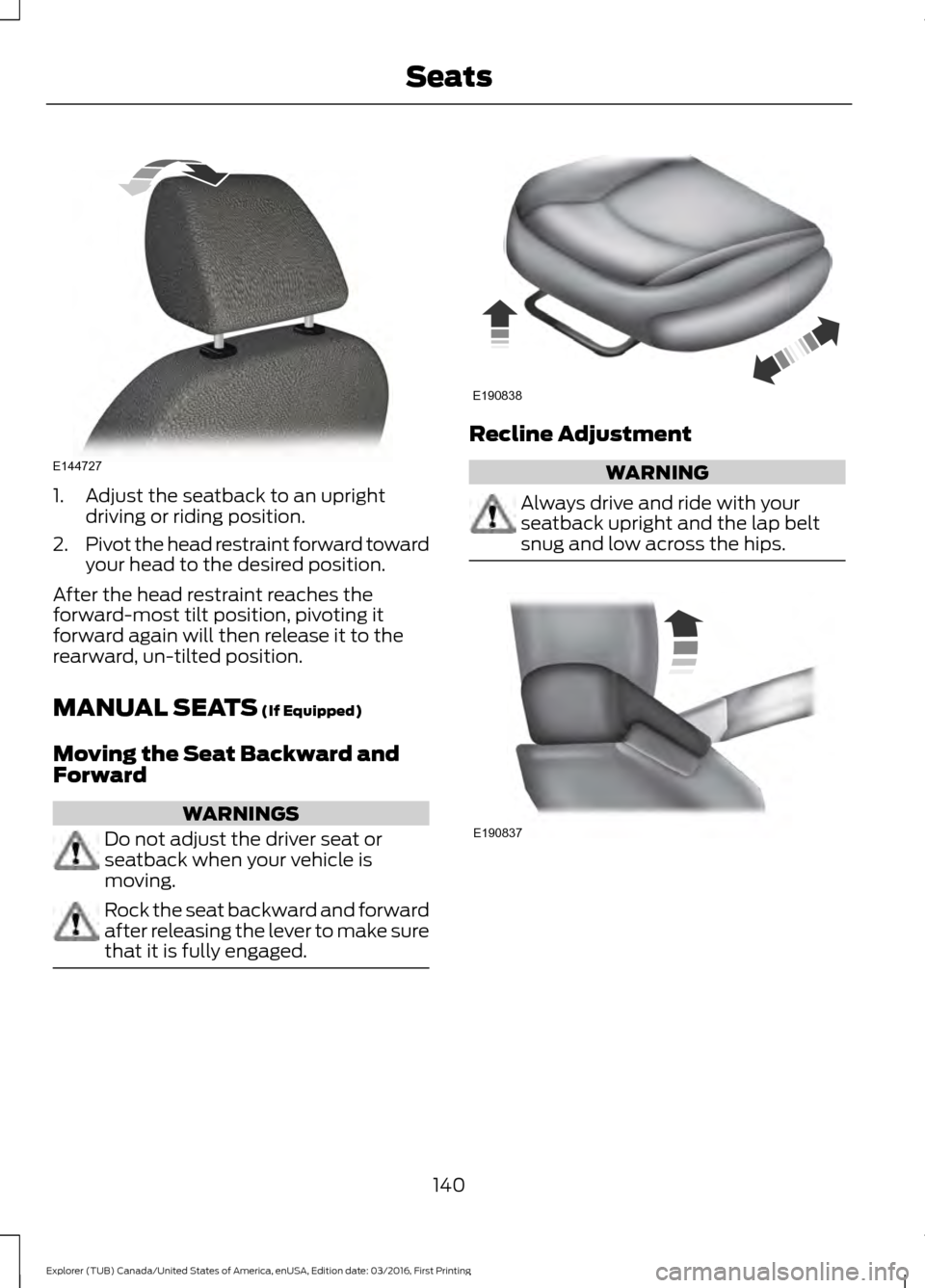
1. Adjust the seatback to an upright
driving or riding position.
2. Pivot the head restraint forward toward
your head to the desired position.
After the head restraint reaches the
forward-most tilt position, pivoting it
forward again will then release it to the
rearward, un-tilted position.
MANUAL SEATS (If Equipped)
Moving the Seat Backward and
Forward WARNINGS
Do not adjust the driver seat or
seatback when your vehicle is
moving.
Rock the seat backward and forward
after releasing the lever to make sure
that it is fully engaged. Recline Adjustment
WARNING
Always drive and ride with your
seatback upright and the lap belt
snug and low across the hips.
140
Explorer (TUB) Canada/United States of America, enUSA, Edition date: 03/2016, First Printing SeatsE144727 E190838 E190837
Page 149 of 541
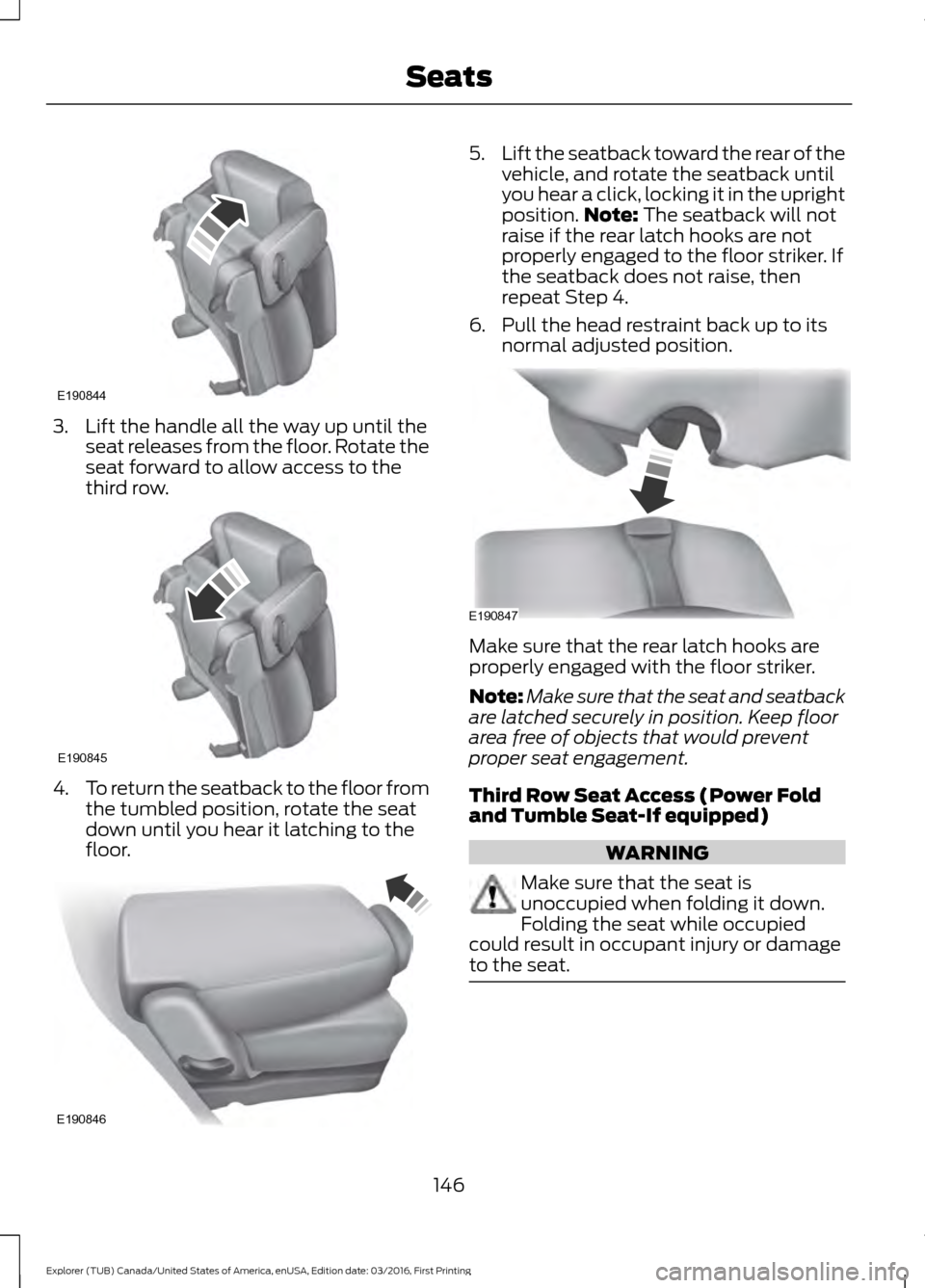
3. Lift the handle all the way up until the
seat releases from the floor. Rotate the
seat forward to allow access to the
third row. 4.
To return the seatback to the floor from
the tumbled position, rotate the seat
down until you hear it latching to the
floor. 5.
Lift the seatback toward the rear of the
vehicle, and rotate the seatback until
you hear a click, locking it in the upright
position. Note: The seatback will not
raise if the rear latch hooks are not
properly engaged to the floor striker. If
the seatback does not raise, then
repeat Step 4.
6. Pull the head restraint back up to its normal adjusted position. Make sure that the rear latch hooks are
properly engaged with the floor striker.
Note:
Make sure that the seat and seatback
are latched securely in position. Keep floor
area free of objects that would prevent
proper seat engagement.
Third Row Seat Access (Power Fold
and Tumble Seat-If equipped) WARNING
Make sure that the seat is
unoccupied when folding it down.
Folding the seat while occupied
could result in occupant injury or damage
to the seat. 146
Explorer (TUB) Canada/United States of America, enUSA, Edition date: 03/2016, First Printing SeatsE190844 E190845 E190846 E190847
Page 151 of 541
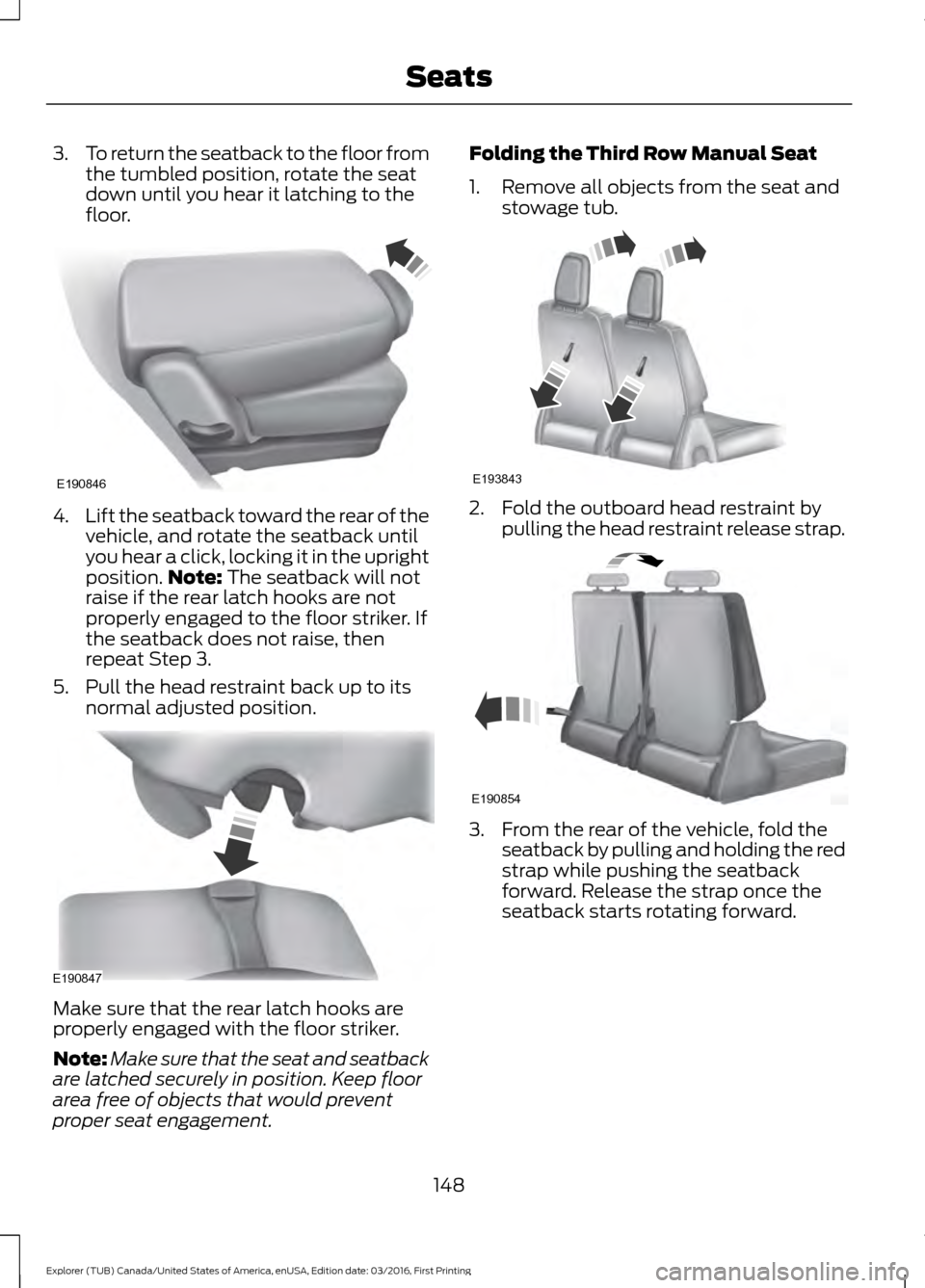
3.
To return the seatback to the floor from
the tumbled position, rotate the seat
down until you hear it latching to the
floor. 4.
Lift the seatback toward the rear of the
vehicle, and rotate the seatback until
you hear a click, locking it in the upright
position. Note: The seatback will not
raise if the rear latch hooks are not
properly engaged to the floor striker. If
the seatback does not raise, then
repeat Step 3.
5. Pull the head restraint back up to its normal adjusted position. Make sure that the rear latch hooks are
properly engaged with the floor striker.
Note:
Make sure that the seat and seatback
are latched securely in position. Keep floor
area free of objects that would prevent
proper seat engagement. Folding the Third Row Manual Seat
1. Remove all objects from the seat and
stowage tub. 2. Fold the outboard head restraint by
pulling the head restraint release strap. 3. From the rear of the vehicle, fold the
seatback by pulling and holding the red
strap while pushing the seatback
forward. Release the strap once the
seatback starts rotating forward.
148
Explorer (TUB) Canada/United States of America, enUSA, Edition date: 03/2016, First Printing SeatsE190846 E190847 E193843 E190854
Page 152 of 541
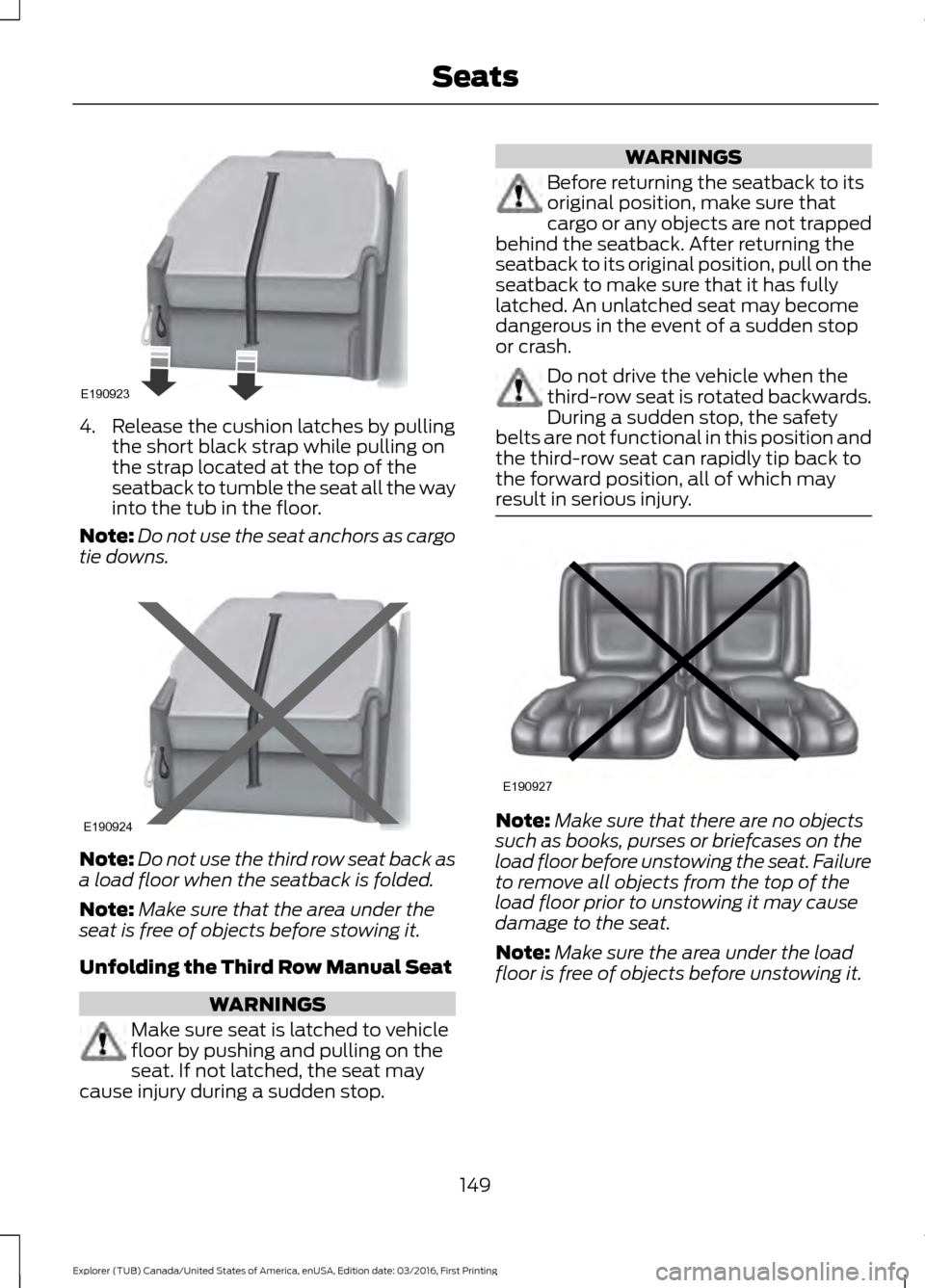
4. Release the cushion latches by pulling
the short black strap while pulling on
the strap located at the top of the
seatback to tumble the seat all the way
into the tub in the floor.
Note: Do not use the seat anchors as cargo
tie downs. Note:
Do not use the third row seat back as
a load floor when the seatback is folded.
Note: Make sure that the area under the
seat is free of objects before stowing it.
Unfolding the Third Row Manual Seat WARNINGS
Make sure seat is latched to vehicle
floor by pushing and pulling on the
seat. If not latched, the seat may
cause injury during a sudden stop. WARNINGS
Before returning the seatback to its
original position, make sure that
cargo or any objects are not trapped
behind the seatback. After returning the
seatback to its original position, pull on the
seatback to make sure that it has fully
latched. An unlatched seat may become
dangerous in the event of a sudden stop
or crash. Do not drive the vehicle when the
third-row seat is rotated backwards.
During a sudden stop, the safety
belts are not functional in this position and
the third-row seat can rapidly tip back to
the forward position, all of which may
result in serious injury. Note:
Make sure that there are no objects
such as books, purses or briefcases on the
load floor before unstowing the seat. Failure
to remove all objects from the top of the
load floor prior to unstowing it may cause
damage to the seat.
Note: Make sure the area under the load
floor is free of objects before unstowing it.
149
Explorer (TUB) Canada/United States of America, enUSA, Edition date: 03/2016, First Printing SeatsE190923 E190924 E190927