key FORD EXPLORER 2017 5.G Repair Manual
[x] Cancel search | Manufacturer: FORD, Model Year: 2017, Model line: EXPLORER, Model: FORD EXPLORER 2017 5.GPages: 541, PDF Size: 6.81 MB
Page 418 of 541
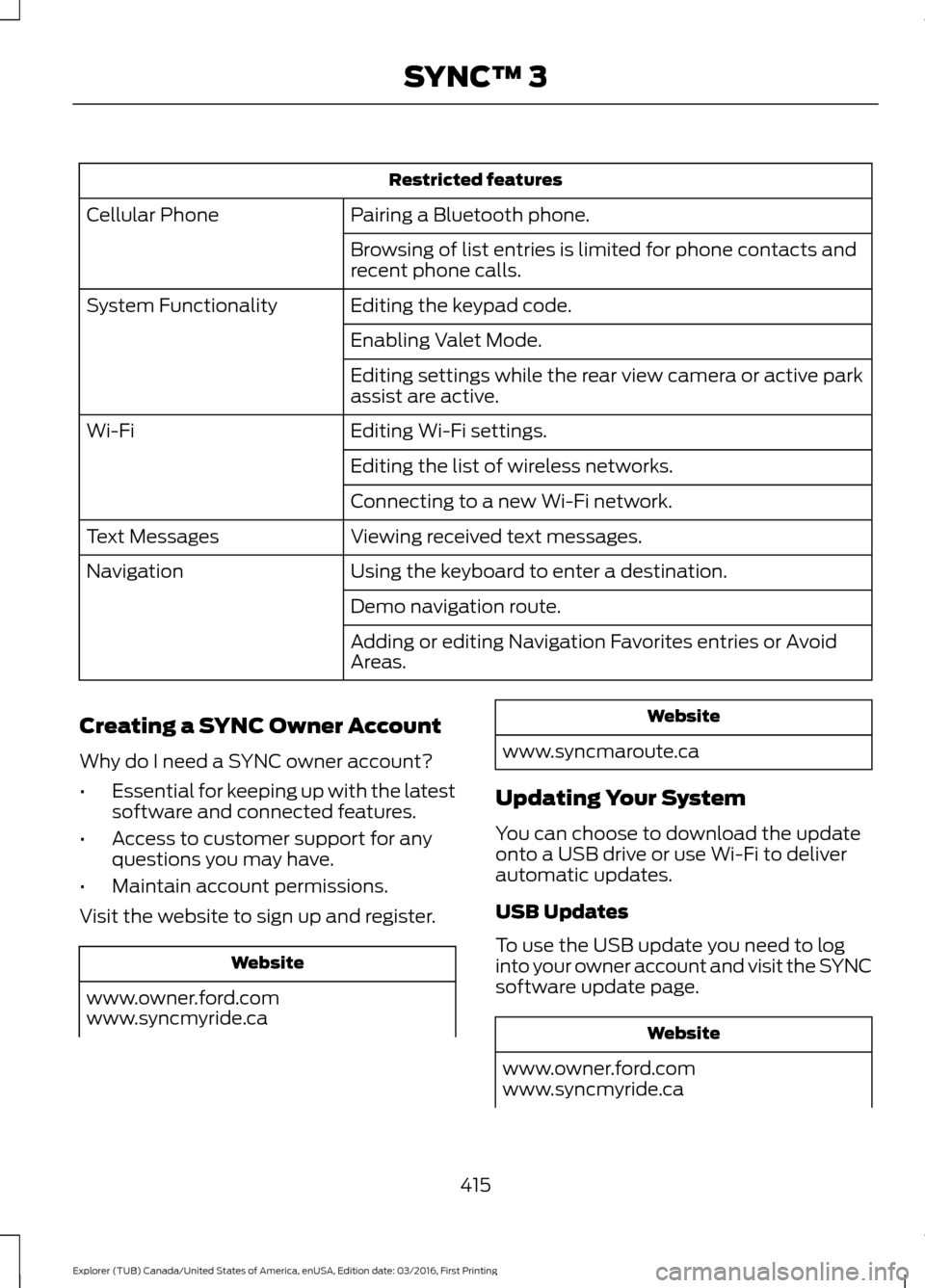
Restricted features
Pairing a Bluetooth phone.
Cellular Phone
Browsing of list entries is limited for phone contacts and
recent phone calls.
Editing the keypad code.
System Functionality
Enabling Valet Mode.
Editing settings while the rear view camera or active park
assist are active.
Editing Wi-Fi settings.
Wi-Fi
Editing the list of wireless networks.
Connecting to a new Wi-Fi network.
Viewing received text messages.
Text Messages
Using the keyboard to enter a destination.
Navigation
Demo navigation route.
Adding or editing Navigation Favorites entries or Avoid
Areas.
Creating a SYNC Owner Account
Why do I need a SYNC owner account?
• Essential for keeping up with the latest
software and connected features.
• Access to customer support for any
questions you may have.
• Maintain account permissions.
Visit the website to sign up and register. Website
www.owner.ford.com
www.syncmyride.ca Website
www.syncmaroute.ca
Updating Your System
You can choose to download the update
onto a USB drive or use Wi-Fi to deliver
automatic updates.
USB Updates
To use the USB update you need to log
into your owner account and visit the SYNC
software update page. Website
www.owner.ford.com
www.syncmyride.ca
415
Explorer (TUB) Canada/United States of America, enUSA, Edition date: 03/2016, First Printing SYNC™ 3
Page 433 of 541
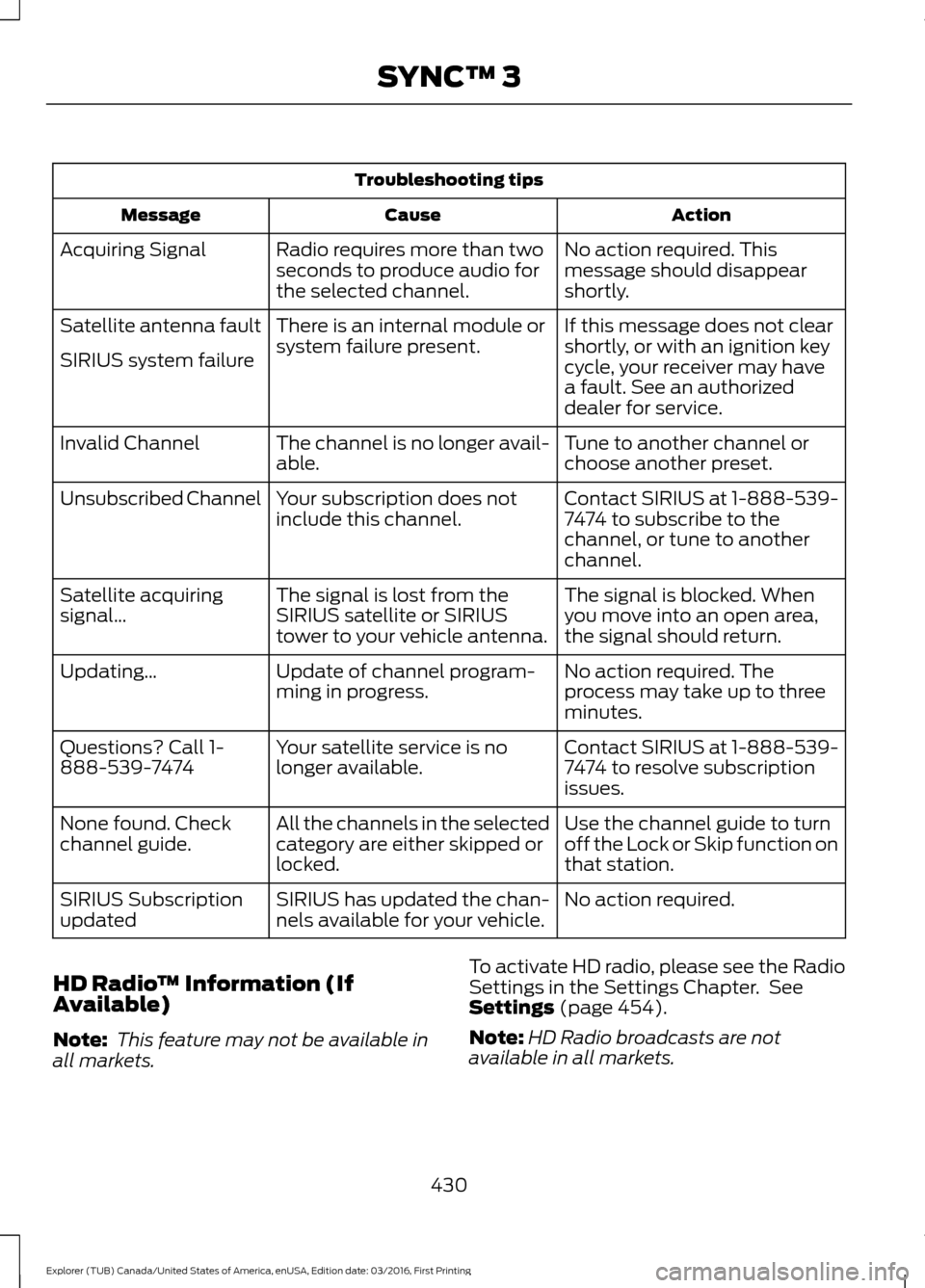
Troubleshooting tips
Action
Cause
Message
No action required. This
message should disappear
shortly.
Radio requires more than two
seconds to produce audio for
the selected channel.
Acquiring Signal
If this message does not clear
shortly, or with an ignition key
cycle, your receiver may have
a fault. See an authorized
dealer for service.
There is an internal module or
system failure present.
Satellite antenna fault
SIRIUS system failure
Tune to another channel or
choose another preset.
The channel is no longer avail-
able.
Invalid Channel
Contact SIRIUS at 1-888-539-
7474 to subscribe to the
channel, or tune to another
channel.
Your subscription does not
include this channel.
Unsubscribed Channel
The signal is blocked. When
you move into an open area,
the signal should return.
The signal is lost from the
SIRIUS satellite or SIRIUS
tower to your vehicle antenna.
Satellite acquiring
signal\b
No action required. The
process may take up to three
minutes.
Update of channel program-
ming in progress.
Updating\b
Contact SIRIUS at 1-888-539-
7474 to resolve subscription
issues.
Your satellite service is no
longer available.
Questions? Call 1-
888-539-7474
Use the channel guide to turn
off the Lock or Skip function on
that station.
All the channels in the selected
category are either skipped or
locked.
None found. Check
channel guide.
No action required.
SIRIUS has updated the chan-
nels available for your vehicle.
SIRIUS Subscription
updated
HD Radio ™ Information (If
Available)
Note: This feature may not be available in
all markets. To activate HD radio, please see the Radio
Settings in the Settings Chapter. See
Settings (page 454).
Note: HD Radio broadcasts are not
available in all markets.
430
Explorer (TUB) Canada/United States of America, enUSA, Edition date: 03/2016, First Printing SYNC™ 3
Page 444 of 541
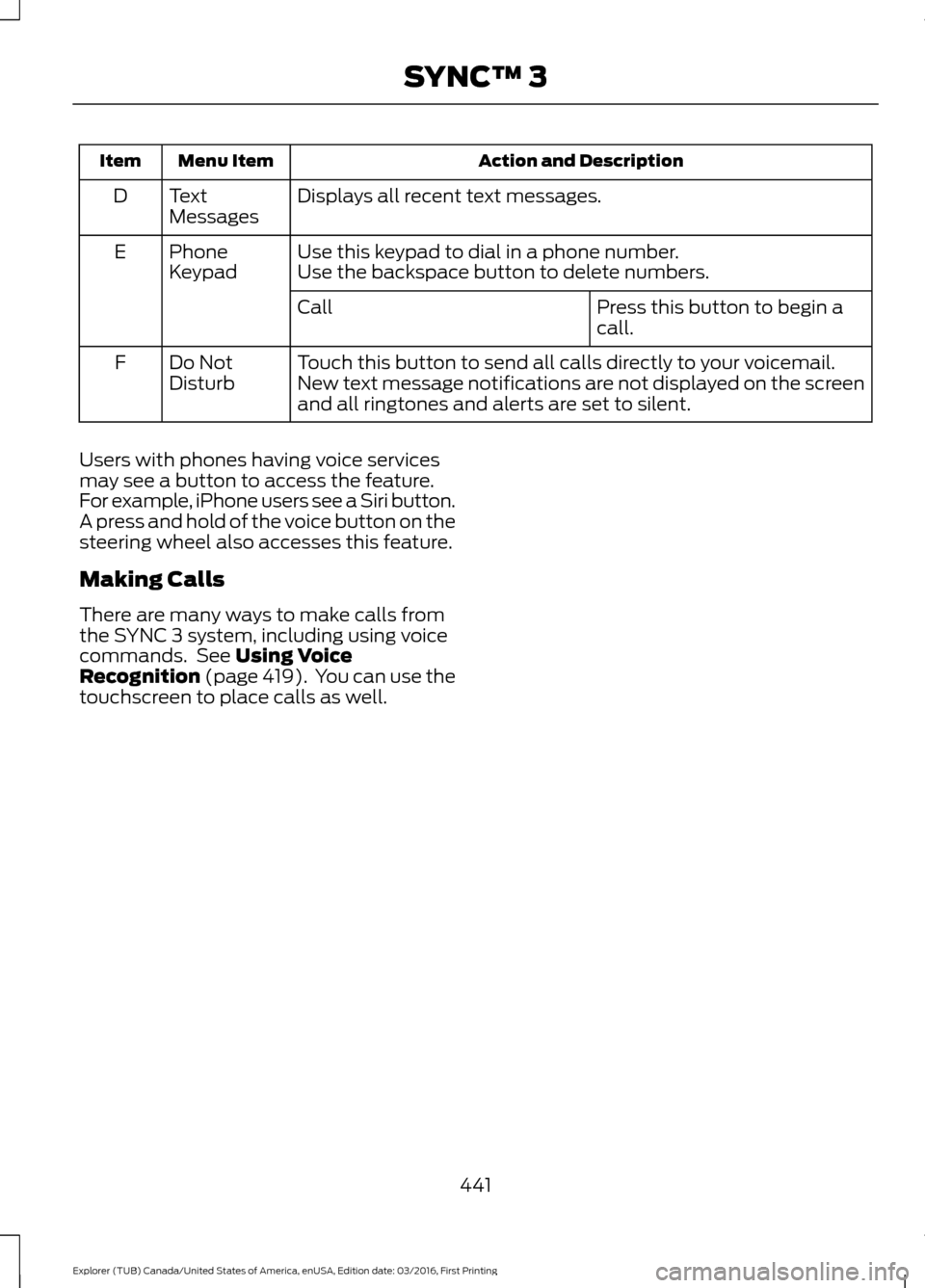
Action and Description
Menu Item
Item
Displays all recent text messages.
Text
Messages
D
Use this keypad to dial in a phone number.
Phone
Keypad
E
Use the backspace button to delete numbers.
Press this button to begin a
call.
Call
Touch this button to send all calls directly to your voicemail.
New text message notifications are not displayed on the screen
and all ringtones and alerts are set to silent.
Do Not
Disturb
F
Users with phones having voice services
may see a button to access the feature.
For example, iPhone users see a Siri button.
A press and hold of the voice button on the
steering wheel also accesses this feature.
Making Calls
There are many ways to make calls from
the SYNC 3 system, including using voice
commands. See Using Voice
Recognition (page 419). You can use the
touchscreen to place calls as well.
441
Explorer (TUB) Canada/United States of America, enUSA, Edition date: 03/2016, First Printing SYNC™ 3
Page 445 of 541
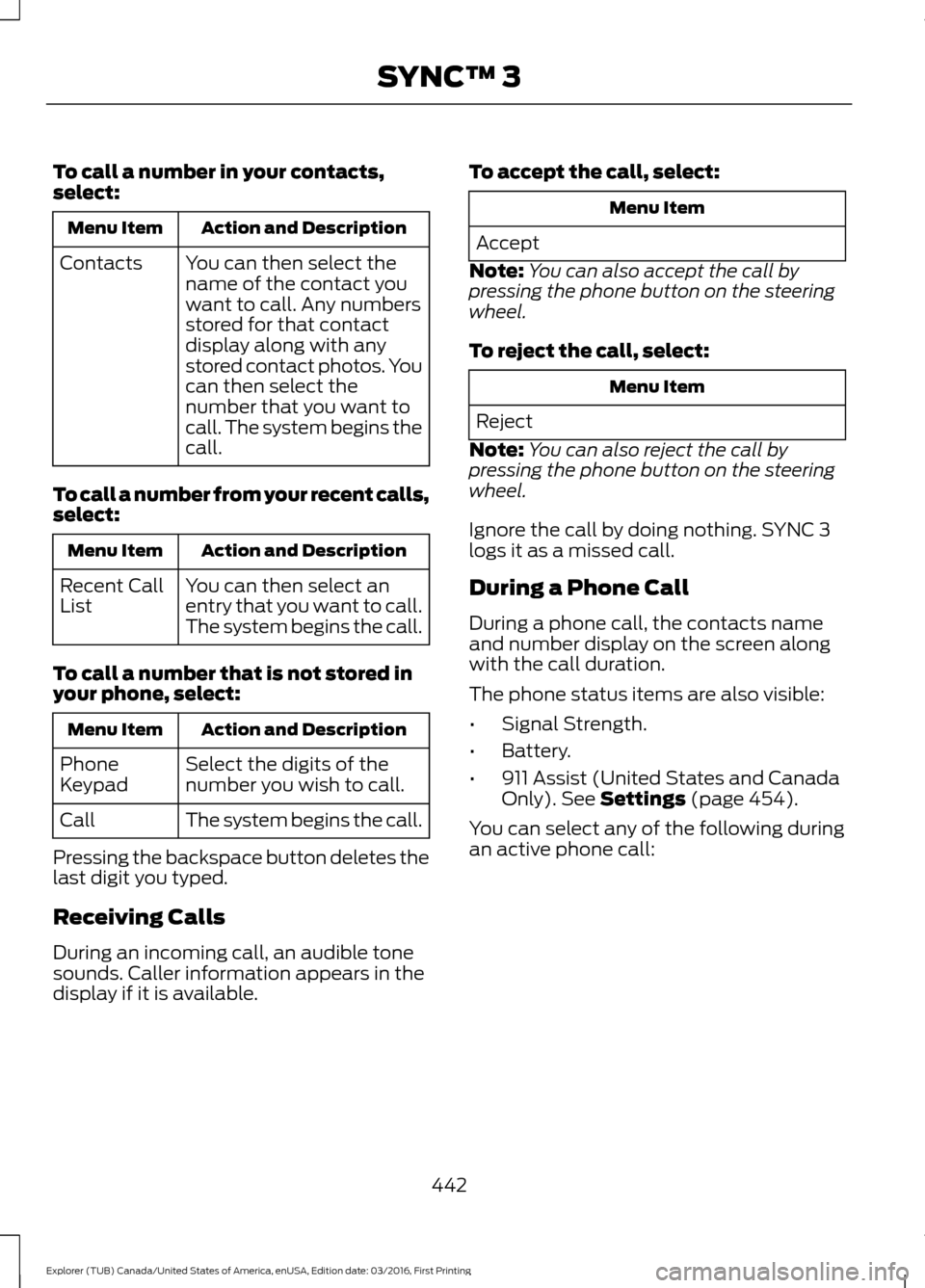
To call a number in your contacts,
select:
Action and Description
Menu Item
You can then select the
name of the contact you
want to call. Any numbers
stored for that contact
display along with any
stored contact photos. You
can then select the
number that you want to
call. The system begins the
call.
Contacts
To call a number from your recent calls,
select: Action and Description
Menu Item
You can then select an
entry that you want to call.
The system begins the call.
Recent Call
List
To call a number that is not stored in
your phone, select: Action and Description
Menu Item
Select the digits of the
number you wish to call.
Phone
Keypad
The system begins the call.
Call
Pressing the backspace button deletes the
last digit you typed.
Receiving Calls
During an incoming call, an audible tone
sounds. Caller information appears in the
display if it is available. To accept the call, select: Menu Item
Accept
Note: You can also accept the call by
pressing the phone button on the steering
wheel.
To reject the call, select: Menu Item
Reject
Note: You can also reject the call by
pressing the phone button on the steering
wheel.
Ignore the call by doing nothing. SYNC 3
logs it as a missed call.
During a Phone Call
During a phone call, the contacts name
and number display on the screen along
with the call duration.
The phone status items are also visible:
• Signal Strength.
• Battery.
• 911 Assist (United States and Canada
Only). See Settings (page 454).
You can select any of the following during
an active phone call:
442
Explorer (TUB) Canada/United States of America, enUSA, Edition date: 03/2016, First Printing SYNC™ 3
Page 446 of 541
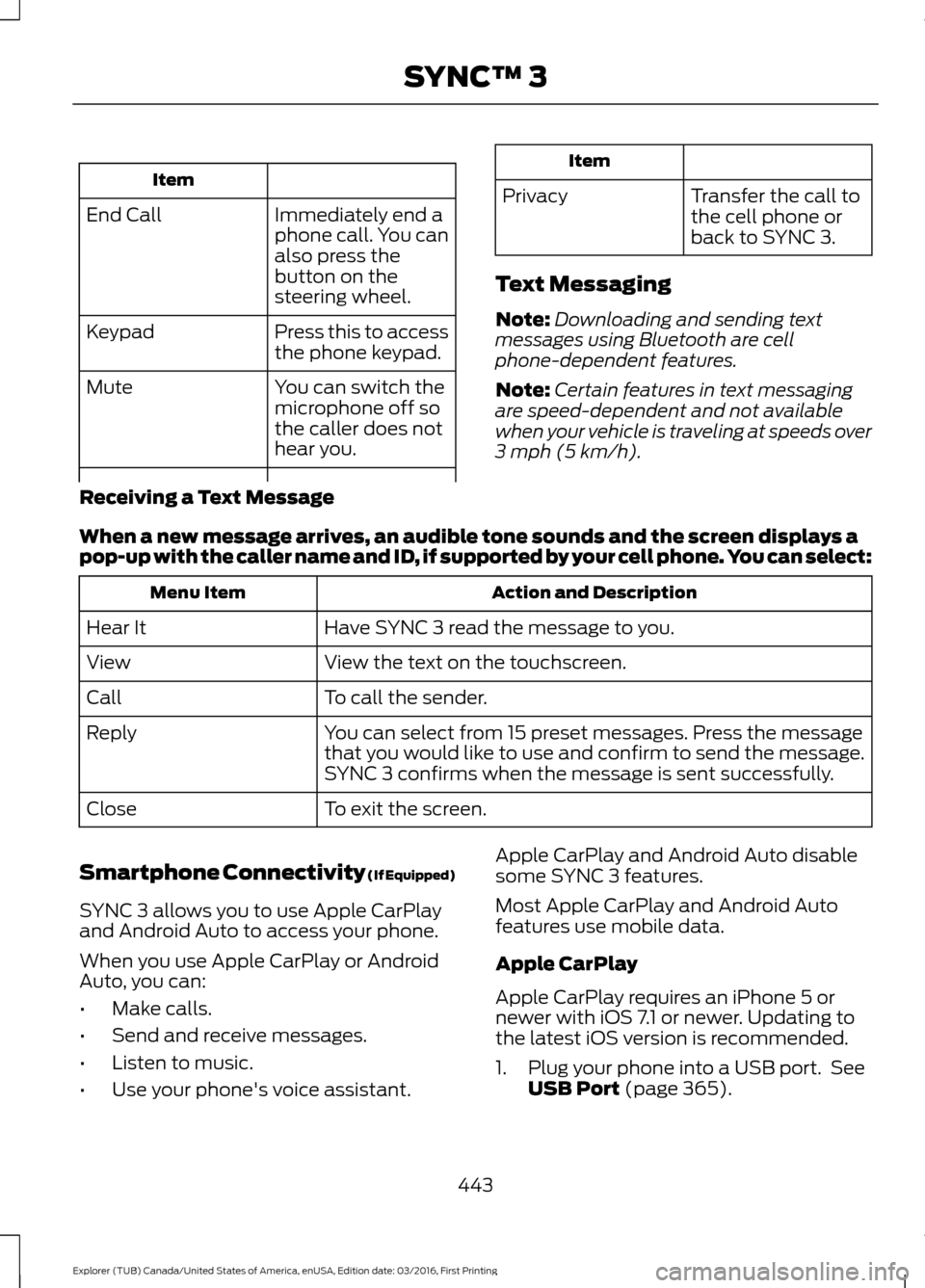
Item
Immediately end a
phone call. You can
also press the
button on the
steering wheel.
End Call
Press this to access
the phone keypad.
Keypad
You can switch the
microphone off so
the caller does not
hear you.
Mute Item
Privacy Transfer the call to
the cell phone or
back to SYNC 3.
Text Messaging
Note: Downloading and sending text
messages using Bluetooth are cell
phone-dependent features.
Note: Certain features in text messaging
are speed-dependent and not available
when your vehicle is traveling at speeds over
3 mph (5 km/h).
Receiving a Text Message
When a new message arrives, an audible tone sounds and the screen displays a
pop-up with the caller name and ID, if supported by your cell phone. You can select: Action and Description
Menu Item
Have SYNC 3 read the message to you.
Hear It
View the text on the touchscreen.
View
To call the sender.
Call
You can select from 15 preset messages. Press the message
that you would like to use and confirm to send the message.
SYNC 3 confirms when the message is sent successfully.
Reply
To exit the screen.
Close
Smartphone Connectivity (If Equipped)
SYNC 3 allows you to use Apple CarPlay
and Android Auto to access your phone.
When you use Apple CarPlay or Android
Auto, you can:
• Make calls.
• Send and receive messages.
• Listen to music.
• Use your phone's voice assistant. Apple CarPlay and Android Auto disable
some SYNC 3 features.
Most Apple CarPlay and Android Auto
features use mobile data.
Apple CarPlay
Apple CarPlay requires an iPhone 5 or
newer with iOS 7.1 or newer. Updating to
the latest iOS version is recommended.
1. Plug your phone into a USB port. See
USB Port
(page 365).
443
Explorer (TUB) Canada/United States of America, enUSA, Edition date: 03/2016, First Printing SYNC™ 3
Page 468 of 541
Ambient Lighting (If Equipped)
Tap a color once to active ambient lighting.
This sets the color to the highest intensity.
You can drag the colors up and down to
increase or decrease the intensity.
To switch ambient lighting off, press the
active color once or drag the active color
all the way down to zero intensity.
Vehicle
Note: You vehicle may not have all of these
features. You can select the following features to
update their settings.
Door Keypad Code
Select this button to add or erase a
personal door keypad code. To add or
erase a personal code, you first need to
enter the five-digit factory set code. You
can find this code on the owner's wallet
card in the glove box or from your
authorized dealer.
Camera Settings
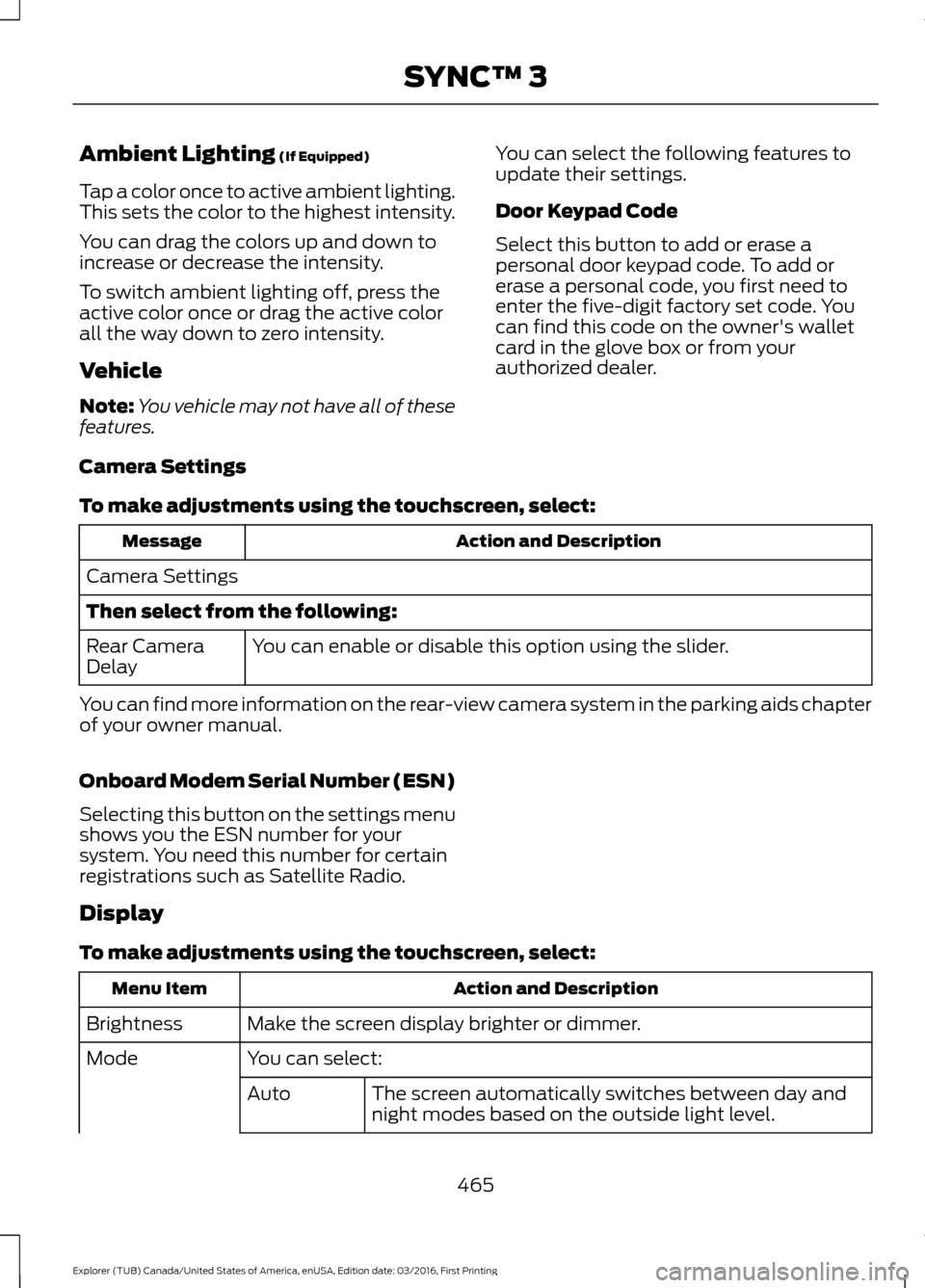
To make adjustments using the touchscreen, select: Action and Description
Message
Camera Settings
Then select from the following: You can enable or disable this option using the slider.
Rear Camera
Delay
You can find more information on the rear-view camera system in the parking aids chapter
of your owner manual.
Onboard Modem Serial Number (ESN)
Selecting this button on the settings menu
shows you the ESN number for your
system. You need this number for certain
registrations such as Satellite Radio.
Display
To make adjustments using the touchscreen, select: Action and Description
Menu Item
Make the screen display brighter or dimmer.
Brightness
You can select:
Mode
The screen automatically switches between day and
night modes based on the outside light level.
Auto
465
Explorer (TUB) Canada/United States of America, enUSA, Edition date: 03/2016, First Printing SYNC™ 3
Page 479 of 541
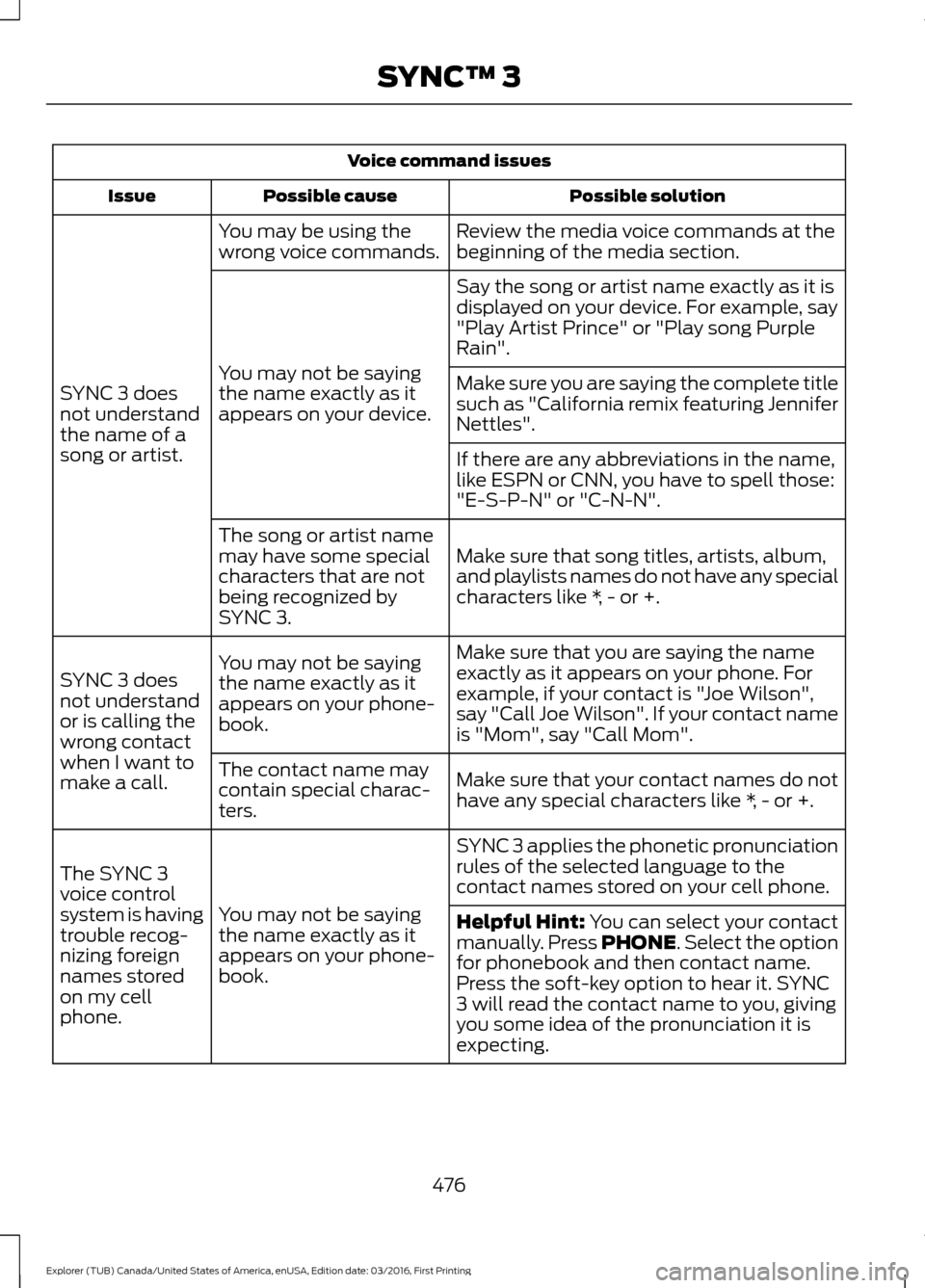
Voice command issues
Possible solution
Possible cause
Issue
Review the media voice commands at the
beginning of the media section.
You may be using the
wrong voice commands.
SYNC 3 does
not understand
the name of a
song or artist. Say the song or artist name exactly as it is
displayed on your device. For example, say
"Play Artist Prince" or "Play song Purple
Rain".
You may not be saying
the name exactly as it
appears on your device. Make sure you are saying the complete title
such as "California remix featuring Jennifer
Nettles".
If there are any abbreviations in the name,
like ESPN or CNN, you have to spell those:
"E-S-P-N" or "C-N-N".
Make sure that song titles, artists, album,
and playlists names do not have any special
characters like *, - or +.
The song or artist name
may have some special
characters that are not
being recognized by
SYNC 3.
Make sure that you are saying the name
exactly as it appears on your phone. For
example, if your contact is "Joe Wilson",
say "Call Joe Wilson". If your contact name
is "Mom", say "Call Mom".
You may not be saying
the name exactly as it
appears on your phone-
book.
SYNC 3 does
not understand
or is calling the
wrong contact
when I want to
make a call.
Make sure that your contact names do not
have any special characters like *, - or +.
The contact name may
contain special charac-
ters.
SYNC 3 applies the phonetic pronunciation
rules of the selected language to the
contact names stored on your cell phone.
You may not be saying
the name exactly as it
appears on your phone-
book.
The SYNC 3
voice control
system is having
trouble recog-
nizing foreign
names stored
on my cell
phone.
Helpful Hint: You can select your contact
manually. Press PHONE. Select the option
for phonebook and then contact name.
Press the soft-key option to hear it. SYNC
3 will read the contact name to you, giving
you some idea of the pronunciation it is
expecting.
476
Explorer (TUB) Canada/United States of America, enUSA, Edition date: 03/2016, First Printing SYNC™ 3
Page 482 of 541
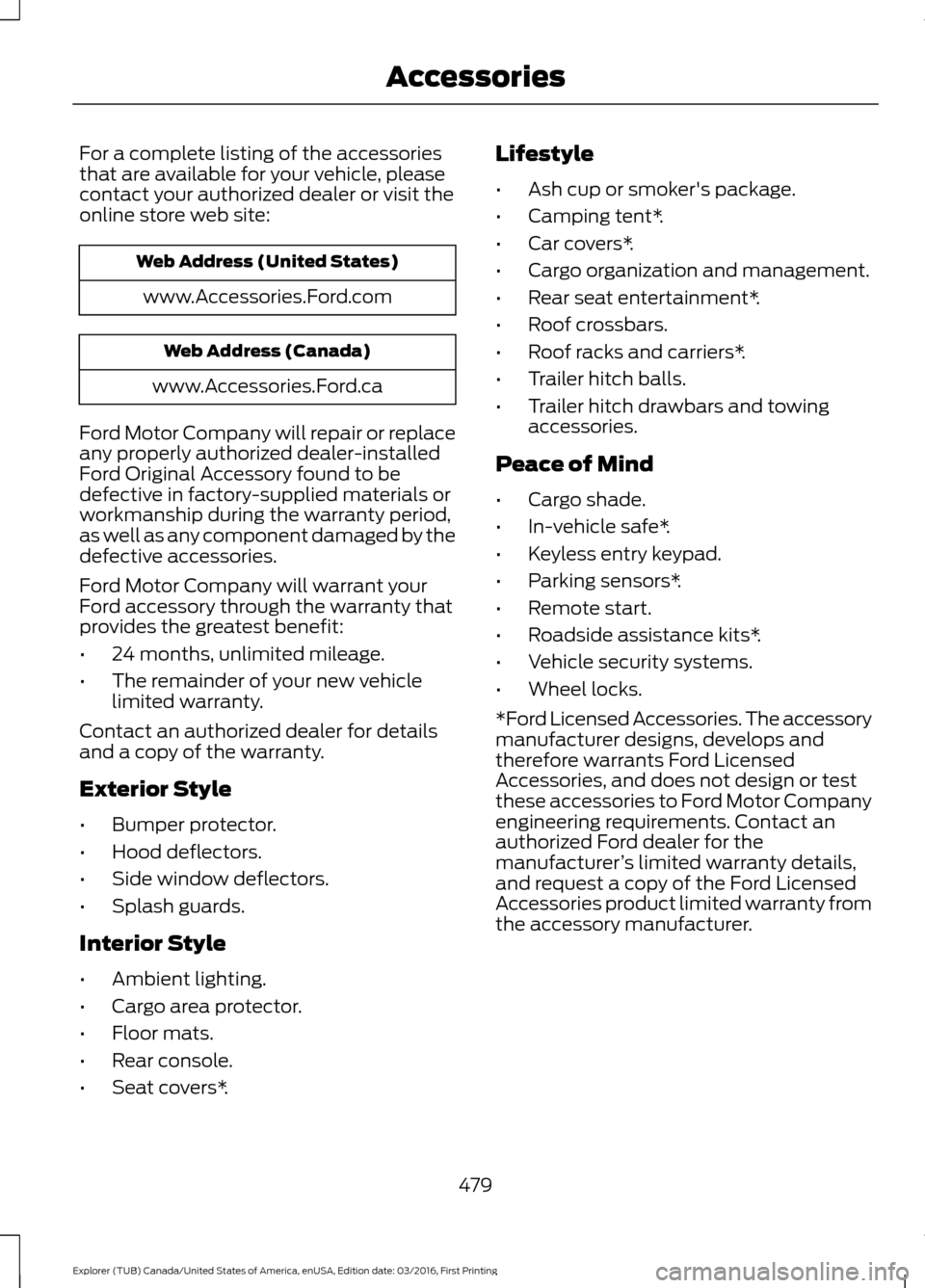
For a complete listing of the accessories
that are available for your vehicle, please
contact your authorized dealer or visit the
online store web site:
Web Address (United States)
www.Accessories.Ford.com Web Address (Canada)
www.Accessories.Ford.ca
Ford Motor Company will repair or replace
any properly authorized dealer-installed
Ford Original Accessory found to be
defective in factory-supplied materials or
workmanship during the warranty period,
as well as any component damaged by the
defective accessories.
Ford Motor Company will warrant your
Ford accessory through the warranty that
provides the greatest benefit:
• 24 months, unlimited mileage.
• The remainder of your new vehicle
limited warranty.
Contact an authorized dealer for details
and a copy of the warranty.
Exterior Style
• Bumper protector.
• Hood deflectors.
• Side window deflectors.
• Splash guards.
Interior Style
• Ambient lighting.
• Cargo area protector.
• Floor mats.
• Rear console.
• Seat covers*. Lifestyle
•
Ash cup or smoker's package.
• Camping tent*.
• Car covers*.
• Cargo organization and management.
• Rear seat entertainment*.
• Roof crossbars.
• Roof racks and carriers*.
• Trailer hitch balls.
• Trailer hitch drawbars and towing
accessories.
Peace of Mind
• Cargo shade.
• In-vehicle safe*.
• Keyless entry keypad.
• Parking sensors*.
• Remote start.
• Roadside assistance kits*.
• Vehicle security systems.
• Wheel locks.
*Ford Licensed Accessories. The accessory
manufacturer designs, develops and
therefore warrants Ford Licensed
Accessories, and does not design or test
these accessories to Ford Motor Company
engineering requirements. Contact an
authorized Ford dealer for the
manufacturer ’s limited warranty details,
and request a copy of the Ford Licensed
Accessories product limited warranty from
the accessory manufacturer.
479
Explorer (TUB) Canada/United States of America, enUSA, Edition date: 03/2016, First Printing Accessories
Page 530 of 541
1
180 Degree Camera...................................208
Camera Views.................................................... 208
Using the 180 degree camera system.............................................................. 208
4
4WD See: Four-Wheel Drive....................................... 181
A
A/C See: Climate Control.......................................... 127
About This Manual...........................................7
ABS See: Brakes........................................................... 186
ABS driving hints See: Hints on Driving With Anti-Lock
Brakes................................................................ 186
Accessories....................................................479 Exterior Style....................................................... 479
Interior Style......................................................... 479
Lifestyle................................................................. 479
Peace of Mind..................................................... 479
Accessories See: Replacement Parts
Recommendation............................................ 12
ACC See: Using Adaptive Cruise Control.............210
Active Park Assist.........................................199 Deactivating the Active Park Assist
Feature............................................................. 203
Parallel Parking, Perpendicular Parking, Parallel Park Out Assist.............................. 199
Troubleshooting the System......................... 203
Adjusting the Headlamps
........................288
Vertical Aim Adjustment................................ 288
Adjusting the Pedals.....................................74
Adjusting the Steering Wheel - Vehicles With: Manual Adjustable Steering
Column............................................................70
Adjusting the Steering Wheel - Vehicles With: Power Adjustable Steering
Column............................................................70
Easy Entry and Exit Feature............................... 71End of Travel Position..........................................
71
Memory Feature..................................................... 71
Airbag Disposal..............................................48
Air Conditioning See: Climate Control.......................................... 127
Air Filter See: Changing the Engine Air Filter............296
Alarm See: Anti-Theft Alarm........................................ 69
Anti-Theft Alarm............................................69 Arming the Alarm................................................ 69
Disarming the Alarm........................................... 69
Appendices....................................................502
Apps..................................................................452 ........................................................................\
.......... 452
SiriusXM Traffic and Travel Link................... 453
Audible Warnings and Indicators
.............98
Automatic Transmission Warning
Chime
.................................................................. 98
Engine On Warning Chime............................... 98
Headlamps On Warning Chime..................... 98
Key in Ignition Warning Chime........................ 98
Keyless Warning Alert ....................................... 98
Parking Brake On Warning Chime.................98
Audio Control....................................................71 Seek and Media..................................................... 72
Type 1........................................................................\
.. 71
Type 2........................................................................\
. 71
Audio System
.................................................351
General Information.......................................... 351
Audio Unit - Vehicles With: AM/FM/CD/ SYNC.............................................................352
Audio Unit - Vehicles With: Premium AM/FM/CD..................................................355
Audio Unit - Vehicles With: Sony AM/ FM/CD
...........................................................356
Menu Structure.................................................. 358
Autolamps........................................................79 Windshield Wiper Activated
Headlamps........................................................ 79
Automatic Climate Control - Vehicles With: Premium AM/FM/CD...................128
Automatic Climate Control - Vehicles With: Sony Audio System.......................130
Automatic High Beam Control..................81 Activating the System........................................ 82
Manually Overriding the System.................... 82
527
Explorer (TUB) Canada/United States of America, enUSA, Edition date: 03/2016, First Printing Index
Page 531 of 541
Automatic Transmission............................178
Brake-Shift Interlock.......................................... 179
If Your Vehicle Gets Stuck In Mud or Snow.................................................................. 180
SelectShift Automatic ™
Transmission.................................................... 178
Understanding the Positions of Your Automatic Transmission............................. 178
Automatic Transmission Fluid Check - 2.3L EcoBoost™.......................................283
Automatic Transmission Fluid Check - 3.5L Duratec/3.5L Ecoboost™
............283
Adding Transmission Fluid ............................ 284
Checking the Transmission Fluid Level................................................................... 283
Autowipers........................................................75
Auxiliary Power Points................................159 110 Volt AC Power Point................................... 159
12 Volt DC Power Point..................................... 159
Locations............................................................... 159
B
Battery See: Changing the 12V Battery..................... 286
Blind Spot Information System.............220 Switching the System Off and On...............223
System Errors...................................................... 222
Using the System................................................ 221
Bonnet Lock See: Opening and Closing the Hood...........272
Booster Seats..................................................26 Types of Booster Seats....................................... 27
Brake Fluid Check........................................285
Brakes...............................................................186 General Information.......................................... 186
Breaking-In.....................................................246
Bulb Specification Chart
..........................294
C
Cabin Air Filter................................................135
California Proposition 65..............................11
Capacities and Specifications - 2.3L EcoBoost™
.................................................339
Specifications..................................................... 339Capacities and Specifications - 3.5L
Duratec
.........................................................342
Specifications..................................................... 343
Capacities and Specifications - 3.5L Ecoboost™.................................................346
Specifications...................................................... 347
Capacities and Specifications................332
Cargo Nets
.....................................................230
Car Wash See: Cleaning the Exterior.............................. 298
Center Console
...............................................161
Rear Seat Armrest............................................... 161
Changing a Bulb..........................................290 Front Direction Indicator.................................. 291
Front Fog Lamp.................................................. 292
Headlamp.............................................................. 291
Headlamp High Beam...................................... 291
LED Lamps........................................................... 293
License Plate Lamp.......................................... 293
Rear Direction Indicator and Reversing Lamp.................................................................. 292
Changing a Fuse...........................................270 Fuses...................................................................... 270
Changing a Road Wheel...........................326 Dissimilar Spare Wheel and Tire Assembly
Information..................................................... 326
Tire Change Procedure..................................... 327
Changing the 12V Battery.........................286
Changing the Engine Air Filter................296
Changing the Wiper Blades.....................287 Front Wiper Blades........................................... 288
Rear Window Wiper Blade............................. 288
Checking MyKey System Status
...............57
MyKey Distance..................................................... 57
Number of Admin Keys....................................... 57
Number of MyKeys............................................... 57
Checking the Wiper Blades
......................287
Child Restraint and Seatbelt Maintenance.................................................39
Child Restraint Positioning.........................28
Child Safety.......................................................16 General Information............................................. 16
Child Safety Locks.........................................30 Left-Hand Side....................................................... 31
Right-Hand Side.................................................... 31
Child Seats.........................................................17
Cleaning Leather Seats..............................301
Cleaning Products
.......................................297
528
Explorer (TUB) Canada/United States of America, enUSA, Edition date: 03/2016, First Printing Index