audio FORD EXPLORER 2017 5.G Owners Manual
[x] Cancel search | Manufacturer: FORD, Model Year: 2017, Model line: EXPLORER, Model: FORD EXPLORER 2017 5.GPages: 541, PDF Size: 6.81 MB
Page 5 of 541
Steering Wheel
Adjusting the Steering Wheel - Vehicles
With: Manual Adjustable Steering
Column...........................................................70
Adjusting the Steering Wheel - Vehicles With: Power Adjustable Steering
Column...........................................................70
Audio Control....................................................71
Voice Control
....................................................72
Cruise Control
..................................................72
Information Display Control
.......................73
Heated Steering Wheel
................................73
Pedals
Adjusting the Pedals
.....................................74
Wipers and Washers
Windshield Wipers
.........................................75
Autowipers........................................................75
Windshield Washers
.....................................76
Rear Window Wiper and Washers...........76
Lighting
General Information......................................78
Lighting Control
..............................................78
Autolamps........................................................79
Instrument Lighting Dimmer.....................80
Headlamp Exit Delay
...................................80
Daytime Running Lamps............................80
Automatic High Beam Control..................81
Front Fog Lamps
............................................82
Direction Indicators.......................................83
Interior Lamps
.................................................83
Windows and Mirrors
Power Windows.............................................85
Global Opening..............................................86
Exterior Mirrors................................................86
Interior Mirror...................................................88
Sun Visors.........................................................89 Moonroof..........................................................89
Instrument Cluster
Gauges................................................................91
Warning Lamps and Indicators................94
Audible Warnings and Indicators
.............98
Information Displays
General Information.....................................99
Information Messages
.................................113
Climate Control
Manual Climate Control
.............................127
Automatic Climate Control - Vehicles With: Premium AM/FM/CD..................128
Automatic Climate Control - Vehicles With: Sony Audio System.....................130
Hints on Controlling the Interior Climate.........................................................132
Rear Passenger Climate Controls..........134
Heated Windows and Mirrors..................135
Cabin Air Filter................................................135
Remote Start.................................................136
Seats
Sitting in the Correct Position..................137
Head Restraints
.............................................137
Manual Seats
.................................................140
Power Seats
.....................................................141
Memory Function.........................................143
Rear Seats
.......................................................144
Heated Seats...................................................151
Climate Controlled Seats
..........................152
Universal Garage Door Opener
Universal Garage Door Opener...............154
Auxiliary Power Points
Auxiliary Power Points................................159
2
Explorer (TUB) Canada/United States of America, enUSA, Edition date: 03/2016, First Printing Table of Contents
Page 8 of 541
Cleaning the Instrument Panel and
Instrument Cluster Lens........................301
Cleaning Leather Seats..............................301
Repairing Minor Paint Damage..............302
Cleaning the Alloy Wheels.......................302
Vehicle Storage............................................302
Wheels and Tires
General Information
...................................305
Tire Care
.........................................................308
Using Summer Tires....................................321
Using Snow Chains
......................................321
Tire Pressure Monitoring System...........322
Changing a Road Wheel...........................326
Technical Specifications...........................330
Capacities and Specific- ations
Engine Specifications - 2.3L EcoBoost™................................................332
Engine Specifications - 3.5L Duratec........................................................333
Engine Specifications - 3.5L Ecoboost™................................................333
Motorcraft Parts - 2.3L EcoBoost™......334
Motorcraft Parts - 3.5L Duratec.............335
Motorcraft Parts - 3.5L Ecoboost™......336
Vehicle Identification Number
................337
Vehicle Certification Label.......................338
Transmission Code Designation............338
Capacities and Specifications - 2.3L EcoBoost™................................................339
Capacities and Specifications - 3.5L Duratec........................................................342
Capacities and Specifications - 3.5L Ecoboost™................................................346
Audio System
General Information....................................351
Audio Unit - Vehicles With: AM/FM/CD/ SYNC............................................................352 Audio Unit - Vehicles With: Premium AM/
FM/CD
..........................................................355
Audio Unit - Vehicles With: Sony AM/FM/ CD..................................................................356
Digital Radio
..................................................360
Satellite Radio
..............................................362
USB Port.........................................................365
Media Hub
......................................................365
SYNC™
General Information
...................................366
Using Voice Recognition...........................368
Using SYNC™ With Your Phone............370
SYNC™ Applications and Services......382
Using SYNC™ With Your Media Player...........................................................387
SYNC™ Troubleshooting
.........................396
SYNC™ 3
General Information..................................404
Home Screen
.................................................418
Using Voice Recognition............................419
Entertainment..............................................426
Climate............................................................436
Phone
..............................................................438
Navigation......................................................444
Apps.................................................................452
Settings...........................................................454
SYNC™ 3 Troubleshooting.....................466
Accessories
Accessories....................................................479
Ford Protect
Ford Protect
...................................................481
Scheduled Maintenance
General Maintenance Information
.......483
Normal Scheduled Maintenance..........486
5
Explorer (TUB) Canada/United States of America, enUSA, Edition date: 03/2016, First Printing Table of Contents
Page 58 of 541
PRINCIPLE OF OPERATION
MyKey allows you to program keys with
restricted driving modes to promote good
driving habits. You can program the
restrictions to all keys but one. Any keys
that you did not program are administrator
keys or admin keys.
You can use admin keys to:
•
Create a MyKey with certain vehicle
restrictions.
• Program certain MyKey settings.
• Clear all MyKey restrictions.
After you program a MyKey, you can view
the following information through the
information display:
• The total number of admin keys and
MyKeys for your vehicle.
• The total distance a MyKey driver
traveled with your vehicle.
Note: Every MyKey receives the same
restrictions and settings. You cannot
program them individually.
Note: For vehicles equipped with a
push-button start switch: When both a
MyKey and an admin key are present when
you start your vehicle, the system recognizes
the admin key only. Standard Settings
Not every vehicle includes the features
listed below. If your vehicle has this
equipment, then you cannot change the
following settings when using a MyKey:
•
Seatbelt reminder or Belt-Minder™.
MyKey mutes the audio system until
drivers, and in some instances,
passengers, fasten their seatbelts.
Note: If your vehicle includes an
AM/FM radio or a very basic audio
system, then the radio may not mute.
• Earlier low-fuel warning. The low-fuel
warning activates earlier for MyKey
drivers, giving them more time to refuel.
• Certain driver alerts, stability systems
or parking aids turn on automatically
when you use the MyKey system. For
example, Blind Spot Information
System (BLIS), cross traffic alert, lane
departure warning or forward collision
warning. Note:
MyKey drivers may be
able to turn the lane departure warning
feature off, but this feature turns back
on automatically with every new key
cycle.
• Restricted touchscreen operation in
some markets. For example, MyKey
may prevent manual navigation
destination input while the vehicle is in
any gear other than park (P) or when
the vehicle reaches a certain rate of
speed.
• Satellite radio adult content
restrictions, if this feature is available
in your market.
Optional Settings
You can configure certain vehicle feature
settings when you first create a MyKey. You
can also change the settings afterward
with an admin key.
55
Explorer (TUB) Canada/United States of America, enUSA, Edition date: 03/2016, First Printing MyKey
™
Page 59 of 541
Note:
Not every feature applies to every
vehicle in every market. When they are
available for your vehicle, then they appear
in your information display, providing
choices to switch them on or off, or to select
a more specific setting.
• Various vehicle speed limits so the
MyKey driver cannot exceed certain
speeds. The information display shows
warnings followed by an audible tone
when the MyKey driver reaches the set
speed. You cannot override the set
speed by fully depressing the
accelerator pedal. WARNING
Do not set MyKey maximum speed
limit to a limit that will prevent the
driver from maintaining a safe speed
considering posted speed limits and
prevailing road conditions. The driver is
always responsible to drive in accordance
with local laws and prevailing conditions.
Failure to do so could result in accident or
injury. •
Various vehicle speed reminders so
MyKey drivers know when their vehicle
speed approaches the limits. Warnings
appear in your information display and
a tone sounds when the MyKey drivers
exceed the set vehicle speed.
• The audio system's maximum volume
limits to 45% so MyKey drivers can
concentrate on the road. A message
appears in the information display
when MyKey drivers attempt to exceed
the limited volume. MyKey also
disables the automatic volume control.
Note: If your vehicle includes an
AM/FM radio or a very basic audio
system, then the radio may not limit.
• Always on setting. This setting forces
certain features to remain on and
active for MyKey drivers. For example,
E911 or emergency assistance and the
do not disturb features stay on even if
a MyKey driver uses the feature's
control to switch it off.
CREATING A MYKEY
Use the information display to create a
MyKey.
1. Switch the ignition on using the key or the transmitter you want to program.
2. Access the main menu in the information display and then scroll
through the menus to begin
programming your MyKey. See
Information Displays
(page 99).
3. Follow the instructions in the display.
4. A confirmation message appears in the
display after you finish programming
your MyKey. The programmed
restrictions apply when you restart your
vehicle with the programmed key or
transmitter.
Note: Make sure you label the programmed
MyKey so you can distinguish it from the
admin keys.
56
Explorer (TUB) Canada/United States of America, enUSA, Edition date: 03/2016, First Printing MyKey
™
Page 74 of 541
End of Travel Position
The steering column sets a stopping
position just short of the end of the column
position to prevent damage to the steering
column. A new stopping position sets if the
steering column encounters an object
when tilting or telescoping.
To reset the steering column to its normal
stopping position:
1. Confirm there is nothing obstructing
the motion of the steering column.
2. Press and hold the steering column control until the steering column stops
moving.
3. Press the steering column control again. The steering column may begin
to move again.
4. When the steering column stops, continue holding the control for an
additional few seconds.
5. Repeat for each direction as necessary.
A new stopping position is set. The next
time you tilt or telescope the steering
column, it will stop just short of the end of
the column position.
Memory Feature
You can save and recall the steering
column position with the memory function.
See Memory Function (page 143).
Note: Pressing the adjustment control
during memory recall cancels the operation.
Easy Entry and Exit Feature
When you switch the ignition off, the
steering column will move to allow extra
room to exit your vehicle. The column will
return to the previous setting when you
switch the ignition on. You can enable or
disable this feature in the information
display. See Information Displays (page
99
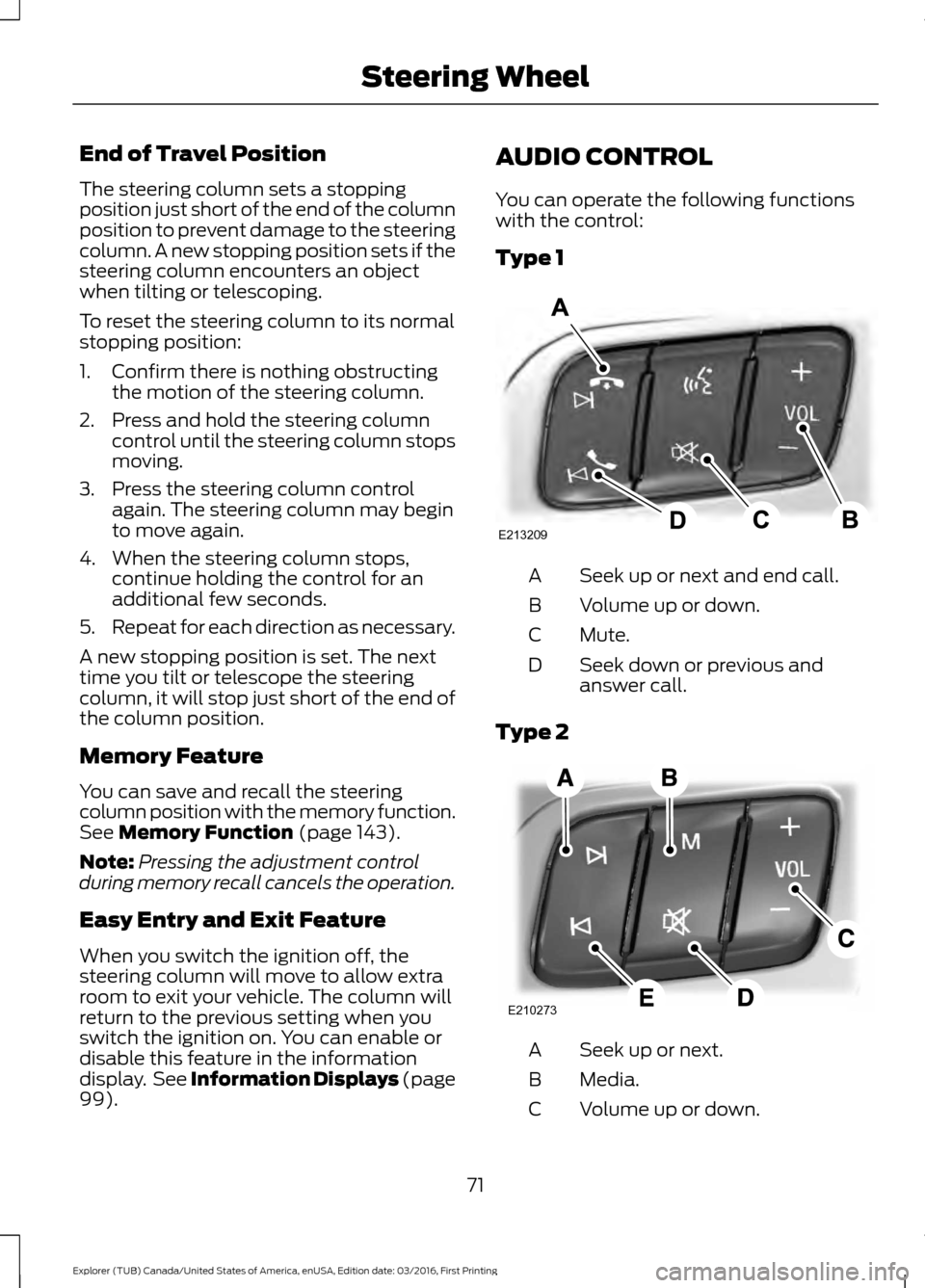
). AUDIO CONTROL
You can operate the following functions
with the control:
Type 1
Seek up or next and end call.
A
Volume up or down.
B
Mute.
C
Seek down or previous and
answer call.
D
Type 2 Seek up or next.
A
Media.
B
Volume up or down.
C
71
Explorer (TUB) Canada/United States of America, enUSA, Edition date: 03/2016, First Printing Steering WheelE213209 E210273
Page 75 of 541
Mute.
D
Seek down or previous.
E
Seek and Media
Press the seek button to:
• Tune the radio to the next or previous
stored preset.
• Play the next or the previous track.
Press and hold the seek button to:
• Tune the radio to the next station up
or down the frequency band.
• Seek through a track.
Press the media button repeatedly to:
• Scroll through available audio modes.
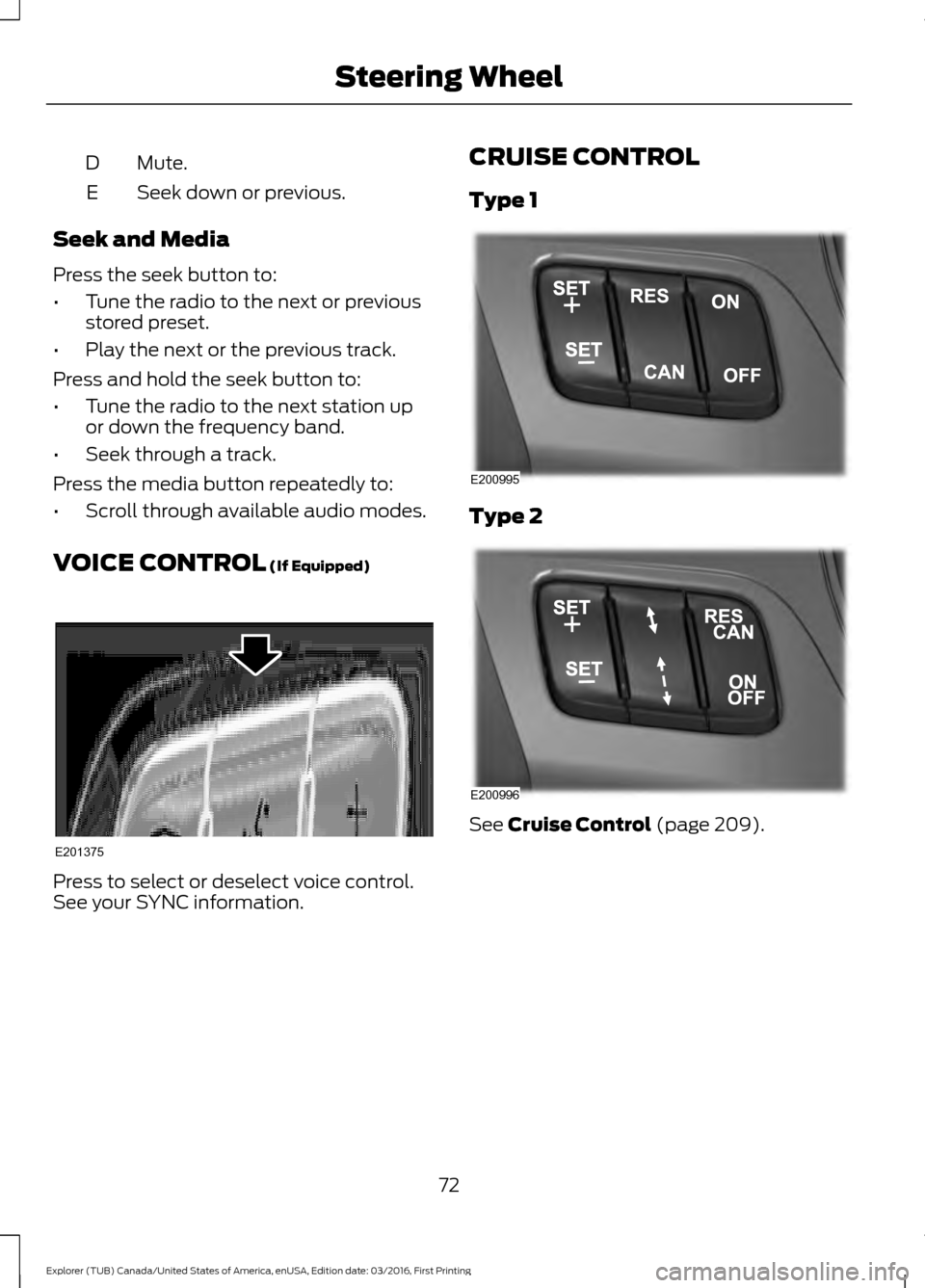
VOICE CONTROL (If Equipped) Press to select or deselect voice control.
See your SYNC information. CRUISE CONTROL
Type 1
Type 2
See
Cruise Control (page 209).
72
Explorer (TUB) Canada/United States of America, enUSA, Edition date: 03/2016, First Printing Steering WheelE201375 E200995 E200996
Page 125 of 541
MyKey
Action
Message
You cannot program a MyKey during key programming.
MyKey Not Created
MyKey is active.
MyKey Active Drive
Safely
When starting your vehicle, a MyKey is in use and the MyKey speed limit is on.
Speed Limited to XX
MPH/km/h
When a MyKey is in use, the MyKey speed limit is on and yourvehicle speed is approaching 80 mph (130 km/h).
Vehicle Near Top Speed
MyKey is active.
Check Speed Drive
Safely
A MyKey is in use and Belt-Minder is active.
Buckle Up to Unmute
Audio
You attempted to program a spare key using two existing MyKeys.
Could Not Program
Integrated Key
Park Aid Action
Message
The system has detected a condition that requires service.
Contact an authorized dealer. See Principle of Operation
(page 195).
Check Park Aid
The system has detected a condition that requires service.
Contact an authorized dealer.
See Principle of Operation
(page 195).
Check Rear Park Aid
Displays the park aid status.
Front Park Aid On Off
Displays the park aid status.
Rear Park Aid On Off
Park Brake Action
Message
You have set the parking brake and you have driven the vehiclemore than 3 mph (5 km/h). If the warning stays on after you
have released the parking brake, contact an authorized dealer.
Park Brake Engaged
122
Explorer (TUB) Canada/United States of America, enUSA, Edition date: 03/2016, First Printing Information Displays
Page 133 of 541
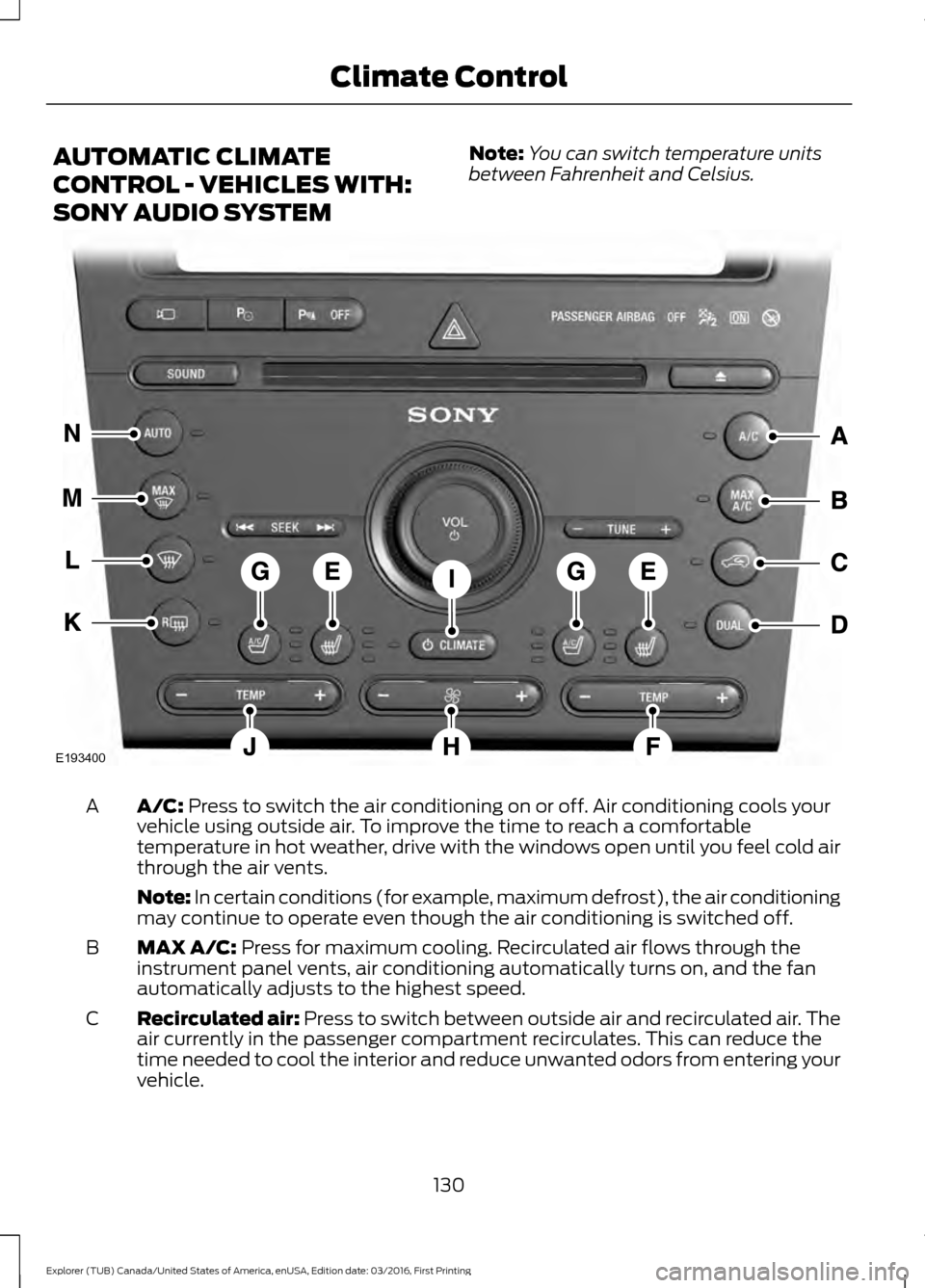
AUTOMATIC CLIMATE
CONTROL - VEHICLES WITH:
SONY AUDIO SYSTEM
Note:
You can switch temperature units
between Fahrenheit and Celsius. A/C: Press to switch the air conditioning on or off. Air conditioning cools your
vehicle using outside air. To improve the time to reach a comfortable
temperature in hot weather, drive with the windows open until you feel cold air
through the air vents.
A
Note: In certain conditions (for example, maximum defrost), the air conditioning
may continue to operate even though the air conditioning is switched off.
MAX A/C:
Press for maximum cooling. Recirculated air flows through the
instrument panel vents, air conditioning automatically turns on, and the fan
automatically adjusts to the highest speed.
B
Recirculated air:
Press to switch between outside air and recirculated air. The
air currently in the passenger compartment recirculates. This can reduce the
time needed to cool the interior and reduce unwanted odors from entering your
vehicle.
C
130
Explorer (TUB) Canada/United States of America, enUSA, Edition date: 03/2016, First Printing Climate ControlE193400
Page 199 of 541
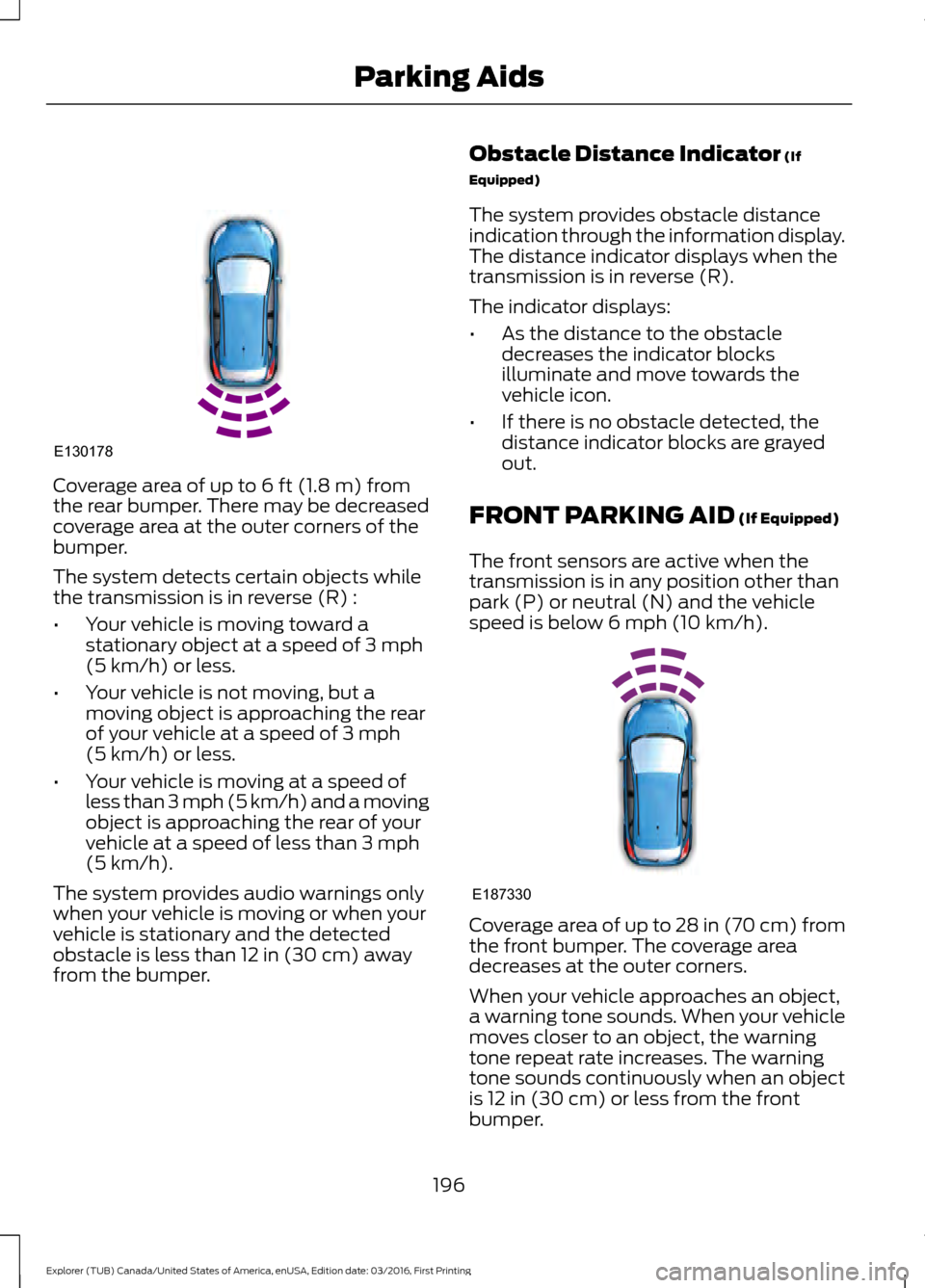
Coverage area of up to 6 ft (1.8 m) from
the rear bumper. There may be decreased
coverage area at the outer corners of the
bumper.
The system detects certain objects while
the transmission is in reverse (R) :
• Your vehicle is moving toward a
stationary object at a speed of
3 mph
(5 km/h) or less.
• Your vehicle is not moving, but a
moving object is approaching the rear
of your vehicle at a speed of
3 mph
(5 km/h) or less.
• Your vehicle is moving at a speed of
less than 3 mph (5 km/h) and a moving
object is approaching the rear of your
vehicle at a speed of less than
3 mph
(5 km/h).
The system provides audio warnings only
when your vehicle is moving or when your
vehicle is stationary and the detected
obstacle is less than
12 in (30 cm) away
from the bumper. Obstacle Distance Indicator
(If
Equipped)
The system provides obstacle distance
indication through the information display.
The distance indicator displays when the
transmission is in reverse (R).
The indicator displays:
• As the distance to the obstacle
decreases the indicator blocks
illuminate and move towards the
vehicle icon.
• If there is no obstacle detected, the
distance indicator blocks are grayed
out.
FRONT PARKING AID
(If Equipped)
The front sensors are active when the
transmission is in any position other than
park (P) or neutral (N) and the vehicle
speed is below
6 mph (10 km/h). Coverage area of up to
28 in (70 cm) from
the front bumper. The coverage area
decreases at the outer corners.
When your vehicle approaches an object,
a warning tone sounds. When your vehicle
moves closer to an object, the warning
tone repeat rate increases. The warning
tone sounds continuously when an object
is
12 in (30 cm) or less from the front
bumper.
196
Explorer (TUB) Canada/United States of America, enUSA, Edition date: 03/2016, First Printing Parking AidsE130178 E187330
Page 200 of 541
You can switch the system off through the
information display menu or from the
pop-up message that appears once you
shift the transmission into reverse (R). See
General Information (page 99). If your
vehicle has a parking aid button, you can
switch the system off by pressing the
button.
Obstacle Distance Indicator
(If
Equipped)
The system provides obstacle distance
indication through the information display.
The indicator displays:
• As the distance to the obstacle
decreases the indicator blocks
illuminate and move towards the
vehicle icon.
• If there is no obstacle detected, the
distance indicator blocks are grayed
out.
If the transmission is in reverse (R), the
front sensing system provides audio
warnings when your vehicle is moving and
the detected obstacle is moving towards
your vehicle. Once the vehicle is stationary,
the audio warning will be stopped after 2
seconds. Visual indication is always
present in reverse (R).
If the transmission is in drive (D) or any
other forward gear (for example, low (L),
sport (S) or any forward gear in a manual
transmission), the front sensing system
provides audio and visual warnings when
your vehicle is moving below a speed of
7 mph (12 km/h) and an obstacle is located
inside the detection area. Once the vehicle
is stationary, the audio warning will be
stopped after 2 seconds and the visual
indication stops after 4 seconds. If the
obstacles detected are within
12 in
(30 cm), the visual indication remains on. If the transmission is in neutral (N), the
system provides visual indication only
when your vehicle is moving at
7 mph
(12 km/h) or below and an obstacle is
located inside the detection area. Once
your vehicle is stationary, the visual
indication will stop after 4 seconds.
SIDE SENSING SYSTEM
(If
Equipped)
The side sensing system uses the front and
rear side sensors to detect and map
obstacles that are near to the sides of your
vehicle. The side sensors are active when
the transmission is in any position other
than park (P).
Note: Obstacles that enter the side
detection area without being detected and
mapped by the front or rear side sensors will
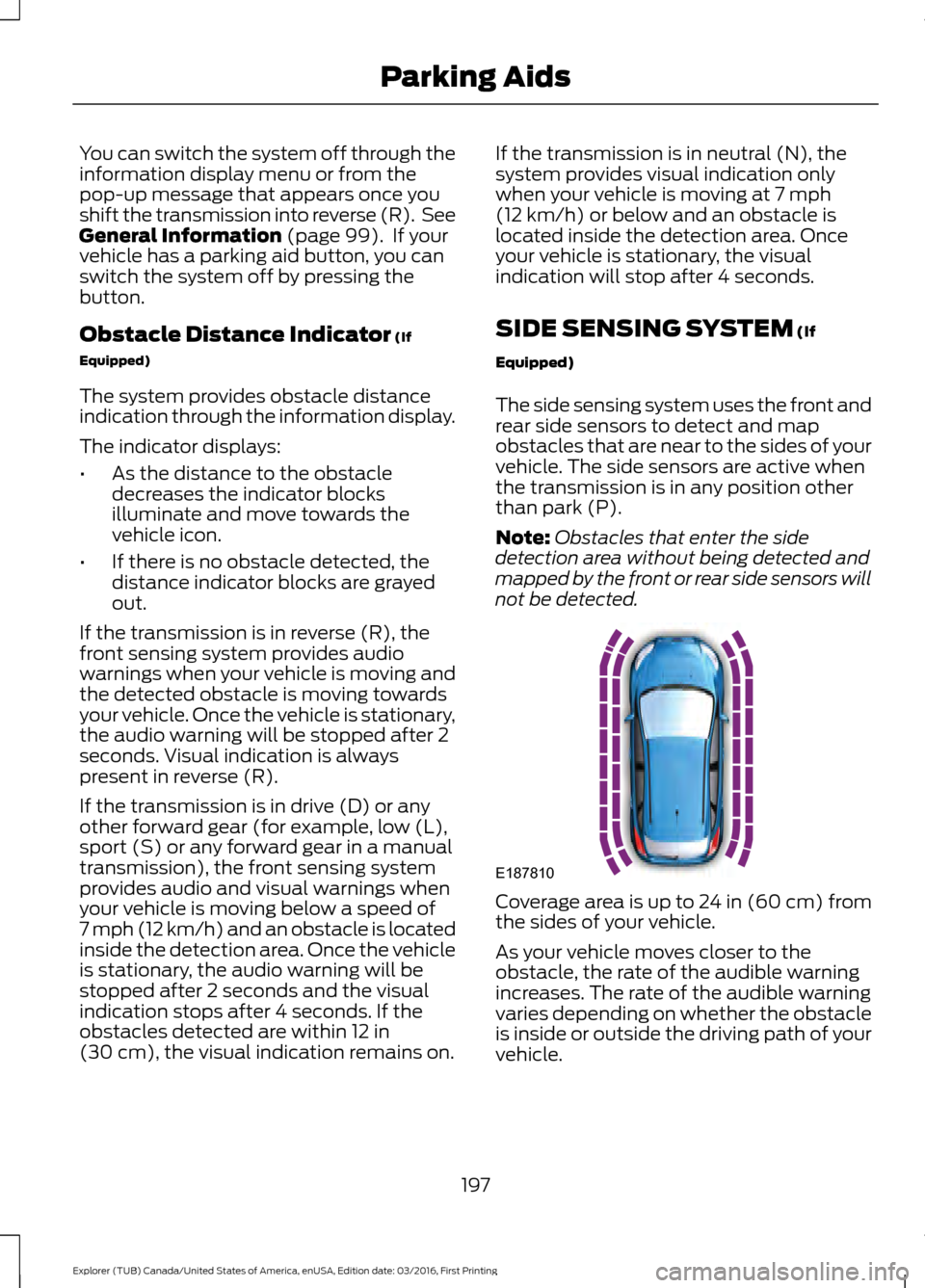
not be detected. Coverage area is up to 24 in (60 cm) from
the sides of your vehicle.
As your vehicle moves closer to the
obstacle, the rate of the audible warning
increases. The rate of the audible warning
varies depending on whether the obstacle
is inside or outside the driving path of your
vehicle.
197
Explorer (TUB) Canada/United States of America, enUSA, Edition date: 03/2016, First Printing Parking AidsE187810