audio FORD EXPLORER 2019 Manual PDF
[x] Cancel search | Manufacturer: FORD, Model Year: 2019, Model line: EXPLORER, Model: FORD EXPLORER 2019Pages: 571, PDF Size: 6.8 MB
Page 493 of 571
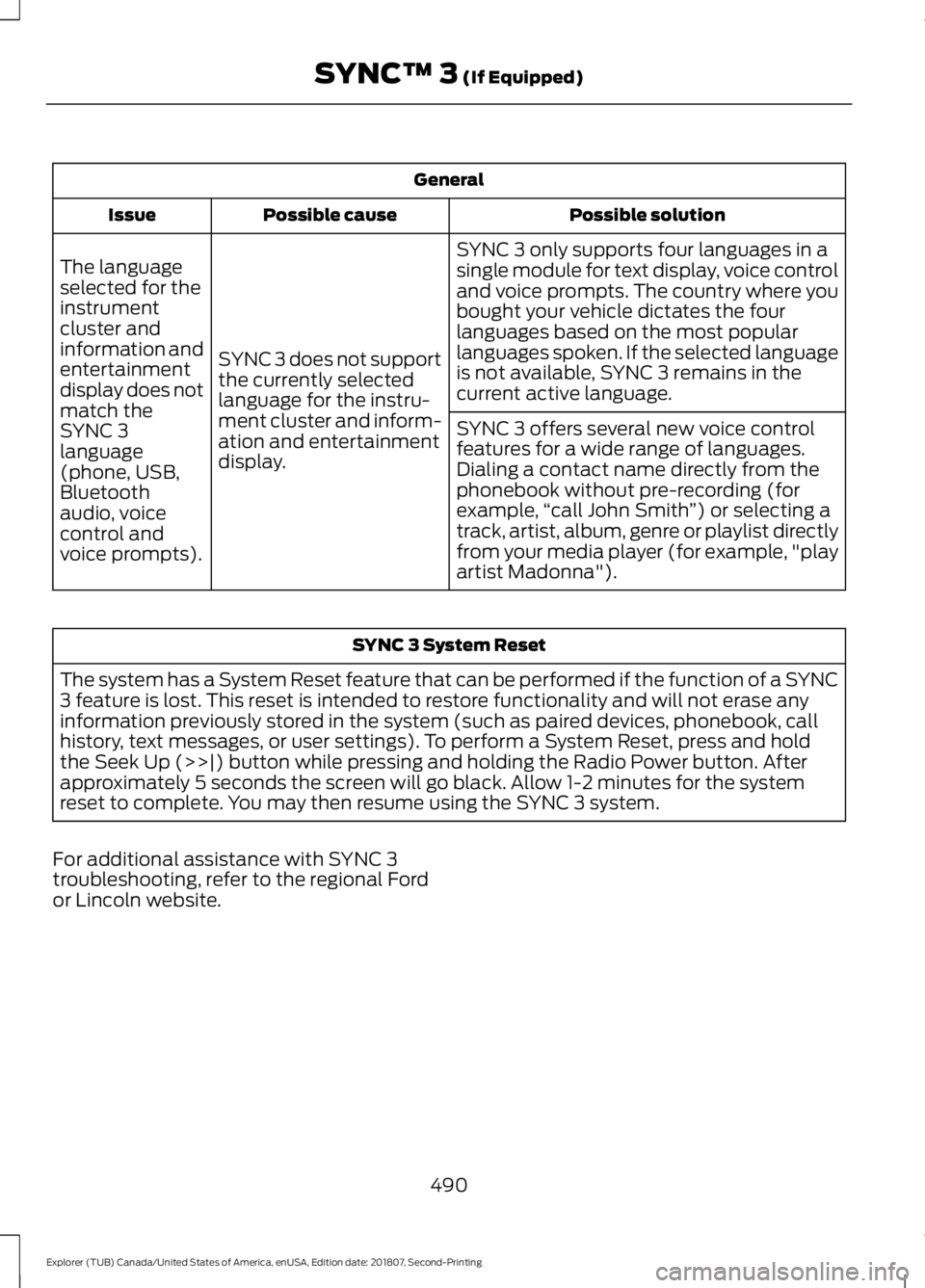
General
Possible solution
Possible cause
Issue
SYNC 3 only supports four languages in a
single module for text display, voice control
and voice prompts. The country where you
bought your vehicle dictates the four
languages based on the most popular
languages spoken. If the selected language
is not available, SYNC 3 remains in the
current active language.
SYNC 3 does not support
the currently selected
language for the instru-
ment cluster and inform-
ation and entertainment
display.
The language
selected for the
instrument
cluster and
information and
entertainment
display does not
match the
SYNC 3
SYNC 3 offers several new voice control
features for a wide range of languages.
Dialing a contact name directly from the
phonebook without pre-recording (for
example,
“call John Smith ”) or selecting a
track, artist, album, genre or playlist directly
from your media player (for example, "play
artist Madonna").
language
(phone, USB,
Bluetooth
audio, voice
control and
voice prompts). SYNC 3 System Reset
The system has a System Reset feature that can be performed if the function of a SYNC
3 feature is lost. This reset is intended to restore functionality and will not erase any
information previously stored in the system (such as paired devices, phonebook, call
history, text messages, or user settings). To perform a System Reset, press and hold
the Seek Up (>>|) button while pressing and holding the Radio Power button. After
approximately 5 seconds the screen will go black. Allow 1-2 minutes for the system
reset to complete. You may then resume using the SYNC 3 system.
For additional assistance with SYNC 3
troubleshooting, refer to the regional Ford
or Lincoln website.
490
Explorer (TUB) Canada/United States of America, enUSA, Edition date: 201807, Second-Printing SYNC™ 3 (If Equipped)
Page 522 of 571
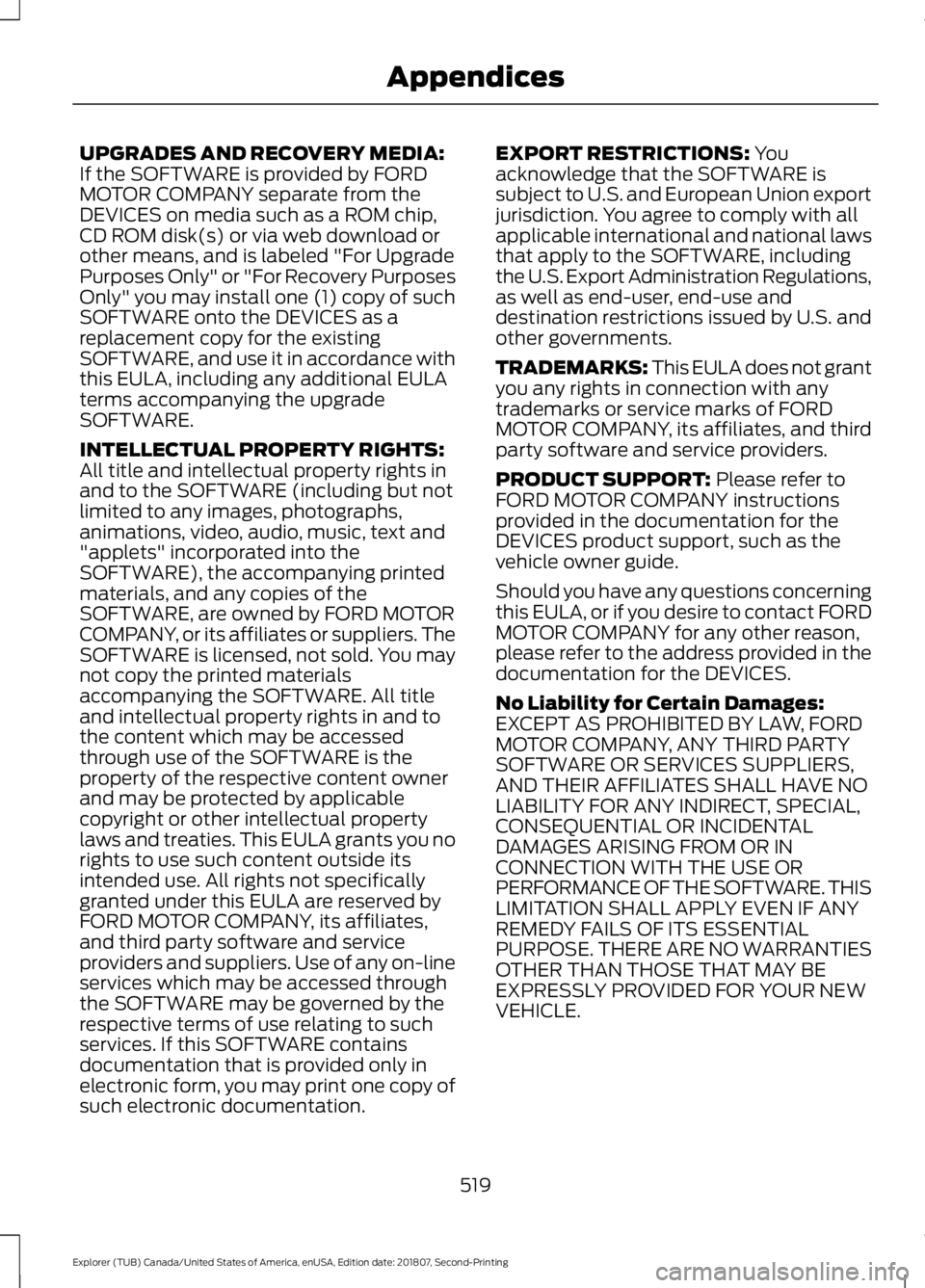
UPGRADES AND RECOVERY MEDIA:
If the SOFTWARE is provided by FORD
MOTOR COMPANY separate from the
DEVICES on media such as a ROM chip,
CD ROM disk(s) or via web download or
other means, and is labeled "For Upgrade
Purposes Only" or "For Recovery Purposes
Only" you may install one (1) copy of such
SOFTWARE onto the DEVICES as a
replacement copy for the existing
SOFTWARE, and use it in accordance with
this EULA, including any additional EULA
terms accompanying the upgrade
SOFTWARE.
INTELLECTUAL PROPERTY RIGHTS:
All title and intellectual property rights in
and to the SOFTWARE (including but not
limited to any images, photographs,
animations, video, audio, music, text and
"applets" incorporated into the
SOFTWARE), the accompanying printed
materials, and any copies of the
SOFTWARE, are owned by FORD MOTOR
COMPANY, or its affiliates or suppliers. The
SOFTWARE is licensed, not sold. You may
not copy the printed materials
accompanying the SOFTWARE. All title
and intellectual property rights in and to
the content which may be accessed
through use of the SOFTWARE is the
property of the respective content owner
and may be protected by applicable
copyright or other intellectual property
laws and treaties. This EULA grants you no
rights to use such content outside its
intended use. All rights not specifically
granted under this EULA are reserved by
FORD MOTOR COMPANY, its affiliates,
and third party software and service
providers and suppliers. Use of any on-line
services which may be accessed through
the SOFTWARE may be governed by the
respective terms of use relating to such
services. If this SOFTWARE contains
documentation that is provided only in
electronic form, you may print one copy of
such electronic documentation.
EXPORT RESTRICTIONS: You
acknowledge that the SOFTWARE is
subject to U.S. and European Union export
jurisdiction. You agree to comply with all
applicable international and national laws
that apply to the SOFTWARE, including
the U.S. Export Administration Regulations,
as well as end-user, end-use and
destination restrictions issued by U.S. and
other governments.
TRADEMARKS: This EULA does not grant
you any rights in connection with any
trademarks or service marks of FORD
MOTOR COMPANY, its affiliates, and third
party software and service providers.
PRODUCT SUPPORT:
Please refer to
FORD MOTOR COMPANY instructions
provided in the documentation for the
DEVICES product support, such as the
vehicle owner guide.
Should you have any questions concerning
this EULA, or if you desire to contact FORD
MOTOR COMPANY for any other reason,
please refer to the address provided in the
documentation for the DEVICES.
No Liability for Certain Damages:
EXCEPT AS PROHIBITED BY LAW, FORD
MOTOR COMPANY, ANY THIRD PARTY
SOFTWARE OR SERVICES SUPPLIERS,
AND THEIR AFFILIATES SHALL HAVE NO
LIABILITY FOR ANY INDIRECT, SPECIAL,
CONSEQUENTIAL OR INCIDENTAL
DAMAGES ARISING FROM OR IN
CONNECTION WITH THE USE OR
PERFORMANCE OF THE SOFTWARE. THIS
LIMITATION SHALL APPLY EVEN IF ANY
REMEDY FAILS OF ITS ESSENTIAL
PURPOSE. THERE ARE NO WARRANTIES
OTHER THAN THOSE THAT MAY BE
EXPRESSLY PROVIDED FOR YOUR NEW
VEHICLE.
519
Explorer (TUB) Canada/United States of America, enUSA, Edition date: 201807, Second-Printing Appendices
Page 528 of 571
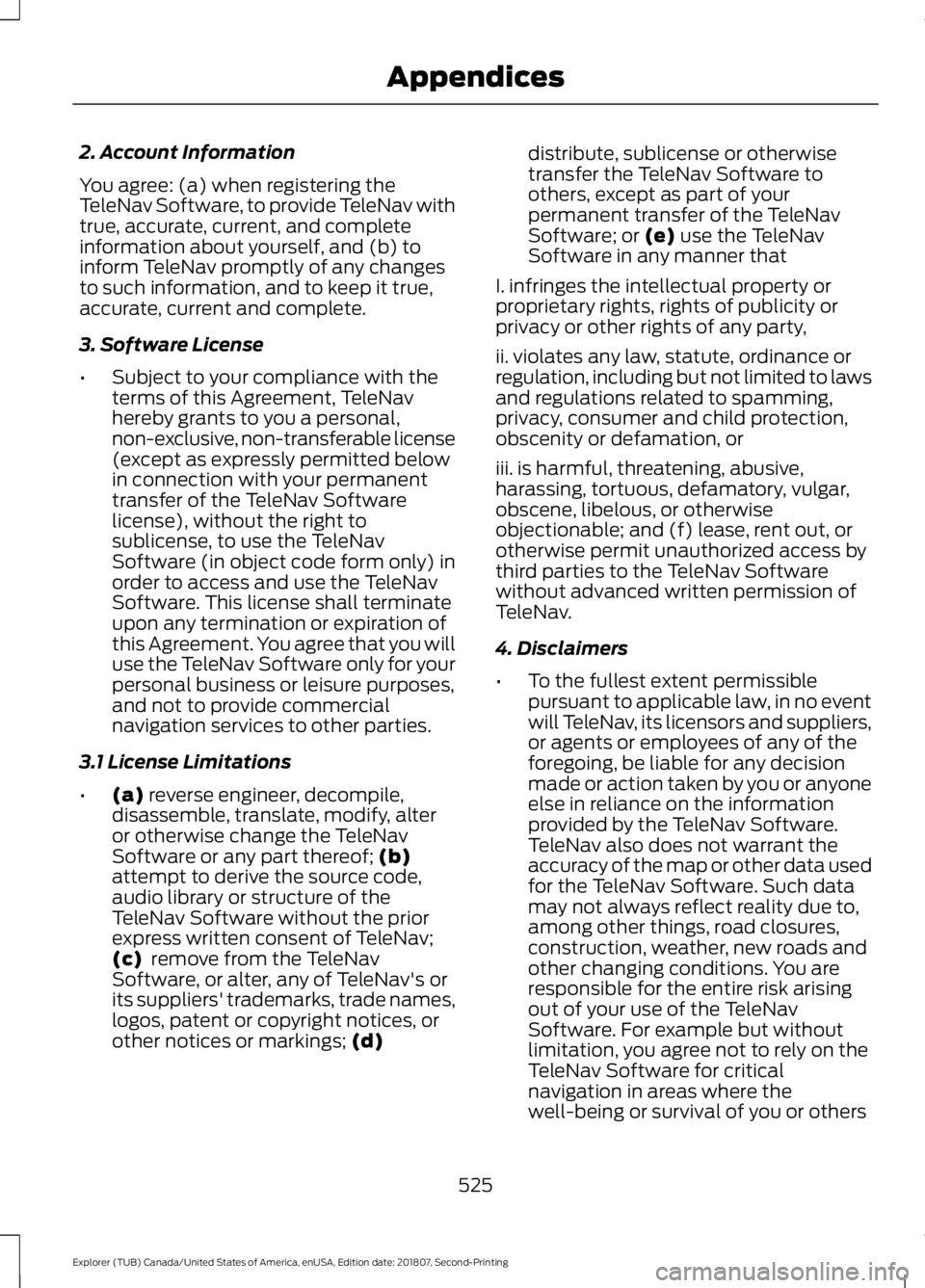
2. Account Information
You agree: (a) when registering the
TeleNav Software, to provide TeleNav with
true, accurate, current, and complete
information about yourself, and (b) to
inform TeleNav promptly of any changes
to such information, and to keep it true,
accurate, current and complete.
3. Software License
•
Subject to your compliance with the
terms of this Agreement, TeleNav
hereby grants to you a personal,
non-exclusive, non-transferable license
(except as expressly permitted below
in connection with your permanent
transfer of the TeleNav Software
license), without the right to
sublicense, to use the TeleNav
Software (in object code form only) in
order to access and use the TeleNav
Software. This license shall terminate
upon any termination or expiration of
this Agreement. You agree that you will
use the TeleNav Software only for your
personal business or leisure purposes,
and not to provide commercial
navigation services to other parties.
3.1 License Limitations
• (a) reverse engineer, decompile,
disassemble, translate, modify, alter
or otherwise change the TeleNav
Software or any part thereof;
(b)
attempt to derive the source code,
audio library or structure of the
TeleNav Software without the prior
express written consent of TeleNav;
(c)
remove from the TeleNav
Software, or alter, any of TeleNav's or
its suppliers' trademarks, trade names,
logos, patent or copyright notices, or
other notices or markings;
(d) distribute, sublicense or otherwise
transfer the TeleNav Software to
others, except as part of your
permanent transfer of the TeleNav
Software; or
(e) use the TeleNav
Software in any manner that
I. infringes the intellectual property or
proprietary rights, rights of publicity or
privacy or other rights of any party,
ii. violates any law, statute, ordinance or
regulation, including but not limited to laws
and regulations related to spamming,
privacy, consumer and child protection,
obscenity or defamation, or
iii. is harmful, threatening, abusive,
harassing, tortuous, defamatory, vulgar,
obscene, libelous, or otherwise
objectionable; and (f) lease, rent out, or
otherwise permit unauthorized access by
third parties to the TeleNav Software
without advanced written permission of
TeleNav.
4. Disclaimers
• To the fullest extent permissible
pursuant to applicable law, in no event
will TeleNav, its licensors and suppliers,
or agents or employees of any of the
foregoing, be liable for any decision
made or action taken by you or anyone
else in reliance on the information
provided by the TeleNav Software.
TeleNav also does not warrant the
accuracy of the map or other data used
for the TeleNav Software. Such data
may not always reflect reality due to,
among other things, road closures,
construction, weather, new roads and
other changing conditions. You are
responsible for the entire risk arising
out of your use of the TeleNav
Software. For example but without
limitation, you agree not to rely on the
TeleNav Software for critical
navigation in areas where the
well-being or survival of you or others
525
Explorer (TUB) Canada/United States of America, enUSA, Edition date: 201807, Second-Printing Appendices
Page 556 of 571
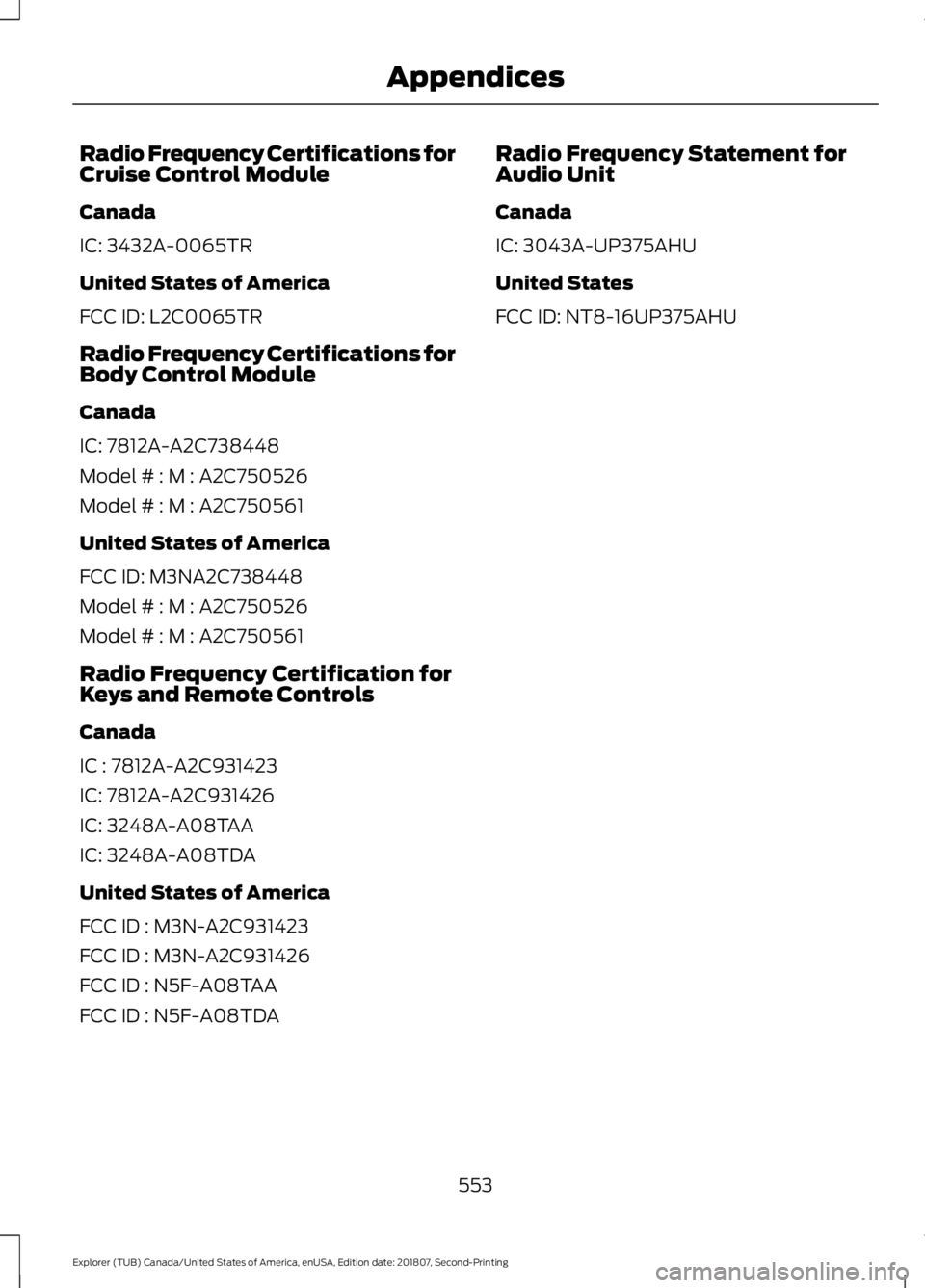
Radio Frequency Certifications for
Cruise Control Module
Canada
IC: 3432A-0065TR
United States of America
FCC ID: L2C0065TR
Radio Frequency Certifications for
Body Control Module
Canada
IC: 7812A-A2C738448
Model # : M : A2C750526
Model # : M : A2C750561
United States of America
FCC ID: M3NA2C738448
Model # : M : A2C750526
Model # : M : A2C750561
Radio Frequency Certification for
Keys and Remote Controls
Canada
IC : 7812A-A2C931423
IC: 7812A-A2C931426
IC: 3248A-A08TAA
IC: 3248A-A08TDA
United States of America
FCC ID : M3N-A2C931423
FCC ID : M3N-A2C931426
FCC ID : N5F-A08TAA
FCC ID : N5F-A08TDA
Radio Frequency Statement for
Audio Unit
Canada
IC: 3043A-UP375AHU
United States
FCC ID: NT8-16UP375AHU
553
Explorer (TUB) Canada/United States of America, enUSA, Edition date: 201807, Second-Printing Appendices
Page 558 of 571
1
180 Degree Camera.....................................215
Camera Views...................................................... 216
Using the System................................................ 216
4
4WD See: Four-Wheel Drive..................................... 188
A
A/C See: Climate Control......................................... 129
About This Manual...........................................7
ABS See: Brakes........................................................... 193
ABS driving hints See: Hints on Driving With Anti-Lock
Brakes................................................................ 193
Accessories.....................................................491 Exterior Style........................................................ 491
Interior Style......................................................... 491
Lifestyle.................................................................. 491
Peace of Mind...................................................... 491
Accessories See: Replacement Parts
Recommendation............................................ 12
ACC See: Using Adaptive Cruise Control.............218
Active Park Assist........................................206 Using Active Park Assist.................................. 207
Adjusting the Headlamps
........................299
Vertical Aim Adjustment................................ 299
Adjusting the Pedals......................................81
Adjusting the Steering Wheel - Vehicles With: Manual Adjustable Steering
Column .............................................................
77
Adjusting the Steering Wheel - Vehicles With: Power Adjustable Steering
Column .............................................................
77
End of Travel Position......................................... 78
Memory Feature.................................................... 78
Airbag Disposal
...............................................52
Air Conditioning See: Climate Control......................................... 129Air Filter
See: Changing the Engine Air Filter............304
Alarm See: Anti-Theft Alarm........................................ 76
Ambient Lighting...........................................89 Adjusting the Brightness................................... 89
Changing the Color............................................. 89
Switching Ambient Lighting Off..................... 89
Switching Ambient Lighting On..................... 89
Anti-Theft Alarm
............................................76
Arming the Alarm................................................. 76
Disarming the Alarm........................................... 76
Appendices.....................................................514
Apps.................................................................460 ........................................................................\
......... 460
SiriusXM Traffic and Travel Link................... 462
At a Glance........................................................16
Audible Warnings and Indicators...........102 Automatic Transmission Warning
Chime................................................................. 103
Engine On Warning Chime.............................. 102
Headlamps On Warning Chime.................... 102
Key in Ignition Warning Chime....................... 102
Keyless Warning Alert ...................................... 102
Parking Brake On Warning Chime................102
Audio Control
...................................................79
Seek and Media.................................................... 79
Audio System................................................362 General Information......................................... 362
Audio Unit - Vehicles With: AM/FM/CD/ SYNC.............................................................366
Accessing the Clock Settings....................... 366
Accessing the Media Source Menu............366
Accessing the Menu......................................... 366
Accessing the Phone Features..................... 366
Accessing the Sound Settings..................... 366
Adjusting the Volume...................................... 366
Changing Radio Stations................................ 367
Ejecting the CD................................................... 367
Inserting a CD...................................................... 367
Listening to a CD................................................ 367
Listening to Satellite Radio............................ 367
Listening to the Radio...................................... 367
Menu Structure.................................................. 368
Muting the Audio................................................ 367
Playing or Pausing Media................................ 367
Switching the Audio Unit On and Off.........367
Using a Cell Phone............................................ 367
555
Explorer (TUB) Canada/United States of America, enUSA, Edition date: 201807, Second-Printing Index
Page 559 of 571
Using Seek, Fast Forward and
Reverse............................................................. 368
Using the Display Control............................... 367
Using the Number Block................................. 368
Audio Unit - Vehicles With: Premium AM/FM/CD.................................................364
Adjusting the Volume...................................... 365
Changing Radio Stations................................ 365
Ejecting the CD................................................... 365
Inserting a CD...................................................... 365
Selecting the Audio Modes............................ 365
Switching the Audio Unit On and Off........365
Using Seek, Fast Forward and Reverse............................................................. 365
Audio Unit - Vehicles With: Sony AM/ FM/CD...........................................................363
Accessing the Sound Settings...................... 363
Adjusting the Volume...................................... 364
Changing Radio Stations................................ 364
Ejecting the CD................................................... 364
Inserting a CD..................................................... 364
Switching the Audio Unit On and Off........364
Using Seek, Fast Forward and Reverse............................................................. 364
Autolamps........................................................85 Windshield Wiper Activated
Headlamps........................................................ 85
Automatic Climate Control - Vehicles With: Premium AM/FM/CD....................132
Directing Air to the Footwell Air
Vents................................................................... 132
Directing Air to the Instrument Panel Air Vents................................................................... 132
Setting the Blower Motor Speed.................. 132
Setting the Temperature.................................. 132
Switching Auto Mode On and Off................132
Switching Defrost On and Off........................ 133
Switching Dual Zone Mode On and Off........................................................................\
133
Switching Maximum Air Conditioning On and Off............................................................... 133
Switching Maximum Defrost On and Off........................................................................\
133
Switching Recirculated Air On and Off........................................................................\
133
Switching the Air Conditioning On and Off........................................................................\
133Switching the Climate Control On and
Off........................................................................\
133
Switching the Heated Seats On and Off........................................................................\
133
Automatic Climate Control - Vehicles With: Sony AM/FM/CD...........................130
Setting the Blower Motor Speed.................. 130
Setting the Temperature................................. 130
Switching Auto Mode On and Off.................131
Switching Defrost On and Off......................... 131
Switching Dual Zone Mode On and Off........................................................................\
. 131
Switching Maximum Air Conditioning On and Off................................................................ 131
Switching Maximum Defrost On and Off........................................................................\
132
Switching Recirculated Air On and Off........................................................................\
132
Switching the Air Conditioning On and Off........................................................................\
. 131
Switching the Climate Controlled Seats On and Off................................................................ 131
Switching the Climate Control On and Off........................................................................\
. 131
Switching the Heated Seats On and Off........................................................................\
. 131
Automatic High Beam Control..................87 Automatic High Beam Indicator.................... 88
Switching the System On and Off.................87
Automatic Transmission...........................184 Brake-Shift Interlock Override...................... 186
If Your Vehicle Gets Stuck In Mud or Snow................................................................... 187
SelectShift Automatic ™
Transmission................................................... 185
Understanding the Positions of Your Automatic Transmission............................ 184
Automatic Transmission Fluid Check - 2.3L EcoBoost™
.......................................293
Automatic Transmission Fluid Check - 3.5L Duratec/3.5L Ecoboost™............293
Adding Transmission Fluid ............................ 294
Checking the Transmission Fluid Level................................................................... 293
Autowipers.......................................................82 Autowipers Settings............................................ 83
Auxiliary Power Points................................162 110 Volt AC Power Point................................... 162
556
Explorer (TUB) Canada/United States of America, enUSA, Edition date: 201807, Second-Printing Index
Page 569 of 571
Towing Points................................................263
Installing the Recovery Hook......................... 263
Recovery Hook Location................................. 263
Towing the Vehicle on Four Wheels - 2.3L EcoBoost™
........................................252
Emergency Towing............................................ 252
Towing the Vehicle on Four Wheels - 3.5L Duratec/3.5L Ecoboost™............252
Emergency Towing............................................ 253
Recreational Towing......................................... 253
Towing..............................................................247
Traction Control
............................................196
Principle of Operation...................................... 196
Trailer Sway Control...................................248
Transmission Code Designation
............346
Transmission..................................................184
Transporting the Vehicle...........................262
Type Approvals
.............................................542
Radio Frequency Certification for Keys and
Remote Controls........................................... 553
Radio Frequency Certifications for Blind Spot Information System........................... 551
Radio Frequency Certifications for Body Control Module.............................................. 553
Radio Frequency Certifications for Cruise Control Module.............................................. 553
Radio Frequency Certifications for Mid Range Radar................................................... 545
Radio Frequency Certifications for Passive Anti-Theft System....................................... 546
Radio Frequency Certifications for Radio Transceiver Module..................................... 549
Radio Frequency Certifications for SYNC 3........................................................................\
... 552
Radio Frequency Certifications for Tire Pressure Monitoring Sensor(s)...............542
Radio Frequency Certifications for Wireless Charging........................................................... 552
Radio Frequency Statement for Audio Unit..................................................................... 553
U
Under Hood Overview - 2.3L EcoBoost™.................................................283
Under Hood Overview - 3.5L Duratec.........................................................284 Under Hood Overview - 3.5L
Ecoboost™.................................................285
Universal Garage Door Opener................157 HomeLink Wireless Control System............157
USB Port
..........................................................375
Using Adaptive Cruise Control................218
Automatic Cancellation................................... 221
Blocked Sensor................................................... 223
Canceling the Set Speed................................. 221
Changing the Set Speed.................................. 221
Detection Issues................................................. 222
Following a Vehicle............................................ 219
Hilly Condition Usage........................................ 221
Overriding the Set Speed............................... 220
Resuming the Set Speed................................. 221
Setting the Adaptive Cruise Speed..............219
Setting the Gap Distance............................... 220
Switching Adaptive Cruise Control Off....................................................................... 222
Switching Adaptive Cruise Control On........................................................................\
219
Switching to Normal Cruise Control...........224
System Not Available....................................... 223
Using Cruise Control
....................................217
Canceling the Set Speed.................................. 217
Changing the Set Speed................................... 217
Resuming the Set Speed................................. 218
Setting the Cruise Speed.................................. 217
Switching Cruise Control Off.......................... 218
Switching Cruise Control On........................... 217
Using Four-Wheel Drive
............................188
Driving In Special Conditions With
Four-Wheel Drive (4WD)........................... 189
How Your Vehicle Differs From Other Vehicles............................................................. 189
Using Hill Descent Control......................200 Principle of operation...................................... 200
Using hill descent control.............................. 200
Using MyKey With Remote Start Systems..........................................................63
Using Snow Chains.....................................329
Using Stability Control...............................198
Using Summer Tires...................................329
Using SYNC™ With Your Media Player.............................................................397
Accessing Your USB Song Library................401
Bluetooth Devices and System Settings............................................................ 403
566
Explorer (TUB) Canada/United States of America, enUSA, Edition date: 201807, Second-Printing Index
Page 570 of 571
Connecting Your Digital Media Player to the
USB Port........................................................... 397
Media Menu Features..................................... 400
Media Voice Commands................................ 398
USB 2..................................................................... 403
Voice Commands for Audio Sources........404
Using SYNC™ With Your Phone...........380 Accessing Features through the Phone
Menu.................................................................. 385
Accessing Your Phone Settings................... 388
Bluetooth Devices............................................. 389
Making Calls........................................................ 384
Pairing a Phone for the First Time................381
Pairing Subsequent Phones.......................... 382
Phone Options during an Active Call.........384
Phone Voice Commands................................ 382
Receiving Calls................................................... 384
System Settings................................................ 390
Text Messaging.................................................. 386
Using Terrain Control..................................199
Using Traction Control...............................196 Switching the System Off............................... 196
System Indicator Lights and Messages.......................................................... 196
Using a Switch..................................................... 196
Using the Information Display Controls............................................................. 196
Using Voice Recognition...........................378 Audio Voice Commands................................. 428
Climate Voice Commands............................. 429
Initiating a Voice Session................................ 378
Mobile App Voice Commands...................... 432
Navigation Voice Commands........................ 431
Phone Voice Commands................................ 429
SiriusXM Traffic and Travel Link Voice Commands..................................................... 432
System Interaction and Feedback..............379
Voice Settings Commands............................ 433
Utilizing the Mediation/Arbitration Program (Canada Only).........................267
V
Vehicle Care..................................................306 General Information......................................... 306
Vehicle Certification Label.......................346
Vehicle Identification Number................345 Vehicle Storage...............................................311
Battery..................................................................... 312
Body........................................................................\
.. 311
Brakes...................................................................... 312
Cooling system.................................................... 312
Engine...................................................................... 312
Fuel system........................................................... 312
General.................................................................... 311
Miscellaneous...................................................... 312
Removing Vehicle From Storage................... 312
Tires........................................................................\
.. 312
Ventilation See: Climate Control......................................... 129
VIN See: Vehicle Identification Number............345
Voice Control
....................................................79
W
Warning Lamps and Indicators................99 Adaptive Cruise Control.................................... 99
Anti-Lock Braking System................................ 99
Automatic High Beam Control..................... 100
Battery.................................................................... 100
Blind Spot Monitor............................................ 100
Brake System....................................................... 100
Cruise Control...................................................... 100
Direction Indicator............................................. 100
Door Ajar............................................................... 100
Engine Coolant Temperature........................ 100
Engine Oil.............................................................. 100
Fasten Safety Belt............................................... 101
Front Airbag........................................................... 101
Front Fog Lamps................................................. 101
Heads Up Display................................................ 101
High Beam............................................................. 101
Hood Ajar................................................................ 101
Lane Keeping Aid................................................. 101
Liftgate Ajar........................................................... 101
Low Fuel Level...................................................... 101
Low Tire Pressure Warning.............................. 101
Low Washer Fluid................................................ 101
Parking Lamps...................................................... 101
Powertrain Fault.................................................. 101
Service Engine Soon.......................................... 102
Stability Control.................................................. 102
Stability Control Off.......................................... 102
Transmission Tow/Haul................................... 102
567
Explorer (TUB) Canada/United States of America, enUSA, Edition date: 201807, Second-Printing Index