Lamp FORD EXPLORER 2019 Owners Manual
[x] Cancel search | Manufacturer: FORD, Model Year: 2019, Model line: EXPLORER, Model: FORD EXPLORER 2019Pages: 571, PDF Size: 6.8 MB
Page 4 of 571
Introduction
About This Manual
..........................................7
Symbols Glossary ............................................
7
Data Recording .................................................
9
Perchlorate ........................................................
11
Ford Credit .........................................................
11
Replacement Parts Recommendation ........................................................................\
....
12
Special Notices ...............................................
12
Mobile Communications Equipment ........................................................................\
....
13
Export Unique Options ................................
14
Environment
Protecting the Environment .......................
15
At a Glance
Instrument Panel Overview .......................
16
Child Safety
General Information ......................................
18
Installing Child Restraints ...........................
19
Booster Seats .................................................
29
Child Restraint Positioning .........................
31
Child Safety Locks .........................................
33
Seatbelts
Principle of Operation .................................
35
Fastening the Seatbelts .............................
36
Seatbelt Height Adjustment .....................
39
Seatbelt Warning Lamp and Indicator Chime ............................................................
40
Seatbelt Reminder .......................................
40
Child Restraint and Seatbelt Maintenance ...............................................
42
Seatbelt Extension .......................................
42
Personal Safety System ™
Personal Safety System ™.........................
43 Supplementary Restraints
System
Principle of Operation .................................
44
Driver and Passenger Airbags ..................
45
Front Passenger Sensing System ...........
46
Side Airbags ....................................................
48
Passenger Knee Airbag ...............................
49
Safety Canopy ™...........................................
49
Crash Sensors and Airbag Indicator ........
51
Airbag Disposal ..............................................
52
Keys and Remote Controls
General Information on Radio Frequencies .................................................
53
Remote Control .............................................
53
Replacing a Lost Key or Remote Control ........................................................................\
..
59
MyKey ™
Principle of Operation .................................
60
Creating a MyKey ...........................................
61
Clearing All MyKeys ......................................
62
Checking MyKey System Status ..............
62
Using MyKey With Remote Start Systems ........................................................
63
MyKey – Troubleshooting ..........................
63
Doors and Locks
Locking and Unlocking ................................
65
Keyless Entry ..................................................
68
Liftgate
Manual Liftgate ..............................................
70
Power Liftgate ..................................................
71
Security
Passive Anti-Theft System ........................
75
Anti-Theft Alarm ...........................................
76
1
Explorer (TUB) Canada/United States of America, enUSA, Edition date: 201807, Second-Printing Table of Contents
Page 5 of 571
Steering Wheel
Adjusting the Steering Wheel - Vehicles
With: Manual Adjustable Steering
Column ..........................................................77
Adjusting the Steering Wheel - Vehicles With: Power Adjustable Steering
Column ..........................................................
77
Audio Control ..................................................
79
Voice Control ...................................................
79
Cruise Control ................................................
80
Information Display Control .....................
80
Heated Steering Wheel ..............................
80
Pedals
Adjusting the Pedals .....................................
81
Wipers and Washers
Windshield Wipers ........................................
82
Autowipers ......................................................
82
Windshield Washers ....................................
83
Rear Window Wiper and Washers ..........
83
Lighting
General Information ....................................
84
Lighting Control .............................................
84
Autolamps .......................................................
85
Instrument Lighting Dimmer ....................
85
Headlamp Exit Delay ...................................
86
Daytime Running Lamps ...........................
86
Automatic High Beam Control .................
87
Front Fog Lamps ...........................................
88
Direction Indicators ......................................
88
Interior Lamps ................................................
88
Ambient Lighting ..........................................
89
Windows and Mirrors
Power Windows ............................................
90
Global Opening ...............................................
91
Exterior Mirrors ................................................
91
Interior Mirror ..................................................
94Sun Visors
........................................................
94
Moonroof .........................................................
94
Instrument Cluster
Gauges ..............................................................
96
Warning Lamps and Indicators ...............
99
Audible Warnings and Indicators ..........
102
Information Displays
General Information ...................................
104
Information Messages ................................
115
Climate Control
Manual Climate Control ............................
129
Automatic Climate Control - Vehicles With: Sony AM/FM/CD .........................
130
Automatic Climate Control - Vehicles With: Premium AM/FM/CD .................
132
Hints on Controlling the Interior Climate ........................................................................\
.
134
Rear Passenger Climate Controls .........
136
Heated Rear Window .................................
137
Heated Exterior Mirrors ..............................
137
Cabin Air Filter ..............................................
138
Remote Start ................................................
138
Seats
Sitting in the Correct Position .................
139
Head Restraints ...........................................
139
Manual Seats ................................................
142
Power Seats ...................................................
143
Memory Function ........................................
146
Rear Seats ......................................................
147
Heated Seats ................................................
154
Climate Controlled Seats .........................
155
Garage Door Opener
Universal Garage Door Opener ...............
157
2
Explorer (TUB) Canada/United States of America, enUSA, Edition date: 201807, Second-Printing Table of Contents
Page 7 of 571
Load Carrying
Rear Under Floor Storage
........................239
Cargo Nets .....................................................
239
Luggage Covers ...........................................
240
Roof Racks and Load Carriers ...............
240
Load Limit .......................................................
241
Towing
Towing a Trailer ............................................
247
Trailer Sway Control ..................................
248
Recommended Towing Weights ..........
248
Essential Towing Checks .........................
250
Towing the Vehicle on Four Wheels - 2.3L EcoBoost™ ......................................
252
Towing the Vehicle on Four Wheels - 3.5L Duratec/3.5L Ecoboost™ ..........
252
Driving Hints
Breaking-In ....................................................
255
Economical Driving ....................................
255
Driving Through Water ..............................
256
Floor Mats .....................................................
256
Roadside Emergencies
Roadside Assistance .................................
258
Hazard Flashers ..........................................
259
Fuel Shutoff ..................................................
259
Jump Starting the Vehicle .......................
260
Post-Crash Alert System .........................
262
Transporting the Vehicle ..........................
262
Towing Points ...............................................
263
Customer Assistance
Getting the Services You Need .............
264
In California (U.S. Only) ...........................
265
The Better Business Bureau (BBB) Auto Line Program (U.S. Only) ....................
266
Utilizing the Mediation/Arbitration Program (Canada Only) ......................
267Getting Assistance Outside the U.S. and
Canada .......................................................
267
Ordering Additional Owner's Literature ........................................................................\
269
Reporting Safety Defects (U.S. Only) ........................................................................\
269
Reporting Safety Defects (Canada Only) ........................................................................\
269
Fuses
Fuse Specification Chart ...........................
271
Changing a Fuse .........................................
280
Maintenance
General Information ..................................
282
Opening and Closing the Hood .............
282
Under Hood Overview - 2.3L EcoBoost™ ........................................................................\
283
Under Hood Overview - 3.5L Duratec ........................................................................\
284
Under Hood Overview - 3.5L Ecoboost™ ........................................................................\
285
Engine Oil Dipstick - 2.3L EcoBoost™ ........................................................................\
286
Engine Oil Dipstick - 3.5L Duratec/3.5L Ecoboost™ ...............................................
287
Engine Oil Check .........................................
287
Oil Change Indicator Reset .....................
288
Engine Coolant Check ..............................
289
Automatic Transmission Fluid Check - 2.3L EcoBoost™ .....................................
293
Automatic Transmission Fluid Check - 3.5L Duratec/3.5L Ecoboost™ ..........
293
Brake Fluid Check .......................................
295
Power Steering Fluid Check ...................
296
Washer Fluid Check ...................................
296
Changing the 12V Battery ........................
296
Checking the Wiper Blades ....................
298
Changing the Wiper Blades ....................
298
Adjusting the Headlamps .......................
299
Changing a Bulb .........................................
300
Changing the Engine Air Filter ...............
304
4
Explorer (TUB) Canada/United States of America, enUSA, Edition date: 201807, Second-Printing Table of Contents
Page 11 of 571
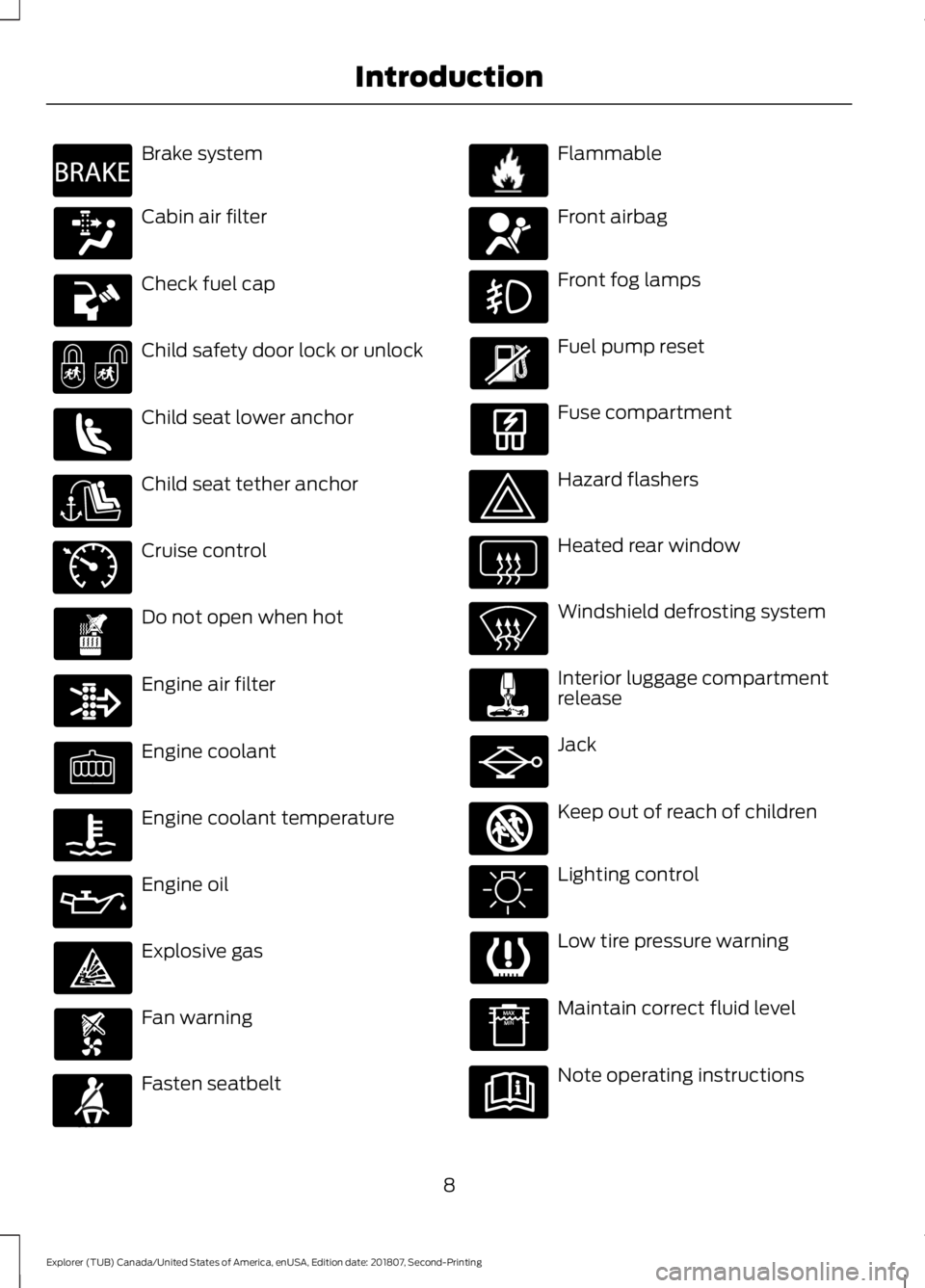
Brake system
Cabin air filter
Check fuel cap
Child safety door lock or unlock
Child seat lower anchor
Child seat tether anchor
Cruise control
Do not open when hot
Engine air filter
Engine coolant
Engine coolant temperature
Engine oil
Explosive gas
Fan warning
Fasten seatbelt Flammable
Front airbag
Front fog lamps
Fuel pump reset
Fuse compartment
Hazard flashers
Heated rear window
Windshield defrosting system
Interior luggage compartment
release
Jack
Keep out of reach of children
Lighting control
Low tire pressure warning
Maintain correct fluid level
Note operating instructions
8
Explorer (TUB) Canada/United States of America, enUSA, Edition date: 201807, Second-Printing IntroductionE270480 E71340 E71880 E231160 E67017 E161353
Page 19 of 571
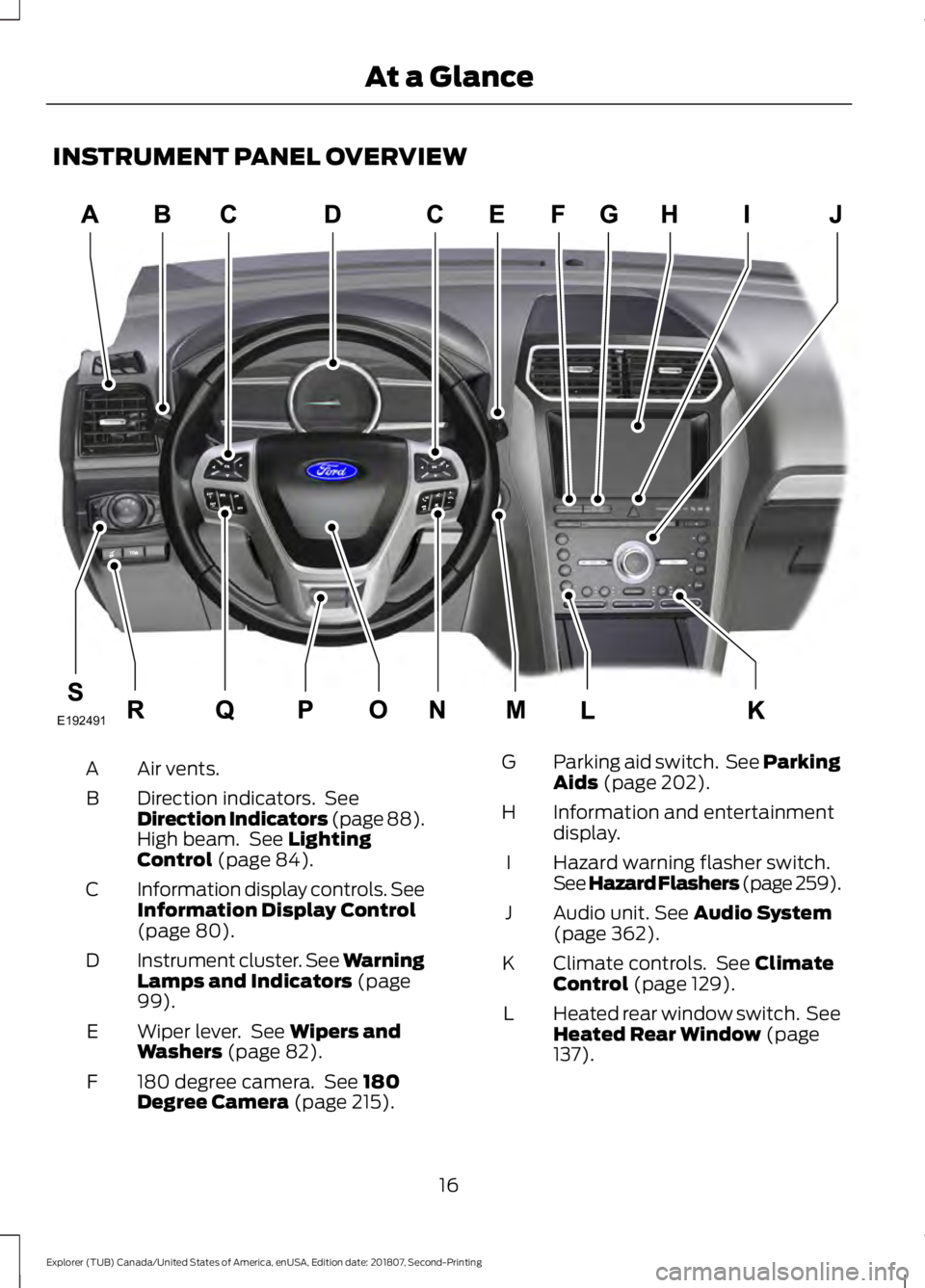
INSTRUMENT PANEL OVERVIEW
Air vents.
A
Direction indicators. See
Direction Indicators (page 88).
High beam. See Lighting
Control (page 84).
B
Information display controls. See
Information Display Control
(page
80).
C
Instrument cluster.
See Warning
Lamps and Indicators (page
99).
D
Wiper lever. See
Wipers and
Washers (page 82).
E
180 degree camera. See
180
Degree Camera (page 215).
F Parking aid switch. See Parking
Aids
(page 202).
G
Information and entertainment
display.
H
Hazard warning flasher switch.
See Hazard Flashers (page 259
).
I
Audio unit.
See Audio System
(page 362).
J
Climate controls. See
Climate
Control (page 129).
K
Heated rear window switch. See
Heated Rear Window
(page
137).
L
16
Explorer (TUB) Canada/United States of America, enUSA, Edition date: 201807, Second-Printing At a GlanceE192491
Page 43 of 571
SEATBELT WARNING LAMP
AND INDICATOR CHIME This lamp illuminates and an
indicator chime will sound if the
driver seatbelt has not been
fastened when the vehicle's ignition is
turned on.
Conditions of operation Then
If
The seatbelt warning lamp illuminates andthe indicator chime sounds for a few seconds.
The driver seatbelt is not buckled before
the ignition switch is turned to the on posi- tion...
The seatbelt warning lamp and indicatorchime turn off.
The driver seatbelt is buckled while the
warning lamp is illuminated and the indic- ator chime is sounding...
The seatbelt warning lamp and indicatorchime remain off.
The driver seatbelt is buckled before the
ignition switch is turned to the on position...
SEATBELT REMINDER
Belt-Minder™
This feature supplements the seatbelt
warning function by providing additional
reminders that intermittently sound a tone
and illuminate the seatbelt warning light
when you are in the driver seat or you have
a front seat passenger and a seatbelt is
unbuckled. The system uses information from the
front passenger sensing system to
determine if a front seat passenger is
present and therefore potentially in need
of a warning. To avoid the system turning
on the Belt-Minder feature for objects you
place on the front passenger seat, only the
front seat passengers receive warnings as
determined by the front passenger sensing
system.
If the Belt-Minder warnings expire
(warnings for about five minutes) for one
passenger (driver or front passenger), the
other passenger can still cause the
Belt-Minder feature to turn on.
40
Explorer (TUB) Canada/United States of America, enUSA, Edition date: 201807, Second-Printing SeatbeltsE71880
Page 62 of 571
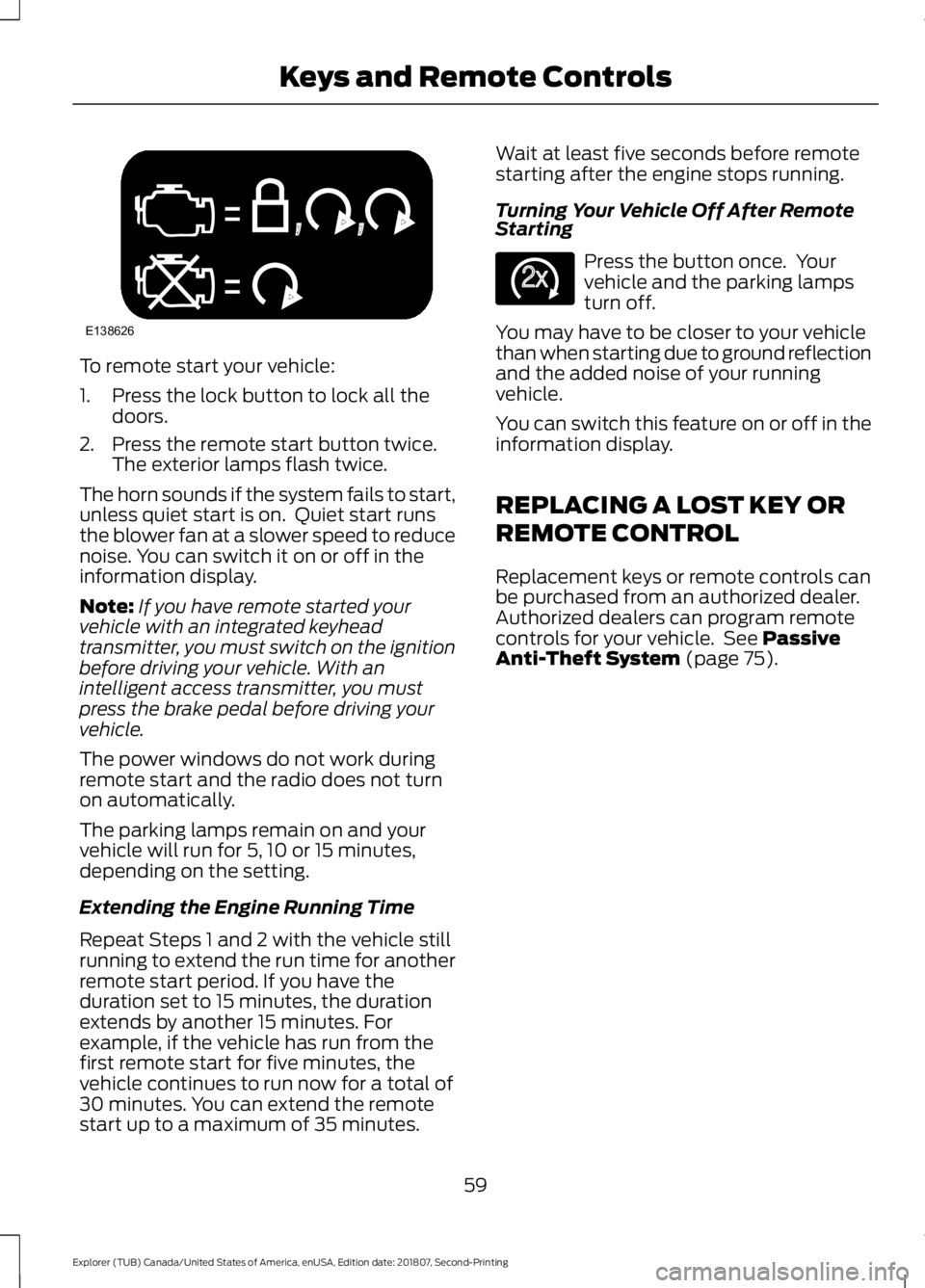
To remote start your vehicle:
1. Press the lock button to lock all the
doors.
2. Press the remote start button twice. The exterior lamps flash twice.
The horn sounds if the system fails to start,
unless quiet start is on. Quiet start runs
the blower fan at a slower speed to reduce
noise. You can switch it on or off in the
information display.
Note: If you have remote started your
vehicle with an integrated keyhead
transmitter, you must switch on the ignition
before driving your vehicle. With an
intelligent access transmitter, you must
press the brake pedal before driving your
vehicle.
The power windows do not work during
remote start and the radio does not turn
on automatically.
The parking lamps remain on and your
vehicle will run for 5, 10 or 15 minutes,
depending on the setting.
Extending the Engine Running Time
Repeat Steps 1 and 2 with the vehicle still
running to extend the run time for another
remote start period. If you have the
duration set to 15 minutes, the duration
extends by another 15 minutes. For
example, if the vehicle has run from the
first remote start for five minutes, the
vehicle continues to run now for a total of
30 minutes. You can extend the remote
start up to a maximum of 35 minutes. Wait at least five seconds before remote
starting after the engine stops running.
Turning Your Vehicle Off After Remote
Starting
Press the button once. Your
vehicle and the parking lamps
turn off.
You may have to be closer to your vehicle
than when starting due to ground reflection
and the added noise of your running
vehicle.
You can switch this feature on or off in the
information display.
REPLACING A LOST KEY OR
REMOTE CONTROL
Replacement keys or remote controls can
be purchased from an authorized dealer.
Authorized dealers can program remote
controls for your vehicle. See Passive
Anti-Theft System (page 75).
59
Explorer (TUB) Canada/United States of America, enUSA, Edition date: 201807, Second-Printing Keys and Remote ControlsE138626 E138625
Page 70 of 571
Smart Unlocks for Intelligent
Access Keys (If Equipped)
This helps to prevent you from locking your
key inside the passenger compartment or
rear cargo area.
When you electronically lock your vehicle
with any door open, transmission in park
(P) and the ignition off, the system will
search for an intelligent access key in the
passenger compartment after you close
the last door. If the system finds a key, all
of the doors will immediately unlock and
the horn sounds twice, indicating that a
key is inside.
You can override the smart unlock feature
and intentionally lock the intelligent access
key inside your vehicle.
To override smart unlock, lock your vehicle
after you have closed all doors by:
• Using the keyless entry keypad.
• Pressing the lock button on another
intelligent access key.
• Touching the locking area on the front
of the door handle with another
intelligent access key in your hand.
When you open one of the front doors and
lock your vehicle using the power door lock
control, all doors lock then unlock if:
• The ignition is on.
• The ignition is off and the transmission
is not in park (P).
Autolock
(If Equipped)
Autolock locks all the doors when:
• All doors are closed.
• The ignition is on.
• You shift into any gear putting your
vehicle in motion.
• Your vehicle reaches a speed greater
than
12 mph (20 km/h). Autolock repeats when:
•
You open then close any door while the
ignition is on and your vehicle speed is
9 mph (15 km/h)
or lower.
• Your vehicle reaches a speed greater
than
12 mph (20 km/h).
Autounlock
Autounlock unlocks all the doors when:
• The ignition is on, all the doors are
closed, and your vehicle has been
moving at a speed greater than 12 mph
(20 km/h)
.
• Your vehicle comes to a stop and you
switch the ignition off or to the
accessory position.
• You open the driver door within 10
minutes of switching the ignition off or
to accessory.
Note: The doors do not autounlock if you
electronically lock your vehicle after you
switch the ignition off and before you open
the driver door.
Enabling or Disabling Autounlock
You can enable or disable the autounlock
feature in the information display or an
authorized dealer can do it for you. See
General Information
(page 104).
Illuminated Entry
The interior lamps and some exterior
lamps illuminate when you unlock the
doors with the remote control.
The lamps turn off if:
• The ignition is on.
• You press the remote control lock
button.
• 25 seconds have elapsed.
67
Explorer (TUB) Canada/United States of America, enUSA, Edition date: 201807, Second-Printing Doors and Locks
Page 71 of 571
The lamps do not turn off if:
•
You switch them on with the lighting
control.
• Any door is open.
Illuminated Exit
The interior lamps and some exterior
lamps illuminate when all doors are closed
and you switch the ignition off.
The lamps turn off if all the doors remain
closed and:
• 25 seconds have elapsed.
• You lock your vehicle from the outside.
Battery Saver
If you leave the courtesy lamps, interior
lamps or headlamps on, the battery saver
shuts them off 10 minutes after you switch
the ignition off.
Battery Saver for Intelligent Access
Keys (If Equipped)
If you leave the ignition switched on and
the engine is not running, the battery saver
will turn the ignition off when it detects a
certain amount of battery drain, or after
45 minutes have elapsed.
KEYLESS ENTRY (IF EQUIPPED)
SECURICODE™ Keyless Entry
Keypad
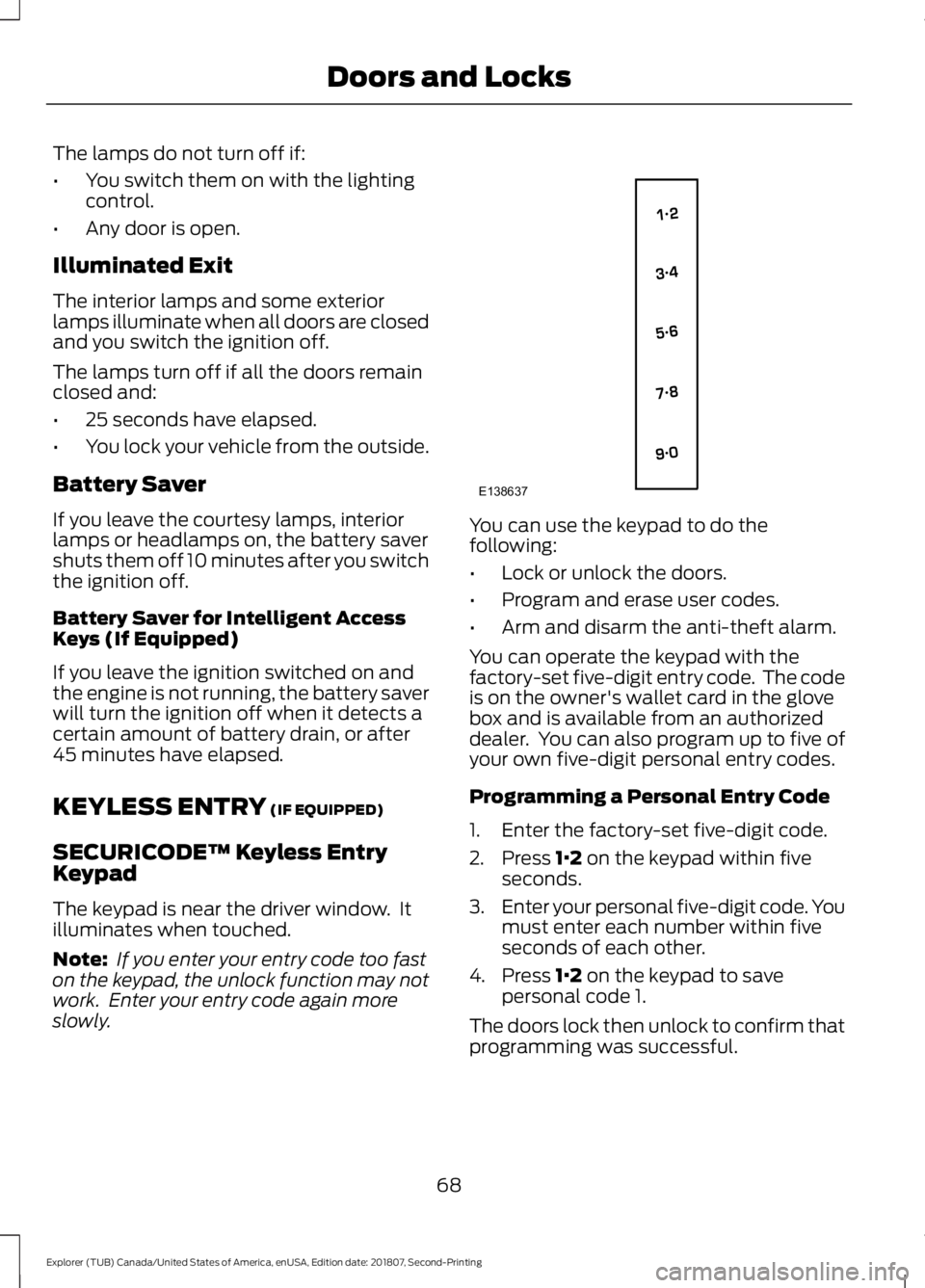
The keypad is near the driver window. It
illuminates when touched.
Note: If you enter your entry code too fast
on the keypad, the unlock function may not
work. Enter your entry code again more
slowly. You can use the keypad to do the
following:
•
Lock or unlock the doors.
• Program and erase user codes.
• Arm and disarm the anti-theft alarm.
You can operate the keypad with the
factory-set five-digit entry code. The code
is on the owner's wallet card in the glove
box and is available from an authorized
dealer. You can also program up to five of
your own five-digit personal entry codes.
Programming a Personal Entry Code
1. Enter the factory-set five-digit code.
2. Press
1·2 on the keypad within five
seconds.
3. Enter your personal five-digit code. You
must enter each number within five
seconds of each other.
4. Press
1·2 on the keypad to save
personal code 1.
The doors lock then unlock to confirm that
programming was successful.
68
Explorer (TUB) Canada/United States of America, enUSA, Edition date: 201807, Second-Printing Doors and LocksE138637
Page 72 of 571
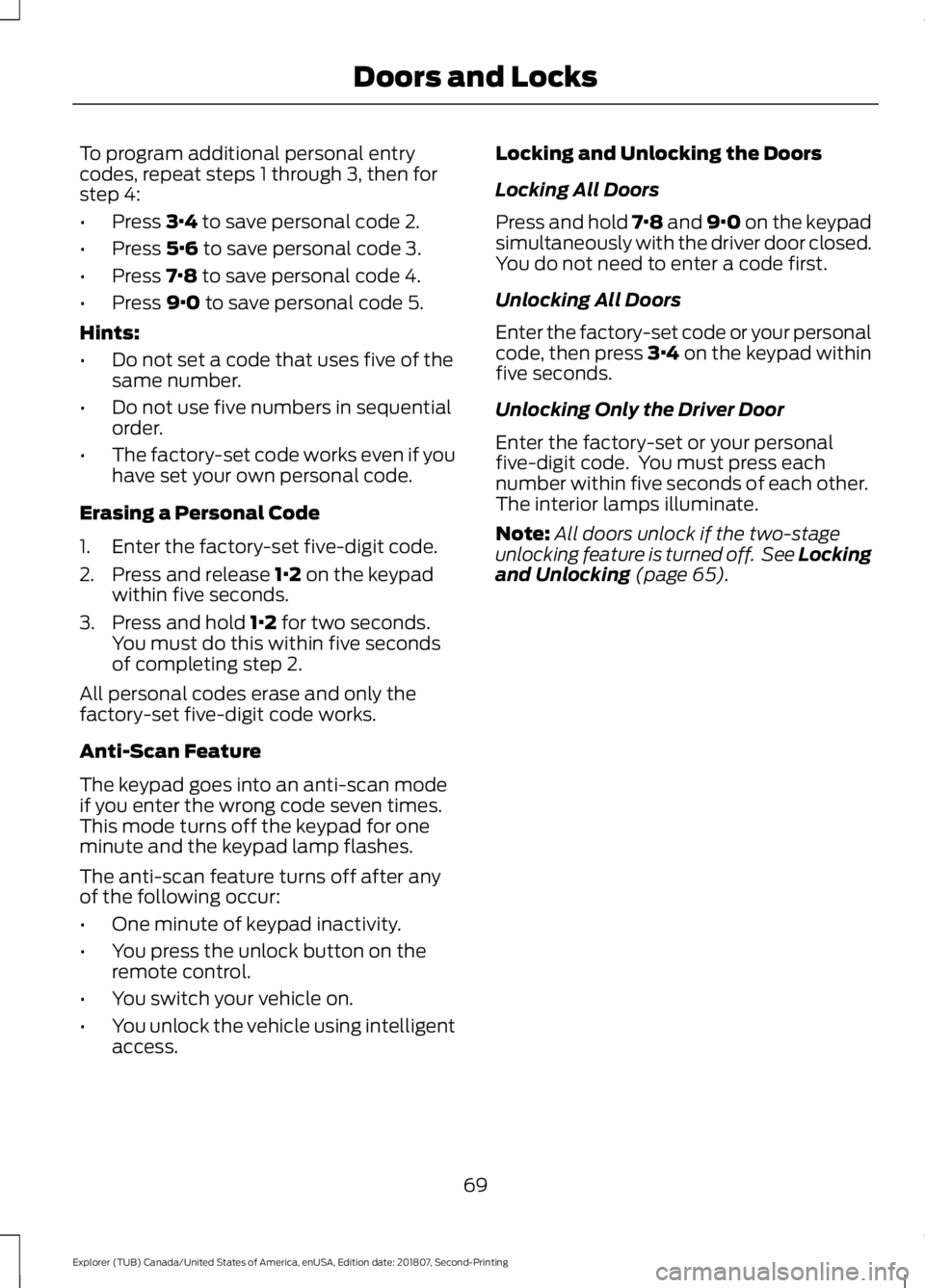
To program additional personal entry
codes, repeat steps 1 through 3, then for
step 4:
•
Press 3·4 to save personal code 2.
• Press
5·6 to save personal code 3.
• Press
7·8 to save personal code 4.
• Press
9·0 to save personal code 5.
Hints:
• Do not set a code that uses five of the
same number.
• Do not use five numbers in sequential
order.
• The factory-set code works even if you
have set your own personal code.
Erasing a Personal Code
1. Enter the factory-set five-digit code.
2. Press and release
1·2 on the keypad
within five seconds.
3. Press and hold
1·2 for two seconds.
You must do this within five seconds
of completing step 2.
All personal codes erase and only the
factory-set five-digit code works.
Anti-Scan Feature
The keypad goes into an anti-scan mode
if you enter the wrong code seven times.
This mode turns off the keypad for one
minute and the keypad lamp flashes.
The anti-scan feature turns off after any
of the following occur:
• One minute of keypad inactivity.
• You press the unlock button on the
remote control.
• You switch your vehicle on.
• You unlock the vehicle using intelligent
access. Locking and Unlocking the Doors
Locking All Doors
Press and hold 7·8 and 9·0 on the keypad
simultaneously with the driver door closed.
You do not need to enter a code first.
Unlocking All Doors
Enter the factory-set code or your personal
code, then press 3·4 on the keypad within
five seconds.
Unlocking Only the Driver Door
Enter the factory-set or your personal
five-digit code. You must press each
number within five seconds of each other.
The interior lamps illuminate.
Note:
All doors unlock if the two-stage
unlocking feature is turned off. See Locking
and Unlocking
(page 65).
69
Explorer (TUB) Canada/United States of America, enUSA, Edition date: 201807, Second-Printing Doors and Locks