tow FORD EXPLORER 2020 Owners Manual
[x] Cancel search | Manufacturer: FORD, Model Year: 2020, Model line: EXPLORER, Model: FORD EXPLORER 2020Pages: 555, PDF Size: 8.16 MB
Page 5 of 555
Liftgate
Power Liftgate
................................................74
Security
Passive Anti-Theft System ........................
78
Anti-Theft Alarm ...........................................
78
Steering Wheel
Adjusting the Steering Wheel - Vehicles With: Manual Adjustable Steering
Column .........................................................
80
Adjusting the Steering Wheel - Vehicles With: Power Adjustable Steering
Column .........................................................
80
Audio Control ..................................................
82
Voice Control ..................................................
82
Cruise Control - Vehicles With: Adaptive Cruise Control With Lane Centering
........................................................................\
..
82
Cruise Control - Vehicles With: Adaptive Cruise Control With Stop and Go .......
83
Cruise Control - Vehicles With: Cruise Control ..........................................................
83
Information Display Control ......................
83
Heated Steering Wheel ..............................
83
Horn ...................................................................
84
Wipers and Washers
Windshield Wipers .......................................
85
Autowipers ......................................................
85
Windshield Washers ....................................
86
Rear Window Wiper and Washers ..........
87
Lighting
General Information ....................................
88
Lighting Control .............................................
88
Autolamps .......................................................
89
Instrument Lighting Dimmer ....................
89
Headlamp Exit Delay ...................................
89
Daytime Running Lamps - Vehicles With: Configurable Daytime Running Lamps
........................................................................\
..
90 Daytime Running Lamps - Vehicles With:
Daytime Running Lamps (DRL) .........
90
Front Fog Lamps ...........................................
90
Adaptive Headlamps ....................................
91
Direction Indicators .......................................
91
Interior Lamps ................................................
92
Ambient Lighting - Vehicles With: 8 Inch Information and Entertainment Display
Screen ...........................................................
93
Ambient Lighting - Vehicles With: 10.1 Inch Information and Entertainment
Display Screen ...........................................
93
Automatic High Beam Control
What Is Automatic High Beam Control ........................................................................\
..
95
Switching Automatic High Beam Control On and Off ...................................................
95
Automatic High Beam Control Indicators ........................................................................\
..
95
Overriding Automatic High Beam Control ........................................................................\
..
96
Windows and Mirrors
Power Windows .............................................
97
Global Opening .............................................
98
Exterior Mirrors - Excluding: ST ...............
98
Exterior Mirrors - ST .....................................
99
Interior Mirror ..................................................
101
Sun Visors .......................................................
101
Moonroof ........................................................
102
Instrument Cluster
Gauges ............................................................
104
Warning Lamps and Indicators ..............
107
Audible Warnings and Indicators .............
111
Information Displays
General Information ....................................
112
Personalized Settings .................................
118
Information Messages ...............................
120
2
Explorer (CTW) Canada/United States of America, enUSA, Edition date: 201902, Third-Printing- Table of Contents
Page 8 of 555
Adaptive Cruise Control Limitations -
Vehicles With: Adaptive Cruise Control
With Lane Centering ..............................247
Adaptive Cruise Control Limitations - Vehicles With: Adaptive Cruise Control
With Stop and Go ..................................
248
Switching Adaptive Cruise Control On and Off .......................................................
250
Setting the Adaptive Cruise Control Speed .........................................................
250
Setting the Adaptive Cruise Control Gap ........................................................................\
.
251
Canceling the Set Speed .........................
252
Resuming the Set Speed .........................
252
Overriding the Set Speed .........................
252
Adaptive Cruise Control Indicators - Vehicles With: Adaptive Cruise Control
With Lane Centering ..............................
253
Adaptive Cruise Control Indicators - Vehicles With: Adaptive Cruise Control
With Stop and Go ...................................
253
Adaptive Cruise Control Indicators - Vehicles With: Intelligent Adaptive
Cruise Control ..........................................
253
Switching From Adaptive Cruise Control to Cruise Control .....................................
253
Switching Lane Centering On and Off ........................................................................\
254
Switching Intelligent Mode On and Off ........................................................................\
255
Adjusting the Set Speed Tolerance ......
255
Adaptive Cruise Control – Troubleshooting ......................................
256
Driving Aids
Driver Alert ....................................................
259
Lane Keeping System ...............................
260
Blind Spot Information System ............
264
Cross Traffic Alert .......................................
268
Traffic Sign Recognition ............................
272
Steering ...........................................................
273
Pre-Collision Assist ....................................
274Drive Mode Control
What Is Drive Mode Control
....................
279
Selecting a Drive Mode .............................
279
Drive Modes ..................................................
279
Load Carrying
Rear Under Floor Storage .........................
281
Cargo Nets ......................................................
281
Luggage Covers ...........................................
282
Roof Racks and Load Carriers ...............
282
Load Limit ......................................................
283
Towing
Towing a Trailer ...........................................
289
Trailer Sway Control ..................................
290
Recommended Towing Weights ..........
290
Essential Towing Checks .........................
293
Towing the Vehicle on Four Wheels .....
295
Driving Hints
Reduced Engine Performance ..............
296
Economical Driving ....................................
296
Cold Weather Precautions ......................
297
Breaking-In ....................................................
297
Driving Through Water ..............................
297
Floor Mats .....................................................
298
Roadside Emergencies
Roadside Assistance .................................
299
Hazard Flashers ..........................................
300
Fuel Shutoff .................................................
300
Jump Starting the Vehicle ........................
301
Collision, Damage or Fire Event ............
303
Post-Crash Alert System .........................
304
Transporting the Vehicle .........................
304
Customer Assistance
Getting the Services You Need .............
306
In California (U.S. Only) ............................
307
5
Explorer (CTW) Canada/United States of America, enUSA, Edition date: 201902, Third-Printing- Table of Contents
Page 17 of 555
Entertainment Data
Data recorded includes, for example:
•
Music, videos or album art.
• Contacts and corresponding address
book entries.
• Navigation destinations.
Services That We Provide
If you use our services, we collect and use
data, for example, account information,
vehicle location and driving characteristics,
that could identify you. We transmit this
data through a dedicated, protected
connection. We only collect and use data
to enable your use of our services to which
you have subscribed, with your consent or
where permitted by law. For additional
information, see the terms and conditions
of the services to which you have
subscribed.
Services That Third Parties
Provide
We recommend that you review the terms
and conditions and data privacy
information for any services to which you
subscribe. We take no responsibility for
services that third parties provide.
Vehicles With a Modem (If Equipped) The modem has a SIM. The
modem was enabled when your
vehicle was built and periodically
sends messages to stay connected to the
cell phone network, receive automatic
software updates and send vehicle-related
information to us, for example, diagnostic
information. These messages could
include information that identifies your
vehicle, the SIM and the electronic serial
number of the modem. Cell phone network service providers could have access to
additional information, for example, cell
phone network tower identification. For
additional information about our privacy
policy, visit
www .For dC onne c t e d . c om or
refer to your local Ford website.
Note: The modem continues to send this
information unless you disable the modem
or stop the modem from sharing vehicle
data by changing the modem settings. See
Network Connectivity
(page 426).
Note: The service can be unavailable or
interrupted for a number of reasons, for
example, environmental or topographical
conditions and data plan coverage.
Note: To find out if your vehicle has a
modem, visit
www .For dC onne c t e d . c om .
Vehicles With SYNC
Mobile Device Data
If you connect a mobile device to your
vehicle, you can display data from your
device on the touchscreen for example,
music and album art. You can share your
vehicle data with mobile apps on your
device through the system. See
Apps
(page 466).
The mobile apps function operates by your
connected device sending data to us in the
United States. The data is encrypted and
includes the vehicle identification number
of your vehicle, the SYNC module serial
number, odometer, enabled apps, usage
statistics and debugging information. We
retain it only as long as necessary to
provide the service, to troubleshoot, for
continuous improvement and to offer you
products and services that may be of
interest to you according to your
preferences and where allowed by law.
14
Explorer (CTW) Canada/United States of America, enUSA, Edition date: 201902, Third-Printing- Introduction
Page 22 of 555
PROTECTING THE
ENVIRONMENT
You should play your part in protecting the
environment. Correct vehicle usage and
the authorized disposal of waste, cleaning
and lubrication materials are significant
steps toward this aim.
For additional information about our
sustainability progress and initiatives, visit
www
.sus t ainabilit y .f or d . c om .
19
Explorer (CTW) Canada/United States of America, enUSA, Edition date: 201902, Third-Printing- Environment
Page 23 of 555
AT A GLANCE - ST
Exterior
•
Front and rear fascias feature unique
ST grille and unique finish.
• ST badging in front grille and on rear
liftgate.
• Trim features unique ST gloss black
finish.
• E-X-P-L-O-R-E-R lettering across
hood.
• Blackout treatment on headlight and
taillight lenses.
Interior
• Unique ST interior trim.
• Ford Performance sill plates.
• ST flat-bottom steering wheel with
integrated transmission shift paddle
controls.
• Selectable Drive Mode controller with
7 settings (Normal, Eco, Sport, Trail,
Slippery, Deep Snow/Sand and
Tow/Haul).
• Unique electronic sound enhancement
in Sport Selectable Drive Mode.
Chassis
• Unique ST-tuned suspension featuring
32 N/mm front coil springs and a 34
mm hollow front stabilizer bar and 106
N/mm rear coil springs and a 21.7 mm
hollow rear stabilizer bar.
• Standard ST brake system consists of
345 mm diameter vented front rotors
with two piston calipers and low-dust
linings; 326 mm solid rear rotors with
single-piston brake calipers and
electric integrated park brake with low
dust linings. •
Optional ST braking system includes
363 mm diameter vented front rotors
with heavy duty two-piston calipers
and low-dust linings; 350 mm diameter
vented rear rotors with heavy-duty
single-piston brake calipers and
electric integrated park brake with
low-dust linings; system requires 21 x
9-inch wheels and P275/45R21
all-season tires.
• Optional low-metallic brake linings are
included with optional P275/45R21
summer tire (late availability).
• ST-tuned electric power assist steering
rack and pinion.
• AdvanceTrac with stability
enhancement system with four modes:
Default, Traction Control Off, Sport and
Disabled.
• Aluminum ST 20 in (50.8 cm) x 8.5 in
(21.6 cm) wheels standard; 21 in
(53.3 cm) x 9 in (22.9 cm) wheels
optional.
• P255/55R20 all-season tires or
optional P275/45R21 all-season tires.
Powertrain
• 3.0L V6 DOHC GTDI engine, 400
horsepower, 415 lb-ft.
• 10R60 10-speed automatic
transmission with SelectShift manual
shift mode.
• 3.58 axle ratios.
• Unique transmission calibration in
Sport Selectable Drive Mode.
• Dual exhaust with quad-tip outlets.
20
Explorer (CTW) Canada/United States of America, enUSA, Edition date: 201902, Third-Printing- At a Glance
Page 28 of 555
INSTALLING CHILD
RESTRAINTS
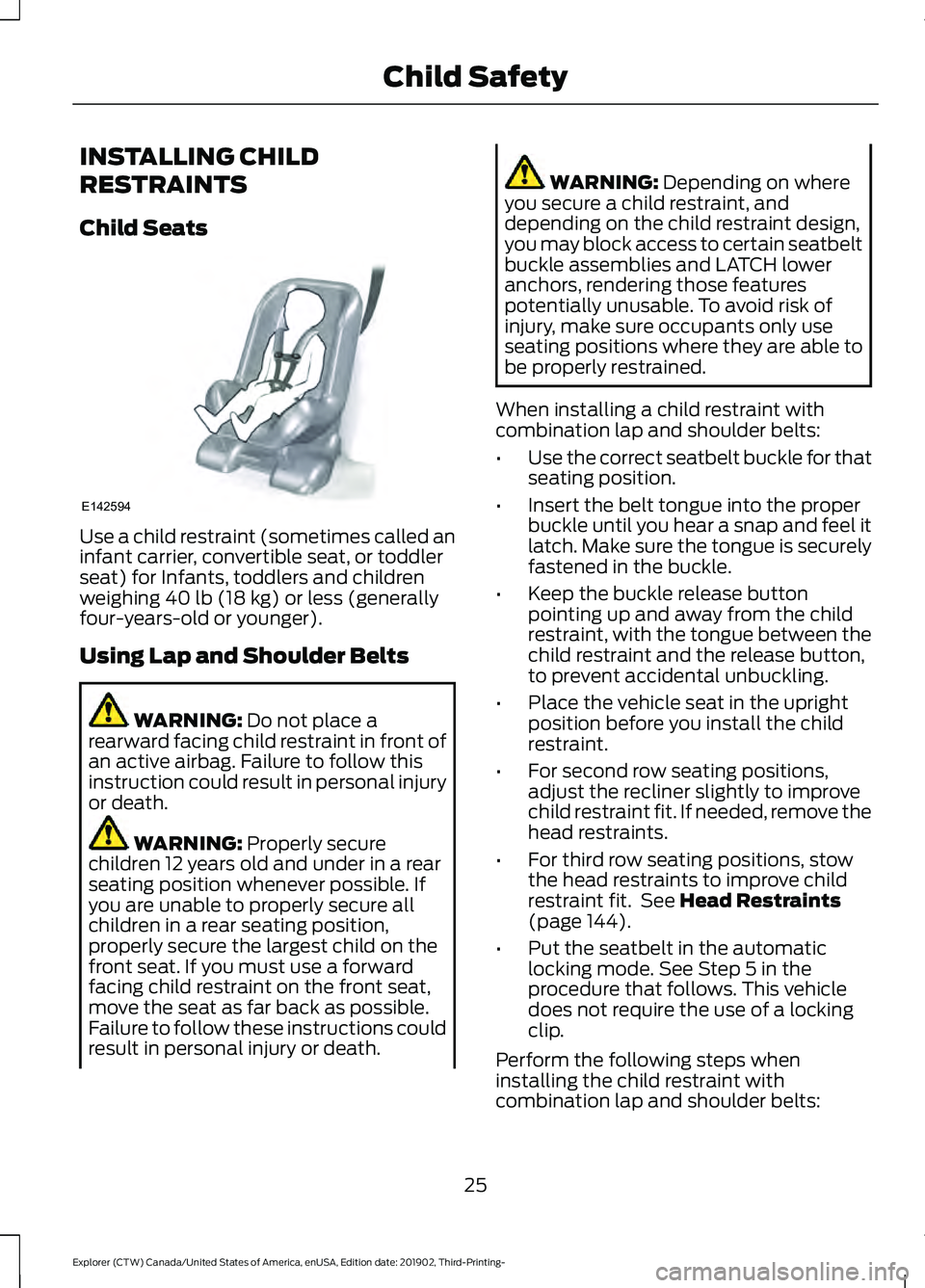
Child Seats
Use a child restraint (sometimes called an
infant carrier, convertible seat, or toddler
seat) for Infants, toddlers and children
weighing 40 lb (18 kg) or less (generally
four-years-old or younger).
Using Lap and Shoulder Belts WARNING:
Do not place a
rearward facing child restraint in front of
an active airbag. Failure to follow this
instruction could result in personal injury
or death. WARNING:
Properly secure
children 12 years old and under in a rear
seating position whenever possible. If
you are unable to properly secure all
children in a rear seating position,
properly secure the largest child on the
front seat. If you must use a forward
facing child restraint on the front seat,
move the seat as far back as possible.
Failure to follow these instructions could
result in personal injury or death. WARNING:
Depending on where
you secure a child restraint, and
depending on the child restraint design,
you may block access to certain seatbelt
buckle assemblies and LATCH lower
anchors, rendering those features
potentially unusable. To avoid risk of
injury, make sure occupants only use
seating positions where they are able to
be properly restrained.
When installing a child restraint with
combination lap and shoulder belts:
• Use the correct seatbelt buckle for that
seating position.
• Insert the belt tongue into the proper
buckle until you hear a snap and feel it
latch. Make sure the tongue is securely
fastened in the buckle.
• Keep the buckle release button
pointing up and away from the child
restraint, with the tongue between the
child restraint and the release button,
to prevent accidental unbuckling.
• Place the vehicle seat in the upright
position before you install the child
restraint.
• For second row seating positions,
adjust the recliner slightly to improve
child restraint fit. If needed, remove the
head restraints.
• For third row seating positions, stow
the head restraints to improve child
restraint fit. See
Head Restraints
(page 144).
• Put the seatbelt in the automatic
locking mode. See Step 5 in the
procedure that follows. This vehicle
does not require the use of a locking
clip.
Perform the following steps when
installing the child restraint with
combination lap and shoulder belts:
25
Explorer (CTW) Canada/United States of America, enUSA, Edition date: 201902, Third-Printing- Child SafetyE142594
Page 30 of 555
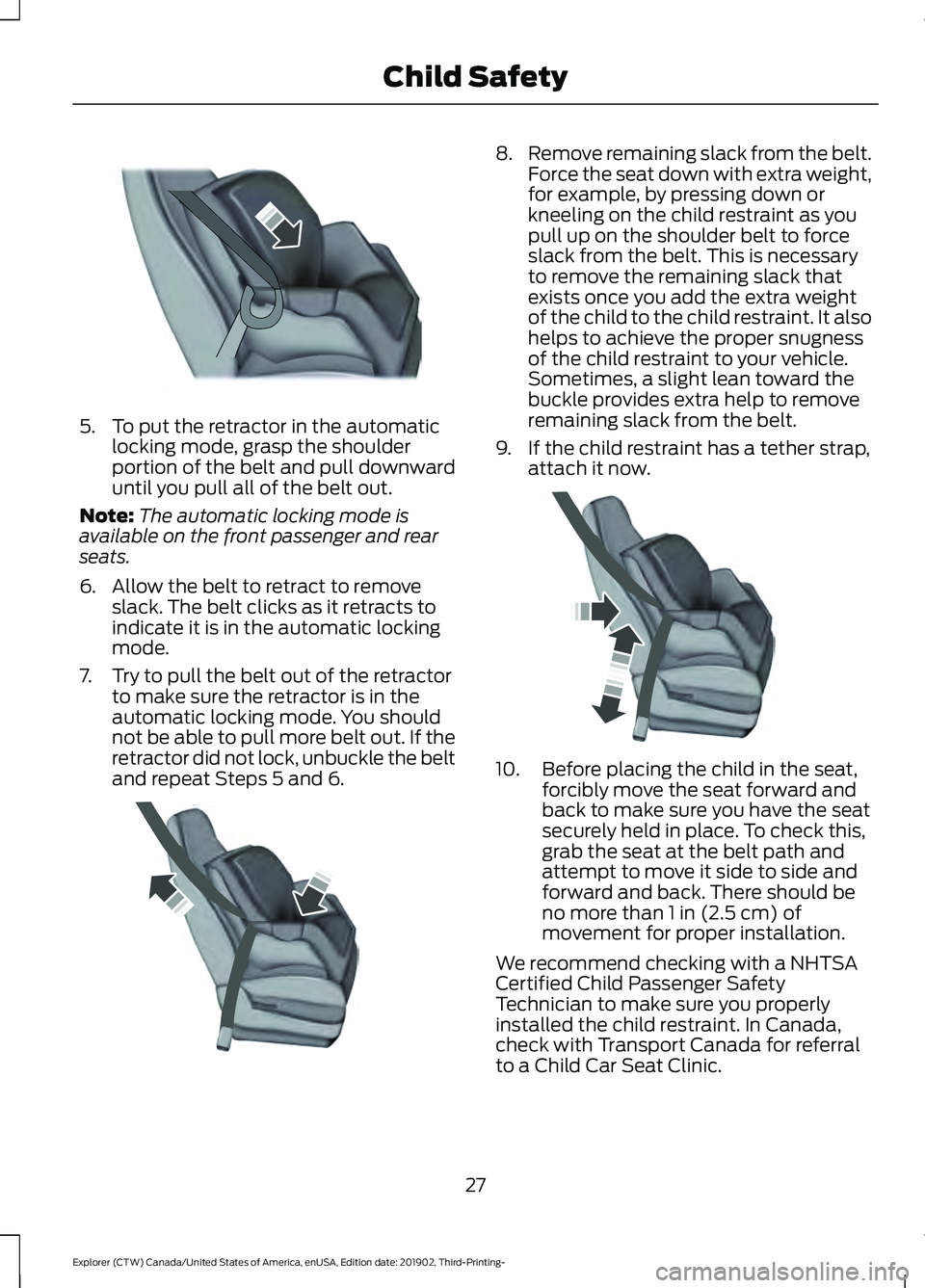
5. To put the retractor in the automatic
locking mode, grasp the shoulder
portion of the belt and pull downward
until you pull all of the belt out.
Note: The automatic locking mode is
available on the front passenger and rear
seats.
6. Allow the belt to retract to remove slack. The belt clicks as it retracts to
indicate it is in the automatic locking
mode.
7. Try to pull the belt out of the retractor to make sure the retractor is in the
automatic locking mode. You should
not be able to pull more belt out. If the
retractor did not lock, unbuckle the belt
and repeat Steps 5 and 6. 8.
Remove remaining slack from the belt.
Force the seat down with extra weight,
for example, by pressing down or
kneeling on the child restraint as you
pull up on the shoulder belt to force
slack from the belt. This is necessary
to remove the remaining slack that
exists once you add the extra weight
of the child to the child restraint. It also
helps to achieve the proper snugness
of the child restraint to your vehicle.
Sometimes, a slight lean toward the
buckle provides extra help to remove
remaining slack from the belt.
9. If the child restraint has a tether strap, attach it now. 10. Before placing the child in the seat,
forcibly move the seat forward and
back to make sure you have the seat
securely held in place. To check this,
grab the seat at the belt path and
attempt to move it side to side and
forward and back. There should be
no more than 1 in (2.5 cm) of
movement for proper installation.
We recommend checking with a NHTSA
Certified Child Passenger Safety
Technician to make sure you properly
installed the child restraint. In Canada,
check with Transport Canada for referral
to a Child Car Seat Clinic.
27
Explorer (CTW) Canada/United States of America, enUSA, Edition date: 201902, Third-Printing- Child SafetyE142875 E142533 E142534
Page 38 of 555
If the booster seat slides on the vehicle
seat upon which it is being used, placing a
rubberized mesh sold as shelf or carpet
liner under the booster seat may improve
this condition. Do not introduce any item
thicker than this under the booster seat.
Check with the booster seat
manufacturer's instructions.
CHILD RESTRAINT
POSITIONING
WARNING: Do not place a
rearward facing child restraint in front of
an active airbag. Failure to follow this
instruction could result in personal injury
or death. WARNING:
Properly secure
children 12 years old and under in a rear
seating position whenever possible. If
you are unable to properly secure all
children in a rear seating position,
properly secure the largest child on the
front seat. If you must use a forward
facing child restraint on the front seat,
move the seat as far back as possible.
Failure to follow these instructions could
result in personal injury or death. WARNING: Always carefully follow
the instructions and warnings provided
by the manufacturer of any child
restraint to determine if the restraint
device is appropriate for your child's size,
height, weight, or age. Follow the child
restraint manufacturer's instructions and
warnings provided for installation and
use in conjunction with the instructions and warnings provided by your vehicle
manufacturer. A safety seat that is
improperly installed or utilized, is
inappropriate for your child's height, age,
or weight or does not properly fit the
child may increase the risk of serious
injury or death.
WARNING:
Do not allow a
passenger to hold a child on their lap
when your vehicle is moving. Failure to
follow this instruction could result in
personal injury or death in the event of a
sudden stop or crash. WARNING:
Do not use pillows,
books or towels to boost your child's
height. Failure to follow this instruction
could result in personal injury or death. WARNING:
Properly secure child
restraints or booster seats when they are
not in use. They could become projectiles
in a sudden stop or crash. Failure to
follow this instruction could result in
personal injury or death. WARNING: Do not put the shoulder
section of the seatbelt or allow the child
to put the shoulder section of the
seatbelt under their arm or behind their
back. Failure to follow this instruction
could reduce the effectiveness of the
seatbelt and increase the risk of injury or
death in a crash. WARNING:
Do not leave children
or pets unattended in your vehicle.
Failure to follow this instruction could
result in personal injury or death.
35
Explorer (CTW) Canada/United States of America, enUSA, Edition date: 201902, Third-Printing- Child Safety
Page 43 of 555
Pregnant women should always wear their
seatbelt. Position the lap belt portion of a
combination lap and shoulder belt low
across the hips below the belly and worn
as tight as comfort allows. Position the
shoulder belt to cross the middle of the
shoulder and the center of the chest.
Seatbelt Locking Modes
WARNING: If your vehicle is
involved in a crash, have the seatbelts
and associated components inspected
as soon as possible. Failure to follow this
instruction could result in personal injury
or death.
All safety restraints in the vehicle are
combination lap and shoulder belts. The
driver seatbelt has the first type of locking
mode, and the front outboard passenger
and rear seat seatbelts have both types of
locking modes described as follows:
Vehicle Sensitive Mode
This is the normal retractor mode, which
allows free shoulder belt length
adjustment to your movements and
locking in response to vehicle movement.
For example, if the driver brakes suddenly
or turns a corner sharply, or the vehicle
receives an impact of about
5 mph
(8 km/h) or more, the combination
seatbelts lock to help reduce forward
movement of the driver and passengers.
In addition, the design of the retractor is to
lock if you pull the webbing out too quickly.
If the seatbelt retractor locks, slowly lower
the height adjuster to allow the seatbelt
to retract. If the retractor does not unlock,
pull the seatbelt out slowly then feed a small length of webbing back toward the
stowed position. For rear seatbelts, recline
the rear seat backrest or push the seat
backrest cushion away from the seatbelt.
Feed a small length of webbing back
toward the stowed position.
Automatic Locking Mode
In this mode, the shoulder belt
automatically pre-locks. The belt retracts
to remove any slack in the shoulder belt.
The automatic locking mode is not
available on the driver seatbelt.
When to Use the Automatic Locking
Mode
Use this mode any time you install a child
safety seat, except a booster, in passenger
front or rear seating positions. Properly
restrain children 12 years old and under in
a rear seating position whenever possible.
See
Child Safety (page 23).
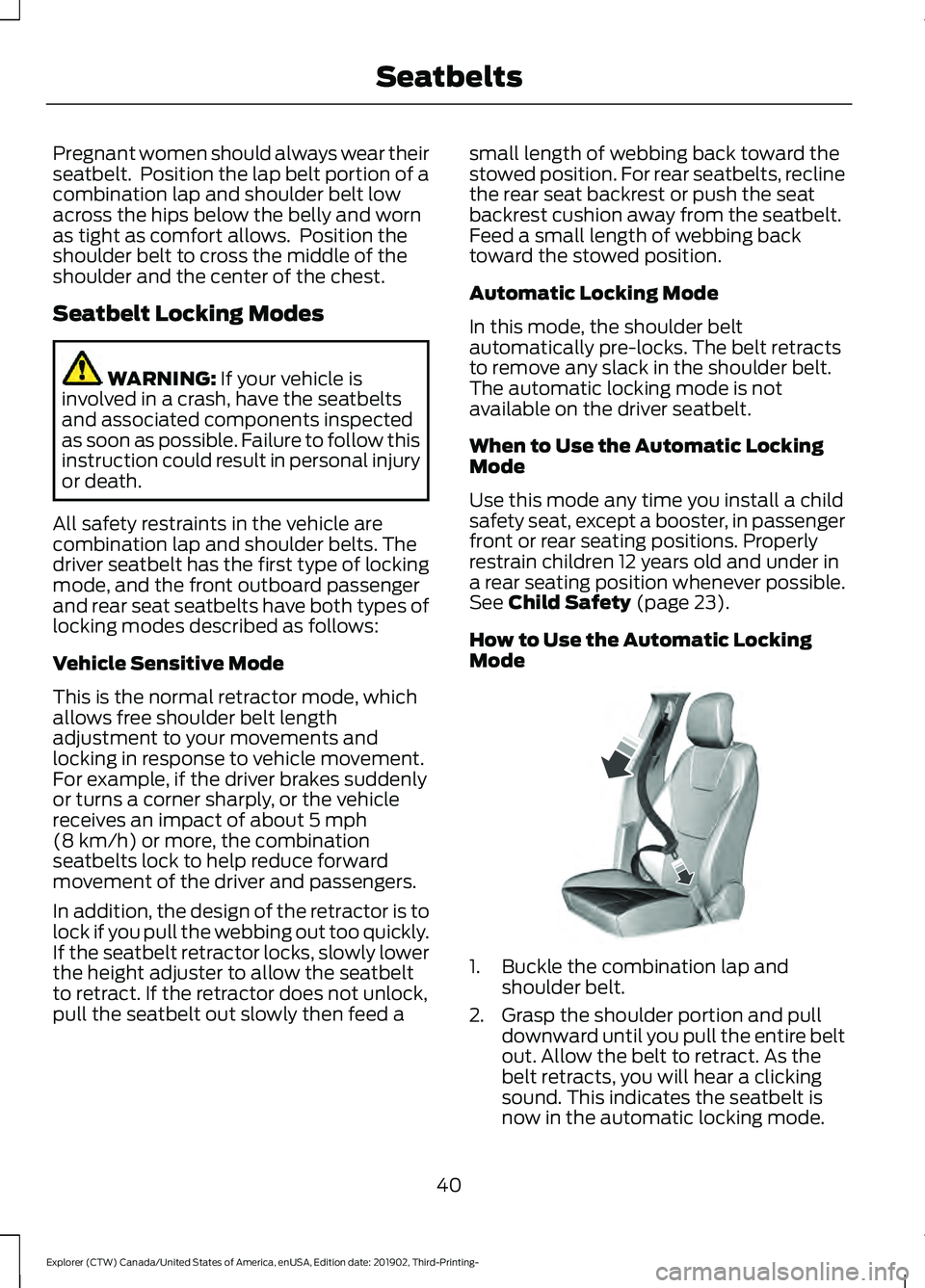
How to Use the Automatic Locking
Mode 1. Buckle the combination lap and
shoulder belt.
2. Grasp the shoulder portion and pull downward until you pull the entire belt
out. Allow the belt to retract. As the
belt retracts, you will hear a clicking
sound. This indicates the seatbelt is
now in the automatic locking mode.
40
Explorer (CTW) Canada/United States of America, enUSA, Edition date: 201902, Third-Printing- SeatbeltsE142591
Page 55 of 555
WARNING: If a supplementary
restraint system component has
deployed, it will not function again. Have
the system and associated components
inspected as soon as possible. Failure to
follow this instruction could result in
personal injury or death.
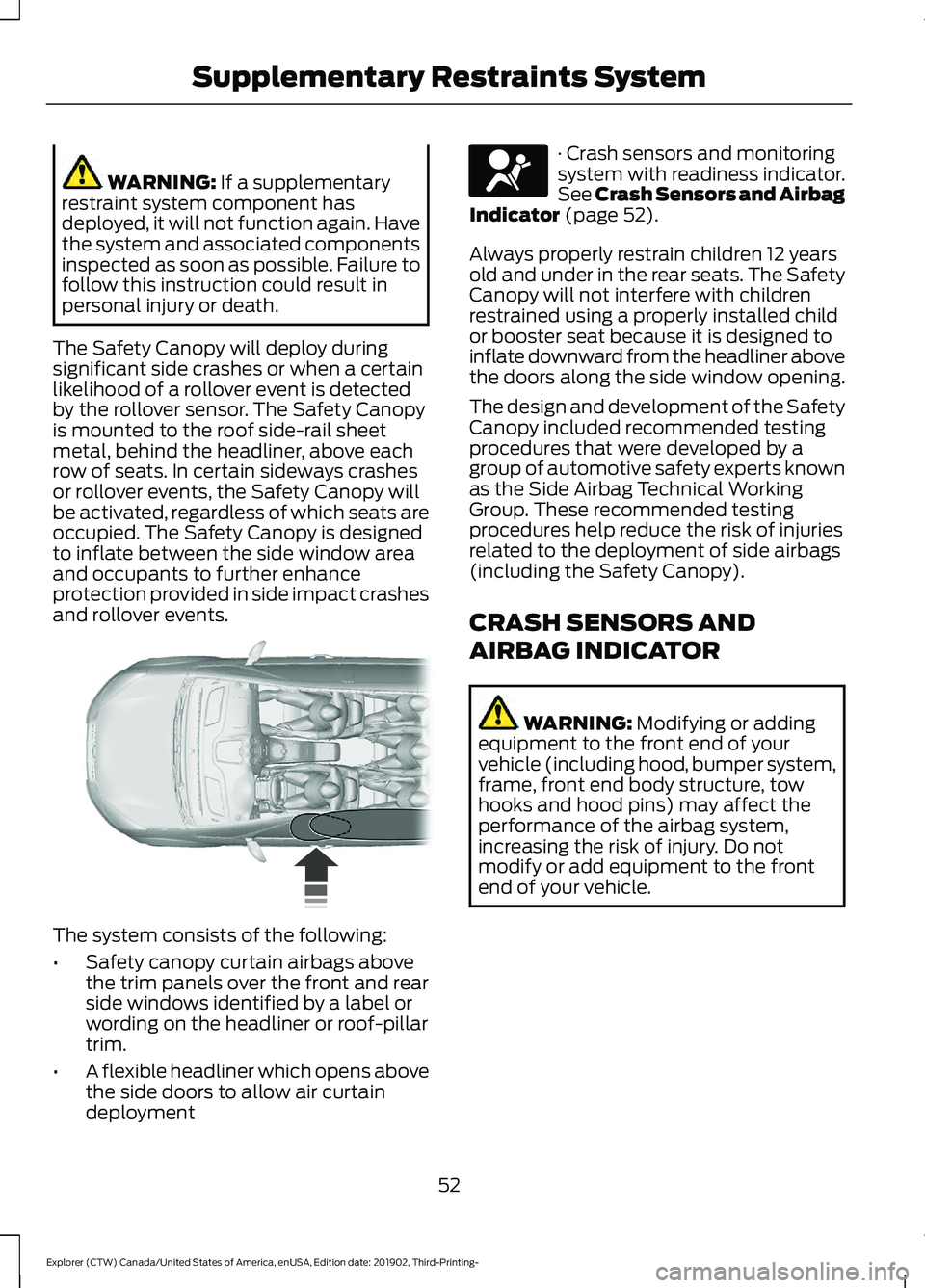
The Safety Canopy will deploy during
significant side crashes or when a certain
likelihood of a rollover event is detected
by the rollover sensor. The Safety Canopy
is mounted to the roof side-rail sheet
metal, behind the headliner, above each
row of seats. In certain sideways crashes
or rollover events, the Safety Canopy will
be activated, regardless of which seats are
occupied. The Safety Canopy is designed
to inflate between the side window area
and occupants to further enhance
protection provided in side impact crashes
and rollover events. The system consists of the following:
•
Safety canopy curtain airbags above
the trim panels over the front and rear
side windows identified by a label or
wording on the headliner or roof-pillar
trim.
• A flexible headliner which opens above
the side doors to allow air curtain
deployment · Crash sensors and monitoring
system with readiness indicator.
See Crash Sensors and Airbag
Indicator
(page 52).
Always properly restrain children 12 years
old and under in the rear seats. The Safety
Canopy will not interfere with children
restrained using a properly installed child
or booster seat because it is designed to
inflate downward from the headliner above
the doors along the side window opening.
The design and development of the Safety
Canopy included recommended testing
procedures that were developed by a
group of automotive safety experts known
as the Side Airbag Technical Working
Group. These recommended testing
procedures help reduce the risk of injuries
related to the deployment of side airbags
(including the Safety Canopy).
CRASH SENSORS AND
AIRBAG INDICATOR WARNING:
Modifying or adding
equipment to the front end of your
vehicle (including hood, bumper system,
frame, front end body structure, tow
hooks and hood pins) may affect the
performance of the airbag system,
increasing the risk of injury. Do not
modify or add equipment to the front
end of your vehicle.
52
Explorer (CTW) Canada/United States of America, enUSA, Edition date: 201902, Third-Printing- Supplementary Restraints System E75004 E67017