cruise control FORD EXPLORER 2021 Owner's Manual
[x] Cancel search | Manufacturer: FORD, Model Year: 2021, Model line: EXPLORER, Model: FORD EXPLORER 2021Pages: 577, PDF Size: 9.79 MB
Page 257 of 577
1. Select Settings.
2. Select
Driver Assist..
3. Select
Cruise Control.
4. Select
Normal. The cruise control indicator
replaces the adaptive cruise
control indicator if you select
normal cruise control. The gap setting does
not display, and the system does not
respond to lead vehicles. Automatic
braking remains active to maintain set
speed. The system remembers the last
setting when you start your vehicle.
SWITCHING LANE CENTERING
ON AND OFF
The cruise controls are on the steering
wheel. See
Cruise Control (page 83). Press the button.
The indicator appears in the information
display. When the system is on, the color
of the indicator changes to indicate the
system status. See
Adaptive Cruise
Control Indicators (page 253).
Note: Adaptive cruise control must be on
before you can switch lane centering on.
Activating Lane Centering
The system only activates when all of the
following occur:
• You have adaptive cruise control with
stop-and-go on.
• Your hands are on the steering wheel.
• The system detects both lane
markings.
Note: If it does not detect valid lane
markings, the system stays inactive until
valid markings are available. You can override the system at any time
by steering your vehicle.
System Alerts and Automatic
Cancellation
You must keep your hands on the steering
wheel at all times.
When the system is active and detects no
steering activity for a certain period of time,
the system alerts you to put your hands on
the steering wheel. If you do not react to
the warnings the system cancels and slows
your vehicle down to idle speeds while
maintaining steering control.
The system also alerts you if your vehicle
crosses lane markings without detected
steering activity.
Note:
The system may detect a light grip
or touch on the steering wheel as hands-off
driving.
When an external condition cancels the
system, for example, no lane markings
available, a tone sounds and a message
appears in the information display. If your vehicle starts to slow
down, you must provide steering
input to the wheel and press and
release the button to regain full system
performance.
Automatic cancellation can also occur if:
• The lane becomes too wide or too
narrow.
• The system cannot detect valid lane
markings.
• Lane markings are crossed.
Note: The system disables until the next
key cycle if your vehicle slows down due to
driver inactivity twice within a key cycle.
254
Explorer (CTW), enUSA, Edition date: 202007, Second-Printing Adaptive Cruise Control
(If Equipped)E71340 E262175
Page 258 of 577
SWITCHING INTELLIGENT
MODE ON AND OFF
WARNING: You are responsible for
controlling your vehicle at all times. The
system is designed to be an aid and does
not relieve you of your responsibility to
drive with due care and attention. Failure
to follow this instruction could result in
the loss of control of your vehicle,
personal injury or death.
Use the touchscreen to select the
following:
1. Select Settings. See Settings (page
464).
2. Select
Driver Assist..
3. Select
Cruise Control.
Changing the Set Speed with
Intelligent Adaptive Cruise Control
When intelligent mode is on, the system
adjusts the set speed to the speed limit
detected by the camera and the speed
limit information provided by the
navigation system.
Note: The set speed adjusts when the
system detects a different maximum speed
limit.
Note: The speed limit information provided
by the navigation map data may be
inaccurate or out of date. See
Navigation
(page 455).
Note: The system alerts you if the set speed
increases beyond the speed limit. See
Adaptive Cruise Control Indicators (page
253
).
If the system does not detect a speed limit,
the vehicle speed remains at the current
set speed. You can override the set speed at any time.
You may need to override or cancel the
system in certain situations such as
inclement weather or if an incorrect speed
is set.
Note:
The system may not detect and read
speed limit signs with conditional
information, for example, when a sign is
flashing, during specific time ranges, or
when children are present.
Note: Under certain conditions, the system
may not adjust the vehicle speed until after
your vehicle passes the speed limit sign.
ADJUSTING THE SET SPEED
TOLERANCE
You can set a permanent speed tolerance
that is above or below the detected speed
limit.
Use the touchscreen to select the
following:
1. Select
Settings. See Settings (page
464).
2. Select
Driver Assist.
3. Select
Cruise Control.
4. Select
Tolerance.
5. Use
+ and - to set the tolerance.
Note: You cannot set the tolerance more
than
20 mph (30 km/h) above or below the
recognized speed.
255
Explorer (CTW), enUSA, Edition date: 202007, Second-Printing Adaptive Cruise Control
(If Equipped)
Page 259 of 577
ADAPTIVE CRUISE CONTROL
– TROUBLESHOOTING
Adaptive Cruise Control –
Information Messages - Vehicles
With: Adaptive Cruise Control With
Lane Centering
Note:
Depending on your vehicle options
and instrument cluster type, not all
messages display or are available.
Note: The system could abbreviate or
shorten certain messages depending upon
which cluster type you have. Action
Message
Make sure you return your hands to the steering wheel andprovide steering input.
Keep Hands on Steering
Wheel
Lane centering assist conditions exist preventing the system from being available.
Lane Centering Assist
Not Available
The system is going to cancel and you must take control.
Resume Control
Press the accelerator and follow the prompts.
Press Accelerator Pedal
to Resume
256
Explorer (CTW), enUSA, Edition date: 202007, Second-Printing Adaptive Cruise Control (If Equipped)
Page 260 of 577
Adaptive Cruise Control –
Information Messages - Vehicles
With: Adaptive Cruise Control With
Stop and Go
Note:
Depending on your vehicle options
and instrument cluster type, not all
messages display or are available.
Note: The system could abbreviate or
shorten certain messages depending upon
which cluster type you have. Action
Message
A malfunction is preventing the adaptive cruise from engaging.
Adaptive Cruise
Malfunction
Front Sensor Not Aligned Contact an authorized dealer to have the radar checked for
proper coverage and operation.
Conditions exist preventing the system from being available.
Adaptive Cruise Not
Available
You have a blocked radar because of poor radar visibility due
to inclement weather or ice, mud, or water in front of the radar.You can typically clean the sensor to resolve this.
Adaptive Cruise Not
Available Sensor
Blocked See Manual Due to the nature of radar technology, it is possible to get ablockage warning with no actual block. This happens, for
example, when driving in sparse rural or desert environments.
A false blocked condition either self clears, or clears after you restart your vehicle.
You have selected normal cruise control. The system does not brake or react to traffic.
Normal Cruise Active
Adaptive Braking Off
Displays when the adaptive cruise control is going to canceland you must take control.
Adaptive Cruise - Driver
Resume Control
Displays when the vehicle speed is too slow to activate the
adaptive cruise control and there is no lead vehicle in range.
Adaptive Cruise Speed
Too Low to Activate
257
Explorer (CTW), enUSA, Edition date: 202007, Second-Printing Adaptive Cruise Control (If Equipped)
Page 261 of 577
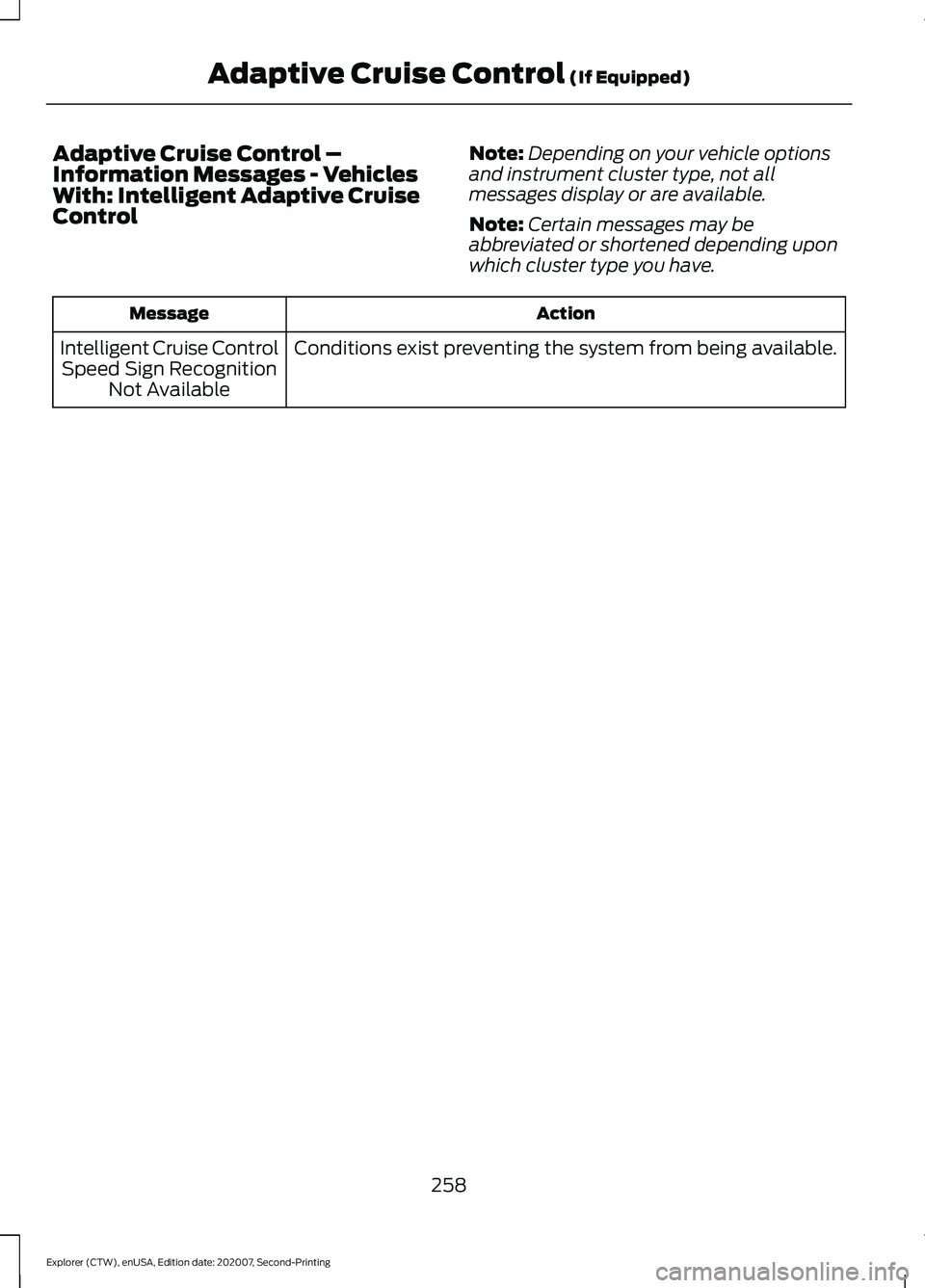
Adaptive Cruise Control –
Information Messages - Vehicles
With: Intelligent Adaptive Cruise
Control
Note:
Depending on your vehicle options
and instrument cluster type, not all
messages display or are available.
Note: Certain messages may be
abbreviated or shortened depending upon
which cluster type you have. Action
Message
Conditions exist preventing the system from being available.
Intelligent Cruise Control
Speed Sign Recognition Not Available
258
Explorer (CTW), enUSA, Edition date: 202007, Second-Printing Adaptive Cruise Control (If Equipped)
Page 278 of 577
Note:
Brake Support and Active Braking are
active at speeds up to 75 mph (120 km/h).
If your vehicle has a radar sensor included
with Adaptive Cruise Control, then Brake
Support and Active Braking are active up to
the maximum speed of the vehicle.
Note: If you perceive Pre-Collision Assist
alerts as being too frequent or disturbing,
then you can reduce the alert sensitivity,
though the manufacturer recommends
using the highest sensitivity setting where
possible. Setting lower sensitivity would
lead to fewer and later system warnings.
Note: Pre-Collision Assist turns off when
you manually disable AdvanceTrac or when
you select deep snow/sand mode.
Distance Indication and Alert
(If
Equipped)
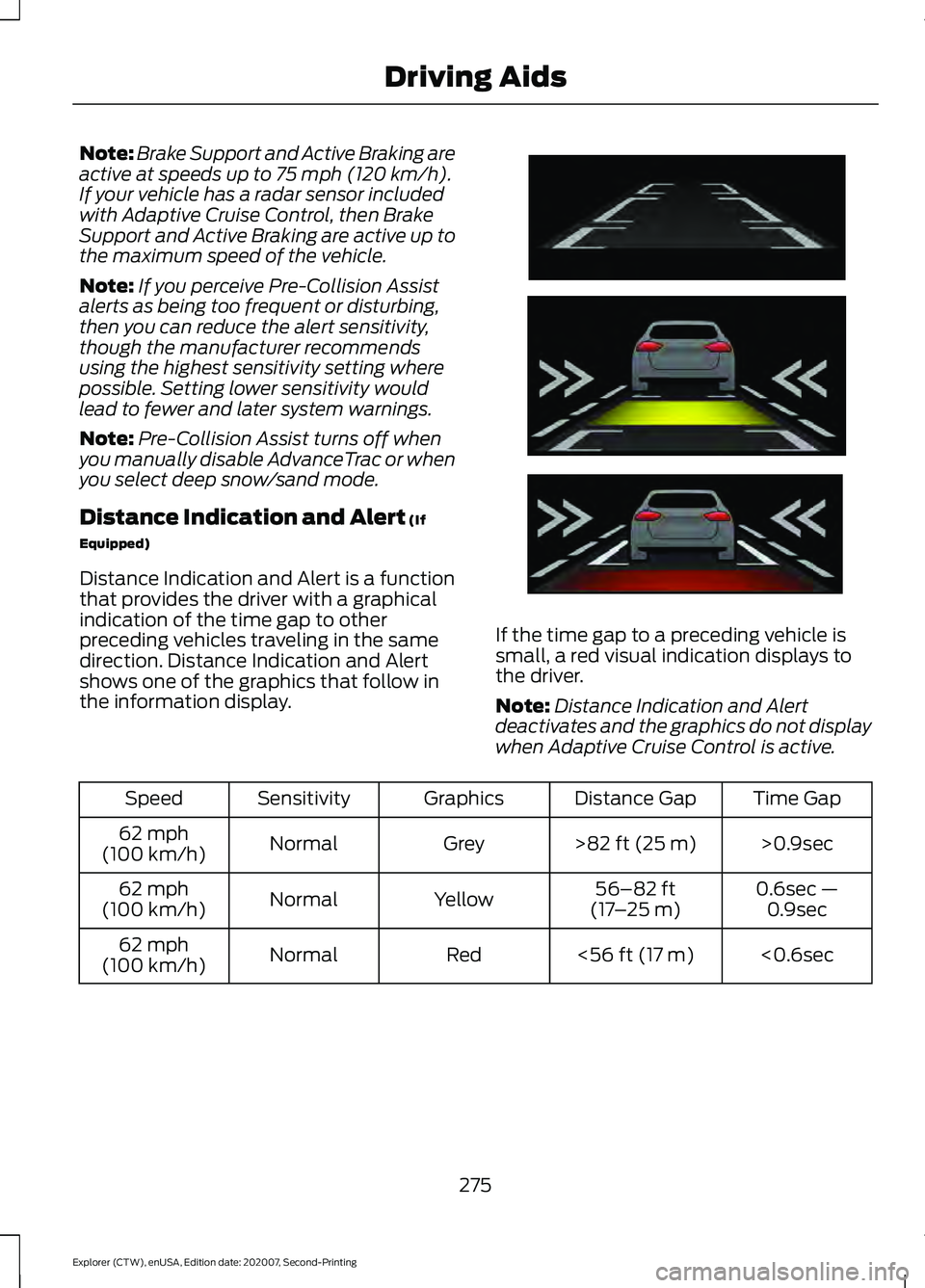
Distance Indication and Alert is a function
that provides the driver with a graphical
indication of the time gap to other
preceding vehicles traveling in the same
direction. Distance Indication and Alert
shows one of the graphics that follow in
the information display. If the time gap to a preceding vehicle is
small, a red visual indication displays to
the driver.
Note:
Distance Indication and Alert
deactivates and the graphics do not display
when Adaptive Cruise Control is active. Time Gap
Distance Gap
Graphics
Sensitivity
Speed
>0.9sec
>
82 ft (25 m)
Grey
Normal
62 mph
(100 km/h)
0.6sec —0.9sec
56–82 ft
(17 –25 m)
Yellow
Normal
62 mph
(100 km/h)
<0.6sec
<
56 ft (17 m)
Red
Normal
62 mph
(100 km/h)
275
Explorer (CTW), enUSA, Edition date: 202007, Second-Printing Driving AidsE254791
Page 299 of 577
![FORD EXPLORER 2021 Owners Manual •
Carry unnecessary weight
(approximately 1 mpg [0.4 km/L] is
lost for every 395 lb (180 kg) of weight
carried).
• Driving with the wheels out of
alignment.
Conditions
• Heavily loading a vehicl](/img/11/40606/w960_40606-298.png "FORD EXPLORER 2021 Owners Manual •
Carry unnecessary weight
(approximately 1 mpg [0.4 km/L] is
lost for every 395 lb (180 kg) of weight
carried).
• Driving with the wheels out of
alignment.
Conditions
• Heavily loading a vehicl")
•
Carry unnecessary weight
(approximately 1 mpg [0.4 km/L] is
lost for every 395 lb (180 kg) of weight
carried).
• Driving with the wheels out of
alignment.
Conditions
• Heavily loading a vehicle or towing a
trailer may reduce fuel economy at any
speed.
• Adding certain accessories to your
vehicle (for example bug deflectors,
rollbars, light bars, running boards, ski
racks or luggage racks) may reduce
fuel economy.
• To maximize the fuel economy, drive
with the tonneau cover installed (if
equipped).
• Using fuel blended with alcohol may
lower fuel economy.
• Fuel economy may decrease with lower
temperatures during the first
5–10 mi
(12 –16 km) of driving.
• Driving on flat terrain offers improved
fuel economy as compared to driving
on hilly terrain.
• Transmissions give their best fuel
economy when operated in the top
cruise gear and with steady pressure
on the gas pedal.
• Four-wheel-drive operation (if
equipped) is less fuel efficient than
two-wheel-drive operation.
• Close the windows for high-speed
driving.
COLD WEATHER
PRECAUTIONS
The functional operation of some
components and systems can be affected
at temperatures below approximately
-13°F (-25°C)
. BREAKING-IN
Tires
You need to break in new tires for
approximately
300 mi (480 km). During
this time, your vehicle may exhibit some
unusual driving characteristics.
Brakes and Clutch
Avoid heavy use of the brakes and clutch
if possible for the first
100 mi (160 km) in
town and for the first 1,000 mi (1,600 km)
on freeways.
DRIVING THROUGH WATER WARNING:
Do not drive through
flowing or deep water as you may lose
control of your vehicle.
Note: Driving through standing water can
cause vehicle damage.
Note: Engine damage can occur if water
enters the air filter.
Before driving through standing water,
check the depth. Never drive through water
that is higher than the bottom of the front
rocker area of your vehicle. 296
Explorer (CTW), enUSA, Edition date: 202007, Second-Printing Driving HintsE259345
Page 317 of 577
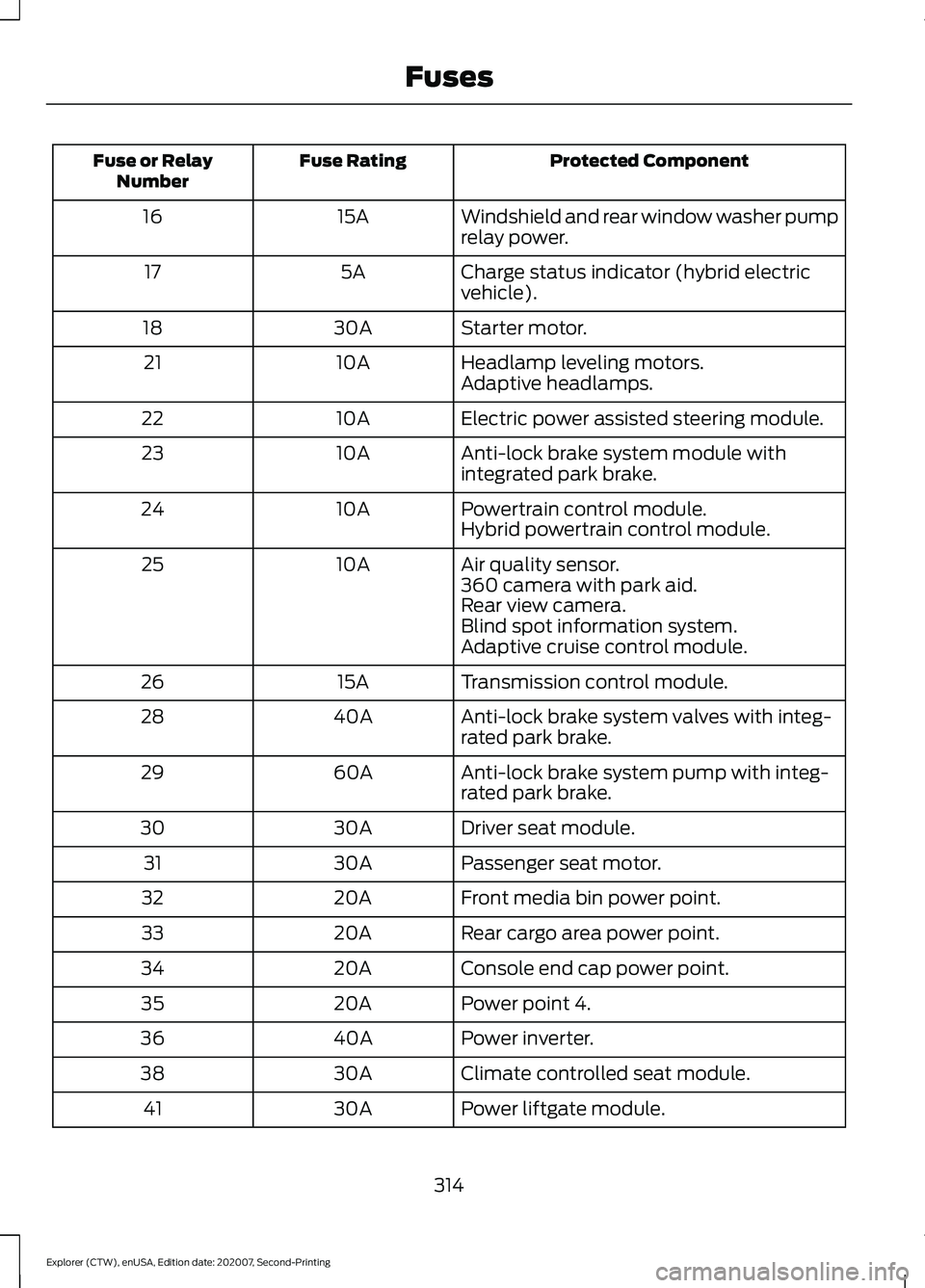
Protected Component
Fuse Rating
Fuse or Relay
Number
Windshield and rear window washer pump
relay power.
15A
16
Charge status indicator (hybrid electric
vehicle).
5A
17
Starter motor.
30A
18
Headlamp leveling motors.
10A
21
Adaptive headlamps.
Electric power assisted steering module.
10A
22
Anti-lock brake system module with
integrated park brake.
10A
23
Powertrain control module.
10A
24
Hybrid powertrain control module.
Air quality sensor.
10A
25
360 camera with park aid.
Rear view camera.
Blind spot information system.
Adaptive cruise control module.
Transmission control module.
15A
26
Anti-lock brake system valves with integ-
rated park brake.
40A
28
Anti-lock brake system pump with integ-
rated park brake.
60A
29
Driver seat module.
30A
30
Passenger seat motor.
30A
31
Front media bin power point.
20A
32
Rear cargo area power point.
20A
33
Console end cap power point.
20A
34
Power point 4.
20A
35
Power inverter.
40A
36
Climate controlled seat module.
30A
38
Power liftgate module.
30A
41
314
Explorer (CTW), enUSA, Edition date: 202007, Second-Printing Fuses
Page 500 of 577
This device complies with Part 15 of the
FCC Rules and with Innovation, Science
and Economic Development Canada
’s
licence-exempt RSS(s). Operation is
subject to the following two conditions:
1. This device may not cause harmful interference, and
2. This device must accept any interference received, including
interference that may cause undesired
operation.
Vietnam Zambia Cruise Control Module
Argentina
Brazil
Djibouti
497
Explorer (CTW), enUSA, Edition date: 202007, Second-Printing Customer InformationE278262 E340511 E308030 E340118 E342394
Page 562 of 577
3
360 Degree Camera....................................241
Front Camera...................................................... 242
Side Camera........................................................ 243
Using the System............................................... 242
4
4WD See: Four-Wheel Drive..................................... 207
9
911 Assist...........................................................55
A
A/C See: Climate Control......................................... 139
About This Manual...........................................9
ABS See: Brakes............................................................ 214
ABS driving hints See: Hints on Driving With Anti-Lock
Brakes................................................................. 215
Accessories....................................................479
Accessories See: Replacement Parts
Recommendation............................................ 12
Active Park Assist........................................235 Using Active Park Assist.................................. 236
Adaptive Cruise Control
............................246
Adaptive Cruise Control –
Troubleshooting............................................ 256
Adaptive Cruise Control Indicators - Vehicles With: Adaptive Cruise Control
With Lane Centering
................................253
Adaptive Cruise Control Indicators - Vehicles With: Adaptive Cruise Control
With Stop and Go
.....................................253
Adaptive Cruise Control Indicators - Vehicles With: Intelligent Adaptive
Cruise Control
.............................................253
System Warnings............................................... 253
Adaptive Cruise Control Limitations - Vehicles With: Adaptive Cruise Control
With Lane Centering................................247 Adaptive Cruise Control Limitations -
Vehicles With: Adaptive Cruise Control
With Stop and Go
.....................................248
Sensor Limitations............................................ 248
Adaptive Cruise Control Precautions - Vehicles With: Adaptive Cruise Control
With Lane Centering
...............................246
Adaptive Cruise Control Precautions - Vehicles With: Adaptive Cruise Control
With Stop and Go.....................................246
Hilly Condition Usage....................................... 247
When Following a Vehicle............................... 247
Adaptive Cruise Control – Troubleshooting........................................256
Adaptive Cruise Control – Information Messages......................................................... 256
Adaptive Headlamps
...................................90
System Check....................................................... 90
Adjusting the Headlamps
........................338
Vertical Aim Adjustment................................ 338
Adjusting the Set Speed Tolerance.....................................................255
Adjusting the Steering Wheel - Vehicles With: Manual Adjustable Steering
Column...........................................................80
Adjusting the Steering Wheel - Vehicles With: Power Adjustable Steering
Column...........................................................80
End of Travel Position.......................................... 81
Memory Feature.................................................... 81
AFS See: Adaptive Headlamps............................... 90
Airbag Disposal
...............................................53
Air Conditioning See: Climate Control......................................... 139
Air Filter See: Changing the Engine Air Filter - 2.3L
EcoBoost™..................................................... 328
See: Changing the Engine Air Filter - 3.0L.................................................................... 329
See: Changing the Engine Air Filter - 3.3L.................................................................... 330
Alarm See: Anti-Theft Alarm........................................ 78
Ambient Lighting - Vehicles With: 10.1 Inch Information and Entertainment
Display Screen
..............................................92
Adjusting the Brightness................................... 93
559
Explorer (CTW), enUSA, Edition date: 202007, Second-Printing Index