power steering FORD EXPLORER 2021 Owner's Manual
[x] Cancel search | Manufacturer: FORD, Model Year: 2021, Model line: EXPLORER, Model: FORD EXPLORER 2021Pages: 577, PDF Size: 9.79 MB
Page 317 of 577
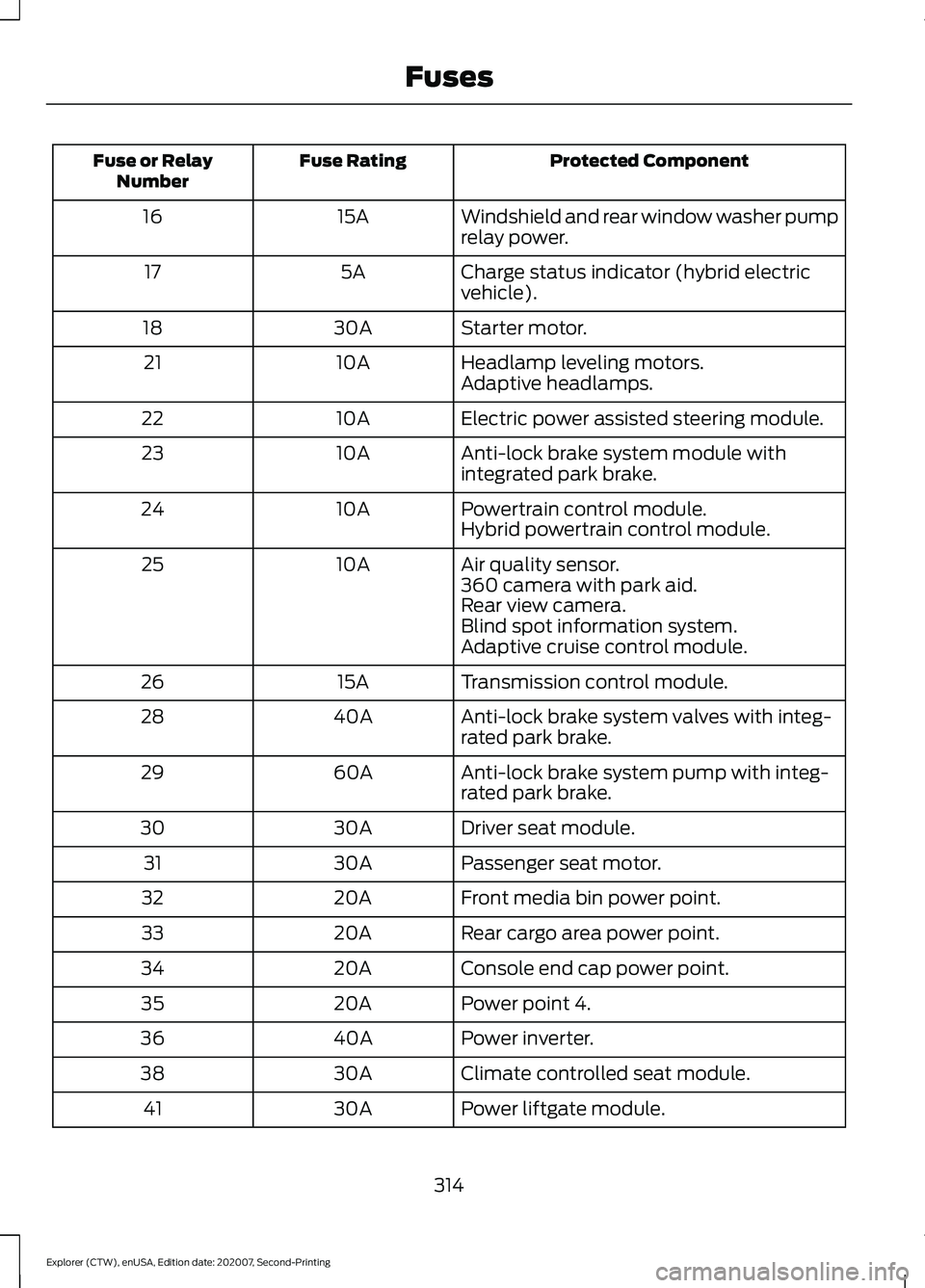
Protected Component
Fuse Rating
Fuse or Relay
Number
Windshield and rear window washer pump
relay power.
15A
16
Charge status indicator (hybrid electric
vehicle).
5A
17
Starter motor.
30A
18
Headlamp leveling motors.
10A
21
Adaptive headlamps.
Electric power assisted steering module.
10A
22
Anti-lock brake system module with
integrated park brake.
10A
23
Powertrain control module.
10A
24
Hybrid powertrain control module.
Air quality sensor.
10A
25
360 camera with park aid.
Rear view camera.
Blind spot information system.
Adaptive cruise control module.
Transmission control module.
15A
26
Anti-lock brake system valves with integ-
rated park brake.
40A
28
Anti-lock brake system pump with integ-
rated park brake.
60A
29
Driver seat module.
30A
30
Passenger seat motor.
30A
31
Front media bin power point.
20A
32
Rear cargo area power point.
20A
33
Console end cap power point.
20A
34
Power point 4.
20A
35
Power inverter.
40A
36
Climate controlled seat module.
30A
38
Power liftgate module.
30A
41
314
Explorer (CTW), enUSA, Edition date: 202007, Second-Printing Fuses
Page 336 of 577
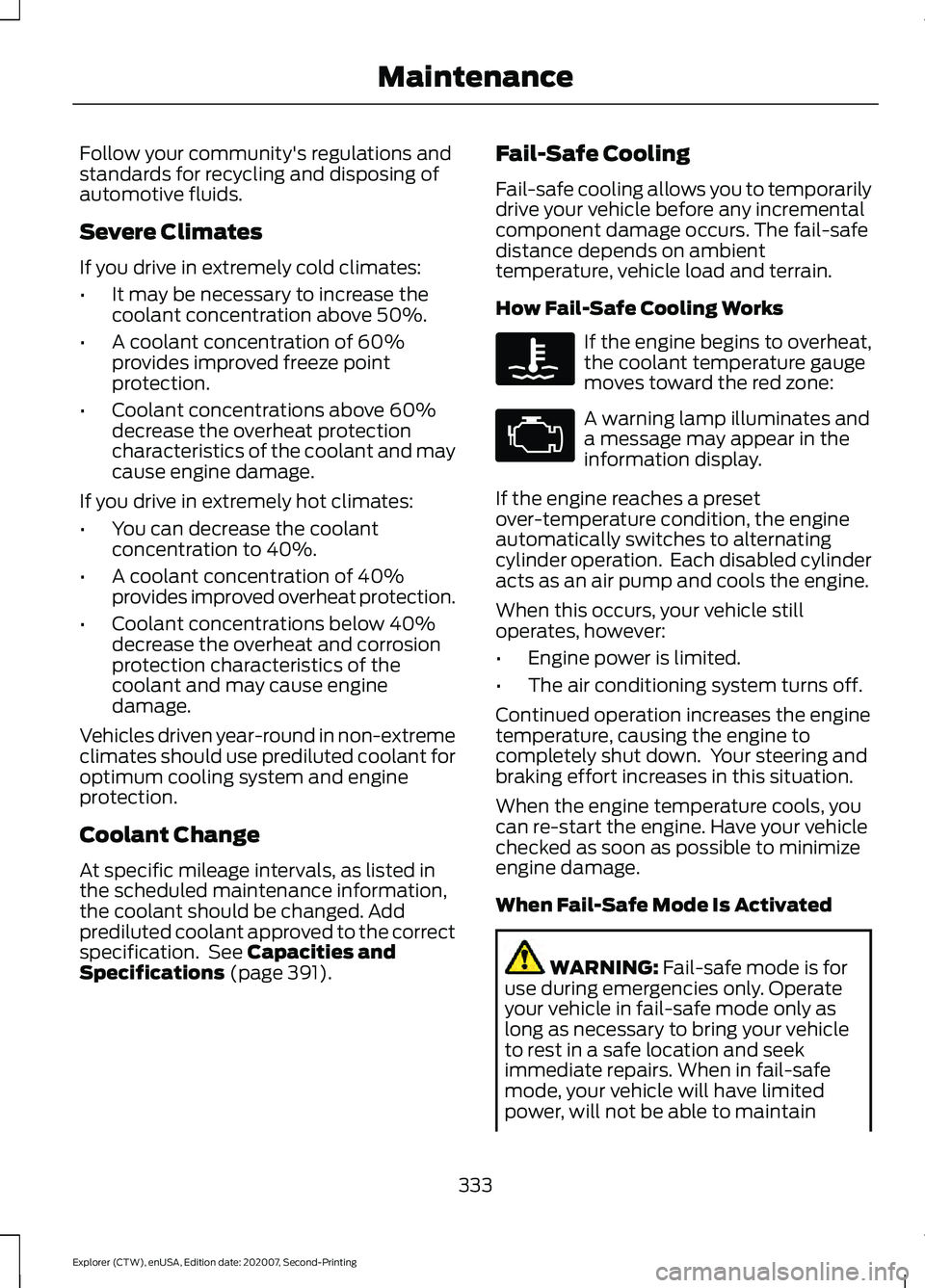
Follow your community's regulations and
standards for recycling and disposing of
automotive fluids.
Severe Climates
If you drive in extremely cold climates:
•
It may be necessary to increase the
coolant concentration above 50%.
• A coolant concentration of 60%
provides improved freeze point
protection.
• Coolant concentrations above 60%
decrease the overheat protection
characteristics of the coolant and may
cause engine damage.
If you drive in extremely hot climates:
• You can decrease the coolant
concentration to 40%.
• A coolant concentration of 40%
provides improved overheat protection.
• Coolant concentrations below 40%
decrease the overheat and corrosion
protection characteristics of the
coolant and may cause engine
damage.
Vehicles driven year-round in non-extreme
climates should use prediluted coolant for
optimum cooling system and engine
protection.
Coolant Change
At specific mileage intervals, as listed in
the scheduled maintenance information,
the coolant should be changed. Add
prediluted coolant approved to the correct
specification. See Capacities and
Specifications (page 391). Fail-Safe Cooling
Fail-safe cooling allows you to temporarily
drive your vehicle before any incremental
component damage occurs. The fail-safe
distance depends on ambient
temperature, vehicle load and terrain.
How Fail-Safe Cooling Works If the engine begins to overheat,
the coolant temperature gauge
moves toward the red zone:
A warning lamp illuminates and
a message may appear in the
information display.
If the engine reaches a preset
over-temperature condition, the engine
automatically switches to alternating
cylinder operation. Each disabled cylinder
acts as an air pump and cools the engine.
When this occurs, your vehicle still
operates, however:
• Engine power is limited.
• The air conditioning system turns off.
Continued operation increases the engine
temperature, causing the engine to
completely shut down. Your steering and
braking effort increases in this situation.
When the engine temperature cools, you
can re-start the engine. Have your vehicle
checked as soon as possible to minimize
engine damage.
When Fail-Safe Mode Is Activated WARNING: Fail-safe mode is for
use during emergencies only. Operate
your vehicle in fail-safe mode only as
long as necessary to bring your vehicle
to rest in a safe location and seek
immediate repairs. When in fail-safe
mode, your vehicle will have limited
power, will not be able to maintain
333
Explorer (CTW), enUSA, Edition date: 202007, Second-Printing Maintenance
Page 337 of 577
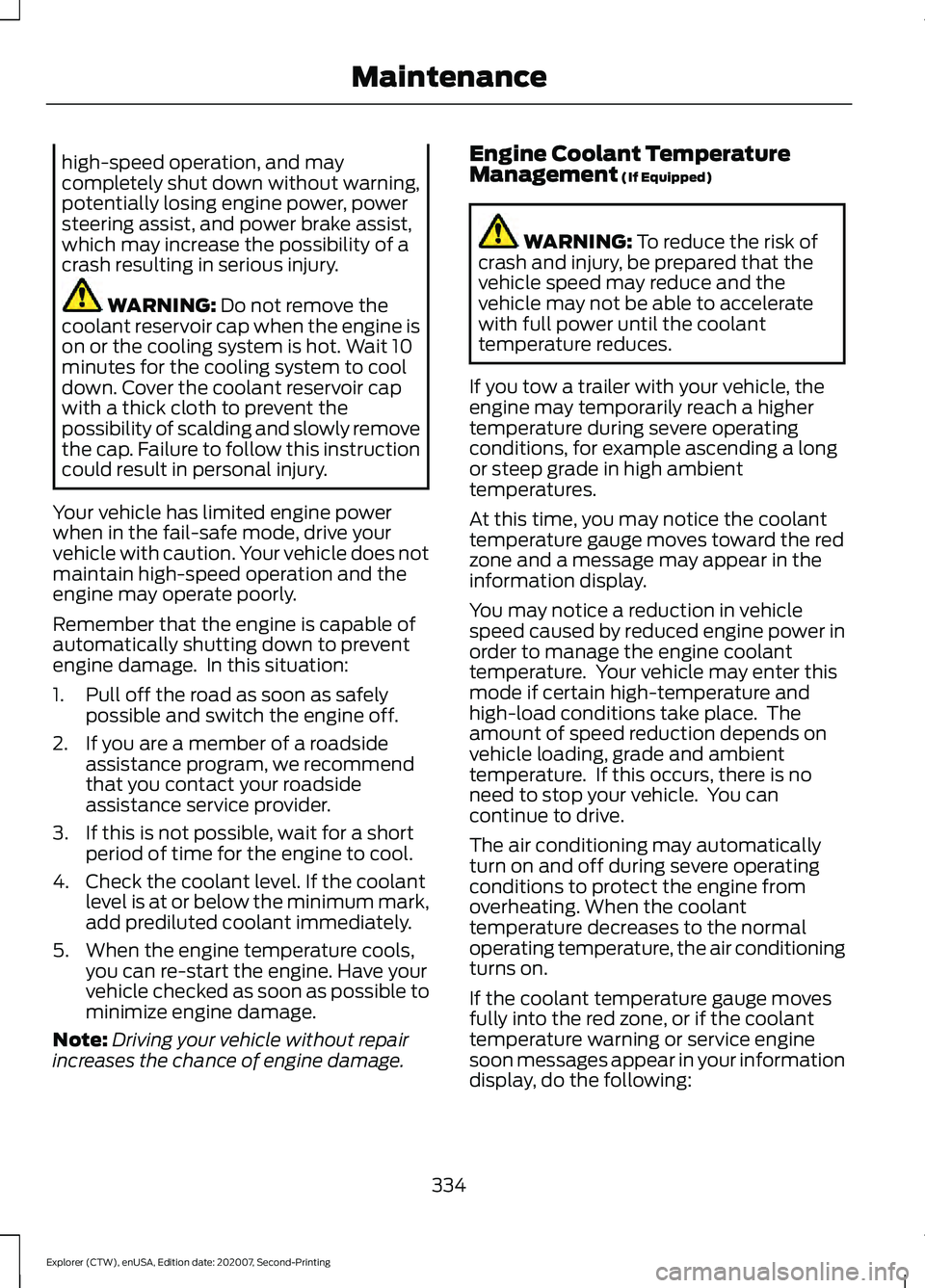
high-speed operation, and may
completely shut down without warning,
potentially losing engine power, power
steering assist, and power brake assist,
which may increase the possibility of a
crash resulting in serious injury.
WARNING: Do not remove the
coolant reservoir cap when the engine is
on or the cooling system is hot. Wait 10
minutes for the cooling system to cool
down. Cover the coolant reservoir cap
with a thick cloth to prevent the
possibility of scalding and slowly remove
the cap. Failure to follow this instruction
could result in personal injury.
Your vehicle has limited engine power
when in the fail-safe mode, drive your
vehicle with caution. Your vehicle does not
maintain high-speed operation and the
engine may operate poorly.
Remember that the engine is capable of
automatically shutting down to prevent
engine damage. In this situation:
1. Pull off the road as soon as safely possible and switch the engine off.
2. If you are a member of a roadside assistance program, we recommend
that you contact your roadside
assistance service provider.
3. If this is not possible, wait for a short period of time for the engine to cool.
4. Check the coolant level. If the coolant level is at or below the minimum mark,
add prediluted coolant immediately.
5. When the engine temperature cools, you can re-start the engine. Have your
vehicle checked as soon as possible to
minimize engine damage.
Note: Driving your vehicle without repair
increases the chance of engine damage. Engine Coolant Temperature
Management
(If Equipped) WARNING:
To reduce the risk of
crash and injury, be prepared that the
vehicle speed may reduce and the
vehicle may not be able to accelerate
with full power until the coolant
temperature reduces.
If you tow a trailer with your vehicle, the
engine may temporarily reach a higher
temperature during severe operating
conditions, for example ascending a long
or steep grade in high ambient
temperatures.
At this time, you may notice the coolant
temperature gauge moves toward the red
zone and a message may appear in the
information display.
You may notice a reduction in vehicle
speed caused by reduced engine power in
order to manage the engine coolant
temperature. Your vehicle may enter this
mode if certain high-temperature and
high-load conditions take place. The
amount of speed reduction depends on
vehicle loading, grade and ambient
temperature. If this occurs, there is no
need to stop your vehicle. You can
continue to drive.
The air conditioning may automatically
turn on and off during severe operating
conditions to protect the engine from
overheating. When the coolant
temperature decreases to the normal
operating temperature, the air conditioning
turns on.
If the coolant temperature gauge moves
fully into the red zone, or if the coolant
temperature warning or service engine
soon messages appear in your information
display, do the following:
334
Explorer (CTW), enUSA, Edition date: 202007, Second-Printing Maintenance
Page 339 of 577
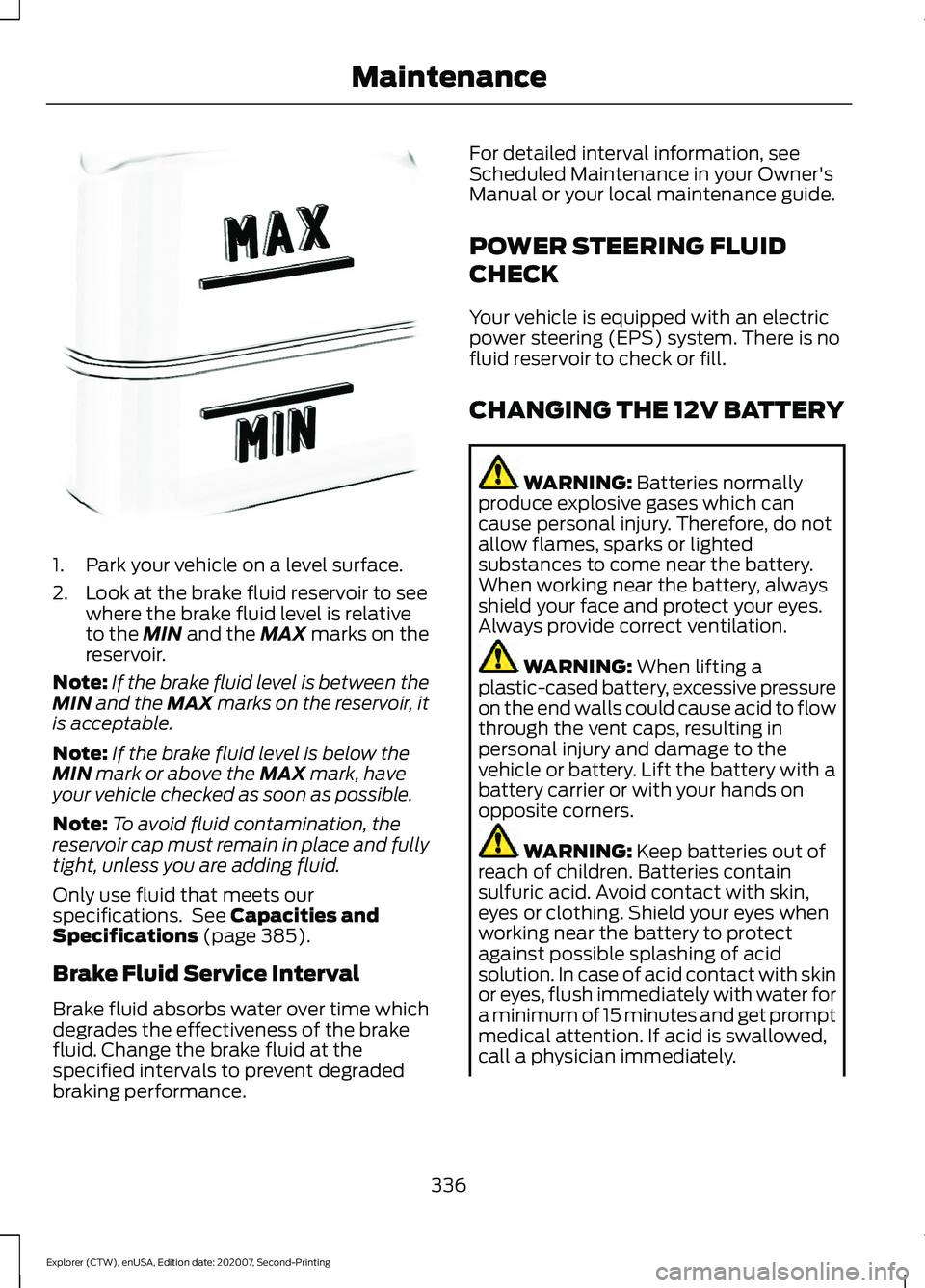
1. Park your vehicle on a level surface.
2. Look at the brake fluid reservoir to see
where the brake fluid level is relative
to the MIN and the MAX marks on the
reservoir.
Note: If the brake fluid level is between the
MIN
and the MAX marks on the reservoir, it
is acceptable.
Note: If the brake fluid level is below the
MIN
mark or above the MAX mark, have
your vehicle checked as soon as possible.
Note: To avoid fluid contamination, the
reservoir cap must remain in place and fully
tight, unless you are adding fluid.
Only use fluid that meets our
specifications. See
Capacities and
Specifications (page 385).
Brake Fluid Service Interval
Brake fluid absorbs water over time which
degrades the effectiveness of the brake
fluid. Change the brake fluid at the
specified intervals to prevent degraded
braking performance. For detailed interval information, see
Scheduled Maintenance in your Owner's
Manual or your local maintenance guide.
POWER STEERING FLUID
CHECK
Your vehicle is equipped with an electric
power steering (EPS) system. There is no
fluid reservoir to check or fill.
CHANGING THE 12V BATTERY
WARNING:
Batteries normally
produce explosive gases which can
cause personal injury. Therefore, do not
allow flames, sparks or lighted
substances to come near the battery.
When working near the battery, always
shield your face and protect your eyes.
Always provide correct ventilation. WARNING:
When lifting a
plastic-cased battery, excessive pressure
on the end walls could cause acid to flow
through the vent caps, resulting in
personal injury and damage to the
vehicle or battery. Lift the battery with a
battery carrier or with your hands on
opposite corners. WARNING:
Keep batteries out of
reach of children. Batteries contain
sulfuric acid. Avoid contact with skin,
eyes or clothing. Shield your eyes when
working near the battery to protect
against possible splashing of acid
solution. In case of acid contact with skin
or eyes, flush immediately with water for
a minimum of 15 minutes and get prompt
medical attention. If acid is swallowed,
call a physician immediately.
336
Explorer (CTW), enUSA, Edition date: 202007, Second-Printing MaintenanceE170684
Page 340 of 577
WARNING: Battery posts,
terminals and related accessories
contain lead and lead compounds,
chemicals known to the State of
California to cause cancer and
reproductive harm. Wash your hands
after handling
. WARNING:
This vehicle may have
more than one battery. Removing the
battery cables from only one battery
does not disconnect your vehicle
electrical system. Make sure you
disconnect the battery cables from all
batteries when disconnecting power.
Failure to do so may cause serious
personal injury or property damage. WARNING:
For vehicles with
Auto-Start-Stop the battery requirement
is different. You must replace the battery
with one of exactly the same
specification.
The battery is in the engine compartment.
See
Under Hood Overview (page 323).
Your vehicle has a maintenance-free
battery. It does not require additional
water during service.
If the vehicle battery has a cover and vent
hose, make sure you correctly install it after
cleaning or replacing the battery.
For longer, trouble-free operation, keep the
top of the battery clean and dry and the
battery cables tightly fastened to the
battery terminals. If any corrosion is
present on the battery or terminals, remove
the cables from the terminals and clean
with a wire brush. You can neutralize the
acid with a solution of baking soda and
water.
We recommend that you disconnect the
negative battery cable terminal from the
battery if you plan to store your vehicle for
an extended period. Note:
If you only disconnect the negative
battery cable terminal, make sure it is
isolated or placed away from the battery
terminal to avoid unintended connection or
arcing.
If you replace the battery make sure it
matches the electrical requirements of
your vehicle.
If you disconnect or replace the battery
and your vehicle has an automatic
transmission, it must relearn its adaptive
strategy. Because of this, the transmission
may shift firmly when first driven. This is
normal operation while the transmission
fully updates its operation to optimum
shift feel.
Battery Management System
(If
Equipped)
The battery management system monitors
battery conditions and takes actions to
extend battery life. If excessive battery
drain is detected, the system temporarily
disables some electrical systems to
protect the battery.
Systems included are:
• Heated rear window.
• Heated seats.
• Climate control.
• Heated steering wheel.
• Audio unit.
• Navigation system.
A message may appear in the information
displays to alert you that battery
protection actions are active. These
messages are only for notification that an
action is taking place, and not intended to
indicate an electrical problem or that the
battery requires replacement.
337
Explorer (CTW), enUSA, Edition date: 202007, Second-Printing Maintenance
Page 355 of 577
Utility vehicles and trucks handle
differently than passenger cars in the
various driving conditions that are
encountered on streets, highways and
off-road. Utility vehicles and trucks are not
designed for cornering at speeds as high
as passenger cars any more than low-slung
sports cars are designed to perform
satisfactorily under off-road conditions.
Study your owner's manual and any
supplements for specific information about
equipment features, instructions for safe
driving and additional precautions to
reduce the risk of an accident or serious
injury.
Four-Wheel Drive system (if
equipped)
WARNING: Do not become
overconfident in the ability of four-wheel
drive vehicles. Although a four-wheel
drive vehicle may accelerate better than
a two-wheel drive vehicle in low traction
situations, it won't stop any faster than
two-wheel drive vehicles. Always drive
at a safe speed.
A vehicle equipped with Four-Wheel Drive
has the ability to use all four wheels to
power itself. This increases traction which
may enable you to safely drive over terrain
and road conditions that a conventional
two-wheel drive vehicle cannot. Power is
supplied to all four wheels through a
transfer case. Four-wheel drive vehicles
allow you to select different modes as
necessary. You can find more information
on transfer case operation, drive mode
selection, and transfer case maintenance
in this manual. See
Four-Wheel Drive
(page 207). You should become thoroughly
familiar with this information before you
operate your vehicle. We recommend installing the temporary
spare wheel and tire on the front axle when
possible. This could provide limited 4WD
traction.
Four-wheel drive: Never use a spare tire of
a different size than the one provided with
your vehicle. This could cause the
four-wheel drive system to default to
rear-wheel drive.
How your vehicle differs from
other vehicles
Sport utility vehicles and trucks can differ
from some other vehicles in a few
noticeable ways. Your vehicle may be:
•
Higher - to allow higher load carrying
capacity and to allow it to travel over
rough terrain without getting hung up
or damaging underbody components.
• Shorter - to give it the capability to
approach inclines and drive over the
crest of a hill without getting hung up
or damaging underbody components.
All other things held equal, a shorter
wheelbase may make your vehicle
quicker to respond to steering inputs
than a vehicle with a longer wheelbase.
• Narrower - to provide greater
maneuverability in tight spaces,
particularly in off-road use.
As a result of the above dimensional
differences, sport utility vehicles and trucks
often have a higher center of gravity and a
greater difference in center of gravity
between the loaded and unloaded
condition. These differences that make
your vehicle so versatile also make it
handle differently than an ordinary
passenger car.
352
Explorer (CTW), enUSA, Edition date: 202007, Second-Printing Wheels and Tires
Page 370 of 577
WARNING: Snow tires must be the
same size, load index and speed rating
as those originally provided by Ford. Use
of any tire or wheel not recommended
by Ford can affect the safety and
performance of your vehicle, which could
result in an increased risk of loss of
control, vehicle rollover, personal injury
and death. Additionally, the use of
non-recommended tires and wheels can
cause steering, suspension, axle, transfer
case or power transfer unit failure.
Follow the Ford recommended tire
inflation pressure found on the Safety
Compliance Certification Label (on the
door hinge pillar, door latch post or the
door edge that meets the door latch
post, next to the driver seat), or Tire
Label on the B-Pillar or the edge of the
driver door. Failure to follow the tire
pressure recommendations can cause
uneven treadwear patterns and
adversely affect the way your vehicle
handles.
Only use snow chains on rear wheels.
Install snow chains in pairs. Do not use
self-tensioning snow chains.
Only use snow chains on the following
specified tire sizes:
• 255/60R18
•Only install chains that are 10 mm
or less.
• 255/65R18
•Only install chains that are 10 mm
or less. •
265/60R18
•Only install chains that are 10 mm
or less.
• 255/55R20
•Only install chains that are 10 mm
or less.
We recommend you use steel wheels of
the same size and specification if snow
chains are required because chains may
chip aluminum wheels.
Follow these guidelines when using snow
tires and traction devices:
• If possible, avoid fully loading your
vehicle.
• Purchase snow chains from a
manufacturer that clearly labels body
to tire dimension restrictions.
• When driving with snow chains do not
exceed
30 mph (50 km/h) or the
maximum speed recommended by the
chain manufacturer, whichever is less.
• Drive cautiously. If you hear the snow
chains rub or bang against the vehicle,
stop and tighten them. If this does not
work, remove the snow chains to
prevent vehicle damage.
• Remove the snow chains when they
are no longer needed. Do not use snow
chains on dry roads.
• If a temporary spare wheel is mounted
on your vehicle, do not use snow chains
on the axle with the temporary spare
wheel.
• Use snow chains that fit against the
sidewall of the tire to prevent the
chains from touching the wheel rims
or suspension, see following
illustration.
367
Explorer (CTW), enUSA, Edition date: 202007, Second-Printing Wheels and Tires
Page 464 of 577
•
Idling: The vehicle is running and in Park
(P). The engine and/or the high voltage
battery are on.
• Electric Driving: The vehicle is running
and in Drive (D) or Neutral (N). The
high voltage battery provides power to
the wheels.
• Hybrid Driving: The vehicle is running
and in Drive (D) or Neutral (N). The
engine and the high voltage battery
provide power to the wheels.
• Engine Driving: The vehicle is running
and in Drive (D) or Neutral (N). The
engine provides power to the wheels.
• Regenerative Braking: The vehicle is
running in Drive gear and is slowing
down. Power captured by the
regenerative braking system is sent
back to the high voltage battery.
Engine On Due To
The following conditions help to explain
why the engine is on, and what you can do
to allow all electric operation.
• Drive Power: The engine is on due to
accelerator pedal pressure or speed
control activation. Reduce pressure on
the accelerator pedal or switch off the
speed control to return to full electric
mode.
• High Speed: The engine is on because
the vehicle speed exceeds the level for
full electric operation. Reduce the
speed to return to electric operation.
• Heater Setting: The engine is on
because of the heater setting. Reduce
or turn off the heater setting to return
to electric operation.
• Neutral Gear: The engine is on because
the vehicle is in Neutral (N). Shift out
of neutral gear to return to electric
operation. •
Engine Cold: The engine is on because
it is cold. The vehicle returns to electric
operation once the engine is sufficiently
warm.
• Battery Charging: The engine is on to
charge the high-voltage battery. The
vehicle returns to electric operation
once the battery is charged.
• Low Gear: The engine is on because
the vehicle is in low gear. Shift out of
low gear to return to electric operation.
• Normal Operation: The engine is on to
optimize vehicle operation. The vehicle
returns to electric operation when
possible.
• Engine Braking Active: The engine is on
to provide increased powertrain
braking. This can occur when you turn
on the grade assist feature, when
speed control is on or when driving with
your foot off the accelerator pedal.
Turning off grade assist or speed
control may allow the vehicle to return
to electric operation.
• Battery Temperature: The engine is on
due to high or low high-voltage battery
temperature. This is a normal operating
condition. The vehicle returns to
electric operation when possible.
• Drive Mode: The engine is on due to the
drive mode selection. Select an
appropriate drive mode for electric only
operation.
APPS
The system allows you interact with select
mobile apps while keeping your eyes on
the road. Voice commands, your steering
wheel buttons, or a quick tap on your
touchscreen give you advanced control of
compatible mobile apps. You can also
stream your favorite music or podcasts,
share your time of arrival with friends, and
keep connected safely.
461
Explorer (CTW), enUSA, Edition date: 202007, Second-Printing SYNC™ 3
Page 562 of 577
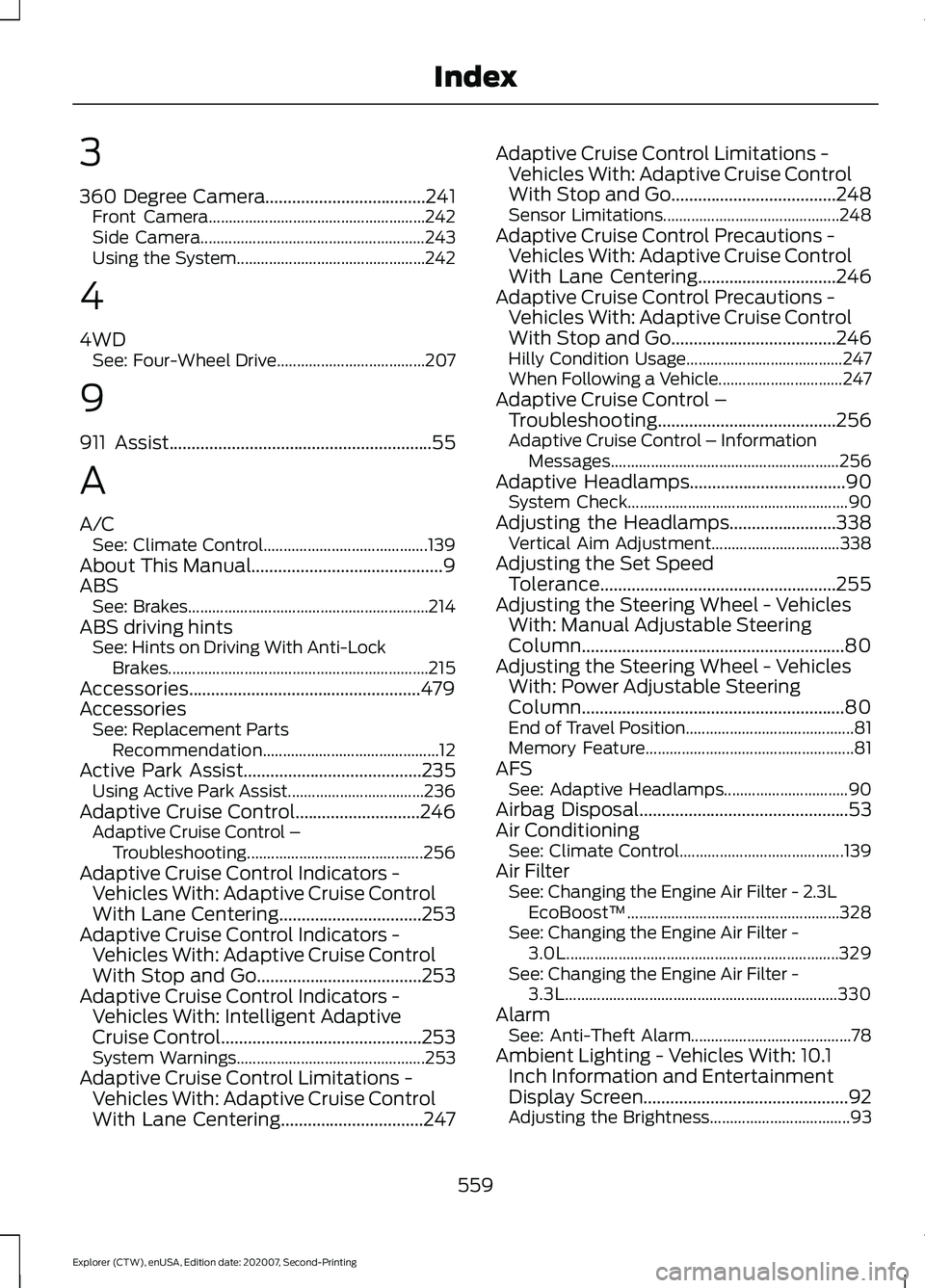
3
360 Degree Camera....................................241
Front Camera...................................................... 242
Side Camera........................................................ 243
Using the System............................................... 242
4
4WD See: Four-Wheel Drive..................................... 207
9
911 Assist...........................................................55
A
A/C See: Climate Control......................................... 139
About This Manual...........................................9
ABS See: Brakes............................................................ 214
ABS driving hints See: Hints on Driving With Anti-Lock
Brakes................................................................. 215
Accessories....................................................479
Accessories See: Replacement Parts
Recommendation............................................ 12
Active Park Assist........................................235 Using Active Park Assist.................................. 236
Adaptive Cruise Control
............................246
Adaptive Cruise Control –
Troubleshooting............................................ 256
Adaptive Cruise Control Indicators - Vehicles With: Adaptive Cruise Control
With Lane Centering
................................253
Adaptive Cruise Control Indicators - Vehicles With: Adaptive Cruise Control
With Stop and Go
.....................................253
Adaptive Cruise Control Indicators - Vehicles With: Intelligent Adaptive
Cruise Control
.............................................253
System Warnings............................................... 253
Adaptive Cruise Control Limitations - Vehicles With: Adaptive Cruise Control
With Lane Centering................................247 Adaptive Cruise Control Limitations -
Vehicles With: Adaptive Cruise Control
With Stop and Go
.....................................248
Sensor Limitations............................................ 248
Adaptive Cruise Control Precautions - Vehicles With: Adaptive Cruise Control
With Lane Centering
...............................246
Adaptive Cruise Control Precautions - Vehicles With: Adaptive Cruise Control
With Stop and Go.....................................246
Hilly Condition Usage....................................... 247
When Following a Vehicle............................... 247
Adaptive Cruise Control – Troubleshooting........................................256
Adaptive Cruise Control – Information Messages......................................................... 256
Adaptive Headlamps
...................................90
System Check....................................................... 90
Adjusting the Headlamps
........................338
Vertical Aim Adjustment................................ 338
Adjusting the Set Speed Tolerance.....................................................255
Adjusting the Steering Wheel - Vehicles With: Manual Adjustable Steering
Column...........................................................80
Adjusting the Steering Wheel - Vehicles With: Power Adjustable Steering
Column...........................................................80
End of Travel Position.......................................... 81
Memory Feature.................................................... 81
AFS See: Adaptive Headlamps............................... 90
Airbag Disposal
...............................................53
Air Conditioning See: Climate Control......................................... 139
Air Filter See: Changing the Engine Air Filter - 2.3L
EcoBoost™..................................................... 328
See: Changing the Engine Air Filter - 3.0L.................................................................... 329
See: Changing the Engine Air Filter - 3.3L.................................................................... 330
Alarm See: Anti-Theft Alarm........................................ 78
Ambient Lighting - Vehicles With: 10.1 Inch Information and Entertainment
Display Screen
..............................................92
Adjusting the Brightness................................... 93
559
Explorer (CTW), enUSA, Edition date: 202007, Second-Printing Index
Page 570 of 577
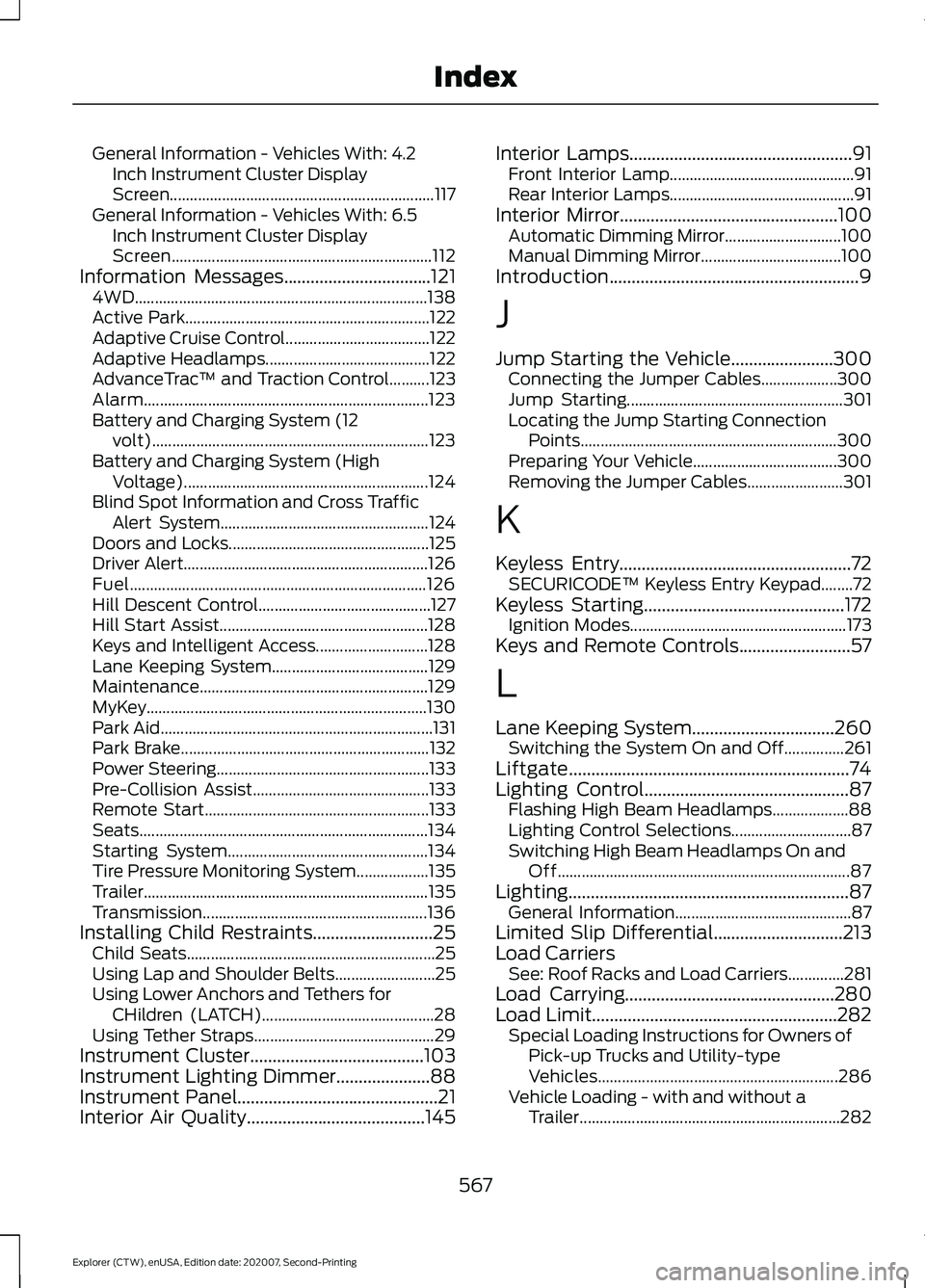
General Information - Vehicles With: 4.2
Inch Instrument Cluster Display
Screen.................................................................. 117
General Information - Vehicles With: 6.5 Inch Instrument Cluster Display
Screen................................................................. 112
Information Messages.................................121
4WD........................................................................\
. 138
Active Park............................................................. 122
Adaptive Cruise Control.................................... 122
Adaptive Headlamps......................................... 122
AdvanceTrac ™ and Traction Control..........123
Alarm....................................................................... 123
Battery and Charging System (12 volt)..................................................................... 123
Battery and Charging System (High Voltage)............................................................. 124
Blind Spot Information and Cross Traffic Alert System.................................................... 124
Doors and Locks.................................................. 125
Driver Alert............................................................. 126
Fuel........................................................................\
.. 126
Hill Descent Control........................................... 127
Hill Start Assist.................................................... 128
Keys and Intelligent Access............................ 128
Lane Keeping System....................................... 129
Maintenance......................................................... 129
MyKey......................................................................130
Park Aid.................................................................... 131
Park Brake.............................................................. 132
Power Steering..................................................... 133
Pre-Collision Assist............................................ 133
Remote Start........................................................ 133
Seats........................................................................\
134
Starting System.................................................. 134
Tire Pressure Monitoring System.................. 135
Trailer....................................................................... 135
Transmission........................................................ 136
Installing Child Restraints
...........................25
Child Seats.............................................................. 25
Using Lap and Shoulder Belts......................... 25
Using Lower Anchors and Tethers for CHildren (LATCH)........................................... 28
Using Tether Straps............................................. 29
Instrument Cluster
.......................................103
Instrument Lighting Dimmer.....................88
Instrument Panel
.............................................21
Interior Air Quality........................................145 Interior Lamps..................................................91
Front Interior Lamp.............................................. 91
Rear Interior Lamps.............................................. 91
Interior Mirror
.................................................100
Automatic Dimming Mirror............................. 100
Manual Dimming Mirror................................... 100
Introduction........................................................9
J
Jump Starting the Vehicle.......................300 Connecting the Jumper Cables................... 300
Jump Starting...................................................... 301
Locating the Jump Starting Connection Points................................................................ 300
Preparing Your Vehicle.................................... 300
Removing the Jumper Cables........................ 301
K
Keyless Entry
....................................................72
SECURICODE™ Keyless Entry Keypad........72
Keyless Starting
.............................................172
Ignition Modes...................................................... 173
Keys and Remote Controls.........................57
L
Lane Keeping System
................................260
Switching the System On and Off...............261
Liftgate...............................................................74
Lighting Control
..............................................87
Flashing High Beam Headlamps................... 88
Lighting Control Selections.............................. 87
Switching High Beam Headlamps On and Off........................................................................\
. 87
Lighting...............................................................87 General Information............................................ 87
Limited Slip Differential
.............................213
Load Carriers See: Roof Racks and Load Carriers..............281
Load Carrying...............................................280
Load Limit
.......................................................282
Special Loading Instructions for Owners of
Pick-up Trucks and Utility-type
Vehicles............................................................ 286
Vehicle Loading - with and without a Trailer................................................................. 282
567
Explorer (CTW), enUSA, Edition date: 202007, Second-Printing Index