key FORD EXPLORER 2021 Workshop Manual
[x] Cancel search | Manufacturer: FORD, Model Year: 2021, Model line: EXPLORER, Model: FORD EXPLORER 2021Pages: 577, PDF Size: 9.79 MB
Page 185 of 577
HYBRID VEHICLE OPERATION
This hybrid vehicle combines electric and
gasoline propulsion to provide
breakthrough performance and improved
efficiency. Familiarizing yourself with these
unique characteristics provides an optimal
driving experience from your vehicle.
Starting
When you start your vehicle, a
green READY indicator light
appears in the instrument cluster
letting you know that your vehicle is ready
for driving.
The engine may not start because your
vehicle has a silent key start feature. This
fuel saving feature allows your vehicle to
be ready to drive without requiring the gas
engine to be running. The indicator remains
on when your vehicle is on, whether the
engine is running or not, to indicate your
vehicle is capable of movement using the
electric motor, gas engine or both.
Typically, the engine does not start unless
the vehicle is cold, a climate control
change is requested or you press the
accelerator pedal.
Driving
The gas engine automatically starts and
stops to provide power when needed and
to save fuel when not needed. When
coasting at low speeds, coming to a stop,
or standing, the gas engine normally shuts
down and your vehicle operates in
electric-only mode.
Conditions that may cause the engine to
start up or remain running include:
• Considerable vehicle acceleration.
• Climbing a hill.
• Charge level of high voltage battery is
low. •
High or low outside temperatures in
order to provide system heating or
cooling.
• Engine not warm enough to provide
passenger requested cabin
temperature.
• Towing a trailer.
• Selectable drive modes: Certain
selectable drive modes may cause the
engine to run. See What Is Drive Mode
Control (page 278).
• Live in Drive: Use of the paddle shifters
while in drive (D) may cause the engine
to run. See Automatic Transmission
(page
201).
Stopping
The gas engine may shut off to conserve
fuel as you come to a stop. Restarting your
vehicle is not required. Simply step on the
accelerator when you are ready to drive.
Transmission Operation
The engine and electric motor together
propel the vehicle through the automatic
transmission. This is normal hybrid
operating and helps deliver fuel efficiency
and performance.
Battery
Your hybrid is equipped with a high voltage
battery. A cool battery maintains battery
life and provides the best possible
performance. The high voltage battery is
cooled by the vehicle's air conditioning
system. When the air conditioning system
is on, you may notice a slight increase in
air temperature coming from the climate
control vents while the battery is cooling.
You may also notice cool air flowing from
the vents when the air conditioning or
blower is off.
182
Explorer (CTW), enUSA, Edition date: 202007, Second-Printing Unique Driving CharacteristicsE293827
Page 187 of 577
HYBRID VEHICLE FREQUENTLY ASKED QUESTIONS
Answer
Question
The high voltage battery is electrically isol-ated from the rest of the vehicle when the
key is off. When you switch the key on, high voltage contactors inside the battery are
closed to make the electricity available to the motor and generator and enable the
vehicle to drive. The clicks are the sound of these contactors as they close and open during start up and shut down.
What are the series of clicks from the cargo
area when I first turn the key in the ignition?
The vehicle's computer determines if an
engine start is required at key-on. Silent key starts the engine if it is necessary for cabin
heating, windshield defrost, or if the outside temperature is low.
Why does the engine sometimes start at
key-on?
There are several reasons the engine stayson for an extended amount of time when
you first start it. One common reason is to
make sure that the emissions components are warm enough to minimize tailpipe
emissions. As the climate gets cooler, this engine-on time is extended.
Why does it take a long time before the
engine shuts down?
In order to make sure that the climate
control system can begin heating the cabin
or defrosting the windshield as soon as you request it, the engine coolant temperature
has to be kept sufficiently hot. Keeping the
engine on is required to maintain the correct coolant temperature.
Why does my engine stay on when it is
extremely cold outside?
Your hybrid vehicle can use E15 fuel (15%ethanol, 85% gasoline), but you couldnotice slightly reduced fuel economy
because ethanol contains less energy per
gallon than gasoline. Your hybrid vehicle is not designed to use E85 (85% ethanol).
Can I put E15 or E85 in my vehicle, and how
will it affect my fuel economy?
The high voltage battery system is designedto last the life of the vehicle and requires no maintenance.
How long will my high voltage battery last?
Does it need maintenance?
184
Explorer (CTW), enUSA, Edition date: 202007, Second-Printing Unique Driving Characteristics
Page 202 of 577
Your vehicle may not pass the I/M test if
the service engine soon indicator is on or
not working properly (bulb is burned out),
or if the OBD-II system has determined
that some of the emission control systems
have not been properly checked. In this
case, the vehicle is not ready for I/M
testing.
If the vehicle
’s engine or transmission has
just been serviced, or the battery has
recently run down or been replaced, the
OBD-II system may indicate that the
vehicle is not ready for I/M testing. To
determine if the vehicle is ready for I/M
testing, turn the ignition key to the on
position for 15 seconds without cranking
the engine. If the service engine soon
indicator blinks eight times, it means that
the vehicle is not ready for I/M testing; if
the service engine soon indicator stays on
solid, it means that your vehicle is ready
for I/M testing.
The OBD-II system checks the emission
control system during normal driving. A
complete check may take several days.
If the vehicle is not ready for I/M testing,
you can perform the following driving cycle
consisting of mixed city and highway
driving:
1. 15 minutes of steady driving on an expressway or highway followed by 20
minutes of stop-and-go driving with at
least four 30-second idle periods.
2. Allow your vehicle to sit for at least eight hours with the ignition off. Then,
start the vehicle and complete the
above driving cycle. The vehicle must
warm up to its normal operating
temperature. Once started, do not turn
off the vehicle until the above driving
cycle is complete.
If the vehicle is still not ready for I/M
testing, you need to repeat the above
driving cycle.
199
Explorer (CTW), enUSA, Edition date: 202007, Second-Printing Engine Emission Control
Page 203 of 577
GENERAL INFORMATION -
HYBRID ELECTRIC VEHICLE
(HEV)
WARNING: This battery pack
should only be serviced by an authorized
electric vehicle technician. Improper
handling can result in personal injury or
death. WARNING:
Apply the parking
brake, shift into park (P), switch the
ignition off and remove the key before
you open the hood or have any service
or repair work completed. If you do not
switch the ignition off, the engine could
restart at any time. Failure to follow this
instruction could result in personal injury
or death. WARNING:
Do not touch the
electronic ignition system parts after you
have switched the ignition on or when
the engine is running. The system
operates at high voltage. Failure to
adhere to this warning could result in
serious personal injury or death. WARNING:
Keep your hands and
clothing clear of the engine cooling fan.
Your vehicle consists of various
high-voltage components and wiring. All
of the high-voltage power flows through
specific wiring assemblies labeled as such
or covered with a solid orange convolute,
or orange striped tape, or both. Do not
come in contact with these components. The high-voltage battery system is a
high-voltage, lithium-ion battery system.
The pack is located underneath the vehicle.
The high voltage battery system uses an
advanced active liquid heating and cooling
system to regulate high voltage battery
temperature and help maximize the life of
the high voltage battery.
Note:
The high-voltage battery does not
require regular service maintenance.
200
Explorer (CTW), enUSA, Edition date: 202007, Second-Printing High Voltage Battery
(If Equipped)
Page 204 of 577
AUTOMATIC TRANSMISSION
WARNING: Always fully apply the
parking brake and make sure you shift
into park (P). Failure to follow this
instruction could result in personal injury
or death. WARNING:
Do not apply the brake
pedal and accelerator pedal
simultaneously. Applying both pedals
simultaneously for more than a few
seconds will limit engine performance,
which may result in difficulty maintaining
speed in traffic and could lead to serious
injury.
Note: You may not be able to shift out of
park (P) unless the intelligent access key is
inside your vehicle.
Understanding Your Transmission
Selector Positions
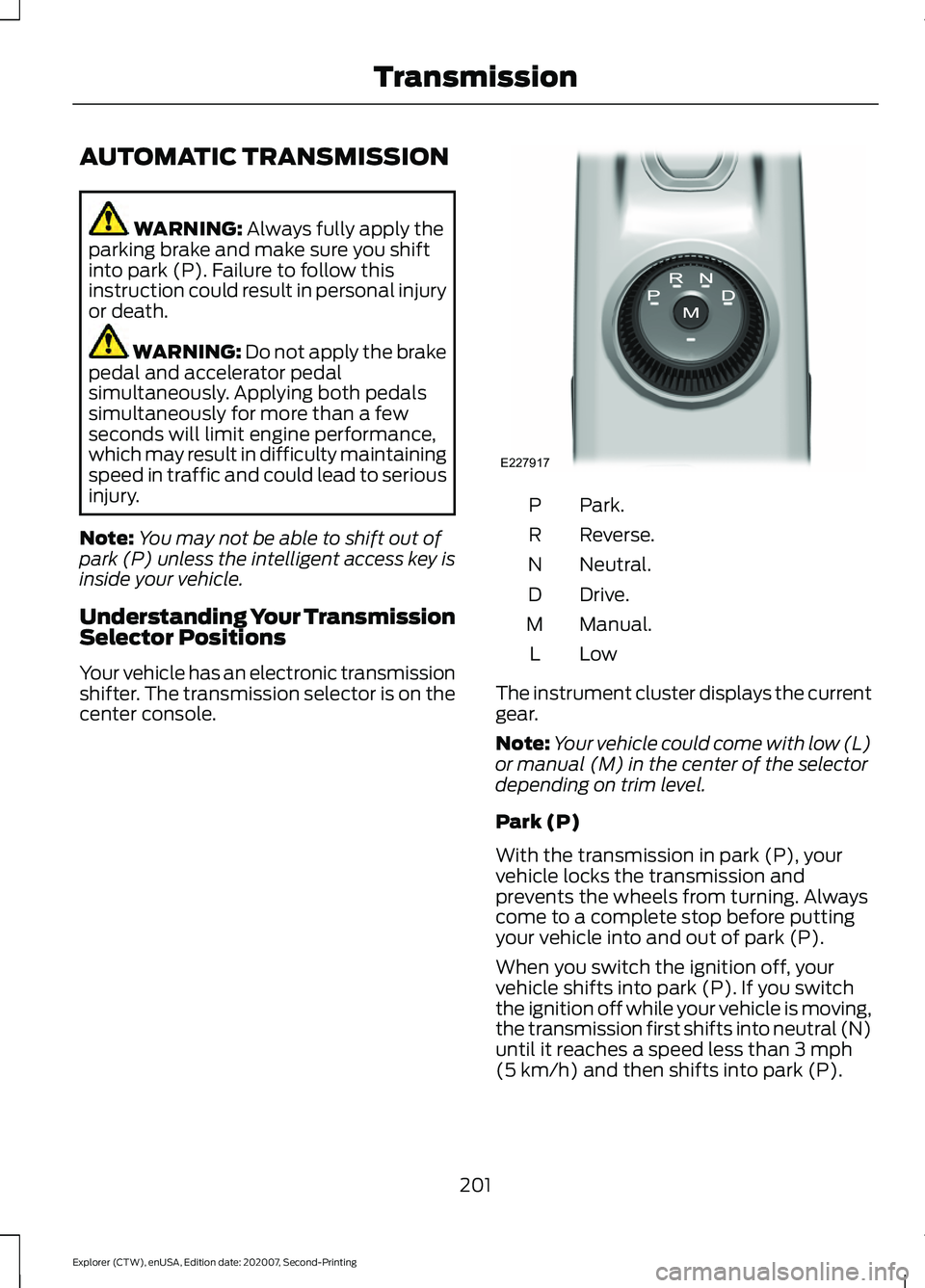
Your vehicle has an electronic transmission
shifter. The transmission selector is on the
center console. Park.
P
Reverse.
R
Neutral.
N
Drive.
D
Manual.
M
LowL
The instrument cluster displays the current
gear.
Note: Your vehicle could come with low (L)
or manual (M) in the center of the selector
depending on trim level.
Park (P)
With the transmission in park (P), your
vehicle locks the transmission and
prevents the wheels from turning. Always
come to a complete stop before putting
your vehicle into and out of park (P).
When you switch the ignition off, your
vehicle shifts into park (P). If you switch
the ignition off while your vehicle is moving,
the transmission first shifts into neutral (N)
until it reaches a speed less than
3 mph
(5 km/h) and then shifts into park (P).
201
Explorer (CTW), enUSA, Edition date: 202007, Second-Printing TransmissionE227917
Page 208 of 577
WARNING: If the parking brake is
fully released, but the brake warning
lamp remains illuminated, the brakes
may not be working properly. Have your
vehicle checked as soon as possible. WARNING:
Do not drive your
vehicle until you verify that the
stoplamps are working.
Use the manual park release to move your
transmission from the park (P) position in
the event of an electrical malfunction or
emergency.
Activating the Manual Park Release
Cable 1.
Apply the parking brake. See Electric
Parking Brake
(page 215).
Note: If the vehicle battery is dead, for
example, no electrical power is available,
you require an external power to apply the
parking brake.
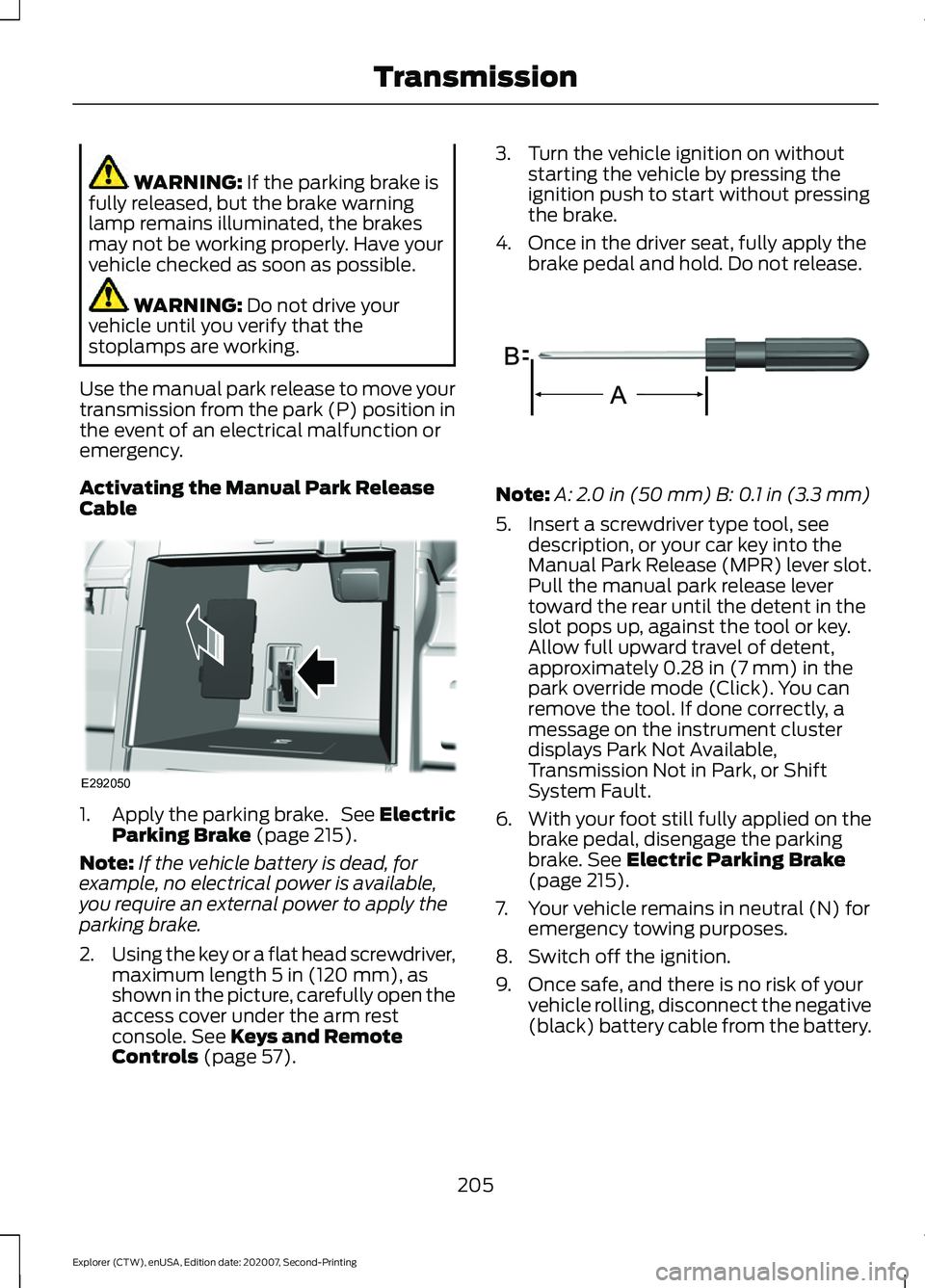
2. Using the key or a flat head screwdriver,
maximum length
5 in (120 mm), as
shown in the picture, carefully open the
access cover under the arm rest
console.
See Keys and Remote
Controls (page 57). 3. Turn the vehicle ignition on without
starting the vehicle by pressing the
ignition push to start without pressing
the brake.
4. Once in the driver seat, fully apply the brake pedal and hold. Do not release. Note:
A:
2.0 in (50 mm) B: 0.1 in (3.3 mm)
5. Insert a screwdriver type tool, see description, or your car key into the
Manual Park Release (MPR) lever slot.
Pull the manual park release lever
toward the rear until the detent in the
slot pops up, against the tool or key.
Allow full upward travel of detent,
approximately
0.28 in (7 mm) in the
park override mode (Click). You can
remove the tool. If done correctly, a
message on the instrument cluster
displays Park Not Available,
Transmission Not in Park, or Shift
System Fault.
6. With your foot still fully applied on the
brake pedal, disengage the parking
brake.
See Electric Parking Brake
(page 215).
7. Your vehicle remains in neutral (N) for emergency towing purposes.
8. Switch off the ignition.
9. Once safe, and there is no risk of your vehicle rolling, disconnect the negative
(black) battery cable from the battery.
205
Explorer (CTW), enUSA, Edition date: 202007, Second-Printing TransmissionE292050 E317360
Page 209 of 577
Returning Your Vehicle to Normal
Mode
1.
Reconnect the negative (black) battery
cable to the battery.
2. Apply the parking brake. See Electric
Parking Brake (page 215).
Note: If the vehicle battery is dead, for
example, no electrical power is available,
you require an external power to apply the
parking brake.
3. Fully apply the brake pedal and hold, do not release.
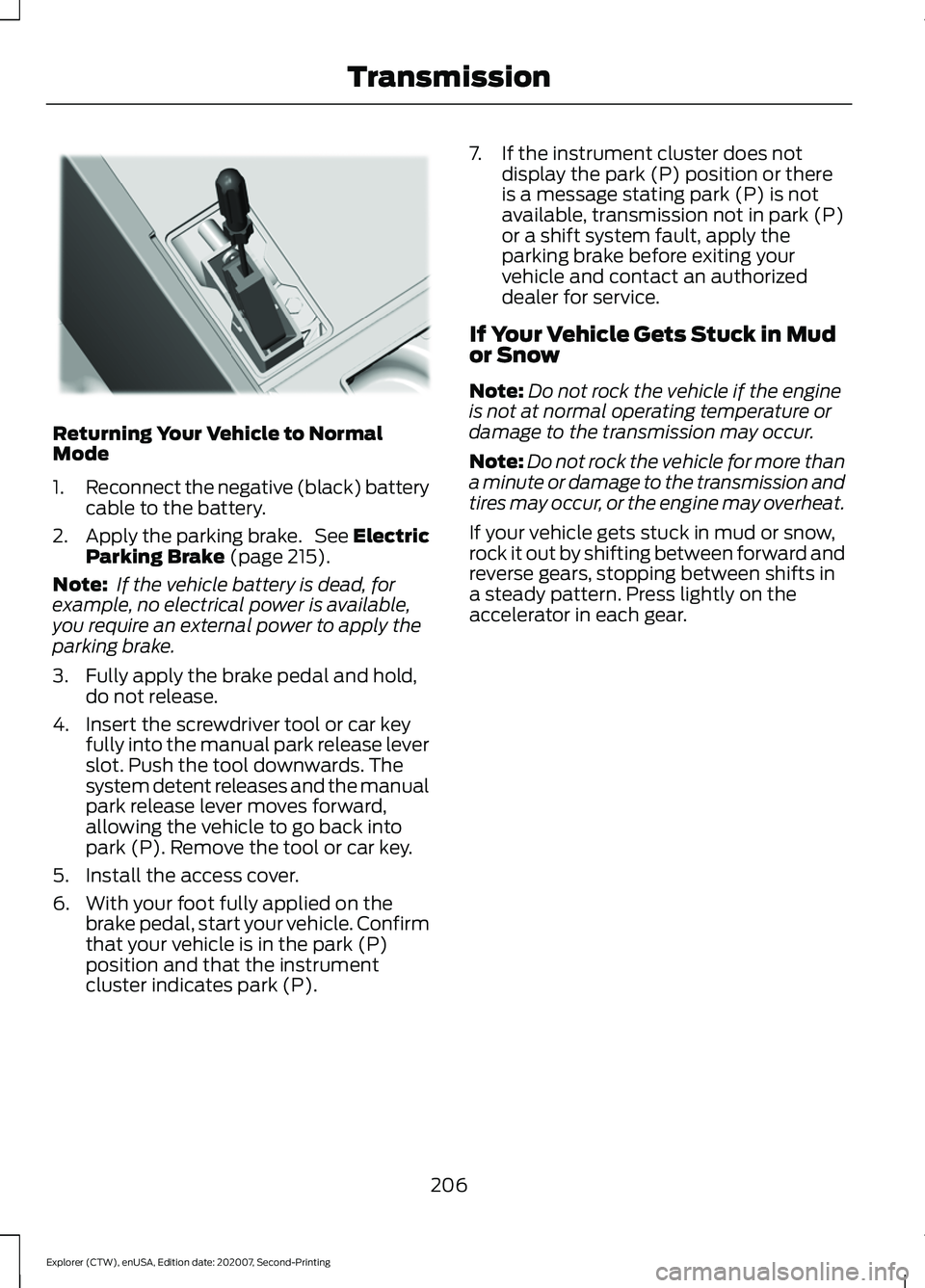
4. Insert the screwdriver tool or car key fully into the manual park release lever
slot. Push the tool downwards. The
system detent releases and the manual
park release lever moves forward,
allowing the vehicle to go back into
park (P). Remove the tool or car key.
5. Install the access cover.
6. With your foot fully applied on the brake pedal, start your vehicle. Confirm
that your vehicle is in the park (P)
position and that the instrument
cluster indicates park (P). 7. If the instrument cluster does not
display the park (P) position or there
is a message stating park (P) is not
available, transmission not in park (P)
or a shift system fault, apply the
parking brake before exiting your
vehicle and contact an authorized
dealer for service.
If Your Vehicle Gets Stuck in Mud
or Snow
Note: Do not rock the vehicle if the engine
is not at normal operating temperature or
damage to the transmission may occur.
Note: Do not rock the vehicle for more than
a minute or damage to the transmission and
tires may occur, or the engine may overheat.
If your vehicle gets stuck in mud or snow,
rock it out by shifting between forward and
reverse gears, stopping between shifts in
a steady pattern. Press lightly on the
accelerator in each gear.
206
Explorer (CTW), enUSA, Edition date: 202007, Second-Printing TransmissionE297270
Page 212 of 577
Driving in Special Conditions With
Four-Wheel drive (4WD)
Note:
Use of the 4WD system in slippery,
deep snow, and sand drive modes on dry
surfaces could produce some vibration,
driveline bind up, or excessive tire wear as
these drive modes are intended for slippery
and loose surfaces.
Note: The design of 4WD vehicles are for
driving on sand, snow, mud and rough roads
and have operating characteristics that are
somewhat different from conventional
vehicles, both on and off the highway.
Basic Operating Principles in Special
Conditions
• Drive slower in strong crosswinds which
can affect the normal steering
characteristics of your vehicle.
• Be extremely careful when driving on
pavement made slippery by loose sand,
water, gravel, snow or ice. If Your Vehicle Goes Off the Edge of the
Pavement
•
If your vehicle goes off the edge of the
pavement, slow down, but avoid severe
brake application, ease the vehicle
back onto the pavement only after
reducing your speed. Do not turn the
steering wheel too sharply while
returning to the road surface.
• It could be safer to stay on the apron
or shoulder of the road and slow down
gradually before returning to the
pavement. You could lose control if you
do not slow down or if you turn the
steering wheel too sharply or abruptly.
• It often could be less risky to strike
small objects, such as highway
reflectors, with minor damage to your
vehicle rather than attempt a sudden
return to the pavement which could
cause the vehicle to slide sideways out
of control or rollover. Remember, your
safety and the safety of others should
be your primary concern.
If Your Vehicle Gets Stuck WARNING: Apply the parking
brake, shift into park (P), switch the
ignition off and remove the key before
you leave your vehicle. Failure to follow
this instruction could result in personal
injury or death. WARNING:
If the parking brake is
fully released, but the brake warning
lamp remains illuminated, the brakes
may not be working properly. Have your
vehicle checked as soon as possible. WARNING:
Do not spin the wheels
at over 34 mph (55 km/h). The tires may
fail and injure a passenger or bystander.
209
Explorer (CTW), enUSA, Edition date: 202007, Second-Printing Four-Wheel Drive
(If Equipped)
Page 233 of 577
PRINCIPLE OF OPERATION
WARNING: To help avoid personal
injury, always use caution when in
reverse (R) and when using the sensing
system. WARNING:
The system may not
detect objects with surfaces that absorb
reflection. Always drive with due care
and attention. Failure to take care may
result in a crash. WARNING: Traffic control systems,
inclement weather, air brakes, external
motors and fans may affect the correct
operation of the sensing system. This
may cause reduced performance or false
alerts. WARNING:
The system may not
detect small or moving objects,
particularly those close to the ground.
Note: If your vehicle has MyKey ™, the
sensing system cannot be switched off
when a MyKey ™ is present.
See Principle
of Operation (page 64).
Note: Keep the sensors on the bumper or
fascia free from snow, ice and large
accumulations of dirt. If the sensors are
covered, the system ’s accuracy can be
affected. Do not clean the sensors with
sharp objects.
Note: If your vehicle sustains damage to
the bumper or fascia, leaving it misaligned
or bent, the sensing zone may be altered
causing inaccurate measurement of
obstacles or false alerts. Note:
Certain add-on devices installed
around the bumper or fascia may create
false alerts. For example, large trailer
hitches, bike or surfboard racks, license plate
brackets, bumper covers or any other device
that may block the normal detection zone
of the system. Remove the add-on device
to prevent false alerts.
Note: When you connect a trailer to your
vehicle, the rear parking aid may detect the
trailer and therefore provide an alert. Disable
the rear parking aid when you connect a
trailer to prevent the alert.
The sensing system warns the driver of
obstacles within a certain range of your
vehicle. The system turns on automatically
whenever you switch the ignition on.
You can switch the system off through the
touchscreen, information display or from
the pop-up message that appears once
you shift the transmission into reverse (R).
If your vehicle has a parking aid button, you
can switch the system off by pressing the
button.
If a fault is present in the system, a warning
message appears in the information
display. See Information Messages
(page 121).
REAR PARKING AID WARNING:
The system may not
detect objects with surfaces that absorb
reflection. Always drive with due care
and attention. Failure to take care may
result in a crash. WARNING:
The system may not
detect small or moving objects,
particularly those close to the ground.
230
Explorer (CTW), enUSA, Edition date: 202007, Second-Printing Parking Aids
Page 239 of 577
WARNING: You are responsible for
controlling your vehicle at all times. The
system is designed to be an aid and does
not relieve you of your responsibility to
drive with due care and attention. Failure
to follow this instruction could result in
the loss of control of your vehicle,
personal injury or death.
The system assists parking into and out of
parking spaces. It uses sensors to detect
parking spaces. The system then steers,
accelerates, brakes and shifts gear as
required to maneuver into or out of a
parking space.
Using Active Park Assist The parking button is near the
transmission selector on the
center console.
Press the parking button to bring up full
screen notifications. Press either the
parking button or the soft keys on the
display screen to switch between Parallel
Park In, Perpendicular Park In or Parallel
Park Out parking modes.
Driving into a Parking Space
Note: When parking perpendicularly, the
system backs your vehicle into parking
spaces.
1. Press the active park assist button.
Note: The system does not recognize
parking space lines and centers your vehicle
between objects.
Note: The system detects other vehicles
and curbs to find a parking space.
Note: The system searches for parallel
parking spaces on the passenger side. Press
the active park assist button again to make
the system search for perpendicular spaces. 2. Use the direction indicator lever to
search for a parking space on the driver
or passenger side of your vehicle.
3. Drive your vehicle approximately 3 ft
(1 m) away from and parallel to the
other parked vehicles when searching
for a parking space.
Note: A tone sounds and a message
appears in the information display when
active park assist finds a suitable parking
space.
4. Press and hold the brake pedal.
5. Release the steering wheel and shift into neutral (N).
6. Press and hold the active park assist button.
7. Release the brake pedal to allow the vehicle to park.
Note: When parallel parking between
objects, the system parks closer to the
object in front of your vehicle to allow easier
access to your luggage compartment.
Note: When perpendicular parking, the
system aligns the front end of your vehicle
with the object next to it.
Note: When perpendicular parking, if the
system detects only one object, it allows
enough distance to open the door on either
side.
Note: You can slow down your vehicle at
any time by pressing the brake pedal.
Note: When parking is complete the vehicle
shifts into park (P).
Leaving a Parking Space
The system assists leaving only parallel
parking spaces.
1. Press the active park assist button.
2. Use the direction indicator lever to choose the direction to leave.
3. Press and hold the brake pedal.
236
Explorer (CTW), enUSA, Edition date: 202007, Second-Printing Parking AidsE146186