brake sensor FORD EXPLORER 2023 User Guide
[x] Cancel search | Manufacturer: FORD, Model Year: 2023, Model line: EXPLORER, Model: FORD EXPLORER 2023Pages: 573, PDF Size: 16.1 MB
Page 235 of 573
WARNING: You are responsible forcontrolling your vehicle at all times. Thesystem is designed to be an aid and doesnot relieve you of your responsibility todrive with due care and attention. Failureto follow this instruction could result inthe loss of control of your vehicle,personal injury or death.
WARNING: Do not use the systemwith accessories that extend beyond thefront or rear of your vehicle, for examplea trailer hitch, bike rack or side mirrorextensions such as telescoping mirrorsor towing mirrors. The system is not ableto make corrections for the additionallength of the accessories.
The system assists parking into and out ofparking spaces. It uses sensors to detectparking spaces. The system then steers,accelerates, brakes and shifts gear asrequired to maneuver into or out of aparking space.
Using Active Park Assist
The active park assist button isnear the transmission selectoron the center console.
Press the active park assist button to bringup full screen notifications. Press either theactive park assist button or the soft keyson the display screen to switch betweenParallel Park In, Perpendicular Park In orParallel Park Out parking modes.
Driving into a Parking Space
Note:When parking perpendicularly, thesystem backs your vehicle into parkingspaces.
1.Press the active park assist button.
Note:The system does not recognizeparking space lines and centers your vehiclebetween objects.
Note:The system detects other vehiclesand curbs to find a parking space.
Note:The system searches for parallelparking spaces on the passenger side. Pressthe active park assist button again to makethe system search for perpendicular spaces.
2.Use the direction indicator lever tosearch for a parking space on the driveror passenger side of your vehicle.
3.Drive your vehicle approximately 3 ft(1 m) away from and parallel to theother parked vehicles when searchingfor a parking space.
Note: A tone sounds and a messageappears in the information display whenactive park assist finds a suitable parkingspace.
4.Press and hold the brake pedal.
5.Release the steering wheel and shiftinto neutral (N).
6.Press and hold the active park assistbutton.
7.Release the brake pedal to allow thevehicle to park.
Note:When parallel parking betweenobjects, the system parks closer to theobject in front of your vehicle to allow easieraccess to your luggage compartment.
Note:When perpendicular parking, thesystem aligns the front end of your vehiclewith the object next to it.
Note:When perpendicular parking, if thesystem detects only one object, it allowsenough distance to open the door on eitherside.
Note:You can slow down your vehicle atany time by pressing the brake pedal.
Note:When parking is complete the vehicleshifts into park (P).
231
2023 Explorer (CTW) Canada/United States of America, enUSA, Edition date: 202209, First-PrintingParking AidsE146186
Page 236 of 573
Leaving a Parking Space
The system assists leaving only parallelparking spaces.
1.Press the active park assist button.
2.Use the direction indicator lever tochoose the direction to leave.
3.Press and hold the brake pedal.
4.Release the steering wheel and shiftinto neutral (N).
5.Release the parking brake.
6.Press and hold the active park assistbutton.
7.Release the brake pedal to allow thevehicle to move.
Note: You can slow down your vehicle atany time by pressing the brake pedal.
Note:After the system drives your vehicleto a position where you can exit the parkingspace in a forward movement, a messageappears instructing you to take full controlof your vehicle.
Canceling Active Park Assist
To cancel parking assistance at any time,shift out of neutral (N).
Note:If you turn the steering wheel or openthe driver door the parking assistance alsocancels.
Pausing Active Park Assist
To pause parking assistance at any time,release the active park assist button.
The vehicle stops moving until you pressand hold the active park assist buttonagain.
Note:If you open the passenger or reardoors the parking assistance also pauses.
Active Park Assist Troubleshooting
Possible CauseSymptom
The system is unable to detect a vehicle, curb or objectto park next to, or in-between. This could occur becauseof sensors not operating correctly, not enough roomfor your vehicle, or the traction control is off.
The system does not correctlyoperate.
You may have switched traction control off.The system does not search fora parking space.The transmission is in reverse (R). Your vehicle mustbe moving forward to be able to detect a parking space.
There could be blockage on the sensors. For example,snow, ice or large accumulations of dirt. Blockedsensors can affect how the system functions.
The system does not offer aparking space.
The sensors in the front or rear bumper could bedamaged.
There is not enough room in the parking space for yourvehicle to safely park.
232
2023 Explorer (CTW) Canada/United States of America, enUSA, Edition date: 202209, First-PrintingParking Aids
Page 247 of 573
•Areas under construction or newinfrastructure.
•When modifications to the steeringsystem have been made.
•When using a spare tire.
Note:The driving assistance torque islimited and may not be sufficient for alldriving situations such as driving throughtight curves or driving through curves at highspeeds.
Note:In exceptional conditions, the systemmay deviate from the center line.
ADAPTIVE CRUISE CONTROL
LIMITATIONS - VEHICLES
WITH: STOP AND GO
Sensor Limitations
WARNING: On rare occasions,detection issues can occur due to theroad infrastructures, for example bridges,tunnels and safety barriers. In thesecases, the system may brake late orunexpectedly. At all times, you areresponsible for controlling your vehicle,supervising the system and intervening,if required.
WARNING: If the systemmalfunctions, have your vehicle checkedas soon as possible.
WARNING: Large contrasts inoutside lighting can limit sensorperformance.
WARNING: The system only warnsof vehicles detected by the radar sensor.In some cases there may be no warningor a delayed warning. Apply the brakeswhen necessary. Failure to follow thisinstruction could result in personal injuryor death.
WARNING: The system may notdetect stationary or slow movingvehicles below 6 mph (10 km/h).
WARNING: The system does notdetect pedestrians or objects in the road.
WARNING: The system does notdetect oncoming vehicles in the samelane.
WARNING: The system may notoperate properly if the sensor is blocked.Keep the windshield free fromobstruction.
WARNING: The sensor mayincorrectly track lane markings as otherstructures or objects. This can result ina false or missed warning.
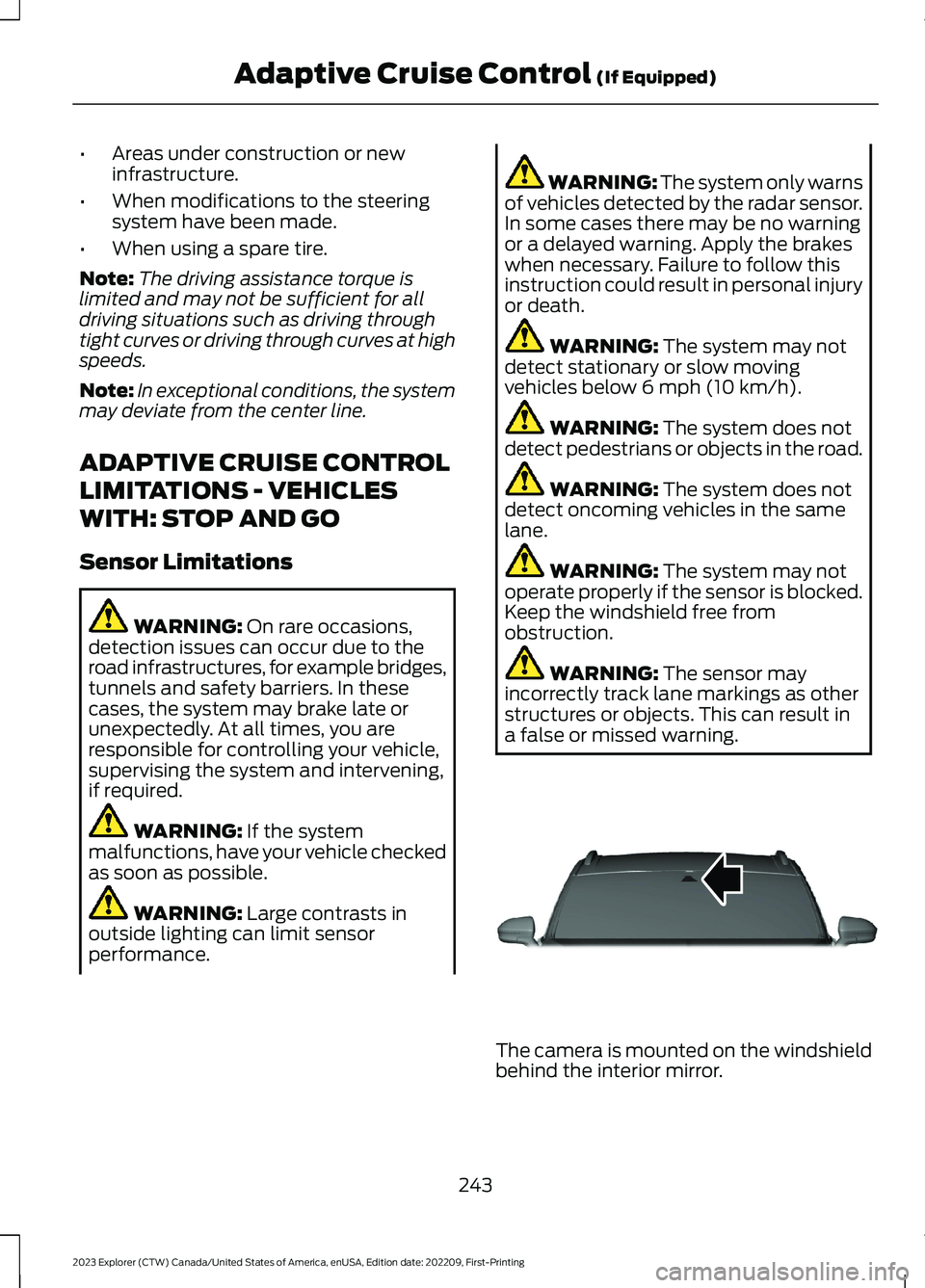
The camera is mounted on the windshieldbehind the interior mirror.
243
2023 Explorer (CTW) Canada/United States of America, enUSA, Edition date: 202209, First-PrintingAdaptive Cruise Control (If Equipped)E307893
Page 248 of 573
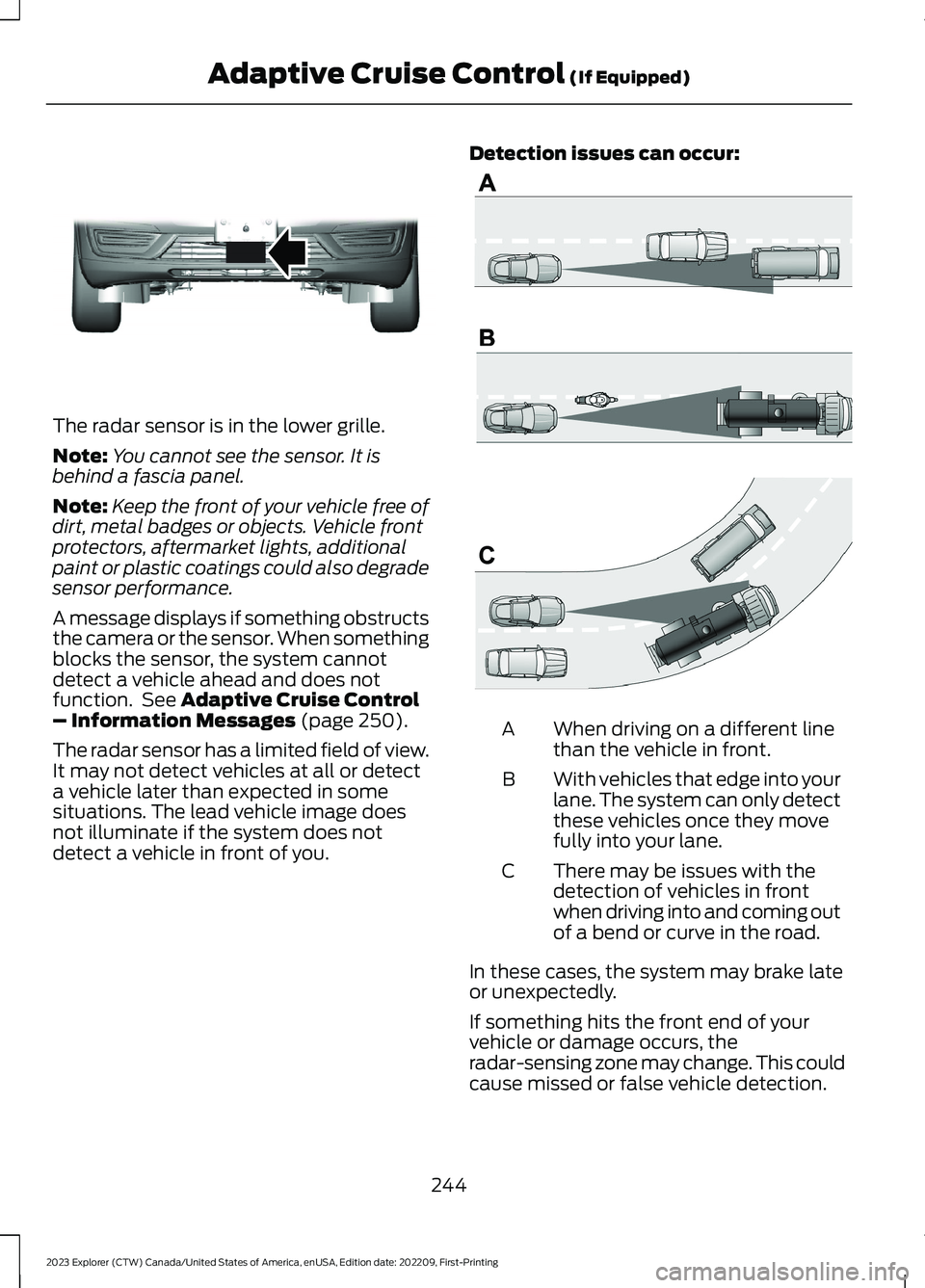
The radar sensor is in the lower grille.
Note:You cannot see the sensor. It isbehind a fascia panel.
Note:Keep the front of your vehicle free ofdirt, metal badges or objects. Vehicle frontprotectors, aftermarket lights, additionalpaint or plastic coatings could also degradesensor performance.
A message displays if something obstructsthe camera or the sensor. When somethingblocks the sensor, the system cannotdetect a vehicle ahead and does notfunction. See Adaptive Cruise Control– Information Messages (page 250).
The radar sensor has a limited field of view.It may not detect vehicles at all or detecta vehicle later than expected in somesituations. The lead vehicle image doesnot illuminate if the system does notdetect a vehicle in front of you.
Detection issues can occur:
When driving on a different linethan the vehicle in front.A
With vehicles that edge into yourlane. The system can only detectthese vehicles once they movefully into your lane.
B
There may be issues with thedetection of vehicles in frontwhen driving into and coming outof a bend or curve in the road.
C
In these cases, the system may brake lateor unexpectedly.
If something hits the front end of yourvehicle or damage occurs, theradar-sensing zone may change. This couldcause missed or false vehicle detection.
244
2023 Explorer (CTW) Canada/United States of America, enUSA, Edition date: 202209, First-PrintingAdaptive Cruise Control (If Equipped)E307892 E71621
Page 249 of 573
Optimal system performance requires aclear view of the road by thewindshield-mounted camera.
Optimal performance may not occur if:
•The camera is blocked.
•There is poor visibility or lightingconditions.
•There are bad weather conditions.
SWITCHING ADAPTIVE
CRUISE CONTROL ON AND OFF
The cruise controls are on the steeringwheel. See Cruise Control (page 82).
Switching Adaptive Cruise ControlOn
Press the button to set thesystem in standby mode.
The indicator, current gap setting and setspeed appear in the information display.
Switching Adaptive Cruise ControlOff
Press the button when thesystem is in standby mode, orswitch the ignition off.
Note:You erase the set speed when youswitch the system off.
Automatic Cancellation orDeactivation
The system may cancel if:
•The tires lose traction.
•You apply the parking brake.
The system may cancel and set the parkingbrake if:
•You unbuckle the seatbelt and openthe driver door after you stop yourvehicle.
•Your vehicle is at a stop continuouslyfor more than three minutes.
The system may turn off or preventactivating when requested if:
•The vehicle has a blocked sensor.
•The brake temperature is too high.
•There is a failure in the system or arelated system.
SETTING THE ADAPTIVE
CRUISE CONTROL SPEED
Drive to the speed you prefer.
Press the toggle button upwardor downward to set the currentspeed.
Take your foot off the accelerator pedal.
The indicator, current gap setting and setspeed appear in the information display.
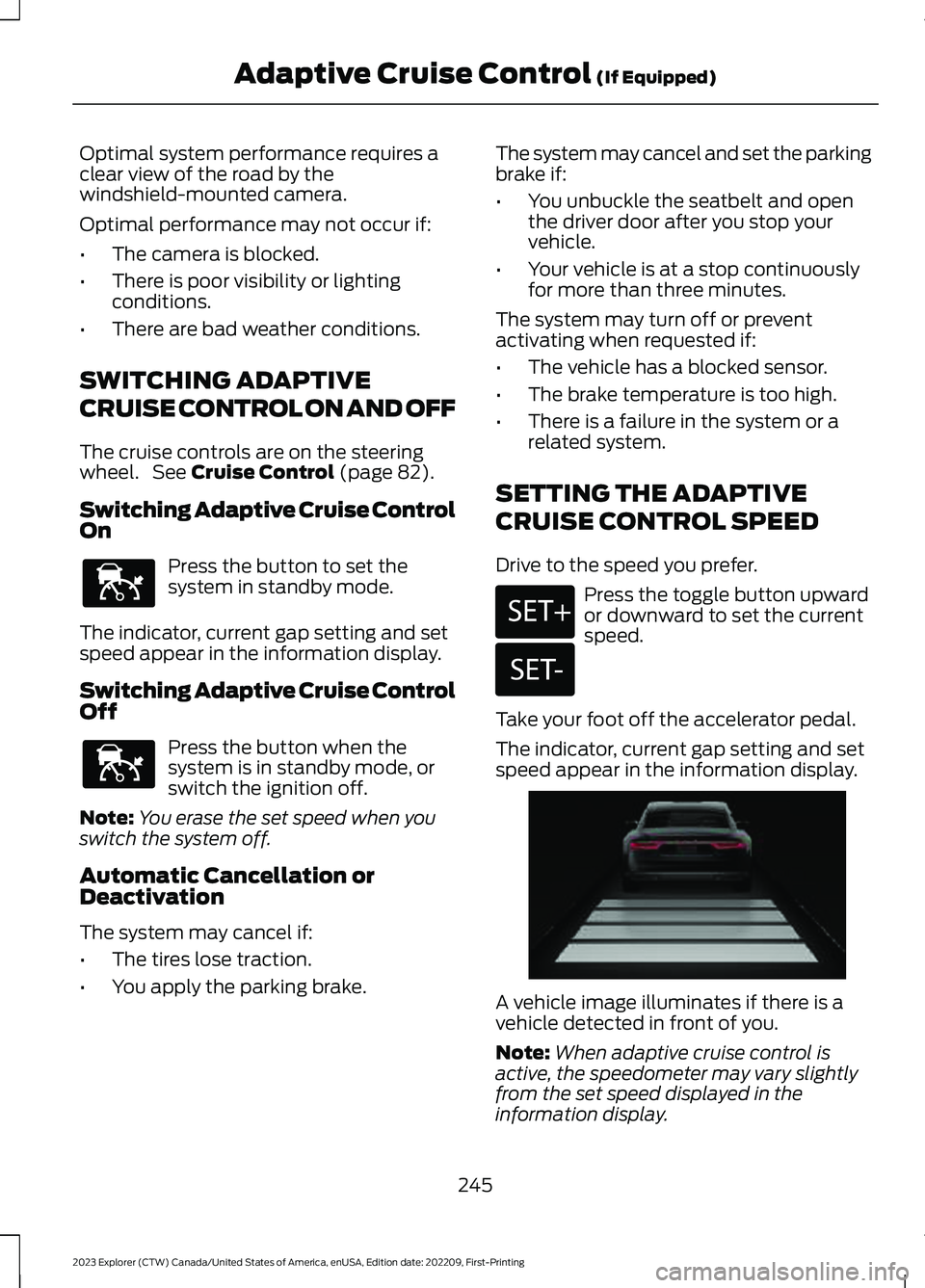
A vehicle image illuminates if there is avehicle detected in front of you.
Note:When adaptive cruise control isactive, the speedometer may vary slightlyfrom the set speed displayed in theinformation display.
245
2023 Explorer (CTW) Canada/United States of America, enUSA, Edition date: 202209, First-PrintingAdaptive Cruise Control (If Equipped)E144529 E144529 E246884 E246885 E255686
Page 257 of 573
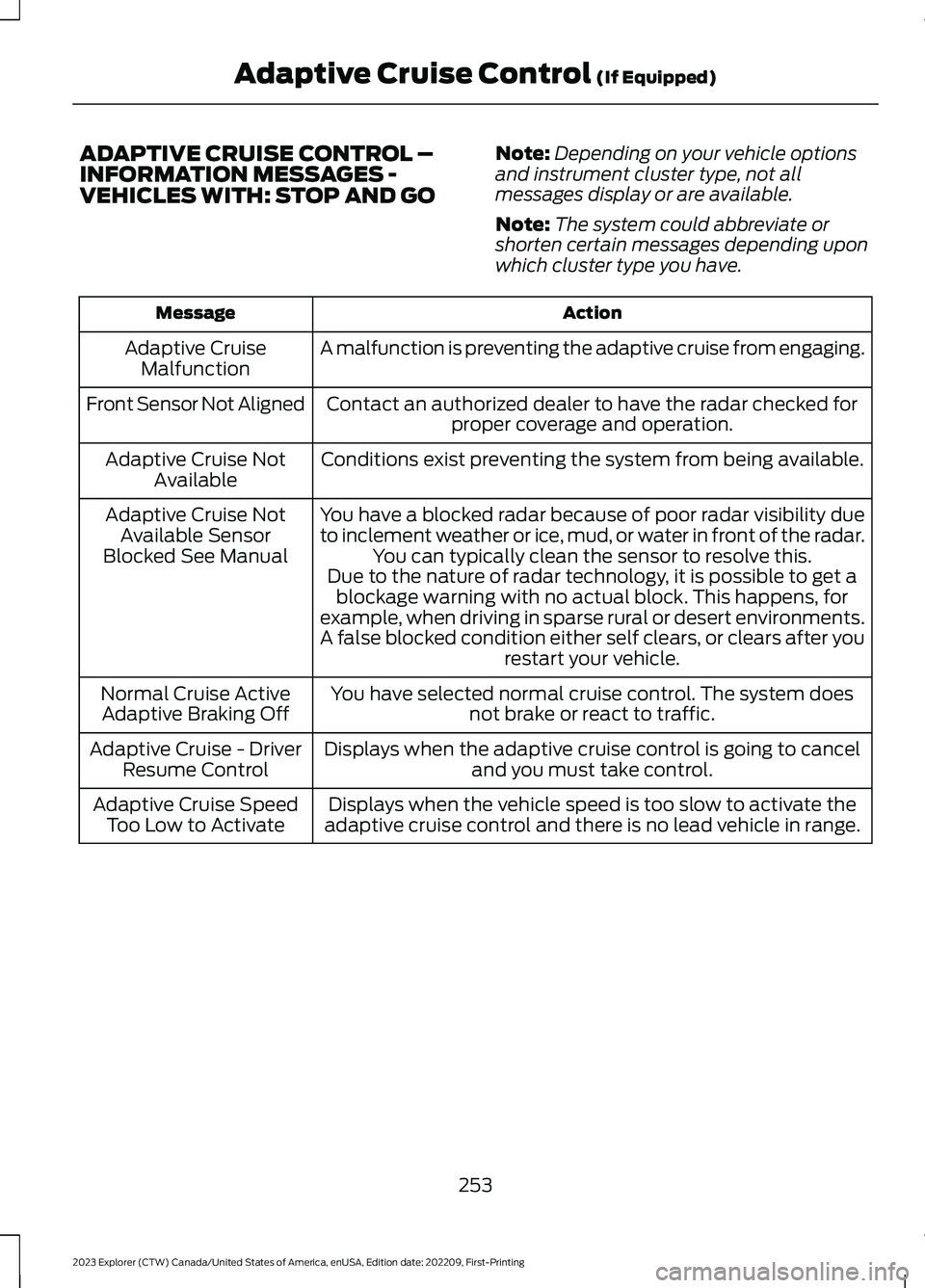
ADAPTIVE CRUISE CONTROL –INFORMATION MESSAGES -VEHICLES WITH: STOP AND GO
Note:Depending on your vehicle optionsand instrument cluster type, not allmessages display or are available.
Note:The system could abbreviate orshorten certain messages depending uponwhich cluster type you have.
ActionMessage
A malfunction is preventing the adaptive cruise from engaging.Adaptive CruiseMalfunction
Front Sensor Not AlignedContact an authorized dealer to have the radar checked forproper coverage and operation.
Conditions exist preventing the system from being available.Adaptive Cruise NotAvailable
You have a blocked radar because of poor radar visibility dueto inclement weather or ice, mud, or water in front of the radar.You can typically clean the sensor to resolve this.
Adaptive Cruise NotAvailable SensorBlocked See ManualDue to the nature of radar technology, it is possible to get ablockage warning with no actual block. This happens, forexample, when driving in sparse rural or desert environments.A false blocked condition either self clears, or clears after yourestart your vehicle.
You have selected normal cruise control. The system doesnot brake or react to traffic.Normal Cruise ActiveAdaptive Braking Off
Displays when the adaptive cruise control is going to canceland you must take control.Adaptive Cruise - DriverResume Control
Displays when the vehicle speed is too slow to activate theadaptive cruise control and there is no lead vehicle in range.Adaptive Cruise SpeedToo Low to Activate
253
2023 Explorer (CTW) Canada/United States of America, enUSA, Edition date: 202209, First-PrintingAdaptive Cruise Control (If Equipped)
Page 273 of 573
WARNING: The system does notdetect vehicles that are driving in adifferent direction, cyclists or animals.Apply the brakes when necessary. Failureto follow this instruction could result inthe loss of control of your vehicle,personal injury or death.
WARNING: The system does notoperate during hard acceleration orsteering. Failure to take care may leadto a crash or personal injury.
WARNING: Some situations andobjects prevent hazard detection. Forexample low or direct sunlight, inclementweather, unconventional vehicle types,and pedestrians. Apply the brakes whennecessary. Failure to follow thisinstruction could result in the loss ofcontrol of your vehicle, personal injury ordeath.
WARNING: The system may notoperate properly during severe weatherconditions, for example snow, ice, heavyrain and spray. Always drive with duecare and attention. Failure to take caremay result in a crash.
WARNING: The system cannothelp prevent all crashes. Do not rely onthis system to replace driver judgmentand the need to maintain a safe distanceand speed.
Note:Keep the sensors free from snow, iceand large accumulations of dirt.
Using the Pre-Collision AssistSystem
The system is active at speeds aboveapproximately 3 mph (5 km/h) andpedestrian detection is active at speedsup to 50 mph (80 km/h).
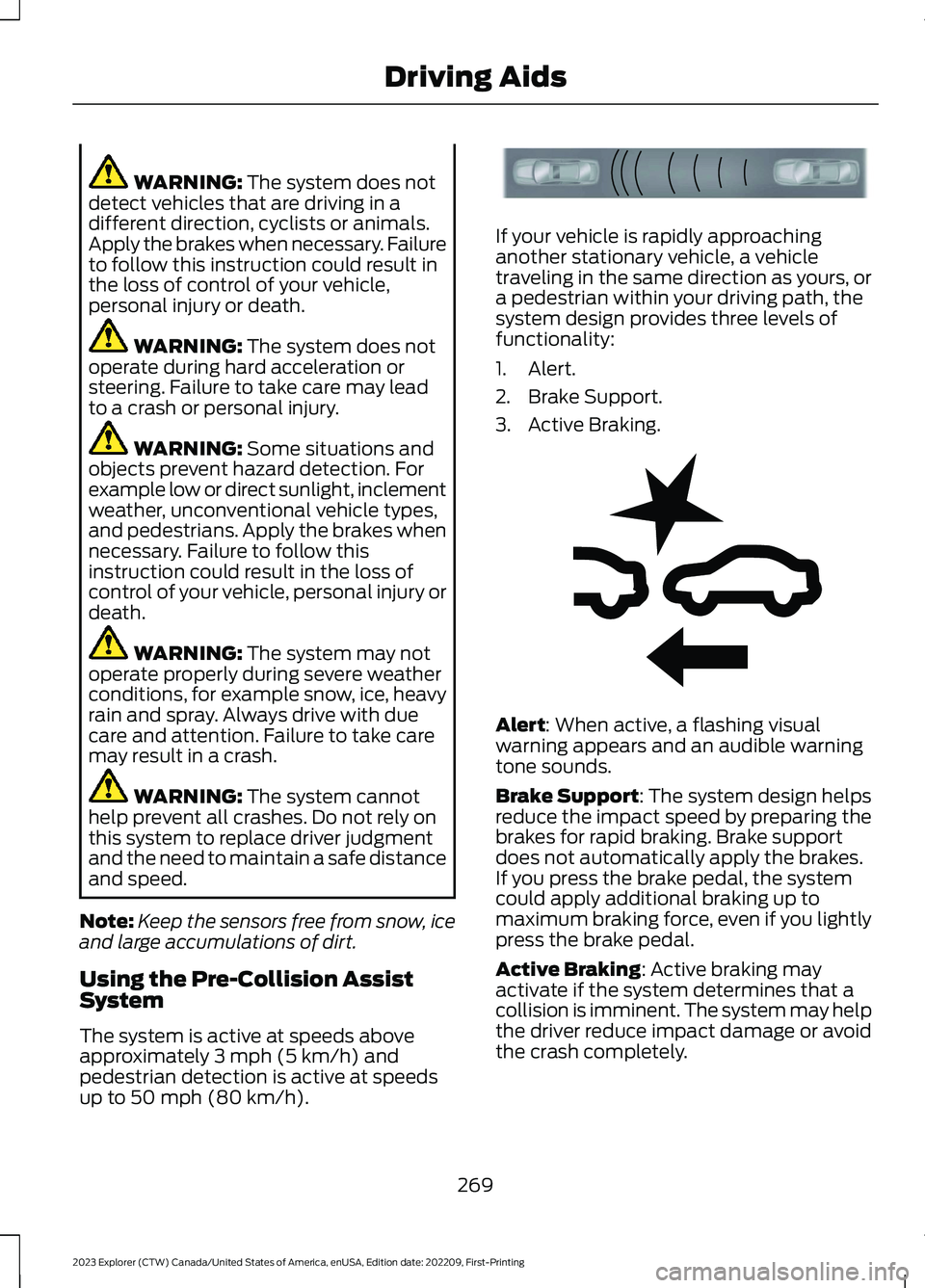
If your vehicle is rapidly approachinganother stationary vehicle, a vehicletraveling in the same direction as yours, ora pedestrian within your driving path, thesystem design provides three levels offunctionality:
1.Alert.
2.Brake Support.
3.Active Braking.
Alert: When active, a flashing visualwarning appears and an audible warningtone sounds.
Brake Support: The system design helpsreduce the impact speed by preparing thebrakes for rapid braking. Brake supportdoes not automatically apply the brakes.If you press the brake pedal, the systemcould apply additional braking up tomaximum braking force, even if you lightlypress the brake pedal.
Active Braking: Active braking mayactivate if the system determines that acollision is imminent. The system may helpthe driver reduce impact damage or avoidthe crash completely.
269
2023 Explorer (CTW) Canada/United States of America, enUSA, Edition date: 202209, First-PrintingDriving AidsE156130 E255268
Page 274 of 573

Note:Brake support and active braking areactive at speeds up to 75 mph (120 km/h).If your vehicle has a radar sensor includedwith adaptive cruise control, then brakesupport and active braking are active up tothe maximum speed of the vehicle.
Note:If you perceive pre-collision assistalerts as being too frequent or disturbing,then you can reduce the alert sensitivity,though we recommend using the highestsensitivity setting where possible. Settinglower sensitivity would lead to fewer andlater system warnings.
Distance Indication and Alert (If
Equipped)
Distance indication and alert is a functionthat provides the driver with a graphicalindication of the time gap to otherpreceding vehicles traveling in the samedirection. Distance indication and alertshows one of the graphics that follow inthe information display.
If the time gap to a preceding vehicle issmall, a red visual indication displays tothe driver.
Note:Distance indication and alertdeactivates and the graphics do not displaywhen adaptive cruise control is active.
Time GapDistance GapGraphicsSensitivitySpeed
>0.9sec>82 ft (25 m)GreyNormal62 mph(100 km/h)
0.6sec —0.9sec56–82 ft(17–25 m)YellowNormal62 mph(100 km/h)
<0.6sec<56 ft (17 m)RedNormal62 mph(100 km/h)
Evasive Steering Assist (If Equipped)
If your vehicle is rapidly approaching astationary vehicle or a vehicle traveling inthe same direction as your vehicle, thesystem design helps you steer around thevehicle.
The system only activates when all of thefollowing occur:
•The system detects a vehicle aheadand starts to apply active braking.
•You turn the steering wheel in anattempt to steer around the vehicle.
270
2023 Explorer (CTW) Canada/United States of America, enUSA, Edition date: 202209, First-PrintingDriving AidsE358669
Page 311 of 573
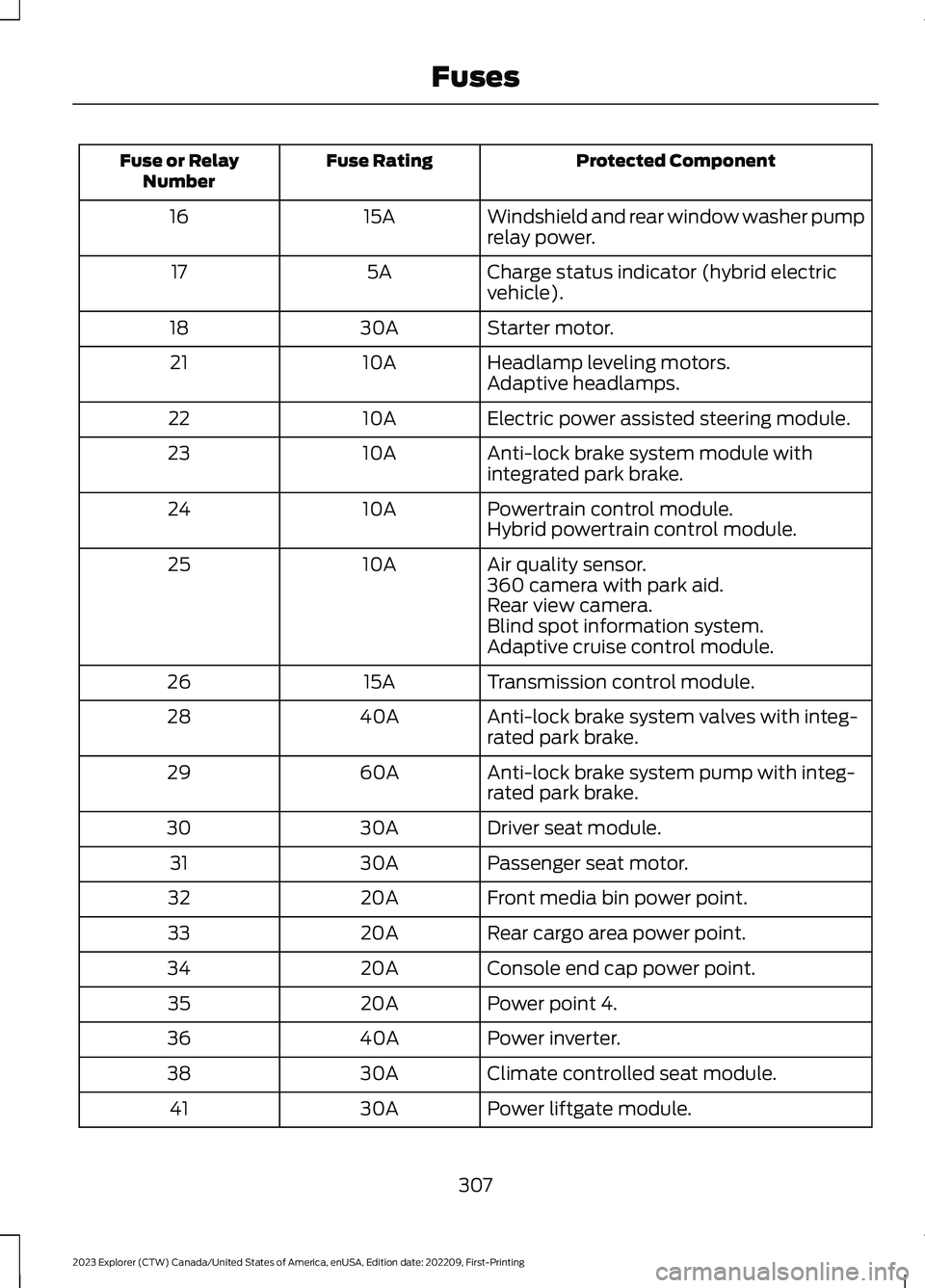
Protected ComponentFuse RatingFuse or RelayNumber
Windshield and rear window washer pumprelay power.15A16
Charge status indicator (hybrid electricvehicle).5A17
Starter motor.30A18
Headlamp leveling motors.10A21Adaptive headlamps.
Electric power assisted steering module.10A22
Anti-lock brake system module withintegrated park brake.10A23
Powertrain control module.10A24Hybrid powertrain control module.
Air quality sensor.10A25360 camera with park aid.Rear view camera.Blind spot information system.Adaptive cruise control module.
Transmission control module.15A26
Anti-lock brake system valves with integ-rated park brake.40A28
Anti-lock brake system pump with integ-rated park brake.60A29
Driver seat module.30A30
Passenger seat motor.30A31
Front media bin power point.20A32
Rear cargo area power point.20A33
Console end cap power point.20A34
Power point 4.20A35
Power inverter.40A36
Climate controlled seat module.30A38
Power liftgate module.30A41
307
2023 Explorer (CTW) Canada/United States of America, enUSA, Edition date: 202209, First-PrintingFuses
Page 334 of 573
WARNING: Battery posts,terminals and related accessoriescontain lead and lead compounds,chemicals known to the State ofCalifornia to cause cancer andreproductive harm.Wash your handsafter handling.
WARNING: This vehicle may havemore than one battery. Removing thebattery cables from only one batterydoes not disconnect your vehicleelectrical system. Make sure youdisconnect the battery cables from allbatteries when disconnecting power.Failure to do so may cause seriouspersonal injury or property damage.
WARNING: For vehicles withAuto-Start-Stop the battery requirementis different. You must replace the batterywith one of exactly the samespecification.
The battery is in the engine compartment.See Under Hood Overview (page 317).
Your vehicle has a maintenance-freebattery. It does not require additionalwater during service.
If the vehicle battery has a cover and venthose, make sure you correctly install it aftercleaning or replacing the battery.
For longer, trouble-free operation, keep thetop of the battery clean and dry and thebattery cables tightly fastened to thebattery terminals. If any corrosion ispresent on the battery or terminals, removethe cables from the terminals and cleanwith a wire brush. You can neutralize theacid with a solution of baking soda andwater.
We recommend that you disconnect thenegative battery cable terminal from thebattery if you plan to store your vehicle foran extended period.
Note:If you only disconnect the negativebattery cable terminal, make sure it isisolated or placed away from the batteryterminal to avoid unintended connection orarcing.
If you replace the battery make sure itmatches the electrical requirements ofyour vehicle.
If you disconnect or replace the batteryand your vehicle has an automatictransmission, it must relearn its adaptivestrategy. Because of this, the transmissionmay shift firmly when first driven. This isnormal operation while the transmissionfully updates its operation to optimumshift feel.
Battery Sensor Reset
When you install a new battery, reset thebattery sensor by doing the following:
1.Switch the ignition on, and leave theengine off.
Note:Complete Steps 2 and 3 within 10seconds.
2.Flash the high beam headlamps fivetimes, ending with the high beams off.
3.Press and release the brake pedal threetimes.
The battery warning lamp flashes threetimes to confirm that the reset issuccessful.
Battery Management System (If
Equipped)
The system monitors battery conditionsand takes actions to extend battery life. Ifexcessive battery drain is detected, thesystem temporarily disables someelectrical systems to protect the battery.
Systems included are:
•Heated rear window.
•Heated seats.
330
2023 Explorer (CTW) Canada/United States of America, enUSA, Edition date: 202209, First-PrintingMaintenance